#🆘│community-support
1 messages · Page 57 of 1
 vague cosmos
You can't make a message after they cancel the close request.
 scenic cliff
Alright
 edgy arch
Is there a way to give a user a role if they make a ticket
and have it automatically removed after closing the ticket
 lunar solar
edgy arch
Is there a way to give a user a role if they make a ticket
lunar solar
edgy arch
Is there a way to give a user a role if they make a ticket
Yes
Panel configs —> Ticket —> Ticket Open —> Add roles/Remove Roles
Same for close
However it’s a premium feature
 wraith vector
preciso de ajuda pra ser desbanido no complexo rj, fui banido atoa pois tenho vip la !
vague cosmos
@wraith vector see below
 humble sequoiaBOT

⚠️ You're in the wrong place
We provide support for Ticket Tool Discord bot and cannot help you with whatever issue you have.
- We don't know which Support Team you should contact to get this issue resolved, and unfortunately we won't be able to accurately tell you.
If you don't have any further questions regarding our bot Ticket Tool, please close this ticket
 languid forum
How can I make different buttons to create tickets?
humble sequoiaBOT
For more convenient use of multipanels, you can now combine panels on the dashboard. This will allow you to directly send the multipanel from the dashboard or via the $panel ID command.
Where can I find this?
You can find this setting on the Dashboard -> Panel Configs -> Panel -> Attached Panels
Note: if you're attaching all the panels to a panel called English, don't include English in the attached panel's box (If you do this, it will create a duplicate)
This will put all buttons from all of your panels on one message. The message is the panel message from the panel you're combining these panels in.
 languid forum
that was quick
languid forum
Where exactly would this be?
vague cosmos
Where can I find this in the embed gives the answer to that question.
languid forum
Where can I find this
vague cosmos
At the dashboard.
languid forum
oops
vague cosmos
If you read the full embed, it explains where you can find it. ;P
languid forum
I thought the bot will send a message if i sent that lol
vague cosmos
No, it was a command I used.
languid forum
👍
vague cosmos
Did you have any other questions on this moment?
 iron nightBOT
Gave +1 Rep to @vague cosmos
 vivid bridge
Good morning, working with multipanels here, is there any way to rearrange the panel order?
vague cosmos
Hey @vivid bridge it depends on how you set the panels up at the multipanel section, that way the panels will show under the ticket message.
vivid bridge
Not quite following, I have all the panels attached but they follow the order they were created
vague cosmos
humble sequoia
You've them attached like you can see here right?
vivid bridge
Yes
vague cosmos
The order you set them there, is the order you get them in Discord when you send the panel.
vivid bridge
the order resets though
vague cosmos
Did you save it first?
vivid bridge
No my point is whenever I make a change to the panel, it resets the order so I would have to redo that every time I push a new change to discord
I am asking if there is a way to renumber/order the panels so this doesnt have to be done each time
Specifically, reordering in here
 vague cosmos
I don't think so, but I am also not able to reproduce it.
vivid bridge
If I use the order I want in the attached panels screen, and push to discord, its that order....however if I make any other changes in that panel and update again, that order is reset to the numerical order in the above dropdown
vague cosmos
Hmm, not sure about that. Might want to open a #premium-tickets and ask the staff for help with this.
 jade topaz
Hello, i have a question
Is it possible i make it that the same ticket panel, with multiple button and to click one you need an role?
vague cosmos
Hey, it's not possible to require a role to use a specfic button if you use multipanels.
Your best way is to lock the specfic panel behind a different channel, which is role locked. @jade topaz
jade topaz
oh, I'm having plan on team and it will be annoying to have a channel for each ticket system, thanks for help
vague cosmos
You can always make a suggestion for it and no worries. Did you have any other questions?
jade topaz
No, my question are answered thanks
vague cosmos
Alright if you've any other questions in the future feel free to reach out.
vague cosmos
@last sleet هل يمكن أن تخبرني ماذا تقصد بالضبط؟
 last sleet
لماذ لما اسوي فتح تذكرة ما يزبط معي
vague cosmos
هل قمت بإعداد الروبوت؟
last sleet
انا لا اعلم طريقه لاني لا أفهم الغة الانقليزي
humble sequoiaBOT
**١- دعوة البوت إلى سيرفرك**
يجب عليك اولاً دعوة البوت إلى سيرفرك من خلال رابط دعوة البوت، بعد ذلك يُمكنك تعديل خصائص البوت عبر لوحة التحكم.

**٢- إنشاء لوحة**
لإنشاء لوحة يجب عليك التوجه إلى لوحة التحكم ، ثم قم بإختيار سيرفرك ، بعد ذلك توجه إلى قسم "Panel Config".
بمُجرد وصولك إلى القسم المذكور أعلاه، يجب عليك الضغط على زر "Create Panel" لإنشاء اللوحة ، ومن ثمها قُم بإدخال اسم اللوحة (يمكنك ملء اي اعدادات اختياريه تريدها).
بعد إدخال اسم اللوحة و ملء الإعدادات ، قُم بالضغط على "Create Panel" لإتمام عملية انشاء اللوحة الخاصة بك بنجاح!
سيتم إرفاق صورة توضيحية لعملية إنشاء اللوحة بالطريقة الصحيحة؛

**٣- إرسال اللوحة إلى روم**
بعد الإنتهاء من عملية إنشاء اللوحة بنجاح ، يجب عليك الآن إرسالها إلى روم بإستخدام زر "Send" على لوحة التحكم بقسم الـ "Panel Config".
بعد الضغط على الزر ، قم بإختيار الروم المفضل لإرسال اللوحة.
بعد إختيار الروم قُم بالضغط على زر "Send" لإتمام عملية إرسال اللوحة!
سيتم إرفاق صورة توضيحية لعملية إرسال اللوحة بالطريقة الصحيحة؛
**هل تواجهك مشكلة أثناء محاولة إرسال اللوحة؟**
قُم بإرسال الامر `/debug" في اي روم يستطيع البوت رؤيته ، ثم تأكد أن البوت لدية جميع الصلاحيات اللازمة لإرسال اللوحة.
 vague cosmos
من المفترض أن يساعدك ذلك في إعداد الروبوت.
last sleet
حسنا شكرا
vague cosmos
لا شكر على واجب. اسمحوا لي أن أعرف إذا كان لديك أي أسئلة أخرى!
last sleet
لا شكرا
 raven crow
salut tout le monde
 wild spire
raven crow
salut tout le monde
wild spire
raven crow
salut tout le monde
Cc! Avez vous besoin d'aider?
raven crow
wild spire
Cc! Avez vous besoin d'aider?
oui peut-tu m'aider a generer un ticket
wild spire
raven crow
oui peut-tu m'aider a generer un ticket
Pour generer des billets dans votre serveur ou comment vous pouvez generer un ici pour recevoir du support?
raven crow
wild spire
Pour generer des billets dans votre serveur ou comment vous pouvez generer un ic...
oui car j'aimerais telecharger le cheat fortine et j'arrive pas on demande un ticket
raven crow
wild spire
Pour generer des billets dans votre serveur ou comment vous pouvez generer un ic...
enfaite il sert a quoi le ticket?
wild spire
raven crow
oui car j'aimerais telecharger le cheat fortine et j'arrive pas on demande un t...
Nous sommes pas le serveur pour Fortnite; Vous devez ouvert un billet dans leur serveur
raven crow
wild spire
Nous sommes pas le serveur pour Fortnite; Vous devez ouvert un billet dans leur ...
ah daccod merci quand meme
wild spire
Normalement il a un panneau avec un bouton pour ou vous pouvez ouvert un billet.
un example est #🎫│make-a-ticket mais vous devez aller sur leur serveur
 drifting atlas
Hello, I was wondring about the bot, trying to put it in a channel and I do /setup and it says failed?
 pseudo ravine
drifting atlas
Hello, I was wondring about the bot, trying to put it in a channel and I do /set...
pseudo ravine
drifting atlas
Hello, I was wondring about the bot, trying to put it in a channel and I do /set...
Hey there. Could you please run the /debug command and send the link?
drifting atlas
pseudo ravine
Hey there. Could you please run the /debug command and send the link?
pseudo ravine
Alright, it seems like it has the correct permissions. What error did you exactly receive?
drifting atlas
pseudo ravine
Alright, it seems like it has the correct permissions. What error did you exactl...
Oh, its working now!
pseudo ravine
Great, glad it is. Is that all you needed?
 shy badger
when i press manage server on the website it redirects me to the same page. How do i fix this?
 shut bolt
shy badger
when i press manage server on the website it redirects me to the same page. How ...
shut bolt
shy badger
when i press manage server on the website it redirects me to the same page. How ...
Hey there, we are aware of some issues with the dashboard and are working on them. Can you please try again a couple times for it to go through?
shy badger
shut bolt
Hey there, we are aware of some issues with the dashboard and are working on the...
I've tried that multiple times, but i'm having trouble with one server and not any others. The other ones work just fine.
shut bolt
shy badger
I've tried that multiple times, but i'm having trouble with one server and not a...
Weird, can I have the server's name or ID?
shy badger
shut bolt
Weird, can I have the server's name or ID?
1064532622321143908
the servers name is 'Alterna'.
shut bolt
shy badger
1064532622321143908
the servers name is 'Alterna'.
https://tickettool.xyz/dashboard/1064532622321143908/configs#pc-menu
Try accessing with this URL
shy badger
It brings me back to the menu again.
shut bolt
shy badger
It brings me back to the menu again.
Really?
That's weird
Can you head to the server and run $debug?
shy badger
is this the one?
 shut bolt
shy badger
is this the one?
shut bolt
shy badger
is this the one?
Ah I see the issue
You don't have permissions for seeing the server's dashboard
Wait
Yup that's the issue
You need to have one of the 3 things listed below
shy badger
OIC!! thank you
humble sequoiaBOT
Don't see your server in the dashboard?
Try using the Sync Servers button on your top left corner on the Dashboard page
You will possibly need to relog. Look below to see the steps on how to relog.
If this doesn't work
You should relog from the dashboard, you can do this by clicking here to log out immediately, and then log back in
Note:
You need one of these 3 things to access the dashboard.
1. Server Owner (Level: 6)
2. Server Administrator (Level: 4)
3. Dashboard Role (Level: 2)
:warning: You can check your level using the </permissionlevel:1029797400174399542> command on your Discord Server
If the bot's response is:
- @User is permission level: 0 (User)
You don't have any of the 3 levels required to access the server's dashboard
 shy badger
thanks @shut bolt
iron nightBOT
Gave +1 Rep to @shut bolt
shut bolt

shy badger
wait one last question, how would the owner be able to higher someones permission level.
shut bolt
EIther by giving you administrator permission or by giving you a dashboard role as shown below
humble sequoiaBOT
Any role you put there will have full access to the ticket tool dashboard. The server owner and users with admin permissions already have access to the dashboard.
Be careful of which roles to put here
 jade topaz
Who knows how to make a thing that says, why are you making this ticket?
With like fields
 humble sequoiaBOT
A Discord Form lets the user answer individual questions in a pop-up Form, which then displays the answers in the ticket message. This can save time if you already know what you want to ask the user.
Setup Forms
Forms can be enabled under Panel Settings > Form Options > Edit Forms Options. In the new pop-up window, you can now enable and edit your own Form.
Form Options
You can add up to 5 questions in the Discord form. This is a Discord limitation. Each question can have a placeholder in the input field, a minimum and maximum input, multi-line, and also the option to have the answer required.
Options
Question Title ➞ Your Question goes here
Question Placeholder ➞ The placeholder text in the input field
Required ➞ If enabled, the user has to answer this question, to submit the form
Multi-Line Input ➞Allows the user to input multiple lines
Minimum and Maximum Input ➞ Set a minimum and maximum input value for the user
Displaying the Answer
To display the answers from the user, you need to enable Auto display form results on the ticket message as an additional embed
In case you don't want a second embed, go into your Panel Configs > Ticket Options > Edit Ticket Message. In there you use the variable {create.form.x} and just replace x with the number of your question. For example, the response to Question 1 can be displayed with {create.form.1}. If you don't use this variable, the response from the user is lost.
 jade topaz
what do i have to do to get it?

 oak arrow
Hello, I would like to know how I can translate the bot's page into Portuguese (PT-BR)
pseudo ravine
jade topaz
what do i have to do to get it?
This server is not support for @tepid island, you can ask in their support server
pseudo ravine
oak arrow
Hello, I would like to know how I can translate the bot's page into Portuguese (...
Hey there. I don't believe there is a way unfortunately
shut bolt
pseudo ravine
Hey there. I don't believe there is a way unfortunately
If you use Google Auto Translate feature there's a chance
It's not the best translation out there
but does a decent job
pseudo ravine
I don't trust it. lol
shut bolt
pseudo ravine
I don't trust it. lol
We used to have support for it directly on our page
Not anymore I believe
pseudo ravine
I don't remember ever seeing it
shut bolt
It was on the footer
pseudo ravine
must have been removed before I started talking/helping
 scenic plinth
oak arrow
Hello, I would like to know how I can translate the bot's page into Portuguese (...
scenic plinth
oak arrow
Hello, I would like to know how I can translate the bot's page into Portuguese (...
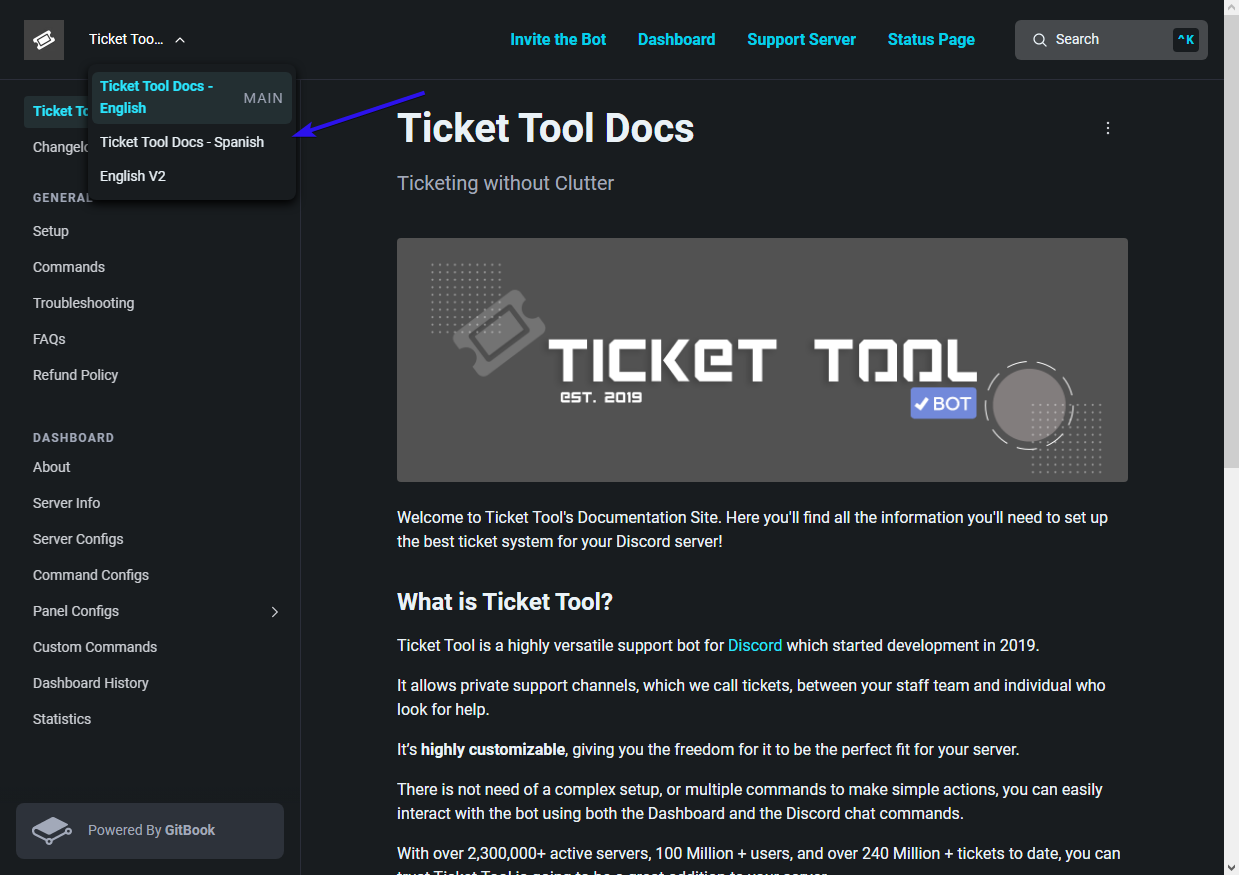
There is no automatic translation for the dashboard itself, though you can translate the docs page from Spanish which I know is relative to your language. (Though be warned this is probably outdated and likely easier to just translate the English page)
 pseudo ravine
kenzy saves the day 
scenic plinth
I realized I made the arrow a difficult color, that's my apologies for only now realizing.
 random plaza
Hello, I need help with the page, when I press the word manager does not enter the configuration and leaves me where same, what do I do?
 pseudo ravine
Hey there. Are you an owner or an admin of the server?
random plaza
i am admin
pseudo ravine
Could you please run the /permissionlevel command and send a screenshot of the response?
random plaza
Sure, wait a moment
pseudo ravine
No worries
random plaza
 humble sequoiaBOT
Don't see your server in the dashboard?
Try using the Sync Servers button on your top left corner on the Dashboard page
You will possibly need to relog. Look below to see the steps on how to relog.
If this doesn't work
You should relog from the dashboard, you can do this by clicking here to log out immediately, and then log back in
Note:
You need one of these 3 things to access the dashboard.
1. Server Owner (Level: 6)
2. Server Administrator (Level: 4)
3. Dashboard Role (Level: 2)
:warning: You can check your level using the </permissionlevel:1029797400174399542> command on your Discord Server
If the bot's response is:
- @User is permission level: 0 (User)
You don't have any of the 3 levels required to access the server's dashboard
pseudo ravine
You need one of the permissions listed above ^
random plaza
pseudo ravine
You need one of the permissions listed above ^
Thanks ^^
iron nightBOT
Gave +1 Rep to @pseudo ravine
pseudo ravine
You're welcome, glad I could help. If you have any other questions/issues, don't hesitate to reach out again 
 viscid prawn
One message removed from a suspended account.
One message removed from a suspended account.
shut bolt
viscid prawn
One message removed from a suspended account.
Use Ctrl + Shitf + R to hard refresh, that fixes it
viscid prawn
shut bolt
Use Ctrl + Shitf + R to hard refresh, that fixes it
One message removed from a suspended account.
One message removed from a suspended account.
shut bolt
viscid prawn
One message removed from a suspended account.
Feel free to #🎫│make-a-ticket and one of our support members will help you
humble sequoiaBOT
Within all the messages the bot sends (both embeds and text) you can mention either channels, roles, or even users, these mentions will only send a notification to the user if they are used within a text field, e.g: a role mentioned in an embed won't ping at all the users who have that role.
For mentioning a role you can use one out of three options:
{@Role Name} ➞ Which is Case Sensitive.
{RoleID} ➞ Replace RoleId with the Id of the role you are trying to ping.
<@&RoleID> ➞ Discord's native syntax to ping roles.
<#ChannelID> ➞ Mention a channel by its ID.
<@UserID> ➞ Mention a user by its ID.
lunar solar
See above @jade topaz ^
jade topaz
thank u
viscid prawn
One message removed from a suspended account.
humble sequoiaBOT
Any role you put there will have full access to the ticket tool dashboard. The server owner and users with admin permissions already have access to the dashboard.
Be careful of which roles to put here
 olive wren
I completely the yesterday's daily tasks and claimed the rewards but taskbar is not showing filled. What i have to do now
 humble sequoiaBOT
⚠️ You're in the wrong place
We provide support for Ticket Tool Discord bot and cannot help you with whatever issue you have.
- We don't know which Support Team you should contact to get this issue resolved, and unfortunately we won't be able to accurately tell you.
If you don't have any further questions regarding our bot Ticket Tool, please close this ticket
 cloud ferry
it syas tiket tool is down?
lunar solar
Error message?
cloud ferry
like even when i try to do verification uit says try again
lunar solar
Yes can you show me the error message please
cloud ferry
 lunar solar
Tried doing verification in a different browser?
 cinder spade
has anyone added this to their ticket transcript??? im looking in the docs but cant find it...

just the actual time part
 gilded verge
cinder spade
has anyone added this to their ticket transcript??? im looking in the docs but c...
gilded verge
cinder spade
has anyone added this to their ticket transcript??? im looking in the docs but c...
this one can help you: #premium-support message
humble sequoiaBOT
Mr. Reed's issue has been solved in another channel.
 odd dove
_
_
https://discord.com/channels/509192800865353738/1124076908800397312
Sure woulda been nice if this was actually answered instead of the lazy response they got...
 rustic gale
odd dove
_
_
https://discord.com/channels/509192800865353738/1124076908800397312
Sure wo...
rustic gale
odd dove
_
_
https://discord.com/channels/509192800865353738/1124076908800397312
Sure wo...
It's a channel for reporting bugs
If you report something that's not a bug, you're going to get that response
odd dove
rustic gale
If you report something that's not a bug, you're going to get that response
so then close and delete the post. because it would be incredibly useful to use that as FAQs..but i forgot this is discord...........
rustic gale
I'm not sure i see the utility of using bug reports as FAQs
 uneven bear
Can I change the colour of that
 vague cosmos
Dashboard > panel config > buttons > create ticket > choose colour from the drop-down
iron nightBOT
Gave +1 Rep to @vague cosmos
vague cosmos
You’re welcome.
 spring forum
Ticket tool is not working @vague cosmos
vague cosmos
Are you getting any error?
 spring forum
vague cosmos
Try to resend the panel
spring forum
vague cosmos
Try to resend the panel
Your helper?
vague cosmos
Yes I help people, doesn’t mean you need to ping for support
vague cosmos
I told you to re-send the panel @spring forum.
spring forum
vague cosmos
I told you to re-send the panel <@1088446499588931704>.
How
 spring forum
Ho thx ❤️ @vague cosmos and why tou don't have support role
iron nightBOT
Gave +1 Rep to @vague cosmos
spring forum
iron night
Gave +1 Rep to **<@143705466734641152>**
🥲
vague cosmos
- Because there were no support team applications for the English team yet.
- I am trying to become a proficient. 🙂
- No problem, did you have any other questions?
spring forum
vague cosmos
1) Because there were no support team applications for the English team yet.
2) ...
No good day
I just see😂 and can you me reason
 vague cosmos
That is something we can't help with here, you'll need to contact support for that bot and request how you can avoid that, @spring forum.
 blazing siren
Hello. Is there any option to block some role from creating ticket or set only allowed role to create to specific panel (not globally)?
 broken hollow
blazing siren
Hello. Is there any option to block some role from creating ticket or set only a...
broken hollow
blazing siren
Hello. Is there any option to block some role from creating ticket or set only a...
Dashboard -> panel configs -> buttons -> create ticket button -> disabled roles
 blazing siren
thanks @broken hollow
iron nightBOT
Gave +1 Rep to @broken hollow
broken hollow
blazing siren
thanks <@873937794479845386>
You're welcome.
rustic gale
blazing siren
Hello. Is there any option to block some role from creating ticket or set only a...
If you want only allowed roles to create tickets, you need to add everyone to the disabled roles.
 kindred timber
How can i make that Someone can create a Ticket
 stark runeBOT
1. Invite Ticket Tool to your server
First you will want to invite the bot to your server. Once the bot is in your server, you can manage your server in the dashboard.
2. Create a Panel
To create a panel we are going to need to head over to the panel configs on the dashboard.
Once at the dashboard we will need to click Create Panel.
Enter a panel name (Fill in any optional settings you want).
Click Create Panel and your ready to get started with configuring your panel.
An example of a creating a panel is shown below.
3. Send the Panel to a Channel
Once you've created a panel on the dashboard you will need to send it to a channel using send on the dashboard.
Select the channel you want your panel to be created in and click send.
For other questions checkout $help faq.
An example of a sending a panel is shown below.
Having a Problem Sending the Panel?
Do $debug in a channel with Ticket Tool and make sure it has all the necessary Discord permissions.
vague cosmos
@kindred timber see here, that is how you setup the bot.
Let me know if you need any specfic help.
 willow vapor
quick question, is there a way to automatically close\delete a ticket after a set time has passed ?
vague cosmos
You can with automations.
vague cosmos
The following will check for messages in a ticket by anyone and if there is none it closes after 6 hours. If a message is sent, the timer resets.
 willow vapor
damn, you are awesome bro .. thanks a lot 🌹
 opal canopy
Can someone help me? I'm adding the ticket bot, and it's all configured on my server, the only problem is that when someone opens a ticket, everyone can see it, it's not "private" the same way I've seen it on other servers...
there's one more thing, when I don't put all the server positions as "support team" they can't open a ticket, because it appears without permission.
humble sequoiaBOT
How to edit `@everyone`'s permissions
Head over to your Dashboard ➞ Panel Configs ➞ Permission Options ➞ Everyone Role Opened/Closed and customize the base permissions for everyone in your tickets.
Note: This set of permissions may be affected by the overrides of Support Team, Additional Roles, and User permissions.
 pseudo ravine
opal canopy
Can someone help me? I'm adding the ticket bot, and it's all configured on my se...
pseudo ravine
opal canopy
Can someone help me? I'm adding the ticket bot, and it's all configured on my se...
Hey there. You can add your Support Team role as an Allowed Role if you don't want to add them as a Support Team Role
opal canopy
I added with Allowed Role, but they have no permission yet
opal canopy
No
pseudo ravine
Do you have multiple panels?


 pseudo ravine
Could you please go to the Buttons and then go to Create Ticket and send a screenshot?
opal canopy

I'm brazzillian, donos = Owners, ADM = Admins, Moderador = Moderator
Sobreviventes = Survivors
pseudo ravine
Which role is your Support Team?
opal canopy
opal canopy
I'm brazzillian, donos = Owners, ADM = Admins, Moderador = Moderator
That 3 roles, survivor its the only that is the non cargo, just to open the tickets
pseudo ravine
And anyone of them can't open a ticket?
opal canopy
No, just the support team can
pseudo ravine
So which role can't? Just to clarify
opal canopy
Survivor
pseudo ravine
Add the Survivor role to Allowed Roles
But can I ask this question, is that your member role?
opal canopy
That is the allowed Roles?
 pseudo ravine
This one
 opal canopy
pseudo ravine
But can I ask this question, is that your member role?
opal canopy
pseudo ravine
But can I ask this question, is that your member role?
No, im Admin, but im with a friend that cannot creat
opal canopy
pseudo ravine
This one
Yes, but if put them on there, they going to look to all of the tickets
pseudo ravine
I'm asking if the Survivor role is your member role. If it is, you don't need to add any Allowed Roles and don't need to have Support Team Only enabled
opal canopy
pseudo ravine
I'm asking if the Survivor role is your member role. If it is, you don't need to...
Yeah, survivor its the member role
pseudo ravine
opal canopy
Yes, but if put them on there, they going to look to all of the tickets
That's not how it works. Allowed Roles in this scenario, only allow the member to create a ticket
opal canopy
I dont find Allowed Roles, where is?
vague cosmos
opal canopy
I dont find Allowed Roles, where is?
Hey - You want everyone to open a ticket right?
Not only the owners, admins and mods?
@opal canopy if that is what you want, you can also make sure not everyone sees the ticket too.
 tranquil palm
hey this randmoly stopped working i've changed nothing and for some reason the cashapp logo appears as this
 vague cosmos
@tranquil palm see below.
humble sequoiaBOT
⚠️ You're in the wrong place
We provide support for Ticket Tool Discord bot and cannot help you with whatever issue you have.
- We don't know which Support Team you should contact to get this issue resolved, and unfortunately we won't be able to accurately tell you.
If you don't have any further questions regarding our bot Ticket Tool, please close this ticket
iron nightBOT
Gave +1 Rep to @vague cosmos
opal canopy
vague cosmos
<@365968490990927872> if that is what you want, you can also make sure not every...
yeah thats what i want
vague cosmos
opal canopy
yeah thats what i want
Okay.
First: Dashboard > Panel Config > Buttons > Edit the create ticket one and make sure it looks like the first screenshot. Save the changes.
Secondly: Dashboard > Panel Config > Permissions > Everyone Role Permissions > Edit the Opened and Closed permission and make sure view channel is on ❌.
Checked earlier screens and you didn't.

 lucid fractal
I have a question about how many different types of panels are we allowed in the free version of the bot?
vague cosmos
There isn't a limit as far I know.
Your only limit is the characters for the messages you create.
lucid fractal
My discord is going under a little overhaul and it is a discord for support for multiple games so I will need a bot that can keep tickets separate for different parts of the discord. Is this bot, if setup properly, something that it can do?
vague cosmos
Yea, you can set different tickets in different categories.
humble sequoiaBOT
1. Go into your Dashboard
2. Open your Panel Configs tab
3. Select the panel you want to grant access to
4. Open the Category options menu
5. Select the categories of your preference
6. Save changes
 lucid fractal
Ok perfect. Thank you. I will be adding it to my discord soon.
vague cosmos
Awesome! Do you need an setup guide?
lucid fractal
I will come back if I'm in need of that. I have worked with the bot once in a different discord but I've been using another bot currently in my discord. But like I said changes are happening so I need to adapt with said changes
vague cosmos
Alright; if you want to get the best out of the bot premium offers you some nice extras.
lucid fractal
Cost is a factor right now
vague cosmos
If you run $vote in #🤖│bot-spam you can get it for free. 😉
lucid fractal
What options are available for premium only and how long do they last with each vote?
vague cosmos
Not sure about the exact time for voting, but the command explains that.
humble sequoiaBOT
 Faster Premium Bot
Automatic Transcripts
Full Customization
Direct Messages
Ticket Automation
Thread Style Ticketing
Premium Support
Scheduled Panel Availability
Integrations
You can purchase premium here:
Price
$6 - Monthly
$66 - Yearly
 Premium
vague cosmos
Premium
vague cosmos
This are the premium perks.
lucid fractal
The automatic transcripts was probably the reason I went to the current bot for handling tickets but it only allows 3 panels.
vague cosmos
You can always save the transcript by hand.
@opal canopy just a check, how is it going?
 terse vale
I need help
humble sequoiaBOT
Hello, we would love to help you, but if you don't tell us what you need help with we can't help you :(
@terse vale, we would love to help you, but if you don't tell us what you need help with we can't help you :(
terse vale
If someone makes a ticket, the person with the rank of assistant cannot enter the ticket to answer the person
pseudo ravine
Hey there. Did you add the assistant role as a Support Team Role?
terse vale
تقريبا
pseudo ravine
ماذا تقصد ب "تقريبا"؟
terse vale
pseudo ravine
ماذا تقصد ب "تقريبا"؟
mostly
pseudo ravine
Did you add the role or not? If you didn't, that's no worries
terse vale
pseudo ravine
Did you add the role or not? If you didn't, that's no worries
Yes, I did not add it
pseudo ravine
Then you can go to the Dashboard > Panel Configs > General > Support Team Roles > Add the assistant role
pseudo ravine
You're welcome, glad I could help. If you have any other questions/issues, don't hesitate to reach out again
 fringe abyss
how do I open tickets in other servers
 thick karma
Hi, how can I make buttons without panels like in this server?

 tender totem
how do i set up claim ticket
pseudo ravine
fringe abyss
how do I open tickets in other servers
Hey there. You just need to click on the “Create ticket” button
pseudo ravine
thick karma
Hi, how can I make buttons without panels like in this server?
Hey there. I believe they just removed the embed after sending the panel. If you’re on PC you can hover your cursor on the message and an X next the embed should pop up, click that and you can remove the embed
humble sequoiaBOT
Claiming allows you to change the ticket name, category and permissions. To use it you have to enable it first on your Dashboard > Panel Configs > Claiming

 Note: This is a premium feature
pseudo ravine
Note: This is a premium feature
pseudo ravine
@tender totem Read this ^
thick karma
thank you very much!"
pseudo ravine
You’re welcome, glad I could help. If you have any other questions/issues, don’t hesitate to reach out again
tender totem
so my ticket msgs have {@STAFF} but only one of the panels ping staff in the opened ticket how do I fix that?
pseudo ravine
You’ll just need to edit the Message Content on all the panels
Dashboard > Panel Configs > Messages > Edit Ticket Message
tender totem
I did they all have the same {@STAFF} in them but only one ticket type pings
pseudo ravine
Could you send a screenshot please?
tender totem
this would ping my staff role right?
 pseudo ravine
Yes, but could you send a screenshot of the ticket message when it doesn’t ping?

 pseudo ravine
Oh, I see. It doesn’t ping when the mention is inside the embed
tender totem
ohh ok so put it in the welcome part?
pseudo ravine
Yes
iron nightBOT
Gave +1 Rep to @pseudo ravine
pseudo ravine
You’re welcome, glad I could help. If you have any other questions/issues, don’t hesitate to reach out again
 subtle zephyr
is there a way to change tickets to @user name rather than number.
 delicate magnet
Hello I have a question I was on the ticket tool page and have pressed something and now I have something activated for 7 days and I wanted to ask if this is free and after 7 days just goes away or if this costs money after the 7 days

and wanted to ask how I can end this
pseudo ravine
subtle zephyr
is there a way to change tickets to @user name rather than number.
Hey there. You can change the ticket name when opened/created if you have Premium
pseudo ravine
delicate magnet
Hello I have a question I was on the ticket tool page and have pressed something...
Hey there. It seems like you pressed the “7 day free trial” button. You will not be charged after the 7 days. You’ll have to wait out the 7 days
delicate magnet
pseudo ravine
Hey there. It seems like you pressed the “7 day free trial” button. You will not...
Okay can I use this now without what happens?
pseudo ravine
You can use the premium features until the trial runs out
delicate magnet
pseudo ravine
You can use the premium features until the trial runs out
ookay if I now make a ticket system which runs with premium it will continue afterwards or will it be reset so that the premium things are not ther
pseudo ravine
It will be reset, so anything that was premium will either not work, or go back to how it was before premium
jade topaz
hello, i'm trying to get tickettool to ping my staff role when a ticket is opened. when someone opens a ticket however, it doesn't actually ping the role. any tips?
pseudo ravine
Hey there. Could you send a screenshot of the ticket when it's opened?
jade topaz

it's the same when it's just the normal ticket for members too it just doesn't ping the role
i've tried putting it outside the embed and both ways it just doesn't ping
pseudo ravine
Well, mentions don't work inside embeds, they must be outside
Are you sure Ticket Tool has the correct permission?
pseudo ravine
Could you please run the /debug command and send the link?
 ancient spindle
My ticketbot will not respond, any tips?
jade topaz
pseudo ravine
Could you please run the `/debug` command and send the link?
i think i just fixed it! thank you so much tho
iron nightBOT
Gave +1 Rep to @pseudo ravine
pseudo ravine
ancient spindle
My ticketbot will not respond, any tips?
Hey there. What did you do when Ticket Tool didn't respond?
pseudo ravine
jade topaz
i think i just fixed it! thank you so much tho
You're welcome, glad I could help. If you have any other questions/issues, don't hesitate to reach out again
ancient spindle
I made a bug report.
pseudo ravine
That isn't a bug, could you please say what you did when Ticket Tool didn't respond?
ancient spindle
Added ticket tool support to my server and neither did they respond.
pseudo ravine
Did you run a command? Did you click a button? What did you exactly do? It'll help me figure out the issue
ancient spindle
I didn't really do much but keep texting.
pseudo ravine
Do you need to setup Ticket Tool?
ancient spindle
Maybe.
humble sequoiaBOT
First you will want to invite the bot to your server. Once the bot is in your server, you can manage your server in the dashboard.
To create a panel we are going to need to head over to the Panel Configs Tab on the Dashboard.
Once at the dashboard we will need to click Create Panel.
Enter a panel name (Fill in any optional settings you want).
Click Create Panel and you are ready to get started with configuring your panel.
An example of a creating a panel is shown below.
Once the panel has been created, use the blue Send button and select the channel you want the panel to be sent to.
The Panel wasn't send
Use the </debug:ID> command to diagnose possible permission issues with the bot.
pseudo ravine
Hey there. What did you do when you received the error?
 shut glacier
I joined this
pseudo ravine
You joined this server?
shut glacier
yes
pseudo ravine
What did you do then?
shut glacier
i did /setup and it said the applacation did not respond
pseudo ravine
You used the command in this server?
shut glacier
no in my server
pseudo ravine
Could you please run the /debug command and send the link if you receive one?
 pseudo ravine
No worries, I saw the link. It looks like Ticket Tool does not have the permission to send messages in that channel. That’s why the application did not respond
shut glacier
Omg thank you so much
pseudo ravine
You’re welcome, glad I could help. If you have any other questions/issues, don’t hesitate to reach out again
jade topaz
Is it possible to have a custom made ticket tool?
is this something that you guys do?
wild spire
jade topaz
Is it possible to have a custom made ticket tool?
If you mean a custom bot/whitelabel.
Not yet, it’s a work in progress at the moment.
jade topaz
wild spire
If you mean a custom bot/whitelabel.
Not yet, it’s a work in progress at the mom...
Yeah a custom bot, for ticketing though.
wild spire
jade topaz
Yeah a custom bot, for ticketing though.
yh then my second sentence applies. Our dev is working on it.
 unkempt stump
A quick question, if I may: What permissions must someone have to manage the Ticket Tool on our server? 🤔
vague cosmos
To manage the bot you need to have administrator permission in Discord, dashboard access or be the server owner.
humble sequoiaBOT
Any role you put there will have full access to the ticket tool dashboard. The server owner and users with admin permissions already have access to the dashboard.
Be careful of which roles to put here
unkempt stump
vague cosmos
To manage the bot you need to have **administrator** permission in Discord, dash...
Dang.. I can't delegate access to someone who is not the admin? 😅
Ah! I can?
vague cosmos
You can, using dashboard roles (see above).
unkempt stump
Cool, thanks!
vague cosmos
No problem, did you have any other questions?
unkempt stump
vague cosmos
No problem, did you have any other questions?
Nope, I think that is it so far 🙂 Thanks a bunch!
iron nightBOT
Gave +1 Rep to @vague cosmos
vague cosmos
No worries and if you've any other questions in the future feel free to reach out.
 hard briar
How do I fix this? Members cannot create tickets when clicking the button.
 lunar solar
hard briar
How do I fix this? Members cannot create tickets when clicking the button.
lunar solar
hard briar
How do I fix this? Members cannot create tickets when clicking the button.
Have you blacklisted a role in your Discord?
Server Configs --> Blacklist Roles
hard briar
lunar solar
Have you blacklisted a role in your Discord?
Just figured it out, I think I accidentally enabled the "Support Team Only" option, just turned it off though.
 dusty crypt
I have an issue with members abusing tickets by opening and closing them, since its closed they are able to open another of the same kind. Is there a way i can have a cooldown for this?
lunar solar
dusty crypt
I have an issue with members abusing tickets by opening and closing them, since ...
If its just the same abusers you could setup a blacklist role and give it to them, would stop them from opening tickets at all.
humble sequoiaBOT
Any role you assign as a blacklisted role won't be able to use commands or reactions.
Selecting a blacklisted role
Go to your Dashboard ➞ Server Configs. There you will find the option to select blacklisted roles.
Note: Don't forget to save.
 dusty crypt
They happen to be multiple different people, looking more for prevention than punishment rn
lunar solar
There is no cooldown feature unfortunetly, the only cooldown is rate limiting on the free version with people opening tickets to quickly.
pseudo ravine
Hola. ¿Se refiere a crear un panel para que los miembros puedan crear tickets?
humble sequoiaBOT
First you will want to invite the bot to your server. Once the bot is in your server, you can manage your server in the dashboard.
To create a panel we are going to need to head over to the Panel Configs Tab on the Dashboard.
Once at the dashboard we will need to click Create Panel.
Enter a panel name (Fill in any optional settings you want).
Click Create Panel and you are ready to get started with configuring your panel.
An example of a creating a panel is shown below.
Once the panel has been created, use the blue Send button and select the channel you want the panel to be sent to.
The Panel wasn't send
Use the </debug:ID> command to diagnose possible permission issues with the bot.
pseudo ravine
De nada, me alegro de haber podido ayudar. Si tiene otras preguntas/problemas, no dude en comunicarse nuevamente
humble sequoiaBOT
Invitando a Ticket Tool
Lo primero que debe hacer es invitar al bot, dando click aquí.
Una vez haya invitado al bot, diríjase al panel de control y cree un panel.
Un panel es usado para definir las configuraciones de un ticket (los usuarios que pueden ver el ticket, los permisos, los nombres, entre otros).
Creando un Panel
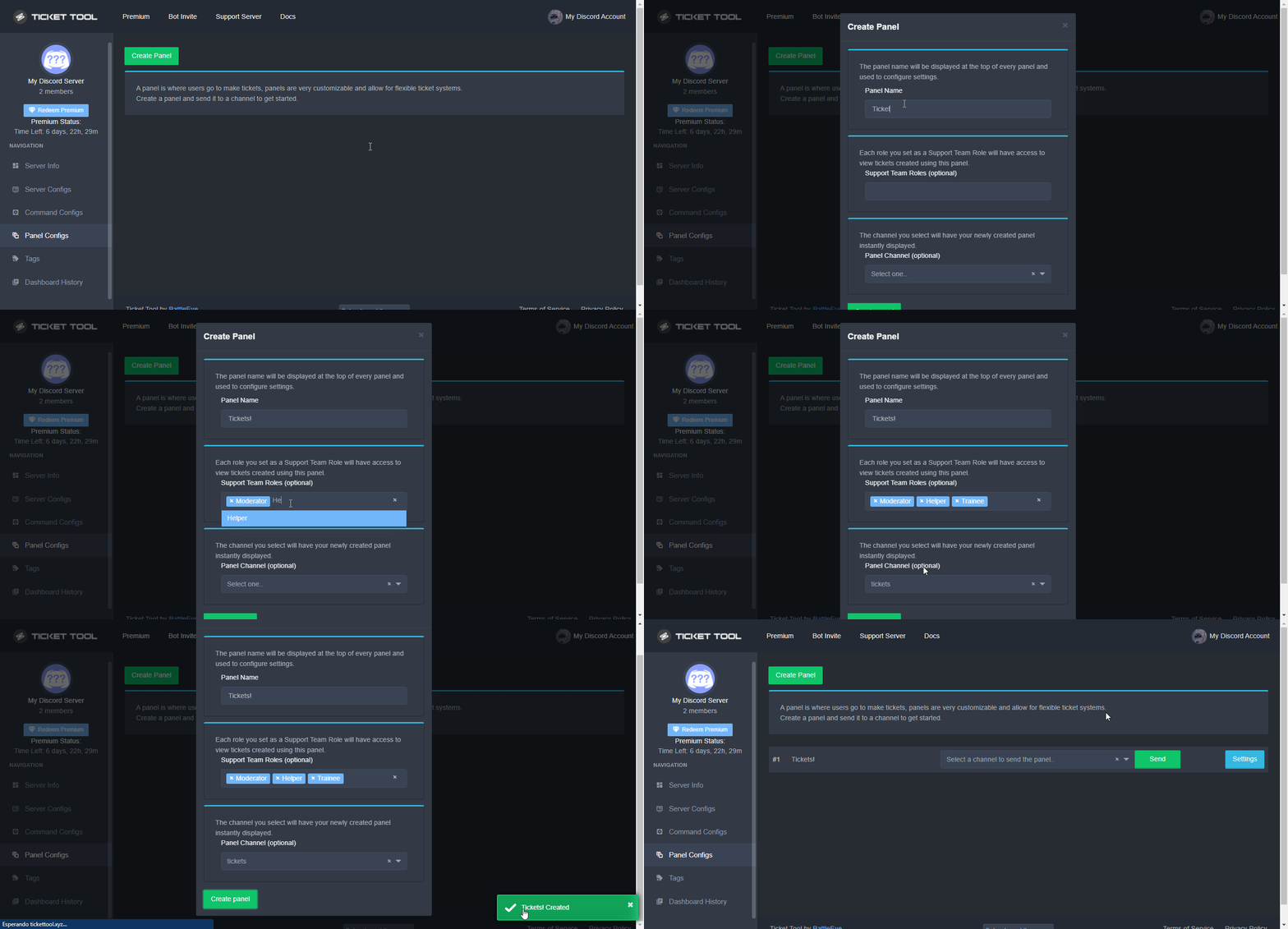
Para crear un panel, diríjase a la pestaña de Panel Configs o Configuraciones del Panel en el panel de control de su servidor.
Una vez esté allí, de click en Create Panel / Crear Panel.
Panel Name → Es el nombre que desea que tenga el panel, puede asignar el nombre de su preferencia.
Support Team Roles → Seleccione los roles que deseen que puedan ver los tickets que se creen desde este panel.
Panel Channel → Elija el canal al que quiera que el panel sea enviado al ser creado. (Este campo es opcional, puede reenviar el panel posteriormente si es necesario)
Finalmente de nuevamente click en Create Panel como ilustra el siguiente GIF:
 vague cosmos
Creo que es más fácil de entender para ti.
 fading karma
Hi, when opening a ticket, the ticket opens at the top, I want the ticket to be opened under the channel, how can I do it?
vague cosmos
del bot? Haga clic con el botón derecho > Cambiar nombre.
humble sequoiaBOT
1. Go into your Dashboard
2. Open your Panel Configs tab
3. Select the panel you want to grant access to
4. Open the Category options menu
5. Select the categories of your preference
6. Save changes
vague cosmos
@fading karma see above. ^
fading karma
vague cosmos
<@585936217351127109> see above. ^
I don't understand
vague cosmos
What don't you understand exactly from the embed?
fading karma
vague cosmos
What don't you understand exactly from the embed?
move the channel to the top when someone generates demand
I want it to open under the demand channel
vague cosmos
No te preocupes, feliz de ayudar!
vague cosmos
fading karma
move the channel to the top when someone generates demand
I want it to open unde...
So you want the channels direct under the channel where the ticket channel is? Then you need to set the category and make sure both are in the same category.
fading karma
vague cosmos
So you want the channels direct under the channel where the ticket channel is? T...
So you want the channels to be directly under the ticket channel? Yes, how do I do that?
vague cosmos
humble sequoia
If both channels are in the same category follow this.
Using threads is also a option, but it requires premium.
 compact escarp
Hi there :) Is there a way to change the green colour when you send a panel config?
vague cosmos
You can change the colour of the embed with premium.
compact escarp
Ah, okay thankyou <3 appreciate the speedy reply
vague cosmos
No worries, do you have any other questions?
compact escarp
vague cosmos
No worries, do you have any other questions?
Nope that is all!
vague cosmos
Alright, if you've any other questions in the future feel free to ask them.
@old pilot see below:
stark runeBOT
1. Invite Ticket Tool to your server
First you will want to invite the bot to your server. Once the bot is in your server, you can manage your server in the dashboard.
2. Create a Panel
To create a panel we are going to need to head over to the panel configs on the dashboard.
Once at the dashboard we will need to click Create Panel.
Enter a panel name (Fill in any optional settings you want).
Click Create Panel and your ready to get started with configuring your panel.
An example of a creating a panel is shown below.
3. Send the Panel to a Channel
Once you've created a panel on the dashboard you will need to send it to a channel using send on the dashboard.
Select the channel you want your panel to be created in and click send.
For other questions checkout $help faq.
An example of a sending a panel is shown below.
Having a Problem Sending the Panel?
Do $debug in a channel with Ticket Tool and make sure it has all the necessary Discord permissions.
 safe stratus
Hi, Is there a way for when someone opens a ticket my mods can see it?
humble sequoiaBOT
1. Go into your Dashboard
2. Open your Panel Configs tab
3. Select the panel you want to grant access to
4. Open the General options menu
5. Select your Support Team Roles
6. Save changes
 safe stratus
TY!!
 livid nova
Hello. For some reason, the votes on BotsForDiscord.com doesn't count if you vote after logging in, it's the second time that I got this scenario where I get disconnected from the website, log back in and don't get my vote registered.
rustic gale
I would recommend contacting them about it
 thin mason
guys how to change the color of this
 thin mason
rustic gale
I would recommend contacting them about it
thin mason
rustic gale
I would recommend contacting them about it
.
jade topaz
thin mason
guys how to change the color of this
Need premium sir
jade topaz
❤️
 humble sequoiaBOT
The Drop-down menu or Select Menu replaces the buttons on your panel message and uses a drop-down menu with all of your panels. To set this up, go to your Panel Configs and select your main Panel.
<:Numbericons1:1018864164032225340> Enable Select Style
First you enable Select Style. Then you add an item in the Dropdown Editor. Now you can start editing your dropdown!
<:Numbericons2:1018864168041971712> Dropdown Editor
Each line in the dropdown editor represents a line in the drop down menu on discord. You can add more "Items", by clicking on 

First you select a panel. That's the panel this option will open a ticket for.  DONT select the same panel twice. Each option should have a different Panel
After that, you can put a Display. This is the title of this option and will appear in the drop down menu. The *Description can be set right after that, which will be below the title in grey.
Additionally you can select an emoji, that will be shown in front of each option. You can either manually input the ID of an emoji or select it in the selector.
Common Issues ⚠️
- Panel doesn't send? Make sure you have a valid emoji selected
- Option doesn't show up? Check if two options have the same panel in the DropDown Editor

$dropdown
pseudo ravine
@delicate magnet Read this ^
 steep bobcat

I'm wondering how to change that
I have a file with a custom image on it and idk how to put the url for it in there
cuz it keeps saying its from my folder and won't load the image
pseudo ravine
Hey there. You can go to the Dashboard > Panel Configs > Ticket > Edit Ticket Message > Embed Editor > Field Editor > Bottom Left is the Footer URL which is what you're looking for
steep bobcat
pseudo ravine
Hey there. You can go to the Dashboard > Panel Configs > Ticket > Edit Ticket Me...
can u check dms
pseudo ravine
I don't do DM Support
 pseudo ravine
Is that what shows when someone creates a ticket? Or is that in the Message Preview?
 pseudo ravine
Try creating a ticket
iron nightBOT
Gave +1 Rep to @pseudo ravine
pseudo ravine
In case you thought I meant create a ticket here, I meant create a ticket in your server to see if it works
steep bobcat
https://i.imgur.com/ThjI4Qo.png how do i make it so all those go in my transcript logs channel?

@pseudo ravine
pseudo ravine
Please don't ping for support. You can go to the Dashboard > Panel Configs > Transcript > Transcript Channel

 sacred leaf
Hello
Im trying to add a role to ticket tool so they can deal with tickets but the only way the role has been able to so far is with Admin perms is there any way to Have the role not have Admin perms but them be able to type and deal with tickets?
pseudo ravine
steep bobcat
is there a way i can make it so there isn't a cool down or its way less?
Unfortunately you cannot, that's due to Discord Ratelimits
jade topaz
humble sequoia
@sacred leaf refer to this guide 🙂
pseudo ravine
sacred leaf
Im trying to add a role to ticket tool so they can deal with tickets but the onl...
Hey there. You can add that role as a Support Team Role
Dashboard > Panel Configs > General > Support Team Role
pseudo ravine
It'll give them access to newly created tickets, it can't give access to previously created tickets
steep bobcat
for some other discords its only 1 second like this https://i.imgur.com/s834hbd.png
 sacred leaf
pseudo ravine
It'll give them access to newly created tickets, it can't give access to previou...
sacred leaf
pseudo ravine
It'll give them access to newly created tickets, it can't give access to previou...
i just made a new ticket and asked the role if they could see and they cant
it says all the other roles up top when i click into the ticket but dosent have the New role im trying to add
pseudo ravine
steep bobcat
for some other discords its only 1 second like this https://i.imgur.com/s834hbd....
It depends on what happens
pseudo ravine
sacred leaf
i just made a new ticket and asked the role if they could see and they cant
Do you have multiple panels?
sacred leaf
pseudo ravine
Do you have multiple panels?
Just 1
pseudo ravine
steep bobcat
renaming on my discord its 10minutes but others its 1 second
Is your server premium or free?
steep bobcat
i fixed it nevermind thank you!
pseudo ravine
sacred leaf
Just 1
Go back to the Dashboard > Panel Configs > Permissions > Support Team Permissions > Send a screenshot please
sacred leaf
pseudo ravine
Go back to the Dashboard > Panel Configs > Permissions > Support Team Permission...
nvm i did have more than 1 panel thank you
iron nightBOT
Gave +1 Rep to @pseudo ravine
pseudo ravine
steep bobcat
i fixed it nevermind thank you!
You're welcome, glad I could help. If you have any other questions/issues, don't hesitate to reach out again 
pseudo ravine
sacred leaf
nvm i did have more than 1 panel thank you
Was that the issue?
sacred leaf
pseudo ravine
Was that the issue?
Diffrent Panel
Ig someone else made a new panel and ive been editing that one
pseudo ravine
No worries
sacred leaf
and they didnt let me know that they made a new one
pseudo ravine
If you have any other questions/issues, don't hesitate to reach out again
sacred leaf
Thank you and i will
pseudo ravine
You're welcome
steep bobcat
how do i add certain roles to my multipanel?
so they can see and type in the ticket
jade topaz
delicate magnet
lol i just did that it took like an houre
how do i add auto transcript
so every ticket transcripts
gilded verge
steep bobcat
how do i add certain roles to my multipanel?
but you mean your moderators?
gilded verge
jade topaz
how do i add auto transcript
panel configs->transcript->enable auto save
steep bobcat
gilded verge
but you mean your moderators?
yes
humble sequoiaBOT
1. Go into your Dashboard
2. Open your Panel Configs tab
3. Select the panel you want to grant access to
4. Open the General options menu
5. Select your Support Team Roles
6. Save changes
jade topaz
gilded verge
panel configs->transcript->enable auto save
thx
iron nightBOT
Gave +1 Rep to @gilded verge
jade topaz
How to add down style
rustic gale
down style?
 waxen talon
heyy how to create ticket
rustic gale
Check out the Setup Guide in #📂│information
 silk crown
so we have the right roles, and perms

but this keep showing up, but they have permission in the channel it is sent to
jade topaz
 scenic plinth
Here are some things to try
If you have security extensions such as Malwarebytes, please temporarily disable the extension first and try the action you are attempting again. In such cases, you may need to refresh or exit the tab to reload the page correctly.
- Check your internet connection (Sometimes you may experience partial loading)
- Refresh your page.
- Mobile (Chrome): Drag down on the site / Open Google Settings and click the spinning arrow icon.
- Disable any extensions that may block JavaScript. Ensure "allow JavaScript" is enabled on your devices browser.
- Mobile (Chrome): Google Settings -> Site Settings -> JavaScript -> Allow -> Save & Done
- Clear app cache and browser cache
- Mobile (Chrome): Google Settings Privacy & Security -> Clear Browsing Data -> Clear Cache
- Mobile (Android Settings): Settings -> Apps -> Google/Chrome -> Storage -> Clear Cache
- Ensure your browser is updated.
- Try incognito mode (varies depending on the browser you are using)
- Try another browser and/or device.
rustic gale
silk crown
so we have the right roles, and perms
«You don't have permissions to use this»
Are your members seeing this message when they try to create a ticket?You may have accidentally denied them permission to use the Create Ticket button.
Look in the following places in your server's dashboard:
👉 Server Configs -> Blacklist Roles
Any roles there will be unable to interact with the bot in any way, including creating tickets.👉 Panel Configs -> Buttons -> Create Ticket -> Support team only
If this is enabled, only your staff will be able to use the button.
👉 Panel Configs -> Buttons -> Create Ticket -> Disabled Roles
Any roles there will be unable to use the button.
 celest tangle
Hi, two days ago I paced an order for AP Fujin helicopter on the market, and I don't know what happened but the artcoins where deducted but the helicopter was not delivered, I have reported it but I hope they solve my problem
Current request status: 1832854
humble sequoiaBOT
⚠️ You're in the wrong place
We provide support for Ticket Tool Discord bot and cannot help you with whatever issue you have.
- We don't know which Support Team you should contact to get this issue resolved, and unfortunately we won't be able to accurately tell you.
If you don't have any further questions regarding our bot Ticket Tool, please close this ticket
jade topaz
i unable to add dropdown style please help
humble sequoiaBOT
The Drop-down menu or Select Menu replaces the buttons on your panel message and uses a drop-down menu with all of your panels. To set this up, go to your Panel Configs and select your main Panel.
<:Numbericons1:1018864164032225340> Enable Select Style
First you enable Select Style. Then you add an item in the Dropdown Editor. Now you can start editing your dropdown!
<:Numbericons2:1018864168041971712> Dropdown Editor
Each line in the dropdown editor represents a line in the drop down menu on discord. You can add more "Items", by clicking on
First you select a panel. That's the panel this option will open a ticket for. DONT select the same panel twice. Each option should have a different Panel
After that, you can put a Display. This is the title of this option and will appear in the drop down menu. The *Description can be set right after that, which will be below the title in grey.
Additionally you can select an emoji, that will be shown in front of each option. You can either manually input the ID of an emoji or select it in the selector.
Common Issues ⚠️
- Panel doesn't send? Make sure you have a valid emoji selected
- Option doesn't show up? Check if two options have the same panel in the DropDown Editor
$dropdown
vague cosmos
@jade topaz see above. I’m going to work again.
vague cosmos
jade topaz
vague cosmos
<#571706435449257997>
worked thanks
iron nightBOT
Gave +1 Rep to @vague cosmos
jade topaz
how can i add catogores to each panel ticket
 vapid slate
Do we know if this is available with ticket tool? Where when making a ticket the user gets sort of a Form they have to fill out before the ticket is created.
 humble sequoiaBOT
A Discord Form lets the user answer individual questions in a pop-up Form, which then displays the answers in the ticket message. This can save time if you already know what you want to ask the user.
Setup Forms
Forms can be enabled under Panel Settings > Form Options > Edit Forms Options. In the new pop-up window, you can now enable and edit your own Form.
Form Options
You can add up to 5 questions in the Discord form. This is a Discord limitation. Each question can have a placeholder in the input field, a minimum and maximum input, multi-line, and also the option to have the answer required.
Options
Question Title ➞ Your Question goes here
Question Placeholder ➞ The placeholder text in the input field
Required ➞ If enabled, the user has to answer this question, to submit the form
Multi-Line Input ➞Allows the user to input multiple lines
Minimum and Maximum Input ➞ Set a minimum and maximum input value for the user
Displaying the Answer
To display the answers from the user, you need to enable Auto display form results on the ticket message as an additional embed
In case you don't want a second embed, go into your Panel Configs > Ticket Options > Edit Ticket Message. In there you use the variable {create.form.x} and just replace x with the number of your question. For example, the response to Question 1 can be displayed with {create.form.1}. If you don't use this variable, the response from the user is lost.
 civic wagon
@vapid slate refer to the embed above ^
vapid slate
Awesome thank you!
 hasty egret
is it possible to have a command that can archive ticket like /archive for example, typing that would move that ticket where its typed in to a specific category?
vague cosmos
hasty egret
is it possible to have a command that can archive ticket like `/archive` for exa...
You can set a closed category or save the transcripts.
hasty egret
ok, will check that out
humble sequoiaBOT
1. Go into your Dashboard
2. Open your Panel Configs tab
3. Select the panel you want to grant access to
4. Open the Category options menu
5. Select the categories of your preference
6. Save changes
vague cosmos
@hasty egret fyi
hasty egret
that one i know, but like manually moving it with a command? perhaps thats not possible
vague cosmos
I’m not sure about that.
 glossy crest
yo guys, can anybody help to set up ticket tool?
stark runeBOT
1. Invite Ticket Tool to your server
First you will want to invite the bot to your server. Once the bot is in your server, you can manage your server in the dashboard.
2. Create a Panel
To create a panel we are going to need to head over to the panel configs on the dashboard.
Once at the dashboard we will need to click Create Panel.
Enter a panel name (Fill in any optional settings you want).
Click Create Panel and your ready to get started with configuring your panel.
An example of a creating a panel is shown below.
3. Send the Panel to a Channel
Once you've created a panel on the dashboard you will need to send it to a channel using send on the dashboard.
Select the channel you want your panel to be created in and click send.
For other questions checkout $help faq.
An example of a sending a panel is shown below.
Having a Problem Sending the Panel?
Do $debug in a channel with Ticket Tool and make sure it has all the necessary Discord permissions.
vague cosmos
glossy crest
yo guys, can anybody help to set up ticket tool?
See above.
jade topaz
hey can i buy premium with crypt
humble sequoiaBOT
PayPal - paypal@tickettool.xyz
BitCoin - 3HhKKAdb9eEvCe2tvzB8bAa8nebHY6qcPA
LiteCoin - MEQX3knLAuotrKnvk3HDNBK5gdRn6PZhHy

Prepay/Direct Payment
To prepay send the payment using your desired method - Available options listed bellow.
⚠️ $18 per 3 months. ⚠️
$66 per year.
(If using the direct payment option, you need to be paying for at-least 3+ months.)
Regular Prices when paying within Discord:
$5.99/per month
Once your payment is sent let us know so we can confirm and get you your key.
- Purchases done with this method are non-refundable.
<:paypal:924596360840372234> Paypal ("Goods and Services" or "Family and Friends")
paypal@tickettool.xyz
<:bitcoin:924638849135689749> BTC - Bitcoin
3HhKKAdb9eEvCe2tvzB8bAa8nebHY6qcPA
<:Litecoin:972176945972383815> LTC - LiteCoin
MEQX3knLAuotrKnvk3HDNBK5gdRn6PZhHy
I sent the payment now what?
After you send the payment, please send a screenshot with proof of payment, our <@&615146349700186112> will verify your payment and will get you setup. For crypto payments, we are waiting for at least ONE verification.

All prices in USD - 3 months min for direct payment
pseudo ravine
@jade topaz Read this ^
jade topaz
pseudo ravine
<@456226577798135808> Read this ^
Bet ty also am I able to switch server if server gets termed?
iron nightBOT
Gave +1 Rep to @pseudo ravine
pseudo ravine
I would assume so, but I would ask the Billing Team just in case
pseudo ravine
You’re welcome, glad I could help. If you have any other questions/issues, don’t hesitate to reach out again 


 limber rampart
it's premium I think
jade topaz
yeah you will need premium 😦
 upper pilot
how do i do it
 pseudo ravine
Hey there. You can go to the Dashboard > Panel Configs > Buttons > Create ticket
fading karma
It doesn't say who opened the ticket, how do I fix it?
 jade topaz
fading karma
It doesn't say who opened the ticket, how do I fix it?
jade topaz
fading karma
It doesn't say who opened the ticket, how do I fix it?
Do you want it to ping the user in the message?
fading karma
jade topaz
Do you want it to ping the user in the message?
Yes
jade topaz
Dashboard > Panel Configs > Panel > Edit Panel Message
In the top box when you get to that page put ''{author}'' in the box, that will ping the person who created the ticket.
 fading karma
I'm typing the channel name.
 jade topaz
fading karma
I'm typing the channel name.
jade topaz
fading karma
I'm typing the channel name.
You want the ticket creators name in the channel?
fading karma
jade topaz
You want the ticket creators name in the channel?
When someone opens a ticket, he opens the channel at the top, I want it to open under the ticket opening channel
jade topaz
Dashboard > Panel Configs > Category, then click on the 'Category Created/Opened' option and select the category you want the ticket to open in.
Make sure to save your changes and open another ticket to check if it works 🙂
 plucky niche
How can I write a message inside the bot ..!
vague cosmos
What do you mean?
Where do you want to write a message exactly 'in the bot'?
@plucky niche ^
plucky niche
vague cosmos
<@781789260973998090> ^

This is a message inside the bot
@vague cosmos ..
vague cosmos
Dashboard > Panel Configs > Messages > Edit Panel Message
There is a limit of chars you can use inside a embed with the free version of the bot.
plucky niche
Send the link please
humble sequoiaBOT

Ticket Tool - Ticketing without clutter - The #1 discord Ticketing bot
plucky niche
Thanks
vague cosmos
No worries. Did you have any other questions?
plucky niche
No
vague cosmos
You speak Arabic right? See below if it's easier.
humble sequoiaBOT
رسالة لوحه التذكره هو المكان الذى يمكن للاشخاص منه عمل تذكره
لتعديلها وجعلها افضل اذهب الى
Dashboard --> Panel Configs -> Settings -> Panel Options -> Edit Panel Message
 plucky niche
@vague cosmos How to make a tiktok in rom..
 pseudo ravine
مرحبًا يا من هناك. من فضلك لا ping أي شخص للحصول على الدعم. ما الذي تحاول فعله بالضبط؟
plucky niche
@pseudo ravine احاول فعل رساله داخل التكت
pseudo ravine
من فضلك لا بينغ. هل تريد تحرير الرسالة داخل التضمين؟ أو الرسالة خارج التضمين؟
 rich sable
Cómo Multi Paneles
humble sequoiaBOT
For more convenient use of multipanels, you can now combine panels on the dashboard. This will allow you to directly send the multipanel from the dashboard or via the $panel ID command.
Where can I find this?
You can find this setting on the Dashboard -> Panel Configs -> Panel -> Attached Panels
Note: if you're attaching all the panels to a panel called English, don't include English in the attached panel's box (If you do this, it will create a duplicate)
This will put all buttons from all of your panels on one message. The message is the panel message from the panel you're combining these panels in.
rich sable
thanks
pseudo ravine
You're welcome, glad I could help. If you have any other questions/issues, don't hesitate to reach out again
 tawdry harness
Hi -- I wanted to ask and see what the DM function is? I saw it listed under Premium, but I couldn't find any configs that seemed related to it.
gilded verge
tawdry harness
Hi -- I wanted to ask and see what the DM function is? I saw it listed under Pre...
Hey, you found this option in Transcript, correct? so Direct Message Transcript means that the transcript will be sent to the user when the ticket is closed or deleted (depends of what is set)
tawdry harness
Got it! I had just read it under the premium features, I hadn't actually found any toggle for DM's haha. Thank you!!
vague cosmos
Hey @jade topaz, that is a premium feature.
humble sequoiaBOT
Claiming allows you to change the ticket name, category and permissions. To use it you have to enable it first on your Dashboard > Panel Configs > Claiming
Note: This is a premium feature
lunar solar
@onyx thorn please run /debug in that channel
 severe linden
running debug also doesnt respond so no commends sent to the bot responmds
lunar solar
Did you run the command?
severe linden
lunar solar
Did you run the command?
 lunar solar
2 secs while I check what perms are missing
lunar solar
severe linden
You need to give ticket tool send message permissions to that channel

 severe linden
i dident setup these channels so that explains it my bad sorry for bothering
 uneven zealot
how do i get it to pop up here like in the channel
 jade topaz
uneven zealot
how do i get it to pop up here like in the channel
jade topaz
uneven zealot
how do i get it to pop up here like in the channel
You mean how do you get the ticket panel to pop up?
uneven zealot
yeah
jade topaz
Dashboard > Panel Config | Then at the top you should see a blue send button, then choose the channel to send it in
uneven zealot
jade topaz
Dashboard > Panel Config | Then at the top you should see a blue send button, th...
thank you now how do i send each tickets transcript to a privet channel??
iron nightBOT
Gave +1 Rep to @keen saddle
jade topaz
uneven zealot
thank you now how do i send each tickets transcript to a privet channel??
Dashboard > Transcript | Then make sure your ''Transcript Channel'' is the channel you want it in
 iron nightBOT
Gave +1 Rep to @keen saddle
jade topaz
uneven zealot
<@456226577798135808> Ty man
Happy to help ❤️
uneven zealot
iron night
Gave +1 Rep to **<@301170524372074496>**
give him all the rep
 languid badger
HeyHou 🙂
does anyone know where to find the ticket archive in the deashboard? So where you can see all created and deleted tickets?
pseudo ravine
Hey there. There's no such thing as a ticket archive. The only way to see deleted tickets are the transcripts
languid badger
that means if someone has accidentally deleted a ticket without transcript it, I can't find it again?
pseudo ravine
Unfortunately not
languid badger
that is bad
pseudo ravine
But since you have premium, you can have Ticket Tool auto save the transcript after the ticket closes or deleted
Dashboard > Panel Configs > Transcript
languid badger
thx mate 🙂
vivid bridge
Is there a way to prevent a ticket owner from closing a ticket?
and just allowing support roles to do it
jade topaz
vivid bridge
Is there a way to prevent a ticket owner from closing a ticket?
Make the close button support team only
 vivid bridge
Ah I already had that selected
Maybe the ticket was created before I had it selected
jade topaz
yeah make sure to update your panel too just in case 🙂
pseudo ravine
Not needed
vivid bridge
haha that must have been it, I thought thats what that option did 😛
will it apply to already open tickets in that category?
jade topaz
no sadly not, just newly created ones
vivid bridge
yeah thats why it didnt work for me previously (duh)
jade topaz
all good 😉
iron nightBOT
Gave +1 Rep to @keen saddle
jade topaz
Happy to help ❤️
jade topaz
i'd like to find out how to do this kind of thing with ticket tools i have prenium
 humble sequoiaBOT
The Drop-down menu or Select Menu replaces the buttons on your panel message and uses a drop-down menu with all of your panels. To set this up, go to your Panel Configs and select your main Panel.
<:Numbericons1:1018864164032225340> Enable Select Style
First you enable Select Style. Then you add an item in the Dropdown Editor. Now you can start editing your dropdown!
<:Numbericons2:1018864168041971712> Dropdown Editor
Each line in the dropdown editor represents a line in the drop down menu on discord. You can add more "Items", by clicking on
First you select a panel. That's the panel this option will open a ticket for. DONT select the same panel twice. Each option should have a different Panel
After that, you can put a Display. This is the title of this option and will appear in the drop down menu. The *Description can be set right after that, which will be below the title in grey.
Additionally you can select an emoji, that will be shown in front of each option. You can either manually input the ID of an emoji or select it in the selector.
Common Issues ⚠️
- Panel doesn't send? Make sure you have a valid emoji selected
- Option doesn't show up? Check if two options have the same panel in the DropDown Editor
$dropdown
jade topaz
Is it possible that users run command to open tickets without panels?
humble sequoiaBOT
Command Style Tickets allow you to open tickets VIA the $new or $ticket commands. This feature also allows you to open tickets for people, by using the aforementioned commands with the user's ping or ID.
You can enable this feature by heading over to your server's dashboard. Then head over to Panel Configs ➞ Settings ➞ Command Style Tickets. (GIF below shows you how to get to it as well).
This section of the panel settings also contains the following features
- Bypass channel list and watch all of them → when you enable this option, Ticket Tool will create a ticket whenever someone uses the $new or the $ticket command in a channel it has access to .
- Channel to monitor for command $new and $ticket → This is the opposite of the previous option, you can actually select in which channels Ticket Tool should look for the $new command instead of looking in the whole server.
- Delete command after creating ticket → If enabled, Ticket Tool will delete the command (whether it's
$newor$ticket) a few seconds after you run it.
 jade topaz
humble sequoia
jade topaz
humble sequoia
Awesome!
 native talon
how do i make it to where ticket tool pings a role when a ticket is opened
jade topaz
Dashboard > Panel Configs > Messages > Panel Message | Replace the {Role ID} with the role ID that you want to ping
 native talon
jade topaz
Dashboard > Panel Configs > Messages > Panel Message | Replace the {Role ID} wit...
native talon
jade topaz
Dashboard > Panel Configs > Messages > Panel Message | Replace the {Role ID} wit...
what abt claiming?
jade topaz
what about it 😁
native talon
like how do i set it up
humble sequoiaBOT
Claiming allows you to change the ticket name, category and permissions. To use it you have to enable it first on your Dashboard > Panel Configs > Claiming
Note: This is a premium feature
jade topaz
Happy to help ❤️
 fiery steppe
hello may i ask how to cancel subcribe
humble sequoiaBOT
<:TicketToolOffline:1018980643092312155> Cancel your subscription
We're sorry to see you go!
To cancel your Ticket Tool Premium Subscription, just head over to your User Settings in Discord, then Subscriptions. Look for Premium Apps and click on Manage Subscriptions. There you can cancel your subscription at the end of your billing cycle.

User Settings > Subscriptions > Premium Apps > Manage Subscriptions > Cancel
 old prawn
Can't log in to website panel keeps throwing a 404 error
humble sequoiaBOT
Ticket Tool - Ticketing without clutter - The #1 discord Ticketing bot
vague cosmos
Try that link. 👍🏻
old prawn
It connects to my discord and I click authorize and I get this
 vague cosmos
Back to home?
humble sequoiaBOT
Don't see your server in the dashboard?
Try using the Sync Servers button on your top left corner on the Dashboard page
You will possibly need to relog. Look below to see the steps on how to relog.
If this doesn't work
You should relog from the dashboard, you can do this by clicking here to log out immediately, and then log back in
Note:
You need one of these 3 things to access the dashboard.
1. Server Owner (Level: 6)
2. Server Administrator (Level: 4)
3. Dashboard Role (Level: 2)
:warning: You can check your level using the </permissionlevel:1029797400174399542> command on your Discord Server
If the bot's response is:
- @User is permission level: 0 (User)
You don't have any of the 3 levels required to access the server's dashboard
old prawn
Nope lol
civic wagon
try another browser
jade topaz
humble sequoia
Is there a way to adjust the trigger alias for each of several specific ticket panels?
It appears that typing $new or $ticket opens the first of all ticket panels I've created.
How does variable 'reason' work in this case?
I've also set specific categories but when I use command style, it does not open the ticket under the specific category but instead at the top.
And I've created forms but the forms do not pop up first when using the command style approach.
humble sequoiaBOT
1. Go into your Dashboard
2. Open your Panel Configs tab
3. Select the panel you want to grant access to
4. Open the Category options menu
5. Select the categories of your preference
6. Save changes
jade topaz
humble sequoia
Yes, I've followed and used this setting accordingly but it still fails to open the ticket under the specified categories.
humble sequoiaBOT
When first invited to your server, Ticket Tool should have the permissions shown below in order to ensure an appropriate functioning:
When customizing permissions for the different ticket participants, you must make sure Ticket Tool has the permissions you want it to grant to others, you can learn more about this here.
Missing Permissions
This error is a direct outcome of the bot missing permissions as depicted above. When troubleshooting this error we suggest you go through these steps:
- Use the </debug:1029783024264564765> command to check if the bot is lacking core role or channel permissions.
- Compare the category/channel's overrides and contrast them with the bot's roles to identify any permission denial that is breaking the functioning
- If you can't still figure it out, let our <@&540295656720302081> know so they can guide you through
Additional Resources
- If you are a server administrator and would like to understand more how to set up your server's permissions, we suggest checking the Discord Support Knowledge Base
- If you are a bot developer and are interested in the internal permission hierarchy we suggest you this part of the Discord Developer Docs
Important Note
- Giving Administrator permissions is NOT required and we do NOT encourage you to do unless you are trying to troubleshoot your permissions setup.
 vague cosmos
Check the category perms
jade topaz
The category permissions are set invisible except to admin viewing-wise - all other perms are default and neutral. And I've assigned the role 'bots' to Ticket Tool bot and this role 'bots' has 'admin' perm enabled.
vague cosmos
Otherwise #🎫│make-a-ticket as I can’t do more at work
jade topaz
vague cosmos
Otherwise <#571706435449257997> as I can’t do more at work
I've consulted the ticket accordingly. I thank you and appreciate your time.
iron nightBOT
Gave +1 Rep to @vague cosmos
 mossy viper
can i just say the support on this server is amazing!
civic wagon
mossy viper
can i just say the support on this server is amazing!
So are you!
jade topaz
Salut tout le monde comment ont met mes ticket comme sa svp pour mon serv
 jade topaz
Salut tout le monde comment ont met mes ticket comme sa svp pour mon serv
jade topaz
jade topaz
Salut tout le monde comment ont met mes ticket comme sa svp pour mon serv
hi how do we put the tickets to choose from please
humble sequoiaBOT
The Drop-down menu or Select Menu replaces the buttons on your panel message and uses a drop-down menu with all of your panels. To set this up, go to your Panel Configs and select your main Panel.
<:Numbericons1:1018864164032225340> Enable Select Style
First you enable Select Style. Then you add an item in the Dropdown Editor. Now you can start editing your dropdown!
<:Numbericons2:1018864168041971712> Dropdown Editor
Each line in the dropdown editor represents a line in the drop down menu on discord. You can add more "Items", by clicking on
First you select a panel. That's the panel this option will open a ticket for. DONT select the same panel twice. Each option should have a different Panel
After that, you can put a Display. This is the title of this option and will appear in the drop down menu. The *Description can be set right after that, which will be below the title in grey.
Additionally you can select an emoji, that will be shown in front of each option. You can either manually input the ID of an emoji or select it in the selector.
Common Issues ⚠️
- Panel doesn't send? Make sure you have a valid emoji selected
- Option doesn't show up? Check if two options have the same panel in the DropDown Editor
$dropdown
Drop-down / Menu Déroulant
Le Drop-down menu (menu déroulant) remplace les boutons du message sur votre panneau et crée un menu déroulant avec tous vos panneaux. Pour le mettre en place, allez à Panel Configs et sélectionnez votre panneau principal. Alors, allez à DropDown style.
<:Numbericons1:1018864164032225340> Activer 'Select style'
Premièrement vous devez activer Select Style. Ensuite, vous ajoutez un élément dans l'éditeur de menu Drop-down. Vous pouvez maintenant commencer à éditer votre menu Drop-down!
<:Numbericons2:1018864168041971712> Personnalisez votre menu Drop-down
Chaque ligne de l'éditeur de menu Drop-down représente une ligne du menu Drop-down sur discord. Vous pouvez ajouter d'autres "éléments" en cliquant sur
Commencez par sélectionner un panneau dans select a panel. C'est le panneau pour lequel cette option ouvrira un ticket. NE sélectionnez PAS deux fois le même panneau. Chaque option doit avoir un panneau différent. (obligatoire)
Ensuite, vous pouvez mettre un titre dans Display. C'est le titre de cette option et il apparaît dans le menu Drop-down. (obligatoire)
La Description peut être définie, elle apparaît en gris sous le titre et donne une description supplémentaire. (optionnel)
Finalement, vous pouvez sélectionner un emoji dans emoji, qui sera affiché devant chaque option. Vous pouvez entrer manuellement l'ID d'un emoji ou le sélectionner avec le sélecteur. (optionnel)
⚠️ Problèmes courants
- Le panneau n'a pas envoyé ? Vérifiez que vous avez choisis un emoji valide.
- Une option ne s'affiche pas? Vérifiez que vous n'avez pas choisis le même panneau pour deux options
jade topaz
humble sequoia
@jade topaz Veuillez utiliser ce qui précède comme guide. ^
jade topaz
 meager vessel
How can I see the received messages sent on ticket tool?
meager vessel
How can I see the received messages sent on ticket tool?
How do you mean?
jade topaz
jade topaz
<@456226577798135808> Veuillez utiliser ce qui précède comme guide. ^
J’ai pas compris
jade topaz
humble sequoia
Je fais sa?
 jade topaz
Je fais sa?
jade topaz
jade topaz
Je fais sa?
Oui, suivez cela pour que vos billets ressemblent à ce que vous avez dit
 neon yarrow
Huh
jade topaz
neon yarrow
Does TicketTool have access to that channel & have permissions to send messages?
neon yarrow
It has all permission
jade topaz
Try running the /debug command
 jade topaz
Are you sure the bot has all the permissions?
lunar solar
neon yarrow
 lunar solar
jade topaz
Are you sure the bot has all the permissions?
lunar solar
jade topaz
Are you sure the bot has all the permissions?
Not overtaking just providing additional info you can't see, I will let you continue support 🙂 (See attached image above as a result of users /debug)
jade topaz
neon yarrow
I did said same thing over and over
Make sure the TicketTool bot has permissions to “Send Messages” in that channel.

 jade topaz
In the channel* not in the roles tab
neon yarrow
Check time at top
lunar solar
neon yarrow
The screenshot you have provided is server permissions not channel permissions please adjust the channel permissions by clicking the  next to the channel name.
You're on mobile, click and hold down on the channel --> Edit Channel
humble sequoiaBOT
The Drop-down menu or Select Menu replaces the buttons on your panel message and uses a drop-down menu with all of your panels. To set this up, go to your Panel Configs and select your main Panel.
<:Numbericons1:1018864164032225340> Enable Select Style
First you enable Select Style. Then you add an item in the Dropdown Editor. Now you can start editing your dropdown!
<:Numbericons2:1018864168041971712> Dropdown Editor
Each line in the dropdown editor represents a line in the drop down menu on discord. You can add more "Items", by clicking on
First you select a panel. That's the panel this option will open a ticket for. DONT select the same panel twice. Each option should have a different Panel
After that, you can put a Display. This is the title of this option and will appear in the drop down menu. The *Description can be set right after that, which will be below the title in grey.
Additionally you can select an emoji, that will be shown in front of each option. You can either manually input the ID of an emoji or select it in the selector.
Common Issues ⚠️
- Panel doesn't send? Make sure you have a valid emoji selected
- Option doesn't show up? Check if two options have the same panel in the DropDown Editor
$dropdown
jade topaz
?
jade topaz
?
jade topaz
Pk sa fait sa alors qu’il a tout les perms svp
 jade topaz
Pk sa fait sa alors qu’il a tout les perms svp
jade topaz
jade topaz
Pk sa fait sa alors qu’il a tout les perms svp
Assurez-vous que le bot de votre serveur dispose des autorisations nécessaires pour afficher et envoyer des messages dans le canal auquel vous souhaitez envoyer le ticket.
 crude lagoon
How I Can Add More Options To Ticket
humble sequoiaBOT
For more convenient use of multipanels, you can now combine panels on the dashboard. This will allow you to directly send the multipanel from the dashboard or via the $panel ID command.
Where can I find this?
You can find this setting on the Dashboard -> Panel Configs -> Panel -> Attached Panels
Note: if you're attaching all the panels to a panel called English, don't include English in the attached panel's box (If you do this, it will create a duplicate)
This will put all buttons from all of your panels on one message. The message is the panel message from the panel you're combining these panels in.
 topaz glen
..
jade topaz
topaz glen
..
Do you need support sir 😁
 sly jackal
how do i use transcripts
jade topaz
jade topaz
Assurez-vous que le bot de votre serveur dispose des autorisations nécessaires p...
Mais il a les perms
jade topaz
sly jackal
how do i use transcripts
Do you mean how to set them up?
jade topaz
jade topaz
Mais il a les perms
Perms pour le canal pas le rôle
jade topaz
jade topaz
Perms pour le canal pas le rôle
J’arrive pas à faire
jade topaz
jade topaz
J’arrive pas à faire
Êtes-vous sur téléphone portable?
Oui
Maintenez enfoncé le canal 'Support' de votre serveur puis allez dans 'Edit Channel' puis dans 'Channel Permissions'. Ajoutez ensuite un membre et ajoutez le bot Ticket Tool et donnez-lui les autorisations "Afficher la chaîne" et "Envoyer des messages".
@jade topaz Si tu veux, je peux
Oui svp
Envoyez-moi votre invitation de serveur en DM
vague cosmos
Hey. Ik weet niet of je al een antwoord hebt gekregen, maar wij kunnen je hier niet mee helpen.
Wij geven hier ondersteuning voor @pseudo glen en @humble sequoia. Waar je met jouw issue heen moeten weten we niet.
Misschien contact opnemen met je bank en/of Tebex?
civic wagon
jade topaz
Envoyez-moi votre invitation de serveur en DM
@jade topaz Nous n'encourageons pas les utilisateurs à envoyer une invitation au serveur pour l'assistance, car le personnel de TT ne peut être tenu responsable en cas de problème causé par un utilisateur. Si votre problème n'est pas résolu, n'hésitez pas à créer un ticket d'assistance à partir de #🎫│make-a-ticket
jade topaz
civic wagon
<@456226577798135808> Nous n'encourageons pas les utilisateurs à envoyer une inv...
Im sorry Jasvirrr 😦
civic wagon
It's alright 😄
jade topaz
@jade topaz Je ne peux pas continuer, désolé. Veuillez créer un ticket pour obtenir de l'aide afin de vous aider davantage. #🎫│make-a-ticket
wild spire
jade topaz
<@456226577798135808> Je ne peux pas continuer, désolé. Veuillez créer un ticket...
try $frticket
@jade topaz je suis disponible dans l’equippe support pour quelques heures.
humble sequoiaBOT

L'équipe du support Français
Cher client,
Si vous avez besoin d'aide, ouvriez un ticket pour le support Français s'il vous plaît.
Allez au #🎫│make-a-ticket et tapez sur le button contenant l'emoji 🇫🇷
 humble sequoiaBOT
For more convenient use of multipanels, you can now combine panels on the dashboard. This will allow you to directly send the multipanel from the dashboard or via the $panel ID command.
Where can I find this?
You can find this setting on the Dashboard -> Panel Configs -> Panel -> Attached Panels
Note: if you're attaching all the panels to a panel called English, don't include English in the attached panel's box (If you do this, it will create a duplicate)
This will put all buttons from all of your panels on one message. The message is the panel message from the panel you're combining these panels in.
vague cosmos
@rare sail see above. 🙂
 rare sail
vague cosmos
<@547073816598282240> see above. 🙂
rare sail
vague cosmos
<@547073816598282240> see above. 🙂
i cant see that
vague cosmos
What can't you see?

 vague cosmos
Check the Where can I find this of the embed above.
It is under Panel.
@rare sail if you're there you should be able to see it.
jade topaz
how do i find my premium key
vague cosmos
How did you pay for it @jade topaz?
jade topaz
card
 vague cosmos
jade topaz
card
vague cosmos
jade topaz
card
I'd suggest you to open a billing ticket so the billing team can assist you with it.
jade topaz
k
rare sail
vague cosmos
How many panels do you have?
wait do i have to connect more panels mybad
my bad
vague cosmos
Yes, multiple panels is for multiple, hence the name. 😛
Don't worry, you can't know everything.
humble sequoiaBOT
━━ lemonde's inquiry has been moved to a ticket ━━
vague cosmos
@rare sail you know how to make more panels?
rare sail
vague cosmos
<@547073816598282240> you know how to make more panels?
yeayea
vague cosmos
Awesome, once you've done that you can create the multiple panels.

 honest patrol
Hey chaps - I am lost right now.
I could swear, there was a way to make people delete themselves automatically after being closed, but I struggle to find it. Can someone quickly guide me there, please?^^
Much appreciated! ♥
rare sail
rare sail
'
i can only select that i was working on but i can select the other one
honest patrol
honest patrol
Hey chaps - I am lost right now.
I could swear, there was a way to make people *...
Ah, I found it - nevermind 😄
vague cosmos
rare sail
i can only select that i was working on but i can select the other one
You can't select the active panel, only other ones. The one that is active will be send double otherwise.
 humble sequoiaBOT
The Drop-down menu or Select Menu replaces the buttons on your panel message and uses a drop-down menu with all of your panels. To set this up, go to your Panel Configs and select your main Panel.
<:Numbericons1:1018864164032225340> Enable Select Style
First you enable Select Style. Then you add an item in the Dropdown Editor. Now you can start editing your dropdown!
<:Numbericons2:1018864168041971712> Dropdown Editor
Each line in the dropdown editor represents a line in the drop down menu on discord. You can add more "Items", by clicking on
First you select a panel. That's the panel this option will open a ticket for. DONT select the same panel twice. Each option should have a different Panel
After that, you can put a Display. This is the title of this option and will appear in the drop down menu. The *Description can be set right after that, which will be below the title in grey.
Additionally you can select an emoji, that will be shown in front of each option. You can either manually input the ID of an emoji or select it in the selector.
Common Issues ⚠️
- Panel doesn't send? Make sure you have a valid emoji selected
- Option doesn't show up? Check if two options have the same panel in the DropDown Editor
$dropdown
jade topaz
@misty night Follow the guide above 😉
 misty night
thx dude
jade topaz
IS there a way to copy all panels from server and put it on another
humble sequoiaBOT
The Backup and Restore feature allows you to transfer your panels, tags, and all settings to a new server, even if the server the settings were created has been deleted! You will want to copy the whole key.
First, go to your server's Dashboard ➞ then Server Configs ➞ under Config Backup & Restore (Server Owner Only) click on Old version can be found here and generate a new backup key by pressing the green button. Now, a key should be generated in the box above. You may need to refresh the page to see this.
Once you have your backup key, navigate to the same page on the new server. Copy the key on the Restore from backup key field.
Now you can choose what you want to copy. Finally, press the green Restore Configs button.
IMPORTANT NOTE
- We suggest you keep this backup key somewhere safe, in case your server is deleted so you are able to recover your panel's settings.
- This feature is only usable by the server's owner
@jade topaz Please follow the guide above 😉
jade topaz
Dashboard > Panel Configs > Messages > Edit Panel Message
When you get to this stage place your message inside of the first box and replace {Role ID} with the ID of the role you want to ping.
@leaden horizon Make sure to save changes and open a new ticket to test it ❤️
 leaden horizon
jade topaz
<@398911894338928645> Make sure to save changes and open a new ticket to test it...
leaden horizon
jade topaz
<@398911894338928645> Make sure to save changes and open a new ticket to test it...
aha ty
iron nightBOT
Gave +1 Rep to @keen saddle
leaden horizon
@jade topaz
 pseudo ravine
Is that inside the embed?
leaden horizon
pseudo ravine
Is that inside the embed?
yep rthats what i need
jade topaz
Put an @
pseudo ravine
Mentions don't work in embeds, it has to be outside. And the variable should be {@Role Name}
jade topaz
^
leaden horizon
jade topaz
Put an @
aight ty
iron nightBOT
Gave +1 Rep to @keen saddle
leaden horizon
@jade topaz fixable?
 jade topaz
you are trying to ping a role correct?
leaden horizon
jade topaz
you are trying to ping a role correct?
yesyes\
jade topaz
How are you using it? Show me your Dashboard.
 jade topaz
zoom out more, let me see most of the page
leaden horizon
@jade topaz
 jade topaz
leaden horizon
<@456226577798135808>
jade topaz
leaden horizon
<@456226577798135808>
yes, my fault. remove the @
leaden horizon
jade topaz
yes, my fault. remove the @
then it doesnt ping
jade topaz
Roles cant be pinged in an embed
jade topaz
leaden horizon
then it doesnt ping

try this way 🙂
Roles can only be pinged in a message, not an embed.
leaden horizon
jade topaz
Roles can only be pinged in a message, not an embed.
it can but then it says idenified

 leaden horizon
jade topaz
leaden horizon
jade topaz
ohh yeahh
jade topaz
you got it?
leaden horizon
jade topaz
Is this how you have it set out?
you know it looks nicer when its in the embed itself
jade topaz
leaden horizon
you know it looks nicer when its in the embed itself
Take a look at the variables you can use, and customise away!
https://docs.tickettool.xyz/dashboard/panel-configs/variables
leaden horizon
jade topaz
Take a look at the variables you can use, and customise away!
https://docs.tick...
Thank aprriciate it [make this guy support team mods :>]
iron nightBOT
Gave +1 Rep to @keen saddle
jade topaz
No worries, happy to help ❤️
 novel knoll
The boutton "Claim Ticket" don't work it's normal ? For all other it's work :/

 vague cosmos
Claiming is a premium feature. @novel knoll
novel knoll
I''m premium O.o
 humble sequoiaBOT
Claiming allows you to change the ticket name, category and permissions. To use it you have to enable it first on your Dashboard > Panel Configs > Claiming
Note: This is a premium feature
vague cosmos
Enable it there ^
 smoky tide
has the format of the transcripts changed?
before there was a clean JSON which specified all the messages one by one and now when decoding with utf-8 on newer transcripts it's just a banch of random characters
pseudo ravine
Hey there. There should be a direct link to the transcript on the embed
smoky tide
I know, but since the channel where transcripts are logged is currently flooded, I am making something that can parse out the info I want in order to avoid having to check each one them individually.
And it works well for older transcripts
 unkempt wagon
i have a question, if someone creates a ticket, what is the command that shows the name of created ticket chanel
for example "zeForwards's-0005"
pseudo ravine
smoky tide
I know, but since the channel where transcripts are logged is currently flooded,...
You may need to just check each one individually unfortunately
pseudo ravine
unkempt wagon
i have a question, if someone creates a ticket, what is the command that shows t...
Hey there. There is no command to just show the channel name, were you thinking of something like $ticketname or something similiar? You can just look at the channel name
smoky tide
pseudo ravine
You may need to just check each one individually unfortunately
Nah seems like the encoding is now base64
unkempt wagon
pseudo ravine
Hey there. There is no command to just show the channel name, were you thinking ...
nono i mean, the channel name changes to the user's name that created the ticket.
pseudo ravine
You want the change the name of the ticket when it's created?
unkempt wagon
pseudo ravine
You want the change the name of the ticket when it's created?
like this

but when its the command user, it will just show user's id
instead of the actual name, what is the command that changes it to an actual name instead of an ID
pseudo ravine
You can use the /rename command
unkempt wagon
not the discord command, the tickettool website command
nevermind, i figured it out, it was {user_name}
pseudo ravine
Ah, you meant variable
unkempt wagon
pseudo ravine
Ah, you meant variable
yeah my bad, i didnt know their names
pseudo ravine
No worries
vivid bridge
Hmm it seems the tickets arent assigning roles on open or close
Is there something I need other than Ticket Opened Roles
Hmm maybe because the ticket tool role was lower than the other roles?
wild spire
vivid bridge
Hmm maybe because the ticket tool role was lower than the other roles?
what’s the server ID? I can take a look if something is missing
I have to go offline.
so if u see this #🎫│make-a-ticket
 hoary barn
I'm trying to create a panel but it won't let me press the save changes button and due to this it won't let me press any other thing to like send the panel over
scenic plinth
Can you disable any extra plugins on your browser please? One of your plugins may be preventing you from interacting with it.
humble sequoiaBOT
━━ Drew's inquiry has been moved to a ticket ━━
 dusk saddle
how do i make it an embed like this
 humble sequoiaBOT
The panel message is where people react to make a ticket. To customize it head over to your Dashboard --> Panel Configs -> Panel -> Edit Panel Message
For more convenient use of multipanels, you can now combine panels on the dashboard. This will allow you to directly send the multipanel from the dashboard or via the $panel ID command.
Where can I find this?
You can find this setting on the Dashboard -> Panel Configs -> Panel -> Attached Panels
Note: if you're attaching all the panels to a panel called English, don't include English in the attached panel's box (If you do this, it will create a duplicate)
This will put all buttons from all of your panels on one message. The message is the panel message from the panel you're combining these panels in.
 torn cipher
How do I get that
 humble sequoiaBOT
━━ kill3rRoy95's inquiry has been moved to a ticket ━━
 vague cosmos
You can’t. I believe it’s Discord default.
But in your server it will show your server name.
shut bolt
vague cosmos
You can’t. I believe it’s Discord default.
Correct
shut bolt
vague cosmos
But in your server it will show your server name.
No, it will show Ticket Tool still since it's submitting it to the application
vague cosmos
shut bolt
No, it will show Ticket Tool still since it's submitting it to the application
Oh yeah, wasn’t awake enough.
vague cosmos
shut bolt
No, it will show Ticket Tool still since it's submitting it to the application
But do you actually see it or how does it work?
shut bolt
vague cosmos
But do you actually see it or how does it work?
We don't see anything of that, that would be a big privacy issue, it's handled by the bot itself, I meant that it's submitted to the Discord Application i.e the bot
vague cosmos
Ah gotcha
 steep jolt
Can we add ticket opening button under any custom message?
civic wagon
steep jolt
Can we add ticket opening button under any custom message?
nope, it has to be a panel sent by the bot itself
 dim bison
When creating a ticket via command, is it possible to pick what panel/category to open?
vague cosmos
Do you mean in which category a ticket comes?
humble sequoiaBOT
1. Go into your Dashboard
2. Open your Panel Configs tab
3. Select the panel you want to grant access to
4. Open the Category options menu
5. Select the categories of your preference
6. Save changes
vague cosmos
@dim bison if so see above.
dim bison
No, sorry. Which one of these to open https://i.imgur.com/aZ553ua.png
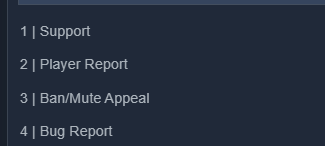 vague cosmos
Is this a dropdown? If so, see below.
dim bison
dim bison
No, sorry. Which one of these to open https://i.imgur.com/aZ553ua.png
This is from the ticket tool dashboard on the panel configs page. It's a list of my panels I have
I want to pick which one to open when using $new but I can't figure out how to tell it which panel to open
vague cosmos
What happens if you run /new?
 vague cosmos
Can you send it, without any context and check if you get a response?
dim bison
I get this https://i.imgur.com/pjfTEj9.png
It's the form for panel #5. After this a ticket using panel #5 is created


 vague cosmos
Okay, can you check the following: Dasboard > Panel Config > Settings > Command Style?
Is it enabled and for which panel(s)?
dim bison
Ah it just seems to be enabled for #5, so if I have it enabled for multiple panels I should be able to pick which one should open?
vague cosmos
I'm not sure if you can enable it for multiple or choose which one, as it resuls in a warning.
 dim bison
I enabled it for multiple panels, it seems like it just picks the panel with the lowest ID when opening the ticket 😦
vague cosmos
You can always make a feature request or use the dropdown/button system and eventually add people to a ticket.
dim bison
I wanted to avoid the last part 😄
Will make a suggestion instead. Thank you
thanks @vague cosmos
iron nightBOT
Gave +1 Rep to @vague cosmos
vague cosmos
Alright, do you have any other questions?
dim bison
Am good for now
vague cosmos
Alright! Thanks for using Ticket Tool and feel free to reach out if you have questions in the future! We're here to help! Have a fantastic day!
willow vapor
any thoughts about why all my tickets opened with number 0006 ?

nvm it fixed it self somehow lol
 iron dagger
how can i claim tiecket
hoary barn
You need to have premium I believe
vague cosmos
iron dagger
how can i claim tiecket
Claiming is a premium feature, like @hoary barn said indeed.
vague cosmos
@zealous zephyr do you need any help?
 zealous zephyr
네
vague cosmos
질문을 하시면 도움을 드릴 수 있습니다.
zealous zephyr
서버 에 티켓 추가했는데 티켓 활용 방법 을 모르겠어요
zealous zephyr
아니 티켓어떻게 열어야 됩니까
vague cosmos
자신의 서버에서? 설정 명령으로 쉽게 할 수 있는 패널을 만들어야 합니다. 영어를 조금 할 줄 아는 경우 아래 메시지가 도움이 될 수 있습니다.
stark runeBOT
1. Invite Ticket Tool to your server
First you will want to invite the bot to your server. Once the bot is in your server, you can manage your server in the dashboard.
2. Create a Panel
To create a panel we are going to need to head over to the panel configs on the dashboard.
Once at the dashboard we will need to click Create Panel.
Enter a panel name (Fill in any optional settings you want).
Click Create Panel and your ready to get started with configuring your panel.
An example of a creating a panel is shown below.
3. Send the Panel to a Channel
Once you've created a panel on the dashboard you will need to send it to a channel using send on the dashboard.
Select the channel you want your panel to be created in and click send.
For other questions checkout $help faq.
An example of a sending a panel is shown below.
Having a Problem Sending the Panel?
Do $debug in a channel with Ticket Tool and make sure it has all the necessary Discord permissions.
 languid dagger
why cant i type in the 2nd description
 vague cosmos
languid dagger
why cant i type in the 2nd description
vague cosmos
languid dagger
why cant i type in the 2nd description
It's premium only.
languid dagger
damn
vague cosmos
But I assume you want to create multiple messages for tickets?
@languid dagger because in that case, is using multi-panels not an option? One message, multiple buttons.
jade topaz
How can I see all Tickets in 1 Channel?
vague cosmos
Hey, how do you mean this exactly?
Do you mean as in when they're created? @jade topaz
jade topaz
Yes
humble sequoiaBOT
With Ticket Tool, you can customize the behavior the bot takes when logging your tickets! For editing these options follow these steps:
Dashboard ➞ Panel Configs ➞ Logging Options
Logging Channel
Here you will define which channel @humble sequoia will save the Logs in (ticket created/deleted/closed, etc.)
Logs you can save:
➞ Ticket Created ➞ Logs when a ticket is created
➞ Ticket Closed ➞ Logs when a ticket is closed
➞ Ticket Opened ➞ Logs when a ticket is opened
➞ Ticket Renamed ➞ Logs when a ticket is renamed
➞ Ticket Deleted ➞ Logs when a ticket is deleted
➞ Transcript Saved ➞ Logs when a ticket is saved
Select with  (disable) or (enabled) which logs you would like
Below you can see an example of what the Logging Options will look like:
 vague cosmos
You can do that with logging, see above.
jade topaz
Okey thank you.(:
vague cosmos
No worries, did you have any other questions?
jade topaz
No.🙂
vague cosmos
Alright! If you've any questions in the future feel free to reach out, for now have a fantastic day.
jade topaz
You to
 wicked breach
How come I can open a support ticket - keep saying interaction failed
humble sequoiaBOT
━━ pork's inquiry has been moved to a ticket ━━
 zenith heron
can you make it so that certain roles can't make tickets?
wild spire
zenith heron
can you make it so that certain roles can't make tickets?
none at all or just on certain panels?
zenith heron
wdym?
wild spire
like make no tickets at all whatsoever or just in one or a few categories
zenith heron
I wanna make a ticket failed role and if u have that role it doesn't allow you to create a ticket that is avaiable to everyone
zenith heron
wild spire
like make no tickets at all whatsoever or just in one or a few categories
a few categories
wild spire
zenith heron
a few categories
panel configs > buttons > edit create ticket > add them in disabled roles
zenith heron
ty
wild spire
anytime
 blissful salmon
Hey peeps I got a question! Is it possible to have ticket tool only create "age-restricted" channels? I am using the tool for moderation purposes and have the server set to being a community server, which removes any sensitive content automatically if not posted in an age restricted channel. The channels created by ticket tool are all regular channels... any help? Maybe I am missing an option.
wild spire
blissful salmon
Hey peeps I got a question! Is it possible to have ticket tool only create "age-...
its not an option. It has been suggested before, but you can always bump it again in suggestions
blissful salmon
wild spire
its not an option. It has been suggested before, but you can always bump it agai...
that's unfortunate! thank you for your help nonetheless. could you point ,e in the right direction for suggestions?
iron nightBOT
Gave +1 Rep to @wild spire
 surreal urchin
People, how to make the role of moderators mentioned when opening a ticket
humble sequoiaBOT
Within all the messages the bot sends (both embeds and text) you can mention either channels, roles, or even users, these mentions will only send a notification to the user if they are used within a text field, e.g: a role mentioned in an embed won't ping at all the users who have that role.
For mentioning a role you can use one out of three options:
{@Role Name} ➞ Which is Case Sensitive.
{RoleID} ➞ Replace RoleId with the Id of the role you are trying to ping.
<@&RoleID> ➞ Discord's native syntax to ping roles.
<#ChannelID> ➞ Mention a channel by its ID.
<@UserID> ➞ Mention a user by its ID.
surreal urchin
humble sequoia
Thank you ❤️
iron nightBOT
Gave +1 Rep to @humble sequoia
 dawn abyss
Im really inexperienced with tickets. and so far almost everything is good with my ticket I am using for support and requests in my server. However, when a ticket is created, the new ticket appears above all catagories and channels. I tried going from Panel Configs > Category and tried to assign 2 different categories for closed tickets and newly created/opened tickets. How do I fix it so the tickets go to the correct categories? Sorry if my explanation sucks, I dont really know anything about tickets and panels.
wild spire
dawn abyss
Im really inexperienced with tickets. and so far almost everything is good with ...
how many tickets does one of your categories have? Can you count all tickets (closed and open both) in it?
dawn abyss
wild spire
how many tickets does one of your categories have? Can you count all tickets (cl...
I dont have any tickets open at the moment, its a small server
wild spire
So none at all?
Then I suggest checking the bot permissions in your category settings.
dawn abyss
I only have the channel where Ticket Tool sent the panel in to create a ticket. I can make a couple demos if needed
dawn abyss
wild spire
Then I suggest checking the bot permissions in your category settings.
That might be it, give me a second please
dawn abyss
wild spire
Then I suggest checking the bot permissions in your category settings.
It works! I gave the Ticket Tool role administator role because I couldnt find anything for assigning channels to categories. Thanks for the help
iron nightBOT
Gave +1 Rep to @wild spire
 shut tiger
Is there a way to make new tickets go into a channel
pseudo ravine
Hey there. Do you mean go into a category? All new tickets are channels
 amber rose
pseudo ravine
amber rose
amber rose
pseudo ravine
amber rose
Do you need any support?
pseudo ravine
In #demo-threads? Or in your own server?
amber rose
Does not work
pseudo ravine
What exactly doesn't work?
shut tiger
pseudo ravine
Hey there. Do you mean go into a category? All new tickets are channels
i meant is there a way to get tickets to go into a certain channel
pseudo ravine
All tickets are channels, unless you chose to use threads
amber rose
The ticket I make but it is being ignored or something else
pseudo ravine
How is it being "ignored"?
pseudo ravine
Yes, I use Ticket Tool. So you created a ticket here and someone hasn't responded yet?
Or is this in a different server?
amber rose
But how do you put the ticket on another server?
pseudo ravine
Do you mean the panel so members can create tickets?
amber rose
Yes
humble sequoiaBOT
First you will want to invite the bot to your server. Once the bot is in your server, you can manage your server in the dashboard.
To create a panel we are going to need to head over to the Panel Configs Tab on the Dashboard.
Once at the dashboard we will need to click Create Panel.
Enter a panel name (Fill in any optional settings you want).
Click Create Panel and you are ready to get started with configuring your panel.
An example of a creating a panel is shown below.
Once the panel has been created, use the blue Send button and select the channel you want the panel to be sent to.
The Panel wasn't send
Use the </debug:ID> command to diagnose possible permission issues with the bot.
amber rose
Thanks