#🆘│community-support
1 messages · Page 55 of 1
 sand briar
 vague cosmos
Oh een bericht zelf? Dat moet je doen in Discord zelf door het bericht te verwijderen.
sand briar
vague cosmos
Oh een bericht zelf? Dat moet je doen in Discord zelf door het bericht te verwij...
nee lol dat snap ik, ik wil 1 van die 4 categorien weg en in een ander channel
vague cosmos
Hier verwijderen, panel sturen en de andere opnieuw sturen in een ander kanaal.
sand briar
dat heb ik
 vague cosmos
Wil je die twee bewaren?
sand briar
ja
vague cosmos
Opslaan en panel versturen
vague cosmos
Geen probleem
 iron nightBOT
Gave +1 Rep to @vague cosmos
vague cosmos
Ik ga weer ff werken
 astral marsh
i just add bot to server, and trying to type /setup but it saying the application is not responding
i see everything is o.k with the bot
vague cosmos
Hey @astral marsh, can you try to make a panel via the dashboard instead?
 humble sequoiaBOT

Ticket Tool - Ticketing without clutter - The #1 discord Ticketing bot
iron nightBOT
Gave +1 Rep to @vague cosmos
vague cosmos
Hmm, a "application not responding" mostly is a one-time issue. Did you have any other questions?
astral marsh
nope thanks
vague cosmos
@sand briar was alles nog gelukt? 🙂
sand briar
vague cosmos
<@878281876689788938> was alles nog gelukt? 🙂
ja hoor dankje!
vague cosmos
Super. Als er wat is, dan hoor ik het wel.
Hey @jade topaz to reply to your bug report. Did you invite the bot to your server?
humble sequoiaBOT
Don't see your server in the dashboard?
You will possibly need to relog. Look below to see the steps on how to relog.
How to relog in the Dashboard.
Note:
You need one of these 3 things to access the dashboard.
1. Server Owner (Level: 6)
2. Server Administrator (Level: 4)
3. Dashboard Role (Level: 2)
:warning: You can check your level using the </permissionlevel:1029797400174399542> command on your Discord Server
User permission level with Ticket Tool
@User is permission level: 0 (User)
```» *If it shows that your permission is **0**, you don't have any of the above **3 things** to manage the dashboard.*
**See the Image below on how to relog:** vague cosmos
Could you try this and see if the server appears then?
No worries, did you have any other questions?
 manic hollow
Anyone know if there is a way I can have the ticket bot send a preset message to a newly opened ticket? Such as a list of questions?
vague cosmos
Hey @manic hollow you can use forms for that so a user needs to answer a maximum of five questions before the ticket it send. Is that something that would work?
manic hollow
vague cosmos
Hey <@488400840046936070> you can use **forms** for that so a user needs to answ...
thats exactly what I am looking for!
humble sequoiaBOT
A Discord Form lets the user answer individual questions in a pop-up Form, which then displays the answers in the ticket message. This can save time if you already know what you want to ask the user.
Setup Forms
Forms can be enabled under Panel Settings > Form Options > Edit Forms Options. In the new pop-up window, you can now enable and edit your own Form.
Form Options
You can add up to 5 questions in the Discord form. This is a Discord limitation. Each question can have a placeholder in the input field, a minimum and maximum input, multi-line, and also the option to have the answer required.
Options
Question Title ➞ Your Question goes here
Question Placeholder ➞ The placeholder text in the input field
Required ➞ If enabled, the user has to answer this question, to submit the form
Multi-Line Input ➞Allows the user to input multiple lines
Minimum and Maximum Input ➞ Set a minimum and maximum input value for the user
Displaying the Answer
To display the answers from the user, you need to enable Auto display form results on the ticket message as an additional embed
In case you don't want a second embed, go into your Panel Configs > Ticket Options > Edit Ticket Message. In there you use the variable {create.form.x} and just replace x with the number of your question. For example, the response to Question 1 can be displayed with {create.form.1}. If you don't use this variable, the response from the user is lost.
 vague cosmos
@manic hollow let me know how it goes. 🙂
manic hollow
vague cosmos
<@488400840046936070> let me know how it goes. 🙂
So that does seem to work well but is there a way I could have more questions or more text allowed in each question?
 pseudo ravine
You can only have 5 questions unfortunately
manic hollow
Cant pay for more?
pseudo ravine
I believe that's a Discord limit
manic hollow
ah that makes more sense
vague cosmos
There is a maximum of five questions and 4000 characters is a Discord limit.
iron nightBOT
Gave +1 Rep to @vague cosmos
vague cosmos
No problem, can I help you with anything else?
vague cosmos
No worries, if you've an more questions in the future feel free to ask them.
 stuck anchor
Is there a way to add the drop down option that was selected into the created message channel?
vague cosmos
You want to use a dropdown for your ticket options instead of buttons?
 hearty gale
Hello is there any option to purchase 1 year sub?
vague cosmos
@hearty gale see below.
stuck anchor
If I make a drop-down that says “general”, I would like “general” to show up in the ticket channel so I know that’s what they clicked
humble sequoiaBOT
PayPal - paypal@tickettool.xyz
BitCoin - 3HhKKAdb9eEvCe2tvzB8bAa8nebHY6qcPA
LiteCoin - MEQX3knLAuotrKnvk3HDNBK5gdRn6PZhHy

Prepay/Direct Payment
To prepay send the payment using your desired method - Available options listed bellow.
⚠️ $18 per 3 months. ⚠️
$66 per year.
(If using the direct payment option, you need to be paying for at-least 3+ months.)
Regular Prices when paying within Discord:
$5.99/per month
Once your payment is sent let us know so we can confirm and get you your key.
- Purchases done with this method are non-refundable.
<:paypal:924596360840372234> Paypal ("Goods and Services" or "Family and Friends")
paypal@tickettool.xyz
<:bitcoin:924638849135689749> BTC - Bitcoin
3HhKKAdb9eEvCe2tvzB8bAa8nebHY6qcPA
<:Litecoin:972176945972383815> LTC - LiteCoin
MEQX3knLAuotrKnvk3HDNBK5gdRn6PZhHy
I sent the payment now what?
After you send the payment, please send a screenshot with proof of payment, our <@&615146349700186112> will verify your payment and will get you setup. For crypto payments, we are waiting for at least ONE verification.

All prices in USD - 3 months min for direct payment
hearty gale
humble sequoia
**PayPal** - `paypal@tickettool.xyz`
**BitCoin** - `3HhKKAdb9eEvCe2tvzB8bAa8nebH...
ok nice 😃
completing this
vague cosmos
stuck anchor
If I make a drop-down that says “general”, I would like “general” to show up in ...
I think the best way to do this is by changing the panel message, once a ticket is opened.
No worries, happy to help. The billing team can be contacted by making a Billing Ticket in #🎫│make-a-ticket, @hearty gale.
@stuck anchor do you know how to edit a panel message?
stuck anchor
vague cosmos
<@132238156794822656> do you know how to edit a panel message?
I do! I’ll try that now! Thank you
iron nightBOT
Gave +1 Rep to @vague cosmos
vague cosmos
No worries, keep me updated!
 umbral shuttle
i need help i cant go to the dashboard of the website it says error
vague cosmos
umbral shuttle
i need help i cant go to the dashboard of the website it says error
Can you send a screenshot of the error?
umbral shuttle
vague cosmos
Can you send a screenshot of the error?
sure
humble sequoiaBOT
Ticket Tool - Ticketing without clutter - The #1 discord Ticketing bot
vague cosmos
Try eventually this direct link.
umbral shuttle
 umbral shuttle
vague cosmos
Try eventually this direct link.
umbral shuttle
vague cosmos
Try eventually this direct link.
same thing
vague cosmos
humble sequoia
https://tickettool.xyz/manage-servers
@umbral shuttle follow this link, that is the right one.
umbral shuttle
vague cosmos
<@980938408320962622> follow this link, that is the right one.
still the error
vague cosmos
Can you copy/paste the link what you got open and errors?
vague cosmos
Can you go to https://tickettool.xyz/ ?
Ticket Tool - Ticketing without clutter - The #1 Discord support bot
You should be able to login at the right top then.
umbral shuttle
vague cosmos
You should be able to login at the right top then.
still the same error
vague cosmos
Can you try to clear the cache and delete cookies of your browser?
umbral shuttle
vague cosmos
Can you try to clear the cache and delete cookies of your browser?
how to do that
vague cosmos
You're using Safari on iOS right?
umbral shuttle
vague cosmos
You're using Safari on iOS right?
yep
vague cosmos
Do you eventually have a computer? It's easier to manage the bot too on a PC.
https://support.apple.com/en-us/HT201265
umbral shuttle
vague cosmos
Do you eventually have a computer? It's easier to manage the bot too on a PC.
<h...
nop im on mobile
vague cosmos
If that doesn't work, can you try another browser such as Chrome also there is no need to ping me on every reply you make.
umbral shuttle
vague cosmos
If that doesn't work, can you try another browser such as **Chrome** also there ...
kk thanks for helping
iron nightBOT
Gave +1 Rep to @vague cosmos
vague cosmos
No problem, let me know if you're able to get into the dashboard and please turn off the ping when you reply.
umbral shuttle
vague cosmos
No problem, let me know if you're able to get into the dashboard and _please_ tu...
same error on google
vague cosmos
I'm not sure what is causing this. Do you have any other device you can try it on and again, turn off the ping when you reply please.
It's not needed to ping me every single time.
@stuck anchor just a quick check, did it work?
umbral shuttle
vague cosmos
I'm not sure what is causing this. Do you have any other device you can try it o...
i dont have any other devices..
vague cosmos
Okay. I'm not sure what is causing this then. I'd suggest you to open a ticket in #🎫│make-a-ticket so the support team can assist you.
humble sequoiaBOT
━━ SOCKS's inquiry has been moved to a ticket ━━
hearty gale
can i change the name of the bot if it is premium?
humble sequoiaBOT
Ticket Tool Custom Avatar
As of now, you are not able to change Ticket Tool's profile picture, nonetheless, our Development Team is working on the release of white labels, this is your own custom bot!
For the time being, you can change the bot's nickname by right-clicking the bot in the user list on your server and clicking Change Nickname
 hearty gale
ok
vague cosmos
You can do that with the free bot too, it's a Discord feature.
stuck anchor
vague cosmos
<@132238156794822656> just a quick check, did it work?
I think I may need premium to edit that message
vague cosmos
No, if you click on embed editor - 1 you can edit the content inside the embed, what is above is premium only.
stuck anchor
vague cosmos
No, if you click on **embed editor - 1** you can edit the content inside the emb...
Oh so when it says create a ticket by clicking {} I can make it say create a general ticket? and that should carry over?
vague cosmos
You want the text of the category in the ticket message right?
humble sequoiaBOT
The Ticket Message is the first message sent by the bot on a new ticket. To customize it head over to your Dashboard ➞ Panel Configs ➞ Ticket ➞ Edit Ticket Message
 vague cosmos
You can change that to for example General with some other text.
stuck anchor
after the person who needs help clicks through everything and it makes a new channel for you and support, I want what they clicked in that channel
vague cosmos
See my response above, you can add it to the ticket message yourself. I don't think there is a other way.
stuck anchor
vague cosmos
You can change that to for example **General** with some other text.
I think I'll just use forms and make people describe it instead of worrying about the label
vague cosmos
That can work too, do you know how to use them?
stuck anchor
vague cosmos
That can work too, do you know how to use them?
yes. Thank you!
iron nightBOT
Gave +1 Rep to @vague cosmos
vague cosmos
Awesome! Let me know if you have any more questions.
 manic vine
Hi
I have a problem with the withdrawal of my airdrop. Since April when I started withdrawing my airdrops, it's all waiting for confirmation. While I still have the claim button active. I am not getting anything in my core account. I don't understand why I'm still waiting for validation.
What's the concern? can you help me remove my parts?
THANKS
humble sequoiaBOT
@manic vine

⚠️ You're in the wrong place
We provide support for Ticket Tool Discord bot and cannot help you with whatever issue you have.
- We don't know which Support Team you should contact to get this issue resolved, and unfortunately we won't be able to accurately tell you.
If you don't have any further questions regarding our bot Ticket Tool, please close this ticket
vague cosmos
humble sequoia
<@1080144021005025391>
We can't help you with the issue you have as you can see here. So I'm not sure what you exactly mean by that, @manic vine.
Do you want to use the bot in your own server?
manic vine
Ok. You don't undertand me and I don't speak english correctly so. Ok bye
vague cosmos
What is your native language, @manic vine? Since you can ask your questions in that language.
manic vine
Je parle le français
vague cosmos
Quelle est votre question exactement ?
manic vine
Je disais que je voulais de l'aide car depuis avril je n'arrive plus à retirer mes pièces de core dans l'airdrop. Je fais la réclamation mais je ne reçois pas les pièces dans mon compte core de metamask. Et les pièces sont toujours dans l'airdrop. Je vous envoie les captures si possible
vague cosmos
 plain surge
We have the tts tag in french <@143705466734641152>
plain surge
We have the tts tag in french <@143705466734641152>
I just found out in #🤖│bot-spam, will use it in a moment. Thanks.
iron nightBOT
Gave +1 Rep to @plain surge
humble sequoiaBOT
@manic vine
⚠️ Vous n'êtes pas au bon endroit
Nous offrons un support pour le bot Ticket Tool et nous ne pouvons pas vous aider avec d'autres problèmes hors du bot.
- Assurez-vous de contacter l'équipe d'assistance appropriée, s'il vous plaît.
S'il n'y a pas d'autres éléments en lien avec Ticket Tool en quoi nous pouvons vous être utiles, veuillez fermer le ticket.
manic vine


Pouvez vous m'indiquer l'équipe approprié dont vous parlez pour que je puisse les joindre ? Merci
vague cosmos
humble sequoia
<@1080144021005025391>
Lisez ce post, encore une fois.
manic vine
Merci
vague cosmos
Aucun problème.
manic vine
Comment on ferme le tchat?
vague cosmos
Ce n'est pas possible ici, c'est un chat où n'importe qui peut poser des questions sur le bot.
manic vine
Ok
 hidden crater
Can someone tell me how can I edit my panel message
humble sequoiaBOT
The panel message is where people react to make a ticket. To customize it head over to your Dashboard --> Panel Configs -> Panel -> Edit Panel Message
 hidden crater
Ty
vague cosmos
No worries. 😉
 vague cosmos
Click on embed editior - 1 to open it, that is the text you can edit.
vague cosmos
No problem.
 jade topaz
I was charged 2 times for 1 server


Give me back 1 of the transactions.

I didn't order this..., I just wanted to pay for the premium bot, since it flew off earlier than it was written in the subscription
vague cosmos
jade topaz
I was charged 2 times for 1 server
Open a billing ticket in #🎫│make-a-ticket for billing issues.
 frank drum
Why if i click on the "Delete" button the bot only clear the message of channel and make it show to everyone?
vague cosmos
What do you mean exactly?
If you click on the "delete" button a ticket, it deletes the channel.
pseudo ravine
(Sorry to interrupt) Do you have Server Storage enabled?
Dashboard > Server Configs > Server Storage Options
vague cosmos
pseudo ravine
(Sorry to interrupt) Do you have Server Storage enabled?
Dashboard > Server Co...
It's okay.
But that seems to be the issue indeed, @frank drum.
Since everyone can see the category the closed channel gets in.
frank drum
vague cosmos
But that seems to be the issue indeed, <@685516440815534095>.
Since everyone ca...
Wdym? Why the bot doesn't delete the channel🙂
vague cosmos
pseudo ravine
(Sorry to interrupt) Do you have Server Storage enabled?
Dashboard > Server Co...
See this message, do you have it enabled?
frank drum
vague cosmos
See this message, do you have it enabled?
Yep yep, disabled it and worked, tysm @pseudo ravine 🫡
vague cosmos
Happy to help, do you have any other questions?
pseudo ravine
You’re welcome, glad we could help
frank drum
No thank you
pseudo ravine
If you have any other questions/issues, don’t hesitate to reach out again 
 ionic thunder
;kl[
vague cosmos
Do you need any help, @ionic thunder?
vague cosmos
ionic thunder
;kl[
هل تحتاج أي مساعدة؟ بما أني أراك تتحدثين بالعربية.
ionic thunder
لا شكرل
vague cosmos
تمام. لا تتردد في القدوم للدردشة معنا في دردشة أخرى.

 civic wagon
Yes
 keen sail
civic wagon
Yes
keen sail
civic wagon
Yes
Ok, what a blank
civic wagon
Whenever someone creates a ticket, it will be created under the category that you mentioned
civic wagon
That's what you want to achieve, right?
keen sail
keen sail
But the bot did not b Does it do an update?
@civic wagon
civic wagon
keen sail
But the bot did not b Does it do an update?
How many existing channels are there under that category?
keen sail

keen sail
civic wagon
How many existing channels are there under that category?
I did not understand you, I speak Arabic
civic wagon
keen sail
I did not understand you, I speak Arabic
Oh. In that case, feel free to create an arabic support ticket from #🎫│make-a-ticket
keen sail
Should I update or not?
keen sail
civic wagon
Oh. In that case, feel free to create an arabic support ticket from <#5717064354...
Yes I know that but they reply after a long time
vague cosmos
Patience is key.
jade topaz
is there an option to only allow a user with a specified role to open a ticket and not "everyone"?
pseudo ravine
Hey there. You can allow a role to use the “Create Ticket” button by going to the Dashboard > Panel Configs > Buttons > Create Ticket > Allowed Roles > Add the role
jade topaz
@pseudo ravine and if i did that option
then a user with no roles would not be able to make a ticket i would assume?
pseudo ravine
There’s no reason to ping me
pseudo ravine
jade topaz
then a user with no roles would not be able to make a ticket i would assume?
Yes
keen sail
vague cosmos
Patience is key.
😐
vague cosmos
No need to ping me for that.
jade topaz
So for some reason players can't see messages in tickets
 young tusk
How to nickname my ticket tool bot?
vague cosmos
young tusk
How to nickname my ticket tool bot?
Right click the bot and choose change name.
keen sail
@vague cosmos Do I update the message when placing the ticket category?
vague cosmos
No need to ping me. I'm going to sleep so I can't answer
young tusk
vague cosmos
Right click the bot and choose change name.
Ok, thanks.
iron nightBOT
Gave +1 Rep to @vague cosmos
 hollow salmon


 neon rock
Is there a way to reset the ticket count?
 rustic gale
neon rock
Is there a way to reset the ticket count?
rustic gale
neon rock
Is there a way to reset the ticket count?
Use the Set Count button in the dashboard and set it to 0
 hollow grove
how do i enable auto save transcript
vague cosmos
hollow grove
how do i enable auto save transcript
You need premium for that. Do you have it?
 raven roost
¿A alguien más le a pasado que el boot premium no ingresa a su servidor de discord? ¿Saben qué hacer?
 idle flint
These colours and some other customisation options are available to those with a premium subscription
 violet quiver
How do I make my tickets like this, I have the multi panels but its just different buttons
 humble sequoiaBOT
The Drop-down menu or Select Menu replaces the buttons on your panel message and uses a drop-down menu with all of your panels. To set this up, go to your Panel Configs and select your main Panel.
<:Numbericons1:1018864164032225340> Enable Select Style
First you enable Select Style. Then you add an item in the Dropdown Editor. Now you can start editing your dropdown!
<:Numbericons2:1018864168041971712> Dropdown Editor
Each line in the dropdown editor represents a line in the drop down menu on discord. You can add more "Items", by clicking on 

First you select a panel. That's the panel this option will open a ticket for.  DONT select the same panel twice. Each option should have a different Panel
After that, you can put a Display. This is the title of this option and will appear in the drop down menu. The *Description can be set right after that, which will be below the title in grey.
Additionally you can select an emoji, that will be shown in front of each option. You can either manually input the ID of an emoji or select it in the selector.
Common Issues ⚠️
- Panel doesn't send? Make sure you have a valid emoji selected
- Option doesn't show up? Check if two options have the same panel in the DropDown Editor

$dropdown
vague cosmos
humble sequoia
@violet quiver
violet quiver
vague cosmos
<@464870285271760906>
I need premium?
 grave otter
Hello! For some reason, closed tickets are no longer being moved to their category, why? I did not change the perms 🥶
 idle flint
grave otter
Hello! For some reason, closed tickets are no longer being moved to their catego...
idle flint
grave otter
Hello! For some reason, closed tickets are no longer being moved to their catego...
Possibly due to discord limits:
50 Channels per category, 500 channels per discord server.
You can either delete tickets once they are closed, or use overflow categories:
humble sequoiaBOT
Discord only allows to stack up to 50 channels per category, meaning that if you have already 50 tickets in one category, the bot won't be able to place a ticket in that category, for such reason Ticket Tool counts with overflow categories, meaning that if your main category is filled, the bot will go ahead and place the ticket on the next one available, simply choose a second category in the category pickers:

 humble galleon
hello guys, tell me which team can tag a role?
I don't get out, I can send a screenshot

i need to mention role @Cur.Academy
vague cosmos
Can you not ghost ping us, please?
humble galleon
vague cosmos
Can you not ghost ping us, please?
Sorry
 lofty obsidian
One message removed from a suspended account.
 surreal ice
Does anyone know the exact variables / commands been used ?
 humble sequoiaBOT
━━ MercuryZx_'s inquiry has been moved to a ticket ━━
━━ .goodi's inquiry has been moved to a ticket ━━
humble sequoiaBOT
1. Go into your Dashboard
2. Open your Panel Configs tab
3. Select the panel you want to grant access to
4. Open the Category options menu
5. Select the categories of your preference
6. Save changes
vague cosmos
@lofty obsidian
 native path
can i ask some thing else that not abot the ticket ?
 gilded verge
native path
can i ask some thing else that not abot the ticket ?
gilded verge
native path
can i ask some thing else that not abot the ticket ?
if this does not apply to Ticket Tool bot, you can ask in #💬│general-chat or #premium-chat
 jagged gulch
Hi, why closed tickets arent moving to correct category as before? to dispel doubts bot have admin, permissions, all has been setup correctly but yesterday is has stopped working

 civic wagon
jagged gulch
Hi, why closed tickets arent moving to correct category as before? to dispel dou...
civic wagon
jagged gulch
Hi, why closed tickets arent moving to correct category as before? to dispel dou...
Most probably your closed category has 50 channels. It is a restriction setup by discord itself and hence no more channels can be created/under that category.
jagged gulch
civic wagon
Most probably your closed category has 50 channels. It is a restriction setup by...
oh thank you so much
iron nightBOT
Gave +1 Rep to @civic wagon
civic wagon
jagged gulch
oh thank you so much
You can create a second closed category as well by following the instructions below

 dim nymph
When filing a ticket, account info, what exactly is needed? Don’t want to give info I don’t have to.
vague cosmos
WHat do you mean?
dim nymph
 humble sequoiaBOT
First you will want to invite the bot to your server. Once the bot is in your server, you can manage your server in the dashboard.

To create a panel we are going to need to head over to the Panel Configs Tab on the Dashboard.
Once at the dashboard we will need to click Create Panel.
Enter a panel name (Fill in any optional settings you want).
Click Create Panel and you are ready to get started with configuring your panel.
An example of a creating a panel is shown below.

Once the panel has been created, use the blue Send button and select the channel you want the panel to be sent to.
The Panel wasn't send
Use the </debug:ID> command to diagnose possible permission issues with the bot.
 gilded verge
humble sequoia
gilded verge
humble sequoia
@heavy fox, check 
 hushed wadi
If i have bought ticket tool premium, can i use it in multiple servers?
 shut bolt
No, premium subscriptions are per server
 narrow bluff
hello everyone
vague cosmos
Hey, how can I help you?
narrow bluff
I was under the impression that multi-panels are a premium feature. Has this changed?
vague cosmos
It is not, see below on how to set it up.
narrow bluff
oh, that's good to know
humble sequoiaBOT
For more convenient use of multipanels, you can now combine panels on the dashboard. This will allow you to directly send the multipanel from the dashboard or via the $panel ID command.
Where can I find this?
You can find this setting on the Dashboard -> Panel Configs -> Panel -> Attached Panels
Note: if you're attaching all the panels to a panel called English, don't include English in the attached panel's box (If you do this, it will create a duplicate)
This will put all buttons from all of your panels on one message. The message is the panel message from the panel you're combining these panels in.
 narrow bluff
thank you @vague cosmos
iron nightBOT
Gave +1 Rep to @vague cosmos
vague cosmos
No worries, did you have any other questions?
narrow bluff
no, just that one. I appreciate you
vague cosmos
Awesome, if you've any more questions in the future let us know.
 heavy iris
Wasn't sure if I put this in the correct channel, but whenever I make a change in the dashboard, it's not carrying over to our server. Transcript button renders an error that the transcript channel is not set. But it is. Also tickets logs are not populating in the ticket log channel that I've created and set.
vague cosmos
Did you save the changes?
heavy iris
vague cosmos
Did you save the changes?
Yes indeed
vague cosmos
Can you check if you have a transcript channel set at the dash?
heavy iris
vague cosmos
Can you check if you have a transcript channel set at the dash?

I even turned on auto transcript, but still nothing.
vague cosmos
Does the bot have the required permissions in the channel?
humble sequoiaBOT
When first invited to your server, Ticket Tool should have the permissions shown below in order to ensure an appropriate functioning:
When customizing permissions for the different ticket participants, you must make sure Ticket Tool has the permissions you want it to grant to others, you can learn more about this here.
Missing Permissions
This error is a direct outcome of the bot missing permissions as depicted above. When troubleshooting this error we suggest you go through these steps:
- Use the </debug:1029783024264564765> command to check if the bot is lacking core role or channel permissions.
- Compare the category/channel's overrides and contrast them with the bot's roles to identify any permission denial that is breaking the functioning
- If you can't still figure it out, let our <@&540295656720302081> know so they can guide you through
Additional Resources
- If you are a server administrator and would like to understand more how to set up your server's permissions, we suggest checking the Discord Support Knowledge Base
- If you are a bot developer and are interested in the internal permission hierarchy we suggest you this part of the Discord Developer Docs
Important Note
- Giving Administrator permissions is NOT required and we do NOT encourage you to do unless you are trying to troubleshoot your permissions setup.
 heavy iris
vague cosmos
Does the bot have the required permissions in the channel?
heavy iris
vague cosmos
Does the bot have the required permissions in the channel?
Yes as far as I know. The bot has been in the server for quite sometime. I recently created the channel and even have a few transcripts, it stopped working last week.
heavy iris
humble sequoia
I'll recheck the permissions
vague cosmos
Alright, let me know if they're fine.
heavy iris
Well I went and checked and set the permissions for the bot on the channels I created. Same results. I can create and close tickets. But still no transcripts or logs
vague cosmos
Not sure what is causing it, could you open a ticket so support can look into it?
#premium-tickets
jade topaz
question, how do i make it so my mods cant see the category UNLESS there is an open ticket?
pseudo ravine
Hey there. Just add your mod role to the Support Team Roles and don’t force permissions inside the category
 wary cairn
In our server we use ticket tool, for people to request subscriptions to products and services and assign special roles. We have automation to remove the paid services (external to discord) . But was wondering if we give someone say a one month subsciption to our server, is there anyway in Ticket Tool to generate an automated ticket after say 30 days to remind us to remove certain role permissions?
shut bolt
wary cairn
In our server we use ticket tool, for people to request subscriptions to product...
Not really a thing you can achieve currently sorry
 twilit tiger
Hey guys I really really need help, is it possible to have an embeded video after someone creates a ticket.
I have been wondering this because I want to include a video after the ticket is created, It can send a link but its not an embeded link, like the video is in discord and you do no need to actually go out of discord to view the link. Btw the link is to a video on youtube
Does it need to be public or can I leave it as unlisted
hello anyone?
 wild current
Downscale the video so the video is under I think 50mb, might have to be lower than 8mb I’m not sure. Then you will be able to directly update the video to discord, not through a link. Then copy the discord link from the video where it’ll say “Copy media Link” or something very similar to that. After that, add that into the custom embed on Ticket tools dashboard and it should show.
twilit tiger
wild current
Downscale the video so the video is under I think 50mb, might have to be lower t...
oh
twilit tiger
wild current
Downscale the video so the video is under I think 50mb, might have to be lower t...
here do I find the custom embed option?
wild current
It’ll be on the ticket tool dashboard

 wide crypt
Yo, how do I put ticket tool in a specific channel?
rustic gale
wide crypt
Yo, how do I put ticket tool in a specific channel?
By sending the panel message with the Send button from the dashboard
Or using the /panel command in that channel
wide crypt
Alr
stuck anchor
how do I get the different language option buttons?
pseudo ravine
Hey there. Do you just want multiple buttons on your panel?
 pulsar knoll
Help how do I cancel my subscription to ticket tool? my card is being charge
There is a new update, all purchases are made through discord how do I cancel
 slow kite
Hello i have a question when i open i ticket it say ticket-0001 how do i get whene i open ticket it sat ticket-drcujo
 rugged gazelle
Hello friends, quick question: When I have a ticket that is closed, how do I make it so then the ticket cannot be seen by the ticket creator anymore and only support team?
Thanks.
civic wagon
rugged gazelle
Hello friends, quick question: When I have a ticket that is closed, how do I mak...
Dashboard > Panel Configs > Permissions > Ticket Owner Permissions > Edit Closed.
Disable the View Channel permission.
rugged gazelle
I have that disabled already, however it seems to still show for the user that closed it.
civic wagon
rugged gazelle
I have that disabled already, however it seems to still show for the user that c...
Does the user have any other role that might bypass their permission to view the channel?
humble sequoiaBOT
The ticket name is the default channel name of all tickets. To edit it, go to your Dashboard > Panel Configs > Ticket. There you can edit the channel name of opened and closed tickets. You can also use variables in there.

 Note: This is a premium feature
civic wagon
Note: This is a premium feature
civic wagon
@slow kite refer to the embed above ^
rugged gazelle
nope, nothing there
oh, I think might know why. the ticket bot might not have access to that particular category to manage channels etc
1 sec
slow kite
It must be premium?
civic wagon
Yes, it's a premium only feature.
slow kite
Ok
rugged gazelle
ahh i see.
civic wagon
rugged gazelle
ahh i see.
It was meant for Dr.Cujo
rugged gazelle
oh, k nvm. well I gave the bot more permissions for where it moves the channel when it closes, but the ticket creator still has access to the see the channel. the category itself has been set private as well already
pulsar knoll
Help how do I cancel my subscription to ticket tool? my card is being charge. There is a new update, all purchases are made through discord how do I cancel
rugged gazelle
if I were to goto the permissions for that closed ticket that the bot created, that user specifically still has access to "view channel"
humble sequoiaBOT
<:TicketToolOffline:1018980643092312155> Cancel your subscription
We're sorry to see you go!
To cancel your Ticket Tool Premium Subscription, just head over to your User Settings in Discord, then Subscriptions. Look for Premium Apps and click on Manage Subscriptions. There you can cancel your subscription at the end of your billing cycle.

User Settings > Subscriptions > Premium Apps > Manage Subscriptions > Cancel
civic wagon
rugged gazelle
if I were to goto the permissions for that closed ticket that the bot created, t...
Does TT have Manage Permissions permission?
rugged gazelle
for those categories yes, however for the ticket channel it is set to /, and I can't seem to find the global option to make it a yes in the edit server > roles
civic wagon
rugged gazelle
for those categories yes, however for the ticket channel it is set to /, and I c...
I'm not sure how to fix this then. You may create a ticket from #🎫│make-a-ticket so that the support team is able to help you out.
rugged gazelle
okay - thaks for trying.
civic wagon
Apologies for taking your time
rugged gazelle
all good. appreciate it.
 main glacier
How can I put embed image in the panel ?
 solemn acorn
I'm attempting to create a multipanel, but I'm encountering an issue where I'm unable to include additional panels. Whenever I try to add them and send the multipanel, I receive a message instructing me to "create a ticket," and only the attached panel is included.
I'm not support, and don't know.
humble sequoiaBOT
1. Go into your Dashboard
2. Open your Panel Configs tab
3. Select the panel you want to ping your support on
4. Open the Ticket options menu
5. Click on Edit Ticket Message
6. In the Message Content use one of the role mention syntax (**{@Role Name}**/**{Role ID}**)
7. Save changes
Note: For this to work properly, Ticket Tool requires the Mention Everyone permission. Or the role must have the Allow anyone to @mention this role setting enabled 
pseudo ravine
There’s no need to ping anyone for support
And either one of them work
You’re welcome, glad I could help. If you have any other questions/issues, don’t hesitate to reach out again
 tranquil palm
Hey <3, How do i add a role to see all future/current tickets <
humble sequoiaBOT
1. Go into your Dashboard
2. Open your Panel Configs tab
3. Select the panel you want to grant access to
4. Open the General options menu
5. Select your Support Team Roles
6. Save changes

 glacial trench
Hey team, can you help me to get rid of a duplicate create ticket button?
civic wagon
glacial trench
Hey team, can you help me to get rid of a duplicate create ticket button?
Did you create a multipanel?
glacial trench
I don’t know what that means

If I go to remove that button it does nothing. If I edit a single button it changes both
civic wagon
glacial trench
Head over to Dashboard > Panel Configs > Panel and share a screenshot please
 civic wagon
glacial trench
civic wagon
glacial trench
Remove that panel from "Attached Panel (Multi Panels)"
Save the changes, and then resend your panel.
glacial trench
BINGO!
civic wagon
^^
glacial trench
Thank you kindly dear Sir 🙏
civic wagon
Happy to help!
glacial trench
Now to figure out how to make sure people added to tickets can talk!
civic wagon
glacial trench
Now to figure out how to make sure people added to tickets can talk!
Dashboard > Panel Configs > Permissions > Ticket Owner Permissions > Edit Opened
glacial trench
So here is the challenge … if a user opens their own ticket we are good
If I open a ticket on their behalf and add them to the ticket .. then they have the ability to see the ticket. But nothing else
I have to edit their permissions every time I add a user to a ticket
Which is exhausting lol
I added a user and their highlighted permissions should be enabled and they’re not. Do I need to be changing something different?


 pseudo ravine
It seems like Jasvir went afk, so I'll take over. How are you creating tickets on their behalf?
civic wagon
glacial trench
I added a user and their highlighted permissions should be enabled and they’re n...
Try setting up "Everyone Role Permissions" > Edit Opened
- Disable view channel
- Enable send messages
glacial trench
Yeah that didn’t work
civic wagon
pseudo ravine
It seems like Jasvir went afk, so I'll take over. How are you creating tickets o...
@glacial trench
How are you creating tickets on their behalf?
 pseudo ravine
Hey there. Claiming is a premium feature
 lament scarab
Alright
 zinc sandal
Is there an option for feedback once a ticket is closed?
pseudo ravine
Hey there. There is not an option for that
 desert horizon
i need help setting up dropdown tickets
humble sequoiaBOT
The Drop-down menu or Select Menu replaces the buttons on your panel message and uses a drop-down menu with all of your panels. To set this up, go to your Panel Configs and select your main Panel.
<:Numbericons1:1018864164032225340> Enable Select Style
First you enable Select Style. Then you add an item in the Dropdown Editor. Now you can start editing your dropdown!
<:Numbericons2:1018864168041971712> Dropdown Editor
Each line in the dropdown editor represents a line in the drop down menu on discord. You can add more "Items", by clicking on
First you select a panel. That's the panel this option will open a ticket for. DONT select the same panel twice. Each option should have a different Panel
After that, you can put a Display. This is the title of this option and will appear in the drop down menu. The *Description can be set right after that, which will be below the title in grey.
Additionally you can select an emoji, that will be shown in front of each option. You can either manually input the ID of an emoji or select it in the selector.
Common Issues ⚠️
- Panel doesn't send? Make sure you have a valid emoji selected
- Option doesn't show up? Check if two options have the same panel in the DropDown Editor
$dropdown
civic wagon
desert horizon
i need help setting up dropdown tickets
Refer to the embed above ^
civic wagon
desert horizon
the panel doesnt update
You need to re-send the panel
iron nightBOT
Gave +1 Rep to @civic wagon
jade topaz

Need help changing the actual names of the tickets. I’ve been trying to mess around with it but I don’t know the exact command for it
 waxen cloud
jade topaz
waxen cloud
jade topaz
I tried {user} to try to display their username but it instead displays their discord if
vague cosmos
I believe there are some issues with that @jade topaz, best to open a ticket for it.
jade topaz
Ok
vague cosmos
waxen cloud
https://discordapp.com/channels/509192800865353738/662692902245498910/1121506372...
No access to that, can you just ask your question (and if that is a ticket) please be patient.
pseudo ravine
(debug link)
vague cosmos
If they just say that + their issue it's easier to help them... instead of jjust a link without info
But they decided to leave so whatever.
glacial trench
civic wagon
> How are you creating tickets on their behalf?
We go to our apply channel > open ticket > add new user to the ticket > update perms so they can interact w the ticket.
We also set it up so that our managers for tickets are excluded from ticket limits.
idle flint
zinc sandal
Is there an option for feedback once a ticket is closed?
Head to #📈│reviews 👍👍
pseudo ravine
glacial trench
We go to our apply channel > open ticket > add new user to the ticket > update p...
Instead of doing that, you can just use the /new command and create a ticket for them. It'll make them the Ticket Owner and such.
Make sure you have Command Style Tickets enabled and setup
pseudo ravine
 forest tinsel
Hey anyone from suport team!!
forest tinsel
Hey anyone from suport team!!
Please don't mention anyone for support. If you need support, just state it here or #🎫│make-a-ticket
forest tinsel
pseudo ravine
Please don't mention anyone for support. If you need support, just state it here...
Yeah I did that... Sorry for tag.. I am new here so was unaware
pseudo ravine
If you already have a ticket open, just wait until an available Support Member can assist you
glacial trench
pseudo ravine
Instead of doing that, you can just use the `/new` command and create a ticket f...
I’ll have to test this.
 green citrus
How i invite the prem bot
humble sequoiaBOT
The first thing you will need to do is invite the premium bot, an invite can be found here
Once the bot is in your server we will head to the dashboard and manage your server. When you are managing your server, you want to head into "Server Configs" then click the drop down menu under "Select the bot you would like to use on this server" then click "Ticket Tool#6207" and then save.
 green citrus
i bought thru discord
 pseudo ravine
green citrus
pseudo ravine
green citrus
Nice it worked
pseudo ravine
Is that all you needed?
pseudo ravine
If you need anything else, don't hesitate to reach out again 
pseudo ravine
Hey there. Unfortunately those statistics aren't on the Dashboard
 hoary pier
Thanks
pseudo ravine
You're welcome, glad I could help. If you have any other questions/issues, don't hesitate to reach out again
 fallow tusk
help
humble sequoiaBOT
Hello, we would love to help you, but if you don't tell us what you need help with we can't help you :(
green citrus
@pseudo ravine Hello is there anyway i can make the ticket tool bot, put a message in the ticket when its opened. i want it to say "$cashapp" cause its a custom command i made that sends a message. Id use this so i dont have to put the command everytime a ticket is opened i want hte bot to do it
fallow tusk
i cant join priveate discord
humble sequoiaBOT
⚠️ You're in the wrong place
We provide support for Ticket Tool Discord bot and cannot help you with whatever issue you have.
- We don't know which Support Team you should contact to get this issue resolved, and unfortunately we won't be able to accurately tell you.
If you don't have any further questions regarding our bot Ticket Tool, please close this ticket
green citrus
green citrus
<@865714582613524491> Hello is there anyway i can make the ticket tool bot, put ...
^
pseudo ravine
green citrus
<@865714582613524491> Hello is there anyway i can make the ticket tool bot, put ...
You don't need to ping me.
You can add an Automation to the ticket, when a ticket is created, Ticket Tool will send a custom command.
Example:
 rustic gale
Automation is a premium-only feature, by the way.
green citrus
pseudo ravine
You don't need to ping me.
You can add an Automation to the ticket, when a tic...
yes, how do i put a embed so when it does "$cashapp" itll send a embed
never mind, i found it out
pseudo ravine
All good?
iron nightBOT
Gave +1 Rep to @pseudo ravine
 south lodge
anyone available to help?
i want the message to say this but idk how

mine only says “to create a ticket react with”
jade topaz
Welcome
jade topaz
how to delete dashboard history? or how much wait?
twilit tiger
ARE WE ABLE TO CREATE A CUSTOM NAME FOR THE TICKET
sorry caps
I am requesting assistance pleasew
pseudo ravine
jade topaz
how to delete dashboard history? or how much wait?
Hey there. You can't delete any history of the dashboard
pseudo ravine
twilit tiger
ARE WE ABLE TO CREATE A CUSTOM NAME FOR THE TICKET
Hey there. You can change the name of the ticket when it's created if you have Premium
jade topaz
pseudo ravine
Hey there. You can't delete any history of the dashboard
uh ok 😦
pseudo ravine
jade topaz
uh ok 😦
Sorry
jade topaz
pseudo ravine
Sorry
no problem
jade topaz
Hy the commands of bot dont appear in my sv
rustic gale
Please clarify what you mean
jade topaz
rustic gale
Please clarify what you mean
The bot dont function in my server dont appear nothing of this /
gilded verge
jade topaz
The bot dont function in my server dont appear nothing of this /
can you send screenshot?
rustic gale
jade topaz
The bot dont function in my server dont appear nothing of this /
Did you invite the bot?
 round sandal
hello
how do I make tickets unviewable to everyone except mods and the person who made it
basically I wanna make it so if person 1 makes ticket only he can see it
and if person 2 also makes ticket 2 at the same time and he can only see it
and after they are done it automatically deletes channel
ping me if anyone replied and thanks in advance
humble sequoiaBOT
1. Go into your Dashboard
2. Open your Panel Configs tab
3. Select the panel you want to grant access to
4. Open the Permissions options menu
5. Find what role you'd like to edit permissions for
6. Choose if you'd like to edit opened or closed permissions for that role
7. Edit the permissions by tickingor unticking
each permission
8. Save changes
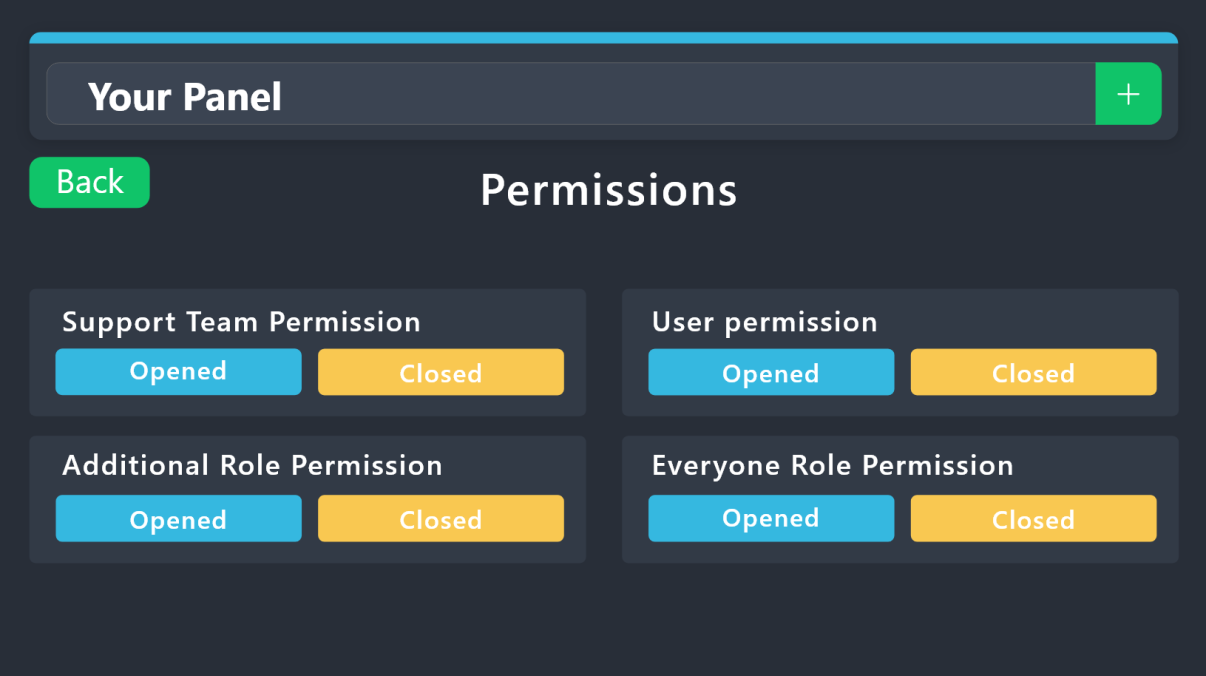 civic wagon
@round sandal refer to the embed above.
- Support Team
View ChannelOpened & Closed permissions - - User
View ChannelOpened permission - - User
View ChannelClosed permission - - Everyone
View ChannelOpened & Closed permissions -
round sandal
sorry for ping
but if i use the view server as role feature can I check if it is working ?
I am owner of the server
humble sequoiaBOT
View As Role feature
Discord's integrated View As Role feature will allow you to see how different groups of roles will have access to your server's channels. Even though, this feature isn't reliable for thoroughly testing Ticket Tool considering that the tickets are created based on User roles, and that Roles permissions are only used for Support Team Roles, and Additional Roles.
For testing Ticket Tool as a user we suggest you ask a friend to open a ticket for you as a regular member would do, or use an alternative account to simulate the same process to make sure everything is set properly.
civic wagon
round sandal
but if i use the view server as role feature can I check if it is working ?
I am...
^
iron nightBOT
Gave +1 Rep to @civic wagon

 balmy turret
i keep trying to /setup (i just added the bot) and it keeps saying interaction failed but the bot is not offline
its been like that for maybe 10 or 20 minutes im not sure
 south nimbus
Hello! I'm using tickets in a way, that later on I add another user to it. Is it possible to automatically send a message to the ticket channel, when I add a new user or use Add command? Like "Welcome XXX you've been added"?
 pine laurel
hi i paid for premium, but i still cant use it
 pseudo ravine
balmy turret
i keep trying to /setup (i just added the bot) and it keeps saying interaction f...
pseudo ravine
balmy turret
i keep trying to /setup (i just added the bot) and it keeps saying interaction f...
Hey there. Could you please run the /debug command and send the link here?
@dawn glade Could you also send the link?
pseudo ravine
south nimbus
Hello! I'm using tickets in a way, that later on I add another user to it. Is it...
Hey there. I don't believe that's possible. The message that sends is the /add command response
pseudo ravine
pine laurel
hi i paid for premium, but i still cant use it
Hey there. In what way can you not use it? Are you getting some sort of error or something?
jade topaz
Hi! How do I ping a certin role when tickets are opened
humble sequoiaBOT
1. Go into your Dashboard
2. Open your Panel Configs tab
3. Select the panel you want to ping your support on
4. Open the Ticket options menu
5. Click on Edit Ticket Message
6. In the Message Content use one of the role mention syntax (**{@Role Name}**/**{Role ID}**)
7. Save changes
Note: For this to work properly, Ticket Tool requires the Mention Everyone permission. Or the role must have the Allow anyone to @mention this role setting enabled
jade topaz
مرحبا
بدي اسال سؤال
كيف اقدر اعيد فتح تيكت تم اغلاقه
@civic wagon
@normal vine
@idle flint
jade topaz
Ok
civic wagon
You can also create arab support ticket from #🎫│make-a-ticket
jade topaz
Speak Arabic pls
jade topaz
civic wagon
Please do not ping our staff members.
Tell me
civic wagon
$articket
humble sequoiaBOT

فريق الدعم الفني العربي
عميلنا العزيز ان كنت تبحث عن مساعدة يرجى فتح تكت خاص بفريق الدعم الفني العربي
اذهب الى#🎫│make-a-ticket
ثم قم بلضغط على الايموجي الاتي (🇯🇴)
civic wagon
jade topaz
Tell me
^
civic wagon
jade topaz
I am open it tell me
إذا فتحت التذكرة ، فانتظر بصبر وسيدعمك شخص ما.
jade topaz
gilded verge
can you send screenshot?
I make a video because i have 138 bots in much dont function
jade topaz
rustic gale
Did you invite the bot?
Yes👍
jade topaz
gilded verge
can you send screenshot?
 jade topaz
jade topaz
jade topaz
I thing here is the sup of nai bot but i wrong but i send a screeshot of The bot ticket The nai isent function to
civic wagon
Discord limitation. Only 50 bots can have their slash commands registered in the server.
civic wagon
jade topaz
I thing here is the sup of nai bot but i wrong but i send a screeshot of The bot...
^
jade topaz
civic wagon
Discord limitation. Only 50 bots can have their slash commands registered in the...
Sad;-;but i put another bot before The 100 and He function
vague cosmos
Nothing we can do about it and I don't think that is true. You might try to search for a specfic command and it might find it.
jade topaz
vague cosmos
Nothing we can do about it and I don't think that is true. You might try to sear...
What you Think isent True?
rustic gale
civic wagon
Discord limitation. Only 50 bots can have their slash commands registered in the...
For real? 😮
civic wagon
Actually I rechecked after this. Some people state that it's 100. Though I experienced it at 50 and resolved it after kicking out some bots. However, there is indeed a limit on the number of integrations per server. I'll confirm it by tomorrow. Going to bed now
 gaunt flume
Yo guys
Is it possible to make more than 1 button without premium?

Could non-premium users create such triggers or forms?
 pseudo ravine
gaunt flume
Is it possible to make more than 1 button without premium?
pseudo ravine
gaunt flume
Is it possible to make more than 1 button without premium?
Hey there. Yes, you can have multiple panels/buttons if you don't have Premium
pseudo ravine
gaunt flume
Could non-premium users create such triggers or forms?
If you're talking about the Dropdown aspect, yes.
If you're talking about the FAQ, no. That is Sapphire Premium
green citrus
helo is there a way i can make it so if they close a ticket it automaticlyl deletes it
pseudo ravine
Hey there. You can disable Two Step Close by going to the Dashboard > Panel Configs > General
 twin merlin
Alguien sabe que es esto?
 pseudo ravine
Hola. De acuerdo con la configuración, solo puede tener 0 tickets abiertos en todo el servidor. ¿Eres un miembro del personal de ese servidor?
green citrus
pseudo ravine
Hey there. You can disable `Two Step Close` by going to the Dashboard > Panel Co...

where at
nevermind found it
twin merlin
pseudo ravine
Hola. De acuerdo con la configuración, solo puede tener 0 tickets abiertos en to...
Discula mis modales al no saludar primero, es que no entiendo mucho en ingles y google no me ayuda. No sabes como puedo solucionarlo?
pseudo ravine
¿Podría ir al Tablero > Configuraciones del panel > Límites > Enviar una captura de pantalla?
 pseudo ravine
Parece que la configuración ha cambiado. ¿Has cambiado algo?
pseudo ravine
Tienes varios paneles?
shut bolt
@pseudo ravine it's the global limit
pseudo ravine
oh wait, the one in Server Configs?
shut bolt
@twin merlin ve a la pestaña que dice Server Configs y mira el campo que dice Global Ticket Limit, juzgando por el pantallazo, está puesto a 0
shut bolt
pseudo ravine
oh wait, the one in Server Configs?
Yup
pseudo ravine
I keep forgetting about that one
shut bolt
twin merlin
Alguien sabe que es esto?
The error here says it's the across all panels so yeap
shut bolt
pseudo ravine
I keep forgetting about that one
Happens to the best 
twin merlin
pseudo ravine
Tienes varios paneles?
no
pseudo ravine
Sigue lo que dijo 𝖄𝖆𝖗𝖊𝖆𝖏. Él puede seguir ayudándote si lo necesitas.
shut bolt
pseudo ravine
Sigue lo que dijo 𝖄𝖆𝖗𝖊𝖆𝖏. Él puede seguir ayudándote si lo necesitas.
Nah you can help em if you want, just pointing out where to go 
Spanish
pseudo ravine
sometimes I feel like Google Translate doesn't work the best, but alright
shut bolt
DeepL is better
At least for some languages
Or even @robust sandal has 2 providers for translations
pseudo ravine
De nada, me alegro de que podamos ayudar. Si tiene otras preguntas/problemas, no dude en comunicarse nuevamente
 twilit rivet
Super new. Added the bot. At dashboard , hit manage under the server that has the bot. Nothing populates
 shut bolt
twilit rivet
shut bolt
twilit rivet
Try hard refreshing (Ctrl + Shift + R) the tab and give it a try
twilit rivet
shut bolt
Try hard refreshing (Ctrl + Shift + R) the tab and give it a try
Ty no luck
iron nightBOT
Gave +1 Rep to @shut bolt
 snow fable
Good no 1 answer me
 scenic plinth
You literally just asked your question 2 minutes ago, and had a ticket open 4 minutes ago before closing it.
humble sequoiaBOT
فريق الدعم الفني العربي
عميلنا العزيز ان كنت تبحث عن مساعدة يرجى فتح تكت خاص بفريق الدعم الفني العربي
اذهب الى#🎫│make-a-ticket
ثم قم بلضغط على الايموجي الاتي (🇯🇴)
snow fable
scenic plinth
You literally just asked your question 2 minutes ago, and had a ticket open 4 mi...
🙂
Oh no it’s 4 AM in Arab country 
shut bolt
twilit rivet
Ty no luck
Give me a second and I'll check something rq for you
shut bolt
twilit rivet
Ty no luck
https://tickettool.xyz/dashboard/901219391654473849/configs#pc-menu
You can use this direct URL
Ticket Tool - Ticketing without clutter - The #1 discord Ticketing bot
twilit rivet
It puts me in the same place as my screen shot. I hit manage and nothing happens
shut bolt
twilit rivet
It puts me in the same place as my screen shot. I hit manage and nothing happens
What browser and which version of it are you using?
twilit rivet
Chrome
shut bolt
twilit rivet
Chrome
Which version?
twilit rivet
114.0. 5735.119
shut bolt
twilit rivet
114.0. 5735.119
Try relogging and see if it makes any difference, if not please #🎫│make-a-ticket and we'll have a closer look
 fervent bobcat
Como consiguo el camo pink neón?
humble sequoiaBOT
⚠️ Está en el lugar equivocado
Brindamos soporte para el bot de Discord Ticket Tool y no le podemos ayudar con el problema que presenta.
- No sabemos a que equipo de soporte debería contactar para solucionar este problema, y desafortunadamente no podremos ayudarle acertadamente.
Si no tiene alguna duda relacionada a nuestro bot, Ticket Tool, por favor cierre este ticket.
shut bolt
@fervent bobcat
fervent bobcat
Whats
shut bolt
humble sequoia
Lee este mensaje @fervent bobcat
 sacred charm
the bot is telling me the application isnt responding what does that mean
rustic gale
sacred charm
the bot is telling me the application isnt responding what does that mean
«The application did not respond»
Are you seeing this message when you use a Ticket Tool command in a channel? It may be because the bot is missing permissions in that channel.
Try the following:
- Right-click the channel, select Edit Channel, then Permissions
- Scroll down to Advanced Permissions and add Ticket Tool there
- Make sure that View Channel and Send Messages are
for Ticket Tool
- Save the changes
- In the channel, use the /debug command to check for any other missing permissions
- If needed, go back to the Permissions menu and grant Ticket Tool any missing permissions
- Retry using the command you wanted to use and confirm that it works properly now.
sacred charm
ok thank you i will check
 brisk mauve
hi i have subscribed to ticket tool premium last month..how do i cancel the auto pay
balmy turret
pseudo ravine
Hey there. Could you please run the `/debug` command and send the link here?
<@...
i did and it said the application did not respond
just now
@pseudo ravine
rustic gale
balmy turret
i did and it said the application did not respond
The bot's missing the Send Messages permission in that channel
iron nightBOT
Gave +1 Rep to @rustic gale
 leaden tide
Hey, is there any way I can report a server to get ticket tool to leave a scam server?
vague cosmos
Hey @leaden tide developers can't make a bot leave a server as far I know.
Best what you can do is report the server to TnS at https://dis.gd/report
leaden tide
vague cosmos
Hey <@1058768145722134528> developers can't make a bot leave a server as far I k...
Hey thanks for the response, how ever bots developers can make a bot leave a server
iron nightBOT
Gave +1 Rep to @vague cosmos
leaden tide
So i wondered if ticket tool has a report system for maliciious servers
vague cosmos
I don't think so, but you can always ask support in a ticket (#🎫│make-a-ticket)
civic wagon
leaden tide
So i wondered if ticket tool has a report system for maliciious servers
We do not interfere in how a server uses the bot. If you feel it's being used in a way which violates discord ToS, you may report the server to discord itself at https://dis.gd/report
leaden tide
civic wagon
We do not interfere in how a server uses the bot. If you feel it's being used in...
thanks
iron nightBOT
Gave +1 Rep to @civic wagon
vague cosmos
@flat ivy what do you exactly mean by this: "I was trying to get the and tried copy paste and when I press get key and copy paste it not there"
vague cosmos
You can send it here.
 flat ivy
Ok
When u copy paste the script right it pop up and then i need the key for it so I press get key it said cop paste on google I don’t see the copy paste thing
It said it on mh clipboard
So i pressed control v
humble sequoiaBOT
⚠️ You're in the wrong place
We provide support for Ticket Tool Discord bot and cannot help you with whatever issue you have.
- We don't know which Support Team you should contact to get this issue resolved, and unfortunately we won't be able to accurately tell you.
If you don't have any further questions regarding our bot Ticket Tool, please close this ticket
flat ivy
And it does not show anything
vague cosmos
See above.
humble sequoiaBOT
@flat ivy
⚠️ You're in the wrong place
We provide support for Ticket Tool Discord bot and cannot help you with whatever issue you have.
- We don't know which Support Team you should contact to get this issue resolved, and unfortunately we won't be able to accurately tell you.
If you don't have any further questions regarding our bot Ticket Tool, please close this ticket
civic wagon
flat ivy
How i get the key i need help
What language do you speak?
flat ivy
English
civic wagon
humble sequoia
<@900845985343889438>
Kindly read this
vague cosmos
Did you read the message send by @humble sequoia? It's saying that we can't help you with your issue and we don't know where you should go.
flat ivy
Can i send you a screenshot shot
 humble sequoiaBOT
@flat ivy
⚠️ You're in the wrong place
We provide support for Ticket Tool Discord bot and cannot help you with whatever issue you have.
- We don't know which Support Team you should contact to get this issue resolved, and unfortunately we won't be able to accurately tell you.
If you don't have any further questions regarding our bot Ticket Tool, please close this ticket
flat ivy
It said it on my clipboard and i copy paste on google nothing showing up
civic wagon
Well, you're still in the wrong place. We cannot help you here.
vague cosmos
Please read the message send by @humble sequoia (again). It is your answer.
flat ivy
Do you know anyone could help me with this
vague cosmos
humble sequoia
<@900845985343889438>
Did you read the embed?
flat ivy
Do you know someone could help me with this
civic wagon
flat ivy
Do you know someone could help me with this
No.
flat ivy
I join the discord for this
vague cosmos
Which part of the embed isn't clear? This Discord gives support for @pseudo glen.
vague cosmos
Your not wasting our time, but you should learn to read messages more carefully. 🙂
vague cosmos
Yes you can get a premium key to get @humble sequoia but that has nothing to do with your issue. We can't help you with your issue here.
jade topaz
How to change this message?
 humble sequoiaBOT
The panel message is where people react to make a ticket. To customize it head over to your Dashboard --> Panel Configs -> Panel -> Edit Panel Message
vague cosmos
humble sequoia
Did you see this message?
jade topaz
How to change amount of tickets?
vague cosmos
What do you mean by that, exactly?
jade topaz
 vague cosmos
Dashboard > Panel Configs > Limits
 vague cosmos
You're not at the right place...
Dashboard > Panel Configs > Limits and there you can set the limit, @jade topaz.
jade topaz
Found it!
vague cosmos
Awesome!
jade topaz
vague cosmos
Awesome!
I made these, thanks a lot for helping me bro!
 iron nightBOT
Gave +1 Rep to @vague cosmos
vague cosmos
You can make them show all at one embed @jade topaz. Makes it even more clear.
jade topaz
vague cosmos
You can make them show all at one embed <@456226577798135808>. Makes it even mor...
How??!
humble sequoiaBOT
For more convenient use of multipanels, you can now combine panels on the dashboard. This will allow you to directly send the multipanel from the dashboard or via the $panel ID command.
Where can I find this?
You can find this setting on the Dashboard -> Panel Configs -> Panel -> Attached Panels
Note: if you're attaching all the panels to a panel called English, don't include English in the attached panel's box (If you do this, it will create a duplicate)
This will put all buttons from all of your panels on one message. The message is the panel message from the panel you're combining these panels in.
jade topaz
:( I'm so dumb
vague cosmos
No you aren't.
humble sequoiaBOT
@red burrow, we would love to help you, but if you don't tell us what you need help with we can't help you :(
vague cosmos
Also, can you turn off your caps? 🙂
Can you do /permissionlevel in the server you want to manage and send a screenshot of the result?
 chrome magnet
does anyone know how to get the key
vague cosmos
@jade topaz run it in the server you're trying to manage not this one.
@chrome magnet what key?
You don't have dashboard access ask the server owner to give a role you have access to access the dasboard.
humble sequoiaBOT
Any role you put there will have full access to the ticket tool dashboard. The server owner and users with admin permissions already have access to the dashboard.
Be careful of which roles to put here
 vague cosmos
Server owner can do that for you.
iron nightBOT
Gave +1 Rep to @vague cosmos
vague cosmos
Does anyone in the server has eventually the administrator permission?
chrome magnet
@vague cosmos like to get the tool
vague cosmos
@chrome magnet you can use @pseudo glen? Or do you want @humble sequoia?
Using a dashboard role is safer. 😉
No worries. Happy to help.
I hope to get Proficient soon and waiting for applications to open up.:D
chrome magnet
right
vague cosmos
vague cosmos
<@989271722324795434> you can use <@557628352828014614>? Or do you want <@722196...
Did you have any other questions @jade topaz?
@chrome magnet see the message I'm replying to. 🙂
iron nightBOT
Gave +1 Rep to @vague cosmos
vague cosmos
Awesome.
pseudo ravine
balmy turret
<@865714582613524491>

 azure frost
Can I make it so the ticxket pings the support roles?
humble sequoiaBOT
1. Go into your Dashboard
2. Open your Panel Configs tab
3. Select the panel you want to ping your support on
4. Open the Ticket options menu
5. Click on Edit Ticket Message
6. In the Message Content use one of the role mention syntax (**{@Role Name}**/**{Role ID}**)
7. Save changes
Note: For this to work properly, Ticket Tool requires the Mention Everyone permission. Or the role must have the Allow anyone to @mention this role setting enabled
jade topaz
подскажите пожалуйста , как подключится к серверу meredian ? я плохо ориентируюсь в дисскорде
vague cosmos
jade topaz
подскажите пожалуйста , как подключится к серверу meredian ? я плохо ориентируюс...
ты не в том месте
Мы обеспечиваем поддержку бота Discord для Ticket Tool и не можем помочь вам с любой проблемой, с которой вы столкнулись.
- Мы не знаем, в какую службу поддержки вам следует обратиться, чтобы решить эту проблему, и, к сожалению, не сможем вам сказать точно.
jade topaz
да я понимаю... но подскажите , как можно его здесь найти? я точно знаю, что этот сервер есть в дисскорде, но я плохо ориентируюсь у вас здесь , потому что все на английском языке
vague cosmos
Нет, мы поддерживаем Ticket Tool. Мы не можем помочь вам найти нужное место, извините.
 hazy tiger
How do I make a tiktok like this
 vague cosmos
Are that forms? Also I assume you mean Ticket Tool?
Because the screenshot doesn't give a lot of information.
Also I see your native language is Arabic, right?
hazy tiger
vague cosmos
Also I see your native language is Arabic, right?
Can you speak Arabic?
vague cosmos
$articket
humble sequoiaBOT
فريق الدعم الفني العربي
عميلنا العزيز ان كنت تبحث عن مساعدة يرجى فتح تكت خاص بفريق الدعم الفني العربي
اذهب الى#🎫│make-a-ticket
ثم قم بلضغط على الايموجي الاتي (🇯🇴)
hazy tiger
Nobody answers why
vague cosmos
أنا لا أتحدثها بنفسي ، لكن ترجمة Google تفعل ذلك.
hazy tiger
I also do not speak to anyone who does this
vague cosmos
لا يوجد سوى عدد قليل من أعضاء فريق الدعم الذين يتحدثون العربية ، ووقت الاستجابة 8 ساعات.
لكن ما هو سؤالك بالضبط؟
hazy tiger
hazy tiger
How do I make a tiktok like this
How do I do a question as shown in the picture
vague cosmos
For real, no tag for that in Arabic...
humble sequoiaBOT
A Discord Form lets the user answer individual questions in a pop-up Form, which then displays the answers in the ticket message. This can save time if you already know what you want to ask the user.
Setup Forms
Forms can be enabled under Panel Settings > Form Options > Edit Forms Options. In the new pop-up window, you can now enable and edit your own Form.
Form Options
You can add up to 5 questions in the Discord form. This is a Discord limitation. Each question can have a placeholder in the input field, a minimum and maximum input, multi-line, and also the option to have the answer required.
Options
Question Title ➞ Your Question goes here
Question Placeholder ➞ The placeholder text in the input field
Required ➞ If enabled, the user has to answer this question, to submit the form
Multi-Line Input ➞Allows the user to input multiple lines
Minimum and Maximum Input ➞ Set a minimum and maximum input value for the user
Displaying the Answer
To display the answers from the user, you need to enable Auto display form results on the ticket message as an additional embed
In case you don't want a second embed, go into your Panel Configs > Ticket Options > Edit Ticket Message. In there you use the variable {create.form.x} and just replace x with the number of your question. For example, the response to Question 1 can be displayed with {create.form.1}. If you don't use this variable, the response from the user is lost.
vague cosmos
أفترض أنك تريد ذلك؟
hazy tiger
humble sequoia
Where is this rom?
 vague cosmos
Under Forms
hazy tiger
That's right
 vague cosmos
نعم
hazy tiger
ماذا اضغط بعده
vague cosmos
هل قمت بحفظه؟
hazy tiger
eas
vague cosmos
إذا فتحت تذكرة جديدة الآن ، فسترى أسئلة النموذج أولاً.
hazy tiger
All right, thank you and sorry if you bothered me♥️🫶
vague cosmos
لا تقلق ونحن هنا للمساعدة! ❤️
vague cosmos
Where exactly? What are you trying to do?
In your server? Did you invite the bot and create a panel?
Can you send a screenshot of the error?
Ah can you access the dashboard?
Try to set it up via the dashboard.
 stark runeBOT
1. Invite Ticket Tool to your server
First you will want to invite the bot to your server. Once the bot is in your server, you can manage your server in the dashboard.
2. Create a Panel
To create a panel we are going to need to head over to the panel configs on the dashboard.
Once at the dashboard we will need to click Create Panel.
Enter a panel name (Fill in any optional settings you want).
Click Create Panel and your ready to get started with configuring your panel.
An example of a creating a panel is shown below.
3. Send the Panel to a Channel
Once you've created a panel on the dashboard you will need to send it to a channel using send on the dashboard.
Select the channel you want your panel to be created in and click send.
For other questions checkout $help faq.
An example of a sending a panel is shown below.
Having a Problem Sending the Panel?
Do $debug in a channel with Ticket Tool and make sure it has all the necessary Discord permissions.
vague cosmos
In case you need a guide, starting at step 2.
Let me know how it goes.
Of the bot? If it has the permissions below it should work fine.
humble sequoiaBOT
When first invited to your server, Ticket Tool should have the permissions shown below in order to ensure an appropriate functioning:
When customizing permissions for the different ticket participants, you must make sure Ticket Tool has the permissions you want it to grant to others, you can learn more about this here.
Missing Permissions
This error is a direct outcome of the bot missing permissions as depicted above. When troubleshooting this error we suggest you go through these steps:
- Use the </debug:1029783024264564765> command to check if the bot is lacking core role or channel permissions.
- Compare the category/channel's overrides and contrast them with the bot's roles to identify any permission denial that is breaking the functioning
- If you can't still figure it out, let our <@&540295656720302081> know so they can guide you through
Additional Resources
- If you are a server administrator and would like to understand more how to set up your server's permissions, we suggest checking the Discord Support Knowledge Base
- If you are a bot developer and are interested in the internal permission hierarchy we suggest you this part of the Discord Developer Docs
Important Note
- Giving Administrator permissions is NOT required and we do NOT encourage you to do unless you are trying to troubleshoot your permissions setup.
Bot should work then. 🙂
 west reef
Hello all, has anyone ever had the issue where the panel is set to raise tickets under a specific category, but instead it just raises them at the top of the server, outside of all categories? 😦
pseudo ravine
Hey there. Are you referring to Category Created/Opened?
west reef
Correct Jdog 🙂
pseudo ravine
Could you please send a screenshot of that page?
pseudo ravine
No, please keep them here. I don't do DM Support
west reef
No problem, thank you anyway - I don't want to post server screenshots in a public forum - it has names on there and I would rather keep that private. Thank you anyway regardless 🙂
pseudo ravine
No worries. Based on that, I'm assuming you have categories set then, yes?
west reef
Correct - hold on, let me let you slightly edited screenshots..
pseudo ravine
Sure

 west reef
You're a star, I knew it was something simple - fixed - thanks @pseudo ravine
iron nightBOT
Gave +1 Rep to @pseudo ravine
pseudo ravine
west reef
You're a star, I knew it was something simple - fixed - thanks <@865714582613524...
You're welcome, glad I could help. If you have any other questions/issues, don't hesitate to reach out again
 atomic barn
Gotta ask, is there a way for a ticket to close automatically after a set amount of time?
pseudo ravine
Hey there. You can set an Automation for that. However, it's a premium feature
atomic barn
Ah damn. I'm a admin on a server and half the time users forget or don't close tickets so yeah. Oh well.
Thx for that
pseudo ravine
You're welcome, glad I could help. If you have any other questions/issues, don't hesitate to reach out again
rustic gale
pine laurel
hi, why is my subscription not showing thru the app directory
Which server is your subscription on?
Give us the ID or name
don't send an invite link
 prisma imp
tava dançando agorinha a pouco parecendo invocar o capeta
pseudo ravine
Você precisa de ajuda com o Ticket Tool?
prisma imp
pseudo ravine
Você precisa de ajuda com o Ticket Tool?
Eu precisava antes, mas um moderador me ajudou
pseudo ravine
Se você não precisar de mais ajuda, por favor, não envie mais mensagens aqui. Você pode conversar em #💬│gen-chat-multilingual
pine laurel
rustic gale
Which server is your subscription on?
iOpTicX Community
rustic gale
pine laurel
iOpTicX Community
That server's subscription appears active
Are you the user who purchased the subscription?
Currently, subscriptions are handled only through the desktop and browser apps.
pine laurel
rustic gale
Are you the user who purchased the subscription?
i did
rustic gale
The mobile Discord app does not have the subscription feature.
You will need to log in through the desktop version or browser version
Navigate to your user settings -> Subscriptions -> Premium App Subscriptions
pine laurel
rustic gale
Navigate to your user settings -> Subscriptions -> Premium App Subscriptions
OOH thats where it is, TSYMM!
twilit tiger
Hey how to make the bot ping the support teams? when the ticket is created
humble sequoiaBOT
1. Go into your Dashboard
2. Open your Panel Configs tab
3. Select the panel you want to ping your support on
4. Open the Ticket options menu
5. Click on Edit Ticket Message
6. In the Message Content use one of the role mention syntax (**{@Role Name}**/**{Role ID}**)
7. Save changes
Note: For this to work properly, Ticket Tool requires the Mention Everyone permission. Or the role must have the Allow anyone to @mention this role setting enabled
vague cosmos
@twilit tiger see above. 👍🏻
vague cosmos
At the dashboard. Just follow the exact steps
 vague cosmos
I always use <@&RoleID>.
twilit tiger
@& then after that I do the role ID?
vague cosmos
Yes, including the<>
twilit tiger
k
vague cosmos
vague cosmos
I always use `<@&RoleID>`.
And the @& before the ID, exactly how I did write it here.
twilit tiger
Thanks
vague cosmos
No worries, make sure the bot can mention all roles or the role can be mentioned by everyone.
 harsh valley
How do I ping the user who made the ticket inside the automated embed message
vague cosmos
harsh valley
How do I ping the user who made the ticket inside the automated embed message
You can't ping inside a embed. You can show the ping but it wont give a notification.
vague cosmos
@twilit tiger is everything working for you?
@harsh valley how is it with your question?
 gaunt plinth
I have a problem when the number of takits reaches 48, it does not go down, it stays at the top when it is closed
vague cosmos
gaunt plinth
I have a problem when the number of takits reaches 48, it does not go down, it s...
Hey, what do you exactly mean by that? Can you share a screenshot of the issue so it's easier to understand?
Or do you mean that the closed ticket doesn't move to a category? In that case:
humble sequoiaBOT
1. Go into your Dashboard
2. Open your Panel Configs tab
3. Select the panel you want to grant access to
4. Open the Category options menu
5. Select the categories of your preference
6. Save changes
vague cosmos
@gaunt plinth that way you can set a closed category for a ticket, assuming you want that.
 opaque tapir
hey can i get some help please
how do i set up (make-a-ticket) in a server i have the bot in my server but i dont have it in a channel ?
how do i set that up ^ basically
humble sequoiaBOT
For more convenient use of multipanels, you can now combine panels on the dashboard. This will allow you to directly send the multipanel from the dashboard or via the $panel ID command.
Where can I find this?
You can find this setting on the Dashboard -> Panel Configs -> Panel -> Attached Panels
Note: if you're attaching all the panels to a panel called English, don't include English in the attached panel's box (If you do this, it will create a duplicate)
This will put all buttons from all of your panels on one message. The message is the panel message from the panel you're combining these panels in.
vague cosmos
@opaque tapir see above. 🙂
stark runeBOT
1. Invite Ticket Tool to your server
First you will want to invite the bot to your server. Once the bot is in your server, you can manage your server in the dashboard.
2. Create a Panel
To create a panel we are going to need to head over to the panel configs on the dashboard.
Once at the dashboard we will need to click Create Panel.
Enter a panel name (Fill in any optional settings you want).
Click Create Panel and your ready to get started with configuring your panel.
An example of a creating a panel is shown below.
3. Send the Panel to a Channel
Once you've created a panel on the dashboard you will need to send it to a channel using send on the dashboard.
Select the channel you want your panel to be created in and click send.
For other questions checkout $help faq.
An example of a sending a panel is shown below.
Having a Problem Sending the Panel?
Do $debug in a channel with Ticket Tool and make sure it has all the necessary Discord permissions.
vague cosmos
You can see this on how to setup the bot if you don't have a panel (start at step 2).
opaque tapir
oooo
vague cosmos
Let me know if you need any help with it.
vague cosmos
Yea
opaque tapir
when i authed into server i didnt uncheck
humble sequoiaBOT
When first invited to your server, Ticket Tool should have the permissions shown below in order to ensure an appropriate functioning:
When customizing permissions for the different ticket participants, you must make sure Ticket Tool has the permissions you want it to grant to others, you can learn more about this here.
Missing Permissions
This error is a direct outcome of the bot missing permissions as depicted above. When troubleshooting this error we suggest you go through these steps:
- Use the </debug:1029783024264564765> command to check if the bot is lacking core role or channel permissions.
- Compare the category/channel's overrides and contrast them with the bot's roles to identify any permission denial that is breaking the functioning
- If you can't still figure it out, let our <@&540295656720302081> know so they can guide you through
Additional Resources
- If you are a server administrator and would like to understand more how to set up your server's permissions, we suggest checking the Discord Support Knowledge Base
- If you are a bot developer and are interested in the internal permission hierarchy we suggest you this part of the Discord Developer Docs
Important Note
- Giving Administrator permissions is NOT required and we do NOT encourage you to do unless you are trying to troubleshoot your permissions setup.
That are the required permissions.
opaque tapir
can i share my link here for debug
vague cosmos
Can you send a screenshot of it instead? I can't see debug links (yet).
opaque tapir
ok np
vague cosmos
So I can help you with a screenshot of the debug response.
opaque tapir

 vague cosmos
Permissions are fine, what exactly doesn't send?
opaque tapir
When I click create a ticket
vague cosmos
Do you get an specific error?
opaque tapir
System failure missing permissions
vague cosmos
Can you try to re-send the panel?
opaque tapir
Still the same
I'll be missing something simple like a setting or something I am new to this so I am sorry
vague cosmos
Hmm, could you open a support ticket in #🎫│make-a-ticket so the staff can assist you with this?
No need to be sorry.
humble sequoiaBOT
━━ Chur Bruva's inquiry has been moved to a ticket ━━
opaque tapir
may i pm you?
vague cosmos
@opaque tapir please wait for a member of the support team to help you. Don't send me a Direct Message where you request if I can help you.
Thank you.
iron nightBOT
Gave +1 Rep to @opaque tapir
opaque tapir
okay apologies 🙂
vague cosmos
No worries, I am sure you'll get help real quick! 🙂
opaque tapir
so sorry i have seemed to have found my problem 😦 i gave ticket tool mod role and fixed my issue should i have done this?
vague cosmos
It can be a temporary fix, but I am sure the support team can have a fix that works without giving the mod role. 🙂
twilit tiger
Is it possible to make it so the owner of the ticket cannot close the ticket
Only the staff and support team roles can close the ticket.
vague cosmos
Dashboard > Panel Config > Buttons > Edit the close ticket > Support Team Only and add the support team roles under allowed roles should work.
@twilit tiger ^
twilit tiger
Thanks
vague cosmos
Enabling support team only should be enough, is what I've heard in the secret places of Discord. 🙂
@twilit tiger do you have any other questions? 🙂
 meager galleon
how do i let my ticket bot tag the support role when a ticket is opened
humble sequoiaBOT
1. Go into your Dashboard
2. Open your Panel Configs tab
3. Select the panel you want to ping your support on
4. Open the Ticket options menu
5. Click on Edit Ticket Message
6. In the Message Content use one of the role mention syntax (**{@Role Name}**/**{Role ID}**)
7. Save changes
Note: For this to work properly, Ticket Tool requires the Mention Everyone permission. Or the role must have the Allow anyone to @mention this role setting enabled
vague cosmos
@meager galleon see above. 🙂
meager galleon
vague cosmos
<@789880748077088798> see above. 🙂
thx!
vague cosmos
No problem, did you have any other questions?
meager galleon
no thats it thx
vague cosmos
Alright! Might you have any other questions in the future feel free to ask them. We're happy to help.
 misty fractal
I have the premium and normal bots on the server, but when I send the ticket board, it appears in the regular bot
vague cosmos
Hey @misty fractal did you switch bots on the dash?
misty fractal
vague cosmos
Hey <@524612785284448257> did you switch bots on the dash?
I do not know how
vague cosmos
You can do that under server configs or use /botswitcher.

@misty fractal let me know if it works.
misty fractal
vague cosmos
<@524612785284448257> let me know if it works.
Only one bot appears
 vague cosmos
Can you try to switch via the dashboard at server configs?
Also what is in the dropdown you see where it says Ticket Tool White?
misty fractal
vague cosmos
Also what is in the dropdown you see where it says **Ticket Tool White**?
 misty fractal
vague cosmos
Can you try to switch via the dashboard at **server configs**?
misty fractal
vague cosmos
Can you try to switch via the dashboard at **server configs**?
I can not
misty fractal
vague cosmos
Are you sure the premium bot is in the server?
Is it the yellow robot
vague cosmos
Yes @humble sequoia is the premium one, but does your server have premium?
misty fractal
vague cosmos
Does your server have premium?
I don't know
vague cosmos
You can see it at the left top of the dashboard. Like on my screenshot.
 humble sequoiaBOT
Ticket Tool - Ticketing without clutter - The #1 discord Ticketing bot
vague cosmos
What does it say for you by Premium Status?
Does it say Free?
misty fractal
vague cosmos
What does it say for you by **Premium Status**?
Does it say **Free**?
Yes, it is written for free
misty fractal
vague cosmos
It requires your server to have premium.
How do I get it
 rich sable
how did it not ping?
 pseudo ravine
Hey there. Did you add something to the Message Content?
humble sequoiaBOT

Premium can now be purchased directly through discord! Either in the app directory (server settings) or directly from the bots profile.
<:TTWarning:1034178155872784494> Important Information <:TTWarning:1034178155872784494>
ONLY purchase premium through ONE of the two Ticket Tool Bots. If you purchased premium on the primary bot (White logo) and plan to use the premium bot, don't kick the primary bot!
What's different?
 The Monthly price changed from
 $6.00 to $5.99

 Yearly subscriptions are not yet available
Don't kick the bot, otherwise, the subscription will be canceled automatically
You'll need to buy the subscription from a computer or on the Application Directory
You might need to run the /premium command on your server to sync the premium status with your dashboard
 A subscription can not be transferred between Servers
 rich sable
what?!!
vague cosmos
humble sequoia
@misty fractal ^
rich sable
pseudo ravine
Hey there. Did you add something to the Message Content?
<@& yes and the pinging perms
pseudo ravine
Did you save the changes?
rich sable
ye
pseudo ravine
Could you send a screenshot of the Message Content for the Ticket Message set in the Dashboard?
Dashboard > Ticket > Edit Ticket Message > Embed Editor > Send a screenshot
rich sable
 pseudo ravine
Do you have multiple panels?
rich sable
❌
pseudo ravine
Did you save changes after they created a ticket?
misty fractal
vague cosmos
<@524612785284448257> ^
Can I use the free premium vote?
vague cosmos
@pseudo ravine can you take over from me? I'm going to eat. ^
pseudo ravine
rich sable
ye
It won't update current tickets. Make a new ticket and see if it updated
rich sable
But why is it allowing people to see the ticket??
pseudo ravine
rich sable
why is allowing other poeple to see the ticket??!!?
Could you please go to the Dashboard > Permissions > Everyone Role Permissions > Edit Opened > Send a screenshot
pseudo ravine
misty fractal
Can I use the free premium vote?
Hey there, I'll be taking over for Meg. Yes you can
 rich sable
pseudo ravine
Could you please go to the Dashboard > Permissions > Everyone Role Permissions >...
rich sable
pseudo ravine
Could you please go to the Dashboard > Permissions > Everyone Role Permissions >...
Nvm, I Got it thank you.
iron nightBOT
Gave +1 Rep to @pseudo ravine
rich sable
What about the ping tho?
pseudo ravine
Since you updated the Message Content after a user created a ticket, Ticket Tool won't update the current message. Create a new ticket to see if it changed
pseudo ravine
misty fractal
<:PabloTiphat:983791053842837624>
Is that all you needed?
misty fractal
pseudo ravine
Is that all you needed?
Yes. Thanks
iron nightBOT
Gave +1 Rep to @pseudo ravine
pseudo ravine
misty fractal
Yes. Thanks
You're welcome, glad I could help. If you have any other questions/issues, don't hesitate to reach out again
pseudo ravine
Please don't mention anyone for support. Could you please elaborate your question?
 bright bronze
pseudo ravine
Please don't mention anyone for support. Could you please elaborate your questio...
bright bronze
pseudo ravine
Please don't mention anyone for support. Could you please elaborate your questio...
I want to be a rank support They heal tickets
pseudo ravine
What is your main langauge?
bright bronze
pseudo ravine
What is your main langauge?
Arab
pseudo ravine
هل يمكنك توضيح سؤالك؟ هل تسأل عن كيفية تعيين أدوار فريق الدعم؟
bright bronze
 bright bronze
pseudo ravine
هل يمكنك توضيح سؤالك؟ هل تسأل عن كيفية تعيين أدوار فريق الدعم؟
bright bronze
pseudo ravine
هل يمكنك توضيح سؤالك؟ هل تسأل عن كيفية تعيين أدوار فريق الدعم؟
I want this rank to see Tickets
this role
pseudo ravine
انتقل إلى لوحة المعلومات> لوحة المعلومات> عام> أدوار فريق الدعم
 pseudo ravine
 bright bronze
pseudo ravine
bright bronze
pseudo ravine
Thank you
iron nightBOT
Gave +1 Rep to @pseudo ravine
pseudo ravine
على الرحب والسعة ، سعيد لأنني استطعت المساعدة. إذا كانت لديك أي أسئلة / مشكلات أخرى ، فلا تتردد في التواصل معنا مرة أخرى
misty fractal
How does work like this
 humble sequoiaBOT
A Discord Form lets the user answer individual questions in a pop-up Form, which then displays the answers in the ticket message. This can save time if you already know what you want to ask the user.
Setup Forms
Forms can be enabled under Panel Settings > Form Options > Edit Forms Options. In the new pop-up window, you can now enable and edit your own Form.
Form Options
You can add up to 5 questions in the Discord form. This is a Discord limitation. Each question can have a placeholder in the input field, a minimum and maximum input, multi-line, and also the option to have the answer required.
Options
Question Title ➞ Your Question goes here
Question Placeholder ➞ The placeholder text in the input field
Required ➞ If enabled, the user has to answer this question, to submit the form
Multi-Line Input ➞Allows the user to input multiple lines
Minimum and Maximum Input ➞ Set a minimum and maximum input value for the user
Displaying the Answer
To display the answers from the user, you need to enable Auto display form results on the ticket message as an additional embed
In case you don't want a second embed, go into your Panel Configs > Ticket Options > Edit Ticket Message. In there you use the variable {create.form.x} and just replace x with the number of your question. For example, the response to Question 1 can be displayed with {create.form.1}. If you don't use this variable, the response from the user is lost.
misty fractal
humble sequoia
There is no button with this name panel sttings
vague cosmos
Where at the dashboard are you?
Also it's Panel Configs, that needs to be updated indeed.
misty fractal
I didn't understand
vague cosmos
Do you see Panel Configs at the dashboard?
gaunt plinth
vague cosmos
Hey, what do you exactly mean by that? Can you share a screenshot of the issue s...
 humble sequoiaBOT
1. Go into your Dashboard
2. Open your Panel Configs tab
3. Select the panel you want to grant access to
4. Open the Category options menu
5. Select the categories of your preference
6. Save changes
misty fractal
vague cosmos
Do you see **Panel Configs** at the dashboard?
Yep
vague cosmos
humble sequoia
@gaunt plinth make sure you have a category closed.
@misty fractal if you click that, you can follow the steps earlier to create the forms.
gaunt plinth
vague cosmos
<@838165651419168780> make sure you have a **category closed**.
<@52461278528444...
how can i know ?
misty fractal
vague cosmos
<@838165651419168780> make sure you have a **category closed**.
<@52461278528444...
Why is there no Arabic language in the bot?
vague cosmos
gaunt plinth
how can i know ?
Check the embed above.
vague cosmos
misty fractal
Why is there no Arabic language in the bot?
Because there isn't, but there is an Arabic support team.
 misty fractal
vague cosmos
Because there isn't, but there is an Arabic support team.
misty fractal
vague cosmos
Because there isn't, but there is an Arabic support team.
It is here on the server
vague cosmos
gaunt plinth
How many tickets are under the closed category?
@misty fractal see below.
gaunt plinth
vague cosmos
How many tickets are under the closed category?
47
humble sequoiaBOT
فريق الدعم الفني العربي
عميلنا العزيز ان كنت تبحث عن مساعدة يرجى فتح تكت خاص بفريق الدعم الفني العربي
اذهب الى#🎫│make-a-ticket
ثم قم بلضغط على الايموجي الاتي (🇯🇴)
gaunt plinth
48 *
vague cosmos
gaunt plinth
47
Hmm, can you try to create a second closed category and see if tickets go under there?
gaunt plinth
ok just 1 min
vague cosmos
Alright.
misty fractal
Now what do I do?
 gaunt plinth
vague cosmos
Hmm, can you try to create a second closed category and see if tickets go under ...
gaunt plinth
vague cosmos
Hmm, can you try to create a second closed category and see if tickets go under ...
They go down
vague cosmos
gaunt plinth
They go down
So they go to the newly created category?
pseudo ravine
Meg, do you want me to take over for one of them?
vague cosmos
misty fractal
Now what do I do?
You need to enable the form and add questions.
gaunt plinth
vague cosmos
So they go to the newly created category?
yes
vague cosmos
I'm fine Jdog, thanks.
vague cosmos
gaunt plinth
yes
I'd assume you had 50 channels under the old category.
gaunt plinth
vague cosmos
I'd assume you had 50 channels under the old category.
I didn't understand
vague cosmos
You can only have 50 channels under a category in Discord.
gaunt plinth
I see servers with more than 500 channels under a category in Discord
vague cosmos
Not possible.
gaunt plinth
I will take a picture and send it to you
vague cosmos
You can send it here.
@gaunt plinth but Discord has a limit of 500 channels total.
@misty fractal how is it going with the forms?
 full hazel
How long do I have to wait for my account after getting the ticket?
 lunar solar
full hazel
How long do I have to wait for my account after getting the ticket?
lunar solar
full hazel
How long do I have to wait for my account after getting the ticket?
Wait for account? Account for what?
misty fractal
vague cosmos
<@524612785284448257> how is it going with the forms?
I haven't completed it yet
vague cosmos
misty fractal
I haven't completed it yet
Alright, keep me updated! Also note you can only have five form questions per panel.
misty fractal
How do I do like this
 humble sequoiaBOT
The Drop-down menu or Select Menu replaces the buttons on your panel message and uses a drop-down menu with all of your panels. To set this up, go to your Panel Configs and select your main Panel.
<:Numbericons1:1018864164032225340> Enable Select Style
First you enable Select Style. Then you add an item in the Dropdown Editor. Now you can start editing your dropdown!
<:Numbericons2:1018864168041971712> Dropdown Editor
Each line in the dropdown editor represents a line in the drop down menu on discord. You can add more "Items", by clicking on
First you select a panel. That's the panel this option will open a ticket for. DONT select the same panel twice. Each option should have a different Panel
After that, you can put a Display. This is the title of this option and will appear in the drop down menu. The *Description can be set right after that, which will be below the title in grey.
Additionally you can select an emoji, that will be shown in front of each option. You can either manually input the ID of an emoji or select it in the selector.
Common Issues ⚠️
- Panel doesn't send? Make sure you have a valid emoji selected
- Option doesn't show up? Check if two options have the same panel in the DropDown Editor
$dropdown
vague cosmos
But since you're an Arabic speaker you can also open a Arabic ticket in #🎫│make-a-ticket so the Arabic Support Team can assist you in your native language.
misty fractal
vague cosmos
But since you're an Arabic speaker you can also open a Arabic ticket in <#571706...
Nobody answers there
vague cosmos
There is a limited amount of people who speak it native, ETA is 8 hours.
 safe stratus
Is there a way for me to write a message for people to see when a ticket is opened?
vague cosmos
You mean to log when a ticket is opened?
Or do you mean a message inside the ticket, when it's opened?
safe stratus
As in a auto message for them tell what to do when the ticket is open
safe stratus
vague cosmos
Or do you mean a message inside the ticket, when it's opened?
Yes!
humble sequoiaBOT
The Ticket Message is the first message sent by the bot on a new ticket. To customize it head over to your Dashboard ➞ Panel Configs ➞ Ticket ➞ Edit Ticket Message
vague cosmos
That is what you're looking for.
safe stratus
Thanks!
vague cosmos
No problem, happy to help!
 proper vessel
@vague cosmos
vague cosmos
proper vessel
<@143705466734641152>
If you're only going to ping me without any context: don't.
proper vessel
@vague cosmos
vague cosmos
@proper vessel do you need any help or not?
proper vessel
No
vague cosmos
Then why are you pinging me twice for no reason?
vague cosmos
proper vessel
No
Because it's kinda annoying / not needed, even when you don't need help.
 cursive phoenix
@proper vesselPlease dont randomly ping users.
If you need assistance with the bot please ask your question(s) etc here
If you do not need assistance, and looking just to chat please use #💬│general-chat
 odd stone
I keep getting an interaction failed message when testing ticket tool on my alt account. Not sure what changed. Maybe my wick bot changed permissions when I tested the lockdown feature. But I'm not sure what may have changed.
vague cosmos
Hey what are you trying to do exactly?
odd stone
Open a ticket with my alt account (non-staff)
vague cosmos
Does it work on your main account?
odd stone
Yep
vague cosmos
Do you have any blacklisted roles? Did you limit who can create a ticket?
odd stone
Nope.
vague cosmos
Can you run other commands such as $ping on your alt?
vague cosmos
Hmm, can you try to open a ticket again? Interaction failed is mostly temporay.
odd stone
Still the same.
vague cosmos
Hmm, can you try to re-send the panel and try to mke a ticket?
vague cosmos
No problem, happy to help! Did you have any other questions?
odd stone
Not at the moment. You've been awesome.
vague cosmos
Happy to help, have a nice day
odd stone
You as well.
misty fractal
humble sequoia
I did not mean the drop-down list, I meant how to send messages and pictures from the bot
misty fractal
vague cosmos
You need premium for that, <@524612785284448257>.
I have one
humble sequoiaBOT
The panel message is where people react to make a ticket. To customize it head over to your Dashboard --> Panel Configs -> Panel -> Edit Panel Message
vague cosmos
Under embed editior - 1 you can insert images.
misty fractal
humble sequoia
where is that
vague cosmos
It's explained exactly above the image. Read it carefully
misty fractal
vague cosmos
Under **embed editior - 1** you can insert images.
Can't put a picture

