#🆘│community-support
1 messages · Page 53 of 1
 keen sail
 vague cosmos
... I told you not to ping me.
You changed the panel mentioned above, so no need to change that.

 vague cosmos
Hmm, you're native language is Arabic right?
keen sail
yes
 humble sequoiaBOT

فريق الدعم الفني العربي
عميلنا العزيز ان كنت تبحث عن مساعدة يرجى فتح تكت خاص بفريق الدعم الفني العربي
اذهب الى#🎫│make-a-ticket
ثم قم بلضغط على الايموجي الاتي (🇯🇴)
vague cosmos
That might be easier, so someone who speaks Arabic can assist you.
keen sail
Ok thanks
vague cosmos
No worries, sorry I wasn't able to help you direct.
 sharp condor
Failed: Invalid Form Body components[0].components[0].emoji.name[BUTTON_COMPONENT_INVALID_EMOJI]: Invalid emoji
Why does it keep telling me this even tho It had admin perms?>
 scenic plinth
 twilit tiger
I there a limit on how many tickets you can make
twilit tiger
I there a limit on how many tickets you can make
Discord limits 500 channels a server and 50 to each category. Depending on the server, they may also have implemented a custom limt either globally or per panel. If this happens, it will show up in a message when you hit the limit telling you what the limit is,
scenic plinth
sharp condor
Failed: `Invalid Form Body
components[0].components[0].emoji.name[BUTTON_COMPONE...
Depending on what it is you are doing, there is an emoji you have set on your panel Ticket Tool cannot use, or you simple inputted the emoji wrong.
sharp condor
scenic plinth
Depending on what it is you are doing, there is an emoji you have set on your pa...
Ah let me see
sharp condor
scenic plinth
Depending on what it is you are doing, there is an emoji you have set on your pa...
Failed to send: Access Denied (Ticket Tool doesn't have permission to view or send into this channel)
That's what it tells me on the sit
It has admin
scenic plinth
Yes... so it now doesn't have access to send the panel to the channel or again, your emoji(s) you have set on either your panel buttons or messages are ones Ticket Tool cannot use.
 rustic gale
«Invalid emoji»
This means that you entered into an emoji field something that the bot doesn't recognize as a valid emoji.
Which emoji field? It depends on what's the action that causes the error message to appear. It's usually the Create Ticket button, or a dropdown emoji field if you're using dropdowns.
Why doesn't the bot accept it as valid? That depends too. It's possible that
- you wrote text there, instead of an emoji (or in addition to an emoji)
- you entered a custom emoji code incorrectly
- you entered a code for a custom emoji from a server that the bot is not a member of
- you're on iPhone and entered an emoji using the phone's emoji pad (use the emoji selector in the website instead)
sharp condor
scenic plinth
Yes... so it now doesn't have access to send the panel to the channel or again, ...
I used the one they give me
Nvm I got it. It's becasue I added To create a ticket react with to the emoji part
scenic plinth
How come you didn't read the reply on your way to find the question to say it was not answered?
twilit tiger
oh ok didnt see it because it was not mentioned
I do have another confusion
Is it possilbe to add a button to close the ticket with request
So it requestes the user (the person who created the ticket) to close the ticket
I dont just want to close the ticket, I want the user to accept it to be closed so that they still have the option to leave it open and to decline that request in case they have something else to ask.
 civic wagon
twilit tiger
I dont just want to close the ticket, I want the user to accept it to be closed ...
civic wagon
twilit tiger
I dont just want to close the ticket, I want the user to accept it to be closed ...
Dashboard > Panel Config > General > Two Step Close 
You should be able to customize the message from:
Ticket > Close Ask Message
sharp condor
scenic plinth
*How come you didn't read the reply on your way to find the question to say it w...
What do you mean?
civic wagon
It wasn't meant for you probably
sharp condor
civic wagon
It wasn't meant for you probably
Got you
scenic plinth
No it wasn't, people just think its an amazing idea to make comments and then get replies only to immediately delete it.
 sturdy frigate
So i am back and the thread for tickets is not working for my tickets anymore and i cant figure out where i am going wrong. the tickets wont make the threads now???
 uneven bear
Anything i did wrong that it did not ping the-
 sturdy frigate
So i am back and the thread for tickets is not working for my tickets anymore an...
sturdy frigate
sturdy frigate
So i am back and the thread for tickets is not working for my tickets anymore an...
Okay so here is an update, All of them work EXCEPT the 2 i circled but the setting are EXACTLY the same as the other 6 so idk why these 2 wont work?!?!?!?

 covert swallow
sturdy frigate
Okay so here is an update, All of them work EXCEPT the 2 i circled but the setti...
covert swallow
sturdy frigate
Okay so here is an update, All of them work EXCEPT the 2 i circled but the setti...
Permissions?
covert swallow
uneven bear
Anything i did wrong that it did not ping the-
The what?


 sturdy frigate
all of the permissions for each ticket to have a thread is set like this. ALL the same. yet the 2 circled ones in the image i provided wont provide a thread like the others and idk why.
 covert swallow
 dapper girder
Stuff like that?
dapper girder
Stuff like that?
Looks like a really long panel message with multipanel (see below
humble sequoiaBOT
For more convenient use of multipanels, you can now combine panels on the dashboard. This will allow you to directly send the multipanel from the dashboard or via the $panel ID command.
Where can I find this?
You can find this setting on the Dashboard -> Panel Configs -> Panel -> Attached Panels
Note: if you're attaching all the panels to a panel called English, don't include English in the attached panel's box (If you do this, it will create a duplicate)
This will put all buttons from all of your panels on one message. The message is the panel message from the panel you're combining these panels in.
 covert swallow
sturdy frigate
all of the permissions for each ticket to have a thread is set like this. ALL th...
covert swallow
sturdy frigate
all of the permissions for each ticket to have a thread is set like this. ALL th...
Server side perms good as well?
sturdy frigate
covert swallow
Server side perms good as well?
they should be since again everything is the same, And where these 2 post at two others go to the same spot and work perfectly fine.
covert swallow
And absolutely nothing changed between it working and not working?
dapper girder
covert swallow
Looks like a really long panel message with multipanel (see below
Yea I was trying that below but Im kinda confused.
Im always doing wrong im working on it trying to see what i did wrong
covert swallow
What part is confusing you
dapper girder
Like the part on how they have the text in like an embed
covert swallow
Thays done through the panel message
sturdy frigate
covert swallow
And absolutely *nothing* changed between it working and not working?
if this is refering to me than no. Nothing changed.
covert swallow
dapper girder
You need Gold for that?
Some parts yes some parts no, the body of the embed is free
covert swallow
sturdy frigate
if this is refering to me than no. Nothing changed.
Hmm, interesting
dapper girder
covert swallow
Some parts yes some parts no, the body of the embed is free
oh ok thank you
sturdy frigate
covert swallow
Hmm, interesting
see it does for the others but those 2 it just wont. I even went to the lengths of giving Ticket tool adminisstrative abilities and still not doing it
 covert swallow
Is there an error does it just.... not do it
sturdy frigate
no it does. thats the # 0009 & 0004 tickets
no errors nothing, they send do everything right just WONT send the thread like you see ticket 0002 doing
covert swallow
I have no idea off the top of my head and its about 2 am for me, try to open a ticket here and another support member who isnt half asleep may be able to help you further
 still lava
Hello, why did the closed tickets still stay in [Category-Open] that I set, even though they've closed? It would be appreciated if anyone could help me to solve this issue.
 civic wagon
still lava
Hello, why did the closed tickets still stay in [Category-Open] that I set, even...
civic wagon
still lava
Hello, why did the closed tickets still stay in [Category-Open] that I set, even...
just confirming, you've set a closed category and tickets were moved there right?
still lava
yep, it works fine before 0054
 civic wagon
still lava
yep, it works fine before 0054
civic wagon
still lava
yep, it works fine before 0054
Most probably you hit the limit of 50 channels per category
if you can check that once
still lava
civic wagon
if you can check that once
oh, this is the limitation that is set by Discord, right?
civic wagon
yes
still lava
Got it, I know how to solve it now.
sturdy frigate
covert swallow
I have no idea off the top of my head and its about 2 am for me, try to open a t...
K I can do in the morning it's midnight for me xD
civic wagon
There's a way around that too
 still lava
civic wagon
There's a way around that too
still lava
civic wagon
There's a way around that too
Wow, this is helpful. Thx, mate.
civic wagon
Happy to help ^^
uneven bear
covert swallow
The what?
I want to ping a person in the ticket but it did not ping anything I did wrong?
uneven bear
civic wagon
Happy to help ^^
Hi, mind helping me for a bit
vague cosmos
Don't ping for help, but what did you do?
uneven bear
vague cosmos
Don't ping for help, but what did you do?
Is it you?
civic wagon
uneven bear
I want to ping a person in the ticket but it did not ping anything I did wrong?
Please provide screenshot too so that it's easier to see
uneven bear
 civic wagon
Are you trying to ping a user or a role?
uneven bear
User
uneven bear
Means it will be <866632167449952286>
Uhh did you just give Ur phone number randomly?
vague cosmos
Not sure what you mean, but I would remove your phone number.
civic wagon
uneven bear
Means it will be <866632167449952286>
You need to add @ before the ID
 pulsar heath
Yeaa i my phone number is registered in coat and prime
uneven bear
civic wagon
You need to add @ before the ID
Oh ok so that's it?
pulsar heath
Please help me
uneven bear
@pulsar heath tell me in hindi
vague cosmos
pulsar heath
Yeaa i my phone number is registered in coat and prime
And what is your exact question?
pulsar heath
Meri I'd ban ho gayi hai
civic wagon
@pulsar heath Apna phone number to mat daalo xD. Ye Ticket Tool bot ka support server hai. Agar koi ID ban hui hai to us server ko contact karo.
uneven bear
Acha ban hogyi matlab
civic wagon
uneven bear
Oh ok so that's it?
Yes.
uneven bear
Teri id ban hui usme ticket tool kya karega
Can someone give link to dashboard I am too lazy :/
humble sequoiaBOT

Ticket Tool - Ticketing without clutter - The #1 discord Ticketing bot
 oak sapphire
Heya, is there a way to make a button for turning automation on and off?
vague cosmos
Automations is a premium only feature.
Which you switch at the dashboard if you have premium.
@oak sapphire
oak sapphire
I know, i have premium. I just wanted to know if there's an automation button that can be attached to the ticket instead of using commands for it
vague cosmos
I don't believe so
 iron nightBOT
Gave +1 Rep to @vague cosmos
 teal grail
vague cosmos
I don't believe so
teal grail
vague cosmos
I don't believe so
hmm
teal grail
oak sapphire
I know, i have premium. I just wanted to know if there's an automation button th...
yes you can, i guess
in Limits
where
 vague cosmos
Isn't that only to disable the options to create tickets? Seems not like an automation.
vague cosmos
This server has premium via Discord, that is how.
teal grail
vague cosmos
Isn't that only to disable the options to create tickets? Seems not like an auto...
Technically it's automatic
vague cosmos
@jade topaz if you hover your mouse over it, you'll see it.
I believe you get it on both bots too if you get premium via Discord.

That is not something we can help you with here, as it has nothing to do with @pseudo glen.
Did you have any other questions, about Ticket Tool?
 unique atlas
how to set ticket system in own discord
 stark runeBOT
1. Invite Ticket Tool to your server
First you will want to invite the bot to your server. Once the bot is in your server, you can manage your server in the dashboard.

2. Create a Panel
To create a panel we are going to need to head over to the panel configs on the dashboard.
Once at the dashboard we will need to click Create Panel.
Enter a panel name (Fill in any optional settings you want).
Click Create Panel and your ready to get started with configuring your panel.
An example of a creating a panel is shown below.

3. Send the Panel to a Channel
Once you've created a panel on the dashboard you will need to send it to a channel using send on the dashboard.
Select the channel you want your panel to be created in and click send.
For other questions checkout $help faq.
An example of a sending a panel is shown below.
Having a Problem Sending the Panel?
Do $debug in a channel with Ticket Tool and make sure it has all the necessary Discord permissions.
 vague cosmos
Ik kan je eventueel in het Nederlands helpen, aangezien ik zie dat je Nederlands bent.
@unique atlas maar zie de embed hierboven, laat maar weten of het lukt.
unique atlas
ja waar staat panel
vague cosmos
Ben je in het dashboard?
unique atlas
ja denk het
humble sequoiaBOT
Ticket Tool - Ticketing without clutter - The #1 discord Ticketing bot
unique atlas
ben nu bij servers beheren
vague cosmos
Selecteer je server en je zal iets zien als dit.
 unique atlas
ik kan zegmaar niet selecteren er staat alleen beheren en dat werkt niet
vague cosmos
Kun je eens een screenshot sturen van wat je precies ziet?
unique atlas
hoe stuur ik ss
vague cosmos
Als je een screenshot hebt gemaakt (prntscr knop) kun je die gewoon hier plakken.
vague cosmos
Wat voor OS heb je?
vague cosmos
Ctrl+prntscr volgens mij, heb zelf geen Windows maar je ziet dit zeker?
 unique atlas
ja dat
vague cosmos
Oke en de manage knop werkt niet? Kun je eens in de Discord server die je wilt beheren het volgende commando uitvoeren en een screenshot van het resultaat maken https://support.microsoft.com/nl-nl/windows/het-knipprogramma-gebruiken-om-schermopnamen-vast-te-leggen-00246869-1843-655f-f220-97299b865f6b#:~:text=Press Ctrl %2B PrtScn keys.,that you want to capture.
/permissionlevel
Mocht een screenshot niet lukken, kun je me dan zeggen wat het resultaat is?
unique atlas
er staat permissionlevel 0
vague cosmos
Dan heb je geen dashboard access, je moet de server owner vragen om een rol die je hebt als dashboard rol toe te voegen.
humble sequoiaBOT
Any role you put there will have full access to the ticket tool dashboard. The server owner and users with admin permissions already have access to the dashboard.
Be careful of which roles to put here
 unique atlas
oke
vague cosmos
Als dat is gedaan kun je wel in het dashboard. 🙂
unique atlas
oo oke 1 sec hoor
vague cosmos
Neem de tijd, het is warm. Geen haast.
unique atlas
ja zeker haha
ze hebben gedaan maar hij doet niet start hem even opnieuw op de ticket tool
humble sequoiaBOT
Don't see your server in the dashboard?
You will possibly need to relog. Look below to see the steps on how to relog.
How to relog in the Dashboard.
Note:
You need one of these 3 things to access the dashboard.
1. Server Owner (Level: 6)
2. Server Administrator (Level: 4)
3. Dashboard Role (Level: 2)
:warning: You can check your level using the </permissionlevel:1029797400174399542> command on your Discord Server
User permission level with Ticket Tool
@User is permission level: 0 (User)
```» *If it shows that your permission is **0**, you don't have any of the above **3 things** to manage the dashboard.*
**See the Image below on how to relog:** vague cosmos
Even opnieuw inloggen werkt meestal. 🙂
unique atlas
nope
vague cosmos
Nog steeds niet? Kun je nog eens /permissionlevel doen?
Als het nog steeds 0 is, heeft hij wel de save button ingedrukt?
unique atlas
nogsteeds 0 wacht even hoor
vague cosmos
Als de rol is toegevoegd, moeten ze wel op de save knop drukken.
 vague cosmos
Ja klopt, als ze naar het dashboard gaan, kunnen ze het doen bij Server Configs.
unique atlas
ja
vague cosmos
Daar kun je dashboard roles toevoegen, daarna klik je de save knop en zou jij - mits je de rol hebt - toegang moeten hebben tot de dash.
unique atlas
ja heb het gezegd ben even snel eten
vague cosmos
Geen probleem, smakelijk! Geef maar een ping als je terug bent. 🙂
unique atlas
ik laat je weten
 fair idol
it’s english only
vague cosmos
@fair idol hi do you need any help? Also support can be done in their native language too.
teal grail
fair idol
it’s english only
here you can ask for help in any language
unique atlas
het is gelukt bedankt
fair idol
vague cosmos
<@949414421220974602> hi do you need any help? Also support can be done in their...
no but 1 questions are u english
vague cosmos
Yes, but not native.
humble sequoiaBOT

⚠️ You're in the wrong place
We provide support for Ticket Tool Discord bot and cannot help you with whatever issue you have.
- We don't know which Support Team you should contact to get this issue resolved, and unfortunately we won't be able to accurately tell you.
If you don't have any further questions regarding our bot Ticket Tool, please close this ticket
vague cosmos
humble sequoia
@buoyant perch
Read the above message, send by @humble sequoia.
There is the answer to your question(s).
rustic gale
You're in the wrong place, pal
We can't help you here
We don't know what's the right place, but it's not here.
We don't know.
vague cosmos
- Don't get banned.
- We don't know what you should do.
Which part of "this is not the right place" and "we can not help you" isn't clear?
For what..? That we told you we can't help you?
 gilded verge
@buoyant perch, who told you to join the Ticket Tool Support discord server?
nobody
so find their server with the problem yourself because as mentioned few times before: We can't help you
uneven bear
How can I make ticket tool do this and when this happens, does all my work on tickets in dashboard gets deleted or it will be just like a shift
 humble sequoiaBOT
The Drop-down menu or Select Menu replaces the buttons on your panel message and uses a drop-down menu with all of your panels. To set this up, go to your Panel Configs and select your main Panel.
<:Numbericons1:1018864164032225340> Enable Select Style
First you enable Select Style. Then you add an item in the Dropdown Editor. Now you can start editing your dropdown!
<:Numbericons2:1018864168041971712> Dropdown Editor
Each line in the dropdown editor represents a line in the drop down menu on discord. You can add more "Items", by clicking on 

First you select a panel. That's the panel this option will open a ticket for.  DONT select the same panel twice. Each option should have a different Panel
After that, you can put a Display. This is the title of this option and will appear in the drop down menu. The *Description can be set right after that, which will be below the title in grey.
Additionally you can select an emoji, that will be shown in front of each option. You can either manually input the ID of an emoji or select it in the selector.
Common Issues ⚠️
- Panel doesn't send? Make sure you have a valid emoji selected
- Option doesn't show up? Check if two options have the same panel in the DropDown Editor

$dropdown
uneven bear
Whoever did it thank you!!
uneven bear
I had a drop down that got deleted by a person by mistake, how do I send the drop-down again?
rustic gale
What do you mean it “got deleted”?
vague cosmos
uneven bear
I had a drop down that got deleted by a person by mistake, how do I send the dro...
Did you mean the message in Discord got deleted?
uneven bear
vague cosmos
Did you mean the message in Discord got deleted?
Yes
vague cosmos
You can just re-send the panel from the dashboard in that case.
Do you know how, @uneven bear?
uneven bear
vague cosmos
Do you know how, <@879624464931885126>?
No brother idk how 😭
uneven bear
vague cosmos
Dashboard > Panel Config > Send
Thanks! And can i add a channel name in my ticket message?
iron nightBOT
Gave +1 Rep to @vague cosmos
vague cosmos
In the message when you create a ticket?
uneven bear
vague cosmos
In the message when you create a ticket?
No brother, the message which comes in embed

Like you there ^^
vague cosmos
Ah, yes you can. You'll need to use <#ID>.
humble sequoiaBOT
The Ticket Message is the first message sent by the bot on a new ticket. To customize it head over to your Dashboard ➞ Panel Configs ➞ Ticket ➞ Edit Ticket Message
 uneven bear
I have to add #??
vague cosmos
Yes, can you paste the ID here so I can give you the exact format?
uneven bear
And btw how do u get a channel id 😁
humble sequoiaBOT
How do I get the ID of Roles/Channels/Emojis?
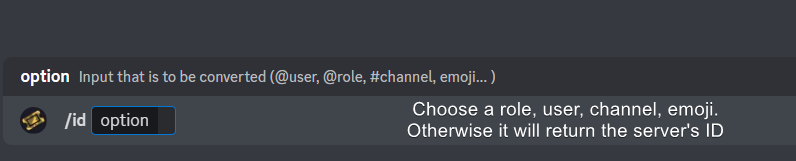
Ticket Tool has a useful command that helps you get the ID of various things like channels, roles, emojis, and your server.
Just use the command </id:1029797400174399546> <#channel/@role/:emoji:>. Now copy everything, including the brackets <...>, to your dashboard (or wherever you want it)
If you want the server ID, just use the command without any option.
Examples:
Server ID: $id ➝
509192800865353738
Roles: $id @Role ➝@humble sequoia
Channel: $id #channel ➝#🤖│bot-spam
User: $id @user ➝@copper owl
Emoji: $id➝

 uneven bear
Okkk
 keen hull
how do i make it so that only moderators can close tickets
vague cosmos
Hey @keen hull, at the dashboard go to panel configs and then buttons. There edit the close ticket button and make it support team only.
uneven bear
1111188604904017960
vague cosmos
uneven bear
1111188604904017960
[#1111188604904017960](/guild/509192800865353738/channel/1111188604904017960/) is what you need to use then.
uneven bear
vague cosmos
`<#1111188604904017960>` is what you need to use then.
Thanks brotha!! Really thankful #📈│reviews now!
iron nightBOT
Gave +1 Rep to @vague cosmos
vague cosmos
No worries, happy to help.
vague cosmos
vague cosmos
Hey <@464557489468473394>, at the dashboard go to panel configs and then **butto...
@keen hull did this work for you?
keen hull
vague cosmos
<@464557489468473394> did this work for you?
yeah thank you
iron nightBOT
Gave +1 Rep to @vague cosmos
vague cosmos
No worries, happy to help!
 primal marten
how can I open a ticket?
vague cosmos
Answerd below
primal marten
always when I make /add there is wrote : This channel isnt a ticket
vague cosmos
Ah, are you sure the channel is a ticket, @primal marten?
primal marten
I dont know how to do it as ticket
vague cosmos
Did you setup the bot?
primal marten
yeah
vague cosmos
Did you send the panel to your Discord server?
primal marten
no how?
stark runeBOT
1. Invite Ticket Tool to your server
First you will want to invite the bot to your server. Once the bot is in your server, you can manage your server in the dashboard.
2. Create a Panel
To create a panel we are going to need to head over to the panel configs on the dashboard.
Once at the dashboard we will need to click Create Panel.
Enter a panel name (Fill in any optional settings you want).
Click Create Panel and your ready to get started with configuring your panel.
An example of a creating a panel is shown below.
3. Send the Panel to a Channel
Once you've created a panel on the dashboard you will need to send it to a channel using send on the dashboard.
Select the channel you want your panel to be created in and click send.
For other questions checkout $help faq.
An example of a sending a panel is shown below.
Having a Problem Sending the Panel?
Do $debug in a channel with Ticket Tool and make sure it has all the necessary Discord permissions.
vague cosmos
Read the third embed. ^
primal marten
thanks
vague cosmos
No worries, did you have any other questions?
primal marten
how long is ticket tool for free?
vague cosmos
It will always be free, but you can support the developer (and unlock amazing features) by buying premium.
@primal marten you can also get free premium by voting, run $vote in #🤖│bot-spam for more information about that.
primal marten
thank you so much
vague cosmos
No problem, did you have any other questions?
primal marten
no not at the moment:)
vague cosmos
Alright, feel free to drop them here if you've more questions. For now have a nice day.
 vague cosmos
Alright, does the bot have all the required permissions?
 nimble geyser
Oh, now it works thanks @vague cosmos !
vague cosmos
No worries; bots don't see edits with a ping. 😉 Did you have any other questions?
 jade topaz
how do i put it where people can make 2 tickets instead of one
vague cosmos
jade topaz
how do i put it where people can make 2 tickets instead of one
Hey! Dashboard > Server Config > Global limit
jade topaz
can you send link
humble sequoiaBOT
Ticket Tool - Ticketing without clutter - The #1 discord Ticketing bot
jade topaz
ty

 pseudo ravine
Could you go take a screenshot of the settings you changed?
 teal grail
It's not that you have to move.
pseudo ravine
Could you send a screenshot of the whole page?
teal grail
He is in Server Confis.
jade topaz
ok
pseudo ravine
Go to Panel Configs > Limits > Send a screenshot of Tickets Open
jade topaz
 pseudo ravine
Panel Configs please
jade topaz
oh
thank you i got it i forgot its panel u just saw u saw go to pannel configs
wait who do i say ty to
teal grail
jade topaz
This option means that only 3 tickets could be open at the moment.
In server.
pseudo ravine
jade topaz
thank you i got it i forgot its panel u just saw u saw go to pannel configs
You're welcome, glad I could help. If you have any other questions/issues, don't hesitate to reach out again 
jade topaz
thank you @pseudo ravine
iron nightBOT
Gave +1 Rep to @pseudo ravine
jade topaz
or who
 dense bluff
How can I cancel ticket premium? Its great that y’all made it impossible to find
 robust pivot
dense bluff
How can I cancel ticket premium? Its great that y’all made it impossible to find
robust pivot
dense bluff
How can I cancel ticket premium? Its great that y’all made it impossible to find
$billing
Opps
scenic plinth
It's amazing how rather respectful you came in 🙂
If you subscribed via Discord, which we don't control their designs, you visit Subscriptions in your user settings and from there manager any ongoing subscriptions to the app.
If you have issues with it, feel free to complain to Discord as we are not responsible for "impossible to find features" on their app.
dense bluff
Guess subscriptions can only be found on PC?
scenic plinth
Yes, that is what it says. You can only manage subscriptions on PC or Discord wWeb Browser.
robust pivot
scenic plinth
Yes, that is what it says. You can only manage subscriptions on PC or Discord wW...
Hey question do you know how send those embeds?
Like these
 scenic plinth
You mean tags? There is a list of them in #🤖│bot-spam by using $commands
robust pivot
Oh I forgot about that 💀 thanks for reminding me.
scenic plinth
dense bluff
How can I cancel ticket premium? Its great that y’all made it impossible to find
Also apologies for the lack of common sense. Though, I cannot fix a lack of braincells 🙂
robust pivot
Thanks @scenic plinth
iron nightBOT
Gave +1 Rep to @scenic plinth
uneven bear
How to add emoji in ticket message the embed one
civic wagon
uneven bear
How to add emoji in ticket message the embed one
Get the emoji ID by using the $id command and paste it there
Make sure the emoji is from a server where tickettool is there as well
uneven bear
civic wagon
Get the emoji ID by using the $id command and paste it there
What bracket should i add
humble sequoiaBOT
How do I get the ID of Roles/Channels/Emojis?
Ticket Tool has a useful command that helps you get the ID of various things like channels, roles, emojis, and your server.
Just use the command </id:1029797400174399546> <#channel/@role/:emoji:>. Now copy everything, including the brackets <...>, to your dashboard (or wherever you want it)
If you want the server ID, just use the command without any option.
Examples:
Server ID: $id ➝
509192800865353738
Roles: $id @Role ➝@humble sequoia
Channel: $id #channel ➝#🤖│bot-spam
User: $id @user ➝@copper owl
Emoji: $id
civic wagon
uneven bear
What bracket should i add
Look at the last example, that is how an emoji format looks like. You'll need to use that ^
 worldly tangle
humble sequoiaBOT
worldly tangle
humble sequoiaBOT
⚠️ You're in the wrong place
We provide support for Ticket Tool Discord bot and cannot help you with whatever issue you have.
- We don't know which Support Team you should contact to get this issue resolved, and unfortunately we won't be able to accurately tell you.
If you don't have any further questions regarding our bot Ticket Tool, please close this ticket
jade topaz

 radiant needle
Hey
uneven bear
Can someone give me the drop-down message
radiant needle
So What do the different things mean on the /invite menu
like what does fake invites and bonus invites mean
rustic gale
Ticket Tool doesn't have an /invite command
Are you sure you're looking at the right bot?
Or do you mean something else?
rustic gale
uneven bear
Can someone give me the drop-down message
You can call it any time, just write $dropdown
(Only in this server)
uneven bear
Why can't I access this
 rustic gale
Because no premium
 rustic gale
Edit Panel Message
uneven bear
rustic gale
Edit Panel Message
Ohk!! Buddy thanks
iron nightBOT
Gave +1 Rep to @rustic gale
rustic gale
uneven bear
I can't change the pannel name can i?
Use the Rename button
uneven bear
rustic gale
Use the Rename button
huh?
Like mine is support ticket, i want it to be support centre
rustic gale
 uneven bear
rustic gale
https://cdn.discordapp.com/attachments/1065154397358796800/1118061639229517855/i...
uneven bear
rustic gale
https://cdn.discordapp.com/attachments/1065154397358796800/1118061639229517855/i...
You see that support ticket, i want that to be changed
 rustic gale
Rename it to whatever you like, then use the Send button to send it again
That's all
uneven bear
rustic gale
https://cdn.discordapp.com/attachments/1065154397358796800/1118061639229517855/i...
Ok!! And sir btw i want my ticket tool to send those buttons like 4 at once how do you do that
humble sequoiaBOT
For more convenient use of multipanels, you can now combine panels on the dashboard. This will allow you to directly send the multipanel from the dashboard or via the $panel ID command.
Where can I find this?
You can find this setting on the Dashboard -> Panel Configs -> Panel -> Attached Panels
Note: if you're attaching all the panels to a panel called English, don't include English in the attached panel's box (If you do this, it will create a duplicate)
This will put all buttons from all of your panels on one message. The message is the panel message from the panel you're combining these panels in.
rustic gale
Just remember to disable dropdown style, since you're using dropdown
uneven bear
rustic gale
Just remember to disable dropdown style, since you're using dropdown
Ok thanks!
iron nightBOT
Gave +1 Rep to @rustic gale
uneven bear
Cant see my other dropdowns
 vague cosmos
Did you create them and save them?
Also might someone else have them deleted?
- are you on the right panel?
@uneven bear
 scenic plinth
We aren't... whatever that is
humble sequoiaBOT
⚠️ You're in the wrong place
We provide support for Ticket Tool Discord bot and cannot help you with whatever issue you have.
- We don't know which Support Team you should contact to get this issue resolved, and unfortunately we won't be able to accurately tell you.
If you don't have any further questions regarding our bot Ticket Tool, please close this ticket
uneven bear
vague cosmos
<@879624464931885126>
Yup saved them, the drop-down is on a channel with it having all options i put first but now can't see
vague cosmos
uneven bear
Yup saved them, the drop-down is on a channel with it having all options i put f...
Hey - I've some internet issues so might have a delay in responding; but are you sure the right panel - where you did setup the dropdowns - is selected on the dashboard?
uneven bear
vague cosmos
Hey - I've some internet issues so might have a delay in responding; but are you...
Wait a second i did drop down from one pannel only
I was on the wrong pannel :bruh:
vague cosmos
I knew it, did you need any more help?
uneven bear
Nope maam
vague cosmos
Alright have a fantastic day!
jade topaz
Hey, how do you change the amount of tickets someone can open at one time? the panel has changed and i can't find it
civic wagon
jade topaz
Hey, how do you change the amount of tickets someone can open at one time? the p...
Dashboard > Panel Configs > Limits
jade topaz
civic wagon
Dashboard > Panel Configs > Limits
That worked, Cheers for that
How to do backup using ticket tool
humble sequoiaBOT
The Backup and Restore feature allows you to transfer your panels, tags, and all settings to a new server, even if the server the settings were created has been deleted! You will want to copy the whole key.
First, go to your server's Dashboard ➞ then Server Configs ➞ under Config Backup & Restore (Server Owner Only) click on Old version can be found here and generate a new backup key by pressing the green button. Now, a key should be generated in the box above. You may need to refresh the page to see this.
Once you have your backup key, navigate to the same page on the new server. Copy the key on the Restore from backup key field.
Now you can choose what you want to copy. Finally, press the green Restore Configs button.
IMPORTANT NOTE
- We suggest you keep this backup key somewhere safe, in case your server is deleted so you are able to recover your panel's settings.
- This feature is only usable by the server's owner
You must be the server owner to do it.
jade topaz
Thx
vague cosmos
No worries, did you have any other questions?
jade topaz
No
vague cosmos
Alright have a fantastic day and feel free to reach out again! 
jade topaz
how can i make my ticket send a dm to ticket owner with the reason i in /close command when closing a ticket?
vague cosmos
It can with automations, which is a premium only feature.
jade topaz
oh then why free users are able to put reason when closing ticket?
i mean that reason we put won't be read by the ticket owner
jade topaz
alright, thanks for letting me know 😄
vague cosmos
No worries, did you have any other questions?
jade topaz
nope thanks
 nocturne scroll
where can u mentions so when u create a ticket it mentions mods and admins?
humble sequoiaBOT
1. Go into your Dashboard
2. Open your Panel Configs tab
3. Select the panel you want to ping your support on
4. Open the Ticket options menu
5. Click on Edit Ticket Message
6. In the Message Content use one of the role mention syntax (**{@Role Name}**/**{Role ID}**)
7. Save changes
Note: For this to work properly, Ticket Tool requires the Mention Everyone permission. Or the role must have the Allow anyone to @mention this role setting enabled
vague cosmos
@nocturne scroll see above. 🙂
vague cosmos
No worries, did youb have any other questions?
nocturne scroll
nope, thx again
oh yeah btw
how do u automatically add mods and admins to a created ticket
humble sequoiaBOT
1. Go into your Dashboard
2. Open your Panel Configs tab
3. Select the panel you want to grant access to
4. Open the General options menu
5. Select your Support Team Roles
6. Save changes
 nocturne scroll
tysm
vague cosmos
No worries. Happy to help.
nocturne scroll
: )
nocturne scroll
humble sequoia
do i put the role name in {@role name} ?
vague cosmos
Yes.
nocturne scroll
ok
vague cosmos
Make sure the bot can mention every role or the role can be mentioned by everyone.
nocturne scroll
ok
 placid stag
@radiant moss sorry, but how do I change the language to Russian?
and how to switch the language to Russian?
civic wagon
placid stag
and how to switch the language to Russian?
You can't switch bot's language to russian
placid stag
I live in Russia just
 wild spire
placid stag
I live in Russia just
wild spire
placid stag
I live in Russia just
if u have an iphone I know you can click here and it’ll say “translate webpage” for the dashboard.
If you set your Discord to Russian it will also translate the errors and such u receive to Russian

 alpine canopy
bot hakkında bişey sorcam
destek kanalı açınce bot ütteki mesajının sonunda rol etiketliyoya onu nasıl yapcaz acaba
vague cosmos
Kontrol Paneli > Panel Yapılandırması > Bilet Mesajı > {role ID} veya {@Role Name}.
 gaunt plinth
How can I do something like this??
 humble sequoiaBOT
The Drop-down menu or Select Menu replaces the buttons on your panel message and uses a drop-down menu with all of your panels. To set this up, go to your Panel Configs and select your main Panel.
<:Numbericons1:1018864164032225340> Enable Select Style
First you enable Select Style. Then you add an item in the Dropdown Editor. Now you can start editing your dropdown!
<:Numbericons2:1018864168041971712> Dropdown Editor
Each line in the dropdown editor represents a line in the drop down menu on discord. You can add more "Items", by clicking on
First you select a panel. That's the panel this option will open a ticket for. DONT select the same panel twice. Each option should have a different Panel
After that, you can put a Display. This is the title of this option and will appear in the drop down menu. The *Description can be set right after that, which will be below the title in grey.
Additionally you can select an emoji, that will be shown in front of each option. You can either manually input the ID of an emoji or select it in the selector.
Common Issues ⚠️
- Panel doesn't send? Make sure you have a valid emoji selected
- Option doesn't show up? Check if two options have the same panel in the DropDown Editor
$dropdown
vague cosmos
@gaunt plinth see the embed above. 🙂
gaunt plinth
vague cosmos
<@838165651419168780> see the embed above. 🙂
Thanks
iron nightBOT
Gave +1 Rep to @vague cosmos
vague cosmos
No worries. Did you have any other questions?
gaunt plinth
no
vague cosmos
Alright have a fantastic day! ❤️
gaunt plinth
🤍 🌼
 hushed wadi
A little problem. I want to switch from regular ticket bot to premium with /botswitcher cmd. When i do it, i cannot change or update the panel that i have created with the common bot. Is there any way to transfer the panels and stuff to premium bot?
vague cosmos
Can you try to switch via the Dashboard?
Dashboard > Server Configs > there you can switch between the bots.
Settings are automatic moved over if you switch, just not for old tickets.
hushed wadi
vague cosmos
Can you try to switch via the Dashboard?
How can i get the panel updated, so that it would have the message posted as premium bot
vague cosmos
You'll need to re-send it.
iron nightBOT
Gave +1 Rep to @vague cosmos
vague cosmos
No worries, did you have any other questions?
hushed wadi
vague cosmos
No worries, did you have any other questions?
Mm, not for now
vague cosmos
Also thank you for supporting Ticket Tool. ❤️
jade topaz
السلام عليكم ممكن مساعدة
hushed wadi
vague cosmos
Also thank you for supporting Ticket Tool. ❤️
One question is more. Now when someone makes a ticket and i wanna claim it, the message was sent by the common bot so i cannot claim it. How can i fix it?
vague cosmos
hushed wadi
One question is more. Now when someone makes a ticket and i wanna claim it, the ...
Do you get an error?
 hushed wadi
vague cosmos
Is it an old ticket?
hushed wadi
vague cosmos
Is it an old ticket?
eem
vague cosmos
"eem"? 👀
hushed wadi
It was yep, my bad 😅
vague cosmos
If it's an ticket created by @pseudo glen, @humble sequoia can't interact with it.
 hardy ibex
i want to do multi buttons and i did this but how do i send it
civic wagon
hardy ibex
i want to do multi buttons and i did this but how do i send it
Go to the Menu and click on send
hardy ibex
it send 1 pannel or ?
civic wagon
You need to send the original panel on which to attached these panels
 stray bobcat
Yes, only the one panel.
hardy ibex
stray bobcat
Yes, only the one panel.
so i can't do the multi open ticket buttons ?
stray bobcat
Yes
hardy ibex
oh
stray bobcat
On the window you sent, click Back, then on top of your screen, click Send, like Jasvir mentioned
it'll send one panel, and will show all your buttons.
hardy ibex
ohh alright
stray bobcat
However, I see you linked New Panel 3, which is the main panel. You should remove it from the list, or you will have a duplicated button.
hardy ibex
oh ok
stray bobcat

 wild spire
hardy ibex
what is this btw he have administrator perm
wild spire
hardy ibex
what is this btw he have administrator perm
go to panel configs > buttons > create ticket
You probably put text in the emoji field
hardy ibex
wild spire
go to panel configs > buttons > create ticket
You probably put text in the emo...
there was space i deleted it and still the same think also i put in the buttun text an emoji is it ok ?
wild spire
hardy ibex
there was space i deleted it and still the same think also i put in the buttun t...
give me the server id?
wild spire
one second
hardy ibex
alright take your time
wild spire
panel 4 still has a space.
And putting an emoji in “button text” defeats the purpose of the emoji field.
I recommend removing them there
 hardy ibex
alright ill try
still
i removed all space
and i deleted all button text i let them empty
wild spire
hardy ibex
still
still the same errors or?
 wild spire
which panel are you trying to send ?

 wild spire
you have selected the same panels twice

 hardy ibex
wild spire
you have selected the same panels twice
hardy ibex
wild spire
you have selected the same panels twice
i removed the right one and still same thing
wild spire
whoops <@&832847423801262090> bot timed out for no reason 
civic wagon
for image spam xD
vague cosmos
wild spire
whoops <@&832847423801262090> bot timed out for no reason <:ye:99892256564288309...
Did you just ping the whole mod team?! 🤪
wild spire
he/she was sending screenshots 😂
wild spire
vague cosmos
Did you just ping the whole mod team?! 🤪
jep 
hardy ibex
i got timeout because i sent 5screenshot wew 😐
wild spire
hardy ibex
i removed the right one and still same thing
anyways run /debug in the channel you’re trying to send ur panel to and give me that link
hardy ibex
alright
hardy ibex
wild spire
anyways run /debug in the channel you’re trying to send ur panel to and give me ...
do i do clear cache ?
wild spire
U can try that already yeah!
I’m gonna start digging through the whole dashboard cause it should work now
hardy ibex
wild spire
U can try that already yeah!
i did and nothing happen 
hardy ibex
wild spire
I’m gonna start digging through the whole dashboard cause it should work now
alright take your time'
wild spire
hardy ibex
alright take your time'
okay so our best guess is to grab the full IDs of emojis manually by the $id (emoji) command and copy/pasting that format
$id 
humble sequoiaBOT
wild spire
$id <:check_green:836268328640184380>
<:check_green:836268328640184380>
wild spire
like that 👆🏻
hardy ibex
only paste the emoji id ?
wild spire
hardy ibex
only paste the emoji id ?
Yes like in my example the <:name:id> format
 wild spire
whoops 😂
hardy ibex
what now 😂 ?
wild spire
okay just send each panel individually (no multipanel yet) and let me know which one is giving the errors
hardy ibex
wild spire
okay just send each panel individually (no multipanel yet) and let me know which...
alright
wild spire
We’ve even looked with 2 people from support now 
stray bobcat
Yeah, definitely odd
hardy ibex
oh only panel 3 is giving erorr
wild spire
all others were able to send?
hardy ibex
that great do i try delete it and do another one ?
hardy ibex
wild spire
all others were able to send?
yea
wild spire
You can try that or I can take another look.
Now I know which one
stray bobcat
woooo!
wild spire
No worries! Sorry we couldnt find the actual issue but yay it works
hardy ibex
its okay at least now you know for other people can help them fast and thank you guys again < 3
 fervent oasis
how to set auto closing and saving tickets to transcript?
panel, channel is set up
vague cosmos
fervent oasis
how to set auto closing and saving tickets to transcript?
Automatic saving a transcript is premium only. Automations are too.
 dim nymph
How do U make it where multiple tickets are able to be opened. Such as if I want there to be 2 buttons, one Player Report and one questions. How can I make them together?
humble sequoiaBOT
For more convenient use of multipanels, you can now combine panels on the dashboard. This will allow you to directly send the multipanel from the dashboard or via the $panel ID command.
Where can I find this?
You can find this setting on the Dashboard -> Panel Configs -> Panel -> Attached Panels
Note: if you're attaching all the panels to a panel called English, don't include English in the attached panel's box (If you do this, it will create a duplicate)
This will put all buttons from all of your panels on one message. The message is the panel message from the panel you're combining these panels in.
vague cosmos
humble sequoia
@dim nymph
dim nymph
vague cosmos
<@1054130143205003314>
Thanks!
iron nightBOT
Gave +1 Rep to @vague cosmos
vague cosmos
No worries
 rose scroll
Hi, good night
How to fix this?
Happens when trying to click the button to create a ticket
 vague cosmos
Are you using Thread Style?
@rose scroll because the channel where threads should be created in can't be found
rose scroll
vague cosmos
<@339615045229215744> because the channel where threads should be created in can...
I'm using this template:
 rose scroll
vague cosmos
Check if the channel there is correct.
rose scroll
vague cosmos
Check if the channel there is correct.
You are sure! Thank you very much friend!
iron nightBOT
Gave +1 Rep to @vague cosmos
vague cosmos
No worries. Happy to help.
dim nymph
How do I make it where the Ticket tool has all the commands it needs?
vague cosmos
dim nymph
How do I make it where the Ticket tool has all the commands it needs?
What do you mean exactly?
dim nymph
vague cosmos
What do you mean exactly?
it wont let me send tickets to my server.
vague cosmos
Are you getting an error?
dim nymph
vague cosmos
Are you getting an error?
Yes,
Failed: Invalid Form Body components[0].components[0].emoji.name[BUTTON_COMPONENT_INVALID_EMOJI]: Invalid emoji
vague cosmos
dim nymph
Yes,
Failed: `Invalid Form Body
components[0].components[0].emoji.name[BUTTON_C...
If your panel is working fine, it's most likely the close button.
dim nymph
vague cosmos
If your panel is working fine, it's most likely the close button.
Do you have to have premium?
vague cosmos
No. Go to dashboard > panel Configs > button
dim nymph
vague cosmos
No. Go to dashboard > panel Configs > button
Then what? Sorry.
vague cosmos
You did send the panel right?
dim nymph
vague cosmos
You did send the panel right?
Yes, but I need to send a new one with all the new buttons.
vague cosmos
dim nymph
Yes,
Failed: `Invalid Form Body
components[0].components[0].emoji.name[BUTTON_C...
So this error is with the new create a ticket button?
dim nymph
vague cosmos
So this error is with the new create a ticket button?
When I try to send it.
vague cosmos
Can you edit the create ticket button and send a screenshot of it?
dim nymph
vague cosmos
Can you edit the create ticket button and send a screenshot of it?
Yes.

Or do you not meant that.
vague cosmos
I meant of the dashboard. But does the error come when you click create ticket?
dim nymph
vague cosmos
I meant of the dashboard. But does the error come when you click create ticket?
Send?
Or just create ticket.
vague cosmos
When do you exactly get the error?
dim nymph
vague cosmos
When do you exactly get the error?
Once I tried to send it.
vague cosmos
vague cosmos
No. Go to dashboard > panel Configs > button
Choose create ticket and send a screenshot.
dim nymph
vague cosmos
Choose create ticket and send a screenshot.
In my discord server?
vague cosmos
No. Read the message I replied to
dim nymph
 vague cosmos
That's not the dashboard.
 vague cosmos
You can't have text at button emoji unless you use a custom emoji.
You can use Button Text to change the text
dim nymph
vague cosmos
You can't have text at **button emoji** unless you use a custom emoji.
You can...
So just an emoji?
vague cosmos
Correct.
dim nymph
Okay, should it work now?
dim nymph
vague cosmos
Correct.
Also, how do I make them diffrient names?
vague cosmos
vague cosmos
You can't have text at **button emoji** unless you use a custom emoji.
You can...
Read the second line of this message.
dim nymph
vague cosmos
Read the second line of this message.
How do I make multiple?
I tried to make some, they made multiple, but has no name.
vague cosmos
No need to ping me every time, but see below:
humble sequoiaBOT
For more convenient use of multipanels, you can now combine panels on the dashboard. This will allow you to directly send the multipanel from the dashboard or via the $panel ID command.
Where can I find this?
You can find this setting on the Dashboard -> Panel Configs -> Panel -> Attached Panels
Note: if you're attaching all the panels to a panel called English, don't include English in the attached panel's box (If you do this, it will create a duplicate)
This will put all buttons from all of your panels on one message. The message is the panel message from the panel you're combining these panels in.
vague cosmos
Yes. If you resend your panel.
dim nymph
Because for me, it only shows the one, and then it's all Open a ticket with no name.
vague cosmos
Hnm, I can't really help you in more detail now. At work and only a phone, could you open a ticket in #🎫│make-a-ticket so support can assist?
dim nymph
Never mind, found it out, thank you so much.
dim nymph
vague cosmos
Did you have any other questions?
Nope, thanks so much though!
vague cosmos
No worries, have a fantastic day.
dim nymph
You too.
jade topaz
why are my members able to close tickets completely?
vague cosmos
jade topaz
why are my members able to close tickets completely?
Dashboard > panel Configs > buttons > close ticket (edit button) make it support team only
jade topaz
thank you ! does this bot have an auto assign for roles option ?
 pliant stump
teal grail
pliant stump
teal grail
Ok
 eager prairie
Hey was wondering how to invite gold bot
humble sequoiaBOT
The first thing you will need to do is invite the premium bot, an invite can be found here
Once the bot is in your server we will head to the dashboard and manage your server. When you are managing your server, you want to head into "Server Configs" then click the drop down menu under "Select the bot you would like to use on this server" then click "Ticket Tool#6207" and then save.
 civic wagon
@eager prairie ^
eager prairie
Thank you
 shut summit
May I ask some questions?
What address is this referring to? Does this refer to the number of addresses I used for the bridge?
 humble sequoiaBOT
@shut summit
⚠️ You're in the wrong place
We provide support for Ticket Tool Discord bot and cannot help you with whatever issue you have.
- We don't know which Support Team you should contact to get this issue resolved, and unfortunately we won't be able to accurately tell you.
If you don't have any further questions regarding our bot Ticket Tool, please close this ticket
 broken edge
Hello, i have a question about ticket tool bot. I’ve got all the big settings done and everything is set up i just don’t know how to make the ticket ping my staff when a new ticket is opened. Like there is the message “hello user how can we help you ?” And i want to add the staff tag in there but i can’t figure out how
humble sequoiaBOT
1. Go into your Dashboard
2. Open your Panel Configs tab
3. Select the panel you want to ping your support on
4. Open the Ticket options menu
5. Click on Edit Ticket Message
6. In the Message Content use one of the role mention syntax (**{@Role Name}**/**{Role ID}**)
7. Save changes
Note: For this to work properly, Ticket Tool requires the Mention Everyone permission. Or the role must have the Allow anyone to @mention this role setting enabled
civic wagon
@broken edge ^
broken edge
Thanks, I’ve also got another question. How can i have more than one ticket opened at the same time ?
civic wagon
broken edge
Thanks, I’ve also got another question. How can i have more than one ticket open...
Dashboard > Panel Configs > Limits
iron nightBOT
Gave +1 Rep to @civic wagon
jade topaz
someone online to help me?
i added the role "helper" to the support team
but they cant see any of the tickets. ping me when answer
humble sequoiaBOT
1. Go into your Dashboard
2. Open your Panel Configs tab
3. Select the panel you want to grant access to
4. Open the General options menu
5. Select your Support Team Roles
6. Save changes
vague cosmos
humble sequoia
@jade topaz
vague cosmos
It only works for new tickets. Does the bot have the required permissions?
jade topaz
vague cosmos
It only works for new tickets. Does the bot have the required permissions?
oh fr? no way to add them?
humble sequoiaBOT
When first invited to your server, Ticket Tool should have the permissions shown below in order to ensure an appropriate functioning:
When customizing permissions for the different ticket participants, you must make sure Ticket Tool has the permissions you want it to grant to others, you can learn more about this here.
Missing Permissions
This error is a direct outcome of the bot missing permissions as depicted above. When troubleshooting this error we suggest you go through these steps:
- Use the </debug:1029783024264564765> command to check if the bot is lacking core role or channel permissions.
- Compare the category/channel's overrides and contrast them with the bot's roles to identify any permission denial that is breaking the functioning
- If you can't still figure it out, let our <@&540295656720302081> know so they can guide you through
Additional Resources
- If you are a server administrator and would like to understand more how to set up your server's permissions, we suggest checking the Discord Support Knowledge Base
- If you are a bot developer and are interested in the internal permission hierarchy we suggest you this part of the Discord Developer Docs
Important Note
- Giving Administrator permissions is NOT required and we do NOT encourage you to do unless you are trying to troubleshoot your permissions setup.

 hearty heron
How can I detect ticket create from a specific user?
 polar pebble
how to add multiple buttons in a panel???????
humble sequoiaBOT
For more convenient use of multipanels, you can now combine panels on the dashboard. This will allow you to directly send the multipanel from the dashboard or via the $panel ID command.
Where can I find this?
You can find this setting on the Dashboard -> Panel Configs -> Panel -> Attached Panels
Note: if you're attaching all the panels to a panel called English, don't include English in the attached panel's box (If you do this, it will create a duplicate)
This will put all buttons from all of your panels on one message. The message is the panel message from the panel you're combining these panels in.
civic wagon
@polar pebble ^
vague cosmos
hearty heron
How can I detect ticket create from a specific user?
What do you mean exactly?
polar pebble
civic wagon
<@880038863416983552> ^
bro how to add more button i'm confused
vague cosmos
What do you not understand exactly?
 vague cosmos
Did you create multiple panels?
polar pebble
no only one
vague cosmos
That's the problem.
It are multiple panels, so you need to create multiple panels to combine them.
vague cosmos
No worries, can I help you with anything else?
@jade topaz was your issue resolved?
polar pebble
vague cosmos
No worries, can I help you with anything else?
if i get touble with somethinf i would ask for sure
vague cosmos
Alright, have a fantastic day!
jade topaz
vague cosmos
<@456226577798135808> was your issue resolved?
not rlyl cant i add them into existing ticketsd?
vague cosmos
You will need to add the permission by hand, not sure if /add works with roles.
Oh it does, you should use /add @role to add them to current tickets.
jade topaz
can i get back deleted tickets?
is there like a DB or smt of deleted tickets? i need their transcripts
vague cosmos
@jade topaz if you've saved the transcript using $transcript yes; otherwise no.
jade topaz
damn i didnt... any way to automatically save transcripts?
vague cosmos
Yes, with premium.
jade topaz
alr thanks
vague cosmos
No worries.
jade topaz
if my account gets trmd can i bring premium to another account? providing payment proofs or any other thing?
vague cosmos
If you pay via Discord no, other ways yes. But open a Billing Ticket in #🎫│make-a-ticket, so the billing team can assist you better with that.
jade topaz
okay, i still have to buy the premium i just wanted to make sure to migrate the premium subscription in case i can't use the account i've purchased it on anymore
so you confirm it's possible to migrate it?
vague cosmos
I'd suggest you to open a billing ticket for that.
jade topaz
okay thanks
 upbeat bluff
this is where questions go right?
humble sequoiaBOT
@upbeat bluff, we would love to help you, but if you don't tell us what you need help with we can't help you :(
upbeat bluff
okay cool! this fleet youtuber guy made a tutorial on how to get the ticket bot up and running, however the bot permissions isn't showing up for me :')

 vague cosmos
That seems to be a old video, you can check the permissions using /debug in your server.
upbeat bluff
okay thank you!
jade topaz
will i get the premium bot or will the subscriptio be linkeed to my email as it was before?
cause i dont want to pay through discord
vague cosmos
Open a billing ticket for that, billing team can help you the best with it.
wild spire
or a normal english support 

 shut bolt
 gaunt flume
Did some one tried making hyperlinks?
gaunt flume
Did some one tried making hyperlinks?
Forms don't support it
 clever cypress
guys can i change the bot's picture?
humble sequoiaBOT
Ticket Tool Custom Avatar
As of now, you are not able to change Ticket Tool's profile picture, nonetheless, our Development Team is working on the release of white labels, this is your own custom bot!
For the time being, you can change the bot's nickname by right-clicking the bot in the user list on your server and clicking Change Nickname
 vague cosmos
@clever cypress see above. 🙂
clever cypress
vague cosmos
<@798524241938350130> see above. 🙂
where?
vague cosmos
humble sequoia
Right here, but the answer in short is no.
iron nightBOT
Gave +1 Rep to @vague cosmos
vague cosmos
No worries, did you have any other questions?
jade topaz
ehm the billing support ain't answering
vague cosmos
You should be patient or close it and open a English ticket - as I heard that it should work too.
jade topaz
alr
vague cosmos
@tired totem hey do you need any help?
teal grail
?
 tired totem
no thanks
teal grail
#🤖│bot-spam
vague cosmos
teal grail
<#910978476536905738>
Do you need any help..?
teal grail
vague cosmos
Do you need any help..?
I was talking to him about the command he made
teal grail
vague cosmos
Do you need any help..?
And I don't need help..
 sand briar
I want that people can see in 1 message all the available sub tickets, and that they can choose... How can I make this?
humble sequoiaBOT
For more convenient use of multipanels, you can now combine panels on the dashboard. This will allow you to directly send the multipanel from the dashboard or via the $panel ID command.
Where can I find this?
You can find this setting on the Dashboard -> Panel Configs -> Panel -> Attached Panels
Note: if you're attaching all the panels to a panel called English, don't include English in the attached panel's box (If you do this, it will create a duplicate)
This will put all buttons from all of your panels on one message. The message is the panel message from the panel you're combining these panels in.
vague cosmos
You mean that, multiple panels? @sand briar
That gives you one message with all the options to create tickets.
sand briar
vague cosmos
You mean that, multiple panels? <@878281876689788938>
That gives you one messa...
Yeah I mean
Do I have to do that with /setup or online?
vague cosmos
Awesome! 
vague cosmos
humble sequoia
You'll need to do it from the dashoard, you can read it here.
sand briar
vague cosmos
You'll need to do it from the dashoard, you can read it here.
thats online or in discord?
with /setup?
vague cosmos
It's via the dashboard.

 sullen fox
Got a question. We use ticket tool in our FiveM server. Is there a way to where if someone clicks on the Report a Player ticket option we made, that instead of opening a ticket where they can report the player - instead it would open a DM to them where they can answer questions such as who they are reporting, what rule was broken, etc. and what they send in the DM will come to the ticket for only Admins to view? Hope that makes sense.
vague cosmos
humble sequoia
Read this message, @sand briar.
humble sequoiaBOT
A Discord Form lets the user answer individual questions in a pop-up Form, which then displays the answers in the ticket message. This can save time if you already know what you want to ask the user.
Setup Forms
Forms can be enabled under Panel Settings > Form Options > Edit Forms Options. In the new pop-up window, you can now enable and edit your own Form.
Form Options
You can add up to 5 questions in the Discord form. This is a Discord limitation. Each question can have a placeholder in the input field, a minimum and maximum input, multi-line, and also the option to have the answer required.
Options
Question Title ➞ Your Question goes here
Question Placeholder ➞ The placeholder text in the input field
Required ➞ If enabled, the user has to answer this question, to submit the form
Multi-Line Input ➞Allows the user to input multiple lines
Minimum and Maximum Input ➞ Set a minimum and maximum input value for the user
Displaying the Answer
To display the answers from the user, you need to enable Auto display form results on the ticket message as an additional embed
In case you don't want a second embed, go into your Panel Configs > Ticket Options > Edit Ticket Message. In there you use the variable {create.form.x} and just replace x with the number of your question. For example, the response to Question 1 can be displayed with {create.form.1}. If you don't use this variable, the response from the user is lost.
 vague cosmos
humble sequoia
vague cosmos
humble sequoia
@sullen fox is this something you can use?
sand briar
vague cosmos
Read this message, <@878281876689788938>.
I did but how is he going to send a message?
sullen fox
I believe so. We just dont want admins and the reporter in the same ticket. We want them to fill something out, send it, and then it closes to them and only admins see the info they provided.
vague cosmos
sand briar
I did but how is he going to send a message?
If you setup multipe panels; once you saved everything you send the panel.
vague cosmos
sullen fox
I believe so. We just dont want admins and the reporter in the same ticket. We w...
You would need to use /remove to remove the user from the ticket in that case, since /close would close the ticket and if someone clicks miss it might delete the ticket.
sand briar
vague cosmos
If you setup multipe panels; once you saved everything you send the panel.
How can I send it?
I did it how can I send it rn?
 vague cosmos
Did you save it? If so: Dashboard > Panel Configs > Send button at the top.
sand briar
vague cosmos
Did you save it? If so: Dashboard > Panel Configs > **Send** button at the top.
Thank you!
iron nightBOT
Gave +1 Rep to @vague cosmos
vague cosmos
No worries, happy to help. Did you have any other questions?
@sullen fox saw your message, but you deleted it?
@sand briar zie nu pas dat je Nederlands bent, je mag je vragen ook in het Nederlands vragen hier; mocht je er nog hebben. 😄
sand briar
vague cosmos
<@878281876689788938> zie nu pas dat je Nederlands bent, je mag je vragen ook in...
ah prima ik kijk zo
vague cosmos
Helemaal goed.
sand briar
ik heb nu zeg maar dit, maar ik wil dat ze allemaal andere titel hebben en dat ik korte uitleg kan geven daarboven.... hoe kan dat?
 vague cosmos
Je bedoelt, dat je de buttons een andere titel wilt geven?
vague cosmos
Dashboard > Panel Configs > Selecteer het panel waarvan je de button wilt aanpassen > Buttons > Create Ticket > Edit Button
Onder "Button Text" kun je de tekst aanpassen.
humble sequoiaBOT
The panel message is where people react to make a ticket. To customize it head over to your Dashboard --> Panel Configs -> Panel -> Edit Panel Message
 vague cosmos
Voor het panel message (welke in jouw geval Searching for is) kun je de tekst van de embed aanpassen.
sand briar
vague cosmos
Voor het panel message (welke in jouw geval **Searching for** is) kun je de teks...
ik kan daar niet typen
 vague cosmos
Klik op **Embed Editior - 1 **, daar wel. Waar je probeert te typen is premium only.
@sand briar lukt het? 😄
sand briar
vague cosmos
<@878281876689788938> lukt het? 😄
ik heb de buttons nu goed alleen die tekst is er niet?
vague cosmos
vague cosmos
Dashboard > Panel Configs > Selecteer het panel waarvan je de button wilt aanpas...
Zie hiervoor, dit bericht.
Je moet wel voor elke button het juiste panel kiezen.
sullen fox
vague cosmos
No worries, happy to help. Did you have any other questions?
<@4265752402697912...
i dont understand this part

where do i put the {create.form.x} for each question?
sand briar
vague cosmos
Zie hiervoor, dit bericht.
Je moet wel voor elke button het juiste panel kiezen...
ja ok, en hoe kan ik elke geopende ticket in een bepaalde categorie laten komen?
vague cosmos
If you don't want it in a new embed:
Dashboard > Panel Configs > Ticket Message
vague cosmos
sand briar
ja ok, en hoe kan ik elke geopende ticket in een bepaalde categorie laten komen?
Dashboard > Panel Configs > Category
sand briar
en hoe kan ik hier wat meer neerzetten?
 humble sequoiaBOT
The Ticket Message is the first message sent by the bot on a new ticket. To customize it head over to your Dashboard ➞ Panel Configs ➞ Ticket ➞ Edit Ticket Message
vague cosmos
Alstublieft. 😄
vague cosmos
vague cosmos
If you don't want it in a new embed:
Dashboard > Panel Configs > Ticket Message
@sullen fox not sure if you saw the message.
sand briar
vague cosmos
Alstublieft. 😄
danku heb het zo wel ongeveer! Dankje!
sullen fox
vague cosmos
<@426575240269791236> not sure if you saw the message.
yeah but i dont know where in the ticket message to add it
vague cosmos
@sand briar geen probleem, had je nog meer vragen?
sand briar
nope!
sullen fox
Also, is there a way to automatically remove someone from the form once they have submitted it and filled out all the questions without having to use /remove?
vague cosmos
@sullen fox are you at the dashboad where you can edit the message? If you click on embed editior - 1 you can change the text.
sand briar
vague cosmos
<@878281876689788938> geen probleem, had je nog meer vragen?
nouja hoe kan je zo'n form maken?
vague cosmos
sullen fox
Also, is there a way to automatically remove someone from the form once they hav...
Automations is a premium only feature.
humble sequoiaBOT
A Discord Form lets the user answer individual questions in a pop-up Form, which then displays the answers in the ticket message. This can save time if you already know what you want to ask the user.
Setup Forms
Forms can be enabled under Panel Settings > Form Options > Edit Forms Options. In the new pop-up window, you can now enable and edit your own Form.
Form Options
You can add up to 5 questions in the Discord form. This is a Discord limitation. Each question can have a placeholder in the input field, a minimum and maximum input, multi-line, and also the option to have the answer required.
Options
Question Title ➞ Your Question goes here
Question Placeholder ➞ The placeholder text in the input field
Required ➞ If enabled, the user has to answer this question, to submit the form
Multi-Line Input ➞Allows the user to input multiple lines
Minimum and Maximum Input ➞ Set a minimum and maximum input value for the user
Displaying the Answer
To display the answers from the user, you need to enable Auto display form results on the ticket message as an additional embed
In case you don't want a second embed, go into your Panel Configs > Ticket Options > Edit Ticket Message. In there you use the variable {create.form.x} and just replace x with the number of your question. For example, the response to Question 1 can be displayed with {create.form.1}. If you don't use this variable, the response from the user is lost.
sullen fox
i have premium
rustic gale
So you want them to not have access to their own ticket?
Easy, just set the ticket owner's View Channel permission to 
vague cosmos
humble sequoia
@sand briar mocht je uitleg in het Nederlands willen; dan geef je maar een gil. 🙂
sullen fox
thank you!
vague cosmos
rustic gale
Easy, just set the ticket owner's View Channel permission to <:deny_red:83626826...
Wow, didn't think about that one... 😊
sullen fox
Last question
With the form, is there an option to allow someone to submit a file like an image or video?
sullen fox
No worries, thank you!
rustic gale
But you can't just upload a file into the form
sand briar
vague cosmos
<@878281876689788938> mocht je uitleg in het Nederlands willen; dan geef je maar...
gaat goed zo
vague cosmos
Awesome!
 ebon flame
What is this?
 pseudo ravine
Hey there. That badge just means that the server has bought Premium Ticket Tool through Discord
ebon flame
pseudo ravine
Hey there. That badge just means that the server has bought Premium Ticket Tool ...
If I buy from here the badge comes in my Premium?
pseudo ravine
Yes
ebon flame
And the web?
pseudo ravine
Then the badge won’t be there
sullen fox
is there a way to be able to allow someone to have more than 1 form ticket opened?

i filled out the form questions and submitted it, but i want people to be able to open more than 1
vague cosmos
Dashboard > Panel Configs > Limits
vague cosmos
No worries, happy to help! ❤️
 timber venture
Hey i have a quick question, so how do you edit the ticket bio thing? If thats even possible. Like is there a way to change what this says?
 vague cosmos
You mean the footer or the message? For the messsage see below:
humble sequoiaBOT
The Ticket Message is the first message sent by the bot on a new ticket. To customize it head over to your Dashboard ➞ Panel Configs ➞ Ticket ➞ Edit Ticket Message
vague cosmos
If you want to change the footer, that is premium only.
timber venture
Thats where it says the supporter thing right?
vague cosmos
What do you mean by it, exactly?
vague cosmos
humble sequoia
Can be done via that.
 timber venture
Yeah that
vague cosmos
Alright, see the message I linked to.
timber venture
Alr, thanks
vague cosmos
No worries, did you have any other questions?
timber venture
Not at the moment, no
 humble basin
hii, what arer the permissions for a ticket owner to not be able to close a ticket?
 proud wharf
hi, does somebody knows why the direct transcript doesnt work on me? in dm
vague cosmos
No.
vague cosmos
proud wharf
hi, does somebody knows why the direct transcript doesnt work on me? in dm
That's a premium only feature.
vague cosmos
humble basin
hii, what arer the permissions for a ticket owner to not be able to close a tick...
Dash Panel Configs buttons make close support team only
humble basin
vague cosmos
Dash Panel Configs buttons make close support team only
wait I don't get what you're saying
proud wharf
not , but im talking about when i open a tiket and then somebody or me jsut close the ticket, and i dont have that direct transcript on dm, and other users in that server do
The staff from that server told me thats a conf i have to make but i dont know how
 brittle spindle
hello. i'm trying to change some stuff on the ticket tool dashboard but nothing appears
 vague cosmos
humble basin
wait I don't get what you're saying
vague cosmos
humble basin
wait I don't get what you're saying
I can't help anymore cause work
 indigo basin
Hi guys, I was wondering how can we open more than one ticket at the same time? One of my colleague told me that she wasn’t able to open more than one
Never mind I found how
gilded verge
brittle spindle
hello. i'm trying to change some stuff on the ticket tool dashboard but nothing ...
hi, some extensions break your browser so you can change browser
covert swallow
An outdated browser can also cause this
 civic moth
hello
In the tickets that the members of my server do, thay can't use comands
and I need specificaly to the use one comand
vague cosmos
Are they able to interact with the bot? Like creating tickets via the buttons? Do they get an error?
 elfin swift
Hey everyone. Someone may have asked this here, but I'm using the ticket tool bot for my server and I want all the support tickets to show up in a certain category in my server. But that's not happening.
On the dashboard of my account, the tickets are supposed to be created under "Supprt-Room" category but as mentioned above, that's not happening.
Instead, it's still showing up on top of all the channels in the left side of all the channels in my Discord.
Can anyone advise?
 vague cosmos
Does the bot have permission to manage channels, under the category?
@elfin swift that's mostly common
elfin swift
vague cosmos
Does the bot have permission to manage channels, under the category?
Thanks for replying - yes it does. I edited the category permission and checked and I had that bot in there
iron nightBOT
Gave +1 Rep to @vague cosmos
vague cosmos
With the required permissions?
humble sequoiaBOT
When first invited to your server, Ticket Tool should have the permissions shown below in order to ensure an appropriate functioning:
When customizing permissions for the different ticket participants, you must make sure Ticket Tool has the permissions you want it to grant to others, you can learn more about this here.
Missing Permissions
This error is a direct outcome of the bot missing permissions as depicted above. When troubleshooting this error we suggest you go through these steps:
- Use the </debug:1029783024264564765> command to check if the bot is lacking core role or channel permissions.
- Compare the category/channel's overrides and contrast them with the bot's roles to identify any permission denial that is breaking the functioning
- If you can't still figure it out, let our <@&540295656720302081> know so they can guide you through
Additional Resources
- If you are a server administrator and would like to understand more how to set up your server's permissions, we suggest checking the Discord Support Knowledge Base
- If you are a bot developer and are interested in the internal permission hierarchy we suggest you this part of the Discord Developer Docs
Important Note
- Giving Administrator permissions is NOT required and we do NOT encourage you to do unless you are trying to troubleshoot your permissions setup.
yes it looks like this:
 vague cosmos
That should be fine, what happens if you remove the category, save and readd it?
elfin swift
vague cosmos
That should be fine, what happens if you remove the category, save and readd it?
Just don't want to lose any of the channels beneath it. Do you recommend I move the channels to another category, delete the category, make a new one, and then move them back?
I don't see that changing the outcome but I can try? 🤷🏽♂️
vague cosmos
I don't think it has to do with the category, but how many channels are under it?
elfin swift
elfin swift
Just don't want to lose any of the channels beneath it. Do you recommend I move ...
two channels
vague cosmos
Alright, it's not the channel limit then. I'm not sure what is causing it, you can eventually open a ticket in #🎫│make-a-ticket
civic wagon
elfin swift
Hey everyone. Someone may have asked this here, but I'm using the ticket tool bo...
Are the channels showing under "suggested"?
elfin swift
civic wagon
Are the channels showing under "suggested"?
where would the "suggested" channels be? In the ticket bot dashboard that I'm on in my browser?
civic wagon
Nvm. I thought it was the "browse channels" thingy but it isn't
 zealous ice
how do i make it so it's liek that on my server?
 humble sequoiaBOT
The Drop-down menu or Select Menu replaces the buttons on your panel message and uses a drop-down menu with all of your panels. To set this up, go to your Panel Configs and select your main Panel.
<:Numbericons1:1018864164032225340> Enable Select Style
First you enable Select Style. Then you add an item in the Dropdown Editor. Now you can start editing your dropdown!
<:Numbericons2:1018864168041971712> Dropdown Editor
Each line in the dropdown editor represents a line in the drop down menu on discord. You can add more "Items", by clicking on
First you select a panel. That's the panel this option will open a ticket for. DONT select the same panel twice. Each option should have a different Panel
After that, you can put a Display. This is the title of this option and will appear in the drop down menu. The *Description can be set right after that, which will be below the title in grey.
Additionally you can select an emoji, that will be shown in front of each option. You can either manually input the ID of an emoji or select it in the selector.
Common Issues ⚠️
- Panel doesn't send? Make sure you have a valid emoji selected
- Option doesn't show up? Check if two options have the same panel in the DropDown Editor
$dropdown
civic wagon
@zealous ice follow the instructions in the above embed ^
zealous ice
civic wagon
<@871101281782091787> follow the instructions in the above embed ^
Thanks 😙
iron nightBOT
Gave +1 Rep to @civic wagon
civic wagon
zealous ice
Thanks 😙
First you need to setup multi panel too. Incase you need help with that too, then refer to the embed below
humble sequoiaBOT
For more convenient use of multipanels, you can now combine panels on the dashboard. This will allow you to directly send the multipanel from the dashboard or via the $panel ID command.
Where can I find this?
You can find this setting on the Dashboard -> Panel Configs -> Panel -> Attached Panels
Note: if you're attaching all the panels to a panel called English, don't include English in the attached panel's box (If you do this, it will create a duplicate)
This will put all buttons from all of your panels on one message. The message is the panel message from the panel you're combining these panels in.
zealous ice
civic wagon
First you need to setup multi panel too. Incase you need help with that too, the...
Thanks Times 2
civic moth
vague cosmos
Are they able to interact with the bot? Like creating tickets via the buttons? D...
They can interact with the bot buy when they whabt yo use any (/) comand they cant
On the ticket created channel
vague cosmos
Check if the permission for application commands is enabled. I have to work.
civic wagon
civic moth
They can interact with the bot buy when they whabt yo use any (/) comand they ca...
Dashboard > Panel Configs > Permissions
civic moth
I Will try
civic wagon
Make sure they have the Use Application Commands permission enabled.
civic wagon
Tuve you the link?
Anyhow
humble sequoiaBOT
Ticket Tool - Ticketing without clutter - The #1 discord Ticketing bot
civic wagon
@civic moth ^
 civic wagon
civic moth
civic wagon
civic moth
Make sure you're logged in with your main discord acc
civic moth
Definetely i am stupid thanks
civic wagon
Happens

 somber island
Hello - users are only able to make one ticket at a time per category but I want them to be able to make multiple, i.e bug reports etc. How can I enable this?
civic moth
I cant send the ticket message to hear
 vague cosmos
somber island
Hello - users are only able to make one ticket at a time per category but I want...
vague cosmos
somber island
Hello - users are only able to make one ticket at a time per category but I want...
Dashboard > server Config > global limit
humble sequoiaBOT
When first invited to your server, Ticket Tool should have the permissions shown below in order to ensure an appropriate functioning:
When customizing permissions for the different ticket participants, you must make sure Ticket Tool has the permissions you want it to grant to others, you can learn more about this here.
Missing Permissions
This error is a direct outcome of the bot missing permissions as depicted above. When troubleshooting this error we suggest you go through these steps:
- Use the </debug:1029783024264564765> command to check if the bot is lacking core role or channel permissions.
- Compare the category/channel's overrides and contrast them with the bot's roles to identify any permission denial that is breaking the functioning
- If you can't still figure it out, let our <@&540295656720302081> know so they can guide you through
Additional Resources
- If you are a server administrator and would like to understand more how to set up your server's permissions, we suggest checking the Discord Support Knowledge Base
- If you are a bot developer and are interested in the internal permission hierarchy we suggest you this part of the Discord Developer Docs
Important Note
- Giving Administrator permissions is NOT required and we do NOT encourage you to do unless you are trying to troubleshoot your permissions setup.
@civic moth bot needs the above perms.
somber island
vague cosmos
Dashboard > server Config > global limit
Hey, thanks for the reponse. My issue currently is that I want people to be able to open up multiple tickets for one panel, I am not sure where to change this
 iron nightBOT
Gave +1 Rep to @vague cosmos
vague cosmos
somber island
Hey, thanks for the reponse. My issue currently is that I want people to be able...
Dashboard > Panel Configs > Limits
somber island
vague cosmos
Dashboard > Panel Configs > Limits
Thank you so much! Have a good day!
iron nightBOT
Gave +1 Rep to @vague cosmos
vague cosmos
Thanks and no worries.
 peak kernel
is there how can i get for free an aimbot?
humble sequoiaBOT
@peak kernel
⚠️ You're in the wrong place
We provide support for Ticket Tool Discord bot and cannot help you with whatever issue you have.
- We don't know which Support Team you should contact to get this issue resolved, and unfortunately we won't be able to accurately tell you.
If you don't have any further questions regarding our bot Ticket Tool, please close this ticket
robust pivot
peak kernel
is there how can i get for free an aimbot?
Wrong use of this channel please only use this channel if you have questions only about Ticket Tool
vague cosmos
robust pivot
Wrong use of this channel please only use this channel if you have questions onl...
See the bot message lol
robust pivot
opps mb
 wanton topaz
I am unable to add ticket bot premium

 humble sequoiaBOT
The first thing you will need to do is invite the premium bot, an invite can be found here
Once the bot is in your server we will head to the dashboard and manage your server. When you are managing your server, you want to head into "Server Configs" then click the drop down menu under "Select the bot you would like to use on this server" then click "Ticket Tool#6207" and then save.
rustic gale
wanton topaz
I am unable to add ticket bot premium
How to switch to the premium bot
The first thing you need to know is: if you don't have long-term premium, switching to @humble sequoia is not recommended. This is because when your premium ends, the premium bot will go inactive and you will have to switch back to the free bot, which is inconvenient.
The second thing is this: the premium bot is not required for access to premium features. All premium features such as claiming, automation, custom messages... are active with the free bot as long as your server has active premium.
Here's how to switch to the premium bot:
- Make sure the free bot is working properly: first, invite @pseudo glen to your server if it's not there. Then use the /botswitcher command to select Ticket Tool White. (If you have any difficulty with this, ask support)
- Make sure you have active premium: in your server's dashboard, look at the Premium Status and make sure it says something other than “Free”, such as “Linked Subscription...” or “Time left...”.
- Invite the premium bot to your server: in Server Configs in your dashboard, there's an Invite Premium Bot button. Use it to invite @humble sequoia.
- Set up permissions for @humble sequoia: if you have many open tickets, the easiest way to do this is to give the bot the Administrator permission. Another option is to give the bot a support team role so it has access to existing tickets. Remember to also grant it access to channels that have panel messages.
- Enable the premium bot: you can do this with the /botswitcher command or with the select menu in Server Configs.
- Re-send any panel messages: Use the Send button in Panel Configs to do this. This is necessary because existing panel messages sent with @pseudo glen will go inactive while the free bot is inactive.
And that's all! Enjoy using the premium bot!
wanton topaz
Thanks, I got it.
vague cosmos
rustic gale
> **How to switch to the premium bot**
>
> The first thing you need to know is:...
Can this become a tag?
rustic gale
No

You can copy the message text, send it on your private server, then copy text+paste every time you need it. That's what i always do
jade topaz
If someone set up the tickets wrong and we have like 100 that are un categorized is there a way to easily move all of them into a category, or is that a lot of work
shut bolt
jade topaz
If someone set up the tickets wrong and we have like 100 that are un categorized...
Sadly not, you'll need to move each on of them using one of two ways:
- Moving them manually on your Discord
- Or setting the category on the dashboard and then closing and reopening the ticket
jade topaz
shut bolt
Sadly not, you'll need to move each on of them using one of two ways:
- Moving t...
ok thanks so If I set overflow categories I can go into each and say close and reopen and it will move them?
iron nightBOT
Gave +1 Rep to @shut bolt
jade topaz
I tried to pull them down but it says the permissions do not match do you want to merge or keep permissions and I press keep and it does not move
shut bolt
jade topaz
ok thanks so If I set overflow categories I can go into each and say close and r...
It should yeap
jade topaz
thanks
shut bolt
jade topaz
I tried to pull them down but it says the permissions do not match do you want t...
Make sure the category doesn't have 50+, otherwise then you'll need more categories which I believe you do, and do not use the sync perms, that will completely mess it up
shut bolt


 gaunt plinth
What do I do ?

 wild spire
 mighty patio
Hello, how do I make a ticket like this?
mighty patio
Hello, how do I make a ticket like this?
dont ping staff.
The first one is called dropdown, the second is called forms.
See below here
humble sequoiaBOT
The Drop-down menu or Select Menu replaces the buttons on your panel message and uses a drop-down menu with all of your panels. To set this up, go to your Panel Configs and select your main Panel.
<:Numbericons1:1018864164032225340> Enable Select Style
First you enable Select Style. Then you add an item in the Dropdown Editor. Now you can start editing your dropdown!
<:Numbericons2:1018864168041971712> Dropdown Editor
Each line in the dropdown editor represents a line in the drop down menu on discord. You can add more "Items", by clicking on
First you select a panel. That's the panel this option will open a ticket for. DONT select the same panel twice. Each option should have a different Panel
After that, you can put a Display. This is the title of this option and will appear in the drop down menu. The *Description can be set right after that, which will be below the title in grey.
Additionally you can select an emoji, that will be shown in front of each option. You can either manually input the ID of an emoji or select it in the selector.
Common Issues ⚠️
- Panel doesn't send? Make sure you have a valid emoji selected
- Option doesn't show up? Check if two options have the same panel in the DropDown Editor
$dropdown
A Discord Form lets the user answer individual questions in a pop-up Form, which then displays the answers in the ticket message. This can save time if you already know what you want to ask the user.
Setup Forms
Forms can be enabled under Panel Settings > Form Options > Edit Forms Options. In the new pop-up window, you can now enable and edit your own Form.
Form Options
You can add up to 5 questions in the Discord form. This is a Discord limitation. Each question can have a placeholder in the input field, a minimum and maximum input, multi-line, and also the option to have the answer required.
Options
Question Title ➞ Your Question goes here
Question Placeholder ➞ The placeholder text in the input field
Required ➞ If enabled, the user has to answer this question, to submit the form
Multi-Line Input ➞Allows the user to input multiple lines
Minimum and Maximum Input ➞ Set a minimum and maximum input value for the user
Displaying the Answer
To display the answers from the user, you need to enable Auto display form results on the ticket message as an additional embed
In case you don't want a second embed, go into your Panel Configs > Ticket Options > Edit Ticket Message. In there you use the variable {create.form.x} and just replace x with the number of your question. For example, the response to Question 1 can be displayed with {create.form.1}. If you don't use this variable, the response from the user is lost.
wild spire
gaunt plinth
What do I do ?
top left, select a channel
mighty patio
humble sequoia
где выбрать стиль?
wild spire
mighty patio
где выбрать стиль?
Stil? kakoje?
mighty patio
wild spire
Stil? kakoje?
I did it right, I send the ticket and there's nothing there
 wild spire
mighty patio
I did it right, I send the ticket and there's nothing there
wild spire
mighty patio
I did it right, I send the ticket and there's nothing there
You didn’t attach your panels to your dropdown
mighty patio

 wary kayak
كيف اخلي البوت في الروم المخصص؟
 tough crystal
What am I really trying to do?
wild spire
gaunt plinth
which channel?
the channel where u want ur transcripts to store 
 robust sandalBOT
wary kayak
كيف اخلي البوت في الروم المخصص؟
robust sandalBOT
wary kayak
كيف اخلي البوت في الروم المخصص؟
How do I leave the bot in the custom rum?
 Arabic (ar) → English (en)
gaunt plinth
wild spire
the channel where u want ur transcripts to store <a:confused:1082755821538123808...
Arabic (ar) → English (en)
gaunt plinth
wild spire
the channel where u want ur transcripts to store <a:confused:1082755821538123808...
i want to all tickets
wild spire
gaunt plinth
i want to all tickets
Yeah then u need to set a transcript channel for each panel so u can save ur transcripts to that channel
gaunt plinth
wild spire
Yeah then u need to set a transcript channel for each panel so u can save ur tra...
i want save to dm
The bot sends saves to private people
wild spire
That’s only possible if you have premium and then it will only send to the ticket owner, not the support team.
civic moth
vague cosmos
<@838441772794511411> bot needs the above perms.
I do r understand
vague cosmos
I just woke up, what do you not understand?
civic moth
It didnt send a message to a channel
vague cosmos
Did you get an error when you tried to send the message?
Because I assume you try to send it from the dashboard?
 vague cosmos
Can you run /debug in the channel and send a screenshot of the response?

 vague cosmos
Okay that looks good. Is another bot maybe deleting the message?
civic moth
Now yo say 😅
vague cosmos
Audit logs might help finding the one
civic moth
 vague cosmos
That looks better. 👍🏻
vague cosmos
No problem. Did you have any other questions?
civic moth
No
 eager tide
Hello.
I have a question.
Where can I get receipt for ticket tool?
eager tide
vague cosmos
[see below]
Yes, I'm using premium for my project Discord channel.
vague cosmos
I've checked it and you don't have premium active on this account.
So I don't think there is any receipt?

@eager tide but I'd suggest you to open a billing ticket in #🎫│make-a-ticket so the billing team can assist; even as you don't have premium (see above).
 lunar solar
eager tide
Hello.
I have a question.
Where can I get receipt for ticket tool?
lunar solar
eager tide
Hello.
I have a question.
Where can I get receipt for ticket tool?
Hi,
As you have subscribed via Discord you will need to contact them for a receipt:
http://dis.gd/billing
vague cosmos
But Lupus, they don't have premium? And Discord doesn't respond to tickets. ;P
lunar solar
vague cosmos
But Lupus, they don't have premium? And Discord doesn't respond to tickets. ;P
They do
Pc check is just if they have Dashboard or Admin access to a server with premium
vague cosmos
But if they pay for it (via Discord) they have premium right?
lunar solar
If they don’t have that or haven’t actually sync’d their premium then the pc check will not reflect that
lunar solar
vague cosmos
But if they pay for it (via Discord) they have premium right?
Not necessarily no
vague cosmos
lunar solar
If they don’t have that or haven’t actually sync’d their premium then the pc che...
I'm confused.
lunar solar
If you pay for a server but don’t have owner/admin or dashboard access you won’t have roles in here for premium
vague cosmos
😕
lunar solar
Additionally if once purchased premium you haven’t clicked the sync button on the dashboard it will not reflect that
Therefore using $ pc will return a no premium status
vague cosmos
I'm still confused, so you litteraly pay without getting the perks here?
lunar solar
You can request them but I a team manager would have to manually assign the role
It’s not auto done via $ pc
And if you had the role manually assigned and someone or yourself did $ pc the role would get removed
All check premium does is see if you have owner/admin or dashboard access to a server with premium
vague cosmos
Why isn't it automatic?
lunar solar
lunar solar
All check premium does is see if you have owner/admin or dashboard access to a s...
Well assuming you have the access listed above it normally is
Sometimes it just gets missed so we manually run the command and boom roles
But check premium doesn’t actually grant premium roles if you don’t have dashboard access
vague cosmos
Isn't that not unfair?
lunar solar
No because it can be requested if you can provide proof of purchase and be manually assigned
It’s not very common for someone to be using premium and not have DB access
Hi
Click the sync button on the dashboard
Top left
I’m on my phone but sure

No on the dashboard for ticket tool
humble sequoiaBOT
Ticket Tool - Ticketing without clutter - The #1 discord Ticketing bot
lunar solar
Looks good to me
I don’t understand sorry what’s the problem?
Ohh right
A sec
@rose tinsel
Is this your friend?
?
Magik haha
User Settings > Subscriptions > Premium Apps > Manage Subscriptions
Just confirming they have navigated to here and can’t see the sub?
Have they left and rejoined the Discord since creating the sub?
Additionally they are using a device or web browser that allows you to view subs?
Yes
Hmm not sure then
Very strange
If they need to cancel or just want the ability to view it back they will need to contact Discord billing:
http://dis.gd/billing
As the sub is via Discords app directory we have no say or debug power to fix it for them
It’s all Discord
I can only go off previous experiences with the ability to see subs

Yeah okay let’s not continue with that
Bye
Yes?
vague cosmos
@jade topaz do you need any more help?
That is not something in this server, so we can't help with that.
Do you need any help with @pseudo glen?
I'd guess that is a no. If you don't need any help you're free to come and chat with us in #💬│general-chat.


 vague cosmos
@zenith kestrel in case you're wondering about the ability to change the avatar:
humble sequoiaBOT
Ticket Tool Custom Avatar
As of now, you are not able to change Ticket Tool's profile picture, nonetheless, our Development Team is working on the release of white labels, this is your own custom bot!
For the time being, you can change the bot's nickname by right-clicking the bot in the user list on your server and clicking Change Nickname
humble basin
hii, what are the permissions for a ticket owner to not be able to close a ticket?
pseudo ravine
Hey there. Did you make it so only the Support Team could use the button?
vague cosmos
humble basin
hii, what are the permissions for a ticket owner to not be able to close a ticke...
Dashboard > Panel Configs > Buttons > Close ticket > Support Team Only