
#🆘│community-support
1 messages · Page 33 of 1
 jade topaz
jade topaz
jade topaz

Hi, does someone know how to fix this issue where all my tickets are loading at the top of all my channels?
They used to be created in the individual channels I assigned, but just randomly stopped working one day
 meager gyro
I was wondering if @humble sequoia is on paid basis ? 👀
bc we already have the primary version of the ticket in our server.
 jovial kiln
when premium trial ends the edited messages reset?
example if i edit the ticket footer, when the premiumtrial ends, the text changes?
 rustic gale
Have a look:
 humble sequoiaBOT
1. Go into your Dashboard
2. Open your Panel Configs tab
3. Select the panel you want to grant access to
4. Open the General options menu
5. Select your Support Team Roles
6. Save changes
 rustic gale
Note that this applies to new tickets only
To apply the new permissions to an old ticket, close and reopen it
rustic gale
jade topaz
I have a question, how I can make some option like on the screenshot. It’s btw G...
It's called a multipanel. It's a way to pack multiple panels into one. Read the following:
humble sequoiaBOT
For more convenient use of multipanels, you can now combine panels on the dashboard. This will allow you to directly send the multipanel from the dashboard or via the $panel ID command.
Where can I find this?
You can find this setting on the Dashboard -> Panel Configs -> Settings -> Panel
Note: if you're attaching all the panels to a panel called English, don't include English in the attached panel's box (If you do this, it will create a duplicate)
This will put all buttons from all of your panels on one message. The message is the panel message from the panel you're combining these panels in.
 rustic gale
jade topaz
They used to be created in the individual channels I assigned, but just randomly...
rustic gale
jade topaz
They used to be created in the individual channels I assigned, but just randomly...
Please read the following information
humble sequoiaBOT
Discord only allows to stack up to 50 channels per category, meaning that if you have already 50 tickets in one category, the bot won't be able to place a ticket in that category, for such reason Ticket Tool counts with overflow categories, meaning that if your main category is filled, the bot will go ahead and place the ticket on the next one available, simply choose a second category in the category pickers:
 rustic gale
meager gyro
I was wondering if <@722196398635745312> is on paid basis ? 👀
rustic gale
meager gyro
I was wondering if <@722196398635745312> is on paid basis ? 👀
The premium bot is premium-only. It's active only if your server has active premium
rustic gale
jovial kiln
example if i edit the ticket footer, when the premiumtrial ends, the text change...
Existing messages won't change, but when they're sent again they will be sent without premium features
Also if you're using the premium bot, its panels and buttons will go inactive
(that's why we recommend not using the premium bot during the trial, unless you plan on getting definitive premium)
jovial kiln
ok
 fluid robin

meager gyro
rustic gale
The premium bot is premium-only. It's active only if your server has active prem...
and if it doesn't have an active premium? how to get?
jade topaz
Hey, how can I set a custom command to DM a user? I have "Dm response instead" setting enabled but it's still private messaging the person who closes/deletes the ticket - not the ticket owner. Anyone know how to fix this?
rustic gale
meager gyro
and if it doesn't have an active premium? how to get?
How to get premium? Buy it through Discord's app directory, or #🎫│make-a-ticket and buy a prepaid key, or get free premium by voting for the bot
rustic gale
jade topaz
Hey, how can I set a custom command to DM a user? I have "Dm response instead" s...
Not possible currently.
 muted ermine
Hi I just want to ask who do I enable the claim ticket?
 covert swallow
Do you have premium?
muted ermine
No
 bleak stream
does anyone know of a way to close all tickets at once?
is that even possible? if not i would love that to be added
 shut bolt
bleak stream
is that even possible? if not i would love that to be added
shut bolt
bleak stream
is that even possible? if not i would love that to be added
</purge:1061739308249251983> can achieve the deletion of all tickets
bleak stream
ooooo ok im gonna try
shut bolt
bleak stream
ooooo ok im gonna try
Note that it deletes instead of closing
bleak stream
thats fine
shut bolt
Fantastic
bleak stream
is that a command i need to configure on the dashboard?
it is telling me i need owner. can i change the perms for it
shut bolt
bleak stream
it is telling me i need owner. can i change the perms for it
No, it's an owner exclusive command
Only the owner is able to run the command
bleak stream
ok next thing. can i convert a ticket to a channel?
shut bolt
bleak stream
ok next thing. can i convert a ticket to a channel?
Explain that more please
bleak stream
ok but back to the other thing. purge is only trying to delete all of the already closed tickets. i need something that will close/delete the open ones too
@shut bolt
shut bolt
bleak stream
ok but back to the other thing. purge is only trying to delete all of the alread...
It lets you choose
 bleak stream
Ok
Ok. So I’ll have to do that next time. As we don’t have the transcripts set to save on a deleted ticket. Which I need. But we fixed it.
Ty so much!
shut bolt

 dapper sleet
hi! so i setup my ticket tool with my support members, etc and i need help with the ticket tool to send a message for people to open a ticket
jade topaz
Hey there i have an issue where i cant open transcripts :/ is there anything that can be done about that ?
 next bramble
My tickets aren’t showing the custom message just “@wanton heron welcome” anything i could be doing wrong ?
 foggy storm
Hello Im trying to understand how to allow my players to make more than 1 ticket at once! it seems to be limited to 1 ticket per user right now
rustic gale
next bramble
My tickets aren’t showing the custom message just “<@841477508783538237> welcome...
What are they showing instead? Just an empty channel?
rustic gale
jade topaz
Hey there i have an issue where i cant open transcripts :/ is there anything tha...
Was the original transcript message deleted?
rustic gale
dapper sleet
hi! so i setup my ticket tool with my support members, etc and i need help with ...
Use the Send button in the dashboard
jade topaz
rustic gale
Was the original transcript message deleted?
it just doesnt open or doesnt download
next bramble
The message is just the “@ ticket creator welcome”
rustic gale
foggy storm
Hello Im trying to understand how to allow my players to make more than 1 ticket...
Panel Configs -> Limits, you can change the ticket limit there
rustic gale
jade topaz
it just doesnt open or doesnt download
That's not an answer to my question
next bramble
Im trying to get something like “welcome please wait for an @ admin” to be auto sent
jade topaz
rustic gale
Was the original transcript message deleted?
what is original transcript message then
rustic gale
next bramble
Im trying to get something like “welcome please wait for an @ admin” to be auto ...
You can edit the ticket message and include a role mention there
humble sequoiaBOT
The Ticket Message is the first message sent by the bot on a new ticket. To customize it head over to your Dashboard ➞ Panel Configs ➞ Ticket ➞ Edit Ticket Message

Within all the messages the bot sends (both embeds and text) you can mention either channels, roles, or even users, these mentions will only send a notification to the user if they are used within a text field, e.g: a role mentioned in an embed won't ping at all the users who have that role.
For mentioning a role you can use one out of three options:
{@Role Name} ➞ Which is Case Sensitive.
{RoleID} ➞ Replace RoleId with the Id of the role you are trying to ping.
<@&RoleID> ➞ Discord's native syntax to ping roles.
<#ChannelID> ➞ Mention a channel by its ID.
<@UserID> ➞ Mention a user by its ID.
next bramble
rustic gale
You can edit the ticket message and include a role mention there
I set that up it is just not sending it in the physical ticket itself
rustic gale
next bramble
I set that up it is just not sending it in the physical ticket itself
Make sure the correct panel is selected in the panel selector at the top of the screen
rustic gale
jade topaz
what is original transcript message then
A message that (usually) looks like this:
 jade topaz
yah its there
rustic gale
What happens when you click Direct Transcript
jade topaz
opens website which never loads up, same for download
rustic gale
That's funny. Can you make a ticket #premium-tickets
dapper sleet
rustic gale
Use the **Send** button in the dashboard
like on the website?
next bramble
rustic gale
Make sure the correct panel is selected in the panel selector at the top of the ...
That did it i assumed since i clicked my server and then the change text option that it would be that one but was fir another panel thx
 iron nightBOT
Gave +1 Rep to @rustic gale
rustic gale
dapper sleet
like on the website?
The dashboard means the website, yes
dapper sleet
okay! ty i figured it out
rustic gale
Awesome
dapper sleet
i just have one more question, if someone opens a ticket, how do i access their messages, and how do i send messages to them?
rustic gale
A ticket is a channel just like any other Discord channel.
You read the messages like you read the messages in any Discord channel, and send messages like you send messages in any Discord channel.
next bramble
I’ve been messing with it but what do i need to put to get the msg to @ a role such as ADMIN
dapper sleet
rustic gale
You read the messages like you read the messages in any Discord channel, and sen...
but how do i access it? like the messages they send?
next bramble
dapper sleet
but how do i access it? like the messages they send?
You have to have a support team role or role with admin turned on j think
dapper sleet
i have that. i'm asking how to access their messages and send messages to those people who opened a ticket
next bramble
What? Either like a normal channel or dming
next bramble
Do you have premium and you send messages like a normal channel unless you mean something else
foggy storm
rustic gale
Panel Configs -> Limits, you can change the ticket limit there
thanks!
iron nightBOT
Gave +1 Rep to @rustic gale
dapper sleet
next bramble
Do you have premium and you send messages like a normal channel unless you mean ...
i don't have premium. i mean like what happens when someone opens a ticket and what do i have to do
next bramble
You have to have premium to claim a ticket
dapper sleet
oh? why?
rustic gale
Because the development team of Ticket Tool decided it should be a premium-exclusive feature
rustic gale
next bramble
I’ve been messing with it but what do i need to put to get the msg to @ a role s...
Use the /id command to find the ID mention of the role, then paste that into the ticket message
For example, <@&642118166243311646> is <@&642118166243311646>
next bramble
Oh ye got it after a few mind numbing mins
rustic gale
dapper sleet
but how do i access it? like the messages they send?
It should be here somewhere

For example, all those channels in my screenshot are tickets
dapper sleet
so the only thing i can do is buy premium
rustic gale
If you want to enable ticket claiming, yes
Ticket Tool is perfectly usable without claiming, though
dapper sleet
so if someone creates a ticket multiple people can talk in it?
rustic gale
By default, the users who can see a ticket are
- the ticket creator
- the server owner (this user can't be removed)
- users with the Administrator permission (they can't be removed)
- users with a support team role if you selected any
- users with an additional role if you selected any
By default, any user who can see a ticket can send messages in it.
dapper sleet
ahh okay! this answered my question, ty @rustic gale
iron nightBOT
Gave +1 Rep to @rustic gale
 frail sinew
Is there an option to make the ticket panel sticky?
 cunning tide
Hello how do we set up the ticket tool so that it autopings a specific role as well along with the person creating the ticket
 sour inlet
How come my embed color isnt changing? its stuck on the default green
next bramble
cunning tide
Hello how do we set up the ticket tool so that it autopings a specific role as w...
{user} for person making ticket
{@role} for a role
^@role is case sensitive you can also use the role id I believe
jade topaz
For how long the transcriptions are saved ?
muted ermine
Why is not deleting
rustic gale
muted ermine
Why is not deleting
Try using the /debug command in that ticket
rustic gale
frail sinew
Is there an option to make the ticket panel sticky?
What do you mean by ticket panel and what do you mean by sticky
rustic gale
cunning tide
Hello how do we set up the ticket tool so that it autopings a specific role as w...
Include a role mention in the ticket message
muted ermine
What is this?
 humble sequoiaBOT
The Ticket Message is the first message sent by the bot on a new ticket. To customize it head over to your Dashboard ➞ Panel Configs ➞ Ticket ➞ Edit Ticket Message
Within all the messages the bot sends (both embeds and text) you can mention either channels, roles, or even users, these mentions will only send a notification to the user if they are used within a text field, e.g: a role mentioned in an embed won't ping at all the users who have that role.
For mentioning a role you can use one out of three options:
{@Role Name} ➞ Which is Case Sensitive.
{RoleID} ➞ Replace RoleId with the Id of the role you are trying to ping.
<@&RoleID> ➞ Discord's native syntax to ping roles.
<#ChannelID> ➞ Mention a channel by its ID.
<@UserID> ➞ Mention a user by its ID.
rustic gale
@cunning tide See above
muted ermine
Hey what is this?
 rustic gale
muted ermine
Why is not deleting
rustic gale
muted ermine
Why is not deleting
Can you try giving the bot Administrator and testing again
muted ermine
rustic gale
Can you try giving the bot Administrator and testing again
Is the role or something?
Yep is deteled
rustic gale
So it was a permission issue
muted ermine
rustic gale
So it was a permission issue
Huh?
 dusky tide
Hello,
I want to ask if it is possible to build something similar like the Tickettool /help command?
Means: is it possible to build a "Documentation" Panel which does not really start any Ticket.
Just beeing a panel with Navigationbuttons or Dropdown to switch through pages.
 delicate furnace
Probably not
Can I buy premium anually? Or only monthly?
Hey, is it possible to fix this so I can fix perms on the dashboard?

Maybe it is good?

Ticket Tool - Ticketing without clutter - The #1 discord Ticketing bot
rustic gale
dusky tide
Hello,
I want to ask if it is possible to build something similar like the Tick...
Not possible
rustic gale
delicate furnace
Can I buy premium anually? Or only monthly?
Not possible currently. Discord hasn't implemented yearly subscriptions
rustic gale
delicate furnace
Hey, is it possible to fix this so I can fix perms on the dashboard?
Fix what?
What you showed is just informative text.
delicate furnace
rustic gale
Not possible currently. Discord hasn't implemented yearly subscriptions
Ah, I wonder why I saw annual in some kinc of image
delicate furnace
rustic gale
Fix what?
Like set perms on the dashhboard, does the iamge show some kind of error?
 leaden depot
 humble sequoiaBOT
A Discord Form lets the user answer individual questions in a pop-up Form, which then displays the answers in the ticket message. This can save time if you already know what you want to ask the user.
Setup Forms
Forms can be enabled under Panel Settings > Form Options > Edit Forms Options. In the new pop-up window, you can now enable and edit your own Form.
Form Options
You can add up to 5 questions in the Discord form. This is a Discord limitation. Each question can have a placeholder in the input field, a minimum and maximum input, multi-line, and also the option to have the answer required.
Options
Question Title ➞ Your Question goes here
Question Placeholder ➞ The placeholder text in the input field
Required ➞ If enabled, the user has to answer this question, to submit the form
Multi-Line Input ➞Allows the user to input multiple lines
Minimum and Maximum Input ➞ Set a minimum and maximum input value for the user
Displaying the Answer
To display the answers from the user, you need to go into your Panel Settings > Ticket Options > Edit Ticket Message. In there you use the variable {create.form.x} and just replace x with the number of your question. For example, the response to Question 1 can be displayed with {create.form.1}. If you don't use this variable, the response from the user is lost.

 uncut coral
Hello, u would like to know what is the correct permission for :
Transcript failed to save to :envelope_with_arrow:│transcripts Transcript channel #:envelope_with_arrow:│transcripts missing permission
 gilded verge
Hey, bot does not have permission to the transcript channel so he can't send
humble sequoiaBOT
ᅠ
@pseudo glen requires the following permissions:
Add Reactions
Read Channels
Send Messages
Manage Messages
Embed Links
Attach Files
Read History
Manage Roles
Manage Channels
To change the role permissions, you can go to your Discord Server ➞ Server Settings ➞ Roles ➞ @Ticket Tool
To change the channel permissions, you can go to your Channel Settings ➞ Permissions ➞ Ticket Tool
ᅠ
Note:
You can give Ticket Tool Administrative Permissions instead of all the permissions listed above, but it's entirely optional and NOT necessary.
 gilded verge
so the best is to check required permissions  and add his role in transcript channel with:
 View Channel, Send Messages, Read Message History
uncut coral
@gilded verge thank you, i appreciate
iron nightBOT
Gave +1 Rep to @gilded verge
 arctic path
How to do this?
 gilded verge
arctic path
How to do this?
gilded verge
arctic path
How to do this?
just to be sure, you mean more than 1 button in the panel, right?
arctic path
yeah
humble sequoiaBOT
For more convenient use of multipanels, you can now combine panels on the dashboard. This will allow you to directly send the multipanel from the dashboard or via the $panel ID command.
Where can I find this?
You can find this setting on the Dashboard -> Panel Configs -> Settings -> Panel
Note: if you're attaching all the panels to a panel called English, don't include English in the attached panel's box (If you do this, it will create a duplicate)
This will put all buttons from all of your panels on one message. The message is the panel message from the panel you're combining these panels in.
arctic path
thanks @gilded verge
iron nightBOT
Gave +1 Rep to @gilded verge
delicate furnace
humble sequoia
You can change on dashboard? Where?
gilded verge
nope, to change permissions you need to do that in your server settings -> roles
delicate furnace
gilded verge
nope, to change permissions you need to do that in your server settings -> roles
Where's the image from then? It looks like it's from dashboard.
Yeah, I think bot role itself has no perms
But bot itself has a role with admin perms, in addition to the bot role. Would this work?
gilded verge
oh so you mean you invited him without perms (so without integration role) but then you added role with perms, right? yes it will work //I hope I understood you correctly 🤔
 lavish hatch
idk if this is a bug or an auto responder but how do i remove it
 covert swallow
Looks like you might have a tag set to reply to A, and cant see the embed for some reason, is your client up to date?
lavish hatch
covert swallow
Looks like you might have a tag set to reply to `A`, and cant see the embed for ...
how do i check that
covert swallow
Through whatever appstore you use (Apple Appstore or Google Playstore most likely)
covert swallow
The custom commands portion of you dashboard
lavish hatch
umm whats the command to dashboard
 digital flame
the website
humble sequoiaBOT
Ticket Tool - Ticketing without clutter - The #1 discord Ticketing bot
lavish hatch
ohhh alr ill brb
lavish hatch
digital flame
the website
okay so im on the site,now where do i find this tag A
covert swallow
 dusky tide
rustic gale
Not possible
dusky tide
rustic gale
Not possible
Thank you for your answer! 💪
iron nightBOT
Gave +1 Rep to @rustic gale
 fiery shell
 humble sequoiaBOT
━━ moved to ticket ━━
 zealous vault
Do I need Tickettool Premium to create a Selection Menu?
humble sequoiaBOT
━━ moved to ticket ━━
 prisma void
How I bay premium
 obtuse moon
For some reason, the bot sends the ticket 2 hours late. What can I do?
jade topaz
How do i make the bot ping a role like support?
rustic gale
obtuse moon
For some reason, the bot sends the ticket 2 hours late. What can I do?
Is this a persistent problem? If so, #🎫│make-a-ticket and we'll take a look
rustic gale
jade topaz
How do i make the bot ping a role like support?
Include a role mention in the message:
humble sequoiaBOT
Within all the messages the bot sends (both embeds and text) you can mention either channels, roles, or even users, these mentions will only send a notification to the user if they are used within a text field, e.g: a role mentioned in an embed won't ping at all the users who have that role.
For mentioning a role you can use one out of three options:
{@Role Name} ➞ Which is Case Sensitive.
{RoleID} ➞ Replace RoleId with the Id of the role you are trying to ping.
<@&RoleID> ➞ Discord's native syntax to ping roles.
<#ChannelID> ➞ Mention a channel by its ID.
<@UserID> ➞ Mention a user by its ID.
jade topaz
rustic gale
Include a role mention in the message:
I did try that but its a font so it doesnt @ it
It just does this
 obtuse moon
rustic gale
Is this a persistent problem? If so, <#571706435449257997> and we'll take a look
obtuse moon
rustic gale
Is this a persistent problem? If so, <#571706435449257997> and we'll take a look
nothing, i fixed. but thanks:))
iron nightBOT
Gave +1 Rep to @rustic gale
jade topaz
jade topaz
It just does this
Nvm i done it!
rustic gale
jade topaz
I did try that but its a font so it doesnt @ it
Did you write @jolly ginkgo or did you write {@jolly ginkgo} including the braces
{}
jade topaz
rustic gale
Did you write <@592471476192673814> or did you write {<@592471476192673814>} inc...
I forgot to add the capital 😂
 balmy falcon
Hey guys i have a question
rustic gale
Everyone has a question
balmy falcon
 humble sequoiaBOT

⚠️ You're in the wrong place
We provide support for Ticket Tool Discord bot and cannot help you with whatever issue you have.
- We don't know which Support Team you should contact to get this issue resolved, and unfortunately we won't be able to accurately tell you.
If you don't have any further questions regarding our bot Ticket Tool, please close this ticket
balmy falcon
I still have These old batlle Pass Things and i cant buy the pixel pass.
rustic gale
 distant osprey
can some of your support coms on vc
distant osprey
can some of your support coms on vc
We don't provide VC support. Consider making a ticket #🎫│make-a-ticket
What do you mean you want to get rid of it?
Disable the Two Step Ticket and Two Step Close switches in Panel Configs -> General
 long basalt
Anybody have a link to a tutorial on how to set up the bot to work for verifying new members? Sorry, I know it’s a lame question that’s been asked before but I can’t seem to find an answer that works…
I’m just trying to set up the bot so newbs fill out a couple of questions in a verification channel, the ticket can then be viewed by mods / myself who can then dish out a role (if approved) so the newbs can enter the server properly.
 stoic falcon
I have a quick question. I am trying to point a ticket to a user other than the one who originally opened it so the DM'ed transcript goes to this other user. Is this possible?

 shrewd terrace
🌙 how do you delete panels ?
 warm warren
shrewd terrace
🌙 how do you delete panels ?
warm warren
shrewd terrace
🌙 how do you delete panels ?

 plain delta
Hello I need help, my forms option is glitching and I don't know why
warm warren
shrewd terrace
🌙 it. Okay how do I get there 😭
Try put pc mode on your celphone
plain delta
As you can see sometimes it just glitches out and I don't know why, I didn't make any changes, it just randomly sends the right option and sometimes the form answer just gets erased


It should be a bug
shrewd terrace
warm warren
Try put pc mode on your celphone
🌙 I'm on app mode
🌙 like on the app, not Browser
warm warren
plain delta
As you can see sometimes it just glitches out and I don't know why, I didn't mak...
Whats your principal problem specifically
plain delta
warm warren
Whats your principal problem specifically
The message is getting deleted in the middle of it, most likely a bug
shrewd terrace
🌙 okay so i figured it out

🌙 but i don't understand why i xant delete it. I'm literally the make of the server 😭
warm warren
plain delta
The message is getting deleted in the middle of it, most likely a bug
The message of the close ticket or wich?
shrewd terrace
🌙 WAIT NVM IGNORE ME
warm warren
shrewd terrace
🌙 okay so i figured it out
A obvius solution, but you could try go ina a pc
shrewd terrace
🌙 no o got it working
warm warren
Other problem go on, someone could help me? 😭

That appears to the people of my server that close a ticket
plain delta
warm warren
Other problem go on, someone could help me? 😭
this message appears when they create a ticket, they just need to click dismiss message
 cinder lava
Hello, can i change the photo of the bot when im a premium ticket tool?
plain delta
cinder lava
Hello, can i change the photo of the bot when im a premium ticket tool?
Nop, unless you have a custom ticket tool bot, which I think they don't really support
cinder lava
thankss!

 primal peak
Is there a way to switch from Premium back to free?
 reef beacon
is there a variable for tagging "support staff" when a ticket is open...without making a support role in discord itself?
rustic gale
primal peak
Is there a way to switch from Premium back to free?
Of course:
humble sequoiaBOT
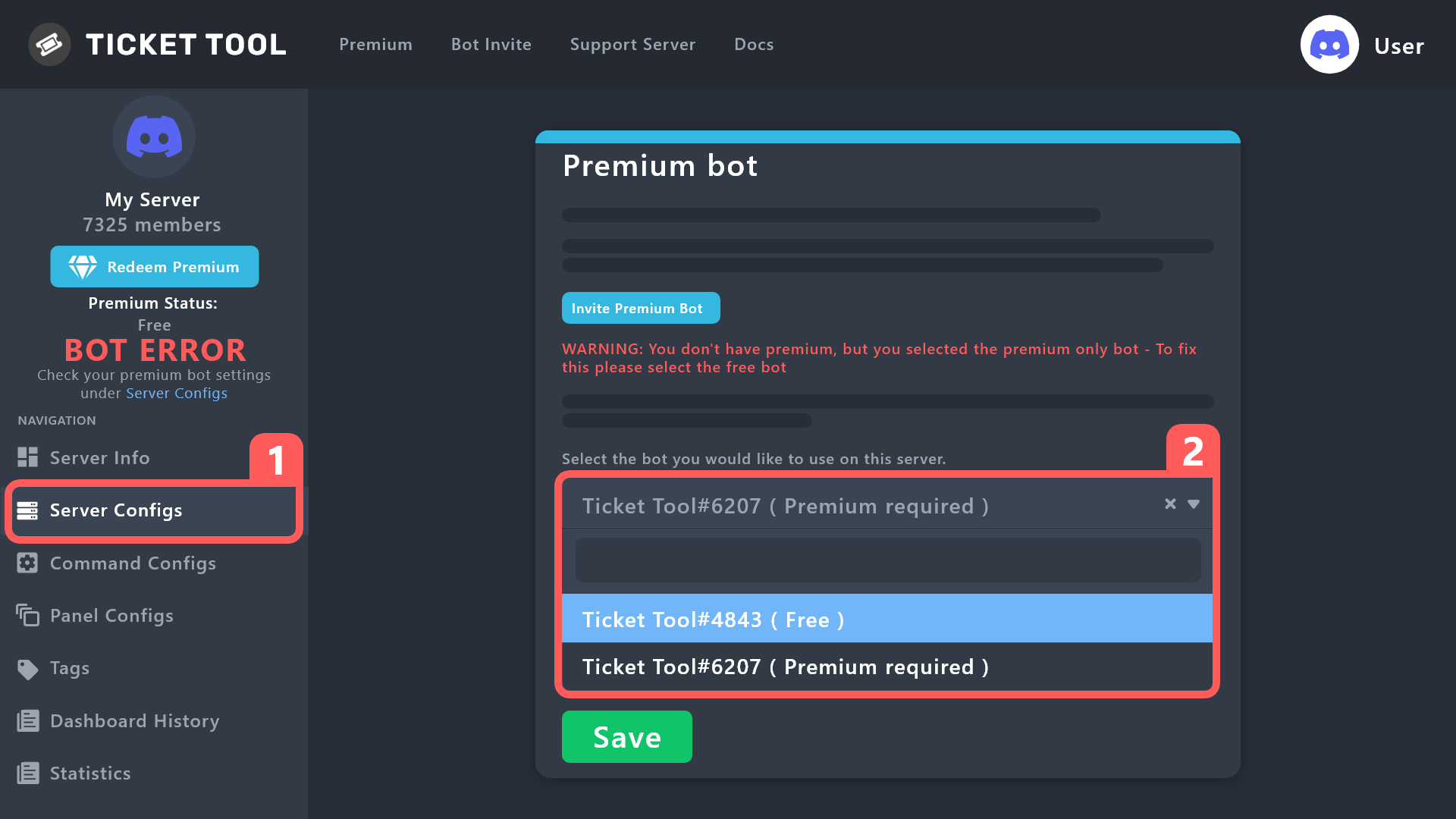
How to disable the premium bot
To disable the premium bot you will have to go to the Dashboard ➞ Server Configs ➞ Premium bot ➞ And on the right-hand side select the primary free bot in the drop down menu.
Premium features will still work on the normal bot.
 rustic gale
Just re-send all the panels after the change, and give @pseudo glen admin for a bit while you clear old tickets
You will need to use commands instead of buttons in the old tickets
primal peak
rustic gale
You will need to use commands instead of buttons in the old tickets
Awesome! THanks for the assistance!
iron nightBOT
Gave +1 Rep to @rustic gale
rustic gale
reef beacon
is there a variable for tagging "support staff" when a ticket is open...without ...
Sadly no. You can use the s!suggest command in #🤖│bot-spam to suggest it though
reef beacon
cool, thanks
rustic gale
 molten harness
we definitely dont have 500 channels
molten harness
we definitely dont have 500 channels
Is that in a server called Gr------?
 zealous root
I'm an admin, and trying to add users or roles to tickets is giving me this:
Failed to add Missing Permissions
Anyone know what might be the cause? This is new, and nothing has changed. Free user
 young elk
im trying to verify myself and everytime after like 15minutes it just closes on itself what do i do?
rustic gale
zealous root
I'm an admin, and trying to add users or roles to tickets is giving me this:
> ...
That means the bot is missing permissions, not you.
rustic gale
young elk
im trying to verify myself and everytime after like 15minutes it just closes on ...
Verify yourself where? Ticket Tool does not handle verification. Are you sure you're looking for help in the right place?
zealous root
rustic gale
That means ***the bot*** is missing permissions, not you.
Any idea which permissions? I adjusted some permissions, and I can now add users, but not roles
rustic gale
zealous root
Any idea which permissions? I adjusted some permissions, and I can now add user...
Try using the /debug command, that could help us figure out the missing permissions
zealous root
rustic gale
Try using the /debug command, that could help us figure out the missing permissi...
This help?

 gaunt plinth
How can I make a person open one ticket and not be able to open my brother's ticket unless the first ticket is closed?
@rustic gale
rustic gale
zealous root
This help?
The permission is Send Text-to Speech Messages
And it's because of this:
 zealous root
rustic gale
The permission is **Send Text-to Speech Messages**
zealous root
rustic gale
The permission is **Send Text-to Speech Messages**
That did it, never would've expected that to be involved, but nice work! Thanks ♥️
iron nightBOT
Gave +1 Rep to @rustic gale
rustic gale
gaunt plinth
How can I make a person open one ticket and not be able to open my brother's tic...
I have no idea what that means, sorry
Also please don't ping me, or other staff (it's against the rules), or anyone else (it's kinda rude)
zealous root
Was it ok that I replied to you..? Sorry if that wasn't ok
rustic gale
You were already talking to me, it's fine
gaunt plinth
rustic gale
I have no idea what that means, sorry
How can I make a person not be able to open more than one ticket?
But he can open a second ticket if you close the first one
rustic gale
gaunt plinth
How can I make a person not be able to open more than one ticket?
You could try setting the Global Ticket Limit to 1 (in Server Configs)
gaunt plinth
rustic gale
You could try setting the **Global Ticket Limit** to 1 (in Server Configs)
Where can I find it, can you give me a picture?

 dapper aurora
How do you mark a ticket as resolved
plain delta
rustic gale
Hey lad, any fixes to my bug?
plain delta
plain delta
As you can see sometimes it just glitches out and I don't know why, I didn't mak...
Here
rustic gale
plain delta
Here
You're hitting the character limit, that's why
gaunt plinth
How can I make the bot give a mention rank?

The bot does not mention the rank
@rustic gale
rustic gale
gaunt plinth
The bot does not mention the rank
Role mentions start with <@&
Note the &
User mentions start with <@ followed by the ID number, without an &
gaunt plinth
ok thx
plain delta
rustic gale
You're hitting the character limit, that's why
Is this new? Never had this problem before
And the responses were generally pretty long a few day ago
rustic gale
plain delta
Is this new? Never had this problem before
Did your server lose premium recently?
plain delta
rustic gale
Did your server lose premium recently?
It was never premium actually
So you guys lowered the threshold for non premium users?
plain delta
rustic gale
Did your server lose premium recently?
If I get premium will this get fixed or the general threshold was lowered?
rustic gale
The character limit hasn't been changed, no.
plain delta
rustic gale
The character limit hasn't been changed, no.
Hmm so it should be a bug in the past update made
rustic gale
What may have changed is the way the content of variables is calculated against the character limit
plain delta
rustic gale
What may have changed is the way the content of variables is calculated against ...
It’s weird since it doesn’t get even close to the character limit
Since the character limit is 4k and is glitching at around 200 characters.
Maybe a little more 300 - 400
If possible please ask to the team to take a look on this, i can provide more screenshots and testing if needed
rustic gale
The character limit without premium is 250
plain delta
rustic gale
The character limit without premium is 250
Oh so it was lowered indeed.
Ok thanks
rustic gale
It wasn't lowered, it has always been 250
plain delta
rustic gale
It wasn't lowered, it has always been 250
Then it wasn’t working correctly haha
rustic gale
plain delta
Then it wasn’t working correctly haha
See the recent update in #📣│bot-news
plain delta
rustic gale
See the recent update in <#571104498483986466>
Not sure which part do you want me to see but all good, thanks for the help, now it makes sense
iron nightBOT
Gave +1 Rep to @rustic gale
 grave vapor
Every time I try setting up, it says the application did not respond.
rustic gale
grave vapor
Every time I try setting up, it says the application did not respond.
Probably a permission issue
Make sure the bot has View Channel and Send Messages in the channel
then use /debug to check for any other missing permissions
molten harness
rustic gale
Is that in a server called Gr------?
yeah
rustic gale
molten harness
yeah
That server does have pretty close to 500 channels
 covert delta
How can I modify this text?

 regal goblet
covert delta
How can I modify this text?
regal goblet
covert delta
How can I modify this text?
Not possible at the moment
 pastel atlas
How do i add more options to the dropdown list, it says select panel but theres nothing there. it only works on one of them
regal goblet
pastel atlas
How do i add more options to the dropdown list, it says select panel but theres ...
Have you created the other panels already?
You need to create each panel first for it to link them to the main panel/dropdown
jade topaz
why my tickets are invisible and unusable
 scenic plinth
No, thats a different bot called Sapphire, which has no relation to ticket tool. Well, official relation.
 median nacelle
scenic plinth
No, thats a different bot called Sapphire, which has no relation to ticket tool....
foggy storm
median nacelle
scenic plinth
No, thats a different bot called Sapphire, which has no relation to ticket tool....
foggy storm
im trying to make a new panel and im a bit rusty but for some reason the panel message is being limited by some sort of text limit on the panel. its weird because i have other panels that are muchhh longer and so im confused on how to fix this issue so i can type the full panel message
 round wing
hi guys, I've been having trouble pinging a specific role with the panel when a user creates a ticket
I've been using <@&role_id> system and so far it's been working correctly, but a couple days ago it just stopped working without me doing anything
any suggestions on what that could be? ty!
 frail island
Hi
rustic gale
round wing
I've been using <@&role_id> system and so far it's been working correctly, but a...
What do you mean it stopped working
round wing
rustic gale
What do you mean it _stopped working_
nevermind this, I just opened a ticket and got it sorted, sorry!
rustic gale
foggy storm
im trying to make a new panel and im a bit rusty but for some reason the panel m...
Without premium, the character limit is 250
 pearl sleet
 tacit bramble
everytime i try to send my panel to my discord it says undefined or code 401. what am i doing wrong?
jade topaz
hello how can i create a ticket in different category and opens up in a different one specific only for tickets???? pls help me solve my problem
hi can someone help me whenever a member of my server tries to create a ticket it says it doesnt have the permission
i looked at the permissions and saw that it disabled add reactions and when i try turn it on it turns off after turning on even if i press save
 dim prawn
Is there a way to clear claimed tickets? I want to reset them every month but I dont know how.
 toxic torrent
Bonjour, comment on fait pour créer des tickets dans notre serveur ?
 winter ore
how do you add more panels to one message?
 shrewd heron
how to enable claiming?
 languid sigil
winter ore
how do you add more panels to one message?
languid sigil
winter ore
how do you add more panels to one message?
Create your individual panels, then in your main panel which will show message etc go to Panel Settings > Panel and attach your panels
 shrewd heron
 iron nightBOT
Gave +1 Rep to @languid sigil
shrewd heron
hello
dim prawn
Is there a way to clear claimed tickets? I want to reset them every month but I dont know how.
shrewd heron
hello
humble sequoiaBOT
Claiming allows you to change the ticket name, category and permissions. To use it you have to enable it first on your Dashboard > Panel Configs > Claiming

 Note: This is a premium feature
plain delta
jade topaz
hello how can i create a ticket in different category and opens up in a differen...
Note: This is a premium feature
plain delta
jade topaz
hello how can i create a ticket in different category and opens up in a differen...
In the ticket dashboard you should be able to set the category that the ticket will be created, check the Category option
plain delta
jade topaz
hi can someone help me whenever a member of my server tries to create a ticket i...
Most likely the bot doesn’t have the permissions to create new channels, so make sure your ticket tool bot have the right permissions
View Channel
Manage Channels
plain delta
foggy storm
im trying to make a new panel and im a bit rusty but for some reason the panel m...
If you don’t have premium there’s a character limit of 250 inside the panel
 sick wing
How do I claim tickets it just does not pop up and I'm confused
plain delta
sick wing
How do I claim tickets it just does not pop up and I'm confused
Your server have ticket tool premium?
sick wing
No
plain delta
sick wing
No
Claiming is a premium feature
sick wing
Ok thanks
plain delta
sick wing
Ok thanks
Np
 novel crest
Hello, i buy Premium. I need another Version of Ticket Tool?
covert swallow
You dont need one but you can use the premium bot if you would like to. Below is a guide on how to invite and enable it
humble sequoiaBOT
The first thing you will need to do is invite the premium bot, an invite can be found here
Once the bot is in your server we will head to the dashboard and manage your server. When you are managing your server, you want to head into "Server Configs" then click the drop down menu under "Select the bot you would like to use on this server" then click "Ticket Tool#6207" and then save.
 iron nightBOT
Gave +1 Rep to @covert swallow
 timid pendant
hey i wounder if someone could help im try to edit the text so the bot show me what dropbox category was selected for ie logo to said ticket opened for a logo so on
rustic gale
timid pendant
hey i wounder if someone could help im try to edit the text so the bot show me w...
Maybe you mean this
humble sequoiaBOT
The Ticket Message is the first message sent by the bot on a new ticket. To customize it head over to your Dashboard ➞ Panel Configs ➞ Ticket ➞ Edit Ticket Message

 lunar solar
jade topaz
lunar solar
jade topaz
Panel configs —> Buttons —> Insert which button this is name —> Edit Button —> Enable 
jade topaz
nvm, had to show button, tyyyy
rustic gale
primal peak
Is there a way to remove teh Premium Bot from the Server?
What do you mean by remove the premium bot
If you're using the premium bot and want to switch back to the primary bot, here's what you should do
humble sequoiaBOT
How to disable the premium bot
To disable the premium bot you will have to go to the Dashboard ➞ Server Configs ➞ Premium bot ➞ And on the right-hand side select the primary free bot in the drop down menu.
Premium features will still work on the normal bot.
primal peak
I switched back to the Ticket Tool Free so I was trying to remove the intergration Ticket Tool Premium.
rustic gale
Just kick it from the server, in that case
primal peak
Thanks!
 solid stream
primal peak
I switched back to the Ticket Tool Free so I was trying to remove the intergrati...
solid stream
primal peak
I switched back to the Ticket Tool Free so I was trying to remove the intergrati...
You can actually make use of my new command /botswitcher
I just added it.
primal peak
humble sequoia
I did do that based on the advice received here! You all are great!
primal peak
solid stream
You can actually make use of my new command /botswitcher
Once swithced is there a way to remove the premium interrgation from the server?
solid stream
primal peak
Once swithced is there a way to remove the premium interrgation from the server?
Just kicking the premium bot should be enough to remove the premium integration.
 paper falcon
 plush goblet
hello, how do i choose which section of the discord the tickets appear under?
 distant jasper
Yea
delicate furnace
So this time will keep increasing if I vote every day?
Just triple checking
Or do I need to put new key each time it expires?
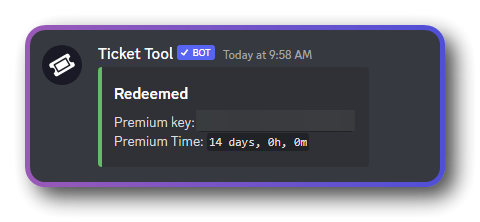
(Accidently showed code)
molten harness
rustic gale
That server does have pretty close to 500 channels
but we delete all the closed tickets
gilded verge
delicate furnace
So this time will keep increasing if I vote every day?
nope, time doesn't increment to the same key, so you'd have to use the command again to get the next key.
With each new key, the premium is combined, i.e. it increases by the number of days from the new key. However, you don't have to wait when the premium expires because you can add keys at any time ^^
delicate furnace
Oh, cool!
humble sequoiaBOT
1. Go into your Dashboard
2. Open your Panel Configs tab
3. Select the panel you want to grant access to
4. Open the Category options menu
5. Select the categories of your preference
6. Save changes
gilded verge
humble sequoia
Hey @plush goblet, if you mean category, then please check
 digital dragon
Hello
Why when i trued to send a panel into a channel in my server it says undefined?
 gilded verge
digital dragon
Hello
Why when i trued to send a panel into a channel in my server it says undef...
gilded verge
digital dragon
Hello
Why when i trued to send a panel into a channel in my server it says undef...
Hey, what's your panel id?

because you can use (for example) /panel 1 command on your channel ^^
gilded verge
Hey, new button? Please explain or give an example of what you mean ^^

 proud ibex
اداره
jade topaz
Can I make shortcuts to commands like delete etc...?
rustic gale
jade topaz
Can I make shortcuts to commands like delete etc...?
Not really. You could use a secondary bot that sends the actual command when you send the shortcut
jade topaz
rustic gale
Not really. You could use a secondary bot that sends the actual command when you...
can you explain it to me
rustic gale
jade topaz
can you explain it to me
Explain what? How to use another bot? You would do best asking in that bot's support server.
There's lots of bots you could use for that purpose. Dyno, YAGPDB, Sapphire, more
How to make Ticket Tool respond to the other bot's messages?
jade topaz
ok thx
rustic gale
Include the other bot's ID here:
jade topaz
ok
 jade topaz
yes i see it thank you
 cosmic moth
is it posible to make my server role to answer tickets that people open?
jade topaz
cosmic moth
is it posible to make my server role to answer tickets that people open?
like add them to all tickets automatically?
plush goblet
gilded verge
Hey <@311261175436410881>, if you mean category, then please check <:this:894279...
thanks ser
iron nightBOT
Gave +1 Rep to @gilded verge
 spring vigil
How can I claim the premium with the votes?
 solemn heath
Can I also change the rights in the dropdown menu? For example, the team only has access to the support ticket, but not to the buy ticket, only the high team.
jade topaz
 cunning jay
Like I having trouble setting them up
cunning jay
Like I having trouble setting them up
whats ur issue
cunning jay
I have the role set up, the message is set up too, but when I do the command in my server, not comes up
Does it only work in tickets?
jade topaz
you're using tags, correct?
edit: i see they changed the name mb
can you send a screenshot of the command rq
 upper pelican
does anyone know how i could make multiple buttons for one channel
cunning jay
 jade topaz
upper pelican
does anyone know how i could make multiple buttons for one channel
jade topaz
upper pelican
does anyone know how i could make multiple buttons for one channel
Panel configs > create a "master panel" where you will put all of your panels you want (each button is a panel) > , create the panels you want, then go back to your master panel > panel tab > add each panel you want to add to the "Attached Panels" section (ss provided)
 jade topaz
cunning jay
jade topaz
cunning jay
click on edit message
cunning jay
 jade topaz
cunning jay
jade topaz
cunning jay
weird, and you just ran $roles in a channel that ticket tool has access to?
cunning jay
Tickettool has admin perms (ik it doesn't need but our server bot role does) and yes
jade topaz
Check if you have any Blacklisted Roles in your Server Configs
& also make sure you have the right bot enabled
like if you are on premium run /botswitcher and make sure its on premium and vice versa if you are using standard
solemn heath
solemn heath
Can I also change the rights in the dropdown menu? For example, the team only ha...
?
cunning jay
I just synced the bot and double check perms and it is working now
Ty for the help
thanks @jade topaz
iron nightBOT
Gave +1 Rep to @ripe leaf
jade topaz
cunning jay
thanks <@456226577798135808>
np
jade topaz
solemn heath
Can I also change the rights in the dropdown menu? For example, the team only ha...
yes
solemn heath
Where ?
jade topaz
each ticket inside of your dropdown menu is a separate panel so you can configure the permissions for those seperately
& then you can just change permissions for those in the panel configs
upper pelican
jade topaz
Panel configs > create a "master panel" where you will put all of your panels yo...
So u can clone the panels and just changed the buttons and boom?
cosmic moth
jade topaz
like add them to all tickets automatically?
i mean like how to make that not only i could read and text in peoples tickets but my friend could also
rustic gale
cosmic moth
i mean like how to make that not only i could read and text in peoples tickets b...
Give them a support team role
humble sequoiaBOT
1. Go into your Dashboard
2. Open your Panel Configs tab
3. Select the panel you want to grant access to
4. Open the General options menu
5. Select your Support Team Roles
6. Save changes
cosmic moth
rustic gale
Give them a support team role
Thanks!
iron nightBOT
Gave +1 Rep to @rustic gale
jade topaz
Hi I need help
So I want to do so that like when a ticket gets closed, whoever opened it will recive a specific message.
My message would be asking if they got the support they needed. Then they could like choose between different emojis that would mean different stuff like "Good Support", "Bad Support", "Great Support"
And the message should be sent via DM's ofcourse
Help please?
rustic gale
jade topaz
My message would be asking if they got the support they needed. Then they could ...
This feature does not exist sadly
I believe it has been suggested before.
With premium, you can have the bot DM the user with a pre-specified message
But it doesn't include buttons, or feedback options of any kind
jade topaz
mmhm
Will it be added tho?
Also you can decide what the ticket name will be with premium right?
does anyone know why when i try to send an embed it says these here? i have premium and the bot has admin im not sure whats going on


 lean kayak
I have a question, can a ticket create voice channels?
proud ibex
jade topaz
does anyone know why when i try to send an embed it says these here? i have prem...
i know
 jade topaz
@mystic hound
jade topaz
@olive eagle
 steady mirage
Good day!
I have a question about the bot, I translate it into Russian and I can't understand what is the difference between "Create Ticket" and "Claim Ticket". And also I can't find where "Claim Ticket" is used
 atomic solstice
steady mirage
Good day!
I have a question about the bot, I translate it into Russian and I c...
atomic solstice
steady mirage
Good day!
I have a question about the bot, I translate it into Russian and I c...
Create ticket is a button which users in your server can use to open a new ticket, where they can ask questions and your support team/mod team can answer.
Claim Ticket is used Inside the ticket itself and it is used for someone from your support team/mod team to claim a ticket as their own. This simply means that the bot sends a custom claim message saying which member of your support team claimed the ticket. It's a feature good for people support teams which deal with many tickets daily and this way members of your support team can show to the user and other support members that they are currently dealing with the ticket they claimed
jade topaz
this hex code is not working #2f3136 :((
atomic solstice
jade topaz
this hex code is not working #2f3136 :((
Where exactly are you trying to input the hex code? Ticket Message? Panel Message?
jade topaz
atomic solstice
Where exactly are you trying to input the hex code? Ticket Message? Panel Messag...
both sir
steady mirage
Good day!
The question arose, will the translation into other languages of the bot be implemented? So that all buttons and text are immediately translated into Russian, for example, and it was not necessary to translate each ticket manually.
atomic solstice
jade topaz
both sir
Does the server where you are trying this on have a Premium Subscription?
jade topaz
atomic solstice
Does the server where you are trying this on have a Premium Subscription?
;-; no
atomic solstice
jade topaz
;-; no
The editing of the color in the embed is a premium feature
steady mirage
atomic solstice
Create ticket is a button which users in your server can use to open a new ticke...
Ty, and where can I find this button?
atomic solstice
steady mirage
Ty, and where can I find this button?
It's a button which appears inside the ticket, once you enable the claiming feature in the dashboard
humble sequoiaBOT
Claiming allows you to change the ticket name, category and permissions. To use it you have to enable it first on your Dashboard > Panel Configs > Claiming
Note: This is a premium feature
jade topaz
atomic solstice
The editing of the color in the embed is a premium feature
oh i see ;-; ty
iron nightBOT
Gave +1 Rep to @atomic solstice
jade topaz
@atomic solstice why the command $claim not work
 atomic solstice
jade topaz
<@601783394334015498> why the command $claim not work
atomic solstice
jade topaz
<@601783394334015498> why the command $claim not work
The claiming feature is not enabled in the dashboard for that panel
humble sequoiaBOT
Claiming allows you to change the ticket name, category and permissions. To use it you have to enable it first on your Dashboard > Panel Configs > Claiming
Note: This is a premium feature


 jade topaz
atomic solstice
The claiming feature is not enabled in the dashboard for that panel
jade topaz
atomic solstice
The claiming feature is not enabled in the dashboard for that panel
Is not here
 atomic solstice
jade topaz
Is not here
atomic solstice
jade topaz
Is not here
it's not in permissions, it's in the claiming category of the panel
jade topaz
atomic solstice
it's not in permissions, it's in the claiming category of the panel
How do I give it permissions?
@atomic solstice
atomic solstice
jade topaz
where is it ?
You have to go to the claiming category in the dashboard, like the first screeenshot above, second button from the bottom
jade topaz
Can you send me pictures?
atomic solstice
jade topaz
Can you send me pictures?
you sent it in your screenshot as well

just go to the dashboard, choose the panel, scroll down to the Advanced Settings and there click the claiming button
then the first option inside will be Enable Claiming

 atomic solstice
jade topaz
Done ?
atomic solstice
jade topaz
Done ?
yes, now you have it enabled, and like the bot says you cannot claim a ticket you opened yourself, you can only claim tickets that other people opened
 torpid jacinth
How do I enable discord members to be able to see the message history of the ticket they opened.?
atomic solstice
torpid jacinth
How do I enable discord members to be able to see the message history of the tic...
either enable the Read message history for members in the category that the bot opens tickets in, or go to the dashboard > select a panel > permissions and there in user opened permissions enable read message history
jade topaz
How can I open a ticket for someone, when I receive the ticket I want my name to appear like this
amstrdam-ticket0007 How
atomic solstice
jade topaz
How can I open a ticket for someone, when I receive the ticket I want my name to...
You want all the tickets in your server to start with your name? Or do you want all the tickets to start with the name of the user who opened the ticket and then the ticket0000?
 atomic solstice
torpid jacinth
<@601783394334015498> here ?
atomic solstice
torpid jacinth
<@601783394334015498> here ?
yes, in the ticket owner permissions
jade topaz
atomic solstice
You want all the tickets in your server to start with your name? Or do you want ...
I want, in the case of a person who received a ticket, his name is printed with the ticket number, on the ticket room that he received
atomic solstice
jade topaz
How can I open a ticket for someone, when I receive the ticket I want my name to...
if you want to change the name of the ticket when it's opened you have to go to the dashboard > select a panel > ticket. There you can customize the name in the Ticket Opened Channel Name part of the settings. you can use the variables there as well.
In your case that would be {ticket.user.name}-ticket{count}
jade topaz
atomic solstice
if you want to change the name of the ticket when it's opened you have to go to ...
I did that, and I received the ticket, but the name of the person who opened the ticket and the ticket number were printed?
atomic solstice
jade topaz
I did that, and I received the ticket, but the name of the person who opened the...
could you send a screenshot?
jade topaz

@atomic solstice The first time you click on Claim, the name of the ticket becomes the name of the one who opened it
I want the name of the ticket to be the name of the person who clicked on Claim
@atomic solstice
Just send me the code or write it like this " {ticket.user.name}-ticket{count}" , but read what I want exactly
atomic solstice
jade topaz
<@601783394334015498> The first time you click on Claim, the name of the ticket ...
It's the same as before but instead of {ticket.user.name} you write {author.name}-ticket{count} in the Claim name part of the claiming category in the dashboard
jade topaz
Thx its work
steady mirage
Good day!
The question arose, will the translation into other languages of the bot be implemented? So that all buttons and text are immediately translated into Russian, for example, and it was not necessary to translate each ticket manually.
 safe gorge
i need dashboard
 thick badger
How do i find my Panel ID?
 jade topaz
 bitter solstice
run /botswitcher to activate the premium bot
jade topaz
proud ibex
i know
okay so what’s the problem here
jade topaz
just ask your question
scenic plinth
You asked 4 times, and have yet to explain your issue.
jade topaz
does anyone know why when i try to send an embed it says these here? i have premium and the bot has admin im not sure whats going on.

 humble sequoiaBOT
Solved in another channel.
rustic gale
 empty thorn
I need help someone help me
empty thorn
I need help someone help me
Everyone here needs help, pal. They usually just ask the question instead of begging for help
empty thorn
No but I really need help
Still not getting helped
Worst customer service ever
@jade topaz not a question. The bot won't work
I have been messaging since 4pm and still not getting help
jade topaz
jade topaz
just ask your question
Saying the bot "doesn't work" is not asking for help. We have no clue what your issue is and complaining about the customer service is not going to get you help. I have already asked you what the issue is.
empty thorn
It would be better if I showed you
jade topaz
Then take a screenshot
rustic gale
empty thorn
<@456226577798135808> not a question. The bot won't work
They usually just ask the question describe the problem instead of complaining that they're not getting helped
humble sequoiaBOT
We would love to help you, but if you don't tell us what you need help with we can't help you :(
rustic gale
humble sequoiaBOT
⚠️ You're in the wrong place
We provide support for Ticket Tool Discord bot and cannot help you with whatever issue you have.
- We don't know which Support Team you should contact to get this issue resolved, and unfortunately we won't be able to accurately tell you.
If you don't have any further questions regarding our bot Ticket Tool, please close this ticket
gilded verge
humble sequoia
@coral saffron
 uncut condor
Hello, I wanna know how could I create a variable with the time when the user opened the ticket and the time when he closed the ticket to put on the transcript
 south topaz
uncut condor
Hello, I wanna know how could I create a variable with the time when the user op...
south topaz
uncut condor
Hello, I wanna know how could I create a variable with the time when the user op...
Check Time Variables here: https://docs.tickettool.xyz/dashboard/panel-configs/variables
Description of the variables you can use across your ticket system
 lone path
Can you send the ticket open message thing into forms?
shut bolt
lone path
Can you send the ticket open message thing into forms?
What do you mean by that?
shut bolt
 brittle sinew
how do you mass close tickets using tickettool?
brittle sinew
how do you mass close tickets using tickettool?
You can use the /purge command if you are the server's owner
lone path
shut bolt
What do you mean by that?
In these
 shut bolt
lone path
In these
shut bolt
lone path
In these
I see, we don't provide support for Discord's Forums
lone path
Oh okay, thank you
 raw birch
Would it be possible to send ephemeral messages as a response to interaction rather than create a channel?
Through ticket tool or would it require another bot?
rustic gale
raw birch
Through ticket tool or would it require another bot?
Ticket Tool does not have that sort of functionality.
Personally i recommend @obtuse kraken
raw birch
Thank you, much appreciated!
 hardy shore
is the bot down, it says application not responding
rustic gale
hardy shore
is the bot down, it says application not responding
Probably a permission issue rather than downtime
hardy shore
rustic gale
Probably a permission issue rather than downtime
yeah just saw
rustic gale
Try using the /debug command. Let me know when you've done so
hardy shore
i forgot to give it speaking perms sorry for wasting your time
rustic gale
No problem, we're here to help
 jade jetty
Hello, can anyone help me
before when someone made a ticket all the text appeared, now not even half of it appears


 hot pilot
Hello
is there a way to pings roles when someone open a ticket ?
Like ping @.admin @.suppurt in my server?
humble sequoiaBOT
1. Go into your Dashboard
2. Open your Panel Configs tab
3. Select the panel you want to ping your support on
4. Open the Ticket options menu
5. Click on Edit Ticket Message
6. In the Message Content use one of the role mention syntax (**{@Role Name}**/**{Role ID}**)
7. Save changes
Note: For this to work properly, Ticket Tool requires the Mention Everyone permission. Or the role must have the Allow anyone to @mention this role setting enabled 
rustic gale
@hot pilot read above
hot pilot
humble sequoia
Thank u a lot❤️
iron nightBOT
Gave +1 Rep to @humble sequoia
 humble sequoiaBOT
Within all the messages the bot sends (both embeds and text) you can mention either channels, roles, or even users, these mentions will only send a notification to the user if they are used within a text field, e.g: a role mentioned in an embed won't ping at all the users who have that role.
For mentioning a role you can use one out of three options:
{@Role Name} ➞ Which is Case Sensitive.
{RoleID} ➞ Replace RoleId with the Id of the role you are trying to ping.
<@&RoleID> ➞ Discord's native syntax to ping roles.
<#ChannelID> ➞ Mention a channel by its ID.
<@UserID> ➞ Mention a user by its ID.
rustic gale
See channel mention above @hot pilot
You can use Ticket Tool's /id command to find the ID
hot pilot
rustic gale
You can use Ticket Tool's /id command to find the ID
Thanks a lot❤️
iron nightBOT
Gave +1 Rep to @rustic gale
 drifting flint
hi
when i use /setup on my server it says that the application did not respond
what shall i do?
howto fix it?
 opal cradle
drifting flint
when i use /setup on my server it says that the application did not respond
opal cradle
drifting flint
when i use /setup on my server it says that the application did not respond
use the dashboard
its better in every possible way
 jade topaz
Hello, a question
Can the deleted tickets be returned?
jade topaz
?
 worldly dune
Can a user with only permission to add bots able to setup ticket bot in a server or do u need more access?
opal cradle
jade topaz
Hello, a question
Can the deleted tickets be returned?
elaborate
 vital oriole
It took forever to figure out, but I finally got all four panels set up and working correctly, @lament sandal... Tysm, for the support!🧡
Lmao
worldly dune
worldly dune
Can a user with only permission to add bots able to setup ticket bot in a server...
@opal cradle
vital oriole
worldly dune
Can a user with only permission to add bots able to setup ticket bot in a server...
You would clearly need more access, since you need to run commands, and you would need the bot to have different permissions that lets the bot access different things, as well
worldly dune
vital oriole
You would clearly need more access, since you need to run commands, and you woul...
Okay thank you
iron nightBOT
Gave +1 Rep to @vital oriole
jade topaz
opal cradle
elaborate
what
vital oriole
iron night
Gave +1 Rep to **<@962228184668069928>**
Lmao, don't know what that means, but I'm assuming that happens every time you help someone, although I don't know how the bot knows, lmfao
 brisk stump
how make ticket panel like this
 jade topaz
Hello, a question
Can the deleted tickets be returned?
vital oriole
brisk stump
how make ticket panel like this
You would need premium
brisk stump
vital oriole
You would need premium
ie with buttons only for premium and with drop-down menus for free?
vital oriole
Without premium, you can't change the smaller text at the bottom, and you can't and images to the inside of the embed
jade topaz
jade topaz
Hello, a question
Can the deleted tickets be returned?
@vital oriole
vital oriole
brisk stump
ie with buttons only for premium and with drop-down menus for free?
You can have buttons for free
brisk stump
vital oriole
You can have buttons for free
how
vital oriole
jade topaz
<@962228184668069928>
Since it doesn't look like there's a restore or backup feature, unless it's on the website, and if you haven't used it, then no, I'm pretty sure that they can't be restored
vital oriole
brisk stump
how
You use the website
Do /setup, then click on the dashboard link, where it says dashboard in blue
brisk stump
vital oriole
Do /setup, then click on the dashboard link, where it says dashboard in blue
I don't understand how to make buttons. I understand how to make a drop down, but I don’t know how buttons
vital oriole
Please don't ping me again, @brisk stump
The next time you reply, turn the mention off
vital oriole
brisk stump
I don't understand how to make buttons. I understand how to make a drop down, bu...
Do it on the website, it's a hell of a lot easier
You can edit the button, in the text on the button, and more
opal cradle
worldly dune
<@603880226631450624>
ill help u in a sec once i get on my pc
jade topaz
opal cradle
ill help u in a sec once i get on my pc
Can the deleted tickets be returned?
brisk stump
vital oriole
Do it on the website, it's a hell of a lot easier
I WANT TO MAKE SOME BUTTONS
opal cradle
jade topaz
Can the deleted tickets be returned?
only the transcripts
opal cradle
brisk stump
I WANT TO MAKE SOME BUTTONS
make multiple panels and set up a multipanel
vital oriole
brisk stump
I WANT TO MAKE SOME BUTTONS
Use this freaking website
Ticket Tool - Ticketing without clutter - The #1 Discord support bot
Stop yelling, damn
brisk stump
vital oriole
https://tickettool.xyz/
Use this freaking website
I KNEW ABOUT DASHBOARD
akos thank you
vital oriole
brisk stump
I KNEW ABOUT DASHBOARD
If you knew about the dashboard, then you should go on the dashboard, create a ticket, and then just scroll down to the buttons tab, and click that
That's literally how you edit buttons, and make buttons show up
Which I actually tried to tell you, earlier
There's no need to create multiple panels, either
opal cradle
vital oriole
There's no need to create multiple panels, either
there is
"multipanels"
vital oriole
I didn't create multiple panels, and I was still able to have a button on my ticket
opal cradle
vital oriole
I didn't create multiple panels, and I was still able to have a button on my tic...
one
he said "some" -> multiple => multipanel
vital oriole
The thing is, is that the multi panels is in pretty much the exact same area, when it comes to the different pieces that you're editing
worldly dune
opal cradle
ill help u in a sec once i get on my pc
okay
humble sequoiaBOT
For more convenient use of multipanels, you can now combine panels on the dashboard. This will allow you to directly send the multipanel from the dashboard or via the $panel ID command.
Where can I find this?
You can find this setting on the Dashboard -> Panel Configs -> Settings -> Panel
Note: if you're attaching all the panels to a panel called English, don't include English in the attached panel's box (If you do this, it will create a duplicate)
This will put all buttons from all of your panels on one message. The message is the panel message from the panel you're combining these panels in.
vital oriole
I'm surprised they didn't see that option, if that's what they were looking for
opal cradle
@brisk stump check out that embed sent by the bot
vital oriole
opal cradle
<@767100643793960963> check out that embed sent by the bot
With what the embed is showing, wouldn't that just cause the multiple panels to show, as well as the buttons?
Since you're adding those panels to the first one?
brisk stump
opal cradle
<@767100643793960963> check out that embed sent by the bot
thanks
opal cradle
vital oriole
With what the embed is showing, wouldn't that just cause the multiple panels to ...
if you attach multiple panels to one panel then all the buttons from the different panels will show on the main panel -> 1 panel, multiple buttons
iron nightBOT
Gave +1 Rep to @opal cradle
vital oriole
opal cradle
if you attach multiple panels to one panel then all the buttons from the differe...
Okay, but I'm asking about the other panels
I was asking "wouldn't that just cause the multiple panels to show, as well as the buttons?"
opal cradle
no, only the buttons would show
vital oriole
Well, that's confusing as hell, to my over-analytical, american, autistic, OCD brain.... Lmao
brisk stump
is it possible to buy a subscription forever?
 jagged pulsar
hey there how could i make my custom role named ticket team to be pinged when some one opens a ticket coz i am unable to find the option there in dash board kindly help me out
 waxen hare
alguien me ayuda explicandome como puedo hacer para vender oro wow por aca?
humble sequoiaBOT
⚠️ Está en el lugar equivocado
Brindamos soporte para el bot de Discord Ticket Tool y no le podemos ayudar con el problema que presenta.
- No sabemos a que equipo de soporte debería contactar para solucionar este problema, y desafortunadamente no podremos ayudarle acertadamente.
Si no tiene alguna duda relacionada a nuestro bot, Ticket Tool, por favor cierre este ticket.
scenic plinth
waxen hare
alguien me ayuda explicandome como puedo hacer para vender oro wow por aca?
Lea arriba.
humble sequoiaBOT
Within all the messages the bot sends (both embeds and text) you can mention either channels, roles, or even users, these mentions will only send a notification to the user if they are used within a text field, e.g: a role mentioned in an embed won't ping at all the users who have that role.
For mentioning a role you can use one out of three options:
{@Role Name} ➞ Which is Case Sensitive.
{RoleID} ➞ Replace RoleId with the Id of the role you are trying to ping.
<@&RoleID> ➞ Discord's native syntax to ping roles.
<#ChannelID> ➞ Mention a channel by its ID.
<@UserID> ➞ Mention a user by its ID.
scenic plinth
jagged pulsar
hey there how could i make my custom role named **ticket team** to be pinged whe...
See above. Please one of the appropriate options according to the roles information in your ticket message. Make sure it is not in the embed portion.
scenic plinth
brisk stump
is it possible to buy a subscription forever?
No, lifetime is not possible to purchase.
brisk stump
why the bot doesn't send any messages when a member opens a ticket
 lunar turret
i cant type commands in this server
rustic gale
lunar turret
i cant type commands in this server
Do it in #🤖│bot-spam
lunar turret
i did
rustic gale
brisk stump
why the bot doesn't send any messages when a member opens a ticket
The ticket message may be broken. Try creating a ticket yourself and seeing if you get an error message
 warm mason
Hi I am trying to enable my attach files permissions from Ticket tool, however the changes aren't reflecting on discord end
lunar turret
 rustic gale
lunar turret
rustic gale
lunar turret
Which commands do you want to use
lunar turret
rustic gale
Which commands do you want to use
why
its commands
i should have access to them
rustic gale
No you shouldn't?
lunar turret
bruh dont tell me you need special roles to use commands
warm mason
Hi @rustic gale I am trying to enable my attach files permissions from Ticket tool, however the changes aren't reflecting on discord end
lunar turret
all i wanna do is suggest smth i dont wanna go through an application process
lunar turret
ok
rustic gale
warm mason
Hi <@832864595726172162> I am trying to enable my attach files permissions from ...
Please don't ping staff for help. It's against the rules
I'm reading the channel, i saw your first message
warm mason
Sure
rustic gale
warm mason
Hi I am trying to enable my attach files permissions from Ticket tool, however t...
Try closing and reopening the ticket
Let me know if it works
warm mason
same issue still can't
rustic gale
Best to make a ticket. #premium-tickets
warm mason
sure
brisk stump
rustic gale
The ticket message may be broken. Try creating a ticket yourself and seeing if y...
where to see error messages
 lament sandal
vital oriole
It took forever to figure out, but I finally got all four panels set up and work...
lament sandal
vital oriole
It took forever to figure out, but I finally got all four panels set up and work...
You’re welcome!
rustic gale
brisk stump
where to see error messages
In the channel with the panel message, when you press the Create Ticket button
brisk stump
rustic gale
In the channel with the panel message, when you press the Create Ticket button
there are no errors
rustic gale
brisk stump
there are no errors
Can you find your server's ID for me please
If you don't know it, you can find it with the /id command
brisk stump
rustic gale
If you don't know it, you can find it with the /id command
1037481064643436544
 noble scarab
Hey,
I usually buy OTP for bots,
Does this bot currently have this & is there any plans for this to be a thing?
rustic gale
What do you mean by OTP
rustic gale
brisk stump
1037481064643436544
Best to #🎫│make-a-ticket
When you're there, send an invite to your server
noble scarab
One time purchase,
Sorry, my bad
.
also,
Another question,
Say 5 people have made tickets during testing phase,
Can I reset the ticket numbers?
I.e. restart at 0001
 muted thistle
I just got premium from discord but it say its on the free plan
rustic gale
noble scarab
One time purchase,
Sorry, my bad
No such thing sadly
noble scarab
sadge
rustic gale
noble scarab
.
also,
Another question,
Say 5 people have made tickets during testing phase...
Of course. Use the Set Count button in the dashboard
rustic gale
muted thistle
I just got premium from discord but it say its on the free plan
Press the Sync button, it should update
noble scarab
rustic gale
Of course. Use the **Set Count** button in the dashboard
tysm 😗
muted thistle
rustic gale
Press the Sync button, it should update
thank you 🙂
iron nightBOT
Gave +1 Rep to @rustic gale
rustic gale
empty thorn
I need help with the bot, it's not a question
Sure, what do you need help with
empty thorn
The bot
rustic gale
Please don't waste my time, pal
rustic gale
Me in DMs? No. You should be able to post the screenshot here
Or #🎫│make-a-ticket and send it there if not
 solemn pagoda
 jovial breach
Halo
rustic gale
Close what?
Is that in your own server?
Make sure those commands aren't disabled
Make sure you're using them in a channel that is actually a ticket
Also, if you tried deleting a ticket and ended up with an empty channel, that means you may have enabled Server Storage
In that case, disable Server Storage and delete the channel as normal
delicate furnace
Hey, can I make these depend of the count of open tickets, and not total tickets made? https://i.imgur.com/Bp9QUMO.png
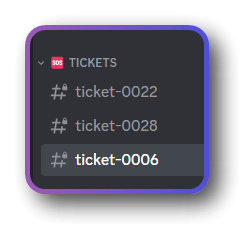
Like the numbers after ticket-
 void walrus
ticket-0006
solemn heath
how do i activate premium status
rustic gale
delicate furnace
Hey, can I make these depend of the count of open tickets, and not total tickets...
There's no such feature. You can use the s!suggest command in #🤖│bot-spam to make that suggestion, though
rustic gale
solemn heath
how do i activate premium status
Depends on how you obtained premium
 heady geyser
Hi! Can someone let me know how we can also have the delete button?


 leaden rose
My ticket channels are going to the top of the list under a new "Suggested" category. Anyone know how to revert this?
humble sequoiaBOT
Button Options
 Enable Button
 Hide or show the button
 Emoji
Emoji
 Select an emoji to show on the button
You can either select one or use a valid Emoji ID
 Button Text
Edit the text that's shown on the button
 Button Color
Select one of four colors for the button. Grey, Green, Red, Blue.
 Support Team Only
Enable this to only let your support team click that button
 Allowed and disabled roles
Edit what roles can use or not use this button
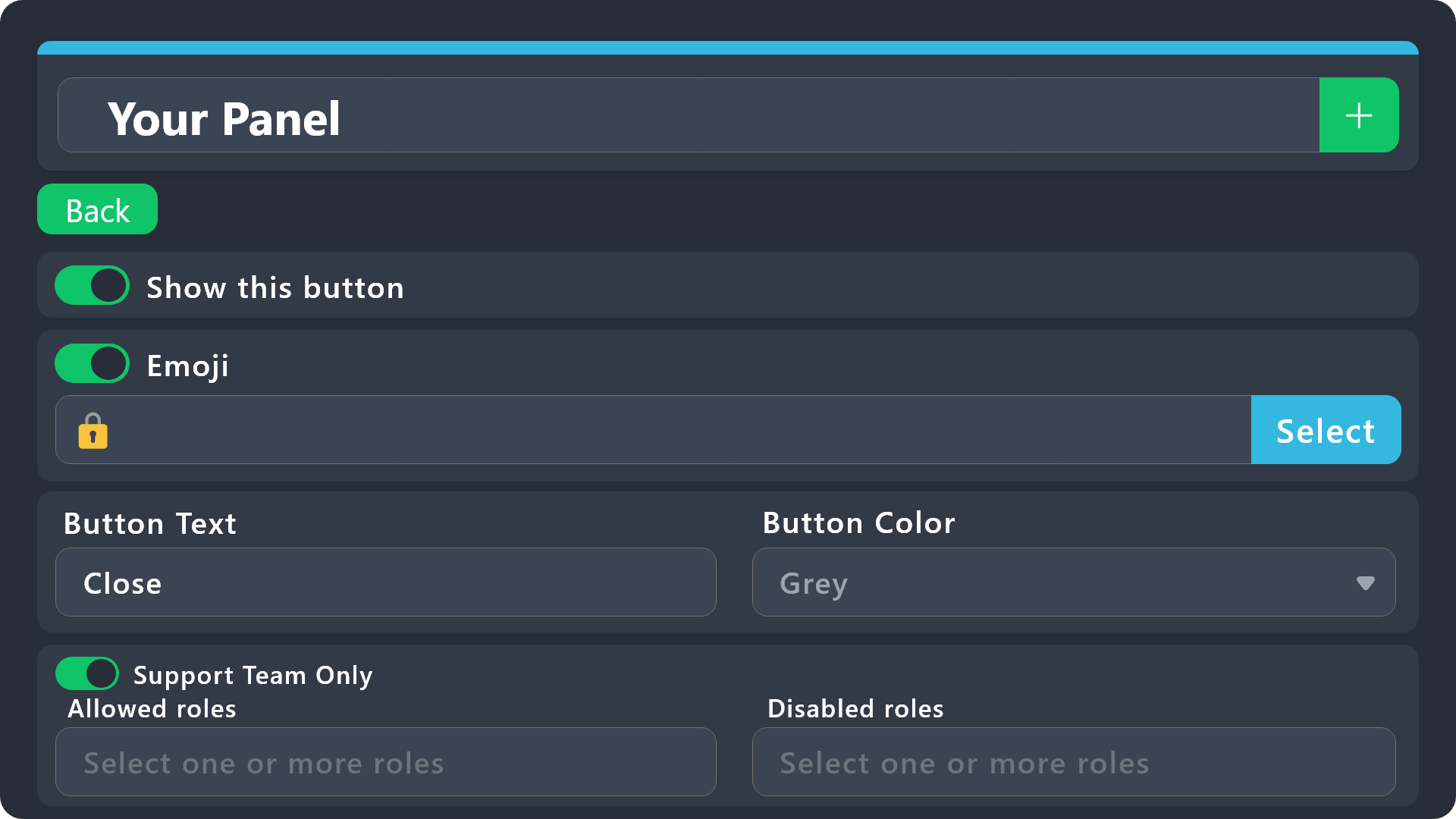
$buttonoptions
shut bolt
@heady geyser enable the Delete button on your panel configs > Buttons > Delete
shut bolt
leaden rose
My ticket channels are going to the top of the list under a new "Suggested" cate...
That's not a category in essence, that shows up when you have disabled the Show All Channels feature, it's just a Discord thing that suggests which channels you should add to your list, you can click on the little :X: on the top corner and it will close
 heady geyser
shut bolt
<@599136189722918932> enable the Delete button on your panel configs > Buttons >...
heady geyser
shut bolt
<@599136189722918932> enable the Delete button on your panel configs > Buttons >...
Thank you so much! It worked :)
Can you also please help me figure out why the tickets are not being moved to the closed category after being closed? 
shut bolt
heady geyser
Thank you so much! It worked :)
Can you also please help me figure out why the...
Does the bot show any error when it answers to you using the Close button?
heady geyser
Aside from the changing of channel names (because I opened a closed ticket for testing), there doesn't seem to be any issue

 shut bolt
heady geyser
shut bolt
heady geyser
How many channels do you have on the logs and archive category?
heady geyser
a looot like 20 😅
humble sequoiaBOT
Discord only allows to stack up to 50 channels per category, meaning that if you have already 50 tickets in one category, the bot won't be able to place a ticket in that category, for such reason Ticket Tool counts with overflow categories, meaning that if your main category is filled, the bot will go ahead and place the ticket on the next one available, simply choose a second category in the category pickers:
heady geyser
yup

oohhh hmm that's really weird. it used to transfer before so i was confused too 😭
shut bolt
heady geyser
yup
Then please check the permissions of the bot in that category are appropriate for it to move the channel to the category
heady geyser
OH MAKES SENSE! thank you soooo much 🙇🏼♂️
leaden rose
shut bolt
That's not a category in essence, that shows up when you have disabled the Show ...
The thing is the tickets are disappearing. I ONLY see it suggested, and not under my support category. If I click the X, it is just gone, and nowhere to be found. Hmm strange lol
shut bolt
leaden rose
The thing is the tickets are disappearing. I ONLY see it suggested, and not und...
Use this option on the top of your server

And click on Follow Category
For the category your tickets are created on
You could also make it show all channels if you had prefer
leaden rose
ok thx. That feature just popped into my discord, confused the hell out of me lol
shut bolt
No worries, it happens :)
shut bolt
leaden rose
ok thx. That feature just popped into my discord, confused the hell out of me l...
You can click this when you right click on your server

And that will help you to show all channels
gilded verge
@gentle sail, are you there? 😅
If you still need transcript, please enable these options and let me know:
//I don't see an answer so it's probably fine, in that case i'm sorry for ping
 jade topaz
Hi! Anyone knows how to stop new tickets from mentioning certain roles?
gilded verge
jade topaz
Hi! Anyone knows how to stop new tickets from mentioning certain roles?
Hey, just remove the ping from the message.
For example from Ticket Message
 nimble pawn
Visit the dashboard for the bot, there you can edit the panel of the ticket to mention certain roles
jade topaz
gilded verge
Hey, just remove the ping from the message.
For example from `Ticket Message`
I'm still unclear! Is there a setting for this on the website? 😮
 jade topaz
Mine's already empty but it always tag the admins like this:

 gilded verge
please make sure you have selected the correct panel
my example:
 gilded verge
oh? what was there? 😮
jade topaz
the last one i think
 gilded verge
righttt... this is thread, and that's why, im sorry but i didn't know how thread works 😅
jade topaz
no issues!
 storm patio
I have a problem the bot keeps saying the application did not respond
jade topaz
tho it would be nice to select which staff they mention
gilded verge
storm patio
I have a problem the bot keeps saying the application did not respond
on your server please run /debug and send link from bot ^^
storm patio
i did debug it says the same thing
gilded verge
jade topaz
tho it would be nice to select which staff they mention
from what I remember in the threads in the message you have to ping otherwise it won't add them to the ticket, Discord did it this way and we can't change it 🤔
wait
gilded verge
storm patio
i did debug it says the same thing
it's because bot doesn't have permission to send message on this channel in your server
 gilded verge
from what I remember in the threads in the message you have to ping otherwise it...
gilded verge
gilded verge
from what I remember in the threads in the message you have to ping otherwise it...
@jade topaz, but you can disable this auto add team to thread option and in Ticket Message you can add mentions, could you try it, please?
storm patio
gilded verge
it's because bot doesn't have permission to send message on this channel in your...
Thx bro its fixed
iron nightBOT
Gave +1 Rep to @gilded verge
jade topaz
gilded verge
<@456226577798135808>, but you can disable this `auto add team to thread` option...
oh brilliant! gotcha
jade topaz
gilded verge
<@456226577798135808>, but you can disable this `auto add team to thread` option...
thank you btw
iron nightBOT
Gave +1 Rep to @gilded verge
jade topaz
Could you do so that a ticket closes in a specified amount of time?
For example I want my tickets to be closed in a matter of 2-3 hours in my server. Is that possible?
rustic gale
jade topaz
For example I want my tickets to be closed in a matter of 2-3 hours in my server...
Yes, automation is a premium feature
jade topaz
K
humble sequoiaBOT
Automation Feature <:beta1:1022173658610946182><:beta2:1022173656492810340>
Automation is now in it's ALPHA TESTING PHASE. Things might work unexpectedly or not at all.
__Note__
Automation will run for a maximum of 7 days or until the ticket is closed, afterwards it will stop checking
Types of Automation
[Watcher] Check for message ► Checks for a message in a certain time frame.
[Trigger] Ticket Closed ► Executes action when the ticket is closed.
[Trigger] Ticket Re-Opened ► Executes action when the ticket is re-opened.
[Trigger] Ticket Created ►Executes action when the ticket is created.
[Trigger] Ticket Owner left Server ► Executes action when ticket owner leaves the server.
[Trigger] Close Ask Message ► Executes action when the Close Ask Message is sent.
[Trigger] Automation
All [Trigger] Type automations simply run the action. A delay can be added.
[Watcher] Automation
The [Watcher] Type automation is a bit more complex.
- Either check if a message IS found or is NOT found
- Check for messages from Support Team | Ticket Owner | Everyone
- Check for a specified time (number in seconds)
- Either check Once and stop or check until stopped
► If Until Stopped is selected, switch between Continue timer and restart timer - Select the action that should be executed
► If "Send Custom Command" is selected, you can select a custom command to be sent
(6.) If Until Stopped is selected, switch between Keep Checking and Stop Checking
Automation Command
Automation can be stopped, by running the /automation stop command inside the ticket you want it to stop in.
Restart it with /automation start

 crystal smelt
When I try to ping a role, it says undefined. Does anyone know what should i do?
 solid stream
crystal smelt
When I try to ping a role, it says undefined. Does anyone know what should i do?
solid stream
crystal smelt
When I try to ping a role, it says undefined. Does anyone know what should i do?
Role ping is <@&123...>

 languid pasture
delicate furnace
I have premium? And limits?
languid pasture
delicate furnace
I have premium? And limits?
Limit of tickets open per panel is diff setting
It limits the amount of tickets 1 user can have open, not that the server can have
delicate furnace
Oh
delicate furnace
languid pasture
Limit of tickets open per panel is diff setting
Where cna I change it?
languid pasture
In dashboard under panel general settings iirc
rustic gale
delicate furnace
Where cna I change it?
Panel Configs -> Limits
 stiff ginkgo
Help me.
how can change the time to date
for example ticket-0001 to ticket 02/15/21
 limber hatch
Hello, was there a change in the welcome message for tickets?
this is what it used to look like, and what it was before.

this is what it looks like now

 queen pagoda
Good day folks. A couple questions:
- I see the 5-question limit for forms is a discord thing, is there a way to have mulitple forms on a ticket as a work-around?
- Is the length of questions also a discord limitation or is it possible to increase that in any way?
 signal hollow
Hey all. Free user here. Is it possible to have the ticket channels moved to a private category automatically when we close them?
We would like to close the channels and retain them but keep them private in case we need to refer to them in the future.
Please tag me here so I get the notification.
 ocean zephyr
Can I have a help
ocean zephyr
stiff ginkgo
for example ticket-0001 to ticket 02/15/21
$rename 02/15/21
 pulsar nimbus
how to make like this

 flat valley
??
 humble sequoiaBOT
The Drop-down menu or Select Menu replaces the buttons on your panel message and uses a drop-down menu with all of your panels. To set this up, go to your Panel Configs and select your main Panel.
<:Numbericons1:1018864164032225340> Enable Select Style
First you enable Select Style. Then you add an item in the Dropdown Editor. Now you can start editing your dropdown!
<:Numbericons2:1018864168041971712> Dropdown Editor
Each line in the dropdown editor represents a line in the drop down menu on discord. You can add more "Items", by clicking on 

First you select a panel. That's the panel this option will open a ticket for.  DONT select the same panel twice. Each option should have a different Panel
After that, you can put a Display. This is the title of this option and will appear in the drop down menu. The *Description can be set right after that, which will be below the title in grey.
Additionally you can select an emoji, that will be shown in front of each option. You can either manually input the ID of an emoji or select it in the selector.
Common Issues ⚠️
- Panel doesn't send? Make sure you have a valid emoji selected
- Option doesn't show up? Check if two options have the same panel in the DropDown Editor

$dropdown
 severe path
@pulsar nimbus ^
 humble sequoiaBOT
1. Go into your Dashboard
2. Open your Panel Configs tab
3. Select the panel you want to grant access to
4. Open the Category options menu
5. Select the categories of your preference
6. Save changes
severe path
signal hollow
Hey all. Free user here. Is it possible to have the ticket channels moved to a p...
^
severe path
 rigid sage
كيف ؟
rigid sage
كيف ؟
Please only write in english
 severe path
queen pagoda
Good day folks. A couple questions:
1. I see the 5-question limit for forms is ...
severe path
queen pagoda
Good day folks. A couple questions:
1. I see the 5-question limit for forms is ...
You can only have one form and the length of the questions is also a discord limitation
humble sequoiaBOT
A Discord Form lets the user answer individual questions in a pop-up Form, which then displays the answers in the ticket message. This can save time if you already know what you want to ask the user.
Setup Forms
Forms can be enabled under Panel Settings > Form Options > Edit Forms Options. In the new pop-up window, you can now enable and edit your own Form.
Form Options
You can add up to 5 questions in the Discord form. This is a Discord limitation. Each question can have a placeholder in the input field, a minimum and maximum input, multi-line, and also the option to have the answer required.
Options
Question Title ➞ Your Question goes here
Question Placeholder ➞ The placeholder text in the input field
Required ➞ If enabled, the user has to answer this question, to submit the form
Multi-Line Input ➞Allows the user to input multiple lines
Minimum and Maximum Input ➞ Set a minimum and maximum input value for the user
Displaying the Answer
To display the answers from the user, you need to go into your Panel Settings > Ticket Options > Edit Ticket Message. In there you use the variable {create.form.x} and just replace x with the number of your question. For example, the response to Question 1 can be displayed with {create.form.1}. If you don't use this variable, the response from the user is lost.
severe path
rigid sage
^
severe path
limber hatch
this is what it looks like now
what's the different?
rigid sage
thx
severe path
Try to reload the page or use a other browser
rigid sage
Form Options?
 severe path
 flat valley
??
limber hatch
severe path
what's the different?
now it cuts out, like if there was a character limit when actually sending the message
 eternal marlin
hello
can i make it so that a message is sent into a ticket from the bot so that the people answering know what the enquiry is
queen pagoda
severe path
You can only have one form and the length of the questions is also a discord lim...
Thank you
jade topaz
Hello, I got some tickets made, and Some the person who made the ticket is able to see the ticket fine, but all of my other members can also see the ticket. How do I fix this?
humble sequoiaBOT
━━ moved to ticket ━━
 noble acorn
jade topaz
Hello, I got some tickets made, and Some the person who made the ticket is able ...
noble acorn
jade topaz
Hello, I got some tickets made, and Some the person who made the ticket is able ...
Set the moderator roles
 wise ridge
is the bot down when i try to set it up it says application isnt responding
rustic gale
wise ridge
is the bot down when i try to set it up it says application isnt responding
Probably a permission issue. Try the /debug command
rustic gale
jade topaz
Hello, I got some tickets made, and Some the person who made the ticket is able ...
How do you tell all of your other members can also see the ticket?
wise ridge
rustic gale
Probably a permission issue. Try the /debug command
Still saying the application didn’t respond
gilded verge
wise ridge
Still saying the application didn’t respond
in the channel settings add permission view channel for his role and it will work
 jade topaz
Its fixed btw
jade topaz
how do i make it so more than one ticket can be opened at once for the pane?
rustic gale
jade topaz
how do i make it so more than one ticket can be opened at once for the pane?
You set limits up in Panel Configs -> Limits
The default number of tickets open per user is 1, you can raise it
 crude palm
The everyone role as well as other can see how that the tickets are open but can't actually read the channel. How do i make it so they can't see the new tickets
 rustic gale
crude palm
The everyone role as well as other can see how that the tickets are open but can...
rustic gale
crude palm
The everyone role as well as other can see how that the tickets are open but can...
Are you testing using Discord's “View as Role” feature?
humble sequoiaBOT
View As Role feature
Discord's integrated View As Role feature will allow you to see how different groups of roles will have access to your server's channels. Even though, this feature isn't reliable for thoroughly testing Ticket Tool considering that the tickets are created based on User roles, and that Roles permissions are only used for Support Team Roles, and Additional Roles.
For testing Ticket Tool as a user we suggest you ask a friend to open a ticket for you as a regular member would do, or use an alternative account to simulate the same process to make sure everything is set properly.
rustic gale
Because... don't. See above
 hardy crater
Do tickets auto delete after a period of time?
rustic gale
hardy crater
Do tickets auto delete after a period of time?
No they shouldn't, no
Unless you've set up automation for it
hardy crater
rustic gale
No they shouldn't, no
Got it. So any deleted would hypothetically be deleted by the user if not by admin?
rustic gale
hardy crater
Got it. So any deleted would hypothetically be deleted by the user if not by adm...
You should probably check your server's audit log.
Filter by the delete channel action
hardy crater
rustic gale
You should probably check your server's audit log.
That’ll say who deleted?
hardy crater
rustic gale
Filter by the _delete channel_ action
Got it. Thanks! How do I access the log?
iron nightBOT
Gave +1 Rep to @rustic gale

 cold rover
Starting today the bot's $new (message here) to create a ticket seems to be limiting the message being shown on the ticket.
Is there a way to fix that?
jade topaz
iron night
Gave +1 Rep to **<@832864595726172162>**
is this part of the bot feature O_O
 terse brook
nitro emoji still cant work right ?
 twilit pollen
Hello, anyone can help me please ?
jade topaz
My transcript says invalid request?
 quick lintel
Does @pseudo glen have this option?
for example: if click on number 1 i will get auto ping the bot telling me what to do before i create a ticket.
Like i set up the texts etc...

 pale pilot
quick lintel
Does <@557628352828014614> have this option?
for example: if click on number 1 i...
pale pilot
quick lintel
Does <@557628352828014614> have this option?
for example: if click on number 1 i...
something like in #📌│automated-support ? No, that's not possible with ticket tool
quick lintel
pale pilot
something like in <#977951125674291271> ? No, that's not possible with ticket to...
Ye like #📌│automated-support, how can I get it then?
pale pilot
quick lintel
Ye like <#977951125674291271>, how can I get it then?
it's the sapphire bot. If you need help on that, they have a great support server as well to help you out
quick lintel
pale pilot
it's the sapphire bot. If you need help on that, they have a great support serve...
Appreciate it
ocean zephyr
Thanks @rustic gale
iron nightBOT
Gave +1 Rep to @rustic gale
 midnight bear
rustic gale
jade topaz
My transcript says invalid request?
midnight bear
rustic gale
jade topaz
My transcript says invalid request?
How are you accessing it?
jade topaz
rustic gale
How are you accessing it?
By clicking the link
rustic gale
terse brook
nitro emoji still cant work right ?
The bot should be able to use any emoji as long as it's from a server that the bot is in.
rustic gale
jade topaz
is this part of the bot feature O_O
That's @iron night, a different bot not related to Ticket Tool
rustic gale
cold rover
Starting today the bot's $new (message here) to create a ticket seems to be limi...
Best to #🎫│make-a-ticket about this so we can take a closer look.
 devout mulch
Anyone knows how to change the bot picture ?
rustic gale
devout mulch
**Anyone knows how to change the bot picture ?**
Not possible currently
That's unfortunate
 hollow valley
how i do this
 humble sequoiaBOT
The Drop-down menu or Select Menu replaces the buttons on your panel message and uses a drop-down menu with all of your panels. To set this up, go to your Panel Configs and select your main Panel.
<:Numbericons1:1018864164032225340> Enable Select Style
First you enable Select Style. Then you add an item in the Dropdown Editor. Now you can start editing your dropdown!
<:Numbericons2:1018864168041971712> Dropdown Editor
Each line in the dropdown editor represents a line in the drop down menu on discord. You can add more "Items", by clicking on
First you select a panel. That's the panel this option will open a ticket for. DONT select the same panel twice. Each option should have a different Panel
After that, you can put a Display. This is the title of this option and will appear in the drop down menu. The *Description can be set right after that, which will be below the title in grey.
Additionally you can select an emoji, that will be shown in front of each option. You can either manually input the ID of an emoji or select it in the selector.
Common Issues ⚠️
- Panel doesn't send? Make sure you have a valid emoji selected
- Option doesn't show up? Check if two options have the same panel in the DropDown Editor
$dropdown
jade topaz
Hi. How do I make the ticket ping a role upon opening?
I started using this amazing bot today as it is much more secure. But I'd like it to ping people when it opens.
rustic gale
jade topaz
I started using this amazing bot today as it is much more secure. But I'd like i...
here's how:
humble sequoiaBOT
1. Go into your Dashboard
2. Open your Panel Configs tab
3. Select the panel you want to ping your support on
4. Open the Ticket options menu
5. Click on Edit Ticket Message
6. In the Message Content use one of the role mention syntax (**{@Role Name}**/**{Role ID}**)
7. Save changes
Note: For this to work properly, Ticket Tool requires the Mention Everyone permission. Or the role must have the Allow anyone to @mention this role setting enabled
 winged kayak
any quick command to prevent a specific user from creating more tickets?
rustic gale
winged kayak
any quick command to prevent a specific user from creating more tickets?
Sadly no
Manually give them a blacklisted role
humble sequoiaBOT
Any role you assign as a blacklisted role won't be able to use commands or reactions.
Selecting a blacklisted role
Go to your Dashboard ➞ Server Configs. There you will find the option to select blacklisted roles.
Note: Don't forget to save.
 winged kayak
aight
 safe lava
Hello! How do I grant a user dashboard access?
hardy crater
rustic gale
It simply shows that TIcketTool deleted the tickets. Does this mean it auto-deleted? Where are the settings to fix this?
 desert zealot
safe lava
Hello! How do I grant a user dashboard access?
desert zealot
safe lava
Hello! How do I grant a user dashboard access?
Server config on the left -> General Options -> Add the role under Dashboard roles
safe lava
desert zealot
Server config on the left -> General Options -> Add the role under `Dashboard ro...
Thank you!!
iron nightBOT
Gave +1 Rep to @desert zealot
rustic gale
hardy crater
It simply shows that TIcketTool deleted the tickets. Does this mean it auto-dele...
Tickets aren't set up to automatically be deleted.
hardy crater
rustic gale
Tickets aren't set up to automatically be deleted.
Okay...must have been the user.
rustic gale
Unless you actually set up automation for it
But you can't set up automation without premium anyway
If it says the bot deleted the ticket, it could have been a user who pressed the Delete button
(or a user who pressed the Close button, if you have two-step ticket disabled)
You can enable logs for this kind of action.
humble sequoiaBOT
With Ticket Tool, you can customize the behavior the bot takes when logging your tickets! For editing these options follow these steps:
Dashboard ➞ Panel Configs ➞ Logging Options
Logging Channel
Here you will define which channel @humble sequoia will save the Logs in (ticket created/deleted/closed, etc.)
Logs you can save:
➞ Ticket Created ➞ Logs when a ticket is created
➞ Ticket Closed ➞ Logs when a ticket is closed
➞ Ticket Opened ➞ Logs when a ticket is opened
➞ Ticket Renamed ➞ Logs when a ticket is renamed
➞ Ticket Deleted ➞ Logs when a ticket is deleted
➞ Transcript Saved ➞ Logs when a ticket is saved
Select with  (disable) or (enabled) which logs you would like
Below you can see an example of what the Logging Options will look like:

 alpine delta
/mf bottrades amount:5
 neon spire
Hello, I would like to know if there is a variable to display the person who closed the ticket for example in the Transcript?
rustic gale
neon spire
Hello, I would like to know if there is a variable to display the person who clo...
Not really. It depends on the action, but that variable doesn't work for the transcript message, no.
delicate furnace
Hey, is there a way to have confirmation before closing tickets?
rustic gale
delicate furnace
Hey, is there a way to have confirmation before closing tickets?
Of course, head to Panel Configs -> General and make sure Two Step Close is enabled
midnight bear
midnight bear
midnight bear
<#1075549922880925716>
I need a response as soon as possible
scenic plinth
Well, unfortunately telling us here does not hurry support up. You need to wait like everyone else.
 coral blade
So I invited the bot to our server, and I have it set to make tickets within a text catergory and yet it still doesn't create it in there and does it in it's own group
 shut bolt
coral blade
So I invited the bot to our server, and I have it set to make tickets within a t...
shut bolt
coral blade
So I invited the bot to our server, and I have it set to make tickets within a t...
Verify the bot has accurate permissions on that category, otherwise it won't be able to create them there
coral blade
shut bolt
Verify the bot has accurate permissions on that category, otherwise it won't be ...
Can I make it an admin?
shut bolt
coral blade
Can I make it an admin?
You can grant it administrator permissions, but, it isn't needed, you can manually set overrides for the category's permissions
coral blade
shut bolt
You can grant it administrator permissions, but, it isn't needed, you can manual...
How do we give it admin?
shut bolt
coral blade
How do we give it admin?
I insist this isn't needed. On your server's roles, you head to the role created by the bot for itself and mark as  the Administrator permission, last permission on the list
coral blade
shut bolt
I insist this isn't needed. On your server's roles, you head to the role created...
Thank you
iron nightBOT
Gave +1 Rep to @shut bolt
 marsh oar
how can i add multiple buttons to the ticket system
humble sequoiaBOT
For more convenient use of multipanels, you can now combine panels on the dashboard. This will allow you to directly send the multipanel from the dashboard or via the $panel ID command.
Where can I find this?
You can find this setting on the Dashboard -> Panel Configs -> Settings -> Panel
Note: if you're attaching all the panels to a panel called English, don't include English in the attached panel's box (If you do this, it will create a duplicate)
This will put all buttons from all of your panels on one message. The message is the panel message from the panel you're combining these panels in.
 graceful halo
How can i take **Ticket close ** permission from everyone????
humble sequoiaBOT
Buttons within Discord can have multiple functions and are used to control your tickets. With Ticket Tool, you can edit all the buttons however you like! Buttons can show emojis, text and can have 4 different colors.
Where can I edit them?
With the 
 Panel Config V2 Editor, buttons don't have their own place anymore. Now buttons can be found under the message settings for each message that has a button!
Example: The Close and Claim Buttons are on the Ticket Message. Therefore, you can edit the buttons under Ticket > Edit Ticket Message. The buttons are below the message editor.
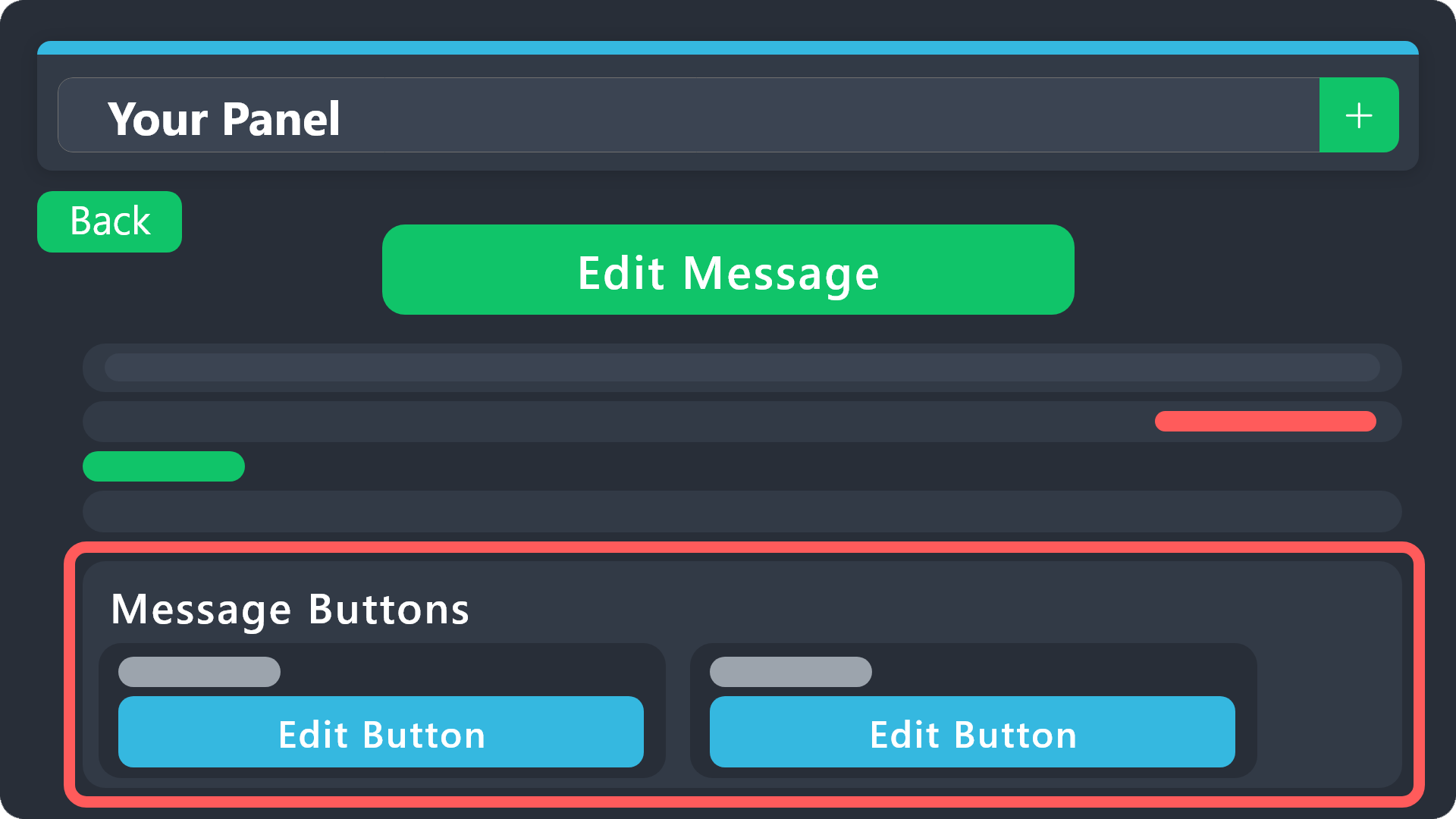 distant osprey
can someone check ticket
 glass marten
How do I set up tickets to ping staff roles when it opens?
I have roles set for staff roles but I cant figure out how to make it ping them when a ticket opens
nimble pawn
Anyone know how to give mental support
scenic plinth
We are not a mental health server, so no idea.
nimble pawn
😔
desert zealot
glass marten
How do I set up tickets to ping staff roles when it opens?
Go to your Panel section, scroll down to the bottom, click Edit Ticket Message, then add the roles ID like this {roleid} Can add as many as you'd like one after another.
Example: https://i.imgur.com/rBZgirc.png

Bare in mind you need to do this per panel
 winged narwhal
when i send the ticket to channel it does show this, instead it shows the default one.
 scenic plinth
I do apologize for not seeing this sooner!
What are you trying to send?
winged narwhal
scenic plinth
I do apologize for not seeing this sooner!
What are you trying to send?
this ticket
i made it and saved it but it wont show it
scenic plinth
You mean your panel message, or the message that appears when you open the ticket?
scenic plinth
You seem to be trying to modify the ticket message, the message the appears when a ticket is opened, which meaning default settings will apply for the message you are trying to send. Try configuring the panel message:
humble sequoiaBOT
The panel message is where people react to make a ticket. To customize it head over to your Dashboard --> Panel Configs -> Panel -> Edit Panel Message
 jade topaz
I invited the bot to my server, I created a category and created the channel. The ticket button came, but when I open a ticket and say close, it does not close immediately. It asks if I should delete the channel. I want it to close immediately when the close button is clicked.
I would appreciate if you tag me when you help me
 robust sandalBOT
Panel ayarlarında iki adımlı bilet seçeneğini devre dışı bırakın, bu 3 düğmeyi gösteren mesajı kaldıracaktır.
 English (en) → Turkish (tr)
Genel Seçenekler -> İki adımlı bilet
English (en) → Turkish (tr)
 scenic plinth
general
 scenic plinth
Did you disable the two step ticket option on the general tab of the dashboard and try on a new ticket?
jade topaz
If I send you the server link and give you an administrator role, wouldn't it be better if you come and help us?
jade topaz
scenic plinth
Did you disable the two step ticket option on the general tab of the dashboard a...
yes
scenic plinth
jade topaz
If I send you the server link and give you an administrator role, wouldn't it be...
I cannot do that, no. Sorry.
jade topaz
do i have to start all over
scenic plinth
jade topaz
yes
Resend the panel and try a new ticket again. Make sure your settings are saved.


 scenic plinth
You disabled two step close, not two step ticket. On the right side of your screen where the button appears green, click it so it appears red, save your settings, and try a new ticket.
jade topaz
okey ?
 scenic plinth
Ok, now ensure those settings are saved, and create a new ticket, and try closing it.
jade topaz
opened tickets go to the top, how can I bring it to the bottom of the ticket opening section @scenic plinth
 robust sandalBOT
Kontrol panelindeki kategori düğmesine bakın.
English (en) → Turkish (tr)
jade topaz
I want to give an auto role to those who open a ticket, how do I do it?
robust sandalBOT
Ne yazık ki, bu premium bir seçenek. Premium'a yükseltirseniz, bu ayarı pano ayarlarınızdaki bilet kategorisi seçeneği altında yapılandırabilirsiniz.
English (en) → Turkish (tr)
robust sandalBOT
Sorun değil
English (en) → Turkish (tr)
 grizzled lantern
heyy it says claiming is disabled but its enabled. anyone know why this might be the case
scenic plinth
You dont have premium.
jade topaz
When I open a ticket, I want it to tag the support role, how do I do it?
jade topaz
yaptım
 potent lichen
Is there a Option to change the Picture of the Bot or delete the description, when you have premium?
 slender minnow
potent lichen
Is there a Option to change the Picture of the Bot or delete the description, wh...
slender minnow
potent lichen
Is there a Option to change the Picture of the Bot or delete the description, wh...
Not at the moment, but it is a planned feature
humble sequoiaBOT
Within all the messages the bot sends (both embeds and text) you can mention either channels, roles, or even users, these mentions will only send a notification to the user if they are used within a text field, e.g: a role mentioned in an embed won't ping at all the users who have that role.
For mentioning a role you can use one out of three options:
{@Role Name} ➞ Which is Case Sensitive.
{RoleID} ➞ Replace RoleId with the Id of the role you are trying to ping.
<@&RoleID> ➞ Discord's native syntax to ping roles.
<#ChannelID> ➞ Mention a channel by its ID.
<@UserID> ➞ Mention a user by its ID.
potent lichen
slender minnow
Not at the moment, but it is a planned feature
Thanks❤️
 lusty hatch
does anyone know the variable for the ticket channel having the member name, ie <ticket-"username" instead of the ticket number?
rustic gale
lusty hatch
does anyone know the variable for the ticket channel having the member name, ie ...
lusty hatch
rustic gale
{ticket.user.name}
Thank you!
iron nightBOT
Gave +1 Rep to @rustic gale