#🆘│community-support

1 messages · Page 26 of 1

lunar solar
#

Hi,

Media contained within transcripts is not saved once the channel is deleted, premium subscribers get up to 8mb of upload to their transcripts however.

Best practice when any media is posted in a ticket is to upload it to a channel that will never be deleted and copy the message link and paste it in the ticket. That way nothing will ever be lost.

river sun
#

ty somachh ! 💔

#

thanks @lunar solar

iron nightBOT
#

Gave +1 Rep to @lunar solar

wise flicker
#

Hi how do i make a role have full perms to tickets so if someone makes a ticket they r automatically in

#

HELP PKS

#

PLS I RLLY NEED IT

silent wasp
#

Does anybody know how to fix this issue when trying to import a server config to a new server?

silent wasp
wise flicker
#

Ok

silent wasp
wise flicker
#

no

lunar solar
quick bone
zenith fern
#

can i solve it?

lunar solar
#

Yes we will be able to fix the issue but posting your pers info here isn't the best way to go about it

zenith fern
#

yes, I didn't know, how can I correct it? I'm a beginner, I don't know how to do this.

lunar solar
zenith fern
#

I wanted to reset 2fa security of the lottochain account because I don't have access to the code I lost the device

humble sequoiaBOT
#
⚠️ You're in the wrong place

We provide support for Ticket Tool Discord bot and cannot help you with whatever issue you have.

- We don't know which Support Team you should contact to get this issue resolved, and unfortunately we won't be able to accurately tell you.

If you don't have any further questions regarding our bot Ticket Tool, please close this ticket

quick bone
#

wrong place

lunar solar
#

Wrong Discord

fair lava
#

I wanted to reset 2fa security of the lottochain account because I don't have access to the code I lost the device

humble sequoiaBOT
#
⚠️ You're in the wrong place

We provide support for Ticket Tool Discord bot and cannot help you with whatever issue you have.

- We don't know which Support Team you should contact to get this issue resolved, and unfortunately we won't be able to accurately tell you.

If you don't have any further questions regarding our bot Ticket Tool, please close this ticket

quick bone
#

@fair lava ^

fair lava
iron nightBOT
#

Gave +1 Rep to @quick bone

humble sequoiaBOT
#
⚠️ You're in the wrong place

We provide support for Ticket Tool Discord bot and cannot help you with whatever issue you have.

- We don't know which Support Team you should contact to get this issue resolved, and unfortunately we won't be able to accurately tell you.

If you don't have any further questions regarding our bot Ticket Tool, please close this ticket

fair lava
#

$help

humble sequoiaBOT
# fair lava $help

Ticket Tool is the only ticketing bot you'll ever need! Explore its features and set the best ticket system for your server!

<:CommandIcon:1018980659064221746> Commands

Browse through Ticket Tool's commands list and find new utilities!

<:TextIcon:1018980662881030144> FAQ

Solutions for the most frequent questions our users have when implementing the bot on their server.

<:Setup:1034174646788030664> Setup

The steps to follow when setting the bot for the first time on any server

quick bone
fair lava
#

@lunar solar

lunar solar
fair lava
lunar solar
#

Define lag?

quick bone
#

command delay i assume

fair lava
#

and delay

fair lava
lunar solar
lunar solar
#

And what error do you get when you try and make a ticket?

fair lava
stark gale
#

Hey, a transcript, does it also save the messages send?

lunar solar
quick bone
#

in a html file and a direct link

stark gale
quick bone
stark gale
iron nightBOT
#

Gave +1 Rep to @quick bone

quick bone
#

then it'll send everything into that channel.

brisk wasp
#

how do i edit this

humble sequoiaBOT
#

The Ticket Message is the first message sent by the bot on a new ticket. To customize it head over to your Dashboard ➞ Panel Configs ➞ Ticket ➞ Edit Ticket Message

quick bone
#

^^ message content

brisk wasp
#

how do i mention role

humble sequoiaBOT
#

Within all the messages the bot sends (both embeds and text) you can mention either channels, roles, or even users, these mentions will only send a notification to the user if they are used within a text field, e.g: a role mentioned in an embed won't ping at all the users who have that role.

For mentioning a role you can use one out of three options:
{@Role Name} ➞ Which is Case Sensitive.
{RoleID} ➞ Replace RoleId with the Id of the role you are trying to ping.
<@&RoleID> ➞ Discord's native syntax to ping roles.

<#ChannelID> ➞ Mention a channel by its ID.
<@UserID> ➞ Mention a user by its ID.

quick bone
brisk wasp
iron nightBOT
#

Gave +1 Rep to @quick bone

shut jungle
#

Hi i have a question, where can i edit this message

humble sequoiaBOT
#

The Ticket Message is the first message sent by the bot on a new ticket. To customize it head over to your Dashboard ➞ Panel Configs ➞ Ticket ➞ Edit Ticket Message

lunar solar
#

No

quick bone
#

mb

lunar solar
lunar solar
shut jungle
#

damn okay thanks 🙏

lunar solar
prisma cedar
#

Hello! How can I make it show more options? I made them but they don't show up.

vestal pilot
#

Hi my account try has eroor

quick bone
#

Hm?

vestal pilot
#

The account sign-in was incorrect or your account is temporarily locked due to sign-in failures. Please verify your details and try again, or if you've already done that, contact customer service

quick bone
quick bone
prisma cedar
#

do I need to create 2 panels? or do they need to be tied somehow?

quick bone
humble sequoiaBOT
#

The Drop-down menu or Select Menu replaces the buttons on your panel message and uses a drop-down menu with all of your panels. To set this up, go to your Panel Configs and select your main Panel.

<:Numbericons1:1018864164032225340> Enable Select Style

First you enable Select Style. Then you add an item in the Dropdown Editor. Now you can start editing your dropdown!

<:Numbericons2:1018864168041971712> Dropdown Editor

Each line in the dropdown editor represents a line in the drop down menu on discord. You can add more "Items", by clicking on AddItemButton1AddItemButton2

First you select a panel. That's the panel this option will open a ticket for. BotOffline DONT select the same panel twice. Each option should have a different Panel BotOffline

After that, you can put a Display. This is the title of this option and will appear in the drop down menu. The *Description can be set right after that, which will be below the title in grey.

Additionally you can select an emoji, that will be shown in front of each option. You can either manually input the ID of an emoji or select it in the selector.

Common Issues ⚠️
  • Panel doesn't send? Make sure you have a valid emoji selected
  • Option doesn't show up? Check if two options have the same panel in the DropDown Editor
edgy vaultBOT
#

The Drop-down menu or Select Menu replaces the buttons on your panel message and uses a drop-down menu with all of your panels. To set this up, go to your Panel Configs and select your main Panel.

<:Numbericons1:1018864164032225340> Enable Select Style

First you enable Select Style. Then you add an item in the Dropdown Editor. Now you can start editing your dropdown!

<:Numbericons2:1018864168041971712> Dropdown Editor

Each line in the dropdown editor represents a line in the drop down menu on discord. You can add more "Items", by clicking on AddItemButton1AddItemButton2

First you select a panel. That's the panel this option will open a ticket for. BotOffline DONT select the same panel twice. Each option should have a different Panel BotOffline

After that, you can put a Display. This is the title of this option and will appear in the drop down menu. The *Description can be set right after that, which will be below the title in grey.

Additionally you can select an emoji, that will be shown in front of each option. You can either manually input the ID of an emoji or select it in the selector.

Common Issues ⚠️
  • Panel doesn't send? Make sure you have a valid emoji selected
  • Option doesn't show up? Check if two options have the same panel in the DropDown Editor
quick bone
#

@prisma cedar what i just said should make it work but it doesn't have a read above

prisma cedar
#

Got it, thank

quick bone
lapis trellis
#

🤔

quick bone
mossy cliff
#

hi!
can someone tell me how to permit a role to open a ticket plaese ? i can't find any info for this

rustic gale
#

Are your users having trouble creating tickets?

mossy cliff
#

I just found the issu, thank for your help

rustic gale
#

Yeah

dusk junco
#

how to make the bot send tickets to one channel?

mossy yew
#

Yea

rustic gale
#

You use the Send button in the dashboard

wary forge
#

hello

quick bone
#

hi!

wary forge
#

I need help, my character got stuck

edgy vaultBOT
#
⚠️ You're in the wrong place

We provide support for Ticket Tool Discord bot and cannot help you with whatever issue you have.

- We don't know which Support Team you should contact to get this issue resolved, and unfortunately we won't be able to accurately tell you.

If you don't have any further questions regarding our bot Ticket Tool, please close this ticket

humble sequoiaBOT
#
⚠️ You're in the wrong place

We provide support for Ticket Tool Discord bot and cannot help you with whatever issue you have.

- We don't know which Support Team you should contact to get this issue resolved, and unfortunately we won't be able to accurately tell you.

If you don't have any further questions regarding our bot Ticket Tool, please close this ticket

wary forge
quick bone
wary forge
#

no... 😦

quick bone
#

tell me your issue here and i may be able to help

wary forge
#

my character got stuck, cant even suicide

quick bone
wary forge
#

between the roof of a house in B3 /C3 Area

quick bone
#

you're in the wrong server

humble sequoiaBOT
#
⚠️ You're in the wrong place

We provide support for Ticket Tool Discord bot and cannot help you with whatever issue you have.

- We don't know which Support Team you should contact to get this issue resolved, and unfortunately we won't be able to accurately tell you.

If you don't have any further questions regarding our bot Ticket Tool, please close this ticket

wary forge
#

where should i go then?

quick bone
wary forge
#

scum

quick bone
wary forge
#

oh, i thought it was the scum server

tepid shale
#

it says go to my dashboard to make a panel but when i go there it shows this

humble sequoiaBOT
#
Don't see your server in the dashboard?

You will possibly need to relog. Look below to see the steps on how to relog.

How to relog in the Dashboard.

First, you must go to the dashboard. Once you are there, click on your avatar on the top right. after you click it, you will see a button that says Logout. You must click that. Once you have logged out, you can log back in.

You can also click here to log out immediately.

Note:

You need one of these 3 things to access the dashboard.
1. Server Owner (Level: 6)
2. Server Administrator (Level: 4)
3. Dashboard Role (Level: 2)

:warning: You can check your level using the </permissionlevel:1029797400174399542> command on your Discord Server

User permission level with Ticket Tool
@User is permission level: 0 (User)
```» *If it shows that your permission is **0**, you don't have any of the above **3 things** to manage the dashboard.*


**See the Image below on how to relog:**
quick bone
#

@tepid shale ^

tepid shale
#

yes?

quick bone
#

read the message above

tepid shale
#

ive read them and did it and its still not showing

quick bone
tepid shale
#

im an admin

quick bone
#

tell me what it says

tepid shale
#

level 0

quick bone
tepid shale
#

do i need to get the server owner to do it?

quick bone
tepid shale
#

its strange because i have the admin rank , i will check something

quick bone
tepid shale
#

yup the owner checked all the boxes but not the admin box

quick bone
#

you can ask them to either add your role to dashboard roles or give you administrator

tepid shale
#

ok ty

#

thanks

zenith fern
#

where can i reset my 2fa

#

?

quick bone
zenith fern
#

where can i reset my 2fa which support?

rigid oyster
#

ازي اشغل بوت

jade topaz
#

if I have 20 current votes and I want to redeem only 10 so how I can ?
What to type ?

rustic gale
jade topaz
rustic gale
jade topaz
#

Like we type $vote redeem 10 and get of 5 day

gusty sapphire
#

How to make that pls

humble sequoiaBOT
#

For a more convenient use of multipanels, you can now combine panels on the dashboard. This will allow you to directly send the multipanel from the dashboard or via the $panel ID command.

Where can I find this?

You can find this setting on the Dashboard -> Panel Configs -> Settings -> Panel

Note: if you're attaching all the panels to a panel called English, don't include English in the attached panel's box (If you do this, it will create a duplicate)

This will put all buttons from all of your panels on one message. The message is the panel message from the panel you're combining these panels in.

brazen abyss
#

Is it possible to see some stats like average time until claimed or average time a ticket takes?

quick bone
#

i don't believe there is, have you dmed the user who made the ticket? it might've saved it to their dms

#

^ or the person who closed the ticket

#

i had a similar issue and the only workaround i found is giving support team access to the logs

lunar solar
#

Premium is required to auto save transcripts to a Discord channel that you set, same as dming the user a copy of the transcript.

You can manually save transcripts however you need to download and reupload the file to a channel, simply having the link isn't enough as the link generates from the file in Discord.

rustic gale
#

And other logs are being recorded correctly?

#

What's the ID of your server? I'll take a look at your settings

jade topaz
#

can i transfer premium from one server to anohter?

rustic gale
#

We don't know when Discord is going to add that functionality, if ever.

jade topaz
#

how do i cancel it for one server?

rustic gale
#

head to your Discord user settings, find the Subscriptions submenu and look for the Ticket Tool subscription there

paper cypress
#

I'm looking to make a ticket system that would be used to have players open the ticket and have a quest generated from randomized possible outcomes in embed. Is that possible?

radiant moss
iron nightBOT
#

Gave +1 Rep to @radiant moss

paper cypress
radiant moss
#

I am not completely sure as I haven't really used the bot. But you would need to see if its even possible that it listens to other bots

paper cypress
radiant moss
#

Many don't have the feature because it can cause spam and api abuse. Ticket tool will listen to other bots if enabled but you have to specify and it limits how often it does listen

drifting pond
#

Good morning - my apologies if this comes across as a stupid question, but I cannot recall the command used to get the ID number for an emoji.

drifting pond
iron nightBOT
#

Gave +1 Rep to @quick bone

stuck patrol
#

Can some one help me My game is Crashing every time after Inject and my Pc sometimes too

humble sequoiaBOT
#
⚠️ You're in the wrong place

We provide support for Ticket Tool Discord bot and cannot help you with whatever issue you have.

- We don't know which Support Team you should contact to get this issue resolved, and unfortunately we won't be able to accurately tell you.

If you don't have any further questions regarding our bot Ticket Tool, please close this ticket

quick bone
#

@stuck patrol ^

opal coral
robust sandalBOT
opal coral
#

Arabic (ar)

#

English (en)

#

→ English حل

quick bone
opal coral
#

I want a solution

quick bone
#

$articket

humble sequoiaBOT
#
فريق الدعم الفني العربي

عميلنا العزيز ان كنت تبحث عن مساعدة يرجى فتح تكت خاص بفريق الدعم الفني العربي
اذهب الى#🎫│make-a-ticket
ثم قم بلضغط على الايموجي الاتي (🇯🇴)

opal coral
quick bone
opal coral
#

OK

quick bone
#

as i'm not sure what the issue is

thick apex
#

how do I give access to a position to answer, close open tickets, etc.

#

I can only give global permissions

quick bone
quick bone
quick bone
severe roost
#

Hey, how can I add multiple buttons to a single panel?

humble sequoiaBOT
#

For a more convenient use of multipanels, you can now combine panels on the dashboard. This will allow you to directly send the multipanel from the dashboard or via the $panel ID command.

Where can I find this?

You can find this setting on the Dashboard -> Panel Configs -> Settings -> Panel

Note: if you're attaching all the panels to a panel called English, don't include English in the attached panel's box (If you do this, it will create a duplicate)

This will put all buttons from all of your panels on one message. The message is the panel message from the panel you're combining these panels in.

quick bone
#

@severe roost ^

severe roost
#

Much appreciated ❤️

thick apex
iron nightBOT
#

Gave +1 Rep to @quick bone

thick apex
#

+REP @quick bone very good

iron nightBOT
#

Gave +1 Rep to @quick bone

thick apex
#

+1REP @quick bone very good

#

+1 REP @quick bone very good

lunar solar
#

Rep is rate limited

thick apex
#

bruh

lunar solar
#

Please stop spamming the channel

raw pendant
#

So I got a dumb question; once I made changes on the Dashboard, what exactly do I have to do in order to have the changes reflected live on the server?

covert swallow
#

Depends on the change

steep dust
#

Can someone help me on a fortnite account I bought

rich osprey
#

where can I open the image upload

#

users are saying they can't upload the image

raw pendant
covert swallow
raw pendant
#

Resent? Guessing you mean Update?

rich osprey
#

@covert swallow where can I open the image upload option?

covert swallow
rich osprey
#

users are saying they can't upload the image when open a ticket

raw pendant
covert swallow
iron nightBOT
#

Gave +1 Rep to @covert swallow

raw pendant
#

Would there be any way to make it so different panels would count up towards the same ticket # total cumulatively? In other words, opening up a ticket under panel 1 would be ticket-0001 but if you then open a ticket under panel 2, it would automatically become ticket-0002?

scenic plinth
#

A global ticket count? Not at the moment.

raw pendant
#

Gotcha, alright

jade topaz
#

$setup

#

$help

humble sequoiaBOT
# jade topaz $help

First you will want to invite the bot to your server. Once the bot is in your server, you can manage your server in the dashboard.

To create a panel we are going to need to head over to the Panel Configs Tab on the Dashboard.

Once at the dashboard we will need to click Create Panel.
Enter a panel name (Fill in any optional settings you want).
Click Create Panel and you are ready to get started with configuring your panel.
An example of a creating a panel is shown below.

Once the panel has been created, use the blue Send button and select the channel you want the panel to be sent to.

The Panel wasn't send

Use the </debug:ID> command to diagnose possible permission issues with the bot.

native tangle
#

How can I make tickets opened appear in another category?

keen axle
#

How to ping the support roles? I used the method but it still doesn't work, the bot has an administrator perms

daring bolt
#

Is there any way to make a ticket automatically close?

#

Like after running a command like $timeclose

scenic plinth
#

Not in the way you are wanting, no. It has been suggested, although I am not quite sure on plans for implementation for a custom time duration.

stark gale
#

Is it possible to create anonymous tickets?

iron nightBOT
#

Gave +1 Rep to @scenic plinth

jade topaz
#

Hi. I wonder how we can whitelist url links sharing? We have MEE6 bot and whitelisted channel "ticket support" but once ticket is created, it gets its own ID and opens within server where bot doesn't understand / count its coming from whitelisted channel "ticket support"?

scenic plinth
#

You would need to whitelist the ticket category, which is more of a question for MEE6 on how to do. In simple terms, just because the ticket comes from a channel you whitelisted, does not mean those tickets are whitelisted from it.

jade topaz
#

Exactly, thats what I try to fix, but have no clue. I would need to whitelist each new ticket created via MEE6, what ofc is not possible.

#

Was just wondering if ever anyone came across with same issue!?

#

And newly created tickets can't get opened within "ticket support" channel, where user creates it?

#

Now all new tickets open on top of all channel - seperately

scenic plinth
#

Again, you would need to whitelist the category your tickets are created in.

jade topaz
#

Ok, but is it possible to decide where all new tickets gets opened? Can I target specific channel where they actually open?

scenic plinth
jade topaz
#

Excellent. Will test this one. Thanks

#

I see. MEE6 doesn't have any option to whitelist category - just channels.
And you have only Category, not channels 🙂

#

In any case, will try to figure something out. Thanks @scenic plinth

iron nightBOT
#

Gave +1 Rep to @scenic plinth

jade topaz
#

Possible user gets a role when creating ticket?

quick bone
lunar solar
#

Panel configs --> ticket --> ticket opened roles

#

Premium feature however

#

You can also set it to remove certain roles on ticket close

quick bone
jade topaz
mossy plinth
#

I have never accessed the site in years, and im magically banned

fallow ingot
#

Along the lines of timed out?

mossy plinth
#

Uh, what do you mean?

#

It just says this

humble sequoiaBOT
#
Error 1015 - You are being rate limited

If you get the above error when trying to access our web page, don't be scared. This is just a security feature on our dashboard to mitigate possible attacks to the site. The only way to access the site is to wait for the temporary ban to be lifted automatically. It typically takes around 1 hour but can be quicker or longer.

fallow ingot
#

Sorry for any inconvenience

mossy plinth
#

Il wait then and see if i can acces it later

sterile tangle
#

Please key

#

Please key

quick bone
jade topaz
#

is there a way to close ALL tickets

quick bone
jade topaz
#

i have 150 tickets its just absurd

pale pilot
#

Copy + Paste the close command in all channels

jade topaz
pale pilot
#

$close

jade topaz
quick bone
pale pilot
#

If you have premium you can automatically save transcripts on deletion

jade topaz
quick bone
jade topaz
#

ok thx

quick bone
#

and get your moderators and support team to help you

jade topaz
#

thanks @quick bone

iron nightBOT
#

Gave +1 Rep to @quick bone

quick bone
jade topaz
#

Hi,how i make a ticket ping someone when opened? Is that pay only?

#

Plz ping thx

humble sequoiaBOT
#

1. Go into your Dashboard
2. Open your Panel Configs tab
3. Select the panel you want to ping your support on
4. Open the Ticket options menu
5. Click on Edit Ticket Message
6. In the Message Content use one of the role mention syntax (**{@Role Name}** / **{Role ID}**)
7. Save changes

Note: For this to work properly, Ticket Tool requires the Mention Everyone permission. Or the role must have the Allow anyone to @mention this role setting enabled onswitch

thorn wasp
#

I need make create a ticket?

quick bone
#

$setup

blazing harness
#

What does current shard mean? If you know please tell me. If I don't respond PLEAEE PING ME

blazing harness
#

What do you mean ?

quick bone
covert swallow
#

Shards are related to hosting

keen axle
#

How to ping the support roles? I used the method but it still doesn't work, the bot has an administrator perms

covert swallow
#

<@ROLEID> should definitely work for any role

blazing harness
quick bone
#

isn't it <@&roleid>

covert swallow
#

You shouldnt even really need to know the shard unless support asks you for it, and its a rare occasion we will

blazing harness
#

Oh ok thanks for clearing this up

covert swallow
blazing harness
#

Thanks @covert swallow

iron nightBOT
#

Gave +1 Rep to @covert swallow

keen axle
#

Thanks @covert swallow

iron nightBOT
#

Gave +1 Rep to @covert swallow

keen axle
#

Prizafal I still don't get pinged! after I did the format, the bot shows the roles, but no red circle near the channel name...

frozen drum
#

im stack here

#

anyone can help me

unkempt nest
#

i don’t know if it helps the developer’s but my server id is 873324459006771210 and interactions are failing. is there a way to find out what is going on?

jade topaz
#

how do invite premium bot?!?!?

#

i have free trial &&^^^ WWW

humble sequoiaBOT
#

Within all the messages the bot sends (both embeds and text) you can mention either channels, roles, or even users, these mentions will only send a notification to the user if they are used within a text field, e.g: a role mentioned in an embed won't ping at all the users who have that role.

For mentioning a role you can use one out of three options:
{@Role Name} ➞ Which is Case Sensitive.
{RoleID} ➞ Replace RoleId with the Id of the role you are trying to ping.
<@&RoleID> ➞ Discord's native syntax to ping roles.

<#ChannelID> ➞ Mention a channel by its ID.
<@UserID> ➞ Mention a user by its ID.

gilded verge
gilded verge
rustic gale
#

All premium features ara available in @pseudo glen as well.

rustic gale
rustic gale
unkempt nest
daring warren
#

Hi guys

#

i can't install my updated and it can't join rally

humble sequoiaBOT
#
⚠️ You're in the wrong place

We provide support for Ticket Tool Discord bot and cannot help you with whatever issue you have.

- We don't know which Support Team you should contact to get this issue resolved, and unfortunately we won't be able to accurately tell you.

If you don't have any further questions regarding our bot Ticket Tool, please close this ticket

rustic gale
novel kayak
#

It won't let me create my ticket, it tells me something like undefined, what could it be?

cold dock
#

not work

#

user not remove on close

#

oh that english was horrendous.
i am experiencing issues with the bot which i am unable to rectify to i have referred myself to the communal support services within your official discord server.

my issue is that whenever a user closes their ticket (which we allow them to do), they are not removed from their ticket after the fact. this means they can continue to open their ticket after we, or they close it and i simply am stumped on how to get this resolved.

thanks

rustic gale
#

If you know your server's ID, include it in the form answer

elder charm
#

i didn't get the ticket

jade topaz
#

how to make like this

jade topaz
#

dropdown

jagged furnace
polar mango
#

i looked at the transcript, tried to check the attachment that was sent and all i got was this

jade topaz
gilded verge
polar mango
#

so is there a way to get the images back 😭

#

this is y i used transcripts rip so i cant flood one category with a million channels 😔

gilded verge
humble sequoiaBOT
#

The Drop-down menu or Select Menu replaces the buttons on your panel message and uses a drop-down menu with all of your panels. To set this up, go to your Panel Configs and select your main Panel.

<:Numbericons1:1018864164032225340> Enable Select Style

First you enable Select Style. Then you add an item in the Dropdown Editor. Now you can start editing your dropdown!

<:Numbericons2:1018864168041971712> Dropdown Editor

Each line in the dropdown editor represents a line in the drop down menu on discord. You can add more "Items", by clicking on AddItemButton1AddItemButton2

First you select a panel. That's the panel this option will open a ticket for. BotOffline DONT select the same panel twice. Each option should have a different Panel BotOffline

After that, you can put a Display. This is the title of this option and will appear in the drop down menu. The *Description can be set right after that, which will be below the title in grey.

Additionally you can select an emoji, that will be shown in front of each option. You can either manually input the ID of an emoji or select it in the selector.

Common Issues ⚠️
  • Panel doesn't send? Make sure you have a valid emoji selected
  • Option doesn't show up? Check if two options have the same panel in the DropDown Editor
gilded verge
real goblet
#

@gilded verge

gilded verge
#

@real goblet why u pinging me 🙂

real goblet
#

I need help with money please help me to improve my life please

humble sequoiaBOT
#
⚠️ You're in the wrong place

We provide support for Ticket Tool Discord bot and cannot help you with whatever issue you have.

- We don't know which Support Team you should contact to get this issue resolved, and unfortunately we won't be able to accurately tell you.

If you don't have any further questions regarding our bot Ticket Tool, please close this ticket

real goblet
#

I need help with money for me to buy food today please

#

I need to know about the ticket

humble sequoiaBOT
#

We would love to help you, but if you don't tell us what you need help with we can't help you :(

real goblet
#

I need help with money please my brother and sister please help me

#

Please help me to get food today please

#

@humble sequoia

gilded verge
#

If you don't need help with a bot, then don't troll

lean folio
#

yo can someone help me how do i put the discord emojis on the ticket message?

#

like this

ember drift
#

hi there, just having some issue with pinging some staff member with his id

#

not the role id
any help ?

gilded verge
humble sequoiaBOT
#

Within all the messages the bot sends (both embeds and text) you can mention either channels, roles, or even users, these mentions will only send a notification to the user if they are used within a text field, e.g: a role mentioned in an embed won't ping at all the users who have that role.

For mentioning a role you can use one out of three options:
{@Role Name} ➞ Which is Case Sensitive.
{RoleID} ➞ Replace RoleId with the Id of the role you are trying to ping.
<@&RoleID> ➞ Discord's native syntax to ping roles.

<#ChannelID> ➞ Mention a channel by its ID.
<@UserID> ➞ Mention a user by its ID.

gilded verge
ember drift
iron nightBOT
#

Gave +1 Rep to @gilded verge

lean folio
gilded verge
#

as I mentioned, just before the emote, use \

#

^^

agile sentinel
#

When the bot sends a message in my server there are two buttons to make a ticket how do I reduce that to one button

humble sequoiaBOT
#

For a more convenient use of multipanels, you can now combine panels on the dashboard. This will allow you to directly send the multipanel from the dashboard or via the $panel ID command.

Where can I find this?

You can find this setting on the Dashboard -> Panel Configs -> Settings -> Panel

Note: if you're attaching all the panels to a panel called English, don't include English in the attached panel's box (If you do this, it will create a duplicate)

This will put all buttons from all of your panels on one message. The message is the panel message from the panel you're combining these panels in.

lunar solar
#

You’ve attached the panel to itself

#

Unattach it and send the message again or update the embed via our upgrade button

opal cradle
#

Is there any way to transfer a claimed ticket to another support member? Currently we just press the claim button again but that just unclaims it for the other person, and puts the channel rename on a cooldown. Example:

  • staff A claims a ticket
  • staff B presses the claim button -> it says unclaimed
pliant jay
#

I'm stuck here

jade topaz
#

Failed: Invalid Form Body components[0].components[0].emoji.name[BUTTON_COMPONENT_INVALID_EMOJI]: Invalid emoji components[0].components[1].emoji.name[BUTTON_COMPONENT_INVALID_EMOJI]: Invalid emoji components[0].components[2].emoji.name[BUTTON_COMPONENT_INVALID_EMOJI]: Invalid emoji

#

and backend says: no perms to write/view [When trying to SEND to #channelx]

dreamy isle
#

I position the image but it appears as a line

jade topaz
#

no u

opal cradle
fallow goblet
#

Hello!

#

Is it possible to have a custom bot with premium?

rustic gale
fallow goblet
rustic gale
#

Because you can't edit the footer without premium, you can't remove that branding

fallow goblet
#

Okay! Got it

#

Also there is an option to put a custom bot ID, what does that do?

rustic gale
#

It makes Ticket Tool respond to commands sent by that bot.

#

It's useful for automating certain tasks

fallow goblet
#

Oh, okay

#

I am looking for a tool with a custom bot

#

Right now I am on trial premium

dense harness
#

I'm having trouble adding the message so they can create the ticket

rustic gale
rustic gale
dense harness
#

@rustic gale yes

rustic gale
dense harness
#

Where?

#

@rustic gale don't have any step by step?

rustic gale
jade topaz
#

how can i mention a specific channel in the ticket?

rustic gale
#

You can find your channel's ID by using the /id command

jade topaz
#

aa ok, let me try! Thanks!

#

thanks @rustic gale 🙂

iron nightBOT
#

Gave +1 Rep to @rustic gale

tribal dawn
#

how do i edit my pannel message before sending it to the channel

humble sequoiaBOT
#

The panel message is where people react to make a ticket. To customize it head over to your Dashboard --> Panel Configs -> Panel -> Edit Panel Message

tribal dawn
#

oh its premium , okok thank youu

rustic gale
#

Some things can be edited for free

tribal dawn
#

is the premium monthly?

jade topaz
#

Also @rustic gale , do you know any bot like this Rep one? i got a big sales discord.. this can be useful

rustic gale
#

You can get a Discord subscription, which is monthly at $6 USD per month

#

You can buy prepaid premium, which is $6 per month starting at three months ($18 USD) and you get a yearly discount at just $66 USD for a year

#

Or you can get free premium by voting. Type $vote to know more

rustic gale
#

I personally recommend it for its powerful, flexible custom command feature. We don't offer support for it here though

jade topaz
#

i'll take a look

#

thanks @rustic gale

iron nightBOT
#

Gave +1 Rep to @rustic gale

outer marsh
#

hello how do you put the ticket tool on your discord server

covert swallow
#

$invite

humble sequoiaBOT
jade topaz
#

What’s the difference between the premium bot and the normal bot

fallow ingot
#

The bot is also prioritised when it comes to fixing problems

edgy arch
#

How do I remove multiple buttons from my panel

#

I only want 1 button

rancid horizon
daring bolt
#

Is there any like command or smth that you can use to ping the ticket owner. I ask this bc I wanna set smth up where you can like automatically ping the owner, without having to look and manually do it

rustic gale
#

Make sure Attached Panels is empty, then send the panel again

#

It should have just the panel's default button.

robust sandalBOT
humble sequoiaBOT
#

The Drop-down menu or Select Menu replaces the buttons on your panel message and uses a drop-down menu with all of your panels. To set this up, go to your Panel Configs and select your main Panel.

<:Numbericons1:1018864164032225340> Enable Select Style

First you enable Select Style. Then you add an item in the Dropdown Editor. Now you can start editing your dropdown!

<:Numbericons2:1018864168041971712> Dropdown Editor

Each line in the dropdown editor represents a line in the drop down menu on discord. You can add more "Items", by clicking on AddItemButton1AddItemButton2

First you select a panel. That's the panel this option will open a ticket for. BotOffline DONT select the same panel twice. Each option should have a different Panel BotOffline

After that, you can put a Display. This is the title of this option and will appear in the drop down menu. The *Description can be set right after that, which will be below the title in grey.

Additionally you can select an emoji, that will be shown in front of each option. You can either manually input the ID of an emoji or select it in the selector.

Common Issues ⚠️
  • Panel doesn't send? Make sure you have a valid emoji selected
  • Option doesn't show up? Check if two options have the same panel in the DropDown Editor
static fox
#

Is it possible to copy all my bot's commands and settings from one of my servers to another (also mine)?

rustic gale
minor crown
#

Good Morning,
I've got a Problem with the ticket Tool. My Support Massage cant be used by the members although it is activates for them.

rustic gale
minor crown
#

So, if my members want to use the panel - the Message "You don't have permissions to use this" is sent.

#

But I have activated it

#

They should have permission to use it

uneven crown
#

I am reporting the loss of FQF-6000 grenade launcher after I have obtained it in BP stage 18 on 1/3/2023 and after the disruption of the server on 1/4/2023, I found out that it is not in my inventory. I received message from bot that it can do nothing about it. Hey, I think you should be able to check record and return that grenade launcher to me. Thank you.

minor crown
#

?

rustic gale
#

Any roles there are prevented from interacting with the bot in any way, including creating tickets

whole kindle
#

do i have to have some kind of vip to change ticket description message?

pine ginkgo
#

How do i make a multi pannel? ;D¨

humble sequoiaBOT
#

For a more convenient use of multipanels, you can now combine panels on the dashboard. This will allow you to directly send the multipanel from the dashboard or via the $panel ID command.

Where can I find this?

You can find this setting on the Dashboard -> Panel Configs -> Settings -> Panel

Note: if you're attaching all the panels to a panel called English, don't include English in the attached panel's box (If you do this, it will create a duplicate)

This will put all buttons from all of your panels on one message. The message is the panel message from the panel you're combining these panels in.

lunar solar
#

@pine ginkgo

pine ginkgo
lunar solar
# pine ginkgo but my menu does nok look that way..

Choose a panel to be the “primary” this will be the first button

Panel configs —> Panel —> Attached panels (multi panels) —> Add other panels to this box, don’t add the panel you are working on to itself.

Send the panel to Discord or update the embed message via our update button

pine ginkgo
iron nightBOT
#

Gave +1 Rep to @lunar solar

lunar solar
#

So choose your emoji

#

For example

#

Then put a back slash in front of it

#

\ PabloTiphat

#

Take the space away

#

That’s what you need ^

pine ginkgo
lunar solar
#

I just showed you

#

Read my messages in order

lunar solar
#

The whole thing

visual marlin
#

Hopefully quick question, why am I seeing 2 buttons. Figured it was part of "Button's per row" but that is set to 1.

lunar solar
visual marlin
#

Yes, indeed I did 🙂

#

Thanks!!

lunar solar
#

Panel configs —> Panel —> Attached Panels (multi panels) —> Empty this box

Resend the msg or update it

visual marlin
#

Thanks @lunar solar that did it

iron nightBOT
#

Gave +1 Rep to @lunar solar

lunar solar
#

No worries

#

Ignore the bot warning 🙂

jade topaz
#

What is the $id command for? I’m trying to use it but my dumb brain don’t how to use it properly

I know it’s like $id [User ID] but there has to be other ways to use it

lunar solar
#

Id command can be used for roles, emojis etc

#

$id PabloTiphat

humble sequoiaBOT
lunar solar
#

$id @lunar solar

humble sequoiaBOT
lunar solar
#

Etc etc

jade topaz
lunar solar
#

Na

jade topaz
lunar solar
#

Literally just getting IDs for referencing them somewhere

#

Like you need role ID to mention a role in an embed

#

Or same for emoji

#

Etc

jade topaz
lunar solar
#

Na

#

You can just do a normal Discord search for that

#

Using their User ID

jade topaz
iron nightBOT
#

Gave +1 Rep to @lunar solar

lunar solar
#

No worries

#

caps

jade topaz
lunar solar
whole kindle
#

do i have to have some kind of vip to change ticket description message?

slender minnow
whole kindle
#

Is there no way to translate the bio of the bot? @slender minnow

slender minnow
#

nope

#

although custom pfp, name and stuff is a planned feature (part of upcoming updates)

burnt bloom
#

Habe den Bot per Discord gekauft, klappt nur nicht

#

I bought the bot via Discord, it just doesn't work

covert swallow
#

How does it not work

burnt bloom
#

Bought bot but doesn't work

humble sequoiaBOT
#

The first thing you will need to do is invite the premium bot, an invite can be found here

Once the bot is in your server we will head to the dashboard and manage your server. When you are managing your server, you want to head into "Server Configs" then click the drop down menu under "Select the bot you would like to use on this server" then click "Ticket Tool#6207" and then save.

covert swallow
#

And make sure you do not kick the free bot, as it cancels the subscription

burnt bloom
#

it does not work

#

field is grey and not available

#

and the Redeem Key doesn't have

burnt bloom
#

problem solved, thanks

#

thanks @covert swallow

iron nightBOT
#

Gave +1 Rep to @covert swallow

upper elk
#

How do I rename the ticket?
Whenever I create one the channel is called #ticket-01 and lists them by number, but I want to rename the ticket part. Is there somewhere I can do that?

jade topaz
upper elk
#

Can I pay for permanent premium?

covert swallow
#

Lifetime premium is no longer available

edgy yoke
#

Hi all, Im trying to add new role to be able to action ticket but after upload this role still cant see tickets

placid walrus
#

Hello, how do you add ticket tool to a specific channel

#

@atomic solstice

#

oh sorry

placid walrus
rustic gale
#

If so, just use the Send button

silk ermine
#

Trying to push a panel with the send button. I keep getting an undefined error. I checked the permissions to another discord I have with ticket tool. Everything is the same. Even gave ticket tool administrator and no dice. Any ideas?

scenic plinth
#

Refresh your page or try a new browser. Usually undefined in the case with the panel means you are trying to update a message that no longer exists or is not by ticket tool, or the channel does not exist or cannot be found.

silk ermine
#

Cleaned out browser cache. In Edge browser (normally use opera gx). Loaded up the page. Tried to send again same error. The channel is there. I can select it in the drop down as well from a clean browser. The only thing I can think of is I invited the premium bot. Activated the 7day trial for that server and maybe it is trying to push it from freemium bot even tho the trial is active?

#

Whelp paid for monthly premium for that server and it's still kicking me with the undefined error

rustic gale
#

it should be
/panel 1
unless you've created more than one panel

silk ermine
#

Just did that and got this message. "This bot isn't active on this server, Please make sure you've selected the correct active bot on the dashboard." I can see on the panel config page the subscription is active on the premium. So not sure what to do.

gaunt quiver
#

Anyone have an issue where there's two identical "Create Ticket" buttons?

rustic gale
plush salmon
#

How do you make the thing where you can click make a ticket

stark runeBOT
#
1. Invite Ticket Tool to your server

First you will want to invite the bot to your server. Once the bot is in your server, you can manage your server in the dashboard.

2. Create a Panel

To create a panel we are going to need to head over to the panel configs on the dashboard.
Once at the dashboard we will need to click Create Panel.
Enter a panel name (Fill in any optional settings you want).
Click Create Panel and your ready to get started with configuring your panel.
An example of a creating a panel is shown below.

3. Send the Panel to a Channel

Once you've created a panel on the dashboard you will need to send it to a channel using send on the dashboard.
Select the channel you want your panel to be created in and click send.
For other questions checkout $help faq.
An example of a sending a panel is shown below.

Having a Problem Sending the Panel?
Do $debug in a channel with Ticket Tool and make sure it has all the necessary Discord permissions.

gilded mountain
#

heyy

#

i need help with configurating my ticket tool

#

can anyone help me?

lunar solar
#

Need to be more specific

#

What’s the issue?

coarse timber
#

can anyone help me with this ?

lunar solar
lunar solar
#

No worries

gilded mountain
# lunar solar What’s the issue?

Failed: Invalid Form Body components[0].components[0].emoji.name[BUTTON_COMPONENT_INVALID_EMOJI]: Invalid emoji components[0].components[1].emoji.name[BUTTON_COMPONENT_INVALID_EMOJI]: Invalid emoji

lunar solar
#

Server ID?

#

Or name

gilded mountain
#

so? what is the problem?

#

do i get the emoji's out?

thorny pier
#

How do I fix this it has all perms but still says thsi

gilded mountain
#

Failed: Invalid Form Body components[0].components[0].emoji.name[BUTTON_COMPONENT_INVALID_EMOJI]: Invalid emoji components[0].components[1].emoji.name[BUTTON_COMPONENT_INVALID_EMOJI]: Invalid emoji

#

its still the same

#

i dont understand im scared

lunar solar
gilded mountain
#

alright, thank you very much

lunar solar
gilded mountain
#

that is the same problem i have

thorny pier
thorny pier
gilded mountain
thorny pier
gilded mountain
#

But it deletes everything I wrote

thorny pier
#

Copy it and then u can do this let me ss it rq

gilded mountain
thorny pier
gilded mountain
thorny pier
gilded mountain
#

Alright I got it

thorny pier
#

Kk lmk if it dosent work

gilded mountain
#

Done, I got the emoji out

thorny pier
#

Kk!

gilded mountain
#

Same thing

#

Failed: Invalid Form Body components[0].components[0].emoji.name[BUTTON_COMPONENT_INVALID_EMOJI]: Invalid emoji components[0].components[1].emoji.name[BUTTON_COMPONENT_INVALID_EMOJI]: Invalid emoji

thorny pier
#

Can you run $debug then show me what it says?

thorny pier
#

Nono in ur server go in a channel that u want it in and say $debug

gilded mountain
thorny pier
#

Alright can u show me the emoji thing again maybe it didn’t save

gilded mountain
thorny pier
gilded mountain
thorny pier
#

Oh click on a emoji and then click the select button again and save

gilded mountain
#

YES]

#

GOD BLESS YOU SOUL

jade topaz
#

Hi, I see that tickettool switched to paying subscription within discord. Is there a way to pay for yearly instead of monthly?

#

Please (@) me to notify me, thanks!

gilded verge
jade topaz
#

ah big oof then and okay

random atlas
#

Is there a video anywhere to help make the drop down menu? Completely don’t understand how to 😩😩😩

thorny pier
#

If not you can try making a ticket or waiting for someone who knows more.

gilded mountain
#

Hello?

#

Is anyone avaliable?

#

How do I make the receipt not print

#

Like, how do I make it so I don't make that appear

rustic gale
humble sequoiaBOT
#

With Ticket Tool, you can customize the behavior the bot takes when logging your tickets! For editing these options follow these steps:

Dashboard ➞ Panel Configs ➞ Logging Options

Logging Channel
Here you will define which channel @humble sequoia will save the Logs in (ticket created/deleted/closed, etc.)

Logs you can save:

Ticket Created ➞ Logs when a ticket is created
Ticket Closed ➞ Logs when a ticket is closed
Ticket Opened ➞ Logs when a ticket is opened
Ticket Renamed ➞ Logs when a ticket is renamed
Ticket Deleted ➞ Logs when a ticket is deleted
Transcript Saved ➞ Logs when a ticket is saved

Select with offswitch (disable) or onswitch (enabled) which logs you would like

Below you can see an example of what the Logging Options will look like:

gilded mountain
#

Thank you

jade topaz
#

for the drop down ticket feature, is it possible for it to open a ticket in a desired category? instead of just under 1

thorny pier
jade topaz
thorny pier
loud widget
#

guys I feel crazy af. I have added this bot to my servers countless times but now I swear I cannot find anywhere to declare what channel to put the ticket bot itself in (to react to open a ticket) please help me I have been clicking around for 20 mins 😭

thorny pier
jade topaz
#

damn all good

thorny pier
loud widget
#

I finally figured it out, I needed the "send" section of the panel, I just am too stupid to get anything 😭 sorry to be a bother <3

jade topaz
#

i figured it out too lmao

civic sparrow
civic sparrow
#

how do I make this window to pop up when clicing on the ticket instead of basic text channel?
can anyone help me out?

lusty steppe
#

hi guys, i had a issue on Monday night with a bug, who do i report this too, and how do i go about it? i sent a message to chappie as well as the ticket tool, but not sure it got where it was supposed to go?

idle sierra
#

How do I see the results of a form that has been filled out on the ticket

jade topaz
humble sequoiaBOT
#

A Discord Form lets the user answer individual questions in a pop-up Form, which then displays the answers in the ticket message. This can save time if you already know what you want to ask the user.

Setup Forms

Forms can be enabled under Panel Settings > Form Options > Edit Forms Options. In the new pop-up window, you can now enable and edit your own Form.

Form Options

You can add up to 5 questions in the Discord form. This is a Discord limitation. Each question can have a placeholder in the input field, a minimum and maximum input, multi-line, and also the option to have the answer required.

Options

Question Title ➞ Your Question goes here
Question Placeholder ➞ The placeholder text in the input field
Required ➞ If enabled, the user has to answer this question, to submit the form
Multi-Line Input ➞Allows the user to input multiple lines
Minimum and Maximum Input ➞ Set a minimum and maximum input value for the user

Displaying the Answer

To display the answers from the user, you need to go into your Panel Settings > Ticket Options > Edit Ticket Message. In there you use the variable {create.form.x} and just replace x with the number of your question. For example, the response to Question 1 can be displayed with {create.form.1}. If you don't use this variable, the response from the user is lost.

gilded verge
gilded verge
gilded verge
idle sierra
#

thx

gilded verge
jade topaz
gilded verge
idle sierra
mossy yew
#

Need a ride it’s time for a short vacation within the communities I need to feel good 😊

gilded verge
ember ivy
#

hi! i always need to delete and resend the panel, when i try to update it i get this:

#

don't understand what i'm doing wrong it is the correct hyperlink

jade topaz
#

Yo

sleek trout
#

i have set 2 roles support team and support manage
i want both to be able to view open and reply to tickets but only manage to view closed is this possible? thank you

jade topaz
#

Ticket tool doesn't seem to be working

modern saddle
#

Same with my server; it’s showing bot is online but not registering any commands

light blaze
#

Down?

sleek trout
#

yes was on dashboard and was kicked off now says

jade topaz
#

They are looking on it rn

scenic plinth
#

We are aware of this issue and are currently working to identify the cause.. We will provide updates when possible. Please avoid pinging, direct messaging staff, and repeatedly asking your question about the bot not responding here please.

crystal halo
#

Hey, i need help pls

#

How can i fix this

jade topaz
crystal halo
#

Uff

#

Ty

#

Thanks @jade topaz

iron nightBOT
#

Gave +1 Rep to @jagged shore

sleek trout
#

ok new question 2 ticket panels if !ticket opens one how do i get the command to open the other panel ticket

urban robin
#

Hey, i just activated the premium on Ticket Tool, how to invite the premium bot please ?

rustic gale
sleek trout
iron nightBOT
#

Gave +1 Rep to @rustic gale

prime laurel
#

Hello family

white knot
#

can i make it so the channel gets deleted automatically when someone closes the ticket?

tired marlin
#

How to change this

crisp otter
#

anybody know why there is 2 buttons of the same??

placid walrus
#

And how do you get the claim ticket command to work?

fallow ingot
#

It’s because you have attached another panel to that panel.

#

You can remove the attached panel by going to Panel option under Ticket Creation.

vast patio
#

I saved the transcript and delete a ticket and would not show up has the transcrpit saved in the area

rustic gale
gusty osprey
#

Having issues logging into the Dashboard on the website?

plucky trout
#

Hola alguien puede ayudarme ?

placid walrus
#

How do I make it so that lower rank roles without admin permissions can see any ticket being opened without me having to add them into the channel?

humble sequoiaBOT
midnight olive
#

hello, i have problem with the error runtime what can i do?

iron nightBOT
#

Gave +1 Rep to @rustic gale

rancid horizon
#

How i can create menus?

#

/help

rustic gale
river sun
#

Hi how do i do this v

#

/help

rustic gale
#

Create a panel with a dropdown menu?

river sun
covert swallow
covert swallow
#

Head to your Dashboard
Select your server
Go to the Panel Configs tab
Under Ticket Creation, click on DropDown Style Options

hazy briar
#

how do i fix this so members can make tickets

rustic gale
#

and make sure you didn't make the Create Ticket button support-team-only (in Panel Configs -> Buttons -> Create Ticket)

lament frigate
#

Lmao. Just joined to ask the above question and I had support-team-only set so my members couldn't make a ticket. Thanks

hazy briar
#

SO DID I HAHA. Thank you

lament frigate
#

Bro we suckkkk xD

scenic plinth
#

There has been much much worse... trust me...

lament frigate
#

I don't doubt that. lol

rustic gale
#

Glad to help. You can always give me rep

hazy briar
#

Sorry for the ping, I wasn’t even thinking about that

#

Nevermind, I figured it out. Again sorry for the notification

river sun
#

hi i i did 4 and it only popped one help

lunar solar
#

So on the right there

#

See how it says tickets, tickets, tickets…

#

You’ve used the same panel every time

#

You need to make a panel for each drop-down option you want

river sun
lunar solar
#

Panel configs —> Green + (Top right hand corner)

river sun
#

oh tyy!!

lusty stone
#

how can i put the bot in another language?

river sun
lunar solar
river sun
#

it said no url

rustic gale
#
  1. In your dashboard, head to Panel Configs -> DropDown Style and make sure every option has a different panel selected
#

Repeated panels = missing options

#
  1. In the main Panel Configs menu, use the Send button to send the panel to your server.
#
  1. Make sure the panel message is sent to your server and check that the dropdown options look the way you want them to.
tender minnow
#

People can’t make tickets because they don’t have perms but I tryed fixing it and I can’t find where

humble sequoiaBOT
#

Solved in another channel.

river sun
#

I made 4 pannels

rustic gale
#

Instead of having them all named Tickets

river sun
rustic gale
#

Not the exact thing

#

But something that will help you keep track of what panel is for what option

river sun
rustic gale
#

It may be best to just send a new message with the Send button

river sun
#

ok tysm!

#

Hi i just did it and this shhows up

#

How many can i put?

fallow ingot
#

You can add more if you want

#

Just head to the dashboard > then drop-down style and then click add item.

river sun
#

Hi idk what to do ToT Im trying to do the dropdown thing

halcyon fossil
#

.

humble sequoiaBOT
#

The Drop-down menu or Select Menu replaces the buttons on your panel message and uses a drop-down menu with all of your panels. To set this up, go to your Panel Configs and select your main Panel.

<:Numbericons1:1018864164032225340> Enable Select Style

First you enable Select Style. Then you add an item in the Dropdown Editor. Now you can start editing your dropdown!

<:Numbericons2:1018864168041971712> Dropdown Editor

Each line in the dropdown editor represents a line in the drop down menu on discord. You can add more "Items", by clicking on AddItemButton1AddItemButton2

First you select a panel. That's the panel this option will open a ticket for. BotOffline DONT select the same panel twice. Each option should have a different Panel BotOffline

After that, you can put a Display. This is the title of this option and will appear in the drop down menu. The *Description can be set right after that, which will be below the title in grey.

Additionally you can select an emoji, that will be shown in front of each option. You can either manually input the ID of an emoji or select it in the selector.

Common Issues ⚠️
  • Panel doesn't send? Make sure you have a valid emoji selected
  • Option doesn't show up? Check if two options have the same panel in the DropDown Editor
gilded verge
river sun
gilded verge
gilded verge
#

hmm, what's your server id or name?

jade topaz
#

how can i change message on panel?

humble sequoiaBOT
#

The panel message is where people react to make a ticket. To customize it head over to your Dashboard --> Panel Configs -> Panel -> Edit Panel Message

gilded verge
#

here ^^

jade topaz
#

thanks

olive pumice
#

How do I do multiple reactions on a single panel?

Como hago para poner varias reacciones en un solo panel

#

Como hago para tener varios sistemas de ticket en un panel

shrewd marsh
#

Как сделать чтобы все тикеты создавались в одну категорию?

scenic plinth
#

Конфигурации панели -> Категория

outer haven
#

hi guys any way I can add more than 1 role that is able to see the tickets?

oblique rock
#

Hi guys how do get my account ?

gilded verge
gilded verge
oblique rock
#

Ok

jade topaz
#

i cant create panels , why ?

steep mulch
#

huh?=

jade topaz
#

whats this ?

abstract hinge
#

Hello, I want to do more options in a dropdown style, I know that 2 items dont have to have the same panel but if i select a different panel wouldnt it be sent to another message rather than the same i want to?

#

I mean all that items in this same dropdown

rustic gale
rustic gale
humble sequoiaBOT
#
Don't see your server in the dashboard?

You will possibly need to relog. Look below to see the steps on how to relog.

How to relog in the Dashboard.

First, you must go to the dashboard. Once you are there, click on your avatar on the top right. after you click it, you will see a button that says Logout. You must click that. Once you have logged out, you can log back in.

You can also click here to log out immediately.

Note:

You need one of these 3 things to access the dashboard.
1. Server Owner (Level: 6)
2. Server Administrator (Level: 4)
3. Dashboard Role (Level: 2)

:warning: You can check your level using the </permissionlevel:1029797400174399542> command on your Discord Server

User permission level with Ticket Tool
@User is permission level: 0 (User)
```» *If it shows that your permission is **0**, you don't have any of the above **3 things** to manage the dashboard.*


**See the Image below on how to relog:**
white mural
#

heya

#

theres a weird issue i wanted to ask about

#

ticket logs doesnt show anymore in my server, like the direct transcript

rustic gale
abstract hinge
jade topaz
#

what does "the ids of the pannels you wish to send mean ?

#

my english isnt good

jade topaz
#

Why is it that with the bot when I do "send" sa puts me message " bottom right in red

rustic gale
#

The first is 1, the second is 2, the third is 3, and so on

iron nightBOT
#

Gave +1 Rep to @rustic gale

rustic gale
#

That's why

#

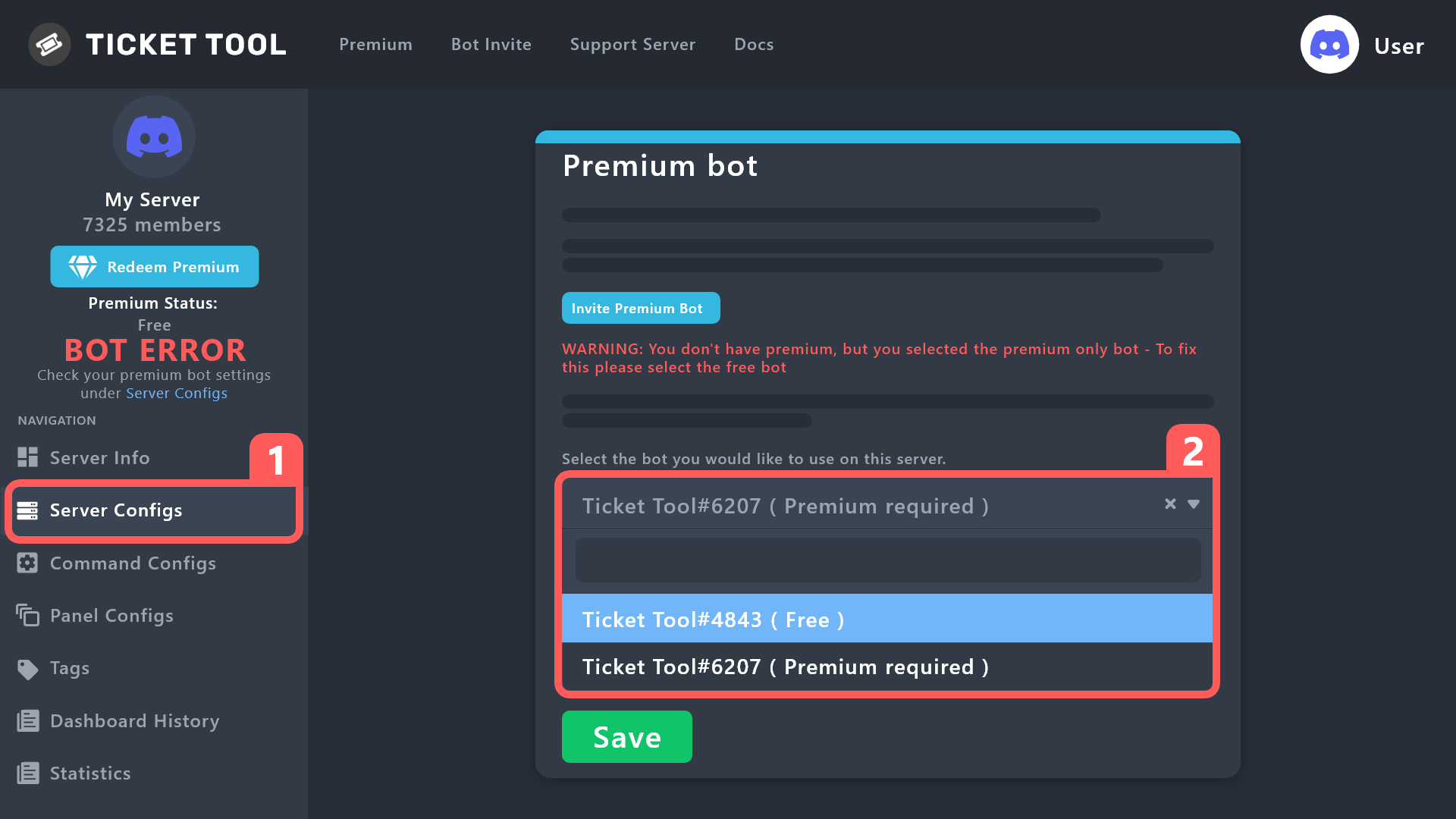
Your server is free, but you selected the premium bot

humble sequoiaBOT
#
How to disable the premium bot

To disable the premium bot you will have to go to the Dashboard ➞ Server Configs ➞ Premium bot ➞ And on the right-hand side select the primary free bot in the drop down menu.

Premium features will still work on the normal bot.

rustic gale
#

Do this and the problem will be fixed

jade topaz
#

Okay is good thanks

sudden raft
#

How many Panels can one server have?

gilded verge
sudden raft
#

I own Premium Just not on this discord account just wanted to be sure it wasn't like 10

jade topaz
#

Hello, is it possible to change the Color of the Ticket Message? Im talking about the blue Color that is default.

fallow ingot
#

Head the dashboard and under General you’ll find Ticket options, then click edit ticket message and open the editor.

#

I’m pretty sure it’s under Field editor.

jade topaz
#

Thank you, I found it.

#

thanks @fallow ingot

iron nightBOT
#

Gave +1 Rep to @fallow ingot

jade topaz
#

Can I kick the normal Ticket Tool Bot when I have the Premium Bot on my Server?

gilded verge
# jade topaz Can I kick the normal Ticket Tool Bot when I have the Premium Bot on my Server?

Hey, it depends what you want to get, because if you bought premium using the button in the free bot and then throw it from server, your subscription will be canceled.
To clarify: canceled but not deleted, so you will have premium until the end of the billing period.
However, after the end of the billing period, buy premium in the premium bot button.
but generally answering your question is yes, if you have active premium on the server and in Server Configs you have selected a premium bot, then you can throw away the free one ^^

jade topaz
#

Okay, thank you

#

thanks @gilded verge

iron nightBOT
#

Gave +1 Rep to @gilded verge

tulip bronze
gilded verge
rustic gale
#

They're telling us they want the boot 😂

hollow fossil
#

has anyone ever experienced closed and deleted tickets being "stuck" in the mobile version of discord. Looks fine on computer but in mobile they just get stuck and don't disappear

rustic gale
#

It happens

#

Glitched deleted channels

hollow fossil
#

first for us, happening to our whole team didnt know if i botched something

#

wait it out?

sinful dagger
#

Hello, I am currently having an issue setting up transcripts. I have the channel selected and ticket bot has permission for the channel. But I keep getting an error message that “transcript channel # missing permission”

river sun
#

Hi do u guys have any video abt operatign the downdrop in tickeet tool im so confuse

jade topaz
#

Como eu faço pra colocar ticket em um canal no meu grupo do dc?

maiden stream
#

Hello please i need help

rustic gale
rustic gale
#

This clearly requires a closer look than would be comfortable to offer in this channel.

rustic gale
rustic gale
rustic gale
#

For the people who just ask for help and don't say why, we have this message

humble sequoiaBOT
#

We would love to help you, but if you don't tell us what you need help with we can't help you :(

sinful dagger
iron nightBOT
#

Gave +1 Rep to @rustic gale

rustic gale
#

The bot 100% does not need the Administrator permission to function

#

Sure, giving it the Administrator permission will solve any permission issues you have

#

It's convenient, but it's never necessary

sinful dagger
#

Well, it wasn’t working for me otherwise so this will do

desert mirage
#

HI guys, I cannot view the server in the dashboard

#

However, I have been granted Manager access right

#

Could anyone help me out?

humble sequoiaBOT
#

━━ moved to ticket ━━

supple badge
#

I can’t create panel with mobile in dashboard
Could anyone help me?

nocturne egret
#

Why I set the ticket count to 0 but I can't create any more tickets?

#

can anyone help me pls

gilded verge
nocturne egret
iron nightBOT
#

Gave +1 Rep to @gilded verge

dry ridge
#

Hi! Is there any chance that I can change the bot`s profile picture for my server?

humble sequoiaBOT
#
Ticket Tool avatar/status Customisation

@pseudo glen is like another discord user; you can't control its avatar icon or status, and we cannot change it for a specific server.

However, on your server, you can change the bot's nickname

slender minnow
#

@dry ridge this

sinful plinth
#

I need help bc i don't know how have the Panel ID

#

And i can't configure the text panel.. I'm admin..

slender minnow
#

nope, not anymore

urban robin
#

i don't find it
Ok i finally find it 😄 thanks

sturdy pilot
#

Hey

Please need support on claiming my price in king tipster

pure mural
#

Is it possible to make options for 3 categories of ticket in one message, using the free bot?

opaque dirge
#

basic question i guess, how do I get users to be able to view message history in the channel that gets created with a new ticket? is this set in the dashboard in the tool, or do I put the ticket panel channel in a category and set the at everyone permission accordingly?

gilded verge
pine raven
humble sequoiaBOT
#

For a more convenient use of multipanels, you can now combine panels on the dashboard. This will allow you to directly send the multipanel from the dashboard or via the $panel ID command.

Where can I find this?

You can find this setting on the Dashboard -> Panel Configs -> Settings -> Panel

Note: if you're attaching all the panels to a panel called English, don't include English in the attached panel's box (If you do this, it will create a duplicate)

This will put all buttons from all of your panels on one message. The message is the panel message from the panel you're combining these panels in.

gilded verge
#

please check this

#

if im correct, then somewhere it was mentioned that you can either have up to 20 or 25 buttons in one panel 🤔

sturdy pilot
humble sequoiaBOT
#
⚠️ You're in the wrong place

We provide support for Ticket Tool Discord bot and cannot help you with whatever issue you have.

- We don't know which Support Team you should contact to get this issue resolved, and unfortunately we won't be able to accurately tell you.

If you don't have any further questions regarding our bot Ticket Tool, please close this ticket

pine raven
humble sequoiaBOT
#

The ticket name is the default channel name of all tickets. To edit it, go to your Dashboard > Panel Configs > Ticket. There you can edit the channel name of opened and closed tickets. You can also use variables in there.

pine raven
#

Oh premium

gilded verge
#

ofc you can get free premium for voting ^^

pine raven
#

How do I vote

gilded verge
#

Please go to #🤖│bot-spam (or to your server) and use $vote or /vote
Then vote in Top.gg and BotsForDiscord. Vote on both sites and after 12 hours do the same again.
You need minimum 6 votes to redeem premium ($vote redeem) | 6 votes = 3 days of premium

pine raven
#

Ty

gilded verge
steep prawn
#

how do I give specific roles that can view tickets

whole condor
#

hello where and how I can retrieve the results of a forms

jade topaz
#

How do I enable autodelete ticket channel after I click delete on the ticket? The ticket stays and I have to manually delete the channel and it gets annoying.

gilded verge
steep prawn
#

thank you

gilded verge
jade topaz
#

thank you so much

whole condor
humble sequoiaBOT
#

A Discord Form lets the user answer individual questions in a pop-up Form, which then displays the answers in the ticket message. This can save time if you already know what you want to ask the user.

Setup Forms

Forms can be enabled under Panel Settings > Form Options > Edit Forms Options. In the new pop-up window, you can now enable and edit your own Form.

Form Options

You can add up to 5 questions in the Discord form. This is a Discord limitation. Each question can have a placeholder in the input field, a minimum and maximum input, multi-line, and also the option to have the answer required.

Options

Question Title ➞ Your Question goes here
Question Placeholder ➞ The placeholder text in the input field
Required ➞ If enabled, the user has to answer this question, to submit the form
Multi-Line Input ➞Allows the user to input multiple lines
Minimum and Maximum Input ➞ Set a minimum and maximum input value for the user

Displaying the Answer

To display the answers from the user, you need to go into your Panel Settings > Ticket Options > Edit Ticket Message. In there you use the variable {create.form.x} and just replace x with the number of your question. For example, the response to Question 1 can be displayed with {create.form.1}. If you don't use this variable, the response from the user is lost.

whole condor
#

thanks @gilded verge

daring shale
#

is it possible to create a ticket and manage the conversation via webhook?

#

I have a zendesk like chat application which I would like to create tickets from a webhook command

delicate furnace
#

Would be soo cool, but probably no possible

rustic gale
#

Webhooks probably not

#

An actual bot user, yes, easily

delicate furnace
#

How?

#

And also, is there not a way to get the discord modals when I make the ticket via another bot?

#

Let me take a vid, (Using sapphire in this case)

delicate furnace
rustic gale
#

I know how that works. No, you can't use forms with it

delicate furnace
#

Ah, okay then. I would like to know about the thing CyberKevin said

#

How I can do that without webhooks?

#

VIa a panel of some sort

rustic gale
#

Just include the bot's ID in the Bot ID field in Server Configs

#

Commands sent by the bot will then be processed by Ticket Tool

delicate furnace
#

Yeah, but can I respond and answer via a website panel of some sort?

#

I know

rustic gale
#

Hmm. Manage the conversation

delicate furnace
#

Like respond via a website panel

rustic gale
#

Well, that's 100% up to what your bot looks like

delicate furnace
#

Is waht I wanna know if is possible or not

rustic gale
#

If your bot can then read the ticket messages and display them in your website, etc

delicate furnace
#

Do you know if there is already a bot that does something like this?

rustic gale
#

No clue.

delicate furnace
#

Okay, now while I am here. It takes a lil while after the command gets sent before it creates the ticket, how can I prevent this?

#

If you see on the vid

plucky hawk
#

Mesh

cyan hull
#

How can I give perms for members who create a ticket to be able to attach files to the ticket?

small lotus
#

ok so attempting as 3rd party in server to kick nonpremium bot and use only premium bot, however when i do so premium bot doesnt respond in server even with perms...

#

I am not the subscriber but do hold admin in server

#

understood i should just need to kick nonprem bot and resend panels from premium... is this a function only the subscriber can do? as premium bot is in server with perms but will not respond to me

daring shale
# rustic gale Commands sent by the bot will then be processed by Ticket Tool

So what you are saying here is that Ticket Tool won't process any / commands from another channel (like one that has incoming messages from a webhook) but a custom bot could be written to interact with an external API and that data can be fed into Ticket Tool using / commands (from the bot, not another Discord server channel)?

daring shale
twin sentinel
#

Can you make a ticket for somebody else? EX. I am a administrator in a server, and I do a command to start a ticket for somebody I need to talk to privately, not in dms.

gilded verge
daring shale
# rustic gale Webhooks probably not

Would I need to use webhooks to trigger an event though? Like "Create Ticket" - I don't currently see how a custom bot can host an HTTP Listener

gilded verge
daring shale
#

does anyone have an example custom bot that sends commands to Ticket Tool ?

covert swallow
#

We have sapphire that does it

daring shale
iron nightBOT
#

Gave +1 Rep to @covert swallow

covert swallow
#

I dont believe it is, @stark rune is a custom version of @obtuse kraken , I don't think their code is public

daring shale
#

ah ok, no worries

covert swallow
#

Assuming your settings are correct the bot just needs to send $new UUID in the correct channel

daring shale
#

ok, I haven't build a bot yet, I'll find some examples. Was just trying to ensure what I am after is possible

grand panther
#

hey can anyone help me get rid of the other one

covert swallow
#

You attached the panel to itself

humble sequoiaBOT
#

For a more convenient use of multipanels, you can now combine panels on the dashboard. This will allow you to directly send the multipanel from the dashboard or via the $panel ID command.

Where can I find this?

You can find this setting on the Dashboard -> Panel Configs -> Settings -> Panel

Note: if you're attaching all the panels to a panel called English, don't include English in the attached panel's box (If you do this, it will create a duplicate)

This will put all buttons from all of your panels on one message. The message is the panel message from the panel you're combining these panels in.

grand panther
#

thanks

mild cargo
#

how can i change the messga when the ticket is opened

humble sequoiaBOT
#

The Ticket Message is the first message sent by the bot on a new ticket. To customize it head over to your Dashboard ➞ Panel Configs ➞ Ticket ➞ Edit Ticket Message

digital hornet
#

i have ticket tool in one of my servers and oly have one pannel but when i go to the dashbord that server dosent show up but others do, its still in my server what should i do?

humble sequoiaBOT
#
Don't see your server in the dashboard?

You will possibly need to relog. Look below to see the steps on how to relog.

How to relog in the Dashboard.

First, you must go to the dashboard. Once you are there, click on your avatar on the top right. after you click it, you will see a button that says Logout. You must click that. Once you have logged out, you can log back in.

You can also click here to log out immediately.

Note:

You need one of these 3 things to access the dashboard.
1. Server Owner (Level: 6)
2. Server Administrator (Level: 4)
3. Dashboard Role (Level: 2)

:warning: You can check your level using the </permissionlevel:1029797400174399542> command on your Discord Server

User permission level with Ticket Tool
@User is permission level: 0 (User)
```» *If it shows that your permission is **0**, you don't have any of the above **3 things** to manage the dashboard.*


**See the Image below on how to relog:**
gilded verge
# humble sequoia

@digital hornet, if I understood correctly and you don't see the server, please check this

digital hornet
#

it worked thanks

woven epoch
#

How to I see the notes for the training!?

#

Can someone send me a link?

quick bone
humble sequoiaBOT
#
⚠️ You're in the wrong place

We provide support for Ticket Tool Discord bot and cannot help you with whatever issue you have.

- We don't know which Support Team you should contact to get this issue resolved, and unfortunately we won't be able to accurately tell you.

If you don't have any further questions regarding our bot Ticket Tool, please close this ticket

shut fox
#

why its do this ? btw I give all permission and his rôle is on the top

humble sequoiaBOT
#


@pseudo glen requires the following permissions:

Add Reactions
Read Channels
Send Messages
Manage Messages
Embed Links
Attach Files
Read History
Manage Roles
Manage Channels

To change the role permissions, you can go to your Discord ServerServer SettingsRoles ➞ @Ticket Tool

To change the channel permissions, you can go to your Channel SettingsPermissions ➞ Ticket Tool

Note:

You can give Ticket Tool Administrative Permissions instead of all the permissions listed above, but it's entirely optional and NOT necessary.

gilded verge
# humble sequoia

@shut fox, Please make sure the bot has this required permissions and permissions on the channel (there where you want to send the panel): View Channel, Send Messages, Read Message History

shut fox
#

he got the administator role

gilded verge
#

in that case, on your server please use /debug and send link from bot
Example:

shut fox
#

its okay my bad I didn't save when I put the administrator role

gilded verge
#

oh, okay ^^

lime marlin
#

one of my friends deleted the bot in the ticket channel how do i add it back 😭

rustic gale
#

With the Send button in the dashboard

lime marlin
#

is the dashboard

#

panel config? im looking for a send button

gilded verge
#

*hmm, from what i see, now you've opened ticket so please make sure you only ask for help on one channel to avoid confusion

lime marlin
#

sry about that

wooden hatch
#

Hi, How can I read a ticket transcript? or reopen a closed ticket?

rustic gale
#

If you don't have a message like that then you don't have a transcript to read.

wooden hatch
rustic gale
wooden hatch
#

thank you @rustic gale

steep prawn
#

how do I save the specific roles i chose that can view tickets

rustic gale
alpine barn
#

the bot just went offline in my server

humble sequoiaBOT
#

━━ moved to ticket ━━

jade topaz
#

Hove to open a ticket with a command

lament shard
#

how do i vote the bot

#

for preuiem

#

and how long do i get it for

#

anyone?

#

NewLineEnd help

#

'/vote'

scenic plinth
scenic plinth