#🆘│community-support
1 messages · Page 18 of 1
 jade topaz

 mental epoch
Hello , how can i do like this
 jade topaz
What is the difference between the paid and regular version?
 lunar solar
Make sure to upvote suggestions regarding the features you want
We can not disclose if it is or is not a planned feature
 humble sequoiaBOT
The Drop-down menu or Select Menu replaces the buttons on your panel message and uses a drop-down menu with all of your panels. To set this up, go to your Panel Configs and select your main Panel.
<:Numbericons1:1018864164032225340> Enable Select Style
First you enable Select Style. Then you add an item in the Dropdown Editor. Now you can start editing your dropdown!
<:Numbericons2:1018864168041971712> Dropdown Editor
Each line in the dropdown editor represents a line in the drop down menu on discord. You can add more "Items", by clicking on 

First you select a panel. That's the panel this option will open a ticket for.  DONT select the same panel twice. Each option should have a different Panel
After that, you can put a Display. This is the title of this option and will appear in the drop down menu. The *Description can be set right after that, which will be below the title in grey.
Additionally you can select an emoji, that will be shown in front of each option. You can either manually input the ID of an emoji or select it in the selector.
Common Issues ⚠️
- Panel doesn't send? Make sure you have a valid emoji selected
- Option doesn't show up? Check if two options have the same panel in the DropDown Editor

$dropdown
lunar solar
jade topaz
What is the difference between the paid and regular version?
Read up on the info about premium here:
https://tickettool.xyz/premium
Additionally when on the dashboard anything with the  is a premium only feature

Ticket Tool - Ticketing without clutter - The #1 discord Ticketing bot

 topaz osprey
Ok so I added the bot and everything to my server everything is up but once I open a ticket it’s blank how do I make it so there is a message like this

It only shows for me (owner) not my members
lunar solar
 obsidian nacelle
My friend
obsidian nacelle
My friend
You need to give ticket tool permissions to use the channel you are trying to use
$perms
humble sequoiaBOT
ᅠ
@pseudo glen requires the following permissions:
Add Reactions
Read Channels
Send Messages
Manage Messages
Embed Links
Attach Files
Read History
Manage Roles
Manage Channels
To change the role permissions, you can go to your Discord Server ➞ Server Settings ➞ Roles ➞ @Ticket Tool
To change the channel permissions, you can go to your Channel Settings ➞ Permissions ➞ Ticket Tool
ᅠ
Note:
You can give Ticket Tool Administrative Permissions instead of all the permissions listed above, but it's entirely optional and NOT necessary.
 lunar solar
topaz osprey
It only shows for me (owner) not my members
lunar solar
topaz osprey
It only shows for me (owner) not my members
Sounds like a permission issue
2 secs
Panel configs —> Permissions —> Edit the groups you want to be able to see the messages under Edit Opened on each area
Make sure View Channel and Read Message History are ✅
topaz osprey
Thank you it worked
 gilded verge
Hello there ^^
As for point.:
> 6, yes, if you sent a panel with a free bot, you have to resend the panels if you changed to premium bot
> 7 and 8, [as I previously mentioned], the subscription has been canceled, but premium is still active and you can use it until the expiry date.
> 2 and 9, Oh, it was a bit unfortunate with this subscription because if you activated the free 7 days trial premium (and you have 5 days left) and then bought the subscription, the remaining time with the trial premium is forfeited. I mean, it will not be connected 5 days (trial) + 30 days (subscription), i.e. you have premium for a month, not e.g. a month and the rest of the days. However, if you want, then you can request a one-time refund for a Discord premium app subscription, you can find the refund policy here: https://support.discord.com/hc/en-us/articles/360012668071-Refund-Policy
We are very glad that you chose the best Ticket Tool bot  If you have any further questions, please let us know
 potent echo
How do I manage the bot so theres certain ticket messages that makes channels below certain ticket categories?
 lunar turret
can i make a transcript of a channel (not ticket) without premium? and if i make a transcript with premium does it stop working if i cancel premium?
gilded verge
potent echo
How do I manage the bot so theres certain ticket messages that makes channels be...
To be sure, so you want tickets to appear in a specific category, right?
potent echo
ye
not all tickets cuz i want channels for purchases, channels for support
and each goes in a certain category
humble sequoiaBOT
1. Go into your Dashboard
2. Open your Panel Configs tab
3. Select the panel you want to grant access to
4. Open the Category options menu
5. Select the categories of your preference
6. Save changes
 gilded verge
Please check 
potent echo
Yeah panels are confusing as heck. Do I have the ability to not save all tickets like purchases ones only or granting certain names automatically etc with the bot feautures?
gilded verge
By "save tickets" you mean transcripts from tickets?
humble sequoiaBOT
The ticket name is the default channel name of all tickets. To edit it, go to your Dashboard > Panel Configs > Ticket. There you can edit the channel name of opened and closed tickets. You can also use variables in there.

 Note: This is a premium feature
gilded verge
Note: This is a premium feature
gilded verge
and is about ticket channel names
 left onyx
I have an question
gilded verge
lunar turret
can i make a transcript of a channel (not ticket) without premium? and if i make...
> can i make a transcript of a channel (not ticket) without premium?
not possible without premium
>and if i make a transcript with premium does it stop working if i cancel premium?
if you run out of premium on the server, transcripts from channels (i.e. not tickets) will also be available (as well as transcriptions from tickets)
 lunar turret
gilded verge
`>` can i make a transcript of a channel (not ticket) without premium?
> not pos...
lunar turret
gilded verge
`>` can i make a transcript of a channel (not ticket) without premium?
> not pos...
thats stupid tbh, i stopped using ticket tool recently and i dont wanna keep paying premium just to transcript channels (no other discord bot does it well)
you should consider making a separate transcript bot
gilded verge
hm? but you can have premium for free if you don't want to pay
lunar turret
gilded verge
hm? but you can have premium for free if you don't want to pay <:peepoBlush:8432...
what?
gilded verge
yep ^^ please wait for info 
Info:
please go to #🤖│bot-spam or your server and use $vote or /vote
Then vote in Top.gg and BotsForDiscord. Vote on both sites and after 12 hours do the same again.
You need minimum 6 votes to redeem premium ($vote redeem) | 6 votes = 3 days of premium
here ^^
left onyx
After the 3 Days all resets or?
gilded verge
left onyx
After the 3 Days all resets or?
I'm not sure what you mean 🤔
lunar turret
ok but please consider making a transcript bot, i would like to save transcripts of my channels without paying £6 for all the ticket features im not even using anymore
left onyx
When you have done what with Premium, then all what you have done resets after the 3 Days of free Premium
lunar turret
left onyx
When you have done what with Premium, then all what you have done resets after t...
 potent echo
Hey is there like a maximum amount of channels that can go under a category? Just curios if I need to add multiple ones for closed tickets.
gilded verge
all panels are still available, but you won't be able to use those panels that had premium features - nothing is removed
potent echo
Also why is this unavailable for me?
 humble sequoiaBOT
Discord only allows to stack up to 50 channels per category, meaning that if you have already 50 tickets in one category, the bot won't be able to place a ticket in that category, for such reason Ticket Tool counts with overflow categories, meaning that if your main category is filled, the bot will go ahead and place the ticket on the next one available, simply choose a second category in the category pickers:
gilded verge
can help you
potent echo
Ah thanks
potent echo
potent echo
Also why is this unavailable for me?
what about
gilded verge
If you can't change something, it's a premium feature ^^
 tepid oak
What do I do if my other server with ticket tool does not appear here? I already relogged
 humble sequoiaBOT
Don't see your server in the dashboard?
You will possibly need to relog. Look below to see steps on how to relog.
How to relog in the Dashboard.
Note:
You need one of these 3 things to access the dashboard.
1. Server Owner (Level: 6)
2. Server Administrator (Level: 4)
3. Dashboard Role (Level: 2)
:warning: You can check your level using $level on your Discord Server
User permission level with Ticket Tool
@User is permission level: 0 (User)
```» *If it shows that your permission is **0**, you don't have any of the above **3 things** to manage the dashboard.*
**See the Image below on how to relog:** gilded verge
Please read all of message
tepid oak
Listo, lo solucione, gracias jajajjajj, saludos de argentina, proximo campeon del mundo
obsidian nacelle
gilded verge
Please read all of <:this:894279341108772914> message
how to make

 slender minnow
obsidian nacelle
how to make <:this:894279341108772914>
slender minnow
obsidian nacelle
how to make <:this:894279341108772914>
Please do not ping for support
humble sequoiaBOT
The Drop-down menu or Select Menu replaces the buttons on your panel message and uses a drop-down menu with all of your panels. To set this up, go to your Panel Configs and select your main Panel.
<:Numbericons1:1018864164032225340> Enable Select Style
First you enable Select Style. Then you add an item in the Dropdown Editor. Now you can start editing your dropdown!
<:Numbericons2:1018864168041971712> Dropdown Editor
Each line in the dropdown editor represents a line in the drop down menu on discord. You can add more "Items", by clicking on
First you select a panel. That's the panel this option will open a ticket for. DONT select the same panel twice. Each option should have a different Panel
After that, you can put a Display. This is the title of this option and will appear in the drop down menu. The *Description can be set right after that, which will be below the title in grey.
Additionally you can select an emoji, that will be shown in front of each option. You can either manually input the ID of an emoji or select it in the selector.
Common Issues ⚠️
- Panel doesn't send? Make sure you have a valid emoji selected
- Option doesn't show up? Check if two options have the same panel in the DropDown Editor
$dropdown
slender minnow
refer the response ^
obsidian nacelle
slender minnow
Please do not ping for support
sry
 weak path
I just bought some diamonds for £1.89 and they took my money but never gave me them, what do I need to do?
humble sequoiaBOT

⚠️ You're in the wrong place
We provide support for Ticket Tool Discord bot and cannot help you with whatever issue you have.
- We don't know which Support Team you should contact to get this issue resolved, and unfortunately we won't be able to accurately tell you.
If you don't have any further questions regarding our bot Ticket Tool, please close this ticket
slender minnow
obsidian nacelle
My brain...
sorry but I can't help you with that
you'll need to specify your problem for me to assist you
obsidian nacelle
Then can u help me #1038467960060260372
slender minnow
our billing team will be with you soon
weak path
Ok sorry I just don't know what to do
obsidian nacelle
ok
slender minnow
weak path
Ok sorry I just don't know what to do
we can't help you with that
weak path
@slender minnow ok ty
 iron nightBOT
Gave +1 Rep to @slender minnow
slender minnow
because you are in the wrong server for help
weak path
Sorry
 oblique bloom
$help
humble sequoiaBOT
oblique bloom
$help

Ticket Tool is the only ticketing bot you'll ever need! Explore its features and set the best ticket system for your server!
<:CommandIcon:1018980659064221746> Commands
Browse through Ticket Tool's commands list and find new utilities!
<:TextIcon:1018980662881030144> FAQ
Solutions for the most frequent questions our users have when implementing the bot on their server.
<:Setup:1034174646788030664> Setup
The steps to follow when setting the bot for the first time on any server
slender minnow
@oblique bloom bot commands should be used in #🤖│bot-spam
 lean pulsar
Is it possible to auto close a ticket if no response within 10h after I write a specific command e.g $stale
Meaning if I type $stale and that would print out:
 Due to inactivity this ticket has been marked stale.

We will be closing this ticket within 10 hours - feel free to open another ticket if the problem persists.

Thank you 🙂
then if no response within 10h then the ticket should auto close
 rustic gale
This feature might be added eventually
lean pulsar
rustic gale
This feature might be added eventually
Any ETA? 😃
 covert swallow
ETA's are never given
 broken apex
hello, is there any video guide that explain ticket thread style ? pelase
broken apex
covert swallow
ETA's are never given
can you help ? please
 final bone
humble sequoiaBOT
final bone
humble sequoiaBOT
We would love to help you, but if you don't tell us what you need help with we can't help you :(
 fallow ingot
 round shell
how can I ping channel in Message Ticket
round shell
how can I ping channel in Message Ticket
<#channel_id>
 @fallow ingot
 sharp totem
how do i find my premium key?
i bought through Discord.. and probablly didnt pay attention to the key
jade topaz
Hello
Someone help me? i make second ticket channel, for wl, and now i can see who open ticket? i searched everywhere i don't know where is the problem?
fallow ingot
sharp totem
i bought through Discord.. and probablly didnt pay attention to the key
Don’t worry if you’ve purchased through Discord a key isn’t necessary to activate. Once you purchase the premium is automatically activated, if it’s not showing on the dashboard then run /premium and check again.
 cedar plaza
What percentage does discord take when you use Discord to charge for your bot?
 boreal patio
Help i dont get my server
jade topaz
How do we check saved transcripts?
humble sequoiaBOT
━━ moved to ticket ━━
jade topaz
can someone help me with setting up this bot please and thank you?!
humble sequoiaBOT

You can check our documentation here;
You can also check #📂│information for the basic setup;
or run the </setup:1025379472167403530> command within #🤖│bot-spam
Our documentation contains all the info you need about the bot to be able to setup and configure the bot however you like.
 stark runeBOT
1. Invite Ticket Tool to your server
First you will want to invite the bot to your server. Once the bot is in your server, you can manage your server in the dashboard.

2. Create a Panel
To create a panel we are going to need to head over to the panel configs on the dashboard.
Once at the dashboard we will need to click Create Panel.
Enter a panel name (Fill in any optional settings you want).
Click Create Panel and your ready to get started with configuring your panel.
An example of a creating a panel is shown below.

3. Send the Panel to a Channel
Once you've created a panel on the dashboard you will need to send it to a channel using send on the dashboard.
Select the channel you want your panel to be created in and click send.
For other questions checkout $help faq.
An example of a sending a panel is shown below.
Having a Problem Sending the Panel?
Do $debug in a channel with Ticket Tool and make sure it has all the necessary Discord permissions.
 lunar solar
Have a read through these @jade topaz
jade topaz
ok will do thanks mate
 native apex
It is possible to do that: After user open up a ticket, he should be able to choose prefered language first, after selecting prefered language, the ticket name should be updated with language tag at the end.
 nimble leaf
how do i get rid of the blue messages that is comming under the ticket creator?
humble sequoiaBOT
━━ moved to ticket ━━
lunar solar
native apex
It is possible to do that: After user open up a ticket, he should be able to cho...
Not with just ticket tool no
this would be possible with the use of @obtuse kraken but would require a lot of work setting up as you'd need a panel for each language
Not to mention rename tickets is a premium feature
iron nightBOT
Gave +1 Rep to @lunar solar
 spice acorn
I'm the only administrator of one server but why in this window show me another server to manage? And how to hide my server in this window from others? 🥺
 humble sequoiaBOT
Don't see your server in the dashboard?
You will possibly need to relog. Look below to see steps on how to relog.
How to relog in the Dashboard.
Note:
You need one of these 3 things to access the dashboard.
1. Server Owner (Level: 6)
2. Server Administrator (Level: 4)
3. Dashboard Role (Level: 2)
:warning: You can check your level using $level on your Discord Server
User permission level with Ticket Tool
@User is permission level: 0 (User)
```» *If it shows that your permission is **0**, you don't have any of the above **3 things** to manage the dashboard.*


**See the Image below on how to relog:**@spice acorn it shows server that you own or have access to the dashboard (using admin perm or dashboard role)
refer the response as well
spice acorn
slender minnow
<@378145975191207937> it shows server that you own or have access to the dashbo...
Thank ❤️
iron nightBOT
Gave +1 Rep to @slender minnow
 coarse jasper
السلام عليكم
 topaz pumice
I need help with this please
 coarse jasper
Hello @slender minnow
rustic gale
topaz pumice
I need help with this please
In your dashboard, enter Server Configs and look for a field called “Global Ticket Limit”
If it's empty, make it something like 500 or 1000
topaz pumice
rustic gale
In your dashboard, enter Server Configs and look for a field called “Global Tick...
here?

 spring thistle
how to make closed tickets cant show to support only owners
topaz pumice
ohhhh ok thx
rustic gale
spring thistle
how to make closed tickets cant show to support only owners
Panel Configs -> Permissions -> Edit Support Team Closed Permissions. Disable the View Channel permission. Then go over any closed tickets, reopen and reclose them to apply the permission
What are you trying to do using the /new command?
spring thistle
rustic gale
Panel Configs -> Permissions -> Edit Support Team Closed Permissions. Disable th...
thanks bro
iron nightBOT
Gave +1 Rep to @rustic gale
rustic gale
Are you trying to set up the bot? Setup is not done through commands. Setup is done through the dashboard.
humble sequoiaBOT
Ticket Tool - Ticketing without clutter - The #1 discord Ticketing bot
coarse jasper
No i need help
 coarse jasper
How do I send a receipt message?
iron nightBOT
Gave +1 Rep to @rustic gale
 narrow surge
Hey when someone claims a ticket can I make it that all people can still see it ?
 devout plinth
I want to change the limit per user to open a ticket can't find the button can anyone help
nvm got it
 acoustic flare

 bold hazel
Hi guys - my panel is not sending even though it's said "Sent" in the notification. Any common causes?

 distant slate
how do I add multiple buttons to one panel?
lunar solar
narrow surge
Hey when someone claims a ticket can I make it that all people can still see it...
Yeah of course, just head to Panel Configs —> Claiming —> Edit Support Team Permissions —> View channel ✅
lunar solar
bold hazel
Hi guys - my panel is not sending even though it's said "Sent" in the notificati...
Ticket tool has permissions to the channel?
lunar solar
 muted haven
how to fix?
muted haven
how to fix?
Panel configs —> Buttons —> Create Ticket (Edit button) —> Ensure Support Team only isn’t ticked or adjust your allowed / disabled roles
humble sequoiaBOT
For a more convenient use of multipanels, you can now combine panels on the dashboard. This will allow you to directly send the multipanel from the dashboard or via the $panel ID command.
Where can I find this?
You can find this setting on the Dashboard -> Panel Configs -> Settings -> Panel
Note: if you're attaching all the panels to a panel called English, don't include English in the attached panel's box (If you do this, it will create a duplicate)
This will put all buttons from all of your panels on one message. The message is the panel message from the panel you're combining these panels in.
 distant slate
thanks
lunar solar
Each button requires its own panel
distant slate
i found it out myself
lunar solar
Ahh nice 🙂
distant slate
forget to say that in chat, mb
lunar solar
No stress
narrow surge
lunar solar
Yeah of course, just head to Panel Configs —> Claiming —> Edit Support Team Perm...
Ty
iron nightBOT
Gave +1 Rep to @lunar solar
 novel plinth
my ticket has 2 open buttons when it's supposed to only have one, and I don't know the cause
lunar solar
novel plinth
my ticket has 2 open buttons when it's supposed to only have one, and I don't kn...
Sounds like you’ve linked your panel to itself
Panel configs —> Panel —> Attached Panels (Multi Panels) —> Remove your panel from his box
humble sequoiaBOT
For a more convenient use of multipanels, you can now combine panels on the dashboard. This will allow you to directly send the multipanel from the dashboard or via the $panel ID command.
Where can I find this?
You can find this setting on the Dashboard -> Panel Configs -> Settings -> Panel
Note: if you're attaching all the panels to a panel called English, don't include English in the attached panel's box (If you do this, it will create a duplicate)
This will put all buttons from all of your panels on one message. The message is the panel message from the panel you're combining these panels in.
 quartz sundial
With what command can i open particular Tickets, if i use "$new {id} (Reason 1,2,3,...)",
it always opens the Ticket with Reason 1
muted haven
lunar solar
Panel configs —> Buttons —> Create Ticket (Edit button) —> Ensure Support Team o...
It’s not working
I already did that
lunar solar
muted haven
I already did that
You need to update the message after
Either by sending it again or using the update function
Sorry for delayed reply I’m at work
muted haven
lunar solar
You need to update the message after
Been did that
jade topaz
Hii, I was wondering if we were supposed set a channel as the ticket channel, if so how?
rustic gale
quartz sundial
With what command can i open particular Tickets, if i use "$new {id} (Reason 1,...
You can't, it doesn't work like that
Each panel is tracked in its own channel.
Multiple command-style panels require multiple channels
rustic gale
muted haven
Been did that
What's your server called?
rustic gale
jade topaz
Hii, I was wondering if we were supposed set a channel as the ticket channel, if...
What are you trying to do?
jade topaz
rustic gale
What are you trying to do?
I'm trying to set up the tickets
rustic gale
jade topaz
I'm trying to set up the tickets
That's done through the dashboard
humble sequoiaBOT
Ticket Tool - Ticketing without clutter - The #1 discord Ticketing bot
stark runeBOT
1. Invite Ticket Tool to your server
First you will want to invite the bot to your server. Once the bot is in your server, you can manage your server in the dashboard.
2. Create a Panel
To create a panel we are going to need to head over to the panel configs on the dashboard.
Once at the dashboard we will need to click Create Panel.
Enter a panel name (Fill in any optional settings you want).
Click Create Panel and your ready to get started with configuring your panel.
An example of a creating a panel is shown below.
3. Send the Panel to a Channel
Once you've created a panel on the dashboard you will need to send it to a channel using send on the dashboard.
Select the channel you want your panel to be created in and click send.
For other questions checkout $help faq.
An example of a sending a panel is shown below.
Having a Problem Sending the Panel?
Do $debug in a channel with Ticket Tool and make sure it has all the necessary Discord permissions.
jade topaz
rustic gale
That's done through the dashboard
Ty
iron nightBOT
Gave +1 Rep to @rustic gale
humble sequoiaBOT
⚠️ You're in the wrong place
We provide support for Ticket Tool Discord bot and cannot help you with whatever issue you have.
- We don't know which Support Team you should contact to get this issue resolved, and unfortunately we won't be able to accurately tell you.
If you don't have any further questions regarding our bot Ticket Tool, please close this ticket
 dry quarry
Does anyone know if I could add the ticket button to another webhook? I have one with different buttons like "About Us", "Rules"... and I'd like a "Submit Ticket" button which creates a ticket.
rustic gale
If you can make the bot send a custom message in a channel of your choice, sure.
the bot meaning not Ticket Tool but whatever bot you're using to respond to those buttons.
rustic gale
Here's what you need to do
- Add the bot's ID to the Bot field in Server Configs
- Enable Command-Style Tickets in Panel Configs -> Command Style and make it track a specific channel. You will probably have to create a channel that only your bot and Ticket Tool can see
- Set up your bot to send the message
$new [user ID]
when the button is pressed, into the channel you chose for command-style tickets
(the prefix may be different)
iron nightBOT
Gave +1 Rep to @rustic gale
dry quarry
Works great, thanks again @rustic gale
iron nightBOT
Gave +1 Rep to @rustic gale
 sand flume
i have same problem as i want people to attach images under tickets, but this is all i see after going to panel configs then general
 rustic gale
sand flume
i have same problem as i want people to attach images under tickets, but this is...
rustic gale
sand flume
i have same problem as i want people to attach images under tickets, but this is...
You paste the url into the Image URL field of whatever message you're trying to edit
Whether it's the panel message or the ticket message. You can find both at the bottom of the main Panel Configs menu
rustic gale
You selected the same panel for all of them
You have to select a different panel for each of them
That means probably creating several panels. You can just copy it a few times and select a different copy for each
it is going to be a single panel message
A panel is not the same thing as a panel message
iron nightBOT
Gave +1 Rep to @rustic gale
rustic gale
A panel is a bundle of settings, permissions, messages and other stuff that lives in your dashboard
A panel message is a message that gets sent to your server and is associated with a panel
A panel message can contain a dropdown menu like the one you set up
Each dropdown menu option is linked to a panel, and it has to be a different panel
sand flume
rustic gale
You paste the url into the Image URL field of whatever message you're trying to ...
i'm a bit confused. i mean when people raise tickets, they don't see the + button to attach images
like here, you see i have the + button on the left. this cannot be seen when people raise tickets
 rustic gale
sand flume
i'm a bit confused. i mean when people raise tickets, they don't see the + butto...
rustic gale
sand flume
i'm a bit confused. i mean when people raise tickets, they don't see the + butto...
Panel Configs -> Permissions -> Edit User Opened Permissions
Grant them the Embed Links and Attach Files permission
then go over any existing tickets and close them and reopen them to make sure the settings are applied
Alternately, you might just want to give your everyone role the Embed Links and Attach Files permissions (on Discord, on your server's settings -> Roles)
sand flume
rustic gale
Panel Configs -> Permissions -> Edit User Opened Permissions
thank you!
iron nightBOT
Gave +1 Rep to @rustic gale
 low idol
how to make this
 humble sequoiaBOT
You can check our documentation here;
You can also check #📂│information for the basic setup;
or run the </setup:1025379472167403530> command within #🤖│bot-spam
Our documentation contains all the info you need about the bot to be able to setup and configure the bot however you like.
stark runeBOT
1. Invite Ticket Tool to your server
First you will want to invite the bot to your server. Once the bot is in your server, you can manage your server in the dashboard.
2. Create a Panel
To create a panel we are going to need to head over to the panel configs on the dashboard.
Once at the dashboard we will need to click Create Panel.
Enter a panel name (Fill in any optional settings you want).
Click Create Panel and your ready to get started with configuring your panel.
An example of a creating a panel is shown below.
3. Send the Panel to a Channel
Once you've created a panel on the dashboard you will need to send it to a channel using send on the dashboard.
Select the channel you want your panel to be created in and click send.
For other questions checkout $help faq.
An example of a sending a panel is shown below.
Having a Problem Sending the Panel?
Do $debug in a channel with Ticket Tool and make sure it has all the necessary Discord permissions.
low idol
thank you!
lunar solar
No worries
jade topaz
How to fix this double buttons
 humble sequoiaBOT
For a more convenient use of multipanels, you can now combine panels on the dashboard. This will allow you to directly send the multipanel from the dashboard or via the $panel ID command.
Where can I find this?
You can find this setting on the Dashboard -> Panel Configs -> Settings -> Panel
Note: if you're attaching all the panels to a panel called English, don't include English in the attached panel's box (If you do this, it will create a duplicate)
This will put all buttons from all of your panels on one message. The message is the panel message from the panel you're combining these panels in.
lunar solar
You've attached the panel to itself
Panel Configs --> Panel --> Attached Panels (Multi Panels) --> Make sure this box is empty
then resend it
and delete others
or update using update button
@jade topaz
jade topaz
lunar solar
<@456226577798135808>
Ty
iron nightBOT
Gave +1 Rep to @lunar solar
 stray sparrow
lunar solar
Panel Configs --> Panel --> Attached Panels (Multi Panels) --> Make sure this bo...
stray sparrow
lunar solar
Panel Configs --> Panel --> Attached Panels (Multi Panels) --> Make sure this bo...
i just had the same issue, thank you 🙂
iron nightBOT
Gave +1 Rep to @lunar solar
 tropic cliff
humble sequoia
tropic cliff
humble sequoia
i already got the answer i just joined and scrolled up to see if someone too asked the same lol
 cloud turtle
How do I get Premium by voting methods, and what is the method of voting?
 sonic zealot
how can i speak to a admin for the shop?
 stray escarp
Hi Guys, does anyone know how i add an image to the bottom of an opened ticket ticket please?
 restive basalt
How can I change this color?
 rustic gale
restive basalt
How can I change this color?
rustic gale
restive basalt
How can I change this color?
Custom embed color is a premium feature
restive basalt
rustic gale
Custom embed color is a premium feature
Ok, thank you
iron nightBOT
Gave +1 Rep to @rustic gale
rustic gale
stray escarp
Hi Guys, does anyone know how i add an image to the bottom of an opened ticket t...
There's an “Image URL” field in the embed editor
add the image link there
The embed editor in Edit Ticket Message specifically
rustic gale
cloud turtle
How do I get Premium by voting methods, and what is the method of voting?
Here you go
$vote
humble sequoiaBOT
rustic gale
$vote
Votes
Current Votes: 0
Lifetime Votes: 0
Linked Votes: 0
Vote Links
Linking Info
Linked User: Not Linked
You can give your future votes to another user by linking with that user.
To link use $vote link (@user or userId)
To unlink use $vote unlink
Redeeming
Each vote is worth 12 hours of premium and can be redeemed once you have atleast 6 votes.
Your current votes are worth 0m
To redeem your current votes use $vote redeem
stray escarp
rustic gale
There's an “Image URL” field in the embed editor
yeah tried it all @rustic gale
image just never shows
rustic gale
stray escarp
image just never shows
 abstract scroll
Hey i need help i have 1 console linked and one free space im adding the shop to my other console but it says that the key ive used does not match the key console is linked to
 jade topaz
 wind rune
You can only make buttons that open a ticket, but stuff that works like those buttons isn't possible
jade topaz
wind rune
how do i do that <@456226577798135808>
$mp
wind rune
ok
jade topaz
no, I fucked up the tag
humble sequoiaBOT
You can check our documentation here;
You can also check #📂│information for the basic setup;
or run the </setup:1025379472167403530> command within #🤖│bot-spam
Our documentation contains all the info you need about the bot to be able to setup and configure the bot however you like.
For a more convenient use of multipanels, you can now combine panels on the dashboard. This will allow you to directly send the multipanel from the dashboard or via the $panel ID command.
Where can I find this?
You can find this setting on the Dashboard -> Panel Configs -> Settings -> Panel
Note: if you're attaching all the panels to a panel called English, don't include English in the attached panel's box (If you do this, it will create a duplicate)
This will put all buttons from all of your panels on one message. The message is the panel message from the panel you're combining these panels in.
jade topaz
there you go, that's how you do it @wind rune
wind rune
ahh ty

 strange bison
GM sers
Is it possible to set up a separate ticket bot + areas for 2 topics:
Like one ticket bot for partnerships, one ticket bot for bug report, and/or another ticket bot for suggestions/feedback
humble sequoiaBOT
For a more convenient use of multipanels, you can now combine panels on the dashboard. This will allow you to directly send the multipanel from the dashboard or via the $panel ID command.
Where can I find this?
You can find this setting on the Dashboard -> Panel Configs -> Settings -> Panel
Note: if you're attaching all the panels to a panel called English, don't include English in the attached panel's box (If you do this, it will create a duplicate)
This will put all buttons from all of your panels on one message. The message is the panel message from the panel you're combining these panels in.
jade topaz
That's how you could do it. Multiple panels that open a ticket for a different topic each
gilded verge
 fathom wolf
can ticket bot send gifs
fathom wolf
can ticket bot send gifs
2 options:
> You would have to have premium on the server and add this link to Image Url
> You would have to delete the content in the Embed Description and then save the settings (check screenshot)
[Panel Configs->Ticket->Edit Ticket Message]
 fathom wolf
gilded verge
2 options:
`>` You would have to have premium on the server and add this link to...
fathom wolf
gilded verge
2 options:
`>` You would have to have premium on the server and add this link to...
wack
strange bison
Thnx for the help guys!
 woeful nova
hello im new to discord and im trying to manage my server for ticket bot and its showing that i don't have any servers help ya girl out lol
humble sequoiaBOT
Don't see your server in the dashboard?
You will possibly need to relog. Look below to see steps on how to relog.
How to relog in the Dashboard.
Note:
You need one of these 3 things to access the dashboard.
1. Server Owner (Level: 6)
2. Server Administrator (Level: 4)
3. Dashboard Role (Level: 2)
:warning: You can check your level using $level on your Discord Server
User permission level with Ticket Tool
@User is permission level: 0 (User)
```» *If it shows that your permission is **0**, you don't have any of the above **3 things** to manage the dashboard.*


**See the Image below on how to relog:**Please read all of message
woeful nova
so how do i get my level to go up
gilded verge
It depends what level you want to get
woeful nova
whichever level lets me on to dashboard im trying to add ticket bot to my server but it wont let me because my level is 0
humble sequoiaBOT
Any role you put there will have full access to the ticket tool dashboard. The server owner and users with admin permissions already have access to the dashboard.
Be careful of which roles to put here
 rustic gale
wind rune
rustic gale
wind rune
That's called Sapphire. It's a different bot. https://sapph.xyz

A Discord Bot — Done Right | Custom slash commands, buttons & select menus, Auto Moderation, Social Notifications, Reaction Roles, Logging, Custom (ephemeral) messages, Scheduled messages, Automated / triggered messages and more
muted haven
rustic gale
What's your server called?
Sorry for late response.. ** Regional Valorant LGF & Community**
Do you want an invite or something so you can help set it up?
Because it’s not working
wind rune
Can i make it so it pings staff when they open a ticket?
rustic gale
wind rune
Can i make it so it pings staff when they open a ticket?
Of course. have a look
$mentions
humble sequoiaBOT
Within all the messages the bot's sends (both embeds and text) you can mention either channels, roles, or even users, these mentions will only send a notification to the user if they are used within a text field, e.g: a role mentioned in an embed won't ping at all the users who have that role.
For mentioning a role you can use one out of three options:
{@Role Name} ➞ Which is Case Sensitive.
{RoleID} ➞ Replace RoleId with the Id of the role you are trying to ping.
<@&RoleID> ➞ Discord's native syntax to ping roles.
<#ChannelID> ➞ Mention a channel by its ID.
<@UserID> ➞ Mention a user by its ID.
rustic gale
Insert a role mention in the ticket message
humble sequoiaBOT
The Ticket Message is the first message sent by the bot on a new ticket. To customize it head over to your Dashboard ➞ Panel Configs ➞ Ticket ➞ Edit Ticket Message
 rustic gale
muted haven
Sorry for late response.. ** Regional Valorant LGF & Community**
rustic gale
muted haven
Sorry for late response.. ** Regional Valorant LGF & Community**
Can't find a server with that name that Ticket Tool is in.
Make sure the bot has been invited to the server.
And either way, do you have the server's ID? That would help.
muted haven
rustic gale
Can't find a server with that name that Ticket Tool is in.
Let me add it back
I kicked it out after you pinged me because it was not working
@rustic gale I added it back
The panel isn’t setup yet though
rustic gale
muted haven
The panel isn’t setup yet though
Here's what your Server Configs look like

See that blacklisted role?
Anyone with that role will be incapable of interacting with the bot in any way
That's why you see “you don't have permission to use this”.
 umbral frost
Hey all, just setting up this bot I have used on many servers and replaced one on a new server, question, I have the bot to ping our support role, but it doesn't actually ping in Discord, this is a Discord setting correct?

 covert swallow
Whats the UUID
 fresh plume
User id?
covert swallow
yeah
fresh plume
Sad I ignored his message request 😂
rustic gale
umbral frost
Hey all, just setting up this bot I have used on many servers and replaced one o...
Make sure the bot has the Mention everyone, here, and All Roles permission in your server's role permission settings
muted haven
Thanks
umbral frost
rustic gale
Make sure the bot has the __Mention everyone, here, and All Roles__ permission i...
I just thought of that as well, checking, thanks.
iron nightBOT
Gave +1 Rep to @rustic gale
umbral frost
rustic gale
Make sure the bot has the __Mention everyone, here, and All Roles__ permission i...
Does the bot need to be above to role in role order?
rustic gale
Not relevant
 unborn aspen
Hi, can I report a user from this server who's advertising in DMs?
covert swallow
Send a ss of the message and their ID please
 fresh plume
Maybe it’s the same as mine 🥹
 opal moon
I got one but from this user
ID: 435077261037797376
 unborn aspen
I just got this message 4 mins ago and this is the only mutual server
 tawny glen
ID: 430417879049961483
 covert swallow
unborn aspen
I just got this message 4 mins ago and this is the only mutual server
covert swallow
unborn aspen
I just got this message 4 mins ago and this is the only mutual server
Handled
 cobalt dock
covert swallow
Handled
cobalt dock
covert swallow
Handled
795030128945266750
 cursive phoenix
i got one too is 152847828014727169 alrdy banned
unborn aspen
covert swallow
Handled
Thank you so much!
iron nightBOT
Gave +1 Rep to @covert swallow
unborn aspen
Oh I think they are using multiple alts to spam in DMs
covert swallow
tawny glen
ID: 430417879049961483
handled
tawny glen
covert swallow
handled
Thank you :>
iron nightBOT
Gave +1 Rep to @covert swallow
cursive phoenix
152847828014727169
cobalt dock
795030128945266750
covert swallow
cobalt dock
795030128945266750
handled
cursive phoenix
Did you see mine Prizafal?
 visual owl
This person dm’ed me as well
covert swallow
yeah
cobalt dock
795030128945266750
 ripe idol
630408585247195167
cursive phoenix
oh ok np thanks
covert swallow
cobalt dock
795030128945266750
handled
visual owl
751966676907720847
covert swallow
ripe idol
630408585247195167
proof?
cursive phoenix
I disabled my dms for this server for now
covert swallow
send the id attached with photo proof please
visual owl
Oh nvm, you already got my ticket I think
 hollow heath
tnks
covert swallow
np
ripe idol
covert swallow
proof?
Above. Pinging you in the message now
jade topaz
covert swallow
id?
799367368912142448
covert swallow
I'm the only mod online and we got like 50 of them
covert swallow
I dont have time to look people up
jade topaz
well here is the ID
 obtuse crater
Another one
ironic that reporting them for this publicly is also advertising for them
covert swallow
Hndled
 dry prairie
Ah I see. Thank you guys
covert swallow
ID?
 fallen wolf
id: 457336760469291010
covert swallow
Handled
 abstract fossil
@lament sandal انفتح تقديم البارتنر ولا لسا

 scenic plinth
Thank you for the reports.
humble sequoiaBOT
The Ticket Message is the first message sent by the bot on a new ticket. To customize it head over to your Dashboard ➞ Panel Configs ➞ Ticket ➞ Edit Ticket Message
scenic plinth
People just do not have a life...
 gentle tulip
I just created a ticket

 magic girder
Hello
Question so Im giving the ticket bot the bot role in my server and whnevr I do it wont show up on bot list
but dyno mee6 and carl shows up but not the ticket bot
 gleaming sonnet
My users can see close/open, how can I stop that? Some people re-open tickets themselves... I just want them to be able to view a closed ticket
 rose burrow
Im confused. I was just got a message from mod system bot saying I was banned for advertising?
humble sequoiaBOT
━━ moved to ticket ━━
lunar solar
tropic cliff
How to edit this message?
Panel configs —> Panel —> Edit Panel Message —> Embed Editor —> Change the description or add fields to your liking
lunar solar
gleaming sonnet
My users can see close/open, how can I stop that? Some people re-open tickets th...
Panel configs —> Buttons —> Edit button (Do this for each button you want to restrict permissions for) —> Either Enable Support Team only or adjust Allowed / Disabled roles to your liking.
To whitelist certain roles that aren’t support team roles add @ everyone to Disabled Roles and add your chosen roles to Allowed roles.
For the permissions to view:
Panel configs —> Permissions —> Edit closed (Do this for the groups you wish to adjust) —> View Channel ✅ / Send Messages 
 echo yacht
How can i report someone in the server for spamming into DM's ?
echo yacht
lunar solar
<#571706435449257997>
Tysm 🧡
tropic cliff
lunar solar
Panel configs —> Panel —> Edit Panel Message —> Embed Editor —> Change the descr...
I already got it by myself but thanks for helping ☺️
iron nightBOT
Gave +1 Rep to @lunar solar
 velvet blade

 sly light
is it that it cant find the emoji?
 frail notch
I need for help
 lament sandal
abstract fossil
<@680423367223803943> انفتح تقديم البارتنر ولا لسا
lament sandal
abstract fossil
<@680423367223803943> انفتح تقديم البارتنر ولا لسا
No, it didn’t open yet.
abstract fossil
lament sandal
No, it didn’t open yet.
ok ty
iron nightBOT
Gave +1 Rep to @lament sandal
 opaque terrace

 austere hinge
Can you transfer premium from one server to another, or must you cancel premium on server 1, then re-enroll in premium on server 2?
 graceful cloak
 humble sequoiaBOT
For a more convenient use of multipanels, you can now combine panels on the dashboard. This will allow you to directly send the multipanel from the dashboard or via the $panel ID command.
Where can I find this?
You can find this setting on the Dashboard -> Panel Configs -> Settings -> Panel
Note: if you're attaching all the panels to a panel called English, don't include English in the attached panel's box (If you do this, it will create a duplicate)
This will put all buttons from all of your panels on one message. The message is the panel message from the panel you're combining these panels in.
covert swallow
austere hinge
Can you transfer premium from one server to another, or must you cancel premium ...
depends on where you bought premium
 opal cradle
Is there any way to add custom buttons to the ticket? (example: close with reason button that gives me a form and trows the input in {close.reason})
Ping me if you respond please
 river coral
Чо
 slim sequoia
Hello
 unkempt cipher
the bot can't find the server I want to set up
 plain current
firt problem it's Failed: `Invalid Form Body
😦
the second problem... me push send... say me a message "acess deneged" the bot not hace access to channel
plain current
ready !!! ty !!!
 rapid elm
is it normal for ticket bot to not take action if the command is done by another bot?
 covert swallow
You need to go to the dashboard and tell TT to reply to that bot
rapid elm
covert swallow
You need to go to the dashboard and tell TT to reply to that bot
i’ll try that, thanks
iron nightBOT
Gave +1 Rep to @covert swallow
jade topaz
When i add ticket tool to my dc and i go to the dashboard it says it doesnt detect any servers
can someone help?
humble sequoiaBOT
Don't see your server in the dashboard?
You will possibly need to relog. Look below to see steps on how to relog.
How to relog in the Dashboard.
Note:
You need one of these 3 things to access the dashboard.
1. Server Owner (Level: 6)
2. Server Administrator (Level: 4)
3. Dashboard Role (Level: 2)
:warning: You can check your level using $level on your Discord Server
User permission level with Ticket Tool
@User is permission level: 0 (User)
```» *If it shows that your permission is **0**, you don't have any of the above **3 things** to manage the dashboard.*
**See the Image below on how to relog:** dapper flower
Good evening, recently I used the free Prenium of the bot. So I had to integrate an image into my ticket and now that the premium is over I can't find any way to remove the integration.. (apart from redoing all the settings of the ticket). Any solution please?
 jade topaz
Hi, can we (Staff) create a ticket to contact a user without /Add user command ? And name the created ticket {usercontacted} xxxx
jade topaz
is there any $hide command or can i make one with tags?
jade topaz
jade topaz
is there any $hide command or can i make one with tags?
becuase everyone in the server can see tickets, so i want to make a tag or something to hide the ticket where no one can see it
 mystic sorrel
How can I make multiple ticket categories? e.g.
one category for Account, another for Issues & Bug Reports, another for Registration, so I don't have one category with "create ticket".
jade topaz
mystic sorrel
How can I make multiple ticket categories? e.g.
one category for Account, anoth...
i think u can just set one for each panel
 warm scaffold
Help myy
My membres Cant't Create a Ticket

@wanton fern
AAAAA HELP MY FAST PLS
 onyx jewel
is it possible a ticket closes due inactivity for a few hours
and no respond from the user who opened.
warm scaffold
é possível que um ticket feche por inatividade por algumas horas
e nenhuma resposta do usuário que abriu.
I NEED HELP PLS
staffs can but members can't Please someone help
rustic gale
warm scaffold
staffs can but members can't Please someone help
You probably blacklisted everyone in Server Configs
warm scaffold
Can my member see tickets created how do I remove this?
 warm scaffold
rustic gale
You probably blacklisted everyone in Server Configs
warm scaffold
rustic gale
You probably blacklisted everyone in Server Configs
No :/
rustic gale
warm scaffold
No :/
Another possibility is you made the Create Ticket button support team only
rustic gale
warm scaffold
Can my member see tickets created how do I remove this?
Looks like permissions aren't set up correctly
warm scaffold
Outra possibilidade é você ter feito a equipe de suporte do botão Criar ticket apenas
Parece que as permissões não estão configuradas corretamente
I configured everything and everything was working aye
rustic gale
warm scaffold
I configured everything and everything was working aye
What's the name of your server?
 robust sandalBOT
rustic gale
What's the name of your server?
robust sandalBOT
rustic gale
What's the name of your server?
Qual é o nome do seu servidor?
 English (en) → Portuguese (Portugal) (pt-PT)
onyx jewel
English (en) → Portuguese (Portugal) (pt-PT)
onyx jewel
is there a way to change the color of this
 rustic gale
onyx jewel
is there a way to change the color of this
rustic gale
onyx jewel
is there a way to change the color of this
Not possible sadly
onyx jewel
rustic gale
Not possible sadly
why's it possible
to change the color for all embeds but that one lol
rustic gale
onyx jewel
to change the color for all embeds but that one lol
There's no menu for it
 pliant ruin
whenever someone tries to create a ticket, it says this

any ideas? my premium subscription was paid for and is still active
 chilly arch
How can I make it so more than 1 ticket can be open at once?
opal cradle
Is there any way to add custom buttons to the ticket? (example: close with reason button that gives me a form and trows the input in {close.reason})
covert swallow
chilly arch
How can I make it so more than 1 ticket can be open at once?
Make the global and panel ticket limits over 1
covert swallow
opal cradle
Is there any way to add custom buttons to the ticket? (example: close with reaso...
There isnt
 tame kayak
covert swallow
stark runeBOT
tame kayak
covert swallow
stark runeBOT
1. Invite Ticket Tool to your server
First you will want to invite the bot to your server. Once the bot is in your server, you can manage your server in the dashboard.
2. Create a Panel
To create a panel we are going to need to head over to the panel configs on the dashboard.
Once at the dashboard we will need to click Create Panel.
Enter a panel name (Fill in any optional settings you want).
Click Create Panel and your ready to get started with configuring your panel.
An example of a creating a panel is shown below.
3. Send the Panel to a Channel
Once you've created a panel on the dashboard you will need to send it to a channel using send on the dashboard.
Select the channel you want your panel to be created in and click send.
For other questions checkout $help faq.
An example of a sending a panel is shown below.
Having a Problem Sending the Panel?
Do $debug in a channel with Ticket Tool and make sure it has all the necessary Discord permissions.
gilded verge
stark rune
@frail notch, please check
gilded verge
 calm heart
Why does it say application didn’t respond
calm heart
Why does it say application didn’t respond
I don't know what you're trying to do but please check if the bot has permission to see this channel and be able to send messages there ^^
 restive fable
i tried making a panel for server but it doesnt let me choose the channel the bot works in
gilded verge
hmmmm... on your server please run command $debug and click button Clear cache, then refresh dashboard page. If that doesn't work, log out and log back in (in dashboard)
 restive fable
gilded verge
hmmmm... on your server please run command `$debug` and click button `Clear cach...
restive fable
gilded verge
hmmmm... on your server please run command `$debug` and click button `Clear cach...
it says this bot is not active on your server (sorry for ping)
gilded verge
Okay, if I'm helping you here, please close your ticket first
humble sequoiaBOT
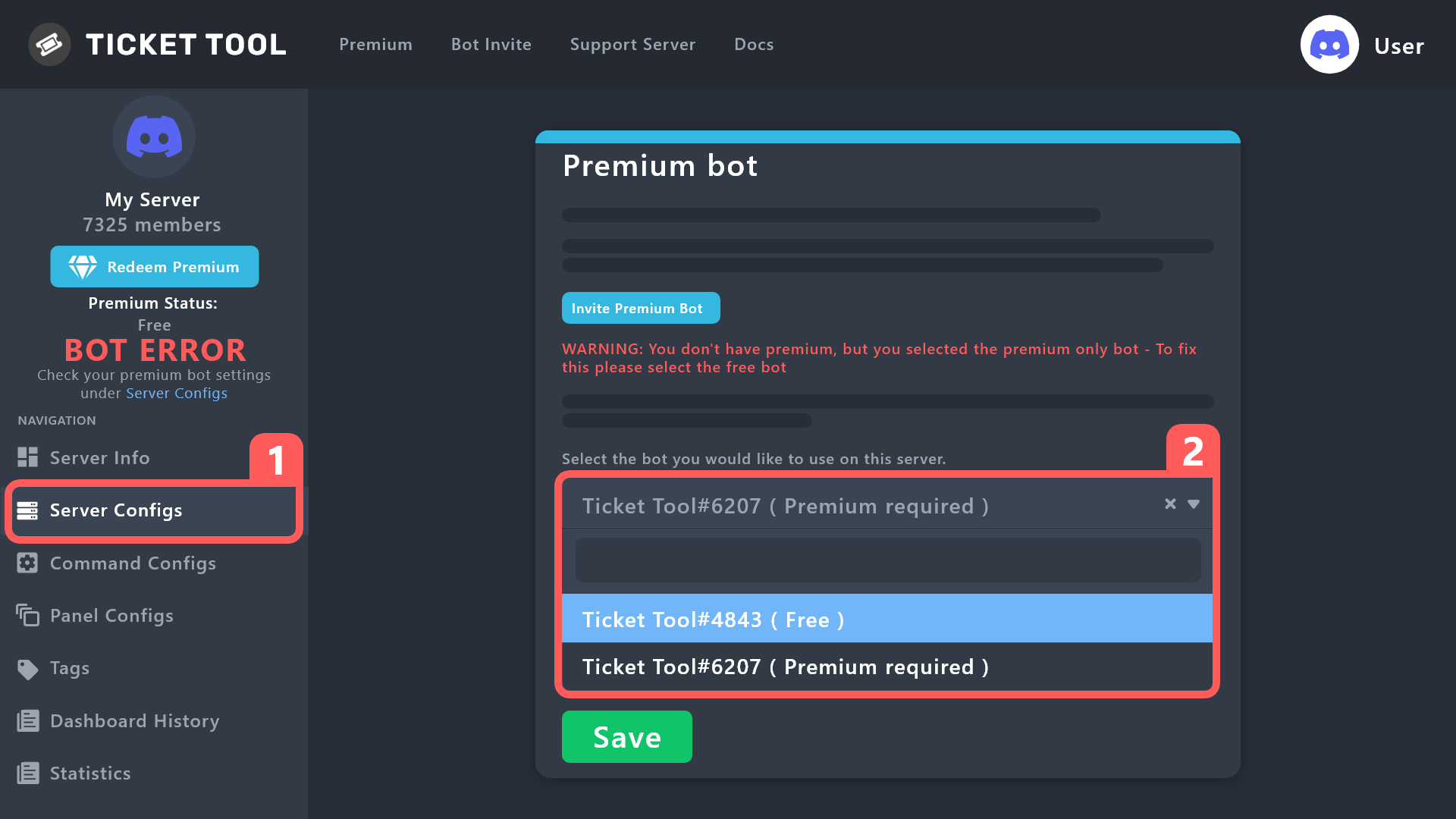
How to disable the premium bot
To disable the premium bot you will have to go to the Dashboard ➞ Server Configs ➞ Premium bot ➞ And on the right-hand side select the primary free bot in the drop down menu.
Premium features will still work on the normal bot.
 restive fable
gilded verge
Okay, if I'm helping you here, please close your ticket first
restive fable
gilded verge
Okay, if I'm helping you here, please close your ticket first
so when you gonna reply
gilded verge
Please make sure you have the correct bot on the server
restive fable
 gilded verge
humble sequoia
gilded verge
humble sequoia
restive fable
cant afford premium
gilded verge
but you need to switch from premium bot to free
restive fable
k
restive fable
gilded verge
but you need to switch from premium bot to free
wait
so i cant use debug command?
gilded verge
first you need to switch from premium to free bot, then you can use this command
restive fable
how do i switch?
gilded verge
humble sequoia
instruction here
restive fable
very nice instruction?
 gilded verge
so you can't see that?
 gilded verge
hmmm okay, in that case,
Server Configs ➞ Premium bot ➞ And on the right-hand side select the primary free bot in the drop down menu.
 restive fable
gilded verge
hmmm okay, in that case,
Server Configs ➞ Premium bot ➞ And on the right-hand si...
restive fable
gilded verge
hmmm okay, in that case,
Server Configs ➞ Premium bot ➞ And on the right-hand si...
where
 gilded verge
 restive fable
done
gilded verge
now it works? please check ^^
restive fable
NOPE
gilded verge
what bot do you have on the server?
restive fable
wait it worked
gilded verge
oh, that's good ^^
restive fable
gilded verge
oh, that's good ^^
where do i choose channel?
 restive fable
gilded verge
oh, that's good ^^
restive fable
gilded verge
oh, that's good ^^
?
gilded verge
you need to create panel first
stark runeBOT
1. Invite Ticket Tool to your server
First you will want to invite the bot to your server. Once the bot is in your server, you can manage your server in the dashboard.
2. Create a Panel
To create a panel we are going to need to head over to the panel configs on the dashboard.
Once at the dashboard we will need to click Create Panel.
Enter a panel name (Fill in any optional settings you want).
Click Create Panel and your ready to get started with configuring your panel.
An example of a creating a panel is shown below.
3. Send the Panel to a Channel
Once you've created a panel on the dashboard you will need to send it to a channel using send on the dashboard.
Select the channel you want your panel to be created in and click send.
For other questions checkout $help faq.
An example of a sending a panel is shown below.
Having a Problem Sending the Panel?
Do $debug in a channel with Ticket Tool and make sure it has all the necessary Discord permissions.
gilded verge
stark rune
do you see this message?
 restive fable
gilded verge
do you see this message?
restive fable
gilded verge
do you see this message?
Nope
gilded verge
oh, okay.
Once you've created a panel on the dashboard you will need to send it to a channel using send on the dashboard.
Select the channel you want your panel to be created in and click send. An example of a sending a panel is shown below.

 frank kelp
hlo suppose i redeemed my vote and got premium for three days ,
what will happen if i redeemed votes again tomorrow for 5 days ?
will the premium time add to that 3 days or whaat ill happen?
restive fable
gilded verge
oh, okay.
Once you've created a panel on the dashboard you will need to send it ...
ty for the help :)
iron nightBOT
Gave +1 Rep to @gilded verge
gilded verge
frank kelp
hlo suppose i redeemed my vote and got premium for three days ,
what will happe...
Hey, keys are combined so you can add them at any time ^^ - each key extends the value of premium days
frank kelp
gilded verge
Hey, keys are combined so you can add them at any time ^^ - each key extends the...
thanks and can i invite custom bot too if i used the key?
iron nightBOT
Gave +1 Rep to @gilded verge
gilded verge
oh, custom bot? 😳 but you mean premium bot?
frank kelp
gilded verge
oh, custom bot? 😳 but you mean premium bot?
yes
humble sequoiaBOT
The first thing you will need to do is invite the premium bot, an invite can be found here
Once the bot is in your server we will head to the dashboard and manage your server. When you are managing your server, you want to head into "Server Configs" then click the drop down menu under "Select the bot you would like to use on this server" then click "Ticket Tool#6207" and then save.
 gilded verge
ah sure but first please check
warm scaffold
I fixed all my members can Create and See But can't send Message ;-; and not Bot user permissions I put it to see and send a message ;-;
 fluid galleon
Hello
I can’t create a ticket on the site
Doesn’t want to appear on my server
I need help, please!
humble sequoiaBOT
━━ moved to ticket ━━
 plain surge
warm scaffold
I fixed all my members can Create and See But can't send Message ;-; and not Bot...
plain surge
warm scaffold
I fixed all my members can Create and See But can't send Message ;-; and not Bot...
So the users can see the ticket but not type in it?
warm scaffold
 warm scaffold
plain surge
So the users can see the ticket but not type in it?
warm scaffold
plain surge
So the users can see the ticket but not type in it?
This I already solved So I don't know Update the URL
plain surge
You need to paste a URL there
 zealous night
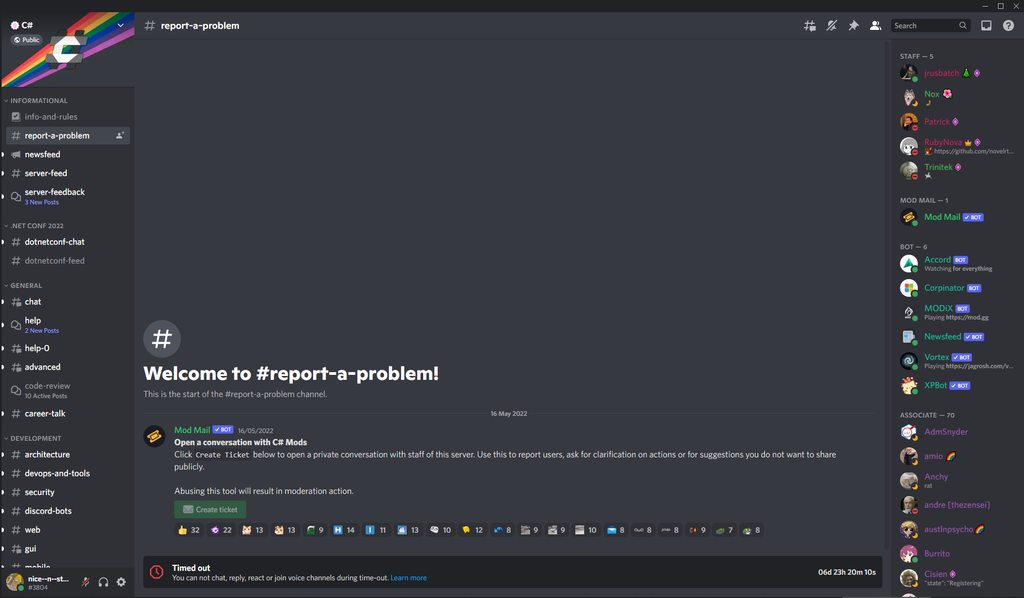
Hey I came here after getting timed out for 1 week on a server, noticed that I can't even make a report / claim anymore... I don't want to make an alt to bypass the time out... so anyone know what I can do / or provide me with a link to this (if it even works?) screenshot: https://imgur.com/a/Dyxs1MQ
 warm scaffold
Você precisa colar um URL lá
warm scaffold
plain surge
You need to paste a URL there
how to do?
plain surge
Go to the panel message and if you are on PC: click on the dots and then click on copy message link.
If you are on phone: tap and hold the panel message then tap copy message link
 plain surge
zealous night
Hey I came here after getting timed out for 1 week on a server, noticed that I c...
plain surge
zealous night
Hey I came here after getting timed out for 1 week on a server, noticed that I c...
You need to contact the server staff to remove your time out
plain surge
plain surge
Go to the panel message and if you are on PC: click on the dots and then click o...
@warm scaffold
zealous night
plain surge
You need to contact the server staff to remove your time out
im trying but the online 'admin' (not mod) won't even respond:
 warm scaffold
Vá para a mensagem do painel e se estiver no PC: clique nos pontos e depois clique no link copiar mensagem.
Se você estiver no telefone: toque e segure a mensagem do painel e toque no link copiar mensagem
plain surge
zealous night
im trying but the online 'admin' (not mod) won't even respond:
I'm sorry but this isn't a problem from our end. Nothing we can really do to remove a mute you have on another server
warm scaffold
I do not understand ;-;
plain surge
Try contacting another staff member
zealous night
plain surge
I'm sorry but this isn't a problem from our end. Nothing we can really do to rem...
no i just want to access the ModMail Bot to message all Mods :(
robust sandalBOT
warm scaffold
Vá para a mensagem do painel e se estiver no PC: clique nos pontos e depois cliq...
Go to the dashboard message and if you're on your PC: Click the dots and then click the copy message link.
If you're on the phone: Tap and hold the message from the dashboard and tap the copy message link
Portuguese (pt) → English (en)
zealous night
plain surge
I'm sorry but this isn't a problem from our end. Nothing we can really do to rem...
check this out

 worthy sedge
the bot in server and he said to me this ?.
 warm scaffold
Hey dom
plain surge
warm scaffold
I do not understand ;-;
$ptticket
humble sequoiaBOT

Equipe de Suporte │ Português
Caro usuário,
Se você está procurando por ajuda, abra um ticket para entrar em contato com a Equipe de Suporte em Português. Vá para o canal: #🎫│make-a-ticket e pressione o botão: :flag_br:
warm scaffold
plain surge
Go to the panel message and if you are on PC: click on the dots and then click o...
On site?
plain surge
warm scaffold
On site?
On Discord
worthy sedge
worthy sedge
the bot in server and he said to me this ?.
.
warm scaffold
Go to ticket pls
plain surge
zealous night
check this out
You aren't a staff member so you can't access the bot's Dashboard.
Also you can't interact with the bot on Discord because you are timed out
humble sequoiaBOT
Don't see your server in the dashboard?
You will possibly need to relog. Look below to see steps on how to relog.
How to relog in the Dashboard.
Note:
You need one of these 3 things to access the dashboard.
1. Server Owner (Level: 6)
2. Server Administrator (Level: 4)
3. Dashboard Role (Level: 2)
:warning: You can check your level using $level on your Discord Server
User permission level with Ticket Tool
@User is permission level: 0 (User)
```» *If it shows that your permission is **0**, you don't have any of the above **3 things** to manage the dashboard.*


**See the Image below on how to relog:**━━ moved to ticket ━━
zealous night
oh. That is messed up @plain surge . Discord has a massive problem in that case. By the time I get around to being unmuted, Patrick will have time to change / modify his context....... Please note this down as an issue with Discord, that censors people. :(
warm scaffold
does anyone know how to update the url?

😠

have more than 8 staff On Can someone help me?????
 formal anvil
@warm scaffold when a bot does not find a message it is either that it has been deleted, or that the bot no longer has access to the channel, remember to check
(or maybe it's a bug, but still remember to check)
humble sequoiaBOT
━━ moved to ticket ━━
gleaming sonnet
Users can still message in closed tickets
Is this a permissions thing I've messed up somewhere?
slender minnow
gleaming sonnet
Is this a permissions thing I've messed up somewhere?
Yes, go to panel config > Permissions > Edit the user closed ticket permission to deny them the Send Message permission
iron nightBOT
Gave +1 Rep to @slender minnow
 gilded bough
how can i set that just my users who has xy role can open a ticket?
 tacit saddle
 winter elm
Like you, my brother, you appeared to me like this
scenic plinth
If you receive that error, refresh your page. That is a temporary error just meaning something went wrong when communicating with the server the website is hosted on.
 unborn depot
I need help
 fading cloak
yeah me too
 tranquil ember
 junior tree
Hello, can you tell me if I'm the only one who can't access the "Panel Config" category, the page stays on a continuous load with a blank screen.
scenic plinth
Is it just the one page?
unborn depot
I can’t set up my ticket tool when it says manage servers it sends a message
On the dashboard
junior tree
scenic plinth
Is it just the one page?
 jade topaz
I'm hoping I'm not the only one still experiencing errors with status code 500 😭
scenic plinth
unborn depot
I can’t set up my ticket tool when it says manage servers it sends a message
I cannot do anything when you are not telling me what this message is dude...
unborn depot
I need help setting up the bot
scenic plinth
junior tree
I will have a look for you as it seems to be ongoing with a few select people, sorry for the inconvenience.
unborn depot
it’s not working
junior tree
scenic plinth
I will have a look for you as it seems to be ongoing with a few select people, s...
No worries, the most important thing is to pass on the information so that the problem can be solved. 💖
scenic plinth
unborn depot
it’s not working
What part of it's not working.... I cannot do anything when all you're telling me is that "it's not working"... there are a billion things you could be having trouble with and I am not exactly wanting to take a guess... but if I had to say if it's with the website your issue is clearly with reading the messages saying we're aware of it....
unborn depot
I keep getting a message when I go to the dashboard thing
scenic plinth
Ok... so clearly your issue is with reading eagle.
unborn depot
 scenic plinth
The developer has been made aware and it should resolve itself momentarily... hopefully.
unborn depot
that
humble sequoiaBOT
Don't see your server in the dashboard?
You will possibly need to relog. Look below to see steps on how to relog.
How to relog in the Dashboard.
Note:
You need one of these 3 things to access the dashboard.
1. Server Owner (Level: 6)
2. Server Administrator (Level: 4)
3. Dashboard Role (Level: 2)
:warning: You can check your level using $level on your Discord Server
User permission level with Ticket Tool
@User is permission level: 0 (User)
```» *If it shows that your permission is **0**, you don't have any of the above **3 things** to manage the dashboard.*


**See the Image below on how to relog:**Wasn't that hard.
unborn depot
scenic plinth
Wasn't that hard.
- You don’t need to be so rude
scenic plinth
 tribal cedar
Atm I cant access panel configs
tribal cedar
Atm I cant access panel configs
Since I know you can comprehend, refresh and try again please, I have been told it should be fixed. If not, try another tab just to be sure.
jade topaz
unborn depot
1. You don’t need to be so rude
Eagle, with all due respect, you're kind of the worst type of person to try and give any sort of support to. 😭
unborn depot
He literally said your problem is obviously reading
jade topaz
unborn depot
He literally said your problem is obviously reading
I don't think she was wrong 😭
tribal cedar
scenic plinth
Since I know you can comprehend, refresh and try again please, I have been told ...
Still seems to not be loading for me. I tried a new tab, window, and I even cleared cookies.
scenic plinth
Alright so 500 should hopefully be resolved by now, the developer is working on the panel configuration "infinite loading"
Appreciate it Enigma.
tribal cedar
Nps
tribal cedar
Ok loads for me now
jade topaz
How to setup dropdown?
rustic gale
jade topaz
How to setup dropdown?
Panel Configs -> “DropDown Style”
Create one item for each option
iron nightBOT
Gave +1 Rep to @rustic gale
rustic gale
Each item must have a different associated panel
Also the name and panel fields can't be empty. I think only the emoji can be empty
After you're done, send the panel again with the Send button
jade topaz
when closing a ticket it just gets stuck on transcript saving
 jade topaz
when closing a ticket it just gets stuck on transcript saving
jade topaz
jade topaz
when closing a ticket it just gets stuck on transcript saving
Same issue
 shut bolt
We are looking into this issue, sorry for the inconveniences
 vale laurel
shut bolt
We are looking into this issue, sorry for the inconveniences
vale laurel
shut bolt
We are looking into this issue, sorry for the inconveniences
Idk if it’s a separate issue but mine won’t close or prompt to close.
And commands aren’t working
shut bolt
vale laurel
Idk if it’s a separate issue but mine won’t close or prompt to close.
Discord messed up something with timeouts and ratelimits, until now this was the only issue we had reported. Please make a ticket so we can check it :)
vale laurel
shut bolt
Discord messed up something with timeouts and ratelimits, until now this was the...
Sure 🧡
 velvet isle
Hi there, I'm receiving this error when attempting to interact with the bot even though the bot is in the server and has appropriate roles. any ideas?
Thank you!

 abstract grotto
Can you make a cue with ticket tool
what do you mean
can you do this without premium
sorry i can send images
stark runeBOT
**Ticket Tool - Technical Difficulties Notice**
Official Ticket Tool bot(s) are currently experiencing some technical difficulties in some shards.
Please stand by as the TT Development Team looks into and fixes the issues.
Please do not spam tickets within the support server & do not keep asking in public channels.
You can view our status page here and keep an eye on #📣│bot-news!

 final kite
How can I put this? To choose options?
 rustic gale
final kite
How can I put this? To choose options?
rustic gale
final kite
How can I put this? To choose options?
It's called a dropdown menu
humble sequoiaBOT
The Drop-down menu or Select Menu replaces the buttons on your panel message and uses a drop-down menu with all of your panels. To set this up, go to your Panel Configs and select your main Panel.
<:Numbericons1:1018864164032225340> Enable Select Style
First you enable Select Style. Then you add an item in the Dropdown Editor. Now you can start editing your dropdown!
<:Numbericons2:1018864168041971712> Dropdown Editor
Each line in the dropdown editor represents a line in the drop down menu on discord. You can add more "Items", by clicking on
First you select a panel. That's the panel this option will open a ticket for. DONT select the same panel twice. Each option should have a different Panel
After that, you can put a Display. This is the title of this option and will appear in the drop down menu. The *Description can be set right after that, which will be below the title in grey.
Additionally you can select an emoji, that will be shown in front of each option. You can either manually input the ID of an emoji or select it in the selector.
Common Issues ⚠️
- Panel doesn't send? Make sure you have a valid emoji selected
- Option doesn't show up? Check if two options have the same panel in the DropDown Editor
$dropdown
 crude bear
I keep getting the 'Application did not respond' error when trying to create a new ticket... any idea what can help?
 rustic gale
crude bear
I keep getting the 'Application did not respond' error when trying to create a n...
rustic gale
crude bear
I keep getting the 'Application did not respond' error when trying to create a n...
Try the /debug command
Ah.
You're using /new
It's very very likely that /new doesn't do what you think it does.
crude bear
Ooh 😮 what should I use then?
rustic gale
The dashboard
stark runeBOT
1. Invite Ticket Tool to your server
First you will want to invite the bot to your server. Once the bot is in your server, you can manage your server in the dashboard.
2. Create a Panel
To create a panel we are going to need to head over to the panel configs on the dashboard.
Once at the dashboard we will need to click Create Panel.
Enter a panel name (Fill in any optional settings you want).
Click Create Panel and your ready to get started with configuring your panel.
An example of a creating a panel is shown below.
3. Send the Panel to a Channel
Once you've created a panel on the dashboard you will need to send it to a channel using send on the dashboard.
Select the channel you want your panel to be created in and click send.
For other questions checkout $help faq.
An example of a sending a panel is shown below.
Having a Problem Sending the Panel?
Do $debug in a channel with Ticket Tool and make sure it has all the necessary Discord permissions.
rustic gale
Have a read.
winter elm
؟؟

 modern juniper
Hey! ive been trying to edit my multipanel names and its not changing?
rustic gale
winter elm
؟؟
Use /debug in the channel you want to send to
rustic gale
modern juniper
Hey! ive been trying to edit my multipanel names and its not changing?
Use the Update button in the Panel Configs menu
modern juniper
I did, still didn’t work
winter elm
rustic gale
Use /debug in the channel you want to send to
Thank you
iron nightBOT
Gave +1 Rep to @rustic gale
rustic gale
modern juniper
I did, still didn’t work
try making a ticket #🎫│make-a-ticket so we can take a closer look
 sonic oasis
Hi
 thorny sun
Hi
final kite

 wanton saffron
السلام عليكم
modern juniper
rustic gale
try making a ticket <#571706435449257997> so we can take a closer look
okay will do thanks!
iron nightBOT
Gave +1 Rep to @rustic gale
 sour gust
Hello, I have an issue with ticket tool. Whenever I go to manage server on my laptop, my server doesn't show up, I tried relogging and checking the bat's status(it's online) but it still doesn't show up. But when I go on my phone to manage servers, it does show up my server. Can I fully set up Ticket Tool from my phone? And how can I fix the problem on my laptop?
frank kelp
how to transfer the claim ?
narrow surge
frank kelp
how to transfer the claim ?
unclaim and then let the other claim (to my knowledge)
jade topaz
I cant update my developer id from manage subscriptions
 grim pilot
Hi! When I use the $add [user ID] command, i receive no error and the bot responds as if it has added the user…however it doesn’t end up doing so when I check the channel settings.
Once I gave the bot the manage channel permission, the user was added. But this wasn’t a requirement before.
narrow surge
how can i make the ticket tool log the form question
 round jewel
Good day, I have a problem with bot
for some reason only admins can create tickets
can someone help ?
velvet isle
Hi there, I'm still having this issue even tho the bot is in the server...
 slender minnow
round jewel
for some reason only admins can create tickets
slender minnow
round jewel
for some reason only admins can create tickets
check the button permissions
if they are set corect
slender minnow
narrow surge
how can i make the ticket tool log the form question
use the variable in your ticket response provided under the question that you created in forms option
slender minnow
velvet isle
Hi there, I'm still having this issue even tho the bot is in the server...
just confirming if your server has an active subscription, feel free to #🎫│make-a-ticket so that we can assist you with any problems that you may be facing
round jewel
slender minnow
check the button permissions
I couldn't find it 😅
i tried on mobile
ill look on pc too
I have it
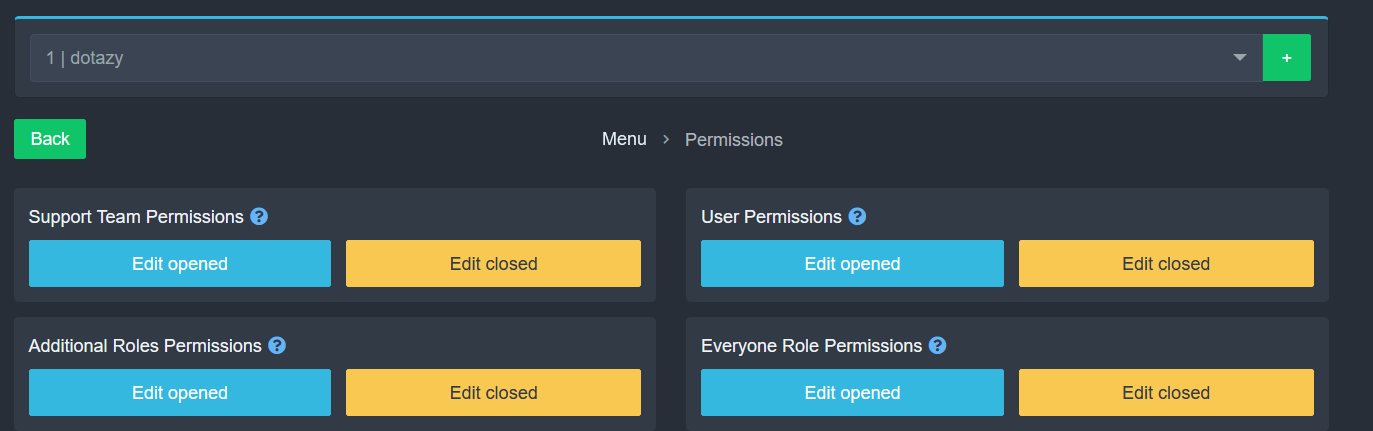 narrow surge
slender minnow
use the variable in your ticket response provided under the question that you cr...
narrow surge
slender minnow
use the variable in your ticket response provided under the question that you cr...
I can’t seem to find it sorry
round jewel
ok ok sorry
slender minnow
round jewel
https://i.imgur.com/idPfMZK.png
those are permissions in ticket
not the button permission
you see button option in panel config?
slender minnow
narrow surge
I can’t seem to find it sorry
when you created your question, you should see a variable under each one that you entered
did you find it?
humble sequoiaBOT
A Discord Form lets the user answer individual questions in a pop-up Form, which then displays the answers in the ticket message. This can save time if you already know what you want to ask the user.
Setup Forms
Forms can be enabled under Panel Settings > Form Options > Edit Forms Options. In the new pop-up window, you can now enable and edit your own Form.
Form Options
You can add up to 5 questions in the Discord form. This is a Discord limitation. Each question can have a placeholder in the input field, a minimum and maximum input, multi-line, and also the option to have the answer required.
Options
Question Title ➞ Your Question goes here
Question Placeholder ➞ The placeholder text in the input field
Required ➞ If enabled, the user has to answer this question, to submit the form
Multi-Line Input ➞Allows the user to input multiple lines
Minimum and Maximum Input ➞ Set a minimum and maximum input value for the user
Displaying the Answer
To display the answers from the user, you need to go into your Panel Settings > Ticket Options > Edit Ticket Message. In there you use the variable {create.form.x} and just replace x with the number of your question. For example, the response to Question 1 can be displayed with {create.form.1}. If you don't use this variable, the response from the user is lost.
 slender minnow
Refer to the above response ^
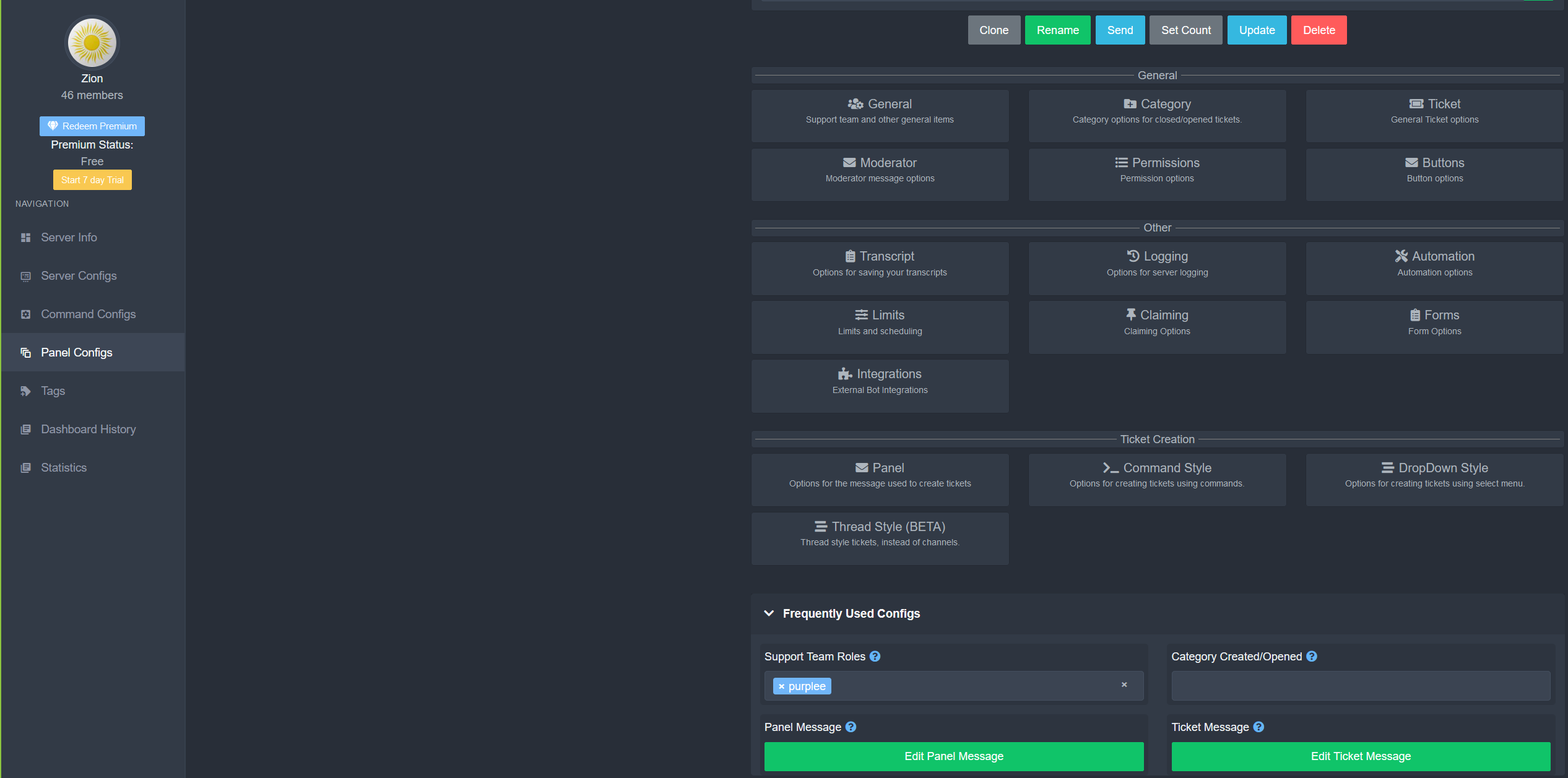 narrow surge
slender minnow
Refer to the above response ^
narrow surge
slender minnow
Refer to the above response ^
It doesn’t show save to logs
slender minnow
narrow surge
It doesn’t show save to logs
do you see a variable when you made the forms questions?
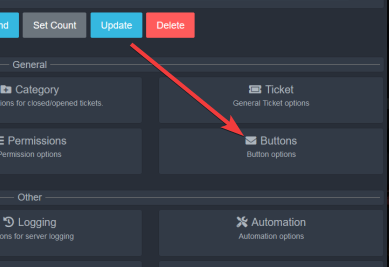 round jewel
oh thanks literally only place I didn't look at 😂
thanks@slender minnow
One more problem
round jewel
slender minnow
https://i.imgur.com/Fc1QOqk.png
for some reason everyone can see the ticket
where is that settings
narrow surge
slender minnow
do you see a variable when you made the forms questions?
im trying to get that

ive set everything else up it wont shop it i the logs
narrow surge
round jewel
where is that settings
thats in the channel setting of your server if the tickets go into a category make that category only available to see for staff
round jewel
but i kinda need it to be visible for person that created it 😅
narrow surge
round jewel
but i kinda need it to be visible for person that created it 😅
thats automatic ticket took hand adds the person who created the server
narrow surge
round jewel
I'll try to change it
make a catagory and then go into ticket tool dashboard under general there is catagory and select the one you made
 dusty sphinx
hi how are things ? I want to know if any of you know how to properly configure the menu to use it with a remote I would appreciate it if you have any video in Spanish if it were possible thank you very much
round jewel
so
round jewel
narrow surge
make a catagory and then go into ticket tool dashboard under general there is ca...
when I create ticket into category that is invisible for everyone that ticket will be visible
also when I close that ticket it become invisible
slender minnow
narrow surge
ive set everything else up it wont shop it i the logs
server id?
i am not sure what you mean by not showing in logs
slender minnow
dusty sphinx
hi how are things ? I want to know if any of you know how to properly configure ...
wdym by controlling with a remote?
narrow surge
slender minnow
server id?
679761755240792106
narrow surge
slender minnow
i am not sure what you mean by *not showing in logs*
when a ticket is closed it makes a logg of who said what. there is a option that the form is also shown in those logs
slender minnow
narrow surge
when a ticket is closed it makes a logg of who said what. there is a option that...
actually i have never tried using the form response in the close message  ^^;
^^;
let me check please
narrow surge
slender minnow
actually i have never tried using the form response in the close message <:hmm_t...
hahaha thanks
iron nightBOT
Gave +1 Rep to @slender minnow
slender minnow
narrow surge
hahaha thanks
you'll have to use this variable in the embed
https://i.imgur.com/WR8RMhq.png

each question you create gets a different variable, and these variables will add the answer (without question)
also, i am not sure if it works in the closed message as well but would be worth trying ^^
updating here, it should work in the closed messages
dusty sphinx
slender minnow
wdym by controlling with a remote?
yes friend is that I have configured it but I don't really notice the aimbot could you help me thanks
iron nightBOT
Gave +1 Rep to @slender minnow
round jewel
thanks@narrow surge
narrow surge
npnp
dusty sphinx
I play in command and I have not been able to configure the engineowning correctly
narrow surge
slender minnow
you'll have to use this variable in the embed
https://i.imgur.com/WR8RMhq.png
i cant figure it out
slender minnow
dusty sphinx
yes friend is that I have configured it but I don't really notice the aimbot cou...
wrong server
slender minnow
narrow surge
i cant figure it out
replace the variable in the image in the embed you want the answer to be in
then hit save
 rugged comet
Hi I need a help
dusty sphinx
Thank you
round jewel

 inner gale
jade topaz
inner gale
jade topaz
Hey how do I unsubscribe from ticket tool?
rustic gale
jade topaz
Hey how do I unsubscribe from ticket tool?
Depends on how you got the subscription
@rugged comet:
humble sequoiaBOT
We would love to help you, but if you don't tell us what you need help with we can't help you :(
jade topaz
Is it possible to get statistics on who/which users opened tickets? I want to give a reward to people who have opened many tickets with us
rustic gale
jade topaz
Is it possible to get statistics on who/which users opened tickets? I want to gi...
Not possible currently

 errant blade
rustic gale
errant blade
rustic gale
 mighty solstice
?
jade topaz
jade topaz
Hi, can we (Staff) create a ticket to contact a user without /Add user command ?...
Hi, up !? 😒
opal cradle
is there a way to make shorter version of existing commands? ($transcript or $delete ==> $t and $d)
 ebon crane
Is there an option to not open a channel when a ticket is submitted? to just have it logged.
My case is for a suggestion box. ticket only needs to go to the team.
covert swallow
opal cradle
is there a way to make shorter version of existing commands? ($transcript or $de...
Not at this time, you can suggest it though
covert swallow
ebon crane
Is there an option to not open a channel when a ticket is submitted? to just hav...
A channel will be opened no matter what, but you can make it so the user who opened it cant see it
And the channel will function like a discussion thread for the idea
 white stump
I added ticket tool to my five m discord but when I go to the dashboard it don’t pull up any help
humble sequoiaBOT
Don't see your server in the dashboard?
You will possibly need to relog. Look below to see steps on how to relog.
How to relog in the Dashboard.
Note:
You need one of these 3 things to access the dashboard.
1. Server Owner (Level: 6)
2. Server Administrator (Level: 4)
3. Dashboard Role (Level: 2)
:warning: You can check your level using $level on your Discord Server
User permission level with Ticket Tool
@User is permission level: 0 (User)
```» *If it shows that your permission is **0**, you don't have any of the above **3 things** to manage the dashboard.*


**See the Image below on how to relog:**thank you! this works
iron nightBOT
Gave +1 Rep to @covert swallow
covert swallow
Glad I can help!
ebon crane
covert swallow
Glad I can help!
lol nice bio
covert swallow
thanks
 oblique temple
hello, please how can i work as a developer in ticket tool?
rustic gale
jade topaz
Hi, can we (Staff) create a ticket to contact a user without /Add user command ?...
No. That's precisely what the /add command is for, why don't you want to use it?
white stump
How do I add it where it’ll tag support when a ticket is opened
 ruby coral
I just decided to test this bot out, and tried doing $help, no response. I tried the slash commands too and it said that the application did not respond. In troubleshooting it said i could try and run $debug, but when i did the message got deleted instantly with no other response.
ebon crane
covert swallow
thanks
I'm sorry @covert swallow I'm not finding the option in Panel Configs to hide channel from user.
covert swallow
Dont worry about the bot yelling at you this time
covert swallow
Panel configs > permissions > user opened > view channel > ❌
ebon crane
covert swallow
Panel configs > permissions > user opened > view channel > ❌
thank you!
iron nightBOT
Gave +1 Rep to @covert swallow

 rustic gale
white stump
How do I add it where it’ll tag support when a ticket is opened
rustic gale
white stump
How do I add it where it’ll tag support when a ticket is opened
Add a role mention
$mentions
humble sequoiaBOT
Within all the messages the bot's sends (both embeds and text) you can mention either channels, roles, or even users, these mentions will only send a notification to the user if they are used within a text field, e.g: a role mentioned in an embed won't ping at all the users who have that role.
For mentioning a role you can use one out of three options:
{@Role Name} ➞ Which is Case Sensitive.
{RoleID} ➞ Replace RoleId with the Id of the role you are trying to ping.
<@&RoleID> ➞ Discord's native syntax to ping roles.
<#ChannelID> ➞ Mention a channel by its ID.
<@UserID> ➞ Mention a user by its ID.
rustic gale
to the ticket message
humble sequoiaBOT
The Ticket Message is the first message sent by the bot on a new ticket. To customize it head over to your Dashboard ➞ Panel Configs ➞ Ticket ➞ Edit Ticket Message
rustic gale
jade topaz
but they usually go down
Category's full, probably
jade topaz
rustic gale
Category's full, probably
ima check if i can make a new channel
@rustic gale

sorry
 crimson quest
u can have multiple people access the ticket system dashboard if theyre server admins right?
rustic gale
crimson quest
u can have multiple people access the ticket system dashboard if theyre server a...
Of course
rustic gale
jade topaz
<@832864595726172162>
But was it created under the correct category?
rustic gale
jade topaz
yes
That's weird. #🎫│make-a-ticket so we can take a closer look
 forest lake
Everytime I try to add it to my server it goes straight to verify but it don’t join server
scenic plinth
Slightly confused as to what you mean.... are you talking about a verification bot on your server...?
 balmy jewel
How do I make it so regular members (non support team) cannot close tickets
rustic gale
balmy jewel
How do I make it so regular members (non support team) cannot close tickets
Make the close ticket and/or confirm close buttons support team only
balmy jewel
Alright
opal cradle
covert swallow
Not at this time, you can suggest it though
could the bot respond to its own tags?
covert swallow
I dont believe so
 stray hawk
Why am I being rate limited from the site
 brave zephyr
hey guys, how can I set the expire time for a ticket?
we're looking for a solution to not have to manually close the ticket when it's been open for like 2 months
 atomic barn
brave zephyr
we're looking for a solution to not have to manually close the ticket when it's ...
atomic barn
brave zephyr
we're looking for a solution to not have to manually close the ticket when it's ...
Was about to ask this as well here, if anyone knows if there is something like this lmk as well :)
 novel kraken
stray hawk
Why am I being rate limited from the site
novel kraken
stray hawk
Why am I being rate limited from the site
That’s discord
jade topaz
How i create ticket?
 foggy vault
Hi i need help i have a pending bridge transaction one day, where can i open a ticket?
rustic gale
brave zephyr
hey guys, how can I set the expire time for a ticket?
No such feature exists currently. cc @atomic barn
rustic gale
jade topaz
How i create ticket?
Look at the Setup Guide in #📂│information
atomic barn
rustic gale
No such feature exists currently. cc <@784529533503799316>
Aight thx for that :)
 mint urchin
rustic gale
Add a role mention
mint urchin
rustic gale
Add a role mention
hi bro please read dm when you free
 molten urchin
Hey, where can I edit the description part of the embed?
 rustic gale
mint urchin
hi bro please read dm when you free
rustic gale
mint urchin
hi bro please read dm when you free
Don't DM staff, that's rude
If you need support, ask here or #🎫│make-a-ticket
 rustic gale
round jewel
what can I do to be able to change this?
rustic gale
round jewel
what can I do to be able to change this?
Get premium
The red diamond means it's a premium-only feature
round jewel
rustic gale
Get premium
if it's only this small thing I don't want to buy Premium for it because I wouldnt even use it
so I am asking if I can buy f.x. only this
rustic gale
You can also just rename tickets manually with the /rename command
round jewel
I know but this would be better 🫤
rustic gale
Well, you can't just buy a single premium feature sadly
You can get free premium by voting though
$vote
humble sequoiaBOT
rustic gale
$vote
Votes
Current Votes: 0
Lifetime Votes: 0
Linked Votes: 0
Vote Links
Linking Info
Linked User: Not Linked
You can give your future votes to another user by linking with that user.
To link use $vote link (@user or userId)
To unlink use $vote unlink
Redeeming
Each vote is worth 12 hours of premium and can be redeemed once you have atleast 6 votes.
Your current votes are worth 0m
To redeem your current votes use $vote redeem
round jewel
$vote
humble sequoiaBOT
round jewel
$vote
Votes
Current Votes: 0
Lifetime Votes: 0
Linked Votes: 0
Vote Links
Linking Info
Linked User: Not Linked
You can give your future votes to another user by linking with that user.
To link use $vote link (@user or userId)
To unlink use $vote unlink
Redeeming
Each vote is worth 12 hours of premium and can be redeemed once you have atleast 6 votes.
Your current votes are worth 0m
To redeem your current votes use $vote redeem
molten urchin
molten urchin
Hey, where can I edit the description part of the embed?
@rustic gale can you help me with this? =/
Oww sry, i thought i was not allowed to ping the admins only.
humble sequoiaBOT
The panel message is where people react to make a ticket. To customize it head over to your Dashboard --> Panel Configs -> Panel -> Edit Panel Message
 plain surge
This is where you can edit the message
molten urchin
thank you! 🙂
jade topaz
how can i create ticket in my own server
stark runeBOT
1. Invite Ticket Tool to your server
First you will want to invite the bot to your server. Once the bot is in your server, you can manage your server in the dashboard.
2. Create a Panel
To create a panel we are going to need to head over to the panel configs on the dashboard.
Once at the dashboard we will need to click Create Panel.
Enter a panel name (Fill in any optional settings you want).
Click Create Panel and your ready to get started with configuring your panel.
An example of a creating a panel is shown below.
3. Send the Panel to a Channel
Once you've created a panel on the dashboard you will need to send it to a channel using send on the dashboard.
Select the channel you want your panel to be created in and click send.
For other questions checkout $help faq.
An example of a sending a panel is shown below.
Having a Problem Sending the Panel?
Do $debug in a channel with Ticket Tool and make sure it has all the necessary Discord permissions.
plain surge
There you go @jade topaz
humble sequoiaBOT
For a more convenient use of multipanels, you can now combine panels on the dashboard. This will allow you to directly send the multipanel from the dashboard or via the $panel ID command.
Where can I find this?
You can find this setting on the Dashboard -> Panel Configs -> Settings -> Panel
Note: if you're attaching all the panels to a panel called English, don't include English in the attached panel's box (If you do this, it will create a duplicate)
This will put all buttons from all of your panels on one message. The message is the panel message from the panel you're combining these panels in.
 vague fjord
/button
 misty brook
Hi, we are using Ticket Tool in our Discord Server. Whenever we close a ticket the bot automaticly creates a "closed-0001" channel. We don't want that and we don't need it. Is there any solution for close this ?
rustic gale
misty brook
Hi, we are using Ticket Tool in our Discord Server. Whenever we close a ticket t...
That's not the bot creating a channel, it's the bot renaming the existing channel
Tickets have two states: open and closed
Closing a ticket just moves it to the closed state. After that you can delete it
If you want to, you can just disable the closed state altogether. Enter your dashboard -> Panel Configs -> General, and disable the switch labeled “Two Step Ticket”
(don't confuse it with Two Step Close, which is a different thing)
round jewel
rustic gale
You can get free premium by voting though
I voted and nothing
 fair lava
i votes for the bot but no premium
scenic plinth
Because you don't automatically get premium... you have to claim the votes when you get the minimum requirement of votes...
round jewel
how many
round jewel
scenic plinth
Because you don't automatically get premium... you have to claim the votes when ...
.
is it possible for People from same server to vote together?
 long plume
slender minnow
round jewel
is it possible for People from same server to vote together?
long plume
slender minnow
round jewel
is it possible for People from same server to vote together?
Yes, just link it to a user
slender minnow
jade topaz
Moved to ticket
jade topaz
I didn't get any panel
 jade topaz
slender minnow
Moved to ticket
jade topaz
slender minnow
Moved to ticket
Bro
 real stirrup
 round jewel
slender minnow
Yes, just link it to a user
round jewel
slender minnow
Yes, just link it to a user
how
 muted geode
Is there a full tutorial on everything?
I am currently using the "Tickets" bot but I am not really happy with it so I planned switching over to "Ticket Tool"
I am just absolutely not comfortable with their dashboard haha
also does the Premium version offer customized bots? like pfp, name etc
jade topaz
jade topaz
I didn't get any panel
.
humble sequoiaBOT
━━ moved to ticket ━━
slender minnow
round jewel
how
run $vote in #🤖│bot-spam
round jewel
and? 😅
slender minnow
muted geode
also does the Premium version offer customized bots? like pfp, name etc
thats a planned feature, our dev is working on it
slender minnow
round jewel
and? 😅
the response should further help you
muted geode
slender minnow
thats a planned feature, our dev is working on it
Can I add a Ticket button under an existing message?
jade topaz
Help!
 slender minnow
muted geode
Can I add a Ticket button under an existing message?
slender minnow
muted geode
Can I add a Ticket button under an existing message?
you can update a message sent by ticket tool to add more button, but not on someone else's message
round jewel
ok 😄
slender minnow
jade topaz
Help!
refer the response below
humble sequoiaBOT
Don't see your server in the dashboard?
You will possibly need to relog. Look below to see steps on how to relog.
How to relog in the Dashboard.
Note:
You need one of these 3 things to access the dashboard.
1. Server Owner (Level: 6)
2. Server Administrator (Level: 4)
3. Dashboard Role (Level: 2)
:warning: You can check your level using $level on your Discord Server
User permission level with Ticket Tool
@User is permission level: 0 (User)
```» *If it shows that your permission is **0**, you don't have any of the above **3 things** to manage the dashboard.*


**See the Image below on how to relog:**thanks @slender minnow
iron nightBOT
Gave +1 Rep to @slender minnow
 abstract osprey
(
 opaque vine
how do i see my panel ids?
humble sequoiaBOT
━━ moved to ticket ━━
opaque vine
how do u fix this? there is two membership buttons
 humble sequoiaBOT
━━ moved to ticket ━━
balmy jewel
rustic gale
Make the close ticket and/or confirm close buttons support team only
How do i do that....
never mind
 cloud orbit
السلام عليكم محتاج مساعدة
rustic gale
balmy jewel
How do i do that....
Panel Configs -> Buttons -> select the button you want to edit -> toggle the switch labeled Support Team Only
robust sandalBOT
cloud orbit
السلام عليكم محتاج مساعدة
Peace be upon you, I need help
Arabic (ar) → English (en)
rustic gale
We would love to help you, but if you don't tell us what you need help with we can't help you.
robust sandalBOT
rustic gale
We would love to help you, but if you don't tell us what you need help with we c...
نود مساعدتك، ولكن إذا لم تخبرنا بما تحتاج إلى مساعدة بشأنه، فلن نتمكن من مساعدتك.
English (en) → Arabic (ar)
 brisk pond
Hey, quick question - was just setting up the ticket tool in my server and I don't know what I did, but the ticket panel shows two "Create Ticket" buttons now. Any help?
humble sequoiaBOT
For a more convenient use of multipanels, you can now combine panels on the dashboard. This will allow you to directly send the multipanel from the dashboard or via the $panel ID command.
Where can I find this?
You can find this setting on the Dashboard -> Panel Configs -> Settings -> Panel
Note: if you're attaching all the panels to a panel called English, don't include English in the attached panel's box (If you do this, it will create a duplicate)
This will put all buttons from all of your panels on one message. The message is the panel message from the panel you're combining these panels in.
gilded verge
Hey @brisk pond, delete the panel that you added in the multi-panels
brisk pond
thank you!
 wild flame
Do better @covert swallow
covert swallow
no u
 amber geyser

Hello someone have this problem ?
Please help i bought a switch but can t install
 buoyant drum
Are things submitted in tickets logged so the bot owners can see?
lunar solar
 exotic wasp
how tf is this possible
exotic wasp
how tf is this possible
I believe the hex colour code is just the same colour as Discord
So it’s there but blends in
lunar solar
amber geyser
I never use any key with my new switch need assistance please
You are in the wrong place, this is support for ticket tool Discord bot
humble sequoiaBOT
⚠️ You're in the wrong place
We provide support for Ticket Tool Discord bot and cannot help you with whatever issue you have.
- We don't know which Support Team you should contact to get this issue resolved, and unfortunately we won't be able to accurately tell you.
If you don't have any further questions regarding our bot Ticket Tool, please close this ticket
lunar solar
buoyant drum
Are things submitted in tickets logged so the bot owners can see?
Elaborate on what you mean please?
buoyant drum
lunar solar
Elaborate on what you mean please?
I.e. say someone submits a ticket of sensitive nature in my group. Could the owners of this group read it? Owners being the creator of the bot.
lunar solar
buoyant drum
I.e. say someone submits a ticket of sensitive nature in my group. Could the own...
Oh no
Sorry I thought you were talking about bot logging if you had setup a channel in your Discord
buoyant drum
lunar solar
Oh no
So I take it that tickets are encrypted or..? 🤔
lunar solar
buoyant drum
So I take it that tickets are encrypted or..? 🤔
Well within your Discord it’s locked out by the permissions that you set and tickets can’t be viewed by the Dashboard
 amber patrol
im pressing the + to make a new panel but it doesnt do anyhting
 rustic gale
amber patrol
im pressing the + to make a new panel but it doesnt do anyhting
rustic gale
amber patrol
im pressing the + to make a new panel but it doesnt do anyhting
You need to enable Javascript in your browser
amber patrol
rustic gale
You need to enable Javascript in your browser
how do i do that?
rustic gale
Good question. I have no idea
amber patrol
rustic gale
Good question. I have no idea
i enabled it and it's still not working
 runic edge
Members of my server get an error saying they don't have permission to make a ticket. Is there a setting I can change to fix this? I can't seem to find it
screenshot of one of my members
 rustic gale
runic edge
Members of my server get an error saying they don't have permission to make a ti...
rustic gale
runic edge
Members of my server get an error saying they don't have permission to make a ti...
Probably a blacklisted role.
runic edge
rustic gale
Probably a blacklisted role.
Where can I see that setting?
Don't have any blacklisted roles
 rustic gale
runic edge
Where can I see that setting?
rustic gale
runic edge
Where can I see that setting?
Ah. You actually set the Create Ticket button to be support team only
Panel Configs -> Buttons -> Create Ticket
iron nightBOT
Gave +1 Rep to @rustic gale
rustic gale
Don't mind the bot, it's drunk
runic edge
rustic gale
Don't mind the bot, it's drunk
Alright xd
jade topaz
want help
can we drop transcripts in 2 different server channels .?
because our server got t 3 r m again & again and we lost all our transcript which is saved in server
 sinful ravine


 verbal yarrow
I tried pinging a role, but it won&t work. Can some one give me an example?
humble sequoiaBOT
Within all the messages the bot's sends (both embeds and text) you can mention either channels, roles, or even users, these mentions will only send a notification to the user if they are used within a text field, e.g: a role mentioned in an embed won't ping at all the users who have that role.
For mentioning a role you can use one out of three options:
{@Role Name} ➞ Which is Case Sensitive.
{RoleID} ➞ Replace RoleId with the Id of the role you are trying to ping.
<@&RoleID> ➞ Discord's native syntax to ping roles.
<#ChannelID> ➞ Mention a channel by its ID.
<@UserID> ➞ Mention a user by its ID.
lunar solar
@verbal yarrow
verbal yarrow
Ah, thanks.
 abstract hinge
What to do when the text from the bot and its panel is not visible when opening the ticket?
lunar solar
jade topaz
Like $wait
= please be patient
Dashboard --> Tags
humble sequoiaBOT
Tags
Tags are used to send a predefined response to your channels using a command. Tags will only respond if the command itself is used, it will not function if you put the tag into a sentence. The prefix is not included.
To create tags, go to: Dashboard > Tags > Create Tag. After creating and naming one, tap on the response button, and you can edit the response.

━━ moved to ticket ━━
amber geyser
I bought a switch how to unlink the switch bécasse I’m the new owner please
Because
 desert wolf
How to set command auto sand massage
slender minnow
amber geyser
I bought a switch how to unlink the switch bécasse I’m the new owner please
wdym by switch?
 rustic parrot
Hello so im abit stuck with the claiming feature.. when a staff member claims a ticket it hides it from everyone else which we dont want that to happen... is there a way to stop this??
rustic gale
rustic parrot
Hello so im abit stuck with the claiming feature.. when a staff member claims a ...
Panel Configs -> Claiming, disable the switch labeled something like “Change permissions for support team when claimed”
 nocturne silo
How do i change the message which gets sent by ticket tool when someone closes tickets?
 peak spoke
Can tickets be deleted when closed? I can't find the option.
lunar solar
peak spoke
Can tickets be deleted when closed? I can't find the option.
Yes,
Panel Configs --> Disable two step close & two step ticket
peak spoke
Thanks @lunar solar
iron nightBOT
Gave +1 Rep to @lunar solar
peak spoke
Oh, uh.. 💀 Sorry
peak spoke
Okay lmfao, thanks anyway
lunar solar
np
abstract hinge
what to do if the bot does not write text after opening the ticket?
lunar solar
abstract hinge
what to do if the bot does not write text after opening the ticket?
What do you mean doesn't write text?
 fleet cove
Hello. I installed ticket tool. I am admin and I can see opened tickets but it not showing for moderators. How can I fix it?
lunar solar
fleet cove
Hello. I installed ticket tool. I am admin and I can see opened tickets but it n...
Add a role they all have to Support Team Roles:
Panel Configs --> General --> Support Team Roles
Note: Only applies to newly created tickets
fleet cove
lunar solar
Add a role they all have to `Support Team Roles`:
Panel Configs --> General --> ...
Does it need any special permission?