#electronics
1 messages · Page 10 of 1
 pliant adder
I was talking about ups
 old vapor
It'll just lose power in like 3 minutes or something I forgor
 west fable
pliant adder
I was talking about ups
west fable
pliant adder
I was talking about ups
same thing applies
ratings are fairly rarely exactly where the max is, usually they'll leave some headroom
old vapor
west fable
ratings are fairly rarely exactly where the max is, usually they'll leave some h...
That's just good engineering
west fable
the only exception is if the ratings are completely fabricated and the actual rating should be considerably lower
pliant adder
I was thinking about connecting pc + server + monitor + network ≈ 800W max measured from the outlet
old vapor
west fable
the only exception is if the ratings are completely fabricated and the actual ra...
Thermaltake smart moment
pliant adder
So I guess something like 1000VA/800W is fine
west fable
lol my friend found "energizer" batteries that had only around 200mah capacity
old vapor
pliant adder
So I guess something like 1000VA/800W is fine
Should be more than enough
west fable
definitely real "energizer" batteries
pliant adder
Just have to find a pure sine wave one
west fable
(they should have been at minimum like 1500mah)
old vapor
Again, I can run my 850w psu desktop on gaming loads with almost all the plugs plugged in
On a 1000va ups
Sine wave vs stepped wave I'm not sure actually makes a difference
People say it does but
pliant adder
850W psu but how much can your system draw?
old vapor
pliant adder
850W psu but how much can your system draw?
Heck if I know
west fable
many modern psus have power factor correction so the VA rating isnt the most important on pcs
old vapor
Not 1000, I can tell you that much haha
west fable
lmao
old vapor
I think its around 400w tho?
west fable
i have a 1500w/1500va ups and my psu is just 750w or smth lmfao
old vapor
400 something iirc I haven't checked since a while ago
old vapor
I run my monitor, printer, charger etc
pliant adder
I'll just keep a good margin and go for at least 800W+ ups
west fable
usually they dont recommend putting printers on a UPS since they have rather high draw
though this is specifically laser printers ig
inkjets should be fine
west fable
lmao
old vapor
You right tho laser definitely don't run on a ups
west fable
i dont like inkjets honestly
pliant adder
Cmon at this point its easier to not understand the topic fully and just go with the extra power
west fable
they clog so fast
old vapor
It will probably trip the ocp
old vapor
pliant adder
Cmon at this point its easier to not understand the topic fully and just go with...
I mean fair
But now you know
old vapor
west fable
they clog so fast
Honestly mines been going strong
pliant adder
Yeah I've lost hours trying to understand all of this dark magic
west fable
actually
old vapor
I don't use it too often either
old vapor
I love kW
west fable
you can see watt and va on that
old vapor
Also valid
I didn't bother I just went with 1000 since it was on sale
And it's just fine
pliant adder
west fable
get a kill-a-watt
I do have one, that's how I measured the power consumption directly from the outlet for most devices
Never bothered checking anything other than Watts, I'll see if there's also VA
 calm mural
Got stuck here, not sure if i cant find my wifi card, or if its just not there
theres only two of them that are named differently to the rest, I see transmit buffers but not transmit power
west fable
calm mural
Got stuck here, not sure if i cant find my wifi card, or if its just not there
that would be on the AP settings (router)
you also could be running into an issue caused by airtime fairness
do you have any older wifi devices connected to your network?
ones that might be say, 802.11b, a, g, or n
calm mural
i dont think so
west fable
one way you can test to see if it's your game or your pc is to try using your pc wired (you could temporarily move it closer to the router so you can directly plug in) and if you dont get any network drops, the issue is likely your wifi network
calm mural
calm mural
crap ill have to get my stepdad to help when he gets home
he knows more about this than i do plus i dont think he wants me configuring or looking at router info when he isnt there

 night lotus
Doesn’t need to be gaming @chrome dust
night lotus
Bet
 kindred yacht
 chrome dust
8 gigs is sad
chrome dust
8 gigs is sad
8gb is barely enough to run win11 and a browser
At least not without using swap space
chrome dust
ya
 cinder anvil
my pc opens discord right after i turn it on, how can i stop that?
 blazing token
cinder anvil
my pc opens discord right after i turn it on, how can i stop that?
blazing token
cinder anvil
my pc opens discord right after i turn it on, how can i stop that?
Go into task manager and go to startup apps. Youll want to click discord disable it. It only disables an automatic startup, you can always open the app when you want.
west fable
blazing token
Go into task manager and go to startup apps. Youll want to click discord disable...
or alternatively
 cinder anvil
can someone help me find the problem?
 west fable
cinder anvil
can someone help me find the problem?
west fable
cinder anvil
can someone help me find the problem?
honestly idk, ignore it if you're not actually experiencing issues
if you are, try reinstalling windows
cinder anvil
west fable
honestly idk, ignore it if you're not actually experiencing issues
😭

i think its gpu artifacting
but
windows said "problem"
idek im so tired
west fable
oh
there could be a few causes
anywhere from the gpu being dead, to the display cable or connectors being bad
or even the display being bad
try using a different cable on a different port on a different display and see if that fixes things
alternatively, try booting from a live linux usb and see if the artifact still show up there
west fable
cinder anvil
i think its gpu artifacting
actually, does the artificing occur even during the bios/post screens
cinder anvil
west fable
actually, does the artificing occur even during the bios/post screens
yea, its everywhere
well
if the screen is black its not messed up ofc
but yea its in bios and stuff
west fable
west fable
try using a different cable on a different port on a different display and see i...
try this first
if it doesnt work, then chances are, your gpu is likely to be dying
you could attempt a gpu reseat but that is unlikely to fix things
 chrome dust
gpu on its way out
west fable
cinder anvil
uhh, guys?
yeah this wouldnt be a monitor or cable issue
im basically certain it's the gpu being dead
west fable
nope
west fable
not with the average person's skillset at the very least
cinder anvil
i thought a local computer shop could fix it but i guess not probably
west fable
it could be a faulty vram package or smth, but you'd need to know how and have the equipment for SMD components to replace a chip
yeah unlikely tbh
and if it's more than 2 generations old, it probably isnt even worth trying to fix
cinder anvil
rip
west fable
if it was a hardware failure like this i mean
west fable
sell it as for parts/not working
cinder anvil
ohh right
west fable
sometimes people may grab it, though you might have it sitting around for a while
alternatively, you can just throw it out if you dont want to bother; bring it to some ewaste recycling place
cinder anvil
i think ill sell it then, ty
 oblique gazelle
cinder anvil
is there no way to fix it?
oblique gazelle
cinder anvil
is there no way to fix it?
You can def still sell it
Oh
Ignore me
west fable
Lmao
old vapor
He is not wrong
west fable
oh yeah idk if anybody even cares but rtings released their microwave reviews
they have come to the conclusion that microwaves dont really vary in performance (for microwaves in the same wattage) between like the $200 microwaves vs the $1000 microwaves
they all microwave the same (within the same wattage)
 sturdy jolt
west fable
oh yeah idk if anybody even cares but rtings released their microwave reviews
th...
sturdy jolt
west fable
oh yeah idk if anybody even cares but rtings released their microwave reviews
th...
What about moisture sensor and other methods of auto popcorn testing?
west fable
yeah that's the only separating factor, the features
sturdy jolt
But that's a real point of contention
west fable
in terms of raw like, timed cooking though, they're practically exactly the same
their conclusion was to buy the cheapest microwave with all the features you want
and that inverter microwaves are slightly more power efficent
sturdy jolt
Clearly the popcorn button is what separated the bad microwaves from the good microwaves
https://youtu.be/Limpr1L8Pss

Try it. You know you want to.
Referenced Videos:
The Antique Microwave Oven that's Better than Yours
https://youtu.be/UiS27feX8o0
And the follow-up to that one
https://www.youtube.com/watch?v=tBD1NyabTt4
The Clapper
https://youtu.be/TBPVJtGBf8Y
Technology Connextras (the second channel where I put stuff sometimes)
https://www.youtube.com/@Te...
west fable
yeah i saw that video, rtings didnt test those though since those are more like extra features? i think the initial goal was to see if there were any microwaves that worked better than others, but ended up realizing they're all pretty much the same in terms of cooking performance
cinder anvil
can someone recommend a good ups?
west fable
cinder anvil
can someone recommend a good ups?
What is the requirements
A ups is often sized to the load and runtime requirements
west fable
cinder anvil
450~ watts and uhh
What is this powering? Remember to calculate everything that needs to have backup power, e.g don't forget monitors
Also minimum runtime is basically it should be able to keep powering your device until it can safely shut down
A UPS isn't meant for offline usage generally; if you want longer periods of being able to keep a device on, the most effective method is a standby generator
Or at the very least, a generator that you can run to turn on during a power outage, because an automatic transfer switch is quite expensive
Like 400 buckaroos
(depending on amperage, including professional installation which is highly recommended)
but i digress
cinder anvil
west fable
What is this powering? Remember to calculate everything that needs to have backu...
pc monitor keyboard mouse and headset
how much runtime is recommended?
west fable
cinder anvil
how much runtime is recommended?
how long does it take for you to turn off your pc
add like 2 minutes to that and that's your minimum runtime i'd recommend
oh yeah one other thing
you in north america?
or do you have eu/uk/etc. plugs
cinder anvil
yea north america
west fable
cinder anvil
yea north america
went to cook dinner, im back now, but CP850PFCLCD probably would be fine, or the BR1000MS (a bit more expensive, but also higher capacity), or CP1000PFCLCD
west fable
yes, but they would be simulated sine wave
idk if your psu has power factor correction, which can be damaged by simulated sine wave, or even shut off due to it which is kinda counter intuitive
cinder anvil
what is simulated sine wave?
west fable
it's not quite a sine wave, it uses basically pwm? or something to make a sine waveform
CP850AVRLCD would be a slightly cheaper option
image for reference
it's not quite as exaggerated like the image shows, since electricity has inertia, so it would be slightly more smoothed than the graphic

but it wouldnt be as smooth as the proper sine wave ups
cinder anvil
ohh i see ty
old vapor
Allegedly it damages equipment but I haven't seen much saying it actually does tho
west fable
Yeah damaging is not 100% (or else they probably wouldn't even sell them) but it definitely isn't as clean of power as pure sine wave at the very least
Image I got was mainly to illustrate the difference between the two, though the text imo is more marketing than informative
Idk how pure sine wave "protects" equipment lmao
That's just the normal waveform
At the very least, the ups used in datacenters are also using pure sine wave, and there aren't really any simulated sine wave UPS's from a reputable company for datacenters
old vapor
Fair enough
 fringe imp
can somebody recommend me a budget alternative of a datavac of about the same power?
west fable
fringe imp
can somebody recommend me a budget alternative of a datavac of about the same po...
Look at Amazon or whatever and search PC duster or smth
See what had good reviews
fringe imp
I mean there’s this🤔
 west fable
should be fine
old vapor
As long as you're okay with it being so huge
The wide attachment is pretty hilarious tho
Like when am I going to need to shotgun blast weak air in my PC
fringe imp
LOL
 odd root
What the heck is going on!
Litterly had this happen to me twice now
This time after powering off my pc
Oops wait wrong chat
 distant python
Anyone know what the risk of buying a used display tablet is (huion kamvas 13)
And if it’s worth it?
New: 229€
Used: 108€
kindred yacht
distant python
Anyone know what the risk of buying a used display tablet is (huion kamvas 13)
...
There's plenty of risks involved depending on where you're buying it from. If you're smart about buying and have some sort of method to get a refund if needed like using paypal or a credit card, then you can mitigate most of the risks.
west fable
distant python
Anyone know what the risk of buying a used display tablet is (huion kamvas 13)
...
I bought a used mobile studio pro 13 from my college for $150 cad
The battery life is so terrible lmao
Also I still haven't figured out how to connect it to my PC
Idk if I need a thunderbolt 3 cable to use usb4 or if any usb 3.1 cable would work
distant python
west fable
I bought a used mobile studio pro 13 from my college for $150 cad
The battery l...
I wonder if it cuz of the use or if it’s generally bad
west fable
It's just old
Mine's like 6 years old or something
The drawing and such still works properly, you just have to stay plugged in the wall
west fable
west fable
Mine's like 6 years old or something
I assume they changed the battery at least once though
Doing another batt swap isn't really worth it though from what it seems
It's another $150 cad for a replacement battery
And the disassembly from what I seen is a huge pain
distant python
west fable
It's another $150 cad for a replacement battery
Oof yeah better to just get another tablet
distant python
I’m switching from Bluetooth pen tablet to wired display 🥲
west fable
Idk if yours has a battery, but if you get to test to make sure it works, and the screen isn't scratched up, then it should be good
distant python
west fable
Idk if yours has a battery, but if you get to test to make sure it works, and th...
Yeah I doubt I need to check the battery since it’s not Bluetooth or anything like that? My only concern was with lagging and glitches
west fable
distant python
Yeah I doubt I need to check the battery since it’s not Bluetooth or anything li...
Just looked up the kanvas 13, it's not a standalone tablet
distant python
Nope it’s display
west fable
It's more akin to another display for your desktop
Yeah
No batt or cpu to worry about
Bring a laptop to test with
distant python
Technically Facebook market but If I buy it ima request using a native website that similar to eBay that way I can pay €12 for both shipping and 24 hour return
west fable
Ah
Idk if they will agree with eBay though, since they will be charged extra fees from ebay
Also you'll probably need to pay sales tax
Is the seller far away
distant python
Hm I think 2-3 hour drive
distant python
It probably cost $20-40 for the transportation
west fable
Maybe the seller using a PayPal goods and services account to do the transaction, then they ship with something like pirate ship for cheap rates?
Most people on marketplace and such are there to avoid eBay's fees
distant python
It’s not eBay haha
west fable
Oh
distant python
It’s native thing that’s similar to eBay
west fable
Mb I thought you said eBay lol
distant python
I used it as a comparison but I get the confusion
Tho I came to the conclusion that it’s prob for the best to get new one since I will get the complete set
And the reason for me switching from pen tablet to display is for comfort having a stand and glove most likely worth investing
Plus Im not tight on money tho the 3ds I wanted to buy will have to wait 😔
west fable
distant python
Tho I came to the conclusion that it’s prob for the best to get new one since I ...
tbh if you're used to using a pen tablet, rather than a display tablet, you dont really need a display tablet
i know that a good few very good digital artists just use the cheaper non-display tablets for their works
distant python
west fable
tbh if you're used to using a pen tablet, rather than a display tablet, you dont...
I’m aware tho I was really struggling getting comfortable with the pen tablet I had and when I checked out getting bigger one assuming that might be the issue I learned it’s not much big difference between the price of Wacom pen tablet Medium sized and huion display
And I have been struggling to get comfortable with this pen tablet for soon 3 years
west fable
distant python
And I have been struggling to get comfortable with this pen tablet for soon 3 ye...
ahh
might be able to get used to it easier if you play osu frfr
also if you are on the budget end, xp pen has quite a good selection of pen tablets and display tablets that are good quality
distant python
west fable
also if you are on the budget end, xp pen has quite a good selection of pen tabl...
Oh yeah I believe I have looked into some of their pen tablets
 green stream
I like the feel of the wacom pro tablets
fringe imp
What are those surge protectors that have a few minutes of power after an outage called?
fringe imp
Thank u :)
cinder anvil
what happens if you have a surge protector plugged into a surge protector?
 void pawn
Not good, can overload them if you pull too much power
kindred yacht
As long as you stay under the rated wattage on everything it should be fine technically
west fable
cinder anvil
what happens if you have a surge protector plugged into a surge protector?
generally not recommended since you'd be tempted to plug even more things into it and most people dont calculate how many amps they're pulling
but in terms of surge protection, it shouldnt break it at least
not sure if it improves that amount of surge protection it can provide, but probably not? the first surge supression would do all the work, and any subsequent ones would only do anything when the first one breaks or something
 left agate
Hello, I need some advice on what power station is a Good choice, My whole room (which is planned to go to that power station) uses around 550W which my PC is the most of the usage.
void pawn
Why do you want a power station? Power outages?
void pawn
About?
left agate
Power usage
west fable
power stations wont reduce power usage
would increase it even
the solar panels could charge a bit but they dont help that much
left agate
west fable
power stations wont reduce power usage
Fact: i'M gonna use it with a Solar Panel
Yes, i'm gonna Schedule Power usage according to that
void pawn
That won't do much either. 200W solar panel, you'll maybe get 150 W at peak power
west fable
you probably will only save like a few cents a day with a solar panel at most
if even a cent
left agate
west fable
you probably will only save like a few cents a day with a solar panel at most
Who said that i connect the Power station to house mains?
Hell nah
void pawn
Yeah, this idea isn't going to work. A 1000 hwatt hour station will get you less than 2 hours of run time. Then it's 8 hours to charge it with a 200W panel
left agate
Okay, on what power usage do you base that on?
west fable
your 550w estimate
left agate
west fable
your 550w estimate
That is with me running the PC without a care about power, but if i optimise it for Energy, i try to run it on lower wattage
west fable
you're better off making an exercise bike with an alternator on it to charge a battery lmao
than solar panel
get some exercise and electricity
void pawn
You also said you were asking for these things for your birthday
I doubt your parents will get you a $500 power station that can store 1000 watt hours?
west fable
left agate
That is with me running the PC without a care about power, but if i optimise it ...
even so, if you drop it to 300w max draw, that would be 3 hours ish
void pawn
Might get 3 hours out of that if you optimize
west fable
for a 1kwh batt bank
void pawn
200 Watt solar panels are ~$200 each
And you will only get 50-80% of that wattage depending on sunlight
So recharge time for a 1000WH power station would be 8-10 hours with one panel
left agate
west fable
even so, if you drop it to 300w max draw, that would be 3 hours ish
Well, i think that one should be good? https://amzn.eu/d/08T3N7Xi

Portable Power Station KS 300PS mit solarpanel faltbar 60W Solar Generator 300 W,Spitzenleistung 600 W,mobile Stromversorgung mit LCD Anzeige,Tragbare Powerstation mit LED-Leuchte,stromgenerator leise
west fable
300wh
void pawn
No, you'll get maybe an hour of runtime and 6-10 hours to recharge it
west fable
1 hour of use with 300w load (actually less due to the inverter)
left agate
void pawn
No, you'll get maybe an hour of runtime and 6-10 hours to recharge it
I'm gonna shift my PC usage to my laptop as much i can also
It uses on the charger up to like 80-90W itself
Way less than the Desktop
west fable
left agate
It uses on the charger *up to* like 80-90W itself
best case scenario in that case would be 3 hours runtime
for that batt bank
left agate
west fable
best case scenario in that case would be 3 hours runtime
That is honestly more than expected, But i just don't want her complaining about my Power usage.
void pawn
60W
left agate
Not counting that i live at the basement
void pawn
Oh, this is in the EU where power is 220 volts, this changes calculations
void pawn
Have you tested your room with a killawatt meter to see actual wattage used?
left agate
void pawn
Have you tested your room with a killawatt meter to see actual wattage used?
Yup, All of my room even safely goes through one plug
It draws when gaming it can draw around 300W to 400W ig
west fable
also if your mom is complaining about power usage, you could just simply switch to your laptop and optimize the power usage and use the money saved from not buying a power station for the lowered amount of electricity you would be using from a way lower power draw computer
left agate
west fable
also if your mom is complaining about power usage, you could just simply switch ...
okay, that is a valid argument, but even just a fan that is like 60W it is apparently too much
void pawn
What does your power cost where you are per KW?
left agate
I saw last time up to like 0.32€
And i used (down to kwh) like 222kwh which calculated by the watt meter was like 71€
so i'd say around 72€ was used by me
assuming the Price per kwh is 0.32€
And yet i'm still awaiting for my dad to even respond
i'm determined to go to a Power Station
So if it is sacrificing the PC time, i will do it
west fable
have you factored in the cost of the power station though
left agate
west fable
have you factored in the cost of the power station though
You mean the Purchase?
west fable
yeah
realistically speaking, the lithium batts would degrade quite a bit within the next 5 years
from constant use
ususally the batteries are rated for like, 500 charge cycles or something
left agate
Okay, but i'd still use it if degraded.
west fable
yes, but it could be like, 30 mins runtime or whatever
left agate
left agate
Well, i think that one should be good? https://amzn.eu/d/08T3N7Xi
Yeah. But i'd say that this power station is still a good Choice.
void pawn
What are you going to do for the 10 hours of recharge time? Basically it's use it for an hour or two, then a full day of daylight to recharge
left agate
brb, ironing clothes again
left agate
void pawn
What are you going to do for the 10 hours of recharge time? Basically it's use ...
Okay, Then i have only up to 2H a day 
If i don't have to use the House Power, it is still considered a Win
west fable
left agate
Okay, Then i have only up to 2H a day <:Shrug:983063500714819595>
realistically, probably more like an hour or less a day, because you wont have ideal sunny conditions all day every day
a more conservative estimate is 30 mins a day of power due to inefficiency from charging and inefficiency from the inverter, and more average sun conditions
left agate
west fable
realistically, probably more like an hour or less a day, because you wont have i...
still a W if it prevents me using House Power
brb, going down
west fable
left agate
still a W if it prevents me using House Power
if you only use 30 mins a day with an 80w draw, you're only using 40wh of power a day
while if you had a battery bank, you would only save like a penny a day, and be spending 300 euro on a battery bank that will not be useful a decade along the line max, and you wouldnt be able to get solar power on overcast days, and a bunch of other downsides that comes with using solar
left agate
west fable
if you only use 30 mins a day with an 80w draw, you're only using 40wh of power ...
Just for the fun i ran P95 with the current CPU config and the Wall power went from 100W ish to 540W ish
and i used CPU only
And just for the hell of it, i looked how many Watt my CPU was using, and it was using like 332W inside the PC
Measured With Asus Intel Extreme Tuning Utility
Yeah, HWINFO also shown a power usage in that Direction.
oblique gazelle
left agate
And just for the hell of it, i looked how many Watt my CPU was using, and it was...
What cpu?
left agate
oblique gazelle
What cpu?
Intel Core i9 10900K
oblique gazelle
Ah makes sense
left agate
Yeah, I ran that test only for a few seconds to not overwhelm the Arctic Liquid Freezer 2 360
i'm officially using scary close to 1kW with a singular PC rn
i might as well call it 1kW
power usage
From the Wall might i add
comes out that builting the dream PC uses loads of power
Well, the CPU was also running Quite toasty
left agate
oblique gazelle
Ah makes sense
Did your PC draw like 1000W from the wall when gaming in the past?
or rn
Because rn i'm gonna drop my CPU frequency to like 4.8GHz and lower the voltage until it can't
west fable
my pc draws like...
odl
idk
lemme crawl under my desk to check my ups
though it has my amps and stuff plugged in so it would be maybe 100w higher
or 200w higher
121va huh

I'm practically on idle though tbf
Just listening to music currently
I'll run 3d mark since I have that installed
On an unrelated note, the glow of a tube looks quite aesthetic

I draw 400va in 3dmark steel nomad
oblique gazelle
left agate
Did your PC draw like 1000W from the wall when gaming in the past?
No, never
My pc I doubt has ever exceeded 550w
13600k+3060 ti, cpu pulls max 220w at 1.35v manual
west fable
Honestly, for gaming, my PC barely ever gets that high of a wattage
left agate
oblique gazelle
No, never
Yes it did. i ran MSI Kombustor Furmark-msi on both GPUs
west fable
3dmark's load is more akin to a game I'd think, so my gaming load would be pretty much spot on 400va
oblique gazelle
left agate
Yes it did. i ran MSI Kombustor Furmark-msi on both GPUs
You were asking if my pc has
Which it never has
 left agate
oblique gazelle
You were asking if my pc has
left agate
oblique gazelle
You were asking if my pc has
oh
i was taking it in the "My PC used 1000W" context
left agate
oblique gazelle
13600k+3060 ti, cpu pulls max 220w at 1.35v manual
1.35v?
west fable
left agate
Well, i think that one should be good? https://amzn.eu/d/08T3N7Xi
btw i received a power station with solar panel (somewhat similar to yours) yesterday, and it notes that the solar panel isnt designed for long term use, and should only be used for emergencies or camping
the panels are made of plastic or whatever, and not glass
we got ours for camping off grid power, or emergencies
since my dad needs a cpap machine to sleep or else he'll suffocate
i still wouldnt recommend it for your use case
if you do end up getting one, you should make sure to get glass solar panels
left agate
me waiting for job then
west fable
but i still dont believe it's worth it for you
left agate
Then i just have to cope until fall at least with a Laptop
calm mural
https://www.youtube.com/watch?v=EXf8KGnOg_k
Been wanting a setup like this for so long
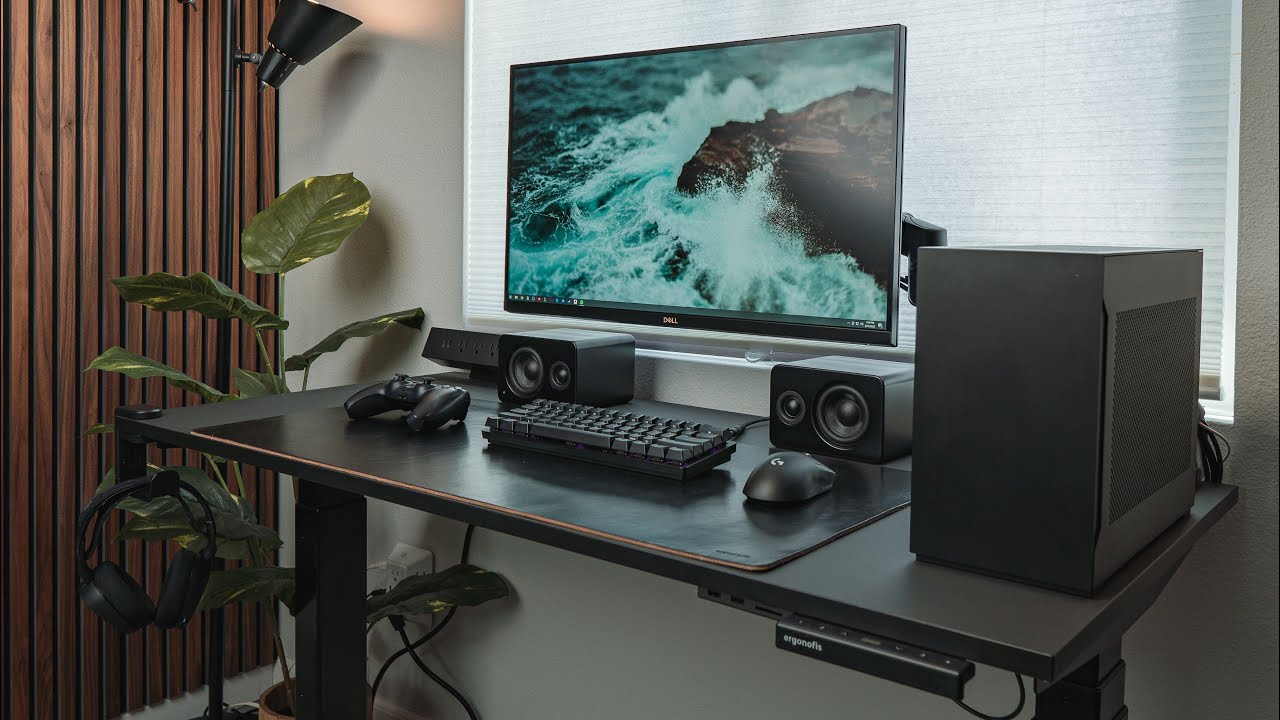
#desksetup #homeoffice #gamingsetup
The home office update is finally done! If you haven't seen the Revamped Home Office watch it here: https://youtu.be/vjeJZMOlm1s
After building a PC, I wanted to create a new gaming setup. Since, this space is primarily an office, selecting pieces that has a professional look is important. I decided to build...
just dont know how to do it since my room is too yellow and teenager-y
and my desk is just not that
 rapid sluice
calm mural
and my desk is just not that
rapid sluice
calm mural
and my desk is just not that
Mousepad and poster but just focus on the monitor
And be ok with not getting that aesthetic
calm mural
rapid sluice
And be ok with not getting that aesthetic
how come
rapid sluice
calm mural
how come
You’ll be primary staring at the monitor all the time
I overspent on aesthetic and lost a couple bucks so I just recommend pc performance over looks
But ofc it’s understandable if people disagree
west fable
Aesthetic builds makes no sense unless you have friends over or whatever
Alternatively, if you're a professional, and have clients over, a clean build would also leave a more professional opinion. Of course, you also need to have the rest of the house clean as well
 runic timber
How I learned
About aesthetics
I changed so quickly off of RGB when I swapped to arctic fans
And the reason? A bright stage light sitting on my left looking cool
Sorry on my right 💀
As little rgb as possible or try to be tasteful with it
I don't have any eye strain now that it's gone
west fable
To be fair, the person above wants an all black setup, which means probably no RGB
But still a bit of a waste of money unless you have people regularly showing up and would see it
Like, honestly even with friends, they wouldn't really care after the first few times
runic timber
I mean nothing wrong with a personal interest in it
I just personally disagree in spending for it
$10, $20, $50, fine
Not like some of the pcmr lists that turn up with $1400+ spent purely on lights and tiny cat gif screens
west fable
True
calm mural
west fable
Aesthetic builds makes no sense unless you have friends over or whatever
Altern...
yeah I usually have friends over often, by often I mean like 3 times a week, we usually hang in my room so I want my pc to be a bit more enjoyable to look at lol
 whole coyote
Hey anyone have a laptop recommendation for both school and gaming, I am studying Information Science with a concentration of Information Security, and I need a new laptop. Budget $500-700 but more of $500 and be able to upgrade storage and ram when needed.
west fable
whole coyote
Hey anyone have a laptop recommendation for both school and gaming, I am studyin...
idk about gaming for that budget lmao
unless you mean simple 2d games
500-700 would likely be an igpu laptop
whole coyote
Yeah just simple games like Roblox
whole coyote
west fable
i dont really think it would do roblox well? though it should be fine for school
idk if the value is worth
chrome dust
whole coyote
Found this https://www.bestbuy.com/site/hp-15-6-touch-screen-full-hd-laptop-inte...
don't get that
chrome dust
whole coyote
Found this https://www.bestbuy.com/site/hp-15-6-touch-screen-full-hd-laptop-inte...
double ping but this is much better
ram is lacking but upgrade it and you're balling
good on battery, decent gaming perf
old vapor
how are they even the same price lmao
battery you can also maximize if you make your own windows power plan
absolutely hilarious that the base m1 mac is more expensive than that laptop on sale
chrome dust
yeah
walmart kept this for like more than a week by now
they're getting rid of em i guess
roblox on igpu is a bad idea
it seems like a light game but it isn't
old vapor
if you literally just play the base game and nothing else sure
but then you're not even playing roblox lmao
I'm almost tempted to just get that laptop even though I don't need it lmao
chrome dust
ya
i meeean
flipping it is easy lmao
just add ram and wait for sale to end
profit
old vapor
not even in the US kekw
whole coyote
runic timber
That's probably not gonna even handle a lot of roblox at 1080p tbh
west fable
whole coyote
I ended up getting this https://www.bestbuy.com/site/dell-inspiron-14-2-in-1-tou...
oh that is..... pretty.... yeah..... hm......
old vapor
I'm betting the victus wasn't bought because it was from walmart
old vapor
whole coyote
I ended up getting this https://www.bestbuy.com/site/dell-inspiron-14-2-in-1-tou...
it's great for office and watching videos, which is half your requirements
its pretty awful at gaming
 pulsar jacinth
old vapor
An inspiron is not handling Roblox
pulsar jacinth
old vapor
An inspiron is not handling Roblox
Lol mine did
Although mine also died within 2 years basically
old vapor
Doing what modes though
And again, it's literally more expensive than a laptop with a dgpu
pulsar jacinth
Yeah it is
But portability and power is just hard to come by. Iris integrated is good enough
Wait is it even iris xe?
old vapor
its literally 0.8kg lighter than the victus tho?
Other than wanting something 0.8kg lighter, and the fold your laptop in half, there's no reason I can see for the inspiron lol
the victus meets portability and power aspect perfectly
but, not my purchase, just a strong suggestion
pulsar jacinth
yeah I dont actually see a need for the 2 in 1 other than for writing notes rather than typing
old vapor
Still well within return window
 hasty void
Hey any techies around to help me find a laptop for college/gaming got the specs I’m looking for
 small meadow
hasty void
Hey any techies around to help me find a laptop for college/gaming got the specs...
small meadow
hasty void
Hey any techies around to help me find a laptop for college/gaming got the specs...
Budget, country, needs?
hasty void
small meadow
Budget, country, needs?
Preferably something less than $900 US needing
• 0/S: Windows 10 or 11
• CPU: Intel Core i7 or better, or AMD
equivalent
• RAM: 16GB or better
• Graphics: NVIDIA GPU with at least 4GB
VRAM
• Storage: 512GB or larger SSD
oblique gazelle
This is on the cheap end, would need to add ram which is easy enough
https://www.walmart.com/ip/HP-Victus-15-6-inch-FHD-144Hz-Gaming-Laptop-AMD-Ryzen-5-8645HS-NVIDIA-GeForce-RTX-4050-8GB-DDR4-512GB-SSD-Mica-Silver-2024/5395277312
Very nice laptop on a great sale
hasty void
oblique gazelle
This is on the cheap end, would need to add ram which is easy enough
https://ww...
Sorry for the late reply but this setup meets the other requirements beside the ram correct? And I should be able to run most games at decent fps such as fivem, what ram would you suggest
kindred yacht
hasty void
Sorry for the late reply but this setup meets the other requirements beside the ...

Taking speed, capacity, and reliability even further, the cutting-edge technology of this DDR5 SODIMM module gives that next-level edge for your laptop's performance. With an aggressive 4800MHz frequency, it's to provide multi-core CPUs with extreme responsiveness and the power to multi-task seam...
small meadow
hasty void
Sorry for the late reply but this setup meets the other requirements beside the ...
Yes it would
oblique gazelle
Could also just add a second 8gb stick instead of going to 32, it's up to you
 warped yew
I really wish 6GB, 12GB, 24GB (so on) sticks were more mainstream
My nicest server has 48GB and it's been super nice running multiple Minecraft servers
warped yew
True
Even just 12 unless it's maybe for laptops (even then, if I were manufacturing laptops, that would be a budget option for me)
old vapor
lmao
kindred yacht
12GB modules are funky. idk if the sodimms have the same issue as 8GB udimms where you lose out on speed because only half the banks are occupied. (probably not now that I think about it)
I'd also be wary of the laptop bios and whether or not it supports the nonbinary memory
old vapor
If you break the laptop tho careful they won't RMA it
cause there was a slightly scuffed screw on the bottom-
chrome dust
lol
well asus thailand doesn't give a damn
a few years ago i rma'd an asus prebuilt i had that i scratched the mobo so badly
they gave me a new board
even gave me a new front panel cuz the technician broke it
old vapor
Ahhh it was just the seagulls that scratched the board
The hell is wrong with autocorrect lmao
chrome dust
i never got to rma my laptop
no time
mom is busy with all her work
i'll probably fix the fans myself when i have income lol
old vapor
Put noctuas in them
hasty void

ASUS eShop USA
READY FOR ANYTHING – Jump straight into the action with Windows 11, AMD Ryzen 9 7940HS processor, and NVIDIA GeForce RTX 4050 Laptop GPU at 140W Max TGP.
FAST MEMORY AND STORAGE – Multitask quickly with 16GB of DDR5-4800MHz memory and speed up loading times with 1TB of PCIe 4.0. Upgrading the storage is a breeze with the addition SSD slot.
...
thinking about getting good buy or steer clear
small meadow
hasty void
https://shop.asus.com/us/90nr0ea5-m000k0-asus-tuf-gaming-a17-2023.html
for 1k? thats grossly overpriced
should at least be getting a 4060 for that
west fable
4050 for 1k lmfao
 spare ibex
runic timber
spare ibex
runic timber
TUFs are often a decent buy.
Not...not this one...
hasty void
Anyone got suggestion for laptops under 1k
runic timber
@chrome dust
pulsar jacinth
hasty void
Anyone got suggestion for laptops under 1k
What purpose?
hasty void
pulsar jacinth
What purpose?
Wanting something to game on and do school looking last
pulsar jacinth
What games then? The heavier graphics the game, the heavier the laptop
hasty void
pulsar jacinth
What games then? The heavier graphics the game, the heavier the laptop
Um honestly fivem and redm is a the big ones
pulsar jacinth
Oof
Yeah I'm not the best for this, but we talked about this earlier in this chat
chrome dust
@hasty void what's your region?
oh nvm usa
i can find lappy for ye
i'd probably get this right outta the bat
4060 laptops aren't really cheap rn
but you can indeed hit just a tad under 1k
and still get a 4060
hasty void
chrome dust
i'd probably get this right outta the bat
I heard hps are cheaply built
chrome dust
that's not true for the omen
or hell, even the victus is ok
omen is a big step up
hp was notorious for bad build quality, but that's been improved upon
chrome dust
tuf is a good laptop but it's overpriced
calm mural
I need some good speakers but here’s my situation: Can’t drill holes into walls so I can’t have surround sound, and i want something I can just stick behind my monitor, so visible but still a clean look, any good brands?
I like subwoofer
west fable
calm mural
I need some good speakers but here’s my situation: Can’t drill holes into walls ...
nothing is good if you stick it behind your monitors
calm mural
west fable
nothing is good if you stick it behind your monitors
well i meant those speakers that are super long kinda like the ones yamaha has
west fable
no speakers are good behind the monitor
only speakers that go under your monitors and arent blocked by your monitor is fine
or if you have speaker stands that put the speakers above your monitors
or if you put your speakers next to your monitor
calm mural
these?
 west fable
hmm
small meadow
calm mural
I need some good speakers but here’s my situation: Can’t drill holes into walls ...
You can have behind monitor depth wise but you cant hide the thing behind the monitor or it'll dampen sound
west fable

RTINGS.com
The Samsung HW-S60B is a 5.0 standalone model released in 2022 as the next generation of the Samsung HW-S60A. It's the smallest and most compact soundbar in the ...
small meadow
Think you mean studio monitors
calm mural
small meadow
You can have behind monitor depth wise but you cant hide the thing behind the mo...
that’s what i meant
calm mural
west fable
https://www.rtings.com/soundbar/reviews/samsung/hw-s60b-s61b maybe this
$290 is too much
west fable
calm mural
$290 is too much
Huh
290 usd? It's 290 cad here so I would have expected it to be more like 200 usd lmao
calm mural
it’s usd yea
west fable
Interesting
west fable
calm mural
it’s usd yea
https://www.rtings.com/soundbar/reviews/hisense/hs2100 see how much this costs then

RTINGS.com
The Hisense HS2100 is a wallet-friendly 2.1 soundbar. It's similar in appearance to other Hisense soundbars, like the Hisense HS214, but comes with a wireless su...
Though, if you want to listen to music, I personally would prefer studio monitors over a soundbar
calm mural
west fable
Though, if you want to listen to music, I personally would prefer studio monitor...
yeah i do a lot so
id listen to you and get some studio monitors
how much are they?
west fable

Edifier MR4 Powered Studio Monitor Speakers, 4" Active Near-Field Monitor Speaker - White (Pair)
Around the same price
small meadow
this might be of best use to you, decide what you like etc https://www.musicradar.com/news/best-budget-studio-monitors

MusicRadar
The best cheap studio monitors for home recording, with hand-picked and affordable options from IK Multimedia, M-Audio, JBL, PreSonus and more
west fable
^
kindred yacht
You can set the studio speakers on their sides or build a stand that attaches to your desk and goes above the monitors, so they take up less room. That's a FAR better option than any sound bar.
 vast flint

Engadget
Apple has reportedly assigned hundreds of employees wo work on a tabletop device that combines a rotating, iPad-like display with a robotic arm.
 west fable
vast flint
https://www.engadget.com/home/apple-is-reportedly-forging-ahead-with-a-rotating-...
west fable
vast flint
https://www.engadget.com/home/apple-is-reportedly-forging-ahead-with-a-rotating-...
I bet they are making this to be like the insta360 camera
vast flint
Table-top though?
night lotus
@chrome dust can you find what laptop this is with this info
 west fable
night lotus
<@214044000556941312> can you find what laptop this is with this info
west fable
night lotus
<@214044000556941312> can you find what laptop this is with this info
Google lens says dell Inspiron
west fable
night lotus
<@214044000556941312> can you find what laptop this is with this info
Idk if the link will expire
(Inspiron 5759)
pliant adder
Which Avhzy tester model is recommended for the most features and port types? C3, CT3 or CT3A?
I don't need the 'L' models that iirc are just to test higher power loads without connecting another device on one end
pliant adder
I just took apart this surface pro 4 that doesn't turn on. There is no power draw and no heat from any component. Zero signs of life
 green stream
Death
pliant adder
I also think its dead somewhere
Light on the charger turns on but still no power draw. I'll check some stuff with multimeter
cinder anvil
guys hear me out
what if i bought a big pc case
and put a motherboard inside like normal but also put an xbox one inside
with the proper cable management and a monitor that has multiple input options, could i switch between the two with a click of a button on the monitor?
oh and id need a way to turn on the xbox
but im sure its possible
oh and cooling
west fable
cinder anvil
and put a motherboard inside like normal but also put an xbox one inside
originpc has done this multiple times
cinder anvil
that would be tough
west fable
they have made a pc, nintendo switch, ps5, and xbox in one single case
cinder anvil
thats wild
west fable

THE ULTIMATE GAMING JUGGERNAUT ORIGIN PC BIG O V3 featuring PS5, Xbox Series X, Nintendo Switch and an RTX 3090 gaming PC in ONE UNIT. Thanks to Secretlab for Sponsoring this video.Check out the Secretlab TITAN Evo 2022, designed for pro-grade ergonomic support and all-day comfort: https://secretlab.co/unboxtherapy-titanevo
Learn more about OR...

The Origin Big O is back and this is one you can actually buy. What'll it be with your gaming PC... PlayStation or Xbox?
Link - http://bit.ly/2FfLP50
FOLLOW ME IN THESE PLACES FOR UPDATES
Twitter - http://twitter.com/unboxtherapy
Facebook - http://facebook.com/unboxtherapy
Instagram - http://instagram.com/unboxtherapy

The Origin Big O 2019. A combo of PS4, Xbox One, Nintendo Switch and RTX Titan Gaming PC in one box.
Origin PC - https://www.originpc.com/big-o/
LG UltraGear 38GL950G - http://bit.ly/2Lf9Qy4
LG UltraGear IPS 1ms 27GL850 - http://bit.ly/2JJTgnX
FOLLOW ME IN THESE PLACES FOR UPDATES
Twitter - http://twitter.com/unboxtherapy
Facebook - http://face...
v2 was for sale for a while
v1 and v3 are not though
cinder anvil
how many people bought one?
west fable
i have no clue
probably not that many since it's pretty gimmicky
and probably very expensive considering that it's custom work, and it's from origin, and that it's a pc and a console combined
oh the big o v3 didnt just have a pc, switch, ps5, and xbox series x
it was a dual pc setup in the same case
 cinder anvil
oh damn
 paper bison
I have two questions; whats a reasonable price to sell a 2020 13 inch macbook pro with an i5 intel chip in it?
and whats the average price for a laptop that can run like...street fighter 6 and other fighting games? looking to pick one up to replace as a laptop for schoolwork and actually be able to play a few games
storage doesnt need to be crazy, like 1tb is good
just long battery life and able to run like games with a medium amount of performance needed
and honestly, preferably not like super gamery and stuff. the most gamery id want is like...some of razers stuff where its just one logo
west fable
Intel MacBooks imo aren't worth much
pliant adder
What parts do I need to program/rewrite a soldered bios chip?
I feel like I could save some money by getting just the essential parts

And just to know, is it always possible to restore a bios chip without physically removing it?
kindred yacht
The CH341A should come with everything you need. It's always possible, yes. You just need to know the pinout.
pliant adder
kindred yacht
The CH341A should come with everything you need. It's always possible, yes. You ...
Could you explain me what each part does in the picture?
There are some parts I don't understand what they're used for
kindred yacht
pliant adder
There are some parts I don't understand what they're used for
You likely won't need all of the parts for BIOS chips, just the programmer, SOIC8 clip, and 1.8V adapter if it's for AMD.
https://winraid.level1techs.com/t/guide-how-to-use-a-ch341a-spi-programmer-flasher-with-pictures/33041

Win-Raid Forum
If you’re worried about flashing your motherboard with an SPI Programmer, then this is the guide for you. Each step is explained in detail, with pictures. We’ll go over everything, from buying your Programmer to flashing your chip with Flashrom. As per usual, this is a tutorial on the internet. Do anything you see here at your own risk. I am no...
pliant adder
So basically the usb thingy and the little pins to attach the cable with clip?
- Is it for those older socketed square chips?
- To solder different chips on the little pcb?
- ?
- Same as 2.?
- ¿

I should probably get this complete kit so I won't regret having to buy additional pieces separately at higher prices in the future
pliant adder
kindred yacht
You likely won't need all of the parts for BIOS chips, just the programmer, SOIC...
You mean an adapter is needed (the turquoise one) to work with amd boards chip?
kindred yacht
Yes
3 is an adapter for the motherboard USB header, in case you don't have any ports open or you have a weird case.
calm mural
oculus quest 2 battery is probably dying out. Not sure, i’m gonna see if i can fix my issue with a new charger, but for now could anyone help me plan ahead just in case it is the quest 2 battery?
How would I replace it? Can I even?
https://a.co/d/9SbKnM3 also would there be any issues with this charger

【Perfectly Compatible】Link cable for Oculus 3/ Pro /2 Connects to your PC to play all Oculus Rift apps and steams VR games. With the solid build quality and the same function, It is a great alternative to the official Link cable
sturdy jolt
calm mural
oculus quest 2 battery is *probably* dying out. Not sure, i’m gonna see if i can...
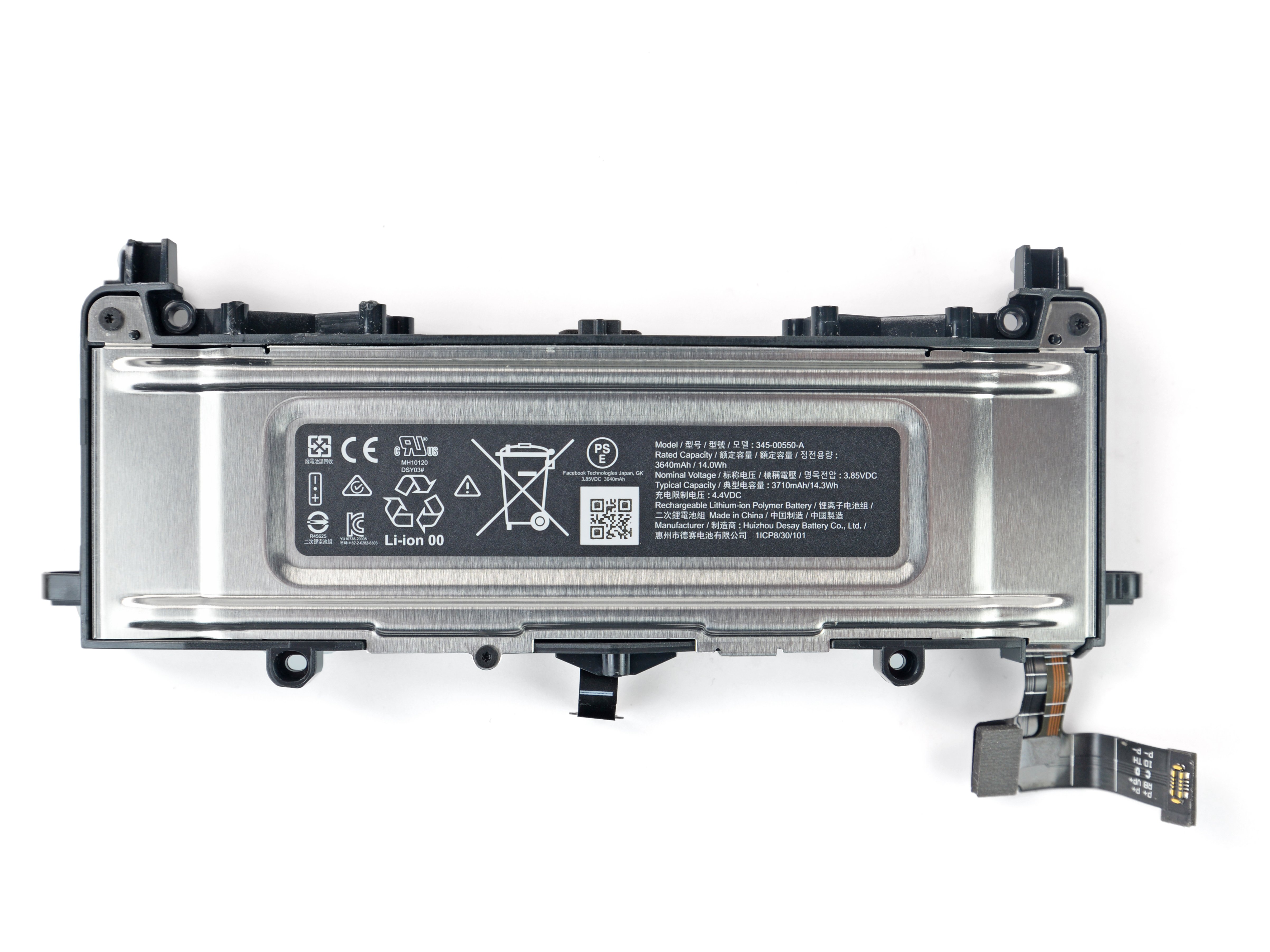
iFixit
This guide shows how to remove and replace a worn out battery in your Meta Quest 2 headset. The battery is positioned above the screen and lens...
Would be very tedious
calm mural
sturdy jolt
Would be very tedious
why so?
kindred yacht
You need to take apart most of it to get to the battery
calm mural
my gosh
i’m sure i could do it but at that point i would just buy a new oculus headset refurbished 
where could i buy the battery itself?
and is there a way i can prevent this in the future
i may or may not be on my headset like 24/7
sturdy jolt
I don't think you can buy it straight from meta so probably just resellers and knockoffs on Amazon
calm mural
that’s annoying
west fable
calm mural
and is there a way i can prevent this in the future
nope
battery degredation is normal
average lifespan of a battery under regular use i'd say is like 3-4 years at most before the capacity is so low that it gets quite annoying
well, at least for a phone
calm mural
i mean i’ve had this headset for that long
i think it’s just that exact
what would i have to do if the charger port got messed up too?
west fable
calm mural
what would i have to do if the charger port got messed up too?
if you need to replace the charger port, you might as well change the battery as well because you pretty much have to take out the battery to reach the charger port
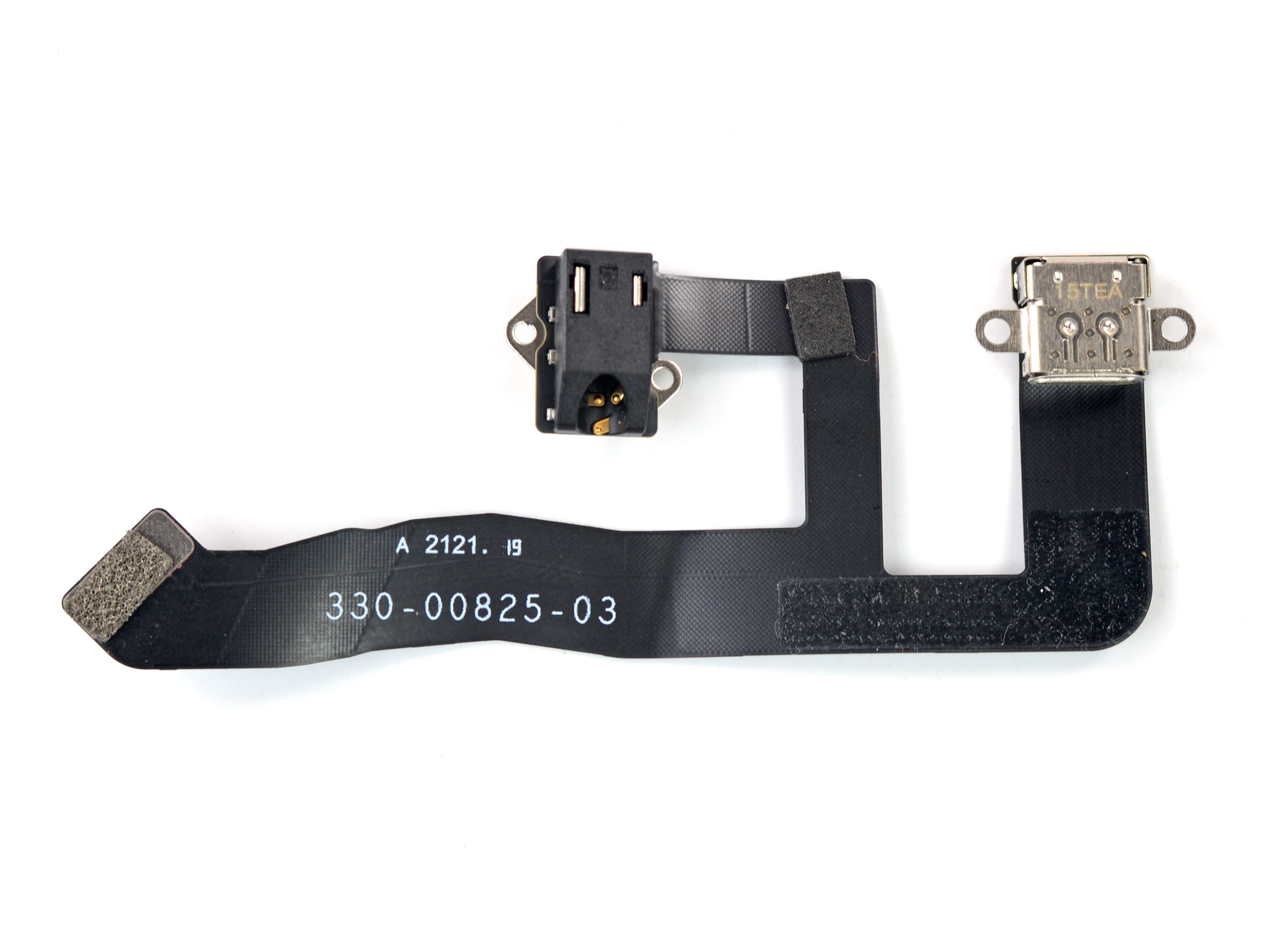
iFixit
This guide shows how to remove and replace the USB‑C port and headphone jack for your Meta Quest 2. The procedure requires extensive disassembly of...
it takes 64 steps to take out the old port
another 64 steps to reassemble
you're looking at 128 steps total to fix the charger port
calm mural
oh neat
west fable
but luckily it would be only like 5 more steps to also replace the battery if you do end up doing it
 foggy stratus
can someone help me with fixing fornite frame rats
i keep getting 30 fps max
or when its seemingly not capped its jumping up and down
runic timber
foggy stratus
i keep getting 30 fps max
If you're on radeon turn off performance mode and swap to dx12 pro

► (Screwdriver) Get 37% OFF on Fanttik E1 NEX Workstation:
► https://www.amazon.com/dp/B0CSJZFNY9?maas=maas_adg_5A707068EC1A3DB6DC85E3031D7D2B56_afap_abs&ref_=aa_maas&tag=maas
► (Apply the Coupon + Use code WORKSTATION)
► Buy my PC builds: https://zttbuilds.com
► Let me help you build a PC: https://zachstechturf.com/consulting
Today, we settl...
Common problem with radeon on fortnite is performance mode running nasty fps
DX12 pro is inherently better for radeon
foggy stratus
wack as hell
runic timber
foggy stratus
wack as hell
Had this problem with it from a few people for months and zach gave me the answers I needed to find the root of the cause
The game itself has a problem lol
If this is what you're experiencing
foggy stratus
runic timber
If you're on radeon turn off performance mode and swap to dx12 pro
preformance mode in fortnite or the control panel?
runic timber
In fortnite
If you're on ryzen 9 x3d switching to balanced in control panel is also recommended
foggy stratus
small problem
runic timber
Ok
foggy stratus
im on ryzen 5700 x3d
but it was already on directx 12
i changed it off
but switching didn thelp
foggy stratus
explain in non it terms
 half capeBOT
DDU (Display Driver Uninstaller) Guide by Pato
https://github.com/NeweggTechie/Graphics-cards/wiki/How-to-use-DDU

GitHub
Contribute to NeweggTechie/Graphics-cards development by creating an account on GitHub.
foggy stratus
i thought that installing the LATEST DRVIERS
WOULD HELP
BUT NOOO
i hate computers more and more
runic timber
That's a default suggestion of tech advice from all support desks
It can often make it worse
foggy stratus
welp switching back kinda helped to dx12
its not spiking
but its still stuck on 30 fps
runic timber
Is it just fortnite
runic timber
Is fine
foggy stratus
i only basically play that
or occasional tf3
2*
but whats the point of having a pc to play at switch fps 😭
runic timber
Well I am wondering if maybe you should watch the vid I linked
Make sure you run ideal settings
foggy stratus
that i should
runic timber
Something might be artificially limited in game
foggy stratus
ya
runic timber
Ok it may not really need ddu then
Ddu is good to do every few months
But it mightn't be the source cause if everything else is fine
I would encourage it still, just as a routine to rule out gpu definitively
foggy stratus
kk
runic timber
I'm thinking it's the game having some setting that's forcing potato fps
Or it may need a reinstall
If we can isolate it to the specific game and nothing else, the game is the problem child so I would look into that
Zach's vid above is very detailed so I would have a watch, come back tomorrow if you find the suggestions aren't working
foggy stratus
aighty
runic timber

foggy stratus
ty
runic timber
Np
 heavy vector
Any computer headset that’s usb? Something not super expensive.
warped yew
ew USB headsets
pulsar jacinth
usb C headsets tho...
pulsar jacinth
heavy vector
Any computer headset that’s usb? Something not super expensive.
check out Jabra, that one steelseries one
heavy vector
I like usb, and I hate wireless
pulsar jacinth
oh THAT
heavy vector
I appreciate the recommendation
pulsar jacinth
honestly just get an adapter, its cheaper
heavy vector
I just need a new headset the right side completely stopped working
sturdy jolt
heavy vector
Any computer headset that’s usb? Something not super expensive.
what's your budget? any reason for no dac/amp?
pulsar jacinth
this is always reliable
https://a.co/d/cB30pQz

Experience clear internet calls a with simple plug-and-play USB connection and a noise-canceling mic. Rigid left-sided mic boom is moveable and can be tucked out of the way when you're not using it. In-line controls let you control volume or mute without interrupting calls. Laser-tuned drivers de...
this is seems decent
https://a.co/d/9EMUd40

JBL Quantum 100 over-ear gaming headset. The JBL Quantum range delivers a sound experience that transforms each headset into a crown for the everyday champion. The JBl Quantum 100 comes with the JBL Quantum Sound signature which gives player the advantage of easily pinpointing incoming fire, hear...
unfortunately Jabra is quite expensive now that I think of it
pulsar jacinth
heavy vector
I just need a new headset the right side completely stopped working
avoid the chinese brands tho, they break down super fast
west fable
pulsar jacinth
avoid the chinese brands tho, they break down super fast
Yes and no
Definitely alot of cheap ewaste from Chinese companies, but also alot of killer value stuff as well that are arguably built better than Logitech's stuff
Not a very high bar
pulsar jacinth
west fable
Not a very high bar
True
I guess I mean cheap Chinese stuff in Amazon that's unbranded or something
I've had 2 headsets break on me so far
west fable
Yeah there are some generic designs that are designed well, but sold by like 50 different brands that slap their own logo onto them
Some better than others
west fable
heavy vector
Any computer headset that’s usb? Something not super expensive.
Any specific reason why you only want usb headsets? Like what Mr1111 asked, any reason why you don't want to just get a separate DAC/amp and a regular headphone/headset with the 3.5mm or such connector?
heavy vector
sturdy jolt
what's your budget? any reason for no dac/amp?
Anything that’s less than 100 I don’t think a headset should be expensive
sturdy jolt
prob just get a cloud iii, <100 won't get you much better
west fable
Unless you go for iems
 vocal summit
pc37x>>>>
west fable
hd6xx>>>>
green stream
109 pro>>>>
warped yew
X2HR>>>>
warped yew
@west fable Do you have open backs? How do you stop from having people hear themselves when in a call while using them? Can't figure that out and I can't use either of my open backs because of this issue lol
west fable
damn how loud do you have your audio 💀
warped yew
I might just have a sensitive mic lol (realizing this after trying two other mics and I had to keep both right next to my mouth)
west fable
also it definitely helps if you have a mic close to your mouth so it's not picking up as much background noise
i use a sm57 a few inches away from my mouth, so my headphones dont really leak enough sound to get picked up
plus i do leave noise cancellation on because of my loud ass keyboard lmao
warped yew
Man maybe I have my mic setup wrong
I have it basically behind and above my monitor lol. For others hearing me it's about good enough
can't stand it being right in my face though tbh
west fable
well, there's 2 methods of doing it; a mic with the gain up, and the mic further away from you, so if you're on camera, you dont see the mic, or you can have the mic near your mouth and it wont pick up much background noise
if you keep the mic further away, and have the gain set higher, then you would probably be better off using iems or some closed backs
warped yew
I see that. Like that would be with a higher gain and everything else would be picked up (this is also why I use SteelSeries Sonar lol. I like their AI noise cancellation. I know it's an artificial filter but it's surprisingly good and gets what I need done lol)
west fable
yeah
also higher gain would additionally mean any reverb in the room will get picked up, which is why pretty much every youtuber and streamer has acoustic treatment in their stream rooms
a huge pile of plushies would also help with the room acoustics
warped yew
lol talking about this makes me want to upgrade my mic arm
it's that cheap garbage one with the springs that comes with every "streamer mic" on Amazon
west fable
lmao
i have it as well
i can agree that it's garbage
though shelling out for a good one isnt really worth it for me
💀
like, i'd love a rode psa1+ but i dont want to spend $100 on an arm
 west fable
it might be a little bit more intrusive, but having the mic arm on your side of the table allows for some better adjustment
warped yew
I have a 3D printed solution to mount it above my monitor but if I pulled it down to my face it would get right in the way of my screen lol
west fable
yeah for pc use, having the mic under your head is better than above (at least for setups meant to be placed near your mouth)
mainly recording studios have the mic mounted high for vocal recordings, because your vocal cords work better or smth when you're looking slightly up

 west fable
you could try having the mic be facing horizontally
warped yew
True but still the arm
The cable tray below my desk doesn't help either
It blocks the twist handle (don't know what it's called lol). Basically I can't the clamp very well at all
"Then how did you get mounted monitors?" A specific type of clamp lol
west fable
try mounting it here and adjusting the mic to see if you can figure out a way to move it so it's close enough to your mouth but isnt blocking you too much
 west fable
most people have desks that are able to have a mic mounted on the side 💀
i mean, you could get one of those arms that you can mount in the middle of the table
warped yew
Actually I wonder if I could 3D print a solution that turns the clamp to a right-angle. So instead of on the top part of the desk it could sit at the side leg
Man I hate this desk lmao
west fable
though that looks like an ikea cardboard special so it probably wouldnt be able to hold well
lmao
warped yew
IT's NOt CARDboArD it'S ParTicAl WooD
west fable
lmfao
well, one other thing you could do (which isnt a solution that is free) is to get a mic arm with longer reach lmfao
warped yew
Anyways I was thinking this but actually 3D print a solution so that the whole is upright and the mic arm could mount properly. The clamp would still be sideways like that
 warped yew
west fable
well, one other thing you could do (which isnt a solution that is free) is to ge...
warped yew
west fable
well, one other thing you could do (which isnt a solution that is free) is to ge...
Nah that’s too easy. I’m a 3D printer. I engineer stuff that breaks eventually
(Jk I have PETG filament otw)
west fable
damn he became a 3d printer
warped yew
I AM the 3D printer
west fable
https://www.amazon.com/dp/B0C45H4WG9 huh this doesnt look too bad honestly

The Low Profile Mic Boom Arm is an essential accessory for aspiring streamers, gamers, and podcasters. Specifically designed for recording, this mic stand recording offers a big convenience, flexibility, and stable metal quality. Mic boom arm for gaming's adjustable design allows you to position ...
should probably be low profile enough to go under the monitors
4.1" tall for the bottom part of the arm
warped yew
Here I explained my issue better lol
west fable
https://www.amazon.com/dp/B0CYLSDQ9H even more budget, though does look visibly lower quality than the fifine lmfao

InnoGear Low Profile Mic Arm, 360° Rotatable Microphone Boom Arm Mic Stand for Fifine AM8 K669B Blue Yeti HyperX QuadCast SoloCast AT2020, Desk Mount with Mic Clip 3/8" to 5/8", 3/8" to 1/4" Adapter
aeugh i forgot that i had music playing in exclusive mode again
LMFAO that monitor arm mount
west fable
though to be fair, for the price you pay for "streamer mics"
warped yew
I mean I can engineer it a bit more so that it doesn't flex but I need my PETG to arrive (the one I printed is just PLA)
west fable
i honestly couldnt expect anything good quality LMFAO
warped yew
I basically need the clamp to screw in from the top rather than the bottom because my cable tray gets in the way
That's how my monitor mounts work
west fable
i mean, if you get a drill bit for metal
you could probably mod that to do that
actually, i have the same mount, lemme do some measurements to see if there's even enough material to do so without it just breaking the mount
since im pretty sure it's just made of aluminum
warped yew
I wanna see how this PETG performs. I have a couple of printed IKEA Skadis copies and they're clamped to another piece of furniture with PLA and they feal somewhat sturdy
I'm an engineer lol (not really but you know)
Like even if it's something like this. Maybe?
https://www.amazon.com/LILANZo-Microphone-Desktop-Overhead-Thickness/dp/B0CPBWGBTG/ref=sr_1_70

lilanzo table clamp mount for microphone stand, 2-in-1 mic boom arm clamp table c clip for desktop overhead camera tripod mic stand lamp base, fits up to 2.56 inch 6.5cm desktop thickness, 1 pcs
warped yew
warped yew
Like even if it's something like this. Maybe?
https://www.amazon.com/LILANZo-Mic...
I mean
 west fable
about 13mm ID on the mount
arm has an OD of under 12mm
clamp underside ID 7.5mm, thickness to od is 4.4mm, so if you nade a 12mm hole.... you would have around 2mm of material left to keep the arm steady..... yeah that might be cutting it close lmao
warped yew
I mean I already have the measurements lol
I have my two 3D printed "solutions" lolll
I guess it's not that bad lol
(really the solution is to get a new desk)
warped yew
Best filament I could print a desk in is ABS
Would probably kill me before I finish it lol
west fable
💀
 warped yew
Here I explained my issue better lol
warped yew
warped yew
Here I explained my issue better lol
@west fable yo or I can just the 3D printed corner mount have a clamp or two so that it doesn't have to flex as much
Final product would be with PETG so it would be sturdier than the brittle PLA that I'm using lolll
yo that could be an actual solution
west fable
true
warped yew
Yeah and then I can still pull the mic closer to me like that
And probably still get a better arm later because I want something nicer than this junk lol
warped yew
I'd probably still put it in the corner mount if it's sturdy enough though
west fable
depending on the arm, might not be compatible
plastic might also not be strong enough for the twisting force
though if you do end up getting a low profile monitor arm, that should be fine with the included mount
warped yew
True but some plastics are stronger than others
Plus when 3D printing, there's different types of infills, how filled you can fill the item you're printing, whatever other type of engineering
If all else fails, I'll just print it out of some ABS that I have while I'm at work so I don't choke on it (ABS is toxic when melted and smells super bad)
If that fails? I move in with my gf lol. I want a new desk but it's hard to justify when my main goal atm is to find a job in her city and move in with here. ATP it's best for me to buy a new desk
Because otherwise I'm spending money on two desks (a new one for at home and one for where she lives lol)
old vapor
Use tape
old vapor
Transparent tape
warped yew
Nah still ugly. Plus my PETG just came in
pulsar jacinth
how often should a person clean a laptop?
my laptop just had a horrific lag spike due to heat, despite being completely exposed to air
i think the fans arent as capable anymore
kindred yacht
Depends on how dirty the environment is. I'd say anywhere from every few weeks to every couple of months.
pliant adder
i just got a CH341A chip programmer, and i have two motherboards to repair, one is an asrock h110m itx, since i'm new to this programmer and bios chip repairs i dont know if this is a 24xx type chip or 25xx. how do i figure that out? i got the sticker off the bios chip but it left all the glue making it impossible to read the part number (glue doesn't come off easily).
What software do you recommend for the programmer? i already got the one to convert the manufaceurer bios file to binary or whatever that is

 runic timber
Hm
@wraith steppe while you're here^

In the meantime this looks really detailed @pliant adder
https://winraid.level1techs.com/t/guide-how-to-use-a-ch341a-spi-programmer-flasher-with-pictures/33041
Win-Raid Forum
If you’re worried about flashing your motherboard with an SPI Programmer, then this is the guide for you. Each step is explained in detail, with pictures. We’ll go over everything, from buying your Programmer to flashing your chip with Flashrom. As per usual, this is a tutorial on the internet. Do anything you see here at your own risk. I am no...
 wraith steppe
What about it
runic timber
Ah, just if you know a good tutorial maybe
Or a direct answer to his query
Answers optional, lol
wraith steppe
Should be easy from Google, ch341a are very common
If you're buying one, get a tl866 imo
runic timber
Ya I'm having a poke around rn
pliant adder
runic timber
In the meantime this looks really detailed <@792442716775514172>
https://winrai...
i'm currently on windows and dont have any linux devices
runic timber
@pliant adder complicated, but is this what you want?

If I had to wager a guess it's a 25xx chip but I could be wrong
wraith steppe
Bios is often sop8
 wraith steppe
Lol, I mean ofc it's the same pin out, but thruhole
runic timber
Hey man idk 
I'm trying
I'm not an electrical engineer
25xx seems to designate chips that run to a product code with 25 in the name as far as I can tell
So won't say 2 alphanumeric after 25
Rather can say any number of things
E.g Winbond 25Q32FVSVQ
Or Macronix MX25L6573E
This might help, pinout for ch341a
Different chip tho

If I'm right they both go in the 25xx slot @pliant adder
Pinouts look the same
Yep I just found the answer
@pliant adder it's 25xx
99% confident as I just found a guide using a Macronix chip and they identified the slot needed was 25xx since the product code has 25 in the name

 runic timber
<@792442716775514172> complicated, but is this what you want?
runic timber
runic timber
<@792442716775514172> complicated, but is this what you want?
So line it up like above here and it should work as far as WSON layout goes
Since it would have a 1 pin indicator if it was SOP
I'm like 99% confident here lol
wraith steppe
Sop is the package lol
Also make sure you have the voltage jumper on the flasher set correctly
runic timber
Ya but there's no identifier apart from the divot
It would have a hole for a pin if it was otherwise
runic timber
Ye
wraith steppe
If unsure, just probe gnd and 5v
runic timber
That's a good idea yeah
So the divot should face away from the usb end of the ch341a
should
And then go in the 25xx end of the 16 slots
After that, Bob's your uncle, I've never found myself needing a ch341a so I think google should have a good tutorial if you want windows
PART 1 CH341A details This guide is based on the w
Maybe?
Pretty old but might still work lol
The program looks like win xp lmao
Or maybe that's windows 8? Lol
Anyway I'm going back to music

pliant adder
Ok, thanks for all the info but i cant get asProgrammer to work, it doesnt detect the CH341. I installed drivers. On the pcb it says CH341 and i used CH341A drivers but afaik they will work the same...
But no success
runic timber
pliant adder
Ok, thanks for all the info but i cant get asProgrammer to work, it doesnt detec...
Got a power indicator?
pliant adder
Yes
runic timber
Or maybe windows notices the device being inserted
pliant adder
pliant adder
Device manager detects it
It's detected as CH341A
pliant adder
I did
Tried many software versions and completely different ones but none detects the device
Drivers too
 pliant adder
- Something