#overclocking
1 messages · Page 109 of 1
 modern walrus
it's hard to imagine that's the bottleneck tho
oh ya NVMe wouldn't bottleneck
have you tried running the XMP numbers but tuning the secondaries?
ya
I mean damn if they're passing TM5 they should be just fine
it might also be if your RAM is 16-19-19 that the ICs aren't good for higher voltage
I'd guess that's hynix CJR or AJR
& if it's CJR, 1.45 is the max voltage before you risk degrading the memory
the little chips on the memory
basically there are three main companies that make DDR4 chips: Hynix, Micron, & Samsung
each of the three has different ICs (integrated controllers) they make
without getting too much into the weeds, every IC has different voltage tolerances & other characteristics
for instance, Samsung has Bdie & Cdie (many others too but for simplicity)
bdie you can absolutely pummel with voltage up to like 1.8-2.2v & if you cool it, it can take it. Cdie on the other hand, over 1.35v can get degraded
to make things even more complicated, the manufacturers rarely tell you which ICs they're using. The only surefire way to know is to remove the heatspreder & see what's printed on the ICs. Otherwise programs like thaiphoon burner will try to tell you but aren't always right
so what makes RAM overclocking especially annoying if not outright ridiculous is when you're buying RAM 3200c14-14-14-34 will be really expensive & 3600c16-18-18-42 will be inexpensive.
& it'll seem silly to spend like double for 3200c14 but later you realize that's bdie & 3200c14 can run 4000c14 if you give it enough voltage
but 3600c16-18-18-42 is like CJR or something that you're pretty much stuck at or close to XMP cuz it can't handle the voltage it would take to make it run faster
 digital dirge
Upgrade to ddr5 when?
modern walrus
I might in the next week or so
gotta see tho
ya I don't think an XMP of c16-19-19-39 is bdie
the 4000mhz bdie I have is 4000c17-18-18-38
32gb of bdie is expensive
like $200+
damn ya cuz it's 4000mhz
32gb in general is usually up there
 sterile flame
@sudden torrent Welp
modern walrus
usually any bdie that's like 3600mhz + is pretty high up there price wise
sterile flame

looks like I got my repadding and pasting together on my gpu
now
I wonder how I can increase my control over this cpu
bc I swear
it does what ever it wants
modern walrus
sterile flame
damn you got my 3080ti beat lol https://www.3dmark.com/spy/24813386

3DMark.com
AMD Ryzen 9 5900X, NVIDIA GeForce RTX 3080 Ti x 1, 32768 MB, 64-bit Windows 10}
ya DDR4 should keep going down
sterile flame
modern walrus
damn you got my 3080ti beat lol https://www.3dmark.com/spy/24813386
that's really good for a 3080Ti ngl
I've seen 3090's with that score
I disagree
Nvidia is better for workstations
AMD gaming
Why bc it's cheap
modern walrus
this is the DDR4 kit I really want. XMP is 4800c17-19-19-39 (the "godbin" bdie lol) https://www.newegg.com/g-skill-16gb-288-pin-ddr4-sdram/p/N82E16820374183?Description=4800 c17&cm_re=4800_c17-_-20-374-183-_-Product&quicklink=true
sterile flame
And you get more performance
modern walrus
too bad it only comes in royals
modern walrus
ya I don't think most CPUs can even run that XMP
modern walrus
only igpu AMDs could synced & probably only 11th & 12th gen intel can
sterile flame
Yeah your opinion is invalid if it's based on feel
Unless you can beat me in a benchmark don't talk to me about performance
Anyways
 dull ginkgo
what
dull ginkgo
modern walrus
this is the DDR4 kit I really want. XMP is 4800c17-19-19-39 (the "godbin" bdie l...
hey, what about the crazy ballistix max 5100c19 kit lol
Rev b is not b die but still great
digital dirge
I'm still salty that my ram turned out to be rev e and not rev b
dull ginkgo
why?
digital dirge
Rev b is better for my kit?
sterile flame
@sudden torrent I plan on deshrouding my 6900xt and throwing 2 T30's on my heatsink. I'm pretty sure the GPU won't show anything on the display if I don't have a fan connected to the GPU fan header but Hay mentioned that it might stress out the header. Any idea what he means?
sterile flame
digital dirge
Rev b is better for my kit?
Both are on par according to testmemhelper
modern walrus
dull ginkgo
hey, what about the crazy ballistix max 5100c19 kit lol
that thing is like $800 lmao
I think Kingston makes 5333 kit
sterile flame
wait
dull ginkgo
digital dirge
Rev b is better for my kit?
if it's between 2 sticks of dr 8gbit rev e versus 2 sticks of sr 16gbit rev b you'd prob get more perf out of the rev e
sterile flame
@digital dirge do you have the 16gb kit or 32?
dull ginkgo
huh, what die?
modern walrus
 digital dirge
I have the 32gb kit
modern walrus
DJR I think

HyperX Predator HX453C20PB3K2/16 Memory Module 5333MHz DDR4 CL20 DIMM XMP 16GB Kit (2x8GB) Black
dull ginkgo
It's going to be like 1.6v and take ln2 to run xD
freq on djr does scale with voltage
sterile flame
digital dirge
I have the 32gb kit
they should be on par with each other
single rank is also faster than dual rank
digital dirge
I have dual rank
digital dirge
Idk. Pato said rev b is preferred for 32gb kit
Rev e for 16gb kit
And... not really complaining lol
sterile flame
I'm assuming it's probably bc rev b 16gb DIMMs are single rank
single rank is faster than dual rank
but dual rank also has it's benefits
i forgot what they were but they were there
 potent fiber
Single rank can oc easier/more, if same speeds & timing dual rank is more performance. Rev E is often dual rank, Rev B was often single rank but there are some dual rank kits of it. 
sterile flame
dual rank rev B is an F moment
dull ginkgo
2 dual rank sticks perform better in general than 2 single rank sticks
dull ginkgo
sterile flame
dual rank rev B is an F moment
that sounds like a 64gb stick momento or something like that
dull ginkgo
what
dull ginkgo
oh yea 8gbit rev b
dull ginkgo
for some reason I thought you meant a 8gb stick with dual rank rev b
sterile flame
do you have any tips on maxing out the boost clock on an alder lake locked cpu?
sterile flame
dull ginkgo
for some reason I thought you meant a 8gb stick with dual rank rev b
lol
dull ginkgo
I assume people have already told you to get a board with clockgen
sterile flame
that would be overclocking the chip lol
dull ginkgo
throttlestop can be useful
dull ginkgo
ye board with clockgen lets you up bclk
sterile flame
I just want to force it to use that 4.9GHz boost clock
bc atm
it just uses it whenever it wants
with PLENTY of thermal headroom
dull ginkgo
throttlestop then, I forgot what the setting is called but there's a thing that's just how aggressively it boosts
sterile flame
is it a software?
 digital dirge
Wait, so I can lock my clock at its max 100% of the time?
dull ginkgo
sterile flame
There is a document somewhere that tells you how everything works, but iirc Speed Shift EPP and just put 1, that should make it boost as high as it can at all times
sterile flame
yeah i'm doing some TS benches rn
just to see what the baseline is
my cpu is weird
without load
it chills at 4.6GHz
with load
it drops down to 4.4GHz
speedshift at 0
got it


nope did nothing
potent fiber
Interesting. Could also use a real bench like wprime, etc. ThrottleStop can be funky. It was made to adjust mainly laptop cpus for less heat/wattage l
sterile flame
still working at 4.4GHz
I used cinebench before
but just need to increase that clock freq
yep it made no difference
the only difference it made was
if I ticked disable turbo
I get to use less of my CPU
🙃
dull ginkgo
sad
potent fiber
Check box for clock mod & multi, set to 46 or w/e maybe. Did you even hit the button that says "Turn On"? 
potent fiber
Click Limits or TPL, those might do something. Been a while since I messed w/ TS
sterile flame
clock mod nothing
multi doesn't work

I did this in TPL
does nothing
this CPU is so frustrating lol
It's got PLENTY of thermal headroom
and yet
it runs slower underload
like bruh
dull ginkgo
power limit prob, dunno though
digital dirge
sterile flame
turn on does nothing
(insert gf joke here)
 dull ginkgo
(Never ran into that but you probably want to read the documentation for throttlestop)
sterile flame
dull ginkgo
(Never ran into that but you probably want to read the documentation for throttl...
I might just uninstall lol
doesn't seem like it's doing anything
 sudden torrent
sterile flame
<@396513761550270464> I plan on deshrouding my 6900xt and throwing 2 T30's on my...
sudden torrent
sterile flame
<@396513761550270464> I plan on deshrouding my 6900xt and throwing 2 T30's on my...
Probably along the lines of the default fans use less power than the T30s would, so the header is probably not designed for the additional power load of them running full speed. I'm sure you could get around that by only plugging one into the GPU and the other into the motherboard and use software to match the speeds.
sterile flame
how do you measure that lol
sudden torrent
I doubt it'll just blank out on you without a fan though
sterile flame
hmmm alright
sudden torrent
The fans will all say what their rated amperage is on a sticker
sterile flame
Ahh yeah
But the question is how much can the GPU output
anyways
Byo said that the motherboard's PCIe sensor only senses the heat coming from the actual slot itself and not the GPU juntion temps
based on that alone I was thinking of just connecting them via 4pin GPU fan header to eliminate both of those concerns
sudden torrent
Yeah that's why you use software to control it. Fan Control I think was the one you want.
If the total amperage of those two T30 fans is pretty close to the amperage of the default 3 smaller fans then it should be fine to do both to the GPU
sterile flame
sudden torrent
Yeah that's why you use software to control it. Fan Control I think was the one ...
also i got a whole list of fan control softwares when I searched that up
also
I tend to say "also" alot
But is deshrouding a form of exotic cooling?
digital dirge
sterile flame
also i got a whole list of fan control softwares when I searched that up

GitHub
This is the release repository for Fan Control, a highly customizable fan controlling software for Windows. - GitHub - Rem0o/FanControl.Releases: This is the release repository for Fan Control, a h...
sterile flame
digital dirge
https://github.com/Rem0o/FanControl.Releases
will this override my bios settings?

digital dirge
Yes
sudden torrent
sterile flame
But is deshrouding a form of exotic cooling?
No, subzero is when it starts to be considered exotic
sterile flame
speaking of air mods
will these fans suck so much air that the rad fans won't be able to keep up?
sudden torrent
Nah
sterile flame
I'm trying to maintain positive airflow
digital dirge
sterile flame
will this override my bios settings?
I mean, bios is good.. but this is highly customizable. You can link fan curves to one graph.. like gpu and cpu temps to one graph.
sudden torrent
Since the fans aren't directly connected to intake or exhaust they'll just use what's in the case already
digital dirge
sterile flame
and with my GPU fans at 100% I start getting negative airflow?
I don't think so since they are inside the case?
sterile flame
I was more concerned about not having enough air in the case
sudden torrent
If it was enough air before then it's enough air now
digital dirge
Are you pushing air towards the gpu or pulling air away?
digital dirge
More intake would be positive pressure
sterile flame
yep
at idle it's pretty stong positive airflow
but once those fans get to 100% idek
(GPU fans)
sudden torrent
Looks like the T30 will draw about 0.36A at 3000 rpm, or 0.13A at 2000
digital dirge
If they aren't against the bottom of the case, they probably aren't pulling any air from outside the case.
Not substantially anyways
sterile flame
sudden torrent
Looks like the T30 will draw about 0.36A at 3000 rpm, or 0.13A at 2000
is 3000rpm a concern for the GPU header?
bc I wanted to run that for benchmarking
sudden torrent
Depends on how much the stock fans run
0.36A is a lot for a case fan though, P12 uses 0.11A at 2300 RPM
sterile flame
danm
sudden torrent
Most motherboard headers are rated at 1A so you could only comfortably run 2 of those T30s without worrying about blowing up the header at max
sterile flame
woah that's rough
sudden torrent
Whereas you can daisy chain 8 P12 fans no sweat lol
digital dirge
Sata powered fan hubs are great too.
sterile flame
I'm only running 2 for the time being
digital dirge
Especially for argb. I have 12 fans on one header
sterile flame
lol
My ARGB fans basically do nothing
I have 2 on my push-pulll rad just to fill in the space
digital dirge
Ah.
I bought argb fans to have a green/purple theme.. then all of a sudden I got a white case so white became priority.
sudden torrent
That's what's nice about RGB in general
Remember when your only choices were blue or red? I do
digital dirge
sudden torrent
Remember when your only choices were blue or red? I do
The last time I had a pc.. I don't think there were colored lights.
When the psu was up top. And I don't remember cpus having a fan.
digital dirge
It's been so long. I'm most likely remembering wrong.
digital dirge
sudden torrent
Really? Was that more than 15 years ago?
Hm.. uh. I'm tired. Let me to math.
sterile flame
 digital dirge
sudden torrent
Really? Was that more than 15 years ago?
digital dirge
sudden torrent
Really? Was that more than 15 years ago?
13 years ago.
sudden torrent
Ok, the light up fans got popular around Windows 7 era but they were around before that. I had a phenom PC that came with 2 blue fans.
(side note, I still have those fans, the LEDs diffuse really well on the clear plastic blades)
digital dirge
sudden torrent
Ok, the light up fans got popular around Windows 7 era but they were around befo...
All my windows experience is windows xp and early vista? I used windows 7 here and there at the library to print stuff I needed. I lived with a family whose parents owned a pc repair shop, but idr ever seeing anything with lights.
potent fiber
sudden torrent
Remember when your only choices were blue or red? I do
Or green*. My dad had green led fans in 1 of his older pcs.

 lavish tundra
sterile flame
you've got no idea what you're talking about
lavish tundra
sterile flame
you've got no idea what you're talking about
im pretty sure hes the alt of a guy who got banned a while back, ive reported
 sterile flame

sterile flame
where's his score?
lavish tundra
or your friend who is the field of grass?
which friend we talkin bout
Ok so in calling avionix derogatory terms, you made a grammatical error. Please use proper grammar to call people names on the internet, thanks.
"Point is. Benchmarks and fps..." is wrong.
"Point is, Benchmarks and fps..." is correct.
Next time you talk down to someone please don't make a fool of yourself. Commas and full stops are not interchangeable.
sterile flame
if you're talking about performance then numbers is the way you measure it. Your point about how you feel playing a game bc you believe that nvidia "feels" better is invalid as doesnt quantify the performance of the gpu
lavish tundra
sounds like your friend is that village going from his sense of logic
lavish tundra
If you look on the right side of the screen, you will see me among the techies. If it wasnt obvious from the name techie, its a tank given to people who know tech.
digital dirge
imagine thinking you are somebody because you know pro gamers.
lavish tundra
I expected as much. Hence the explanation :)
digital dirge
LOL I make money with hard work. Not sitting on my fat a$$ eating cheetoh puffs all day touching a keyboard.
sterile flame
Well what do you need overall performance for? Explain to me what the difference between CUDA cores and stream processors are and why you prefer to pay double the price for gaming applications.
lavish tundra
Oh im sorry i forgot to ask if you were comfortable reading english... its a hard language and not for everyone... how rude of me
well you got my height right! Good for you!
digital dirge
Why are you projecting your insecurities on people?
oh you're a roid rager! I get it now!~
get out of here loser.
you are not wrong.
sterile flame
I've yet to meet anyone that's in-shape and has a well off career who uses their self-worth to insult random people online
digital dirge
I do have a family and I WORK 7 days a week.. soo see ya
sterile flame
Alright bet
potent fiber
Finally. Pro tip: just don't respond. Clogging up OC thread w/ bs, lol.
digital dirge
I couldn't help it.
digital dirge
He insulted my Avionix.
 zenith palm
Be banned
sterile flame
potent fiber
Finally. Pro tip: just don't respond. Clogging up OC thread w/ bs, lol.
sorry dude
I took it personally
anyways

repadded and pasted my GPU today
digital dirge
sterile flame
better temps to to oc with? I can't tell pic is blurry on my end
sterile flame
pulling 400W worth of power with a hotspot of 90C
sterile flame
digital dirge
better temps to to oc with? I can't tell pic is blurry on my end
yeah
it dropped by 20C
digital dirge
oh jeezae
sterile flame
the pads on my VRMs were too thick causing the PCB to bend upwards
digital dirge
oh
sterile flame
My guess is that the bend was creating an airgap between the die and coldplate which resulted in temps at around 110C when pulling 400W
feels kinda bad knowing I downgraded my GPU for a while
but all is good now and that issue is resolved
digital dirge
aren't gpus bad to get above 80c?
lavish tundra
digital dirge
He insulted my Avionix.
i concur how dare he
digital dirge
Wish I could overclock this download.
80mbps is just not cuttin it for me. I don't want to wait another 40 minutes to play this game.
and getting to this stupid chunk of chocolate in my ice cream is taking forever.
@potent fiber looked like you were writing a novel, but nothing came up... what is ok temps for a gpu then?
like for a gaming binge session of say... 24 hours.
or maybe 2 weeks of my vaca.
Success! I got to the chocolate.
potent fiber
I just aim for 90max on hotspot & 75 on core. Not a big deal. I was just gonna mention how temp is apart of boosting and max/average clock so might lose 50ish mhz from 70c to 80c depending on the gpu.
 kind walrus
digital dirge
aren't gpus bad to get above 80c?
kind walrus
digital dirge
aren't gpus bad to get above 80c?
For AMD the boost works using the hotspot which on RDNA 2 is limited to 110C
At least I think that's right
I've been learning with Avi the last few weeks lol
So gaining 20C hotspot headroom is really good
Even the stock paste wasn't close to that
digital dirge
my hotspot is 10c hotter than my core
so I should be looking out for my hotspot when ocing?
digital dirge
I just wanna make sure because I don't want to ruin a brand new 4090 by ignorance.
digital dirge
hm?
kind walrus
On that note looking forward to even maintaining 600W on air let alone hotspots lol
digital dirge
40 series should drop right around 13th gen so I will be picking up a 12900k and then custom looping so we'll see how it goes.
I totally meant 13900k lol
potent fiber
kind walrus
On that note looking forward to even maintaining 600W on air let alone hotspots ...
Stock 4090 is likely 450w, or the 4080 ti might be. Idk, just have heard the 600w statement might be bs.
digital dirge
I mean.. it kinda does sound sus
kind walrus
Of course, remains to be seen
Kopite weaved this whole web himself really with twitter
 ruby summit
Ad102 is specced for 800w tho iirc
So that's not super supportive of 4090 stock being 450w
I bet it's gonna be higher
 dark ferry
Soon our PSUs will be as big as the pc itself.
 idle sierra
soon our psus will be as big as your mom
 cold jolt
impossible
 mental turret
factual statement
sterile flame
@sudden torrent https://www.3dmark.com/spy/28916445
3DMark.com
Intel Core i7-12700F Processor, AMD Radeon RX 6900 XT x 1, 32768 MB, 64-bit Windows 11}
that's with the new coolers
I think I've literally hit the silicone limit on this card
3DMark.com
Intel Core i7-12700F Processor, AMD Radeon RX 6900 XT x 1, 32768 MB, 64-bit Windows 10}
3DMark.com
Intel Core i7-12700F Processor, AMD Radeon RX 6900 XT x 1, 32768 MB, 64-bit Windows 10}

hotspot at 1.2V
at this point the best thing to do is install a separate benchmarking OS and eliminate the random background processes i cant shut down
 digital dirge
 proven canopy
https://www.dropbox.com/s/04voq5wdbnu6wlq/21h2forks1.0.iso?dl=0
proven canopy
https://www.dropbox.com/s/04voq5wdbnu6wlq/21h2forks1.0.iso?dl=0
What's this?
proven canopy
 zenith palm
digital dirge
What's this?
zenith palm
digital dirge
What's this?
bench os forks edition
 static oasis
sterile flame
hotspot at 1.2V
static oasis
sterile flame
hotspot at 1.2V
What card?
sudden torrent
6900 XT
sterile flame
proven canopy
You're using morepowertool, right?
yep
sterile flame
static oasis
AMD usually get even hotter on the hotspot right?
not 120
110C is when it'll shut down if you keep it at that for too long
static oasis
Wasn't it 125?
sterile flame
110C is the danger zone
static oasis
Oh, have you changed thermal paste/ applied thermal pads?
sterile flame
yep
sterile flame
sterile flame
static oasis
Undervolt?
that has nerfed my scores
sterile flame
yep
static oasis
Jeez
sterile flame
I'm literally at my silicone limits rn
static oasis
sterile flame
Tha usb port hhehe
static oasis
sterile flame
I'm literally at my silicone limits rn
Blast fans

 frigid cedar
What's your current frequency going for 2.7?
static oasis
sterile flame
you think I havent done that yet?
Overvolt fans 🥶
sterile flame
frigid cedar
What's your current frequency going for 2.7?
2.7GHz in wattman?
frigid cedar
That's about the best I've seen for 6900 xt
static oasis
Ok now bye, Imma sleep
sterile flame
2.638GHz
sterile flame
frigid cedar
That's about the best I've seen for 6900 xt
depends what card you get
there's artifacting in GPU test 2 tho
frigid cedar
Well yeah of course but sounds to me like yours is binned pretty decent so Def keep tweaking it
kind walrus
It's very good for XTX yeah
frigid cedar
Amd definitely has my wallet I'm dumb enough to want to buy the refresh
kind walrus
I think the 6900XT OCF is still worth it even with the refresh
Granted the refresh gets better control tho
frigid cedar
I'm sure the cost saving Definitely beats 2 gbps of vram
kind walrus
Ye
frigid cedar
Especially if you can 2150 with fast timings then why waste a couple hundred for non msrp
sterile flame
frigid cedar
Especially if you can 2150 with fast timings then why waste a couple hundred for...
you tune your vram?
frigid cedar
I try but have hit or miss luck
frigid cedar
I've gotten a rx 560 with adjustable memory controller voltage from 1750 to 2000 by just slapping it to 1.1v from 950mv
sterile flame
too hot?
frigid cedar
Just that awfully binned
sterile flame
lol
frigid cedar
And no voltage control for the controller if other cards then msi 5700 have that
So yeah definitely think tuning vram is worth it but completely a coin flip for my luck
potent fiber
sterile flame
is there even a program that tests for vram errors
Yea, Unigine Superposition then you lower clock back down when performance stops jumping up.  Srsly, perhaps occt had a mode for vram but I think it just had a general gpu stresstest
frigid cedar
Would second that synthetics that will fully stress it are real showy so too high will artifact and way too high will fail
Funniest thing I've ever heard was someone trying to explain to me I shouldn't stress a gpu to its max for overclocking and that I'll get a higher oc if I just go for game testing
Like no I want my gpu stable at its peak!
Who in their right mind would recommend overclocking to the point you can't run synthetics to get the most fps in a game
potent fiber
Also "test" in the games you play so it's legit stable, and don't use furmark.
frigid cedar
Had issues with that alot in maxwell
Vram stability was different game to game
Oh and for anyone who's seen my ramblings of a mad man relearning how ram works I removed and resocketed my ram this morning and finally got 6000mhz working again (imagine being a moron like me and looking at perfectly functional ddr5 6000mhz cl36 1T and thinking I need more)
Note to self don't change subtimings without planning to f up your training
frigid cedar
I was just about to ask if it was cap mods or bios mods but I have heard some great things about copper and paste for gddr6
sterile flame
The bios mod if good if you can get that thermal on the core down.
and its actually quite easy (the mod)
however if you can afford the 60$(ish) waterblock thats made for your card... that is what i would do.
frigid cedar
See that's my issue
I'm an ekwb shill and and don't like alphacool but ekwb doesn't make an msi rx 5700 xt gaming x
sudden torrent
Copper replacements you need to be careful with since A) it conducts electricity and B) if you get the wrong size you'll have bad contact
frigid cedar
It's a partial cover block I'd only use the hundred or so for a full cover block
sudden torrent
I assume you mean Kapton lol
frigid cedar
I like to cover vram, vrm and core and I've noticed some cheaper blocks miss vrm or are even simpler universal just cores
I've considered swapping my custom card for someone's reference just to watercool it without spending much of anything
sterile flame
depends on how deep you wanna go.
you can 3d print a bracket and use a CPU AIO
just then thermal glue on tiny heat sinks
frigid cedar
I was just about to mention that if I were to just use an aio nzxt kraken at least have a fan for the rest
sterile flame
ya
glue is like 5-7
sinks are 10 for a mess of 10+
Then i would just blow a 120 on it
across the ram vrm
frigid cedar
And I've seen cheap copper heatsinks absolutely trash a backplate in cooling
frigid cedar
Me neither
Some of these massive coolers look kinda nice now but seeing coolant through a clear block or having an aio cool the die to 30-50° is just the most efficient way
frigid cedar
A heat pump my goodness that's a bit too far for me
You could certainly hook a chiller up to it I've considered it but then I usually decide that feels overkill
sterile flame
Well - its the technology thats in those tiny fridges.
putting power through this square plate thing: One side gets hot, the otherside gets ice cold.
sudden torrent
Isn't that a TEC
frigid cedar
Yeah the peltier effect
sterile flame
Peltier Thermalelectric cooler "tec module"
frigid cedar
Unfortunately my z690 doesn't have lga 1200 mounting so I'm praying for a 3rd gen lga 1700 tec
sterile flame
eh?
frigid cedar
sterile flame
eh?
Ekwb and cooler master have watercooled tec blocks
sudden torrent
As far as I've seen those aren't too efficient once you overload the capacity of the module, which a GPU totally will
frigid cedar
Yeah the blocks draw like 200+ watts to function and a 400 watt gpu would destroy it
sterile flame
Oh - see. yeah you have to add a aux potentiometer off of the fan controller.
so it treats it like a fan (dc)
but theres... lets see which modules i use.
sudden torrent
That would be possible to do
frigid cedar
I believe the cooler master block uses a 6 pin eps but not the ekwb
sudden torrent
But doesn't solve the problem of overloading the capacity under full load
sterile flame
TEC1-12706
Ive not had an overloading problem.
I have had a condensation problem.
sudden torrent
sterile flame
Ive not had an overloading problem.
Used with what exactly
sterile flame
That was on a gtx 1060 6g
frigid cedar
sterile flame
I have had a condensation problem.
Understandable unregulated they can go below 0
sudden torrent
Ah yeah that won't come close to maxing it
frigid cedar
Intels xtu tec is like 5 degrees above ambient in regulated mode
sterile flame
The way the science works is the amount of power going through it will carry away the heat. (more or less)
Now you can get beefier tecs.
sudden torrent
That's an oversimplified answer but essentially yes
sterile flame
Yes. However the temperatures that the hot side works in actually has an advantage.
because [hotter] moves to [hot] better than [Hot] to [cold]
rather [hotter] to [cold] in this case
which is kinda how a copper heat pipe works. that transition.
but this is getting into theory-science.
fun to play with but... well you have to really work to make it practical
sudden torrent
Applied physics can be fun yeah
sterile flame
a peltier cascade is the optimal solution - but im not actually sure how regulate those 2 modules.
I know the power for each differs.. but no idea what would impliment it
sudden torrent
A lot of the time you'll see hybrid solutions like that yeah.
But you're right, basically nothing would exceed the capacity of a cascade cooler alone so no practical need for the TEC on it too.
sterile flame
surely someone has made a freon cooler... how is that not a thing.
sudden torrent
There's some pics in the pins you might be interested in
proven canopy
Check the pictures of phase builds in the pins haha
sterile flame
yeah im looking at en.,
proven canopy
You cooled a 1060 with a single 12706? How?
Even a much larger 250w TEC would struggle with that
sterile flame
It was an experiment we did at work.
CPR "cell phone repair"
We only ran it for like an hour.
so im not certain on how stable it was.
I got it to play starcraft.
 signal belfry
sterile flame
hotspot at 1.2V
signal belfry
sterile flame
hotspot at 1.2V
amd cards hotspots are usually high
potent fiber
Yea because sometimes their hotspot actually refers to vram.
sterile flame
potent fiber
Yea because sometimes their hotspot actually refers to vram.
thats for nvidia
oh wait
nvm im thinking about nvidia junction temps
potent fiber
Actually I might've been thinking of junction temps. AMD just has to be weird w/ certain things.
 barren ridge
amd does the similar thing too
sterile flame
 signal belfry
potent fiber
Yea because sometimes their hotspot actually refers to vram.
signal belfry
potent fiber
Yea because sometimes their hotspot actually refers to vram.
Even if it did amd uses gddr6 so it wouldn’t be that hot
proven canopy
I could see a very powerful tec + robust chiller/water loop being maybe useful for sub-ambient single thread stuff benching like 32m, definitely not happening for multi core
If you cascade TECs, you need 3x+ capacity with each tier, and a copper busbar or similar to transfer heat off the hot side of the coldest stage to the next
sterile flame
@proven canopy You were right about the tec I said I used. I had those in my desk and i forgot i ordered 2 sets. It was not the one i used on that GTX 1060

also youve inspired me to rerun the experiment.
 rustic vigil
proven canopy
rustic vigil
proven canopy
 mental turret
dang i cant upload images
sterile flame
@sudden torrent

I don't think I even need to explain this
||I added more thermal paste and mounted it correctly||
sudden torrent
That temp delta tho
sterile flame

sterile flame
sudden torrent
That temp delta tho
is it a bad thing?>
bc ik "current temperature" is the edge of the chip for AMD
sudden torrent
It's definitely not good, I recommend a remount. Even if you did it right it can go wrong.
sterile flame
sudden torrent
It's definitely not good, I recommend a remount. Even if you did it right it can...
can you respread the thermal paste?
sudden torrent
You can but you'll probably need some more, since it'll squeeze it right off the die
 sudden torrent
You can totally see the problem area yep
 sudden torrent
Looks fine
sterile flame
should I thermal paste the memory chips?@sudden torrent
sterile flame
one of my friends suggested that it was the pads that might be the cause of the uneven mount
potent fiber
If too thick/thin, yes perhaps.
sterile flame
I have a feeling
its the springs on my screws getting jammed
bc some have less rotations than others
digital dirge
sterile flame
Just so I know... was it a bad mounting? Not enough pressure on the left side?
sudden torrent
Seems that way based on the spread
digital dirge
Ok. I figured that's what I was looking at, but I'm not experienced so that's why I wanted to make sure.
sudden torrent
Yep, when you have a pattern like that where one side is almost clean and the other has a thick layer, usually the mount is the issue.
digital dirge
sudden torrent
That temp delta tho
Is that what's labeled as hotspot?
digital dirge
sudden torrent
Yep, when you have a pattern like that where one side is almost clean and the ot...
Gotcha ok
sudden torrent
digital dirge
Is that what's labeled as hotspot?
AMD calls it Junction, and the delta I refer to is the difference between the edge "current" temp and the center "junction" temp
digital dirge
Oh ok
sterile flame
@sudden torrent how long can kryonaut be left out for before it's too dry to use
sudden torrent
When it no longer flows easily and becomes hard
Exact timing varies but it's a long time
Keep in mind all those coolers that have preapplied thermal paste, that are potentially sitting on the shelf for a year or more

 mental turret
sterile flame
mental turret
sterile flame
the 1660v3 in my daily lol


ive gotta tweak it some, i was lazy with the OC settings
sterile flame
mental turret
the 1660v3 in my daily lol
these arent settings
this is repaste and remount

also its a gpu
mental turret
my point was my temperature and power draw are like that because of my settings
sudden torrent
Casual 340W on a CPU
sterile flame
mental turret
my point was my temperature and power draw are like that because of my settings
Well I'm pushing my gpu to it's absolute max settings on air
And it's looking horrible
@sudden torrent I think at this point
 left bladeBOT
 Avionix#4365 has been warned
Reason: Bad word usage
sterile flame
My card just has a very bad mounting design
sudden torrent
That's entirely possible. You mentioned some trouble with springs and those can be really tricky.
sudden torrent
Sometimes you need to have them perfectly centered on the hole just to get the shroud to line up right
 sudden torrent
There's always die lapping 
sterile flame
uncentered thermalpad
sterile flame
sudden torrent
There's always die lapping <:weggNyehe:903404415648665611>
I even thought of coldplate lapping
left bladeBOT
Avionix#4365 has been warned
Reason: Bad word usage
sterile flame
it bends even when no pads are on there
sudden torrent
That's a major problem with these large GPU dies, it's REALLY hard to get things properly lined up and even pressure.
sudden torrent
Too much torque and the center comes up on a large plate like that, too little and it's not transferring enough heat.
(╯°□°)╯︵ ┻━┻
 sudden torrent

 mental turret
sudden torrent
Casual 340W on a CPU
mental turret
sudden torrent
Casual 340W on a CPU
The 360clc I benched with could handle it no problem, but my daily uses a 240clc lol
sudden torrent
No fan swap I'm guessing. Workstation CPUs love 3k+ RPM fans after all.
The memory fan that came with my Z420 hits 6k for some reason
kind walrus
sterile flame
I think the weirdest part was that centering this pad actually increased the delta by 2-3C 
kind walrus
It's been a consistent 38C delta then that simple change

But now the core is slightly better overall like what
Lmao
sudden torrent
If it's consistently that one side of the die that is getting all the contact you can lap the die a bit focusing a little more on the high side
mental turret
sudden torrent
No fan swap I'm guessing. Workstation CPUs love 3k+ RPM fans after all.
No... it's because it's a 240mm rad lol
static oasis
@mental turret were you able to make the motherboard work or was it just dead?
mental turret
Yea I got lots of help in the hwbot server
I put this together as well so here take a look
https://imgur.com/a/3OJtHaU @static oasis
didnt end well though lol
 fathom harness
That mobo looks nice
mental turret
But I should be able to get it fixed by someone who has the equipment
yea its a pretty nice board besides the shoddy msi engineering
despite it being from like 2016, it still has pretty modern features
it feels weird to say that something from 2016 is old....
static oasis
Literally you get power almost everywhere but those little spots just don't make it work
Sad
mental turret
nah, read the rest of the imgur post
mental turret
yea.. 💀
mental turret
@sudden torrent apparently one of my radiator fans was disconnected the whole time lmao

 lethal root
sterile flame
lethal root
sterile flame
your clueless about overclocking
sudden torrent
They know enough to do some stuff while being guided but that's a bit rude and unhelpful
lethal root
Yeah definitley.
mental turret
lethal root
your clueless about overclocking
thats not helpful at all
lethal root
My gpu is already oc
mental turret
and?
lethal root
I’m just saying
kind walrus
You're not really saying anything actually
lethal root
yeah I’m texting
kind walrus
Texting what tho, you could try a bit harder here
mental turret
ill get us back on topic:
dead x79 motherboard

gonna use this for benching after i fix it
well, maybe
i kinda doubt its better than my e-ws
kind walrus
I love the chipset cover
lethal root
My motherboard is 5 years old
mental turret
kind walrus
I love the chipset cover
ikr
this board is from 2012 iirc
i keep forgetting which x79 boards are sandybridge or ivybridge era
kind walrus
I've wanted to dabble in intel hedt a couple times tbh
mental turret
its definitely worth it
sudden torrent
They're really fun
mental turret
If you want to start with something cheap that has a lot of experimentation value, you could start with X58 stuff
though x58 is pretty much useless outside of just for overclocking's sake, besides light home server use or whatever
lethal root
I have a strix b550
sudden torrent
That's not 5 years old but ok
sterile flame
@mental turret did you lap that cpu yourself?
 mental turret
a few hours
sterile flame
good stuff and whats the temp difference between that and stock?
mental turret
for this chip it was pretty minor. a few degrees at best, and thats just a guess. I only lapped it since i was gonna put it under dry ice anyway and wanted the best possible results
sterile flame
Ahh fair enough
sterile flame
@zenith palm

whats a good frequency for this VCCSA
I dont think its gonna go over 1V so what's the best OC for rev E?
zenith palm
I've hardly ram oc'd on intel wouldn't be able to tell ya tbh
sterile flame
fair enough lol
lethal root
Can you overclock a intel i7
digital dirge
lethal root
your clueless about overclocking
Hmmmmmmmmmmm
digital dirge
lethal root
Can you overclock a intel i7
Depends what sku
sudden torrent
If the CPU name ends in a K yes, but if not you can usually still use the base clock to get a few % more out of it
zenith palm
Also needs to be on a Z motherboard
sudden torrent
If you do it wrong it can be
zenith palm
lethal root
What’s the benefits of over locking
Better performance
lethal root
Or should I just overclocking my gpu
sudden torrent
Depending on the game you could get more fps or better 1% lows
lethal root
My lows are usually 120
sudden torrent
Not by much these days but an average person could get about 5% more
lethal root
I have a gtx 1080 to founders edition
lethal root
lethal root
I have a gtx 1080 to founders edition
Ti
sudden torrent
Of course that 5% will cost about 10-15% more power and increase your temps about 8 degrees
lethal root
My power supply is 950 watts is it worth it?
zenith palm
Power isn't really a problem for you then
lethal root
How can I tell how much to overclock it
zenith palm
You don't, you just need to guess a bit and stress test
mental turret
lethal root
But is it dangerous?
😢
 clever epoch
Hey so, technically wrong channel to ask but I'm sure OC guys have more experience with this.
I have a friend with a EVGA Supernova G3 750, and he just got a GPU that needs 3x8pin, up from 2x8pin before.
But unfortunately his wife threw away his spare PSU cables.
He has a PC parts store he can go to, but I know that you can't just grab a random PSU to PCIE 8 pin connector, because the wires could be arranged differently, but is there any way you can reliably tell that a cable will work?
EG are all the EVGA cables wired the same (past year 2020 or so)? Or will he have to make sure to get cables from the same exact model?
sudden torrent
clever epoch
Hey so, technically wrong channel to ask but I'm sure OC guys have more experien...
Here's the note on that model in the tier list, DO NOT USE THE PIGTAIL CONNECTOR
 potent fiber
clever epoch
Hey so, technically wrong channel to ask but I'm sure OC guys have more experien...
sudden torrent
potent fiber
clever epoch
Hey so, technically wrong channel to ask but I'm sure OC guys have more experien...
sudden torrent
20+ Gauge wires is kinda scary for a high power GPU
potent fiber
Yeah it's got plenty of ports anyways. Image on evga.com is messed up, but cables are ez to find since we can use 1 that's compat w/ quite a few other models as the compat lists say
 clever epoch
potent fiber
https://www.evga.com/products/product.aspx?pn=W001-00-000147
clever epoch
potent fiber
https://www.evga.com/products/product.aspx?pn=W001-00-000147
So then I guess this means that all the EVGA PCIE cables should be wired the same and should work
sudden torrent
Mostly yes
potent fiber
pretty much, it's the psu ports that sometimes (often) differ. Part of the compat list for instance. G3 was A-tier at once time btw, solid psu overall. Obviously they just pre-date 30 series and they're not the best pick for the highest 30 series, although there's always an UnderVolt to try.  -- I actually have a 650w G3 myself for now, w/ a G+ (aka G1 or G1+) as backup.
 clever epoch
Neat, thanks
clever epoch
sudden torrent
Here's the note on that model in the tier list, DO NOT USE THE PIGTAIL CONNECTOR
Also the cables he has doesn't have pigtails anyways, so not an issue.
 tall pelican
clever epoch
So then I guess this means that all the EVGA PCIE cables should be wired the sam...
tall pelican
clever epoch
So then I guess this means that all the EVGA PCIE cables should be wired the sam...
Worse case, get a dmm and check voltage if he's not certain
proven canopy
clever epoch
Hey so, technically wrong channel to ask but I'm sure OC guys have more experien...
Use this list https://cablemod.com/compatibility/
zenith palm
Xfx make psu's?
digital dirge
Wish I had gotten a different a tier psu . Cablemod doesn't have mine listed so I can't get custom cables from them 
sudden torrent
That's why I love my RMx
zenith palm
Your wallet thanks you
mental turret
im getting mine replaced hopefully
clever epoch
tall pelican
Worse case, get a dmm and check voltage if he's not certain
Yeah he doesn't have a DMM (and I'm an international border away ATM) so I was hoping for a shortcut
clever epoch
proven canopy
Use this list https://cablemod.com/compatibility/
This is exactly what I was looking for. Thanks
static oasis
I'd like to understand this guide a bit better with your help, since I want to oc my vengeance rgb pro 3200 to something similar. What are (summarised) the many different things he change into bios? Like... why those voltages? Why those timings? What do they do?
Can I run the same setup or will it be different depending on the overall configuration, for example: I have 3600x and b550 gaming plus. He has 5600x and another mobo (MSI meg)
https://youtu.be/kpXb8J6FKsk

The Ryzen Calculator does not support overclocking data for this Corsair kit (CMW16GX4M2C3200C16) beyond 3466Mhz. But this kit has much more potential waiting to be unlocked! Lets find out how, shall we? :)
00:00 - Intro
1:05 - Unboxing and first look
2:41 - Installed in the system look
3:36 - Thaiphoon Burner inspection of IC's
4:40 - Importin...
proven canopy
Check the ddr4 guide in the pins
sudden torrent
static oasis
I'd like to understand this guide a bit better with your help, since I want to o...
I'm calling BS on that video, he only got it that high by pure luck.
The version number shows 4Gb CJR, which is possible to get to higher speeds but that's such a garbage binned stick.
It's unlikely that you'll be able to replicate the video. What version number do your sticks show? That'll tell you what die it is and in turn what the overclocking potential is.
static oasis
Idk, I'll install the programs he used and Chech my ram specs
zenith palm
Probably the just posted with 3800 16-26-26 
kind walrus
Ah vengememes
kind walrus
I learned a thing this morning

So you also get full ram OC control if you pair a 12600K with a B660. So it's not just the extra e cores
I didn't know that until now

I've always thought it was by board not by CPU
sterile flame
kind walrus
So you also get full ram OC control if you pair a 12600K with a B660. So it's no...

kind walrus
sterile flame
<:teristare:707628250603585618>
sterile flame
kind walrus
<:teristare:707628250603585618>
 sudden torrent
Depends on what you're overclocking
potent fiber
sterile flame
who knows what the best overclocking app is
Afterburner usually for gpu(nvidia), buos for cpu/ram.
sterile flame
thanks
signal belfry
static oasis
I'd like to understand this guide a bit better with your help, since I want to o...
I remember ocing that ram from 3200 to 3800 or 3733 at cl19 I think
Btw lowering voltage instead of highering might be better on those kinds of ram
static oasis
Yes I know but if you want a higher Freq you'll probably end up highering it because it's going to be unstable
lavish tundra
signal belfry
Btw lowering voltage instead of highering might be better on those kinds of ram

static oasis
Unless I want to undervolt ram, → completely unnecessary
signal belfry
It worked for me lowering it from 1.35 to 1.34
signal belfry
static oasis
Yes I know but if you want a higher Freq you'll probably end up highering it bec...
Works differently on those dies
lavish tundra
Many ics have different cut off points and different oc characteristics. Quite a few ics like samsung c die degrade in perf after 1.35V or so but dont generalise. OC with the ic u have in mind.
sudden torrent
My C-die liked 1.38v so there can be a bit of variance too
static oasis
I'm still trying to understand Corsair vengeance rgb die
signal belfry
@sudden torrent what did u oc it to?
lavish tundra
static oasis
I'm still trying to understand Corsair vengeance rgb die
Thats not a die
static oasis
What die does it use?
B-die? C-die or whatever it is
lavish tundra
Depends what ur stick uses
lavish tundra
All corsair vengence kits with the same xmp dont use the same die
static oasis
lavish tundra
Depends what ur stick uses
Does it change? Same ram model for everyone but the die can change?
lavish tundra
signal belfry
<@396513761550270464> what did u oc it to?
C die is pretty much peaked at 3600c18
sudden torrent
signal belfry
<@396513761550270464> what did u oc it to?
The C-die? 3200 c16 because I only had a 2700 at the time so higher frequency would probably cause unstable infinity fabric, but I did tighten other primaries and secondaries
lavish tundra
static oasis
Does it change? Same ram model for everyone but the die can change?
Yep thats why you buy a kit not 2 of the same sticks
sudden torrent
You can have the exact same model number and different kits can have different dies
signal belfry
Btw it might be a little useful to set a voltage controller for the ram and tune the secondary and primary timings
static oasis
But do does that change based on availability or based on what time you buy the ram
signal belfry
And terds if u want to
lavish tundra
static oasis
But do does that change based on availability or based on what time you buy the ...
Whatever they have on hand
static oasis
Ah
lavish tundra
signal belfry
Btw it might be a little useful to set a voltage controller for the ram and tune...
...
lavish tundra
Yes
sudden torrent
It can be
signal belfry
I forgot what the program is called but it can check what die u have
Typhoon something
I think
sudden torrent
Thaiphoon Burner, it only guesses though
static oasis
Yeah
signal belfry
DDR4 OC Guide: https://github.com/integralfx/MemTestHelper/blob/oc-guide/DDR4 OC Guide.md
HCI MemTest v6.4: https://cdn.discordapp.com/attachments/328891236918493184/646909841335648272/memtest.exe

GitHub
C# WPF to automate HCI MemTest. Contribute to integralfx/MemTestHelper development by creating an account on GitHub.
@static oasis
Have fun reading for like 5% performance boost if your gaming on amd
static oasis
Yeah... I would have probably looked for a guide online but I just wanted to understand all the things the person changed on the video (the one from 3200 to 3800mhz Corsair Vengeance)
lavish tundra
3200c16 to 3600c18 was like 10% bump for me
signal belfry
Well ima kinda rusty
lavish tundra
static oasis
Yeah... I would have probably looked for a guide online but I just wanted to und...
Then stop watching the video
And read the guide we sent
signal belfry
Don’t remember the exact things anymore
sudden torrent
The guy got lucky with a cut down version of an actually good memory die
lavish tundra
That video is useless to you anyway
signal belfry
Btw expect to reset bios and boot crashes
static oasis
Yeah, I noticed, he only used some values without explaining a thing,too
signal belfry
And maybe even artifacting bios
static oasis
signal belfry
Btw expect to reset bios and boot crashes
Ik, 3600x OC gave me some problems after 4.3GHz
sudden torrent
signal belfry
And maybe even artifacting bios
This was fun too https://cdn.discordapp.com/attachments/590951656305459220/988647002986389544/PXL_20220621_032929331.jpg
 static oasis
Nice pattern
signal belfry
I remember my intel integrated gpu artifscted on mc before I got a gpu
I low key wanted to use the warranty bc I degraded the cpu a lil bit on accident lol
sudden torrent
How'd you manage that? Too much voltage?
sudden torrent
Oof
signal belfry
1.7v
static oasis
And it's still alive?
sudden torrent
Yeah that'll do it
static oasis
Wow
I'm impressed
sudden torrent
Was that 1.7 under load or idle?
sudden torrent
Oh well idle isn't as bad at least
static oasis
My cousin thought it was a good idea to put 2v through his Rx580
signal belfry
Ain’t there voltage restrictions on gpus
static oasis
MSI afterburner
sudden torrent
Not if you bypass them
signal belfry
static oasis
MSI afterburner
Well idk how a rx580 pcb works, but i think there are hard limits built into them
static oasis
The GPU survived, I think some cores are dead (is it possible right?) Because his frequency isn't the same a before (frame rate too)
sudden torrent
signal belfry
Well idk how a rx580 pcb works, but i think there are hard limits built into the...
Let me put it this way... before 6000 series AMD cards were super sketchy
signal belfry
Yea 5000 series cards had issues left n right
A 5700 xt gigabyte card was selling for like 300 new a month before gpu crisis
sudden torrent
5700 XT in particular had tons of issues before they mostly fixed with drivers
 faint tangle
couldnt you flash 5700 to 5700xt perf?
sudden torrent
Dr. Lisa Su was the best thing that ever happened to AMD, change my mind
signal belfry
Yea
sudden torrent
faint tangle
couldnt you flash 5700 to 5700xt perf?
Sort of
signal belfry
Intel funding amd in bankruptcy
signal belfry
signal belfry
Intel funding amd in bankruptcy
Wait nvm idk if that’s right
sudden torrent
Dr. Su pulled them through that
Made the entire company change direction, focused hardcore on fixing drivers before anything else
signal belfry
And multicore stuff
Lisa su should make own kind of rtx and dlss
Ik they ready have one
But like more advanced then regular upscaling
sudden torrent
... they are
signal belfry
Oh
sudden torrent
They're currently on par with 20 series RT performance, and FSR/RSR are progressing nicely
signal belfry
On the 6000 series right
sudden torrent
Yes
Next gen is still a total mystery, barely any leaks about raytracing performance exist, let alone reliable ones
sudden torrent
Pretty much yeah
signal belfry
Only exist on twitter pages
static oasis
Intel has never been able to make good GPUs
And we're expecting to save the market with the new ones
static oasis
Yeah... I don't think it's going to be a high end GPU
sudden torrent
They tried before yeah, and from what we've seen from their currently "launched" GPUs the drivers are still unusable
static oasis
Today we need more powerful GPUs, not high end external iGPUs
static oasis
Yep but not many people will buy those
static oasis
Yeah, they're pretty good as CPUs but iGPUs are still bad
signal belfry
Hopefully that 10nm gets shrunk
static oasis
Vega11 came out many years ago and still beats any newer intel iGPU
Vega 8 too
sudden torrent
The major problem I think is that they were targeting the 3080 as the highest point of performance, realistically expecting 3070 level. They're going to be made irrelevant before they ever launch.
signal belfry
Maybe it’s gonna be like the 5700xt going against the 1000 series
But the rumors are saying the 4060 equals the 3090
signal belfry
Yea sounds like bs
I’ll prob upgrade in like 2 or 3 generations even though I game 1080p
sudden torrent
4070 is expected to be 300W, pretty close to the 3090 so expecting the same level is realistic
signal belfry
On some pretty overkill pc parts
lavish tundra
sudden torrent
Dr. Lisa Su was the best thing that ever happened to AMD, change my mind
Its like they showed that hiring a person who has a phd in electrical engineering from mit is more capable than a guy who had a bachelors in chemistry
I never woulda believed them
static oasis
 sudden torrent
lavish tundra
Its like they showed that hiring a person who has a phd in electrical engineerin...
sudden torrent
lavish tundra
Its like they showed that hiring a person who has a phd in electrical engineerin...
 static oasis
I have 4060 smh
signal belfry
lavish tundra
Its like they showed that hiring a person who has a phd in electrical engineerin...
I have a degree in marketing make me ceo 
sudden torrent
They already tried scouting the guy that made 486 years and years ago lol
lavish tundra
signal belfry
I have a degree in marketing make me ceo <:Intel:598279075928342579>
Ask intel they might just go for it
signal belfry
They did with the last ceo
lavish tundra
That is the guy with bachelors in chem
signal belfry
Oh
lavish tundra
Lol
signal belfry
Well he sure did a good job at causing chemical reactions through thermal combustion

@static oasis
I found this picture looking for another picture in my Camera roll
static oasis
Ik
signal belfry
It’s different for everybody
static oasis
signal belfry
It’s different for everybody
Yep
signal belfry
I also use crucial ballistix, I just oced it for fun a long time ago when I was a pc nerd
proven canopy
ballistix these days is usually rev.e or rev.b, oc's well
static oasis
I want to OC to avoid ram bottlenecks since I have oc 3600x + 2080 system
proven canopy
3200c16 does 3800c14 dual rank no problem
sterile flame
is this decent for a 2080ti?
 proven canopy
 signal belfry
sterile flame
is this decent for a 2080ti?
signal belfry
sterile flame
is this decent for a 2080ti?
Compare with scores online
Pretty sure someone has scored on Reddit
dull ginkgo
sterile flame
is this decent for a 2080ti?
bit above average but nothing special
https://www.3dmark.com/search#advanced?test=pr P&cpuId=&gpuId=1209&gpuCount=1&gpuType=ALL&deviceType=ALL&storageModel=ALL&memoryChannels=0&country=&scoreType=overallScore&hofMode=false&showInvalidResults=false&freeParams=&minGpuCoreClock=&maxGpuCoreClock=&minGpuMemClock=&maxGpuMemClock=&minCpuClock=&maxCpuClock=
proven canopy
sterile flame
is this decent for a 2080ti?
static oasis
sterile flame
is this decent for a 2080ti?
Should be about 12000
I guess
dull ginkgo
3dmark has their own leaderboards
assuming you're stock, compare with hwbot people for oced
sterile flame
its a kingpin card
proven canopy
You beat a chilled water sub, so can't be that bad
I know AKM, and he's a very skilled bencher, so only 50 points off sounds like 10711 is a pretty good score
signal belfry
proven canopy
How many volts r u usin?
proven canopy
1.6 vdimm
signal belfry
Dang
proven canopy
that was not my daily
But you very well could daily 1.6v rev.e

HWBOT
The Core i9 10920X @ 5400MHzscores getScoreFormatted in the y-cruncher - Pi-1b benchmark. Forksranks #3 worldwide and #1 in the hardware class. Find out more at HWBOT.
signal belfry
 proven canopy
wtr_s 2?
signal belfry
This was another pic I found in my camera roll
proven canopy
Nice tertiaries
signal belfry
It must’ve been like 1.475v - 1.5v
proven canopy
Should try some hwbot benches, dual rank rev.e is pretty decent in ycruncher
Or x265
7zip as well
 sterile flame
proven canopy
I know AKM, and he's a very skilled bencher, so only 50 points off sounds like 1...
sterile flame
proven canopy
I know AKM, and he's a very skilled bencher, so only 50 points off sounds like 1...
what aib is it
i beat my friend who has a gigabyte ref pcb 2080ti
signal belfry
It could do cr1 but I did t see any performance gain
potent fiber
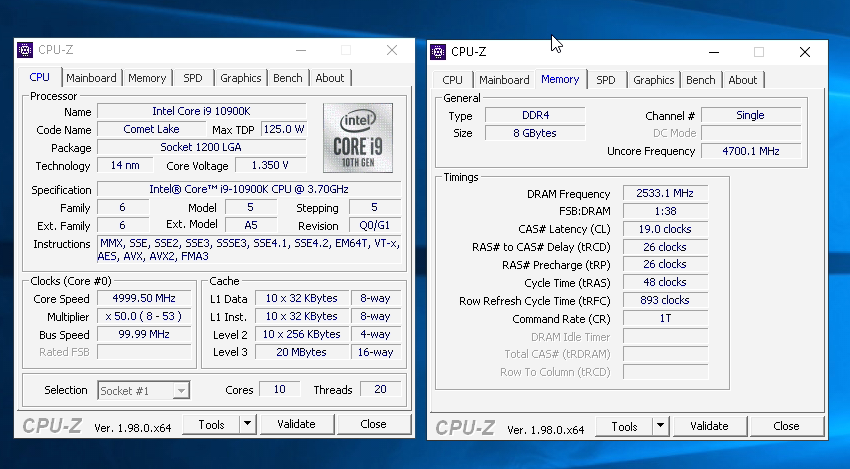
Yea CR1 is afaik a bit tougher to run and the latency boost or w/e isn/t much. 4000c16 at 1.4 is pretty solid.
signal belfry
Iirc I got the trfc down to 540 same voltage
proven canopy
sterile flame
what aib is it
No idea, but I could ask
signal belfry
potent fiber
Yea CR1 is afaik a bit tougher to run and the latency boost or w/e isn/t much. 4...
Wish I had gotten a better mb tho for overclocking ram cause z490 e is a pain in the rear to make it pass 4000mhz
lavish tundra
signal belfry
I daily this at 1.4v
what die
signal belfry
Rev e
signal belfry
signal belfry
Wish I had gotten a better mb tho for overclocking ram cause z490 e is a pain in...
I’m pretty sure it could go near 5ghz if I had a better mobo and cpu
proven canopy
5ghz rev.e on intel is usually not worth it
I did 5133 valid or something, 5066 32m on rev.n (rev.b superbin) 10900k but it's not practical.
signal belfry
Ik there’s pretty much no performance gain but it’s pretty cool knowing u have fast ram
sterile flame
Big numbers feel satisfying ngl
sudden torrent
Big number = endorphins
potent fiber
Yea 10700K on a z590 mobo would probably be good for max Rev E OC. (or something like that) -- just for epeen pretty much.
 signal belfry
potent fiber
Yea 10700K on a z590 mobo would probably be good for max Rev E OC. <:Pepe_KEK:83...
signal belfry
potent fiber
Yea 10700K on a z590 mobo would probably be good for max Rev E OC. <:Pepe_KEK:83...
Not to mention it’s used for 1080p gaming with an overkill 3090
proven canopy
I think this is sparky https://i.imgur.com/XVnH68s.png
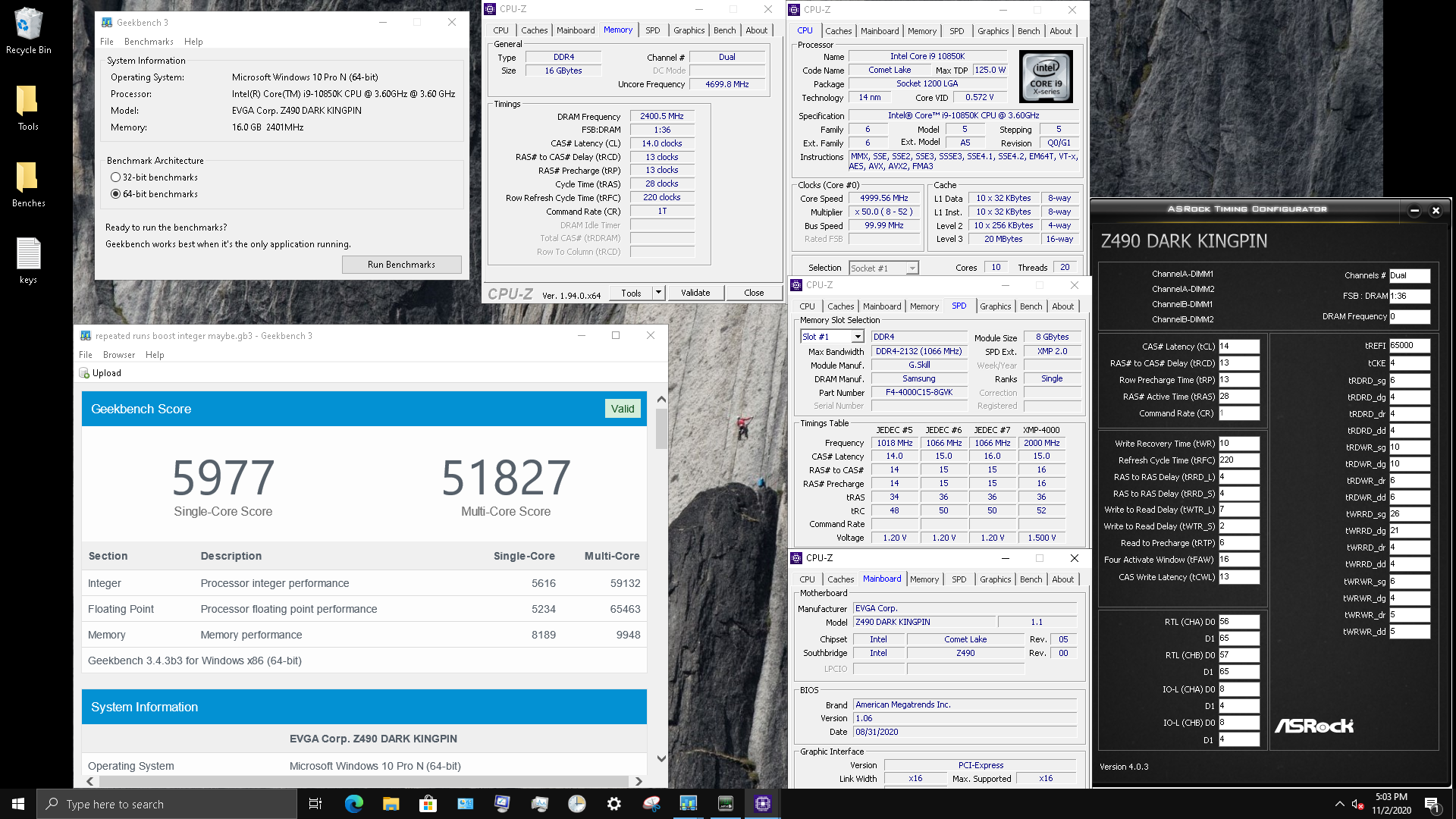


Just looking through my imgur folder