#overclocking
1 messages · Page 107 of 1
 sudden torrent
 modern walrus
I mean to like run at all
sudden torrent
If it passes POST on XMP it's probably fine
 latent wolf
So I forget what program tells me what Die type my memory is
modern walrus
I've written XMP so many times it just happens immediately when I press shift+X nowadays
sudden torrent
Thaiphoon burner
modern walrus
sudden torrent
I'm sure it can but might need to disable e-cores if it crashes
& Zen 3?
sudden torrent
sudden torrent
Thaiphoon burner
It really just guesses though
latent wolf
@sudden torrent Thank You I couldnt remember
modern walrus
what's your XMP?
 potent fiber
modern walrus
windows XP
potent fiber
modern walrus
windows XP
GL.
sudden torrent
modern walrus
& Zen 3?
Zen 3 is very few issues, I've run a mini xp boot disk on mine
Hiren's Boot CD if you're curious
latent wolf
Zen 3 works really well with RAM clock speeds above 3000mhz
modern walrus
I've run Server 2012 & workstation before for benchmarks but not XP
modern walrus
latent wolf
Zen 3 works really well with RAM clock speeds above 3000mhz
I meant to ask whether Windows XP runs easily on Zen 3
sudden torrent
Now we're all just confused lol
sudden torrent
modern walrus
what's your XMP?
 latent wolf
I dont see why it wouldnt other than the limited amount of RAM that the OS can use cause if I remember right it can only read up to 8gb of RAM in XP
modern walrus
okay forget everything I've said up to now. I was asking:
(1) @sudden torrent do you need any special drivers or anything to run Windows XP on Zen3; &
(2) @latent wolf what the XMP was on your memory sticks
potent fiber
The issue is perhaps mobo drivers and such. XP is 20 yrs old
latent wolf
XMP on mine is 3000 mhz I believe.
modern walrus
dammit I can't write XP lol
latent wolf
Not sure dont have XMP enabled
sudden torrent
modern walrus
okay forget everything I've said up to now. I was asking:
(1) <@396513761550270...
Windows XMP eh? lol
It'll run but won't support advanced features and sensors and such
modern walrus
latent wolf
Not sure dont have XMP enabled
it's on the label of your DIMMs & available in BIOS. I asked because it can help you narrow down what die you're using
modern walrus
sudden torrent
Windows XMP eh? lol
It'll run but won't support advanced features and sensors an...
I know I fixed it
lol
latent wolf
Thaiphoon tells me Samsung but not what Die Type
modern walrus
well if you know the XMP profile, it might help
potent fiber
3000c15 probably
modern walrus
unfortunately the only way to be 100% sure it to take the heat spreaders off & see what's on the ICs themselves
latent wolf
Yeah I not messing with that I have RGB on my RAM
modern walrus
damn no XMP profile? what's the like model number?
no I wasn't suggesting you do that. that's not a good idea lol
latent wolf
CL 16-18-18-36 at 1.35 Volts
modern walrus
3000mhz?
latent wolf
Right now through Ai Tweaker I have it running at5 3200mhz in the BIOS but was trying to figure how far I can push the ram before system instability
Yeah 3000mhz
latent wolf
Yeah Ive used the guide in the past and I know Ai Tweaker in the BIOS adjsuts the timings on its own based on the frequencyu I want
sudden torrent
I'm going to guess that it's either D-Die or a low binned C-Die
latent wolf
DRAM COMPONENTS
Manufacturer
Samsung
Part Number
K4A8G085W[B/C/D]-BCPB
Package
Standard Monolithic 78-ball FBGA
Die Density / Count
8 Gb / 1 die
Composition
1024Mb x8 (64Mb x8 x 16 banks)
Input Clock Frequency
1067 MHz (0.937 ns)
Minimum Timing Delays
15-15-15-36-50
Read Latencies Supported
16T, 15T, 14T
Supply Voltage
1.20 V
XMP Certified
1502 MHz / 16-18-18-36-68 / 1.35 V
XMP Extreme
Not programmed
SPD Revision
1.1 / September 2015
XMP Revision
2.0 / December 2013
I dunno thats what Thaiphoon is telling me
modern walrus
I've never messed with C or D die but I think both suffer from the limitation of low voltage tolerance
sudden torrent
Yeah Thaiphoon isn't good at guessing samsung dies
sudden torrent
Yeah 1.35v is roughly the limit on both C and D
potent fiber
3000c16 alone tells us it's not great.
sudden torrent
If it's D, you probably won't get it above 3200 easily. C you can possibly get to 3600 c18.
latent wolf
I wanted to shoot for 34 or 3600 but the manufacturer has the same RAM I have at 4000mhz
modern walrus
with 5800x, you're limited to 3733 or 3800
modern walrus
rarely FCLK will do >1900mhz stable but very rarely
sudden torrent
latent wolf
I wanted to shoot for 34 or 3600 but the manufacturer has the same RAM I have at...
Well that would only be on B-die if it's samsung and you're almost 100% not B-die
latent wolf
Probably paid for the RGB more than anything
sudden torrent
I got my b-die rgb kit for $110
modern walrus
did you get it new?
sudden torrent
Yes
latent wolf
VisionTek OCPC RGB X3TREME 16GB DDR4 3000MHz DIMM – White
modern walrus
sorry I meant to ask @latent wolf
modern walrus
sudden torrent
Yes
that's about what I paid for some Vipers
sudden torrent
(╯°□°)╯︵ ┻━┻
latent wolf
modern walrus
will redouble my efforts
Yeah I got mine brand new through Dell
modern walrus
damn I had no idea Dell sold RGB memory
latent wolf
Yeah I didnt either till I found it
sudden torrent
They do, and they have some b-die kits even
latent wolf
Unit price was 114.99 then with Express shipping is what bumped it to 150
@sudden torrent You think I actually managed to get B die possibly then since I ordered it through Dell???
sudden torrent
Almost certainly not
latent wolf
It was a hope
sudden torrent
But if you want to test it you can set it to 3600 cas 16 at 1.4v and see if it boots
latent wolf
CL 16 at 3600mhz???
sudden torrent
Yeah, that's a cake walk for b-die
latent wolf
True
well Ill be back and see what happens
Ok Im back... Set at 3600 and Booted first try
sudden torrent
Color me surprised. You set cas latency too?
sudden torrent
It might reset and go to "auto" when you change it, download this to see https://zentimings.protonrom.com/

ZenTimings
ZenTimings is a simple and lightweight app for monitoring memory timings on Ryzen platform.
 sudden torrent
Ah yeah see? tCL 26
latent wolf
yeah So when I use the AI tweaker it changes them on their own. Good Old ASUS
Then again the system is definatly way more responsive to at 3600
sudden torrent
That's the infinity fabric at work
latent wolf
Oh yeah the infinity fabric with the RAM Clock
sudden torrent
At least we've ruled out the crappy d-die, but c-die can do 3600 too
latent wolf
yeah So either B or C then
sudden torrent
Yep. Set tCL (CAS) to 16 and DRAM voltage to 1.4 and you'll know which if it starts or not.
sudden torrent
Still set it manually
latent wolf
so set the RAM for the stock 16-18-18-36?
sudden torrent
For now just the cas
latent wolf
ok
sudden torrent
That's all you need to know what die it is
latent wolf
it should handle CL 16 with the rest of the timings staying the same then?
Im still somewhat new to OC RAM.. Been doing it according to the guide pinned to the channel
sudden torrent
Yeah. If it starts with cas at 16 then it's b-die and I can give you a set of timings that should work. If not it's c-die and you can use a different set of timings.
latent wolf
Ummm Its booting
sudden torrent
Check zentimings again
latent wolf
 latent wolf
Yeah I figured cause normally you only change 4 or 5 of the timing
sudden torrent
If this works you can just copy my settings lol, I have 5800X too
latent wolf
Nope no boot
sudden torrent
1.45v, same timings
latent wolf
Have to flash back the bios
latent wolf
I have a button on my mobo on the back
Fml I got DRAM light
Gotta jumper shunt the cmos
Ok let's see if this works
No joy
C die then at 3600 cl 16 with the rest being in the 20s. Still a very responsive timing
sudden torrent
Try 3600 16-20-20-20-36 1.38v
If that works it's just very well binned c-die
latent wolf
It booted
You would think with a ASUS ROG STRIX X570 Gaming II Mobo it would handle alot more but with the RAM being C Die I probably cant squeze much more performance out the RAM but can the CPU since its a Custom Liquid Cooling loop
sudden torrent
Yeah c-die is just average as far as memory goes. Certainly not worth what you paid for it, maybe half.
The CPU can definitely do better. Most 5800X can do 3800 14-14-14-28 or better.
latent wolf
Im looking on the list and see 3800 on C Die with timings of 18-18-21-21-39-65-1T
sudden torrent
That'll require other tuning like vSoC and cad bus resistance
latent wolf
ah
sudden torrent
If you somehow get lucky enough to have a kit that does that speed
latent wolf
ALso on a R9 3900X
sudden torrent
Yeah that can do it too but it's a little harder
And takes a little luck to have it stable on the infinity fabric
latent wolf
Yeah I think I will stick with where its at since I know I can set the CPU for 42x instead of the stock 38x
sudden torrent
I'd recommend running a stability test or two
latent wolf
On The RAM??
sudden torrent
Yes
latent wolf
I have AIDA64
sudden torrent
That's a benchmark, not a stability test. But it is good to run.
Overclock.net
Hello everybody
I am just making a very light tutorial with a collection of custom config files and a DOWNLOAD LINK for TM5 v0.12
anta777 absolut config Official Intel DDR4 24/7 Memory Stability Thread
None of the work is mine but it seems like a pretty good and fast testing app
latent wolf
aida64 Extreme has a stress test option
sudden torrent
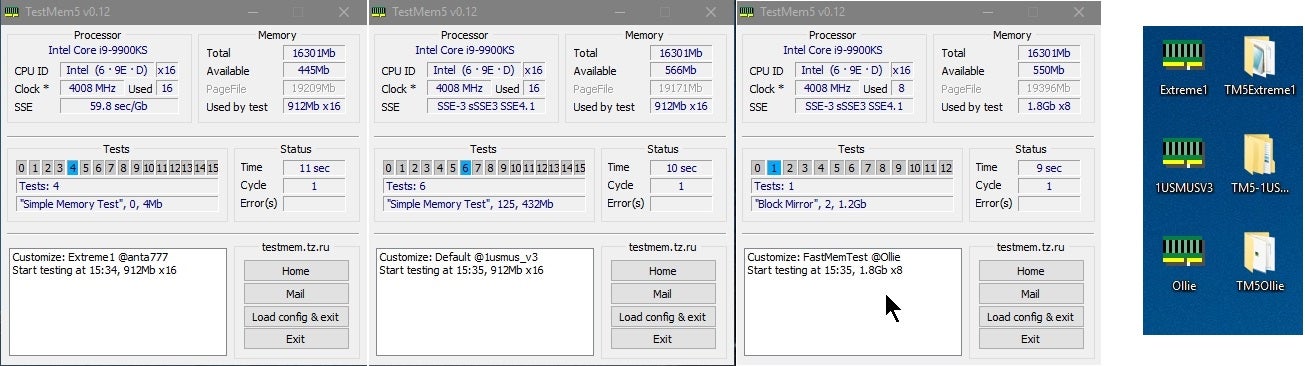
Try the anta extreme profile, it'll run for a few hours. A single error means it fails.
sudden torrent
latent wolf
aida64 Extreme has a stress test option
Is that not a paid feature? And it's not super intensive anyway
latent wolf
Stress/System Stability Test
I have Trial Version Right now since It came on the Support Disc with my new Motherboard
I somehow fried my TUF Gaming X570 Plus WiFi motherboard which fried my RX-5500XT Gpu at the same time
sudden torrent
Oof
latent wolf
Yeah
sudden torrent
You're allowed to post those pics here too you know
sudden torrent
Those pins straight up melted though, sheesh
latent wolf
yeah I know
sudden torrent
One must have bent and shorted on another pin is my guess
latent wolf
Which is weird cauise the system hadnt been pulled apart since it was put together over 6 months ago
sudden torrent
Dust conducts electricity too, was it cleaned at least once a month or so?
sudden torrent
Huh. What a freak accident then.
latent wolf
yeah
TestMem5: Debug Module Process Not Running (15 of 16), State 3. Critical error, programm stopped!
@sudden torrent ^^^^^^^
potent fiber
Screenshots, lol
 lavish tundra
sudden torrent
https://www.overclock.net/threads/memory-testing-with-testmem5-tm5-with-custom-c...
lavish tundra
sudden torrent
https://www.overclock.net/threads/memory-testing-with-testmem5-tm5-with-custom-c...

GitHub
Contribute to NeweggTechie/Windows-Troubleshooting-Utilities development by creating an account on GitHub.
I wrote a better guide to use tm5 a while back btw
modern walrus
 sterile flame
oh i jusr ran a bunch of power shell scripts lol
sterile flame
oh i jusr ran a bunch of power shell scripts lol
lol oh boy... uh dunno if that's a great idea for daily
sterile flame
modern walrus
lol oh boy... uh dunno if that's a great idea for daily
just debloating the OS lol
stuff like
uninstall onedrive
modern walrus
oh ya that's not terrible
it's when you like remove windows security & stuff
which is great for benchmarks on a benchmark partition
sterile flame
working out how to use the scripts that you sent lol
modern walrus
but not advisable for daily use connected to the internet
sterile flame
yeah fair enough
modern walrus
I will warn you tho, I ran all of those on a benchmark partition & windows was kinda messed up
There's this thing called like ReviOS that is supposed to be a stripped version of windows for gamers or something but it was kinda goofy when I ran it too
sterile flame
well I ran Sycnex's debloat script
modern walrus
I don't really recommend using that but might be worth checking out https://www.revi.cc/revios

Faster
Framerates up and latency down
sterile flame
and also bloatbox
modern walrus
gonna post it in general & see the reactions to it hold on lol
sterile flame
my ram usage atm is at 6gb lol
sterile flame
modern walrus
gonna post it in general & see the reactions to it hold on lol
lol yeah
 left bladeBOT
 Avionix#4365 has been warned
Reason: Bad word usage
modern walrus
but they don't like anything except for like MP33s lmao
sterile flame
MP33s?
lavish tundra
sterile flame
well I ran Sycnex's debloat script
good
sterile flame
 kind walrus
NVMe drive
kind walrus
NVMe drive
fair enuf
 frigid cedar
I'm back and I've done it!

28063 without overclocking the P cores
Loadline and balancing all on auto but an adaptive offset of -.085, energy efficient turbos turned on, thermal velocity tuning to decrease voltage when temps are lower and the chip feels more efficient and E cores all at 4 ghz
Draws ≈180 with the adaptive offset taking 1.255 volts to a range of 1.14 and 1.17 under cinebench 76°C
Overclocking the E cores and undervolting the P cores unbalanced this thing crazy
Stock 12900k geekbench 5 is 1990 single and 16000 multi I ended up with 1930 single and 19000 multi
I'll happily take that trade off
 digital dirge
frigid cedar
Stock 12900k geekbench 5 is 1990 single and 16000 multi I ended up with 1930 sin...
digital dirge
frigid cedar
Stock 12900k geekbench 5 is 1990 single and 16000 multi I ended up with 1930 sin...
Nice. I get 197XX with my oced 12600.
frigid cedar
Oh that's awesome Definitely saves money to tune yeah?
digital dirge
Yeah lol.
I'm surprised you aren't trying to push yours for the best it can do.
Daily*
sudden torrent
Sounds like the idea was to lower temps while gaining a bit of performance. Since the e-cores are disabled.
frigid cedar
Well with a 12900k speed why not improve efficiency yknow?
sudden torrent
Yep, they tend to respond pretty well to undervolting
frigid cedar
sudden torrent
Sounds like the idea was to lower temps while gaining a bit of performance. Sinc...
And hello again!
digital dirge
Ecores are disabled?
sudden torrent
Ah no I misread
frigid cedar
E cores are set the way they'd be on 12900ks being all 4ghz but the p cores are undervolted
digital dirge
My e cores are 4ghz. My voltage is 1.27 under 100% load
sudden torrent
Might as well try to lock your p-core clock at about your stable voltage and see how high it goes without generating more heat. The boost table isn't great for undervolts.
digital dirge
P cores 5.2
frigid cedar
I've got a 20+1+2 vrm so I certainly could oc instead of uv
sudden torrent
In this case it would be both, OC+UV
frigid cedar
True enough
sudden torrent
12900k can totally do with less voltage with almost no performance tradeoff
frigid cedar
Too bad it's gigabyte and not asus imagine 12900k undervolting down the whole curve!
sudden torrent
That's why I suggested locking the voltage
If you set it to 1.25 manual it should droop below 1.2, so it'll still be at your stable voltage while being cooler and less spiky
lavish tundra
ASUS 💀
frigid cedar
I've seen stock 12900k load line to like 1.36 and only get 26xxx in cinebench so I am pretty prideful of my 1.255 with 28063 at 1.255 offset to 1.17
Can't forget the offset lol
frigid cedar
sudden torrent
That's why I suggested locking the voltage
But really think I could get from 1.255 to 1.2 with static?
sudden torrent
The natural behavior of the CPU and VRM is to reduce voltage under load, which we call droop. You can control how much droop you have using LLC. So it'll go as low as you need it to.
frigid cedar
Oh and just an update since we've talked last I may or may not have ruined my memory training lol
sudden torrent
Sounds like gigabyte to me
frigid cedar
I fiddled with my trdrd and twrwr trying to get more and accidentally made my 6000mhz cl36 1T unstable
sudden torrent
Yeah I've done that before lol. Then you try to input your last known good settings and it doesn't train.
Only solution is to start from scratch.
frigid cedar
Instead of fighting or reseating it I might just slap 1.26 or 1.275 vdd/vddq to make it stable since it doesn't work at 1.25 no more
I was happy with it and more crappy gigabyte issues the z690 doesn't have an option for a memory training voltage boost like my old msi board
sudden torrent
That is pretty nice on the MSI ones, I can attest to that. Just max out the memory training times and such and let it roll.
frigid cedar
I'd have my msi board boost to 1.4 to make my tight timing 1.35 more reliable when testing random settings
My i5-9600k was r0 stepping instead of p0 so it was binned for an i9 but cut down for production while p0 is designed for i5
So I'd just abuse the controller binning
Also an answer to earlier yeah im just gonna redo the overclock step by step and hope that works
Maybe if I run it at 5700 ot 5800mhz for a while getting it set back to 6000 will go smoother
 dull ginkgo
@short blade any way of telling TM5 to not close itself when it errors out? was confused on why it just disappeared while messing with things, tried again, 20 min later, gone again, and so I watched it for 10 min to find it was just having a lot of errors. Or perhaps just set up a custom filter for event viewer for tm5..?
 short blade
you sure the system didn't just reboot?
dull ginkgo
Yes
Didn't have to log back in or anything, just tm5 disappeared
Discord was open in the background and still was
short blade
weird, never happened to me before
well, if it has more than 0 errors then you already know what you need to know
dull ginkgo
also, wtf, I run it again to get video proof and it goes ~40 min without any errors
yay for ram oc ig
 proven canopy
Doesn't it finish with a "test complete"?
dull ginkgo
Usually, yes
 wintry narwhal
I overlooked my t-create 3200 to 3600 and now my pc doesn't send a signal to my monitor
what should I do now
 finite frigate
reset cmos
wintry narwhal
finite frigate
reset cmos
thx
 zenith palm
dull ginkgo
<@122901618369757184> any way of telling TM5 to not close itself when it errors ...
zenith palm
dull ginkgo
<@122901618369757184> any way of telling TM5 to not close itself when it errors ...
It's never exited on error in my experience either that's wack
dull ginkgo
Yea...
sterile flame
do tertiary timings change when you change to a different mobo?
in other words can I dial in the same tertiary values from my previous mobo onto my new mobo without impacting the stability?
 faint tangle
i am not the most knowledgeable when it comes to this, but i think so yes, assuming its the same kit of ram

 sturdy stump
wintry narwhal
I overlooked my t-create 3200 to 3600 and now my pc doesn't send a signal to my ...
sturdy stump
wintry narwhal
I overlooked my t-create 3200 to 3600 and now my pc doesn't send a signal to my ...
First mistake there is buying T-Create, that stuff has trash tier timings
Selling garbage-tier DDR4 dies overclocked to 3200 CL22 so people who don’t know better will see the speed and buy it, all while marketing it as being “for creators”, is genuinely fraudulent in my book, no matter how much I like Teamgroup’s other products
zenith palm
sterile flame
do tertiary timings change when you change to a different mobo?
Yes, only primaries are saved to xmp (for ddr4 anyway)
zenith palm
sturdy stump
First mistake there is buying T-Create, that stuff has trash tier timings
T create is just fine
zenith palm
sturdy stump
Selling garbage-tier DDR4 dies overclocked to 3200 CL22 so people who don’t know...
3200c22 isnt overclocked at all it's the highest jedec spec
potent fiber
Pale greens, amirite. I know it's about desktop, but that speed is obv common and fine for laptops anyways.  (or when below 1.35v is needed/wanted)
sudden torrent
sterile flame
in other words can I dial in the same tertiary values from my previous mobo onto...
Tertiary timings will probably be stable at different values in a different motherboard due to differences in how the board's signal integrity is
sterile flame


TeamGroup “Evolving Invincibility” Giveaway: https://bit.ly/3HlM0eq
Support us on Patreon: https://www.patreon.com/hardwareunboxed
Join us on Floatplane: https://www.floatplane.com/channel/HardwareUnboxed
Buy relevant products from Amazon, Newegg and others below:
GeForce RTX 3050 - https://geni.us/fF9YeC
GeForce RTX 3060 - https://geni.us/MQ...
how's the tertiary timings on this board?
zenith palm
You just want a board with good topology but just use the board you have rn
short blade
zenith palm
3200c22 isnt overclocked at all it's the highest jedec spec
inb4 3200c22 1.4v

short blade
cursed
sterile flame
zenith palm
You just want a board with good topology but just use the board you have rn
I wanted to try this board so I can OC my locked cpu lol
zenith palm
sterile flame
I wanted to try this board so I can OC my locked cpu lol
Only no d4 boards have external clock gen afaik btw
Also just upgrade to a k?
sterile flame
zenith palm
Also just upgrade to a k?
too expensive lol
12700K is alright in terms of price when you buy the OEM version but the boards are pretty pricy
Also there's the issue of how do I flip a 12700F lol
can probably make it work but its a bit of a gamble as to how much I can balance my losses
sudden torrent
You can do the same level of non-k overclocking on a good B660 that you can do on an average Z690. Which is about 3-4%.
The ones with external clock gens that are getting up to 130-135 bclk are way expensive, and yes I don't think any are DDR4.
kind walrus
B660M Mortar Max is a new one in that video and it's DDR4
It comes with the Renesas clockgen chip
sudden torrent
Then that's the only exception I'm aware of and it's still not a Z690
zenith palm
sterile flame
too expensive lol
Cheaper than a new board lol, sell non k cpu, add 50$ on top get the k granted would require you yo have z690 atm
But still
Bclk oc requires changing ram speed accordingly too which is a pain
zenith palm
sterile flame
12700K is alright in terms of price when you buy the OEM version but the boards ...
OEM version?
kind walrus
No box just chip
zenith palm
Oh right
sterile flame
zenith palm
Cheaper than a new board lol, sell non k cpu, add 50$ on top get the k granted w...
yeah i don't have a z690 which is the issue

i could buy @kind walrus's MSI unify-x

kind walrus

kind walrus
Indeed it is, idk if it even has the PCIe clockgen chip either lol
Never thought to look
finite frigate
unify x has it iirc
proven canopy
It does
Rather, the board works well for non-k alder lake OC
But you really want a dark or y0/m0 apex
lavish tundra
@proven canopy you got any tips for ocing amd 6000 series cards? having trouble forcing higher power limit, I increased it in mpt but it resets everything to default whenever I actually apply the limit in driver
@tall pelican could you tell me what you use? I remember you having a 6900xt
 tall pelican
Ignore driver pl, set the wattage in mpt
lavish tundra
tall pelican
Ignore driver pl, set the wattage in mpt
ahh i see
you use any other apps to OC?
sterile flame
lavish tundra
<@546791995830566912> you got any tips for ocing amd 6000 series cards? having t...
If you use the driver to increase the power limit up to 150% it'll end up working out to be MPT PL x 1.15
As for resetting to default, have you been checking the power consumption during your benches to see if it was drawing more power?
proven canopy
lavish tundra
you use any other apps to OC?
Overdriven
lavish tundra
aight aight thanks for the input
lavish tundra
sterile flame
If you use the driver to increase the power limit up to 150% it'll end up workin...
I seee
lavish tundra
proven canopy
Overdriven
cant find a download, u got a link?
proven canopy
First Google result for amd overdriven
lavish tundra
sterile flame
If you use the driver to increase the power limit up to 150% it'll end up workin...
worked thanks
WHats the max i can safely push through 8pin + 6pin pcie?
zenith palm
It's supposed to be 225 but I'd say you could do 250 fine
lavish tundra
yeh yeh but im wondering if 300W would be fine :)
 lavish tundra
i like my wires
lavish tundra
zenith palm
It's supposed to be 225 but I'd say you could do 250 fine
pato
slot does 75W
nerd
300 is totally fine
zenith palm
lavish tundra
slot does 75W
Oh yeah indood
proven canopy
lavish tundra
WHats the max i can safely push through 8pin + 6pin pcie?
You won't run into that limit, even on ln2
tall pelican
lavish tundra
yeh yeh but im wondering if 300W would be fine :)
Elmor's PDM shows 400-500w on my 8 pins very regularly
lavish tundra
tall pelican
Elmor's PDM shows 400-500w on my 8 pins very regularly
damn
nice thanks
sudden torrent
If it's a PSU with 16 gauge cables then it can handle tons of current no issue. Like 150W per 12v input, so 300W on 6 pin and 450W on 8 pin plus slot power. The ones on the PSU tier list that are gold A tier have 16 gauge.
lavish tundra
sudden torrent
If it's a PSU with 16 gauge cables then it can handle tons of current no issue. ...
I have a B tier gold
sudden torrent
Mmm, do you have a caliper to measure the cable thickness?
Or is it a Corsair one?
zenith palm
sudden torrent
Or is it a Corsair one?
Cooler master mwe v2
lavish tundra
sudden torrent
Mmm, do you have a caliper to measure the cable thickness?
Dad probably has one id have to borrow it
lavish tundra
sheeee
zenith palm
Rawr boutta pull 825w from his 750w just for gpu now sheesh
lavish tundra
yeah 1 sec OCing psu to 1000W
tall pelican
look at me, my 400w psu is fine pulling 600w 
digital dirge
sudden torrent
Mmm, do you have a caliper to measure the cable thickness?
What.. are we back in middle school?
sudden torrent
I didn't even know what a caliper was in middle school so...
 sudden torrent
Oh I got it, I meant I used other things because I didn't know what a caliper was
 tidal harness

3DMark.com
AMD Ryzen 9 5900X, NVIDIA GeForce RTX 3090 Ti x 1, 32682 MB, 64-bit Windows 11}
 cedar cypress
Ok I’m here
modern walrus
ya if you read the guide, you'll see the first step is to set all secondaries & tertiaries to auto & try to get the highest frequency you can with reasonable IO/SA & DRAM voltages
on MSI, you can go to advanced DRAM settings & enable Round Trip Latency which will help with latency
modern walrus
ya tCL, tRCD, tRP, tRAS
you can leave XMP enabled cuz apparently it helps run higher frequencies (according to the guide)
cedar cypress
Advanced dram configurations for round trip latency?
Maybe mine doesn’t have it
What timings did u say to try again
18 18 38?
modern walrus
tCL 18 tRCD 19 tRP 19 tRAS 39 for now
modern walrus
you just want them loose so they don't limit how high you can put frequency
ya later you can adjust that down tho
modern walrus
leave it on auto if you can
otherwise you can set to 100mhz & once you get the highest frequency you can to run, you can set it to 133mhz to see if you can go slightly higher
modern walrus
not necessarily
cuz if the highest you can get is, say, 4266 thats with 133mhz reference clock
meanwhile if you set it to 100mhz, 4200 will be highest
modern walrus
you may want to do 4200 first but ya why not it's not that crazy of a jump
it's when you like POST 3800 so you try 4200 next that it might've done better if you did like 3800, 4000, 4133, then 4200
better to kind of climb the ladder
cedar cypress
4266 booted fast also and ah yes I understand
modern walrus
it's like the IMC needs to build its confidence lol
modern walrus
haha exactly
I have yet to hear an explanation as to why that works but I imagine it has something to do with training? lol
cedar cypress
Do I need to test or keep trying
Ahahah yes I wouldn’t put it past technology is odd
modern walrus
for now just see how high it'll go then once you hit a wall you can try to add more voltage or back up one setting & work on that
cedar cypress
Ok got it
modern walrus
I find backing up one setting is usually the best for daily cuz you really don't wanna be running really hot with high voltage
modern walrus
eh not necessarily but with memory OC you want to eliminate as many variables as you can
& what's a stable CPU OC with memory at [x] frequency might not be stable with memory at [y] frequency
modern walrus
& CPU oc is far less time consuming & really only has like three variables (frequency, voltage, & LLC)
modern walrus
so it's easier to get memory on point then go back to CPU
you might as well see where your limit is
modern walrus
some 10900Ks can go pretty high
modern walrus
my 10900K not so much but hopefully you get lucky lol
did you set load line calibration?
modern walrus
also on 10900K, cooling is a major, major factor
modern walrus
I can do 51x but only because I'm on a custom loop, delidded, & running direct die cooling with liquid metal
cedar cypress
Or something
modern walrus
some 10900Ks will run 52x on an AIO
modern walrus
WHEA error?
cedar cypress
I’m not sure it was just that it failed
I think maybe whea
I’d have to try again
modern walrus
ah okay. Do you have HWiNFO installed?
modern walrus
oh okay cuz at the bottom it'll have error count
I think L1/L3 error means insufficient voltage for CPU
but it could also be a memory error or all sorts of other fun
cedar cypress
Like the ram is to much for the cpu etc or
Cuz 5.0 with the ram oc worked but 5.1 didn’t
modern walrus
at least Intel is gracious enough to crash under load. AMD usually crashes at idle when OC too high lol
modern walrus
that could also be an issue with the motherboard
cedar cypress
Yeah and is crazy lol
To be fair
In this board
I didn’t try
5.1
Since I switched
Lol
modern walrus
I had a Z490 MSI Gaming Carbon Wifi that I could not get 10900K to run 51x on
cedar cypress
I just thought old board didn’t work
modern walrus
then I had to RMA it cuz of failed BIOS update
cedar cypress
So it was cpu
modern walrus
& got a Z590 Aorus Ultra that did 51x fairly easily
cedar cypress
Wow ok I definitely need to try then
modern walrus
damn 4666 is nice
modern walrus
like really nice lol
I don't think throwing the kitchen sink I can get 4600 to run on my 10900K
cedar cypress
I had z490 p and 5.1 failed. But now a z590 a pro
So maybe it’ll work on 5.1
And lmfao
4666 on 1.5 dram is that enough
Lol
modern walrus
lol for real even with IO voltage at crazy high 1.4 4600 might work
will 4700 POST?
(I think that's the next one up I forget)
4666 is nice tho
but you may wanna see if higher will POST so you can get a sense of where your limit is
cedar cypress
Lol
modern walrus
cuz if 4666 is the highest it'll go, you may want to back up slightly cuz I've found trying to tune at the max (especially for daily) is really frustrating
cedar cypress
4800 went standby mode for like a second or two
And then I shake mouse
And it turned on
That’s limit?
cedar cypress
All the others didn’t do standby
Gahahaha
Should I keep going still even tho it went standby
modern walrus
at 1.5v dram too? heck
cedar cypress
Yeah
modern walrus
actual picture of my 10900K after delid
 cedar cypress
LOOOL
kind walrus

modern walrus
cedar cypress
This can’t mess up ram trying 4933
no only putting too much voltage messes up the ram
cedar cypress
Wow so the whole time I though my cpu was bad cuz it didn’t run 5.1 but it was probably my asus z490 p was bad
modern walrus
heads up tho: it is possible to mess up your windows install tuning memory
modern walrus
like you can make it all slow & derpy
oh good okay
some people are like muh gamezzzf
cedar cypress
Ahhahaha
modern walrus
I usually install a separate windows partition just for memory overclock
cedar cypress
Yeah bro I thought a windows install would help …
modern walrus
I can't even count how many times I've reinstalled windows in the last year
cedar cypress
Cuz my game felt slower after oc etc
But it didn’t so I will do a fresh install
Still
modern walrus
that's probably because you took away 400mhz of bandwidth
despite how easily your CPU apparently handles 400mhz increases, 400mhz is significant lol
cedar cypress
I did try an hour with 1.37 v core and 1.49 dram and it did feel better but maybe placebo? Hard to say after an hour
Oh wow I didn’t know that
modern walrus
oh & to go back to your question before
gear 1 runs 1:1 memory clock & gear 2 runs 2:1
cedar cypress
Ahhh I see
modern walrus
my 11600K 1:1 maxes out at 3600mhz
which is just
I can't find the words to express how awful that is
cedar cypress
Yeah that sounds bad l Hahahah
modern walrus
thing is tho, it's about average
modern walrus
for me, worst case is clear CMOS & start over
modern walrus
but if you're on the brink of 4900,
modern walrus
damn I mean you could either try bumping to 1.55 or stay with like 4800
cedar cypress
I hit like 51 on 1.49
modern walrus
which holy crap I can't believe you can run that with easy tbh
cedar cypress
Prob should stay
😂
Oh wait
I think the 4933
Broke windows
But 4900 is working
Yeah
4900 is on
Rn
modern walrus
it might POST with more DRAM voltage but feels like getting greedy at this point lol
cedar cypress
Yeah this is good fossure unless I get a cooler or something
Since I know my temp is already not the best
Should I load into private match
modern walrus
just to give you an example, there's a trident royal bdie kit that is 4800c17-19-19-39 at 1.6v
cedar cypress
Pc screen went standby mode 4900 no bueno I think
Lol
Hahahahha
Do I just restart pc go into bios
And what’s to high of a temp for ram?
modern walrus
I mean it might if you bump to 1.55 DRAM & maybe like 1.32 IO & 1.36 SA (SA you can run up to like 1.49 if you wanted but I'd keep it below 1.45)
modern walrus
bdie usually doesn't like to be over 40C
modern walrus
depends on the kit & silicon & such
cedar cypress
Ohhh
Yeah mine doesn’t crash or anything
I thought maybe temp would cause input lag
Or rendering?
Issues
modern walrus
usually it'll just crash completely when it's hot like that
or BSOD
hot as in too hot for the kit
cedar cypress
Ohhh so it’s fine then?
modern walrus
it isn't like CPU where there's a set TJ max that it throttles or anything
well if it's at 44C just existing, it'll probably be considerably hotter once you load it up with OCCT or something of the like
cedar cypress
It’s doing automatic repair again lol
modern walrus
ya I would probably do 4700 or 4800
or even 4666
cuz when you tighten timings it makes it hotter
modern walrus
now if you wanna do some crazy benchmarking or something you can floor it like that since benchmarks don't last long
cedar cypress
Oh no no
Just for gaming
Doing 4666
Should I do a test on it
Or go into a private match
modern walrus
ya well that's another thing like you can have it ostensibly stable from memory testing but when you add CPU heat & GPU heat to the mix inside the case end up crashing
cedar cypress
Ohhhhh
modern walrus
I'd test it to see how hot it gets
cedar cypress
Hmm now 4600 is crashing now did I mess something up lol
It won’t boot
Says automatic repair
Or that’s the fresh install I need
modern walrus
no that's just RAM being RAM... sometimes you'll have a "hole" where it just doesn't seem to like certain frequencies
modern walrus
also, if you watch buildzoid videos, he'll say how sometimes it'll POST a frequency but then won't seem to want to do it again but if you run it lower & ramp back up it'll be fine
modern walrus
ya it's definitely something you get like a feel for like swinging a baseball bat or something
well test it & see
cedar cypress
4666 automatic repair. 4600 automatic repair
Even tho they worked before
So I should do
4000 default
And then ramp it up
Cuz it feels like 4933 causes the issues lol
modern walrus
ya drop to 4000 or so then bring it back up to like 4400 or 4600 I'd say
cedar cypress
Caused
**
Also is it possible to have a bad ram kit that passes tests etc but feels slower
Oh
Windows is broke
I think
4000 won’t boot
Lol
modern walrus
4933 is really high. I don't think that would POST on my 10900K with 1.5 IO/1.6 SA/2.0 DRAM lol
try shutting down, turning off PSU then pressing power button a few times & holding it for like 20 seconds to clear capacitors
cedar cypress
Should I do startup repair
modern walrus
then turn it back on
cedar cypress
Ok I’ll do that
modern walrus
if it says "your PC couldn't shut down correctly" it's just mad about last shut down & you can press enter to keep going
modern walrus
if it says "your PC couldn't start correctly" press ESC to go back to BIOS cuz your settings aren't gonna work lol
modern walrus
ya try that & let it POST defaults
that way you can see if it's a windows error or board just acting up
modern walrus
okay try shutting down & clearing CMOS
with power off & capacitors discharged
could also try loading optimized defaults before doing CMOS clear
since CMOS clear is a pain
modern walrus
ya set those all to auto
or load optimized cuz it'll do all that for you
if you press F1 it'll show you which F key loads optimized
cedar cypress
Ok let me see
Bad system confit
Confit
Confit
Config
Won’t start still
Restored defaults
And I did cmos
modern walrus
when it tries to start windows?
modern walrus
did it say BIOS has been reset after CMOS clear?
modern walrus
you short the CMOS header with something metal thing
cedar cypress
Yeah I think I did
modern walrus
ya that's it.
modern walrus
damn never seen windows get corrupted that fast
cedar cypress
Did another restore
modern walrus
highest I've seen 10900K POST & quickest I've seen windows get borked
cedar cypress
😂😂😂
cedar cypress
Hahah I will try 4800? Since it worked
Or no
4900 worked
4933 didn’t
Or I should do 4666
modern walrus
I'd say 4666 or 4700 is probably safe bet since it POSTs so high
cedar cypress
Windows booted but blue screen and frozen lol
modern walrus
are you setting CPU oc or leaving it default?
modern walrus
windows might be hecked
cedar cypress
From the 4933
modern walrus
it's possible ya. Try like 3800c16-17-17-37 or something even safer
or don't set any voltages or timings & just enable XMP
cedar cypress
Did recovery again
It booted
4666
Hmm
Restarted oc twice
Pc**
Seems to be working
modern walrus
open cmd with admin privileges & do:
sfc /scannow
cedar cypress
Kk
modern walrus
after that:
dism /online /cleanup-image /restorehealth
did it find integrity violations or errors?
cedar cypress
Ok and also did u see my question ? I got a z trident ram kit 4000 cl16 18 18 39 for gf and it feels slower than her old 32 16 18
And yeah
Her kit passed testing
modern walrus
oh sorry no I missed that
was worried I left you worse off then when you initially asked for help with all this haha
cedar cypress
Hahahahha
modern walrus
16-18-18-39 isn't bdie like your 4000c16-16-16-36 kit so you won't get as good OC results but what CPU is she on & what's the XMP on her kit?
oh & wait let me rewind a second, your XMP is 4000c16-16-16-36?
cedar cypress
My xmp is 16 16 16 36
Hers is 16 18 18 39.. but hers feel slower than her old kid 3200 16 18 18 36
…
Like input lag
I tried it on my pc also
Like a week ago
Just thought it’s bad ram
Or is there something it needs
modern walrus
16-18-18-38 is probably hynix CJR I'd guess but in any event, is it possible to see her secondary timings? I'd guess those are the likely culprit
also do either of you have any optional updates in windows update?
cedar cypress
Yo think ofnit
To
Think
I didn’t have those Xeon updates
U said to do
Could that fix it
I didn’t have those installed
modern walrus
I always do those random driver updates cuz I really don't think they've actually ever hurt me other than wasting storage space cuz they don't do anything lol
cedar cypress
True. I guess it wouldn’t hurt o try it again later.
My fps is about 60 fps lower
On multiplayer gpu bound
Gpu time is 4 tho
So idk why my time is 4
Usually 3
Cpu time is good at 2ms
Maybe my recovery messed up my gpu driver
Let me ddu
Or should I do a ram test
Ram is on 4666 18 19 19 39
modern walrus
which GPU?
cedar cypress
3080ti
modern walrus
do a RAM test
cedar cypress
FPS went from 320 to 275
modern walrus
kinda pointless to get everything else all good if RAM OC might mess it up anyway
since you still have all the secondaries & stuff to do
cedar cypress
Could be the
modern walrus
assuming this passes lol
modern walrus
ya it could be a multitude of things
cedar cypress
From 512.95 to an older one
But I’ll test it quick
Testmem5?
Or any will be ok
modern walrus
I find the easiest way to test RAM stability is to run ycruncher 2.5b
cuz that's so intense, it'll throw coefficient error if you're not stable
TM5 is the best test tho for sure
with either anta777 config or any of these two:
cedar cypress
Screen standby mode
Without trying to test etc
Lol
Lower it?
Pc restarted back to windows now
modern walrus
well see how the testing goes
if it immediately starts racking up errors, I'd drop to like 4400
modern walrus
well you can either increase DRAM voltage or drop frequency
modern walrus
but if you're already getting errors at 4666c18, it's gonna take a lot of voltage to get you to like 4666c16 or lower
modern walrus
try 4400 first
modern walrus
ya I think it goes 4300 then 4400
can't remember if there's a 4466 but I don't think so
cedar cypress
4500 and 4533
modern walrus
me & maf don't get along too well lol
cedar cypress
From 4666
modern walrus
oh ya big jump
modern walrus
I mean if you can daily 4400c16 or even 4400c17 you're doing pretty darn good
modern walrus
at 4400?
dull ginkgo
Btw, thought about actively cooling ram?
cedar cypress
It’s probably just windows I’ll do a fresh install of this test pasts
Restraint pc
Restating
Restarting
And @dull ginkgo
What do u have in mind
 dull ginkgo
Weird
cedar cypress
And I could try… is it hard to setup
modern walrus
you gotta kinda make something up unless you 3d print a bracket or buy one of the like 3 options that exist lol
cedar cypress
Hahahah ohhh
modern walrus
sorry voltage I mean
cedar cypress
But failed test
1.5
And 4400 I can’t do anything
Except keyboard works
Nothing like that on 4666
Tho
modern walrus
try 1.55
cedar cypress
Kk
cedar cypress
Yeah it’s windows.. cuz I tried to click on screen to get to where it says enter password
Didn’t work.
Click on the power button to restart pc or shutdown
Or sleep
It let me do that
On the windows password screen
dull ginkgo
modern walrus
how do you cool RAM?
Just letting a fan dangle there lol, but I haven't bothered much with my cjr
cedar cypress
Going to do voltage
modern walrus
cedar cypress
Going to do voltage
voltage might help but ya if windows is borked you might have to reinstall just to avoid frustration
cedar cypress
Didn’t touch anything
And windows working now
Lol
Was going to do voltage
And it starting working
Going to do ram test
Slow like u said tho
Windows is
Reinstall is quick anyways
But slow could be voltage?
1minute in
No errors
Better than 10 seconds
On 4666
😂
modern walrus
cedar cypress
But slow could be voltage?
nice nice
could be voltage. I've spend a lot of time playing with IO/SA/DRAM in the past
I hope you don't ahve to endure that lol
modern walrus
dull ginkgo
Just letting a fan dangle there lol, but I haven't bothered much with my cjr
I started with an L bracket holding a 92mm delta. that sounded & looked horrible lol
modern walrus
tried my luck with this thing which was eh
 modern walrus
cedar cypress
It past all tests first round
modern walrus
cedar cypress
It past all tests first round
well watch HWiNFO
assuming you have temp sensors on your memory
& see what temps look like & at least watch it until stabilizes
modern walrus
ya run it for maybe like 20-30 minutes & see where it ends up
I mean I guess we could tune some settings first then run it for a little while too tho
modern walrus
you never really know with windows
it could've been installing some important keyboard update in the background
cedar cypress
Went in a game
modern walrus
which TM5 config are you using btw?
modern walrus
PCBdestroyer tends to heat it quickest
modern walrus
ah okay well you'll wanna do more like 30 minutes going forward but you can mess with a few timings before that
cedar cypress
Sounds good
modern walrus
try tRDD_L/S & tFAW at 4/4/16
cedar cypress
And without cpu oc
My game actually feels smoother
Is that normal v
With the higher ram
modern walrus
yes
modern walrus
well that's one size fits all but maybe
modern walrus
I don't think any game would say 4000+ is optimum anyway cuz I don't think the overwhelming majority of people do not run that high
modern walrus
cedar cypress
To make stable
that or it's a very common XMP for bdie
cedar cypress
Like they said get
Cl16 18-19 kit
Then oc it
3600 cl14
What timings should I try
modern walrus
did you set tRDD_S/L & tFAW?
cedar cypress
No
modern walrus
okay ya do 4/4/16 on those respectively
dull ginkgo
might also want to do cwl at the start?
modern walrus
if you do tCWL I think you'd have to bring primaries down to earth too
cuz you're at 4400c18 rn or what? I forget
cedar cypress
Yeah I don’t have those
modern walrus
on MSI it's like tRRD & something goofy iirc
modern walrus
ya under them tho?
 cedar cypress
Kk
modern walrus
 cedar cypress
Do I not have Speedstep?