#overclocking
1 messages · Page 103 of 1
 digital dirge
Yeah. Let it run while I was at home depot. No errors. Thank you guys
 zenith palm
Nice , what mem oc have you gone too?
digital dirge
Gonna try ocing later and see how it goes. Just wanted to make sure there were no errors already before I started
Just at xmp 1 oc.
So 3200
zenith palm
4k could be possible in gear 1 maybe not tho
digital dirge
Heh you remember what ram I have huh?
Anyways, just got back from home depot. So I'm gonna go build my computer stand
zenith palm
digital dirge
Heh you remember what ram I have huh?
Ballistix 3200 right?
 clever epoch
What do you guys use to clone your OS drive?
 potent fiber
clever epoch
What do you guys use to clone your OS drive?
potent fiber
clever epoch
What do you guys use to clone your OS drive?
Macrium reflect is a common program to use
 sterile flame
mac and cheese reflect
 eager hazel
im using a 3080 lhr on nicehash. are these OC settings good or are they too high?

 faint tangle
tf oc software is that
 sudden torrent
Usually you want negative on the core, and you can probably go higher on memory unless you got unlucky with binning
300W is a bit high too but your ideal power draw will vary
eager hazel
sudden torrent
Usually you want negative on the core, and you can probably go higher on memory ...
alr
eager hazel
faint tangle
tf oc software is that
excavator
its the only one that works with nicehash
and how much higher should the mem go
or could it go
sudden torrent
Depends on stock frequency and luck, some will do 1200, others 1500
faint tangle
i can do 1500 on my 3060 ti
you should be able to do 1250+
tho as fal said it depends on your bin
i got lucky with mine, so it can oc pretty well
eager hazel
would it be pushing it to go 1750?
faint tangle
very much so
faint tangle
id be surprised if 1600 was stable
eager hazel
lol
sudden torrent
30 series doesn't crash if it's too high, you'll get bad/lost shares or reduced hash rate
eager hazel
ah alr
faint tangle
sudden torrent
30 series doesn't crash if it's too high, you'll get bad/lost shares or reduced ...
atleast for desktop lol
my 3050 ti crashes at 650 lmao
i dont actually mine on it
was just curious what itd do
sudden torrent
Laptops are a whole other animal
faint tangle
mm
sudden torrent
Well that's too high then lol
eager hazel
no way
i thought i could fix it by doubling it
lol
also what would happen if i left my max power draw at 370
not doing it but im curious
would it like
just kill the gpu
sudden torrent
Nah it'll just get hotter and use more power. If it gets too hot it might crash.
The idea is to get the best hashes per Watt you can. LHR cards can usually get 300 KH/W or better.
eager hazel
ah
sudden torrent
That way it maximizes your profit. You have to account for power costs.
eager hazel
what about without power costs
sudden torrent
It's still better to keep it cooler
sudden torrent
Ideally you'll want video memory at or below 100C, core temp under 60C
eager hazel
thats not too bad
sudden torrent
If you've got a good cooler and thermal pads then yeah, it's not too bad
eager hazel
can unlocking the max core voltage hurt the gpu
eager hazel
sudden torrent
If you've got a good cooler and thermal pads then yeah, it's not too bad
ye i gots
sudden torrent
eager hazel
can unlocking the max core voltage hurt the gpu
Doesn't work on the 30 series
eager hazel
ah
sudden torrent
Nvidia locked voltage control years ago
eager hazel
why?
faint tangle
sudden torrent
If you've got a good cooler and thermal pads then yeah, it's not too bad
My gigabyte gpu has surprisingly good cooling
eager hazel
faint tangle
My gigabyte gpu has surprisingly good cooling
same
sudden torrent
"It's for your own protection" is their main reason
faint tangle
Core stays at or below 50 with 65% on fans 55% pl -502 core +1250 mem
eager hazel
sudden torrent
"It's for your own protection" is their main reason
lmao
sudden torrent
That's LHR kicking in
eager hazel
oof
sudden torrent
It'll take some time to find your ideal LHR settings, it's an automatic process and you can set it manually once it's dialed in
 sudden torrent
You'll use that to set it once it finds your ideal settings
Chances are it'll settle to around a ratio of 70-74
eager hazel
ah alr
im just curious
could like
wayyyyy overclocking
straight up kill the gpu
sudden torrent
Voltage and hard modding is the only way really
sudden torrent
Not any more than gaming for 6 hours a day would. Since it's using less power, the capacitors and such aren't as stressed.
sudden torrent
The fans might die but those are easily replaced
eager hazel
ye
sudden torrent
Just keep it clean and it shouldn't be an issue for a couple years at least
clever epoch
sudden torrent
30 series doesn't crash if it's too high, you'll get bad/lost shares or reduced ...
except for my 3080 that never sees reduced hash rate and just crashes my entire computer instead
sudden torrent
There's exceptions to every rule and if you follow best practices for overclocking that doesn't happen 😛
eager hazel
finally found the perfect settings
 digital dirge
Alright. TM5 test for 3800mhz 16 19 19 36
Gear 2
Wouldn't post gear 1
Oh gear 2 isn't good is it?
clever epoch
sudden torrent
There's exceptions to every rule and if you follow best practices for overclocki...
Nah, the ECC on my 3080 is straight up broken. It's the only card I know of (including another 2 I tested myself) that does this. ECC doesn't work, error(s) eventually happen, and the driver irrecoverably crashes, requiring a hard reset.
It isn't even this bad on other cards without ECC (another 2x 3070s I tested at some point), those eventually crash games/programs, maybe a driver crash, but it recovers. This 3080 is cursed
sudden torrent
digital dirge
Oh gear 2 isn't good is it?
It's not ideal
digital dirge
Ok I'm gonna try gear 1 again
ok Posted with 3800 16 19 19 36 gear 1
time to run test
Oof. 10 seconds blue screen
eager hazel
lets goooooooooo

 left bladeBOT
 chilled greese#6969 has been warned
Reason: Bad word usage
eager hazel
bruh
digital dirge
@sudden torrent do you by chance know why even though in bios I set 16 19 16 36.. when I open HWiNFO it shows it as 16 19 19 36
?
sudden torrent
Either hwinfo isn't reading it right or it's being overridden by the board or cpu
Or you're looking at the wrong timings
digital dirge
Tcas
Trcd
Trp
Tras
Right?
sudden torrent
There's RCDWR and RCDRD
The timings get abbreviated since normally they're the same
So 16-19-16-36 is actually 16-19-19-16-36
sudden torrent
Screenshot that section of hwinfo and we'll see
 proven canopy
Use zentimings or astc
digital dirge
sudden torrent
Screenshot that section of hwinfo and we'll see
Sorry for late reply. Company showed up.
 sudden torrent
digital dirge
Sorry for late reply. Company showed up.
sudden torrent
digital dirge
Sorry for late reply. Company showed up.
See what astc says
digital dirge
Can I download that while running tm5?
I'm an hour in and don't wanna mess anything up.
 digital dirge
I don't even know what asct is.
eager hazel
so close
 proven canopy
What board? You want 4.0.13 for z690
sudden torrent
Looks like the mag tomahawk z690
eager hazel
proven canopy
<@559912224010010624>
wat dat
proven canopy
Shows your ram timings in windows
sterile flame
eager hazel
lets goooooooooo
my 1070 hardly makes anything anymore
sudden torrent
Yeah after electricity you'd be at about 60 cents a day right?
sterile flame
I dont pay for electricity rn since I've been at college but yea pretty much
sudden torrent
Ah nice, so $1 a day lol
sterile flame

zenith palm
sterile flame
<:Icry:818962285485096960>
Hey that's still 365$ extra a year
digital dirge
@sudden torrent sorry man, I had been up 24 hours when you sent that. I couldn't even download it when you linked the program, I had to go lay down and pass the heck out lol
 eager hazel
sterile flame
my 1070 hardly makes anything anymore
eager hazel
sterile flame
my 1070 hardly makes anything anymore
shhh
eager hazel
proven canopy
Shows your ram timings in windows
ah
digital dirge
When you guys use afterburner to oc your gpu.. do you guys set the fans back to auto once you find a good oc?
zenith palm
digital dirge
When you guys use afterburner to oc your gpu.. do you guys set the fans back to ...
Yes and kind of, i always use a custom fan curve
digital dirge
is that so you don't hear it ramping up and down?
 dull ginkgo
If you're finding an oc for daily, just find a fan speed you're happy with and keep working with it
I do like 54% because it's the highest speed that's inaudible to me
zenith palm
digital dirge
is that so you don't hear it ramping up and down?
Yes and usually stock ones are blehh
digital dirge
this evga 1650 super fans..
like
I can hear them at 100% with my panel off
but with it on I can't hear them
dull ginkgo
If you can't hear the sound at all, just leave it to auto
digital dirge
but I don't want to run it at 100% all the time
ok yeah that's what I was thinkikng'
eager hazel
digital dirge
When you guys use afterburner to oc your gpu.. do you guys set the fans back to ...
nope. i always have my fans at 100. doesn’t matter either way i always blast my music
faint tangle
eager hazel
nope. i always have my fans at 100. doesn’t matter either way i always blast my ...
that isnt good for the fans
whenever my fans go over 75% now they rattle, and i have to replace one of them
i wouldn't even run them at 85% for an extended period of time
faint tangle
as long as your temps arent too high, id just leave them at auto
potent fiber
Obviously different gpu for me, but I just keep it under around 75 & 40% fan is the highest I've needed. 
eager hazel
potent fiber
Obviously different gpu for me, but I just keep it under around 75 & 40% fan is...
ah
who made it
like
gigabyte
or someone else
sudden torrent
If it's the strix in his name then it's Asus
eager hazel
sudden torrent
If it's the strix in his name then it's Asus
nicknames dont show up for me lol
sterile flame
this new 2021 macbook pro strix is really lit
faint tangle
sterile flame
this new 2021 macbook pro strix is really lit
i prefer the 2023 13600k version
sterile flame
honestly i understand that viewpoint but you're wrong
faint tangle
fair
potent fiber
eager hazel
nicknames dont show up for me lol
You have a nick here, haha. Anyways yea, Asus Strix 1080. The one w/ vram at "11gbps" instead of 10. 🤘
sterile flame

eager hazel
i saw something on the nvidia forum saying that you can trick a gpu into mining without lhr if you run a game at the same time
im not genius but that sounds a little off
can anyone confirm/deny
sudden torrent
The end result would be the same, any game using enough power to do that would reduce your hashrate anyway
zenith palm
eager hazel
is 75 ok to run them at?
Just run them on a fan curve, no need to put unnecessary wear and tear on them
eager hazel
zenith palm
Just run them on a fan curve, no need to put unnecessary wear and tear on them
alr
eager hazel
sudden torrent
The end result would be the same, any game using enough power to do that would r...
ight cool
is there any way to get around lhr?
other than using lhr ratio and intensity
dull ginkgo
No
dull ginkgo
eager hazel
is there any way to get around lhr?
The ones that claim to bypass lhr so far have been scams
eager hazel
oof
dull ginkgo
You could mine two coins, that gets you more profitability, but not getting around lhr
eager hazel
dull ginkgo
You could mine two coins, that gets you more profitability, but not getting arou...
ah cool
ty
dull ginkgo

Tom's Hardware
Bypassing Nvidia's mining limiters by splitting power 70/30 across two different coins.
 short otter
For 5.1 should I increase voltage or nah @sudden torrent
sudden torrent
See if it'll do it without changing voltage; if it doesn't, change voltage.
You focus on one at a time, increase clocks until unstable, increase voltage to stabilize, increase clocks, increase voltage to stabilize...
short otter
Uhhh my system froze no blue screen when I tried p95 LOL
Usually it just blue screens this is interesting
short otter
I was already in mode 3, trying 1.3
And the reason I asked earlier was your bet on if it'd crash on 1.28 lol
Holy crap 30 watts on idle now lol
Hard crash at 1.3? Odd...
sudden torrent
Bump SA?
short otter
That's a lot of voltage for 5.1 considering I can do 5 at 1.255
LOL
Falcie I'll fry SA
It's kinda really high for my dram already
sudden torrent
Ah yeah having memory overclocked will limit your cpu a little, but not much
sudden torrent
mem oc still more than worth it
short otter
I am NOT raising it
I have 4000 mhz cl16 on 4 sticks
I'm not sacrificing that either LOL
sudden torrent
short otter
That's a lot of voltage for 5.1 considering I can do 5 at 1.255
Point of diminishing returns has been found
short otter
Lol the point of diminishing returns is starting the overclocking in general tbh
Oh crap
I still have power limits on
At 180 to prevent throttling on my old cooler
Lemme go ahead and make that limit 4000 watts
There we go that might've been doing it
short otter
sudden torrent
Bump SA?
Yeah so my SA is already at 1.25, do I risk raising that anymore?
sudden torrent
Nah see if the power limit does anything first
1.25 is already high like you said
short otter
It was .01 above what was stable (1.24)
I did that so I wouldn't run into problems
I tend to do that
sudden torrent
Smart. It'll degrade a little over time so nice to have that cushion.
short otter
Okay so
The crash is really weird
It runs for like 10 seconds
Then core temp freezes
Then mouse freezes 10 seconds after and nothing works
Trying 1.305
If it doesn't work by 1.31 I'm yeeting pcore OC and going to ecore
Windows then mouse froze again
5.1 isn't worth it over 1.31 imo
sudden torrent
Not worth that 100 MHz at all
short otter
but the frames
sudden torrent
You mean the 2 frames in a game where you're already getting 400? lol
short otter
Actually it would be 20 for a 5% increase smh
Wait bad may
Math*
It's 2%
8 frames!!!!
sudden torrent
Except it's not linear like that
 sudden torrent
Gotta overclock that cache to make it linear
sudden torrent
I'm not sure, haven't messed with 12th gen much personally
sudden torrent
Considering you're probably at, what, 200W by now?
short otter
224 according to core temp
sudden torrent
Sheeee
short otter
Apparently stock voltage for 12600k is 1.22-1.25
sudden torrent
I can't even cool 170
short otter
No I hard crashed again QwQ
Intel: I only guaranteed 5
YOU GET ONLY 5
It went above 230 before it crashed
230 watts on an i5
That poor thing is probably screaming
short otter
Wouldn't I have to mess with the block size-
Also yeah WTF
I had heard 12th gen are some really bad overclockers
I wonder what Intel's yields are
sudden torrent
That's because they're already pushed to the wall so they can put big number on chart above red
short otter
They can't be good with how hard they're pushing them
The yields on these must be really bad
Like 3090ti bad
sudden torrent
5800X3D bad?
short otter
Not that bad
You see the report that their yields were under 30% for that CPU?
Kinda terrifying
It's bad enough where AMD was like
you are NOT allowed to OC this
It's barely stable already
sudden torrent
Yeah the tolerances they needed to keep the same Z height were insane, sanded down to the bare metal no shielding
sudden torrent
KS are pre-binned so you already know what to expect at least
X3D having normal overclocking with multiplier and PBO advanced locked... you're stuck with bclk
sudden torrent
I saw one person get 5.013 GHz on the 5800X3D
proven canopy
binning 5800x3d would be kinda silly
short otter
I meant bin for 12900ks and produce for 5800x3D
Intel been making a lot of 12900K maybe they're more successful with their endeavor
Ecores are at 38. I'mma bump voltage to 1.285 and then see when ecores fail
proven canopy
I think some guys have run really aggressive bclk to get over 5ghz on the x3d
short otter
Trying 40 on ecore and praying
sudden torrent
Hwbot validated frequency record is currently 4778.69 
proven canopy
Yeah, but since there are so few subs, not many will bother to sub that category since it isn't anywhere close to competitive for globals
sudden torrent
But there's only 2 subs yeah
proven canopy
It's decent on ycruncher, x265, 7zip globals though
sudden torrent
I mean they only shaved the CCD down like 30%, that's not a big deal right? 
 short otter
4.1 ecore chance? LOL
sudden torrent
short otter
4.1 ecore chance? LOL
Low chance, but possible
proven canopy
Here's data, only really gained on geeks, x265, ycruncher, 7zip https://docs.google.com/spreadsheets/d/1J5t5Tm7Q1S2Ot4EOEB2V0coT6Efc9RnVgE5ulgSK2Ms/edit#gid=0
short otter
6 minutes into p95 no errors on 4.1ghz ecores
You mean to tell me that pcore can only get 100mhz but I can get +400 on the ecores?
proven canopy
Should be able to do 5.3 pcores 4.2 ecores 4.4 cache on water
Maybe 5.2 core if you have a bad chip
proven canopy
Don't have to be stable to pass cinebench
short otter
LOL
proven canopy
And you'll run out of thermal headroom on a heatkiller iv before you hurt the chip
short otter
1.34V pulling almost 240 watts I was only at 90° on highest core
Thermals headroom still there
And that was on p95
proven canopy
Sounds like an aio, arctic AIOs don't work well on intel 12th gen btw
Package power isn't accurate
proven canopy
You'd really need to read the vrm sensors in hwinfo, or use a PMD
short otter
Much better than my dark rock 4
 lavish tundra
proven canopy
Don't have to be stable to pass cinebench
lavish tundra
proven canopy
Don't have to be stable to pass cinebench
Ive heard of cinebench passing but opening task manager crashed pc
digital dirge
Is it a bad cpu oc if the pc locks up for several seconds when closing a program? This happens maybe once a day/every other day.
zenith palm
Possibly that or ram imo
potent fiber
Yes I agree bad oc on cpu and/or ram.
lavish tundra
Could also be windows corruption
proven canopy
There's a much easier way to test this, just run some occt large avx2, if that's stable and you still have the issue, it's clearly something wrong elsewhere.
Run the sfc/dism stuff and see if that fixes it.
sudden torrent
Besides 1900 fclk, what should I work on next? I can't get 1900 stable on this bios version.

 humble jay
can maybe do gear down mode off
sudden torrent
I can probably do 5-10 ns lower trfc too but that's the last thing.
I'll see if gdm off cooperates.
 short blade
can't do 1833/1867?
zenith palm
sudden torrent
Besides 1900 fclk, what should I work on next? I can't get 1900 stable on this b...
Did you try 3733mhz ram?
sudden torrent
Yeah, I couldn't get that stable either. GDM off isn't training, it's been trying this whole time.
zenith palm
You soc voltage looks a little low tbh I'd try up that a bit unless there's a load of dropoff
sudden torrent
I thought so too but it's 100% stable like that so 🤷♂️
Might bring it up to try GDM off though, good point
zenith palm
Try proc 40 and clkdvr 60 and setups 63 to try help
zenith palm
sudden torrent
Might bring it up to try GDM off though, good point
Yep if you might be able to get 3733
sudden torrent
With this bios version I can't do above 3600
sudden torrent
I'd roll it back but MSI only keeps the latest beta bios on the page, and the latest non beta doesn't support 5000
zenith palm
I'd try bit higher vddp and vddg if needed
sudden torrent
X470 problems
 modern walrus
gg
 digital dirge
short otter
230 watts on an i5
digital dirge
short otter
230 watts on an i5
Thats odd. My i5 is 5.2 pcores 4.0 ecores 1.32v running 198-201w 100% load max temp 79c with LFII 360
zenith palm
digital dirge
Thats odd. My i5 is 5.2 pcores 4.0 ecores 1.32v running 198-201w 100% load max t...
Might be a different bench/test or they're reading package power instead of the cores
proven canopy
Round 2 $5 gpu competition
https://oc-esports.io/#!/round/CheapaChipsR2
https://www.techpowerup.com/gpu-specs/ati-rv710.g69
https://cdn.discordapp.com/attachments/662740657819090974/969939992677842944/22001-HWBOT-CheapazChips2-A02-4K.jpg
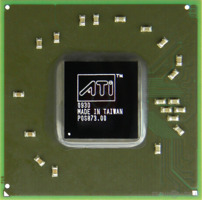

 eager hazel
lhr 3080 is the GOAT
 faint tangle
my 3060 ti fhr makes 2.5 a day
at 61.5mh/s
theres currently a spike on eth
so estimated proitabilities are off
eager hazel
my 3080 makes 2.80 on a normal day
faint tangle
youll make closer to 3.5 a day
 faint tangle
eager hazel
should i crank it more?
faint tangle
eager hazel
should i crank it more?
Depends purely on the bin of your gpu
It's unlikely to crash, but the hashrate will start to scale negatively when when hit your limit
eager hazel
lol
modern walrus
proven canopy
Round 2 $5 gpu competition
https://oc-esports.io/#!/round/CheapaChipsR2
https://...
when does round two start for the other competitions?
modern walrus
proven canopy
Challenger?
crap just saw you replied. ya challenger
zenith palm
eager hazel
but i came home to 10.50
Nice hash per day thing is very temperamental
Only way you'd be making that much is if that screenshot was a year ago
short blade
eager hazel
lhr 3080 is the GOAT
nicehash profitability calculator is not reliable
eager hazel
short blade
nicehash profitability calculator is not reliable
yeah but i’m curious as to what caused it to go so high for that long
zenith palm
Weird fluctuations in market value can cause that, their calc in client is pretty weird, their web calc is decent
eager hazel
zenith palm
Weird fluctuations in market value can cause that, their calc in client is prett...
ah
potent fiber
I finally tried out an actual undervolt guide. Usual peak at 2000ish MHz & 1.05v-ish was 200w-ish. 20% (peak) power savings for 5% lower clock is pretty beast. I also checked a 900mv setup & even that still beat stock boost too. 

 zenith palm
Yeah undervolting+ oc is great
short blade
got a "driver overran stack buffer" bsod, is that oc related? never seen it before and it's not in that list of bsod causes
haven't updated drivers recently
sudden torrent
short blade
got a "driver overran stack buffer" bsod, is that oc related? never seen it befo...
Buffer errors are usually memory overclock yes
short blade
is it possible to be cpu cache?
sudden torrent
short blade
is it possible to be cpu cache?
Possibly. Anything connected to a buffer.
short blade
i increased cache by 5mV and it hasn't happened again
i passed extreme1, anta x arshia, and 4 hours of linpack xtreme so idk
i was hoping it wasn't the ram oc
zenith palm
short blade
i increased cache by 5mV and it hasn't happened again
If you wanna test cache, p95 small fft it 
short blade
zenith palm
If you wanna test cache, p95 small fft it <:KermitEmperor:659807936985432077>
I did 4 hours of linpack
 short blade
p95 makes intel laptop do a bit of thermal throttling
not sure if it's useful for undervolt testing
zenith palm
short blade
p95 makes intel laptop do a bit of thermal throttling
Oh right you where on laptop nvm
short blade
well I'll try it anyways
time to shower while it's running and hope it doesn't burn down my house
currently thermal throttling from 4.6ghz to 3.6ghz
this is fine
wait I forgot to disable avx512 LOL
gonna run avx2
proven canopy
zenith palm
If you wanna test cache, p95 small fft it <:KermitEmperor:659807936985432077>
That's just L2 cache though, maybe set a custom size and watch main memory read bandwidth in hwinfo to test L3
short blade
well prime95 is finding hardware errors
guess linpack doesn't work very well for testing an undervolt on a laptop with thermal throttling
think i need to redo cpu lm? or this is fine

bouncing between 3.9-4.0ghz all core in small ffts avx2
zenith palm
proven canopy
That's just L2 cache though, maybe set a custom size and watch main memory read ...
Ahh alright i thought it used l3 as well... Good to know thanks
zenith palm
short blade
well prime95 is finding hardware errors
You're welcome :)
proven canopy
Just depends on the fft size, iirc smallis meant to fit entirely within L2
I think p95 tries to guess based on your chip - or maybe reads L2 size like cpuz does
zenith palm
Why not get it to span across l2 and l3?
modern walrus
4900mhz all-core on CB R23 with 10900K is not the stock setting, right?
single-core R23 runs about 5230mhz. I think I remember that 10900K boosts up to 5300mhz on single core but that all-core seems really high
(for stock)
 steel zephyr
Not the result I was expecting... https://hwbot.org/submission/4989595

HWBOT
The GeForce GTX 1650 (GDDR5)scores getScoreFormatted in the 3DMark - Time Spy benchmark. Bavorranks #null worldwide and #1 in the hardware class. Find out more at HWBOT.
modern walrus
steel zephyr
Not the result I was expecting... https://hwbot.org/submission/4989595
I think you broke it
sudden torrent
steel zephyr
Not the result I was expecting... https://hwbot.org/submission/4989595
Your actual score is the GPU score not the overall
So 4285
steel zephyr
The other submissions are using the overall score.
sudden torrent
They're not supposed to, report them
That's a GPU benchmark so only the GPU score counts
All someone would have to do to top the charts is use a better CPU than the other guy if overall was allowed
steel zephyr
If it goes by GPU/Graphcis score only than more than half the submissions for many GPUs on the leaderboards for Timespy scores are wrong because they are all submitted with overall scores. There is a separate ranking for GPU score only. I looked at the rules and it shows both a 3DMark Timespy and a 3DMark Timespy (GPU). I submitted mine just for timespy and not timespy (GPU).
Here is the separate Timespy GPU score https://hwbot.org/submission/4989617

HWBOT
The GeForce GTX 1650 (GDDR6)scores getScoreFormatted in the 3DMark - Time Spy (GPU) benchmark. Bavorranks #27 worldwide and #1 in the hardware class. Find out more at HWBOT.
sudden torrent
You're right I misread it. I thought it was the GPU score category.
steel zephyr
I was a bit confused because if its GPU scores only, many submissions would need to be removed.
sudden torrent
The hwbot site is really terrible on mobile. Half the page is cut off.
steel zephyr
When I look at the site on my phone, I end up turning the phone sideways to view the rest of the page.
sudden torrent
For some reason if I do that on my phone the keyboard pops up and blocks most of the screen
In fact this keyboard just likes to pop up and say hi a lot
sterile flame
one of my VRMs likes to get pretty hot, about 82 degrees when I'm running PBO
any solution for this?
zenith palm
What's your vrms at?
sterile flame
whenever they hit 83, it throttles
 static oasis
MSI a320mA pro vrms get to 110-120 🥶
sterile flame
Using PBO in my bios and now only half my cores are turboing to about 4.6 and the other half are at 4.1
tf
zenith palm
sterile flame
Using PBO in my bios and now only half my cores are turboing to about 4.6 and th...
If you're reading in bios that makes sense lol
sterile flame
no It's in ryzen master
zenith palm
Oh yeah don't use ryzen master and bios, they conflict, I'd recommend just bios thi
sudden torrent
Don't say I didn't warn you #old-cooling message
zenith palm
sudden torrent
Don't say I didn't warn you https://discord.com/channels/500085440221806603/5001...
They seem to be blind to reading their vrm temps lol
digital dirge
What vssca/vssio would be recommended maximum daily for 12th gen? I have ballistix 3200c16 32gb kit e-rev that I can't seem to get better than 3600 16-19-16-36
modern walrus
zenith palm
Oh yeah don't use ryzen master and bios, they conflict, I'd recommend just bios ...
for me Ryzen Master was affecting my settings even after I uninstalled it lol
This finally got rid of it: https://www.amd.com/en/support/kb/faq/gpu-601?msclkid=8bb30c26ce7011ec8ec16a145bb78bc8
says it's for graphics drivers but worked for me for Master
proven canopy
World's fastest 2060 https://www.3dmark.com/3dm/75048531

3DMark.com
Intel Core i9-12900K Processor, NVIDIA GeForce RTX 2060 x 1, 32768 MB, 64-bit Windows 11}
proven canopy
I think my mount wasn't great, only gained ~30 mhz over stock volts 1.3 vs 1.09

HWBOT
The GeForce RTX 2060 (TU106) @ 2295/2050MHzscores getScoreFormatted in the 3DMark - Time Spy benchmark. Forksranks #null worldwide and #1 in the hardware class. Find out more at HWBOT.
Also, that 22k cpu score
sterile flame
sweet
sudden torrent
That's only 5% short of my 3060 overclocked on air, very nice
potent fiber
https://www.3dmark.com/compare/spy/28034451/spy/12275976# (what's up w/ these clocks on the 1080? Pretty sus). I just felt like looking up highest gfx score from a 1080. That 2060 sure is a moderate amount higher than my 1080 doing 8400ish
3DMark.com
zenith palm
modern walrus
for me Ryzen Master was affecting my settings even after I uninstalled it lol
That's odd
modern walrus
XTU did it too
proven canopy
potent fiber
<:Pepe_KEK:830213485089652757> https://www.3dmark.com/compare/spy/28034451/spy/...
Why is the 1080 average clock only 1500
My effi on the time spy run isn't great, might be Windows 11 or lack of a good os tune, unsure
potent fiber
proven canopy
Why is the 1080 average clock only 1500
Yea idk, lol. I'll post my own run later & the average clock iirc was 1950+ MHz.
 jaunty dome
What does overclocking do exactly?
sudden torrent
Makes clock speeds higher mostly, which can make other numbers go higher like benchmark scores and fps
jaunty dome
So makes computer better?
sudden torrent
It can, done properly
Modern hardware you can squeeze about 5-10% more fps out of it without doing anything too crazy
proven canopy
More 2060 pics https://i.imgur.com/jig6Br6.jpg
https://i.imgur.com/YY6bep7.jpg
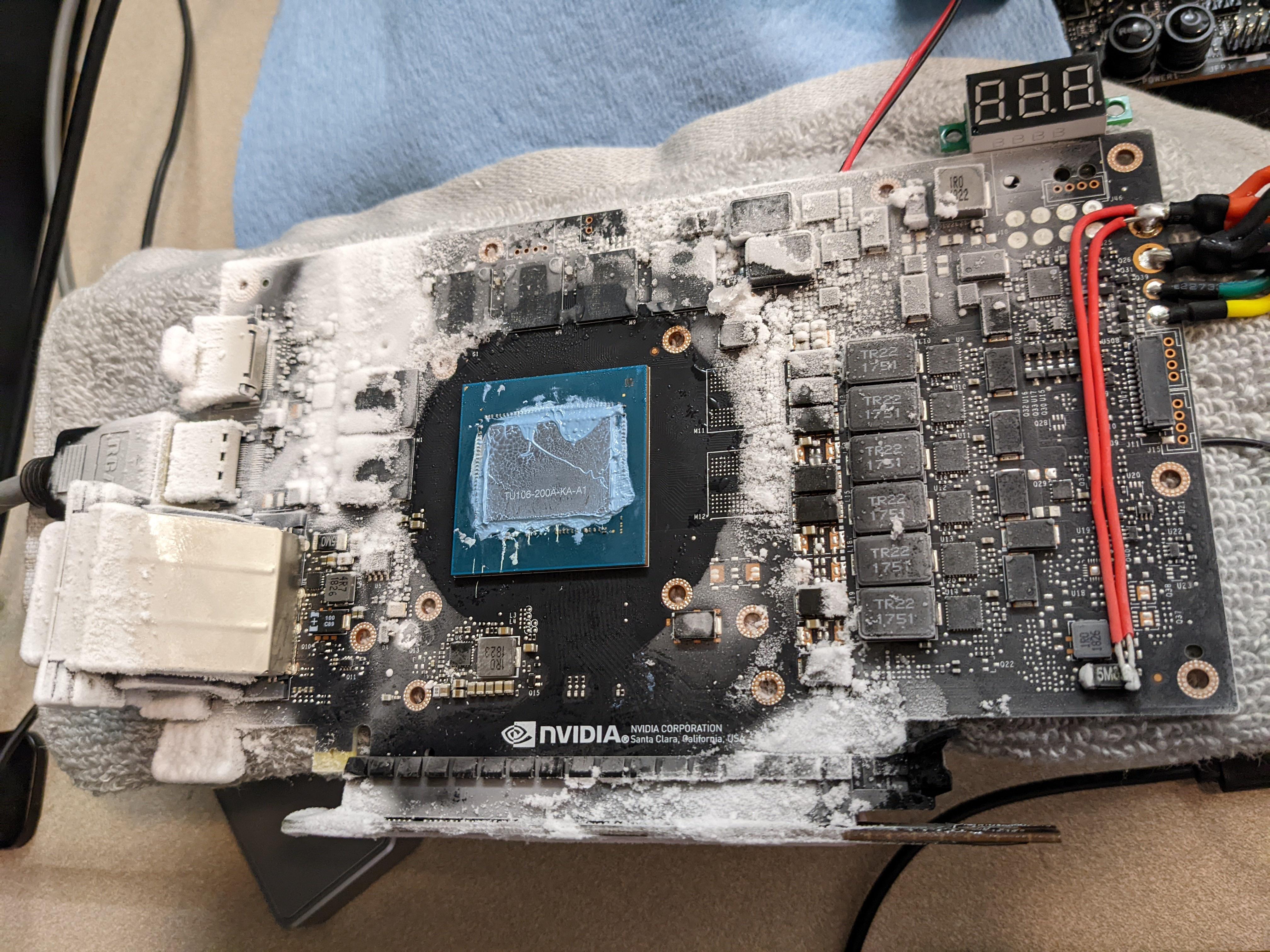
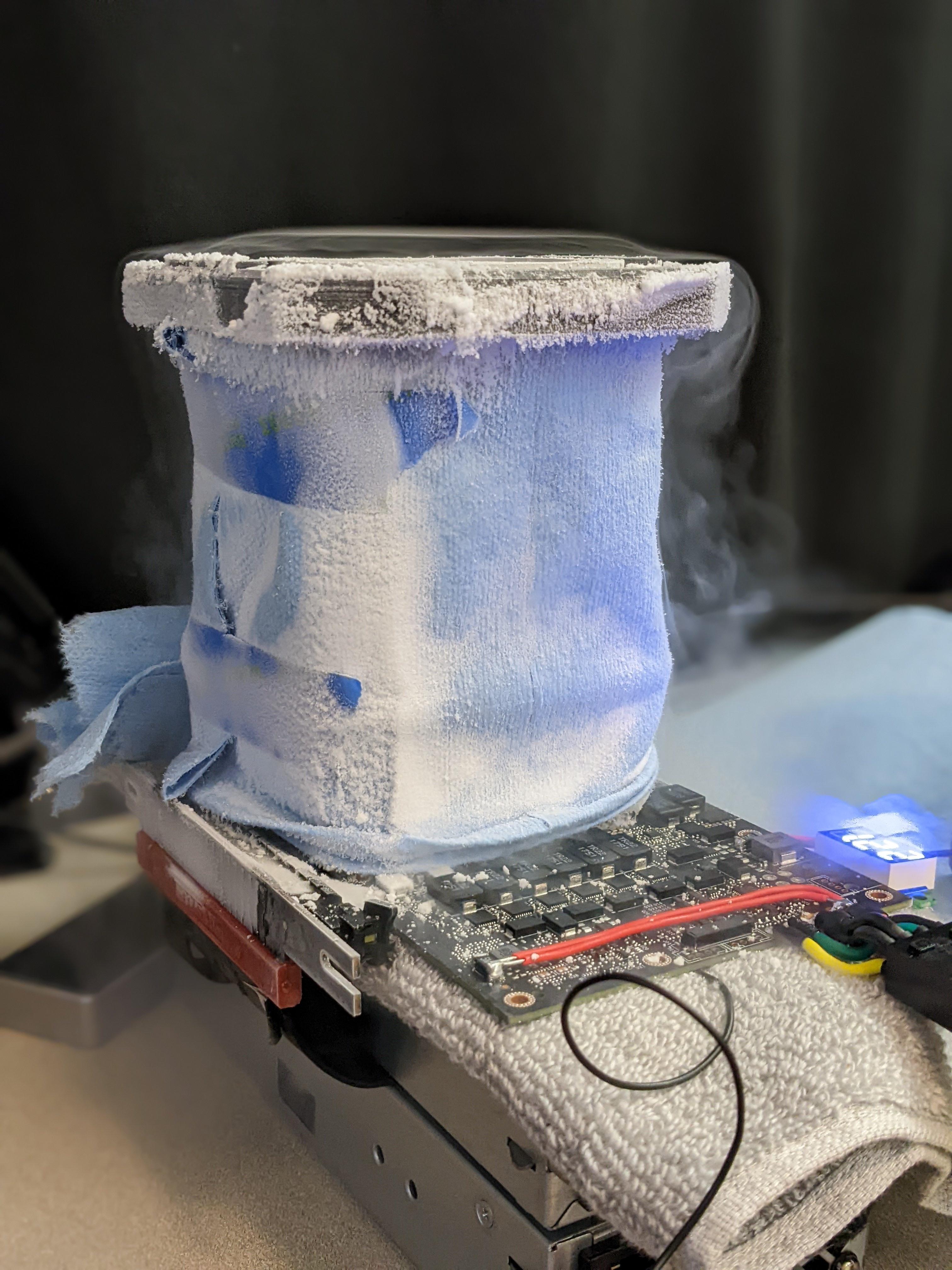
I think the memory got too cold, was doing +1500 last session, only +1200 this time for 2050 mhz true clock
faint tangle
suffering from success
 distant jasper
I have this 32gb 3200 c14 and someone told me i can push it to 4000mhz if i pushed the voltage to 1.5
Ive been doing a lot of tweaking in the bios and nothing seems to be working
faint tangle
distant jasper
I have this 32gb 3200 c14 and someone told me i can push it to 4000mhz if i push...
it wouldnt surprise me fi you could get 3600c14 or 4000c16, depending on the kit
distant jasper
Check this out on @Newegg: HP V10 RGB 32GB (16GBx2) Gaming RAM 3200 MHz DDR4 CL14 1.35V Desktop Computer LED Memory Kit - 48U45AA#ABC https://www.newegg.com/hp-32gb-288-pin-ddr4-sdram/p/0RN-000Z-00P47?Item=9SIARDJGJ84632&Source=socialshare&cm_mmc=snc-social-_-sr-_-9SIARDJGJ84632-_-04282022
It was this kit specifically
Its bdie so it should be fine
faint tangle
hp (derogatory)
distant jasper
Yeah ik i had my suspicions at first
faint tangle
im not the best in ram ocing but you should be able to get it pretty high
what cpu?
distant jasper
12700k
With a tuf z690
It even advertised it in the description to manage to get 4000 c14 but im not sure what coltage
Maybe it isnt enough
Even though 1.5 should do get the job done
dull ginkgo
you prob just need extra vccsa vccio and such
distant jasper
Im lost
sudden torrent
Basically adding more power to the memory controller
dull ginkgo
Try 1.2v vccsa/vccio
dull ginkgo
With b die, you could push the voltage on the dimms to 1.55v and even a bit more if you think you can cool it
distant jasper
How do i cool ram without removing the heatspreaders
dull ginkgo
Fan
 sudden torrent
System Agent is VCCSA
distant jasper
Do t see that either
sudden torrent
Asus has to be different and call XMP DOCP too 🙄
dull ginkgo
Asus might call vccio as vtt?
sudden torrent
Yeah
distant jasper
1.2 right?
dull ginkgo
yea, try 1.2 to start
 dull ginkgo
And you'll prob want to look around for vccio/vtt, it should be there somewhere, unless it has another name
I mean, to start, do like 16-20-20-40 and then pull down from there
Take it slow until you know it's stable
dull ginkgo
give it like 2 min in case memory training is taking a while
distant jasper
Restarting…
sudden torrent
Training
dull ginkgo
should still be tcl trcd trp tras
sudden torrent
Yes but they call them differently, the order should be the same
distant jasper
 sudden torrent
Probably correct
distant jasper
Ye i dont think this is workin out
sudden torrent
Hard to tell without seeing the left side
You can always drop to 3800, 4000 might be too hard for those sticks
dull ginkgo
they should be able to do it with looser timings at least
and I'd try to find vccio
decently important when you're pushing higher clocks
distant jasper
Still 1.55v?
dull ginkgo
Dram voltage? Could back down to 1.5v for now if you want
But I'd try to get vccio to 1.2
distant jasper
Have no idea what its caled in this bios version
Intead of making speeds higher what if i just lower the latency
1.4 c12 3200
sudden torrent
C12 is extremely hard to do on DDR4
distant jasper
Nvm then
proven canopy
sudden torrent
C12 is extremely hard to do on DDR4

humble jay
need more system agent than 1.2, try 1.35 for 4000 maybe, though 12700K imc is usually worse than 12900K one, and not even all of those can do 4000
Also you chose gear 1 right, the 1:1 option right above dram frequency
also also, as you increase frequency latency goes down, since the timings are in clock cycles, but yes it may be worth trying to do like 3600c14 as an easy oc
modern walrus
ever wondered what all those random voltages in BIOS are? https://hardwaresecrets.com/understanding-all-voltage-configurations-from-the-motherboard/6/ I still don't know but this helps
Hardware Secrets
Confused about what each voltage configuration on the motherboard setup really means? Learn all about them in this updated tutorial.
digital dirge
humble jay
need more system agent than 1.2, try 1.35 for 4000 maybe, though 12700K imc is u...
You seem to know about the 12th gen cpus, I had asked a question yesterday about what I could run the 12600k at vssca/vssio for daily use. I'm trying to oc my ballistix to 4000mhz, but am having trouble and it was suggested I up those values.
Do you by chance know what the max i could set those too for daily?
humble jay
vccio doesn't exist on 12th gen
digital dirge
Ah ok.
humble jay
but i mean, there isn't really an official value, it's kinda up to how brave you are, but up to 1.4v should be pretty fine
digital dirge
Ok cool. I just want to be able to get 4000/4200 out of the ram.
modern walrus
so would increasing VCC18 PCH voltage help CPU or RAM overclocks? no idea but dammit
humble jay
something to keep in mind is that some memtest (especially TM5) seem to not care about sa at all, so you should run y-cruncher 2.5b as well to validate that your SA is high enough
digital dirge
humble jay
something to keep in mind is that some memtest (especially TM5) seem to not care...
You lost me, but I'll do some research.
humble jay
TM5 is the most common free memory stress testing software (can get it here https://www.overclock.net/threads/memory-testing-with-testmem5-tm5-with-custom-configs.1751608/
y-cruncher is another stress test/benchmark (you can get it bundled here in an easy launcher: https://benchmate.org/ , or individually here http://www.numberworld.org/y-cruncher/#Download)
digital dirge
Ah yeah I know about the programs. I was meaning you lost me about the SA
humble jay
VCCSA, like if you don't set it high enough, you'll pass tm5 fine, but instacrash in y-cruncher
zenith palm
sudden torrent
Asus has to be different and call XMP DOCP too 🙄
Only on amd boards cuz they don't wanna pay the 5c fee
 latent wave
whats the increment for mem for rtx 3000 series? 25 right?
zenith palm
latent wave
whats the increment for mem for rtx 3000 series? 25 right?
Mem is increments of 5 iirc
proven canopy
 proven canopy
12900k on ln2 https://www.twitch.tv/beardedhardware
 proven canopy

HWBOT
The GeForce RTX 3080 (320bit)scores getScoreFormatted in the 3DMark - Time Spy benchmark. Forksranks #null worldwide and #1 in the hardware class. Find out more at HWBOT.
Lol, still loses to my 6800xt on air
 sudden torrent
Quoth the CPU, "stop making me do degrading things!"
short blade
sudden torrent
Quoth the CPU, "stop making me do degrading things!"
i'm really not sure if i degraded it or not
my other cores are all decent it's just core 0
core 7 is handling -30 at +100 fmax
so is core 5
sudden torrent
RIP the one core it needs to run stable the most on POST
short blade
core 5 can do -30 at +150 fmax but core 7 is my most important core
so i'm focusing on where my core 7 can do -30
CPPC labels my core 0 as my best core but it's actually by far my worst core lol
it's the only core incapable of hitting 4.7
 zenith palm
sudden torrent
RIP the one core it needs to run stable the most on POST
zenith palm
sudden torrent
RIP the one core it needs to run stable the most on POST
Why is that?
sudden torrent
zenith palm
Why is that?
Core 0 is the one that the system uses to initialize. That's why when you're doing extreme overclocking and going for frequency records, you can disable all the cores except core 0.
Funny enough, at one point Ryzen Master let you disable core 0. If you did that, the system would fail post 🙃
My best core is actually core 0 so if I ever go for records I'd have a leg up. It overclocks a dream.
zenith palm
sudden torrent
Core 0 is the one that the system uses to initialize. That's why when you're doi...
Oh right i misread as core 5 was most important, was still half asleep x)
sudden torrent
sterile flame
send results

HWBOT
The Radeon RX 6800 XT @ 2550/2000MHzscores getScoreFormatted in the 3DMark - Time Spy benchmark. Forksranks #72 worldwide and #5 in the hardware class. Find out more at HWBOT.
sterile flame
sudden torrent
https://hwbot.org/submission/4951274_forks_3dmark___time_spy_radeon_rx_6800_xt_2...
did he push 550mHz on the clock speed?
sudden torrent
Looks that way, +550 over reference
sterile flame

sudden torrent
Time spy page reports a peak of 2570 and average 2535
lavish tundra
on the 11th i will push my 6750XT to its limits on air
am hyped
havent done hwbot in a while
sudden torrent
That's Forks for you. His 3080 and 6800XT both beat my 3080 ti by 1000+ points
sterile flame

lavish tundra
oh btw falcie do u know about how timespy scales with ram?
sterile flame
i wonder how far i can push this
 lavish tundra
more but slower or less but faster better?
sudden torrent
Less but faster. Dual rank best.
lavish tundra
im talking 32 gb dr 3600c16 ballistix xmp vs tuned 16 gb 3800c14 highly tuned stuff
sudden torrent
32GB dual rank I should say
sudden torrent
Probably, no idea how high
sterile flame
yeah it doesnt say on there lol
lavish tundra
look at the timings i am forced to run because 4 sticks:(

the drv str timimngs there are necessary for stability
sudden torrent
Yeah those are often needed for 4 sticks
sterile flame
what're str timings meant to be?
sudden torrent
Mine are 24-20-20-20
Doing 3800 14-13-13-28
I got so lucky with this CPU and motherboard
lavish tundra
also voltage scales negatively past 1.47 or so
sudden torrent
Higher can be good for stability, especially with more sticks or higher clocks
lavish tundra
2 sticks was sooooo much easier
sudden torrent
Indeed, and if it's between 2 sticks or 4 for time spy I'd do 2 with better timings
2x16 dual rank is ideal
Of course you can always do both and just submit the better score
lavish tundra
true
zenith palm
lavish tundra
im talking 32 gb dr 3600c16 ballistix xmp vs tuned 16 gb 3800c14 highly tuned st...
Have you tried tuning to 3600cl14 or even 15?
lavish tundra
zenith palm
Have you tried tuning to 3600cl14 or even 15?
yes
zenith palm
lavish tundra
yes
Big shame :(
short blade
lavish tundra
look at the timings i am forced to run because 4 sticks:(
imagine leaving 16gb gang
that just looks like xmp timings lol
short blade
lavish tundra
also voltage scales negatively past 1.47 or so
are you sure?
did you try a VTT offset?
my rev. e scales to 1.7v and possibly beyond
haven't benched anything higher
lavish tundra
short blade
that just looks like xmp timings lol
Tis
lavish tundra
short blade
did you try a VTT offset?
Dont have setting
lavish tundra
short blade
are you sure?
Same thing isnt stable at 1.5v
short blade
might just be because of VTT
I've never seen a rev. e kit not scale past 1.5
since you have a 3200c16 kit
have you tried tRCD 19 at 3600-3800?
I wouldn't expect tRCD 18 to be stable at 3600 on a 3200c16 kit
otherwise why would they bin it as a 3200c16 kit
tRCD has 0 voltage scaling on rev. e
lavish tundra
short blade
I wouldn't expect tRCD 18 to be stable at 3600 on a 3200c16 kit
It is
short blade
how much stability testing did you do
3200c16 binned rev. e usually needs tRCD 19 at 3600
pato's does
I've had some errors intermittent enough to show up 18 hours into testing
anyways I need to study
bye for now
 obtuse adder
Hey hey!
I needs me some help overclocking a 12700k with a z690 tomahawk.
I think I got it. Nvm.
My heart just skipped a beat when I saved the settings and the PC just went, 💀
Only downside is that my PC is 2°C hotter.
 frosty violet
obtuse adder
Only downside is that my PC is 2°C hotter.
frosty violet
obtuse adder
Only downside is that my PC is 2°C hotter.
That’s not bad
obtuse adder
Ye. It's thanks to it currently being open air case.
 tall pelican
might be doing something wrong, but getting 5.2ghz
 sudden torrent
At less than 1v VID no less
 uncut bramble
Question. The memory I have (G-Skill Ripjaws V) is 3600MHz. But apparently my motherboard (Gigabyte Z690 UD AX DDR4) can only support 3200MHz max.
The XMP profile only has the 3600MHz clock, and my system very much doesn't like the XMP being set for that reason.
Is there any way to get to the 3200 clock with manual settings so I can run faster than the current (2666MHz per the BIOS)? BIOS has been updated, but no indication from looking at Gigabyte info that the update will help me in this case.
zenith palm
uncut bramble
Question. The memory I have (G-Skill Ripjaws V) is 3600MHz. But apparently my mo...
your motherboard can do 3600
just enable xmp and you should be good
uncut bramble
I had tried thar already, and I kept getting blue screen after blue screen in Windows. Didn't stop til I disabled XMP.
zenith palm
might need to mess around with some voltages
uncut bramble
Hm. Any advice on that? This'll be my first time messing around with things like that.
zenith palm
i mean it could be a bad kit from g skill but i am not really sure on safe voltage range for 12th gen but iirc you want to mess with vssca and vsscio
uncut bramble
Any way I can tell if it's just a bad kit, before I go batching voltages up? Heh.
uncut bramble
That's Greek to me. Heh.
digital dirge
zenith palm
i mean it could be a bad kit from g skill but i am not really sure on safe volta...
vccio doesn't exist on 12th gen and up to 1.4v vccsa should be fine for daily.
uncut bramble
I'm assuming this is a voltage change on the memory? And is this with or without XMP enabled?
zenith palm
mem voltage will change with enabling xmp
zenith palm
uncut bramble
Any way I can tell if it's just a bad kit, before I go batching voltages up? Heh...
no way to tell without tuning your memory controller voltage
uncut bramble
Hmm... Okay. That's not ideal, but... What's my play then? Activate XMP, see what happens, then if things go awry, adjust that voltage you talked about up towards the 1.4v?
 cedar cypress
zenith palm
mem voltage will change with enabling xmp
cedar cypress
zenith palm
mem voltage will change with enabling xmp
Could you inform me on the 100x memory multiplier vs 133x?
zenith palm
uncut bramble
Hmm... Okay. That's not ideal, but... What's my play then? Activate XMP, see wha...
activate xmp and set vccsa 1.35v to start
zenith palm
cedar cypress
Could you inform me on the 100x memory multiplier vs 133x?
do you mean like the bus clock?
zenith palm
Bus clock oc also ocs like the cpu and ram
Think you're thinking of something different or not phrasing your question in a way that i can understand 😅
uncut bramble
Does VCCSA go by any other names?
Because I activated XMP, then tried to find the VCCSA to adjust it... But the only thing I found was an Internal VCCSA setting that was locked to Auto.
Op. Scratch that.
BIOS has a mouse interface, but it only adjusts off the keyboard. Weird.
Anyway. Trying that.
zenith palm
uncut bramble
Because I activated XMP, then tried to find the VCCSA to adjust it... But the on...
Yeah internal vccsa is right
zenith palm
cedar cypress
Like by the ram
Can you send a pic?
uncut bramble
What's the best test to stress this and see how it goes?
zenith palm
Test mem5 extreme anta77 profile
uncut bramble
Op. Just blue-screened.
zenith palm
If you get one error it's a fail tho and it'll take about 2hrs
Oof
Try 1.4v i guess
Wait
Is the kit in slots 2 and 4 from left to right?
uncut bramble
Yes. DDR4_A2 and B2.


 uncut bramble
And you're certain the mobo can handle this memory at 3600, even though everything I've seen says it only maxes at 3200?
zenith palm
uncut bramble
And you're certain the mobo can handle this memory at 3600, even though everythi...
It does, 3200cl22 is the minimum a motherboard/cpu has to be stable on otherwise it's considered defective
As XMP is technically an oc
Maybe try updating bios
proven canopy
zenith palm
It does, 3200cl22 is the minimum a motherboard/cpu has to be stable on otherwise...
I think there are plenty of boards that can't run the highest jdec spec (3200c22) e.g. a 2700x on b450 with 4x8 b-die or similar
zenith palm
proven canopy
I think there are plenty of boards that can't run the highest jdec spec (3200c22...
Yes but their board is z690
short blade
proven canopy
I think there are plenty of boards that can't run the highest jdec spec (3200c22...
it says 2933mhz maximum on the 2700x spec sheet
so yeah, it's the highest jedec profile the cpu lists support for, not necessarily 3200c22
but yeah anything that can slot into z690 is officially rated for ddr4-3200
uncut bramble
zenith palm
Maybe try updating bios
Latest run yesterday was after a BIOS update.
 zealous atlas
I need help with my USB Miner build. I have recently purchased 4 GekkoScience Compac USB bitcoin miners and to overclock them at max capacity I need 3A of current supplied to each of them. Thus I need a powerful USB Hub. The problem is that this is a tricky search and I have had no luck in finding the right product on either Amazon, Aliexpress or even Newegg. The left side sort option simply does not have a field to select "max power output per port". Can you guys help?
zenith palm
uncut bramble
Latest run yesterday was after a BIOS update.
Maybe try manually changing it to gear 2 like forks said
uncut bramble
zenith palm
Maybe try manually changing it to gear 2 like forks said
So XMP and change the BIOS setting to Gear 2?
zenith palm
Yeah
uncut bramble
Alrighty. Stand by.
 restive cargo
I haven't even really tried overclocking my 12900K yet.
That sucker runs 80-90C at stock under load.
On a custom loop.
@zenith palm What were you saying about cache voltage with the 12900K?
I got the core voltage set, but MSI BIOS kinda weird.
uncut bramble
Trying out TestMem5 with the Extreme Anta777 config.
Balls. Already reported an error. Can't read it, but something popped up in the Error status and the text block.
2 errors so far. But this configuration seems a bit more stable than before. Haven't BSOD'd immediately.
12 minutes in, 3 errors, but no crashes.
short blade
you should just stop it as soon as you see an error
short blade
can you find VCCIO setting?
uncut bramble
I think I've run across it before, yeah.
short blade
would try 1.15 vccsa 1.15 vccio
sometimes higher vccsa than needed can be harmful to stability
pato recommended 1.35 vccsa which is kind of a ridiculous amount for 3600 xmp
i run 3600 gear 1 on my laptop with 1.15 vccsa works like a charm
gets angry with anything lower though
haven't tried higher, no need
uncut bramble
Alright, so... XMP with Gear 2, and set those 2 voltages?
uncut bramble
Hmm. Okay, I guess I was wrong... Can't immediately find VCCIO... Got the VCCSA set to 1.15. Any thoughts?
digital dirge
uncut bramble
Hmm. Okay, I guess I was wrong... Can't immediately find VCCIO... Got the VCCSA ...
if it's 12th gen.. there is no VCCIO.
uncut bramble
Got it. So it'd just be VCCSA then.
zenith palm
restive cargo
<@191276897227898880> What were you saying about cache voltage with the 12900K?
For uv you want to match cache and core voltage iirc q
restive cargo
I totally don't see that setting.
zenith palm
Maybe it's not a setting on desktop then idk only ever done it with my laptop
short blade
digital dirge
if it's 12th gen.. there is no VCCIO.
interesting, didn't know that
short blade
zenith palm
For uv you want to match cache and core voltage iirc q
my laptop disagrees
core stable at -55
cache can't drop below -0 at all
zenith palm
short blade
my laptop disagrees
Interesting, throttlestop guide says 1:1 drop
zenith palm
on my laptop it's running -100mv cache and core
short blade
idk why my cache is clocked so low
digital dirge
short blade
interesting, didn't know that
Yeah I was a bit confused about it as well at first.. also.. I totally only wrote this so I could ping you. ;)
I guess I didn't really ping you though huh..
@short blade
There 
short blade

 late topaz
Might try overclocking my 6600, I've noticed its only drawing some 100 watts of power
Probably won't see a huge difference but eh
Probably will help the few games that need a small preformance bump in 1440p
faint tangle
late topaz
Probably will help the few games that need a small preformance bump in 1440p
why run 1440p on a 6600 anyways
id rather save $100 on a monitor and spend that $100 more on a gpu
late topaz
I play mostly older titles
And the newer titles I even play still run fine at high
Worst preforming game still sits at the 50s and 60s at high
And its RDR2
Which is fine at 60
(Plus I wanted a larger screen and 1080p at 27 inch sounds gross)
So yuh
zenith palm
late topaz
Might try overclocking my 6600, I've noticed its only drawing some 100 watts of ...
Only 100w of power? That sounds low
Sounds like somethings wrong
late topaz
Nah, the swft runs low
Every Yt video I've seen about the swft shows that
Around 100 watts of usage
Good to undervolt
zenith palm
What are you using to test it?
zenith palm
3d mark timespy (3d mark's demo on steam)
zenith palm
Eh probably a good 15%
late topaz
I have a few games that reach the 165fps mark
But miss slightly
So maybe an OC can help get to it
short blade
time for vbios modding
 unique oriole
I have this card https://www.asus.com/Motherboards-Components/Graphics-Cards/Turbo/TURBO-RTX2070S-8G-EVO/ and these are my OC settings https://drive.google.com/file/d/17JzXavuYazWbQwwSzvxeT1S9GFFuEcds/view?usp=sharing, not pictured but the target temp is set to 83 C how much more do y'all think I could push the OC?
faint tangle
Ocs are specific to your exact card
One 2070 super might be able to do +160 on core while another might only be able to do 90
The best way to test is to download 3dmark timespy demo on steam/from the link in the pins in this channel, and run one. After each successful run turn core clock up by 15 until it crashes
Turn it down to the last successful offset, and then do memory by 50s
And turn power limit to the highest it can go
tall pelican
Best part is, because of factory overclocks and boost curves, even doing +160 on the same model card may result in completely different clocks and performance
sudden torrent
Just like CPUs. When you simply adjust the boost behavior using PBO or XTU, depending on the burned in v/f curve you might get 2 very different results with 2 of the same chips.
Like for some reason my 5800X is +50MHz from the factory
tall pelican
They're all +50 for 5800xs (might be all of zen3) due to "target clock" shenanigans
sudden torrent
I wasn't aware of that, why even specify one thing if you're going to completely ignore it at the factory level anyway?
Which of course this makes my +150 PBO effectively a +200 over spec
sterile flame
how does the mv slider work in the AMD software? And why is it at max by default?
 dusty gulch
I also have the top spot in time spy
https://www.3dmark.com/search#advanced?test=spy P&cpuId=2316&gpuId=1391&gpuCount=0&gpuType=ALL&deviceType=ALL&storageModel=ALL&memoryChannels=0&country=&scoreType=overallScore&hofMode=true&showInvalidResults=false&freeParams=&minGpuCoreClock=&maxGpuCoreClock=&minGpuMemClock=&maxGpuMemClock=&minCpuClock=&maxCpuClock=
tall pelican
https://www.3dmark.com/spy/11620794 your cpu score is really low for a 2700x
3DMark.com
AMD Ryzen 7 2700X, AMD Radeon RX 5700 XT x 1, 16384 MB, 64-bit Windows 10}
sterile flame
Whats a high juntion temp for a 6900XT?
sudden torrent
100C
GDDR6 spec lists that as the limit and that's generally where it'll start throttling the power to the card
 finite frigate
@digital dirge
 digital dirge
What is the benefit of that? So.. at a certain freq your card is only pulling certain amount of voltage?
digital dirge
finite frigate
<@913267599779971133>
Or other way around?
finite frigate
digital dirge
What is the benefit of that? So.. at a certain freq your card is only pulling ce...
yessir
digital dirge
finite frigate
yessir
Maybe I'm to tired.. does the card run hot so you have to do that??
finite frigate
card doesnt run too hot, power draw is just too high for the freq
digital dirge
Ah so you are doing more so for the efficieny?
finite frigate
mhm
as i get higher perf with less voltage and therefore power
200w vs 150w
same perf
digital dirge
Oh ok
finite frigate
slightly higher currently
digital dirge
I'm gonna need to know all this when I get either the 3080ti or 6950xt.
finite frigate
make sure you get a "good" 6900xt, some have different dies than the others that lack voltage control
sudden torrent
There's a reason that chips perform better at lower temps too. Circuits are more electrically efficient at lower temps, and consume less power to do the same work as it would at higher temps.
finite frigate
i and a couple others call them "XTK" models
digital dirge
I was thinking of going with nitro+ , but I also want to get one that can be watercooled.
finite frigate
sudden torrent
There's a reason that chips perform better at lower temps too. Circuits are more...
mhm, less resistance
digital dirge
Whatever gpu I get.. I plan on using it for a long while and I plan on doing a custom loop once the 13900 comes out.
Idk.. I can't wait to take a week vacation to finally get my pc oced perfectly.
I still have to mess with my ram
potent fiber
here's mine. peaked w/ 32% fan, 66c, running 950mv. Sometimes it'll do 1974 instead of 2000MHz but doesnt matter. 164w peak in apex. maxed gfx excL cpu at 1080p. definitely much nicer than 200w or more.
 finite frigate
ram is a boring and week long adventure
sudden torrent
I saw today that the MSI Gaming Z 3080 with the triple 8 pin is on sale on amazon and gamestop for $850. I'd love to pick that up and slap the 450W EVGA vbios on it.
digital dirge
finite frigate
ram is a boring and week long adventure
I'm thinking of trying someone else's oc and see if that works for me. Hopefully:P. Yes I do know oc is different for everyone.
finite frigate
a 3090ti would be a very very fun investment for me
at least one of the good ones
potent fiber
investment?
finite frigate
or like an asus 3080 strix, cause those have the same pcb as 3090s
finite frigate
potent fiber
investment?
mining but also oc fun
potent fiber
GL w/ mining less and less profitable. 3090 has the toasty backside vram, idk.
sudden torrent
I guess with the new memory modules it would be better at mining
But yeah that's not exactly a safe investment right now
sudden torrent
Yes, the more dense modules though
finite frigate
which is nice
sudden torrent
Micron
potent fiber
all above 3070 is gddr6x afaik, yes. 3090 ti is denser ram so none on backside
digital dirge
I wanted to get into mining, but from the time I started my pc adventure 4 months ago til now.. it has like plummeted crazy
finite frigate
the + part is what i was wondering
sudden torrent
G6X is micron, G6+ is samsung
sudden torrent
G6+ isn't out yet, still in sampling stage
finite frigate
heat
digital dirge
Oh right
finite frigate
kaby lake sucks
intel toothpaste sucks even harder
i need 1.42v for 5.1 and 1.45 5.5 post, 1.42 is just pushing the safe limits of kaby
sudden torrent
I yolo'd 1.4v into my ryzen 2700, it survived and I set several 🏆 records
finite frigate
1.4 is the safe limit of kaby lake
ive also read 1.42 is fine
im not taking anything less than 5ghz as an aswer after delid
finite frigate
sudden torrent
I yolo'd 1.4v into my ryzen 2700, it survived and I set several 🏆 records
i hold a record for 570s lol
just because new category on hwbot
theres tons of 570s that beat me but arent submitted
sudden torrent
https://hwbot.org/hardware/processor/ryzen_7_2700/
All of the 🇺🇸 are me, I've also got several silvers
Totally crushed it on ycruncher
finite frigate
do you daily a 2700?
sudden torrent
Nah 5800X
sudden torrent
2700 was my old chip. And yes, it was painful. When I upgraded from a 1060 3gb to a 2070, the cpu couldn't keep up.
sudden torrent
All the artifacting I got on Fallout 4 agrees lol
digital dirge
I've never had anything other than this 1650s
Which has only been about a month and a half.
finite frigate
sudden torrent
All the artifacting I got on Fallout 4 agrees lol
YIKES
digital dirge
Is artifacting things like.. you can see gaps of void in between things?
digital dirge
Oh ok
finite frigate
gaps of void is just the game
sudden torrent
I had a lot of "missing texture so I see random garbage instead" kinds of artifacts
Missing textures being caused, of course, by video memory being full
That was really the first game I played that tried to use more than the 3gb vram at 1080p
digital dirge
I just downloaded Assassins Creed Valhalla yesterday... so I'm hoping I can play it at least in mid. Minimum req says 3gb while recommended says 8gb