#overclocking
1 messages · Page 99 of 1
 twilit pike

 worldly wasp
work great
 sterile flame
you're getting me a new 7900X if it breaks lol
twilit pike
 zealous orchid
Is that normal or I should change the memory clock?
zealous orchid
Is that normal or I should change the memory clock?
I think typically they enable the core voltage and set it to max
Then 100/500 is a good place to start
sterile flame
X299 TUF Mark 2, decent overclocking board or average?
Ill probably want better than decent though huh lol
 proven canopy
How many and what power stages does it have?


 sudden torrent
A few more boards confirmed for non-k overclock
https://youtu.be/1P72bCUQ1Ak

https://community.hwbot.org/topic/210553-intel-12th-gen-non-k-oc-capable-boards-bios-versions/
My Patreon: https://www.patreon.com/buildzoid
Teespring: https://teespring.com/stores/actually-hardcore-overclocking
The Twitch:https://www.twitch.tv/buildzoid
The Facebook: https://www.facebook.com/actuallyhardcoreoverclocking
#overclocking #ald...
sterile flame
Does 7zip benchmark see significant gains from faster memory?
proven canopy
Absolutely, dual rank as well
sterile flame
Nice
twilit pike
Why is 7zip being benchmarked? lol
 lavish tundra
Because speed of archiving and unarchiving is an important use case
And speed of the cpu affects it
 dull ginkgo
twilit pike
Why is 7zip being benchmarked? lol
dull ginkgo
twilit pike
Why is 7zip being benchmarked? lol
why do we benchmark a picture of a random room? cinebench, that's why
 tall pelican
Let me introduce you to superpi and gpupi
dull ginkgo
There's also just the furry donut
dull ginkgo
@zenith palm talking about furmark btw
 zenith palm
dull ginkgo
<@!191276897227898880> talking about furmark btw
zenith palm
dull ginkgo
<@!191276897227898880> talking about furmark btw
Oh I'm aware just love the description of it
dull ginkgo
lol
sterile flame
 faint tangle
Yes, fx-8150> 5600x
faint tangle
Yes, fx-8150> 5600x
facts bro
FX chips are like civics, but without the v-tec
 short blade
sterile flame
FX chips are like civics, but without the v-tec
short blade
sterile flame
FX chips are like civics, but without the v-tec
the efficiency of an 18 wheeler with the performance of a tricycle
sterile flame
9590 moment
 clever epoch
sterile flame
More cores more better
clever epoch
sterile flame
More cores more better
Both. Cinebench is basically Cores * Hertz lol
sterile flame
more cores more hertz more better
 noble bay
Anyone know how to swap windows from hardrive to m.2 without loosing data?
dull ginkgo
Could use smth like macrium reflect
 timber hound
macrium reflect worked for me to transfer my win7 and win10 systems
sterile flame
what temps i should be okay with? around 85c when OC?
sudden torrent
Under 80 is ideal on cpu, gpu can be a bit higher. Any more and it might start throttling.
sterile flame
thanks
faint tangle
Also depends on use case
Mining you want gpu core under 70c, 65 preferably, I keep mine under 50 because vram is used more for eth mining, meaning it's hotter than core
For gaming/benching technichally anything under 90c is fine but I'd be careful if it reaches 85
sterile flame
faint tangle
Mining you want gpu core under 70c, 65 preferably, I keep mine under 50 because ...
lol i have a 1050ti
seems to crash though at around +200 MHz Core clock even at 75c
but memory clock seems good at +500
faint tangle
Most 30 series cards can't even do +195 core stable
And being able to put the slider up there when idle doesn't mean it's stable
You have to do it in something like a benchmark to check if it's stable
sterile flame
faint tangle
You have to do it in something like a benchmark to check if it's stable
yup i used 3dmark demo
everything works fine now though
faint tangle
You can do +180 on core, and get through a whole bench?
sterile flame
faint tangle
You can do +180 on core, and get through a whole bench?
i have it set on +175 core and +500 memory
2488 no OC 2506 with OC
zenith palm
sterile flame
seems to crash though at around +200 MHz Core clock even at 75c
Tbf +200mhz core is pretty aggressive
sterile flame
oh, didn't know it was
my initial thought was if my cooling can handle the temp when oc'ing
zenith palm
Well you also need to have the right die and the extra power to do so
faint tangle
I only know one other person who can do +210 core on their gpu, other than 3090s
And what would be sips
zenith palm
I mean it will depend on if factory oc'd or base spec and how much power limit headroom you have
short blade
zenith palm
Tbf +200mhz core is pretty aggressive
not really for lower end pascal tbh
pretty common to push 200+ on pascal
my laptop 1050 did over +400
higher offset just means it's not as optimized out of the box, they're getting better at doing that now
since there's actual competition and all
zenith palm
short blade
not really for lower end pascal tbh
Ahh fair enough not experienced with gtx 1000
short blade
my 1070 FE could do +255 as well
not sure about my 1080ti cause i had to undervolt it bc zotac dual fan
zenith palm
 sterile flame
I have a 1070 but never really tried overclocking it much
I just put +400 on memory and called it a day lol
sterile flame
I have a strix OC so I definitely have some headroom
sterile flame
Does memory matter a ton for wprime? If it does, what types are ideal?
proven canopy
Not really
sterile flame
what about y-cruncher? besides capacity
proven canopy
Yes, likes dual rank, depends a lot on platform
sterile flame
could you elaborate on that some more?
proven canopy
lol, clock high time tight, e.g. figure out if 48c14 vs 4133 c12 is better. Work on timings like wrrd s/l/faw, scl's, stuff that improves avx2 bandwidth.
Check top subs, all the usual stuff, can't give specific advice without specifying a platform.
sterile flame
alright, thanks
proven canopy
So what chip/memory?
sterile flame
I havent checked what this ddr3 is using since it's probably crap anyway, but it's dual-rank, 8-8-8-21 1333mt
then there's the single rank hyperx stuff that's 1600mt 9-9-9-24
proven canopy
enable locked pages in memory with gpedit, try server 2019 or 2022 if you want. Also check the ycruncher website's documentation, great writeups.
Also test the different memory mapping options, the default is usually fine
sterile flame
alright, ill keep that in mind
 humble jay
(use an OS that can actually pass y-cruncher)
don't find out that you can't pass at stock with this iso several hours into ln2 session
 potent fiber
sterile flame
then there's the single rank hyperx stuff that's 1600mt 9-9-9-24
potent fiber
sterile flame
then there's the single rank hyperx stuff that's 1600mt 9-9-9-24
Both those 1333 and 1600 isn't great timings, just like my 1866c10 HyperX. I thought of at least trying 2000c10, but it's my daily.
sterile flame

https://hwbot.org/submission/4925701_farawaythrower_cinebench___r15_xeon_e5_1680_v2_1733_cb
https://hwbot.org/submission/4925722_farawaythrower_cinebench___r20_xeon_e5_1680_v2_3657_cb/

HWBOT
The Xeon E5 1680 v2 @ 4747MHzscores getScoreFormatted in the Cinebench - R15 benchmark. FarawayThrowerranks #null worldwide and #3 in the hardware class. Find out more at HWBOT.

HWBOT
The Xeon E5 1680 v2 @ 4770.5MHzscores getScoreFormatted in the Cinebench - R20 benchmark. FarawayThrowerranks #null worldwide and #1 in the hardware class. Find out more at HWBOT.
faint tangle
Is it normal for +700 mem on a 3050 ti to be unstable?
It seems very low for a 30 series mobile card
Could be pl ig
short blade
not sure about 3050ti, both of my 3070M could do above +1600
what's the stock speed?
might be lower binned g6
if they're using the same chips they were putting on turing ya definitely plausible
short blade
pretty easy to check yeah
faint tangle
Stock would be what it runs at under stress with no oc, right?
short blade
ye
dull ginkgo
I'm thinking about benching my 2070 and getting some hwbot points, have a 3800x, most of the CPU benches require benchmate, but 3dmark won't need benchmate, correct? GPUpi has an option for benchmate in the rules, but I'm not sure if that'll be required or not?
faint tangle
dull ginkgo
I'm thinking about benching my 2070 and getting some hwbot points, have a 3800x,...
if you do use 3dmark, make sure you install the proper systeminfo thing if you want it to count towards the leaderboards and stuff
my best bench didnt count because the newest version didnt install with timespy
dull ginkgo
Oh interesting
zenith palm
dull ginkgo
I'm thinking about benching my 2070 and getting some hwbot points, have a 3800x,...
Nope if you go to benchmarks then category it will show the bench's and there's a rules thing, it will say in there if benchmate is needed
Also benchmate is cool, if it's an option i would use
dull ginkgo
zenith palm
Nope if you go to benchmarks then category it will show the bench's and there's ...
Ye, but rules for CPU benches specify different rules for AMD and Intel chips on dif windows versions, was wondering if the same rule applies to GPU benches rules
zenith palm
Ahh fair enough
 wind shore

So if I have in bios. It’s set to 1.3. For core voltage. Io and SA
And it isn’t going to 1.3
What’s that mean
sudden torrent
wind shore
What’s that mean
The voltage will drop when it's under load. If you want to reduce the amount that it drops you want to change load line calibration settings in bios. On most boards, higher LLC means less droop. Too high can be a problem. Level 3 or 4 is usually good.
wind shore

@sudden torrent if I understand this.. I need to turn down my voltage?
Or does it mean my cpu needs more voltage.
Like it was going above the limit
sudden torrent
Does it show that when it's idle or under stress test?
sudden torrent
Ok. Sounds like it's too high voltage which is tripping the board's protections and throttling, maybe.
There's ways to bypass that but... Those limits are there for a reason. Usually vrm stress reasons.
sudden torrent
Yeah and it's complaining about IA being too high
sudden torrent
Probably
wind shore
Core is ok tho
Also.. my fans when I turn on pc or restart
Are on like extreme
Any reason why?
Lol
Once my pc is on windows it turns off(icue has to be open)
sudden torrent
Bios post test
wind shore
Does 1.3 ia sound high to u?
sudden torrent
It sets the fans high to check for failures
sudden torrent
I'm not too familiar with Intel overclocking
sudden torrent
You can't turn off post. It's there for your protection,making sure all the hardware is working enough to boot.
wind shore
I have vccio and system agent voltage
Hmm
Gf has the same thing on her pc
Same message
But her cpu isn’t overclocked lol
sudden torrent
I don't know, that's not even a sensor on amd and I'm only somewhat familiar with Intel
sterile flame
wind shore
I have vccio and system agent voltage
iirc, VCCIO controls the CPU IMC voltage, as for VCCSA I'm not sure what it refers to, though im pretty sure both affect memory stability. what CPU are you overclocking?
im gonna try and guess, ivybridge or sandybridge?
wind shore
Lolll
But yeah it’s showing without overclock
The same message
Must be irrelevant
sterile flame
oh wait it's showing vccio and vccsa in hwinfo64 right? its not a thing in bios?
wind shore
Haha no it’s my monitoring stuff
Ill send it again

I set it higher than what it’s putting on…
I set it to like 1.3
And it’s doing lower
sterile flame
hmmm
So you set that voltage to 1.3v in bios right? Did you use an "adaptive" option or fixed
wind shore
Fixed
sterile flame
Do you need it to be at 1.3?
Also can you show exactly which voltage hwinfo is showing that is?
That's vcore vid right? What do you have your current/power limit set to in bios?
proven canopy
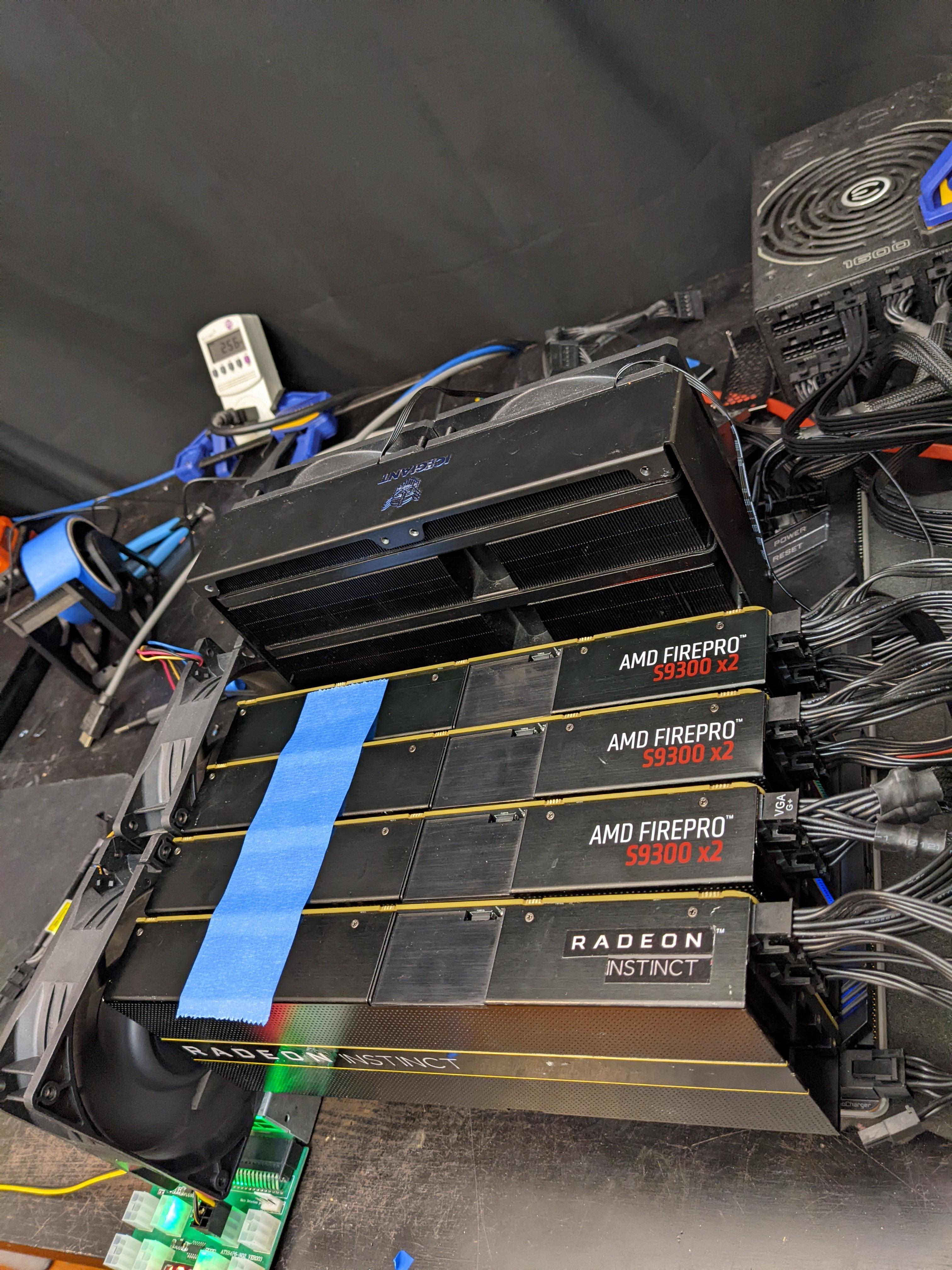
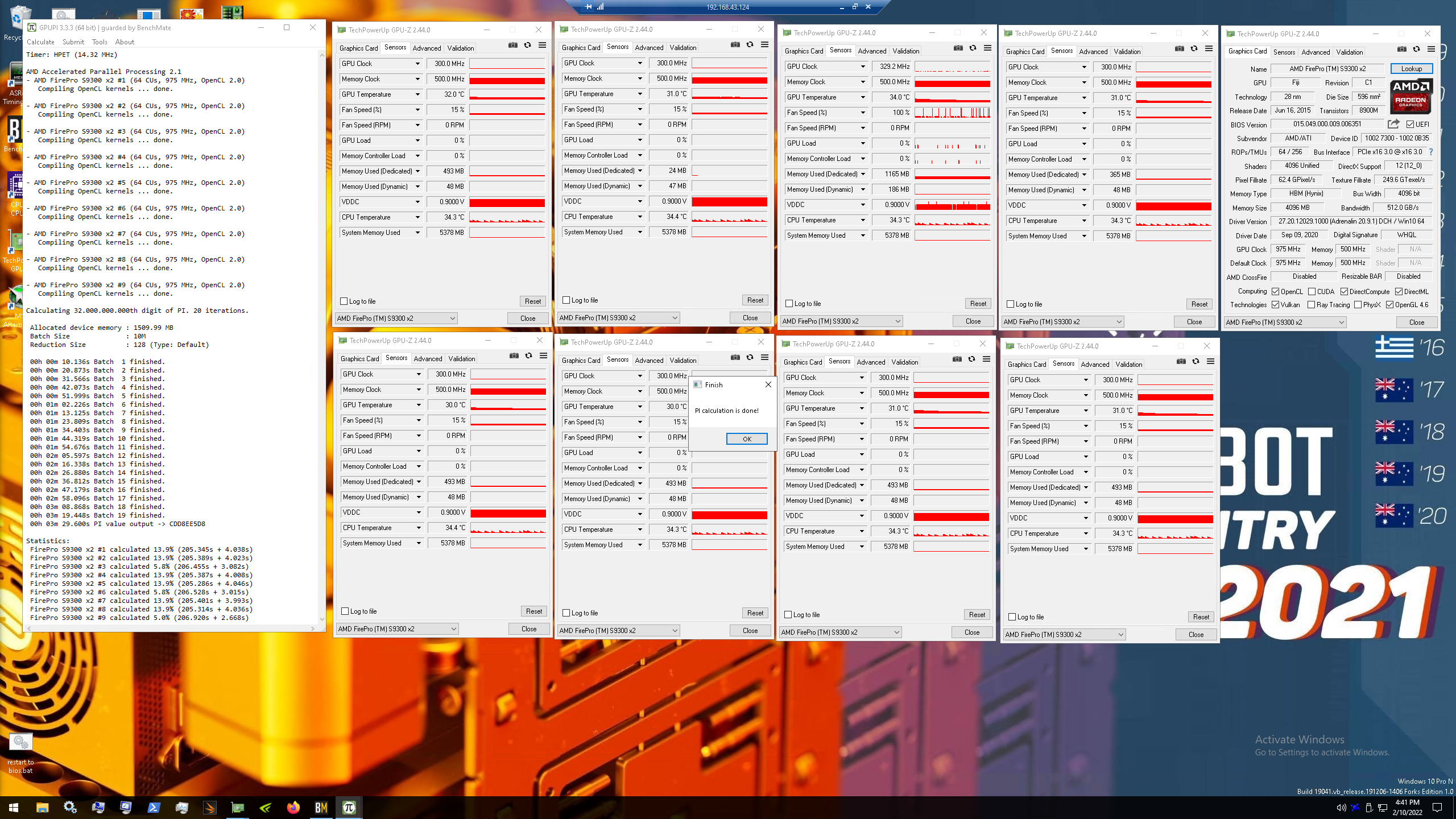
First time benching amd cards
https://i.imgur.com/Vdejpns.jpeg
https://i.imgur.com/essrOwj.png
 wind shore
@sterile flame would it be not going over 1.27.. bc of SA voltage??
@proven canopy forky
So I have core voltage 1.32 SA and vccio 1.3
But my core voltages stay at 1.23-1.26
Lol
Is there something wrong
proven canopy
wind shore
<@456226577798135808> would it be not going over 1.27.. bc of SA voltage??
No
wind shore
What’s it mean?
proven canopy
What's what mean?
wind shore
Ok so I think I figured it out

= V max stress needs to be off?
@proven canopy
Or is my cpu damaged or something
proven canopy
You need to raise or disable some voltage/power limits in bios
sterile flame
^
clever epoch
VID is only what the core would request at stock voltage
 modern walrus
should I really need 1.64v on DRAM to get 4400c16-17-17-36? XMP is 4000c17-18-18-38 at 1.4
sudden torrent
Depends on silicon lottery
sudden torrent
Yeah I figured lol, no other die will do that speed/timing
modern walrus
my 10900K has a potato IMC I think
ya true
micron rev e? eh
DJR could do the frequency but timings heck no
sudden torrent
Rev E might do 4400 16-9-19 or something, not flat timings
modern walrus
it won't even let me set tRCP & tRP different on my Gigabyte board
now it's running at 1.58v
wth is going on I'm so confused
sudden torrent
It's possible but unlikely
modern walrus
well sorry let me be more specific
PCIe errors
the last time I had these, I was using a crappy 1x to 16x PCIe adapter to run two GPUs lol
pretty sure that's a record

but it was those same PCI/PCIe Bus Errors
sudden torrent
I don't suppose your bclk is overclocked
sudden torrent
Then it's probably some pci device, but keep in mind things like usb are also connected by the pci bus
modern walrus
I was thinking it might be my external HDD
but I disconnected that
& still get the same heckin nonsense
sudden torrent
Check all your headers too
modern walrus
aside from those, the only thing could be either (1) the GPU riser, (2) the USB 2.0 expansion thing, or (3) the USB 3.1 connection
there are fan controllers connected to the motherboard USB too
but I've never had issues with any of those 4 things
but maybe over a certain frequency they start to have issues
hm
ya it has to be something that has nothing to do with RAM
I just booted at 3900 & I'm at 137k errors already
hmm
what does that leave then...
I'd prefer not to remove each USB connection from the motherboard but I think that's where we're headed
hmm
could it possibly be because I disabled the services associated with the Razer chroma box?
sudden torrent
Well it's easier to save a profile and revert to stock first to test if it's the overclock
modern walrus
since I was going to reinstall OC after all this was done
ya true
I'll clear CMOS & boot
still have errors
with bone stock everything
sudden torrent
Then it's probably some hardware, unlikely to be software
modern walrus
I'm going now to msconfig
& re-enabling every service
including all 7 Razer services
heckin stupid razer
still getting them
HECK
I disconnected my USB hub
if that doesn't get rid of it I'm totally out of ideas lol
still doing it
what on earth is causing this I don't understand
I guess I'll reseat the PCIe adapter
I really don't want to reseat the NVMes
dull ginkgo
Does any of the GPU benches care about memory?
sudden torrent
Not particularly
dull ginkgo
huh
 sudden torrent
Interesting. New rule?
dull ginkgo
Maybe
hm?

Why is that not valid..?
the link for reference
https://www.3dmark.com/3dm/71960178

3DMark.com
AMD Ryzen 7 3800X, NVIDIA GeForce RTX 2070 x 1, 32768 MB, 64-bit Windows 10}
wait
@sudden torrent Do you have any ways of making cpuz/gpuz/3dmark tabs all fit nicely without covering each other up at 1080p?
https://hwbot.org/submission/4927437_mr1111_3dmark___time_spy_geforce_rtx_2070_9770_marks

HWBOT
The GeForce RTX 2070 @ 2100/8200MHzscores getScoreFormatted in the 3DMark - Time Spy benchmark. Mr1111ranks #1698 worldwide and #51 in the hardware class. Find out more at HWBOT.
sudden torrent
Not that I know
tall pelican
sudden torrent
Interesting. New rule?
very old rule, he's prob just now in enthusiast instead of whatever's before it
sudden torrent
Ah, so it's new to him rule
dull ginkgo
Probably
Gonna start working on a quick ram oc and leaving it to be tested overnight
sudden torrent
Considering strapping a 80mm delta fan to my memory since I still get errors after long tests, even at 1.45v
No idea what I would use to hold it in place though
I have zip ties I could zip to the top of the case I guess
 iron lake
@dull ginkgo
 dull ginkgo
Uh you don't want to pull that down
@iron lake pulling that down means you'll just go to lower clocks at the same voltage
dull ginkgo
Usually you just choose a spot you want the voltage to sit at, and then raise frequency to as high as you can while being stable
short blade
dull ginkgo
<@!396513761550270464> Do you have any ways of making cpuz/gpuz/3dmark tabs all ...
DSR
dull ginkgo
short blade
DSR
Doesnt affect hwbot scores or rules?
short blade
i mean you can turn it on after the benchmark if that's your concern
dull ginkgo
Alright, I'll do that soon
short blade
just for the screenshot
sudden torrent
DSR works for desktop too?
short blade
ye
dull ginkgo
@short blade while you're here, what's the next timing I should tighten after primaries, tfaw, and trc?
iron lake
dull ginkgo
Usually you just choose a spot you want the voltage to sit at, and then raise fr...
so... like that?

ughhh
short blade
dull ginkgo
<@122901618369757184> while you're here, what's the next timing I should tighten...
just follow the order in the oc guide
but do tRFC/tREFI last imo
dull ginkgo
Was there an order?
dull ginkgo
Alright
potent fiber
iron lake
ughhh
Reset it then try a simple +60 or +75 in the oc box, then glance at the curve
proven canopy
You can just press L


 dull ginkgo
yea if you get an error there that'd be realllly annoying
sterile flame
are you dailying that sysem or something? just wondering why you need 0 errors
dull ginkgo
I'm tempted to leave the rdrd and wrwr's on auto now, because that's the only thing I changed
dull ginkgo
sterile flame
are you dailying that sysem or something? just wondering why you need 0 errors
yes
proven canopy
Woah odt is high there, was IC again?
sterile flame
oh alright
dull ginkgo
proven canopy
Woah odt is high there, was IC again?
Too high for cjr?
I could go down to 60
proven canopy
ngl the only useful advice I have on cjr is keep vdimm low and buy some b-die 
dull ginkgo
:(
dull ginkgo
proven canopy
ngl the only useful advice I have on cjr is keep vdimm low and buy some b-die <:...
Is there negative scaling on vdimm?
proven canopy
I thought > 1.45 risks degradation
dull ginkgo
Yea I'm just sitting at 1.45
I thought I read cl and freq scaled decently with vdimm on cjr
I wonder what exactly test 13 is
since that's what I'm getting errors on
zenith palm
dull ginkgo
an error a hour in...
Set procodt to 40 btw
dull ginkgo
zenith palm
Set procodt to 40 btw
Thought higher helped stability?
sterile flame
my laptop crashes whenever i have HWinfo opened for a while lol
dull ginkgo
I do have a fan there temporarily
zenith palm
dull ginkgo
Thought higher helped stability?
Higher helps with voltage but that's insanely high
zenith palm
@dull ginkgo this splains better
 dull ginkgo
huh
zenith palm
Basically high proc helps with voltage requirements at cost of imc
But should be ~40
 dull ginkgo
proven canopy
The sd's might be too tight yeah
dull ginkgo
proven canopy
The sd's might be too tight yeah
Yea, 2x16, any suggestions? atm just running TM5 at auto rdrd/wrwr's to find a stable point to tighten from
proven canopy
Lol, idk anything about cjr
But those sd's could be tight-ish on b-die
rdwr seems very tight
dull ginkgo
rdwr and wrrd are on auto iirc
if they're on manual I'll change them if this gives me errors
 dull ginkgo
good nuff
 dull ginkgo
lmfao I just went up 200 pts on time spy from turning off the nvidia overlay, exact same settings
 short blade
proven canopy
39 hours in, cycle 2 <:LaughingSunshine:568916806304137257>
short blade
proven canopy
39 hours in, cycle 2 <:LaughingSunshine:568916806304137257>
dare you to do anta x arshia instead
proven canopy
I should probably edit the cfg to run more cores with a smaller batch size
short blade
you will die of old age before anta x arshia completes
dull ginkgo
Forks, quick question about hwbot, should I remove my previous sub if I'm going to post a sub with a better score on the same bench and same hardware?
proven canopy
No
proven canopy
You can't delete subs, and better scores will automatically replace the lower subs
dull ginkgo
Alright, thanks
short blade
and will have a link that says Not Mr1111's best submission
if you do make a mistake on a sub and need it deleted you can ask in hwbot server
dull ginkgo
I should prob join hwbot discord
short blade
i had to delete a bunch of subs when benchmate decided to screw up the screenshots
was only SSing half of my screen for whatever reason
dull ginkgo
the heck happened to benchmate here

0mhz frequency
unstable?
Hmm
Going to just reinstall benchmate
???
 sterile flame
i hope you dont have as many issues with benchmate that i did
sterile flame
dull ginkgo
???
I think you have to run the installer as admin
I had that issue once and im pretty sure that fixed it for the time being. you're on windows 10 right?
sterile flame
I did the same thing before lmao
modern walrus
anyone have a registry entry that disables all of windows security crap? was gonna use it for bench SSD since real-time protection keeps enabling itself on restart
lavish tundra
@modern walrus
modern walrus
thank you kind sir
modern walrus
lavish tundra
<@808772530017665024>
did he do an update of OS btw?
lavish tundra
strip.zip is what u want
lavish tundra
modern walrus
did he do an update of OS btw?
Not as far as i know
proven canopy
modern walrus
anyone have a registry entry that disables all of windows security crap? was gon...
Don't use regedit to disable defender, do it through gpedit, and you'll have to change it if you use my iso.
proven canopy
lavish tundra
Not as far as i know
Been meaning to do that for some time now - will get around to it eventually.
modern walrus
proven canopy
Don't use regedit to disable defender, do it through gpedit, and you'll have to ...
okay thank you. I'll find the command online
proven canopy
You could use a powershell command, or just do it this way https://i.imgur.com/LCGcQoE.png
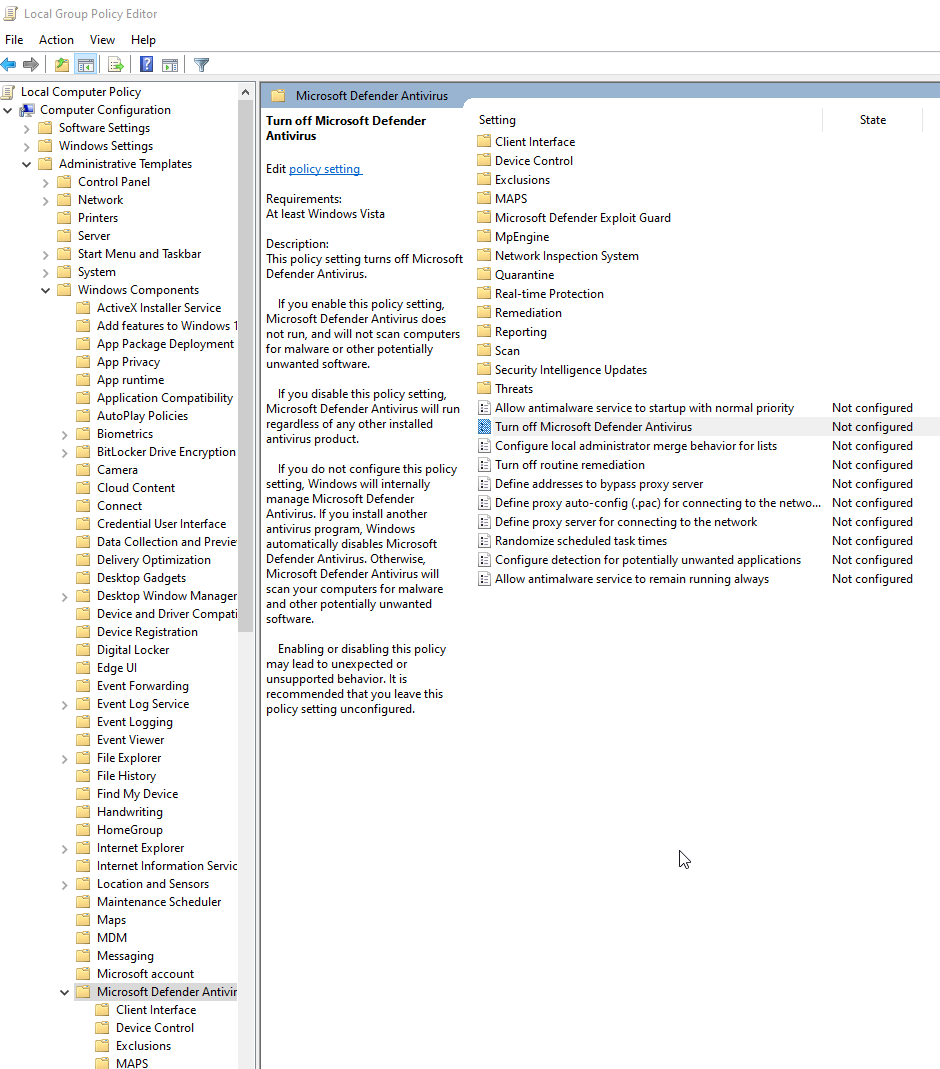
If you want to use your own windows iso, can run this stripper script. Stock 21h2 + that script can be slightly more efficient in some benches than forks1.iso
proven canopy
Sure, that same script will mostly work, a lot of the commands probably won't work, but it shouldn't crash or anything
modern walrus
until I disabled real-time protection, I was getting a better SuperPI-1M score in regular win11 than on benchmark iso
is it possible win11 might run faster if stripped?
just throwing crap out there, we all know I don't know much about this lol
I did run some tests earlier to find best thread for "set affinity." It's probably more of me wasting time for OC but oh well lol
 sudden torrent
Nothing to do but try it. Worst case you waste some time.
modern walrus
sudden torrent
Nothing to do but try it. Worst case you waste some time.
make benchmate work on linux plz
lol
proven canopy
You always want to set affinity and priority for 32m
make a batch file that launches 32m through psexec
sudden torrent
modern walrus
make benchmate work on linux plz
I could
In a VM
proven canopy
e.g. C:\WINDOWS\system32\PSTools\Psexec.exe -accepteula -d -realtime -a 1 Z:\TOERAM\super_pi_mod.exe
modern walrus
sudden torrent
I could
In a VM
probably would run slower than regular win lol
proven canopy
Here's an xp waza / launch 32m script
If you want to run that in server 2k3- need to edit the copy commands a bit as 2k3 doesn't have xcopy
modern walrus
proven canopy
You always want to set affinity and priority for 32m
I did for 1M. 32M kept crashing my computer for whatever reason
proven canopy
I mean, it's very memory intensive
modern walrus
proven canopy
e.g. C:\WINDOWS\system32\PSTools\Psexec.exe -accepteula -d -realtime -a 1 Z:\TOE...
is PSTools something I have to download? damn I'm so clueless my bad
proven canopy
Nah you're good, yeah
I wouldn't think of it as "I have to do all these things to get a 32m score"
It's more that 32m has been around for 20+ years so people have figured out all kinds of stuff to optimize benching it
modern walrus
ah okay
I was running it with PBO on but I think the magnitude offset(s) is too low & causes crash
proven canopy
Read gtijason's post here
https://community.hwbot.org/topic/167622-spi32m-help-needed/
and https://forums.evga.com/Basic-Tweaks-for-running-SuperPi-m536503.aspx
HWBOT Community Forums
Hi Guys. It's getting time to learn Spi32m for me now. Is one of the pros willing to make a short tutorial how to set up Windows(with tweaks), and how wazza works? Just from the view angle of having absolutely no clue at all how it works. You guys would help me alot Thanks already in advance =)
modern walrus
oh btw
I know you don't like Cinebench
but I noticed something on there earlier
 proven canopy
I don't dislike it, just not interested in it personally since it's just core scaling
modern walrus
I tried Medium but I think it lowered my score by 200pts or so
any idea what those are?
been trying to find it, just not getting direct answer
I did see where someone suggested running at 800x600 resolution for better score lol
proven canopy
No idea
Offscreen render + priority are the only CB tweaks I know lol
I don't spend a lot of time on CB haha
Do you have an asus board by chance?
modern walrus
I do for 5900x yes
proven canopy
Rather than pbo - I would just set a manual single ccx oc with reasonable voltage and set affinity to that core
modern walrus
oh okay I'll check that out
modern walrus
proven canopy
Rather than pbo - I would just set a manual single ccx oc with reasonable voltag...
do I disable whatever the AMD version is of hyperthreading is for that too since it lets me pick threads?
modern walrus
I see
proven canopy
Oh, actually, read this https://community.hwbot.org/topic/207932-how-to-git-gud-at-zen-3-superpi-benching-an-informal-guide/
HWBOT Community Forums
To start: I believe you will need OS boot mode to be in CSM for the OS itself to work, but for the installation process, I don't remember if it needs CSM or UEFI. When you download anything to bring to your bench OS, such as tools or benchmarks, download from a daily OS to a USB, and then boot fr...
modern walrus
I was looking at the numbers for the 9 people ahead of me (only out of 15 for 5900x) & they're all running cl12 & like 5100+ on single core
proven canopy
That writeup by sparky will get you 90%+ of the way to a good 32m score on amd
modern walrus
if my FCLK throws tons of WHEA errors but is otherwise functional over 1900, is it better to stay at 1900 or just ignore the WHEAs?
like is the measure of whether FCLK can go over 1900 whether it runs in windows or whether it runs without errors?
proven canopy
Use 21h2 64 bit instead of the 1809 he recommends btw
proven canopy
modern walrus
like is the measure of whether FCLK can go over 1900 whether it runs in windows ...
Without errors
modern walrus
will do.
can voltage tweaks fix the errors on FCLK or is it just silicon lottery & don't bother
proven canopy
I mean, at best, might let you run 33 mhz higher? idk
I have little experience with zen3
modern walrus
ya true
proven canopy
Really though, give that sparky guide a read
modern walrus
& then what? I get 66mhz on RAM? not really worth the errors I'd imagine
definitely will
proven canopy
Well, with gdm off (as the guide recommends for 32m) you won't be able to run ram real fast anyway
modern walrus
oh ya I heard it's a nightmare stabilizing gdm off
not quite as hopeless as trying to get 1N command or training IOL/RTL on my Aorus Z590 Ultra w/ 10900K but up there
proven canopy
I mean, you just have to run lower clocks and maybe looser timings, that's all there is to it
It's not a "nightmare" in that I don't think it's any less finicky than normal amd memory overclocking
modern walrus
I think the highest I POSTed with 1N was 3600
proven canopy
if you want an easy memory overclocking experience, run intel with a safeboot and retry button lol
modern walrus
haha I'm pretty sure both my MSI & Aorus boards have safeboot enabled
the AMD overclocking experience is annoying if you don't put a lead on the 2 pin Clear CMOS header so you can just put a little piece of wire in it to clear instead of navigating the screwdriver under the video card
proven canopy
Amd has a built in safeboot that doesn't work well. The asus amd boards have the buttons, but they don't work at all.
I meant that both of those buttons actually work on asus modern intel
modern walrus
the clear CMOS button is nice but the computer is positioned so that I have to get my ass out of the chair to push it lol
zenith palm
modern walrus
the clear CMOS button is nice but the computer is positioned so that I have to g...
Hook up reset switch to clr cmos 
modern walrus
good idea but it's far enough away that I can't reach the reset switch either lol
guess I could grab the two-pin cable I used for OC on the other computer, cut end off, & splice some long wires on
lavish tundra
zenith palm
Hook up reset switch to clr cmos <:stonks1:839967161845284956>
Yes the rawr oc method
modern walrus
lavish tundra
Yes the rawr oc method
here's my "I hate Intel & I hate Aorus Z590 Ultra" method
zenith palm
lavish tundra
Yes the rawr oc method
Patent pending?
zenith palm
modern walrus
here's my "I hate Intel & I hate Aorus Z590 Ultra" method
Why?
 lavish tundra
zenith palm
Patent pending?
lavish tundra
zenith palm
Patent pending?
Yes
zenith palm
I mean 1.64v do you have a fan on that thing?
lavish tundra
Ggood
modern walrus
will have the waterblock on this week
lavish tundra
Buy rev e
modern walrus
lol I'm too invested
zenith palm
1.64v seems a bit high for 4000c15?
modern walrus
I have 6 sets of RAM rn
zenith palm

lavish tundra
Indeed
zenith palm
Have you tried lower voltages?
modern walrus
until I had to
lavish tundra
Its poopy b die probably
zenith palm
zenith palm
Have you tried lower voltages?
Can help with stability sometimes
zenith palm
Also io/sa voltages look a bit high imo
modern walrus
4400c16 is kinda stable ish
zenith palm
Lol go to sleep
modern walrus
I think my IMC is IMtrash
zenith palm
modern walrus
4400c16 is kinda stable ish
 modern walrus
or conveniently that works as I'M trash [at mem oc]
modern walrus
for why tho lol
lavish tundra
Lighr on the imc
modern walrus
if ya'll wanna throw some spaghetti, I'm running out of noodles
lavish tundra
Sell ur b die
modern walrus
just give me your best DRAM/IO/SA voltages
zenith palm
I'm not at all familiar with ram oc on intel but sips has told me 1.3/1.3v io/sa is safe - i think sa higher for 11th/12th gen is okay but don't qoute me
modern walrus
I hit the same walls regardless of whether I'm using my 4000c17-18-18-38@1.4v kit or my 3200c14-14-14-35@1.35v kit
ah I heard limits for daily were 1.4/1.5 IO/SA
the guide says some people run bdie daily up to 1.65v
I think on water I could go bananas up to 1.8 for benchmarks
no plans to do that as of yet
zenith palm
Some do with a fan or 2 pointed at it but you live in like Florida or something right? Not great for b die because hot
zenith palm
Does your sticks have temp sensors?
zenith palm
What temps where you getting?
modern walrus
lately that's the only thing I like about g.skill
32-34C as of last time the damn thing POSTed
before I got the stupid corsair thing
I was testing 4400 & it would run fine
until it hit 48C
zenith palm
Yeah that should be fine, if you want to run it daily tho keep in mind you only have 6-8c of ambient headroom before it starts erroring the crap out
modern walrus
then boom BSOD
zenith palm
B die preferably under 40c
modern walrus
my motherboard is so strange
4200-4300 is like this abyss
never gotten either set to POST in that range
zenith palm
Some mobos don't have the multipliers for it
modern walrus
4400 tho? ye
like rn
I bumped it to 4400 & gave it .200v of System Agent
& 4400 worked & windows came on
with flat 17s
but c17 on bdie? at 4400?
that's so garbo
wait
2,250x2
4500 oops
heck I wonder if this'll work lol
couldn't finish y-cruncher 1B but no BSOD yet
guess I'll see what's up with 4500c17-18-18-38 real quick
& when that inevitably fails, try 4500 flat 18s
maybe it's like breaking the sound barrier, once you get past it it's smooth sailing?
zenith palm
@proven canopy just a suggestion but maybe have this for the tm5 link instead?
https://www.overclock.net/threads/memory-testing-with-testmem5-tm5-with-custom-configs.1751608
Includes a guide on how to do and a few cfgs

Overclock.net
Hello everybody
I am just making a very light tutorial with a collection of custom config files and a DOWNLOAD LINK for TM5 v0.12
anta777 absolut config Official Intel DDR4 24/7 Memory Stability Thread
None of the work is mine but it seems like a pretty good and fast testing app
modern walrus
anyone done RTTs on an MSI board? Not sure if I need to enable/disable any settings in DRAM Training Configuration to make this work...
sudden torrent
modern walrus
anyone done RTTs on an MSI board? Not sure if I need to enable/disable any setti...
I've got mine at 40-20-20-28 ohms respectively to do 3800 14-13-14-28. I've got dram latency enhance on "msi setting". Read and write training on auto, which I think defaults to 0. You can max out out if you're having problems training.
modern walrus
Is that on AMD or Intel?
Damn I should tune my AMD RTTs also
That's a great idea
because otherwise I can only do 3800c14-15-15-21
modern walrus
I'm at 1.58
No idea why that bdie never has temp issues
But it doesn't have temp sensors so I don't even know if it's that hot
Also I have 2 70mm little bad ass fans above them
47cfm 4500rpm lol
Not bad for a 70mm
They're loud tho
Bgears b-Blaster 70 Cooling System, Black https://smile.amazon.com/dp/B073V1M8VZ/ref=cm_sw_r_apan_glt_i_GRVQVMB14YZ3957F8FZW?_encoding=UTF8&psc=1

Bgears b-Blaster 70 Cooling System, Black
sudden torrent
Fans by it would be the reason it's not having temp issues lol
It's not like you need to liquid cool it, a little breeze and it's happy
modern walrus
Those work better than that stupid $65 joke corsair ram fan thing I got
Well soon I'm liquid cooling the bdie on my 10900K
I already got the EK monarchs
I de-lidded the ram & put the new spreaders on alreadyn
I'm also going to de-lid & direct die cool the 10900K with liquid metal
Conformal compound, pipe, fittings, direct die kit, everything is here. I just gotta actually get it done
sterile flame
when it comes to overclocking where do i start?
sudden torrent
Start with the pinned messages
proven canopy
sterile flame
when it comes to overclocking where do i start?
So, I know I put a lot in the pins, but honestly, give hwbot a look over and see what the competitive scene it like, that's what got me interested https://hwbot.org/
modern walrus
is it a bad idea to change DRAM Power Limits from auto? lol
proven canopy
No, it's unlikely you'll run into them though
sterile flame
proven canopy
So, I know I put a lot in the pins, but honestly, give hwbot a look over and see...
exactly
the competition is compelling
modern walrus
ya not sure why they allow them to 4056 on DRAM lol
sudden torrent
That is weird. It doesn't even line up with a binary number, the nearest would be 4096
 clever epoch
modern walrus
I have 6 sets of RAM rn
clever epoch
modern walrus
I have 6 sets of RAM rn
How many months did it take for you to go from
"Oh, I have crap CJR"
to this? 😂
I also may have 6 sets in my household as well :p
proven canopy
short blade
10W for the dimm and 4046W for the RGB
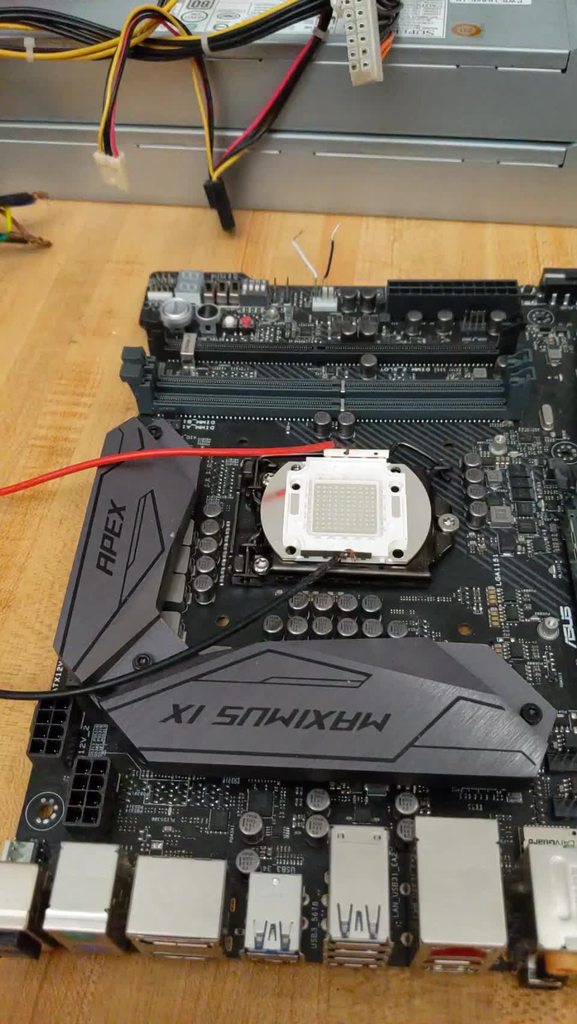 proven canopy
I've actually never tried pushing high voltage on those, I don't have a psu that could do > 33v @ > 3 amps lol. Would have to make one
I could make something really cursed with 3 server psus in series...
It's "fine" as long as you let each ground float
short blade
@proven canopy how much performance gain could I actually expect going to b-die at 1440p ultra?
proven canopy
Idk, could look over faris's benchmarks for loose b-die vs tight to get an idea
short blade

my zentimings at 1.53
might be possible to do cl 13 and 280ns with cooling
280ns is stable downstairs but not upstairs it seems lol
short blade
15c ambient difference between downstairs and my room
is it going to be large enough to notice without an fps counter? lately I've noticed games are more fun when that is turned off lol
proven canopy
Could be, especially if you get good sticks
short blade
I can't really tell the difference between 90 and 240 fps with the counter off ngl
starts getting noticeable below 90
proven canopy
Not sure if it'll do anything, but you can floor all the wrwr/rdrd's to 1 with 2x8
short blade
c9blm is supposedly the best bin of rev. e
proven canopy
I want to convince sips to upgrade from 2x8 rev.e to 2x16 b-die
How much performance do you think he can net on that chip? 3090 gpu
tall pelican
Sottr was a solid 15-20% behind from dr reve to dr bdie on my 3900xt
modern walrus
clever epoch
How many months did it take for you to go from
"Oh, I have crap CJR"
to this? �...
lol it was AJR & about uh 7 lol
tall pelican
Like 190 vs 215
And idk how bad 3090s are, but 6900xt is cpu bound in majority of games
short blade
my rev. e will do 3800 13-18-12 1t gdm off
might be limited to 1.5vdimm or so on b-die
modern walrus
short blade
15c ambient difference between downstairs and my room
waterblock it lol
tall pelican
Primaries are cool and all, but trfc and terts are massive
short blade
my full zentimings are up there
I know I can cut that tRFC by more than half with b-die
terts probably, not sure
short blade
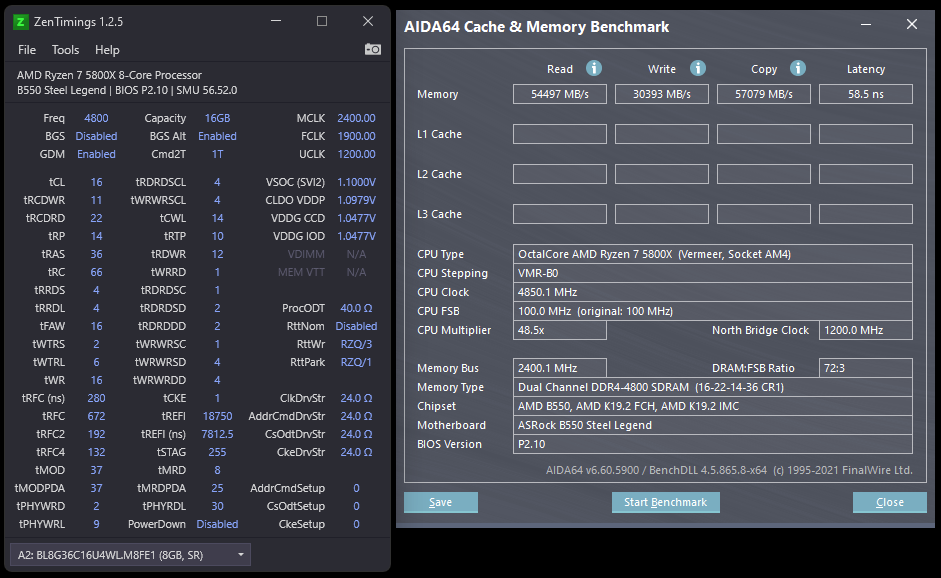
had to go up to 22 when I was playing with desync
my primary concern with b-die is temps
cannot get my rev. e dimm temps below 49c with no rgb, a 120mm fan blowing 100% at the ram, open case, 1.53v, at nighttime, in the middle of winter
6 intakes at ~70% besides the fan on the ram
modern walrus
remove spreaders?
sudden torrent
short blade
<@546791995830566912> how much performance gain could I actually expect going to...
I could do some testing for you if you can't find the info you want, I've got the same cpu. I can try to match your current memory timings and compare to my best overclock.
And if you're worried about temps on b-die slap a 80mm fan over it
sudden torrent
Just noticed you're running 4800 desyc too. How's that vs 3800 synced?
Figured lmao
short blade
oops
I forgot
but yeah that was just for fun I don't actually run that
just wanted to see what the dimms could do
sudden torrent
short blade
https://media.discordapp.net/attachments/828044837935775784/939339609672912936/u...
I'll go by this one then for trying to match timings. Obviously not all will work, especially rcdwr.
short blade
don't feel obligated, if you want to try it for fun go ahead
sudden torrent
But it should be easier with such loose rfc
Yeah it would be a fun little time wasting project
short blade
I'm thinking my next upgrade is just going to be ddr5
in every game I try I'm usually either GPU bound or game-isn't-demanding-enough bound
sudden torrent
What do you think I should use for benching? I'm thinking assassin's creed and a couple other games of varying demand
short blade
AC valhalla is the most skewed in favor of ram oc lol
sudden torrent
Precisely why I picked it lol
short blade
5800x + 3800c14 rev. e + 3080 beats a 5900x + 3600c16 xmp + 3090 by over 20% in that bench
at 1440p ultra even
I dunno, I don't usually play games that are pushing the limits of my hardware
getting into lost ark recently which runs at 1440p ultra locked to monitor refresh rate no problem
both CPU and GPU are barely working
short blade
free game that came out recently
super hyped
long queues to log in on launch day
3070 chilling at like 40%
doesn't budge from 162 fps
I honestly didn't get to test much of anything on the 3090 since I broke it almost immediately
clever epoch
short blade
cannot get my rev. e dimm temps below 49c with no rgb, a 120mm fan blowing 100% ...
Sounds like horrendous spreaders or a really hot GPU. I can't get my FlareX or Trident kits above 40 without GPU load (even with no fan)
sterile flame
assuming the price doesnt go up, I was considering getting two of these kits https://www.newegg.com/amp/oloy-16gb-288-pin-ddr4-sdram/p/N82E16820821411
 bleak saddle
i figured it wouldnt work on consumer crts
those are the lower end ones, right?
with fewer features
sorry wrong chat
zenith palm
sterile flame
assuming the price doesnt go up, I was considering getting two of these kits htt...
I'd consider the this kit too
https://www.amazon.com/dp/B09NLBNLZ4

Patriot’s Viper Steel memory modules are designed with true performance in mind. Built for the latest Intel and AMD platforms, our Viper Steel DDR4 memory provides the best performance and stability for the most demanding computer environments. The Viper Steel memory utilizes a custom designed hi...
Still 92$
zenith palm
https://www.amazon.com/dp/B07KXLFDL6 or this one

Patriot Memory’s Viper Steel memory modules are designed with true performance in mind. Built for the latest platforms, the Viper Steel series provides the best performance and stability for the most demanding computer environments. The Viper Steel utilizes a custom designed high performance alum...
Ye
Oh nvm
Coupon for that one gone
sterile flame
hmm yea i might get that one
the first one you posted
plus it doesnt have the obnoxious rgb which is good
sterile flame
Yea
zenith palm
I can't tell what Voltage the xmp is but eh should be better bin anyway for cheaper
sterile flame
pfft who cares about voltage
just get more cooling
also doesnt bdie usually not do flat timings at high frequency? or was the ddie or something
zenith palm
sterile flame
pfft who cares about voltage
Well voltage of the xmp can also help with the bin
sterile flame
yea ik lol
zenith palm
zenith palm
https://www.amazon.com/dp/B07KXLFDL6 or this one
@sterile flame this one is flat 19s lol?
Not sure i think it can do flats at high voltage still
Basically everything on b die scales with voltage
sterile flame
on a random note:
im gonna try trading an x99 board and my decent x299 board for a good overclocking board
Then again it'd possibly be more profitable if I sold each board at around 150, since I could probably find an x299 dark for around 170 or strix gaming ii for around 220 if i looked/waiting long enough
humble jay
sterile flame
assuming the price doesnt go up, I was considering getting two of these kits htt...

yes
sterile flame
Ill probably be getting those patriot dimms instead 😔
humble jay
3600 bin though, but white oloy blades have a special place in my heart
 humble jay
 sterile flame
hmmm alright
humble jay
rocket lake can run 1T on dual rank though, so that's a bonus
but 1T single rank is better than dual rank 2T for this bench
sterile flame
What about pifast and wprime?
humble jay
i'm pretty sure those are like, completely cpu frequency based, at least pifast was a nightmare for the country cup 2021
was locked 5ghz
and my 3600 10-10-10-21 performed worse than someone elses XMP sOOOoooO
sterile flame
jeez
so superpi is just different then
I should probably google how each of these calculate the digits of pi
humble jay
but yeah, as long as you get a kit of DDR4 that does 4000 12-12-12-28 at least, then you're good
sterile flame
you wanna see what 7900X submissions I'm really gonna try to beat? lol
humble jay
3DMark.com
Intel Core i9-7900X Processor, NVIDIA GeForce RTX 3080 x 1, 32768 MB, 64-bit Windows 10}
this is the only bench i remember doing for 7900x lol
kinda terrible cpu score it looks like

https://www.3dmark.com/spy/13518981 here is better one
3DMark.com
Intel Core i9-7900X Processor, NVIDIA GeForce GTX 1060-6GB x 1, 32768 MB, 64-bit Windows 10}
sterile flame
humble jay
https://www.3dmark.com/spy/14884699
16.68 times better than an average office PC 

HWBOT
The Core i9 7900X @ 5970MHzscores getScoreFormatted in the Cinebench - R15 benchmark. Luumiranks #null worldwide and #1 in the hardware class. Find out more at HWBOT.
I doubt ill beat splave's score let alone lumi's
but it's a goal
humble jay
6Ghz on X299, yeaaaaaahhh gl
sterile flame
lmao
this guy went nuts
I do want to at least beat der8auer's score
i probably wont be an absolute ln2 noob by the time im on x299, so that's something at least
and yes i know im underestimating the difficulty of their submissions
the thought of actually getting top 10 against these guys is just exciting
humble jay
terrrrrrible video of me going through the bios settings for the daily OC on my brother's 7900X QS before updating bios

Google Photos
i don't remember how stable it even was tbh
maybe not daily, but ig it passed TM5 and seemed stable enough
sterile flame
that reminds me, i gave my x99 ocing hardware as an upgrade for my brother's system
modern walrus
do tuned RTTs reduce the required DRAM voltage to run better tCL, etc or do they just reduce the IO/SA voltage requirements?
sterile flame
he had some crapping skylake i5 before
humble jay
modern walrus
do tuned RTTs reduce the required DRAM voltage to run better tCL, etc or do they...
it just helped me run higher freq, don't remember if i lowered sa
modern walrus
& you were running 1.35/1.45 for IO/SA if I remember correctly?
 sterile flame

HWBOT
The Core i9 7900X @ 6304MHzscores getScoreFormatted in the CPU Frequency benchmark. Splaveranks #null worldwide and #1 in the hardware class. Find out more at HWBOT.
modern walrus
okay I need to figure this out here.. do tuned RTTs allow you to (1) run at higher frequency at the same IO/SA voltage; (2) run tighter timings at the same DRAM voltage; (3) both 1 & 2; (4) run the same frequency at lower SA/IO; (5) run the same frequency at lower DRAM voltage; (6) both 4 & 5; or (7) something else?
sudden torrent
Here's a puzzler for you guys.
I used to be able to run 3800c14 at 1.5v on my b-die. I had it running like that with no issues or errors.
Now, if I try to boot with my memory above 3600 my mouse and keyboard don't work when I boot. If I hit the power button it shuts down normally so it's not locked up.
Have I degraded my memory controller, the memory, or the motherboard? I'm barely able to get it to boot at 3600 with straight 14s, and it errors on memory tests.
short blade
have you changed bios version? @sudden torrent
sudden torrent
Yes. I noticed a few whea errors popping up after a while and decided to update bios. It's gotten progressively worse since then. I updated again today to the bios released 2 weeks ago.
Being a X470 board the only recent versions are technically beta. The last stable version is from over 2 years ago.
short blade
highly doubt anything has degraded
b-die degrading at 1.5v should be impossible unless you were really overheating it or something
memory traces degrading is unlikely
vsoc... possible? not likely
what were your imc voltages?
sometimes updating bios can make ram oc worse
how long did you run 3800c14? FWIW i've had a ram oc that was seemingly stable for 3 months without turning off the pc end up popping an error
after passing 4x anta x arshia, many anta777 extreme1, 3 hours linpack, literal weeks of corecycler prime95/y-cruncher, hci memtest to 1000%/thread

 dull ginkgo
Looks like pretty good, could sub it on hwbot
https://hwbot.org/benchmark/cinebench_-_r23_single_core_with_benchmate/rankings?hardwareTypeId=processor_6348&cores=12#start=0#interval=20
modern walrus
can I use De-lidding tool I used on 10900K on 10700KF?
humble jay
Yes
modern walrus
oh yo
modern walrus
humble jay
Yes
you inspired me
good call on that kit btw
worked impeccably
I just put LM/waterblock on CPU a little while ago. Direct die is by far the way to go imo
you don't have to worry about LM shorting motherboard
unless you're a total moron & put like the entire tube
humble jay
Nice!
modern walrus
I think that 10700KF might be getting a haircut soon too lol
I'd need to get a direct die kit for it tho
why remove the IHS just to put it back on? heck that
humble jay

sterile flame
modern walrus
why remove the IHS just to put it back on? heck that
Im gonna delid my 7900X and still use the ihs 😔
sterile flame
easier in what sense
modern walrus
you don't have to put the IHS back on, the area you put liquid metal on is tiny, & eh
those two should be reason enough no? lol
sterile flame
I'm still going to use the ihs because it just gives more consistent results from the research i've done
Also I'm doing LN2 so our circumstances are a little different lol
modern walrus
look how small the die is

if you get LM on your motherboard somehow
with that huge buffer zone surrounding it
you don't deserve a motherboard lol
sterile flame
I wont be using LM either
modern walrus
well I'll see soon
 cold jolt
it wouldnt touch the edges of the die properly
modern walrus
lol heck well I'll test the theory in the next 48 hours
sterile flame
what cooler are you using?
cold jolt
modern walrus
lol heck well I'll test the theory in the next 48 hours
yeah just dont crack the center of the die when you screw it down.
modern walrus
EK uh
I forget
the waterblock
not monarch... that's the RAM
it's super flat tho
sterile flame
you're using a custom loop?
modern walrus
yes
sterile flame
nice
modern walrus
well adding to it
sterile flame
ek quantum?
sterile flame
nice, i was going to get one of those
Right now for when I do water, I just use a 360CLC
though I wanted a custom loop so I can have a fatter rad
sterile flame
60mm?
modern walrus

I'd have to look it up
I think it's like standard 27mm
but let me check
it's Alphacool NexXxos
sterile flame
god i forgot how huge 200mm fans look lmao
humble jay
cold jolt
bc die is flat cooler is not
First pic is when I was halfway lapping the core 
 modern walrus
damn I should've lapped? lol
humble jay
Nah
modern walrus
sterile flame
god i forgot how huge 200mm fans look lmao
440x200x48mm https://www.performance-pcs.com/water-cooling/radiators/alphacool-nexxxos-xt45-full-copper-400mm-radiator.html

Big is Good. Bigger is Better! Make No Compromises, Use Copper.As usual, Alphacool also uses pure copper for the NexXxoS 400 mm XT45 Radiator. The end chambers, water channels and cooling fins are all made of copper and are a unique selling point worldwide. As a result, Alphacool radiators have been among the most popular and best on the market...
 sterile flame
i would lap my 7900X's die, but if I kill it im screwed
sterile flame
yea, it isnt scary
still a risk
Ill probably do it if I need to compensate for a crappier bin than I'd like
sterile flame
sure
modern walrus
so what makes using a tool designed to pop off part of a chip so much more dangerous? lol
sterile flame
?
no im gonna delid
im talking about lapping the die
also those two are not really comparable lol
really bad analogy imo
cold jolt
humble jay
First pic is when I was halfway lapping the core <:PES_Surgeon:64608066929806540...
die not flat O_O
sterile flame
some dude just overtook my R15 1680v2 score


he either has a great bin or he's trolling
4.75GHz at 1.4V
 lavish tundra
HDR REEEEEEEE
proven canopy
Not sure what pcb that is, not sure if I'd chance it tbh.
proven canopy
Maybe google knows more, or if that render is accurate, look at the capacitor layout vs https://cdn.discordapp.com/attachments/328891236918493184/832635470005010523/ddr4pcbs-v2-prev.png

 modern walrus
I mean I'm not gonna buy it or anything
just thought it was interesting
it came out 2/2/22 according to listing
proven canopy
Interesting for sure because it's HP lol
lavish tundra
modern walrus
typical marketing garbo imo
modern walrus
exactly. I'd expect it to be crappy coming from HP
but if they're trying to break into the gaming market, maybe they did go all out cuz they have something to prove
modern walrus
lavish tundra
typical marketing garbo imo
true true
but $200 for 32gb of bdie isn't bad
proven canopy
It's about normal price for that bin over the last 3 ish years, slightly low I guess
modern walrus
oh Forks, I found your next RAM stick purchase for server
proven canopy
Can't say without knowing how the pcb OCs
proven canopy
lol what about that stick?
proven canopy
It's relatively high, yeah, those are worth around $300 used
It's a junk listing, doesn't list the actual part number, but that's also really high for not being an LRDIMM

Link to the competition:
https://hwbot.org/competition/CheapaChipsR1 GT 218/
Good quality variable resistors for your voltmods:
https://elmorlabs.com/product/variable-resistor-potentiometer-trimpot-knob-pack/
0:00 Introduction
0:10 Plugging cheapaz chips competition
2:44 Overview of the card
4:52 Replacing Vmem caps
7:16 Adding measurment p...
modern walrus
lol
I have an HP laptop from this era
I think it's a 2011 or 2012...
you think I could solder one of the 218 core GPUs on it somehow? lol
it only has integrated graphics
but it's a 17" laptop
sudden torrent
short blade
how long did you run 3800c14? FWIW i've had a ram oc that was seemingly stable f...
I highly doubt it's my voltages. SoC was 1.025v, vddp 1v, vddg 0.95v
I can't even run xmp anymore with desync fclk (4133c19) because the mouse and keyboard don't work.
modern walrus
so I imagine there's some space on the motherboard...
short blade
sudden torrent
I highly doubt it's my voltages. SoC was 1.025v, vddp 1v, vddg 0.95v
I can't eve...
yeah I'd suspect bios or it wasn't fully stable to begin with
sudden torrent
I ran it stable for a year or so
I do agree the bios is a possible culprit. I'd hate to give up the newer bios features but I'll try reverting back a couple years.
(since that's the last available version besides the beta)
short blade
good luck
sterile flame
I still gotta do something about my weird windows 10 crashing issue on my other x79 board
I'd love to get it working 100% normal
modern walrus

 wheat ether
i guess my 5900x is garbage now
lol
i was trying to get the 4.7 all core running
to do some tests and it wont boot into windows anymore
switch all core off it boots
even for craps and giggles i tried 1.35v
and nothing
faint tangle
wheat ether
i guess my 5900x is garbage now
Rma/return time?
wheat ether
eh
pbo works fine
theres prolly a setting that i changed before thats cauysing issues now
sudden torrent
Trying all core for cinebench? It's pretty useless for daily when pbo exists
wheat ether
 wheat ether
sudden torrent
Trying all core for cinebench? It's pretty useless for daily when pbo exists
wheat ether
sudden torrent
Trying all core for cinebench? It's pretty useless for daily when pbo exists
yes all core for benches
but
my pbo isnt going as high as it has before


ok there
effective clock was lower but overall is higher
and its 8496 vs 8692
imma optimize my pbo stuff
sudden torrent
Max out scalar on pbo
Yolo
Time for a new motherboard for me. I tried downgrading my bios and now it's not posting. FML
CPU light is on
I guess I could try swapping in my old 2700
 wheat ether
What
sudden torrent
 short blade
he doesn't care about overclocking but he found a cheap used bundle with a 5800x + x570 dark hero + 32gb ram
I asked if I could trade with him so I could use it for OC and he said sure lmao
also I can trade my 5800x for his if his is a better sample
in exchange I'll oc his ram

just gotta see if the deal goes through
would be cool for sure lol
wheat ether
I did positive curve score dropped 1500 in cone bench r20
proven canopy
Dark hero's a nice board for sure.
short blade
wonder if i'll be able to push past 1900 fclk
proven canopy
Probably won't want to. Also, I think that oc software I dm'd you a while ago should work on that. I'll test it on my c8h later
humble jay
proven canopy
Probably won't want to. Also, I think that oc software I dm'd you a while ago s...
If it is work tool, the latest version unlocks a ton of the tools from the old NDA version for AMD


proven canopy
The per core ccx oc on zen2 is a huge QoL improvement lol, being able to save and load profiles.
short blade
proven canopy
Probably won't want to. Also, I think that oc software I dm'd you a while ago s...
i mean if it's stable and performant i'll take it
i can go higher on this 5800x but everything goes to crap lol
4000c14 with 2000 fclk performs worse than jedec 👍
humble jay
And by core use 
sudden torrent
wheat ether
I did positive curve score dropped 1500 in cone bench r20
Negative curve is the way to go


 sudden torrent
Meanwhile mine can all do -12 to -25
short blade
 humble jay
Mine can’t do +-0
short blade
wait why does CPPC say everything is #1 now lmao what
anyways, core 0 is the only core that is unstable above 4.7 no matter what
other ones will push 4.8-4.95 in single core loads
sudden torrent
I have to do negative offset voltage of 25mV to keep it stable
short blade
i tried undervolting on top of the curve, just got clock stretching