#overclocking
1 messages · Page 98 of 1
 sacred trench
before OC I could play dense Beat Saber maps at 120Hz with minor flukes and stutters
smooth 100% through this time
pretty cool
o heck beatsaber crashed xd
im gonna try again if it crash again then i'll have to dial back lmao
 potent fiber
yep, take 15 MHz core and/or 50 on mem. Perhaps take the mem down 1 notch 1st.
potent fiber
mhm. artifacts = unstable.
sacred trench
hmm okay ill take 50 off of mem just to be sure
 tall pelican
2000 series was lower than 1000 series 
potent fiber
tall pelican
2000 series was lower than 1000 series <:LeoKek:798776990508908594>
Base clk, & not a bad thing. It's like an intel T or nonK that still boosts up near the speed of a K model. 🤘
potent fiber
Eh, they were close enough. Deffo not a bit upgrade if having a 1080 Ti 
 faint tangle
aight i need some input from other people
i started benching again yesterday but my results wont show up on timespys site
i got 12922 which is my highest result, but it wont display under the results tab when im looking at other gpus
but it does show under the my results tab

3DMark.com
AMD Ryzen 5 3600, NVIDIA GeForce RTX 3060 Ti x 1, 16384 MB, 64-bit Windows 10}
is there any way to search results other than top 100? i want to go further down the list to see around where i placed
 humble jay
faint tangle
is there any way to search results other than top 100? i want to go further down...
humble jay
faint tangle
is there any way to search results other than top 100? i want to go further down...
Did you put leaderboard instead of score explorer at top left
 zenith palm
@faint tangle make sure you're logged into the site btw
faint tangle
i am
zenith palm
humble jay
Did you put leaderboard instead of score explorer at top left
Shows up in both for me
humble jay
Score explorer has duplicates is all
zenith palm
humble jay
Score explorer has duplicates is all
Ahh yeah but this but should show up like
 humble jay
Ah yeah
 proven canopy
faint tangle
i still havent been able to fix it
proven canopy
faint tangle
i still havent been able to fix it
Try subbing to https://hwbot.org/benchmark/3dmark_-_fire_strike_(gpu)/
faint tangle
I got it
Apparently the systeminfo thing has to be up to date for things outside of hall of fame, even though it doesn't say that
Because why would they
Now every test I run is crashing when it loads the results, so I'm pretty sure it corrupted, it hasn't crashed during the test though
That or I pushed my gpu too far and it's no longer stable at what I was yesterday and earlier
proven canopy
Very unlikely that you've degraded anything - my guess is try repair the sysinfo/3dmark install
faint tangle
The stock bench finished
Fully
Knocking it down 15 on core fixed it, gonna try 195 one last time
The odd thing is
potent fiber
Modern Nvidia gpus just seem to top out right around 2100MHz right now (without extra volt/cooling
faint tangle
It gets through the whole bench
faint tangle
potent fiber
Modern Nvidia gpus just seem to top out right around 2100MHz right now (without ...
195 on core worked earlier and last night
But it crashes when it's loading results
So weird
I think two more sections for the bench left
potent fiber
+195 core? That's quite a bit tbh, even at max PL
faint tangle
Maybe one
faint tangle
potent fiber
+195 core? That's quite a bit tbh, even at max PL
I know, I was surprised that it worked
Sips can do 210 on his 3070
It can also do +1100 mem
And it also has a stock 100mhz oc on mem
It worked
12901
potent fiber
Whole different chip, and gpus vary anyways haha. Oh wait, might be same chip technically. Idk
proven canopy
For gpu clocks - always state the actual clock instead of offset, cards have different stock clocks/boosts etc
Also grats
faint tangle
 proven canopy
yeah, that's overall
faint tangle
proven canopy
yeah, that's overall
no, im searching by graphics score
potent fiber
Funny thing about my 3550, is I get to have the highest TS score with this combo. 
faint tangle
i have a 3600, im like 31% overall
potent fiber
Nice. I think at 2101MHz I was top 9% or something, on the 1080 list. I'll retest later since I reset the cpu to it's max of 3.9G all core.
faint tangle
http://www.3dmark.com/spy/25752541 if you wanna look at it
3DMark.com
AMD Ryzen 5 3600, NVIDIA GeForce RTX 3060 Ti x 1, 16384 MB, 64-bit Windows 10}
i got 210 core to go through once, i doubt ill get it again though
zenith palm
@faint tangle you have gigabyte gaming oc right? You should be able to flash the vision oc bios and get an extra 50w btw
faint tangle
zenith palm
<@654444344274845698> you have gigabyte gaming oc right? You should be able to f...
nah its 1x8pin
total 225w possible
zenith palm
You have gaming oc?
faint tangle
gaming oc pro
zenith palm
faint tangle
nah its 1x8pin
Rip
potent fiber

faint tangle
yeah, unfortunate
zenith palm
faint tangle
gaming oc pro
I'll have a look see if any higher tdp bios's than yours with 1x8pin
faint tangle
it would only increase it by a few watts anyways
i also have no clue how to bios flash and am a lil scared about bricking
potent fiber
Well what was peak watt so far?
faint tangle
not sure
proven canopy
I wouldn't chase overall percentage - look it up in leaderboard mode and you might be top 10 for your config, that's a lot cooler than 4% imo
If you have some b-die and a good aio, bet you could get #1
potent fiber
Yepper
faint tangle
proven canopy
I wouldn't chase overall percentage - look it up in leaderboard mode and you mig...
not sure, i have se-224xt and some hp 3600c18, so prolly not
and non oced 3600
proven canopy
Try pbo
faint tangle
top 5% for my config
proven canopy
Did you set anything in nvcp?
potent fiber
Doesn't many nvcp changes make a result invalid?
potent fiber
What place? Lol. Yep, 3600c16 is the general sweet spot. At least for amd cpus
faint tangle
potent fiber
What place? Lol. Yep, 3600c16 is the general sweet spot. At least for amd cpus
?
potent fiber
Place instead of %. Like top 90?
proven canopy
set texture filtering to max performance, power to to the same in nvcp, small boost in score
faint tangle
where do i set that?
proven canopy
Look through the nvcp options
 potent fiber
Yep. Look for advanced 3d settings or somthing, then there's a spot that says Global or has list of programs profiles

 proven canopy
btw - run the standalone, not through steam if you don't already
proven canopy
Up to you
potent fiber
Oh, and DL a non-steam version?
faint tangle
did price on ram go back up? cheapest 3600c16 kit i see is 82$
potent fiber
I should've bought the 32GB $98 3600c16 Ballistix kit, unless I'm misremembering
zenith palm
faint tangle
might have to invest in a 3600c16 kit...
3200 ballistix will do
faint tangle
zenith palm
3200 ballistix will do
wont 3600c16 be better tho?
i dont feel like ram tuning
zenith palm
potent fiber
I should've bought the 32GB $98 3600c16 Ballistix kit, unless I'm misremembering
It was 3200 kit but you could easy set the freq to 3600, maybe change vdim and be done
proven canopy
potent fiber
I should've bought the 32GB $98 3600c16 Ballistix kit, unless I'm misremembering
Yep, that was an incredible deal
zenith palm
faint tangle
wont 3600c16 be better tho?
Yes but 3200 cheaper, and they can oc like this, more freq if my fclk was stable above 1800mhz
 faint tangle
id check my subtimings with zentimings, but it doesnt like to work
just gives me this

im guessing theyre awful, since its hp ram
proven canopy
Do your HP sticks have heat spreaders? If not, easy to read the IC
zenith palm
faint tangle
id check my subtimings with zentimings, but it doesnt like to work
Ryzen master will work in a pinch
 proven canopy
Yeah, usually need chipset drivers for the voltages
I mean, the XMP is only the speed, voltage, and like 5 timings usually, the motherboard picks the rest
faint tangle
can you tell the subtimings off of that?
potent fiber
At least those are slightly better than my 1866c10, lol. The trfc at 600+ is high though.
proven canopy
Yes, every timing is shown there
proven canopy
But you need to know what ICs the sticks uses for further tuning advice
faint tangle
i also have no clue how to check that
proven canopy
Might as well see what thaiphoon says they are
faint tangle
i think i have that installed alraedy
one sec
what do i do from here

nvm
its reading
proven canopy
Testing some rev.b on the 10900k
 potent fiber
Should be a code on the mem stick that we can look up and almost guarantee what die they are
 proven canopy
read eeprom
zenith palm
faint tangle
here we go
Well you can set tfaw to 30 pretty safely, should do lower easily
proven canopy
potent fiber
Should be a code on the mem stick that we can look up and almost guarantee what ...
Not every brand, gskill does
 proven canopy
There you go
proven canopy
Doesn't mean anything
zenith palm
@faint tangle are you sure you only have 1 8 pin? Tech power up says all revisions if gigabyte oc pro have 1 6 pin 1 8 pin
faint tangle
zenith palm
<@654444344274845698> are you sure you only have 1 8 pin? Tech power up says all...
i can take a picture if you want
proven canopy
Just check the power limit in gpuz
zenith palm
That or pl in gpuz like forks said
faint tangle

Case was already open
And got up before you said that forkz
Cant use flash bc phone almost dead, but you can see it well enough i think
zenith palm
Looks like someone ripped your 6 pin out of the board lol
proven canopy
I'm sure that's not the case
faint tangle
maybe its rev 1 thats 1x8pin
proven canopy
Aside from how unlikely that'd be, those are thru-hole soldered and would rip off a chunk of the pcb
zenith palm
@faint tangle the oc non pro has 1x8 pin
faint tangle
it shows model in gpu-z right?
zenith palm
proven canopy
Aside from how unlikely that'd be, those are thru-hole soldered and would rip of...
Am aware you can see they just designed it with 2nd power port in mind
zenith palm
faint tangle
it shows model in gpu-z right?
I don't think so
faint tangle
it does in fact not
are there any visual differences between them?
if not then its possible i have the regular oc, i just matched them via image
because it was from a pre built
proven canopy
If you're really curious, look up the exact name of your gpu vbios, just google it
Should be listed in the techpowerup database
faint tangle
idk where to find my gpu vbios
zenith palm
faint tangle
are there any visual differences between them?
Apart from an extra 6 pin power
proven canopy
faint tangle
idk where to find my gpu vbios

Might find this useful, idk, never used it on modern cards
potent fiber
I have used it (on 900 & 10 series, of course). Hmm, min 100w? As if you'd bother going that low. Would be interesting to compare various cards at certain wattage levels like people do with cpus sometimes.
proven canopy
I've only used it on 200 series haha
potent fiber
Yeah I used it with my 260 as well
proven canopy
Anyway - should sub your scores to hwbot - rack up more team power points for :wegg:

Wish they had season team rankings as well
zenith palm
Dw imma do a load of gpu subs and mem subs now that ram is stable, exam are over and paste is here to repaste gpu
potent fiber
Almost top 10 here!
faint tangle
so how would i go about ram tuning?
proven canopy
I would check out the ddr4 guide in the pins, it'll be difficult without knowing what IC your sticks have. Honestly I wouldn't recommend doing so on your daily for now, could corrupt windows. Pick up a $20 ebay ssd like an sm841 and install w10forks.iso for benching
faint tangle
ive got a 500gb ssd in my system that i havent done anything with, i can use that
might just wait for a good b die kit on sale
proven canopy
Yeah, could disconnect your main drive to be safe, might be able to do so in bios
proven canopy
faint tangle
might just wait for a good b die kit on sale
Price range? 16 or 32GB?
proven canopy
Might be better deals at some point, but can't go wrong with this https://www.newegg.com/p/pl?N=100007611 601386107 600561668 600546709&Order=1
faint tangle
if i buy a new kit ill prolly go for 3600c16

Render in higher resolutions. Witness realistic pictures and smooth transitions. End choppy animation and catastrophic lag. Handle complex tasks with ease. Browse unlimited tabs and multitask like a pro. Do what you love faster with confidence. Sound like a dream? The new XPOWER Gaming DDR4 makes...
proven canopy
3200c16 can be any IC, not a bad deal, but that's not going to perform or oc well
faint tangle
@proven canopy im guessing this brand is less than reputable? https://www.amazon.com/Kimtigo-PC4-25600-Unbuffered-High-Performance-Compatible/dp/B091T9FKZJ/ref=sr_1_51?crid=3N6SNK4W4YNOH&keywords=ram&qid=1642805581&refinements=p_n_feature_four_browse-bin%3A10656894011&rnid=2057428011&s=pc&sprefix=ram%2Caps%2C66&sr=1-51

Kimtigo DDR4 32GB (16GBx2) 3200MHz PC4-25600 CL16 1.2V U-DIMM Unbuffered Non-ECC for Gaming and High-Performance Compatible with Desktop Memory Module Ram Upgrade PC Memory
never heard of it before
proven canopy
Read through the ddr4 guide above
Also, like I said, 3200c16 can be any IC, it's very unlikely to be anything worth the "upgrade"
faint tangle
its 32gb which is why im considering it as well
but the brand makes he hesitant
i know 3200c16 isnt inherently better than 3600c18, just a bit easier to oc
proven canopy
I'm telling you 3200c16 is a poor choice unless it's crucial
potent fiber
What you mentioned starts out w/ the same overall latency.
faint tangle
alr
faint tangle
potent fiber
What you mentioned starts out w/ the same overall latency. <:kekw:74167835079108...

Crucial Ballistix gaming memory is designed for high-performance overclocking and is ideal for gamers and performance enthusiasts looking to push beyond standard limits. With hundreds of awards, multiple E-sport championships, and numerous overclocking world records under its belt, Crucial Ballis...
crucial 3600c16
proven canopy
Not good for the price tbh, spend $20 more for b-die
potent fiber
I know, dang it's twice the 32GB price of the 3200c16
faint tangle
Alr
 proven canopy
Nice progress, post the link, also, should sub to hwbot
From the hwbot server, moscow mule mug dry ice pot on a naked laptop mobo. I love it. https://cdn.discordapp.com/attachments/662431495113277470/934321568895602688/PXL_20220122_0531498742.jpg
 proven canopy
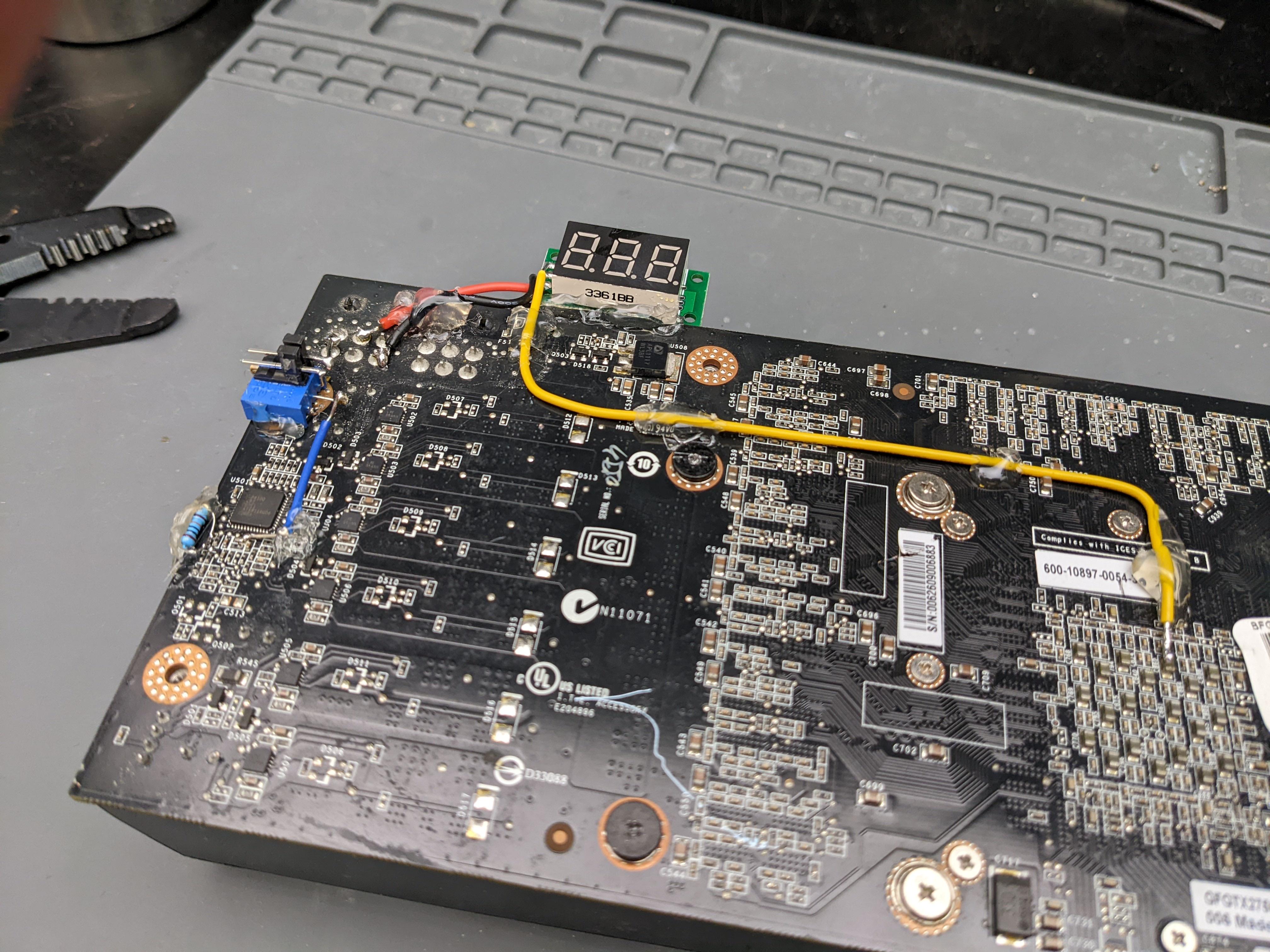
Streamed some gpu modding last night
Gtx 275 vcore, ocp, coldbug https://i.imgur.com/uP1gUHQ.jpeg
 faint tangle
proven canopy
Nice progress, post the link, also, should sub to hwbot
faint tangle
proven canopy
Nice progress, post the link, also, should sub to hwbot
Not home, I'll post it when I'm outta work if I remember
I'm like 60 pts off top 100 for 3600/3060 ti builds using pbo
 short blade
proven canopy
I'm telling you 3200c16 is a poor choice unless it's crucial
short blade
proven canopy
I'm telling you 3200c16 is a poor choice unless it's crucial
fwiw pato's 3200c16 ballistix kit seems to be a noticeably worse bin than mine and rawr's 3600c16 ballistix kit
proven canopy
That makes sense
short blade
so I think it's not worth going for 3200c16 ballistix either unless that $15 or so really makes or breaks your budget
i guess if total system price is below 700 or so it's worth considering, not like $15 will move you up a gpu tier or anything
i can run tRCD 18 at 4000, he has to run tRCD 19 at 3600
makes sense, if his kit was able to run tRCD 18 at 3600 it probably would've been binned for the 3600 16-18-18 lol
zenith palm
short blade
fwiw pato's 3200c16 ballistix kit seems to be a noticeably worse bin than mine a...
It's still 3600c14 for dirt cheap usually
short blade
those subtimings still have a performance impact
it's not necessarily bad but you have a 3070 i would've sprung for the $15 more
zenith palm
Especially if getting the 32gb kit tho, only 115$ compared to like 160$ or so for a 3600cl16 kit
short blade
adds like what 1% total system cost at most? if you squeeze out 1% more ram performance seems worth
zenith palm
Ehh am cheap lol also i just wanted something 2060 tier but 3070 was all i could get my hands on lol, anyway that 3070 has made be profit, going 3070 was an investment so my total system cost is actually like 700€ or something
zenith palm
short blade
lol if we go by that my entire rig has cost me negative money
Yes but only reason i got it was because ik it would be at least over half paid off
Also idk if the extra €20 would have been worth it
short blade
i personally think so
tall pelican
1.45 iirc
faint tangle
short blade
so I think it's not worth going for 3200c16 ballistix either unless that $15 or ...
The 32gb kit was on sale for 90$ again so i picked it up
20 minutes ago
Decided against a 16gb kit since it wouldn't be a huge upgrade, but the sale on 32gb was too good to pass up
zenith palm
faint tangle
The 32gb kit was on sale for 90$ again so i picked it up
You should put that in tech deals
faint tangle
zenith palm
You should put that in tech deals
Up to 130$ already
zenith palm
Dam flash sale?
faint tangle
Also it doesn't get here till Feb 18-20 which i didn't pay attention to, but whatever
I'm not in a rush
 sudden torrent
 clever epoch
8Gb DR CJR Max safe Voltage?
clever epoch
8Gb DR CJR Max safe Voltage?
Iirc that scales like c-die so might hit its ceiling around 1.35v, but 1.45v is technically safe for all DDR4 according to spec.
tall pelican
cjr does good cl and freq scaling, but meh trcd/rp, while cdie is just meh overall
clever epoch
sudden torrent
Iirc that scales like c-die so might hit its ceiling around 1.35v, but 1.45v is ...
There's still some early dies that risked degradation past 1.35 iirc :p
 fast bobcat
Should I overclock my ram?
faint tangle
fast bobcat
Should I overclock my ram?
depends, what cpu do you have an what speed and timings ram do you have
fast bobcat
faint tangle
depends, what cpu do you have an what speed and timings ram do you have
I got a 5 5600 i beleave idk for the ram all I know it's 8 years old and I got no budget
8 or 5
I dont really know
faint tangle
ram ocing can be very difficult
not to be rude, but with your level of knowledge about pcs im not sure it would be a great idea
 timber hound
fast bobcat
The idk how old it is
timber hound
fast bobcat
The idk how old it is
Check Manufacturing date
But if it's your first pc I would not
proven canopy

 modern walrus
anyone use conformal coating to hedge their bets using LM before?
proven canopy
Usually people use clear nail polish. Pick one that's benzene free like sally hansen insta-dri top coat.
modern walrus

was looking at that one... silicone better?

internet has lied before tho
I mean I'll probably still short the CPU & the board somehow but this lessens the likelihood I think
I think I'm gonna try it out on an old laptop
proven canopy
I've used this with good success. https://www.amazon.com/gp/product/B085G42TGS

422C Silicone Conformal Coating is a 1-part, acrylic-silicone blend conformal coating that cures to a durable, flexible and smooth finish. It is easy to apply and can be handled in only 10 minutes. It may be removed with appropriate strippers or soldered through for repair or rework. 422C is desi...
modern walrus
damn I knew I should've waited to order it
hopefully the just acrylic one isn't crap
I got some disposable lip gloss applicators to put it on cuz the reviews say the brush dries out very quickly
proven canopy
I'm sure you'll be fine
Just use qtips or something. I just use the ends of zip ties
 worldly wasp
i use a brush
 cold jolt
just use your fingers smh
 sterile flame
So, I have an i5-6600k, and my overclocking potential with my current motherboard (Gigabyte B250M) is kinda non existent even though there are overclocking options in the bios.
I'm thinking of an upgrade to a ASRock B365M Pro4-F, but I need to know it's overclocking potential for the i5-6600k, because if it's equally gonna be lacking, I honestly think I'd get better performance from my i5-4690k, which CAN be overclocked and is already quite heavily boosted. (3.5ghz stock all core to 4.6ghz all core)
Any help would be greatly appreciated
sudden torrent
sterile flame
So, I have an i5-6600k, and my overclocking potential with my current motherboar...
B250 doesn't officially support overclocking, you'd want a Z270 board. That goes for all but the two most recent generations, overclocking is restricted to Z sku boards.
sterile flame
sudden torrent
B250 doesn't officially support overclocking, you'd want a Z270 board. That goes...
You're kidding? Why would they have overclocking even present in the bios and unlocked if they don't even support it. What a load of rubbish.
So it's back to my i5-4690k then? I'm not paying that kind of premium just for overclocking when I already paid over $100 for the CPU... Looks like I really blew my money on some rubbish this time 😅
sudden torrent
That's intel for you. They make you pay the overclocking tax.
sterile flame
That I can understand. What I don't understand is the fact that a board that cannot overclock literally has the bios options.
That's just bad practice.
sudden torrent
That's mostly gigabyte's fault. They made one bios for all the boards and just selectively disabled features.
sterile flame
They didn't even disable the features
worldly wasp
sudden torrent
That's intel for you. They make you pay the overclocking tax.
amd just makes you pay the amd tax 
sterile flame
It's not greyed out, there's nothing saying it's incompatible or doesn't work, it's there, visible, and even tweakable to 4.5ghz. It just does nothing.
worldly wasp
yeah
sudden torrent
They don't really have to disable all the features, it's baked into the board design to gimp it
 dull ginkgo
B250, the chipset, disables overclocking, Gigabyte didn't do that
sterile flame
So say so instead of students like me with zero income now having to spend yet another $300 they don't have on yet another motherboard
sudden torrent
worldly wasp
amd just makes you pay the amd tax <:FeelsOkayMan:576487215878766723>
That was bulldozer era right? Late ddr3. AMD was not very competitive then
 dull ginkgo
this gen is too expensive
dull ginkgo
5800x being like 330$ at MC is the price it should've launched at
worldly wasp
12600K absolutely curbstomps 5800X and its currently $75 cheaper on newegg 
sudden torrent
Intel didn't really have an answer for it for a long time. 11900k had to overclock to reliably beat it.
sterile flame
At this point I'm effectively VSing a 4690k at 4.6ghz against a 6600k at 3.6ghz all core.
I've paid over £200 to lose an entire ghz of performance just by jumping to what is supposed to be a better chip because Gigabyte didn't put a warning saying "The chipset this motherboard is equipped with is unsuitable for overclocking."
worldly wasp
well
sterile flame
You see this is why I hate building computers
 sudden torrent
It's literally on Wikipedia
sterile flame
worldly wasp
if you googled it
I went on their website before I bought the damn thing
worldly wasp
intel H and B chipsets ever since ivy bridge did not allow overclocking
sudden torrent
 sterile flame
When I buy a new motherboard, I go to their website. I don't go all over the internet looking at wikipedia or anything else, I just go straight to the manufacture's website and you'd think that's all one would have to do, but no.
sterile flame
worldly wasp
i would return it
I bought it second hand so I can't
worldly wasp
does it say on the website that you can overclock
or merely it never said you couldnt
sudden torrent
They'll put whatever they need to on the website to get you to buy it, all the buzz words
worldly wasp
a double negative does not necesairly equate to a positive
sudden torrent
"This motherboard comes with next generation flash utility" means they updated the bios
sterile flame
How come every new generation there's something else I have to look for to make sure it'll do what I want
dull ginkgo
Intel being Intel has been a thing for a while now, and that's still 5 years old
sterile flame
I don't like the fact that I basically have a $200 paperweight in my desktop purely because I figured newer must mean better right
dull ginkgo
newer doesn't always mean better, more expensive doesn't always mean better.
sudden torrent
sterile flame
How come every new generation there's something *else* I have to look for to mak...
This is part of why this channel exists. We're here to answer these questions.
sterile flame
I honestly do not know what I'm gonna do here, do I sacrifice the newer features and DDR4 as well as my super fast M.2 and go back to my 4th gen or do I keep this thing in my rig knowing full well I'll never be able to unlock it's full potential
faint tangle
@proven canopy forgot to post thjis the other day http://www.3dmark.com/spy/25779047
3DMark.com
AMD Ryzen 5 3600, NVIDIA GeForce RTX 3060 Ti x 1, 16384 MB, 64-bit Windows 10}
proven canopy
Nice progress, what spot is that?
faint tangle
for gpu, top 2%
for system, about 60 pts off 100th
its still 2% over all for system tho
 proven canopy
Enable leaderboard mode at the top, you're actually 41st place
faint tangle
my 3060 ti is 26th place-
proven canopy
I meant your total system
proven canopy
sterile flame
I honestly do not know what I'm gonna do here, do I sacrifice the newer features...
6th gen chips and boards sell for a lot on ebay, I recommend you sell it all and pick up a 12th gen platform you can afford or wait for zen3+
faint tangle
proven canopy
I meant your total system
yeah i saw that too
proven canopy
I was confused since you said 100 pts off top 100
faint tangle
yeah i had it backwards
i thought leaderboard showed all benches
sorry had a stroke there
potent fiber
proven canopy
6th gen chips and boards sell for a lot on ebay, I recommend you sell it all and...
Agree. 6600K setup probably fetch a decent amount. Although, I'm curious how they compare (similar rigs with ddr3 vs "good" ddr4).
clever epoch
worldly wasp
amd needs to slash prices imo
Why bother? They still sell almost every chip(let) they make.
They literally can't make enough Epyc chips
clever epoch
proven canopy
6th gen chips and boards sell for a lot on ebay, I recommend you sell it all and...
Zen3+ is only Rembrandt APU, at which point you might as well get a 5600X or 5800X. Unless you mean Zen3D, which will be... Likely out of his budget.
worldly wasp


 keen fiber
I got a question, could you overclock a laptop cpu or a gpu?
timber hound
worldly wasp
Soaking a cotton swab with isopropyl alcohol works great
timber hound
keen fiber
I got a question, could you overclock a laptop cpu or a gpu?
Laptop gpu uses the same method as overclocking in a desktop, cpu is harder but usually still doable depending on which one
I actually overclocked my laptop gpu so much it drained the battery during full load due to the stock power brick not supplying enough power 😆
keen fiber
also is overclocking undo able
sudden torrent
keen fiber
I got a question, could you overclock a laptop cpu or a gpu?
Most laptops (except a few "gaming" laptops) don't officially allow this because of strict power limits but you can undervolt most laptops, which results in lower temps and higher sustained boost clocks.
And yes it's 100% reversible
Check out throttlestop
keen fiber
alright thanks
modern walrus
keen fiber
alright thanks
Also, try installing afterburner
you probably won't get control over power or voltage
but usually you can overclock GPU/mem
well... if my ancient 970m or pain in the ass Surfacebook are any indication at least
modern walrus
sudden torrent
Most laptops (except a few "gaming" laptops) don't officially allow this because...
how the heck you been bro? been awhile
I haven't had any middle of the night questions to bug you with haha
you've had mod assist for awhile now right?
modern walrus
congrats
servers acting up?
how old are yours? I only have the one 4 year old but he's a handful
sudden torrent
The new one is more of a pain than the older ones too, go figure
modern walrus
haha ya they need constant attention when they're super young but I'm sure you know way better than I do
sudden torrent
We can take it to the special channel, they're done with their game it looks like
modern walrus
I'm down
new to this Nitro thing
so if I'm a little late it's cuz I'm lost not that I'm not coming haha
faint tangle
Doing a fresh install of windows for benching atm
So do I just install timespy demo and msi afterburner off Google?
And then don't install anything else?
zenith palm
faint tangle
Doing a fresh install of windows for benching atm
On a spare ssd? I'd recommend using forks's iso and rufus personally if you haven't installed yet
Also id run his strip file but just comment out the disabling internet line/run the troubleshooter for internet
faint tangle
zenith palm
On a spare ssd? I'd recommend using forks's iso and rufus personally if you have...
Alr installed, spare ssd, I might do forks later on once I have the new ram
Do you have a link to the 3dmark demo standalone?
Can't find it
zenith palm
faint tangle
Do you have a link to the 3dmark demo standalone?
In the pins
faint tangle
Got it, ty
Going all out for this, using my lowest res monitor and unplugged my other monitors

11917 total
Ffs
It didn't register because sysyteminfo is automatically not up to date
faint tangle
Ofc now I can't get it to complete with 210 core 1090 mem
zenith palm
faint tangle
Going all out for this, using my lowest res monitor and unplugged my other monit...
Using lowest res monitor shouldn't make difference, still renders at like 1440p iirc
 sturdy stump
Hey, has anyone here tried out some of those crazy BCLK OCs reviewers are getting on the i5-12400 and i5-12100?
faint tangle
sturdy stump
Hey, has anyone here tried out some of those crazy BCLK OCs reviewers are gettin...
Intel said that ocing a non ocable chip can lead to damaging it, but that could just be them tryna get us to not do it
But as of now I wouldn't reccomend doing it
sturdy stump
faint tangle
But as of now I wouldn't reccomend doing it
I don’t have one myself, but by all accounts, it doesn’t seem like there’s a lot of voltage involved? Idk BCLK OCs are weird though
sturdy stump
faint tangle
Intel said that ocing a non ocable chip can lead to damaging it, but that could ...
Idk I’ll wait for more data on long-term stability, but considering that overclocking voids warranty even on K chips this feels like Intel being Intel
faint tangle
Ok so
Confusion
First off, I'm now 14th for my setup
2nd, I somehow moved down in gpu score?
My score went up
Placing went down
And yes I am sorting by leaderboard
proven canopy
UL rankings are silly, I prefer hwbot
faint tangle
Going to try to get 210 core 1090 mem one last time
Alr
I'll connect to hwbot after this bench, or maybe later since I work at 2:30
Oh also fork
If I plug my two other drives back in, one that has 3dmark and windows also installed
Will there be any issues?
Leaving this one as boot
proven canopy
Shouldn't be, just tell bios to boot from the right one
 left bladeBOT
 fbi.matt#6969 has been warned
Reason: Bad word usage
zenith palm
worldly wasp
its like $5
Only on sale it's like 30$ or something regularly
sudden torrent
Goes on sale a few times a year at least, and we usually point it out in #tech-deals
dull ginkgo
Cool, wonder if we'll be seeing more ln2 ddr5 record breaking
https://www.igorslab.de/en/ddr5-8888-with-liquid-nitrogen-and-lots-of-luck-g-skill-shows-new-ram-oc-world-record/

igor'sLAB
Skill shows a new DDR5 overclocking world record with 8888 Mbps on Trident Z5 memory. Together with a Maximus Z690 Apex motherboard from Asus and an Intel Core i9-12900K processor…
faint tangle
does it say the timings tho?
clever epoch
faint tangle
Intel said that ocing a non ocable chip can lead to damaging it, but that could ...
That's what they say about overclocking in general lol
clever epoch
faint tangle
does it say the timings tho?
Yeah it was like 88-88-88-176 lol
176=88*2
potent fiber
clever epoch
That's what they say about overclocking in general lol
General is more "OC may lessen overall life, lol
 clever epoch
potent fiber
General is more "OC may lessen overall life, lol
clever epoch
potent fiber
General is more "OC may lessen overall life, lol
Every second a processor remains on (powered) its life is being lowered. Overclocking just tends to reduce it a little faster.
"Damage" (aka degradation) is just commonly considered to be when the life is reduced to the point where it performs noticeably worse than before. Or more realistically, when it can't maintain stock behavior.
In any case, these chips are all made the same way, and are the same physical dies (only 2 variants of the desktop dies for Alder Lake-S, containing different numbers of cores). They just have different bits disabled (due to defects, performance characteristics, or just to meet demand).
If you keep voltages the same, there is no difference between the locked and unlocked chips, other than some clock scaling behavior, maybe
 iron lake
does command rate matter in memory OCs?
sudden torrent
Yes
That's the frequency at which commands can be issued. 1T means every cycle, 2T means every other cycle. Therefore 2T will have much higher latency, but can also have positive benefits of higher max clock speed.
worldly wasp
not that much higher
sudden torrent
Oh and if you try to run odd cas latency on ryzen you'll need 2T to be stable. Even numbers are best. Intel doesn't care as much.
proven canopy
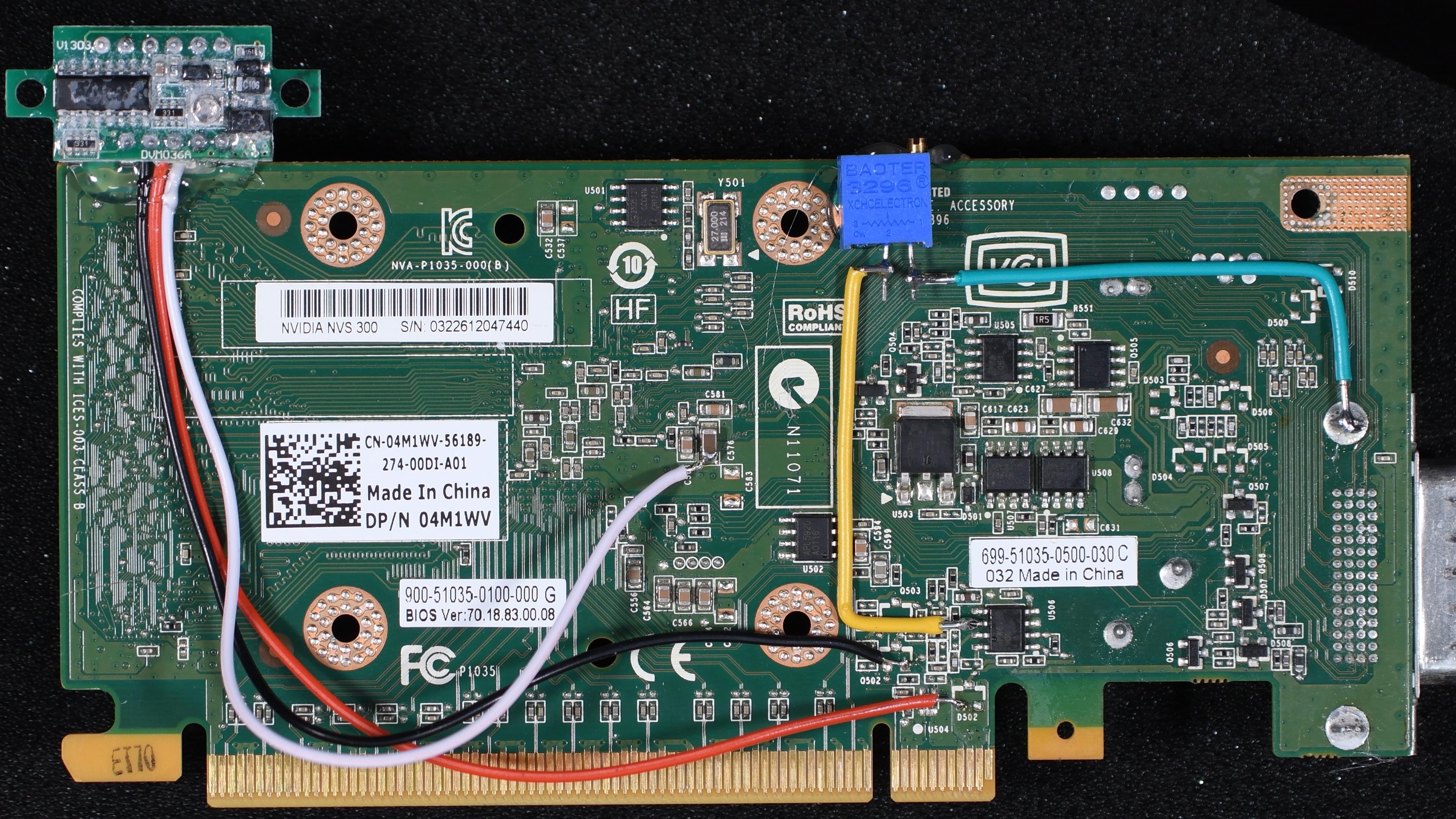
Meant to post a while ago, but nvs300 with vcore, memory, pll, and bios chip  volt mods. https://i.imgur.com/gjAwLMr.jpg
https://i.imgur.com/3z1viym.jpeg
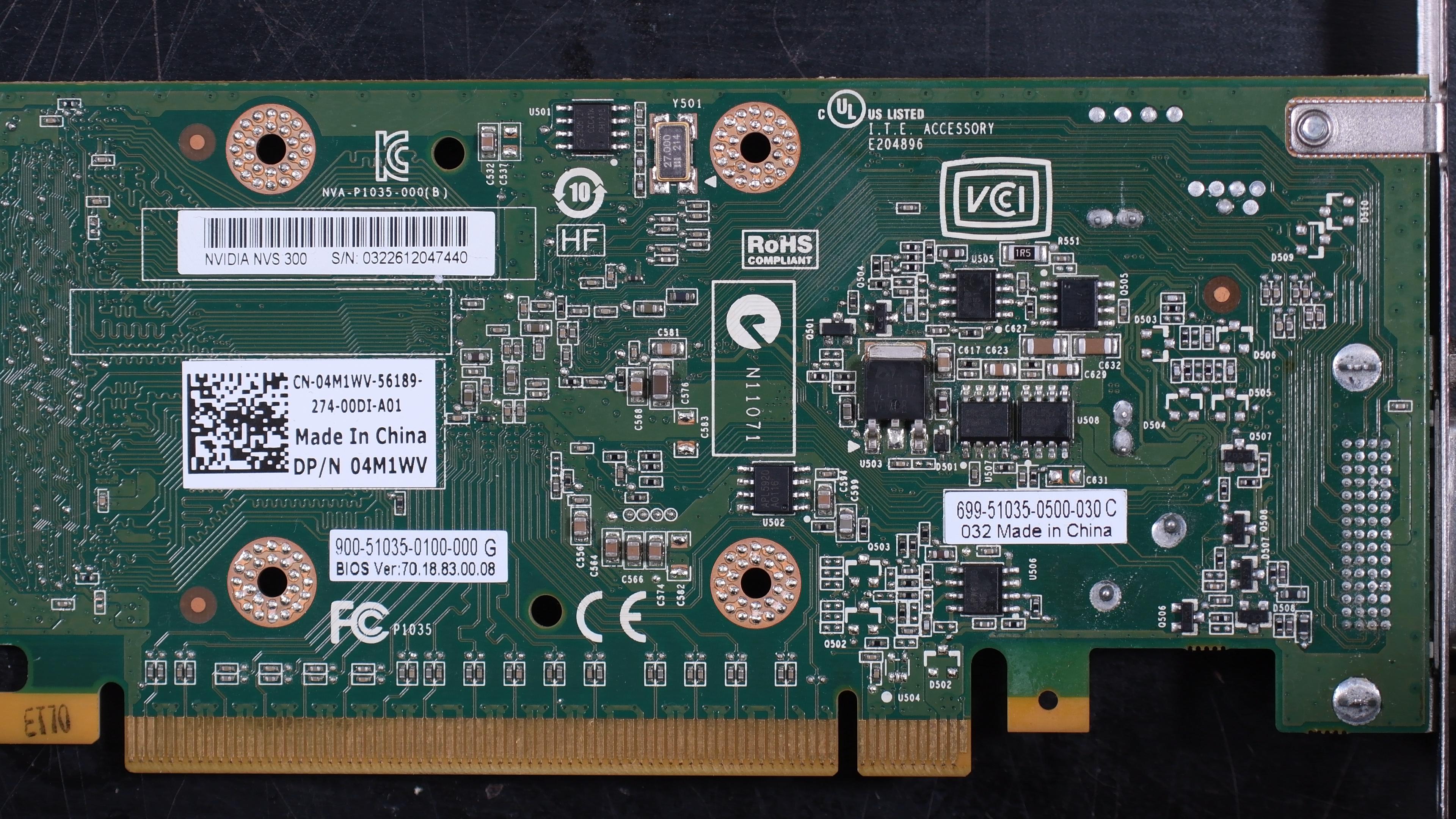
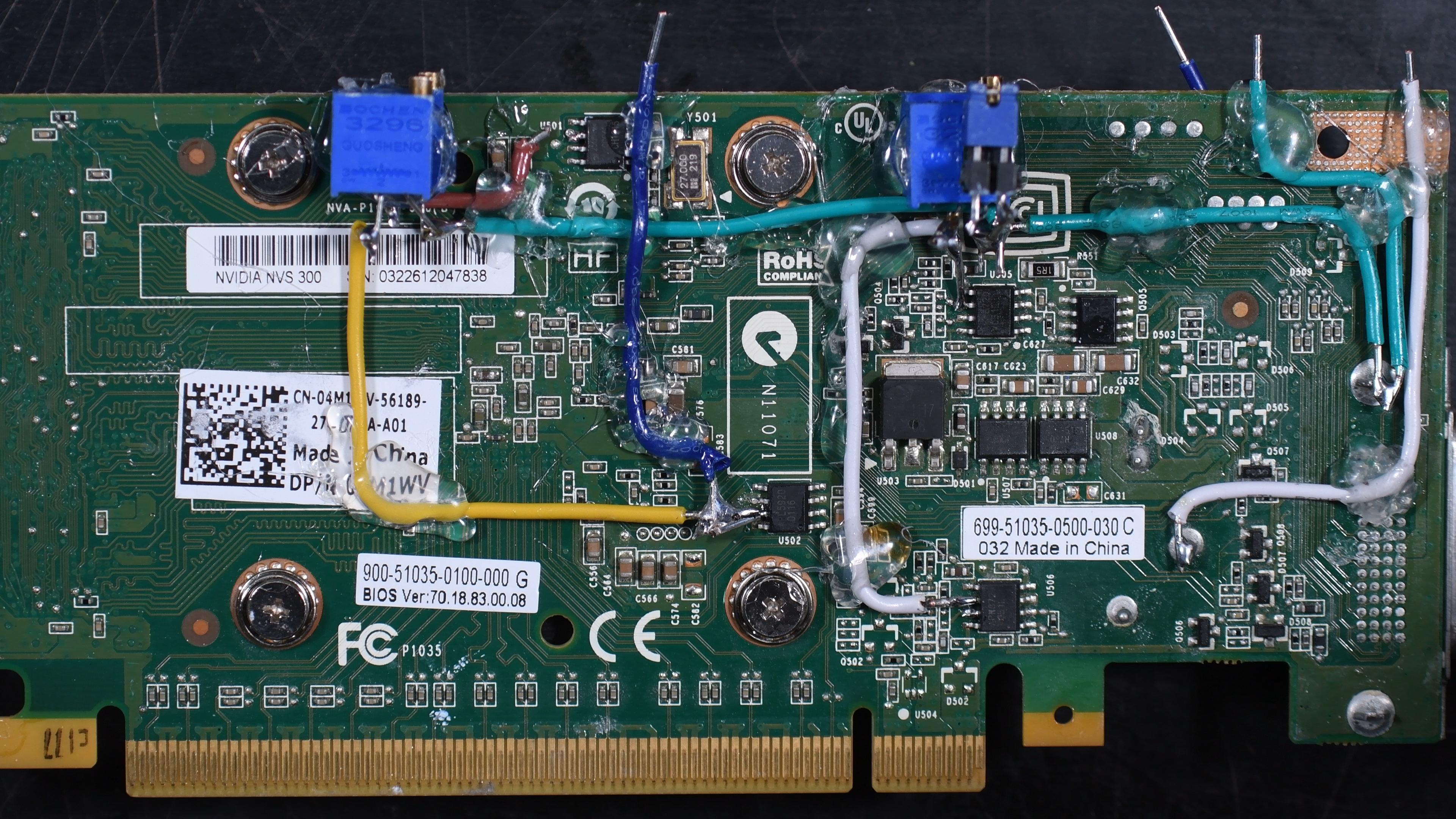
From 520mhz core to 1000mhz, .9v to 1.5v
 wind prairie
Im getting an 6700k to delid and oc as a temporary test before me and the bois go all out on 12600k and im wondering if i should delid + liquid metal a used 6700k
Also if imma do ice bucket aio do i have to vaseline the mobo
worldly wasp
no
proven canopy
Vaseline on the board is overkill for ice bucket aio, just watch for condensation, wrap things in towels accordingly.
timber hound
That's one thing I wanna try at some point, how much of an OC can I get when I use a laboratory freezer to set the ambient temp to -50°C?
It's for a 20x30ft room so that's alot of air
proven canopy
Good question - if you're going to do that, you have to be very careful, both about condensation, and about overloading the freezer's compressor.
I would try and chill a 5+ gallon 60/40 antifreeze/water mix in the freezer, add one gallon at a time over a day or two.
Pump said mixture through a waterblock with a diaphram pump or magdrive MD-30 etc
zenith palm
timber hound
That's one thing I wanna try at some point, how much of an OC can I get when I u...
If you set the ambient temp in your room to -50 i don't think you'll survive long
proven canopy
You have access to a 20x30ft -50c freezer?
timber hound
That's why u put the pc inside and you sit outside it
proven canopy
A lot of stuff on the mobo could get unhappy at -50, but honestly I think it might work.
timber hound
proven canopy
You have access to a 20x30ft -50c freezer?
My work has an empty one rn so I could have access if I asked probably
proven canopy
There are a few folks in the ln2 crowd who don't insulate or use a socket heater and the boards work fine when completely frosted over. e.g. 10x more than this https://i.imgur.com/yOu1hyd.png
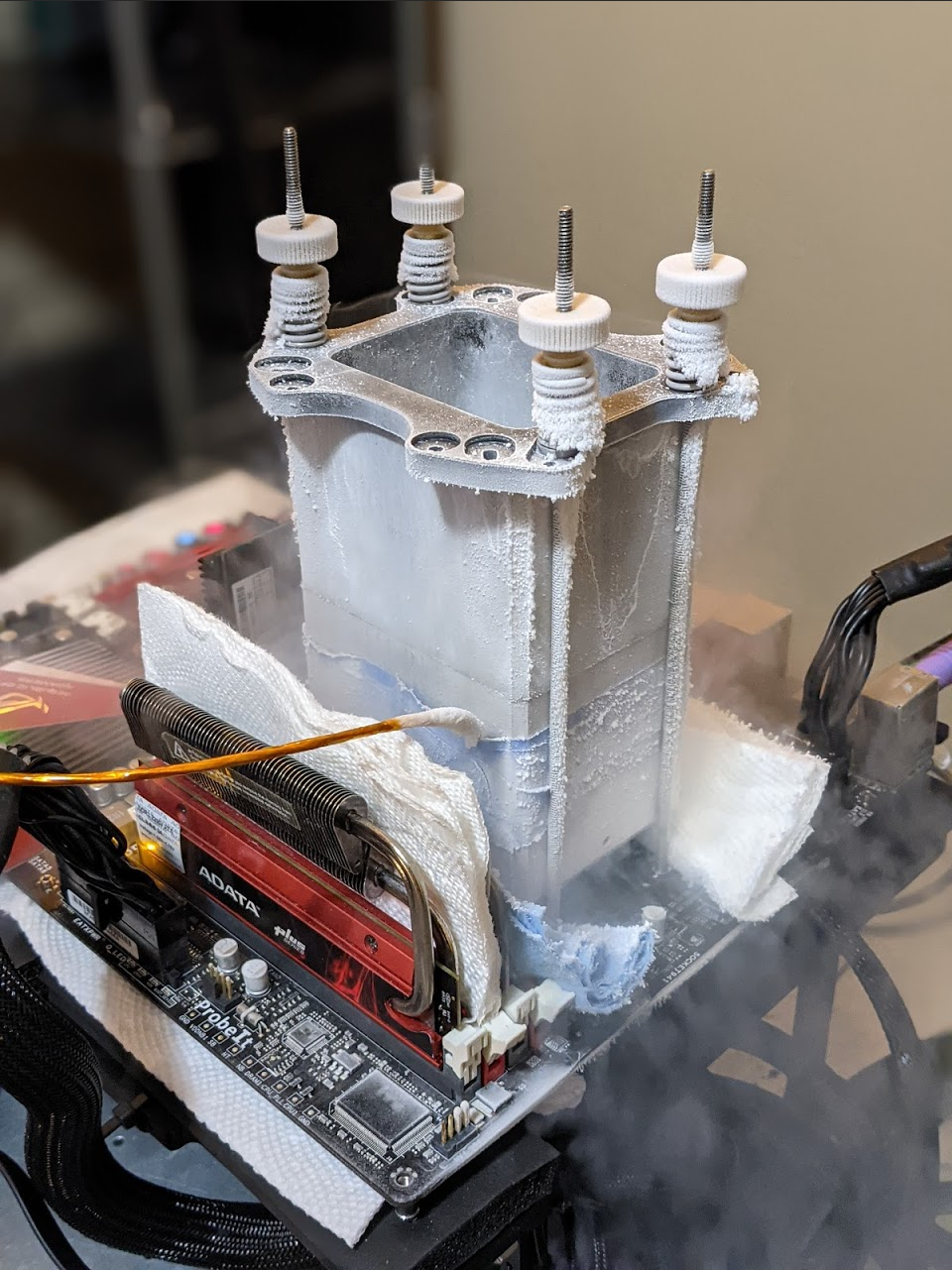
For a freezer of that size - you can skip the whole 5 gallon res suggestion and run a regular loop, with antifreeze ofc.
humble jay
Yos’ board with my 5700G
 wind prairie
proven canopy
Vaseline on the board is overkill for ice bucket aio, just watch for condensatio...
wind prairie
proven canopy
Vaseline on the board is overkill for ice bucket aio, just watch for condensatio...
Ight bet
sterile flame
wind prairie
Ight bet
From when I did ice bucket. The towels on the tubes was unnecessary in my case though, but it still looked cool lol
Make sure you slosh the radiator around every couple runs or so to keep the coolest water near the rad. And if you use salt to keep the ice as ice for longer, please remember to clean out the salt from the rad fins when you're done, like I neglected to...

I put some towels covering most of the board too in other pics, protects against splashing, especially a good idea if you salt up your water 💀
wind prairie
Thoughts on car radiator cooling?
cold jolt
like using a car rad to cool a cpu?
ion think it works very well because they depend on high airflow
ya know, like you driving 65 mph
wind prairie
What if i submerge it
cold jolt
would prolly work
 steel zephyr
Ice bucket cooling is much easier with a cheap pond pump to circulate the water. https://www.youtube.com/watch?v=bc8dRuhlJyY&t=2255s

My Patreon: https://www.patreon.com/buildzoid
Teespring: https://teespring.com/stores/actually-hardcore-overclocking
The Twitch:https://www.twitch.tv/buildzoid
The Facebook: https://www.facebook.com/actuallyhardcoreoverclocking
#HWbot #Overclocking
sterile flame
Yea, I ran out of money to buy a pump 💀
potent fiber
cold jolt
ion think it works very well because they depend on high airflow
Not necessarily. I've (rarely) seen something like a thin Honda radiator used for a pc.
modern walrus
car radiators are aluminum, worse heat transfer
but maybe size makes up for that I dunno
 weary valley
sudden torrent
weary valley
sudden torrent
That ltt video was so cringe. Their approach to adapting the fittings was questionable at best. They deserved every leak. And the towels... shudder
potent fiber
mo-ra3 420 is awesome. ggood, tons of heatsinks, aios and rads are mostly alum. Hey Fal, this is a thiccc one 

 barren ridge
sudden torrent
barren ridge
sudden torrent
It's alive!
potent fiber
That's what she said. X2
 desert spear
Hey guys gotta question
faint tangle
I might have an answer
desert spear
I have an i5-6600k i went from 3.9 to 4.0 i changed it by one and my stress test puts my cpu temp at 51 the highest.. should i go higher or keep it? Or is it bad?
faint tangle
Temp isn't all that matters, there's a max safe voltage
desert spear
 desert spear
Im not sure what that mean as ive never OC before
 clever epoch
1.35V for now
desert spear
Should i increase it to 1.35V?
clever epoch
yes
short blade
nope
100C max
when i was playing with a 6600K i had that thing pegged to 100C for entire benchmark runs
sudden torrent
desert spear
What is TPM
Trusted platform module
It's used to uniquely identify your hardware, which can help with security. TPM 2.0 (1.4 really) is required for windows 11.
Which is found on 7th gen and newer intel iirc
desert spear
Oh alright i will upgrade to 11 when its stable and good
sudden torrent
Windows 10 will be supported for several more years, no real need
desert spear
What happens if i OC the vram? @sudden torrent
sudden torrent
On the video card? It runs at a higher frequency, allowing a higher bandwidth, which may improve your frame rate in games.
proven canopy
Change is in the air https://community.hwbot.org/topic/210709-hwbot-new-points-rollout/
HWBOT Community Forums
Due to new competitions starting mid February we took the decision to implement the new Boint system already this weekend. Pretty short notice but at least this give us time to get everything sorted before we host any official competition. First step is to move the current scores/records to the U...
sterile flame
Nice
zenith palm
So points being calculated differently?
proven canopy
Yeah, I think the goal is to encourage more casual participation rather than 3dmark2001 gpu getting 200 global points
Personally I like trying to take the  in a highly contested category rather than scatterbenching to farm points, but we'll just have to wait and see how things roll out.
zenith palm
yo @proven canopy can you upload previous timespy results to hwbot now through the load function in 3dmark if thats allowed?
proven canopy
There's never a time limit to sub
zenith palm
okay cool just because its a previous run, cant reach it anymore lol
sterile flame
So... theoretically, the ultra slept-on xeons will be worth more points now?
First place 1660v3v on r20 was like... 3 hw points lol
Or 1.5, I forget
proven canopy
You can check on https://uat.hwbot.org
sterile flame
uat? That's the testing server or something right?
sterile flame
Yea I saw the warning about that
So are they using the uat as a way to archive scores or something? Why are they switching
proven canopy
Looking at my "top 30 global points" on the uat server, the 2080 ti sub points are way higher than I think they should be
 proven canopy
sterile flame
So are they using the uat as a way to archive scores or something? Why are they ...
proven canopy
sterile flame
So are they using the uat as a way to archive scores or something? Why are they ...
uat is the test server
Oh, I think there just aren't many 2 gpu superpos 1080p subs on the test server
sterile flame
Oh alright
proven canopy
modern walrus
might be ready for some competition... can't do much better than this except running flat 14s at 1.63v+

(passed tm5 btw)
clever epoch
modern walrus
might be ready for some competition... can't do much better than this except run...
What are you doing then? Run flat 14s
:p
modern walrus
well actually now I need to redo AIDA64 test. Forgot I made a couple changes

crazy thing is, (for now) I settled at 4000c15 on 10900K overclock
somehow passed TM5 with tCWL at -7tCL
another Discord said tCWL 8 is below JEDEC spec or something
modern walrus
clever epoch
What are you doing then? Run flat 14s
lol will do for benches
clever epoch
A lot of overclocking is below JEDEC spec. That's kind of the point, to make it faster :p
modern walrus
I dunno something about most boards don't go under 9 either

trying to get that y-cruncher on 5900x at least
still work in progress
22nd on 12x CPU so, you know, only 19 places behind Jedi Master Forks
if I can figure out how to break this DJR out of 4200mhz jail, maybe I can throw up some 10700KF points too
steel zephyr
I'm finally figuring out overclocking the Threadripper 3970X https://hwbot.org/submission/4916296_bavor_cinebench___r23_multi_core_with_benchmate_ryzen_threadripper_3970x_51694_cb

HWBOT
The Ryzen Threadripper 3970X @ 4700MHzscores getScoreFormatted in the Cinebench - R23 Multi Core with BenchMate benchmark. Bavorranks #1 worldwide and #1 in the hardware class. Find out more at HWBOT.

HWBOT
The Ryzen Threadripper 3970X @ 4675.1MHzscores getScoreFormatted in the Cinebench - R23 Single Core with BenchMate benchmark. Bavorranks #null worldwide and #1 in the hardware class. Find out more at HWBOT.
I had to find the overclocking limit of each group of 8 cores at a specific voltage and overclock each group individually.
sudden torrent
modern walrus
another Discord said tCWL 8 is below JEDEC spec or something
If you set an invalid number the imc will just pick one
Zentimings reads from the bios so it'll still show the number you set, not the actual number
sterile flame
@steel zephyr what kind of cooling are you running?
Oh man, so close to taking @proven canopy's score lol
 steel zephyr
sterile flame
<@!245049068143902722> what kind of cooling are you running?
steel zephyr
sterile flame
<@!245049068143902722> what kind of cooling are you running?
A slim 360mm radiator and a 40mm thick 280mm radiator D5 pump/res, and the Optimus Threadripper CPU block.
sterile flame
oooooo nice
im not super familiar with how these threadrippers perform, about how much power does a 3970X pull stock, and at your OC settings?
steel zephyr
Stock is 280 watts. I think I was hitting closer to 400 watts with the OC. Power draw varied depending on the benchmark.
sterile flame
Oh alright
I'd love to oc some threadrippers but I don't have the funds for that lol
I do have a 3900x but I'd need a proper board, though I wouldn't want to risk killing it either since it's part of my main system
steel zephyr
I got a good bundle deal on the CPU, motherboard, and some RAM. I didn't need the RAM in the bundle.
I did ice bucket cooling on my daily system to get a high port royal score last summer. It was in one of Buildzoid's weekly roundup videos.
sterile flame
Do you remember which video? I might watch it then lol
I actually got a really good deal on an x79 fatality board yesterday, got one that I'm almost certain works for just 20 bucks plus shipping
steel zephyr
Here is the video: https://www.youtube.com/watch?v=bc8dRuhlJyY&t=2255s
My Patreon: https://www.patreon.com/buildzoid
Teespring: https://teespring.com/stores/actually-hardcore-overclocking
The Twitch:https://www.twitch.tv/buildzoid
The Facebook: https://www.facebook.com/actuallyhardcoreoverclocking
#HWbot #Overclocking
I need to do more overclocking of older hardware, its much less costly.
sterile flame
Yea, I started getting into xocing recently, my first platform was x99 with a 1660v3
Was tons of fun, I got 1 first place and 5 2nd place scores with it
I'm going x79 now with a 1680v2
Overclocking xeons is fun lol
steel zephyr
I have a box of stuff that I saved from old systems. I have to see if any of it still works.
sterile flame
hopefully it does
proven canopy
modern walrus
well actually now I need to redo AIDA64 test. Forgot I made a couple changes
This is quite good
sterile flame
can you send me a link to the pump you used in that ice bath setup? @steel zephyr
modern walrus
proven canopy
This is quite good
Thanks. For you to say so, I must've gotten it right this time lol
steel zephyr
sterile flame
can you send me a link to the pump you used in that ice bath setup? <@!245049068...
Its a pond pump I bought at Lowes. https://www.lowes.com/pd/Beckett-680-GPH-Submersible-Pond-Pump/5005519261
sterile flame
Thanks!
When I did an ice bath setup I had to slosh the radiator around manually because I ran out of budget for a pump lol
Do you know if these sort of submersible pumps have any issues with salt?
steel zephyr
I planned ahead and made a nice ice bath setup using the large cooler I already owned. Its designed to be removable so I can still use it as a cooler. I used 5 gallons of water and 50 lbs of ice.
No idea about salt. I haven't tried that yet.
sterile flame
hmm ill have to do some research then
Yea I used about 50 pounds of ice on my 1660v3 also
proven canopy
@steel zephyr Use this for per-ccx overclocking instead of per-ccd
steel zephyr
proven canopy
<@!245049068143902722> Use this for per-ccx overclocking instead of per-ccd
thanks!
proven canopy
Try go for x265 4k and ycruncher 1b, those actually give global points, a lot of them
modern walrus
with 1.63v I can drop to flat 14s. 1.65 I can get c14-14-12-21-33 to run but it still won't bring me into the top 3 on 7zip. I'm not sure
proven canopy
I think this is the only sub where I ran a per-ccx oc, but I included the clocks in the screenshot https://hwbot.org/submission/4901436_forks_y_cruncher___pi_1b_ryzen_threadripper_3990x_10sec_848ms

HWBOT
The Ryzen Threadripper 3990X @ 4399.9MHzscores getScoreFormatted in the y-cruncher - Pi-1b benchmark. Forksranks #1 worldwide and #1 in the hardware class. Find out more at HWBOT.
Be careful benching over 1.25v for either ycruncher/x265
modern walrus
if I should attempt desync or try to throw some more voltage to get 47.5x all-core
modern walrus
if I do the 47.5 all-core, I might be able to bring up R23 score too
wow 10.848 is low
steel zephyr
With x265 4K I keep having issues with too much variance if I run 4 or more instances in the "overkill mode".
It says the score isn't valid because my FPS varied too much.
proven canopy
Oh, yeah, run process lasso and include x265-64.exe and ffmpeg.exe in the instance balancer
steel zephyr
thanks!
proven canopy
It's a pretty powerful tool, lol
 steel zephyr
I noticed
sterile flame
dang
steel zephyr
sure. I wondered why the server OS works better?
proven canopy
I forgot to answer earlier, but it's a different scheduler.
Better in some benches, much worse in others like 7zip, geek3
steel zephyr
thanks!
proven canopy
If that happens to have any of my geek3 keys etc in it, remember to change them
steel zephyr
No problem
modern walrus
this is where I'm at with 10900K now... are those loose tertiaries worth the stupid low tCWL?

I haven't installed AIDA to check yet since this win11 install is pretty banged up from weeks of this
I'm gonna go for higher frequency when I figure out my RAM cooling situation next week
proven canopy
But yeah, you can probably beat both of my 1B and x265 4k scores if you per-ccx oc. I look forward to seeing you on the front page
modern walrus
4400 is a definite possibility. 4600 isn't completely out of reach I think
sterile flame
@steel zephyr im actually gonna head to lowes in in a couple hours to just get acquiring a pump out of the way lol
ill keep the one you sent me in mind
modern walrus
would a sump pump be better? those things pull nasty water thru them a lot... might be more resilient to salt water
proven canopy
modern walrus
would a sump pump be better? those things pull nasty water thru them a lot... mi...
Overkill
If you want something higher end, get an iwaki magdrive
modern walrus
ya you're right those are more expensive & usually made for permanent install
sterile flame
yea
modern walrus
might have to get one for my memory DIMMs
steel zephyr
It took a while to find the maximum OC of each CCX at the same voltage. I think they varied by as much as 150 MHz at 1.25-1.3v.
proven canopy
modern walrus
ya you're right those are more expensive & usually made for permanent install
You can find them for <$100 on ebay, more like 50 for the 240v pumps
modern walrus
240 sounds great if you can grab it off the panel or have it nearby.
good if you had the older beast wall units
or maybe a dryer plug nearby lol
gotta rig it up a bit
proven canopy
For something low power like that, can just get a cheapo step up transformer
modern walrus
didn't even think of that. good idea
proven canopy
Not sure if I like the new point system, looking at my top hardware and global point subs, some of the highest scoring subs are stuff like 2 2080 ti's on air, I think that's kinda lame.
zenith palm
i got a good bit more points than i thought i would for this sub personally https://hwbot.org/submission/4916463_patokav_3dmark___time_spy_geforce_rtx_3070_15315_marks

HWBOT
The GeForce RTX 3070 @ 2130/2065MHzscores getScoreFormatted in the 3DMark - Time Spy benchmark. Patokavranks #656 worldwide and #12 in the hardware class. Find out more at HWBOT.
proven canopy
NVS300 vcore mod https://i.imgur.com/oplVi3v.jpeg
 zenith palm
proven canopy
oh, you subbed the wrong number
zenith palm
proven canopy
oh, you subbed the wrong number
I was doing gpu not cpu i don't see what i missubbed?
proven canopy
That category is total score
zenith palm
Crap
proven canopy
You can just edit it
They just recently added vantage and firestrike (gpu) score categories
I hope they add time spy next
zenith palm
Ohhh there's no timespy gpu only?
That's confusing
It's literally in the gpu drop down menu
I don't see where...
 proven canopy
zenith palm
Ohhh there's no timespy gpu only?
proven canopy
zenith palm
Ohhh there's no timespy gpu only?
Not yet. Yeah, it's annoying that all the 3dmark gpu benches are so heavily influenced by cpu score.
proven canopy
zenith palm
I don't see where...
I meant edit the score in your sub to 12993
zenith palm
I've fixed that now, can't believe that because timespy overall is a good amount of cpu
Like if i did that cpu score on a 12900k it would get me an easy 2.5k more points
proven canopy
That's the gripe many of us have with how few truly gpu only benches are on hwbot.
Just gpupi, geek4 compute really. I asked leeg to add the vantage/fs gpu a bit ago, I think TS gpu would be a great addition. All 3 should get hw points imo
zenith palm
Sad, next week or later this week I'll probs do some ram ones with my ram as i can push it much higher than it is while stable but would probs pass bench's at way higher
proven canopy
7zip, geek3, x265, ycruncher are the most fun to bench with tuned ram IME
zenith palm
Yeah I've tried y cruncher, not the other ones tho
proven canopy
Be very careful with manual voltage on ycruncher and x265 over 1.25v set or so.
zenith palm
proven canopy
Be very careful with manual voltage on ycruncher and x265 over 1.25v set or so.
As much as it is contradictory i don't think my cpu would oc better than pbo and i prefer ram oc for some reason.. i assume you mean 1.25v to my cpu anyway?
sterile flame
I wasn't able to do y-cruncher on my 1660v3, and it'll be different trying ti again on my 1680v2 though since it doesn't have avx2
When I revisit x99 I'll try ycruncher again, unless I do x299 before then
proven canopy
Wasn't able to run? or just very difficult
sterile flame
very difficult
proven canopy
Yeah, it's a much more demanding bench. x299 tops out at 5.3ish on ln2 ycruncher lol
sterile flame
Which CPUs?
man, that's still surprisingly low lol
went over the 1680v2 records again, looks like Ill be able to take 2nd place cpu frequency without much of an issue i think
proven canopy
Something like a 10920x, it varies
sudden torrent
It's looking like I need to build my liquid cooling kit sooner than later, and that I should include memory in the loop. I had to drop my memory overclock by over 0.1v because the torrent is bad for memory. Even the fan on my gpu blowing through isn't enough.
sterile flame
I still really want to put together a 24/7 subambient setup
I still need to learn more about phase change, and maybe other methods of 24/7 subambient cooling though. Then put together the funds for it over time
steel zephyr
Clovis runs a 24/7 sub ambient setup with a chiller and a fridge/freezer. He is on the EVGA Forums and the Performance PCs discord.
sterile flame
Oh alright, connections are good lol
humble jay
My open window at night RTX 3090 beat his chillers 
sudden torrent
Skill issue
sterile flame
living in antarctica moment
proven canopy
Rad in the window meta https://i.imgur.com/6wg1Jen.mp4
 proven canopy
🙌
 sterile flame
💯
worldly wasp
proven canopy
Just gpupi, geek4 compute really. I asked leeg to add the vantage/fs gpu a bit ...
port royal is pretty CPU agnostic iirc
as long as you use something thats not terrible
 vagrant lance
Dose anyone know how to get the best out of ur ram all the way cause I have 16gb and it only goes to 13gb how can I use it all ?
potent fiber

steel zephyr
I didn't see a huge drop in Port Royal scores until I tried a pair of 3090s in a Z77 3770k system.
Even a 6700k wasn't much lower in scores than a 5950x or 10900k
 lavish tundra
vagrant lance
Dose anyone know how to get the best out of ur ram all the way cause I have 16gb...
lavish tundra
vagrant lance
Dose anyone know how to get the best out of ur ram all the way cause I have 16gb...
huh
modern walrus
uh system uses that probably
potent fiber
modern walrus
uh system uses that probably
funny part is just thinking of trying to use every bit of ram. "I paid for the ram, I'm gonna use all the ram", lol.
 zenith palm
 wheat ether
guys how do i get my .1GB back
wheat ether
guys how do i get my .1GB back
I stole it
 short blade
noticed recently that with my bclk manually set to 100.0 it'll still drop as low as 99.1
5800x, b550 steel legend
any clue how I can make it stop doing that?
can't see a spread spectrum option
it's bothering me that 3dmark is reporting my ram speed as like 3770 lol
found a suggestion to turn off SVM and that worked
I don't use vms so should be fine
just realized now I need to redo all the benches I did yesterday
wow that's so annoying
proven canopy
Try disable iommu
modern walrus
proven canopy
Try disable iommu
The Tomi controversy returns lol
Virtualization off:
bcdedit /set hypervisorlaunchtype off
Virtualization on:
bcdedit /set hypervisorlaunchtype auto
proven canopy
tomi probably actually used vm software though
modern walrus
Good point.
All I know is, I used that command & never fall below 100mhz BCLK anymore.
It does prevent you from using Android sub-system for Windows tho... I saw there's an app to side-load .APKs now but haven't bothered with it yet
proven canopy
That's just enabling/disabling hyper-v
If you don't use hyper-v, no reason to have it on. It's a type 1 hypervisor.
iommu is a setting in your bios
zenith palm
modern walrus
All I know is, I used that command & never fall below 100mhz BCLK anymore.
Tbh i did that too, did nothing for me
modern walrus
zenith palm
Tbh i did that too, did nothing for me
on windows 11?
iommu... I remember seeing that
it was one of the many settings I didn't touch cuz I knew nothing about
thanks for heads up
proven canopy
You probably already had hyper-v off. Can check in msinfo32.exe or in "turn windows features on or off"
modern walrus
I disabled it there & uninstalled Hyper-V from there
thinking that would fix it
the virtualization is some security feature I think
like that memory isolation thing that slows down your RAM

 zenith palm
modern walrus
on windows 11?
zenith palm
modern walrus
on windows 11?
10
sterile flame
cb r15 doesnt use AVX right? Just SSE3 and older?
proven canopy

Cinebench R15 (CBR15) is a popular benchmark based on Cinema4D’s 3D rendering engine. It can utilize all available CPU threads, but here we’ll be analyzing it in single thread mode. In …
sterile flame
ah alright
sterile flame
hmm for some reason my 1680v2 just wont stay at 4.4Ghz, hwinfo isnt telling me a power limit thing, and temps arent an issue
eh this is probably a simple solution, ill probably figure it out
proven canopy
Yeah, check bios for power limit/vrm related settings.
sterile flame
Yea I had already set power limit for the cpu to 300W, im nowhere near that limit right now, and i dont see anything vrm related that'd cause that issue
proven canopy
Odd that it's in watts, usually it's something like "short term power limit" in amps
And will max out at 4096
sterile flame
theres also the core current limit option, i already adjusted that
default was 200, i put to to 300 rn just in case
i must be missing something, im gonna go through the board's manual or something to see if there's stuff im missing in the bios
proven canopy
Do you have a wall meter? I highly recommend investing in one, helps with all kinds of benching.
sterile flame
Yea I had planned on getting one a while back but wasnt sure which to buy and didnt see it as necessary at the time
proven canopy
Or actually, an elmor PMD if you don't have a plat/titanium psu and want to have to account for that.
sterile flame
Yea ive got an rm850x
proven canopy
You can get fancy with a dc current clamp, but I don't recommend that.
sterile flame
how come?
proven canopy
It'll be very expensive even for something with mediocre accuracy, dc clamps are often very sensitive to any gap in the clamp jaws, have to degauss often.
The jaws are also pretty narrow, can be difficult to get all the cables you need to fit
sterile flame
Oh alright, yea I dont want to spend too much money right now
proven canopy
I would save up for an order from elmor's store, lots of very affordable overclocking related gadgets and supplies.
sterile flame
yea I have some tabs saved from there
really need looking stuff
i did a few runs and the clockspeed isnt dropping weirdly anymore
interesting
sterile flame
https://hwbot.org/submission/4918647_farawaythrower_cinebench___r15_xeon_e5_1680_v2_1696_cb first x79 submission

HWBOT
The Xeon E5 1680 v2 @ 4737MHzscores getScoreFormatted in the Cinebench - R15 benchmark. FarawayThrowerranks #null worldwide and #8 in the hardware class. Find out more at HWBOT.
clever epoch
proven canopy
Yeah https://chipsandcheese.com/2021/02/22/analyzing-zen-2s-cinebench-r15-lead/
So glad to see chipsNcheese shared more :)
proven canopy
Do you write for them? I forget
clever epoch
No, I'm just friends with the authors.
Maybe some day I'll have enough brain cells to put something on there though
proven canopy
Any french speakers in here? 12900kf 3dmark cpu benching https://www.twitch.tv/overclocking_com
 proven canopy
Mick playing polybridge while memtest86+ runs
https://www.twitch.tv/mickulty
 modern walrus
I can sorta speak spanish
sudden torrent
proven canopy
Any french speakers in here? 12900kf 3dmark cpu benching https://www.twitch.tv/...

You know we're English only, no other languages exist here!
zenith palm
sudden torrent
<:Bruh:598228546980151316>
You know we're English only, no other languages exist...
Imo it's fine, it's a link to a french oc'r as long as not talking french in here is all good
sudden torrent
Forgot the /s mb
zenith palm
Lol wasn't sure
proven canopy
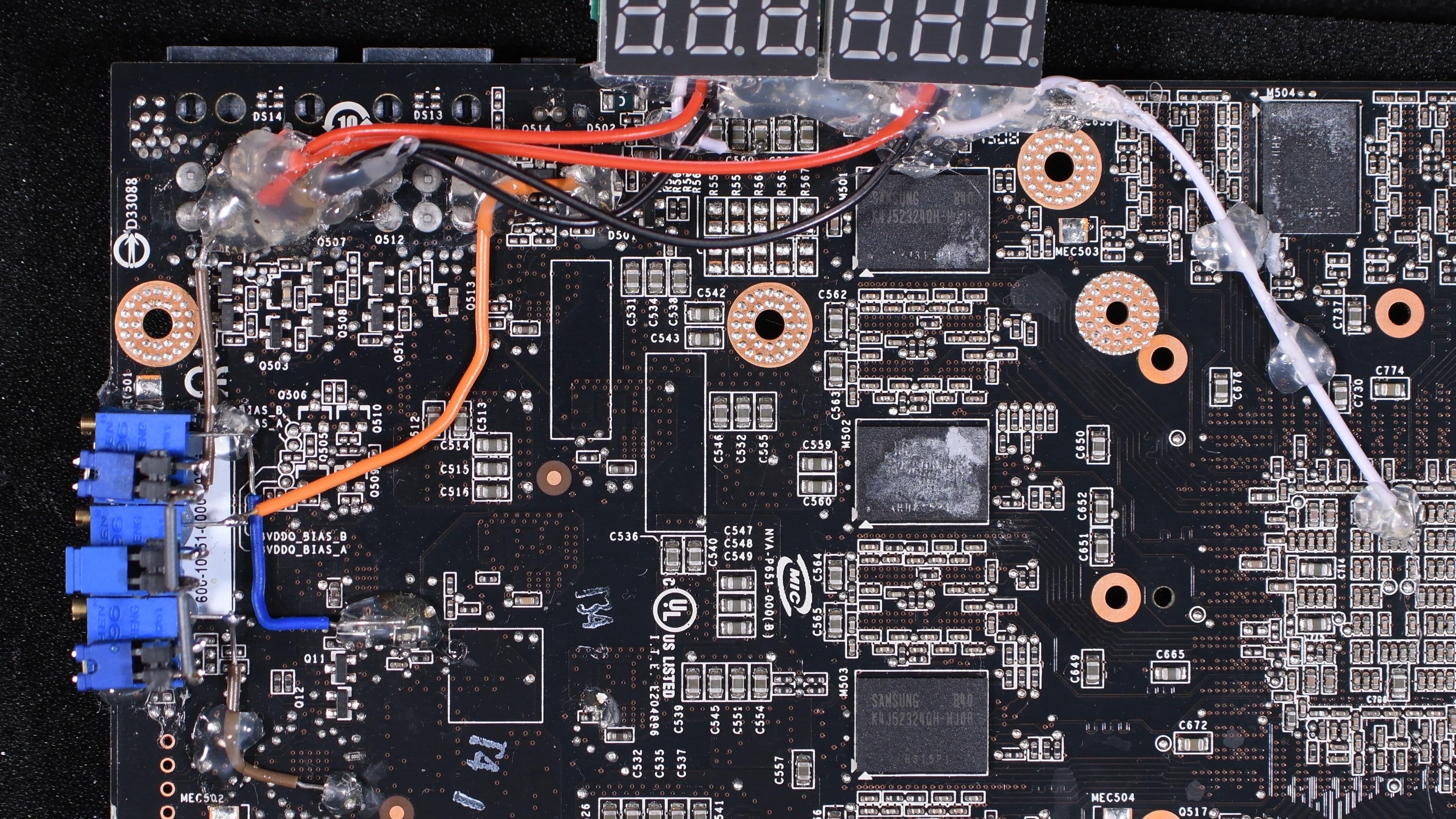
One of the 280's from country cup, vcore,vmem,vddq. https://i.imgur.com/R5qdHfS.jpg
 twilit pike
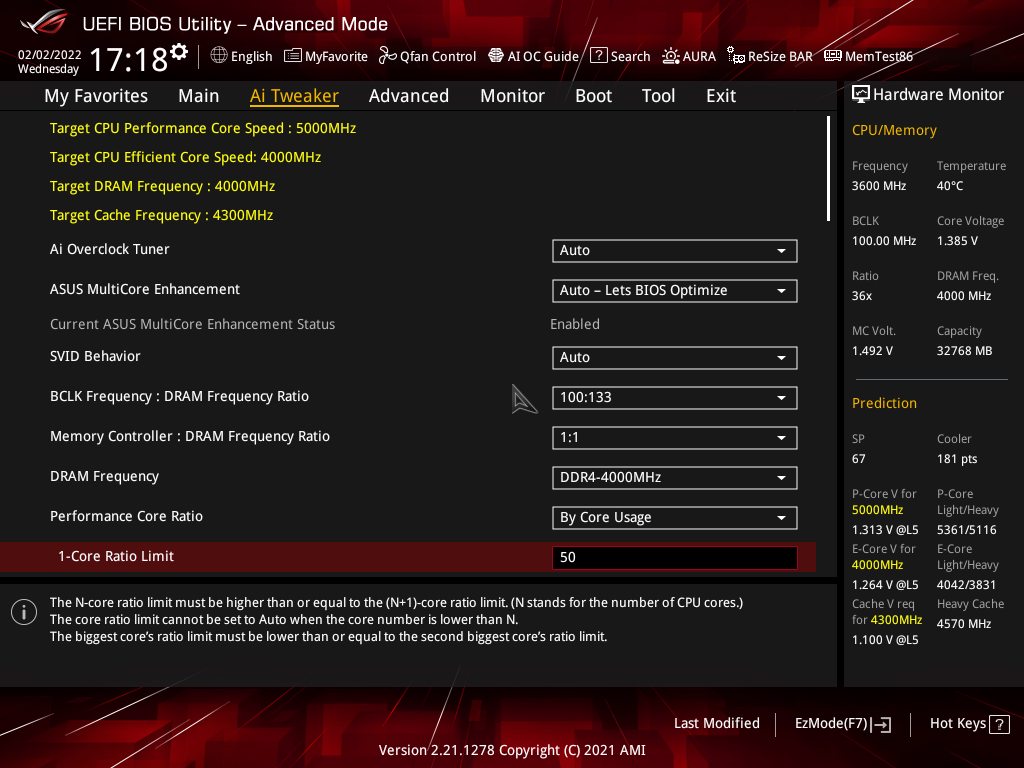
Can someone take a look at my overclock imgs
is there aynthing I can do to improve it?
 shell hound
@twilit pike what cpu is that?
twilit pike
12700k
shell hound
I mostly build AMD, and swear by lapping the processors. I know that isn't related to your BioS image, but it has helped me get higher, more stable clocks every time
twilit pike
I once lapped a heatsink. I went through to the heat pipes lol
shell hound
lap the cpu, not the heatsink.
twilit pike
Eh, I would pay someone professional to do it. . . Scares me too much.
shell hound
On Ryzens, there are major high points at each corner of the integrated heat spreader. Lapping really helps with more lower temps and higher clocks
an Intel chip would be much easier than AMD because you don't have pins to worry about bending.
Just get yourself a small mirror or piece of flat glass and tape a few different grits of sandpaper and go to town 🙂
lavish tundra
mate wot
zenith palm
twilit pike
Eh, I would pay someone professional to do it. . . Scares me too much.
dont bother they be smoking the good kush or something
sudden torrent
He's not exactly wrong just... The conversation wasn't relevant to the question. At all.
clever epoch
twilit pike
https://imgur.com/a/MndKNUa#WAAVO5a
If you're doing different core ratios, you can probably do more than 5 GHz single core. You should be able to do 5 GHz all core at around 1.30V (and I would recommend just setting all core OC instead of different ratios)
I had these results with my 12700k. I did my tests with E-cores disabled, and on a MSI motherboard (where higher LLC number means more vDroop). Also my voltage readings are socket sense, and not actual core voltage
https://cdn.discordapp.com/attachments/782534144134610965/925317297646755881/unknown.png
https://cdn.discordapp.com/attachments/782534144134610965/925317150967750697/unknown.png


I tried up to 1.35V for 5.1 core frequency. Didn't work. I have a pretty solid wall lol
proven canopy
Why not use excel? lol
clever epoch
proven canopy
Why not use excel? lol
it was on the bench OS you sent me, which doesn't have excel
proven canopy
ah, I just use google sheets on a 2nd pc/laptop while benching
clever epoch
yeah that would be the intelligent thing to do
proven canopy
Nice data though, good testing 👍
clever epoch
also @twilit pike , if your memory is going into Gear 2 mode for 4000, you should consider dropping it to 3900 or something to stay in gear 1.
twilit pike
It's stable right now
proven canopy
Post a cpuz memory tab
clever epoch
twilit pike
Is that with ecores off? <@111605868138655744>
yes
clever epoch
eh. I still wouldn't recommend W11...
 proven canopy
Looks like gear 1 to me
twilit pike
Yeah it is gear 1
sudden torrent
4000 straight 15s
Even though it's 2t that's not bad
sudden torrent
1t unless you're really pushing it high
twilit pike
i am not sure i want to increase ram voltage anymore
zenith palm
twilit pike
i am not sure i want to increase ram voltage anymore
Whats it at now and what imc?
zenith palm
Sorry didn't mean imc meant ic*
As in what die
Ahh i just saw your pic above
I'm assuming b die
twilit pike
or so im told
clever epoch
4000 15-15-15 has to be B die
if you put a fan on your sticks you can probably go up to 1.5V and stay at ~45C or lower
most of the heat on RAM ends up coming from (air-cooled) GPUs though
lavish tundra
1.5 is fine without fan
1.55 is where fan becomes a concern really
Till then case with good airflow is fine
And you can always flip the top fan in ur case to blow down onto the ram instead of exaust
twilit pike
I dont have top fans
lavish tundra
just front intake?
 sterile flame
my case traditionally has crap airflow too, but i just took the crappy acrylic front panel off and it's way better, and looks better too
i have a DG-73
other than that it's a pretty decent case
clever epoch
I don't think "safe" is much of a concern with B die so much as "unstable". If it's running too hot, you'll know from the errors/crashes before it poses a threat of degradation (IME)
proven canopy
lavish tundra
1.5 is fine without fan
Ehh
proven canopy
Depends on what heat spreaders, if they're single or dual rank, and your workload
Some sticks tolerate heat better than others
proven canopy
lmk if any of you need the invite to the team wegg chat
worldly wasp
@proven canopy 
twilit pike
What's that?
faint tangle
im having an issue with my dell laptop
im changing values in msi afterburner
but the total clocks dont change
is there a certain software i need to use?
twilit pike
Have you even opened it up to change the thermal paste?
faint tangle
twilit pike
Have you even opened it up to change the thermal paste?
no, but it hasnt seen over 60c on core
twilit pike
What? When you say core do you mean your cpu cores?
twilit pike
Which gpu?
faint tangle
3050 ti
tall pelican
Current status of a 1080 ftw


 tall pelican
Its a 1080 with a shorting vrm that's getting epowered
proven canopy
https://www.twitch.tv/techtested
XOC Podcast - What is XOC and how to get started! Guest host UnityOC

Twitch
Tech Tested foolin around and destroying computer parts on stream! Matt and Josh goin at it in games! Grab your beer and popcorn and watch the nonsense ensue!
clever epoch
any recommendations for good thermal putty to use on a GPU repaste for VRAM/VRM?
(ideally available via amazon prime)
nvm just gonna use pads
faint tangle
alright so
im trying to oc my laptop gpu
3050 ti
i put memory up 600
but the total clock does not change at all
it sits stable at 5500
tall pelican
because power limits
faint tangle
doesnt fluctuate at all
faint tangle
tall pelican
because power limits
you can still oc laptop gpus
i speak from experience
tall pelican
and vram power limits are a thing that i've seen
clever epoch
Try reducing the memory clock
faint tangle
clever epoch
Try reducing the memory clock
doesnt change
core also doesnt change
i think its smthn to do with dell bios
which would be odd
since its gpu ocing, not cpu
faint tangle
tall pelican
a gpu is just a cpu with a different function
bios tends to not have gpu related things in it from what ive seen?
atleast on desktops
clever epoch
well, when they're on the same motherboard...
tall pelican
welcome to laptop land
faint tangle
tall pelican
welcome to laptop land
first real laptop ive owned, last one i had is almost 9 years old without a dpgu
tall pelican
dgpus on laptops are treated the same as cpus
tall pelican
if the cpu is locked from altering, what makes you think they wouldnt do the same for the gpu?

its not going to be in bios, they just lock you out of it completely
faint tangle
tall pelican
its not going to be in bios, they just lock you out of it completely
wdym
proven canopy
I mean, there's probably a way to unlock some power limits and voltage, but not without a hardware flasher or soldering iron
tall pelican
its a laptop, AB/XTU either allows you to do stuff, or its completely locked out and a pita to do anything
faint tangle

What's that number 2 thing
nvm
core is changing now
idfk
and now its back down to 600
im so confused
it goes to 1200 for a while
then drops down to under 600
wait
is there a hashrate limiter on 3050 it?
yep, thats it
i can oc outside of mining
mem clock still locked to 5500, but core can change
works on ergo ig, idk why
zenith palm
C states is like the cpu/gpus core sleep mode
clever epoch
new bios update, more time, time to mess with Z690 DDR4 again

gonna try to floor the voltage, then I'll try my A0 S8B kit, then I'm gonna rip the DR 4266 16-19-19 kit from my daily to see what I can do with it on the test bench
and maybe I'll grab the M8E from my dad's HTPC to see what I can do with that
zenith palm
https://hwbot.org/submission/4923301 not to shabby to be locked at 1.5v vdimm

HWBOT
The DDR4 SDRAM @ 2394.7MHzscores getScoreFormatted in the Memory Frequency benchmark. Patokavranks #236 worldwide and #219 in the hardware class. Find out more at HWBOT.
 granite gate
Tried overclocking my ram in bios and there’s no tweaker option
zenith palm
It's because it's a laptop and an old one at that
Very few new laptops let you overclock ram
granite gate
Makes sense
sudden torrent
That plus intel doesn't allow memory overclocking on anything unless it's a Z sku board or is B560/B660
short blade
sudden torrent
That plus intel doesn't allow memory overclocking on anything unless it's a Z sk...
you can still tighten timings on most desktop boards even if you're frequency locked
can run 2933c10 on b460 
sterile flame
why do people disable svid when overclocking?
proven canopy
Not sure really, can't think of anything it'd affect much in terms of bench scores. I know it can prevent you from reading cpu power draw
sterile flame
Ive read in a few places that it's because having it enabled can give extra voltage under load on some platforms? I havent had that issue and dont see how it's cause that but idk
proven canopy
Maybe with adaptive vcore? But nobody uses that
sterile flame
yea i learned not to use adaptive real quick lol
another question, do you think using a custom IHS for my 7900X help in any notable way compared to just lapping intel's IHS well?
https://www.ebay.com/itm/192526028056? this is the ihs i was wondering about

eBay
I7-7800X - 6 corei7-7820X - 8 corei9-7900X - 10 corei9-7920X - 12 corei9-7940X - 14 corei9-7960X - 16 corei9-7980XE - 18 core i7-7800X - 6 corei7-7820X - 8 corei9-7900X - 10 corei9-7920X - 12 corei9-7940X - 14 corei9-7960X - 16 corei9-7980XE - 18 core.
the description doesnt really give very useful info on it though
proven canopy
If anything, I'd guess it could be worse
sterile flame
well that would be less than ideal lol
proven canopy
Do you not want to lap the stock ihs?
Honestly, I would just start with a delid kit
sterile flame
Yea I wanted to lap it, but also wanted to know if just getting a custom ihs would be better
oh yea, I cant find a good delid kit
the one from der8auer on his website is really expensive, and i cant find any on other sites
proven canopy
Many from china, no us unfortunately https://www.ebay.com/sch/i.html?_from=R40&_trksid=p2047675.m570.l1313&_nkw=2066+delid&_sacat=0
 sterile flame
Yea I saw those ones from china, but Im not sure I trust them lol
proven canopy
I'd imagine it'd be easy to get a feel for it once it's in your hands, whether or not things line up etc
sterile flame
true