#overclocking
1 messages · Page 96 of 1
 bleak sable
 faint tangle
i thought you were saying you were before
bleak sable
what
faint tangle
i thought by saying the issues fixed themselves you were having issues before
bleak sable
no
well
+1300 is bad for me
+1500 used to get 0 lost
but driver update ruined it
faint tangle
ahh
 steady prism
ñ
 proven canopy

 dull ginkgo
A very fun pot
dull ginkgo
proven canopy
https://cdn.discordapp.com/attachments/855034686027989002/916070660827152394/202...
Is the plate serving any purpose or just decoration?
proven canopy
I guess it keeps ln2 from getting into places it shouldn't be if you can't pour it straight.
Pouring straight out of a normal thermos can be tricky. I switched to using one of these now https://www.amazon.com/gp/product/B076C164HD
$14 amazon warehouse lol
 sterile flame
nice lol
dull ginkgo
fair
dull ginkgo
proven canopy
Pouring straight out of a normal thermos can be tricky. I switched to using one...
The question is, can it hold ln2 without deteriorating?
 modern walrus
would plastic tervis tumbler work? lol
proven canopy
dull ginkgo
The question is, can it hold ln2 without deteriorating?
It definitely won't deteriorate, even if you filed the think will ln2, but that's not the point at all. It's a spill shield. It'd be pointless to fill the pot above the top anyway.
That said, below -150 or so when the leidenfrost effect no longer applies, pouring any ln2 into the pot can make it violently boil and droplets will often land on the electronic bits below.
This pic is from flagship lab, he's active in Elmor's server.
 humble jay
Also just helps keep the cold gas away
Heatsinks got very cold and board started getting wet when I removed the LN2 pot lol

Most of the water is from the snow melting
humble jay
I had Elmor labs HOT underneath, kept the area around the socket ambient temp
And shop towel around the pot


Lots of snow when taking stuff apart

 zenith palm
Ahh nice
 tall pelican
I see why seby kills boards so often now /s
humble jay

Lol I properly insulated the dark too
I was so mad
It was insulated for like 2 hours then died
 zenith palm
humble jay
zenith palm
humble jay
What did you do 
humble jay
The board kept freezing over because of LN2 on ram
And making the ram super unstable and making the VRM not work lol
zenith palm
But why it look like it was boiling lol
humble jay

Just MLCCs and dumping it on idk
But that insulation worked super well
Memory was rock solid stable after that
Then it just decided it hated being alive
zenith palm
Shnoww
proven canopy
Purge box 
humble jay
Is nice, just also takes up a lot of space I don’t have rn 
sterile flame
humble jay
Lots of snow when taking stuff apart
Maybe you can cool the CPU faster than the AIO cooler 

humble jay
It was at 6GHz so probably
 pallid nest
@humble jay are you Forks 2.0 🤔
humble jay
😳
proven canopy
FX-6300 on AIO https://www.twitch.tv/techtested

Twitch
Tech Tested foolin around and destroying computer parts on stream! Matt and Josh goin at it in games! Grab your beer and popcorn and watch the nonsense ensue!
proven canopy
I want to know the story behind this 1600MHz ddr4 @ 2:1 https://hwbot.org/submission/4364885_airblank_y_cruncher___pi_1b_ryzen_threadripper_3960x_1min_1sec_221ms/

HWBOT
The Ryzen Threadripper 3960X @ 4200MHzscores getScoreFormatted in the y-cruncher - Pi-1b benchmark. Lordairfallranks #14 worldwide and #7 in the hardware class. Find out more at HWBOT.
 lavish tundra
proven canopy
I want to know the story behind this 1600MHz ddr4 @ 2:1 https://hwbot.org/submis...
lavish tundra
proven canopy
I want to know the story behind this 1600MHz ddr4 @ 2:1 https://hwbot.org/submis...
"Ok I see what ur saying about faster being better but shat if we just S L O W I T D O W N a little"
dull ginkgo
Looks like that guy ran all of his benches at those settings
 worldly wasp
proven canopy
I want to know the story behind this 1600MHz ddr4 @ 2:1 https://hwbot.org/submis...
worldly wasp
proven canopy
I want to know the story behind this 1600MHz ddr4 @ 2:1 https://hwbot.org/submis...
XMP?
lol
3200 16-18-18 is xmp
proven canopy
Yeah but the 2:1
worldly wasp
bios
proven canopy
The ram isn't anything weird other than cpuz probably misreading the channel count
 proven canopy
Shouldn't auto 2:1 until much higher freq, guess the board is just weird
proven canopy
Seems like a cpuz bug there as well
proven canopy
??
newer cpuz calls it uncore freq - but 1.91 still reads it as NB freq on TR it seems
worldly wasp
idk
proven canopy
I think that's actually reading uclk in cpuz
 grave idol
oof
 ashen onyx
should it be possible to oc a rx5600xt 6gb from sapphire? I'm new to overclocking.
faint tangle
ashen onyx
should it be possible to oc a rx5600xt 6gb from sapphire? I'm new to overclockin...
Nearly any if not any gpu is ocable. If you're new to ocing I'd reccomend listening to someone here guide you
tall pelican
https://hwbot.org/submission/4874645_fitvelkiz_y_cruncher___pi_10b_ryzen_7_5800x_7min_56sec_766ms decently cool

HWBOT
The Ryzen 7 5800X @ 4800.2MHzscores getScoreFormatted in the y-cruncher - Pi-10b benchmark. Fitvelkizranks #5 worldwide and #1 in the hardware class. Find out more at HWBOT.
 marsh zenith
hey guys, just built a new machine (5800x, B550 Tomahawk with an Arctic Freeze 360, Corsair 4000D Airflow).
I ran cinebench and the temps reached 90 degrees. Is that normal or should I be tinkering with something? I've read that undervolting is a thing but I could never wrap my head around it.
Could anyone help
 sudden torrent
marsh zenith
hey guys, just built a new machine (5800x, B550 Tomahawk with an Arctic Freeze 3...
sudden torrent
marsh zenith
hey guys, just built a new machine (5800x, B550 Tomahawk with an Arctic Freeze 3...
Set a negative offset voltage
marsh zenith
Can i do that in ryzen master or should I do that in bios?
sudden torrent
bios preferably, changing voltage isn't so reliable in RM
proven canopy
 sudden torrent
That's what I do, we've got a high of 40F but I'm still not running my heater. My mining keeps my family warm.
tall pelican
proven canopy
https://i.redd.it/qxfisi2nty481.jpg
Literally do this at work because my coworkers run the ac at like 70F and its cold as balls
 cold jolt
my bedroom rn
zenith palm
Mining is safe full stop
 bleak saddle
i just wasnt sure in the summer due to temperatures getting over 110F here at times
but if it is safe i guess it isnt too bad?
tall pelican
Mining is safe*
*when done correctly
sterile flame
at 110F its pretty annoying to do
i would get exterior fans
not good for GPU fan bearings to be running 100%
for 4 months
tall pelican
its fine for the bearings, its generally just having decent airflow and monitoring temps
and not running them in a humid environment
proven canopy
4 months at 100% isn't too bad, depends on the model of fan in the card, can always replace them or zip tie some 120's on later.
 potent fiber
proven canopy
https://i.redd.it/qxfisi2nty481.jpg
potent fiber
proven canopy
https://i.redd.it/qxfisi2nty481.jpg
both, if I didn't have overkill cooling and/or if my space heater wasn't only 250W max total.
potent fiber
tall pelican
Literally do this at work because my coworkers run the ac at like 70F and its co...
pro strat. Wish I "worked" w/ computers
marsh zenith
Hey guys. Been enjoying my 5800x but ive seem conflicting opinions where it's not worth OCing cos of Precision Boost and that it's best to leave it stock. but then there are a lot of videos saying that there is some performance to be gained and mostly through Curve Optimizer (especially for thermals)
I'd like to know what you guys think so I can gain some clarity on the matter
zenith palm
marsh zenith
Hey guys. Been enjoying my 5800x but ive seem conflicting opinions where it's no...
So precision boost overdrive isn't stock you will have to enable it in bios to take advantage of it
And yes you should be using curve optimiser with PBO for best perf in games
For multi core it would probs be worth a manual oc
marsh zenith
Gotcha. Is there a video you'd recommend cos I know it's easy to mess this one up!
lavish tundra
marsh zenith
Gotcha. Is there a video you'd recommend cos I know it's easy to mess this one u...
Pbo->on
Thats it
Thats all you need to do
lavish tundra
zenith palm
For multi core it would probs be worth a manual oc
Not really tbh
zenith palm
lavish tundra
Not really tbh
Meant to said could wooops
lavish tundra
Zen 3 pbo is :chefskiss:
zenith palm
lavish tundra
Zen 3 pbo is :chefskiss:
Emote fail
lavish tundra
zenith palm
Emote fail
On porpoise
zenith palm
lavish tundra
On porpoise
Suree

 zenith palm
lavish tundra
There you go <@!191276897227898880>
zenith palm
lavish tundra
There you go <@!191276897227898880>
 marsh zenith
LMAO yeah thanks homies. Sorry for being a PITA. Just didn't wanna break stuff lol
zenith palm
DW you're not, the whole point of this server is to ask questions learn more etc
proven canopy
Nah, as long as you do some minimal reading, check the pins etc and put more effort into your question than "how overclock raizin" you're good
 short blade
proven canopy
Nah, as long as you do some minimal reading, check the pins etc and put more eff...
short blade
proven canopy
Nah, as long as you do some minimal reading, check the pins etc and put more eff...
1.65v good for raizin 5? I get 5ghz but then make smoke and smell like grapes
sterile flame
proven canopy
Nah, as long as you do some minimal reading, check the pins etc and put more eff...
@ivory lichen moment
sterile flame
short blade
1.65v good for raizin 5? I get 5ghz but then make smoke and smell like grapes
I OvErClOcKeD mY rAm To 9234MhZ bUt My CoMpOoTuR nOt WoRk WhAt Do I dO???
 stiff loom
ok. can someone send me a video on overclocking my 3070 ftw3 ultra
 barren ridge
potent fiber
barren ridge
potent fiber
OC'ing it too much is also simple, LuL. w/ MSI AB or the evga program: Up Core 5-10Mhz, run benchmark or various games for a bit, if no crash or funky stuff, increase Core another 5-10mhz and repeat numerous times until: game crash, pc crash/freeze/restarts, etc. If any funky stuff, OC has to go back down 5-10 Mhz. That's a very generalized instruction.
sterile flame
stiff loom
ok. can someone send me a video on overclocking my 3070 ftw3 ultra
just set core to +50 and then increase it gradually
(usually +105 is high and stable depends on the application) i have seen people push their core clock to +280 and have it stable but thats crazy and they only get +115-+150 stable or something
im not an expert on gpu oc idk why im telling you what to do
but i did +105 core and +750 mem and it was stable
 sacred trench
not 100% sure what im doing, but is this a good V/F curve for a 3060ti?
 potent fiber
Tap on the 1st box of the flat line pls so we can see a clock/voltage number.

 potent fiber
Healthy oc. 2nd pic is so Similar to my 1080 it's funny. Instead of the variable oc, I'd probably make it a straight +90 oc. Not usually in 3d mode below 1700 Mhz(w/e base clock is), if that makes since.
sacred trench
yeah no i dont know much about OC'ing ;-;
potent fiber
See how the 1st dot & ones near it say +159ish? Any boxes sub-1700ish mhz can be lowered to +90 like your highest one w/ almost no loss in performance. The top-end is a pretty safe curve, you should be though. Remember to maybe up power limit to 105-110.
 potent fiber
Better. Yeah, I was gonna say just try a straight +90 oc, while keeping the max mhz line at 2010ish. Do a few benches to see it it's stable & check temps. All these newer cards have their normal boosting that goes pretty high before even doing an oc. Save this profile. Later after benches you can swap to no oc w/ just pL at 105-110 & see how that option does.
potent fiber
Np. Many people keep going near +100 oc but gpu has a lot of dynamics & ingame mhz still varies by load/temp so diminishing returns happen quick.
sacred trench
I see
potent fiber
Some people move a certain box then tap L on it to lock that vF. I was doing that to try out undervolting. 150w vs 200w for .9v-ish vs 1.05ish is interesting. The L lock usually kept me from clocking down completely at idle so I stopped using it. I can show examples later if wanted
zenith palm
@sacred trench just do a flat +150 or whatever no need to use the curve for regular ocing and stress test it
bleak saddle
finally learned how to oc my 1030
proven canopy
 proven canopy
strix 1080, lol
worldly wasp
and powerstages yoo big
potent fiber
That is awesome!
 bleak saddle
proven canopy
bleak saddle
proven canopy
corrosion or cold?
proven canopy
🧊
potent fiber
bleak saddle
corrosion or cold?
 short blade
@modern walrus i bought a cheap prebuilt recently
came with some 3000c16 mystery micron die
modern walrus
I hate Hynix
short blade
i didn't care much so i did ram oc the stupid way
modern walrus
how I do it?
short blade
just sent a bunch of timings and stuck with what booted
ended up finishing in like 3 hours
short blade
yeah terts too
modern walrus
on & off
corrupted win11
had to reinstall
which of course somehow crashed like 3x during install
even tho I was on JEDEC
short blade
it was a really bad kit so a lot of this is loose lol

maybe i could have pushed some things a little farther? but for a 3 hour speedrun of an unknown die good enough
some people said it might be rev. p or rev. j
modern walrus
bruh
short blade
never heard of those
modern walrus
to make it worse I'm on intel
so I'm even more lost than usual
which is really lost
short blade
the terts were basically just stable at the lowest they could boot
3800c18 would boot but crash about 4 minutes into stress testing with no errors no wheas
was weird
but figured it was fclk anyways and dropped it to 3733
hard to hit 1900 fclk on zen 2
modern walrus
kinda what I'm experiencing minus the part where you were even remotely successful lol
worldly wasp
what cpu
modern walrus
I bet. I had a hell of a time just hitting it on zen 3
short blade
yeah its a pretty big jump from xmp 3000 16-18-18-38
worldly wasp
i have a 2050 fclk 5900x
modern walrus
10900K
short blade
cl16 didn't want to boot at 3600 let alone 3733
my 5800x runs 2000 fclk stable but with bad performance
so i daily 1900
modern walrus
I do the same
modern walrus
but only cuz 2000 FCLK was WHEA party
oh no you were about to
then I started rambling on about my usual nonsense
short blade
i was just shopping for 5700XTs
got a 3700X + 16gb ram + 1tb nvme + 5700XT prebuilt for $700 instead
worldly wasp
where u find these deals
modern walrus
stolen & seller had a gambling habit? wow
short blade
5700XTs are worth $850-900 alone lol
short blade
worldly wasp
where u find these deals
this one was from facebook
first time i've found a good deal on facebook in a while
most of my deals are from r/hws
short blade
modern walrus
did someone die next to it? wth?
nah seller just didn't know what he had
he bought a new prebuilt with 128gb 2666mhz ram for gaming
lol
my guess is that he just priced it based off of what he bought it for + some depreciation without knowing about the current state of graphics cards
modern walrus
worth it for sure
short blade
yeah for sure
no problems with it either just took 2 hours to clean cause he had a cat lol

i should try overclocking the cpu eventually
the aio isn't too bad, only 120mm but it's push/pull
was handling the 3700x fine in prime95 small ffts with pbo on
~83C
it's not an impressive result at all for sure but for a prebuilt it could be a lot worse lol
short blade
i feel that
modern walrus
short blade
was handling the 3700x fine in prime95 small ffts with pbo on
haha that's better than mine
well maybe not
I'm around 80c
short blade
your cpu is also a lot harder to cool than a 3700x
modern walrus
but only because run TDC/EDC at 178amps
short blade
it cleaned up decently
 short blade
yeah the 3700x was drawing like 90W with PBO on lol
modern walrus
I think I'm at like 180 or something
short blade
my 5800x will go up to about 160W before it hits thermal limit
modern walrus
oh man the top of that case is begging for a 280 or 240
short blade
this prebuilt uses the first b550 board ever made
it's an oem only board
hwinfo actually reads it incorrectly as an x570 board
modern walrus
do all Zen 2 & 3 CPUs have PBO available?
it's not like Intel where only K & KF can overclock?
short blade
look at that motherboard section lol
 modern walrus
apparently ASUS was really excited to enable it since I have 3 different places in BIOS that are PBO
Bixby?
that pseudo-Siri thing on Android? lol
short blade
👀
short blade
 modern walrus
Chadrock ftw
short blade
yeah idk since it's the first ever b550 board maybe they just didn't program that part correctly
modern walrus
play around with it a bit? change some fans with extras you have lying around?
short blade
but it's only the vrms at the top that are bare
and there's a decent heatsink on the rest of them at the left that's hidden by the aio unless you look for it
i'll prob try to flip the whole prebuilt minus gpu
or put in a different gpu
short blade
it works
modern walrus
perfect height
short blade
hidden vrm heatsink
 modern walrus
haha well hidden
short blade
you can see 2 bare phases at the top
modern walrus
damn I dunno how you do it
short blade
i didn't see the heatsink at first so i was like "ok this board is doomed"
then i googled the board and the review was like "we can see a pretty beefy vrm heatsink" and i'm like wait what
modern walrus
I couldn't sell a 5000D/10700KF/RTX3060 build and you can sell an older GPU-less one
short blade
nah its getting really hard to flip tbh
ive had this 6700K 970 build for like 2.5 months trying to sell at 0 profit
someone's coming over today hopefully they don't flake
i just want it gone lol
modern walrus
everyone wants 12900K or market is just saturated?
short blade
i dunno
the guy who sold this prebuilt to me mentioned he got tons of messages from scammers
modern walrus
well 12th gen not specifically i9
modern walrus
lol like "just leave the computer at this address & I'll paypal you"
definitely a nice buy
short blade
"text me at <number with area code from the other side of the country>"
"by the way do you accept checks and will you ship"
modern walrus
they troll looking for suckers
they do it everywhere
dating apps especially
on telegram (which I rarely used)
I would get random message from ostensibly an attractive girl like
oh hey
short blade
the person coming over today actually asked me to text them with a number from the other side of the country
but they said they recently moved here
modern walrus
they set proxy server to appear like in my area or something
short blade
as long as it's a local meetup i can't really get scammed so let's see how that works out
modern walrus
meet them at a police station I guess
you should get one of those markers/pens that detects counterfeit bills
short blade
nah starbucks inside a grocery store
modern walrus
that's the only thing they can really do at that point
short blade
i'm not taking cash
modern walrus
etherium only?
short blade
starbucks cause they want to plug it in and see it turn on
modern walrus
I prefer PayPal
but Zelle works cuz my bank has it so that way they're involved lol
ya true any smart buyer should do that
if you have some extra KPX lying around maybe you can cut a few C off it
short blade
i have mx-4
modern walrus
probably better than what's on there
After I repasted old 970m laptop I can leave it mining all the time without it throttling
short blade
I have way too much thermal paste lying around
modern walrus
here's a chance to get rid of some lol
go crazy & repaste the GPU too if you're bored haha
 clever epoch
short blade
ive had this 6700K 970 build for like 2.5 months trying to sell at 0 profit
clever epoch
short blade
ive had this 6700K 970 build for like 2.5 months trying to sell at 0 profit
yeah I got ahold of a DDR5+mobo bundle that I'm trying to get rid of because I don't have the time to mess with it now sadly 😦
tall pelican
clever epoch
yeah I got ahold of a DDR5+mobo bundle that I'm trying to get rid of because I d...
Just curious, which combo?
clever epoch
tall pelican
Just curious, which combo?
Trident Z5 DDR5 5600 C36
(F5-5600U3636C16GX2-TZ5K) https://www.newegg.com/g-skill-32gb-288-pin-ddr5-sdram/p/N82E16820374309
MSI MPG Z690 Carbon Wifi https://www.newegg.com/p/N82E16813144484
Got them for $800 with tax.
tall pelican
Damn, gave you a decent mobo, but meh ram
clever epoch
Could be worse. Pretty sure it's Samsung, and Hynix is a unicorn, so I'll settle with "not micron"
tall pelican
I want to say its samsung too, I've been benching mine on this terrible asus board today
it doesnt listen to avx offset = 0, so yeah......
this 12600k better get me enough points to catch back up to forks lmao


HWBOT
The DDR5 SDRAMscores getScoreFormatted in the Memory Frequency benchmark. Fitvelkizranks #12 worldwide and #10 in the hardware class. Find out more at HWBOT.
clever epoch
Oof. I've heard asus Z690, especially DDR5, is quite poopy


 tall pelican
It was supposed to be poopy, but afaik it'll still max out Samsung sticks (might need seby to confirm it)
Not sure if Samsung was meh because of max clocks, or because of timings
modern walrus
if anyone ever needs excel sheets to do tuning, I spent the time to make them & will happily send them to you to track your efforts. That's the one I made for tuning Aorus Z590 for example
 proven canopy
Do you have a script to import the saved bios settings file into excel? I hope you're not typing that all in manually
modern walrus
proven canopy
Do you have a script to import the saved bios settings file into excel? I hope ...
I totally wrote it all out manually. Dammit lol
potent fiber
Well after 1st draft you can copy/paste quite a bit at least
modern walrus
ya at least I won't have to do it again I suppose
proven canopy
FX 8350 on LN2
https://www.twitch.tv/bonesxoc
clever epoch
Recommendations on either a pre-imaged bench OS (Windows 10) or what/how to disable extra stuff
Obviously windows defender and extraneous services like fax, windows store, etc
 clever epoch
proven canopy
https://www.dropbox.com/s/04voq5wdbnu6wlq/21h2forks1.0.iso?dl=0 +
clever epoch
proven canopy
https://www.dropbox.com/s/04voq5wdbnu6wlq/21h2forks1.0.iso?dl=0 +
Also noob question, what should I use to install the ISO onto the bench SSD
(preferably free)
proven canopy
Burn it onto a usb with rufus, install from usb
clever epoch
 sudden torrent
Ooh fun
clever epoch
it POSTs, runs my DDR4 3200 14-14-14 kit without issues, so everything seems to be functioning. Just installing windows now
annoying that I don't get a "SP" rating, since only Asus seems to have it
 reef bridge
dose overclocking shorten the life span of the cpu, ram or gpu?
tall pelican
yes*
potent fiber
reef bridge
dose overclocking shorten the life span of the cpu, ram or gpu?
Yes, but how much depends on clock speed & mainly extra volts. Flipside, undervolting or lower clock might extend life a bit but I'm not sure how much.
 clever tree
Would a bios update allow me to undervolt my laptop's CPU?
(Acer nitro 5 rtx3060+i5-10300h)
potent fiber
You can try to clock it down more or other stuff. Check out ThrottleStop.
clever epoch
zenith palm
Smh wheres the lf 420 😤
ngl, I forgot that it existed 😄
I only looked at the 280 and 360, and the 360 was actually a couple dollars cheaper
zenith palm
clever epoch
I only looked at the 280 and 360, and the 360 was actually a couple dollars chea...
Tbf not many cases even fit the 420
clever epoch
Yeah I'm not sure I'm putting it in a case as well either
I would like something from openbenchtable but it's so expensive
zenith palm
Yeah wasn't sure if you were gonna daily it just on a different os
clever epoch
I don't intend to daily on it tbh. Just want a fresh system to play with where I don't have to worry about stability
Doing memory OC was tedious because I could only do it on my daily. Now I have a second system to test things on, and I can use my daily system at the same time while running stability tests
Also makes it easier for me to stick the radiator in a bucket of ice water...
modern walrus
is there somewhere I can learn how to tune tertiaries & termination voltage (RttNOM, RttPark, RttPark, IoLat, & Round Trip Latency especially) in order to achieve higher frequencies? I can't get my 10900K to run 4000c16+ on memory with XMP at 3600c14-15-15-35.
Also (on a nominally related note), which is better bin: (a) 4000c17-18-18-38 or (b) 3600c14-15-15-35?
lavish tundra
clever epoch
Damn nice!
zenith palm
clever epoch
Also makes it easier for me to stick the radiator in a bucket of ice water...
Fair 2nd system for oc would be nice
tall pelican
zenith palm
Smh wheres the lf 420 😤
https://d1ebmxcfh8bf9c.cloudfront.net/u308494/image_id_2607920.jpeg right here lmao, thing is massive
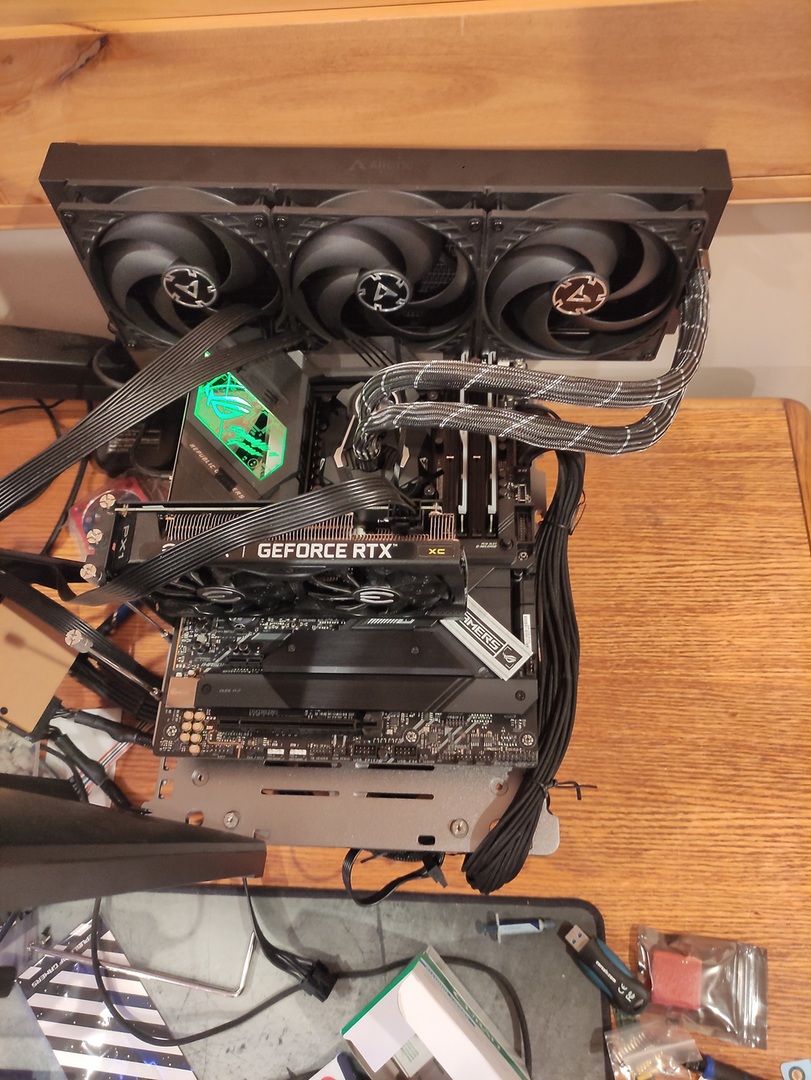 potent fiber
You'd need a 2nd one for a 3090, lol. That's awesome
clever epoch
tall pelican
https://d1ebmxcfh8bf9c.cloudfront.net/u308494/image_id_2607920.jpeg right here l...
Is that an OpenBenchTable?
 weary valley
clever epoch
Is that an OpenBenchTable?
weary valley
clever epoch
Is that an OpenBenchTable?
Looks like it
I have been wanting to buy one for awhile now just never got to it
tall pelican
it is
proven canopy
Honestly, a $10 foam pad off ebay works well. BC1 is nice if you really need portable, and the build quality is great, but it's still a $200 aluminum frame.
Take an angle grinder with a cutting wheel to a cheap atx case and you have something very similar.
tall pelican
I had the $40 aluminum frame one from amazon, and I dont like how none of it locks together nicely. I'm happy to pay the $200 for a study frame with rad mounts
clever epoch
tall pelican
I had the $40 aluminum frame one from amazon, and I dont like how none of it loc...
https://www.amazon.com/Computer-Bracket-Aluminum-Support-Graphics/dp/B07PVTSJ1H/
Was it something like this?

ATX Computer Open Air Case Bracket Aluminum DIY Bare Frame Support Graphics Card Test Bench
tall pelican
yeah, I have that at work and its not very portable
needs threadlock or something on the screws
clever epoch
Portability isn't a big deal. I'd move it a couple times a week at most
Although that particular one on Amazon seems to have questionable reviews. Was it that one exactly that you purchased?
proven canopy
It's still a great bench for ambient, but I don't think I'll use it for ln2 again.
clever epoch
https://www.amazon.com/Motherboard-Aluminum-GDAE10-Overclocking-Dissipation/dp/B09DK34TDZ/
This one looks reasonable

ATX PC Motherboard Case Frame, Aluminum 7 PCI Bit Open Air Case Bare Air Water Cooling Fan Stand Chassic Test Bench Rack GDAE10 Computer Board Overclocking Heat Dissipation Graphics Card Support
zenith palm
@tall pelican do you know how crucial bins their ballistix kits? like i assume the 3200cl16 kit is slightly better bin than their 3000cl15 and same for 3600 vs 3200?
tall pelican
all depends on the revision/model of the chip
if you dig up a thaiphoon page of the micron spd, it'll say
zenith palm
tall pelican
if you dig up a thaiphoon page of the micron spd, it'll say
right i was just wondering because i was looking into a cheap kit to oc
tall pelican
the part number is the bin

c9bkv is the "does xyz bin"
there's others like d9vpp or whatever that does slightly worse
and I think a c9blm that's the 4400 bin
zenith palm
ahh okay thanks
tall pelican
otherwise is just whatever's on the shelf that day
zenith palm
id be buying online so id be chancing it then
tall pelican
if you can see the IC, it helps a lot
zenith palm
yeah all i could see would be the pics posted on amazon 🤷
literally not available in person in ireland
tall pelican
I'd honestly try to do the ebay special
zenith palm
tall pelican
I'd honestly try to do the ebay special
yeah used parts kinda suck here too, would cost the same or more than from amazon
tall pelican
but you'd be able to see the ICs in the picture of oem stuff
zenith palm
tall pelican
but you'd be able to see the ICs in the picture of oem stuff
yeah but ebay hassle id rather just get a new 3600cl16 kit at that point you know
tall pelican
up to you
my fastest stick of ddr4 is still an oem stick of reve
Fitz | flexing OEM hardware is my nickname in oc discord for a reason
sudden torrent
modern walrus
Also (on a nominally related note), which is better bin: (a) 4000c17-18-18-38 or...
Only looking at timings, 3600 c14 is better here with 7.77ns cas vs the 8.5ns of 4000 c17
tall pelican
sudden torrent
Only looking at timings, 3600 c14 is better here with 7.77ns cas vs the 8.5ns of...

Google Docs
Main Sheet
KIT INFO,Cas Predictions (ns),RCD Predictions (ns)
XMP Rating,Speed,Cas Lat,RCD,Voltage,XMP CL,XMP RCD,1.35v,1.4v,1.45v,1.5v,1.55v,1.6v,1.35v,1.4v,1.45v,1.5v,1.55v
Single Rank
3200 14-14-14 1.35 ,3200,14,14,1.35,8.75,8.75,8.75,8.44,8.15,7.88,7.62,7.38,8.75,8.44,8.15,7.88,7.62
3600 14-...
zenith palm
tall pelican
up to you
Actually scratch that there's 1 3200cl16 kit that has a non stock picture is like 25€ more than a 3600 kit new so yeah
sudden torrent
tall pelican
https://docs.google.com/spreadsheets/d/1Xz_rQgNFQF3Dm0yHJBzldVkal5jmfI9Ug9tnpjky...
Forgot about that sheet for a while, thanks
modern walrus
I am incapable of finding an appropriate SA/IO to run this 10900K's memory at 4400mhz
even with bdie w/ XMP of 3600c14-15-15-35
I thought I sucked at AMD but heck lol
I've tried every SA/IO combination I could find in these archives of actually successful mem OCs
clever epoch
12700k crashes in OCCT AVX2 extreme at 5.1, 1.3V, LLC4 (medium droop with MSI?) :/
modern walrus
I was really excited for Fitz's cuz he has 10900K on Aorus Z590 Ultra & so do I but to no avail
sudden torrent
clever epoch
12700k crashes in OCCT AVX2 extreme at 5.1, 1.3V, LLC4 (medium droop with MSI?) ...
So lower your avx offset and see if that helps
zenith palm
hey @tall pelican sorry for ping but how much of an actual do you think i would see in lower binned vs higher binned rev e?
tall pelican
depends on the platform really, intel is all over the place, and on amd it will vary from 3800c14 to 3800c18
tall pelican
modern walrus
I am incapable of finding an appropriate SA/IO to run this 10900K's memory at 44...
board and imc dependant, so Im assuming board
zenith palm
tall pelican
depends on the platform really, intel is all over the place, and on amd it will ...
it would be on a r5 3600
tall pelican
on a 3600, should be light enough to do 3800, but silicon lottery might say 3733
sudden torrent
What's your fclk stable at is the first question I'd ask
zenith palm
uhh idk lemme doo some loose af testing with my timings tomorrow as ive c die, never gone above 3800cl16 on the sticks
sudden torrent
If it's 100% stable 1:1 at 3800 then there's your answer right there
zenith palm
sudden torrent
If it's 100% stable 1:1 at 3800 then there's your answer right there
i figured it would push 3800 but the timings would be the real thing
sudden torrent
It's possible but unlikely to go much higher without whea
zenith palm
zenith palm
uhh idk lemme doo some loose af testing with my timings tomorrow as ive c die, n...
meant to say 3600cl18 im loosing it
modern walrus
tall pelican
board and imc dependant, so Im assuming board
I have same board you did 10900K OC on
sudden torrent
Oh 3600 lol, that's a whole different story. Getting 3800 on c die alone would be a feat.
modern walrus
but silicon lottery affects more than just CPUs, DIMMs, & GPUs I assume
Aorus Z590 Ultra
modern walrus
zenith palm
i figured it would push 3800 but the timings would be the real thing
I heard best way to test whether FCLK is stable is to run OCCT VRAM & Prime95 Large FFTs at the same time
sudden torrent
Personally I've just run occt and it triggers the wheas just fine, but p95 is good too

 sudden torrent
Hmm, on my kit I've had unstable tcwl that booted so maybe less testing needed at least.
 left bladeBOT
 fbi.matt#6969 has been warned
Reason: Bad word usage
potent fiber
That guy still here?
clever epoch
Does the MSI Z690 Edge really not get a vcore reading that's accurate? The "vcore" sensor from HWInfo basically doesn't droop at all. It's probably reading socket at best, maybe even direct from VRM
Hmm, maybe I need to mess with LLC more to make sure it's actually drooping
proven canopy
 dark gust
is it safe to overclock
potent fiber
no idea, not really something I've heard of.
clever epoch
You can't really OC a motherboard. The only thing is bCLK really, and that will, by extension, affect CPU and memory frequency. But you probably won't get more than a couple percent (at best) before running into pcie/Sata issues
bleak saddle
nah nvm then
potent fiber
To me bclk is like the old FSB (front side bus), but FSB was basically a cpu thing and often the way to OC instead of changing a simple multipleir. --- well I doubt many of the younger people used 3dMark06, but checkout the FPS we can do now.  All the older 3dmark programs are free so I'm messing around w/ em. I wish I had a card or 2 from each gen to compare.

 zenith palm
Hey @proven canopy i ran your strip file on a custom install, was wondering if you knew which value i could change to enable internet incase i wanna sub to timespy or hwbot again just to avoid reinstall if possible?
proven canopy
Most people save the 3dmark result file and screenshot to a flash drive, then upload
proven canopy
ctrl f for network or dhcp etc in the config file
 twilit hedge
How much modification of the OS are you allowed to do for hwbot?
zenith palm
Cheers, what value would i change tho as i was having a look and it was changing to a string value instead of on/off 0 1 etc
Maybe i was searching for wrong keyword tho
zenith palm
twilit hedge
How much modification of the OS are you allowed to do for hwbot?
To my knowledge as much as you want
proven canopy
twilit hedge
How much modification of the OS are you allowed to do for hwbot?
Whatever you want. Just have to use specific versions on some platforms unless you use benchmate due to timer bugs.
twilit hedge
Interesting
proven canopy
zenith palm
Cheers, what value would i change tho as i was having a look and it was changing...
No, look at the config file and comment out a disable, comment back in the enable function
twilit hedge
I'm assuming modification of the benchmark program itself is a no-no?
proven canopy
Yeah, some expose some tweaks like affinity, large process memory, priority, calculation algorithms, batch size etc though
zenith palm
proven canopy
No, look at the config file and comment out a disable, comment back in the enabl...
Ahh alright thanks
proven canopy
The rules are pretty common sense, e.g. you can cap mod or epower a gpu, but if you edit the vbios to make a 580 pretend to look like a 560, it's cheating
twilit hedge
Makes sense
clever epoch


Trying to boot into windows


I can't put more than 1.6V otherwise it doesn't POST
(vDIMM)
zenith palm
clever epoch
I can't put more than 1.6V otherwise it doesn't POST
Is it the sticks or the board?
clever epoch
Board
zenith palm
Sadge
clever epoch
At least I'm pretty sure it is
I mean, it goes from POSTing just fine to no POST when only changing 1.6 to 1.65
VTT locked at 0.8
zenith palm
Sounds like the board, i assume you're using b die or something
proven canopy
You have to set maxmem in windows for much over 1.6v, but that won't stop it from posting.
zenith palm
You have to tell windows you're running above 1.6v ram?
proven canopy
b-die is unstable over 1-2GB per rank at > 1.65v. Varies by sticks.
zenith palm
Oh right yeah i misinterpreted
 distant jasper
Alr just downloaded 3dmark and now i care too much abt fps
Whats the best bios i could use on a 2 pin 3080?
zenith palm
2 8 pin?
distant jasper
Yes
zenith palm
what card do you have?
distant jasper
I was thinking of tuf but i think amp holo would work better since i have a trinity
zenith palm
distant jasper
I was thinking of tuf but i think amp holo would work better since i have a trin...
https://www.techpowerup.com/vgabios/232349/gigabyte-rtx3080-10240-201102 probably this one

450w bios
idk if you would loose ports tho
distant jasper
Id actually be gaining ports
Ok
Now how do i properly overclock a cpu
I managed to get my 10900k to 5.3ghz but i never see results
distant jasper
zenith palm
https://www.techpowerup.com/vgabios/232349/gigabyte-rtx3080-10240-201102 probabl...
Wait
Isnt that a 3pin card?
zenith palm
distant jasper
Isnt that a 3pin card?
if you click that it bring you to a 2 pin model
 worldly wasp
 lavish tundra
worldly wasp
https://cdn.discordapp.com/attachments/321348295526187018/925600398033698826/IMG...
lavish tundra
worldly wasp
https://cdn.discordapp.com/attachments/321348295526187018/925600398033698826/IMG...
Nice delid
proven canopy
haha I have the same cheapo chinese solder brass
worldly wasp
i just need a working x79 board to test it
worldly wasp
proven canopy
haha I have the same cheapo chinese solder brass
hey this is hakko
proven canopy
11/10 english on the packaging
 proven canopy
I'm sure mine will disintegrate after 3 uses
 clever epoch
proven canopy
You have to set maxmem in windows for much over 1.6v, but that won't stop it fro...
clever epoch
proven canopy
You have to set maxmem in windows for much over 1.6v, but that won't stop it fro...
I did 3900 14-15-15 @ 1.6V TM5 stable. I'm just having a lot of trouble with gear2.
It's very nearly stable. No errors until over an hour in, but I can't figure out what's causing the error eventually. I doubt it's temperature, since they never even hit 40C.
I got 4533 16-18-18 CR 1T nearly stable, but even 2T isn't stabilizing it.
I dropped RTTs, shuffled tREFI
I had to drop voltage during training in order to boot with 1.65 vDIMM because otherwise it would not train with >1.6V vDIMM

this is my life right now
distant jasper
Do lga 1151 ihs’s work with lga 1200 cpus?
tall pelican
No, different z heights
proven canopy
540mhz bclk oc https://hwbot.org/submission/4890147_
4850c14 5600g 1:1 https://hwbot.org/submission/4890151_
 distant jasper
Any idea what the issue could be?
 rain horizon
Search for "Flash Vbios Frame Chaser" on YouTube. He flashes an EVGA XC3 and shows how to get around the BIOS not being accepted.
worldly wasp


 timber hound
Trying to OC my 5900X fclk up to 2k and I'm having issues, it boots into windows at auto voltage but I get WHEA errors, any suggestions to stabilize it?
Highest fclk without WHEA that I have gotten is 1866MHz
timber hound
Fair enough any easy way to check bin? Beyond just fclk stability?
I mean I know my 2x16GB ram uses Hynix 16Gb MJR dies
But beyond that idk
zenith palm
timber hound
Fair enough any easy way to check bin? Beyond just fclk stability?
Well you can bin for different things, fclk, frequency, imc etc
clever epoch
timber hound
Trying to OC my 5900X fclk up to 2k and I'm having issues, it boots into windows...
I highly recommend against auto voltage, especially on asus boards
timber hound
Asrock board and I have been watching voltages using HWinfo
clever epoch
 barren condor
yo is anyone up rn
barren condor
yo is anyone up rn

Just ask what you need, if somebody is able to help, they will.
barren condor
clever epoch
https://dontasktoask.com
oh i decided it would probably be a dumb question but

how do i get rid of the red triangle idk what i did wrong
potent fiber
try hovering arrow on it or click it. probably says invalid driver, non-default settings or something.
 potent fiber
Seems like just a certain driver setting. It's like soemthing in there is different, and I know you have AMD stuff but the circled restore button is an example of maybe something similar you can do. It resets it all.

 barren condor
ok
potent fiber
what does this say?
 potent fiber
I had a similar issue but instead of trying to hunt down a certain setting I did that restore button I mentioned. Worst case, you reinstall drivers and make/edit a profile for 3dmark
barren condor
it has three different settings on AMD standard high and performance
potent fiber
can you show?
barren condor
oh i can also preform a Reset too
potent fiber
is it like this ?


 potent fiber
lol battery saving like it's a laptop, but it's not. On that esports button hit advanced on the left unless what's showing is "advanced".
potent fiber
exactly. Has that Power saving button/menu for no reason
potent fiber
That spot wasn't very "advanced"  oh, hit gaming or try that custom spot on the right
I just realized your power saving button and the rest are like profiles to set and they each probably use certain settings. Instead of Esports, hit the gaming button then try the TimeSpy. And/or try that "standard" button.

 potent fiber
perhaps it's this .


I know it's tough compared AMD to Nvidia settings, haha. --I added a 3dmark profile. See it's all default and/or "application-controlled"? That's sort of what we want. Also if you ever find Negative LOD Bias, I think "Allow" is usually better.

 barren condor
potent fiber
perhaps it's this .
barren condor
potent fiber
perhaps it's this .
that was ut
 potent fiber
so it worked for exactly 1 run, same exactly error?
barren condor
yea but look at my score ima restart my pc brb
potent fiber
hmm, even the cpu score.

 barren condor
potent fiber
hmm, even the cpu score.
barren condor
potent fiber
hmm, even the cpu score.
everything is fine now


 proven canopy
Yes
potent fiber
It clocks like Pentium 4 , LuL. I mean the voltage it handles. Wow!
clever epoch
 proven canopy
GG

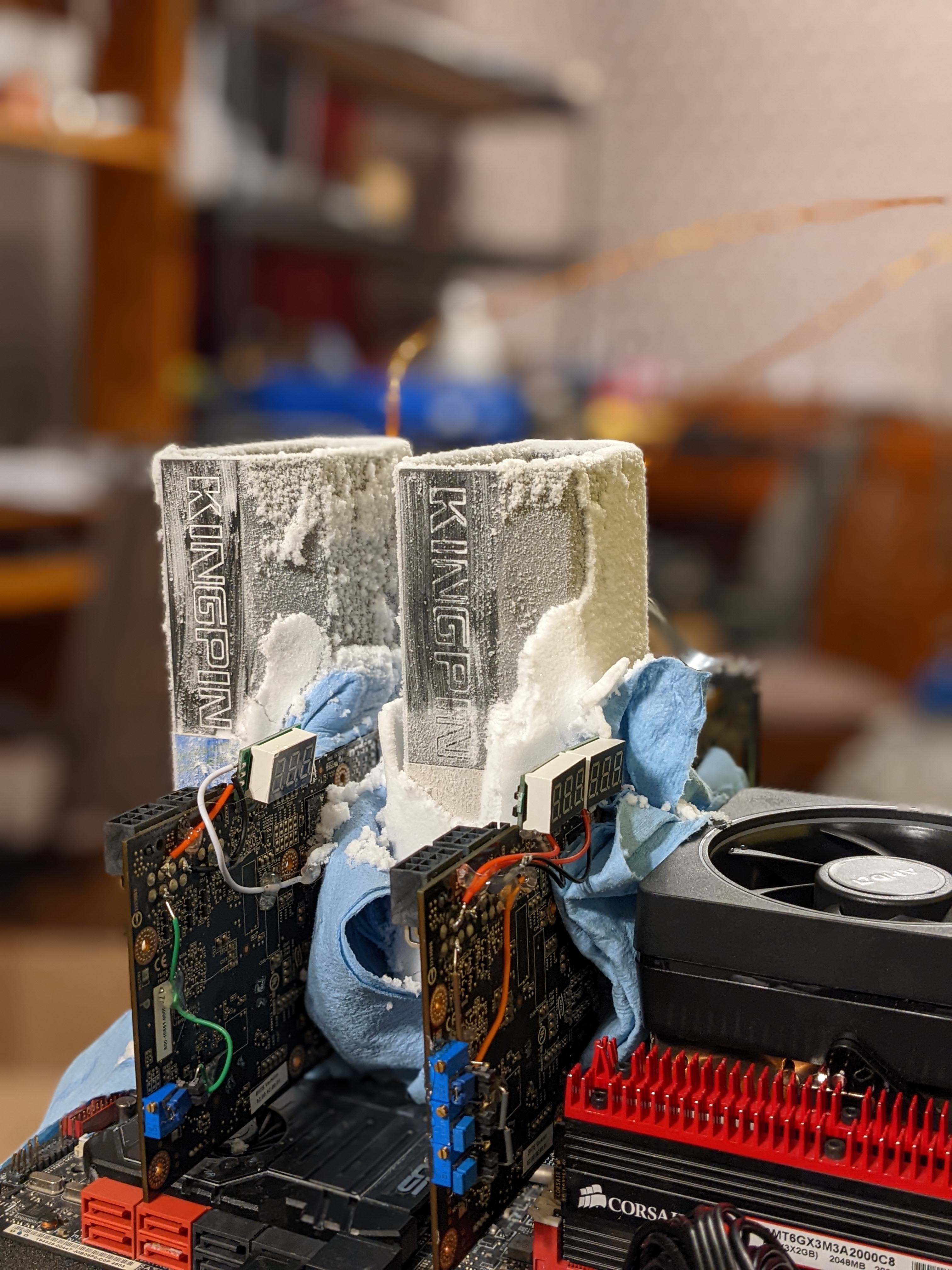
Bought these gtx 280s from dallas, modded vcore, vdd, vddq, pll on one, just core on the other.
dull ginkgo
US won the country cup?
proven canopy
Seems like it. Scores are being checked now. Now that it's over, here's our spreadsheet https://docs.google.com/spreadsheets/d/1l9lOYSXXi_g49ldp00g2Su4NcDWyvP_pEMohlc3Xy2I/edit#gid=1905278102

Google Docs
AMD CPU
Stage Rules,Optimal Hardware,Score To Beat,Subbed,Unsubbed,Notes
Gpupi 1b for cpu ddr3,piledriver 1,3 minutes,3:23:6.04 - 8320 - matt - subbed
(3 subs) ,piledriver 2,3 mi...
worldly wasp
proven canopy
https://i.imgur.com/RAhkATE.jpg
what motherboard is that
any reason why you're benching on d3?
proven canopy
Rampage iv extreme, yos's board. Native sli for 200 series matters a lot
 worldly wasp
proven canopy
Rampage iv extreme, yos's board. Native sli for 200 series matters a lot
worldly wasp
proven canopy
Rampage iv extreme, yos's board. Native sli for 200 series matters a lot
wdym native? can things like x299 or threadripper not run them well?
proven canopy
no
potent fiber
worldly wasp
wdym native? can things like x299 or threadripper not run them well?
Sli support/performance was highly mobo/chipset dependent
 lean pecan
Anyone got a good oc for the asus rog strixs 3080ti?
lavish tundra
lean pecan
Anyone got a good oc for the asus rog strixs 3080ti?
Just OC it yourself tbh
Its not hard
lean pecan
Never done it b4 lol but ok ill figure it out i just wanted an instant oc that I know works
 woven tiger
how risky can it be to OC?
worldly wasp
potent fiber
Sli support/performance was highly mobo/chipset dependent
interrsting is there a list of whats the best chipset per platform
lavish tundra
lean pecan
Never done it b4 lol but ok ill figure it out i just wanted an instant oc that I...
The one asus provides out of the box is an instant oc that works
clever epoch
lean pecan
Never done it b4 lol but ok ill figure it out i just wanted an instant oc that I...
there's no "instant OC that just works" for nvidia graphics cards. GPUs these days are pushed pretty close out of the factory
worldly wasp
woven tiger
how risky can it be to OC?
not at all if you do it properly
clever epoch
The biggest thing you can do is increase the power limit. After that, it's trial and error testing
lean pecan
lavish tundra
The one asus provides out of the box is an instant oc that works
I NEED MOREE MORREEEEE
lavish tundra
woven tiger
how risky can it be to OC?
If you know what ur doing then not risky
woven tiger
i have 32gb ram at 3200 a 3060 and ryzen 7 5800x think its a good system to OC? or do components
not really matter?
clever epoch
RAM overclocking is a whole can of worms that I wouldn't recommend starting out with
woven tiger
clever epoch
RAM overclocking is a whole can of worms that I wouldn't recommend starting out ...
ok thank you for the tip
clever epoch
nvidia gpu overclocking is fairly straightforward. Possibly the easiest
potent fiber
clever epoch
there's no "instant OC that just works" for nvidia graphics cards. GPUs these da...
I only put an "oc" on mine because stock voltage per clock wasn't as good a manual
lean pecan
Ram oc made my system boot loop for 30 min 
woven tiger
clever epoch
nvidia gpu overclocking is fairly straightforward. Possibly the easiest
probably start there then
clever epoch
5800X... PBO will give you the best results. Really the default boost algorithm will be the same, unless you have a really good cooler.
woven tiger
lian li 240 aio
clever epoch
Unless you run a lot of consistent multicore workloads, then a manual all-core OC could be better. But you lose single core performance
clever epoch
woven tiger
lian li 240 aio
it's probably OK. Nothing special, wouldn't bother
woven tiger
clever epoch
it's probably OK. Nothing special, wouldn't bother
ok thank you!
tall pelican
Just pbo the 5800x, no reason to all core
potent fiber
worldly wasp
interrsting is there a list of whats the best chipset per platform
Tbh I'm not really sure. Been years since I paid much notice to SLi being mentioned on a mobo.
clever epoch
I do think advanced PBO can be interesting to play with. The real gains are from curve optimizer though, and that... is very difficult, at best, to stability test.
potent fiber
lean pecan
Ram oc made my system boot loop for 30 min <:Minus_One:641079498170826773>
Ram oc can be sketch. Probably why my pc takes an extra 30 seconds on the white spinning dots even w/ an ssd.
tall pelican
potent fiber
Tbh I'm not really sure. Been years since I paid much notice to SLi being mentio...
Very few newer mobos have sli cert because:
Only high end gpus have it
Sli cert costs a ton
clever epoch
I've been running my system with CO for months, and I get maybe 1 crash a month that I initially chalked up to windows or my RAM OC getting raggedy. But since I disabled hardware acceleration on my browser (chromium), I've been getting consistent crashes until I toned down my CO.
This was after initially testing it with 24 hours of corecycler.
(5900X, 2x16 B die overclocked to 3800 14-15-11)
potent fiber
I guess I should reset my oc & bios to check on my long boot
worldly wasp
tall pelican
Very few newer mobos have sli cert because:
>Only high end gpus have it
>Sli cer...
was mostly wondering about x299 and stuff
thought that would be the most popular platform
lavish tundra
Ram oc is cool
tall pelican
proven canopy
GG
check again lmao, looks like aussies won?
 clever epoch
lavish tundra
Ram oc is cool
clever epoch
lavish tundra
Ram oc is cool
RAM OC is a path to insanity and boy do I know how to run
humble jay
tall pelican
check again lmao, looks like aussies won?
lots of scores taken down for small mistakes  , but was fun, and you know we didn't actually cheat :P
proven canopy
It's been back and forth as the mods go check through all the subs, but for now, the USA is back on top
faint tangle
clever epoch
RAM OC is a path to insanity and boy do I know how to run
i love this
left bladeBOT
 Fleymi#7145 has been warned
Reason: Duplicated text
worldly wasp
lol
timber hound
I've been messing with these trying to get a stable 2000mhz fclk, I don't think it's possible for my cpu though 😦 too many WHEA

Any suggestions before I start reducing clocks?
timber hound
Went with 1900 to remove my WHEA errors
zenith palm
timber hound
I've been messing with these trying to get a stable 2000mhz fclk, I don't think ...
most likely just not possible on your cpu, 2k fclk is pretty rare
Also you need the ram for it too
timber hound
Yea I kinda figured after messing around. It booted but got like 100 WHEA a minute
With tweaking I was able to drop to like 30 a minute but still
Ram is on my motherboards QVL, but is sadly Hynix 16Gb MJR dies
Not the best for OCing
zenith palm
timber hound
Ram is on my motherboards QVL, but is sadly Hynix 16Gb MJR dies
Qvl basically means nothing, whats the xmp on your ram
timber hound
zenith palm
Qvl basically means nothing, whats the xmp on your ram
1.4v

G. Skill F4-4000C18-16GTZN
zenith palm
timber hound
1.4v
Yeah so just your cpu holding you back then best bet is to just tune it down to something like 3800 and try tune your other latencies down
proven canopy
Just tune for 3800c14 tight for daily
Go 4 4 16, 4 8 12, SCLs to 2, etc
Oh, nvm, mjr haha
timber hound
zenith palm
Yeah so just your cpu holding you back then best bet is to just tune it down to ...
Yep 3800 (1900fclk) is rock stable so far
timber hound
proven canopy
Oh, nvm, mjr haha
Yeaaaaa b-die was 2x cost
proven canopy
Could get a 32GB kit for 150 if you look around
timber hound
O
proven canopy
16GB for 55
timber hound
I got my 32gb 4000mhz for $125
timber hound
I wanted just incase my cpu could handle. But 3800 seems to be it lol
timber hound
proven canopy
But if you're tuning manually anyway, meh
Eh was hoping for a better bin this way tbh
Kinda oops
I know more now than 1 month ago
clever epoch

Bumping to 4600 produced errors. Will have to investigate later. I tried 4800 but that also errors. I think I'll have to manually loosen some of the auto timings
tRP 16 also errored :/
I guess I can try tRCD but I doubt it'll work. When I was doing 3900 Gear1 I had to bump tRCD to 15 from 14 flat
Still though, bought this GSkill FlareX kit brand now in October 2020 for $90. I'd say I got my money's worth out of the kit
(3200 14-14-14 standard B die bin)
zenith palm
timber hound
Eh was hoping for a better bin this way tbh
Barely any bins do 2k fclk lol
timber hound
zenith palm
Barely any bins do 2k fclk lol
eh, was worth the yolo. I learned alot about the different settings of ryzen
zenith palm
Fair enough
zenith palm
clever epoch
https://media.discordapp.net/attachments/845104892946546728/926604648176025607/u...
4530 is a bit of an odd freq number for ram no?
clever epoch
zenith palm
4530 is a bit of an odd freq number for ram no?
4533
timber hound
does ddr5 have different steppings?
clever epoch
bCLK fudgery is doing 99.95 or something
timber hound
ah
clever epoch
timber hound
does ddr5 have different steppings?
What do you mean by this
timber hound
does ddr5 have different frequencies than ddr4 (where they overlap which would be 4800-5600MT/s)
timber hound
yee
clever epoch
Jedec minimum for DDR5 is 4800
Jedec maximum for DDR4 is 3200
So technically no
But there are halo DDR4 kits with XMP of 4800+
timber hound
mhm
zenith palm
clever epoch
4533
Ahhhh makes sense
zenith palm
clever epoch
bCLK *fudg*ery is doing 99.95 or something
Change to fudge before the mods see
timber hound
was asking if ddr5 does something different than the typical +200MT/s per step (like 4800 > 5000 > 5200) or if it was something different like 4800 > 4933 > 5066 > etc
clever epoch
zenith palm
Change to fudge before the mods see <:steveconfused:722597717465104414>
🥷
clever epoch
timber hound
was asking if ddr5 does something different than the typical +200MT/s per step (...
Ahhh. I'm not sure tbh. I think it's just 100 MHz steps now. I remember reading about 133 steps being dropped
timber hound
neat!!
 south sky
clever epoch
Jedec minimum for DDR5 is 4800
south sky
clever epoch
Jedec minimum for DDR5 is 4800
Jedec min is 3200 for ddr5 and 1600 for ddr4.
south sky
timber hound
was asking if ddr5 does something different than the typical +200MT/s per step (...
ddr5 has bins 3200 to 8400 going up by 400 each time.
Above 6400 bins are not published yet though but they will be in the future
clever epoch
south sky
Jedec min is 3200 for ddr5 and 1600 for ddr4.
Oh wow, I didn't know there was lower than 4800 jedec for ddr5
south sky
Yeah there is, just rarely used for stuff
Corsair has some 4400 kits

DDR4 on the other hand is just 1600 to 3200 with 266 increments
clever epoch
Of course corsair has the lowest bins
south sky
clever epoch
Of course corsair has the lowest bins
Usually manufacturers just match supported frequency... expect corsair
DDR4 actually went to 1600 😅
worldly wasp
2 dimm per channel and 2 ranks per dimm per channel intel spec is 3600
(4 dual rank sticks)
(yes i know ddr5 is 4 sticks
south sky
Intel's ddr5 specs are dumb

2DPC 1 dimm vs 2DPC 2 dimms 1R????????
Funny how the 4800 spec is just for 1DPC boards
sudden torrent
I wonder when we'll see things like mixed dies on a single stick, or different timings on a single stick. I think it was arshia that teased that.
south sky
never
zenith palm
so im getting some rev e in the next few days, what is a safe voltage and temp for rev e and any other values i should change except vsoc, CLDO VDDP, VDDG CCD and VDDG IOD?
sudden torrent
Rev.e scales with voltage almost as good as b-die. Without exotic cooling you can crank the voltage as high as it will go until it gets unstable from heat, which is typically in the 1.55v region depending on your heat spreaders and airflow. With active cooling you could do more voltage.
zenith palm
yeah wont be active cooling using it in my daily
@tall pelican hey how are you supposed to actually use microns spd, have tried putting in loads of model numbers etc but nothing comes up
zenith palm
yeah like what are you supposed to enter as part numbers arent working
tall pelican
Id use google or reddit and just "micron/crucial xxxxx"
You should also be able to tell reve based on the label
tall pelican
I wouldn't
timber hound
sudden torrent
Rev.e scales with voltage almost as good as b-die. Without exotic cooling you ca...
Does HYNIX 16Gb MJR scale this way too? Their XMP is 1.4v
I have active cooling on my ram due to my top down cpu cooler
zenith palm
active cooling refers to a fan basically on the ram pushing heat away btw
 sudden torrent
MJR is a weird die. It depends on your bin how well it does, which could be 3600 or 4000. It tends to not like above 1.35v
zenith palm
timber hound
ahh itx
timber hound
sudden torrent
MJR is a weird die. It depends on your bin how well it does, which could be 3600...
18-21-21-21-43, 4000 @ 1.40v was the xmp
timber hound
zenith palm
ahh itx
Yee cooler is the same footprint as the the mobo
sudden torrent
Then you've got a good bin if that's the xmp, but overclocking will be trial and error. If the voltage is too high it will negative scale.
timber hound
sudden torrent
Then you've got a good bin if that's the xmp, but overclocking will be trial and...
Oki will be fun to test! Thanks!!
 latent wave
How good is afterburners auto overclocker
sudden torrent
It's OK for finding a starting point but it's really conservative
potent fiber
yep, gave me a not great but not bad 2088 core, although PL is probably a factor and I didnt max it out.
 zenith palm
potent fiber
yep, gave me a not great but not bad 2088 core, although PL is probably a factor...
zenith palm
potent fiber
yep, gave me a not great but not bad 2088 core, although PL is probably a factor...
when ocing always max out pl

potent fiber
zenith palm
when ocing always max out pl
haha, this is a start huh . (Only used these settings for 3dmark, not gaming yet.) 

 true sluice
potent fiber
haha, this is a start huh . (Only used these settings for 3dmark, not gaming yet...
true sluice
potent fiber
haha, this is a start huh . (Only used these settings for 3dmark, not gaming yet...
take that all the way to 200% power limit
potent fiber
120 is max PL, and Idk if I should bother upping the volts. Will take a bit more actual tuning. Currently w/ +90/+200 here's the curve.
 zenith palm
potent fiber
120 is max PL, and Idk if I should bother upping the volts. Will take a bit more...
zenith palm
potent fiber
120 is max PL, and Idk if I should bother upping the volts. Will take a bit more...
nah you dont needa touch voltage, also i would just do + x in the gpu clock instead of doing curve
potent fiber
zenith palm
nah you dont needa touch voltage, also i would just do + x in the gpu clock inst...
I do, I just glance at the curve sometimes. I used to lock the clock/voltage at a certain point for less fluctuations in game but for a while now just let it do it's thing.
 fringe radish
Anybody got any recommended videos for beginner overclocking? I have a 280 mm rad and a 10700k that I want to overclock for using with a 3080ti for gaming and video/photo editing. Will it make an improvement? And is this a good pairing?
Please @ me, I may not see your reply otherwise 😅
 clear glade
Does anyone know where to find an easy tutorial to overclock CPU? I have a asus ROG rampage black edition
fringe radish
clear glade
Does anyone know where to find an easy tutorial to overclock CPU? I have a asus ...
Let me know when you find one lol
 fringe radish
Tanks
tall pelican
Gigabyte lmao
 clear glade
I keep getting over clocking failed… 4930k trying to get 4.5hz with 1.25,1.3,1.4 still doesn’t work
potent fiber
lul
 clear glade
Hi guys if I wanted to do some overclocking to my 12900kf I’m planning to just get the basic Asus prime board, so I be considering a better board for overclocking purposes or the prime should be just fine?
zenith palm
the prime should be fine
clear glade
zenith palm
the prime should be fine
It’s the lowest one Asus Prime Z690-P though lol
zenith palm
Yeah z690 prime p is good
clever epoch
The VRM is a bit anemic, especially for a 12900k
clear glade
zenith palm
Yeah z690 prime p is good
Really? It’s really basic are you sure it can overclock ok?
clever epoch
It can overclock. I wouldn't expect great results, especially on core
also might need to pay attention to VRM temps if you push it high
I've been using the MSI MPG Edge. It's pretty good so far. I don't have direct experience with other boards to compare, but it has 2 more stages than the Prime Z690-P, and each stage is 75A instead of 50A on the Prime P. VRM is rock solid
And memory OC is going pretty well well, at least on gear1. Gear2 is a bit disappointing so far, but it could be my sticks and/or early BIOS issues
No POST code or power/reset buttons on the board make it more annoying, but the lack of buttons is easily fixed with a screwdriver
it also has CMOS reset pins, which can also be used via screwdriver
zenith palm
clever epoch
The VRM is a bit anemic, especially for a 12900k
ahh its decent especially with enough airflow
clever epoch
zenith palm
ahh its decent especially with enough airflow
it will work, but I know somebody who got much better results with better VRMs
zenith palm
ohh yeah well better board is gonna oc better
clever epoch
He got much more efficiency with a Z690 Apex compared to... I don't remember, a lower end board for sure.
zenith palm
i mean yeah ofc apex is gonna oc better (if it doesnt catch fire lol)
clear glade
Should i go for the Asus Z690-A over the P? or maybe the ROG strix version?
zenith palm
ahh if you dont have it yet id grab msi tomahawk or something instead
although yeah the a is better than the p
clear glade
zenith palm
ahh if you dont have it yet id grab msi tomahawk or something instead
I wanted to stick with the Asus boards because of the AIO cooler bracket, we're having issues trying to get the LGA1700 bracket in Canada
zenith palm
clear glade
I wanted to stick with the Asus boards because of the AIO cooler bracket, we're ...
arctic started shipping lga1700 since like late nov/early december in us anyway, z690 prime a looks like decent price in canada
clear glade
zenith palm
arctic started shipping lga1700 since like late nov/early december in us anyway,...
Yeah Z690 prime A seems reasonable $359 cdn, the ROG strix one is nearly $140 more...
clever epoch
clear glade
I wanted to stick with the Asus boards because of the AIO cooler bracket, we're ...
asus LGA1200 -> 1700 conversion is not great
heard lots of issues with mounting pressures and temps
also I got a free LGA1700 mounting kit from arctic (after sending proof of purchase of my 12700k)
zenith palm
they seem to be including them now anyway
clever epoch
they are on new purchases, yes. Mostly mentioning that if you have a spare arctic AIO you can make it work
proven canopy
clever epoch
it also has CMOS reset pins, which can also be used via screwdriver
These are pretty convenient https://www.amazon.com/Warmstor-3-Pack-Desktop-Button-Computer/dp/B072FMVZJZ

Cost-effective 3 Pack 2-Pin Power Switch Cable as great replacement for a broken or damaged power button switch/cable on a desktop computer!
I've had some cheap ones fail though, but easy enough to rewire your own or just cut the switch off and manually short the wires.
cold jolt
i like the sound those make
have considered building a keyboard or controller with them lol
they would fail way too quickly though
 soft dew
Can someone explain to me like I'm 5, what overclocking is?
 bold shore
simplest way, you overclock something in order to try and get more performance out of it
 dusky token
So you push it harder than it’s meant to go? Or is it meant to be overclocked
soft dew
bold shore
simplest way, you overclock something in order to try and get more performance o...
Like gaming at max settings?
bold shore
not necessarily because that also depends on what gpu you have and cpu, etc. but its like a performance boost
like an energy drink to get you up and going
soft dew
Or is it high performance that causes overheating?
bold shore
can cause overheating if you dont overclock correctly but kinda hard to do
hard to do as in hard to overheat your parts unless you just turn off the fans all together
soft dew
Ohhhh, got it
I imagine the inside of a PC either on fire or glowing red, but I've never heard of that happening before
Its like a last resort feature that 99% of us don't use
modern walrus
anyone try using this debloated windows versions for benchmarks? or recommend others? https://www.revi.cc/revios/download/alternative-downloads

ReviOS - 21H2 1.0
clever epoch
proven canopy
https://www.dropbox.com/s/04voq5wdbnu6wlq/21h2forks1.0.iso?dl=0 +
check this message @modern walrus
modern walrus
nice thank you
everything good btw? Happy New Year
feel like I'm never in here anymore
clever epoch
I built an ADL test bench. Core OC is horrendous, but I've been having "fun" with memory
tall pelican
what "cores"? even my 12600k is benching 5.1-5.2 with 1.35v
e cores are like 3.5, p 5+
modern walrus
oh man Fitz would I love to bore you to death asking questions about Aorus Z590 Ultra & how the heck you managed to get your memory OC so high & why I can't break out of the 4000mhz prison but I'll spare you
I found your settings in a pinned POST either here on on OC discord & tried to mimic them but got nowhere
so much to learn
potent fiber
@dusky token@soft dew I think a decent comparison would be turbo charging a car so it has more horsepower than the factory gave it. A by product would be perhaps less life & more heat in the engine bay. Increasing voltage is often required to reach super high clock speeds, and would of course put out more watts/heat and need better cooling. You can "OC" quite a bit w/ "stock" voltage actually. My pic is just a quick example of OCing.
 clever epoch
tall pelican
what "cores"? even my 12600k is benching 5.1-5.2 with 1.35v
clever epoch
tall pelican
what "cores"? even my 12600k is benching 5.1-5.2 with 1.35v
P cores wall at 5.0. Even 1.35V moderate LLC, can't get 5.1 stable (OCCT SSE test, not even AVX)
also this new BIOS I just installed on my board destabilized my 4533 16-18-18 memory OC
proven canopy
Ran dallas's gtx 280 on ln2 for a 3rd place with vantage, going to revisit, hoping to take the  from splave
https://hwbot.org/submission/4894494_forks_3dmark_vantage___performance_geforce_gtx_280_21212_marks

HWBOT
The GeForce GTX 280scores getScoreFormatted in the 3DMark Vantage - Performance benchmark. Forksranks #2762 worldwide and #3 in the hardware class. Find out more at HWBOT.
zenith palm
bold shore
can cause overheating if you dont overclock correctly but kinda hard to do
Or have poor cooling
south sky
modern walrus
oh man Fitz would I love to bore you to death asking questions about Aorus Z590 ...
Are you using dual rank or something?
I've found dual rank sticks to be extremely poor on the z590 ultra
With single rank sticks it's a beast, I can even hit 4533 with 4 sticks
Micron IC's will get dead spots on it though VCCPLL can assist them
IIRC on Rev.E with 2 sticks 4000 to 4600 was a dead spot for me
Nothing helped
south sky
rip
modern walrus
but I'm pretty sure Fitz used the same kit 2x16 on his
south sky
Dual rank Rev.E went to 3600, b-die 4133 and e-die 4000 for me
Whereas in single rank form they all did well over 4800
modern walrus
I could only squeeze 4000 out of bdie... sad
actually
I could only squeeze 4000 out of DJR also
also 2x16gb
 modern walrus
I threw in the towel & settled for 4000c15-16-16-35@1.55v
which isn't much to get excited about
modern walrus
I couldn't get DJR to POST over 4000 on MSI Z490 Gaming Carbon Wifi either
command rate?
modern walrus
damn no freaking way
what's crazy about that is
I had 2x32gb MJR on there
& that board wouldn't POST XMP of 3800c18
& 1T command rate, it would need CMOS clear
south sky
I was hitting 4400~4500 with 1N on A3 dimms, A2 just lower
modern walrus
haha I noticed
I just don't know where to start with all those like super tertiary settings
south sky
You want reasonable IOL's? How about nope.
south sky
modern walrus
I just don't know where to start with all those like super tertiary settings
terts are tCCD timings, technically those ones are quaternaries
modern walrus

I'd be fairly happy with this OC if I could get 1T on it
and that is the first time I've ever heard the word quarternaries
south sky
If only you could lower those rtl's
modern walrus
damn & I don't even know how to lower them tbh
south sky
Board won't let you, at least on the bios' I've tried
modern walrus
I'll restart & see if it POSTs at 1T but I kinda doubt it
modern walrus
oh man that would be so far over my head
was surprised that held tbh
but I've probably done 10 hours of tm5 since & no issues
south sky
55000 is low
modern walrus
tREFI you want highest number no?
south sky
Yeah
It's the time between the starts of refreshes
So total refresh time is tRFC/tREFI (plus some other stuff but eh, not that big)
modern walrus
on the DJR on MSI, it's held just fine at max 65,534
alright let me try this 1T thing haha
others have told me this board has a "hole" at 4k
south sky
Only really on micron stuff in my experience
modern walrus
so I don't really even know why it's been working at 4k for me
ah okay
are you on 11th or 10th gen CPU btw
south sky
10th
south sky
I'd rather a Pentium then to destroy my pride with 11th gen
modern walrus
so it's apples & oranges trying to compare mem OC settings from what I gather
south sky
With 2x8 Rev.E, 4000 works, 4100 is unstable, 4266 is more unstable, 4350 posts but that's it, then 4350~4550 doesn't post, 4550 is unstable, and 4600 works like it's nothing. (2N)
It's not the ratio, I tested that
modern walrus
another thing that sucks with this board is the DRAM termination setting has to be manually set
but maybe that's typical I dunno
south sky
What do you mean?
modern walrus
otherwise I get PCIe bus interconnect errors
south sky
VTT?
south sky
modern walrus
otherwise I get PCIe bus interconnect errors
Oh easy fix
 south sky
At least it fixed them for me
That should solve all the PCIE errors
Around 0.95 is nice
Lower VCCPLL
modern walrus
will do once this thing stops making all this noise trying to train 1T
south sky
Did you lower or raise VTT?
modern walrus
I think I set VTT at 1.15 on a recommendation
south sky
That wouldn't be correct


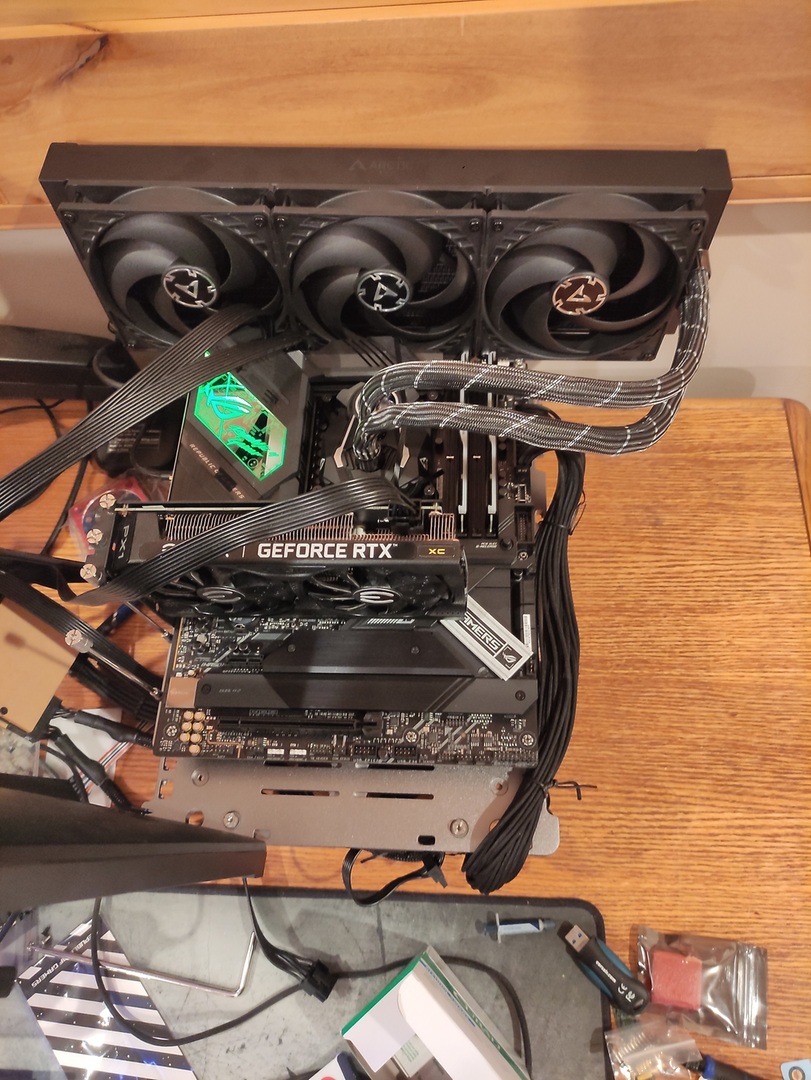



 modern walrus
ya I figure if I'm gonna suck at doing something I might as well have it well documented so if I learn something new I can get a sense of what I did before
south sky
dr should go lower
modern walrus
those are the ones tied to tWTRS/L?
south sky
No that tWRRD
tWTR isn't a thing on Intel
There is effective tWTR, which is two less then what asrtc shows
modern walrus
damn I dunno if it's cuz someone walked me thru it or what but AMD oc seemed so much easier
alright my motherboard is just spinning wheels let me reset & mess with VTT
south sky
AMD can be easier because you aren't pushing max clocks of the ram
modern walrus
you try desync? haha
south sky
desync can be solid if you really push it