#overclocking
1 messages · Page 94 of 1
 lavish tundra
 high grail
Ah, that's confusing when Zentimings shows it the other way
lavish tundra
Yeah its always
Freq tcl trcdrd trcdwr trp tras
high grail
https://i.imgur.com/3mwHiFu.png Looks like i'm a little slower than my last imlc
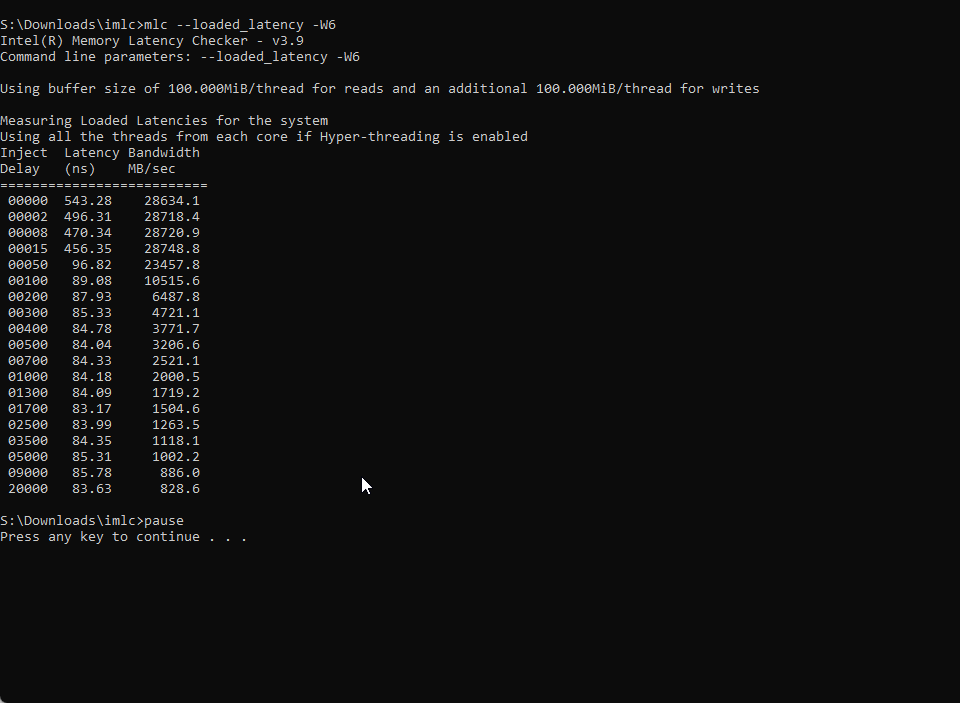
I guess it's sub-timing and turnaround timing time.
 sudden torrent
Yep, you can set the tRFC 1/2/4 to 560 and it'll calculate the other 2 automatically
tRC you can probably do 54
Possibly 52
 sudden torrent
It is, that's based on your XMP timings usually
 sudden torrent
That should be enough for another boot and bench test
lavish tundra
Anyway imma go fr have fun and good luck
high grail
Oh
It didn't calculate the other 2 settings.
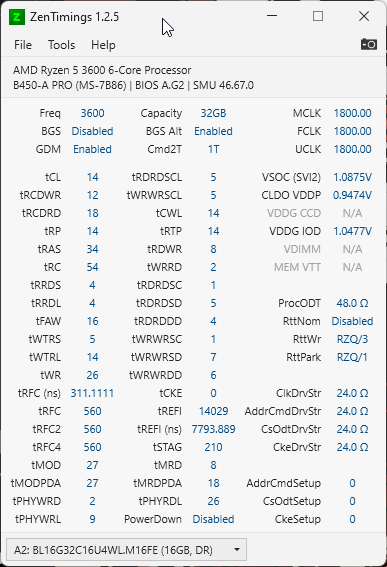
It did a dumb and just set them all to 560
sudden torrent
The IMC knows what they are, zentimings only reads bios
high grail
Ah.
sudden torrent
Try tWTR_S 4 and tWTR_L 8 next with tWR 20
 proven canopy
Did you set vddp manually? I run .9v
high grail
Yes
proven canopy
Idk if you can on rev.e but dropping SCLs to 2 or 3 gives a noticeable performance benefit
high grail
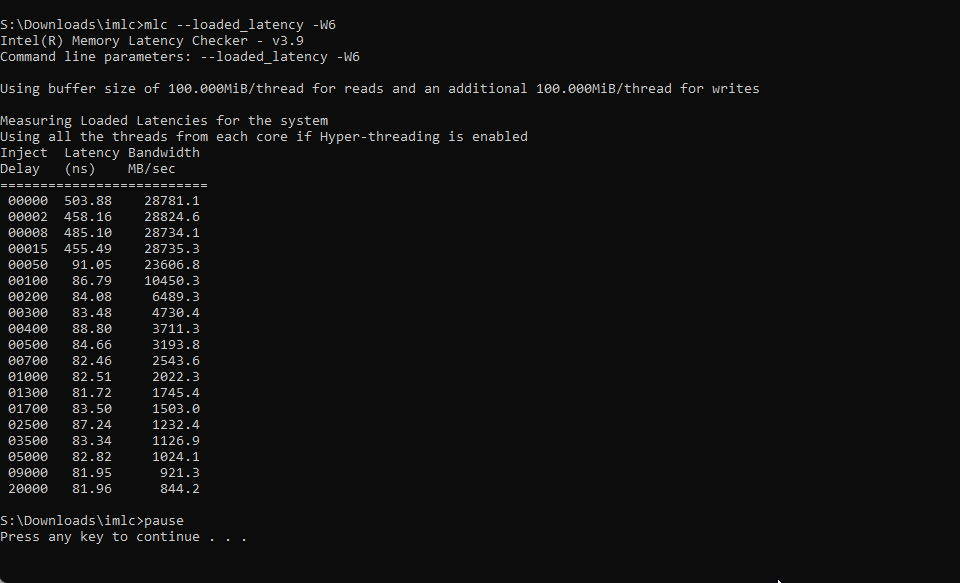
https://i.imgur.com/0tCbNF5.png We're getting even faster bois.
 proven canopy
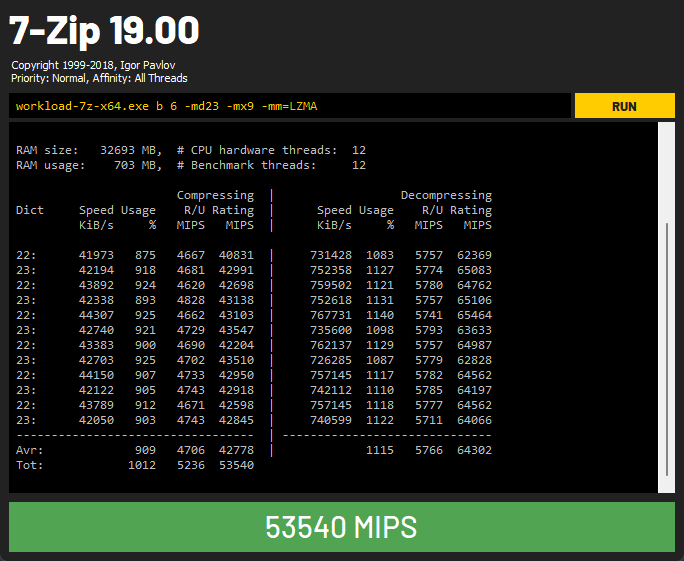
Run 7zip or ycruncher out of benchmate
7zip is one of my newly favorite memory benches
high grail
Hmm, I guess I can do that.
I'd need to go back and test Stock (No XMP), XMP, and then Fine Tuning
I would kill right now for a motherboard with an external CMOS Reset Button
high grail
https://i.imgur.com/F1zFkXm.jpeg And a Cinebench for kicks
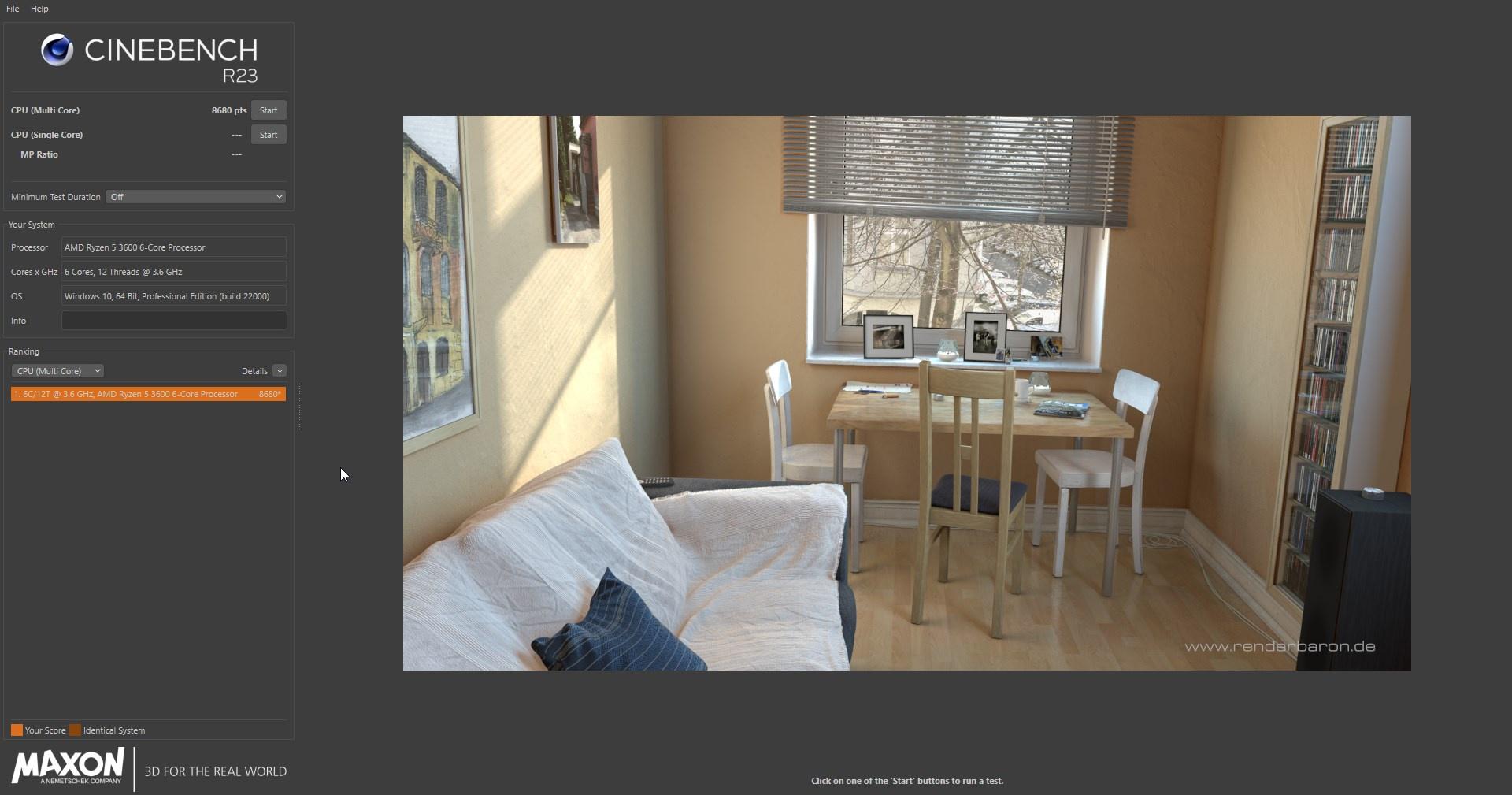
How odd
My 3600 is quite a bit lower than the one here.

Cinebench R23 is the newest instalment of the most popular CPU-Rendering Benchmark Cinebench. We have the Score Results for all modern Processors.
Around 400 points.
sudden torrent
Your voltages are higher because you're still in the testing phase, once you get it stable you can try lower voltages for less heat and more boosts
high grail
And someone else almost a year ago managed 10152 on a 3600 OC'd to 4.3Ghz at 1.175v
sudden torrent
Probably LN2
high grail
Ok, something is forked
Oh nvm
That was a 3600X number.
Not the 10k
I saw a Stock 3600X pull 9501 on Stock Cooler.
sudden torrent
Ah yeah the X is clocked higher
sudden torrent
Welp that's unstable then
high grail
Coefficient is too large
Well ok the full error is
ConvolutionFailedException
So it's unstable?
sudden torrent
Yeah something is unstable
sudden torrent
Run OCCT memory test and tell me about how many errors per second you get
sudden torrent
Very unstable then
high grail
So... What should I peel back on?
sudden torrent
What's your zentimings look like right now

 sudden torrent
WTR_S to 5 and _L to 10
WR to 24
See if that helps
high grail
Ok, now it's giving anywhere from 6 to 2 errors for around 18 seconds, and then Windows freezes
@sudden torrent
What do I need to change now to increase stability?
sudden torrent
tWR to 28
tRFC 580
high grail
I'm going to hedge a bet that that is still unstable
Because Windows didn't finish logging in
sudden torrent
Try tRCDWR 14 then
high grail
Well, we got that to boot just fine.
 short blade
shouldn't skip too many steps at once
high grail
Im trying to go tighter
short blade
then start by tightening tRP and only tRP
I got mine to 12
also
was it stable? or just booted
high grail
Ok, fair it booted and was working for over an hour. But now I am doing real stability testing.
short blade
I'd stability test it primarily to make sure tCL 14 is stable
if tCL 14 isn't stable you're going to waste a lot of time on everything else
high grail
I'm getting errors in OCCT, but it's been a Minute so far and no crashes.
Weird, when I stopped the test it crashed.
Jeez, even at 3600 14-18-18-18-36 with a tRC of 58 I get errors.
And a crash when the test ends.
It doesn't make sense.
Like, do I somehow have literally the worst Rev E in the world?
short blade
could be bad board as well
high grail
Well, I'd be up a creek if it was a bad board.
I don't have the money for a new board.
short blade
it's a bottom tier b450
trace quality of the board can absolutely affect ram oc
okay not completely bottom tier
but low tier
high grail
Should I just enable XMP/DOCP and set Voltage to 1.5v and go on about my day?
Until I get a new motherboard obviously.
short blade
you could try higher vsoc as well
but like i said
tRAS should be 38 for initial testing
not 36
not sure why you are so insistent on 36
short blade
gear down mode on?
high grail
It's set to 1T
Though I wonder.
Let me check if there'
is some gear down mode auto setting
short blade
1T gear down mode on would be best here
high grail
So force Command Rate to 1T and then Enable gear down mode?
short blade
yes
short blade
like i said before
40 ohm
rttnom disabled
rttwr rzq/3
rttpark rzq/1
all drive strengths at 24 ohm
all setup times at 0
1.1 vsoc, 1.05 cldo vddp, 1.05 vddg ccd, 1.05 vddg iod
may need to raise those IMC voltages further for dual rank but test at that
high grail
 high grail
What values are those? I don't have rzq
high grail
 short blade
1.1 vsoc, 1.05 cldo vddp, 1.05 vddg ccd, 1.05 vddg iod
short blade
short blade
1.1 vsoc, 1.05 cldo vddp, 1.05 vddg ccd, 1.05 vddg iod
did you do this already
 high grail
Boot Fail
high grail
Oh wait
short blade
only primary
high grail
All subs are undone.
short blade
may need higher procodt or clkdrvstr
or higher IMC volts
though I feel like it shouldn't be IMC volts for rev. e
high grail
Yay... I gotta reset cmos
high grail
And for some reason cmos won't reset...
proven canopy
high grail
Did the Galaxy brain play of wiring your Reset Switch to be Clear Cmos
https://i.imgur.com/7RtFx42.png Newest ZenTimings with Sub-timings on Auto and Auto ProcODT.
Error count is a lot lower, but there's still errors.
Let's see if just plain old XMP works without Errors.
Because if it doesn't, then I'm gonna blame the board.
And then I'm gonna have to look for a half decent but not ultra-expensive B550 motherboard.
I'd also like to know why Windows commits suicide when stop the test.
short blade
@high grail is there a soc LLC setting
your vsoc is drooping really low
try 60 ohm clkdrvstr
high grail
Oh
Yes, there's LLC
So, also good news
XMP is Error Free
This is my XMP setup
Just for a baseline
Here is my LLC options.


And my options for over and under voltage for SoC
Oh
Too blurry...
Under voltage is - 475, - 525 or - 575 mV. Over voltage is 375, 425, or 475 mV
How much juice should I add?
high grail
It's starting to look like XMP is the safest way for me to go right now until I get a new, and better motherboard.
proven canopy
https://hwbot.org/submission/4841421_forks_3dmark_cpu_profile_max_ryzen_threadripper_3990x_27418_marks 100mhz down, still 

HWBOT
The Ryzen Threadripper 3990X @ 4300MHzscores getScoreFormatted in the 3DMark CPU PROFILE MAX benchmark. Forksranks #1 worldwide and #1 in the hardware class. Find out more at HWBOT.
short blade
damn, nice WR
 sterile flame
So… Injust had to overclock my GPU by 250mhz just to get it to run at stock. (1050mhz, currently overclocked to ‘1302mhz’ in quotes because it really isnt)
GPU temps are under 75 degrees Celsius and I’ve never seen this issue before. Any idea as to why my GPU is running 250mhz slower than it’s base clock when the usage is 100% and temps are low?
It’s working with the overclock rn but if anyone knows anything, chuck me a ping. Thanks in advance
 dull ginkgo
@sterile flame get GPUz, it should tell you something in perfcap reason
Maybe power limited, maybe temp, that should tell you
sterile flame
dull ginkgo
<@456226577798135808> get GPUz, it should tell you something in perfcap reason
It was Temp
One of my sata cables got caught up in one of my fans and sent temps through the roof. Temps looked fine but the card was throttling
short blade
sterile flame
It was Temp
One of my sata cables got caught up in one of my fans and sent temp...
how did your sata cable end up all the way up there? O_O
sterile flame
short blade
how did your sata cable end up all the way up there? O_O
It pinged out of a HDD and the end of the cable just shot upwards - I added a new HDD earlier and didn’t notice
My HDDs are right next to the GPU
short blade
huh...
pic?
oh wait is it one of those older cases with drive bays in the front of the case
i was very confused how a sata cable could get there lol
sterile flame
Anyone have any tips on how to get x99 to stop being dumb and detect all 4 dimms
 tall pelican
Get off x99
sterile flame
yes that is a valid option
but
im not done overclocking this chip yet
dont worry, im done with x99 after november 7th
then im gonna start ocing on x79, once i get an unlocked cpu for it lol
funny thing is, the board actually does detect all 4 dimms, its just not using slot D1 for god knows why
proven canopy
I find it enjoyable to bench difficult platforms like threadripper, quad g34, other NUMA systems due to the challenge.
 midnight chasm
hey fellas - anyone know the best way to remove acrylic conformal coating that I put on the capacitors around the GPU die to prevent shortages from occurring were the liquid metal to drip onto them?
 left bladeBOT
 DasSauce#4404 has been warned
Reason: Bad word usage
midnight chasm
proven canopy
Link the product page of the coating
https://www.amazon.com/MG-Chemicals-Premium-Acrylic-Conformal/dp/B07B8RY7M6/ref=asc_df_B07B8RY7M6
It's on a 3090 Strix so I'm really not trying to screw it up.

MG Chemicals - 419D-55ML 419D Premium Acrylic Conformal Coating, 55 mL Bottle, IPC 830, UL 94V-0 (File # E203094)
I have to RMA it for unrelated issues and if it's on there Asus is 100% going to refuse RMA.
proven canopy
If you still have it, I'd try painting some random dead pcb and testing acetone, iso, etc to try and remove it without melting anything important
I think I have the exact same stuff
midnight chasm
isopropyl alcohol didnt work at all
sudden torrent
Of course he's already done this https://youtu.be/ExPdq4yX2OI
Support me on Patreon:
https://www.patreon.com/der8auer
Save 10% on your iFixit purchase: DER8AUER10
https://eustore.ifixit.com/der8auer
Pro Tech Toolkit: http://bit.ly/2JOFD8f
Find my products at Caseking:
Delid Die Mate 2: htt...
midnight chasm
proven canopy
If you still have it, I'd try painting some random dead pcb and testing acetone,...
I don't have any unfortunately 
 sudden torrent
The thick IHS also means there's potential for direct die cooling to be effective again
proven canopy
AMD Sempron 130 overclocking on phase change cooling, -40C
https://www.twitch.tv/mickulty

Twitch
Trying to have the fastest AMD Sempron 130 | SuperPi 1M | PB 18.252s | HW record 15.828s
 worldly wasp
midnight chasm
hey fellas - anyone know the best way to remove acrylic conformal coating that I...
worldly wasp
midnight chasm
hey fellas - anyone know the best way to remove acrylic conformal coating that I...
if you broke the card
and you put lm on it
midnight chasm
worldly wasp
and you put lm on it
no ln2, just liquid metal. the issue is unrelated to the liquid metal
worldly wasp
thats your problem, not asus's
well when you LM if you basically forfeit warranty
good luck
midnight chasm
and I'd like to hear them prove that I used liquid metal
 midnight chasm
I removed it
worldly wasp
and they dont need to prove it
if they just think you did it they can refuse rma

good luck my friend trying to scam their RMA dept 
midnight chasm
scam?
the issue is unrelated
I'm not sure why you think it's okay to talk to me in a condescending manner
worldly wasp
i mean like i said, when you use liquid metal, you forfeit warranty
or when you apply conformal coat
midnight chasm
And the onus is on them to prove it.
 midnight chasm
Regardless if they turn it down or not, I can get it repaired for $275. Not sure what makes you think you can talk to me like that
midnight chasm
You should probably get off your computer once in a while. I enjoy them too, but fresh air works great.
 midnight chasm
Not doing RMA fraud regardless. The issue is unrelated to the liquid metal. If they want to do the right thing and fix their faulty card like they should, they can. If they turn it down, I spend $275 for repair.
Don't assume things.
worldly wasp
so you willingly forfeit warranty (by lming and conformal coating), then when it breaks, you regret it and try to hide it so they dont deny rma
maybe asus and luck will be on your side
$275 is if its repairable

dull ginkgo
worldly wasp
i mean like i said, when you use liquid metal, you forfeit warranty
EVGA, MSI, and XFX are basically confirmed to not care if you replace cooler for RMA, I don't think Asus would be that much different
 prisma arch
1.55?
high
 dull ginkgo
MSI quote:
"Heatsink is removable, but will void your warranty if the PCB is damaged, you will also need to restore the card to stock condition when returning for RMA."
So as long as you don't damage PCB and return it with stock cooler
They don't care
worldly wasp
coating it in conformal coat i'd considered damaged :p
dull ginkgo
I would disagree, but I would just like to point out how the manufacturers are actually relatively flexible when it comes to these things
Well, some manufacturers
 humble jay
worldly wasp
well when you LM if you basically forfeit warranty
humble jay
worldly wasp
well when you LM if you basically forfeit warranty
I liquid metal'd and shunt modded my strix that exploded

i got good at hiding it
worldly wasp

humble jay
also i used nail polish, so just used nail polish remover (acetone)
humble jay
worldly wasp
$275 is if its repairable
$1700

nvm 1600


Rupert D is clutch though
 midnight chasm
worldly wasp
$275 is if its repairable
midnight chasm
worldly wasp
$275 is if its repairable
Yup, Tech Cemetery (great guy, love his videos) quoted me $275. If anyone can repair it, it's him.
I'd love for you to find anywhere in the ASUS warranty where they say it voids your warranty. No such language exists. They use general terms like "unauthorized modification". They can decide what is unauthorized modification or not. I don't think it's unauthorized modification, so that ambiguous language is on them to interpret.
I already explained that the liquid metal was completely unrelated to the issue. As long as I return it to stock (I still have the original cooler with all original pads completely intact) it is fair use under their return policy to RMA it.
Don't falsely accuse me of "RMA fraud" thanks.
 modern walrus
do some memory kits not report temps to HWiNFO?
 midnight chasm
worldly wasp
btw what failed
midnight chasm
worldly wasp
btw what failed
Not sure exactly what is wrong but I'm confident it has to do with the memory modules. Would leave mining overnight and would come back to the computer being off despite memory junction temperature never exceeding 80C, average temp 50C. Then it suddenly fails to display out on boot most of the time. If I leave off for days and start it up, it displays out. Otherwise, it posts, but no display out. My computer automatically logs in and starts up my music program and I can hear the music so I know it always posts. If the liquid metal made contact with any of the capacitors around the GPU die itself, the GPU would be a $2000 brick and I wouldn't even get a post.
worldly wasp
memory failures usually artifact but ymmv
also it wouldnt necesarily brick, the liquid metal has resistance
midnight chasm
It would definitely brick.
worldly wasp
but i dont think its the LM either
i've had LM flow over on my card
and it worked when i removed
it would crash under load
i'd assume from OCP on the VRM
midnight chasm
AFAIK there is no OCP on 30 series cards?
midnight chasm
Yeah, from what I remember there's a lot of cards frying due to VRMs because of the lack of OCP on them.
proven canopy
If the vrm ocp has to kick on at all, something else is very wrong
midnight chasm
I mean OCP on the card failing or not being a thing and the VRMs getting fried
That's just what I heard idk at all
Lots of bad information though
sudden torrent
midnight chasm
AFAIK there is no OCP on 30 series cards?
There's OCP but it's set so high you'll never hit it
dull ginkgo
Kinda like g3
worldly wasp
proven canopy
If the vrm ocp has to kick on at all, something else is very wrong
x299 moment 
midnight chasm
Lol X299 was so sad. Those VRMs were so insufficient for that many cores and power draw
worldly wasp
990FX too
proven canopy
Well that'd just be user error trying to run a 9980xe on water in a cheapo board or something
worldly wasp
like rampage vi apex 
proven canopy
There are plenty of x299 boards (now) that have sufficient vrm, strix e II, omega, dark, but yeah, just not the vi apex sadly
midnight chasm
When you gotta waterblock mobo VRMs 
worldly wasp
i mean literally any second gen board is fine
even the cheapo primes/tufs have 12 phase ir3555
midnight chasm
ye, I did write "was" for a reason 😛
proven canopy
Trying to break 12 @ 4.0 core https://i.imgur.com/yLhlKBI.png
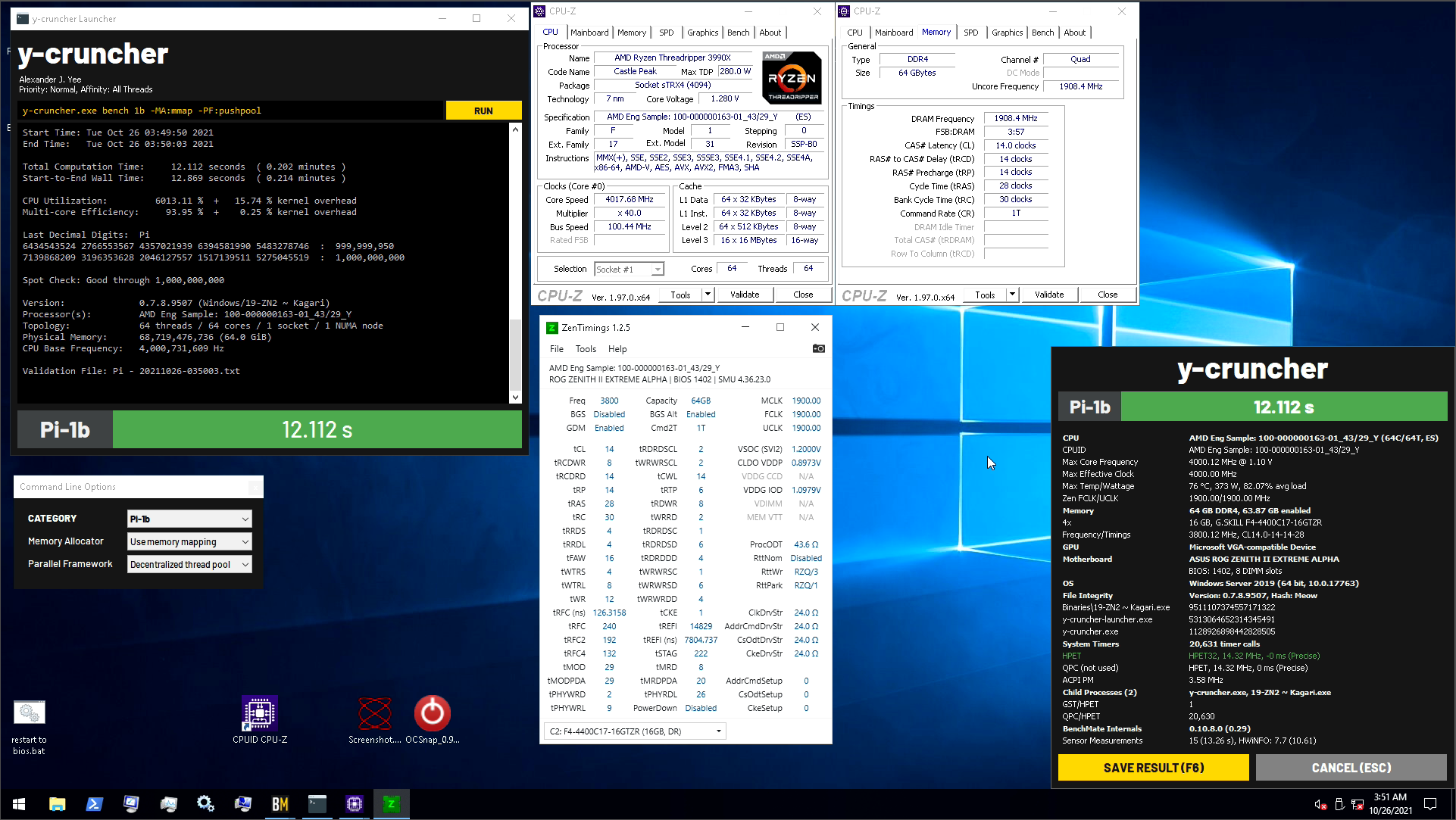 worldly wasp
@proven canopy lower tRFC, CWL, RP?
proven canopy
Didn't notice any much performance improvement
Thinking of raising a bunch of twr's and trying for twrrd 1
proven canopy
Yes - but I can't figure out how to post over 4200 
Have heard ln2 mode works, but eh
Currently around https://i.imgur.com/amQmHA1.png
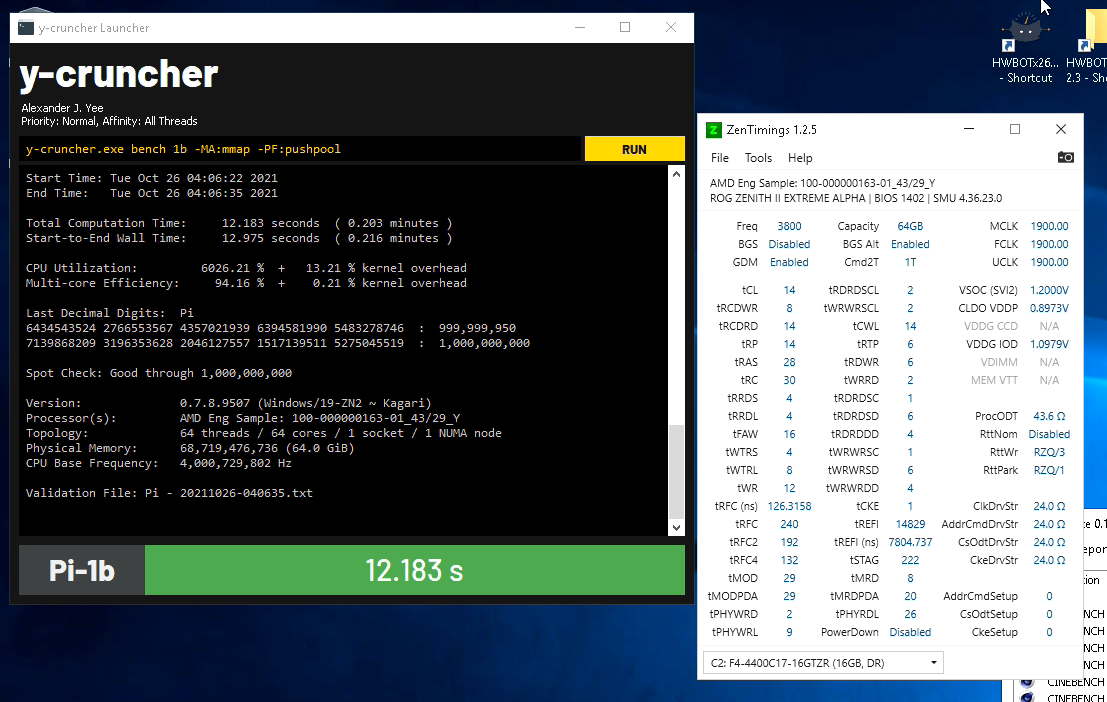
There's a lot of variability, especially on server 2019 for some reason, x265 is kinda the same way
well, rng'd into a best score yet
 proven canopy
I imagine I'd have to run very different timings in general for gdm off, I've played with it a bit, but didn't notice anything special. Was testing x265 at the time
worldly wasp
proven canopy
Yes - but I can't figure out how to post over 4200 <:brokenchamp:710168831263375...
the straps might just be cursed
try bclking up
proven canopy
lol
worldly wasp

proven canopy
Up to 4500? hah
proven canopy
I'm currently amazed how much more intense ycuncher 10b is at 64c than 1b
can do 41 1b, can't pass 10b at any voltage, even if there wasn't a cooling limit
nvm, pretty sure it's also the memory oc
 clever epoch
midnight chasm
I mean OCP on the card failing or not being a thing and the VRMs getting fried
clever epoch
midnight chasm
I mean OCP on the card failing or not being a thing and the VRMs getting fried
BZ believes that the OCP limit is set so high on the uP9511 controllers that it might as well not be set; by the point OCP is triggered, your VRM is probably already fried.
midnight chasm
clever epoch
BZ believes that the OCP limit is set so high on the uP9511 controllers that it ...
This is exactly what it was.
clever epoch
not all of them have uP9511 controllers though. I'm not sure which ones do/don't, and allegedly the newer revisions of many cards use the updated uP9512 controllers
proven canopy
Seems like fclk was the culprit, first bench so far I've found not to do 1900
Seems like 1b will occasionally throw a similar error, 1/10 maybe
1866 made it to 50%, previous high was 20 something
Another interesting "quirk" of ycruncher, I can see it pull 800w from the wall, yet the cpu is under 60c, not the case in x265, seems like the heat load is far more concentrated
24c room, 33c water temp at the end of a 3 minute run 
 tight plinth
clever epoch
not all of them have uP9511 controllers though. I'm not sure which ones do/don't...
tight plinth
clever epoch
not all of them have uP9511 controllers though. I'm not sure which ones do/don't...
Apparently might be NCP8610 controller. Idk, one RMA-ed 3090 ftw3 owner said that
Tho I am scared for the fact that the most popular GPU deaths are asymmetrical VRM designs. Am on 3080TUF that I want to shunt mod but also am on asymmetrical VRM.
That do be one of the theories behind GPU deaths
clever epoch
Any way to see what it has (even only on the core rail) without opening it? I imagine not
sudden torrent
clever epoch
Any way to see what it has (even only on the core rail) without opening it? I im...
Techpowerup and others usually have pcb shots with the cooler removed
clever epoch
sudden torrent
Techpowerup and others usually have pcb shots with the cooler removed
yeah but the FTW3 came out forever ago and I want to know what my specific model has. I even spoke with the EVGA guy and he said they don't track which model has which controller(s)
proven canopy
Ice bucket AIO Phenom II x6 overclocking https://www.twitch.tv/techtested

 jagged hollow
when overclocking your cpu, it's done through some software on windows, not the bios, correct?
and if so, anyone know of anything that would work with the i7-950
XTU supposedly can't work with such outdated hardware
 faint tangle
jagged hollow
when overclocking your cpu, it's done through some software on windows, not the ...
faint tangle
jagged hollow
when overclocking your cpu, it's done through some software on windows, not the ...
no
jagged hollow
it is done through the bios?
faint tangle
yes
jagged hollow
the bios on my x58 doesn't seem to show much
faint tangle
idk if your cpu is overclockable
jagged hollow
shame, looks like it isn't
I was hoping that I could actually get something out of it
faint tangle
F
jagged hollow
lol, the cpu may be old, but the graphics card on this system is the firepro W2100
has 2 gigs of DDR3
faint tangle
jesus
jagged hollow
DDR3 must kill card performance, not that there's much of a card either
Is ram overclocking also done in the bios?
My cpu may not be overclockable, but looking into it, my cpu is actually being used very little for the speeds I'm getting
faint tangle
jagged hollow
Is ram overclocking also done in the bios?
yes
adding more might help you more though
jagged hollow
I have 12 gigs, it's just running at like 12800 MHZ
faint tangle
jagged hollow
I have 12 gigs, it's just running at like 12800 MHZ
Ohh, you meant 2 gigs of gddr3 lmao
jagged hollow
no, that's what my graphics card has
faint tangle
yeha thats what i just said
when you said 2gb of ddr3 i thought you meant system ram
 barren ridge
faint tangle
Ohh, you meant 2 gigs of gddr3 lmao
barren ridge
faint tangle
Ohh, you meant 2 gigs of gddr3 lmao
tfw my laptop actually has ddr3 as its own vram 
im not joking either
gpu-z confirms it
clever epoch
Yeah iGPU uses system RAM as VRAM
faint tangle
840m right?
barren ridge
850m
It's pretty bad as ddr3 form kek
gddr5 is ok
I basically just have xbox one perf cause thermals are bad on this
In games that xbox one runs on that is
tall pelican
I have a dgpu that uses ddr3, its decently common
proven canopy
Phenom X3 8600b overclock/unlock
https://www.twitch.tv/techtested
 cedar cypress
when im overclocking ram and testing.. my average temps are 72. but my max is 90?
which one do i go off of?
short blade
...ram temps??
if you are hitting 72-90c on your ram it's time to stop overclocking
figure out why your ram is hitting 72-90c first
are you pointing a heat gun on it?
proven canopy
Clearly he means core
short blade
why does cpu temperature matter for ram oc
ram tests aren't that heavy of a CPU load
72 is fine
worldly wasp
short blade
ram tests aren't that heavy of a CPU load
hello meet linpack
or y cruncher
tall pelican
Everything that is too big to fit in cache is technically a ram test
jagged hollow
So I'm thinking about overclocking my m1000m, a mobile nvidia quadro with gaming performance close to that of the rx 550
can MSI afterburner be used to overclock on a laptop?
and seeing as how temps for my gpu rarely exceed 60 degrees, is it running too hot for an overclock as is?
 zenith palm
jagged hollow
can MSI afterburner be used to overclock on a laptop?
zenith palm
jagged hollow
can MSI afterburner be used to overclock on a laptop?
Afaik yes
jagged hollow
and what is the maximum temp you would run a mobile gpu at?
my cooling system is crap but seems like my cpu is the one that really suffers, my cpu idle temp is about my gpu load temp
zenith palm
Uhh 90c ish usually
zenith palm
jagged hollow
my cooling system is crap but seems like my cpu is the one that really suffers, ...
Could always try undervolting your cpu a bit
jagged hollow
the device is HP, it doesn't let me mess with the cpu or ram at all
it's kinda annoying
zenith palm
jagged hollow
the device is HP, it doesn't let me mess with the cpu or ram at all
Xtu? Throttlestop nothing?
jagged hollow
overclocking my card has actually turned out pretty well
with insignificant changes in temps I have already got a 10% increase in performance
zenith palm
Nice
jagged hollow
Is it normal for msi afterburner to put limits on core clock?
And not even allow you to change the memory clock
My temps still don’t get above 65 degrees but I’ve overclocked as much as afterburner will let me
zenith palm
Could just be a mobile gpu thing/whatever way hp has set it for you
jagged hollow
HP is kinda sucky
But, oh well, guess this is the most I’m going to get out of my laptop
proven canopy
What are you using that i7 950 for?
jagged hollow
not really anything
I do just about everything on the i7-6700HQ
the i7-950 is very obselete
the i7-6700HQ is just sad
I'm probably going to replace it with the 12600K when I actually get some money on hand
proven canopy
Get hyped

 wheat ether
proven canopy
Get hyped
wheat ether
proven canopy
Get hyped

 hybrid frost
What is overclocking
wheat ether
hybrid frost
What is overclocking
it is overclocking
hybrid frost
?
sudden torrent
It's making the clock go over the base limit
hybrid frost
Nvm
jagged hollow
Overclocking is speeding up the speed of processors basically for better performance
But typically also leads to a whole lot more heat generation and power consumption
You can overclock your cpu, ram, and gpu
At least most of the time, sometimes the ram is locked and even more commonly the cpu cannot be overclocked either
For a little more elaboration then others
modern walrus
I put my 2x32gb kit in with my 10900K on Aorus Z590 Ultra but it won't even boot XMP. when same kit was with same CPU on MSI Z490 Gaming Carbon Wi-fi, it worked fine.
VCC IO/SA are both set to 1.25v
DRAM voltage set to 1.4 (XMP)
all timings on auto
XMP is 3800c18-22-22-42
won't POST. If I try 3866, it POSTs but goes to hell on memtest5. Same with 3733.
Also tried loading optimized defaults then enabling XMP. no POST
tried 3000 & 3200. Again, memtest5 goes to hell
I disabled fastboot in hopes it was a training issue but doesn't help
BIOS are F4, which I believe is current
& yes, have done CMOS clear
clever epoch
have you tried another kit? Board could just be borked
modern walrus
clever epoch
have you tried another kit? Board could just be borked
it was running overclocked AJR before I swapped it
if you feed too much voltage into a die, what gets messed up typically? the memory sticks themselves, the IMC, or the board?
I don't think 1.45v is overvolting it when XMP is 1.4v
but it's certainly possible
btw generally, should you always run 2T on Intel?
sudden torrent
modern walrus
if you feed too much voltage into a die, what gets messed up typically? the memo...
Usually the memory itself, which can be very hard to pin down.
sudden torrent
modern walrus
btw generally, should you always run 2T on Intel?
Only if you're running high speeds, like 4200+
modern walrus
damn well I can't get much to work at all on 10900K with 1T command rate
rn I'm running anta on 3866c19
with 2T cmd
on MJR die tho
which I'm pretty sure is crap
or let me rephrase: which my experience thus far tends to indicate is crap
btw assuming this is accurate, it might deserve a pin
 sudden torrent
I'm not too familiar with mjr oc but from my research it doesn't seem to follow any rules at all. Some sticks will get negative scaling past 1.25v and some (like yours) are binned for 1.4v. I've seen some people on reddit push the voltage up a little but it didn't seem to have any effect.
sudden torrent
Yeah dram Calc doesn't even know 16gb mjr exists
modern walrus
I've never even used the calculator & I don't think I ever will
unless by some miracle most of the regulars in here do a 180 on it
sudden torrent
It was... Ok. Very conservative. It tried to tell me that my b-die kit could only do 1.42v safely (xmp is 1.45v)
modern walrus
Same here with the 1.45 XMP. What did you end up overclocking your kit to?
sudden torrent
Best I got before my fclk degraded was 3800 14-15-14-31 at 1.52v
modern walrus
I'm working on 3800c14 on 5900x. Any higher the WHEA error gatling starts going off
modern walrus
I know you can use that program to ignore WHEAs but I dunno if it's worth it
13 isn't too low for daily?
sudden torrent
No it's not, the internal error correction makes you lose performance
CL 14 is fine, other primaries at 13 passes tm5
modern walrus
I was thinking trying 3600c12 but forks told me that wasn't daily-able
& he knows so I didn't question it
sudden torrent
He definitely knows
modern walrus
I can't get other primaries below 15
sudden torrent
The reason being it would need a ton of voltage
modern walrus
Oh ya that reminds me I need to figure out how to get some cooling going on my memoryn
sudden torrent
Tbh just having a fan nearby moving air is enough
modern walrus
Ya I put a 92mm blowing on VRMs
sudden torrent
At least for daily voltage levels up to 1.55 or so
modern walrus
I might get another one or see if I can slide it over a bit
I guess the top rad fan isn't enough
sudden torrent
If there's a top exhaust fan near the ram that's probably enough unless you get errors after long tests
modern walrus
What does suck tho is the kit I got doesn't have temp readings
sudden torrent
Mine doesn't either, kinda sucks but b-die isn't that temp sensitive
modern walrus
I should've gone with G.Skill again but I wanted something different since I always get Trident Zs
Oh & I wanted rgb because I'm a clown like that I guess
modern walrus
I got Team Group T-Force something
Xtreem rgb it's called. Had to check
The ADATA sticks looks nice
I just went on bdie finder & started copying & pasting model numbers from everyone but G.Skill
I didn't do Corsair because I've heard conflicting things
sudden torrent
Corsair is meh. Some good kits
modern walrus
I showed Forks & he asked who recommended it because I could've gotten better for the price
Then I told him I wanted rgb lol
Ahh I think I drive him crazy
modern walrus
Ya I think I'm the forever noob tho
Maybe because I don't have much of a math/science background & don't catch on as easy I dunno
I'm more of a conceptual leaner or something.
Seems like a good portion of the people who know their stuff here are involved in computers on a professional level
Or studying that type of stuff in school
prisma arch
sudden torrent
Yeah 3800 is about the limit for zen 3
orange mushroom got 4000c14 or something i heard from 3600c16
zenith palm
3800cl14
 zenith palm
Probably can but with worse perf than 3800cl14
prisma arch
lavish tundra
I can run my desktop rev e at 4000c14 too
ah ok
short blade
prisma arch
ahh yes
the ram can run at 4000c14
i run it at 3800c14 because the cpu is holding it back
you really think i'm lying about an average overclock? lol
yikes
prisma arch
short blade
you really think i'm lying about an average overclock? lol
no im amazed because i cant even get 3866 without errors
zenith palm
prisma arch
no im amazed because i cant even get 3866 without errors
1 it depends on what ram you have, 2 ram errors or flck?
prisma arch
zenith palm
1 it depends on what ram you have, 2 ram errors or flck?
35 errors
not flck
zenith palm
Well what ram you have
prisma arch
3200mhz cjr
prisma arch
zenith palm
Rev e overclocks very well
yes
but which kits are rev e im playing a game
zenith palm
What
prisma arch
which kits use rev e
zenith palm
Ballistix
zenith palm
Only some kits of trident z use b die
Most brands have a b die bin, g skill, patriot, etc
But it will be a 4400cl16 bin or something
lavish tundra
4400c17
jagged hollow
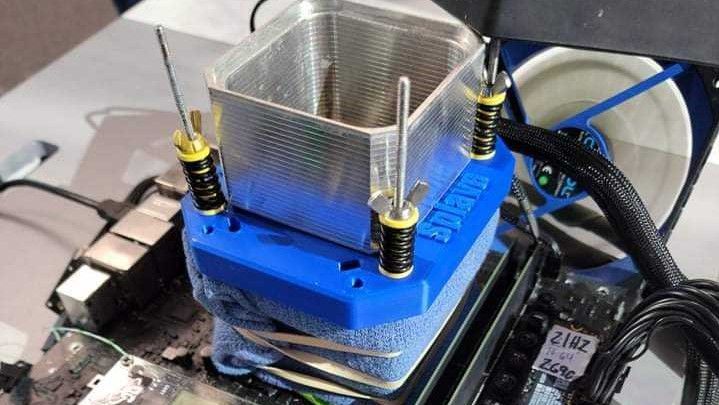
Tom's Hardware
Alder Lake's hybrid power on LN2
Did not realize liquid nitrogen cooling was actually a thing
zenith palm
Not daily but for ocing yes
clever epoch
Nobody tell him about liquid helium
lavish tundra
jagged hollow
Did not realize liquid nitrogen cooling was actually a thing
Bro forks talks about it pretty often
Over here
clever epoch
prisma arch
thought they used b die lol
Crucial is a sub brand of Micron. They only use Micron chips
Apparently they used to sell non micron stuff at some point, not anymore afaik
zenith palm
clever epoch
Nobody tell him about liquid helium
You mean improved water balloon fluid 👀
lavish tundra
zenith palm
You mean improved water balloon fluid 👀
How u still here I literally ate you a few hours ago
 jagged hollow
lavish tundra
Bro forks talks about it pretty often
jagged hollow
lavish tundra
Bro forks talks about it pretty often
Sorry, I’m a newbie to this
That and the fact that it’s pretty hard to tell if you guys are being sarcastic or not
modern walrus
lavish tundra
Only apus tho
apus? what's that?
modern walrus
how much more powerful? like actually usable for light gaming?
jagged hollow
Yeah, the 5600G is basically a light gaming cpu/gpu combo
When I say light gaming it can run older titles and sorts
The graphics on the apu are the bare minimum for gaming
modern walrus
ah okay
lavish tundra
jagged hollow
Just cpus with more powerful iGpus
No
Cpu with igpu is apu
Even if its a weak igpu
If it has an igpu its an apu
Strength of igpu doesnt matter
lavish tundra
jagged hollow
The graphics on the apu are the bare minimum for gaming
Wrong
They dont fullfill minimum spec of many games out there
lavish tundra
lavish tundra
Cpu with igpu is apu
@modern walrus
modern walrus
so like 10900K is APU if it were an AMD?
lavish tundra
No
10900k is an apu
Who makes it doesn't matter
Heck you can say the chip in ur phone is an apu
proven canopy
prisma arch
ah ok
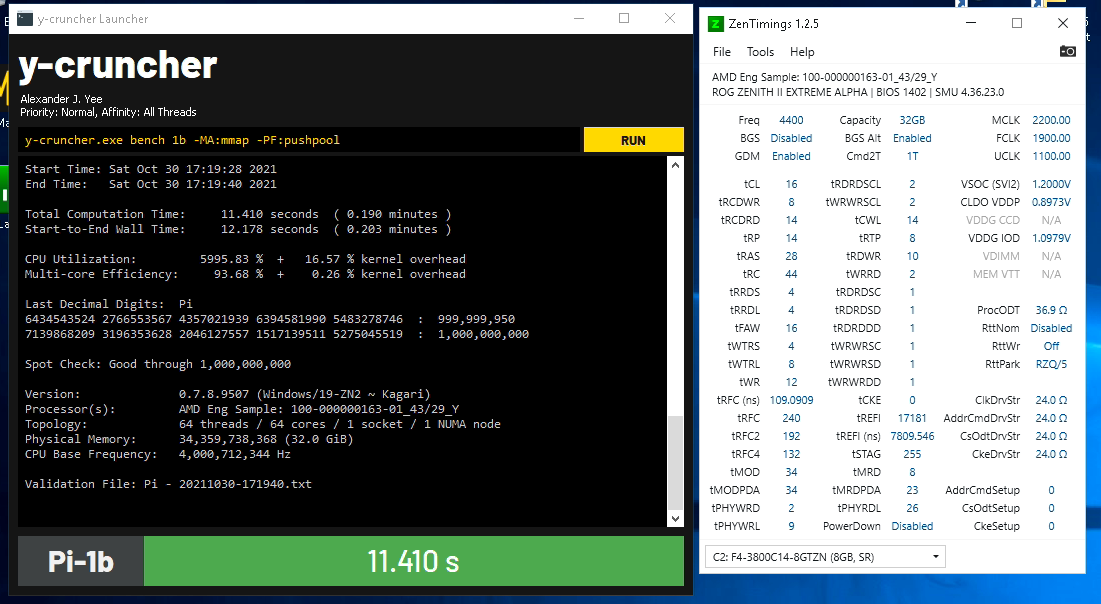
Even on zen2 threadripper... desync though https://i.imgur.com/a7gtkob.png
 clever epoch
modern walrus
apus? what's that?
clever epoch
modern walrus
apus? what's that?
APU is a term made by AMD. Generally understood as any CPU with a functioning iGPU
sterile flame
a-peepoo
prisma arch
proven canopy
Even on zen2 threadripper... desync though https://i.imgur.com/a7gtkob.png
Wow
Nice
modern walrus
proven canopy
Even on zen2 threadripper... desync though https://i.imgur.com/a7gtkob.png
damn nicely done. You have the patience of a saint apparently. I can't even get oc with GDM off stable, I can't imagine desync lol
proven canopy
It's not that bad, just a pain to have to clear CMOS with almost every failed oc, but that's just an amd thing.
 sudden torrent
Underclock or undervolt? Voltage tweaks usually work better
 clever tree
i cant undervolt
left bladeBOT
 TheYeetStreet#7946 has been warned
Reason: Bad word usage
clever tree
stupid intel
zenith palm
If you can overclock i can't see why you wouldn't be able to undervolt
lavish tundra
What voltage was it running 5.3ghz at
Also what cpu
Z490 is motherboard chipset
Not a cpu
10900k?
Give me a range
Actually cant you go check?
Its not 1.3
I can guarantee that its not 1.3v
Its higher
Cant you go and check
Then theres really no way to tell you why it isnt hitting those clocks because you cant provide any info
O no have u overclocked ur 5900x?
Oh thank god
Ive seen too many people run ryzen processors at way too high voltages
prisma arch
lavish tundra
Ive seen too many people run ryzen processors at way too high voltages
1.47volts is too high?
lol
jk
proven canopy
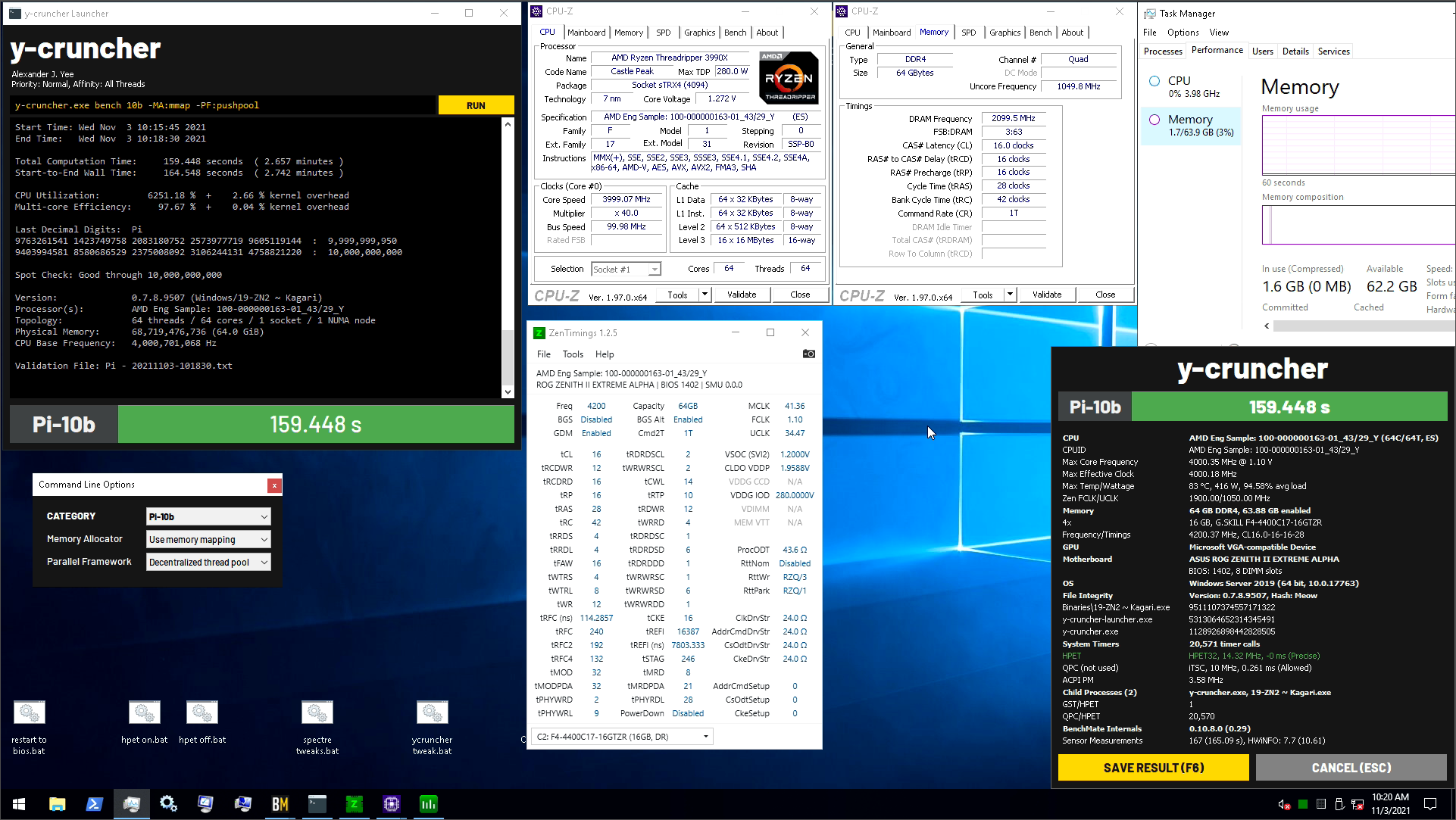
Had to really loosen things up to get 10b to pass at 4200, might tighten further, but cba until oviz beats me again https://i.imgur.com/fXG7atH.png
 cedar cypress

i have my cpu core voltage set at 1.350.. its goign 1.299 max. does that mean i can turn down my voltage?
clever epoch
VID is what your CPU is requesting
you want to look for a VR VOUT reading from your motherboard
proven canopy
From varexos/redux, good stuff
https://docs.google.com/document/d/1yIZ_jWPHQX0VJOPUpK_p0meg7i7omyL42GwhQo6peNg/edit
https://i.imgur.com/C527U41.jpg

Google Docs
[Slightly Revised 1/20/2019] Set VDIMM and VSOC to baseline values. Set frequency to a baseline value. Primary timings: initial tightening and gauging baseline timings tCL, tRCD, tRP Set tCL, tRCD, tRP, tRAS somewhat loose. Unstable: Repeat until stable: tCL + 1, tRCD + 1, tRP + 1, tRAS + 2 Rep...
 proven canopy
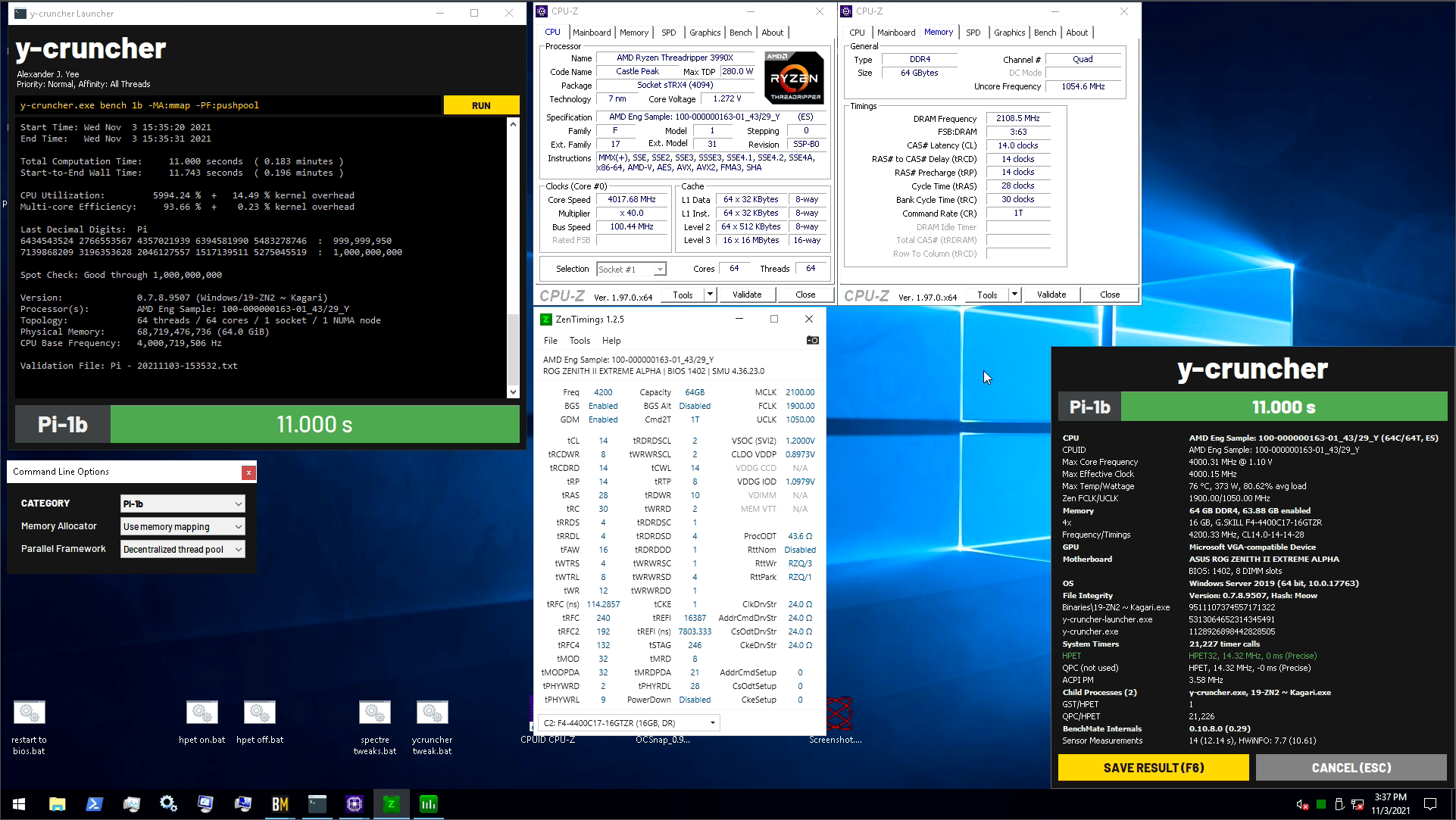
11 flat, finally satisfied with my 4.0 core score https://i.imgur.com/HGvEw1C.png
 sterile flame
what are the rules for HWBot frequency records? does it have to be an all-core OC?
clever epoch
I think there are all core records as well as single core
proven canopy
sterile flame
what are the rules for HWBot frequency records? does it have to be an all-core O...
Depends on the chip I think, they recently changed the rules.
Just check the rules tab for the bench
sterile flame
alright
short blade
proven canopy
11 flat, finally satisfied with my 4.0 core score https://i.imgur.com/HGvEw1C.pn...
that .000 is 
proven canopy
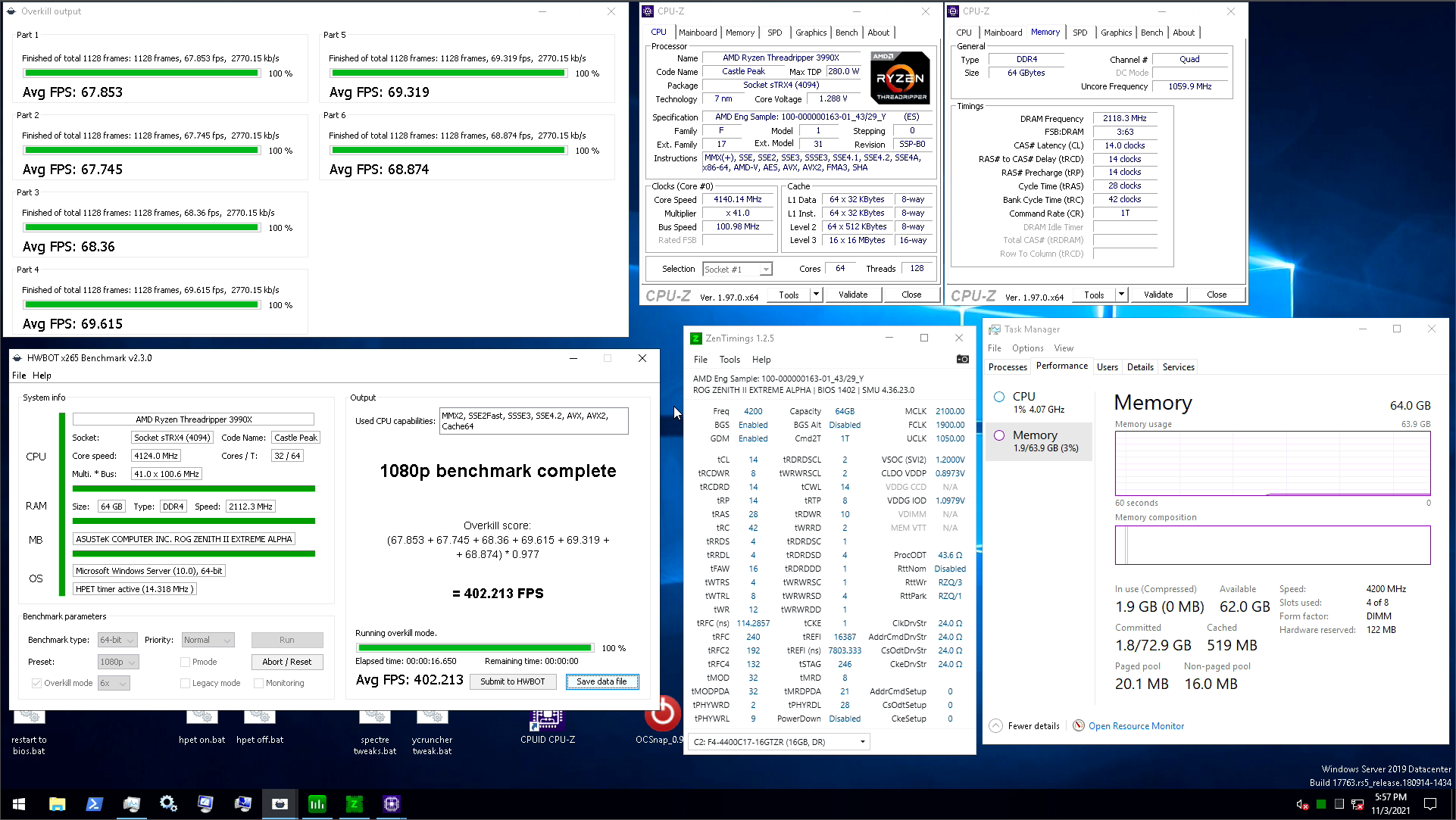
Aiming for 401 fps in 1080p x265 now with similar memory config. Not a big difference between 3800c14 tight compared to ycruncher

HWBOT
The Ryzen Threadripper 3990X @ 4124MHzscores getScoreFormatted in the HWBOT x265 Benchmark - 1080p benchmark. Forksranks #1 worldwide and #1 in the hardware class. Find out more at HWBOT.

worldly wasp
proven canopy
Depends on the chip I think, they recently changed the rules.
wait did derbauer thing go thru
thats pepega
why not make 2 catagory
single core valid
all core valid
jagged hollow
So I keep overclocking my hp laptop gpu through MSI afterburner
and everytime I shut down my laptop the graphics card resets to stock settings
barren ridge
Just make it apply with every boot up
sudden torrent
jagged hollow
and everytime I shut down my laptop the graphics card resets to stock settings
There's a button that looks similar to the windows logo that applies your oc on boot
It's disabled by default just in case a bad oc causes it to crash the system
barren ridge
^
modern walrus
good, bad, ugly?
 sudden torrent
Pretty decent. Looks like b-die should. What voltage? Are you able to bring down tRAS and tRC any?
Might be able to get tRP down a tick also
lavish tundra
modern walrus
good, bad, ugly?
Tfaw to 16
modern walrus
up is better?
modern walrus
sudden torrent
Pretty decent. Looks like b-die should. What voltage? Are you able to bring down...
1.52 yes b die
I think I had tFAW as 16 then messed up & put it to 10
& it survived anta so I left it
lavish tundra
Yeah keep it 16
modern walrus
but 16 is better than lower number on tFAW?
sudden torrent
It's probably running at 16 in the IMC anyway
modern walrus
was thinking bump to 1.55v & try to drop tCWL?
tRAS could probaby drop too with voltage increase
problem is no temp sensor on DIMMs so I dunno how how it's running
lavish tundra
sudden torrent
It's probably running at 16 in the IMC anyway
Tfaw has to be in a certain relation to trrds and trrdl
Wrong reply
lavish tundra
modern walrus
but 16 is better than lower number on tFAW?
Meant to reply here
sudden torrent
modern walrus
problem is no temp sensor on DIMMs so I dunno how how it's running
You'll start getting errors after long tests if you're too hot
sudden torrent
I've done 1.6v without heat related errors
modern walrus
it's very windy in my case lol
sudden torrent
2 hours is probably enough to tell
modern walrus
ya I'm gonna run that when I think I'm finished
you know just to find out there's 2 errors & have no idea what to do lol
it's been a loooooong process
 sudden torrent
If you can't get any of those primaries or secondaries tighter you probably have a weird bin. 3800 14-15-14-30 is what I run and I thought I had a bad bin.
clever epoch
modern walrus
good, bad, ugly?
tFAW to 16 as mentioned (any lower doesn't do anything), and tRRDL to 6 will help a lot with stability in weird edge cases
also bump up tRFC then tighten those terts
modern walrus
it was originally 3600c14-15-15-35
sudden torrent
Original timings mean very little for b-die tbh
modern walrus
tertiaries are the 1 6 4 1 6 4 ones?
I'll see if I can get 1 4 4 or 1 4 2
will check the guide
sudden torrent
140ns tRFC is a good sweet spot probably
lavish tundra
clever epoch
tFAW to 16 as mentioned (any lower doesn't do anything), and tRRDL to 6 will hel...
Really no point in going 16 tfaw with trrdl at 6
modern walrus
sudden torrent
140ns tRFC is a good sweet spot probably
ah okay so bump ticks until I it changes 130 to 140 ns got it got it
clever epoch
lavish tundra
Really no point in going 16 tfaw with trrdl at 6
Keeping tRRDS at 4 still makes sense to keep tFAW 16
sudden torrent
modern walrus
ah okay so bump ticks until I it changes 130 to 140 ns got it got it
266, 198, 122
modern walrus
oh guide said don't bother with tRFC2 & tRFC4
so they're on auto
but I'll change them
sudden torrent
The guide is right, they don't really do anything on ryzen. I just use the 1/2/4 option in my bios.
Loosening that up means you can probably tighten other primaries
modern walrus
you think voltage bump good/bad idea?
sudden torrent
As it stands you've got a solid daily oc, and a few ticks down here and there won't make much real world difference. Maybe a few points in benchmarks.
1.54v couldn't hurt, that's my daily
modern walrus
sounds good I'll go with 1.54 then
tRAS scales with voltage... maybe I should try dropping tRAS & tRC?
sudden torrent
That aligns with my original suggestion, yes
sudden torrent
It really is, don't blame you. Especially having to go back and forth between bios and discord.
modern walrus
well luckily I have a separate system I can keep Discord open on
still hard for me haha
sudden torrent
Also see if you can do tRP 14
modern walrus
heckin ASUS
I wonder what training looks like at like a microscopic level
do you run SOC at 1.1 or 1.2?
computer keeps turning on beeping, turning off, then coming back on lol
then went to setup mode hmm
it's very angry
sudden torrent
SoC 1.075 for me
modern walrus
ya I saw that--somewhat counterintuitively--lower SOC is better for stability
I was looking at Fork's oc & he runs SOC at 1.2 is why I thought maybe that might work better
I think what I resisted accepting for a long time is OC is so relative
i.e. Person A & Person B with the exact same setups can have widely different results
ya it's really fighting those lower tertiaries
sudden torrent
Terts didn't tighten well on mine either. If I touched any of them except a couple it wouldn't post.
modern walrus
managed to drop tWRWRDD & tRDRDDD from 4 to 2
still gotta test stability tho
I tried POSTing c13 with GDM disabled but doesn't look like that's gonna play ball
modern walrus
next gen AMD 4000mhz FCLK? lol

8,704MT/s (effectively) had its timings loosened all the way to 120-120-120-127. To put that into perspective, G.Skill's Trident Z5 RGB DDR5-6400 memory runs as 'low' as 36-36-36-76.
lavish tundra
I paid for the entire timings bar im gonna use the entire timings bar moment
modern walrus
We need gofundme to get this setup to Forks
 cold jolt
cpus with 8-64GB of sram cache when O_O
call it L4 and just stack it till the die look more like a cube
ya know when you think about it, high end cpus already have like 100MB+ of L3
which is really like 1/10th of a gb, or 1/160th of total system memory for the average person
proven canopy
clever epoch
tFAW to 16 as mentioned (any lower doesn't do anything), and tRRDL to 6 will hel...
<16 can help some scores for unknown reasons, maybe affects training of hidden timings, but I agree 4/4/16 is very meta
proven canopy
modern walrus
it's been a loooooong process
hey, can I get a copy of that? thanks
modern walrus
yessir
tall pelican
modern walrus
managed to drop tWRWRDD & tRDRDDD from 4 to 2
Are you on 4x8?
tall pelican
DD doesn't do anything then
tall pelican
DD = dual dimm (per channel)
modern walrus
I'll know that for next time then
I forgot to include in the description in that spreadsheet that it's bdie but I guess it's somewhat implied by voltage over 1.5
well over 1.45 really
well maybe not
see dunno what I'm talking about again
here that has model number of memory kit, CPU, motherboard info, & die info in the title now so it's not left uncertain
worldly wasp
DR = different rank
worldly wasp
tall pelican
DD = dual dimm (per channel)
i believe its different dimm iirc
sg = same group
dg = different group
dr = different rank
dd = different dimm
clever epoch
barren ridge
I would say amd wouldn't need infinity fabric in the future
IF and stacking/chiplets are not related. Remember that until Zen3, a group of 4 cores (CCX) had to go through IF to connect to the other 4 cores on the same die.
Besides, if needed, IF could be rebranded to refer to a parallel connection instead of SERDES.
It's too early to say whether SERDES or parallel connections will win; parallel should eke out in the short term (and low power), SERDES might take over in the medium term as we run into signaling issues and bandwidth limits, and then back to parallel in the long run once we get novel materials (think like carbon nanotubes)
clever epoch
modern walrus
I forgot to include in the description in that spreadsheet that it's bdie but I ...
Micron RevE also scales above 1.5. also Samsung E die, and I'm sure other ICs too
modern walrus
I wish MJR did too so my 10900K OC wouldn't be so crappy
I mean XMP is 1.4 so maaaybe? eh nah I'll cal 1.45v the limit
if I set everything to auto
and increase voltage by like .1 each time
then check to see if auto settings raise CL, etc.
will that tell me if the die scales with voltage or do I have to manually input a CL value each time?
and if CL continues to drop, would that help me find the voltage limit?
or is the only way to find the voltage limit to get an MJR kit and push it until it fails?
dull ginkgo
djr scales well over 1.5
dull ginkgo
mjr does seem like pain
modern walrus
ya I won't buy it again
zenith palm
I wish brands like g skill would say which die is in x kit and just have like 3 different models at same price insisted of bunching :(
dull ginkgo
clever epoch
IF and stacking/chiplets are not related. Remember that until Zen3, a group of 4...
AMD does already use the Infinity fabric (SDF and SCF) to connect CCX's on the same die without using a serdes afaik, don't even need to rebrand it, its just whatever connects everything together in an AMD chip, like ring with Intel and no one really questions what Intel is doing with ring bus
Of course, we'll probably have more issues with multiple dies and that might push AMD to use serdes to connect different dies, especially on epyc/TR, but well, they'll probably come up with another structure that would be something completely different from zeppelin here...
 clever epoch
dull ginkgo
AMD does already use the Infinity fabric (SDF and SCF) to connect CCX's on the s...
clever epoch
dull ginkgo
AMD does already use the Infinity fabric (SDF and SCF) to connect CCX's on the s...
different CCXes are connected via IF, regardless of whether they're on the same die
AMD uses a ring or mesh within a CCX, don't remember which
sudden torrent
Mesh
Intel used ring bus
dull ginkgo
sudden torrent
Mesh
Intel used ring bus
I believe Intel used mesh on some chips too
source: https://www.anandtech.com/show/11544/intel-skylake-ep-vs-amd-epyc-7000-cpu-battle-of-the-decade/5
 dull ginkgo
clever epoch
different CCXes are connected via IF, regardless of whether they're on the same ...
dull ginkgo
clever epoch
different CCXes are connected via IF, regardless of whether they're on the same ...
But communication between different CCX's on different dies would use IFOP and therefore a serdes, but I don't believe communication between different CCX's on the same die would use a serdes.
clever epoch
dull ginkgo
But communication between different CCX's on different dies would use IFOP and t...
It does. They've been doing it since Zen 1
dull ginkgo
huh
proven canopy
Anything hedt/server uses mesh now
modern walrus
think it's worth doing liquid metal paste on 5900x w/ waterblock? I made the mistake of using the crap paste that came with the waterblock & even tho my coolant is usually around 31-33c, I'm seeing 75c+ on CPU even without PBO on
might just get some more KPX tho cuz it's been outstanding on GPU
that 73w/mk thermal grizzly is lookin pretty good tho
clever epoch
From my understanding, liquid metal requires more frequent replacement. If you're really trying to push it, it'll be better but requires more maintenance, but I personally wouldn't bother for daily
 modern walrus
ya I'm not trying to take loop apart all the damn time for that
thanks
KPX it is
clever epoch
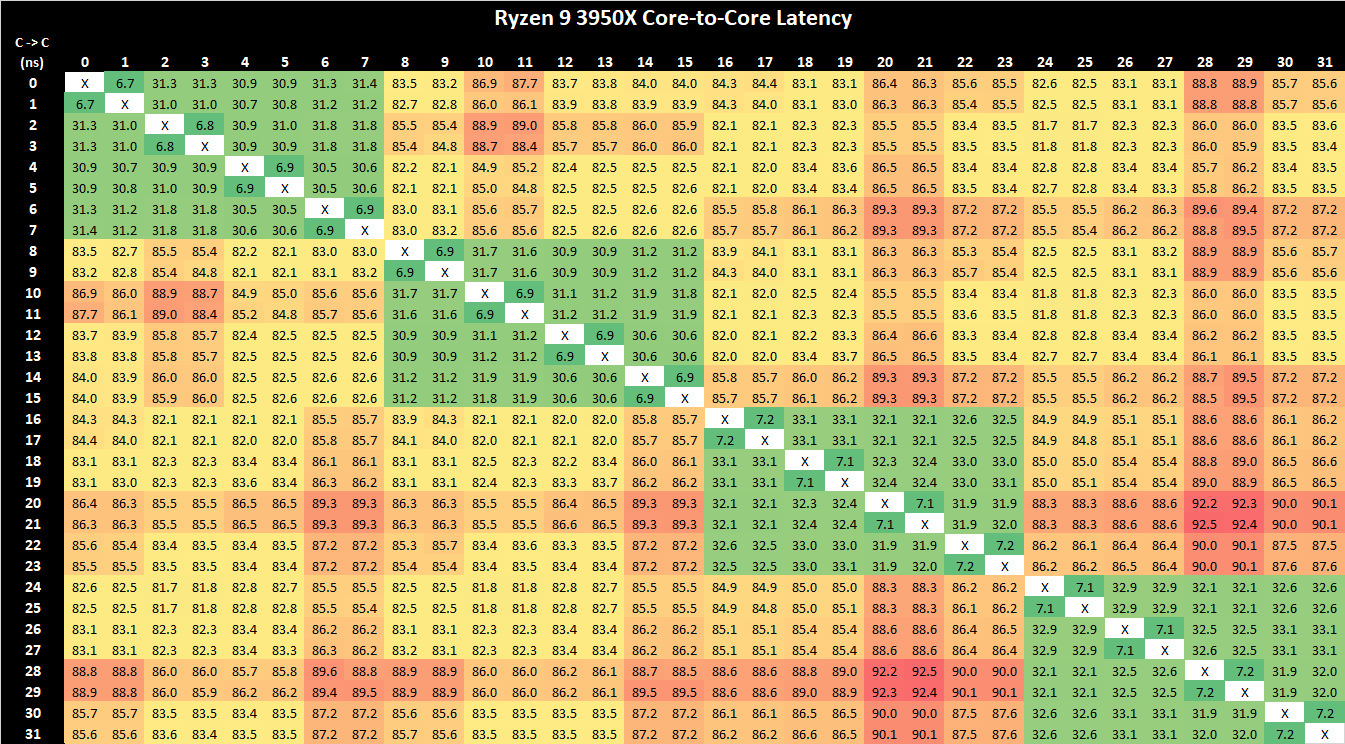
Meant to send this sooner but got busy. You can see that core/core latencies aren't really affected by whether they're on the same die or not, just whether they're on the same CCX
lavish tundra
clever epoch
From my understanding, liquid metal requires more frequent replacement. If you'r...
Well
Yes but actually no
modern walrus
btw waterblock is nickel plated
dull ginkgo
Ah
lavish tundra
modern walrus
btw waterblock is nickel plated
Yeah then its a non issue
You might have to redo after a few months but then thats it
modern walrus
oh okay thought LM was better with nickel plated but guess nvm
modern walrus
ya I saw you shouldn't even do that cuz it'll oxidize AL
modern walrus
but that has no impact on the frequency I'd have to re-paste?
with all these pipes & coolant & crap I'm not trying to repaste unless I have to
i.e. as infrequently as possible
damn should I be seeing 60kMB/s+ write speed from memory oc? cuz now I'm like 57,412-58,323
modern walrus
what if you just set PPT & let AMD figure out how to allocate the amps for TDC/EDC?
sudden torrent
modern walrus
what if you just set PPT & let AMD figure out how to allocate the amps for TDC/E...
Does your board have a "motherboard limits" option in pbo advanced?
modern walrus
ya but it's weak 90/140
it also has option to increase current limits to 130%
lol
sudden torrent
Oh you had one of those weird asus boards
They should just keep all the settings in one place lol
modern walrus
yo I haaate that
I can set PBO in 3 freaking places
DRAM timings in 3 freaking places
wth am I supposed to do with all this?
sudden torrent
On my board it's the same except one menu is in hexadecimal and the others are in decimal, and updating one doesn't change the other for some ungodly reason.
modern walrus
only 1 of 3 PBO options has curve optimizer
oh ya the voltage for DRAM/SOC/etc has to be set in mv if I do it in Advanced v. AI Tweaker
sudden torrent
So if I want to set rzq/3 I need to either know how many ohms that is or go into the hex menu, save and exit, and then it updates the decimal menu
modern walrus
It's like 3 different groups worked on the motherboard but they didn't have a meeting beforehand to assign who does what
then they came together & insisted each group had the best approach
and the boss--embarrassed & frustrated she or he didn't hold the initial meeting--said to hell with it & stuck all three in there
I'm tempted to not use curve optimizer & try ASUS's little PBO version
but I have a feeling that's just, in effect, a way for me to turn up scalar to like 4x & pretend I didn't
sudden torrent
I love how these companies claimed they didn't have enough rom storage for all the ryzen model's info, which only takes a few kb, and then they have three of the same menu
modern walrus
lol they're clowns
sudden torrent
Asus or someone needs to collaborate with der8auer and ahoc to make an actually good overclocking bios menu
Maybe a toggle for dec/hex instead of 2 different menus that have different options
modern walrus
so does Aorus because they dunno wth they're doing either
sudden torrent
Giga💩
modern walrus
I swear any company that makes hardware should outsource the software for it
proven canopy
Ready for the weekend https://cdn.discordapp.com/attachments/750496542149836891/906271984147632198/20211105_150059.jpg
 wheat ether
@proven canopy https://youtu.be/5YGNF61fItk did you see this?

More Information about Hetzner USA:
https://derbauer.hetzner.com/en/cloud-usa-211101/
Support me on Patreon:
https://www.patreon.com/der8auer
Save 10% on your iFixit purchase: DER8AUER10
https://eustore.ifixit.com/der8auer
Pro T...
proven canopy
Heard if it, haven't watched
wheat ether

This morning a few hours ahead of the embargo lift for Intel Alder Lake reviews, Gigabyte Aorus publ
apparantly it was a non legit 8ghz
sudden torrent
Yeah there's going to be a lot of backlash in the OC community for Gigabyte claiming 8GHz
proven canopy
Not really, just an honest mistake it seems
sudden torrent
That'll be what they claim but I'm 100% sure they know what they did
It's still all over their marketing, and someone who doesn't know will see that
proven canopy
Well, mistake by hicookie at least, I think the marketing folks decided to publish anyway knowing it was bugged
worldly wasp

@proven canopy you seeing this shit??
this is seby's 5.6/4.4 with 3600 16-16-16 auto gear 1 ram
this is on 0C air, not even subzero yet
proven canopy
lol
proven canopy
sterile flame
system is shutting itself off instantly after starting r15 at 1.58v, r20 at 1.56v. which setting should I adjust to fix this? board is a x99 extreme6, cpu is 1660v3, PSU is rm1000
sudden torrent
Load line calibration maybe?
proven canopy
sudden torrent
Load line calibration maybe?
Lol why would that cause shutoff? It's either psu/vrm ocp/otp etc kicking on, cpu thermal shutoff. My bet is vrm current limit being exceeded. He had it on auto, maxing to 245 should work.
sudden torrent
Sudden voltage drop could be an issue but you're right as always
proven canopy
That'd manifest in a crash/bsod etc of some kind I'd think
But it's x99, so who knows
sterile flame
proven canopy
Lol why would that cause shutoff? It's either psu/vrm ocp/otp etc kicking on, c...
245A? Why so high? I thought CPUs like mine in particular only drew around 25A stock, maybe around 40A at 1.57V or something
sudden torrent
That thing has a TDP of 140W stock and you know it'll pull more than that
proven canopy
Because that's just the vrm shutoff point. I mean, you could set it to 50 or something if you want to be more careful.
sterile flame
yea but thats watts, im talking about current limits
I have my wattage limit at 430W right now
sudden torrent
It's easy to find amps given Watts and volts
sterile flame
yea, 40A times 12V is 480W
wait is that even the formula?
no wonder i suck at EE
sudden torrent
That's the formula but it's only 12v before the voltage regulators, coming off the eps cables.
 twilit hedge
I'd assume the current is measured at the CPU voltage if it's that high
 static fog
im guessing that 3390 marks is as good as im going to hit on a gigabyte z390 with an i7 9700k?
zenith palm
In what?
dull ginkgo
Xtu?
dull ginkgo
Sounds about right
static fog
i keep toying with the idea of messing with my gpu but im scared to with the current issues of trying to get a new one if something goes wrong x3
dull ginkgo
Might be able to squeeze a few more points out but if 5.1 is what you can get, this is the highest someone has gotten with 5.1ghz
https://hwbot.org/submission/4132277_bravo76101_xtu_core_i7_9700k_3423_marks
HWBOT
The Core i7 9700K @ 5100MHzscores getScoreFormatted in the XTU benchmark. bravo76101ranks #1795 worldwide and #28 in the hardware class. Find out more at HWBOT.
static fog
yeah i saw his score and was like how the heck x3
zenith palm
Idk how mem intensive xtu's bench is but mem can play a large factor
static fog
nod nods, he likely isnt running mixe mem like i am currently
dull ginkgo
Background apps can make that difference if you haven't stripped windows
zenith palm
Mixed mem? :O the cardinal sin
dull ginkgo
There's also just run to run variation
zenith palm
static fog
_nod nods, he likely isnt running mixe mem like i am currently_
What mixed kits you running?
static fog
one sec let me look, i know clock speeds are the same,
32 gigs of gskill and 16 gigs corsair
zenith palm
2x16 and 2x8?
static fog
eventually i plan on going all the same ram and maxing it out with rgb 128 gigs
dull ginkgo
Would prob reccomend trying to bench with only one kit of whatever is higher frequency
static fog
zenith palm
2x16 and 2x8?
yep
static fog
dull ginkgo
Would prob reccomend trying to bench with only one kit of whatever is higher fre...
ok i can do that next time i power down
this is my first home built pc and first time messing with overclocks
zenith palm
static fog
ok i can do that next time i power down
Yes, shut down the pc and take out the slower sticks
Whats the speeds and timings of the kits you have?
static fog
both identical, let me see if i still have the box,
zenith palm
If both same timings and speeds then might as well keep the 32gb kit in
static fog
yep both are the same at 32000 and 18-22-22-42 on timings
dull ginkgo
32000 or 3200
static fog
only reason i went mixed is i needed a bit more ram and couldnt afford almost 200 for the same kit x3
3200 hit an extra 0
after i find stable work again and the pc prices drop again i plan on making it all match and upgrading from a gtx 970 to something better
dull ginkgo
3200c18 is a bit sad, if it was PC4 32000, that would've been 4000c18, which made a bit more sense
static fog
the gskill say PC4 32000 but i cant find the box for my corsairs so cant confirm that one
the kit i bought when i built the rig are ripjaws V series
dull ginkgo
Just use the g.skill kit when benching then
static fog
ok i will do that ^^
like i said first time doing this so still learning and seeking help where i can ^^
also might give it a good cleanout while im in it as well, even with filters its dusty in there and looks like the rad could use a bit of a blow out as well
zenith palm
dull ginkgo
32000 or 3200
32000 if only xD
I've never even seen 3200 18 22 22 42 before
You could give ocing your ram a shot but warning it's tedious and can yeet windows so i would advise testing on a 2nd windows install
proven canopy
xtu is a mem benchmark, I'd try for some of the stuff in benchmate, 7zip is my current favorite. ycruncher, x265 are great core + memory benchmarks as well.
proven canopy
<@&896784369820250114> https://hwbot.org/competition/gskilltweakersambient/stage/5341_superpi_-_32m_with_benchmate_-_4805mhz les go
dull ginkgo
there's a hwbot role?
proven canopy
Made it so I can ping
dull ginkgo
hm
dull ginkgo
proven canopy
<@&896784369820250114> https://hwbot.org/competition/gskilltweakersambient/stage...
Is something like this good to sub only if you get a good score or you should sub anyways?
proven canopy
100% sub anyways, that's why I'm sharing here. The more participation, the more likely gskill is to do this in the future. Random drawing prizes etc.
humble jay
top score seems weak 
i think i can beat it tonight if the dark cooperates
but maybe frequency matters more than i think lol
oh wait there's only one score
dull ginkgo
I might try to sub to that over thanksgiving
proven canopy
humble jay
top score seems weak <:hmmge:852501348973019166>
I mean, there's only 1 sub, lol, it just started
humble jay
😅
proven canopy
@humble jay Remember you gotta sub to the extreme league comp instead https://hwbot.org/competition/gskilltweakersextreme/
HWBOT
Level 1 OC-ESPORTS competition running from 11/1/20 12:00 PM till 11/30/21 6:00 PM.
humble jay
oh i didn't realize there was an extreme one too, can i do both?
worldly wasp
proven canopy
<@&896784369820250114> https://hwbot.org/competition/gskilltweakersambient/stage...
didnt get ping
ohh
every time i get kicked
i lose it
oh its superpi
ffs
i dont have 11900k
humble jay
worldly wasp
i dont have 11900k
i send you mine after i'm done
jkjkjkjk
that's cheating 
humble jay
tach?
worldly wasp
sold my tachyon
humble jay
ah



 humble jay
no alder lake 
lavish tundra
proven canopy
<@&896784369820250114> https://hwbot.org/competition/gskilltweakersambient/stage...
The only gskill memory I have is c die
Guess I sit this one out
zenith palm
lavish tundra
The only gskill memory I have is c die <:kekw:741678350791081994>
There might be a complimentary prize like the corsair one go check
lavish tundra
zenith palm
There might be a complimentary prize like the corsair one go check
Nop jus points
zenith palm
lavish tundra
Nop jus points
Mmmm sub anyway so can keep comps like that up nerd 
proven canopy
Who cares what hardware you have? All but very few with have the top tier ram/cpu/board.
proven canopy
A "good" score is always relative to the hardware you have. If you bench on 7 or xp with the right timings, could beat some folks in b-die easily
worldly wasp
proven canopy
<@&896784369820250114> https://hwbot.org/competition/gskilltweakersambient/stage...
btw i delided my gskills
still count?
i have the heatsinks but they're bent
@humble jay can you give me sparky xp iso