#overclocking
1 messages · Page 92 of 1
 clever epoch
yeah sorry, I don't have a lot of knowledge on all the ICs. Only my own sticks really
clever epoch
If you're willing to shell out the cash, you might want to spend ~$160 on some 2x16 Crucial RevE
 modern walrus
I haven't observed rollover but I'm not 100% sure tbh
ya I would get new RAM but I spent so much on this back when I had zero clue what I was doing
It's 2x32GB
clever epoch
if XMP is 1.4 it can probably go up to 1.45, but not sure. Anything about 1.45 is dangerous unless you know the die
oh 2x32. You can also get 2x32 crucial, obviously gonna cost more
actually, can it even be MJR? Is there 16 Gbit MJR?

reddit
2 votes and 4 comments so far on Reddit
looks like it
modern walrus
 clever epoch
04266XS820M
modern walrus
yes S820M is MJR pretty sure
clever epoch
ok so you have DR MJR
clever epoch
I wouldn't go to 1.5
if XMP is 1.4V, I'd say it's reasonable to do 1.45
but 1.5 is a jump
especially 1.55
modern walrus
ya I think you're right
I'm gonna keep it at 1.455v & see how tight I can get timings
really CAS below 18 would make this all worth it
but I think it has to be even number because of gear down
and I have my doubts about pushing CAS 16
modern walrus

G.Skill Trident Z NEO Series 64GB (2 x 32GB) 288-Pin SDRAM PC4-28800 DDR4 3600 CL18-22-22-42 1.35V Dual Channel Desktop Memory Model F4-3600C18D-64GTZN
I wish I knew then what I know now
clever epoch
yeah I only recommended it because you have 64GB for a reason I assume
modern walrus
haha nope
clever epoch
ok then get the 32GB version for ~$160
modern walrus
the reason was I wanted to build a computer, had little to no idea what I was doing, and thought more RAM = better
RAM = good
More RAM = More Good
derp
clever epoch
hah, well, only once you have "enough" RAM
modern walrus
ya then do what with this 64gb set tho?
 placid oak
u can get to a point where u have too much ram
modern walrus
well the motherboard caps at 128gb
placid oak
what are you wanting to do
modern walrus
I've opened every PDF, like 5 CADs, & every non benchmark/stress test program on my computer & maxed out at 53% memory
I'm saying having 64 GB is completely unnecessary but I already have it so I ought to use it
placid oak
I got 128gb and I totally regret it I'm going to build another pc and half it between them
modern walrus
ya I should've just thrown one of my 32gb sticks in my 10900K build instead of getting another 32gb set for it
which was heckin AJR
I buy the worst ram for overclocking
cuz pretty rgb...
modern walrus
What's better: (1) Keep GDM on & stay at 18 CAS or (2) turn GDM off & try for 17 CAS
clever epoch
I'd keep GDM on. It's negligible performance hit for a huge boost in stability
you're more likely to hit C16 with GDM on than C17 with GDM off
modern walrus
ah okay
now I gotta figure out how to get C16 to work
(1) get C16 to work
(2)
(3) Profit
 sudden torrent
You'd probably need CR2 with GDM off and odd CAS, so the performance hit from that negates it usually
modern walrus
As usual, I think you're right
Even BIOS hangs when I try to run CAS 16
and if somehow it makes it past BIOS, windows tells me I need to run recovery environment or go back to BIOS
just sucks cuz even if I leave it at CAS 18 I'm still not getting anywhere tightening timings either
I can't get below 22-22-42
and I get those numbers with XMP
but I did manage to up from 3800 to 3866
such an exciting time to be alive
 amber hedge
My main systems top scores without custom bios and extreme cooling
 sudden torrent
Not bad at all
 short blade
nice, what's the graphics/CPU score break down on time spy?
 proven canopy
Why would you run a 10900k stock for time spy
 worldly wasp
because
i was down a stick of ram

running 2666mhz with one 16gb and 8 gb stick
cursed
also
i misremembered
it was 22k graphics
combined was like
20.5k

cursed cpu
 sterile flame
Apparently around 10 years ago, a chemistry professor at my college got on a world top 10 leaderboard for a CPU overclock using his own LN2 lol
no idea what cpu it was though or how fast he got it :(
proven canopy
Not your average zen2 memory oc 

 zenith palm
proven canopy
Not your average zen2 memory oc <:brokenchamp:710168831263375390>
zenith palm
proven canopy
Not your average zen2 memory oc <:brokenchamp:710168831263375390>
3800 cl12 
What mem are you using for that
proven canopy
4400c17 dr trident z
I've realized that for high core count chips, memory score doesn't really matter in geek3, just need to keep the cores fed for your float score
Might help int a bit as well
zenith palm
proven canopy
4400c17 dr trident z
Wdym by dr? But ehh damm
proven canopy
Dual rank
Almost any b-die can do 4000c12 on modern intel, good kit+cpu - the meta is 4800c14+
zenith palm
Damm i assume with active fan
proven canopy
I ended up just running 3800c14 for geek3, 1.6v
sterile flame
short blade
was fx out yet in 2011
I think bulldozer was? I'm not too sure though
yea, bulldozer came out octover 2011
my memory did not fail me
except for yesterday when i broke two dimms
proven canopy
 sterile flame
rgb
sterile flame
@proven canopy what are some sources you recommend i give a read or watch? I have about 3 weeks to learn about the more advanced stuff on extreme overclocking for an event going on at my college lol
proven canopy
buildzoid on youtube, unityoc,antitux,mickulty on twitch
sterile flame
oh yea buildzoid is great, i love his 30 minutes rants lol
ill definitely check those other guys out too
god this is why i dont use reddit, weird kids just downvote stuff for no reason
 proven canopy
What's "best" mean?
sterile flame
most stable to work with relative to other CPUs of the platform, what can achieve highest clocks relative to other CPUs on the platform, etc.
does that make sense? idk
proven canopy
x99 is a notoriously awful platform to bench
sterile flame
How come?
 clever tree
i cant figure out how ti use throttlestop, does anyone know how to
sterile flame
clever tree
i cant figure out how ti use throttlestop, does anyone know how to
WHat are you trying to use it for?
clever tree
sterile flame
WHat are you trying to use it for?
stopping my cpu from hitting 95c
 left bladeBOT
 fbi.matt#6969 has been warned
Reason: Bad word usage
worldly wasp
crappy ddr4 oc
extremely cursed bios
hard to get good boards
some boards kill cpus
sterile flame
yes
im aware
but i dont have any other realistic options in this case
i dont have much money to spend on getting another platform
sterile flame
i just killed my cpu yesterday unrelated to OCing like an absolute bafoon
as for the boards i have access to, a GAX99UD5, and Extreme6 (which has memory detection issues so i probably wont use it)
sterile flame
e5 2699a is unlocked?
worldly wasp
no but it has 22 cores
sterile flame
Id get a 6950x but its a bit expensive
Oh its not really a competitive competition like that
It's just a casual hackathon event thing, where making stuff and trying new things tech-related is the goal
 royal shuttle
Quick question. I'm using a ryzen 5 1600 cpu which has a base clock of 3.2 but OC to 3.6. So is it alright if i put ram withfrequency of 3.6 mhz? Or should I just stick with 3200 or less stick. Mobo supports up to 4133 mhz btw
short blade
royal shuttle
Quick question. I'm using a ryzen 5 1600 cpu which has a base clock of 3.2 but O...
definitely don't even think about 3600
even 3200 can be difficult to run on a 1600
you should buy a 3200 kit and stability test it, if it doesn't work then downclock it to 2933/3000
the memory controller in ryzen 1000 is garbage
royal shuttle
2933 does seem safer, ill check both thanks
short blade
technically 2667 is the highest speed guaranteed by amd, but 2933 should be easy to hit on basically all samples
3200 is a gamble
royal shuttle
Lol the 3200 mhz rams are cheaper than 2933 mhz here. W T F
zenith palm
Sounds bout right
2933 is rare xmp
3000 bit more common but 3000 close enough to 3200 that they just produce 3200mhz mainly instead
zenith palm
Ehh what capacity? That seems bit expensive for 3200mhz
royal shuttle
For 2933
zenith palm
No, capacity, like 16gb, 32gb?
zenith palm
Yeah
royal shuttle
It's on sale, original price is 154.99 on amazon
zenith palm
That's awful
royal shuttle
Yea xD
zenith palm
https://ca.pcpartpicker.com/products/memory/#Z=16384002,32768002,32768004&S=3000,5100&L=30,160&sort=price&page=1 here's page of ram just sort low to high if you dont like the look of that ram
royal shuttle
Imma just get the corsair vengeance lpx. It around the price as the first link and it's all black
zenith palm
royal shuttle
Imma just get the corsair vengeance lpx. It around the price as the first link ...
Just get the ripjaws for 8$ less and not have to deal with corsair being corsair x)
royal shuttle
Its 40$ more expensive here ...
Oh wait those are 16 gb ones
I see them. All black right?
zenith palm
Ye
royal shuttle
Aight thanks
zenith palm
Np
modern walrus
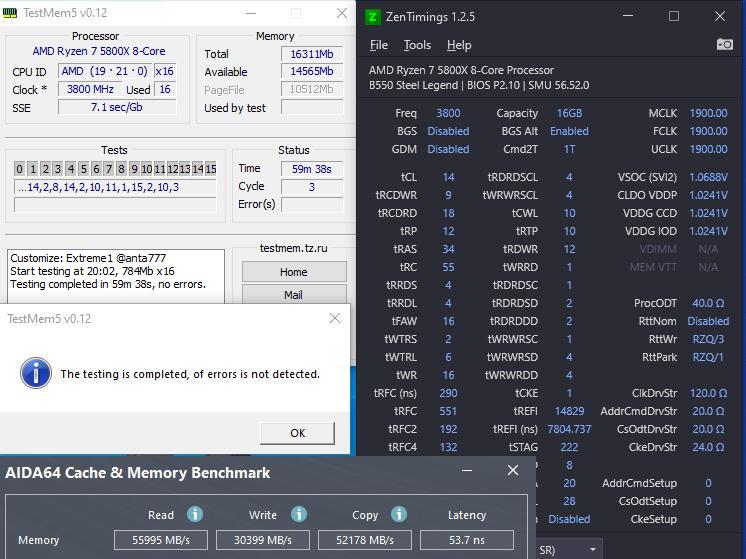
I'm trying to figure out the source of my WHEA errors. Before overclocking memory, every couple months or so I would get a WHEA error of bus/interconnect. Event Viewer showed APCID: 0 or 4 so I would reduce magnitude on Core 0 &/or 4 in curve optimizer. Since mem OC, Event Viewer shows the same APCID: 0. I tried reducing core offset (separate from PBO) & I tried reducing magnitude on 0 to 0 but no success. It may just be the reality of MJR being a crappy die for OC. I am presently running TestMem5 on Anta/Arshia config
& I am ~4 hours in without errors on TestMem but approaching 10,600 WHEA errors on HWiNFO. Below are my ZenTimings. My OC is from 3800c18-22-22-42 to 3866c18-22-22-40 with secondaries as tight as I could get them. It's an underwhelming OC for sure. If anything stands out to anyone, I'd very much appreciate your help.
btw underwhelming as it may be, I did see an approximately 5-6% improvement in testing on read/write/copy/latency

btw kit is G.SKILL Trident Z Neo Series 64GB (2 x 32GB) DDR4 - F4-3800C18D-64GTZN
 clever epoch
short blade
the memory controller in ryzen 1000 is garbage
clever epoch
short blade
the memory controller in ryzen 1000 is garbage
I know somebody who ran 3600 16-18-18 on a 1950X 😛
but you need Rev E for that (very light on the IMC)
worldly wasp
short blade
the memory controller in ryzen 1000 is garbage
prev valided 4100
and can get 3600-3800 pretty stable
its more that zen 1 boards are turbo crud
worldly wasp
with micron rev e and a non turbo turd board 3600 is completely possible
check pins
modern walrus
but I also came to understand that you're supposed to OC memory THEN CPU
worldly wasp

GitHub
C# WPF to automate HCI MemTest. Contribute to integralfx/MemTestHelper development by creating an account on GitHub.
yes
read this
modern walrus
annnd I don'twanna dedicate 90 hours to it rn
believe it or not, that's what I was using
guess I overlooked the part about CPU OC after
I'll start from square one next week or something
any suggestion(s) to actually pull off dropping CAS from 18 to 16?
it boots but GSODs a few minutes into testmem5
worldly wasp
1.4v
modern walrus
voltage is already maxed at 1.45v
worldly wasp
better ram
modern walrus
1.4v is XMP
lol word
This kit is so frustrating
it's expensive as hell but crap
worldly wasp
4 sticks probably contributes to thst
modern walrus
32x2
modern walrus
ya when I got it I thought (a) more ram = more good; (b) 3800 sounds fast so that's cool; & (c) what's a CAS & all these other seemingly random numbers
I maxed out voltage
and upped all the secondaries & tertiaries under 10 by 2
 limber falcon
i overclocked my 5600x to 4.75 ghz is it a good overclock
 tall pelican
no
limber falcon
tall pelican
no
y its on all cores and stable
tall pelican
Because you're either going to degrade it, or degrade it
tall pelican
Let me guess, like 1.4v?
limber falcon
yeah
tall pelican
Just tune pbo
limber falcon
what is pbo
tall pelican
How you're supposed to overclock zen 2 and 3 in order to not degrade
limber falcon
i just encrest the multi plyer
limber falcon
its on 1.4 volt
 lavish tundra
limber falcon
its on 1.4 volt
lavish tundra
limber falcon
its on 1.4 volt
bye bye 5600x
enjoy its last few days
its gonna die soon
1.25 ish is the limit of what you should manually do on zen 3
maybe less
limber falcon
it has run fine for a week now'
lavish tundra
do you want it to run fine for another week?
also it hasnt
its 100% degraded to some extent
@short blade degraded 5800x at 1.4v in 10 mins lmfao
uve run it like that for a week
imagine
limber falcon
should i reset bios
lavish tundra
yes
and leave PBO on
and hope and pray to god that the chip will live for a while more
short blade
lol if you stress tested it to be stable at 1.4v and ran it for a week it's probably already degraded
but given you're running zen 3 at 1.4v, you probably don't know what stable means so maybe not
limber falcon
it still gets 11800 on cinebench r23
zenith palm
limber falcon
its on 1.4 volt
Turn it off immediately
zenith palm
limber falcon
it still gets 11800 on cinebench r23
Until it doesn't
limber falcon
its the same score it got a week ago
zenith palm
Look if you want to degrade your 5600x keep it on then ;-;
If not use pbo
Usually better anyway
limber falcon
what about 1.28 volts
lavish tundra
is that more than 1.2V?
limber falcon
yeah
lavish tundra
then its not safe for manual
lavish tundra
limber falcon
it still gets 11800 on cinebench r23
untill one day it doesnt even boot
@limber falcon turn on PBO and hope your chip still has life in it because uve already decreased the life span
sudden torrent
limber falcon
it still gets 11800 on cinebench r23
And that's fine to benchmark once or twice, but having a manual all core clock like this is reducing your single core performance.
Compare your stock r23 single core to your overclock.
Gaming is heavily single thread performance dependent
lavish tundra
sudden torrent
And that's fine to benchmark once or twice, but having a manual all core clock l...
hes running the 5600x at 1.4v for that score
single core is the least of his problems
the cpu living seems to be a bigger problem
sudden torrent
Yeah the 1.4v is going to kill it soon too, but I'm just pointing out that it is also reducing gaming performance on top of that.
Since they seem determined to leave it at 1.4v anyway
zenith palm
guys why does a fx6300 beat my 5600x
https://c.tenor.com/T-6u_UYWemYAAAAM/a-few-moments-later.gif
 modern walrus
is dropping from 3800c18 to 3800c17 worth it if it costs me Gear Down Mode & change from 1T to 2T command rate?
lavish tundra
zenith palm
*guys why does a fx6300 beat my 5600x*
https://c.tenor.com/T-6u_UYWemYAAAAM/a-fe...
Because the fx6300 boots while 5600x doesnt because you killed it
 formal sable
That is why they say overclock at your own risk
zenith palm
well theres one thing to oc at your own risk, its another when you do an unsafe voltage, ask if its unsafe and ignore everyones advice as they were looking for echo chamber reinforcement oop
formal sable
Dang
clever epoch
modern walrus
is dropping from 3800c18 to 3800c17 worth it if it costs me Gear Down Mode & cha...
Probably margin of error
Actually, probably worse unless you reduce other timings
proven canopy
tall pelican
That's how you kill a cpu, not how you overclock
To be fair, it's both
 zenith palm

modern walrus
overclockers of reddit
I gave up and I've been trying to improve the XMP values
At least I learned a valuable lesson: never buy MJR again
lavish tundra
modern walrus
overclockers of reddit
oh no
modern walrus
I meant the dude running his processor at like 1.5 or whatever
 dull ginkgo
lol
proven canopy
No, test manually
 outer wing
k
sterile flame
welp I just ordered the components I need for my x99 OCing @proven canopy 
proven canopy
What'd you get?
sterile flame
the e5 1660v3 and A650GF
Hopefully at the event I end up getting decent enough scores to be able to submit something to hwbot
proven canopy
The 5820k is far more popular, I would've gone with that
https://hwbot.org/hardware/processor/xeon_e5_1660_v3/
But if you don't care about points, either are fine
sterile flame
Yea I just went with the 1660v3 since I found one for a relatively good deal, and I wanted to try it since it's basically the 5960x
My college does have a 5930k here I could use aswell, so I'll OC that one if I have time after I'm done with the 1660
proven canopy
Yeah, look at the hardware points for top subs on each chip
You be able to compete for 8 core globals with either ofc, but fitz probably has them all with the 5800x
sterile flame
So how does the point system work on HWbot? Im still not sure
Why do some submissions give more points than others? And what're other things I might need to know
proven canopy
The more subs there are for a given chip/card the more hardware points the top sub(s) get(s)
Global points are by core count, gpu count
sterile flame
Hmm okay
There might be some LGA 775 CPUs I could use to OC, but I'll have to check if any of this stuff works
It's also a real bummer that Z87X-OC board is dead. Although there are no unlocked 1150 chips here anyway
not sure why my college got that board to begin with lol
There's a Q9550 here I could use, and another core 2 quad, I forget which it is
worldly wasp
proven canopy
You be able to compete for 8 core globals with either ofc, but fitz probably has...
not for long
seby benching his 11900K on ln2

and he joined the team
sudden torrent
Yeah but Fitz has the HW points for my main CPU already
worldly wasp
sub gpu stuff
sudden torrent
I will once I get my liquid loop installed, hopefully next month
tall pelican
worldly wasp
seby benching his 11900K on ln2
good thing it wont last long with the volts he likes to run
proven canopy
seby?
tall pelican
 proven canopy


 humble jay
wtf
worldly wasp
oh it got fixed
worldly wasp
idiot
humble jay
i fixed it in like 20 seconds
worldly wasp
i bet
humble jay
i got pinged instantly in hwbot discord
sudden torrent
Yeah they'll do that if you mess with world records lol
worldly wasp
i wonder
how many times
leeghoofd
and the others
have to fix this kinda stuff
i bet its over 50%
proven canopy
Anything that shows up on the front page will be caught quickly
worldly wasp
mhz vs mts
humble jay
tall pelican
good thing it wont last long with the volts he likes to run
oh that was with bugged CPU-Z lmaoooo, the old benches i did actually ran best at asus LLC8 at under 1.4v
sudden torrent
I'm sure that happens a lot yep
tall pelican
humble jay
oh that was with bugged CPU-Z lmaoooo, the old benches i did actually ran best a...
I was more referring to your gpu history 
humble jay
:YIKES:
 humble jay
😢
worldly wasp

humble jay
the only diagnosis i've done so far is that the core isn't a big short circuit
on any rail
humble jay
it pulls 2.8 amps at 1.25v
worldly wasp
one helluva 280x tho
did 1260 on air at 1.3v and had samsung memory
so clocked like hell
tall pelican
man, good thing my cap modded, evc, lm'd 6900xt is still chilling
 tall pelican
yeah, and its dead now
worldly wasp
humble jay
it pulls 2.8 amps at 1.25v
honestly send to techcementary
or northbridge dude
left bladeBOT
 Fitz#6900 has been warned
Reason: Bad word usage
worldly wasp
bad mod
humble jay
i was going to do this the same day
tall pelican
northridge wont do anything
tall pelican
"customer modified the card themselves, I will charge them $100 fee and send it back" - northridge
humble jay
yup
lul
only tech cemetery might help if i say it was the fastest in the world at one point 
tall pelican
like, rossman would do more than northridge
worldly wasp


maybe epower it
can remove the inductors in the way
@proven canopy give this dude the tole
tall pelican

3DMark.com
AMD Ryzen 9 5950X, AMD Radeon RX 6900 XT x 1, 16384 MB, 64-bit Windows 10}
humble jay
check out that gpu score
worldly wasp
seby get brutus to make you a two stage cascade
humble jay
ln2 doesn't break my ears
humble jay
i have a friend with me, so I can have two people at once
proven canopy
lol ofc bench meets are within the rules
worldly wasp
i remember there was that person who got a hot chick to be his assistant
and pour ln2
tall pelican
humble jay
check out that gpu score
https://www.3dmark.com/3dm/57853797 gpu score cool and all, but 0 mods on a lm ref still scores higher gpu
3DMark.com
AMD Ryzen 7 5800X, AMD Radeon RX 6900 XT x 1, 32768 MB, 64-bit Windows 10}
worldly wasp
do you remember
proven canopy
If you're sharing hardware, just have to send leeg a pic of the two of you
worldly wasp
tall pelican
https://www.3dmark.com/3dm/57853797 gpu score cool and all, but 0 mods on a lm r...
tess 
humble jay
what if it's my hardware but just have a friend helping me pour
tall pelican
hwbot rules m8
worldly wasp
true true
i wish i could buy a 5950X 3D to just cheese
all of the old gpu fire strikes

humble jay
i should cap mod my unify-x with all the extra caps I have 
worldly wasp
nice 1500mhz 290x shame i have updated drives and a 3x as fast cpu
bad seby no
dont do it

motherboards dont need more bulk capactiance and you gonna brick the board with your mlccs
humble jay
x570 dark vs unify-x looks so bad thooooough
worldly wasp
whats wrong with stock ux
humble jay
i can't bring myself to use my dark hero again for anythinig
worldly wasp

humble jay
even feel bad selling it so i haven't
worldly wasp
why feel bad
humble jay
two 3090s and a 6900xt ALL died at idle while i was away on it
left bladeBOT
fbi.matt#6969 has been warned
Reason: Bad word usage
worldly wasp
thats brutus level
three $1000-2500 gpu
tell me you rma'd
rma the board
amd the dead cards
humble jay
was just benching 10900K vs 5950X with gpu at stock, with stock air cooler, dead 3090 strix while i slept - returned fine
went to school with pc in sleep mode - came home to ded 3090 strix- RMA'd
went to school with pc in sleep mode two days later - came home to ded 6900xt ref - RMA'd and also refunded at the same time
humble jay
i wish i could post LN2 setup pics here already 
i'll just be active between today and the next time i bench
going to liquid rubber the board so it doesn't die on me again, although i was about to call it since it was 9pm already anyway
also now i have to live with the fact that i can't kill this 290X because i don't have another GPU that works with the Z590 Dark
bios version 1.06 breaks (evga sc btw) 1060 6GB support
proven canopy
Post away
humble jay


wish i had taken a picture of 3786 10-10-26 150 tRFC in the BIOS, was trying to get it into windows for a bit
proven canopy
ngl I kinda want to pick up rocket lake just for hwbot
Not sure how great of an experience I'd have on just an m12a, but still
humble jay
very fun CPU, maybe it'll be super cheap next month
m12a should be fine enough, still validated 6000 mems with it (dark can't do past 5066 with DJR btw)
proven canopy
I don't own djr - yet, but plenty of b-die
 proven canopy
What's the aida latency if you just run that xmp lol
humble jay
i've never tested, probably like 60ns though 
Was having issues with the HOT for some reason that I really need to figure out. The EVC software said it was at full blast, but it also reported 65000 degrees most of the time sooo
 proven canopy
My inferno can't keep up with a 10900k full pot, definitely getting a HOT
worldly wasp
seby if you bench hawaii with updated drivers guarantee you will get first place
ez globals
not globsl
hw
humble jay
proven canopy
My inferno can't keep up with a 10900k full pot, definitely getting a HOT
i have the thicc edition on the way now :D
humble jay
worldly wasp
hw
with 5950X on LN2 to really solidify my position 🤪
humble jay
not even 5950x too lol
worldly wasp
amd fine wine drivers
proven canopy
feelsbadman, had the same issue in the team cup ddr3 night raid kepler stage, basically a 9900k + z170 coffee mod bench
I ran my 770 in an r720
worldly wasp
wait
is coffeemod
and ddr3
legal
because im pretty sure theres cometmod 10c parts
and on ddr3 that'll slaughter the other ddr3 results
humble jay
lmao
worldly wasp
in anything cpu dependent
proven canopy
It'd only be useful for comps
 proven canopy
And just the stages like the last ddr3 kepler gpu stage I mentioned
proven canopy

HWBOT
The GeForce GTX 770scores getScoreFormatted in the 3DMark - Night Raid benchmark. Forksranks #null worldwide and #9 in the hardware class. Find out more at HWBOT.
worldly wasp

proven canopy
Not even the greatest 770 graphics score, but I subbed it real last minute
Night raid is limited to 8 threads
humble jay
budget HOF ram (oloy)
 humble jay
p5e3 premium for $150, then you can buy lots of 20 e8500 for $15
proven canopy
If you want to get into 775 -
 humble jay
is it only for 65nm or whatever CPUs, or for all cpus on that socket
proven canopy
Any 775
humble jay

proven canopy
p5e3 premium would be my choice, apparently they're known to be pretty resilient, very hard to kill
I got one from mythical, kinda wish I stocked up on a few bin rejects
I know two guys in this server interesting in getting into the oc hobby and it'd be a perfect legacy benching platform
humble jay
how much are they "supposed" to cost
because google shopping brings up some weird site for $180 without shipping

proven canopy
You can get them under $100, just rare to see them on ebay
humble jay
well, at least i finally got a cheap 290x, i've been wanting one for a while since I think it's a cool card
$80 "for parts" but it just came without fans
humble jay


 sterile flame
proven canopy
https://hwbot.org/submission/4827161_
sterile flame
proven canopy
https://hwbot.org/submission/4827161_
what's this submission for? interesting setup lol
nevermind, redundant question
 vagrant lance
heyo i was wondering if someone could help me choose the right numbers and stuff to overlclock my icpu im not really into overclocking but i know how to and just wanting the few extra fps so if anyone could help that be awsome
if want to dm me
zenith palm
vagrant lance
heyo i was wondering if someone could help me choose the right numbers and stuff...
What cpu you got?
worldly wasp
what cpu gpu and ram
zenith palm
And what motherboard if intel
zenith palm
What speed the ram at?
vagrant lance
2666
zenith palm
Is it 2666 ram or is it not running at xmp/docp?
dull ginkgo
What Mobo
vagrant lance
b450m gigabyte d3sh v2 ,
ive overclocked it before but reseted my computer to all stock and just want a professinol to help lol
dull ginkgo
Did you buy a 2666 kit of ram or did you buy like 3200 and never set it to 3200
vagrant lance
its 3000 but it says in task manager its 2666
dull ginkgo
Prob want to enable xmp first
vagrant lance
its xpg spectrix d60g is my ram and 2 sticks x8
ive never oc my ram so i wouldt know lol
dull ginkgo
Xmp is a profile that has the ram run at the advertised speeds
vagrant lance
is it a software i download or is it in bios
dull ginkgo
It's in bios
vagrant lance
alright thanks ,now for oc my icpu do u know a voltage and cs ? i could do
 sly apex
Hey guys, looking for motherboard options z390 with supplemental 6 pin for gpu power. Currently running a Aorus ultra with a KP 3090 and need that 6 pin for the extra power in case 😛
Or is the EVGA power link thing good enough
dull ginkgo
sly apex
Hey guys, looking for motherboard options z390 with supplemental 6 pin for gpu p...
As in you want extra power through the pcie slot...?
sly apex
Yes
humble jay
Z390 Dark only option for 6 pin PCIe , other options use 4 pin connector
sly apex
The card pulls 600W on OC settings
vagrant lance
For the xmp do I just do profile 1
sly apex
Or should I just get a 5950X and a asus crosshair extreme
humble jay
Alder 😃
dull ginkgo
Kp shouldn't draw more than the standard from just the pcie slot though, usually the extra power is for multi-gpu
zenith palm
vagrant lance
For the xmp do I just do profile 1
If there's multiple profiles just pick the one with the highest frequency
vagrant lance
zenith palm
If there's multiple profiles just pick the one with the highest frequency
So is all I do is select profile and save
zenith palm
vagrant lance
So is all I do is select profile and save
Yee
sly apex
dull ginkgo
Kp shouldn't draw more than the standard from just the pcie slot though, usually...
Got it
sudden torrent
sly apex
Hey guys, looking for motherboard options z390 with supplemental 6 pin for gpu p...
You can safely push over 1000W (15A x 12V x 8) through a set of eight 14 gauge wires (2x 8 pin), which are what most high quality power supplies use. The third 8 pin is just so it's easier to spread the power around the board.
sly apex
sudden torrent
You can safely push over 1000W (15A x 12V x 8) through a set of eight 14 gauge w...
Thank you!
proven canopy
The card still won't pull > 100w peak from the slot, nor do you want it to.
Those auxiliary power plugs are for running 4x rx480 or something dumb
sudden torrent
Exactly. With a single GPU on the board you don't need to worry about it.
dull ginkgo
Didn't 470's draw 140w from slot
proven canopy
14 awg is very rare in desktop hardware, 16 is the thickest I've seen
proven canopy
dull ginkgo
Didn't 470's draw 140w from slot
Both were notoriously bad about that, check the toms review
dull ginkgo
And also half the pins are gnd or sense, usually only 3 of the pins are 12v
sudden torrent
Really? I measured my PSU cables with a caliper and they're 14 gauge
dull ginkgo
proven canopy
Both were notoriously bad about that, check the toms review
I see
proven canopy
dull ginkgo
And also half the pins are gnd or sense, usually only 3 of the pins are 12v
That's pcie
proven canopy
sudden torrent
Really? I measured my PSU cables with a caliper and they're 14 gauge
Did you include the insulation thickness? lol, they'll almost certainly be printed on the wire, check
sudden torrent
The point stands, even doing 16 gauge wires 10A x 12v x 9 (3x 8 pin) is still over 1000W
dull ginkgo
proven canopy
That's pcie
Yea I was responding to the single pcie 8 pin being able to push 1000w
sudden torrent
Yes I cut one of the cables I'm not using and measured the actual wire
They're all braided so I couldn't measure without cutting
proven canopy
What psu? It's really not printed on the wire itself?
sudden torrent
Not that I could see, plain black wire, no print
Or print that's the same color as the wire maybe?
No wait, my caliper wasn't calibrated. They're 16 gauge.
But still no print on the wire
EVGA 650 GQ
And Corsair RM850x (the braided one)
proven canopy
Surprising, usually only 1000 watt+ stuff uses 16 awg for the cpu
Maybe some 850w units, I think my seasonic/evga t2 did
lavish tundra
forks can 2 sticks in 2 channels run 2 different timings?
humble jay
i know that's something that MSI bios can do
gigabyte too i think, but i haven't had one of their boards (working) yet
still looking for board for my QQLS 
proven canopy
I haven't heard of it, but doesn't seem impossible that some timings on some boards could do that.
lavish tundra
proven canopy
I haven't heard of it, but doesn't seem impossible that some timings on some boa...
I had it happen to me on a timing i had on auto, just wanted to know if thats normal
lavish tundra
lavish tundra
wierd
.
sudden torrent
proven canopy
Surprising, usually only 1000 watt+ stuff uses 16 awg for the cpu
I was measuring the PCIe cable, I know the rest is usually smaller gauge
sterile flame
Nice, this z87xoc board works unlike the other one. Too bad there are no unlocked 1150 chips here, and I don't have any either

this thing was just sitting in an ugly case, not even mounted at all, with bent pins of course because for some reason nobody who handles this hardware cares about anything
worldly wasp
sudden torrent
I was measuring the PCIe cable, I know the rest is usually smaller gauge
theres insulation
short blade
lavish tundra
forks can 2 sticks in 2 channels run 2 different timings?
yeah, for msi bios they let you unlink all timings even lol
sudden torrent
sudden torrent
Yes I cut one of the cables I'm not using and measured the actual wire
@worldly wasp Yes I took that into account
proven canopy
I find evga's 16 awg wires to be painfully difficult to bend at times, superflower's are much easier to work with. + no in-cable caps.
humble jay
worldly wasp
my HX1000 is horrible
Flat or sleeved cables?
humble jay
Flat ones are impossible to manage but look nice imo
 worldly wasp
lmao
humble jay

Then I use generic PVC stranded wire which is incredibly stiff
Which looks nice I guess
But for the 24pin especially it is so hard
My favorite was the dual EPS connector
 lavish tundra
humble jay
i know that's something that MSI bios can do
lavish tundra
humble jay
i know that's something that MSI bios can do
Ahh i see thanks for the info
lavish tundra
short blade
yeah, for msi bios they let you unlink all timings even lol
Hmm whats the advantage of running multiple sticks with different timings? Does it hobble perf at all?
short blade
i have no idea
sudden torrent
Test and find out
tall pelican
lavish tundra
Hmm whats the advantage of running multiple sticks with different timings? Does ...
if you know you have a bad stick and a good stick, you can run the good stick at tighter timings
lavish tundra
tall pelican
if you know you have a bad stick and a good stick, you can run the good stick at...
Hmmm interesting. How does it work in dual channel tho? Like does it average out between the 2 sticks or does it work the same way as 3 sticks and speed depends on ram utilisation
worldly wasp
humble jay
My favorite was the dual EPS connector
nice heatkiller backplate 
humble jay
worldly wasp
nice heatkiller backplate <:feelsnihaoman:726868257927331931>
Amazing block too, optimus not worth, buuuut, did I ever show you the carnage I did to my HKIV?
humble jay
worldly wasp
do i want to see
Basically I made the screws into circles, and I had to clean stuff out of my loop, and safety goggle are overrated and a dremel is better than drilling
Just look away bro
worldly wasp

humble jay


 bold shore
humble jay
Then I went to bench outside when it was super cold, GPU idled at 0C (this is when I had a lot more concentrate in my loop, but still my loops hold like 1.5 gallons), and I got so cold I went inside and tucked under the bed, which led to me sleeping with my pc outside and on

And the compromised block leaked, which killed my apex, but then it came back after like a week, then kept occasionally dying and working until it killed my golden 11900K a few months later

Also corrosion led to fun things like this

Around the io chip, cleaning it with alcohol made the reading go down, and with a meter it was correct as well
worldly wasp
@humble jay why did you do this again?
humble jay
worldly wasp
<@!401118397707976705> why did you do this again?
two of the screws were stripped, and I was concerned that the fins got clogged up again because i didn't flush my new hwlabs rads
so i made them into flathead
worldly wasp
pepega
humble jay

worldly wasp
ffs
humble jay
i mean it still works, that's what i used for my DDR4-10900 submission 

i lost one of the thumb nuts though 
if i use 3/4 the temps suuuuuck
bold shore
surprised you havent shown us duct tape anywhere yet holding something in place
humble jay
i'll see if i can find something stupid
worldly wasp
dont
 humble jay
at 3733
humble jay

chilled them then put it back in

but it did like nothing
i beat burners LN2 superpi 32M on aio though


oh and yeah this is how my loop looked before backplate blocks were a thing/people were even starting to do it

worked pretty well
humble jay
Yeah they were pretty tight, angled fittings helped. And I think they stayed under 75 ish
But the optimus backplate is waaay better
worldly wasp
nice noiseblocker
humble jay
best airflow fan apparently, and also looks nice instead of an a12 there
proven canopy
https://www.youtube.com/watch?v=RjLIEQhkHm0 We'll get carlbot to autopost.. eventually

My Patreon: https://www.patreon.com/buildzoid
Teespring: https://teespring.com/stores/actually-hardcore-overclocking
The Twitch:https://www.twitch.tv/buildzoid
The Facebook: https://www.facebook.com/actuallyhardcoreoverclocking
#HWbot #Overclocking
proven canopy
https://www.twitch.tv/techtested
BCLK overclocking on e8400
proven canopy
Who could've possibly thought this was a good UI

 proven canopy
On giga, page up/down will increment/decrement and it's annoying coming from asus
proven canopy
Clearing cmos after a bad oc takes a good 2 minutes
This experience is hot garbage thus far vs the zenith
sterile flame
what board is that lol @proven canopy
proven canopy
trx40 xtreme 1.1
humble jay
proven canopy
Clearing cmos after a bad oc takes a good 2 minutes
For me it’s so so bad with 5700G
Wonder how TR compares to that for clear cmos time
With how long it takes to initialize ram it’s probably way worse though

proven canopy
Benching on the zenith is wonderful compared to this
Much of that is just asus bios vs whatever this mess is
sterile flame
@proven canopy For some reason my CB scores are lower after I went from 4.5GHz to 4.6, and now that I go down to 4.4, it's still low.
I've checked temps, power limits, vrm temps. everything seems to be fine so I'm kind of stumped.
At 4.6ghz, my vcore is at 1.35v, input voltage is at 1.92v, and LLC is at level 1
proven canopy
Has the OS been corrupted at all? Same results on a clean image?
sterile flame
It's a new install
proven canopy
CB has a ton of variation , is the average still lower?
tall pelican
admin/realtime?
sterile flame
Yea, after 5+ tests
yup
the good 4.5GHz score i got was 1287 on R15, the bad scores all hover around 1065 to 1090
proven canopy
x265 1080p progress https://i.imgur.com/Fd0WIhX.png
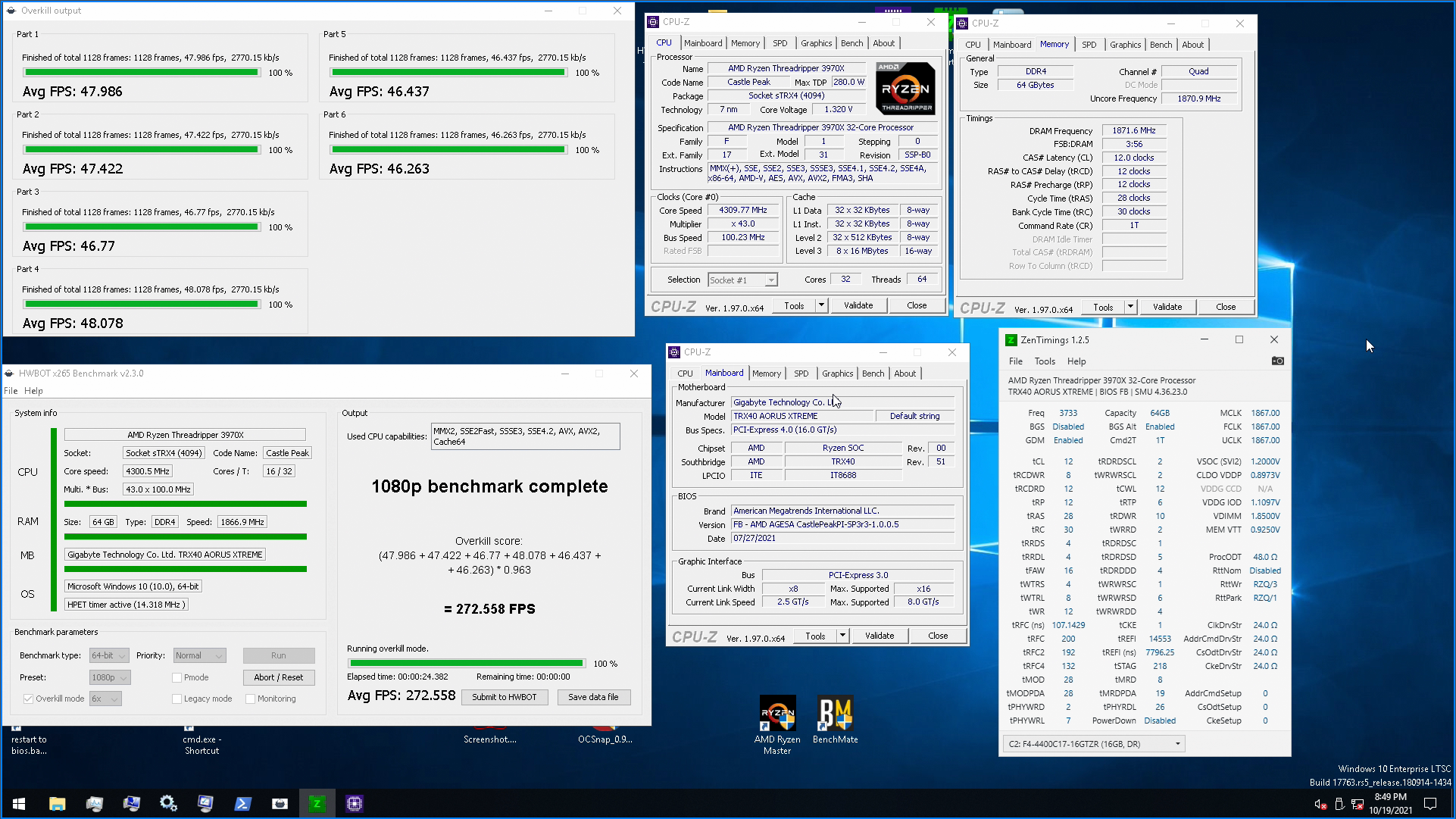
Would be really nice to take  on ambient water, but I think 290 is too hard to beat
 humble jay
proven canopy
Would be really nice to take <:glod:752599715735928945> on ambient water, but I...
humble jay
proven canopy
Would be really nice to take <:glod:752599715735928945> on ambient water, but I...
apparently setting tFAW to less than 16 still helps performance, and 6 should boot with that voltage
tall pelican
Even though tfaw's min value is 4x trrds, and trrds min value is 4?
humble jay
apparently helps with hidden timings
proven canopy
This one run was by far the most strangely high efficiency I ever got in x265 1080p
https://i.imgur.com/jtPI7Xu.png
humble jay
these worked for 2x16 at 3600 with my 5950X at 1.6v is the only other thing i see possible
 proven canopy
And it's not due to RNG - efficiency multi there is .964 - quite low
hwinfo reads read bandwidth around 78GB/s and write around 25, so I'd imagine the tRDRDs should be the focus
tall pelican
humble jay
these worked for 2x16 at 3600 with my 5950X at 1.6v is the only other thing i se...
Those are terts, and DD does nothing for 2x16
humble jay
forks said he was running triple rank at one point, thought not sure if he still is
tall pelican
DD is for 2+ dimms per channel
proven canopy
I did some brief testing, but there didn't seem to be any out of the box scaling
tall pelican
SD is 2+ ranks per dimm
proven canopy
So SD vs DD is distinct for each of 4x8 vs 2x16 b-die in a t-top board?
tall pelican
SD is the ranks per dimm, DD is different dimm timings
proven canopy
I still smashed the next highest non-ln2 score, so I aint mad tbh
https://hwbot.org/submission/4288651_lucky_n00b_hwbot_x265_benchmark___1080p_ryzen_threadripper_3970x_258.494_fps/
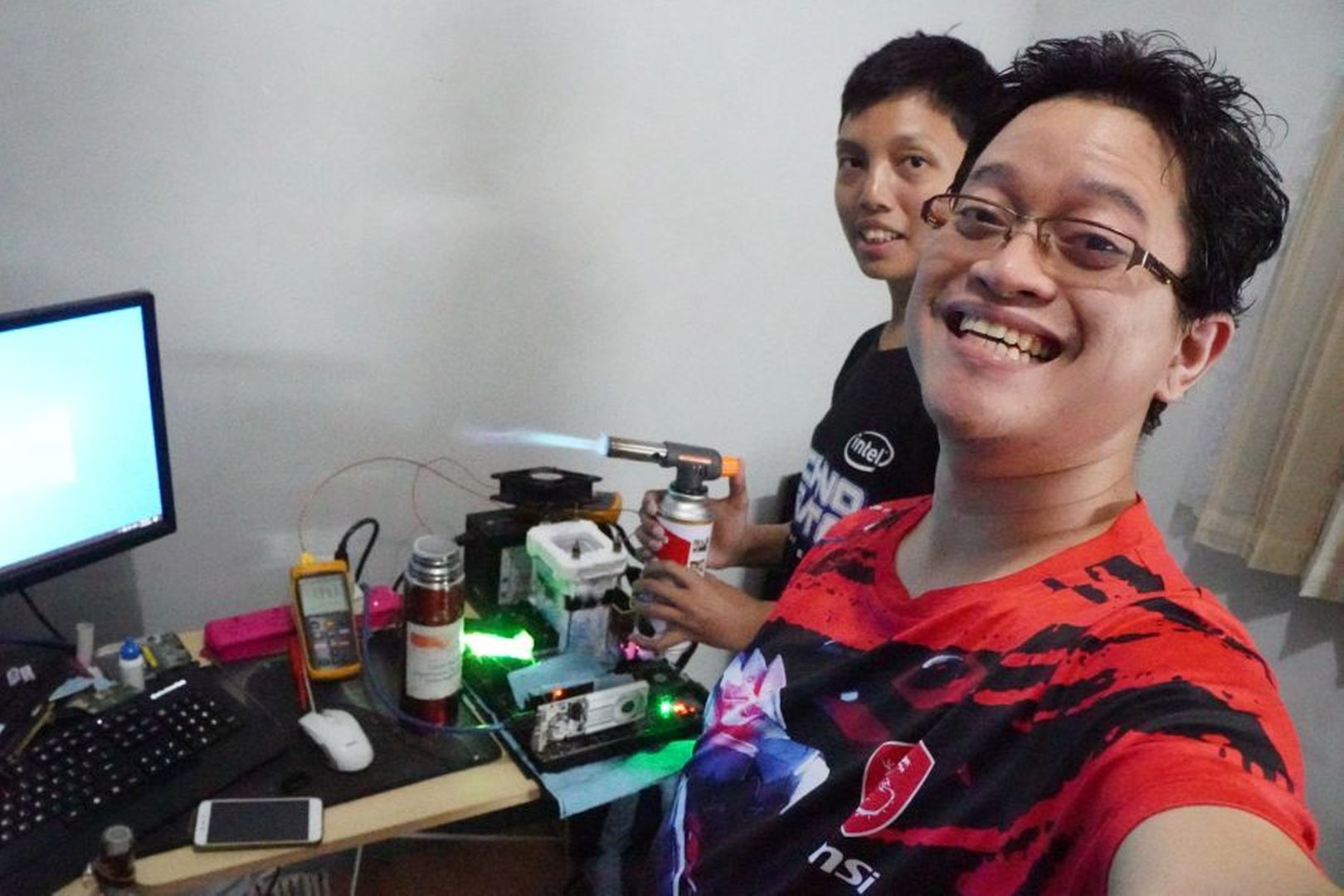
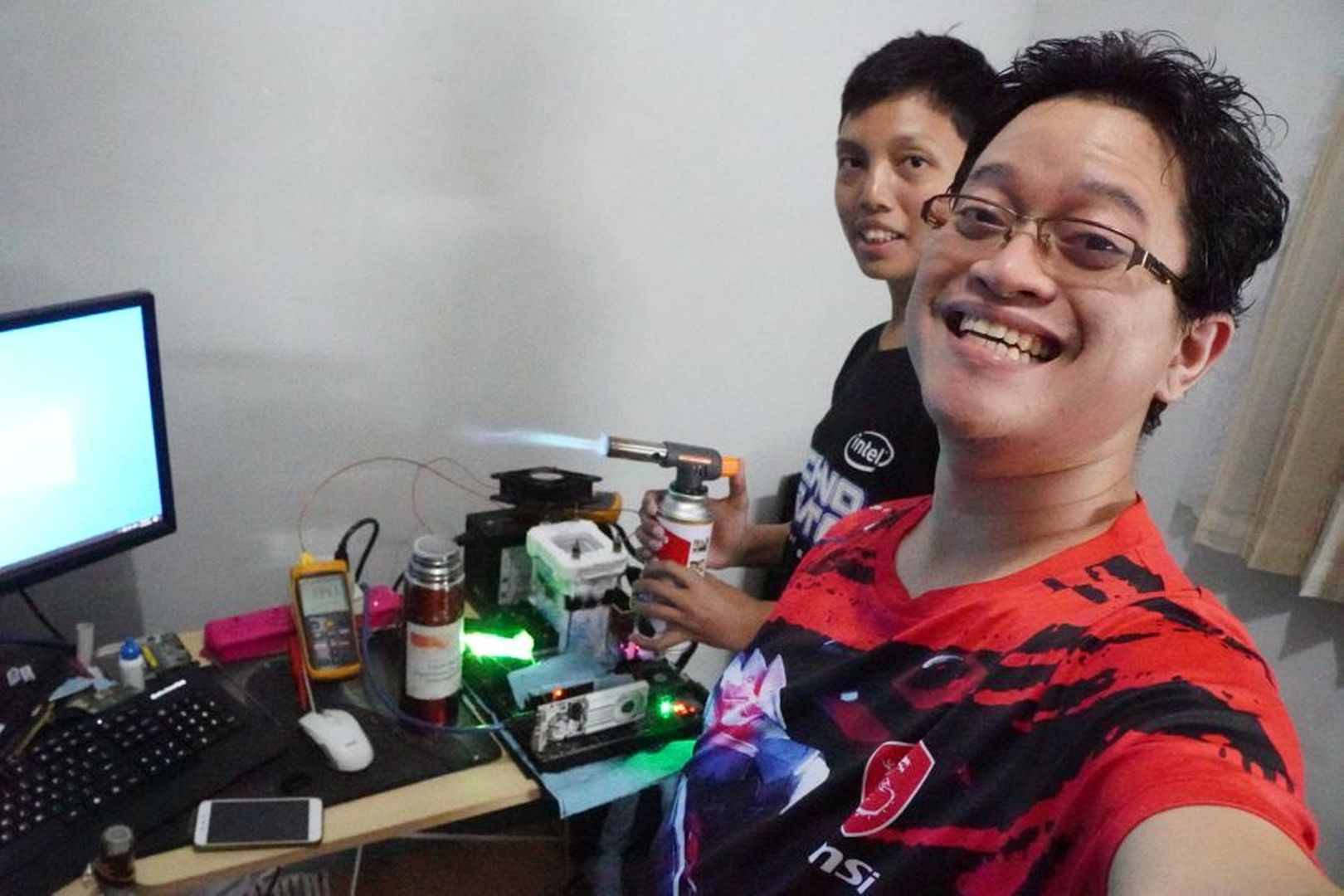
Lol at those guys using a butane kitchen torch
https://d1ebmxcfh8bf9c.cloudfront.net/u15135/image_id_2264875.jpeg
 tall pelican
When I get on my pc, I'll show 2x8 and 2x16 shenanigans with timings
humble jay
proven canopy
Lol at those guys using a butane kitchen torch
https://d1ebmxcfh8bf9c.cloudfront...
lol
https://cdn.discordapp.com/attachments/401528308535394314/900174415365541908/image0.jpg new benching background, and glad i got a proper torch instead of using a heat gun, because heatgun would have been so bad for so many reasons
 proven canopy
I recommend a ts8000 + mapp, propane is fine though
humble jay
yep, that's what i got
was going to use ts8000+ propane but it only cost like $12 more vs only getting ts4000 head
although it's map pro not mapp, which apparently is the actual good stuff but doesn't exist anymore
proven canopy
The new map is just propylene, the OG mapp was only problematic because the flame has too much hydrogen
humble jay
💥
proven canopy
Not a safety hazard, but it'd make welds in metals like steel very weak
humble jay
oh really? guess that makes more sense tbh
sterile flame
@proven canopy oh i fixed the issue btw
At some point I must've put the CPU Cache ratio to 12, and didnt noticed it stayed at 12 even after putting it back to auto....
dont ask why i lowered it to begin with lol
 prisma arch
humble jay
these worked for 2x16 at 3600 with my 5950X at 1.6v is the only other thing i se...
prisma arch
humble jay
these worked for 2x16 at 3600 with my 5950X at 1.6v is the only other thing i se...
damn
 prisma arch
humble jay
here's what it was
prisma arch
humble jay
here's what it was
wtf
my timings for 3600mhz ram are double that
hek
howd you get your trcdwr that low
humble jay
it's a timing that doesn't do much, so several ICs can just always run 8
prisma arch
oh ok
tall pelican
1800if on a 5950x 
proven canopy
Pretty conservative voltages there too, aren't they?
humble jay
Later I just ran 4200 c16
1.2 SOC, .89 VDDP, .95 CCD, 1.1 IOD
This was when I cared about WHEA
tall pelican
3800 dr should be ezpz without whea, otherwise just whea suppressor it
 proven canopy
tall pelican
3800 dr should be ezpz without whea, otherwise just whea suppressor it
proven canopy
tall pelican
3800 dr should be ezpz without whea, otherwise just whea suppressor it
Interesting - I normally see lower vddp, but higher vddgs
humble jay
tall pelican
3800 dr should be ezpz without whea, otherwise just whea suppressor it
1900 FCLK doesn’t boot on mine 
Then ig i decided that 3733c14 < 3600c12
lavish tundra
My 3600x gives no whea errors at 1900fclk
 zenith palm

worldly wasp
rev e moment
lavish tundra
worldly wasp
rev e moment
how did you know I have rev e
lavish tundra
ahh the code at the bottom
worldly wasp
yes
lavish tundra
You have any suggestion for me
like any values that jump out
that I should work on?
lavish tundra
trrds and trrdl will be made 4
worldly wasp
and 16 tFAW
lavish tundra
That was gonna be what I try now
worldly wasp
WTRS and WTR can and should be lowered on b die dunno about rev E
an d WR
terts too but you're working with rev e
try GDM off too
lavish tundra
stick no boot with trcdrd below 18
lavish tundra
worldly wasp
try GDM off too
cl 13?
short blade
lavish tundra
stick no boot with trcdrd below 18
expected
tRCDWR can likely go 9-12 though
I'll send you my timings to look at

I intentionally run looser tRFC than the tightest stable due to living in cali
high ambient
you should do the same
280ns is stable when it's cold enough
lavish tundra
my trc doesnt go below 55 either
short blade
mine boots at 51 but degrades performance below 55
tighten tRP before tRC
and tRAS before tRC
lavish tundra
Im gonna save my current timings to a profile and send all ur timings
short blade
lmao
probably won't work
apparently I have one of the better rev. e bins
C9BLM code
but you can try it
 proven canopy

HWBOT
The Ryzen Threadripper 3970X @ 4301MHzscores getScoreFormatted in the HWBOT x265 Benchmark - 1080p benchmark. Forksranks #2 worldwide and #2 in the hardware class. Find out more at HWBOT.
lavish tundra
proven canopy
https://hwbot.org/submission/4838457_forks_hwbot_x265_benchmark___1080p_ryzen_th...
Oh VERY nice!
 trim sparrow
Should I overclock my ram to 3200 mhz before installing windows?
proven canopy
no
trim sparrow
Ok then i should do it afterwards then?
 trim sparrow
Ok
proven canopy
I would do it after until you know you're stable
lavish tundra
fair but the chance of instability on that particular ram is VERY low
proven canopy
Probably, but is it worth it for 10 seconds off 10 minutes of install?
lavish tundra
Oh btw I changed the reset button on my case to clear cmos jumpers and its honestly so good while OCing ram
lavish tundra
proven canopy
Probably, but is it worth it for 10 seconds off 10 minutes of install?
Fair enough
proven canopy
lavish tundra
Oh btw I changed the reset button on my case to clear cmos jumpers and its hones...
Should try benching modern intel on an asus board with retry+safeboot
lavish tundra
proven canopy
Should try benching modern intel on an asus board with retry+safeboot
Oh I have a system running an 11500 and a b560 tuf
10/10
ram no boot? we save settings and let u into the bios
no need to load a profile
I absolutely love it
Honestly im in love with that chip... Stays so much cooler and draws so much less power than my slower ryzen system (cpu wise)
worldly wasp
proven canopy
https://hwbot.org/submission/4838457_forks_hwbot_x265_benchmark___1080p_ryzen_th...
ambient?
hailea when
 worldly wasp
sub amb?
proven canopy
For practical benching - I'm just going to build one
proven canopy
single stage soon ™️
lavish tundra
worldly wasp
want my 480 monsta <:kevinla:825053874573410304>
alphacool rad?
worldly wasp
lavish tundra
alphacool rad?
yes
proven canopy
Brutus just shipped me an evap, so maybe in the next few weeks
lavish tundra
worldly wasp
yes
very nice
proven canopy
Got two of these cheap, 33cc  https://www.ebay.com/itm/203101810484

eBay
Model #: AJB2444ZXA. 1 HP LOW-TEMP RECIPROCATING REFRIGERATION COMPRESSOR, 100-115/60-50/1 R-404A. 1 HP LOW-TEMP RECIPROCATING REFRIGERATION COMPRESSOR, VOLTS:100/115, HERTZ:60/50, PHASE:1, LRA:87, REFRIGERANT:R-404A, CONNECTION SIZE:5/16" X 3/8", CONNECTION TYPE:SWEAT, HEIGHT:11-7/16", BASE DIMS:5" x 8", WEIGHT:50 LBS, IN BULK, MADE IN FRANCE ...
worldly wasp
proven canopy
Brutus just shipped me an evap, so maybe in the next few weeks
bartX?
proven canopy
I think it is, yeah, it's from mythical's cascade
worldly wasp
ah
sudden torrent
PMD is out https://youtu.be/DTQoHjZBtIw

More Info about Hetzner AX41 Server:
https://derbauer.hetzner.com/en/ax41-211002/
Hetzner Datacenter Tour:
https://www.youtube.com/watch?v=5eo8nz_niiM
Elmor PMD: https://elmorlabs.com/product/pmd-power-measurement-device/
Suppor...
worldly wasp
did you get a refund for your mythical
proven canopy
Everyone did
proven canopy
I only ever ordered an evap, no units
 zenith palm
lavish tundra
<@!122901618369757184> send rest of ur timings
zenith palm
lavish tundra
<@!122901618369757184> send rest of ur timings
Test fin in 1hr 14m 🤤
lavish tundra
zenith palm
Test fin in 1hr 14m 🤤
Bro I literally yeeted sippys timings and sent them

low effort ram oc
dull ginkgo
lol
zenith palm
lavish tundra
low effort ram oc
Wasn't low effort for sips lel
lavish tundra
also im running lower voltage than him too
zenith palm
proven canopy
@restive cargo up your air conditioning game https://www.youtube.com/watch?v=2OR8ZPrlDXk
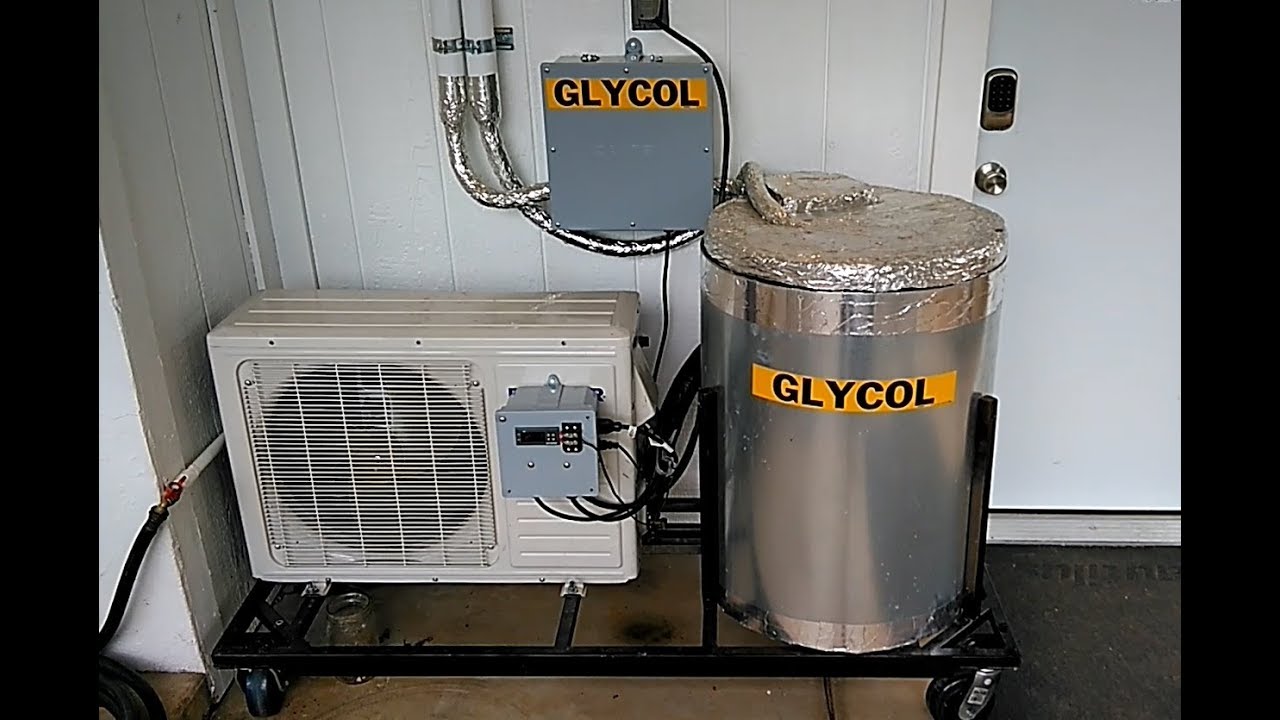
This is the final build of the Chiller.
12,000 BTU Capacity. IPG 50% Blend.
120 VAC @ 642 Watts in total with all pumps and compressor.
Minisplit Glycol chiller
R-410a 52 OZ Charge. ( Will Retrofit to R-32 in the future)
NOTE: 1 part polyurethane foam will not work!
YOU MUST USE 2 PART POLYURETHANE FOAM IF IT IS THICKER THAN 2 INCH!
We use...
 acoustic crane
Hey so I'm running cinebench with my r3600x and during single core run the core peaks at about 3.5ghz, but in multicore all cores sustain 4-4.1ghz
humble jay
So yeah, my DJR hard walls at 6200 even with LN2 and cpu and ram

Kept the board dry this time though
 acoustic crane
Hey so I'm running cinebench with my r3600x and during single core run the core ...
acoustic crane
acoustic crane
Hey so I'm running cinebench with my r3600x and during single core run the core ...
I have auto OC on in ryzen master and the reason I'm OCing is cause I believe I have a couple bottleneck in Battlefield
acoustic crane
acoustic crane
I have auto OC on in ryzen master and the reason I'm OCing is cause I believe I ...
And I've heard BF needs a good single core performance so I'm confused why it's only going to 3.5ghz
Also I can only run my 3200mhz ram at 3133 without crashing, idk if that's part of the issue or not
Any help would be appreciated:)
humble jay
acoustic crane
Also I can only run my 3200mhz ram at 3133 without crashing, idk if that's part ...
Do you have them in the correct slots?
 humble jay
Hmm, 3133 is especially bad
zenith palm
acoustic crane
I have auto OC on in ryzen master and the reason I'm OCing is cause I believe I ...
That's your problem auto oc sucks hard, delete ryzen master it's pretty trash, go into the bios and enable precision boost overdrive(pbo)
acoustic crane
ok ill try that
zenith palm
acoustic crane
Also I can only run my 3200mhz ram at 3133 without crashing, idk if that's part ...
Are you using xmp/docp or auto timings?
acoustic crane
I just set the speed to 3133 and timings to auto
acoustic crane
yeah but the xmp is 3200 which doesnt work
like it does sometimes but other times it boot loops a bunch
and then turns off xmp and runs ram at 2133
even with setting the speed it sometimes reverts it to 2133
anyways imma go look for PBO
by chance do you know where it is in ASROCK bios?
zenith palm
Just try doing xmp, and leave everything else alone, if that doesn't work, your ram kit is faulty and you should u rma it
zenith palm
acoustic crane
by chance do you know where it is in ASROCK bios?
Probably in overclocking tab or something
acoustic crane
Should I change it from Auto to Enabled?
 zenith palm
Enabled
acoustic crane
K
Got a better multicore score but singlecore speeds are still really low
Is that normal?
Peaking at 3.8ghz
zenith palm
Odd
zenith palm
acoustic crane
Got a better multicore score but singlecore speeds are still really low
Your speeds will be pretty highly affected by ram speed, so I'd try get your ram sorted out first
acoustic crane
It's at 3200mhz now I believe
I did the xmp and it booted
If it keeps resetting when I turn off/restart my PC I'll look into RMA or something
lavish tundra
I cant see a few under aida windowww
zenith palm
lavish tundra
I cant see a few under aida windowww
Deal with it 
short blade
lavish tundra
I cant see a few under aida windowww
those aren't changeable
so doesn't matter
also I'm not really surprised that the ones you tried worked
I thought you tried everything at once lol
did you also test performance?
also you're at 2T
and I'm at 1T
which is probably why you passed 3800c14 with less voltage lol
1T GDM off
lavish tundra
So how i do 1t gdm off
acoustic crane
Scored 1222 on cine R23
Anyone know if that's a decent singlecore score for a 3600x?
short blade
took more voltage as well as tuning cad bus, rtts, everything
short blade
gn
short blade
huh
sudden torrent
GDM just makes it easier to run 1T
short blade
is there any practical situation where you would ever want to run 2T GDM?
short blade
ah fair enough
proven canopy
Catch up on those season rankings bros
 tall pelican
have no fear, I just ordered 5 gt 710s
proven canopy
Better see a 5x gpu gpupi bench from you soon
humble jay
proven canopy
Catch up on those season rankings bros
👀
i'm about to potentially gain a ton of points

 tall pelican
proven canopy
Better see a 5x gpu gpupi bench from you soon
tall pelican
proven canopy
Better see a 5x gpu gpupi bench from you soon
I got a giga z77 that Im using as a test bench in my shop, that I think has enough slots
humble jay
6900xt ocf 👀
proven canopy
humble jay
koolance qd4?
proven canopy
I currently use them as well - but I put 50cm or so of 1/2 zmt between the block and the qdc
humble jay
easier to store with short qdc run
proven canopy
Also damn - that's a ton of mlcc's on the back of that card, what is it?
proven canopy
What's extra on it?






 proven canopy
Somewhat related, do you guys want the hwbot role hoisted or higher than the mee6 roles?