#overclocking
1 messages · Page 90 of 1
 tall pelican
If its 8820A then its 8gbit afr, if its S820A or something like that, its 16gbit ajr
 modern walrus
oh okay
It's g.skill
F4-3200C16D-32GTZR
it says04320XS20A above barcode
Here's my super reliable source

 tall pelican
modern walrus
it says04320XS20A above barcode
tall pelican
modern walrus
it says04320XS20A above barcode
ajr then
modern walrus
Thank you. Now I need to check what voltage that thing can handle because I think 1.45 may be pushing it
 proven canopy
Finally got around to watching through this vid, very interesting now that I've gotten a lot of benching experience with the board https://www.youtube.com/watch?v=-9itzQhr4Sk
My Patreon: https://www.patreon.com/buildzoid
Teespring: https://teespring.com/stores/actually-hardcore-overclocking
The Twitch:https://www.twitch.tv/buildzoid
The Facebook: https://www.facebook.com/actuallyhardcoreoverclocking
#ROG #motherboard #Z490
Totally agree that safeboot and retry are incredibly useful on a benching board, the full speed fan port is quite nice as well.
Also, on a board like this, it's nice to have two separate ps/2 ports vs a combined one like on an x299 dark where you have to go hunting for a compatible adapter.
 zenith palm
What would you even use the ps/2 port for?
 sterile flame
How far can I overclock my msi 4gb rx560
zenith palm
It will vary card to card, just start by upping the power as much as possible, upping the core in increments of 50 then once it crashed in the stress test(i recommend 3d mark demo) then go back to the one before crash, then start upping memory by like 100mhz until crash then -25 until stable
proven canopy
zenith palm
What would you even use the ps/2 port for?
Makes it just a bit easier to run legacy OS without manually slipstreaming in the usb drivers.
To be fair - no real use for xp on x299, win7/8.1/2012 r2 definitely though.
I'm working on my m12a xp image now for superpi, I'm 200mhz ahead and 8 seconds behind using optimized win7 vs xp
zenith palm
proven canopy
Makes it just a bit easier to run legacy OS without manually slipstreaming in th...
So benching on legacy oc squeezes out some extra points?
proven canopy
Depends on the bench and your hardware.
Win10 + benchmate is pretty decent for what it is
Just not superpi 32m, x265, some older benches
zenith palm
I see
 worldly wasp
proven canopy
Totally agree that safeboot and retry are incredibly useful on a benching board,...
worldly wasp
proven canopy
Totally agree that safeboot and retry are incredibly useful on a benching board,...
safeboot is hella useful even on daily
retry less so tho
 manic seal

 brisk hound
Love that ^
modern walrus
48 minutes into anta777 & no errors (yet). I got G.Skill Trident (AJR) to 3400c16 from 3200c16. I did secondaries & tertiaries. Think I could've done a lot better? finding info on 16x2 AJR isn't easy
 prisma arch
modern walrus
48 minutes into anta777 & no errors (yet). I got G.Skill Trident (AJR) to 3400c1...
prisma arch
modern walrus
48 minutes into anta777 & no errors (yet). I got G.Skill Trident (AJR) to 3400c1...
what cpu
modern walrus
10900K
zenith palm
modern walrus
48 minutes into anta777 & no errors (yet). I got G.Skill Trident (AJR) to 3400c1...
Nice but don't take it as stable enough yet, let it at least finish anta once
modern walrus
It's at 1:18. Needs 3 hours?
 clever epoch
about 3 hours per 32 GB
worldly wasp
modern walrus
48 minutes into anta777 & no errors (yet). I got G.Skill Trident (AJR) to 3400c1...
try 3600!
also
i'd use lmhz2
its in the integralfx
worldly wasp
LMHz2
its much faster than anta
should cut your testing time by 30-40% yet its more than strenous rnougj
ignore the thing about 1.45v its fine to use on whatever voltage
sterile flame
Made it to the top 100 in Firestrike in my first testing this afternoon. Sub ambient cooling is fun.
 worldly wasp
sterile flame
Made it to the top 100 in Firestrike in my first testing this afternoon. Sub amb...
worldly wasp
sterile flame
Made it to the top 100 in Firestrike in my first testing this afternoon. Sub amb...
hell yeah!, you beat blackdot with his hof lol
modern walrus
worldly wasp
its much faster than anta
omg where was this 12 hours ago
it says Ryzen. Does that matter?
worldly wasp
naw
also, ram testing gets faster the faster your ram is
@sterile flame is this volt/capmodded?
and i assume xtxh?
modern walrus
worldly wasp
ignore the thing about 1.45v its fine to use on whatever voltage
I'm trying to find the link

 modern walrus
oh I copy this to prime95 config or to memtest5?
worldly wasp
i'd run a 10980xe chilled
worldly wasp
modern walrus
oh I copy this to prime95 config or to memtest5?
tm5
sterile flame
*mess
modern walrus
no I don't even know what that is tbh
worldly wasp
next step probably evc2 voltmod, if you want more, then capmodding
worldly wasp
modern walrus
no I don't even know what that is tbh
other dude
modern walrus
oh right sorry
save to bin folder?
nvm just loaded (I think)
memory clock on HWiNFO says 1467mhz
kinda weird
also tRAS shows 42 not 38
 sudden torrent
modern walrus
memory clock on HWiNFO says 1467mhz
sudden torrent
modern walrus
memory clock on HWiNFO says 1467mhz
That translates to 2933 speed
modern walrus
ya that's horrible
wth
I know you help me constantly but can I ask for your advice yet again?
sudden torrent
What CPU/mobo? Maybe it failed when training and reverted some settings
modern walrus
In about 2 years I'll hopefully be a lawyer & maybe I can advise you for once lmao
Aorus Z590 Ultra/10900K

should I turn off realtime memory timing?
sudden torrent
Couldn't hurt to try
sterile flame
Nope. Haven't messed with morepowertool yet. Just basic MSI Afterburner and AMD tuning
That score was my 5th compete run
modern walrus
I just disabled everything that had an option to be disabled
sudden torrent
Well you want channel and rank interleaving on at least
modern walrus
oh crap well I'll go undo that
dunno why but HWiNFO showing same thing
unless memory reference clock on auto is causing this I really dunno what to think
maybe enabled XMP profile was overriding... hmm
changed that to disabled
sudden torrent
Nothing to do but try different settings. I'm kinda busy right now so I can't go more in depth.
modern walrus
no worries
you're like a professor to me already haha
if that was the issue, it's typical. I did battle with the remnants of Ryzen Master trying to get PBO configured right
tall pelican
in gigabyte, you need xmp enabled in order to have the board train anything faster than what the cpu is "specced" for
modern walrus
oh okay I turned it off but I'll turn it back on
I just saw a training voltage option
should that be set = to DRAM voltage?
prisma arch
undervolt exynos 2100 = good
modern walrus
well so much for memory oc. I don't know at which point in the process Aorus decided to just do whatever it wanted with frequency but I'm not retracing my steps to heck with it.
worldly wasp
which board
you might just be having an unstable oc
so it automatically posts and boots at lower feeq
i had great results with my z590 ultra
zenith palm
Did you remember to loosen timings a bit as well?
proven canopy
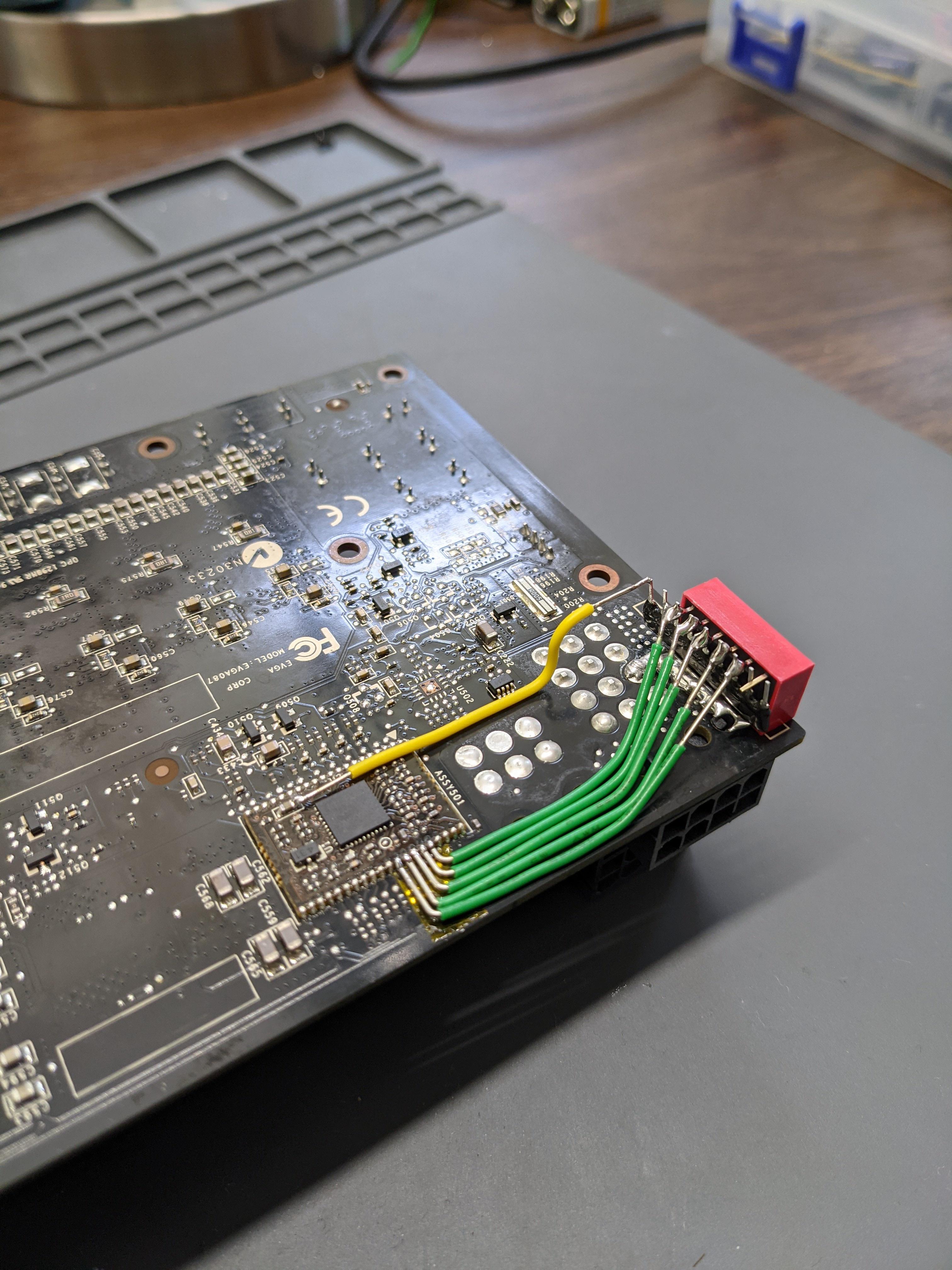
Used a SIP 4.7k resistor instead of 5 individual ones for the 680, saves a bit of time https://i.imgur.com/IYhrw5h.jpeg
 modern walrus
worldly wasp
i had great results with my z590 ultra
modern walrus
worldly wasp
i had great results with my z590 ultra
Aorus Z590 Ultra. I think fastboot was preventing it from training properly. When I fixed that setting, the oc was unstable. Luckily, about halfway through I saved a profile on BIOS so rn I'm at 3400 16-19-19-39. Teritaries aren't tuned but I'll get to those later
worldly wasp
yeah dont fastboot
modern walrus
I thought I'd disabled it awhile ago but I guess when I reloaded a profile awhile ago that profile didn't have it off
at least I have baselines to try for each setting on my excel sheet
Universal2 (instead of anta777) only needs to run for about an hour to test stability?
modern walrus
What's the threshold for speedy?
 dull ginkgo
It's just estimates for how long it takes to complete
Not a stress test that runs on a timer
modern walrus
oh ya I meant like is 3600mhz+ "speedy" or 4000mhz+, etc
dull ginkgo
(depends really)
modern walrus
haha ya memory is complicated
I'm testing 3400mhz 16x2gb. I'll just do an hour & a half I htink
 fair vapor
Overclocked my cpu to 5.5 Ghz and it exploded
tall pelican
oof sounds like a dud
 modern walrus
hour & a half it is then haha
I think I'm gonna stay at 3400c16 19-19-40
Can't get stable at even 3466c16 with 19-19-40
zenith palm
Depends what you're overclocking
proven canopy
Just saw this https://www.youtube.com/watch?v=rxHgSb6jQgU

My Patreon: https://www.patreon.com/buildzoid
Teespring: https://teespring.com/stores/actually-hardcore-overclocking
The Twitch:https://www.twitch.tv/buildzoid
The Facebook: https://www.facebook.com/actuallyhardcoreoverclocking
#HWbot #Overclocking
Wish he'd add time stamps, or have someone in the community do it, but entertaining nonetheless.
sterile flame
After half a year of owning a 6900 xt ultimate edition, it is pretty impressive. I can run it to 2750 without thermal throttling/losing performance.
It beats out most 6900 xt benchmarks I've seen in youtube.
By 4-30 FPS.
tall pelican
Youtube also runs them at stock
sterile flame
Some do. When someone overclock, I still have 2-6 more FPS.
Tho it's not something to brag about lol
Either way, I'm still impressed with that card
zenith palm
I'd recommend looking at 3d mark timespy(or other 3d mark benchs) more realistic to compare to other 6900xts
sterile flame
zenith palm
I'd recommend looking at 3d mark timespy(or other 3d mark benchs) more realistic...
I actually like to get it, but I don't have the time to buy it atm
zenith palm
sterile flame
I actually like to get it, but I don't have the time to buy it atm
Timespy is free
prisma arch
and so is our sponsor
RaId ShaDoW lEgEnDs
dull ginkgo
Timespy demo is free yea
 faint tangle
prisma arch
and so is our sponsor
RaId ShaDoW lEgEnDs
faint tangle
prisma arch
and so is our sponsor
RaId ShaDoW lEgEnDs
Rod shodow loginds
sterile flame
zenith palm
Timespy is free
Oh ok. I just noticed. When I tried downloading it, it didn't work. I just noticed it had a demo section for that page.
zenith palm
You can then compare that number online with others results
sterile flame
Yeah, I did. It's kinda hard to compare exactly because it includes the CPU score as well. Tho, it says I'm like the top 24% within the same specs.
I don't overclock my CPU, so it's much lower bc of it
But geez, the top 100 people does absurd overclocking.
zenith palm
sterile flame
Yeah, I did. It's kinda hard to compare exactly because it includes the CPU scor...
You can get rid of cpu on the left side of the site and just compare graphics score on leaderboard
modern walrus
Does anyone change their VDDCR SOC voltage? (I'm on 5900x btw) I occasionally get CPU/BUS interconnect errors--usually when under heavy load on graphics card--& was trying to figure out if raising it might prevent the error. Currently, it's set to auto which board shows means 1.1v. I read a gamersnexus article that said, "if you ask us, . . . 1.2-1.25v [SOC]." The article also warned that HWiNFO, et.al. could underreport SOC voltage which could lead to degradation of the IMC over time. The article was also from 2018 so not sure how relevant it still is.
was also thinking instead of setting a static voltage, to add minimum positive offset
tall pelican
Run 1.1-1.2, gn is on drugs
And its not hwinfo "underreporting" its called being under load
sudden torrent
I run my SoC at 1.125 and that's with all the overclocks I've done including maxing my fclk.
More than that will affect heat load more
In my case at least, ymmv
modern walrus
thank you.
btw what did you max fclk at?
I set it to offset +.00625 but I think I'll change it to static 1.2
er 1.125
is that enough considering it's already 1.1?
I guess it's more than a .00625 offset
zenith palm
modern walrus
btw what did you max fclk at?
Fclk max for falcie would be 1900mhz, 2000mhz if they got a god bin
 normal ether
An unstable overclock could cause a computer to turn all the way off by itself right?
zenith palm
ye
zenith palm
ughh i uploaded wrong photo to hwbot sub i just realised, is there a way to delete the sub?
zenith palm
Nvm just did a new run and it scored higher anyway
 short blade
normal ether
An unstable overclock could cause a computer to turn all the way off by itself r...
short blade
normal ether
An unstable overclock could cause a computer to turn all the way off by itself r...
personally i have never seen a hard shutdown from overclocking
lockups, boot fails, restarts, bsods
but never just a hard shutdown
normal ether
Or sorry it’s kind of like a restart
short blade
yeah restarts are common
normal ether
Thing turns off cold like it lost power and the turns on again
No restart screen tho
clever epoch
likely unstable CPU or memory OC
check windows event viewer; if it's a CPU issue you might get a log. Memory errors are harder to identify (without stability testing)
sudden torrent
modern walrus
btw what did you max fclk at?
1900, I can do 2000 if I ignore the WHEAs
zenith palm
sudden torrent
1900, I can do 2000 if I ignore the WHEAs
Sure who cares about WHEA's anyway pfft
sudden torrent
Right? I can bench it like that at least and I don't error out so there's that
short blade
normal ether
Thing turns off cold like it lost power and the turns on again
yeah i thought you meant cold shutoff and not restarting by itself
that i've never seen from overclocking
but cold shutoff where it makes that click sound and the board goes dark
and then it restarts
that has happened to me several times today
normal ether
clever epoch
check windows event viewer; if it's a CPU issue you might get a log. Memory erro...
just says kernel power error
clever epoch
normal ether
just says kernel power error
if there's nothing before that, it's likely memory issue
worldly wasp
short blade
personally i have never seen a hard shutdown from overclocking
lol
ive has shutdown into corrupted bios
also ocp trops
sterile flame
I'm pretty sure this is an oc problem but I'm not sure because I reset bios via battery and jcom1 short and none work. Basically my pc was working with a stable oc that I stress tested for maybe 1 hr with prime and max temps were 85-90 I think but anyways I stopped using my pc for a while (like a week give or take) and now its giving me ez boot white light.
Soo I need help bad

Btw this pc has been working for months
Soo even worse
💀💀
 ruby summit
is that ram at rated or you overclock it farther than rated?
sterile flame
Rated
ruby summit
hmm weird
ruby summit
you try shorting cmos reset pins?
ruby summit
could try running a single stick of ram maybe
sterile flame
Thas a good idea
ruby summit
i really hope your cpu didnt kill itseldf
sterile flame
I forgot what slot went with one ram stick
ruby summit
any one of them
sterile flame
ruby summit
i really hope your cpu didnt kill itseldf
If it did I think it wouldnt boot
Like no loghta
Lights
ruby summit
@short blade didnt you say ryzen 5k degrades really quick in some cases?
yeah its weird
sterile flame
Alr I'll get back to you
ruby summit
ight
bios is all updated right? im assuming it is since you said youve been using this pc for awhile
sterile flame
 sterile flame
ruby summit
bios is all updated right? im assuming it is since you said youve been using thi...
sterile flame
ruby summit
bios is all updated right? im assuming it is since you said youve been using thi...
Yup
 void kelp
cool
sterile flame
Actually updated again recently like 2 weeks or less
 barren ridge
cause 5600x has single core boost of 4.6
ruby summit
yeah maybe
sterile flame
Pbo?
ruby summit
pbo is oc technically
sterile flame
No I manually oc
All core
I think I'm better of going single though if I can even get it to work
sterile flame
Like 3.2
barren ridge
3.2v?
ruby summit
bruh
sterile flame
Yeh
barren ridge
yep
ruby summit
3.2 will toast a cpu
sterile flame
But it lights up
barren ridge
any cpus will die at 3.2
ruby summit
lights up but wont post
sterile flame
💀💀
ruby summit
mobo can still light up without a working cpu
sterile flame
Shii
barren ridge
ryzen safe voltage is 1.35v under load
sterile flame
Wtf
ruby summit
im amazed it lasted that long tbh
barren ridge
ye
ruby summit
over twice rated for a couple weeks is impressive
sterile flame
I litterly went through this with other people in this server they said I could do 3.5v
💀💀💀
barren ridge
wow
well they're mega dumb then
cause no cpus in the world actually runs that high
ruby summit
who gave you that advice?
sterile flame
I think a mod assist
 lavish tundra
that voltage can kill any one of those components
lavish tundra
sterile flame
I think a mod assist
you need to buy a new cpu
sterile flame
But this was when 5000 series barely came out
lavish tundra
ok?
sterile flame
Idk
barren ridge
any ryzen runs 1.35v max
lavish tundra
that doesnt make 3v fine
ruby summit
lavish tundra
cpu. gpu or ram
they didnt oc ram, it was at rated so itll be fine
barren ridge
it's basically a general oc
ruby summit
i dont think a socket will even allow 3.5
sterile flame
😭😭😭
ruby summit
your board shouldnt even let you do that
lavish tundra
ruby summit
they didnt oc ram, it was at rated so itll be fine
Nah nah im saying pushing that kind of voltage through any one opf then 3 components will instakill
sterile flame
I have a b450 tomohawk max
ruby summit
lavish tundra
Nah nah im saying pushing that kind of voltage through any one opf then 3 compon...
yeah forsure
sterile flame
Alr cool thanks 😭😭😭💀💀💀
ruby summit
wait
sterile flame
Wat
ruby summit
you didnt run at 3.5
modern walrus
sudden torrent
1900, I can do 2000 if I ignore the WHEAs
I guess I'm lucky that fclk runs at 1900 without having to overclock
ruby summit
max voltage a tomahawk will let you push is 1.55
 lavish pecan
 barren ridge
it probably caps at 1.55
lavish pecan
Hm?
barren ridge
ah 1.35
sterile flame
Ohhhh
barren ridge
well that's weird
sterile flame
I-
barren ridge
reset cmos
barren ridge
which exact light is on?
short blade
ruby summit
<@!122901618369757184> didnt you say ryzen 5k degrades really quick in some case...
yes
but
modern walrus
sometimes reseating RAM helps
sterile flame
barren ridge
like boot with one stick or something
Did
modern walrus
ya I think mine is capped at 1.8v
short blade
any modern cpu would instantly die explosively if you forced 3.2v through it
modern walrus
maybe mine is capped at 1.6 then
sterile flame
Thxx😅😅
ruby summit
well that doesnt solve the isssue
short blade
either way
ruby summit
you still arent getting display
sterile flame
Exactly
short blade
applying board max will destroy it quickly enough
short blade
but 3.2v is impossible
sterile flame
I have 1.32 soo
ruby summit
how do you know?
short blade
1.32v is still extremely dangerous
ruby summit
i thought it wouldn't post?
short blade
you should stay away from overclocking until you do some more research
sterile flame
ruby summit
i thought it wouldn't post?
I mixed up 3.2 for 1.32
ruby summit
short blade
you should stay away from overclocking until you do some more research
only pbo is allowed lol
sterile flame
Ik it was one or the other
short blade
it is entirely possible that you're not booting after cmos clear because you've damaged your cpu to the point of not being stable at stock
ruby summit
yeah
short blade
also - pbo is better for gamers than manual oc anyways
ruby summit
would 1.32 degrade it that quick you think?
short blade
well, hard to say depends on what it was being used for
sterile flame
short blade
you should stay away from overclocking until you do some more research
I did a lot of research
lavish tundra
1.32 still degrade any zen 2 or zen 3 cpu
sterile flame
And this is my 4th pc
sterile flame
💀💀
short blade
1.32v on zen 3 is ABSOLUTELY NOT okay
ruby summit
sterile flame
I did a lot of research
you still dont know the difference between 3.2 and 1.32 bruh
lavish tundra
1.25 max safe imo
ruby summit
nah
short blade
nor is it on some zen 2
modern walrus
wait what?
sterile flame
ruby summit
you still dont know the difference between 3.2 and 1.32 bruh
I'm dum ok that doesnt count
ruby summit
degrade quickly on ryzen 5k
short blade
manual oc should be 1.2v absolute maximum on zen 3
barren ridge
hmn
modern walrus
whaaaat
lavish tundra
fr?!
modern walrus
This is not good news
short blade
going above 1.2v is already risking degradation
barren ridge
yikes
lavish tundra
hmmmmmm
sterile flame
But degrading in only like 3 months?!??!
barren ridge
yeah
short blade
barren ridge
well does pbo go lower than 1.2v under load
the point is that pbo is ALLOWED to go higher
sterile flame
That's not possinle
modern walrus
5900x
barren ridge
3 months is possible
short blade
modern walrus
so when I see 1.296 on CB it's no bueno?
i degraded a 5800x in 10 minutes
barren ridge
short blade
the point is that pbo is ALLOWED to go higher
ahh
barren ridge
3 months is not too short
modern walrus
I've been pushing 5900x at 1.300v for months now
barren ridge
if it means quick degradation
short blade
3 months is long enough to completely kill the cpu if you are hitting it with enough voltage and load
ruby summit
im running at 1.1v on my 3600 rn
lavish tundra
I degraded my 3600x in 2 months at 1.35
short blade
modern walrus
I've been pushing 5900x at 1.300v for months now
for what use case?
ruby summit
goes up a tiny bit when pbo sets in and boosts
short blade
light to moderate gaming it's likely fine
modern walrus
I'll hit 1.296 on CB R23 max during render typically
short blade
slamming it with productivity workloads - not fine
modern walrus
prime95 like 1.19v
short blade
under pbo?
modern walrus
ye
modern walrus
oh you're talking all core?
short blade
pbo can safely go up to 1.5v
lavish tundra
pbo is fine
modern walrus
I ran manual 1.294 for CB Benchmarks
short blade
when you run pbo the chip protects itself so it doesn't matter if voltage goes over 1.2v
modern walrus
with manual all core 47.25x
lavish pecan
Wait pbo can safely go up to 1.5v? I thought it was 1.4v? Or am I thinking of something else 🤔
short blade
if you just did some quick benches it's likely fine - but you should still be careful
it only took one cinebench r23 run to degrade my 5800x at 1.4v
short blade
lavish pecan
Wait pbo can safely go up to 1.5v? I thought it was 1.4v? Or am I thinking of so...
1.5v
sterile flame
Ok but so 😅😅
modern walrus
24,257 score thooo
short blade
but you will only ever see 1.5v at extremely low load
sterile flame
I'm still crying over here
lavish tundra
1.5v at desktop
sterile flame
😭😭
lavish tundra
no apps open
modern walrus
10900K safe up to 1.35 under load?
short blade
yeah as long as you can cool it
modern walrus
I have to run 1.305 VRVOUT to stable 5100mhz all core
short blade
10900K is a monster to cool at 1.35v but that's not a dangerous voltage if you're keeping it cool enough
sterile flame
Soo uh am I screwed or what?
short blade
sterile flame
Soo uh am I screwed or what?
hard to say
lavish pecan
Do you have an older, compatible cpu lying around to swap out and see if the cpu is just borked?
short blade
if it won't boot after a cmos clear, and you've been running 1.32v manual for 3 months, you should try putting in a different cpu to see if it boots
also
you've been crippling your gaming performance by using manual oc
my old 5600x ran 4.85ghz easily on pbo without risk of degradation
sterile flame
short blade
you've been crippling your gaming performance by using manual oc
Oh alr good to know
short blade
makes me wonder where you are doing your research that they recommended 4.4ghz 1.32v manual
lavish tundra
what ram you got daveypoo
barren ridge
so it's fine in short bursts
short blade
less than milliseconds
modern walrus
1.32v you should be able to clock way higher than 4.4 ghz no?
barren ridge
manual is constant
short blade
modern walrus
1.32v you should be able to clock way higher than 4.4 ghz no?
silicon lottery
barren ridge
damn, less than?
sterile flame
short blade
if it won't boot after a cmos clear, and you've been running 1.32v manual for 3 ...
Only problem with this is that I only have intel cpus laying around💀💀
barren ridge
that's super quick
short blade
my 5800x can only do 4.3ghz @ 1.2v manual
lavish tundra
modern walrus
1.32v you should be able to clock way higher than 4.4 ghz no?
amd chips suck at OC
modern walrus
at 1.300v I could run 4725 long enough to CB & submit before crash lol
lavish tundra
barren ridge
best way to oc without much worry
best way to oc in general
modern walrus
well 1.296 or something
short blade
dude today i was benching the 6600K at 1.5v
beat the crap out of it
$25 air cooler + 1.5v
modern walrus
ouch
barren ridge
lavish tundra
best way to oc in general
tru
 lavish tundra
short blade
dude today i was benching the 6600K at 1.5v
lavish tundra
short blade
dude today i was benching the 6600K at 1.5v
6600k be like-
modern walrus
If I run prime95 on my 10900K it'll hit TJ max in like .0002 seconds
 lavish tundra
 ruby summit
Don't mind the voltage
short blade
modern walrus
If I run prime95 on my 10900K it'll hit TJ max in like .0002 seconds
yeah, i don't enjoy ocing comet lake because it's so hard to actually stability test them
ruby summit
It's def safe
short blade
like wtf are you going to use? realbench? LMAO
short blade
when the 10900K pushes 400W in prime95
modern walrus
I just let it OCCT for like 15 hours lol
short blade

barren ridge
is it tau?
short blade
barren ridge
does intel have any amd alt to pbo?
closest thing is TVB
barren ridge
ah
short blade
adjusts boost algorithm higher when your temps are below 70C
short blade
but still uses the boost algorithm
lavish tundra
short blade
when the 10900K pushes 400W in prime95
450W more like
barren ridge
shame
short blade
and you can set power limits
it's not quite the same thing but it's not that far off
barren ridge
something like pbo for intel would be cool
short blade
intel doesn't need it
modern walrus
I do PBO /core magnitudes & add -.06250v offset
short blade
intel hits temp limit long before voltage limit
 short blade
and you can do per core oc for higher single core boosting if you like
short blade
ruby summit
This chip prolly died after setting the record lol
fx chip, nothing of value was lost
modern walrus
lol 8ghz wow
ruby summit
Yeah only a 8370
barren ridge
fx could die and no one will care
ruby summit
Yeah it set a record and that's all that matters
barren ridge
i mean i dont too
modern walrus
wait what? on 10th gen you can do per core for intel??
barren ridge
it's just fun
short blade
it's not really per core as in you can change specific cores
short blade
you can set a clock speed for # of cores loaded
barren ridge
the only part people cares about an fx is dem records
ruby summit
Shoulda get a clock speed in the thz
modern walrus
oh ya I tried that
ruby summit
Terahertz
modern walrus
couldn't get it to work either lol
short blade
like you can have the 10900K run 5.4ghz on 1-2 cores, 5.3ghz for 3-6 cores, 5.2ghz for 7-10 cores loaded
short blade
if you have the intel cryo cooler i believe it automatically makes such a profile for you
barren ridge
just no oc kek
short blade
58/57/56/55
modern walrus
58 jeez
short blade
cryo cooler is subambient cooling so
modern walrus
makes sense ya
barren ridge
 modern walrus
is that a loop?
modern walrus
how do they stop condensation?
lavish tundra
short blade
if you have the intel cryo cooler i believe it automatically makes such a profil...
When the cpu cooler pulls more power than most cpus
barren ridge
it's not even an aio or anything
short blade
modern walrus
how do they stop condensation?
sorry i meant subambient not subzero
you can watch the linus video about it lol
barren ridge
ah okie
short blade
barren ridge
ln2?
it's just a fancy branded TEC cooler
short blade
lavish tundra
When the cpu cooler pulls more power than most cpus
true lol
barren ridge
fair
sterile flame
Do you guys think micro center will exchange my cpu?
short blade
meanwhile 10900K under cryo cooler: 600W take it or leave it
short blade
sterile flame
Do you guys think micro center will exchange my cpu?
you'd technically be scamming them but maybe
barren ridge
yep it's literally a tec but fancy name
short blade
it's a TEC but you get their software 
barren ridge
cool
sterile flame
short blade
you'd technically be scamming them but maybe
Alr if it means I will be fine then J might do that
tall pelican
short blade
meanwhile 10900K under cryo cooler: 600W take it or leave it
More like 200w cpu power and 600w cpu+tec
short blade
goodbye ethics
sterile flame
I'll first ask them to see ways wrong with the pc
And if they can fix it then good for them
short blade
tall pelican
More like 200w cpu power and 600w cpu+tec
i'm sure you can easily push a 10900K past 400W on its own with some form of subambient cooling
barren ridge
we doing some scamming to the retail
toasted cpu can't be fixed tbh
it's either throw it away or replacement if they allow that
tall pelican
short blade
i'm sure you can easily push a 10900K past 400W on its own with some form of sub...
You can do 350w fairly easily with just water and direct die, but the tec is overloaded at 200w
sterile flame
They have like magic with pcs
tall pelican
On 11th gen?
modern walrus
I think I do 286w on 10900k
barren ridge
tfw im on lappy
modern walrus
& it's already making LF2 look like a piece of crap
short blade
10700K + 1.35V + prime95 = 330W
short blade
cooler was a coolermaster mirror 360
tall pelican
If you're pulling 330w on skylake 8 core, you're looking at package power, which is vid*current
short blade
don't remember if VID was accurate or if i was looking at package power
i had it set to 5.0 @ 1.35
can't imagine VID would be too high for 5.0
tall pelican
Then vid and package power are both inaccurate
Package power = vid * current
Pout = vr vout * current
short blade
anyways the cooler was stated to dissipate 320W and it was sweating at 100C all core so it was probably somewhere around there
sold that build a long time ago so i couldn't check for you
tall pelican
At 5.3 on my 10900k with 1.35v load, it was 350w in p95 small avx2
short blade
LLC?
tall pelican
If you have 1.35 set and it says 330w, spot what's wrong
Llc doesn't matter if its 1.35v load
I had like 1.48v set
Gimme a sec to math package power for that
short blade
i had LLC at maximum setting, vr vout said 1.35v load
don't remember if i was looking at package power or POUT though
tall pelican
Would have been 430w package power
I can guarantee you that a 8c skylake was not pulling 300w+ on ambient
short blade
guess i'll have to pay more attention next time i get my hands on one of these chips
not sure if the 6700K i'm getting tomorrow will count
tall pelican
modern walrus
how are you able to cool that??
Water, lm and dd
short blade
i might've been looking at package power yeah
modern walrus
what's lm & dd?
short blade
liquid metal direct die
short blade
had an 8700K with liquid metal on both sides of IHS reporting 265W at 1.4 vr vout but ig that was package power
that one i could actually cool without throttling
tall pelican
That sounds very package power
modern walrus
wow
tall pelican
On z390, you needed either gigabyte or maximus to get accurate power
short blade
it was a not very good z370 extreme4
modern walrus
1,676,542,074 PCI/PCIe Bus errors on my mining thing
tall pelican
Yeah, don't think asrock had die sense
short blade
couldn't run tests for very long cause it would hit vrm throttling even though cpu was chilling
would run prime95 for about half an hour before the vrms gave up and it went back to base clock
modern walrus
 short blade
that's a few errors
modern walrus
There's no way this cannot be a bad thing
1.68 billion errors?
my event viewer file must be like 3gb by now
This 1x PCIe riser is crap
Can it possibly be because it's on the 3.0 PCIe slot instead of sharing with slot one via slot 2?
like that is terrible
mining still works fine but wth
 barren nacelle
modern walrus
barren nacelle
modern walrus
WHAT?
modern walrus
lol couldn't tell ya
sterile flame
Guys I dont know how but I left the pc unplugged all day and when I came home I tried to turn it on and it posted
I am now using auto oc
😅😅
clever epoch
Auto OC software or PBO? Those are 2 different things
barren ridge
clever epoch
Auto OC software or PBO? Those are 2 different things
use pbo
mobo's auto oc sucks
barren ridge
okie
zenith palm
Eraser smort
clever epoch
zenith palm
Eraser smort
only on accident
zenith palm
clever epoch
only on accident
How on accident lmao?
clever epoch
zenith palm
How on accident lmao?
Implying I'm not intentionally smart, I just happen to say things that make me seem intelligent sometimes
zenith palm
Lol
zenith palm
clever epoch
Implying I'm not intentionally smart, I just happen to say things that make me s...
You know your stuff tho
clever epoch
zenith palm
You know your stuff tho
Do I? Or do I choose random words and get lucky with the arrangement? 🤔
||I know a lot more than I used to thanks to peeps here and elsewhere, I enjoy passing on some of what I learned||
Now I'm just limited by time and budget, but I suppose that's everybody :P
zenith palm
Yeah lol we all start somewhere
modern walrus
Is it worth getting an 8k HDMI cable to see if I can overclock display? I realized I have no idea whether the display can overclock since the cable is limited to 4k@60hz
I mean I guess it's a long shot but the display is Samsung
barren ridge
nope
proven canopy
4790k overclocking on phase change -40C https://www.twitch.tv/mickulty
prisma arch
beat my speedrun score
 modern walrus
 zenith palm
 zenith palm
modern walrus
zenith palm
modern walrus
What did you do?? 
modern walrus
mine eth with 3060 connected with 16x PCIe to 1x PCIe
with a usb extension cable
I swapped the cable & started mining ergo
up to 1 error rn
faint tangle
modern walrus
I swapped the cable & started mining ergo
I thought raven was better to mine with trex and kawpow with the lhr?
Or is it the one where dummy plugs or dev drivers work
modern walrus
I'm pretty sure it's a different algorithm all together so LHR doesn't activate

 faint tangle
Interesting
modern walrus
 faint tangle
I've got a fhr card but I think I'll have to check it out
modern walrus
Sorry that's all the pictures I'll send don't worry
That's assuming this whattomine.com site is accurate
faint tangle
Some moron was saying he makes 70cents in 15min with a 3070 on autokylos 2 lmao
Different server
dull ginkgo
Prob lucky with a block in that 15min
faint tangle
He also randomly sent me a gif of a guy kissing a girl that was sleeping
modern walrus
oh that's nice
faint tangle
dull ginkgo
Prob lucky with a block in that 15min
He said he got it consistently
faint tangle
modern walrus
oh that's nice
Yeah seemed like the kinda guy who wanted discord kittens
Anyways, lmk how mining ergo goes
When I tried it out for a day I made less than eth mining, but thats bc I have fhr
modern walrus
Right now I have 3060 & 3070 doing about 160 & 70 hash respectively
I'm still working on tuning them but
modern walrus
3070 at 130w & 3060 around 110w
faint tangle
Increased power to 91 only gave it an extra 2mh/s
And idk if it uses core or not
I dont think it does I think foxy said
faint tangle
So I might try it again with lower core
faint tangle
My eth settings are 55% power-502 core +1250 mem, I can go up to 1450 without errors but it barely helps hashrate
modern walrus
like 235 hash
modern walrus
That's not bad at all
faint tangle
Been using gminer but might switch, also should switch to ethash
Since I'm currently using nicehash pool
modern walrus
when I had 3060 on eth I was getting 48 at 100w
faint tangle
I basically leave my miner going 24/7 now
Since most demanding game I'm playing currently is valorant
And still get like 200kh/w while playing and good fps, so why not
modern walrus
I wonder if I can mine ergo on 970m
I have that mining btg
& it makes like $5/month
faint tangle
Probably, I dont see why not
modern walrus
which is kinda pointless but at the same time I never use that computer
modern walrus
actually
I take it bac k
It made more I just had the stupid address thing messed up
faint tangle
F
modern walrus
so I had to charge that one to the game
faint tangle
Since I can't make a coinbase account I use a miner called salad, or atleast my profits go into that
modern walrus
3080ti gets about 1hash/w
faint tangle
I pay my parents for the energy I use though
modern walrus
rn at 231 I'm getting 236hash
faint tangle
Use gminer to go into salad
faint tangle
Well sort of like a wallet I guess
 faint tangle
Nice
modern walrus
heck if I can keep that going I'll be chillllin
faint tangle
I was thinking about setting my brothers 2070s max q up for mining
modern walrus
3080ti outperforms 3060+3070
faint tangle
But it's an omen laptop so I don't trust the cooling
modern walrus
meanwhile on ETH the opposite was true
oh ya you'd have to set power level as low as possible
I have a 1660ti on my laptop
faint tangle
Can't change power limit on laptops I don't believe
modern walrus
but it'll like melt
faint tangle
Only core and mem I believe
faint tangle
He has a cooling pad but I still just don't trust it
modern walrus
I think ThrottleSTOP gives you more options to try undervolt & what not even on laptops
but I didn't end up messing with it
faint tangle
Yeah I prolly won't
Maybe I'll test the mining on it and see the Temps
2070s has gddr6?

 short path
so I pushed a gigabyte 1660 OC edition to +120 core clock and +250 memory
it appears stable, runs benchmarks fine, but I don't yet have a game that's picky enough about core clocks to see if it's truly stable
what do you guys think?
afterburner btw
zenith palm
short path
it appears stable, runs benchmarks fine, but I don't yet have a game that's pick...
Just use 3dmark demo on steam
proven canopy
@alpine mantle When you bench the card, should share some pics/results here
 alpine mantle
ok!
proven canopy
5900x ln2 stream (not me) https://www.twitch.tv/antitux

 finite frigate
yeah this is the gy iwas just talking about lol;
why is he benching with a RTX 5000
what is he testing with?
TSE it seems
proven canopy
Lol no, just using the gpu for display out, benching 3dmark cpu profile max threads
finite frigate
oh lol
weird that hes using a 5000 though
iw as confused i was like
ho
*oh
no issue with it just weird lol
proven canopy
it's clearly in the chipset slot, so not for anything 3d, lol
proven canopy
Lol, he's relatively new to benching and I don't think he owns anything lesser
proven canopy
Check out his setup https://antitux.dev/

Personal Blog of John Dee
finite frigate
i dont remember exactly what he's oc'd yet
proven canopy
yeah, strix 3090 PR
 tender plinth
bro
so i reset my UEFI back to default values. i used to have my bios auto oc my cpu and it was at 4000 mhz. and after i reset it, the only things i changed were my fan curves and XMP/DOCP. i just started up a game of apex and i'm seeing my cpu trying to get to 5000 mhz?!?!? is this PBO?!?
5950x and using a noctua NH D-15 for the cooler
i'm a little worried because i dont know whats happening
running 72°C
tall pelican
that's normal, the 4000mhz you had before is an underclock
aka why bios auto oc = bad
tender plinth
so
5000 ish is good?
interesting
so its PBO working right?
and it only activates under certain loads?
i'm a little slow so please educate me
zenith palm
tender plinth
5000 ish is good?
Yeah that's what you should be getting
Cpus normally vary in frequency
tender plinth
ah alright, i was just worried that it was hitting 78c and running at 4600+
zenith palm
tender plinth
running 72°C
72c is nothing to worry about, danger zone is 90c+ ish
But nhd15 isn't the optimal cooling for a 5950x really, 360mm/420mm arctic liquid freezer, ek rgb or lian li Galahad aios are what you want to get the most out of your 5950x but the nhd15 will handle it fine
tender plinth
yeah, i'm thinking to upgrade the cooler later on. it'll look much more better too haha
zenith palm
I mean the nhd15 is still a good cooler so i wouldn't worry since you already have it but you will get a bit of extra perf when the chip is cooler
clever epoch
tender plinth
so i reset my UEFI back to default values. i used to have my bios auto oc my cpu...
Also you don't have to worry about the CPU when PBO is running (unless you went into advanced settings and disabled safeties). PBO will automatically adjust the CPU to keep it safe from too much temperature, voltage, or current.
fair vapor
Is it normal that a 5950x reaches temperatures as high as 95 degrees celsius?
Overclocking
zenith palm
fair vapor
Is it normal that a 5950x reaches temperatures as high as 95 degrees celsius?
Well 1 just use pbo, 2 no it should throttle a bit before that happens
zenith palm
 orchid flame
Christ
orchid flame
Christ
Whats up?
zenith palm
Oh lol
prisma arch
i saw typing
 lone berry
hello wondering if someone can help... im on a gtx 1080 i got it back in 2017 used it like 2 times back then just now getting back on it and i have been trying to fix jagged edges in games and when its just at home also my fps are poop maybe oc can fix ps idk much about pc stuff..
 real ledge
fair vapor
Is it normal that a 5950x reaches temperatures as high as 95 degrees celsius?
real ledge
fair vapor
Is it normal that a 5950x reaches temperatures as high as 95 degrees celsius?
on pbo i hit a max of 89c under an all core load, cooling is an nh d15 with both fans at 1500rpm
clever epoch
lone berry
hello wondering if someone can help... im on a gtx 1080 i got it back in 2017 us...
Jagged edges? You mean aliasing?
Also what resolution and games? Because the 1080 is quite aged and won't be able to drive much more than 1080p 60fps on modern demanding games with max graphics.
Overclocking will help a bit, but if your fps is truly "poop" it may make it tolerable, but I wouldn't expect more than 10% improvement at best.
lone berry
clever epoch
Jagged edges? You mean aliasing?
Also what resolution and games? Because the 10...
Ah alright playing like warzone it gets like 110 and goes down from that and any idea how much I could get if I sold it have seen so many different numbers for it
clever epoch
lone berry
Ah alright playing like warzone it gets like 110 and goes down from that and any...
Judging by ebay, you could sell it for $400 to $500.
The trickier part will be getting a replacement GPU. If you can live without it, try to put it up on craigslist or Facebook marketplace or reddit r/hardwareswap (ebay takes a large cut).
If you need it, you should just lower graphics settings on your games.
lone berry
clever epoch
Judging by ebay, you could sell it for $400 to $500.
The trickier part will be ...
Oh ok thank you so much I was looking at the rtx 3080 possibly if I can sell the 1080 for a few hundred bucks
clever epoch
lone berry
Oh ok thank you so much I was looking at the rtx 3080 possibly if I can sell the...
good luck finding one...
lone berry
clever epoch
good luck finding one...
Yea meant to say if I can find one lmaoo do you have any other you recommend I don’t really know much about pc stuff haha
clever epoch
lone berry
Yea meant to say if I can find one lmaoo do you have any other you recommend I d...
any new GPU you can get ahold of right now near MSRP.
if you're in the US, 6600XT isn't too hard to find with a little effort. That should give you a substantial bump without breaking the bank. Nice and efficient too
lone berry
clever epoch
if you're in the US, 6600XT isn't too hard to find with a little effort. That sh...
Alright thank you 👍🏻
 bleak sable
lone berry
Alright thank you 👍🏻
bleak sable
lone berry
Alright thank you 👍🏻
Any microcenter has 6600XTs readily available
From the two I’ve been to
lone berry
bleak sable
Any microcenter has 6600XTs readily available
I don’t have one that close to me
@clever epoch would it be worth trying to oc it or?
clever epoch
lone berry
<@111605868138655744> would it be worth trying to oc it or?
OC your 1080? It'd be mostly for fun but you might as well if you want. Or you can keep trying; best buy gets physical inventory in some stores these days.
Also, AMD's website sells cards at MSRP every thursday. No 6600xt, but you can get 6700xt, 6800, 6800XT, and 6900XT
lone berry
clever epoch
OC your 1080? It'd be mostly for fun but you might as well if you want. Or you c...
Alright should I just watch a video or what do you recommend for settings oc it I don’t know like anything about it lmao
lavish tundra
Increase clock speeds by 25mhz while not touching the voltage and run 3dmark timespy till the pc crashes
Then reduce by 50mhz
lone berry
lavish tundra
Increase clock speeds by 25mhz while not touching the voltage and run 3dmark tim...
Alright will try that out
clever epoch
set power slider to max as well
lone berry
Alright
clever epoch
@lone berry Set the power slider to max, and then do what Rawr suggested: increase the core clock speed 25 MHz at a time, and run 3dmark time spy each time. If time spy crashes, reduce the core clock speed by 50 MHz, and that's your core clock
and then you should repeat the process with your memory clock

 shrewd pasture
clever epoch
ruby summit
Imma wait here till someone gets the joke lol
shrewd pasture
clever epoch
ruby summit
Imma wait here till someone gets the joke lol
The channel you decided to post it in made it too easy 😛
lavish tundra
ruby summit
Imma wait here till someone gets the joke lol
gpu is quite literally over a clock
you can go now
tall pelican
jokes on you because a titan rtx barely overclocks on the ref cooler 
lavish tundra
I just saw someone recommend the stress test that comes with radeon software on reddit lmfao
zenith palm
But it's a stress test 
lavish tundra
zenith palm
But it's a stress test <:stonks1:839967161845284956>
it doesnt stress anything except you when the test comes back clean and pc crashes while gaming
zenith palm
lavish tundra
it doesnt stress anything except you when the test comes back clean and pc crash...
Yes stress you
tall pelican
lavish tundra
I just saw someone recommend the stress test that comes with radeon software on ...
Pulls more power than any game I've played. Metro exodus rtx got close
Its about equal to ts/tse
lavish tundra
tall pelican
Pulls more power than any game I've played. Metro exodus rtx got close
Ive ran that stress test when it came out and even tho it passed, heaven hung 2 mins in
dull ginkgo
It's probably difference between just synthetic load and variable load tbh
lavish tundra
Might be
tall pelican
Heaven is also a cpu test, so there's that
lavish tundra
Cpu passed prime95 small ffts
lavish tundra
Eh fair point
tall pelican
Small fits in the cpu cache, aka a cache/core test
tall pelican
And there's more to a cpu test like heaven than just core and cache
 cold jolt
sudden torrent
cold jolt
sudden torrent


 sudden torrent

 twilit hedge
 proven canopy
Kinda last minute, but I'm going to try get a sub in for team cup with the 3080 https://hwbot.org/competition/HWBOT TEAM CUP 2021 - NVIDIA GPU/stage/5300_3dmark_-_fire_strike_(gpu)_-_ddr4
proven canopy
@manic helm Want to get one in as well?
sudden torrent
Oh shoot I thought I put a sub in for that already. I'll put one in with my "3090".
proven canopy
I feel bad for not being more active in team cup, I've been real busy the last month - but I totally could have the first month of the competition
proven canopy
Might as well get a 770 night raid in as well https://i.imgur.com/Jo7E8ea.jpeg
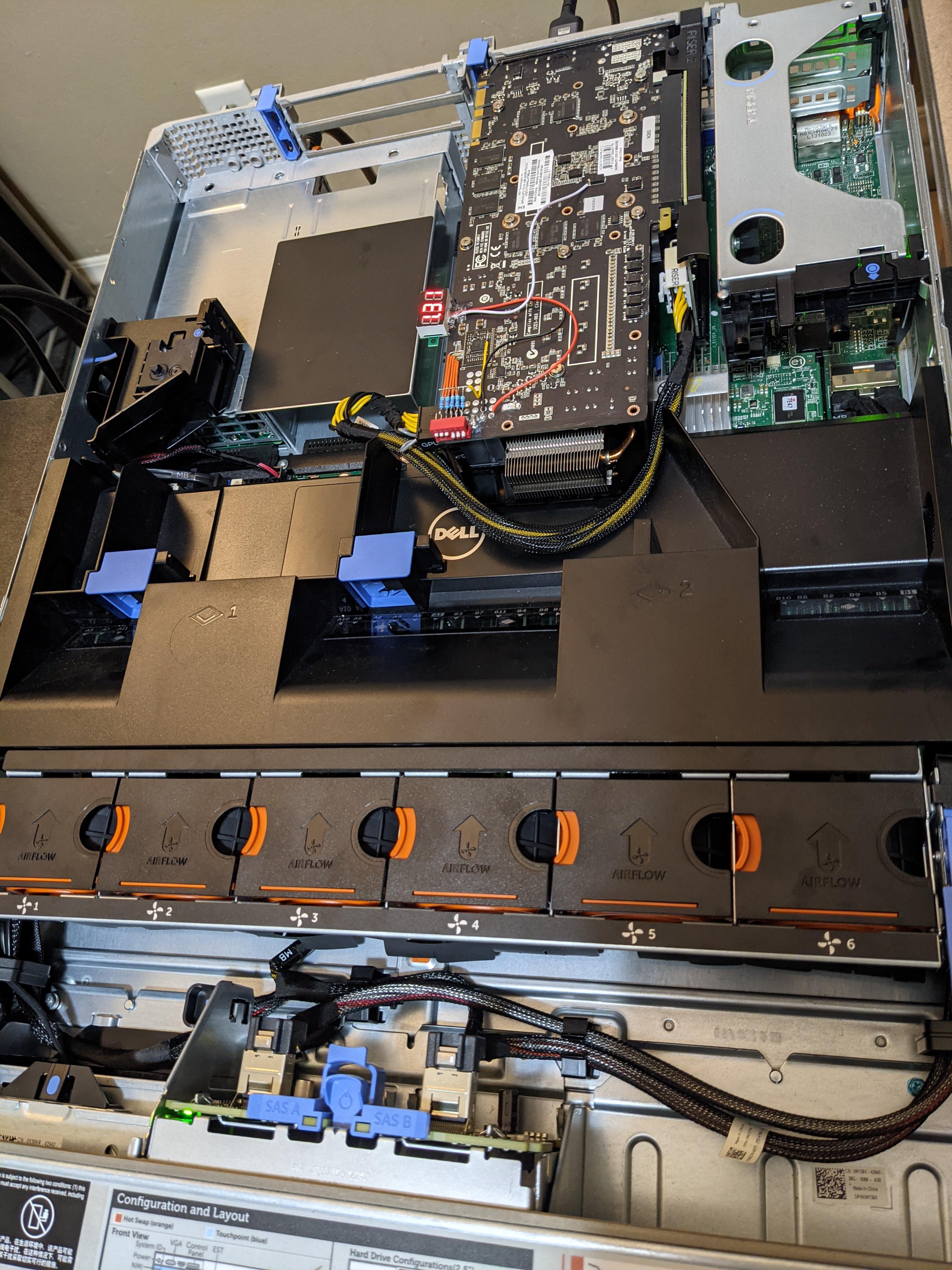
Unfortunately, this is probably the best ddr3 platform I have for this right now
 proven canopy
@sudden torrent how's it going
proven canopy
school > hwbot
sudden torrent
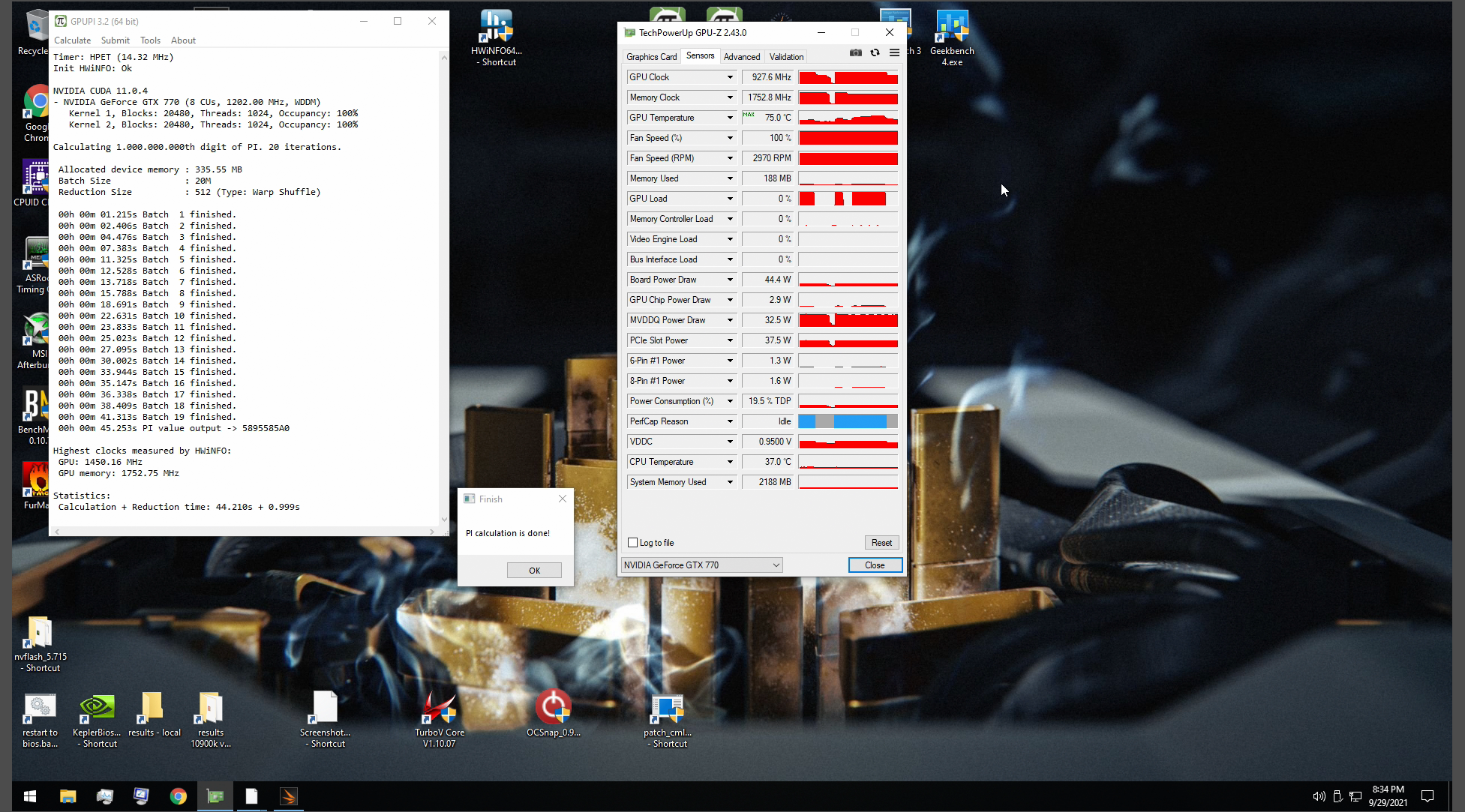
Working on improving my score, I'm at 47,377 but I can do better


 manic helm
I don't have any old systems here right now, but I have the same xfx 6600gt from this sub

nevermind thats a 7600gt
looks the same
 proven canopy
You should build a single stage
manic helm
someday maybe. wife wants a truck and a camper. Both of those will require a garage to store, so I might be able to weasel my way into getting some space for projects.
bleak sable
sudden torrent
Working on improving my score, I'm at 47,377 but I can do better
Do better
Best my 80ti I believe in you

sudden torrent
I'm not beating anything with this 2x 8 pin "3090"
But I did get 47,545 and brought us up to 8th overall
Maybe if I dunk the radiator in an ice bucket... Nah not today
I'd need to go get a bag of ice for that
proven canopy
No worries, I put up a totally potato 770 ddr3 score
proven canopy
I assume theo did that
tall pelican
I dont even know what that means
proven canopy
me neither
sudden torrent
Is anyone else planning on subbing for the ycruncher DDR4 memory part of the contest?
proven canopy
Depends how late I stay up, lol
Man, I should've started on TC when it opened up
The last month I've been real busy, but I could've put in some work during the first month of the contest
tall pelican
I can do y cruncher I guess, daily should be more than enough for a decent sub
tall pelican
yeah, Id have to move my sticks over to 10900k for 10c, or leave it in 5800x for 8 core
sudden torrent
And here I am with puny sr b-die, at least the stock cooling is good enough for 3800 c14
tall pelican
Oh, Im getting sleepy af, so no 10 core from me
proven canopy
Yeah.. I think I'll just do 9900k 3080 FS then go to bed
ln2 pot is still mounted to the 10900k and fs is gpu score only so..
But hey, let's go hard for country cup
tall pelican
By then I'll have actual disposable income lol
bleak sable
I’m in bed no y cruncher for me
tall pelican
Got a sub in for ddr4 8core
proven canopy
damn, up to #16
sudden torrent
Got my ycruncher in, doing r23 now