#overclocking
1 messages · Page 86 of 1
 zenith palm
 prisma arch
so far so good
3600 17-20-20-40
prisma arch
so far so good
3600 17-20-20-40
Btw odd cls don't actually work on ryzen properly
 proven canopy
Depends if you run gdm
prisma arch
ok its 16-20-19-40
zenith palm
Remember running tm5 will take a long time -hour and a half or so for a 16gb kit, double that for a 32gb kit etc and you want to do it after every change
 sudden torrent
You can do odd CAS with GDM off and CR2
prisma arch
for 1.5 hrs???
sudden torrent
Ideally yes
Best way to know if it's totally stable or if some random weird operation will fail later on
Personally I do OCCT memory test for 1 hour while doing initial testing and then once I find my best settings I run TM5 twice
zenith palm
prisma arch
for 1.5 hrs???
Well until it finishes ideally, which will take about 2.5-3 hours with your 16gb kit
prisma arch
sudden torrent
You can do odd CAS with GDM off and CR2
how do i do that
 clever epoch
memory settings. GDM = Gear Down Mode. CR2 = Command Rate 2t
zenith palm
Is there any benefits of having gdm on or?
zenith palm
Ahh yeah that's what i thought, not a common thing on intel then or?
zenith palm
sudden torrent
But can mess with your settings without you knowing
Ohh like making cl even?
sudden torrent
Nope purely AMD, Intel doesn't mind odd CAS as much
sudden torrent
zenith palm
Ohh like making cl even?
And a few others yes
zenith palm
I see
Yeah i want sure if amd only feature or if was just disabled by default on Intel
prisma arch
ok cl16 not stable
zenith palm
prisma arch
ok cl16 not stable
What other timings where you running?
prisma arch
16-20-19-40
zenith palm
Ah you could try 16 20 20 40 most likely start at 18 20 20 40

 sudden torrent
Ehhh, yes but also no
prisma arch
?
sudden torrent
On Ryzen it's good to get the frequency as high as you can safely sync the fclk so the cores can talk to each other faster, but on the other hand you'd have lower latency with 3266c15
zenith palm
prisma arch
mm no
Also btw next time you go in hit the load config and exit button, and pic extreme by anta77
 hard goblet
sudden torrent
GDM is good for stability
hard goblet
sudden torrent
GDM is good for stability
If i remember they entroduce this for ram that has weird timinga like cl17.. it run down into cl16 instead. Now it doesnt run.
Need to disable now it works
sudden torrent
Tell that to my 4133c19 kit that runs at c20 with GDM on ☠️
prisma arch
or should i go for 3666 cl18?
hard goblet
Oc?
prisma arch
yes
sudden torrent
Higher than 3600 probably isn't going to be stable for fclk
hard goblet
I have trash samsung c die . I oc it to
 short blade
on zen 3?
short blade
3733-3800 shouldn't be hard on zen 3
prisma arch
from 3200
short blade
3733c18 would beat 3266c15 for sure
prisma arch
?
sudden torrent
Yeah my mistake I was thinking Zen2
prisma arch
 prisma arch
ok ill try it
short blade
I did 3800c16 on djr with only 1.42vdimm
prisma arch
what shoul dmy voltage be
short blade
try 1.45 for now
sudden torrent
You'd need more voltage for sure, and probably more on SoC and VDDP/VDDG also
short blade
3733 18-22-22-42
1.1 vsoc
1.05 vddp vddg
you can work on tightening primaries later
just test 3733c18 first
1867 fclk
hard goblet
short blade
3733 18-22-22-42
Is that better than my 3600 18 19 19 19
Should i try 3733 too?
short blade
yeah
zen 2 can usually do 3733 as well
it's only zen 1/+ that struggles
I gotta go out now
but falcie is smart he got y'all covered
idk if c-die will go above 3600
but doesn't hurt to try
iirc with c-die you are pretty much limited to 1.35v?
negative scaling above that
hard goblet
short blade
idk if c-die will go above 3600
I did 4200 on it
3600 18 19 19 39 1.35v
3600 18 20 20 xx 1.35v
4200 18 24 24 42 1.35v
My testing
Dint try 3733 yet xD but i wish to use same timing as 3600
Sadge
prisma arch
ok
prisma arch
hard goblet
I did 4200 on it
whats ur original ram spped
prisma arch
oh same
short blade
4200c18 was stable?
then you could probably do 3800c16
but you'd have to test if 3733 or 3800 performs better on your cpu
hard goblet
I doubt my Samsung c die can do cl16 3800mhz
They said its a super trash samsung
Im kinda scared to the point it wont boot
And i have to touch the cmos reset
XD
sudden torrent
Wire your reset button the the cmos jumper to save time
hard goblet
Yeah thats what im planning to do for so long
sudden torrent
I'd do it if my kids didn't always push my buttons (literally). I had to set Windows so it doesn't respond to the power button but one of them figured out holding the button still shuts it off. I also just don't have my reset wired at all.
hard goblet
sudden torrent
I'd do it if my kids didn't always push my buttons (literally). I had to set Win...
What if it hangs
And it doesn't xD responnd
Hahah
sudden torrent
That's what the switch on the PSU is for 
sudden torrent
I don't have hang issues anyway, if anything it just crashes
short blade
time to teach your kids how to overclock
 modern walrus
Well I missed my streams & I'm tired af but the semester is over
Time to figure out how I can get these monitors synced & play something on them
prisma arch
3733mhz cl18 nanosecond time=9.643718189124028
vs 3266mhz cl15 time = 9.185548071034905
short blade
doesn't matter
higher fclk is more important than lower latency
you can try c17 or c16
 modern walrus
if you have a reset button you do potentially
 dull ginkgo
clear cmos button would be on the back or on the board itself
clever epoch
^
prisma arch
ok i have managed 3733
c18 22 20 22 40
modern walrus
what die?
zenith palm
sudden torrent
I'd do it if my kids didn't always push my buttons (literally). I had to set Win...
Time to only turn on pc by opening panel and a screw driver x)
 south sky
prisma arch
3733mhz cl18 nanosecond time=9.643718189124028
vs 3266mhz cl15 time = 9.18554807...
south sky
prisma arch
3733mhz cl18 nanosecond time=9.643718189124028
vs 3266mhz cl15 time = 9.18554807...
that's just cas latency
just cas latency isn't enough to figure anything out
prisma arch
yes my timings are 18-20-17-21-40
as opposed to 3200-16-18-18-36 stock
or 3266-15-17-18-36
 finite frigate
does anyone know how to change the memory voltage on an R9 280x?
the slider is there in AB but it does nothing
ive tried updating to a bios that apparently fixes the issue but its still sitting at a crazy 1.6V
and does that no matter what
im fine with bios mods but i cant find anything online about it
 sterile flame
Got my 3600 stable at 4.4ghz 1.225v under load
Is that good enough or still too high
Scratch that
1.2v with vrise to 1.21.
south sky
vrise?
sterile flame
Voltage spikes above the user defined limit
south sky
How on earth are you measuring those
you need very specialised hardware too
It's called overshoot
sterile flame
My mistake.
sterile flame
Nah, just the product of limited research and understanding of the subject matter.
south sky
If your average voltage is above set the sensor reading it is wrong
all software readings are averages excluding asus' vlatch
I'm guessing you are looking at a vcore sensor
sterile flame
The number im looking at isbprobably the total CPU package value and not core value
south sky
If so look at svi2 core voltage, or whatever it is called
south sky
sterile flame
The number im looking at isbprobably the total CPU package value and not core va...
It won't be for voltage
Most incorrect voltage readings are across the socket
so they don't account for losses through the back of the socket, the socket and the substrate
sterile flame
Hmmmmmm
I use hwinfo when I'm doing things like this, but mostly I use aida64 for monitoring
Aida has CPU core, CPU vid, CPU vdd, and CPU vddnb.
Any idea if any of these are the same as svi2 tfn
Vdd is what the CPU is actually being fed so I'll stick to that
hard goblet
prisma arch
do i have a clear cmos button?
You can make one
By putting your reset button there
prisma arch
ok
hard goblet
prisma arch
ok
look the reset pins.. and put the reset button on it
but be careful
if u have kids
xD
they might push it
sudden torrent

clever epoch
hard goblet
if u have kids
(or pets)
zenith palm
tomie i tried this but still after restart
 hard goblet
zenith palm
tomie i tried this but still after restart
hard goblet
zenith palm
tomie i tried this but still after restart
u putt off?
zenith palm
yup
hard goblet
is your cpu spread spectrum on?
zenith palm
hard goblet
is your cpu spread spectrum on?
whats that
proven canopy
The effect on performance is negligible, and you aren't likely to get it to read a perfect 100mhz anyway
Just leave spread spectrum to auto on amd
hard goblet
proven canopy
The effect on performance is negligible, and you aren't likely to get it to read...
true
ocd wants it 100 xD sometimes mine dips 97 xD sadge
mine set auto too
its just hyper v killing it
zenith palm
so i should use hyper v off?
proven canopy
Unless you use it.. yes lol
You would've had to manually enable it in windows features
zenith palm
yeah i dont use it will enable it if needed i suppose
prisma arch
hard goblet
they might push it
umm ok
modern walrus
Does CB R23 or OCCT Stability stress the CPU harder? the reason I ask is because CB shows sub-1.3v on HWiNFO for the entire duration of the benchmark, albeit excluding brief periods between renders. OCCT shows voltage well north of 1.3 but south of 1.4 with HWiNFO reporting 100% core usage on all threads. OCCT also allows clocks to hit 4700+/core while CB will only exceed 4615mhz/core between renders (i.e. not under heavy load). Since prime95 small keeps voltage sub-1.25, I'd think OCCT is easier on the CPU than CB. Also, how concerned should I be about the likelihood of degradation given these readings?
clever epoch
I wouldn't be concerned about degradation with PBO
you're probably not running OCCT with AVX, which is why it isn't stressing as hard
or perhaps running the memory stability test, which uses 100% CPU but not that intensive
sudden torrent
R23 is more comparable to a gaming load. OCCT with AVX2 will push it harder.
sudden torrent
Alarming how? 1.25v is fine
sudden torrent
Did you leave the test mode on auto or change it to AVX2?
modern walrus
Data set: Large
Mode: Extreme
Load type: Variable
Instruction set: AVX2
sudden torrent
Variable load should be constant
modern walrus
Should I run agian with load type steady?
sudden torrent
Yeah steady
modern walrus
ah okay let's see what that gives me then
sudden torrent
Variable is simulating a gaming type load where the cores aren't 100% all the time
modern walrus
I see. I thought they were holding steady on all cores tho since HWiNFO consistently reported about 4700mhz/core
but it certainly wouldn't be the first time I was wrong
which should come as no surprise lol
sudden torrent
That's normal boost behavior, if the core isn't fully loaded it can clock higher
modern walrus
but showing on all cores simultaneously?
sudden torrent
Yeah
modern walrus
the only difference is CCD0 was about 10mhz higher than CCD1
for Data set, is it better to go small v. large?
I figured since prime95 hits hardest with small it might be
sudden torrent
Small is more for heat and error detection. You can hover over all the settings and see what they do too.
modern walrus
which--unrelated--makes me wonder, does a threadripper only have two CCDs also?
oh okay ya that's why I went with large to begin with
sudden torrent
Depends on the threadripper, I know some have 4 CCDs
modern walrus
also, is it just me or does OCCT seem to take time to really start hitting hard unlike prime95?
sudden torrent
P95 launches your temps almost right away, that's what it's good at
modern walrus
alright HWiNFO showing 4700mhz CCD0/4696mhz CCD1 at 1.362v right now.
max thread usage & total holding 100%
sudden torrent
Once it heats up check then
modern walrus
only good news is max temp 69.6rn
clever epoch
modern walrus
alright HWiNFO showing 4700mhz CCD0/4696mhz CCD1 at 1.362v right now.
how much power though
modern walrus
PPT is only at 151.3w
sudden torrent
Yeah, amps matter as much as volts
modern walrus
amps 180
clever epoch
modern walrus
which--unrelated--makes me wonder, does a threadripper only have two CCDs also?
threadrippers have 2 CCDs up to 16 cores, 4 CCD up to 32 cores, and 8 CCDs for the 64 cores
modern walrus
EDC
clever epoch
that's your EDC limit
modern walrus
approximately 82 TDC
modern walrus
that's amazing. I'd love to own that 64-core powerhouse like that but I'd be wasting it
110?
oh 110 watts
sudden torrent
They're not good for gaming, lower performance per thread is the compromise for all those threads
clever epoch
at 1.362V
that would put you at 110
actually I didn't account for IO Die power
that's gonna be what? 20W?
95A for 12 cores
modern walrus
sorry currently TDC/EDC/PPT are as follows: 82/180/152
sudden torrent
That's pretty low tbh
modern walrus
at 1.362v
well when things really go crazy like on CB I'm north of 250
250w I mean
prime95 I don't even know
clever epoch
modern walrus
sorry currently TDC/EDC/PPT are as follows: 82/180/152
I'm not talking about the limits you set in BIOS. I'm talking about active usage
modern walrus
actually let me take that back until I can give you accurate numbers
sudden torrent
modern walrus
well when things really go crazy like on CB I'm north of 250
The same can be accomplished on intel just by disabling the power limits lol
modern walrus
That's active usage presently
BIOS is 180/180/I don't remember lol
I have spreadsheets hold on
180/180/230
I never hit 100% PPT so I just leave it at whatever
It almost seems like in comparison, OCCT is pretty weak
I'll hit small FFTs rn
okay I'm glad I took back my earlier claims because that's only hitting a max of 185w
clever epoch
modern walrus
actually let me take that back until I can give you accurate numbers
eg if CPU PPT (active usage) is 150W, I subtract ~20W for the IO Die, so 130W for the cores. If voltage is 1.362V:
Current = Power / Voltage = 130/1.362 = 95.4A
modern walrus
I have no headroom left for TDC/EDC/PPT because of motherboard limitations on TDC. I dunno that I'd want to be north of 180amps anyway
clever epoch
you probably don't
modern walrus
with all cores at 4,415-17mhz my voltage is at 1.131
clever epoch
I'm still convinced that your OCCT isn't configured properly. It should not be using that little power for an AVX2 load
modern walrus
It's the latest update I believe. It updated earlier this week
but you're right it does seem like I'm doing something wrong for sure
clever epoch
can you send a screenshot of your test configuration?
modern walrus
yes
one second

that's how I ran it both times that it showed 1.362v with the only change being "Load type" from "Variable" to "Steady"
clever epoch
hmm, data set might be a factor
or perhaps you have to manually set 24 threads?
not sure
I apparently uninstalled OCCT at some point and I'm too tired to reinstall and test it right now 😛
modern walrus
btw, it's a 5900x, PBO advanced, 180 EDC/180 TDC/230 PPT, highest magnitude is -24 on Core 4 but otherwise I think all magnitudes run -25 to -30, +125mhz, and I have an additional core voltage offset set to -.0625v
My only concern is Scalar is 2x. I thought that might be a factor & the source of the higher voltage
Also, VDDG CCD Voltage control is 1.050v; VDDG IOD Voltage Control 1.050v; and CLD0 VDDP Voltage Control is 1.00v
I'll manually set 24 threads
I have no idea because there's a setting in HWiNFO for AMD Zen 3 that's supposed to give the most accurate clocks at the expensive of not reporting threads individually
I'd screen shot it right now if it wasn't so needlessly difficult to get to settings in HWiNFO
oh found it. btw right-click on tray icon to access startup settings in HWiNFO

Fixed at 24 threads currently showing 4700.0/4696.7, TDC 81.319a/EDC 180.000a/PPT 150.574w voltage 1.356-.362. Max temp 80.3
wait no max temp is 63.8. 80.3 was because I didn't reset since prime95
20 minutes in & no changes other than core clocks down a few mhz
modern walrus
 prisma arch
ok
prisma arch
modern walrus
what software
modern walrus
I appreciate it but I figured it out. I needed a link to a the picture & forgot to delete it. Razer Chroma
prisma arch
ok
modern walrus
Thanks tho
if you happen to know how to make layers go in sequence, I'd still like to know
but I ended up working around it
modern walrus
I've gotten a couple Bus/Interconnect errors lately. Any likely source other than core offset voltage is too high?
proven canopy
HWBOT Community Forums
The wait is almost over.... we are working out the final details HWBOT Competition Page E-Sports Competition Page Only prerequisite to enter: Retail Corsair memory sticks For Air and Water Cooling setups only (no chillers nor any form of extreme cooling allowed) The Corsair DDR4 OC competition wi...
There's a random drawing as well, so might as well sub something if you got a corsair ddr4 kit

@dapper hound will probably just win it anyway
 dapper hound

zenith palm
I mean free ram is free ram
modern walrus
Do they charge to see doctors outside the network?
Medicare af?
okay it wasn't funny
modern walrus
Even tho I'm only running XMP, I thought I'd try bumping the voltage on my memory .025v to try to get rid of the bus/interconnect errors since from what I read that issue is memory/FCLK related
lol ya for sure
proven canopy
Point is, as far as giveaways go, great odds to win and more people participating in the corsair comp makes these types of things more likely to happen in the future.
zenith palm
Exactly, wonder how much of a chance my c die oc has 
 tall pelican
proven canopy
Point is, as far as giveaways go, great odds to win and more people participatin...
tall pelican
proven canopy
Point is, as far as giveaways go, great odds to win and more people participatin...
odds greatly diminish when rauf asks if extremes can join, and leeg okays it
 lavish tundra
zenith palm
Exactly, wonder how much of a chance my c die oc has <:thinkhard:586068622594801...
lavish tundra
zenith palm
Exactly, wonder how much of a chance my c die oc has <:thinkhard:586068622594801...
Urs? Probably none.
south sky
 orchid flame
<@546791995830566912> Corsair DDR5 is Medicare af from every report I’ve seen
orchid flame
<@546791995830566912> Corsair DDR5 is Medicare af from every report I’ve seen
I guess you'll be surprised then
sudden torrent
From what I've seen speed and timings are decent, a little higher speed than good DDR4 kits but looser timings. That'll improve over time.
Here's one that I saw

Keeping in mind the memory itself works differently CAS latency isn't an apples to apples comparison
south sky
cas latency still does the same thing
sudden torrent
Yes it still does the same thing but it's also doing the same thing twice
Each stick is 2 channels
We'll have to see some hard numbers to see how 40 CAS DDR5 compares to 20 CAS DDR4
south sky
sudden torrent
Yes it still does the same thing but it's also doing the same thing twice
yeah that makes it better
I'm looking forward to being able to run different timings on the same dimm
sudden torrent
In theory, yes. It's better for it to read 2x 16 bit rows instead of 1x 32 bit. More useful data can be pulled each cycle instead of wasting another activation cycle to get more.
south sky
no that's not why
sudden torrent
In practice, we'll need reliable benchmarks (i.e. NOT AIDA64)
south sky
I've already run sims on it, it smashes
sudden torrent
south sky
no that's not why
It's one of several major changes, that's why I brought it up
south sky
that's not the reason why that is better though
sudden torrent
Oh yeah that's right you were the one that had access to engineering stuff
south sky
Most of the benefits that 40bit channels give to ddr5 is for dual channel configs vs single on ddr4
going to 4, 8 or even 16 channels at the high end sees the performance benefits drop off
the integrity and clock benefits are still nice though
sudden torrent
Man, 16 channels of memory on a single CPU, I look forward to that Xeon/TR
south sky
more smaller channels is better because channels work together as one big thing
south sky
sudden torrent
Man, 16 channels of memory on a single CPU, I look forward to that Xeon/TR
might even see 24 or 28
sudden torrent
On a single IMC? Not dual socket? Impressive
south sky
yeah
one thing that is really cool is you can have different IC's on the same stick and it works fine
on ddr5
half dual rank sticks anyone?
sudden torrent
What
That's a VERY good sign for overall memory intercompatibility
south sky
it's cool
zenith palm
lavish tundra
Urs? Probably none.
Figured xD, hey if it passes a tm5 test bootloader shmootloader, they don't neeed to know xD
lavish tundra
zenith palm
Figured xD, hey if it passes a tm5 test bootloader shmootloader, they don't neee...
Well how u gonna run that TM5 test if ram corrupts windows and you cant even boot off it 😳
zenith palm
lavish tundra
Well how u gonna run that TM5 test if ram corrupts windows and you cant even boo...
Can get into windows fine just restarting is the problem xD
lavish tundra
zenith palm
Can get into windows fine just restarting is the problem xD
OC time then
lets go
lavish tundra
zenith palm
Not booting to my main drive tho lol
UNPLUG MAIN DRIVE
zenith palm
lavish tundra
UNPLUG MAIN DRIVE
It's okay I'll just manually boot to sata
sudden torrent
Famous last words, "oh it'll be fine"
zenith palm
sudden torrent
Famous last words, "oh it'll be fine"
 don't jinx me bruh
proven canopy
south sky
I'm looking forward to being able to run different timings on the **same** dimm
This is the most alatron thing I've ever heard
sterile flame
Im confused
Internet says a good stable core overclock frequency for my gpu (gtx 1080fe) is 2000-2100mhz
I can get a steady 2088mhz without even altering voltage or power limit
I have it set to run at 2100mhz core clock right now, with stock power limit and voltage
Under load, it drops my clocks down to 2088mhz (perfcap reason says vrel, and it doesn't want to stray from 1.050v under load so that adds up. That's stock voltage though)
Supposedly the gpu die itself is voltage locked, so I guess I can max the slider and it should still be a safe voltage, right?
And if that's the case, I should be able to get substantially higher core frequencies than the 2100mhz that the internet says is good
zenith palm
sterile flame
Im confused
Internet says a good stable core overclock frequency for my gpu (gtx...
Just don't touch voltage slider if moving up, they give you plenty of voltage room at stock, if anything undervolt, just crank the power slider
sterile flame
Ok. I'm playing with all my overclock settings now trying to find the best combination of cpu and gpu overclocks for a daily. I'll keep that in mind though, thanks
 rugged cloak

3DMark.com
Intel Core i9-11900K Processor, NVIDIA GeForce RTX 3090 x 1, 32768 MB, 64-bit Windows 10}
is this decent?
rugged cloak
its running what the bios auto set
modern walrus
My 10900K CPU score with all-core 51x is 13,438, which you beat by about 430 points
The RTX3060 I have on the 10900K has a graphics score of 9499 which you blew out of the water obviously
rugged cloak
im not a overclocker
modern walrus
The Graphics score on my 3070 is 13,018 so not even close
rugged cloak
and i have crapy ram
modern walrus
and my 5900x with PBO is just south of 12k so you beat that too
Now I'm questioning whether overclocking is even worth it haha
rugged cloak
👀
modern walrus
If you want to push it further, download MSI Afterburner
rugged cloak
my best score was 20221
modern walrus
it's really easy to overclock your GPU
Just add +25mhz to GPU memory clock until it can't run TimeSpy then back it up 25mhz
rugged cloak
Graphics Score21 925
CPU Score14 040
modern walrus
Do the same to the GPU core clock
then set them both at the highest you could maintain stability and you're done
rugged cloak
i set everything back to default.. now its nice and quiet
modern walrus
well if you want to squeeze a little more out of your GPU, overclock it
modern walrus
I just now realized TimeSpy only uses one core, meaning an all core overclock of 5100mhz is going to limit me because it won't exceed 5100mhz
rugged cloak
im running the demo
modern walrus
I should pay more attention lol
but ya you really don't need to ask if your score is good when it says better than 99% of all results lol
rugged cloak
lol
i know..
a friend of mine asked me if i ran any benchmarks on it..
since i basically finished yesterday
modern walrus
If you run Cinebench R23 or other CBs you won't see as great performance tho
because that utilizes all your cores
So it's give & take
rugged cloak
 rugged cloak
I was running discord, hue sync and gf experience at the same time
modern walrus
Well I dunno how much that affects CPU since you're using one core
but it might impact your score a little
I don't know how significantly discord & hue sync affects your GPU
Can you run Port Royal on the free version?
That's basically all GPU
rugged cloak
I should have had it. But I can’t
modern walrus
Did you try Cinebench R23? It's free in the Microsoft store or you can download it from their website
modern walrus
It sure is quiet in this discord lately
prisma arch
is higher command rate better
it was auto on 1 before and after the bios update it is on 2
modern walrus
I'm pretty sure 1T>2T but you'd have to wait for the users more experienced with RAM overclocking to tell you for sure sorry
i.e. lower command rate is better
Now if you are able to get higher frequencies & tighter timings with a higher command rate, I don't know if that's better tbh
I think with the same frequency & same timings, the lower command rate is better
prisma arch
ok
modern walrus
if you manually set the timings, frequency, and command rate, is it stable?
modern walrus
Well I guess just go with that then
prisma arch
i like how my ram defaults to 2666mhz cl18
 obtuse fjord
Can someone help me overclock my pc
I7 10700k
Gigabyte 2070
16 gbs of g skill ram
My mobo is z590
zenith palm
For your graphics card download msi afterburner and 3d mark demo on Steam
obtuse fjord
Ok
zenith palm
Then start with moving the power slider as far as possible and then like +100 core go up in 50s, when timespy crashes go back 25 and test again
Then once you get core, oc' do memory starting at like 300, then increase in 100 til crash then go back in 50s til stable
modern walrus
where the fack are my 2000 points on Time Spy
What setting(s) do y'all change in Nvidia control Panel?
from default I mean
zenith palm
I change a few yeah but cant remember what lol i usually look up a guide
modern walrus
ah okay
tall pelican
zenith palm
Then start with moving the power slider as far as possible and then like +100 co...
Turing and Ampere clock in steps of 15, so I generally go +90, then 30s
zenith palm
Forgot about that actually fair enough
modern walrus
hey do you all still have that RAM OC guide?
oh it's steps of 15? I thought it was 25. That's good to know
clever epoch
modern walrus
hey do you all still have that RAM OC guide?

GitHub
C# WPF to automate HCI MemTest. Contribute to integralfx/MemTestHelper development by creating an account on GitHub.
it's in pins
modern walrus
Thank you
prisma arch
is this what afterburner is supposed to look like?

on the website the ui is different
sudden torrent
prisma arch
is this what afterburner is supposed to look like?
Yeah there's a bunch of different skins
prisma arch
my cinebench score when i got my pc was 15364 (5800x) with an oc of 4625 mhz@1.25v
now after a bios updates early this year i cannot do that anymore so i use pbo
i did all cores -12 and got like 14850
is that bad
 faint tangle
prisma arch
my cinebench score when i got my pc was 15364 (5800x) with an oc of 4625 mhz@1.2...
faint tangle
prisma arch
my cinebench score when i got my pc was 15364 (5800x) with an oc of 4625 mhz@1.2...
Are you sure you were on r23 both times?
sudden torrent
That's a reasonable score on r23 multi core, my personal best is 16k.
How are your temps? Undervolting helps a lot with PBO.
prisma arch
faint tangle
Are you sure you were on r23 both times?
yes
sterile flame
What programs do you use to test system stability
I use aida64 to test stability and cinebench/unigine heaven/3Dmark to validate the overclocks themselves. This made me notice that my CPU pulls more current in cinebench than in the aida64 stress test, though the CPU gets hotter during the Aida64 test (but I attribute this to the fact that aida64 stresses the whole system so the whole system gets hotter and hurts the CPUs cooling capacity)
Should I be running prime95 to test OC stability instead?
zenith palm
I use timespy for gpu oc, Tm5 extreme anta and then occt after, for cpu I'd recommend p95 small fft
sterile flame
How much of a temperature delta do you personally see between like, prime95 and cinebench r23?
I think my overclock is stable it's definitely at least stable enough for what I use it for
zenith palm
Ehh i don't oc cpu because pbo better
sterile flame
I don't like PBO.
I've been in here complaining about it lots of times, I'm not gonna go back into that again.
Anyway my Ryzen 3600 is fine at 4.4ghz 1.225v, but I wanted to try hitting it with the heaviest workload I could think of to be sure
It ran the aida64 stability test for twelve hours with no issues
But I wanna hit it harder
dull ginkgo
P95 smallfft with avx isn't great for Ryzen, a bit too heavy load, might want to just use like occt and use like small dataset variable load
sterile flame
I want it to be too heavy a load though, to test worst case
dull ginkgo
Your choice ig
sterile flame
do i leave well enough alone or do i go for #1

also, this is my new argument against PBO, cause this was at 1.225v
sterile flame


 brazen walrus
sterile flame
brazen walrus
sterile flame
I got 66th for my setup in firestrike extreme too
Gonna try to crack top 50
proven canopy
Set it to leaderboard mode
sterile flame
Why, am I not comparing it to people with my components globally?
i didnt realize there was a difference, but here
 sterile flame
Only for the combination of r5 3600 and 1080 non ti and only in this one benchmark, but yes
I also got 28th for my setup in firestrike extreme
modern walrus
Are Bus/Interconnect Errors caused by lack of core voltage? i.e. is my voltage offset likely too low?
or high depending how you want to look at it
sterile flame
@modern walrus check simplest solution first
Make sure you didn't accidentally unpair your fclk speed and memory speed
modern walrus
I'll check but I had it set at 3800/1900
sterile flame
Oh oh that could be why
modern walrus
Where is the lack of disconnect typically?
sterile flame
I've heard of some motherboards fabric clock not wanting to go above 1800mhz
modern walrus
hmm I didn't have problems before
but that raises an interest questoin
of whether something got changed recently because I was trying to replicate the settings I got an extra 2k points on Time Spy with
but in loading old profile maybe I reduced my RAM voltage
I gave it a little extra from G.Skill rated 1.400 to 1.425
Hadn't had the problem since
I don't suppose messing with FCLK voltage is a good idea
modern walrus
PBO
no static OC
core offset is -.0650
keeps me at about 1.294v under CB R23 load
with 4,600 all core
sterile flame
What CPU?
sterile flame
Ooooh
I do not know a single freaking thing about Ryzen 5000 voltage
To be fair I don't even know much about Ryzen 3000 voltage
sterile flame
What PBO settings are you on
modern walrus
like on startup
Advanced TDC/EDC/PPT 180/180/225 (motherboard max) Curve Optimizer per core offsets
don't recall all 12 offhand but I doubt they'd be of much use anyway
Scalar 2x
PBO +125mhz
sterile flame
Turn the scalar down to 1x and pbo back to default
The pbo mhz slider thing doesn't actually do anything
lavish tundra
sterile flame
Turn the scalar down to 1x and pbo back to default
The pbo mhz slider thing does...
well it does affect max boost clocks
modern walrus
& pretty much the reason I don't just do all core 47 ratio instead of PBO
sterile flame
No. It seems like it's meant to but it just straight up doesnt. If you'd like I can send you a really information-dense buildzoid video where he goes over PBO and some good settings for it on ryzen 3000, but unfortunately I'm not going to be much use to you on 5000
lavish tundra
sterile flame
No. It seems like it's meant to but it just straight up doesnt. If you'd like I ...
And theres your problem
modern walrus
PBO v. PBO 2.0?
sterile flame
Maybe it's different on 5000 series but on 3000 it had no function
lavish tundra
zen2 pbo was absolute stinky garbage compared to zen3
its a completely different ballgame
lol
lavish tundra
modern walrus
PBO v. PBO 2.0?
yep
modern walrus
I guess I can run core cycler until the cows come home/the evil core of WHEA errors shows itself
will system event viewer tell me WHEA source?
lavish tundra
modern walrus
will system event viewer tell me WHEA source?
should
modern walrus
lol I hate event viewer
lavish tundra
Its not too bad
modern walrus
I find it confusing
sterile flame
Ryzen is kinda hinky to begin with
For instance, the Ryzen 3600 has a max boost of 4.2ghz, but when I run my CPU stock (which I do 99% of the time if I'm not playing with benchmarking) it will sometimes boost as high as 4.35 when the situation calls for it
I don't even use PBO because I hate it, so it isn't that
lavish tundra
sterile flame
Ryzen is kinda hinky to begin with
For instance, the Ryzen 3600 has a max boost ...
PBO auto = PBO on
also that boosting common for late 3600s
sterile flame
Pbo disabled = pbo off, though
This is a very recent sample 3600
I'm almost convinced that the silicon shortage made them put higher binned silicon in lower end CPUs, because it shouldn't be performing as well as it does
modern walrus
Assuming in Event Viewer I go to Windows Logs and look under System would the Source be WHEA?
or kernel-general?
lavish tundra
my 3600x boosts to 4.45 sometimes
WhoCrashed, automatic crash dump analyzer for Windows
modern walrus
Service Control manager?
lavish tundra
ggood
modern walrus
I mean there's so much stuff on here that it becomes useless
well I guess I can narrow to date
lavish tundra
sterile flame
Pbo disabled = pbo off, though
This is a very recent sample 3600
I'm almost con...
yeh checks out
not for the reason you think
but yes
modern walrus
Error: The Steam Client Service failed to start . . .fashion
useless
okay what else
Next error: steam again
Intel SUR QC Software Asset Manager...?
sterile flame
Oh really? Jeeze, I'm never right in these situations. For what reason, if not for the one I suggested though?@lavish tundra
lavish tundra
Just that the process has had time to mature
so yields and silicon quality are higher for that process
modern walrus
So Core 0 is bamboozling me?

2d WHEA-Logger warning Also says Processor APIC ID: 0
sterile flame
Oh I see. I thought you were gonna say I was right but they were literally just using silicon binned for 39x0 CPUs in their lower tier CPUs just like, idk, to stick it to Intel or something maybe
modern walrus
well I'll be back in a minute or two
gonna go reduce the magnitude of Core 0's offset
sterile flame
If I'd thought about it though that would mean I could get to frequencies higher than 4.6 at a safe voltage
Which I cannot
modern walrus
It's like 6 less than others already. It's acting like Core 7
lavish tundra
sterile flame
If I'd thought about it though that would mean I could get to frequencies higher...
whats ur safe voltage for ur 3600 tho?
sterile flame
1.28v for a 4.6ghz static oc
Well, more like 4.592ghz or something like that
lavish tundra
Hmm I know of people degrading their cpus at 1.27V
on a 3600
in like 1 weeks time
sterile flame
Early sample? Because everything I've seen either said 1.35 or 1.3
lavish tundra
everything you have seen is blatant lies
I wouldnt push a zen 2 cpu past 1.25 daily
unless you FIT test and find that ur cpu is good for higher
also how are you testing stability?
sterile flame
But anyway, this cpu has like maybe 10 minutes uptime at that frequency cause I got the exact same cinebench r23 score at 4.4ghz 1.2v
lavish tundra
cinebench?
sterile flame
Well, within margin of error anyway. Not literally the exact same but within like 60 pts
lavish tundra
How are you testing stability?
sterile flame
12 hours on the full system Aida 64 stress test, but I never ran that at 4.6. it was literally just to see how high I could get the core frequency at 1.28
I'm gonna use prime 95 to test the 4.4 I've been running, but I haven't gotten around to it yet
sterile flame
That's the plan. I'll probably raise the voltage a little for it, I have plenty of headroom to do so at 1.2v even
sterile flame
Well
Let's just say
I didn't get first place in the 3dmark CPU profile benchmark ||for the combination of r5 3600 gtx 1080|| due to my merits as an overclocker
sterile flame
Very very nice
I'm top 6% for my gpu and CPU on timespy, its by far my worst one
sterile flame
I got 28th in firestrike extreme but I literally cannot get higher than that no matter what I do
My gpu is like, maxed maxed for that test. It crashes on test 3 if I raise either my core or memory frequency by 5mhz
I still have temperature headroom, but my perfcap kicks vrel and there's not a lot I can do about that without hard-mods or liquid nitrogen
I wish I had been patient, because I got this 1080 pretty recently and I could have gotten a good AIB 1080ti today for less than what I paid for my 1080fe
modern walrus
If it makes you feel any better, I have one system with a 3060 and the other with a 3070
and I really wish I had waited for a 3080
or 3070Ti
and the 3070 has a waterblock on PETG pipe so it's all but written in stone that it's staying there
sterile flame
Why would you feeling buyers remorse over getting two cards that most definitely perform better than mine does, and probably for less money than I paid, make me feel better
modern walrus
Fair enough. I meant it more like I wasn't patient either
guess I glossed over that part. My bad
lavish tundra
Im so glad I got my GPU for msrp
modern walrus
the 3070 from TechwithExcellence
lavish tundra
RX570 for 150$
sterile flame
Because my fiancees cousin was selling it for "cheap"
It was cheap for the market at the time I bought it
lavish tundra
Great silicon sample too
sterile flame
And I also know him and he's had it for it's whole life, and I knew he'd been taking good care of it
modern walrus
I dunno how I ever got on stupid wayfair's mailing list but the subject line, "you've never seen rugs like this before" does not make me want to open the email and does not make me wonder how different/great these rugs are that I would have never seen them before.
sterile flame
Wayfair?
"they come with your very own Guatemalan child slave"
modern walrus
must be some really rare wood
Isn't there some new thing that allows the GPU to directly access storage
I heard about that tonight but I forgot what it was
sterile flame
I'm considering trying to use my 3d mark scores as leverage to email some gpu manufacturers trying to get free stuff
I'm mostly joking but like, have you seen some of the YouTubers they send free stuff to? And really, what's the worst that can happen, they never respond?
modern walrus
ya how does being a youtuber work exactly/
sterile flame
Obviously they'd be really really stupid to do it
And id be really really stupid to try
Stupid like a fox
modern walrus
you just annoy the hell out of everyone around you by recording your uninteresting life until enough morons online wanna watch it?
then bam, free stuff?
well aside from time, I don't think you have much to lose in trying
Can't really assess your opportunity costs there tho
sterile flame
My self respect when they actually take the effort to email back "we don't care. Go buy one"
modern walrus
well just don't take it so personally I guess lol
sterile flame
I mean, fair enough
It's not like they'd be telling me anything I didn't already know, that they don't care and that I'm gonna have to buy one myself
modern walrus
so really there's no material change in position there
sterile flame
I've been thinking of investing in an open air test bench and starting a YouTube channel where I buy cheap used processors and GPUs off ebay and like Facebook marketplace and wherever I can find them and seeing how high I can overclock them before they straight up die
Then I'll take them apart and find the point of failure and do my best to try to explain what happened
Sounds relatively interesting right? And it'll give me an excuse to teach myself how to do hard- mods on GPUs and motherboards
modern walrus
it does sound interesting
I'd watch it
I think the biggest hurdle would be the narrow appeal
like people who are into overclocking and everything would probably love it
Let me back up tho, do you mean to monetize this or just for fun?
it appeals to less people than some moron going to closed down Chuckie Cheese locations at 3am
because people as a whole are pretty dumb
sterile flame
Just for fun/ hopefully find a way to monetize it enough that it supports itself
Which shouldn't be much at all, and even if I don't reach that point I can probably keep the dream alive out of pocket, albeit at a slower update cycle. Even in this market you can get like, ooooold old Nvidia and ATI Radeon cards for dirt cheap
modern walrus
ya people are dusting them off because they think they'll actually sell with no alternatives available
sterile flame
I don't expect it to get big or anything like that, but I think it would be fun and there's definitely a niche audience of people who would like it. Potentially even a pretty big niche demographic
I mean, look at buildzoid at actually hardcore overclocking. His videos are waaaay too technically dense for most people to even follow, but he gets pretty decent viewership and sponsors and stuff.
A lot of it is because he impressed somebody at gamers Nexus and they started featuring him in some segments, but still. The demographic is there
I'm not comparing myself to buildzoid at all because obviously I am not even nearly on par with him
modern walrus
That's true
and you have sort of like a mythbusters type thing going on where on one hand you're destroying stuff and on the other you're using it as a way to learn about it
sterile flame
Eventually, if it somehow against the odds became successful, I can also do a thing where I can test the actual amperages that CPU and GPU cores can handle and give definitive max voltage numbers.
Which is 100% the reason I had this idea to begin with
modern walrus
That would be great to know
I just wonder how significant the difference with silicone lottery are
I really don't know
like you'd be giving approximately parameters no?
sterile flame
I guess the best way to do it would be to (in the case of the Ryzen 3000 series, for example)
Would be to somehow get my hands on an early sample Ryzen 3600 (or possibly a 3100 or 3300x cause I'm not sure which would have the worse binning. Probably the early sample 3600 but you never know) as well as a new 3950x, so get a worst case and best case for your silicon binning
lavish tundra
modern walrus
Isn't there some new thing that allows the GPU to directly access storage
directstorage isnt out yet
sterile flame
It would really hurt to intentionally kill a brand new 3950x with voltage but for science? ||And if I can get it for free from AMD?||
lavish tundra
killing it would be tough tbh
sterile flame
Yeah to get the desired result of killing it with voltage rather than temperature id probably need some form of sub-ambient cooling solution
modern walrus
Is directstorage going to be available on RTX cards?
sterile flame
But you know, these are all things we work out the logistics for later. Right now I'm just talking about finding like a gts 450 and frying it
lavish tundra
modern walrus
Is directstorage going to be available on RTX cards?
not gpu specific iirc
modern walrus
Who's developing it?
sterile flame
Microsoft
modern walrus
oh nice
modern walrus
think we'll get to a point where we have NVMes specifically for GPU & CPU
respectively

 lavish tundra
modern walrus
think we'll get to a point where we have NVMes specifically for GPU & CPU
lavish tundra
modern walrus
think we'll get to a point where we have NVMes specifically for GPU & CPU
nope
thats not how direct storage works
sterile flame
Might also also be easier to keep cool cause it's held in front of your front fans rather than tucked down against the motherboard pcb
Would make gpu memory cooling harder, but only as gpu memory is now. Who's to say gddr8x or whatever wont be capable of such high frequencies that they keep them at the low end so the gpu cores, which will hardly progress at all cause it doesn't make Nvidia and amd any money to make them reasonably faster, can keep up
lavish tundra
sterile flame
Watch, radeon 8000/rtx5000 are gonna have m.2 ports
nope
not even close to right
have you seen the difference between memory speeds?
lmao
 lavish tundra
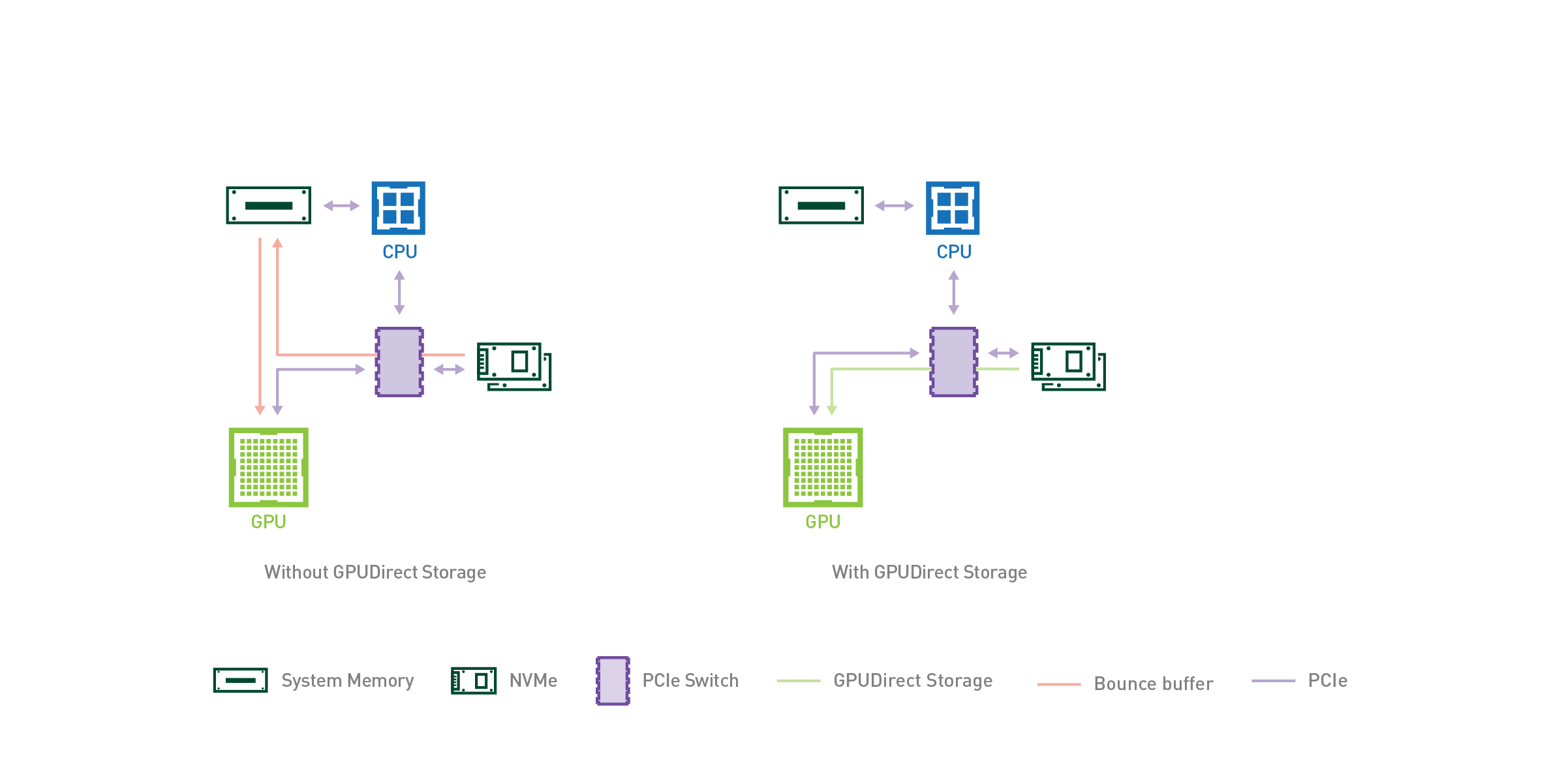
As AI and HPC datasets continue to increase in size, the time spent loading data for a given application begins to place a strain on the total application’s performance. When considering end-to-end…
sterile flame
You know it's a good joke when some people think you're legit and others think you're mentally disabled
Wait a second lmao
All this diagram is saying is that I'm right and that it would make sense to cut out the middleman entirely and process storage right on the gpu
Look at the Intel beast canyon NUC, then look at direct storage, and tell me we aren't heading for gaming being done on an SOC
It would make perfect sense to have a full gaming platform on an add-in pcie card. They're working towards the technology to do it, if they could figure out how to cool it it would work better than the current system, and it would make them a freaking boatload of money
lavish tundra
Its just cutting the transfer to system ram and then vram
lavish tundra
sterile flame
Wait a second lmao
All this diagram is saying is that I'm right and that it woul...
We arent
atleast not on x86
lavish tundra
nvidia doesnt own arm
sterile flame
And I did see something recently about somproject Nvidia did with arm
Anyway, Nvidia is still heavily invested in arm
lavish tundra
windows on arm with great app compatability is years away
sterile flame
Idk man, you ever take a look at Nvidias r and d budget?
lavish tundra
also it doesnt matter if a graphics card manufacturer supports a microarchitecture
the os has to
lol
hardware is just so much silicon without software support
sterile flame
Wouldn't be too hard for a company like Nvidia to make an OS
And a game engine for it
Sure it wouldn't catch on right away, but if the games it did have ran at levels of performance that the current way of doing things isn't capable of
sterile flame
Which since Nvidia has been manipulating graphics performance progression all along wouldnt be outside the realm of possibility either
Bro you really really need to stop taking me seriously. I am joking.
Im drawing wild conclusions that don't make sense in terms of business or in terms of how computers work
I'm genuinely sorry if my sense of humor bothers you.
lavish tundra
It is theorotically possivble
but not realistically
ARM soc isnt gonna be big till windows supports it widely
sterile flame
Hey, unrelated but isn't Intel supposed to be unveiling their version of big.little one of these generations?
I'm really curious to see what overclocking is like on a platform like that, or if it'll even be possible
lavish tundra
sterile flame
Hey, unrelated but isn't Intel supposed to be unveiling their version of big.lit...
12th gen laptop
sterile flame
Ohhh so it's close. That's exciting
Maybe I'll buy some more Intel stock lol
zenith palm
It will be in 12th gen desktop too but yes
lavish tundra
zenith palm
It will be in 12th gen desktop too but yes
Hmmmm didnt hear of that
nice
zenith palm
Aye big.little just coming 12th gen
lavish tundra
zenith palm
Aye big.little just coming 12th gen
24 core consoomer cpu?!
zenith palm
lavish tundra
24 core consoomer cpu?!
16c24t i9
lavish tundra
zenith palm
16c24t i9
how many perf cores?
zenith palm
lavish tundra
how many perf cores?
8c16t big 8c8t smol
sterile flame
I wonder if they'll still have room for igpu
lavish tundra
zenith palm
8c16t big 8c8t smol
nivce
sterile flame
I would imagine so, but boy is that a lot of cores
Unless they make them like, lga2011 size
zenith palm
sterile flame
I wonder if they'll still have room for igpu
Pretty sure it stays
zenith palm
Romours say the i9s are just as power hungry
sterile flame
As what, 11th gen?
zenith palm
10th and 11th afaik
 barren ridge
socket is bigger
heat density might not be a concern if it's spread through the ihs
but who knows
sterile flame
lavish tundra
ARM soc isnt gonna be big till windows supports it widely
ya
takes even the biggest teams 5 years minimum to make drivers n crap
clever epoch
zenith palm
Romours say the i9s are just as power hungry
Basically confirmed. 224 PL2 stock for the 12900k
proven canopy
Gonna set it to 4096 anyway 
zenith palm
clever epoch
Basically confirmed. 224 PL2 stock for the 12900k
Pl2? Power limit 2?
clever epoch
yes
zenith palm
clever epoch
yes
Ngl didn't realize there was a 2nd power limit, thought there was just 1 or unlocked pl
clever epoch
sterile flame
huge socket and they're doing M-die now right?
no multi-die on desktop until meteor lake
clever epoch
zenith palm
Ngl didn't realize there was a 2nd power limit, thought there was just 1 or unlo...
PL1 is sustained power limit, PL2 is a sort of "temporary" power limit. You'll see "PL2" and "tau"; the latter refers to how long PL2 will be the power limit
there's a PL3 as well which I'm not sure about. Probably peak limit with a tau on the order of 1 second or less?
zenith palm
clever epoch
PL1 is sustained power limit, PL2 is a sort of "temporary" power limit. You'll s...
Ahhh i see thank you for the explanation
dull ginkgo
I thought PL3 was the max before throttling
 steel grove
Hello I wanted to know if it's possible to OC my ram kit to CL16 (Corsair CMW16GX4M2Z3600C18 ) and if it will give me a noticeable performance improvement. I am pretty happy with my current performance but still am curious if I can get free extra performance by just OCing. Thanks.
My current build https://pcpartpicker.com/b/jT7TwP
Check out Dark_Polito_10's completed build on PCPartPicker! Ryzen 5 5600X 3.7 GHz 6-Core, GeForce RTX 3070 8 GB XC3 ULTRA GAMING, iCUE 465X RGB ATX Mid Tower, ...
clever epoch
https://www.reddit.com/r/intel/comments/i31lhv/how_intel_turbo_boost_and_power_management_works/
@zenith palm I oversimplified it. Tau is a bit more complex than just a simple time limit.
@dull ginkgo it doesn't talk much about PL3 but apparently it (and PL4) are usually disabled
reddit
13 votes and 1 comment so far on Reddit
clever epoch
steel grove
Hello I wanted to know if it's possible to OC my ram kit to CL16 (Corsair CMW16G...
Can you take pictures of the label on the back of the memory stick(s)?
And you will see some performance improvement. How much will depend on the application; games will usually benefit the most. Although it's likely you're going to be GPU bound in most instances.

CL16 3600mhz vs CL18 3600mhz memory (2x8gb), FPS Test.
Test details
Tested at 1080p resolution.
Room ambient Temp - 29 degrees
CPU - i7 10700k
CPU Cooler - Corsair h100i
GPU - igame RTX 3070 gaming OC 8GB GDDR6
Motherboard - Asrock Z490m pro4 ...
tall pelican
clever epoch
https://youtu.be/o74lrq7qh3I
cant tell what, but there's something definitely wrong with the setup
cl18's cpu temps are 5-10c hotter across the board
cpu appears to be thermal throttling in almost all the tests, as the cooler cpu is also pulling much more gpu power
modern walrus
how does one obtain a 10900K delidding kit?
sudden torrent
Check the links in description
https://youtu.be/2b83EJu7uqQ
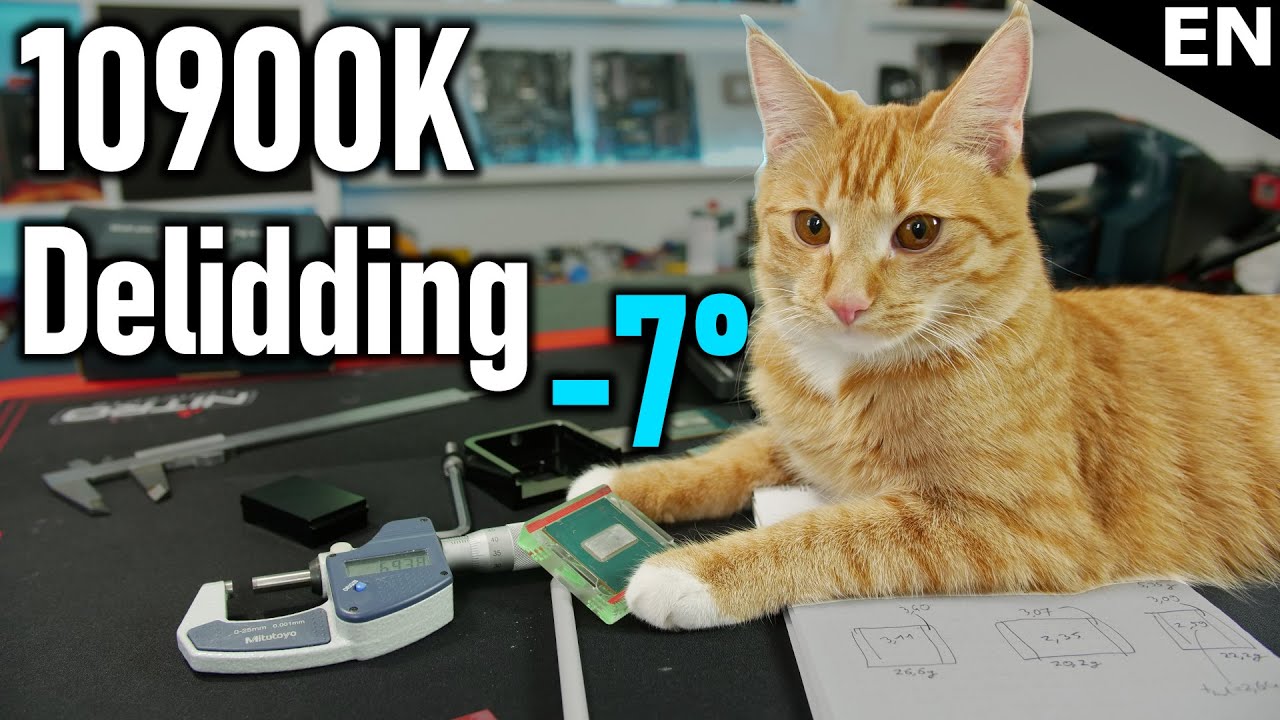
Support me on Patreon:
https://www.patreon.com/der8auer
Find my products at Caseking:
Delid Die Mate 2: https://bit.ly/2Rhv4y7
Delid Die Mate X: https://bit.ly/2EYLwwG
Skylake-X Direct Die Frame: https://bit.ly/2GW6yyC
9th Gen OC Frame: https://bit.ly/2UVSubi
Debug-LED: https://bit.ly/...
modern walrus
thank you
prisma arch
clever epoch
https://youtu.be/o74lrq7qh3I
yes
 vital crag
does anyone know the best oc for a msi gtx 1030
modern walrus
so basically what's going on here is you remove the lid, put better thermalpaste then attach the lid back on?
vital crag
im having trouble and it keeps freezing
modern walrus
for de-lid I mean
sudden torrent
That's basically how it goes, some of them benefit from lapping the die too for better contact
vital crag
Does anyone know the best oc for a msi gtx 1030
sudden torrent
vital crag
does anyone know the best oc for a msi gtx 1030
Every card is different but honestly you might go from 40 to 43 fps, not really worth the instability
modern walrus
what is lapping the die?
modern walrus
just download afterburner & play with it?
sudden torrent
modern walrus
what is lapping the die?
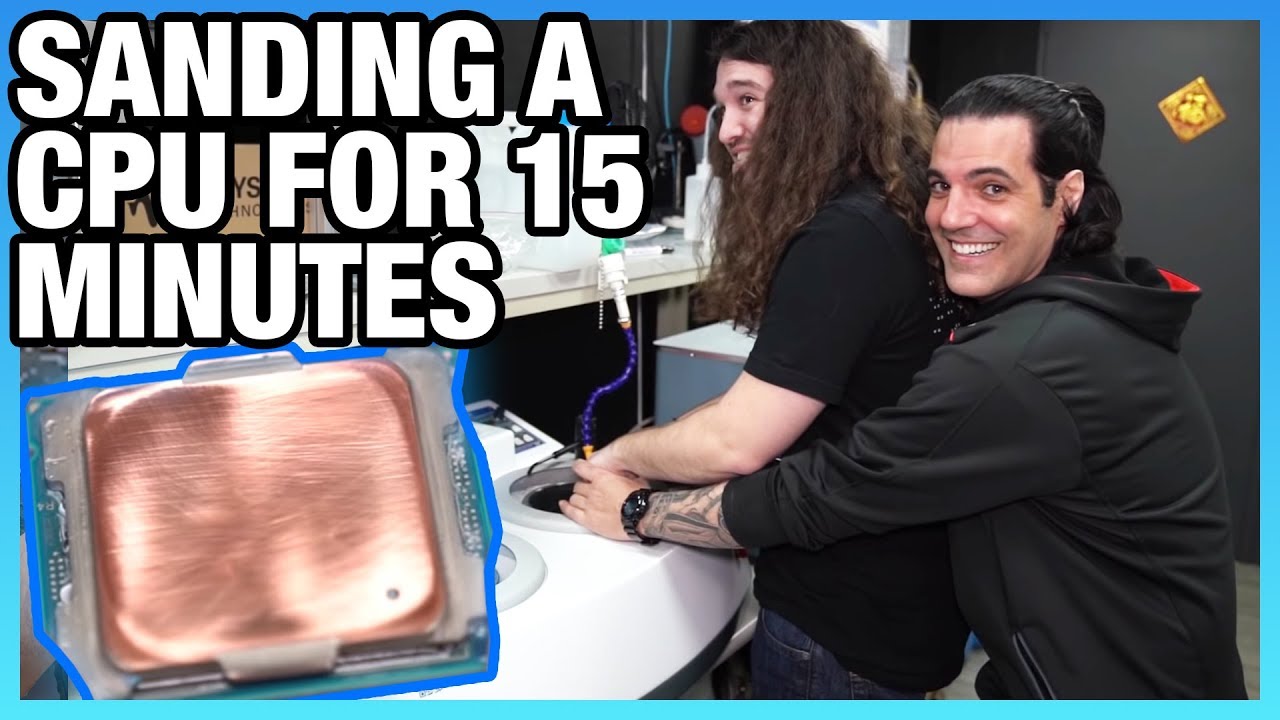
Working with KINGPIN at EVGA to perfectly sand a CPU IHS. Mostly, anyway. We basically just talk with KP and TiN while holding a CPU on a sander.
Ad: Buy Thermal Grizzly Kryonaut on Amazon (http://geni.us/gntgkryo) or Conductonaut Liquid Metal on Amazon (http://geni.us/gntgconductonaut)
This video follows our previous lab tour with KINGPIN and ...
modern walrus
ohh I head about this
you're basically just sanding it down
You can color it with permanent marker to make sure you do it evenly & what not
sudden torrent
vital crag
i need to know
And I'm telling you, every card is different. Some can get +400 on the memory and some crash at +100.
vital crag
mine can get high its just that i go over too much and it crashes and i have to put it into recoverymode and uninstall it
then reinstall it
sudden torrent
Then don't do it that high
vital crag
i tried but it still didnt word
work
whatever im not getting any help from here anyway
sudden torrent
Ok? Not like I can give you magic numbers or something, some just don't overclock
proven canopy
Epower it
steel grove
clever epoch
Can you take pictures of the label on the back of the memory stick(s)?
And you ...
Sure here https://imgur.com/a/pyJ47ld
 modern walrus
If I just sand it myself....is that a dumb idea? lol
sudden torrent
Version 3.31, cross referencing...
sudden torrent
modern walrus
If I just sand it myself....is that a dumb idea? lol
You can do that, just try to make it even
clever epoch
Single rank, not Samsung
modern walrus
so like in the video, you wanna sand until you see copper?
sudden torrent
Rev B
clever epoch
Oh excellent
proven canopy
haha I just asked some other folks about that rev earlier today, c-die, or rev.b if lucky
steel grove
So are they good or bad lol
clever epoch
Corsair uses 4.xx for Samsung I'm pretty sure
clever epoch
steel grove
So are they good or bad lol
Very good
sudden torrent
Well, good as far as the midrange chips go
clever epoch
You should be able to up the frequency a bit and tighten the timings
steel grove
clever epoch
You should be able to up the frequency a bit and tighten the timings
Without comprimising the reliability?
proven canopy
clever epoch
Very good
uhh
clever epoch
Corsair bins loose for micron so I would say you have a decent chance
clever epoch
proven canopy
uhh
RevB and RevE is good though? Not as good as B die
clever epoch
steel grove
Without comprimising the reliability?
You can make it 100% stable, you just have to stability test properly
steel grove
Cool!
clever epoch
You can potentially get the frequency as high as 4000, but your CPU will likely top out around 3800 or 3866, unless you're lucky
sudden torrent
From the reddit overclocking page under rev.b:
On Ryzen: tRCDWR and tRAS both go as low as you can set them (still needs 19 tRCDRD), and tRP goes very tight as well, managing DDR4-3200 15-(19/08)-13-21 1T 1.35V
Don't go past around 1.35v it doesn't like that
steel grove
clever epoch
You can potentially get the frequency as high as 4000, but your CPU will likely ...
I am using a 5600x
On a Asus b550-f
sudden torrent
clever epoch
Oh I thought revB scaled to 1.5
Nope, scales negative to voltage past 1.35, like c-die
clever epoch
Interesting
proven canopy
See what thaiphoon says just out of curiosity
clever epoch
steel grove
I am using a 5600x
Yeah, so you want to keep your fCLK synced to your memory speed on Ryzen chips. Unfortunately, your fCLK will likely top out at 1900 (DDR4-3800). Any higher is luck, with the best chips hitting 2000 (DDR4-4000)
south sky
steel grove
Sure here https://imgur.com/a/pyJ47ld
probably rev.e
modern walrus
How are the G.Skill Trident Neos geared to AMD? Does this mean there's very little overclocking headroom? That would make sense considering I need CMOS reset even bumping +33mhz on frequency
clever epoch
modern walrus
How are the G.Skill Trident Neos geared to AMD? Does this mean there's very litt...
depends entirely on memory chip
modern walrus
I lost the file somehow that had what it was. My one the smart guys in here determined was AJR. I think the other was MJR or something like that
of course it couldn't be something simple like B die
Both sets are G.Skill & Hynix
orchid flame
modern walrus
How are the G.Skill Trident Neos geared to AMD? Does this mean there's very litt...
they arent at all
lol
thats complete BS
modern walrus
okay well heck I dunno
orchid flame
at most what they could have are contracts with companies to use Neos on their QVL
lol
otherwise theres no difference
modern walrus
I just know if I bump from 3800 to 3866 (I think) it won't boot
modern walrus
G.Skill and I think like MJR or something I can't remember
but they're Hynix
and apparently Hynix sucks
orchid flame
16Gb MJR?
modern walrus
32gb x 2
orchid flame
they're 2x32 I assume
yep
MJR or AJR
probs MJR
what timings at XMP
16-19-19?
1.35v
modern walrus
command is 1T
orchid flame
what CPU?
modern walrus
okay give me 2 seconds
orchid flame
VDDP 0.95v
VDDG IOD 1,05v
DRAM voltage 1.45v
go into advanced dram timing config
modern walrus
okay getting to BIOS now
modern walrus
I wish I could hit CAS latency below 18
orchid flame
tRC to 84
orchid flame
modern walrus
I wish I could hit CAS latency below 18
you can.
just wait
anyways
tRRDS 4
tRRDL 6
modern walrus
okay in BIOS now will do settings now
orchid flame
tFAW 16
tRFC 560
Gear down mode enabled
power down mode disabled
everything else is fine on auto
boot at 3800
go back in
increase frequency
set memory to DDR4-3866
set FCLK to 1933MHz
boot
modern walrus
VDDR SOC voltage is same as SOC?
orchid flame
what board is this
modern walrus
VDDP CCD I manually set to 1.050 and same with IOD
ASUS B550-F gaming
Strix B550-F wifi
rather
modern walrus
okay just did what you said I think
CPU SOC? heck okay let me get back into BIOS
if I even POST lol
which rn isn't looking too promising
but I know it takes a minute to do something usually
my 10900K does this weird thing where it like revs fans for 90 seconds before boot whenever I mess with RAM settings
uh not looking so good rn
probably have to clear CMOS
darnit my bad
okay ya for sure no POST
No SOC?

do you do this under AMD's settings or motherboard?
I found SOC under AMD's will clear ASUS side
prisma arch
ok
prisma arch
modern walrus
No SOC?
wait would 3733-21-18-40 be better than 3800-22-22-42?
modern walrus
I have no clue if you're asking me lol
prisma arch
i am i think
modern walrus
It makes me set voltage on VDDP SOC in mili volts
prisma arch
 prisma arch
modern walrus
It makes me set voltage on VDDP SOC in mili volts
prisma arch
modern walrus
It makes me set voltage on VDDP SOC in mili volts
oh
modern walrus
I really don't know if that's better or worse
prisma arch
for some reason there are errors when i manually set the vddp
modern walrus
1150 milivolts = 1.15 volts right? Deci is -10 power, centi is -100 power, milli is -1000 power?
prisma arch
yes
modern walrus
heckin metric system
prisma arch
oh you are from US
but like would 3733-21-18-40 be better than 3800-22-22-42?
i like how as soon as i start typing the chat dies
modern walrus
happens to me a lot too
I mostly talk to myself in here lol
Yes from US
Metric system makes more sense I know but
still annoying lol
not sure if I did something wrong but I'm not getting a POST with these settings
oh well
zenith palm
modern walrus
It makes me set voltage on VDDP SOC in mili volts
Mines the same yeah lol
zenith palm
modern walrus
1150 milivolts = 1.15 volts right? Deci is -10 power, centi is -100 power, mill...
1100 is 1.1v ye it's just x by 100 or whatever
modern walrus
eh I can't get POST

 prisma arch
modern walrus
I mostly talk to myself in here lol
prisma arch
modern walrus
I mostly talk to myself in here lol
yes
short blade
after flashing new bios with agesa 1.2.0.3C my mobo is now allowing up to +500 boost override on pbo. interesting
modern walrus
oh come on I said was a better system. I dunno who thought 5280 feet = one mile or any of that other nonsense when you can just move decimal points
really?
I just updated AGESA with Asus BIOS but they're beta
zenith palm
short blade
after flashing new bios with agesa 1.2.0.3C my mobo is now allowing up to +500 b...
:o
modern walrus
but I don't see more than +200
zenith palm
short blade
after flashing new bios with agesa 1.2.0.3C my mobo is now allowing up to +500 b...
Thing your portable sun might become portable bomb xD
short blade
I have not yet seen higher than 5.05ghz
modern walrus
then again I don't recall if I looked
short blade
running corecycler and it looks the same
zenith palm
modern walrus
oh come on I said was a better system. I dunno who thought 5280 feet = one mile ...
Ohh it definitely didn't sound like that lol
short blade
bad cores running 4.7 best core running 4.8
zenith palm
modern walrus
I just updated AGESA with Asus BIOS but they're beta
I wouldn't do a beta bios unless it's a last resort tbh
short blade
one nice thing about the bios update
I used to get 30 corrected whea on each boot
now I get 0
modern walrus
which CPU again?
zenith palm
Nice
modern walrus
oh I think single core was like 5032mhz or something
short blade
I have not seen any performance gain from +500 so I'm just going back to +200

 prisma arch
modern walrus
oh I think single core was like 5032mhz or something
prisma arch
modern walrus
oh I think single core was like 5032mhz or something
damn
clever epoch
prisma arch
but like would 3733-21-18-40 be better than 3800-22-22-42?
only way to know for sure is to test yourself. I would lean towards yes
modern walrus
My CB score goes up like 1000 points if I close all rgb controls & crap... who would've thought? derp