#overclocking
1 messages · Page 84 of 1
 sterile flame
 left bladeBOT
 Analice#6283 has been warned
Reason: Bad word usage
 short blade
i'm a student living with parent and working 2 jobs so i have disposable income and few expenses
sterile flame
im broke as heck
 modern walrus
I just justified it by pretending I needed it for school lol
short blade
my customers pay for the parts
sterile flame
wait is there an age limit to this server
short blade
just the discord default 13+
sterile flame
either way, im 16 so i dont have a job or anything
short blade
i got my first job at 14
modern walrus
lol I'm 33 damn
short blade
tutoring for $25/hour lol
modern walrus
I got my first job when I was 15
short blade
I spent it all on games
modern walrus
working at a bowling alley
sterile flame
short blade
i got my first job at 14
want a job, mom wont let me
modern walrus
when minimum wage was just north of $6/hour
sterile flame
modern walrus
when minimum wage was just north of $6/hour
pain
sterile flame
painer
short blade
probably better than what it is now adjusting for inflation and living costs lol
modern walrus
and I did the same dumb crap back then that I do now
I saved all my money
& bought a massive kicker amplifier for the subwoofers in my Expedition
lol
sterile flame
ive spent more on my keyboard then my pc
modern walrus
pieces of the AC vents were falling out of the ceiling. it was magnificent
sterile flame
if i hadnt spend anything on a kb id have a 5800x rn
short blade
i'm 22 and already have mild tinnitus from listening to headphones at 20% volume 
 faint tangle
sterile flame
either way, im 16 so i dont have a job or anything
faint tangle
sterile flame
either way, im 16 so i dont have a job or anything
I'm 15 and just got my first job this summer, 10$/hr under the table
sterile flame
my mom wont let me get a job.
short blade
i listen at 15 now
faint tangle
Assisting a contractor
modern walrus
lol low frequencies don't damage ears as much
short blade
yall they made it clear they can't get a job lol
modern walrus
it was all bass
but 5 years of listening to grinders & chipping hammers didn't help
but I think my hearing is okay. No one says anything
sterile flame
short blade
yall they made it clear they can't get a job lol
ive had people in other tech servers when i was younger yell at me to wash dishes, mow lawns, or do whatever
faint tangle
Our entire generations are gonna have hearing issues lmao
modern walrus
That's where building electronic crap got started with me tho. Wiring my car system was like the first time I messed with stuff like that
faint tangle
For me it was back towards the end of last year when I was looking at buying a pc
faint tangle
I've gotten so into pcs since then
faint tangle
short blade
lol getting paid to do chores is a foreign concept to me
Same
sterile flame
very rarely do i get money from my mom
especially not for doing what im supposed to do
faint tangle
faint tangle
Same
I've worked for anything I want, paid for my pc myself
modern walrus
I wish I could do it all over again. That's the most expensive way to do things: get a little bit of knowledge, invest a lot with that knowledge, then learn more & keep upgrading until the thing you're upgrading only has like 1 or 2 parts from what you originally bought
sterile flame
gift or not
faint tangle
Why won't she let you get a job?
faint tangle
modern walrus
I wish I could do it all over again. That's the most expensive way to do things:...
I'm mining with my gpu to fund future upgrades
Make 75$ a month
Just when I'm not using my pc
short blade
why not mine while using pc too?
faint tangle
Lol
sterile flame
faint tangle
Why won't she let you get a job?
School, Transportation, We are on Gov Assiss so it would subtract from that for me to get a job and most of it would go to her paying the bills since i took from our gov assis or to transportation back and forth from the job.
 faint tangle
short blade
i mine while playing light games and browsing
faint tangle
short blade
i mine while playing light games and browsing
It lowers hashrate so I just turn it off
sterile flame
short blade
lol
genshim impacc
faint tangle
I'd rather not break smthn
modern walrus
I would do that but how much are we talking on electricity use? Also, does it use a lot of bandwidth? My internet is free with my rent but my cheap landlord has data limits on it. btw I can't believe I use a terabyte a month
short blade
nothing to break i been doing it for months it's safe lol
faint tangle
modern walrus
I would do that but how much are we talking on electricity use? Also, does it us...
I'm paying like 150$ in electricity a year, make that in two months
sterile flame
should i mine on my pc?
faint tangle
Depends
short blade
 faint tangle
I'm not sure the profitability with your gpu
modern walrus
oh ya that's not crazy
faint tangle
short blade
Rookie numbers
sterile flame
faint tangle
I'm not sure the profitability with your gpu
i could oc it to make it a bit better
short blade
8gb 570 or 4gb?
short blade
4gb 570 can only mine altcoins like etc or rvn, 8gb can mine eth
modern walrus
how much could I even realistically make with a FTW3 3070 waterblocked & a stock cooled 3060?
sterile flame
how much could i even realistically make with a RX 570 4GB?
faint tangle
short blade
4gb 570 can only mine altcoins like etc or rvn, 8gb can mine eth
Nah any card wirh 3gb or more can mine eth, but i think it's better at alt
short blade
sterile flame
how much could i even realistically make with a RX 570 4GB?
unsure about altcoins
short blade
faint tangle
Nah any card wirh 3gb or more can mine eth, but i think it's better at alt
how can a 3gb card mine eth with a dag size of 4.4gb?
faint tangle
I'd guess like 1.5-2$ a day
sterile flame
we pay the same amount regardless
modern walrus
mien has to be wrong. It says I've used 2.17gb in the last 30 days. I've downloaded 50 gb games int he last 30 days
10900K has used 225gb. that sounds about right
faint tangle
short blade
how can a 3gb card mine eth with a dag size of 4.4gb?
I've known people to mine on a 1060 3gb with eth
sterile flame
faint tangle
I'd guess like 1.5-2$ a day
better than nothing
faint tangle
sterile flame
better than nothing
Don't quote me on that
sterile flame
i might start mining
faint tangle
It's a guess
sterile flame
i can do it on linux right
faint tangle
Probably?
modern walrus
what program are you using to mine? ASUS came with one that's horrible
faint tangle
Never looked into Linux
faint tangle
modern walrus
what program are you using to mine? ASUS came with one that's horrible
I use gminer cli
sterile flame
yeah no windows yucky only use it when i need it
which is usually never
got it cause i couldnt anta on linux
short blade
yeah you can mine on linux but i can't help you with that
i am a windows victim
i know it's possible, i don't know how to do it
sterile flame
short blade
i am a windows victim
become a linux suspect
faint tangle
I'm gonna send you an invite to a disc server ana
sterile flame
genshin?
short blade
nope
faint tangle
They can help you
short blade
i am a league of legends victim
modern walrus
I have linux on the surface go & two laptops
sterile flame
short blade
i am a league of legends victim
virtual machine with gpu passthrough
and work is being done to change this
infact i think its not the case anymore that it cant run
p sure it can
modern walrus
Linux is cool cuz it runs super light but the compatibility is annoying
 sudden torrent
modern walrus
Linux is cool cuz it runs super light but the compatibility is annoying
sudden torrent
modern walrus
Linux is cool cuz it runs super light but the compatibility is annoying
Only if you don't know how to get around that
modern walrus
I had to set a little command thing to run on startup to make the gpu adjust to ultrawide monitor
faint tangle
I've never tried linux
modern walrus
cuz it won't save it for some reason
faint tangle
Don't plan to
modern walrus
mint & ubuntu are pretty easy
faint tangle
I like win10
sterile flame
sudden torrent
Only if you don't know how to get around that
this
short blade
if gpu directstorage is win11 exclusive i might have to stay with windows
sudden torrent
Mint is a decent way to get your feet wet, it's got a Windows-like interface
modern walrus
ya but you were here talking about WINE earlier. WINE is a mission
sudden torrent
short blade
if gpu directstorage is win11 exclusive i might have to stay with windows
Win 10 and 11
short blade
i've got a little linux experience for programming
haven't used it as a daily driver
i enjoyed assembly on linux far more than on windows
modern walrus
I really only use it on my computers that run windows slow af
sterile flame
short blade
i enjoyed assembly on linux far more than on windows
most do
sterile flame
modern walrus
I really only use it on my computers that run windows slow af
im gonna try developing a linux just for this
well for laptops atleast
😎
modern walrus
There's a way to use Mint
to trick Google Chrome OS install
I've done it
it's legit
sterile flame
like,
modern walrus
it takes forever but it works... except I couldn't get touchscreen working but I also didn't really try cuz Chrome OS is meh
sterile flame
modern walrus
to trick Google Chrome OS install
like android apps chrome os
or,
chromium os
sounds like chromium to me
but id rather have a full linux desktop, then chrome os
faint tangle
Chromium is malware, no?
sterile flame
what...?
modern walrus
no it's actual Chrome OS
sterile flame
where the hell did you see that
faint tangle
One of my dumb friends who I don't talk to anymore
sterile flame
atleast you dont talk to them anymore.
sudden torrent
sterile flame
im gonna try developing a linux just for this
They have that
faint tangle
I got it on my old pc even tho I didn't install it
When I unisntalled it it fixed the issues I was having
sterile flame
sudden torrent
They have that
ik this but not one specifically for low end craptops and netbooks
based on musl and toybox
not gnu and glibc
faint tangle
That blue and white symbol that looks like chromes symbol, eight?
modern walrus

Go through our step-by-step guide and dual boot Chrome OS and Windows 10. We have also mentioned some important fixes to run Chrome OS along with Windows.
Linux is better but Chrome gives you access to most android stuff
sudden torrent
sterile flame
based on musl and toybox
That could be interesting, heck I might even use it on my laptop with a radeon 4250 that shipped with a single core processor.
You'd have to find all the old module and kernel versions and pre-compile most of it though.
sterile flame
yeah im aware
im using my Celeron N3050 2gb laptop as a testing grounds and the pc in my nick as the actual device to use
sudden torrent
I'm still a puppy fan for older hardware
sterile flame
i might put some of the clear linux patches in aswell
sterile flame
sterile flame
im using my Celeron N3050 2gb laptop as a testing grounds and the pc in my nick ...
this is why i was asking about a new processor
im gonna have to compile my own whole ass repo on a dual core
pain
modern walrus
I got an '08 17" HP with like a 3d gen i7
sterile flame
im aware
especially a web browser
but i dont know if i should even include that
low end laptops plus web browsers aint a perfect mix
modern walrus
oh wait no that's like a 1st gen i7
sudden torrent
Maybe a smaller browser, nothing like firefox or chromium
sterile flame
@short blade cr2 made it to 10 minutes
sterile flame
sudden torrent
Maybe a smaller browser, nothing like firefox or chromium
which one though
maybe a terminal browser like elinks or lynx?
modern walrus
wait I bought it in like 2010...or 2011? maybe I should turn it on & check
sterile flame
short blade
died at 10 mins?
nah its still going
sudden torrent
There's literal hundreds of options 😫
short blade
you can try fiddling with the uncore voltages or just drop freq-
oh
okay
hope it keeps going lol
sterile flame
i see no reason it wouldnt if it made it this far
faint tangle
I've got a laptop with a 4030u still going strong
short blade
ahh
you say that but
i've watched a ram oc enter cycle 3 of tm5 anta777 with no errors
went to bed
sterile flame
faint tangle
I've got a laptop with a 4030u still going strong
this isnt too terrible
short blade
in the morning windows was gone
modern walrus
is there a way to force overclocking on an old i7 like that?
short blade
modern walrus
is there a way to force overclocking on an old i7 like that?
no but you can undervolt and repaste
sterile flame
sudden torrent
There's literal hundreds of options 😫
for low end browsers or just browsers?
short blade
might help the performance
faint tangle
short blade
no but you can undervolt and repaste
Btw what model 3080?
modern walrus
how can I undervolt?
short blade
vision
faint tangle
I've got a gigabyte gaming oc pro for my 3060 ti
short blade
i'm not 100% sure if you can undervolt 1st gen but you can try
download throttlestop
sudden torrent
My old radeon laptop won't even run windows any more without constant blue screens, all video card related so I think the card is ded, but it still loads linux (and Kali runs beautifully)
faint tangle
sudden torrent
My old radeon laptop won't even run windows any more without constant blue scree...
My brothers old Toshiba laptop with amd cpu with integrated couldn't run anything other than Google from the day we got it
sterile flame
sudden torrent
My old radeon laptop won't even run windows any more without constant blue scree...
this doesnt even have enough space for windows
faint tangle
Not even minecrsft at more than 10fps
My laptop has issues with it but it'll hold 50fps
sterile flame
faint tangle
Not even minecrsft at more than 10fps
save it with linux
left bladeBOT
Analice#6283 has been warned
Reason: Bad word usage
faint tangle
sterile flame
save it with linux
It's already gone, this was 8 years ago
sudden torrent
sterile flame
this doesnt even have enough space for windows
Not Win 10 but it shipped with Win 7, won't even run that any more
sterile flame
i managed to get minecraft to run on a dang intel atom netbook at stable fps
faint tangle
Wow
sterile flame
im 100% convinced it can run on anything
faint tangle
My laptop def struggles when compared to my pc, can't bear it anymore after playing on a proper pc
sterile flame
ive gotten it to run at over 200fps on this
faint tangle
4030u with hd 4400 def struggles with mc
short blade
sterile flame
i managed to get minecraft to run on a dang intel atom netbook at stable fps
now run rtx minecraft on it
sterile flame
wait a second, did i do this right
sterile flame
short blade
now run rtx minecraft on it
lol
sudden torrent
modern walrus
wasn't 8 trash?
8 was trash in 2 common cases: the computer didn't have a touch screen and/or it wasn't designed to run 8
faint tangle
Technichally it barely misses the minectaft minimum of a 1.9ghz processor and Intel hd 4000
sterile flame
my Tcas is 16 trcd is 20 trp is 20 tras is 40 and trc is 85
short blade
yeah auto trc is fine for now
sterile flame
doesnt look right to me but i assume it is?
sterile flame
faint tangle
Technichally it barely misses the minectaft minimum of a 1.9ghz processor and In...
this has intel hd, not 4000 or 3000 or whatever, just intel hd.
or, intel hd 400
not to be confused with the uhd series
this is before intel hd used actual numbers
sterile flame
uhd is better yes
sudden torrent
Speaking of Zentimings, I'm very happy with the results for my memory overclock for the most part. 3800@14-15-11-13-31 with tighter subs than before I updated agesa.
sterile flame
it is yeah
faint tangle
Oh yeah idk what I was looking at last time
modern walrus
hmm maybe I should put the stock MF200s back in my 10900K case & transfer the Riing Trio 20s to the top of my TT case 🤔
faint tangle
Bruh I have inside by bo Burnham stuck in my head now
I should add more p12s to my pc
But id need to plug a pwm splitter into a pwm splitter
Which idk how safe that is
sterile flame
faint tangle
But id need to plug a pwm splitter into a pwm splitter
dont do this
modern walrus
get molex adapters lol
faint tangle
Ima be honest
sterile flame
modern walrus
get molex adapters lol
dont do this either
faint tangle
I have no clue what those are
sterile flame
i have 3 fan headers including the cpu fan one
the 2 sys fan ones both have seperate splitters
faint tangle
I have 2 regular fan connectors and then 2 pwm
sudden torrent
faint tangle
But id need to plug a pwm splitter into a pwm splitter
The header is capable of 1A, usually that's 2-3 fans per header
modern walrus
you can if you get a PWM splitter so the header controls speed & get rpm while the molex powers
modern walrus
that's how my Delta fans are hooked up since the 5500rpm one pulls more than 1 amp
faint tangle
Yknow I thought I knew about pcs
I might have to take that one back bc this is gibberish to me
sudden torrent
Delta fans are a special case and you know it
faint tangle
Lol
modern walrus
lol yes I know but the same principle still applies, get power directly off the PSU to support more fans
sterile flame
modern walrus
lol yes I know but the same principle still applies, get power directly off the ...
do this if u like having ur fans at full power all the time
faint tangle
I have room for one more pwm fan without having to bootleg it
So I might just go with one more
modern walrus
vroom vroom
 faint tangle
After that the next move would prolly be replacing the two stock fans in my coolermaster n400
sudden torrent
Delta fans are designed to have one or two fans on the entire server, usually running near full speed, instead of the 6-15 fans a desktop can have
They can also chop vegetables, and probably fingers
sudden torrent
Sure but you ever try gaming with your toes? Not as fun
modern walrus
nooo the PWM splitter splits 2/4 wires off the PWM connection. 2 (+ & - 12v) go directly to the PSU Molex connection & 2 (the PWM speed control & the line back that tells motherboard the RPM) connect directly to the fan header
faint tangle
Yes actually, I got 60 kills on valorant, totally a thing that happened
sterile flame
modern walrus
nooo the PWM splitter splits 2/4 wires off the PWM connection. 2 (+ & - 12v) go ...
huh?
faint tangle
totally doesn't bottom frag most of the time
modern walrus
blue/yellow to go fan header; black/red go to molex adapter
 sterile flame
how would you make that work at all
sudden torrent
modern walrus
blue/yellow to go fan header; black/red go to molex adapter
... That diagram is upside down
modern walrus
power comes direcly from PSU & control & readings go to fan header
well it's the first picture that showed up on Google lol
brooo okay let me find it
sterile flame
modern walrus
power comes direcly from PSU & control & readings go to fan header
how would you do this with cables tho
especially a splitter
sudden torrent
Not just upside down but also backwards lol
That can't physically fit together
Oh wait no I see, the perspective is just weird

 sudden torrent
I've never seen a pinout that labeled the TOP of a connector
modern walrus
same page now?
modern walrus
so you can use more than 1 amp on a header
sudden torrent
Moar power, but still PWM controlled
modern walrus
well more than 1 amp of a single fan signal
sterile flame
extra cables yucky
modern walrus
ya but extra fans is heart
sudden torrent
Tuck in the back and no one will notice
sterile flame
i only have room for 5 fans
modern walrus
I can't have a 5500rpm fan on full blast all the time. I wanna hear myself think
sterile flame
sudden torrent
Tuck in the back and no one will notice
i like my back cable management to be rather nice too
modern walrus
well get a sharpie
sudden torrent
I have room for 6 and I'm hurting for a new case because I want to custom loop
short blade
modern walrus
I can't have a 5500rpm fan on full blast all the time. I wanna hear myself think
just load up your case with delta fans and achieve liftoff
modern walrus
bro I'm not even kidding
sterile flame
sudden torrent
I have room for 6 and I'm hurting for a new case because I want to custom loop
way to broke for this
modern walrus
if you put the 5500rpm fan on the table then power it with a psu it starts moving
short blade
I pull my rig apart way too often to ever want to custom loop
sudden torrent
sudden torrent
I have room for 6 and I'm hurting for a new case because I want to custom loop
7 technically but I'd need to remove the drive cage
sudden torrent
short blade
I pull my rig apart way too often to ever want to custom loop
Soft tubing
short blade
I really cannot keep a pc together for more than 6 months
sterile flame
aio is the most im gonna go
sterile flame
id have to sell my soul and my liver for custom loop
short blade
put 19 delta fans you won't
modern walrus
lol heck no Delta fans are annoying
sterile flame
30 minutes 💪
modern walrus
I run CB & it sounds like a runway in here
sudden torrent
3 Deltas MAX, those things really move air
short blade
if you actually get 3600 stable on zen 1 that's impressive
sterile flame
3 of my fans are fans that come with cases
2 of them came from a poor purchasing decision
cougar fans
sudden torrent
I hope you're balancing intake and exhaust then with all them Deltas
modern walrus
3x 120s on the 360 Liquid Freezer & a 92mm I specially made fit where the PCIe expansions should be lol
I have 2 200mms intake on the front, a 140mm & a 92mm intake on the back
the bottom doesn't support fans but I was thinking of ditching my HDD & getting my good friend the hole saw again
sudden torrent
I'm going to guess you don't have the 10-12k Deltas then
modern walrus
cuz I already cut a 2" hole in the shroud above the HDD to push air up to the AIO
12k rpm? lol nah
I could replace the 5500rpm with something like that but only one 120x38mm fits. I need 120x25mms otherwise
short blade
actual deltas will fry consumer mobo headers won't they
modern walrus
there's my little custom rig job with a 92x38mm Delta
 short blade
they pull over 50 watts each lmao
sterile flame
i wish i wouldve known i can oc my gpu from bios.
modern walrus
not all Deltas are that crazy
short blade
sterile flame
i wish i wouldve known i can oc my gpu from bios.
only igpu
modern walrus
the two x25mms I have on the AIO are 150cfm & you could run them on pump headers
sterile flame
short blade
only igpu
i see gfk oc settings
modern walrus
Aorus boards have 2 amp headers
short blade
gfk?
sterile flame
gfx
short blade
I'm pretty sure that's for the igpu in the 3000g
bios being able to oc gpu doesn't make any sense
modern walrus
sorry they're 113cfm not 150 but these deltas are completely reasonable: https://www.amazon.com/Delta-Electronics-AFC1212D-120x120x25mm-connector/dp/B004YELGR4

Delta AFC1212D 120 x 120 x 25mm PWM Cooling Fan, 3400 RPM, 113.11 CFM, 46.5 dBA, 0.53A, 4 pin PWM Connector, Ship from Los Angeles
short blade
how does bios know if you have nvidia, radeon, heck you could have the asrock m.2 gpu, intel dg1, maybe you're using a pcie to pci adapter with a 3dfx voodoo card
modern walrus
ya they're loud-ish but compared to the 92 & 120x38s they're reasonable
.53 amp too
sudden torrent
You should replace your 5k deltas with these, 7400 with a 4 pin connector and the fastest 120mm fan around. The faster ones are smaller. https://www.delta-fan.com/PFR1212DHE-SP00.html
 modern walrus
2.54amp lol
modern walrus

eBay
Airflow: 85.5 CFM (2.42 m^3 / min). Electric DC tubeaxial fan made by Delta. 7 blade impeller. Ball bearings. Current: 500 mA (750 mA max).
this is one of the ones I got that I put where the PCIe Expansion lots are supposed to be
sterile flame
OH SHOOT its throwing a bunch of errors
modern walrus
2 for $11 85cfm 92mm
short blade
errors bad
stop it
up to you if you want to fiddle with uncore voltages or just start dropping frequency
modern walrus
the only thing that sucks is they're 3 wire & they don't have any connection so you have to either make a header on the wires or just splice it like I did
sudden torrent
Errors late in testing may indicate heat dispersion issues
short blade
if you made it this long you can probably get 3600 stable with further tuning
also that
is hynix mfr heat sensitive?
do your dimms have temp sensors?
sterile flame
aaas for as i can see they do not
modern walrus
tbh I might replace that 5500rpm fan with another one of those 113cfm AFC1212D-PWMs
it's too loud & ridiculous
& really doesn't affect the cooling all that much
It's over 200cfm tho
I think like 213
sudden torrent
short blade
is hynix mfr heat sensitive?
Yes, but not as much as other dies, but it does get along with Intel better than AMD
2T command rate is advised at high frequency
sterile flame
its at 2T
short blade
3600 is probably high for mfr and zen 1 lol
sudden torrent
modern walrus
& really doesn't affect the cooling all that much
Delta fans be like that when in a desktop, they're meant for servers, not for airflow
modern walrus
lol ya it was a ridiculous idea I admit it
sudden torrent
Oh Zen 1? You probably won't be able to sync fclk at that speed without crazy voltages.
modern walrus
you should see how it's wired too. I had to take some wires off a replacement fluorescent ballast I had lying around
to extend the connection to the PWM splitter
it's almost worth getting up & opening the case so you all can get a good laugh
sudden torrent
11.5k 92mm Delta fan, go fur it https://www.delta-fan.com/PFR0912XHE-SP00.html
 modern walrus
71.0dB lmfaooo
sudden torrent
But also rated at 8 years of continuous life
sudden torrent
Maybe this one is more your speed https://www.delta-fan.com/gfb0912es-e.html
 sterile flame
i mean if i up voltages what would be recommended to up
sudden torrent
sudden torrent
Maybe this one is more your speed https://www.delta-fan.com/gfb0912es-e.html
 sudden torrent
Moar powa
modern walrus
it needs 4 parallel feeds of power? lol
sudden torrent
3+3+4
 lavish tundra
sterile flame
i mean if i up voltages what would be recommended to up
lavish tundra
sterile flame
i mean if i up voltages what would be recommended to up
What are you overclocking
modern walrus
3- 3+ & 4 what?
sterile flame
ram
sudden torrent
lavish tundra
What are you overclocking
Memory, hynix MFR
sudden torrent
modern walrus
3- 3+ & 4 what?
3 pin, 3 pin, and 4 pin, so it gets PWM signal
lavish tundra
sudden torrent
Memory, hynix MFR
MFR is similar to c die when it comes to OC capability right?
sudden torrent
lavish tundra
MFR is similar to c die when it comes to OC capability right?
Quite similar in most cases, maybe a little more
But it's also on Zen 1
lavish tundra
Oof
sudden torrent
Yeah, my thoughts too
lavish tundra
Absolutely terrible imc
sudden torrent
Probably best bet is to push it until fclk is maxed then tighten timings
lavish tundra
Run it at like 3200 and get primaries as low as possible imo
modern walrus
seems complicated
lavish tundra
sudden torrent
Probably best bet is to push it until fclk is maxed then tighten timings
I would stick to 3200
And get primaries as low as possible
sudden torrent
(up to) 3400 is possible depending on IMC binning
lavish tundra
Yee but 3200 either better or at par because other timings no?
You can get tighter timings on 3200 than 3400
sudden torrent
Depends where fclk lands, that's the biggest boost
lavish tundra
Ahh true
sterile flame
confusion
sudden torrent
And since Zen 1 doesn't allow you to select sync mode, it's entirely possible that it desyncs after 3200
lavish tundra
sterile flame
confusion
Keep everything auto except voltage that should be 1.35 and frequency that should be 3400 and send a pic of zen timings
In windows
sudden torrent
sterile flame
confusion
Basically, on the older Zen platforms, the infinity fabric is how the cores communicate with each other, and its speed is tied to memory clock. Push memory clock past "accepted" limits and it desyncs, causing performance loss instead of gain at higher frequencies.
On the newer Zen 2 and 3 platforms you can select the fclk speed manually and tune it
sterile flame
lavish tundra
Keep everything auto except voltage that should be 1.35 and frequency that shoul...
what about the voltages @short blade told me to put 🤔
lavish tundra
sterile flame
what about the voltages <@!122901618369757184> told me to put 🤔
Ignore
We just testing fclk
short blade
lavish tundra
Ignore
sounds like exactly how i had to start over my ram oc
ignoring uncore voltages
🙂
thought leaving them auto to begin with was fine
thought wrong
sudden torrent
Yep. The best memory overclock on Zen 1 and Zen+ is when the fclk is synced, so we need to find where your max is.
short blade
also i don't see why 1.35vdimm
sudden torrent
1.35v is a decent number for those speeds
lavish tundra
Just testing if the thing can run fclk synced with 3400 ram sips
sudden torrent
Almost all dies can do 3200 at 1.35v
short blade
what's the benefit of not just doing 1.4 or 1.45 while trying speeds
I start with higher and try to lower it afterwards
sudden torrent
Some dies will not respond to more voltage, c-die for example stops scaling at 1.35v or so
MFR is similar to c-die
short blade
sure but we know that's not the case here
lavish tundra
1.35 is the sweet spot for those speeds
sterile flame
i can manually set fch base clock
short blade
ive definitely seen positive scaling above 1.35v with mfr
i settled on 1.4v as 1.45v wasn't letting me push anything extra
but 1.4v allowed me to run lower tcl than 1.35
so there's definitely positive scaling
could be relevant for trying to push 3400
i just don't see any benefit to putting 1.35 here
try lowering voltage after everything else is dialed in
sudden torrent
Sure some scaling is possible past 1.35v (I'm not sure on specifics for this die) but almost every die with 2 exceptions stops scaling around 1.4v
short blade
so why not 1.4v
i just finished ocing an mfr kit last week
i am 100% certain there is positive scaling up to 1.4v
sudden torrent
More heat
We got errors late in testing so heat=bad
short blade
errors after 30 mins doesn't guarantee that it's heat
modern walrus
okay so how do I find out if this is junk or not?
 sudden torrent
True but it's a decent indicator
short blade
could just be intermittent errors unrelated to heat
and i really don't think heat is a significant factor at 1.4v
maybe if you're running furmark on a 3090 and p95 avx512 on 11900K in an oven of a case at the same time
sudden torrent
Or if the airflow is lower due to the CPU being lower temp but the memory being full load
short blade
a 3000g is never going to get hot might as well set fan curves based on gpu
argus monitor ftw
sudden torrent
Could be either of the 2 factors, it's hard to tell for sure
short blade
like yeah there's a chance that heat is an issue
sterile flame
i...what do i do
short blade
but it's not a 100% chance and definitely worth investigating if 1.4v is a benefit
therefore i disagree with starting with 1.35
if you really want to eliminate heat as an issue just run jedec at 1.4v and see if it errors lol
sudden torrent
For testing purposes, 1.4v should be ok but lower voltages should be tried later after tightening
sudden torrent
sterile flame
i...what do i do
Ignore the chatter to start with lol
sterile flame
soooo 3400, cl 16 20 20 20 40
short blade
i dialed in all my timings at 1.55 and tightened to 1.52 after the fact
sterile flame
1.4v and everything else to auto?
short blade
i would recommend keeping the manual uncore voltages
but if i'm getting outvoted sure you can auto them
modern walrus
will Thaiphoon tell me what die it is?
short blade
personal experience tells me i've been burned by autoing them
short blade
modern walrus
will Thaiphoon tell me what die it is?
sometimes
it's not 100% accurate
and sometimes it can't read it at all
sudden torrent
Uncore/SoC is good to have manual at high frequency
short blade
but you will usually get something
sterile flame
so ill keep the manual and rock the 1.4
sterile flame
should i go back to 1t
short blade
ram oc is all about taking your time
modern walrus
hmm
short blade
try 2t first
sudden torrent
Honestly, memory overclock is 100% trial and error
short blade
right now you're focusing on trying to hit 1700 fclk
don't skip steps
trying to save time in ram oc is almost guaranteed to cost you more time
you can just leave most of the secondaries/terts on auto if you don't have the patience to see it all through
sterile flame
glad i switched over to windows for this
short blade
but for whatever timings you have decided to do you should be patient
sterile flame
alr rebooted with manual settings :V
sudden torrent
Ye Windows has more good tools for testing
sterile flame
short blade
but for whatever timings you have decided to do you should be patient
the 16 20...40 u said earlier
short blade
yeah
those are primaries
what im saying is
if you lose patience after ocing for a while
you can just do freq/tcl/trcd/trp/tras/trc/trrd/tfaw/trfc and be like 98% of the way there perf-wise
and ignore like all of the terts
sterile flame
short blade
if you lose patience after ocing for a while
i spent an entire summer finding the best operating system for a netbook
i dont think ill loose patience
sudden torrent
The time consuming part is every time you make a change it's a 60 minute test minimum. I've had errors pop up after 57 minutes, meaning it wasn't truly stable. Annoying.
short blade
i run 3-4 hours of tests per change
modern walrus
I'm gonna get this Thaiphoon thing & start there
short blade
i'm just traumatized by tm5 not being good enough lol
it takes longer but i can feel confident i wont run into errors down the road
modern walrus
& just so I know if it's B die then wonderful hit up that OC if it's C die is it even worth it?
short blade
thaiphoon notoriously misreports c-die as b-die
sudden torrent
modern walrus
I'm gonna get this Thaiphoon thing & start there
Ideally yeah, but I do the 1H OCCT test to see if it's ok as it is, then tighten, 1H test, until I think it's good THEN I do my overnight test.
short blade
i'm gonna say your 3800c18 bin is almost certainly not b-die
sudden torrent
Whoops wrong reply
short blade
if it says b-die it's probably c-die
modern walrus
I'm starting with the 3200 16-18-18-38 first
short blade
3200c16 can be pretty much anything
modern walrus
the F4-3200C16D-32GTZR
sudden torrent
short blade
if it says b-die it's probably c-die
For a lower clock kit, yeah, but if it's 3600+ good chance it's actually b-die
sudden torrent
short blade
i'm just traumatized by tm5 not being good enough lol
TM5 won't even run on my PC, it errors before I even start the test
 sudden torrent
Just loading the extreme preset, it crashes instantly
sterile flame
pc crashed not even a minute in
sudden torrent
Any other preset, insta crash
modern walrus
I don't wanna do the 3800 until I connect a lead to my CMOS so it's way easier to restart
reset
modern walrus
I use a long Klein 3/16 screwdriver
sudden torrent
modern walrus
I don't wanna do the 3800 until I connect a lead to my CMOS so it's way easier t...
Easy enough to do, wire your reset switch to the cmos jumper
modern walrus
but it's still a headache
short blade
ive cleared cmos with a cleaver lol
modern walrus
that's what I was thinking of doing haha
okay you win
it's buried behind the GPU Waterblock
sterile flame
guess i gotta go 3200 then
modern walrus
I need a flashlight & I gotta get it from the right angle
lavish tundra
short blade
thaiphoon notoriously misreports c-die as b-die
Bad guesswork
sterile flame
or should i go 3333
modern walrus
heckin wack
short blade
you can also try changing uncore voltages a bit
lavish tundra
modern walrus
the F4-3200C16D-32GTZR
C die
short blade
can try auto or can try decreasing them in 25mv increments
modern walrus
so not worth the effort?
sudden torrent
You can try 3333, what we're looking for is the zentimings screenshot
modern walrus
my motherboard jumps from 3200 to 3300 to 3400 I think
This is on intel btw
10900K
lavish tundra
modern walrus
my motherboard jumps from 3200 to 3300 to 3400 I think
3300 isnt a ram frequency
modern walrus
5900x gets to rest tonight after 80000 cinnebenches yesterday
well I dunno it jumps weird
sudden torrent
They go in 66 increments, so 3200, 3266, 3333, 3400
modern walrus
like something is missing
sterile flame
sudden torrent
You can try 3333, what we're looking for is the zentimings screenshot
how me find
lavish tundra
sterile flame
how me find
Download and run zentimings
sterile flame
i set the other stuff to auto
sudden torrent
sterile flame
how me find

ZenTimings
ZenTimings is a simple and lightweight app for monitoring memory timings on Ryzen platform.
lavish tundra
Send a screenshot
sterile flame
okidoki
Just wanna say, yall are really helpful, thank you for taking your time to help.
sudden torrent
I'm always happy to help people get the most for what they paid for
sterile flame
do i do zentimings before or after i get a stable oc
sudden torrent
You just need to boot and load that app, it'll tell us the fclk speed and if it's synced
short blade
before
modern walrus
which reminds me I need to gloat

awwww yeee finally got 4,600mhz on all cores under CB load
okay that's enough sorry
sudden torrent
Nice! I won't shame you with mine lol
modern walrus
single-core is just north of 5000
yours is 5900x or 5800x?
my bin is mediocre I think
sudden torrent
5800X
modern walrus
when in doubt blame the bin
sudden torrent
A decent bin too on mine
modern walrus
can't be my lack of experience or only rudimentary understanding of what's going on or anything
heck no it's the chip's fault
sudden torrent
Single core I top out around 5025 so we're about even there
sudden torrent
I did end up trying less voltage on mine and my board is WEIRD
With a small positive offset I had less voltage than auto
short blade
i saw greater stability with 1.025vsoc than 1.1vsoc on my board
modern walrus
 sudden torrent
+0.0125v got me at 1.265v, auto I hit 1.33v
sterile flame
 lavish tundra
Nice
lavish tundra
You can run 3400mts
sudden torrent
Good! We can work with that
sudden torrent
Not likely but possible it syncs
modern walrus
I didn't bother to do all 200, 175, 150, 125 at each offset level but oddly, there was no correlation between greater offset & higher ratios or even changes in voltage
it was almost kinda random
sudden torrent
modern walrus
it was almost kinda random
That's PBO for you
modern walrus
reminded me of my experience overclocking the 10900K where if you decrease LLV but then increase core voltage, a pattern starts to develop
sterile flame
short blade
so 1700 fclk does sync
so fclk sync is just those 3 numbers in the top right being the same
?
sudden torrent
sterile flame
so fclk sync is just those 3 numbers in the top right being the same
Sort of, yes
modern walrus
& you end up adjusting core voltage & then seeing almost the same voltage numbers during tests but like a .01-.02 diference
short blade
yes you want them to be the same for best perf
sudden torrent
Really? Epic. Hopefully it's stable.
sterile flame
doubt it
heavily
still dont know what changed, before this i couldnt get 3200mhz to boot
sudden torrent
You'll need more VDDG and VDDP at a minimum I'm sure. It's REALLY hard for zen 1 to hold that.
sterile flame
maybe that was when i had the igpu
now that i have a dgpu is causing less problems since the gpu isnt using system ram
imagine it got 4000mhz to sync

sudden torrent
Could be a factor, but more likely it's the power limits. With less power needed on the iGPU more is available to the cores.
sudden torrent
sterile flame
imagine it got 4000mhz to sync
I can get my Zen 3 chip to sync 4000 but it WILL have errors
modern walrus
nvm I'm not gonna dig through it
sterile flame
upgrading to zen2 by the end of this year (hopefully) so ill literally have to do this over
modern walrus
Actually I'm interested to see what your clocks look like & voltage
sudden torrent
sterile flame
upgrading to zen2 by the end of this year (hopefully) so ill literally have to d...
You mean you get to have all this fun all over again!
modern walrus
it wouldn't put me to shame
I mean it might but I wouldn't feel ashamed cuz I'm on like month 3 of even knowing how to do this at all
lol
sterile flame
sudden torrent
You mean you get to have all this fun all over again!
😭
i also got a more power efficient psu
short blade
i can get my zen 3 chip to 2000 synced with no errors
but it performs really badly
so i daily 1900
sterile flame
i was literally using a prebuilt psu before
modern walrus
what size?
sudden torrent
Ewwww
modern walrus
I got a 500w EVGA on prime day for $21 lol
sudden torrent
Let me guess, either 80+ white label or not certified at all?
modern walrus
just for testing my pump
sterile flame
modern walrus
I got a 500w EVGA on prime day for $21 lol
my new one is an evga g+ 650w
sterile flame
sudden torrent
Let me guess, either 80+ white label or not certified at all?
iirc it was gold
i can check again though
modern walrus
Revolutoin D.F. or bust
sudden torrent
modern walrus
Revolutoin D.F. or bust
RMx FTW
short blade
many prebuilts have decent-good psus
sterile flame
3666 did so bad it restarted, and set it to 2133
modern walrus
wait what makes a PSU "pre-built" as in non-modular?
short blade
dell also uses some platinum psus
modern walrus
sudden torrent
RMx FTW
lol you go ahead & pay extra
sterile flame
modern walrus
wait what makes a PSU "pre-built" as in non-modular?
it comes inside a prebuilt, is what we are reffering to
sudden torrent
sterile flame
2133 doesnt sync
That's just jedec being weird, there's a minimum speed for fclk
modern walrus
ohh gotcha
sudden torrent
modern walrus
lol you go ahead & pay extra
$120 for a RM850x 😎
sudden torrent
sterile flame
should i try 3600 or 3400
Do a memory test like AIDA64 that will tell you how each performs. Chances are the 3400 performs better.
modern walrus
I got a Thermaltake Toughpower GF1 850w for the 10900K for $110
So my ex used my credit card to buy Louis Vuitton crap
only like $260 worth luckily
so I used hers to buy amazon crap
including that PSU
and then she told the bank it was fraud
even tho my name was actually on the card
so it was absolutely not fraud
& ya rn my prime account is locked
sudden torrent
Yay identity theft
sterile flame
ill just save myself time and use 3400
modern walrus
well we were both authorized users on each other's accounts
so really it was just she wanted to be petty so I was petty back
sterile flame
im also going to set the voltages back to manual
sudden torrent
Technically still counts as identity theft
sudden torrent
Sure but joint accounts are weird according to law
There's no court in the world that would find this any more than funny but technically it's a problem
I'm off to bed, so @short blade has you covered from here. He knows his stuff, even if our methods are different sometimes.
short blade
👀 i'm not a she but thank you sir
sudden torrent
Derp I was probably thinking of someone else, my bad
short blade
might have been because i had a picture of my gf as my pfp for a bit
sudden torrent
Could have been that yeah
short blade
anyways have a good night
sudden torrent
I was under the impression that it was an account under which both parties had signature authority, but if it's an individual account like that yeah authorization can be revoked at any time
Of course, that's always the best thing to do.
G'night
sterile flame
sudden torrent
Of course, that's always the best thing to do.
G'night
gn
modern walrus
nothing to see here
so C dies
worth it or not worth it?
This Thaipoon thing doesn't seem to have a hardware profile for my heckin motherboard
gn btw
so uh SMBus addresses 50h-57h apparently are disabled by BIOS
ah maybe because I didn't run as admin
nope that's not it
maybe HWiNFO is interfering
modern walrus
it asked me to when I opened it
I have to "press the read button and select one of the available SPD EEPROM devices to read SPD binary data"
then click on the report button to decode spd binary data & get info on the DRAM module
short blade
strange, reads everything perfectly fine for me and i'm not running as admin
modern walrus
now I'm at files.fm & apparently I'm supposed to check all these pictures to see which one matches? lol


 short blade
i have no idea what you're looking at lol
modern walrus
well heck that makes two of us
short blade
did you try clicking the option i showed
modern walrus
oh shoot no I'll do that now
cuz BIOS doesn't seem to have anything related anyway
except it has its own SPD that gives all the info so I dunno whta the heck
btw while I'm here
CPU Vcore Current Protection is set to Auto but can be set to normal, standard, low, medium, high, turbo, or extreme... you think auto is the best setting?
modern walrus
ya probably best not to mess with it huh?
modern walrus
10900K
short blade
i see
modern walrus
I'll mess with the 5900x when I get the clear CMOS thing ready to go
short blade
my aorus board doesn't restart if mem fails
neither does my asrock b550
but my asrock z370 did
my msi hm470 does not
modern walrus
I think I've had to clear CMOS once on this borad
board
freaking love this board I wish I'd known better I would've gotten it from the beginning & gotten one for the 5900x too
short blade
i've had to do a lot of cmos clearing
i have never seen my b550 aorus elite restart itself from a mem oc boot fail
modern walrus
lol what's the voltage on that battery in there? I should like build a switch somehow
short blade
it's a standard cr2032 watch battery
short blade
dunno, i don't wear watches
modern walrus
me neither
short blade
cr2032 is a standardized watch battery size type
modern walrus
eventually I'd get one of those samsung ones maybe
short blade
 modern walrus
I don't like the squre apple ones
short blade
it's 3 volts
modern walrus
okay I'm gonna click what you said to click
& it worked without incident
what was that nonsense about?
short blade
no idea lol

 south sky
modern walrus
CPU Vcore Current Protection is set to Auto but can be set to normal, standard, ...
south sky
modern walrus
CPU Vcore Current Protection is set to Auto but can be set to normal, standard, ...
Auto yes
modern walrus
Did it even guess here?
short blade
ah alatron is here
i can go to bed knowing someone smarter than me has it covered lol
modern walrus
oh... that isnt' a b or a c
short blade
do your sticks show a part number on the sticker
might help
i don't recall if g.skill part numbers reveal the die
modern walrus
okay I'm looking for a picture of them so I don't have to shut down & take one out
I could've sworn I took one heck
alright well I'm gonna go take it out
 sterile flame
whats the issue you're having?
modern walrus
Trying to figure out what die this has
to see if it's worth the effort of overclocking it
sterile flame
damn man
left bladeBOT
Analice#6283 has been warned
Reason: Bad word usage
Analice#6283 has been kicked
Reason: Too many infractions
modern walrus
I've tried this before & it is one heck of an uphill battle
sterile flame
im just gonna assume 3200 is as good as i can do on this
modern walrus
with RAM I dunno how safe it is to assume anything lol
lavish tundra
sterile flame
im just gonna assume 3200 is as good as i can do on this
ur other timings matter too...
not just frequency
modern walrus
is c-die worth the hassle/
lavish tundra
modern walrus
is c-die worth the hassle/
3600 18 20 20 20 40 and call it good
procodt 36.9
voltage 1.35
modern walrus
the 3200?
lavish tundra
all c die ram will run that
lavish tundra
modern walrus
the 3200?
yeh
modern walrus
okay let me try rn then
lavish tundra
everything else auto
modern walrus
I'm assuming it's C. I can't find anything definitive
was thinking I might email G.Skill
 modern walrus
so the increase in frequency is worth the uptick in timings?
lavish tundra
modern walrus
so the increase in frequency is worth the uptick in timings?
yeh
just an increase of 2 over xmp
modern walrus
what about with 3800 18-22-22-42 on a 5900x?
lavish tundra
modern walrus
what about with 3800 18-22-22-42 on a 5900x?
might not work
modern walrus
I'm doing that rn on the 3200
lavish tundra
and XMP off
modern walrus
should I leave Memory Timing Mode on Dynamic or change it to Fixed?
modern walrus
the default is dynamic
lavish tundra
then dynamic
modern walrus
procodt is present with intel right?
south sky
no
lavish tundra
modern walrus
procodt is present with intel right?
nah
lavish tundra
Ahh lol
modern walrus
well guess that's not going down lol
lavish tundra
doesnt really matter tbh
south sky
yes
modern walrus
I want 1.35 not 1.4?
lavish tundra
modern walrus
I want 1.35 not 1.4?
c die doesnt scale over 1.35
so additional voltage is either worse than 1.35 or no difference
so yee stick with 1.35
modern walrus
well seems like in both cases (64gb & 32gb), my RAM sucks
lavish tundra
C die actually pretty good
modern walrus
I still don't know which value this should go under: procodt 36.9
18
18-22-22-42 I believe
lavish tundra
modern walrus
I still don't know which value this should go under: procodt 36.9
if you dont see it, ignore it
look from bottom up once tho
modern walrus
okay saving now
lavish tundra
its a value close to the bottom
lavish tundra
nah as long as you checked its fine
modern walrus
I'm sure you're just dying for pictures haha
lavish tundra
Nah
 zenith palm
What brand is the ram?
modern walrus
no I'm not sure of anything to be honest
G.SKill
I think it might be Hynix like the 3200
zenith palm
What's the number on the sticker
lavish tundra
3200 is the c die u said
modern walrus

yes but that's a best guess. Thaiphoon was like "I dunno"
and I can't find it on Google or anything
of course manufacturer does not list it
10900K loaded windows without incident thus far
zenith palm
Hynix m die so mjr?
lavish tundra
OH btw @proven canopy ddr4 guide by integral moved to https://github.com/integralfx/MemTestHelper/blob/oc-guide/DDR4 OC Guide.md

GitHub
C# WPF to automate HCI MemTest. Contribute to integralfx/MemTestHelper development by creating an account on GitHub.
modern walrus
my HWiNFO is still totally bonkers
lavish tundra
lavish tundra
OH btw <@!546791995830566912> ddr4 guide by integral moved to https://github.com...
Please edit the pinned message
modern walrus
my mem clock is 10,862.0mhz rn
you know who I haven't seen in here in awhile is Sir Fitz. He okay?
oh snap when did I get promoted to Elite?
modern walrus
what's next on the agenda then? a little TM5 action?
lavish tundra
modern walrus
what's next on the agenda then? a little TM5 action?
no need
its going to be stable
modern walrus
alright a little 3dmark action to see if we moved the needle a bit
modern walrus
haha no I don't want to
I spent awhile looking at that darn thing
then reverted back to XMP
zenith palm
lavish tundra
Nothing I can pull off the sticker
Wdym?
lavish tundra
zenith palm
Wdym?
The sticker led me nowhere concrete
modern walrus
does your uncore haaaave to be -3 from CPU ratio?
zenith palm
lavish tundra
The sticker led me nowhere concrete
Is there no hynix m die?
modern walrus
cuz that's the only thing I can think of that's out of wack
lavish tundra
its either hynix or samsung from the OC guide
zenith palm
lavish tundra
its either hynix or samsung from the OC guide
It's hynix
What the sticker says
modern walrus
my oc rn has been stable for awhile at 51/49 0 AVX
lavish tundra
zenith palm
It's hynix
Ahh I missed it then
But yeah hynix makes sense because timings
its hynix ajr mostly
not mjr
zenith palm
lavish tundra
Ahh I missed it then
Don't look at anything before the x, S 16gb 2 hynix ignore next num, letter at the end = die letter
modern walrus
this must be good news
 zenith palm
lavish tundra
its hynix ajr mostly
zenith palm
lavish tundra
its hynix ajr mostly
Why ajr?
lavish tundra
zenith palm
Don't look at anything before the x, S 16gb 2 hynix ignore next num, letter at t...
Ahhh yep ur right
lavish tundra
zenith palm
Why ajr?
Based on the timings
modern walrus
why has no one ever heard of any of the RAM I use lol
zenith palm
lavish tundra
Based on the timings
But sticker says m 
Hmm fair
I'm not familiar with hynix
zenith palm
lavish tundra
It also says 32x2
Is it not 32x2?
modern walrus
bro... one it reads partially with an error & the other one not at all
lavish tundra
zenith palm
Is it not 32x2?
it is
modern walrus
 lavish tundra
zenith palm
Don't look at anything before the x, S 16gb 2 hynix ignore next num, letter at t...
lavish tundra
zenith palm
Don't look at anything before the x, S 16gb 2 hynix ignore next num, letter at t...
but this
zenith palm
modern walrus
bro... one it reads partially with an error & the other one not at all
Typhoon only guesses anyway
modern walrus
 zenith palm
lavish tundra
but this
zenith palm
lavish tundra
but this
Must be S = 16 and higher or something
modern walrus
I'm deleting this application lol
zenith palm
Lol
modern walrus
it's 0 for 4 with me
lavish tundra
guide doesnt even have info about 32gb sticks
zenith palm
lavish tundra
guide doesnt even have info about 32gb sticks
Probs cuz ppl clocking 64gb ram are mad in the head XD
modern walrus
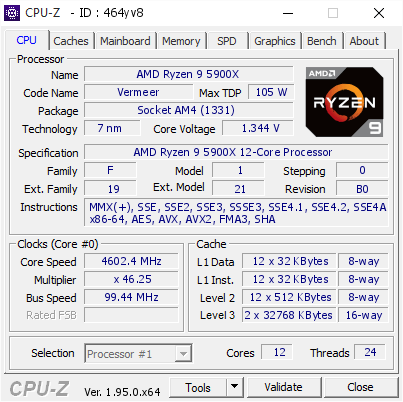
[464yv8] Validated Dump by NEMESIS-GO0DEN0 (2021-08-02 12:34:18) - MB: Asus ROG STRIX B550-F GAMING (WI-FI) - RAM: 65536 MB
I dunno if any of this helps
lavish tundra
zenith palm
Probs cuz ppl clocking 64gb ram are mad in the head XD
indeed
zenith palm
lavish tundra
indeed
Whole ass 12 hr run lol
lavish tundra
Oh wait nah ur right
modern walrus
TimeSpy was 9937, which is consistent with usual scores ranging from 9920-10025