#overclocking
1 messages · Page 72 of 1
 modern walrus
and it melts because increasing the amperage creates heat, which further increases resistance
 tall pelican
that's just internal resistance of the wire
if the wire is an inch long, it'll most likely be fine
modern walrus
I see
tall pelican
there's a reason the psu eps sends 12v, then the vrm right next to the cpu converts it to the 1.2v
 proven canopy
well - length shouldn't matter much for if it'll melt at all, cross sectional area will
tall pelican
and even then, the vrm does like 1.3v in order to get 1.2 by the time it gets to the cpu
proven canopy
That said if it's real short - it'll conduct heat away at either end easily
tall pelican
proven canopy
well - length shouldn't matter much for if it'll melt at all, cross sectional ar...
"on a #12 wire"
modern walrus
well ya higher voltage means less voltage loss when conducted over a distance. Hence why your house uses 120 volts but the power lines outside are 3000+. Also why long transmission lines are up to 500,000v
tall pelican
its not just that, but if the cpu needs 200A at 1.2v, you can send 20A at 12v and have the vrm convert it closer to the source
modern walrus
hence why Thomas Edison lost to Westinghouse for electrical infrastructure
Edison's idea was essentially wire everything as 12v. Sure you'll need a copper conductor 10 inches wide to send power 100 miles but it's safer
but now I'm flirting with DC v. AC voltage and that's outside the scope of this discussion
okay I'm now on YouTube watching "What is a semi-conductor" lol thanks for pointing me in the right direction
modern walrus
oh... well ya the entire basis of the decision was AC v. DC voltage
proven canopy
DC lost because AC was was easier to convert at the time
modern walrus
Doesn't DC require a much larger conductor to send it long distances?
proven canopy
High voltage DC long distance transmission is more efficient nowadays because of semiconductor electronics
No, and you don't have capacitive/em/skin effect losses
modern walrus
well I think that sheds some light on my confusion because the basic, older technology seems to be the opposite
eddy currents
L0 Cache errors are caused by insufficient voltage?
oh and let me clarify something: when you say DC over long distance is "more efficient" do you mean more efficient than DC transmission used to be or more efficient than conducting AC voltage?
proven canopy
There are pros and cons
But the tech to both invert and rectify on that scale with good efficiency/cost wasn't a thing 100 years ago
 clever epoch
modern walrus
L0 Cache errors are caused by insufficient voltage?
clever epoch
modern walrus
L0 Cache errors are caused by insufficient voltage?
Most likely yes. You're trying to run at an unstable frequency for the voltage
modern walrus
Thank you all @sterile flame @clever epoch @tall pelican I know I have a lot to learn. My bad if I get annoying with dumb questions
Ring should be - 3 of CPU ratio?
proven canopy
no problem
modern walrus
I try to set cpu ration with ring on auto first
proven canopy
Usually yeah, something like 47/50 on a 9900k, varies by platform
tall pelican
max ring is whatever's stable
modern walrus
Ratio
I dunno why it tagged forbi meant @proven canopy see I can't even use the chat right haha
Another question. I know usually you should just apply the same settings to all cores but in my case core 4 seems to always get hottest. Is it a bad idea to try to leave that core at a slightly lower setting?
Or will multiple settings just invite further instability?
Also why is it that after 4 hours of OCCT w/ AVX it'll show my max temp as like 79 then 5 seconds of P95 has 4 cores at TJMAX?
 sudden torrent
P95 is a synthetic load, putting unrealistic strain on the CPU
modern walrus
So is OCCT a reliable source to determine whether thermals are okay? Should I be averaging the two?
proven canopy
what cpu/board/ram
modern walrus
10900k/MSI MPG Gaming Carbon WiFi/G.Skill Trident Z Neo (32gbx2@3800)
I wish I'd been patient & gotten a Ryzen 9 so PC would be largely pointless lol
I had a stable 5.0/core going with -1 AVX offset. I got it pretty stable without an offset then decided to go for the gold & try to get a 5.1gHz OC stable
proven canopy
10900k is a great chip lol
modern walrus
I have no complaints about the chip. I'm just trash at OC
I'm thinking I lost the silicone lottery (maybe nowadays a better name for it would be silicone shuffle) because I read forums where people claim stable OC at 5.2, 5.3, & even 5.4.
proven canopy
Friend's data https://docs.google.com/spreadsheets/d/1jSNF2ZstrEmcR4JJpBdA9ZfsrA8xlcC1nLZneEZEl9E/edit#gid=283718095

Google Docs
Statistics
Percentile,Silicon Prediction,Clock Speed
SP,Count,%,0,61,49
60-69,149,63.40425532,0.01,63,49
70-79,18,7.659574468,0.02,63,49
80-89,42,17.87234043,0.03,63,49
90-99,22,9.361702128,0.04,63,49
100+,4,1.70212766,0.05,63,50
0.06,63,50
63SP,141,60,0.07,63,50
0.08,63,50
No. of CPUs,235,0.09,...
 trail sail
what kind of voltages do you guys run for a 3700X?
 dull ginkgo
1.25 is a safe bet for manual, but pbo is good
trail sail
i have been running 1.375v @ 4.35ghz but now realize that's a tad high...
dull ginkgo
very..
trail sail
i was worried because i always see 1.5v spikes so i figured i'd lock it to 1.375v
dull ginkgo
but chip to chip differences mean there is no safe voltage for every chip
trail sail
but now i'm reading that raises the average voltage and since i just game, i should leave it stock
dull ginkgo
pbo is good
 zenith palm
Amd dont recommend above 1.3v iirc
trail sail
i just have pbo & xmp enabled in the bios, and am only getting a 10% reduction in multicore performance in cinebench r23
single core is within margin of error
imma dummy, it's lasted a year with those settings too
temps have always been perfect as well
 quick rose
What ram speed?
dull ginkgo
I ran like 4.4ghz at 1.375v manual for a few months on my 3800x, it doesn't clock that high any more
zenith palm
Degradation
trail sail
i was never able to hit more than the 4.35 after much testing, unless i upped the voltage more
zenith palm
trail sail
3600mhz ripjaws v cl16 (b-die)
You could possibly oc that ram
zenith palm
trail sail
i was never able to hit more than the 4.35 after much testing, unless i upped th...
Don't up it too much degradation not good
trail sail
i've tried, but didn't have much luck. never messed with ram oc before
zenith palm
There are many ram oc genius's in here lol
trail sail
i've been more concerned about my 1070 hanging in there to realize i been being ballsy af with my cpu lol
zenith palm
trail sail
i've been more concerned about my 1070 hanging in there to realize i been being ...
What do you mean?
trail sail
i take better care of my gpu & worry about it more than my cpu
zenith palm
Your gpu will be fine, even if overclocked
It's actually safer cus you don't have to mess with voltage
 lavish tundra
trail sail
i have been running 1.375v @ 4.35ghz but now realize that's a tad high...
lavish tundra
trail sail
i have been running 1.375v @ 4.35ghz but now realize that's a tad high...
anything above 1.3V for ryzen is killing the cpu
also the spikes to 1.5V are on idle or low load
so it doesnt matter as much
proven canopy
1.25v for zen2 and on is considered max safe under any load
lavish tundra
proven canopy
1.25v for zen2 and on is considered max safe under any load
fr?
I always thought it was 1.3
proven canopy
It'll vary by chip - but if someone's asking "what's the max safe all core voltage" that's the answer
 proven canopy
If you're letting the chip control it's own voltage, it'll see 1.5v often for idle/low loads and that's fine
lavish tundra
proven canopy
If you're letting the chip control it's own voltage, it'll see 1.5v often for id...
yeah idle doesnt really matter
sudden torrent
1.3v is "safe" for zen 3 according to AMD
proven canopy
Under normal gamer use cases, 1.3 probably is, but not for p95 or something
lavish tundra
voltage + high current bad right
sudden torrent
1.25v for Zen 2
sudden torrent
lavish tundra
voltage + high current bad right
Yes
lavish tundra
I got more perf with less voltage
proven canopy
You should see anta777 roast him on the forums
lavish tundra
proven canopy
You should see anta777 roast him on the forums
Please link an example
lavish tundra
proven canopy
Idk why 1usmus has the following they have
Im pretty sure its the 1 vid linus made praising ctr
lavish tundra
ah yes I forgot 1usmus did that
tall pelican
Ctr was also like: "you have poop sample 3900xt" only does 4.6/4.3ghz at 1.2v
lavish tundra
tall pelican
Ctr was also like: "you have poop sample 3900xt" only does 4.6/4.3ghz at 1.2v
It told me I have gold sample. same test 5 mins later: u have bronze poop chip
clever epoch
I managed to go from bronze to gold by just changing LLC on a 5800x
CTR is a waste of time tbh
 delicate temple
What benchmark?
zenith palm
CTR is clock tuner for ryzen which is supposed to help you oc but its bleh
delicate temple
Ohhh
trail sail
I just set everything in the bios to auto and am running only PBO & XMP and it's running great
clever epoch
lavish tundra
Its a waste of cpu health
 modern walrus
Does C-State need to be disabled for OC?
sudden torrent
For stability on more extreme OC it's a good idea
Mostly only needed if your computer has trouble waking up from sleep or something
modern walrus
ah okay thanks.
I think 5.0 is as extreme as my CPU is going to allow with my current setup.
sudden torrent
Yeah that's not high enough that I'd call it necessary unless you're having problems with stability
modern walrus
50 core ratio, 47 ring ratio, 0 AVX offset, LLC Mode 4, I'm still hitting 89 degrees on CB R23
sudden torrent
Looks like beefier cooling solution is the next step, that's where I'm at too.
modern walrus
Yesterday I spent hours trying to get stable with a 51 core ratio and when I finally did I was hitting TJMAX on 4 cores
I have a Coolermaster 360 AIO
and I just redid the thermal paste on it just to be sure it wasn't bad
sudden torrent
modern walrus
I have a Coolermaster 360 AIO
Well there's your problem. A cheap 360 is only about as good as a decent 240.
modern walrus
with the stable 50 I'm at 1.290v
yikes. $220 is a cheap AIO? lol
I was thinking I'd either change the AIO or swap out the 3 in 1 fan setup it comes with & throw three Noctua NF-F12s on the AIO since they're nearly double the static pressure
but then again that's a $75 investment on fans that may or may not get me anywhere
sudden torrent
Depending on which 360 it is, yeah. It can be cheap build quality but deceptively cost more.
modern walrus
MasterLiquid ML350P Silver Edition
sudden torrent
ML series is meh
sudden torrent
Kraken is good but overpriced. All you're paying for really is the name and a tiny LCD screen.
EK-AIO, Lian Li Galahad, and Liquid Freezer II
modern walrus
I mean is it worth the investment tho? i.e. am I likely to jump from stable 50 to stable 52-53?
sudden torrent
Liquid Freezer II is sitting at the top of Gamer's Nexus' charts last I checked
sudden torrent
modern walrus
I mean is it worth the investment tho? i.e. am I likely to jump from stable 50 t...
That's a question you have to answer yourself. Is the investment worth a potential 5% gain in performance?
modern walrus
True but I guess what I meant to ask is whats the likelihood of obtaining that 5% gain
Like is a new AIO so much better than my current one that I'll actually see that gain
sudden torrent
Pretty good odds, since not only can it go higher it can go higher longer
It also has a little VRM fan that helps a bit with airflow there
modern walrus
Really? okay maybe I'm looking at it wrong. I saw where the bin numbers put the liklihood of having a 10900k capable of a 53 ratio are only about 1 in 3
sudden torrent
53 isn't likely, sure, but you have a better chance when you're below tjmax
Lower temps = better OC
modern walrus
I think I also have to factor in my motherboard. I have an MSI Gaming Carbon Wifi which from what I've gathered from others in here isn't spectacular in the OC department
& swapping the mobo is headache city since Windows will see it as a whole new system & want a new product key
I guess I could transfer this one but still a mission
not to mention it'll be like $300 for a good mobo
sudden torrent
Not necessarily, once you sign into your MS account you can simply hit "I changed hardware" and done
modern walrus
I wish I went ASUS on the mobo to begin with but I had no idea which video card I'd finally end up with
then I somehow won the shuffle & got the ASUS UF-rtx3060-O12G
rather
TUF-RTX3060-O12G
sudden torrent
Not bad, that one has a way overkill cooler
modern walrus
I was hoping for at least a 3070 but given the circumstances I'm pretty darn happy
I use it at +700 mem clock & +200 GPU clock. I can't get it stable any higher
Hindsight being what it is, I also wish I'd looked at different cases. my H500P Mesh looks great but there's no side mount or bottom air flow places
So I basically have top radiator/exhaust, back exhaust, & front intake. I upgraded the fans from the stock 200mms to Thermaltake Riing Trios
but fan-wise I'm pretty much maxxed out
sudden torrent
Looking at various test data sets it looks like moving to a liquid freezer ii would reduce your CPU temps about 6 degrees at least
modern walrus
Too bad you can't get the top panel in mesh cuz there isn't much space for the radiator exhaust to escape
oh wow 6 degrees would put me in a pretty good spot
sudden torrent
Based on a couple different tests, ML360P is 4 degrees behind Kraken X72, Kraken is behind freezer by another 2 degrees
modern walrus
I only see Liquid Freezer II in 120, 240, & 280 on Newegg. Is there no 360? 280 won't fit the case
sudden torrent
Buy ARCTIC Liquid Freezer II 360 - Multi Compatible All-in-One CPU AIO Water Cooler Compatible with Intel & AMD Efficient PWM Controlled Pump Fan Speed: 200-1800 RPM (Controlled via PWM) - Black: Water Cooling Systems - Amazon.com ✓ FREE DELIVERY possible on eligible purchases
sudden torrent
There's even a 420 if you get a big chungus case
modern walrus
You don't think changing the fans would get me anywhere near 6 degrees right?
lol
I know the answer is no but had to ask
sudden torrent
Maybe 2 degrees changing fans
 sterile flame
you're not gonna get much better on fans unless you alter ML120s or use server fans
i would just push/pull
modern walrus
ya $75 on fans for 2 degrees vs $125 on AIO for 6
Problem is I can't fit push/pull
The 360 is like a 1/16" away from hitting the CPU power cables as is
If I re-ran the CPU cables somewhere else it'll look nasty
sterile flame
liquid freezer ii 360 is 1 cable for the entire thing
modern walrus
 sudden torrent
They daisy chain
 sudden torrent
No RGB so it's easier to manage too
modern walrus
I've been working on another build. The motherboard is Ryzen this time & I'm attempting to do a custom loop
sudden torrent
Ooh those are fun
modern walrus
 sudden torrent
Stressful, but fun
modern walrus
ya but not for your wallet for sure lol
That's what I've done so far
I should be getting my 2d 360mm & another 120mm radiator in the mail tomorrow
sterile flame
when i got confused i looked at AIO and i realized my daisy chain 8 pin PCIe was stopping the middle fan from spinning
lmao
sudden torrent
D'oh
modern walrus
I'm gonna do one 360 to the CPU & one to the GPU then have them hit the 120 before they come back to the pump so the liquid is a decent temp in the pump
sterile flame
i would get a P500A for custom looping
sudden torrent
Or 5000d
sterile flame
put a 120/140mm reservoir at the back fan mount, 420mm push pull on the front and a 280mm top
modern walrus
I'm kinda kicking myself in the butt for not going all corsair
modern walrus
haha ok nvm then
sterile flame
but LL120s/QL120s etc are garb
modern walrus
I'm going mostly thermaltake
sudden torrent
Corsair software is trash
sterile flame
iCUE is totally fine
modern walrus
all the radiator fans are thermaltake & so are the 4 200mms
sterile flame
thing is with it, you just open the program, set the profile and close it
sudden torrent
Eh, everyone has opinions
sterile flame
it'll freeze the RGB but you keep the colors you set on the hardware
sudden torrent
I despise how intrusive it is, and it tends to break forcing you to reapply everything frequently (from my experience)
sterile flame
when it comes to mouses its def buggy
modern walrus
well in my experience MysticLight is junk, MasterPlus is junk, AmouryCrate is junk, & TT RGB Plus is junk
I don't understand why these companies can't make decent software for their RGB
and how there's no unifying controller for them.
sudden torrent
True there's not really any single best program
modern walrus
I have to use all 4 I just mentioned on my H500P build. It's exhausting
sudden torrent
You can try using openrgb if you are mixing brands to get it more unified but that has its own problems
modern walrus
& both ArmouryCrate & MysticLight wanna control the RAM despite my settings so then that gets all confused & like half the lights will be one thing and half another
I attempted to use Jack RGB but that was useless
Not to mention the XPG RGB software or G.Skill's
trash & trash
sudden torrent
Yep didn't even bother installing the XPG one, but dragon center didn't detect my RAM until I did a full reinstall of Windows
modern walrus
XPG's RGB colors on the S40G are so off
If you try to put white it looks light purple
so goofy
sudden torrent
Mine are slightly blue shifted, so annoying.
modern walrus
MysticLight has detected my RAM since day one. It was fine until I installed ArmouryCrate to change the little light on the graphics card
They really incentivize you to purchase only their products when it comes to RGB
It's like barely anything is compatible
I could connect my CoolerMaster controller to MysticLight but the settings r blah
Thermaltake barely plays ball with anyone. The Trio 200mm fans only work on TT RGB cuz of the power draw or some nonsense
It's such an annoying thing to deal with. If I wanna leave the computer on overnight to run OCCT or something, I have to turn off the lights in 4 different programs
sudden torrent
Lol I did kinda the same, when I got my Gigabyte GPU I just turned off all 6 lighting zones and uninstalled the app.
modern walrus
That Jack RGB program is like ya it works with MSI but you have to do these like 4 steps oh & make sure DragonCenter is on if Jack RGB is on or you can permanently mess up the MSI motherboard RGB crap
sudden torrent
OpenRGB had an issue with MSI where it could straight brick the RGB, they had to disable MSI compatibility for a while.
sudden torrent
MSI is touchy I guess
modern walrus
if you used the old method it could brick it
Computer components are so strange. You buy like a $400 part & it doesn't even come with instructions
sterile flame
speaking of rgb software

Whirlwind FX
The only RGB software you'll ever need. Never again will you have to run a software for every single brand of RGB devices that you own. SignalRGB is a powerful software that controls all of your RGB devices better than the original software your devices come with. SignalRGB features 50+ top game integrations, tons of p
iCUE on steroids with majority of other programs mixed in
 sudden torrent
There's yellow in there, what are you so mad about? lol
modern walrus
shoot I might be installing that otnight
tonight
The other random colors haha
ArmouryCrate & MysticLight off:

What is telling those lights to be pink & purple rn? Wth
sudden torrent
This is why some level of standardization is needed, it avoids strange conflicts like that
modern walrus
I agree
RGB needs standardization & so does the connections on power supplies
I needed an extra Molex cable (before it dawned on me that you can just convert SATA) & they're nearly impossible to find
sudden torrent
I kept all of my old cable adapters through the years, I still have the sata to molex to 6 pin PCIe weird cable I got with an ancient GPU
modern walrus
While I'm on the issue of compatibility, if a case comes with two separate connections for the USB C 3.2 & USB A 3.0 but the motherboard only has one connection, can you split that or you just have to choose either one?
sudden torrent
USB C uses a different kind of header
modern walrus
Lol ya but isn't 52w the limit on Sata/Molex? i.e. connect a modern graphics card & watch the cable melt?
sudden torrent
Yep that's why I'd only ever use it on this 75W 750ti a friend gave me
modern walrus


one of those connects to the USB C
how the heck I don't know
both look like USB 3.0
sudden torrent
So one of those goes to 2x type A and the other a type C?
modern walrus
correct
no idea what it looks like internally but connection wise they look identical

I already had to get this to deal with the fact that my fans need 3 controllers plus the case USBs
So 2 headers was not going to be enough
sudden torrent
Each 3.0 header can support either 2x 3.0+ ports or 4 USB 2.0 ports
modern walrus
Amazon.com: Sabrent Internal USB 3.0 Hub/Splitter (HB-INTS): Computers & Accessories
I guess I could get that thing
Those are all 2.0s
oh wait you mean for the 3.0? Cool no USB C for me I guess
I wonder if there's a way to convert like one of those mini PICe connections to USB 3.0 lol
sudden torrent
Yes there's PCIe x1 to USB 3.0 header adapters
modern walrus
is it the x16 or the smaller one?
modern walrus
I was just looking at one just like that one trying to figure out if the connection for the USB 3.0 on the back is in or out
sudden torrent
That converts the PCIe 3.0 slot to effectively 4 USB ports
modern walrus
ah okay
lol great & because of how the case is to mount the GPU vertically, I'll need a riser to connect that
assuming the cable from the case USBs even make it that far
makes
tall pelican
modern walrus
https://smile.amazon.com/Sabrent-Internal-USB-Splitter-HB-INTS/dp/B08Y3GG82F/ref...
Only issue I've had with mine is a boot miscommunication when I had it as a powered hub. Unplug the sata power and it works like a splitter
sudden torrent
It comes with a low profile bracket, maybe you could use it that way?
 modern walrus
 sudden torrent
Or just get one that doesn't have the external connection and take the bracket off completely
modern walrus
That whole thing turned on this case for vertical mount
sudden torrent
Buy PCI-E X1 to 2 Ports 19 Pin USB 3.0 Header PCI Express to Dual 20 Pin USB 3.0 Card: USB Port Cards - Amazon.com ✓ FREE DELIVERY possible on eligible purchases
Could get that one and just remove the bracket. If you need extra support still zip ties work lol
Bonus being that you won't be able to see it underneath your GPU
modern walrus
Gotta love zip ties
What do you use to hang these things?

The velcro that comes with them is a joke.
sudden torrent
True that, though my power supply came with some decent enough velcro
modern walrus
The stuff that came with these is 3M & it's still junk
I'm using this stuff rn

But the top controller came loose. I just added another couple squares. Who knows if it'll hold
Oh nice I didn't realize the mounting part was held with just two screws
sudden torrent
Not really an issue I've had since my case has screws to mount everything
modern walrus
I'll probably just grab that & let it hide behind the gpu
Even the rgb/fan controllers?
sudden torrent
I don't have one
modern walrus
I was thinking of just drilling a hole thru two corners haha
sudden torrent
Just a splitter for my 240mm AIO
modern walrus
heck that must be nice
This current build I've gotten just about everything but the really expensive stuff. I still need a Ryzen 9 5900 or 5950 (Id rather the 5950 but it's like almost a grand), RAM & two water blocks
Those water blocks are so expensive for nothing
Like the fancy Thermaltake one I'd like to get is $120. A whatever one from ebay is like $15
a few RGB lights costs $105? come on man
Maybe I'll just get cheaper RAM & swap the ones that are in my H500P build & use the Trident Z in the new build
I thought 64GB was a good thing to have but I doubt I've ever used even half of it
maybe I can just put one 32 in each build haha
sudden torrent
Most people don't have a need for more than 16GB of memory still, 32GB is for future proofing, and 64GB is for developing a massive open world game
modern walrus
Maybe I'll just get a 4x4gb setup
or 4x8 jic
I still haven't gotten an answer to whether 8x4 or 2x8 for 16gb (for example)
2 sticks cool better but that's about all I've heard
sudden torrent
Technically speaking, 4x sticks is better but only by a few % and it puts additional strain on the memory controller
sudden torrent
More strain means less overclock potential, and possibly it won't even run the memory at rated speeds
Yeah pretty much just tradeoffs
modern walrus
originally I wanted to get all 128GB but I'm glad I didn't because that would've been ridiculous
sudden torrent
I'd be surprised if a Ryzen CPU could do 128GB at 3600C16, maybe 3400
modern walrus
Wait does that mean there's really no reason to get RAM over 3600?
sudden torrent
Yes and no
sudden torrent
3800 is good for zen 3, the infinity fabric tends to max out around there
modern walrus
This is on the 10900K
sudden torrent
Oh I thought we were still talking 5900X
modern walrus
ya sorry I'm bouncing back & forth between my current build and the one I'm working on
sudden torrent
Intel's point of diminishing return is 3200 iirc, higher is still better but has less impact on performance as you go higher
modern walrus
Maybe I'll just do the swap then. I'll put like 32GB at 3200 in the 10900K & move the 64GB at 3800 to the Ryzen whenever I finally get it
sudden torrent
That would work. You could tighten timings on the 3200 set and it would perform only slightly lower than the 3800.
modern walrus
While I'm bothering you with all these questions, my dad has an older computer 4th gen i5 & the system drive is an HDD that's really slow, like 60mb/s read slow. I was gonna put an SSD in it & clone the HDD. You think there will be a noticeable difference?
sudden torrent
Or you could split up the 64GB in 32+32
modern walrus
one stick in each build?
sudden torrent
modern walrus
While I'm bothering you with all these questions, my dad has an older computer 4...
100% night and day difference
sudden torrent
modern walrus
one stick in each build?
Ah only 2 sticks nvm
modern walrus
I ran benchmark on it & I'm surprised it didn't start laughing
ya 2 32s
My new build has a Sabrent Rocket in it. I can't wait to benchmark that thing
you think a max temp of 87 in CB R23 is too high?
this Coolermaster AIO is junk lol
sudden torrent
It's high but shouldn't throttle too much, thermal limit is 93C I believe
modern walrus
btw how'd you learn all this? Your own research, trial & error, or school?
sudden torrent
A combination of the three
modern walrus
really? min doesn't throttle until it hits 100
HWiNFO doesn't even turn red until it's north of 90
sudden torrent
No wait I think that was the 1x600k I was thinking of, the 1x900k is 100C
modern walrus
Sounds like I'm scorching my CPU
I tried to read Intel's spec sheet but the darn thing is 137 pages
sudden torrent
Maybe not scorching but there's room for improvement for sure
Intel ARK is good for specs
modern walrus
oh I just downloaded it from intel's website
sudden torrent
summary is nice
https://ark.intel.com/content/www/us/en/ark/products/199332/intel-core-i9-10900k-processor-20m-cache-up-to-5-30-ghz.html
Intel® Core™ i9-10900K Processor (20M Cache, up to 5.30 GHz) quick reference guide including specifications, features, pricing, compatibility, design documentation, ordering codes, spec codes and more.
modern walrus
Tjunction answers the question?
sudden torrent
Yes
modern walrus
okay cool so I'd think 88/100 isn't awful
darn I just hit 92 on Core 4
Core 4 is always the hottest
sudden torrent
If you know someone that has the machinery you could lap the die so the temps are more evenly spread
And lap the CPU block while you're at it too, get that even mounting pressure goodness
modern walrus
I'm not sure if I know someone because I don't even know what machinery is involved
get this: no change to my OC settings but my CB R23 just went from 15589 to 16317
How on earth does that happen?
sudden torrent
Background processes probably
modern walrus
I changed nothing & reset the computer
strange
My RAM is still on idiot mode with the RGB rn tho
darn it
I'll try making MysticLight overwrite 3d party software on restart & see if that works
What a mission
sudden torrent
Sanding the CPU heat spreader works too
https://smallbusiness.chron.com/lap-cpu-processor-69154.html

Small Business - Chron.com
How to Lap a CPU Processor. Lapping a CPU is a process by which you sand the top of a CPU's case until it is as close to perfectly smooth as possible. The idea is that if you can eliminate microscopic air gaps between the processor and the heatsink that sits on top of it, you can more effectively transfer heat ...
sudden torrent
400
modern walrus
max thermal ended up at 92. 88 on every core otherwise except 84 on 8, 81 on 1, & 84 on 0
sudden torrent
Removing the heat spreader allows your cooler to have direct contact to the IHS
That's why people delid
modern walrus
sounds like you could easily brick the CPU tho
if that goes wrong
I'm gonna do 3dmark now let's see how that goes
sudden torrent
Oh yeah people rip the IHS off the chip all the time
modern walrus
ya well Murphy's law & seem to go hand-in-hand so I'm not delidding lol
law & I rather
sudden torrent

reddit
144 votes and 36 comments so far on Reddit
Lapping is still perfectly safe and can improve cooling performance
It's easy on Intel CPUs since there's no pins on the chip
modern walrus
lol "looks like a murder scene from CSI Miami"
ya but wouldn't I need like some sort of scientific instrument to be sure I was actually sanding it flat?
I'm not saying it won't work, I'm saying I doubt I can perform it correctly
sudden torrent
Read the steps, that's what the sharpie is for
modern walrus
are you supposed to use a belt sander?
I have a multi-tool sander but it just oscilates
Jeez this is ballsy
Can I say ballsy on here? the robot didn't get mad this time
sudden torrent
Yeah you're fine
modern walrus
here we go... time to watch TimeSpy for the 900th time
sudden torrent
You can hand sand to lap it even, don't need power tools technically
modern walrus
how much improvement do you think you'd get from that process?
woo GPU fans are definitely hitting 100% rn
What GPU are you running?
sudden torrent
Results vary widely. Anywhere from 1-4 degrees I've seen.
I've got a 3090
sudden torrent
HAH not a single one is still even close to $1500
Mine cost $2350 from newegg in the shuffle
modern walrus
oh ya the 3080 is kinda close to that
wow dude I think my entire build is less than that
What monitor(s) do you run it on?
I have a 43" Samsung but it's only 60Hz
I also have a 29" LG but it's only 75Hz
I kinda put my system together for school cuz of Zoom then transitioned to gaming
which I still haven't done much of
Aside from the RE2 remake
modern walrus
okay I gotta ask
what on earth do yo do with that much storage??
When gaming do you only use the Gigabyte monitor?
sudden torrent
Would you believe me if I told you I need more? My hard drives are full.
I run a plex server and other things in the background, so I've got tons of media.
I use the Gigabyte monitor for the game and the other one (which was free to me) for discord and browsing while gaming
modern walrus
okay noob question #964: what's a plex server
?
You're using a similar CPU cooler to me no?
sudden torrent
Plex is a media server that allows streaming almost anything to almost any device
modern walrus
I guess you don't need to bother to OC Ryzen 5xxx?
sudden torrent
Oh I overclocked it for sure, but it taps out around 4.7GHz on all core load mostly due to the VRM on my motherboard overheating
I'm also running the memory at 3800C16, if I boost the voltage more I can probably get C15 or 14
I'm a performance nut, I like to eek out every drop of performance that I can, even if that comes at a disproportional power/heat cost
I even slapped a heatsink on the backplate of the GPU with an old 80mm CPU fan
If you've never heard an 80mm fan run at 5000 rpm, count yourself lucky
zenith palm
sudden torrent
If you've never heard an 80mm fan run at 5000 rpm, count yourself lucky
Make sure it doesn't take off XD
sudden torrent
Right? My car doesn't even usually hit 5000 rpm
Maybe if I floor it getting on the highway
modern walrus
5k RPM? lol wth
I'm trying to do the same system builder but my XPG S40G apparently isn't even an option
wait jk
sudden torrent
Yeah not every model for parts is listed on pcpp
modern walrus
it's under ADATA
sudden torrent
Ah yep, XPG is the product line
modern walrus
I spoke too soon. Still can't find it
lol jk there it is
I can't find my monitor
cuz I guess technically it's not even really a monitor
hmm that's the wrong RAM
https://pcpartpicker.com/list/WcC2Cz okay ya that's the setup
I wanted to build a Coolermaster Cosmos but they're stupid expensive
sudden torrent
Not bad at all
modern walrus
ya the whole thing is like a tick above your 3090 lol
price wise I mean
Do you ever max out that video card?
Can you even? I guess like multi-screen 4k maybe
sudden torrent
Not yet I haven't, but I got close doing project cars 2 on max settings 1440p
at 200 fps lol
modern walrus

Samsung Display Solutions
Discover Samsung 43” QBR Series 4K UHD Signage; Display any content in ultra-high definition with incredibly rich color on slim, efficient signage.
That's my monitor
It's not really a monitor
& it's not really a television
It's basically like a screen for departure times at airports or something
supposedly commercial displays last a really long time. They're designed for 24/7 operation
sudden torrent
Or like you'd see in fast food places for the menus
modern walrus
lol ya exactly
if you wanted to go crazy they're also designed to be daisychained
you can also have multiple ones make a single picture
I just pretend it's a monitor
I like it tho. It's 4K HDR.
in a perfect world it would be at least 120Hz but what can I do
sudden torrent
4k60 is still hard enough to run
modern walrus
I'm pretty sure 4K is usually around 60FPS anyway
Ya my 3060 can't even go full settings on 2019 Resident Evil 2 because I play it on 4K
200 fps is insane wow
UserBenchmark must have you as like DeathStar
sudden torrent
You know it's been a long time since I've used them since their data is mostly garbage and skewed badly, but let me check
 modern walrus
wooow
sudden torrent
Hard drives always perform badly on there, there's not much reason to have them these days
modern walrus
223/108/239 vs my 120/107/129
I'm close to your desktop score but otherwise like half
sudden torrent
Desktop is more influenced by SSD speed than anything else, multi core processor test second
modern walrus
it says on yours that the RTX3090 is $1500 lol
sudden torrent
Yeah that's msrp, there's nothing in stock for it to check current prices. Plus it's an odd model that isn't detected well.
modern walrus
your 2012 HDD is outperforming the one I bought in like February
I don't get the model name. Extreme Waterforce? hmm
tall pelican
https://www.userbenchmark.com/UserRun/43279728 glad to see "desktop" so low 
 modern walrus
The results on these Memory Kits makes me think I should've put money into speed instead of volume
sudden torrent
modern walrus
I don't get the model name. Extreme Waterforce? hmm
The Aorus Extreme was always one of their top models (but this one kinda sucks) and the waterforce denotes it's got an AIO attached
modern walrus
ohh. did it come with an AIO?
sudden torrent
modern walrus
The results on these Memory Kits makes me think I should've put money into speed...
Quality over quantity
Yeah it came with a 240mm AIO attached
tall pelican
ehhhhh dr makes up for a good amount of "quality"
modern walrus
You all may have beaten me by every metric but I bet you don't have a Pikachu light lol
sudden torrent
No I think you got me there, I've only got my series 1 card collection lol
modern walrus
ya I made the mistake of giving away all my cards in like 2003
sudden torrent
TBF only a few of them are actually worth any money
sudden torrent
I have my Mew card they gave away with the first movie tickets still
modern walrus
you know I think I might actually have had that one too. I saw the movie the day it came out
tall pelican
I have a glowing tube xD
 modern walrus
When Ash gets hit by Mew & Mewtwo & Pikachu thinks he's dead, very moving
oh niice
I wanna get the RGB thing to go in the reservoir like that
sudden torrent
Yeah they picked a really good song for that scene too
modern walrus
I watched the movie again with my three-year-old a couple weeks ago
It's like I'm not crying lol
tall pelican
Its just a uv cathode and uv reactive fluid
tall pelican
Its a bykski something
modern walrus
That's similar to how I'm attempting to build mine
tall pelican
I think paul's hw had 2 of them in a 1000D?
modern walrus
but out of utter brilliance I decided to attempt rigid tubing
I figured if I can bend electrical conduit I can bend rigid hard tubing
It's not as easy tbh
sudden torrent
The break point comes a lot faster than conduit
zenith palm
sudden torrent
https://www.userbenchmark.com/UserRun/43279485
Wow 223% that makes sense yes
modern walrus
If you try to heat close to another bend, the heat will travel & start letting the other bend out
I got the little molding things but I don't really like them because they're too long
Trying to bend w/o a silicone insert is impossible
sudden torrent
zenith palm
Wow 223% that makes sense yes
I swear they stopped trying to make relevant numbers
modern walrus
ya when are they going to move the precentages to something reasonable?
sudden torrent
Never 

For this Fool is never early, nor is it late. He arrives precisely when he doesn't mean to.
Impact Prelude Kevin MacLeod (incompetech.com)
Licensed under Creative Commons: By Attribution 3.0 License
http://creativecommons.org/licenses/by/3.0/
0:00 - Intro
1:13 - Pre-Ryzen
1:26 - Ryzen 1000
3:07 - Ryzen 2000
3:49 - Changed benchmarks
5:20 - Ry...
modern walrus
What does a 3dmark score look like with a 3090? Like 25k?
tall pelican
modern walrus
ya when are they going to move the precentages to something reasonable?
100% is a i5 something and 1070
zenith palm
sudden torrent
I swear they stopped trying to make relevant numbers
Swear they get their numbers the same way monitors are named
 modern walrus
On an unrelated note, I've been meaning to watch that video about how people waste money buying power supplies they don't need
after putting all my parts into parts picker, I couldn't gotten away with like a 600w
zenith palm
NonO
sudden torrent
With a 3060, yep you could
zenith palm
You always want psu head room
zenith palm
sudden torrent
With a 3060, yep you could
Ohh yeah nvm
modern walrus
I got an 850w for my next build & I bet it'll be way more than necessary
zenith palm
Better to have some headroom and a quality psu tho, stops you from having to buy a new one next time you upgrade
tall pelican
I mean, what psu do you think you need for a 5800x and 6900xt? ||I've tripped ocp on a 1000w||
zenith palm
Damm really?
tall pelican
Yeah
zenith palm
Oof
tall pelican
New gpus have stupid transients
modern walrus
More noob questions: why does that message have that black thing?
sudden torrent
 zenith palm
Was probs a decent psu too smh
modern walrus
like what you said was redacted?
tall pelican
Spoiler
zenith palm
sudden torrent
No oc I'm guessing?
sudden torrent
 modern walrus
wow I get excited when I break 10k
sudden torrent
 tall pelican
3090 should be 20k+ tbh
zenith palm
That's whack tho, my 3070 overclocked gets 15.1k
sudden torrent
modern walrus
More noob questions: why does that message have that black thing?
It's a spoiler
modern walrus
Spoiler? Like when someone tells you what's going to happen in a movie you haven't watched yet or those things that create downforce at high speeds for better traction in your car? or it makes milk go bad?
what the heck is a spoiler?
sudden torrent
More the first one. In his case he didn't want to spoil the answer to the question he asked.
modern walrus
oh right
sudden torrent
When you're typing, highlight a word or sentence and hit the eye icon to mark it as a spoiler
||Like this||
sudden torrent
"" for quotes
modern walrus
I'll be a discord pro in no time
"Ask not what your country can do for you, but what you can do for your country."
Didn't work?
modern walrus
"Whether you think you can or you can't, you're probably right."
...?
lol
xrandr --addmode HDMI-2 2560x1080_75.00
Why xrandr doesn't support ultra wide resolution natively I don't understand
tall pelican
|twice, before and after does spoiler.
space does quote.
~twice before and after does a slash through
modern walrus
"The only thing we have to fear, is fear itself."
tall pelican
lies
modern walrus
oh wait is this so I can respond directly to what other people said
not so I can put random famous quotes?
sudden torrent
Use it however you think works
tall pelican
Reply used to do that, now its the cancerous ping hell
modern walrus
What's this ping thing I keep hearing about?
sudden torrent
tall pelican
Reply used to do that, now its the cancerous ping hell
I try to remember to turn the ping off
tall pelican
modern walrus
What's this ping thing I keep hearing about?
This
modern walrus
I went in the nVidia Discord thing & people were talking about it
tall pelican
modern walrus
What's this ping thing I keep hearing about?
Vs this
modern walrus
oh the orange background?
tall pelican
If you're in a different channel, you get a ping
modern walrus
What does Dopp mean?
tall pelican
Hypa Hypa
modern walrus
oh like an audible alert that someone has replied to you?
tall pelican
Yeah
tall pelican
Music
modern walrus
oh ya I'm kinda out of touch with modern music
tall pelican
There's a half dozen covers of it now
modern walrus
I'm 33 & a dad so I'm allowed to not be cool anymore
tall pelican
Uhhhh dont watch the video with kids around, and be prepared to explain it to the wife 
sudden torrent
Yes dad jokes are now required, so we can make everyone's eyes roll
Anyway I gotta head to bed, g'night guys
modern walrus
night
you got it
how come my picture didn't work
I still have the little discord mask thing
tall pelican
Prob didn't click save
modern walrus
I guess I have to graduate above Regular+ status?
it's showing on my phone
oh well
oh wait there it is
haha
tall pelican
Control+r will refresh discord
modern walrus
nice thank you
how much variation is there in thermal paste? is one significantly better than another?
I guess these are things I could ask Google
zenith palm
modern walrus
how much variation is there in thermal paste? is one significantly better than a...
Not much, liquid metal is better but expensive and doesn't work on copper iirc
Something like arctic mx4 will do most people
tall pelican
It works on copper, just stains it and needs reapplication after a few months
zenith palm
Ahh yeah works was the wrong work but meant it's not a good idea longevity wise
 spark hemlock
overclocked the sh*t out of my i5 2500k (from 3.3ghz to 4.2ghz) lmao
modern walrus
I just used the coolermaster stuff that came with the AIO
zenith palm
Yeah the included paste is the best because it's free X)
modern walrus
Fine with me if there's no significant difference between the one it comes with & some other one
clever epoch
modern walrus
originally I wanted to get all 128GB but I'm glad I didn't because that would've...
128GB DDR4 on consumer is not only very hard to run, but liable to cause memory errors, even at XMP
modern walrus
I'm glad I didn't blow money on that
sterile flame
I'm gonna back on subzero soon
proven canopy
spark hemlock
overclocked the sh*t out of my i5 2500k (from 3.3ghz to 4.2ghz) lmao
You can probably hit a safe daily 4.5 or 5.0 on air for benches
 faint tangle
opinions on amd ryzen master software overclocking?
lavish tundra
faint tangle
opinions on amd ryzen master software overclocking?
dont
its ok not great
what cpu u got?
@faint tangle
 left bladeBOT
 TheTrueBacca#2995 has been warned
Reason: Bad word usage
faint tangle
God- can't say that either
faint tangle
lavish tundra
<@!654444344274845698>
3600
Ik I can do bios but I'm not the sharpest tool in the shed when it comes to dealing with bios
faint tangle
alr
not ocing just yet but i might be upgrading gpu a bit, and i dont think a 3600 would be great with a 3070 at 1080p gaming
lavish tundra
faint tangle
not ocing just yet but i might be upgrading gpu a bit, and i dont think a 3600 w...
not at all...
faint tangle
really?
lavish tundra
bottlenecks are over hyped
you can run a 3090 with a 3600 without any noticeable bottlenecks
spark hemlock
proven canopy
You can probably hit a safe daily 4.5 or 5.0 on air for benches
ikr?
 celest moss
any1 have an 8700k & MSI MAG z270 ace\
tall pelican
coffee modded your z270?
celest moss
my bad... z370*
proven canopy
damn, got me all excited
 weary estuary
been running for 5 days straight, beautiful oc
 sudden torrent
+1500? and no hash rate loss?
zenith palm
weary estuary
been running for 5 days straight, beautiful oc
How's your rejecteds doing
That's running way too hot tho 70c is core your mem is gonna be on fire
Up your fans
zenith palm
lavish tundra
already has enough memory issues
Especially at 30% fan  🔥🔥
🔥🔥
lavish tundra
zenith palm
Especially at 30% fan <:Cringe:598228562222514196> 🔥🔥
Yep
No wait pato chill
Its fine
Its 37%
Not 30
 zenith palm
Ohh 37 okay okay
tall pelican
Its also just gddr6, not 6x, so it doesn't produce nearly as much heat
zenith palm
tall pelican
Its also just gddr6, not 6x, so it doesn't produce nearly as much heat
Yeah but the core is like 70c the mems gonna be a good bit hotter not much heat is being moved clearly
tall pelican
Depending on the power draw, its most likely perfectly fine
zenith palm
70%
zenith palm
That's what the afterburner sc says but tdp of a 2080 ti is like 250w
tall pelican
So 70% of 250w is what? 😏
zenith palm
175w would be fine but you shouldn't be getting temps that high
tall pelican
tall pelican
200w at 70c, the cooler isnt being saturated
.
sterile flame
what
its gddr6, shouldn't be getting that hot at all and mem oc is gonna have a 5c diff max depending on model
zenith palm
sterile flame
its gddr6, shouldn't be getting that hot at all and mem oc is gonna have a 5c di...
It's cuz their fans are at 30% tho
sterile flame
may get a little hot if it doesn't, but it'll throttle adequately
 robust aurora
No point to leave fans that low
If you want it to be quiet do like 50%
I dont even hear mine at 70%
zenith palm
Yeah i sleep with mine at 70% hardly hear it in an airflow case
modern walrus
If the overclock is averaging 86 degrees (10900K) on Cinebench R23 at 1.3v... that's too high huh?
sudden torrent
It's warm but within tolerance
modern walrus
max temp 95 on 4/10 cores
sudden torrent
Ah 95 is throttling
 sudden torrent
Good move, that'll help with the VRM a little too
modern walrus
I just watched the GamerNexus review of the EK Elite
& I'm gonna go w/ the arctic to save $75
I can live without the RGB. There's enough of that going on in my case already
sudden torrent
Yeah arctic is still the best imo
modern walrus
ya the interesting part was how the push/pull doesn't do anything at 100% on the EK
oh look there is an RGB version for an extra $20
sudden torrent
EK use their Vardar fans which are really overkill. Their advice was sound, use the extra fans on the case lol
modern walrus
ya that's exactly what they said
I already have fans laying around I don't need
I'm gonna wait & order it a little later tho to see if that "get it tomorrow" thing shows up
clever epoch
you can get Arctic P12 with RGB now, so if you can fit a 360mm rad, you can get Arctic RGB fans
modern walrus
oof
1 hour & 35 minutes OCCT w/ AVX hitting 97
but average 66 so I dunno
Is P12 better than Freezer II?
clever epoch
Arctic P12 is the fan that comes on the Liquid Freezer 2
I'm saying that you can get RGB with the Liquid freezer 2 if you buy Arctic's P12 RGB fans
(but it has to be 240mm or 360mm)
modern walrus
ah I got u
I was a little confused tbh
but I usually am on Discord
is the EK AIO Basic better than Arctic Freezer II?
zenith palm
ek is closest tho
dull ginkgo
@zenith palm not ek aio basic
modern walrus
got it got it
dull ginkgo
Basic is wacky
dull ginkgo
Ek-aio drgb yes, very close
Ek aio basic don't have enough testing on, but igor's lab testing seems to point it towards just mediocre
 worn seal
Hey so I've been away for a while and have only gotten back to messing with the mess of a patriot ram kit I got, to the best of my understanding increasing soc voltage to help the memory controller won't do anything if it's just bad bin ram right?
zenith palm
dull ginkgo
Ek-aio drgb yes, very close
Ek aio basic don't have enough testing on, but igor...
Thats wack i thought they were basically the same :/
dull ginkgo
Only decent testing I saw was igor's lab, and yea
zenith palm
Wack
tall pelican
not bad for a tec + fuma2 and one fan
 proven canopy
Is the clock not reporting correctly?
tall pelican
who knows, was just a stock test
proven canopy
oh lol, didn't think to look at the temp
tall pelican
its still 75F out, and doing 15c atm seems like a win
later tonight it should get colder
tall pelican
https://valid.x86.fr/85z170 meh 2500k is 🥔
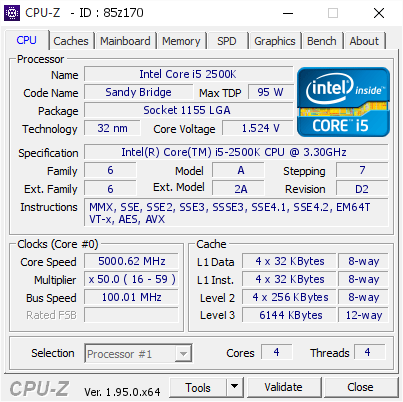
[85z170] Validated Dump by fitvelkiz (2021-05-27 06:01:24) - MB: Gigabyte Z77X-UD5H - RAM: 8192 MB
proven canopy
Damn, that was best max valid all core?
tall pelican
One of the cores is def a dud since 2c valid is 5.3
zenith palm
Any manual pbo recommendations/where to start for Ryzen 5 3600?
sudden torrent
Start with maxing out your power limits and see how high it goes
zenith palm
sudden torrent
Start with maxing out your power limits and see how high it goes
Should i check what power my cpu spikes at atm and then increase from there or? Should i just start at the useless tdp lol
sudden torrent
Whatever the max is for each of your power settings. My board limit is 1000 PPT (no limit essentially), 114 TDC, and 180 EDC.
It won't hurt your motherboard, only voltage will do that. The board can protect itself if something goes wrong with the current or temps.
zenith palm
Okay, will it just not post if it doesn't like the settings, or will it stop me from entering it in, also will that do anything different than using the motherboard setting in pbo or are they more conservative?
sudden torrent
The only thing that will change are behaviors under heavy load
The CPU won't max out the power draw just because it can now, this is just to give it more breathing room so it can boost higher for longer without being starved for power.
zenith palm
sudden torrent
The CPU won't max out the power draw just because it can now, this is just to gi...
Okay thanks, so should 3d mark do stress test wise to see if it helps or would cinebench or occt or something be a better suit
sudden torrent
Time Spy will give you an idea of what the power load when gaming is, OCCT will max it out to see how hot it gets.
Alternatively Prime95 small fft to max out power/heat
Make sure you're running a monitoring tool in the background like hwinfo so you can see what the peak is for everything
zenith palm
Okay I'll try that then
If i go to far with some of the numbers will it just perform worse or?
Kinda throttle like?
sudden torrent
Worst case it overheats and throttles
zenith palm
Ahh okay
zenith palm
So @sudden torrent do you think i should start at something like that
 sudden torrent
Max it out. The CPU will only use what it needs, and the board knows its limits.
Leave boost clock override at 0 for now, you'll adjust that last, and increasing incrementally, testing stability
Leave Scalar on auto
zenith palm
@sudden torrent i did 500 100 150 it only used max of 97, 56 and 77, is there a point going higher or should i just work ok the scaler now
sudden torrent
Should be fine if it's only using that much. I forgot you're using a lower power chip than me lol.
Run a cinebench test and compare to baseline, you should see an improvement already.
Then you can do +200 offset and test again. If it's unstable at that point, you can go lower.
zenith palm
Okay, well i ran with 0 boost clock overdrive and it performed the same as before with the motherboard limits on timespy but I'll run again with the offset this time and see how it goes
Or should I switch to cinebench instead?
sudden torrent
Time Spy CPU score works
Once you've got those results you can play with the scalar. This is the one you don't want to just max out, since it increases voltage. You'll need to watch your load voltage and temps.
sudden torrent
See if it's stable at +200 offset, worst case it just doesn't boost as high, which will be noticeable in scores. Honestly this is one of those things you just need to play around with to get your optimal settings anyway.
zenith palm
Okay thanks
clever epoch
setting TDC/EDC too high can actually degrade performance. For a 3600 I would start at 60 TDC/EDC, increase by 5 (or 10) A at a time, and bench to see if performance degrades
if performance degrades, go back, and then start increasing only EDC
looks like you already topped out at 56 TDC. I guess 55-60 TDC would be fine, then start at 60 EDC and increase by 5
zenith palm
clever epoch
looks like you already topped out at 56 TDC. I guess 55-60 TDC would be fine, th...
Should i just use slightly over the amps for the maximum i got in my test or what do you think?
clever epoch
zenith palm
Should i just use slightly over the amps for the maximum i got in my test or wha...
I would go slightly conservative on amps, especially for TDC
the manufacturing process node that Zen 2 and Zen 3 chips are made on (N7) is pretty tough against temperature and voltage, but weak to current
I don't think you'll degrade your chip with PBO, but the boosting behavior considers the fact that the chip is most likely weak to current, so you might end up with reduced performance
I doubt you'll actually see a different though, that close to the limit
 pine gust
random af but im using ryzen master profile 1 PBO - for my 3600 its maxing at 4.16ghz @ 64C. is my ram holding me back? its trash at the moment - gskill 2x 4GB 2132 and corsair 2x 8GB 2132 - memory set to Coupled OFF - 1500 and 1333 fabric clock....
quick rose
2133 ram? Decoupled IF is always a performance hit
pine gust
the ram is ddr4 2132
quick rose
Defo holding you back
NOt necessarily from the overclock
But for everything else
Benchmarks, games, etc
pine gust
dont ask why but right now its these two kits: https://www.newegg.com/g-skill-8gb-288-pin-ddr4-sdram/p/N82E16820231882
and
https://www.newegg.com/corsair-16gb-288-pin-ddr4-sdram/p/N82E16820236419
pine gust
quick rose
NOt necessarily from the overclock
hmmm so the board is holding me back right
on my strix E gaming the auto OC went to like 4.45ghz and now in the F gaming II its barely pushing 4.1ghz
zenith palm
clever epoch
I doubt you'll actually see a different though, that close to the limit
Thanks for the advice
lavish tundra
pine gust
hmmm so the board is holding me back right
No the CPU is
4.16 is decent all core for a 3600
if indeed you are getting that all core
lavish tundra
pine gust
dont ask why but right now its these two kits: https://www.newegg.com/g-skill-8g...
at the same time in ur pc?
remove the Gskill stick
and run only corsair
slot 2 and 4
zenith palm
 stable fox
i did it on afterburner and it went away
stable fox
i did it on afterburner and it went away
You need to hit the tick, then save it to a profile and hit the windows button if you want it applied on boot
stable fox
but the windows button is greyed out
zenith palm
stable fox
but the windows button is greyed out
Go into the settings then and make sure open on windows boot or something is ticked
clever epoch
You have to save a preset first

 pine gust
lavish tundra
remove the Gskill stick
pine gust
lavish tundra
remove the Gskill stick
smart. i should try that. but really i need to upgrade to the ballistix 32gb 2x 16gb 3600 kit.
clever epoch
Good choice
pine gust
@lavish tundra @clever epoch - im wicked confused lol - Ryzen Master is showing the auto PBO is cranking my 3600 to 1.38 and 1.4.... and asus AI whatever is showing core voltage at 1.4+ like constantly closer to 1.45... isnt that way, way too high for 24/7 use?
clever epoch
I feel like there should be a pin by now that explains this lol.
lavish tundra
pine gust
<@!499525349109923844> <@!111605868138655744> - im wicked confused lol - Ryzen ...
Its while almost no programs are open yeah?
clever epoch
Ryzen Zen 2 and 3 chips will, by default, adjust the voltages automatically based on the workload.
Voltages up to 1.5V are common and to be expected, because "high" voltage (up to ~1.6V) on its own won't cause degradation. It's usually a combination of voltage and power (current) that causes degradation.
Keep in mind that the most common form of degradation (electromigration) is a combination of: Temperature, Voltage, Current, and Time.
The effects of the different combinations vary from manufacturing node to node (this is why Intel chips get away with a bit higher voltages and a lot of current), and even from processor to processor due to manufacturing variance.
So the default boost algorithm knows (roughly) what it's dealing with, and will adjust the voltage dynamically with the knowledge that high voltage at low load (current) is perfectly safe, and as soon as you start drawing any real amount of power, it will drop the voltage accordingly.
clever epoch
In the case of Zen 2 and Zen 3, the process node (TSMC N7) is pretty resilient to voltage and temperature, but weak to current
left bladeBOT
 BRAVOSNIPER1347#1748 has been warned
Reason: Bad word usage
clever epoch
NOTE: Setting the voltage too high will automatically degrade/destroy the processor, regardless of current. That's going to be in the territory of 1.6V+
pine gust
for sure
clever epoch
What warning are you referring to?
pine gust
honestly, its for work. im not chasing any overclock scores or something
well, ASUS AI software warns me that the vcore is high
ASUS AI "DUAL INTELLIGENT PROCESSORS 5"
clever epoch
If you're on stock settings then you should be fine. Be careful about messing with LLC though
pine gust
yeah im just using Ryzen Master and PBO to do all the stuff automatically
and clocked my ram higher
clever epoch
Afaik Asus doesn't do "negative droop" LLC anymore but even the zero droop stuff is questionable
I recommend using BIOS instead, at least for final tuning
pine gust
final tuning for PBO?
i thought ryzen master has full access to all bios CPU and RAM control
clever epoch
RM can do some funky things sometimes. Also your settings won't automatically apply without doing them in BIOS
And if you're on Zen3, I don't think RM allows you to use the curve optimizer
pine gust
is the curve optimizer only able to be set in bios?
il google it lol sorry
https://www.reddit.com/r/Amd/comments/khtx1o/guide_zen_3_overclocking_using_curve_optimizer/ seems pretty awesome but i dont think my use case is good for this. i need solid reliability.

reddit
750 votes and 428 comments so far on Reddit
quick rose
pine gust
is the curve optimizer only able to be set in bios?
It's only for 5000 series CPU's
Not 3600
pine gust
oh. thank you
quick rose
Your CPu is Zen 2
pine gust
yeah im just going to use ryzen master PBO. and dial RAM in bios
i see. ill explore that when i upgrade later. cheers.
quick rose
IMO, BIOS better than Ryzen Master. Some settings changes require a reboot anyway so may as well just dabble in the BIOS.
pine gust
really. hmm. I did liquid cool this 3600 so i might as well get the most, safely, out of it
 finite frigate

3DMark.com
Intel Xeon Processor E3-1230V2, AMD Radeon RX 570 x 1, 16384 MB, 64-bit Windows 10}
Yet
quick rose
PBO does a little but but unlocking EDC, PPT, TDC, raising SOC voltage and a couple other things really makes a difference as well.
pine gust
quick rose
PBO does a little but but unlocking EDC, PPT, TDC, raising SOC voltage and a cou...
hmmmm and ryzen master doesnt tweak those....
even in manual mode....
pine gust
okay
should i just uninstall the asus AI stuff and go old school in bios? thats what i always used to do
quick rose
Asus AI suite is good for fan control and that's about it
Ryzen Master is good for seeing CPU specs
pine gust
lolol
pine gust
thanks
pine gust
ty!
finite frigate
3DMark.com
Intel Xeon Processor E3-1230V2, AMD Radeon RX 570 x 1, 16384 MB, 64-bit Windows 10}
best run i could get on gpu score
proven canopy
Nice, #1 config?
 lavish tundra
okay?
thats good
only 1 core boosting tho mostly
3DMark.com
AMD Ryzen 5 3600X, AMD Radeon RX 570 x 1, 16384 MB, 64-bit Windows 10}
My best
modern walrus
I swapped out my Coolermaster ML350P to a Arctic Freezer II. Thermals on 3DMark, Cinebench R23, & UserBenchMark, dropped 7, 4, & 5 degrees respectively. I still can't get a 51 Core ratio w/o hitting TJMAX or getting L0 Cache errors tho. The best I've done is get my ring ratio up to 49 with a CPU ratio of 50, but at 49 it tops out at 96 degrees on R23.
So I'm thinking I'll leave it at 48 ring & 50 CPU ratio with 0 AVX offset & pretty decent thermals
lavish tundra
modern walrus
I swapped out my Coolermaster ML350P to a Arctic Freezer II. Thermals on 3DMark,...
userbenchmark ewwww
lavish tundra
also the thing is, what cpu ur overclocking is slightly more important than the cooler ur using lmao
finite frigate
proven canopy
Nice, #1 config?
ye by a long shot
beats my previous score (which was still the best just not by much) by like 100 points overall
all it took was a fresh install of windows and some tactical service killing
 rough cairn
 prisma arch
HELP
prisma arch
HELP
nice! is this all core oc or pbo?
sterile flame
finite frigate
all it took was a fresh install of windows and some tactical service killing
you're like 200 points off of 5500xt
lmaoo
prisma arch
rough cairn
nice! is this all core oc or pbo?
all core
 obtuse adder
What good cheap motherboard can do overclocking for a i5 11400?
quick rose
Z490/590
obtuse adder
Okie dokie. Thank you!
quick rose
B series can't overclock CPU's on Intel
Cuz Intel poopy
and the Z series aren't cheap :/
tall pelican
that'll only let you do memory overclocking
obtuse adder
Even though it says it can?
obtuse adder
What is memory overclocking?
obtuse adder
Won't that break the ram?
tall pelican
more of running memory faster than intel approved
obtuse adder
Um. Buddy. The Z series uses pins.