#overclocking
1 messages · Page 68 of 1
 dull ginkgo
 open surge
...or maybe that, makes sense.
 waxen wave
mine is prebuilt pc so its the hp version of that.
open surge
OUH
 sudden torrent
That's even worse tbh
sudden torrent
I've seen prebuilt power supplies rated for 430W (seriously, very specific) that caught fire with sustained load over 350W
dull ginkgo
Looks like the elite is just really old, misses uvp, and maybe some others
waxen wave
sudden torrent
I've seen prebuilt power supplies rated for 430W (seriously, very specific) that...
when gaming i use 400 watts of power no fire
if full load
usually its at 20-30%
open surge
waxen wave
when gaming i use 400 watts of power no fire
Wait until 2 years of daily use.
sudden torrent
Right, but overclocking on that will push it exponentially higher, especially if you disable power limits on that CPU. The 10700f alone can pull 250W just from disabling limits, no OC.
open surge
sudden torrent
Right, but overclocking on that will push it exponentially higher, especially if...
So as much as an entry level GPU...
...rich !
waxen wave
sudden torrent
Right, but overclocking on that will push it exponentially higher, especially if...
my is limited to 3.9
ghz
sudden torrent
Right, since it's not a k processor it can't be overclocked but the limits can still be disabled
Since the limits only are there to restrict the boosting behavior
sudden torrent
They'll get even more mad once the smoke alarm goes off
waxen wave
it hasnt
sudden torrent
yet
sudden torrent
Water makes electrical fires worse
There's a specific type of fire extinguisher for electrical fire
waxen wave
ya thats why i said it wont helo
help
just to be safe, im keeping 911 on speed dial
but i havent nticed any smoke or anything wrong with my psu
ive also only been using it for a month
sudden torrent
As it ages the potential power will go down, keep that in mind as well
open surge
waxen wave
just to be safe, im keeping 911 on speed dial
Can also keep a glock on arms reach in case your PC turns into some kind of monster for mistreatment.

 sudden torrent
Not bad at all. That minimum fps is what I was most concerned about and you boosted it to playable levels even in extreme scenarios
open surge
Well, I have driven more tests, an it does not seem that stable.
First one was on factory settings
And I made 5 more tests (with 50% base fan speed as opposed to the 20% from the previous one but still factory clocks) :
1 : 77/30
2: 64/28
3: 66/29
4: 63/31
5: 66/32
 left bladeBOT
 Skiptrace#4386 has been warned
Reason: Bad word usage
open surge
GG
 high grail
https://prnt.sc/11b07sa Tempted to try these settings just to see if my RAM can even run this fast.
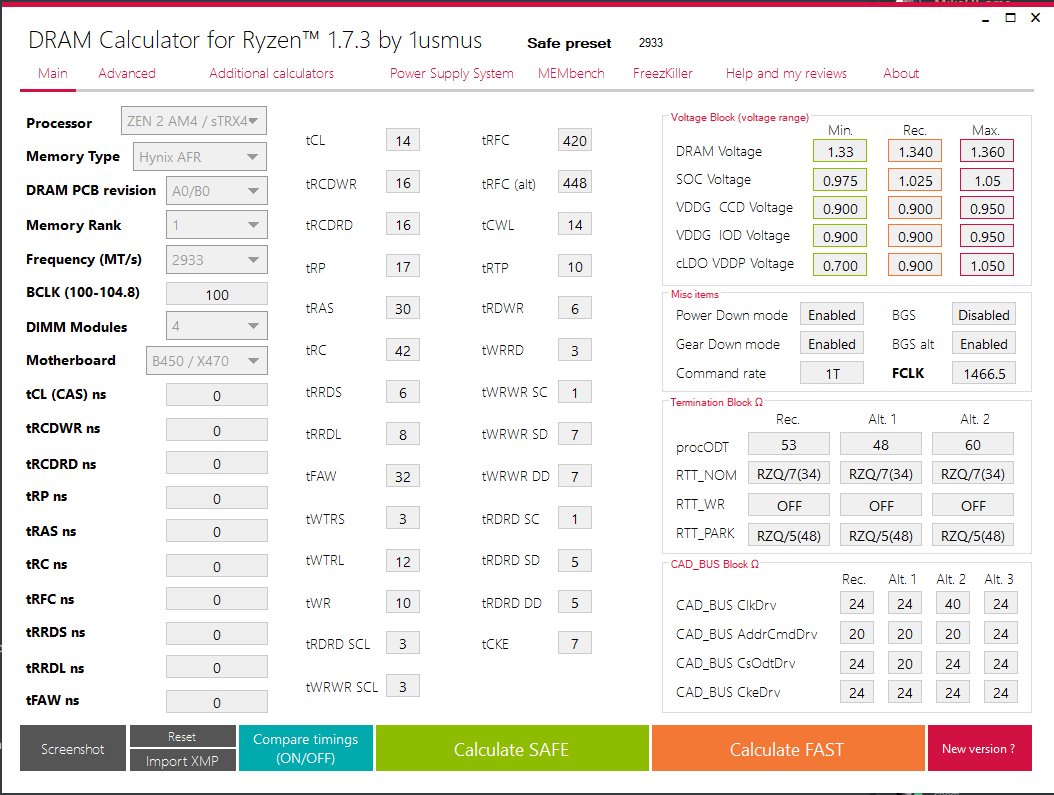
Holy mother of tight timings batman
open surge
😶
high grail
Well, I'm in windows.
open surge
GPUs behave in a very strange way...
 little hound
is it worth it to try overclocking a 3600xt
 mint mountain
little hound
is it worth it to try overclocking a 3600xt
mint mountain
little hound
is it worth it to try overclocking a 3600xt
Yeah prob
If you have adequate cooling
little hound
so 240mm aio is probably enough rigth?
 bold shore
depending on what youre trying to clock to but air coolers work too for oc
little hound
bold shore
depending on what youre trying to clock to but air coolers work too for oc
i am trying to get a decent overclock on an 3600xt
 tall pelican
test what it can do with 1.25v, then test what it does with pbo, then test what stock does
little hound
will do thanks
open surge
I guess it is the best I will get.
+200 MHz core clock
+850 MHz memory clock
105% Power limit
80% Fan speed
Keeps a solid 64°C during the benchmarking process.

 olive quiver
Would I save a lot on a motherboard by getting a cpu that doesn’t overclock
tall pelican
if you dont plan on overclocking, then dont spend the money for it
olive quiver
Yeah but I’d save a lot of money too right?
little hound
Not a lot but some
high grail
So the super tight timings that 1usmus's Ryzen DRAM calculator spat out, actually work for my kit of current RAM.
I'm honestly quite surprised they worked.
Probably didn't give a major performance boost, but it's something at least.
I'll get a nicer boost when I get my 2x16GB Kit to reduce the load on the IMC.
 clever epoch
olive quiver
Would I save a lot on a motherboard by getting a cpu that doesn’t overclock
clever epoch
olive quiver
Would I save a lot on a motherboard by getting a cpu that doesn’t overclock
Better off buying a decent mobo and setting maximum power limits. Even the "not overclockable" CPUs will just use up the power budget and turbo themselves to decent frequencies
dull ginkgo
olive quiver
Yeah but I’d save a lot of money too right?
everything depends
for example
if you buy a 5600x, there's no difference in a b550 board for 100$ or x570 board for like 200$, it's all overclocking capable
if you buy a 10600k, b560 board might be 100$, z490 board like 150$
dull ginkgo
what
dull ginkgo
dull ginkgo
if you buy a 5600x, there's no difference in a b550 board for 100$ or x570 board...
@sterile flame come back again when asus has 100$ b550 boards >:P
 sterile flame
dynamic oc switching
tall pelican
not just x570, but asus likes product segmentation
sterile flame
actually useful feature that the include on the x570 boards but not their 260$ b550
tall pelican
nah, swaps between pbo/stock boosting and a manual oc at some amount of current draw
sterile flame
^
dull ginkgo
wack
sterile flame
apparently fixes the single core disadvantage on "manual"
tall pelican
v-latch is a z590 apex/extreme only feature
die sense is maximus only feature
vttddr is only vdimm/2 or greater on strix boards, but on maximus/crosshair its whatever you want
dull ginkgo
h m
tall pelican
asus be like: "lets make product segmentation in firmware, along with hardware"
dull ginkgo
I assume someone already modded it?
dull ginkgo
the heck is vttddr
tall pelican
you generally dont need to mess with it, auto is vdimm/2
reve/revb likes it at 0.6-0.7, bdie is 0.8-0.9
with reve, if you want to clock higher than like 4000mts, you need the vttddr set to that range
with bdie, it helps tighten timings
dull ginkgo
interesting
clever epoch
So the best memory overclocking board is the unify-x by default because it's the only one with only 2 DIMM slots and proper VTTDDR control lol
Stupid that asus doesn't give VTTDDR control for Strix boards
clever epoch
Only positive offsets for VTTDDR does not count as real VTTDDR control :p
tall pelican
its not really an offset (asrock does offsets)
 still hull
so about oc if the maxx turbo boost is 5.0ghz can you like oc it to 5.4 ghz or something
 quick rose
Dpends on if it's a K processor and the board supports overclocking and how good your CPU cooler is
quick rose
Yes, all Ryzen CPU's can overclock on pretty much all the motherboards
NOt restricted like Intel
 proven canopy
With enough cold and volts, yes
 signal belfry
Only zen 3 is kind of worth overclocking bc zen 2 and below can’t even hit there rated speeds
I’d just use pbo
sterile flame
signal belfry
Only zen 3 is kind of worth overclocking bc zen 2 and below can’t even hit there...
This is a chip by chip basis. One 3600 can barely hit 4.1Ghz stable while another can hit 4.5Ghz and be on the net. PBO is the way to go, yes, better than manual wasting so much time for barely a measurable difference in most people's cases or only stable within benchmarks, but not within some games or system wide tasks in windows
 dim plank
is max boost clock the same as overclock? Does it mean maximum overclock speed?
sterile flame
dim plank
is max boost clock the same as overclock? Does it mean maximum overclock speed?
Top boost clock is just the highest the chip will be allowed to go. You may overclock past that depending on the chip. Not its not the same thing.
The maximum you can go changes from chip to chip. Some people may get good ones, some get ones that barely get past a boost clock. But you get what you payed for no matter what. If it says the boost clock is 5.0Ghz then you're guaranteed that.
 vale nymph
This is what is referred to as the silicon lottery
sterile flame
Yep, here's two 11900K CPUs Optimum Tech received for example. One can clock the same (possibly higher too), and more efficiently than the other.
olive quiver
Is an mATX suffice compared to an ATX motherboard
dull ginkgo
It's the same thing, just without the extra slots
olive quiver
Oh. So really I can get a mATX that’s just as good as an ATX there’s just nor as many slots in it
dull ginkgo
Basically
 zenith palm
Quick question, for overclocking my ram should i do it in AMD overclocking in the bios or advanced memory settings?
clever epoch
bios
bios always for memory overclocking, and I would heavily recommend BIOS for cpu overclocking as well
clever epoch
oh. I've never used the "AMD Overclocking" section in my bios for memory overclocking
I'd probably just use what is most accessible to you in BIOS
zenith palm
Yeah i went into the advanced mem settings instead clearly too high of speed tho XD cmos reset time
zenith palm
any other ppl knowledgeable with ram ocing, I'm trying to OC my ram, it's Samsung c die and fal cie said that it should probs boot at 3600cl16 no prob with 1.4v but I've got 3 sticks do i need to change something, because i can't get that to boot even 3400 wasn't booting
sudden torrent
Skip over 3400 and go to the next step up, not the first set I've seen that didn't like 3400 for whatever reason
1.1v SoC
1.0v VDDP
1.05v VDDG
Load line calibration level 3, or 4 if you have CPU overclocked too
Try to get it to hit the target frequency before you tighten the timings
@zenith palm
zenith palm
Okay thanks I'll give that a go, just pbo on my cpu
sudden torrent
Might as well go for LLC lvl 4, it won't hurt
zenith palm
Thanks, I'm trying now 🤞
zenith palm
sudden torrent
Might as well go for LLC lvl 4, it won't hurt
I don't seem to have llc is that okay?
sudden torrent
What motherboard do you have? It's usually under the power options or CPU overclock menu
zenith palm
Gigabyte b450m ds3h
Under cpu overclock i see cpu frequency, cpu voltage, ccd control, core control and smt control
sudden torrent
Is yours one of the models that has the M.I.T. menu?
sudden torrent
Not at all, one sec I found screenshots
zenith palm
Okay thanks because i googled and ppl on Reddit where saying it was bad lol
sudden torrent
Nah you just don't want to set the voltage too high because LLC will hold the voltage higher under load
zenith palm
Ahh i see
sudden torrent
If you can find "advanced power settings" it should be under there
zenith palm
That's all i got under the mit window
 sudden torrent
try advanced voltage
zenith palm
Just DVID, DVID SOC and dram voltage
sudden torrent
Hmm, miscellaneous?
zenith palm
Just pcie slot config and 3dmark01 enchanement
sudden torrent
Funny that that's a setting
You BIOS is different from the one I'm looking at then
sudden torrent
Go ahead, but if it's unstable under load you'll need to find it later
zenith palm
Okay thanks
Well its booted into windows so thats a good start
Ffs it blue screened
sudden torrent
That's an improvement, just need to do the timings now
zenith palm
But it blue screened as soon as it opened ms teams lol? Should i not be worried about that or can it be fixed
 wet whale
Hi everyone, I was sent here by Newegg support team for some advice. I brought 2 sets of 3800C14D-32GTZN DDR4 RAM and when I enable DOCP and reboot, my pc switches off then after a few reboots goes into safe mode. Am I in the right place for some help?
sudden torrent
zenith palm
But it blue screened as soon as it opened ms teams lol? Should i not be worried ...
That's an easy fix. What were the timings when you did that?
zenith palm
Just auto i believe
sudden torrent
wet whale
Hi everyone, I was sent here by Newegg support team for some advice. I brought 2...
Definitely the right place. What specs are you working with? CPU, motherboard?
wet whale
Great 🙂
sudden torrent
zenith palm
Just auto i believe
XMP on with auto, or just jedec? Either way, probably too tight on the timings since it expects a lower speed. Try 18-20-20-40 to start, and if that tests fine go lower.
zenith palm
Okay, ehh it was just 3600 with the voltage settings you said before
sudden torrent
Yeah if you have it on auto it'll just load up whatever the XMP or jedec timings are, which is bad. At least it booted which is more than I'd expect in that scenario.
zenith palm
Ahh okay, I'll try those timings in a few
wet whale
Specs: AMD Ryzen 9 5950X – Latest Chipset installed
ASUS ROG Strix X570-E Gaming Motherboard – Latest BIOS version (3603)
RAM: G.SKILL Trident Z Neo Series 32GB (2 x 16GB) 288-Pin DDR4 SDRAM DDR4 3800 (PC4 30400) Desktop Memory Model F4-3800C14D-32GTZN
ASUS GeForce RTX 3090 24 GB ROG Strix GAMING OC
Samsung 980 Pro 1TB on M2 motherboard slot 1
Samsung 980 Pro 1TB on M2 motherboard slot 2
Samsung 970 Evo Plus 2TB on PCI-E lane 3
Corsair RM850x PSU
Corsair iCUE H150i ELITE CAPELLIX Liquid CPU Cooler + x6 Fans in push/pull
Windows 10 Pro 64bit OS
zenith palm
Thanks fal
wet whale
RAM is x2 so 64 GB ram
I have very little experience with BIOS level changes but lots of experience in OS at an enterprise level. This is my first PC build
sudden torrent
wet whale
I have very little experience with BIOS level changes but lots of experience in ...
Nice! You've got an advantage over most people I'd say. Very nice set of specs too.
The issue here is that the IMC (memory controller) on the CPU isn't able to go full speed on 4 sticks, but we can add more voltage and hope that fixes it. Start with this:
1.1v SoC
1.0v VDDP
1.05v VDDG
sudden torrent
Both
wet whale
To 1.0?
sudden torrent
VDDP is 1.0, VDDG 1.05
sudden torrent
Right, both of them 1.05
wet whale
I can’t post pictures in here? Sorry new to discord too! Haha
sudden torrent
Yeah need to be higher level for pics, DM me if you need to
wet whale
Set and rebooted but post failed and went into safe mode again
sudden torrent
Ok. Hard to tell at this point if it's the IMC or the IF that doesn't like that speed, so I'll run on the assumption it could be both.
SoC 1.2v
VDDG 1.1v
wet whale
That’s now set and went into safe mode again
Btw the FCLK is set to auto which is showing up at 1800mhz
sudden torrent
Drop SoC down to 1.15v and you can set fclk to manual 1900, but that won't help it boot. Doing a bit of research.
Try setting Load Line Calibration (LLC) to level 3, I believe it's under Digi+ VRM menu
wet whale
Sure no problem
Same result
Also for what it’s worth, I did some research and people online suggested it was something to do FCLK but I was able to post if set the FCLK to 1933 but memory speed to 3600
With DOCP enabled
sudden torrent
Yeah I doubt it's fclk at this point, Zen 3 can handle 1900 with no errors, sometimes 1933+
wet whale
I also know this is wrong as it’s best to be in 1:1 but though I’d mention it
Thought*
sudden torrent
Just for testing purposes it's fine, but I'm sure you're aware of the latency penalty
wet whale
Yup I ran Aida64 and saw for myself 😂
 latent kettle
how do i over clock
tall pelican
If you're on asus, there's a high chance it just won't do 1900
sudden torrent
Oh hi Fitz
tall pelican
I was referring to the amd system that was having trouble doing 1900if
latent kettle
?
sudden torrent
I was about to suggest loosening the timings to take some strain off the IMC, what does the expert think?
latent kettle
(╯°□°)╯︵ ┻━┻
tall pelican
What ic?
wet whale
I can get it to 1933 and even 2000 but just speed of the memory can’t cope if I set it to 3800mhz
wet whale
Happy to try any suggestions
sudden torrent
4 sticks though, that's where the issue is
wet whale
It’s Samsung BDIE
tall pelican
Leave it on 2133 auto, and use the voltages that the mobo sets for 1933if
Then if still no 1900if, its the asus™️ 1900if hole
sudden torrent
latent kettle
how do i over clock
What are you trying to overclock? Intel limits overclocking to k SKU chips, but depending on motherboard you could do memory overclock. GPU overclock is easy.
sudden torrent
tall pelican
Then if still no 1900if, its the asus™️ 1900if hole
He said the IF booted at 1933 with memory at 3600
wet whale
tall pelican
Leave it on 2133 auto, and use the voltages that the mobo sets for 1933if
So memory speed on auto and FCLK set to 1933 right?
dull ginkgo
if you're new to OC, you might want to 
latent kettle
i dont really need to over clock just wondering what it is
sudden torrent
I'm convinced it's the IMC because 4 sticks at those extreme timings would be quite a strain
tall pelican
sudden torrent
He said the IF booted at 1933 with memory at 3600
So use the imc volts from that and try it at 1900
wet whale
Yup I have screenshot from zentimings showing I can post if I set to fclk to 1933 but only if memory is set to 3600
tall pelican
And note that zentimings reads vsoc 2 ticks lower than what it actually is
sudden torrent
Tried SoC 1.15v, VDDP 1.0v, VDDG1.1v, still no post
tall pelican
Prob just asus™️ 1900if hole if nothing works
sudden torrent
Could try running 2 sticks and see if that boots to narrow down the issue
wet whale
I will try that next
sudden torrent
If 2 sticks doesn't boot Fitz is definitely right
sudden torrent
Must be the IMC then, doesn't like having to drive that much memory.
wet whale
When you say memory controller, that the CPU or mobo?
sudden torrent
The IMC is located on the CPU
wet whale
Damn so the best thing do is loosen the timings?
sudden torrent
Well, lets start with why you need 64GB of memory. Chances are 16GB is plenty for gaming, 32GB is likely enough for 3D modeling and video editing.
Did you have an application you use in particular that needs that much memory?
wet whale
Ok, I work in the IT industry and as part of my role I do a lot of virtualisation. In my spare time I try to learn new things by creating test labs in VMware workstation. Some env consists of 8+ servers and a 2 hypervisors in some instances
So I need a lot of ram
sudden torrent
Ah, I see. More memory and cores makes sense then.
wet whale
On most days I suck at warzone otherwise 😊
sudden torrent
Ok, what we can try then is to disable Gear Down Mode and set CAS to 15
If that still doesn't work GDM on CAS 16
wet whale
Btw i set the FCLK to 1900 now with the speed at 3800. It booted but with a yellow light on mobo and the screen stays black . So I think 1900 deffo is still a bug
Clearing CMOS now
To try what you suggested
If I set it 1933 it’s goes to the windows screen no issues
sudden torrent
Hmm. Combination of both problems perhaps? For now lets get the memory to post before we mess with fclk, leave fclk on auto.
wet whale
Sure
sudden torrent
We might even be able to get it overclocked to 3866 with fclk at 1933 to keep it 1:1, unless 1933 introduces WHEA errors
So let's go back to 4 sticks for now and see if we can get it to post with memory on XMP
wet whale
Ok I’ve cleared CMOS enabled XMP, set soc to 1.15, set both VDDG to 1.1 and VDDP to 1.0
Ok, so this but I’ve never done before. Should I be going into DRAM timings and setting CAS column to 15
It’s currently 14
sudden torrent
Yes, but you'll also have to go down until you see Gear Down Mode or GDM and disable that, or else it'll force CAS to 16
wet whale
Ok set gear down mode to disabled and CAS to 15 and load line calibration to level 3 again
No post
wet whale
Should I set GDM to enabled again?
sudden torrent
Yes
wet whale
Set and rebooted, no post
sudden torrent
Ok. Since you have B-Die memory (that's why it cost so much more) it should be able to handle extra voltage. Set CAS back to 14 and change DRAM voltage to 1.55, if it boots great we'll try to get it lower again so it doesn't have overheating problems.
wet whale
Tried that and went back to safe mode
sudden torrent
CAS 16 and try to boot again, if that fails there's only one more thing I'd try before passing the problem to an expert overclocker.
wet whale
That didn’t work either
sudden torrent
Set memory clock speed to 1933. If that STILL doesn't work, 1866.
(3866 and 3733 respectively)
wet whale
So neither of them worked
tall pelican
if he's on dual rank, he pretty much needs gdm on
wet whale
The sticks are dual rank
sudden torrent
tall pelican
if he's on dual rank, he pretty much needs gdm on
Fair point. Do you think Forks would have any insight? Or anyone else?
It booted with 2 sticks at 3800 if you weren't keeping up
tall pelican
I mean, asus 100% has issues with some boards just not doing 1900if with anything
if it can do 1900 with 2 sticks, then more soc and vddp
sudden torrent
Ok, we're getting into unsafe voltage territory though moving much higher.
Memory clock 3800
1.2v SoC
1.075v VDDP
wet whale
When you mean unsafe, does that mean if ran at these voltages for a long time the components will degrade? Or do you mean it can instantly die forever lol just checking
sudden torrent
We're not at instant death range (that's much higher) but getting close to degrading range
zenith palm
Hey fal, earlier you said 18-20-20-40 for my timings, but am i right to do this
 sudden torrent
The memory I'm not worried about at all, B-Die can handle 1.7v often
sudden torrent
zenith palm
Hey fal, earlier you said 18-20-20-40 for my timings, but am i right to do this
Yes, and you can see how the auto settings went for straight 15 which is WAY too tight
zenith palm
Ahhh i see
Thanks i wasn't sure because there was 3x 20 and you said 2x 20 so was just checking thanks
Should i use occt to test if i get into windows and dont bsod again?
sudden torrent
tRCD RD/WR typically match when you're testing, they can be different as you tighten further
zenith palm
Ahh cool thanks
sudden torrent
Yes test with OCCT
For example, mine are 15 and 13 but if I lower the 15 I don't boot
 zenith palm
Ahh i see
wet whale
I will set them voltages. What shall I set the memory frequency to and Fclk
sudden torrent
Leave fclk auto for now and memory frequency 3800
sudden torrent
80% is enough to do a quick 15 minute test
wet whale
Ok that went to safe mode too
sudden torrent
Yeah
zenith palm
Pc screen went black then back that doesn't sound good
sudden torrent
Well it's supposed to reset to do the timings, give it a minute
zenith palm
Okay
It happened like 2 times now
This looks wrong :/ ?

Now full black
Okay looks fine now after the black screen
It keeps black screening, happened a few more times now :/
sudden torrent
Probably doesn't like the mixed kits on flex mode if I had to guess
zenith palm
Aight time to take out the old stick then
Already seems a lot more stable lol
Alright it's gone fine with just the 2 sticks, should i try drop the timing by 2 each?
@sudden torrent sorry, for tag just answer later if you're busy
sudden torrent
Just finished up what I was doing, no worries
zenith palm
Cool
sudden torrent
Start by dropping CAS to 16
sudden torrent
Happy to help, I find overclocking a really fun hobby but I lack the hardware to do it as much as I'd like, so I get to do it through other people lol
zenith palm
Nice always a good way to do tech stuff XD
sudden torrent
You can probably drop DRAM voltage to 1.35v btw since you've only got the 2 sticks, C-Die doesn't always like more than that
zenith palm
Ohh, should i drop first I'm already back in windows?
sudden torrent
Nah just next time you're in BIOS
sudden torrent
Yep
zenith palm
It should also just log any errors it finds? Because i wanna go grab a snack lol as in i won't have to check for visual errors or something myself which i doubt but just double checking
sudden torrent
Yeah, try 16-19-19-38
 zenith palm
Okay
sudden torrent
If not, or it doesn't boot, cmos clear
zenith palm
Think clear cmos time :/
zenith palm
Okay will try after
The extra .05v hardly would make it more likely for tighter timings to work would it?
sudden torrent
On C-Die not likely
zenith palm
Wait should i try again, before i exited I've been saving the profiles and trp was still 20 when i loaded up the last one should i try again, think it didn't get 19 right or does that make a diff?
sudden torrent
It won't make a difference
zenith palm
Ahh okay
16 20 20 40 here i come
Thanks for the help fal much appreciated
Hopefully see a bit of a bump in perf
sudden torrent
Should be a huge jump over, what was it 3000, 3200?
sudden torrent
1.38v
zenith palm
Okay thanks will try
1.38 worked thanks fal 🙏
Even tho the timings meh still big diff right?
sudden torrent
Yeah timings are more important here, plus higher fclk
Err, I mean to say timings are still good considering what the sticks were rated at
sudden torrent
That's CPU-Z though, not an actual benchmark
sudden torrent
Yeah that would be better, plus time spy would REALLY notice the difference
zenith palm
Okay, I'll do timespy as I already have after i upgraded to my 3070
Fal it got an error and didn't bench lol 🤦
I'm just gonna go into steam and make sure no files corrupt
@sudden torrent should i bump voltage back to 1.4v?

That was 95% mem but still
sudden torrent
Yeah go ahead and try 1.4v
zenith palm
Okay
sudden torrent
That's also potentially a cooling problem if the errors came late in the test
zenith palm
It was like 2 mins i
In
And it ran the 1.4v test for 15 mins no errors
Looking good, only 4 mins in at 95% no errors this time
Got 1 error so far does whea error mean anything to you @sudden torrent ?
sudden torrent
A single error means it failed
That far into the test though, might be cooling as I mentioned since that die is very temperature sensitive. Do you have a fan blowing over the sticks?
sudden torrent
Hmm. Lacking a temperature probe or internal sensor, you can always go by the touch test. The heatsinks can be warm but not too hot to touch.
zenith palm
Okay lemme reopen case and se
They feel warm but just like a nice warm not too hot
I think
Mb a bit too warm
In the middle
sudden torrent
Judging by that description I'd guess they're around 50-55C
Do you have a small fan to put directly on the modules?
zenith palm
No
I'm guessing 50c is too hot
Yeah i think it might be getting a bit too hot, any advice?
sudden torrent
With how sensitive C-Die is known to be yeah, that's a bit too hot. You've got a liquid cooler right? That complicates things. You'll want something that can move the air between the sticks. I might be able to suggest more from a pic of the clearance between the RAM and top fan.
 sudden torrent
Are you able to slide that top fan over so it's more centered on the RAM?
zenith palm
Nope 120mm slot for fan on top
sterile flame
icepack on the dimms
sudden torrent
Can't really tell in the pic, is that top exhaust?
sterile flame
looks like it
sudden torrent
sterile flame
icepack on the dimms
Yes that would work but not for daily lol
zenith palm
sudden torrent
Can't really tell in the pic, is that top exhaust?
Yep
sterile flame
sudden torrent
Yes that would work but not for daily lol

zenith palm
Yeah dont have an infite supply of ice pack mando :/
sterile flame
u should
i always got icepacks
who knows when 17 kids are gonna come to your door with scraped knees?
sudden torrent
I'd flip that one and do top intake if you only have one intake fan
sterile flame
^
sudden torrent
zenith palm
Yeah dont have an infite supply of ice pack mando :/
Order from Amazon Fresh, you get free ones every time lol
sterile flame
so thats why the shipping is so damn expensive
zenith palm
sudden torrent
I'd flip that one and do top intake if you only have one intake fan
Hmm could i try 3466 or something first don't really feel like flipping it lol planning on getting 4000d airflow soon anyway
zenith palm
sudden torrent
Order from Amazon Fresh, you get free ones every time lol
No Amazon fresh in Ireland 
sudden torrent
zenith palm
Hmm could i try 3466 or something first don't really feel like flipping it lol p...
Nah, go to 1.35v, C18
Better to keep the gains from the boosted fclk
sudden torrent
You can tighten secondary and tertiary timings to make up for the CAS
zenith palm
Might need some guidance with that, are they the ones after cas i assume?
sudden torrent
The primary timings include everything down to tRAS, secondaries are after that, tertiary are the ones with really long weird names like tRDRDSC_L
zenith palm
Ahh i see
zenith palm
No errors, 95% for 15m that okay?
sudden torrent
Should be good, you can try tightening the other primary timings too now or call it good for the time being
zenith palm
Calling it good for the night as it's definitely not 12:40 rn
zenith palm
Yeah thanks for the help good night
high grail
Can any of you RAM nerds figure out what Die is on my new kit of RAM?
Kit: Crucial Ballistix RGB White 32GB 2x16GB DDR4-3200 CL16-18-18-36
Model Number: BL16G32C16U4WL.M16FE
I want to know which Die it is so I can use the proper settings in 1usmus Ryzen DRAM Calculator.
zenith palm
You can try typhoon burner but it kinda guesses, look at the sticker on the set you have and see if there's a version number, that's how fal helped me find what die i was using on my ram
high grail
I'm not installing it in my system until I know what it IS.
I know it's gonna be Micron something
high grail
The sticks are definitely double sided.
waxen wave
can i oc hp oem rtx 2060?
quick rose
Yes, use MSI AFterburner. Should be able to
tall pelican
high grail
The sticks are definitely double sided.
if there's ICs on both sides of the stick, 8gbit rev e, but if its all on one side, 16gbit rev b
(edited to clarify gbit, since there is 16gbit rev e and 8gbit rev b)
high grail
It's Double Sided. Now I'm just trying timing configs to make it bootable with tighter timings than normal.
Yeah, it's 100% confirmed 8Gb E-Die
Checked it in Thaiphoon Burner
tall pelican
should be able to run 1.5v without an issue, but only cl scales with voltage
rcdrd will suck, and rp is kinda just random
high grail
Ah, I'm just putting it through 1usmus calculator on the Safe preset. Tried Fast and didn't get a boot.
tall pelican
what frequency?
tall pelican
what cpu?
high grail
R5 3600
tall pelican
you arent really going to get tighter timings with the same clock speed
high grail
Mobo: B450 A-Pro (Non MAX)
tall pelican
I'd try like 3733/3800 and get the IF up there
high grail
How odd, I was able to get my old ass Hynix AFR kit to run 2800 with tighter timings than stock.
And it was 4 DIMMs
This is 2 DIMMs
tall pelican
something like 16-20-20-20-40 should be fine with 3800
high grail
Don't bother with sub-timings?
tall pelican
afr tightens timings because it cant clock high
dont bother with subs at first
get stable primaries, then do secondaries
high grail
AHHH Ok, that's why it got super tight timings (I was getting like, 14-16-16-36 on the AFR kit)
tall pelican
yeah, afr golden samples will do 3600mhz
reve will do 4400+ depending on pcb and layout
tall pelican
and give it 1.5 vdimm
high grail
Is that... Safe?
high grail
And what should my Inf Fabric clock be set to?
tall pelican
try something like 1866 at first, if its stable, try 1900
tall pelican
yeah, depends on how hard you want to push the cpu
high grail
I got to Windows at 16-20-20-20-40 3800mhz
Time for a Cinebench and Timespy run
I've also never manually OCd my 3600. I used to manually OC a 6600K, but... I'm a bit scared to do a manual OC on Ryzen.
quick rose
FCLK synced at 1900?
high grail
I have plenty of cooling, a Scythe Mugen 5 Rev B in a P400A Digital
sudden torrent
Test for WHEA errors too with testmem5 or occt at that speed
quick rose
SO with ram at 3800 FCLK is desycned right now then?
sudden torrent
100% it's that
high grail
Oh right... I forgot to set the settings for the power profile too...
🤦♂️
Booted to Windows at 1900 FLCK!
Uhhhh....
What...
My Cinebench score dropped...
8578

And it's still worse than my old 4x8 kit
What the heck gives?
I also can't seem to get Ryzen Master to turn PBO on???
Anyone?
sudden torrent
You said you're on a R5 3600 right?
sudden torrent
It's tricky getting a 3000 series chip to work faster than 1800 without errors, run OCCT cpu and memory tests and I'm sure you'll see tons of WHEAs
sudden torrent
Maybe, test it to see
high grail
Got any ideas on the PBO issue?
sudden torrent
A few golden samples of 3000 chips can do 1900 so you just have to test to see where you're stable
sudden torrent
PBO you want to do in BIOS
high grail
Ohhh
sudden torrent
 lean helm
can my pc not boot at all if i mess up in oc
lean helm
can my pc not boot at all if i mess up in oc
Worst case scenario you need to reset the cmos, it's really hard to actually damage something
left bladeBOT
Skiptrace#4386 has been warned
Reason: Duplicated text
high grail
Reee
sudden torrent
The bot's extra touchy today I guess
high grail
I have a few PBO options. Enabled, 4 modes of Enhanced, an Eco mode (45w) and Advanced.
My board bios is limited due to it being a Non MAX board.
But, it still is pretty functional
sudden torrent
That won't matter much tbh it's only extra features that get cut
lean helm
sudden torrent
Worst case scenario you need to reset the cmos, it's really hard to actually dam...
oh ok
sudden torrent
Start with enhanced mode 1, anything beyond that you'll want to get into advanced and tune it yourself
high grail
Got it
8677... Still slower than my old kit. And I dont know why.
My old kit maxed out at 8869 in CB R23
I'm kinda miffed.
I mean, it ran at 2800mhz
That should by all intents and purposes SUCK for Ryzen.
And on top of that the Single Core CB R23 run isn't even pegging out a single core at 4.2Ghz
tall pelican
the slower your memory is, the higher your cores will boost, and given that cinebench doesnt care about memory, its entirely possible the slow kit scores more than the fast kit
sudden torrent
OCCT
high grail
I thought "Faster RAM = Ryzen Go nyoom more"
high grail
I guess this upgrade was more of a "Let's take some stress off my IMC"
Since I went from 4x8 to 2x16
sudden torrent
Gaming benchmarks like heaven and time spy would see a lot of benefit
high grail
Ohhh
Good point.
Let me do a Timespy Run
My best CPU Timespy run was 6831
Holy moly. Got a 7245 on Timespy CPU Score!
That's a 400 point improvement
I'm gonna call that a Win for now.
sudden torrent
Yeah that's an 8.6% increase, not bad at all
proven canopy
If you're sticks are dual rank it's the same load on the imc
You get a performance benefit in 2 ranks/channel anyway
high grail
Oh, so it's same load, but more benefit in the case of going down to 2x16. I'm pretty sure my AFR kit was single rank modules.
 earnest onyx
Question. Is samsung ddr4 1200mhz ram XMP ready or no not really? I tried looking it up, didn't see anything I could understand or translate into english from techspeak.
dull ginkgo
(I'm assuming they don't have it and are looking to buy, but dunno)
dull ginkgo
DMs work if bot eats iamge
earnest onyx
Am I dming you or forks
earnest onyx
Yea, I was thinking that.
proven canopy
Post here
earnest onyx
Here you are, this what you wanted?
 proven canopy
Post the spd as well
earnest onyx
Where would I find that, just curious. Haven't really used CPUZ before
proven canopy
Next tab over
proven canopy
Just one if they're the same sticks
earnest onyx
I have two that are the same, slots 1, and 4, slot 2 is the same speed but is a different part number as is slot 3.
Would you like them here?


The slot number is in the top right, slots 1 and 4 are identical hence just slot 1 was posted
earnest onyx
Ahhhh ok, didn't think there was but I wanted to be sure. Thank for the help guys!
sudden torrent
Download MSI Afterburner (works with other GPUs as well)
Max out the power and temperature target bars
Increase core by +15 and test for artifacts/glitches, once core becomes unstable pull it back a notch
Increase memory by +20 until the GPU becomes unstable again
You can start with +60 core and +400 memory, most cards should be able to do that easily but if yours can't just lower the numbers until it's stable again
sterile flame
when i do that my cpu temp goes to 100%
sudden torrent
Temperature is measured in degrees Celsius, what are you measuring with a percentage?
sterile flame
hang on
can u help me in call?
on the kombustor it says my temp goes up to 80 degress celcius
and to like 100
sudden torrent
80 is perfectly normal, and even 100 won't damage a GPU
sterile flame
on the cpu tho
sudden torrent
Odd, what CPU?
sterile flame
I5 4460
sudden torrent
Well no wonder, that's a really outdated chip. It'll have trouble keeping up with a modern GPU.
You're on the stock cooler I'm guessing?
sudden torrent
A $25-30 air cooler like the SE 224 or Gammaxx 400 will keep that chip nice and cool
That should help at least, and then you can use that cooler after you upgrade as well later
sterile flame
would thermal paste help also?
sudden torrent
A new cooler would come with paste
Stock paste is usually fine, the best stuff makes maybe a 3 degree difference on a good day
 dark ferry
I still use Arctic Silver.
tall pelican
4000 18-22-22-42 1.35v xmp

vs 5 mins of tuning secondaries

(most of the 5 mins was recovering from trfc too low  )
)
proven canopy
What IC are those
 stark lodge
How do you get into overclocking?
stark lodge
alrighty, I'll get to reading. Quick question though, is losing data a big issue to worry about with ocing?
quick rose
Not at all
tall pelican
with memory overclocking, it can be
stark lodge
memory overclocking sounds scary lol, I've seen some horror stories
dark ferry
Memory Overclocking from what I've seen is just extremely time consuming. Half the time the guides expect you to already know things about timings you definitely don't know, or assume you're going to follow blindly without a real understanding of what you're changing.
tall pelican
tall pelican
vs 5 mins of tuning secondaries
.
 chrome smelt
How far can one overclock on cpu ? Like can you push the cpu far beyond it's capabilities to lets say: 400% instead of the usual 100% ?
tall pelican
No, its closer to 105-110%
chrome smelt
oh..., maybe I was expecting a bit too much
proven canopy
Some chips like intel 2nd gen can get 30% OC on air
dim plank
Hello guys. What is the max safe voltage for ZEN+ cpus? Safe from degradation?
sudden torrent
1.35v should be long-term safe if it's cooled properly
sudden torrent
Yes
That should be fine, 1.4v wouldn't be too much of a problem either but again, added heat
dim plank
is there some kind of degradation with 1.4v?
sudden torrent
Not anything you'll notice in a year or 2
dim plank
Hello guys. Just wondering, does high voltage ex:1.45v safe while in idle?
sudden torrent
Yes, that's the normal behavior of the chip when it's on auto. The voltage is higher at idle and droops when under load.
dim plank
From what I have read so far, high voltage in idle is fine as long as the voltage is not high in load?
sudden torrent
Yes, that sums it up nicely
But if you're setting a manual voltage target, the voltage won't droop as much and may be dangerously high at load
dim plank
sudden torrent
But if you're setting a manual voltage target, the voltage won't droop as much a...
Thanks again.
sudden torrent
No problem
dim plank
Is it safe to input high votlage to bios as long as the cpu voltage hwinfo reported is low? ex: bios input= 1.5v hwinfo vcore= 1.3v
What if hwinfo only reports 1.3v as max? Does it still mean I have to consider the high voltage flactuations that hwinfo might not detect?
sudden torrent
1.5v is dangerous voltage, well above the AMD recommended max
dim plank
I am not so familiar with voltage input in bios vs hwinfo vcore reporting. I thought that as long as the vdroop goes to 1.3v max in hwinfo it is fine. Does vcore input in bios still matter instead of referring the voltage from hwinfo?
tall pelican
to an extent, idling super high can be dangerous
dim plank
From my thinking. I though I could input as hig has 1.5 -1.6 v as long as the idle or load max voltage is around 1.3v.
does the voltage you input in the bios(before the vdroop) go to the die or chip? That is why it is still not safe? @tall pelican @sudden torrent
sudden torrent
Pushing too much voltage into the chip, even at idle, can cause it to immediately die
If droop is a problem for you, just set load line calibration to level 4
dim plank
I see. I thought that the input in the bios could just be a number and it is still not the actual voltage that the chip would recieve. And the actual voltage I should consider is only the resulting voltage applied after the vdroop.
sudden torrent
The voltage in BIOS is the only correct one, often the voltage reported to the OS is inaccurate or has an unspecified offset
You can see the current voltage under whatever your board's version of a system monitor is in BIOS
dim plank
I was seeing 1.290v max in hwinfo. And I thought I could increase the input voltage in the bios around 1.5v. because the vdroop will just turn 1.5v input in the bios into 1.35v max in hwinfo vcore.
quick rose
LLC will help with Vdroop
sudden torrent
Correcting the vdroop with load line calibration is a better option than risking your hardware
tall pelican
red line is what llc you set
 dim plank
tall pelican
red line is what llc you set
dim plank
tall pelican
red line is what llc you set
Can load line calibration go beyond the voltage input?
tall pelican
like higher than bios set?
dim plank
yes
signal belfry
dim plank
yes
It can happen in Asus bios if u max out the llc
When u put a high clock that needs more voltage in asus bios max llc it will add voltage at least in my experience
When it did it actually added just the right amount which I found kind of surprising
signal belfry
tall pelican
red line is what llc you set
It’s better to have it with a set safe voltage going in a straight line
In other words no vdroop at all
tall pelican
no
signal belfry
tall pelican
no
Why?
tall pelican
https://cdn.discordapp.com/attachments/706607974004686920/722581079461986374/O-scope.png zoom in on the red line and it looks like this
 tall pelican
signal belfry
When u put a high clock that needs more voltage in asus bios max llc it will add...
tall pelican
signal belfry
When u put a high clock that needs more voltage in asus bios max llc it will add...
the "added" voltage is superio misreadings
signal belfry
tall pelican
https://cdn.discordapp.com/attachments/706607974004686920/722581079461986374/O-s...
Can u explain this with more detail pls?
tall pelican
the green line is based on the llc you set, the "flatter" your llc, the higher transient spikes you'll get
and you will always have a voltage drop before the vrm can adjust the voltage, to the point where a flat load line wont have any affect on it
sterile flame

Kits featured in the video:
BLM2K8G40C18U4B 4000 CL18
BL2K8G36C16U4B 3600 CL16
BL2K8G32C16U4B 3200 CL16
BL2K8G30C15U4B 3000 CL15
BLS8G4D30AESBK
My Patreon: https://www.patreon.com/buildzoid
Teespring: https://teespring.com/stores/actually-hardcore-overclocking
The Twitch:https://www.twitch.tv/buildzoid
The Facebook: https://www.facebook.com...
 woven oar
is +1100 on vram safe?
I'm trying to get the most out of my 1660 ti in terms of mining performance.
sudden torrent
If your card doesn't crash or artifact, sure it's safe
The higher you go the more likely it is to crash though
woven oar
okay, thanks!
 bleak sable
Hynix C die is good right
quick rose
It's meh
 restive cargo
 tall pelican
Overheats at xmp if you mem test it too 
 fading eagle
5.2 all core on core voltage on a 10850k
 real prawn
So it seems my 3600 CL16 overclock was actually not stable, as I hopped on today and was hit with a blue screen for memory management.
I decided to drop it back to stock XMP at 3000 CL15 and pushed my 3950X from 4.15 Ghz to 4.25 Ghz. Testing the speed now.
tall pelican
did you stability test your mem overclock?
real prawn
So 4.15 was 641 seconds, and 4.25 was 638 seconds. The 3333 ram was 629 and 3600 was 620. So clearly RAM+FLCK is better, but I don't really want to continue diagnosing a faulty RAM OC. Rather just buy a better RAM kit at that point.
tall pelican
if you just plug in dram calculator, ofc its going to be unstable
real prawn
I had, yes. I let it run overnight and it had 0 errors.
I didn't. I was using advice from here and from a guide I saw.
I got 3000 15-17-17-35 to something like 3600 16-20-20-38. It was stable, but I got a memory management bsod today, so I decided just to not deal with it and reset to stock XMP.
tall pelican
if you follow the ddr4 guide on here, you shouldnt run into random bsods
real prawn

I had spent 4 days on it already. Don't really care enough
At least with a CPU overclock, I can expect when it would probably crash. With this RAM OC it's completely random, not including hidden errors.
zenith palm
Maybe try 3600 cl18 because you'll take advantage of the higher fclk
real prawn
Maybe in the future. I just want a PC that runs stable at the moment.
I do think RAM overclocking is cool, but it really only seems worth it if you already have high speed RAM and want to push it to insane levels for fun. I probably wouldn't use a machine daily that has a RAM OC outside the XMP preset that the kit is rated for.
sudden torrent
Yeah taking a low grade stick and forcing it to be faster isn't as reliable as taking a higher rated stick and making it run tighter
real prawn
I mean, it was cool as heck, especially seeing that 3.3% improvement.
 slim oyster
anyone know why when downloading the chipset driver for the ryzen balanced power plan, after installation and restart it does not show in my power settings?
sudden torrent
Do you have a 5000 series CPU?
There's no special power plan for 5000, it's only for zen 2 or lower and zen 3 is the 5000
 short otter
My 1650ti memory can be clocked higher than my 2060's by 600 mhz
It's driving me crazy that my 2060 just won't accept any higher than +220 memory
I got +1150 on my 1650ti
zenith palm
You can't really compare the deltas, 2060 should have higher mem clocks in the first place anyway
short otter
well after it all my 1650ti can clock higher in memory by 600mhz
it's kinda silly ngl
they already have similar speed gddr6 since that's the main upgrade for the ti version
sterile flame
short otter
it's kinda silly ngl
Why? because they aren't gonna give everybody good bins
they bin for factory OC
at best
which is usually just core
short otter
Yeah my core clock can hit 2120mhz on my 2060
like that's a super good bin for the core
it was already factory oc'd
but the memory barely can be pushed any higher, which honestly I find more important, especially with the smaller frame buffer
sterile flame
its not nvidias problem lol
short otter
It's mine for buying a 6GB gpu lol
Like doom eternal I literally can't max out the game without modifying it because of the frame buffer
zenith palm
Then lower details?
tall pelican
1440p max needs like 7.8 or something like that, barely fits in 8gb
real prawn
I feel like doom is a poor example, because it's the only extremely optimized game out there that legitimately runs into a VRAM bottleneck
tall pelican
rise of the tomb raider can, and HZD has used 11gb of vram at 1440p
real prawn
Meh
I think people are realistically just complaining that their poor research resulted in them not being able to play games well. I had bought a 970 when it just came out, and even then, most games only ran smoothly at medium or high settings at 1080p, not even maxed.
 robust aurora
Cod mw is using almost 8 too on 1440p max
real prawn
Well, that doesn't include the fact that CoD is a game that lets you choose your VRAM amount, and compensates for it properly. I think people forget that DirectStorage/RTXIO are becoming things for that exact reason
And note you said "1440p Max". It was only a few years ago that 1080p 60 was the standard. Now people want their games to run at max settings, really high res, without paying more money.
robust aurora
True
real prawn
Software and hardware aren't able to keep up with demand, which is why we are getting directstorage, DLSS, RTX, Tensor cores, Resizable BAR, and other technologies.
sterile flame
i need some help please, i have a ryzen 7 3700x that has served me well at 3.9 ghz for months, but today for some reason it went down to 0.54 ghz and is staying there, i’m not sure what happened, it’s extremely slow now but the temperatures are showing that it isn’t hot, so what could be causing it to be so slow
chrome smelt
Has anyone here overclocked their cpu to their fullest limits ?
Like 6ghz or 7ghz (if it's possible)
robust aurora
chrome smelt
Like 6ghz or 7ghz (if it's possible)
Well it is possible but not for a normal consumer
You need to use liquid nitrogen for those frequnecys
chrome smelt
Mane, that's crazy Gamer's Nexus and JayzTwoCents have that type if cash
tall pelican
its like $200 for a pot, $100 for dewar and $50 for ln2
and you can do 6ghz on a core or two, if you know what you're doing on water
chrome smelt
That's a couple of text books and some ramen noddles that would last a years worth of studying right there
tall pelican
that's barely 1 uni text book 
chrome smelt
Wait where do you buy your Uni books ? I buy them off from Cheap Text Books websites or Ebay, and it works
tall pelican
used on ebay
chrome smelt
tall pelican
that's barely 1 uni text book <:SadCat1:741024861224304670>
except you're right, I was forced to buy a $280 (used) book for one semester since I could't find it on the website or ebay.....
sterile flame
real prawn
And note you said "1440p Max". It was only a few years ago that 1080p 60 was the...
Standard still is 1080p
Gonna take a while since a good 1440p 144hz is 250-300 minimum
real prawn
Maybe on the steam survey, sure, there's more 1080p monitors than the rest. But that's not really the current public outlook for many games. And 1440p is a lot more popular than you think.
Back in 2014, a 1080p 144hz monitor was about $250-350.
That's when I got mine
sterile flame
Still, im pretty sure 1440p is not more mainstream than 1080
This year might change that
who knows
real prawn
It's not really about what's mainstream. It's about what developers are pushing towards (because 1440p and 4K, or even 1080p/1440p UW actually make up a significant portion of the market).
zenith palm
1080p high refresh rate is still the most popular not just according to steam but also according to sales, and until you can buy a 1440p monitor for 200 or less i wouldn't consider it the standard
sterile flame
real prawn
It's not really about what's mainstream. It's about what developers are pushing ...
The complaining was about a last gen card worth almost nothing for those titles
real prawn
IDK. All I really know is that 1440p makes up a considerable part of the market, and that so, so many people were complaining about VRAM when it really only affects people pushing 1440p on max settings in some games.
Back on a 970 I could still barely run high settings on some games at 1080p.
And now they expect a 3070 to play 1440p UW max settings 60+ FPS no problem.
sterile flame
real prawn
And now they expect a 3070 to play 1440p UW max settings 60+ FPS no problem.
the guy complaining is on a 2060, the only way you're fixing that VRAM problem is just making it better vram which is gonna make more miners buy the card
not exactly helpful for nvidia to do that, and that said, Fast vram > more vram
unless for some reason you want the 3060s garbage vram on something like a 3080
sterile flame
So I’m obviously a novice when it comes to manual overclocking. I was thinking of PBO + Auto OC my Ryzen 5 3600. Is it worth it? And how do I go about doing that? Any tutorials I should look at? 🤭😅
sterile flame
sterile flame
So I’m obviously a novice when it comes to manual overclocking. I was thinking o...
just go to bios and enable pbo
 lunar bear
i'm afraid to put liquid metal on my laptop cpu :/
and it's over heating in warzone 😦
sudden torrent
Why? Repasting laptops is easy enough and a great way to drop temps a few degrees.
lunar bear
LIQUID METAL
sudden torrent
Yeah? Just don't put too much
lunar bear
i have repaste my laptop and it was good but for a few months only
i could kill my laptop 🙂
sudden torrent
Do you have a cooling pad? Might be easier if it scares you that much
sudden torrent
Then your options are re-paste, get a better pad with a more direct fan, or deal with the overheats.
sudden torrent
You could do that, but keep them near the original vent
zenith palm
Make sure you do it with the backplate off lol and dont decimate your poor laptop
sudden torrent
I'd hope that goes without saying lol
zenith palm
Me to but sounds like something you might overlook lol
real prawn
sterile flame
just go to bios and enable pbo
I was reading that this does nothing but increase voltages, and that you actually need to tune PBO manually for it to have any benefit.
sterile flame
@real prawn any recommendations on tutorials? Im novice at overclocking 😬
dull ginkgo
@sterile flame check the pins
sterile flame
Ohh true thanks 🙏🏽
real prawn
I never even tried PBO because it's apparently better to just do an all-core on a 3900X/3950X
Plus I'd need to do a ton of testing just to even get a dataset to work off of
tall pelican
real prawn
I never even tried PBO because it's apparently better to just do an all-core on ...
I want to know who told you that, because its a lie
all core is the absolute worst thing you can do to a dual ccd zen2/3 cpu
proven canopy
Let's see some love for ddr3 http://www.xtremesystems.org/forums/showthread.php?285767-DDR3-IC-thread
I thought it might be a good idea to compile an online list of popular DDR3 ICs with known information.
Right now it is based mostly on my personal experience but I appreciate any educated contributions.
Before we begin, a couple of words on density:
Elpida
Hynix
proven canopy
proven canopy
Let's see some love for ddr3 http://www.xtremesystems.org/forums/showthread.php?...
 lavish tundra
real prawn
I never even tried PBO because it's apparently better to just do an all-core on ...
lavish tundra
real prawn
I never even tried PBO because it's apparently better to just do an all-core on ...
When you have more than 1 ccd, one ccd is always higher bin than the other. You OC that ccd higher than the other one
Per CCD OC is the way to go
or PBO
both work
real prawn
I had tried per CCX and CCD, but the gains were negligible and ultimate more unstable than a 4.25 Ghz
lavish tundra
real prawn
I had tried per CCX and CCD, but the gains were negligible and ultimate more uns...
Then you didnt try well enough
real prawn
I.E: The jump from 4.0 (stock all core when under full load) to 4.25 was much larger than pushing each CCX as far as it can go
lavish tundra
You have to treat each CCD as an indivisual CPU that you need to oc
real prawn
I had spent a whole day once pushing each CCD and then CCX to their maxes and it didn't really work, especially with heat
Once it got close to the max before crashing, it would start to have rounding errors in P95
Which was basically anything above 4.30 Ghz
And any more voltage would keep it above 95C
lavish tundra
See not all ccds are gonna go up to the same frequency
real prawn
I understand that. I had one CCX max out at 4.35 and another at 4.575 Ghz
lavish tundra
One can hit 4.5 while the others are 4.2 and stuff like that
lavish tundra
real prawn
I understand that. I had one CCX max out at 4.35 and another at 4.575 Ghz
reduce by 25 mhz steps
keep voltage at 1.3
Then when you have your frequencies stable you can start crushing voltage
real prawn
But on the 4.575 one, it was having rounding errors above 4.5. Not to mention it needed more than 1.3V on the highest LLC setting, which I did not feel safe keeping daily.
All in all, the gains I had seemed negligible above 4.3, and 4.35 all core was actually worse, I'm assuming because of a lack of voltage.
I do want to test resetting the OC to stock and testing just to see if I was missing anything, because many benchmarks claim the 3950X to be way better than mine is.
lavish tundra
real prawn
But on the 4.575 one, it was having rounding errors above 4.5. Not to mention it...
put LLC on medium or one step above medium
1.3V
and get as much out of each ccx as possible
real prawn
I had already done that, I'm telling you
lavish tundra
then reduce voltage PER CCD by 6mv
real prawn
it had incredibly negiligble gains
and 1.3 on LLC 2 or 3 (above middle, middle respectively) would droop below 1.25 under load, crashing the system usually.
lavish tundra
I mean you are saying one CCD was stable at 4.5GHZ?
Then keep it 25 mhz below that
real prawn
I chalk it up to a bad bin and the fact that I had the ASRock X570M Pro4
lavish tundra
real prawn
I chalk it up to a bad bin and the fact that I had the ASRock X570M Pro4
more the mobo
real prawn
One CCX to 4.575. The other CCX on that CCD was 4.4 I believe, so the CCD would be 4.4
lavish tundra
even a bad bin on a ryzen 9 shouldnt perform like that
Just keep trying or use pbo on all limits maxed
real prawn
I had done per CCD at one point, but I didn't pay much attention to the results since it was basically the same as my 4.25 all core
Maybe one day when I'm bored. I've seen how much better memory speeds are, so maybe one day when I can afford it, I'll swap out to a 3600 CL16 kit, assuming I don't go for Zen 3 at that point.
Because at this point I feel like I've done all I can to compromise between speed and stability
The 3600 OC ended up failing so I just dropped it back to the stock 3000 XMP
I'd rather have a stable PC than an unstable one that's 1-3% faster.
Thing already gets to 82C on video encodes at 4.25, and mid 60s during gaming.
lavish tundra
real prawn
Maybe one day when I'm bored. I've seen how much better memory speeds are, so ma...
i mean even ZEN 3 likes 3600mhz
real prawn
Oh absolutely. I'm realizing now that many of my performance losses are probably a combination of locking it to all-core and not running a 3600 Mhz kit.
well, performance losses at least in games.
My 4.25 all core can manage just shy of 10,000 in R20
And I believe stock was about 9,000-9,300
lavish tundra
real prawn
well, performance losses at least in games.
All core doesnt matter to games tho.
most games are single core workloads
and pbo better than all core for gaming
real prawn
Yeah, I know that
It doesn't help that Zen 2 still suffered quite a bit from the cross-CCX performance losses
Before tarkov fixed itself, I was getting about 45-60 FPS with stutters versus a smooth 90-120 FPS, just by locking it to 4 cores on a CCX
I had even turned off SMT for a period of time because I was seeing a small fps boost.
lavish tundra
real prawn
It doesn't help that Zen 2 still suffered quite a bit from the cross-CCX perform...
It isnt zen 2, its the fact that ur FLCK is slow
real prawn
It still was a problem. That was a major talking point when they talked about Zen 3 having 8 cores per CCX instead of 4.
Surely my FLCK being at 1500 and all core didn't help, but there was still an inherent CCX issue that AMD acknowledged when they announced Zen 3.
robust aurora
is there overclock guide for lga 1200? cant find it in the pinned messages
proven canopy
robust aurora
is there overclock guide for lga 1200? cant find it in the pinned messages
Intel 6th through 10th gen are very similar
real prawn
It was worse on Zen 1, where the 1950X couldn't even encode video properly because of the Infinity fabric latency
robust aurora
proven canopy
Intel 6th through 10th gen are very similar
ok thanks
real prawn
At any rate, my desire for 1-3% more FPS in games does not out weigh spending that OC time doing other things, or just having a stable system
proven canopy
nah, gotta run direct die + custom loop for those extra single digit fps
4400 cl16 memory or broke
real prawn
Has anyone tried to do direct die on Ryzen yet?
lavish tundra
real prawn
It still was a problem. That was a major talking point when they talked about Ze...
ur talking about L3 cache?
real prawn
Kinda, yeah. Because the old design basically had two of processors on each CCD, and then further split with two CCDs on a processor, right?
Oddly, I saw my best gaming performance when I specifically tied a game to CCX 0_1 and CCX 1_0. Unless the way it's reported in Ryzen Master and HWiNFO is different from what affinity I set in process lasso
lavish tundra
real prawn
Kinda, yeah. Because the old design basically had two of processors on each CCD,...
You are talking exactly about unified L3 on ZEN 3
It improved perf for sure
but L3 isnt a problem at all on ZEN 2
real prawn
It's not about the L3 specifically. It the layout of the CCXs. On Zen 2, there is an infinity fabric not just between the CCDs, but between the CCXs as well.
Here is a Zen 2 CCD, where you can clearly see the middle section cutting off each CCX.

I can't find a raw image of the Zen 3 CCD, but if you look at the official slide they used, you can see the Zen 2 layout and how that middle section was moved to the bottom.

So it's not L3 cache specifically being filled or anything, but the latency between cores, as well as L3 cache.
Previously, if a core on CCX 0_0 needed data from a core on CCX 0_1, it would need to do a transfer between caches (or something like that), which introduced a bit of latency.
It doesn't seem like a lot, and many games don't really suffer from it all that bad, but I've noticed a boost of 5-10% in some games on Zen 2 simply by restricting it to a single 4 core CCX.
And as I said, oddly when I go across CCDs with one CCX each (8 cores total) it actually sometimes has a slightly between performance than a single CCX. But I'm guessing this is down to Windows optimizations and micro architecture improvements to not trade threads between CCDs or something.
Sea of Thieves is a pretty good example. I would observe an FPS boost from, say, 82 FPS to 90 FPS by restricting it to a single CCX instead of allowing it to run on all cores.
lavish tundra
real prawn
I can't find a raw image of the Zen 3 CCD, but if you look at the official slide...
That is the larger unified L3 cache lmfao
also just because a new way is better does not mean the old way was problematic
real prawn

I'm not sure what to say to that.
The new Zen 3 CCX design acknowledges that there was an issue with the original CCX design that was carried into Zen 2.
Yes, the CCX design actually wasn't too bad at all when it came to Zen 2 and performance was still great, but there was still an issue with some games not getting as much performance as they could have if it was laid out like it is now with Zen 3.
The only reason I started to bring this up is because you countered my cross CCX point with mentioning FLCK, which was cross CCD. Even though, in my tests, cross CCD was actually more performant than cross CCX (as I had just mentioned).
It's a shame because besides AMD saying it in their presentation, no one has really covered the CCX performance issues that existed/still exist on Zen 2.
Wendell from Level1 actually had reached out to me, offering me a trade for a 9900K if I could document the issue, send him the results, and then send him my 3950X. Though, I failed to follow through because of personal life.
I actually wrote a better article on it when I noticed the issue in Tarkov.

reddit
2,736 votes and 652 comments so far on Reddit
lavish tundra
real prawn
I'm not sure what to say to that.
The new Zen 3 CCX design acknowledges that th...
acknowledges there was a better way
not that the old one was problematic
real prawn
I would consider it problematic, since that same basic issue was happening on a CCD level back in Zen, where multi-threaded, time sensitive work was suffering (like software video encoding).
And even though it's kind of Tarkov's fault, and they did improve it significantly over time with patches, it was extremely problematic for me when I'm just trying to play a game just like everyone else.
Again, yeah, it's not a big deal in the grand scheme of things, but it's enough of a performance boost in some games that it could be problematic.
I'm sure if AMD admitted this issue, they could have released a software update with windows, or provided guidance for game developers to improve performance further on some games.
It was actually to the point that I was getting hitching in CSGO, where it was resolved when I forced it to 4 cores.
AMD could've done that instead of fixing it on a hardware level in Zen 3, which surely gained them more revenue by boasting an X number of game FPS boost (when it would have been smaller if you compare the performance of games running on one CCX).
lavish tundra
real prawn
I would consider it problematic, since that same basic issue was happening on a ...
just because you do doesnt make it a problem
just that a new method is better
real prawn
Just because I do doesn't mean it isn't a problem either. I firmly believe that no one really noticed it and was fine with the performance they were getting.
I'm sure if more people knew about it, or even if a medium sized tech news place reported on it, then way more people would think it's an issue, including you.
The fact that AMD solved the same problem I had by changing the architecture itself proves that it was a problem. Otherwise, it really would've just been a me issue.
Especially that every tech news outlet reported exactly the words I had mentioned about a year ago, which were parroted by a statement from AMD.
It's not like some new technological advancement that helped increase IPC (which AMD is doing well), it's a preventable problem that, honestly, I think AMD could have easily found in their testing.
I would not be surprised if they planned it this way on purpose to maximize revenue. Though, honestly, isn't a bad move and I wouldn't mind if they did, since they have been crushing Intel, and dropping Zen 3 optimizations in Zen 2 (as least the CCX layout) would have stagnated the market, which is bad for burgh AMD and Intel.
It could be that they noticed the issue, but felt that the performance boost over Zen+ was justified enough already and felt good releasing Zen 2 as it was. Which makes sense. You don't want to pour all your effort into a single product if it means delays.
clever epoch
I can almost guarantee you that the silicon engineers at AMD were very aware with the cache layout limitations of Zen2 and very much realize the fact that a workload spanning more than 4 cores will run into latency issues when attempting cross core communication.
It's not a problem so much as a limitation with the design that AMD used. If you remember, Zen/+ also have 4 core CCXs. So the update to zen 2 inherited that, and Zen3 refined it by merging them.
I'm certain this was a deliberate decision, as if you remember, Zen2 was taped out shortly after Apple's turn on the N7 node, where yields (particularly for the high performance library) were less certain
Additionally, 32 MB of cache on a chip takes up a lot of space, as you can see on the die shots. In fact, cache takes up the most area on zen chiplets.
So with such a huge volume of cache and yields being less certain, and AMD being relatively cash starved on a very expensive node, it made sense for them to be conservative with the design and opt for better yields instead.
And this is assuming that they even had the time to think about unifying the cores in a CCD. It seems easier than you think, especially with all the other core and uncore changes they made with Zen 2
Also the biggest aspect that it seems you neglect to mention is the fact that with the unified cache, a single thread has access to double the L3 it previously did. The cross-core communication penalty is secondary to that for most games
lean helm
if i wanna overclock my cpu the easiest way possible do i just put a higher speed for it and leave everything on auto?
on a ryzen 5 3500x mobo is asus prime b450/a-csm
tall pelican
enable precision boost overdrive
 clever epoch
lean helm
what is tha
clever epoch
lean helm
what is tha
AMD's advanced boosting algorithm. You should enable it in BIOS. Should be under the "AMD overclocking" section of advanced.
lean helm
do i have to manually regulate the voltages
tall pelican
not for pbo
dull ginkgo
offsets available but no need to manually set
lean helm
cause i dont wanna mess with the voltages
lean helm
tall pelican
enable precision boost overdrive
so what do i do with that exactly
can u guide me thru
tall pelican
look up for your motherboard for how to "enable precision boost overdrive"
lean helm
do i just enable it and it auto ocs?
tall pelican
yes
 orchid flame
real prawn
I'm not sure what to say to that.
The new Zen 3 CCX design acknowledges that th...
orchid flame
real prawn
I'm not sure what to say to that.
The new Zen 3 CCX design acknowledges that th...
no. this is simply put not that at all
the choice to go with a 4c CCX on Zen2 was purely an economically driven one.
at the time, N7 was 9.8k/wafer and had a D0 of 0.12
now, with wafer price dropping to 8.9k and D0 of 0.09, it suddenly became much much more economically viable to increase chipset size
also
the main performance uplift isnt actually the 8c CCX
crosstalk between CCXs was already quite rare even on 4c CCX
the main thing was that they decreased internal CCX latency
despite makeing theCCX 2x the physical size, it was still managed to be of lower internal latency
orchid flame
real prawn
Sea of Thieves is a pretty good example. I would observe an FPS boost from, say,...
that is latency driven, however not related to being2 seperate CCXs
in order to prove that you need look no farther than Renoir
the fact is the reason a single CCX is faster isnt actually rhe added latency of going cross CCX, but just the added distance. Same is true of a mesh based CPU like a 10980XE
such CPUs will perfor much much better in 2-3 core workloads if you restrict it down to a few cores that are next to eachother
had the Zen2 CCX been 8c, the internal core-core latencies would have still not made a major impact to performance.
it also comes down to how windows handles multicore communication, so its not even purely latency driven
real prawn
Is there data to back that up? Otherwise, it's speculation, which is kind of the same as what I had.
Though, I don't really want to debate this topic further, both since I see no point and because this is the overclocking channel.
I only brought up the cross CCX thing because I think I'd get more performance out of that than trying to go from all-core to PBO.
Also since the Zen 3 redesign notes specifically mentioned game performance when it came to unified cache and 8-core CCXs.
orchid flame
data to back what up exactly?
which specific point
Also since the Zen 3 redesign notes specifically mentioned game performance when it came to unified cache and 8-core CCXs.
ofc it makes a difference, just nothing anywhere NEAR as substantial as the core-core latency drop from within CCX.
real prawn
Nevermind. I guess I asked for data on a point where it wouldn't have mattered or actually proven.
real prawn
orchid flame
> Also since the Zen 3 redesign notes specifically mentioned game performance wh...
What?
orchid flame
Zen3 CCX has lower core-core latency on its furthest cores than Zen2 did on its furthest cores.
despite being double the size
that is a change entirely unrelated to CCX size, but rather design of the core-core bus.

matisse

vermeer

renoir
real prawn
So may I ask, what point are you debating with this information? Because as far as I can tell, we agree.
orchid flame
oh, I saw discussion about arch and was bored
@proven canopy you still up btw?
got some cool news
tRFC ns scales negatively with clock speed on Rev E
the lower your clock, the lower the tRFC ns you can get
until about 4400
its an upside down parabola
took some Rev E to 800, got 173ns tRFC
lowest I've seen on rev E to date
real prawn
orchid flame
that is latency driven, however not related to being2 seperate CCXs
My only issue was that, in this quoted reply, you said it is latency driven, and nothing about it being two separate CCXs.
This is despite the fact:
The net win of the new structure from greatly improved cache hit rates for application with larger memory pressures, taking advantage of the full 32MB L3, as well as workloads which make use of heavy synchronisation and core-to-core data transfers: Whereas in previous generations two cores in different CCX’s on the same die would have to route traffic through the IOD, this on-die penalty is completely eliminated on Zen3, and all cores within the new CCD have full and low-latency communication to each other through the new L3.
https://www.anandtech.com/show/16214/amd-zen-3-ryzen-deep-dive-review-5950x-5900x-5800x-and-5700x-tested/4

 orchid flame
yeah, didnt phrase that the best
its just that cross-talk doesnt happen all too often in games
it does help
but had it still been a 4c CCX, the other changes to the CCX would have themselves brought substantial gains
real prawn
The only reason this whole thing started is because Confused was, I guess, assuming I was only talking about the unified L3 cache, and not about the IOD.
Oh I agree, but it's clear that Zen 2 had a problem when it came to game thread optimization. Confused was somehow pretending like this wasn't an issue at all, and just a design improvement.
orchid flame
game thread optimization
less of an architectural defect and more microcode an scheduler related
the windows scheduler has gotten massive amounts of updates recently to be better optimized for Matisse
real prawn
The fact that I could assign one CCX per CCD and performance increased further in all my tests shows that it was a software optimization thing, at least I think. But when it was two CCXs on the same CCD, the OS or whatever manages threads didn't think it was a problem to have threads across CCXs.
orchid flame
something thats helped performance substantially
real prawn
I would say it's both, honestly, but I guess it depends on the game. A game that uses two or three threads, and having it go across CCDs would incur a major performance penalty. But the thread management keeping it in on a single CCX can help. That was basically all I was seeing.
But then, a game like FS2020 saw FPS boosts with every thread I gave it. It did not care about what threads it used since the game is inherently slow in the first place, to where the processing on a single thread was slower than what latency would do to FPS.
orchid flame
well yeah thats expected in FS2020
the only real games I see scale like that are games made on AnvilNext2.0
and any similar engine that scales to 8+c
real prawn
I'm guessing that DOOM would be a good example too, but I haven't tested it. I don't even own it.
orchid flame
I can test using smth like pocess lasso or just manually changing thread affinity