#overclocking
1 messages · Page 66 of 1
 quick rose
 olive quiver
Oh okay. And is there crazy benefits for it really or no?
 ancient pumice
not huge benefits, but it's nice to have a big number ngl
olive quiver
Ah okay. So should I just get a pc that is capable of over clocking in case I ever do,
?
 sudden torrent
Some people can get 20% more fps from overclocking, but usually it's less
 proven mango
olive quiver
Ah okay. So should I just get a pc that is capable of over clocking in case I ev...
proven mango
olive quiver
Ah okay. So should I just get a pc that is capable of over clocking in case I ev...
i belive all graphics card that are newer than like the nvidia 700 series can overclock
ancient pumice
olive quiver
Ah okay. So should I just get a pc that is capable of over clocking in case I ev...
sure, if that's going to be one of your goals with the pc, to be able to overclock
proven mango
idk abt cpus tho
sudden torrent
If you get a Ryzen CPU then everything will be able to overclock anyway
olive quiver
Okay. I’m getting an intel probably. I’ll see the price of my pc and see the price difference of getting something I can over clock vs not and decide from there
ancient pumice
intel gets pricey if you plan on overclocking smh
olive quiver
Hm. Maybe I won’t then
quick rose
If Intel, you'll need a K processor and a Z motherboard
sudden torrent
It costs a lot more on Intel to get the Z board and k CPU
olive quiver
Yeah I’ve noticed that. So maybe I’ll just not over clocking
sudden torrent
If you get a B560/H570 motherboard you can at least use fast RAM and overclock that, memory is always good to boost
olive quiver
So question then. If I get an Intel i9 10900 as opposed to a 10900k, is it the same exact cpu, except if I had the K, I would get the bonus stuff from overclocking?
sudden torrent
K means the CPU can overclock, but ONLY on a Z board like Z490/Z590, so you have to spend more on the CPU as well as the motherboard.
K chips can have a slightly higher base clock speed but nothing that would be noticeable to be worth an extra $80. Other than that they're identical.
proven mango
k means overclockable i think
olive quiver
Ah okay. So I might as well go w an i9 10900 without the k and a motherboard without the Z and it’ll be cheaper with barely any difference. And would that be a good cpu for gaming with a 3070 gpu?
sudden torrent
That'll be more than enough for a 3070, with 10 cores/20 threads you'll be able to stream and video edit fast too
olive quiver
Okay sweet. Sounds good thanks. And then I’ll be able to save money on the mother board
sudden torrent
Exactly, if you don't want to squeeze every drop of performance out of it no point spending more for basically the same thing.
proven mango
hows this?
 sudden torrent
UB is bad for measuring OC
proven mango
once im done with my match lemme do a time spy
once im done with my match lemme do a time spy
 zenith palm
proven mango
hows this?
zenith palm
proven mango
hows this?
This means nothing lol
proven mango
lol that match was ez
 solid crown
I hate Sony for making there laptops intentionally hard to overclock
solid crown
i know
does anybody know a way to get to the advanced bios features?
I want to enable turbo boost
quick rose
What laptop and CPU? And turbo boost is on by default on most of them?
solid crown
Its a sony vaio vpceb11fm with an upgraded intel i7 620m
turbo boost is disabled by default
quick rose
yeah, that's a little on the old side
quick rose
Right, i'm looking at the chipset to see if it even supports that
solid crown
According to ark intel it says it does
quick rose
H55
zenith palm
solid crown
I hate Sony for making there laptops intentionally hard to overclock
Sony make laptopsss?
quick rose
Sorry, HM55 express
solid crown
yeah
quick rose
zenith palm
Sony make laptopsss?
It's from 2010
zenith palm
Ahh
solid crown
they still make them
zenith palm
Tbh the motherboard will not support overclocking, it never does in laptops
1 because cost, 2 because thermals
solid crown
Yeah
quick rose
Not overclocking, just Turbo Boost
solid crown
I was just hoping to get the most performance out of it
I tried an app called throttle stop, waste of time
zenith palm
Adding an ssd if your laptop doesn't have one will be the best way to get bit of extra snapyness
zenith palm
Sata ssds and nvme aren't really noticeable unless doing large transfers all the time
 tall pelican
only issue is it might be limited to sata2 speeds
solid crown
thats what I said
solid crown
Im going to put an SSD in it no matter what
 dull ginkgo
throttlestop is actually pretty decent for forcing boosting on chips that don't OC
and for the voltage control
solid crown
yeah
proven mango
pog
 solid crown
I originally had an intel i3 330m and just put the i7 620m in there and was hoping to get the best performance out of it
tall pelican
https://kb.sandisk.com/app/answers/detail/a_id/8142/~/difference-between-sata-i%2C-sata-ii-and-sata-iii looks like 285MB/s will be your cap (if it is sata2)
dull ginkgo
not bad
dull ginkgo
Sata is backwards compatible right?
solid crown
yeah
dull ginkgo
nice
quick rose
I can't find anything about that laptop and advanced BIOS settings
Only how to get into it
solid crown
yeah thats my issue right there
quick rose
It might not be supported on the H55M express chipset TBH although I couldn't find much on that either
solid crown
Yeah its kinda hidden
Sony's forums are absolutely useless
I just feel that when you pay for something they should allow you to do what you want with it.
sudden torrent
That's the whole concept behind the "right to repair" movement, which includes modifications and customization
quick rose
mmmm......what GPU does it have or integrated only? Also depends on OS.
solid crown
integrated, runs windows 10 home
quick rose
What's it say in Device Manager? Intel Ark isn't very helpful "
Intel® HD Graphics for Previous Generation Intel® Processors"
quick rose
oofs
tall pelican
open up gpuz
quick rose
Yoiks
tall pelican
adv tab will tell you support
sudden torrent
Windows key + R
dxdiag
Let it run
solid crown
ok
it says directx 12
but all the programs I have say it has 10.2
nope
still says incompatible directx
quick rose
I'd wager a guess it's not supported then.
sudden torrent
Still useful for basic tests and info
 short blade
i7-620m supports DirectX 10.1
opengl 2.1

HD Graphics (Westmere) (formally Ironlake) is a family of integrated graphics processors introduced by Intel in their Westmere-based microprocessors in 2010. These IGPs are found in Clarkdale and Arrandale-based cores. These are Intel's fifth generation integrated GPUs and first packaged GPU with CPU.
either way you're not going to be able to run any remotely modern games on an 11 year old dual core's igpu
so not sure what dx11 would do for you
it's more suited to games from early-mid 2000s
running dx 7-8
 tawny hazel
Max OC on 3200g stock cooler?
dull ginkgo
You want to know the max?
dull ginkgo
4.465ghz on stock
https://hwbot.org/submission/4394664_codename_dolphin_cpu_frequency_ryzen_3_3200g_4465.95_mhz

HWBOT
The Ryzen 3 3200G @ 4466MHzscores getScoreFormatted in the CPU Frequency benchmark. Codename Dolphinranks #6837 worldwide and #2 in the hardware class. Find out more at HWBOT.
tawny hazel
on stock
dull ginkgo
Because of it I just go look for hwbot subs whenever someone asks max lol

 dull ginkgo
usually you don't set core frequency, you set a multiplier
 mint mountain
Well yeah but idk where that is
 sterile flame
[47x 48x 49x]
tall pelican
core you have to set core ratio limit, ring is cache min and max ratio limits
mint mountain
There’s the core ratio do I set that to 50 for 5 ghz
sterile flame
Yeah
mint mountain
How do I do the cache min and max if I want 47 ring
tall pelican
47 min and 47 max
mint mountain
Oh ok
 proven canopy
DAE really want to just daily 50/50/5000 just because
sterile flame
one guy in LTT discord got his 3950x to 4.9GHz but was running it at 1.45V and thought it was safe to run daily

proven canopy
Can't imagine that's even single core stable
I could see it being able to boot windows though
mint mountain
Hmm my computer looks like it’s going to boot Into windows the. Just doesn’t
Ayy it’s doing something
Oh it’s advanced repair optiond
Hmm I don’t think this is stable
Considering it’s getting stuck and not showing the login screen
 clever epoch
definitely not
sterile flame
hello

4.4ghz 3100
All core
On a stock cooler
And those temps are idle
Imma just try booting 4.5ghz
sudden torrent
World record is almost 6 GHz on HWbot
https://hwbot.org/submission/4453768_takukou_cpu_frequency_ryzen_3_3100_5928.19_mhz

HWBOT
The Ryzen 3 3100 @ 5928.2MHzscores getScoreFormatted in the CPU Frequency benchmark. Takukouranks #null worldwide and #1 in the hardware class. Find out more at HWBOT.
That's on LN2 of course
Which, a 3100 on LN2 is a very funny picture to me
short blade
he is setting 44 multiplier on auto voltage and calling it overclocking
someone make him stop
sudden torrent
71 C on stock cooler though, could definitely push it higher with more voltage
short blade
temperature is not the only factor
he mentioned in general chat it is going to 1.3v auto under loads
which is already in the danger zone of most zen 2 chips
but he did not want to listen to the 6 people telling him not to use auto voltage with manual multiplier
so if he wants to kill his chip then he wants to kill his chip
sudden torrent
Oh I have general muted, yeah auto is bad when manual overclocking.
short blade
I'll never understand people that ask for advice and then argue against everyone lol
tall pelican
sometimes you gotta let kids kill their cpus before they learn to take advice from those more experienced than them 🤷♂️
 sudden torrent
You know who the most dangerous users are? It's not the ones that know what they're doing, not even the ones that have no idea what they're doing. It's the ones that THINK they know what they're doing.
short blade
morgana?
sudden torrent
?
What, was that a quote or something? I was speaking from experience lol
tall pelican
sudden torrent
You know who the most dangerous users are? It's not the ones that know what they...
like me benching 1.5v on my 3900xt 
sudden torrent
You're the first category, you know damn well what you're doing and prepared to accept the consequences
short blade
no, the user morgana is like that
they argued for an hour that a 3080 or 3090 is incompatible with any cpu newer than an i7-7700k
because of "above 4g decoding"
who even knows where they got that idea lol
sudden torrent
WTF that's so random. Should have posted that on r/confidentlyincorrect
short blade
perhaps, I dropped out after like 2 minutes though
anyways this is no longer about overclocking
I posted my ram oc on reddit
and someone was like "that trfc is too loose try 140ns"
I said that's b-die trfc
he said nope 140ns trfc works on rev. e
 sudden torrent
tall pelican
(yes ik its single channel)
sudden torrent
tall pelican
(yes ik its single channel)
Cheater lol
sudden torrent
Trippy. Can't fix it with Thaiphoon?
tall pelican
supposed to look like this

instead looks like this

cant write an spd without am4, and my one am4 board doesnt boot with a bad stick installed
sudden torrent
1gb dram chip lol
sudden torrent
Guessing Thaiphoon said no writing to SPD?
tall pelican
thaiphoon wont, I asked the dev
sudden torrent
Yeah a lot of modules are blocked from writes, either from hardware or firmware
short blade
I go to sleep gn you two
sudden torrent
g'night


 sudden torrent
There's a function on the snipping tool that captures a single program window 😉
sterile flame
sudden torrent
There's a function on the snipping tool that captures a single program window 😉
too long
anyways, why is PBO still acting up 
clever epoch
It's literally faster than taking out your phone, going to camera, and sharing to discord
sterile flame
clever epoch
It's literally faster than taking out your phone, going to camera, and sharing t...
?????????
tall pelican
win+prntscreen, tab to discord, control+v
sudden torrent
3 seconds
 clever epoch
Also that isn't nearly enough information. What chip? What PBO settings? What benchmark/workload?
tall pelican
5900x, 3900x wouldnt pull as much with just pbo
sterile flame
clever epoch
Also that isn't nearly enough information. What chip? What PBO settings? What be...
motherboard limit +200 nothing else, Prime95 smallest fft
my SVI2 is hitting 1.1v max
tall pelican
bruh you hid ppt/tdc/edc limits
sterile flame
idk why
clever epoch
tall pelican
5900x, 3900x wouldnt pull as much with just pbo
Ah you're right. Didn't look at core count and clocks
sterile flame
tall pelican
bruh you hid ppt/tdc/edc limits
where is it so i can grab it
tall pelican
in hwinfo
sterile flame
what section
sudden torrent
You're going over 80 C also, boosting will be limited
tall pelican
boosting continues to 90c
clever epoch
Also you should adjust curve optimizer before setting boost override
sterile flame
i manual set thermal throttle to 90 maybe 95c iirc
clever epoch
80C recorded doesn't mean you're under 90C across the entire chip as well btw
sudden torrent
86 on CCD1, pretty close to 90
tall pelican
2s on default
sudden torrent
2000 ms (unless I changed mine)
Yeah so it's totally possible it hit 90 for a second and dropped back
clever epoch
Oh yeah, 2000. I lowered mine and forgot
sterile flame
gonna put ice packs on rad rq
clever epoch
Anyways I'd do curve optimizer before touching boost override
tall pelican
amd hold temps, the throttling is microseconds long
just show ppt/edc/tdc limits, problem solved
clever epoch
And set the limits manually, don't just do motherboard
250/200/200 for PPT, EDC, TDC should be fine
sudden torrent
That's where they are

 tall pelican
clever epoch
Get rid of boost override IMO
tall pelican
clever epoch
Get rid of boost override IMO
nonono let him have the AMD™️ experience of crashing at idle
sterile flame
Wot
 lavish tundra
Im getting very tired of restarting to bios all the time
tall pelican
dont oc ram in os
sudden torrent
I know that you can change settings from Ryzen Master but you still need to reboot and cross your fingers it starts
lavish tundra
Oh okay
tall pelican
let your boot manager tell you you're unstable, not your OS
sterile flame
U have to clear cmos for ryzen master if it no boot
lavish tundra
When the electricity in my area comes back could you suggest some secondary and tertiary timings
sudden torrent
What die do you have?
lavish tundra
Like take your time no need to get back to me immediately
lavish tundra
sudden torrent
What die do you have?
Samsung C
tall pelican
just lower than what the mobo autos to
integral's guide gives decent starting points
clever epoch

GitHub
C# WPF to automate HCI MemTest. Contribute to integralfx/MemTestHelper development by creating an account on GitHub.
tall pelican
oh, and whoever was wondering about thaiphoon writing spds, integral's page had the elmor's lab spd writing program
sudden torrent
That was me. Still a no-go on fixing the SPD?
lavish tundra
Oh okay thanks a ton
tall pelican
oh, I've tried for a couple days, just waiting for gskill to okay the rma
sudden torrent
Oh well yeah gskill does lifetime warranty so you're good there
sterile flame
cool icue isn't recognizing my h100i anymofre
tall pelican
well there's your issue
clever epoch
icue
Found your problem
tall pelican
link4 is the cool older brother of icue
sterile flame
mines a plat
tall pelican
then it should def have on board memory
sterile flame
sudden torrent
That's where they are
how do i get it to show those
 sudden torrent
What version of HWinfo is that?

 sudden torrent
Layout, check for things disabled under Monitoring
It might also just be further down the list
It's where the temps are
sterile flame
everything is enabled
sudden torrent
Well you can always watch the limits in Ryzen Master, HWinfo must not like your board
There's an update available for hwinfo to 7.02, maybe go with that
sterile flame
sudden torrent
Well you can always watch the limits in Ryzen Master, HWinfo must not like your ...


 sterile flame
sudden torrent
Guessing your board didn't like that one lol
sterile flame
sudden torrent
Guessing your board didn't like that one lol
Could there be a setting in bios causing it?
sudden torrent
Yeah, drop the EDC from 200 to 180 in BIOS

 sudden torrent
Yeah you got some BIOS issues going on there
sudden torrent
Make sure to drop back to stock or clear cmos before updating
sterile flame
Why
sudden torrent
A potentially unstable overclock can mess with the bits. A BIOS update will clear cmos after anyway usually.
sterile flame
bios update fixed it
Still no data in hwinfo, but its in ryzen master now
250/200/180
should the max be this low?
 sudden torrent
ok that's a start, you'll need to change the bios options again since it's defaults
sterile flame
sterile flame
should the max be this low?
this is after i changed it back to prior settings
sudden torrent
Hmm Ryzen Master says it's the defaults though, maybe it was an invalid number and bios threw it out?
sudden torrent
Is RM overriding any settings? Maybe it needs to be updated too?
sterile flame
and its back to being scuffed
 sterile flame
sudden torrent
Is RM overriding any settings? Maybe it needs to be updated too?
sterile flame
sudden torrent
Is RM overriding any settings? Maybe it needs to be updated too?
i JUST installed ryzen master
sudden torrent
Well we can just ignore that for now at least. Try to run another stress test, it should have more power available to it now.


 sudden torrent
Did you set your overclock back on too? 4300 effective on one die is a little weak
sterile flame
this is just PBO
i want to figure out my FIT voltage
Clearly can't do that, considering its running a max of 1.1v
sterile flame
hey so i am having a issue with getting my new kit of four 8gb sticks of trident z rgb 3600 to run at 3600 mhz without random bsod's
had to lower it to 3333 mhz to run it stable without any bsod's
if anyone is familiar with running memory at a speed of 3600 with 4 sticks, could you dm me(i might not see the message in here)
lavish tundra
sterile flame
hey so i am having a issue with getting my new kit of four 8gb sticks of trident...
Motherboard and cpu?
also are you manually overclocking or enabling XMP?
lavish tundra
motherboard and cpu?
lavish tundra
sterile flame
i custom built my desktop btw
then you should know what your motherboard and cpu are...
sterile flame
i do
i just was gonna get you the full model
nvm about speccy then here
ASUSTeK COMPUTER INC. ROG MAXIMUS XII HERO
10700k
lavish tundra
sterile flame
ASUSTeK COMPUTER INC. ROG MAXIMUS XII HERO
chipset?
lavish tundra
have you updated bios tho
sterile flame
not recently, most recent update i did was probably like 6 months ago, i would expect it to work
since that if after the ram came out
lavish tundra
update to latest and enable xmp and try
sterile flame
Updating it now
sterile flame
Ok testing it now
After the update
Would prime 95 with the option that stresses the memory controller and ram be a good test?
Seems to still have not crashed. I guess updated the uefi did work either that or it got smarter and adjusted the settings automatically better to be stable
zenith palm
lavish tundra
update to latest and enable xmp and try
Updating the bios most likely wouldn't do anything unless the shipped the board on a unstable bios for overclocking r sum
zenith palm
sterile flame
Would prime 95 with the option that stresses the memory controller and ram be a ...
Mem test 86 i think is what you wanna use
sterile flame
Well it was a year old when I updated it just nos
Also prime95 ran without crashing on the memory stress option at 3600 this time after updating but stopped after one error after 24 mins for some of the tests and 27 for some of the others
Also for some reason the board defaulted to 1.4 voltage on the system agent and 1.4 voltage on the vccio rail
That doesn't sound ok unless I am wrong
Granted I could be wrong which I probably am
zenith palm
Well xmp is usually 1.35v for something like 3200 voltage depends on your speed and timings
sterile flame
That is the dram voltage
dull ginkgo
dunno, not sure what vccio should default to
sterile flame
I am talking about vccio and system agent
dull ginkgo
not generally something you touch for ram oc
sterile flame
It was auto set to the voltage I said above
And might be what was causing the crashes earlier
Since on the non updated version it was leaving them at 1.1
dull ginkgo
(As in, it might not be involved in dram operations)
Things like soc voltage are things you might touch for ram
sterile flame
Yeah I have new ram
That is what I am trying to get to run correctly
Earlier before I updated the uefi it was setting the vccio to 1.1 voltage and leaving system agent at 1.0 and it was blue screening a lot. Now with the newest update of the uefi it auto set the vccio to 1.312 voltage and system agent to 1.408 voltage which didn't give a error until aprx 25 mins into a stress test
dull ginkgo
also, you might want to set soc voltage to like 1.1v manually
dull ginkgo
oh I see
Intel
also, note, "Some easy examples would be the System Agent voltage for Intel CPUs (VCCSA); increasing VCCSA to, for example, 1.4V is inadvisable for modern platforms, and will inevitably damage the IMC."
sterile flame
Out of curiosity is that for the 10 gen cpu's?
Also I dropped it to 1.2 voltage on both of those rails
And it hasn't insta blue screened like it did before updating the uefi
So hopefully if it doesn't give me a error after 30 mins in prime95 I will put memtest 86 on a usb and test that
dull ginkgo
Well, the article is like 3 years old, but should still apply
if p95 doesn't give an error, I'd do either occt or tm5
sterile flame
Can I dm you?
dull ginkgo
tm5: https://www.overclock.net/threads/memory-testing-with-testmem5-tm5-with-custom-configs.1751608/
occt: https://www.ocbase.com/

Overclock.net
Hello everybody
I am just making a very light tutorial with a collection of custom config files and a DOWNLOAD LINK for TM5 v0.12
None of the work is mine but it seems like a pretty good and fast testing app
Ocbase is the home of OCCT, the most popular all-in-one stability / stress testing / monitoring tool available for PC
sterile flame
K I can look at those if prime95 doesn't give a error
Nope still got errors with prime 95
No bsod but got errors on the workers
Well one error so far but def more would come
olive quiver
question. What’s really the difference between intel i9 10900 and 10900k cause I read they both support overclocking
sterile flame
hiyo, am I to understand MSI Afterburners OC Scanner no longer works on Pascal GPU's?
I'm trying 4.6.2 now to see if that still works
well, it hasn't immediately errored out, so that's a good sign
olive quiver
Oh maybe the website I read was wrong then
sterile flame
nah it's officially not-overclockable, I read the same thing
4.6.2 does seem to be working tho
since 4.6.3 beta 5 has been impossible to find and download
okay, we stable
zenith palm
Just manually overclock the gpu in afterburner it's pretty easy, bit more time consuming but you'll get better perf anyway
sterile flame
@sudden torrent Figured it out
my PBO FMax enhancer was being automatically enabled and was hidden
Disabled it, fixed my EDC problem and its now pulling 195W
SoC still doesn't want to pull more than 1.1v though
sudden torrent
SoC is mostly for getting memory and infinity fabric stable, you don't really need it for cpu overclocking.


 short blade
sterile flame
SoC still doesn't want to pull more than 1.1v though
short blade
sterile flame
SoC still doesn't want to pull more than 1.1v though
you don't want SoC to pull more than 1.1v anyways
1.1V SoC can push pretty much to the limits of the IMC
sudden torrent
4.3 GHz all core effective speed, that's an improvement already
sterile flame
Yeah
sudden torrent
Your second die was sitting at 3.8 last time so it can only get better from here
sterile flame
For new cooler, EK 360 or freezer ii
sudden torrent
They're effectively the same price/performance
Freezer was like 2 degrees better iirc
sterile flame
It uses P12s right?
sudden torrent
Yeah
sterile flame


1.25v CPU core voltage, 1.243 VID, 4.65GHz CCD 0, 4.55GHz CCD 1 and 220W package power
sudden torrent
Looking good 👍
A bit warm though, CPU says 94 but it's not thermal throttling
proven canopy
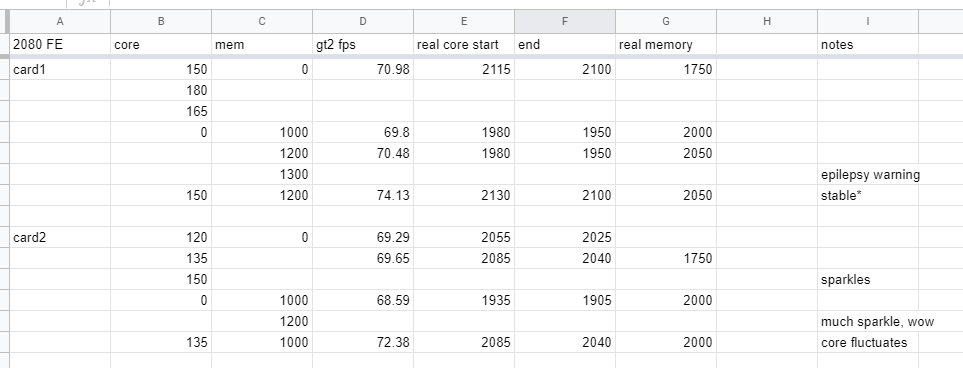
2080 FE time spy GT2 testing results https://i.imgur.com/xuZ3VB9.png
 dull ginkgo
Much sparkles, wow
sterile flame
epilepsy warning
proven canopy
oddly, testing 5 more times, could never get 150 core stable again on that card, so final results are 135 core for both cards, 1000 on one and 1200 on the other
 restive cargo
Well I was finally able to get my 10700K stable for AVX loads at 5.3 GHZ on water.
Took 1.395 vcore but it got there.
Non-AVX loads it's stabil at like 1.360 vcore.
Like gaming on Rust or League of Legends or Risk of Rain 2 at 1.360 vcore is fine.
It's when I hit it with that AVX that it needs the extra juice.
Thing is my load line is set to level 6 but 1.395vcore doesn't actually mean 1.395 vcore.
The board in reality is feeding it around 1.385 vcore at the max.
lavish tundra
oh pog!
restive cargo
I kept hitting it with some R11.5, R15 & R20 until it finally passed all 3 without crashing.
 real prawn
Has anyone heard of the past mentions that the max safe voltage for Zen 2 was 1.30V or 1.325V?
restive cargo
I only use the CPU for gaming so I know if it can pass 20 mins of Aida 64 & all 3 of those big boys then it should be able to handle any gaming load without issue.
At least for the games I play.
That is an AMD question and I know AMD is very different than Intel.
Hopefully one of the AMD boys are on.
lavish tundra
real prawn
Has anyone heard of the past mentions that the max safe voltage for Zen 2 was 1....
1.30 is safe for daily. 1.325 is fine for an hour or so max
lavish tundra
restive cargo
That is an AMD question and I know AMD is very different than Intel.
Hopefully ...
I am an AMD boii
real prawn
Now, is that under heavy load? Or just at all? Because I know Zen 2 and Zen 3 can hit over 1.4V on stock settings, but usually droops under because it's usually set to the lowest LLC by default
lavish tundra
restive cargo
Because I am the Intel master.
Intel sensei
lavish tundra
real prawn
Now, is that under heavy load? Or just at all? Because I know Zen 2 and Zen 3 ca...
1.4 over prolonged use can permanantly degrade or even kill a zen 2
real prawn
So the stock Zen 2 processors that used to sit in the 1.35V to 1.45V range during idle or light load are being degraded and might die much faster?
lavish tundra
also unless you have it locked to a specific voltage, the chip will automatically drop voltage if there isnt a use for it to boost up
real prawn
Actually, my bad. I guess I should specify.
In HWInfo, there's Core VID (Effective) and then Core Voltage SVI2 TFN.
lavish tundra
real prawn
So the stock Zen 2 processors that used to sit in the 1.35V to 1.45V range durin...
If its idling at that voltage or light workloads it isnt as dangerous but yeah still not great
real prawn
For me, Effective VID is stuck at 1.306V with my current overclock, but the SVI2 TFN voltage is anywhere from 1.319V to 1.331V. However, under heavy load, SVI2 TFN droops to 1.27V or 1.255V. This is with LLC 4 (second highest on my motherboard).
I noticed that with the highest LLC setting, it would stay at around 1.325V pretty strictly (sometimes actually boosting to 1.331V or 1.3375V) no matter what. Which makes sense, but I remember Steven from GN mentioning that this can be unsafe because it may overvolt the CPU.
lavish tundra
real prawn
For me, Effective VID is stuck at 1.306V with my current overclock, but the SVI2...
which chip and what frquency?
real prawn
So the reason I asked heavy load vs. light load was because my current overclock on a 3950X is 4.15 Ghz, 1.325V, LLC4/5, which is 1.325V at idle, 1.27V under load (about 155W average).
I used to have a 4.35 Ghz overclock, but it realized that while the PC didn't crash, it was throwing a ton of errors in Prime95 (which is important, since I do video encoding).
I was hoping to push it up again, but my idea was that if it was sitting at 1.27V under load, could I increase my voltage to 1.35V or 1.3625V since it will probably droop to 1.3 to 1.325V (the recommended max voltage)? This is while keeping LLC 4/5 so it can droop under heavy load, so idle would be around 1.35V.
lavish tundra
do you have the ryzen power plan on?
real prawn
I do not. I have a bitsum power plan from Process Lasso.

I also overclocked in the BIOS, not in Ryzen Master, if that matters.
lavish tundra
you want ryzen high power
lavish tundra
real prawn
I also overclocked in the BIOS, not in Ryzen Master, if that matters.
it doesnt
real prawn
What does the high performance plan do?
lavish tundra
what settings did you change in the bios
lavish tundra
real prawn
What does the high performance plan do?
just some optimisations under the hood
proven canopy
restive cargo
I only use the CPU for gaming so I know if it can pass 20 mins of Aida 64 & all ...
Use occt
lavish tundra
no I asked Dark swordsman
lavish tundra
proven canopy
nor should you
it gave me a great starting point
I dont use it anymore
sudden torrent
proven canopy
oddly, testing 5 more times, could never get 150 core stable again on that card,...
I saw a similar situation when there was the live LN2 overclocking contest with Jayz and GN. When Jay moved the nearby wireless devices like the microphone and camera away from the computer he was able to get the GPU core stable at the next step up.
real prawn
lavish tundra
what settings did you change in the bios
I can't remember explicitly, but I did a manual core overclock. So I set it to 4.15 Ghz, and then manually set the voltage to 1.325 (IIRC? Might actually be 1.306V, but somewhere in there).
I also had upped the Load Line Calibration from 1 to 4. For my motherboard (ASRock X570M Pro4), there are 5 settings, with 1 allowing the most droop, and 5 with no droop.
Only other thing I think is that I set the SoC voltage to 1.1V, which I think is up from the default around 1.05V. SoC should be the infinity fabric chip IIRC.
I also disabled PBO completely I think? Either that or I didn't touch it.
I also have never heard of CTR, so I don't know what that is.
sterile flame
sudden torrent
I saw a similar situation when there was the live LN2 overclocking contest with ...
lmaO
sudden torrent
Interference is a thing when you're pushing the limits
lavish tundra
real prawn
I can't remember explicitly, but I did a manual core overclock. So I set it to 4...
did you adjust the core multiplier or go into the oc section and set the voltage and frequency?
real prawn
lavish tundra
did you adjust the core multiplier or go into the oc section and set the voltage...
I can't remember exactly. It's been a while so I should probably go back into the BIOS to check, but I do know it was at least the OC section.
I think it was a frequency? Because it allowed me to do increments of 25 Mhz. I then manually set the core voltage instead of an offset.
lavish tundra
real prawn
I can't remember exactly. It's been a while so I should probably go back into th...
ahh from personal experience that gives worse results.
You wanna adjust the core multiplier
real prawn
This is what the section I adjusted looks like.

I don't think I ever saw an option for core multiplier
real prawn
From my recollection, the only options I have are the OC mode and then PBO overclocking
But I can reboot and check
lavish tundra
real prawn
This is what the section I adjusted looks like.
also thats not great ram for a zen 2 chip
real prawn
This screenshot is a random one I pulled off the site, since I have a lot of programs open and haven't been able to restart
lavish tundra
I see
real prawn
But I have 3000 Mhz CL15, even though I know 3600 Mhz CL16 is usually the best
lavish tundra
real prawn
But I can reboot and check
yeah you should
lavish tundra
real prawn
But I have 3000 Mhz CL15, even though I know 3600 Mhz CL16 is usually the best
so the same ram in the pic then
you might be able to bring up the ram.. ask falcie or sir fitz tho they are good at ram oc
sudden torrent
And I was just about to suggest overclocking it too lol
real prawn
I tried ocing the ram once. I'm not a big fan of it, and I think for my use case it won't help much at all.
lavish tundra
real prawn
I tried ocing the ram once. I'm not a big fan of it, and I think for my use case...
for video editing its a massive difference
like MASSIVE
real prawn
The ram calculated didn't really want me to do much besides CL14 because it's Corsair Vengeance LPX
lavish tundra
real prawn
The ram calculated didn't really want me to do much besides CL14 because it's Co...
that doesnt matter. the memory dies do
sudden torrent
Oh the DRAM Calculator? I wouldn't go by that
real prawn
Video editing, or video encoding? Because my video editing in Premiere has been fine. I'm just trying to speed up my ffmpeg encodes because it's currently at 0.08x speed, lol
lavish tundra
sudden torrent
Oh the DRAM Calculator? I wouldn't go by that
I use sir fitz as my dram calculator. VERY reliable
lavish tundra
real prawn
Video editing, or video encoding? Because my video editing in Premiere has been ...
both
sudden torrent
I agree, he's helped on many occasions lol
real prawn
All I know is I looked it up once and the dies on it weren't great. And the vee minor overclocks I did weren't very stable.
lavish tundra
real prawn
All I know is I looked it up once and the dies on it weren't great. And the vee ...
ask fitz
he will basically give you your primary timings
real prawn
I'd probably get more from buying a good 3600 CL16 kit than overclocking this.
lavish tundra
real prawn
I'd probably get more from buying a good 3600 CL16 kit than overclocking this.
this always true
but if ur on a budget you can OC
i have a 3200 kit oced to 3600
sudden torrent
Yes it's better to get faster kits, but you can still push the one you have higher in the meantime
lavish tundra
falcie you know I havent been able to bring down primaries by even 1 without losing all stability from the primaries fitz told me to use
sudden torrent
He's done enough OC to just... know. He knows each die very well, even the "bad" ones.
lavish tundra
sudden torrent
He's done enough OC to just... know. He knows each die very well, even the "bad"...
mans a GOAT
real prawn
Here's my current settings. From my understanding based on videos from GN I've seen, VID is the on board voltage of the cores, and Vcore is the external voltage that is sent to the chip.
Also, I got LLC backwards again. I have LLC 2, where the highest is 1.

 sudden torrent
Did you remember what die you had on your memory @real prawn ?
lavish tundra
real prawn
Here's my current settings. From my understanding based on videos from GN I've s...
should be under advanced or main. not under OC
sudden torrent
I keep LLC on level 3 or 4
real prawn
I can't remember. All I know is it's a 4x8 GB Corsair Vengeance LPX kit, 3000 Mhz, 15-17-17-35
sudden torrent
Could be cjr or djr, I'll see what I can dig up
lavish tundra
sudden torrent
Could be cjr or djr, I'll see what I can dig up
ifs its doing 3000 mhz cl 15 there should be a way to get it up to 3400 atleast right?
real prawn
This is what's under advanced
 lavish tundra
real prawn
This is what's under advanced
lavish tundra
real prawn
This is what's under advanced
check main
sudden torrent
Well if it turns out to be something like micron rev A you're better off setting it on fire
lavish tundra
sudden torrent
Well if it turns out to be something like micron rev A you're better off setting...
LMAOO
real prawn
 real prawn
I'd like to reiterate that my goal is just to increase encode speed. For libx265, this means 70-100% CPU utilization most of the time, where on stock, it would always push it down to 4.0 Ghz. So peak core isn't a priority for now.
lavish tundra
real prawn
I'd like to reiterate that my goal is just to increase encode speed. For libx265...
Yep okay
quick rose
If you wanna increase encode speed, get a kit of 3600 mhz or faster ram
lavish tundra
OC tweaker
quick rose
Core to core communication on AMD is tied to ram speed
lavish tundra
there should be an option called CPU Ratio
quick rose
With 3000 mhz ram, FCLK is only 1500 mhz instead of 1800+
real prawn
These are the options

 lavish tundra
strang
Vintage do you know where the core frequency ratios are in the asrock bios?
quick rose
Faster ram will do more for you than clocking the CPU will. Right now that CPU is hamstrung by slow ram.
lavish tundra
I have a video open that says they should be right there but they arent
quick rose
Honestly manually OC'ing AMD CPU's doesn't net much more than PBO.
lavish tundra
quick rose
Honestly manually OC'ing AMD CPU's doesn't net much more than PBO.
It did for me
by more than 100mhz
quick rose
This is a 3950X tho
lavish tundra
True
quick rose
That 100 mhz won't do anything for encoding times TBH
lavish tundra
It will make small difference
lavish tundra
quick rose
Maybe a second
5 seconds or so
lavish tundra
quick rose
Where faster ram will be huge improvement
VERY huge
quick rose
Have fun
lavish tundra
quick rose
Have fun
lol thanks
real prawn
When I was previously overclocking, my R20 score raise from about 9400 at 4.0 Ghz to I think 9800 at 4.15 Ghz. Highest I got was 10100 or so, but that was unstable.
lavish tundra
ok so try going into the amd oc section
real prawn
We are talking about encodes that are currently at 0.08x speed because I'm doing 4K 10-bit H265 with the slow preset
quick rose
Why are you even limiting it manually?
Max boost is 4.7, single core yeah but....just crank up PBO
real prawn
I don't think PBO will help since that's for single core peaks. Libx265 uses all 32 threads near 100% utilization.
At least since I'm currently encoding 4K and it can split more threads off
lavish tundra
real prawn
I don't think PBO will help since that's for single core peaks. Libx265 uses all...
PBO isnt single core only.
quick rose
real prawn
I don't think PBO will help since that's for single core peaks. Libx265 uses all...
No no no
My 3700x will do 4.3 all core on PBO
and it's a bad bin
real prawn
So if it sees an opportunity to increase some cores it will? Even under heavy multi threaded load?
lavish tundra
pbo pushes all cores as far as it can to the max advertised boost
real prawn
I see. I remember testing, and my worst CCX was 4.35 Ghz, where the best was 4.575 Ghz.
lavish tundra
true
quick rose
max Boost is single core only
all core expect less, 300 or so
But changing some PBO limits you can bypass that
quick rose
But I'm telling you right now, that slow ram is literally hamstringing that CPU if you want a speed boost
real prawn
I guess I'll have to try PBO at some point then. I was just hoping to see if I can increase it to 4.25 Ghz or 4.30 Ghz by upping the voltage, since Vcore was drooping to 1.27V under load, well under the recommended 1.325V limit.
lavish tundra
quick rose
But I'm telling you right now, that slow ram is literally hamstringing that CPU ...
i told them they definitely need to buy better ram or ask fitz
and falcie is checking what chips the ram sticks use
quick rose
Set everything back to stock in the BIOS. Go to AMD Overclocking, turn on PBO there, and change a few more things
Need to see a screen to see what exactly is there
lavish tundra
quick rose
Need to see a screen to see what exactly is there
asrock bios is the worst ive seen yet ngl
quick rose
it is
quick rose
Need to turn up PPT, TDC and EDC a little bit. Otherwise it will power limt
sudden torrent
@real prawn The memory is either Hynix or Samsung on that kit. Snap a pic of the white sticker on one of the sticks and I can tell you for sure.
quick rose
LLC should go up as well
With the settings it's at now that's 4.15 all core and a bit slow
real prawn
I appreciate the help, but I think I'll skip it for now. I used to have a 4.25, 4.30, and 4.35 Ghz overclock, though the 4.35 Ghz overclock was a little unstable (and limited by the slowest CCX).
I was hoping to just increase my vcore, put it at 4.25/4.30, do a 10-15 minute test with p95 to check stability, and then continue using it to hopefully increase my encode times (since currently, my next encoding is slated to happen for 25 hours straight, so even a bump from 0.08 to 0.09 would take it from 25 hours to 22.2 hours.
quick rose
I mean, PBO should be able to do better than that. I'd expect 4.5 at least all core with it set up right
real prawn
I know that with memory overclocks, I need to run multiple instances of memtest overnight and constant check the OC for issues until it's stable. Then for PBO, I've never done it before and don't know what issues to look for.
lavish tundra
real prawn
I appreciate the help, but I think I'll skip it for now. I used to have a 4.25, ...
Get better ram tbh. Perf will instantly increase by a lot
quick rose
PBO is the same issues as manual overclock
lavish tundra
real prawn
I know that with memory overclocks, I need to run multiple instances of memtest ...
anta profile on memtest is great'and you need to run it for an hour tbh
real prawn
I also am using a 240mm AIO, and the last time I tried to do PBO I hit over 110C instead of my usual max of 85C with a 4.25/4.30 Ghz overclock.
sudden torrent
real prawn
I know that with memory overclocks, I need to run multiple instances of memtest ...
There's easier ways to test memory. You only need an overnight test if you need 100% perfect stability.
lavish tundra
sudden torrent
There's easier ways to test memory. You only need an overnight test if you need ...
anta stable for an hour is good enough
real prawn
Yeah. Maybe I'll do all that in the future. Right now I just wanted to see if upping my vcore would be safe so I can run a slightly higher overclock, which I know can help at least a little bit, especially for a quick fix.
I also don't want to touch RAM for overclocking beyond it's spec, since memory accuracy is kinda important for video encoding.
quick rose
real prawn
I also am using a 240mm AIO, and the last time I tried to do PBO I hit over 110C...
Honestly it should stock boost higher than that all core.
Base clock is 3.7 ghz
sudden torrent
Upping your RAM frequency will boost your Infinity Fabric, which directly affects core performance
real prawn
When I used to have it stock, it would sit at 4.0 Ghz during anything that used more than 70% of the CPU
And this sits at 90+% all the time
quick rose
What Asrock board?
real prawn
It did actually used to sit at 4.5-4.7 Ghz quite a bit during light loads, but it didn't matter when I started to actually utilize a lot of the threads
ASRock X570M Pro4
quick rose
Mmmm, that board doesn't have the best VRM's either. 96C with a 3800x and you've got a 3950x in there. MIght actually be getting power limited trying to just get to stock clocks.
lavish tundra
10 power phases
not the best for a cpu like the 3950X
thats 8 phases to a 16 core CPU
quick rose
I'd just slap it back to stock or whatever clocks worked for you with some faster ram and call it a day.
lavish tundra
Same honestly
its a very bad board for ocing a 3950X
I have 12 phases for a 6 core processor lmao
sudden torrent
That's a bit overkill lol, is that like a 12+4 board?
lavish tundra
sudden torrent
That's a bit overkill lol, is that like a 12+4 board?
12+2
real prawn
All I know is that I've been running LLC 3/2 for a while, but I didn't know my vcore was drooping to 1.255V-1.27V. My last stable OC was 4.25 Ghz, but I dropped it to 4.15 Ghz just to be safe. But this was, again, not realizing that under load, it would droop to 1.27V or so.
Faster RAM is certainly on my list, though, not really affordable for me at the moment, lol.
lavish tundra
12+2 Phases Digital VRM Solution with DrMOS
sudden torrent
Marketing fluff mostly in that phrase
lavish tundra
real prawn
Faster RAM is certainly on my list, though, not really affordable for me at the ...
send falcie a pic of your ram sticker
lavish tundra
sudden torrent
Marketing fluff mostly in that phrase
thats why I sent it to you tbh
real prawn
So what would I be doing, frequency overclock, not timings?
I just don't want to do a memory overclock because I won't feel safe unless I did a long memtest on it, and that's not really time I have.
lavish tundra
real prawn
So what would I be doing, frequency overclock, not timings?
both
you cant increase only 1
real prawn
At that point I'd probably just want to spend money on a 3600 Mhz kit and not have to deal with overclocking the memory
lavish tundra
trust me what fitz told me worked out of the box.
I would be fine not mem testing it if fitz slapped on his seal of approval
sudden torrent
Well if you got lucky and scored yourself some Samsung B-Die or even C-Die you can easily get it up to 3600 with pretty tight timing very stable, send that sticker and I'll tell you what to expect if you overclocked it
real prawn
I mean, for gaming I wouldn't mind, but I'm doing a very, very long video encode and trying to maintain a high quality. I guess ideally I would use ECC memory, but that's just not an option currently. Sending now.

I should probably clean my case tomorrow. Been a while
real prawn
really?
I mean, I can try it
Just not sure what the other values should be, since I know it's not all cas latency
sudden torrent
3600 16-19-19-38 I would try, but go in steps changing one value at a time so you know what the problem is if there is one.
real prawn
Also, would it be achievable on a 4x kit? I heard that having 4x dimms instead of 2x can reduce overclocking capabilities
I see. So should I start with timings, then frequency? And I should probably adjust the FLCK with memory frequency, right?
I also have GearDownMode set to off I think? That was because I couldn't originally achieve the RAM's rated CL15 with it on. I should probably turn that back on?
lavish tundra
sudden torrent
3600 16-19-19-38 I would try, but go in steps changing one value at a time so yo...
16-20-20-40 should be better
lavish tundra
real prawn
I see. So should I start with timings, then frequency? And I should probably adj...
FCLK adjusts itself
always to half the ram speeds
real prawn
Oh, really? Last time I had it on auto it was auto-setting to 1200 Mhz, even though my ram was set to 1500 (3000)
lavish tundra
real prawn
Oh, really? Last time I had it on auto it was auto-setting to 1200 Mhz, even tho...
reset mobo settings
have you updated the bos anytime recently?
real prawn
I can't remember the last time I updated it, so I probably should I guess
sudden torrent
real prawn
Also, would it be achievable on a 4x kit? I heard that having 4x dimms instead o...
This is only true at speeds above 4000, and less frequently a problem in AMD than Intel
lavish tundra
real prawn
I can't remember the last time I updated it, so I probably should I guess
yes
sudden torrent
real prawn
I also have GearDownMode set to off I think? That was because I couldn't origina...
With GDM off your RAM automatically will set itself to CR2 which is a lot slower than CR1 with GDM. You'd be better off setting the cas to 14 than turning off GDM.
real prawn
So GDM on, and I can probably set it to CL16, then up the frequency?
sudden torrent
Yes, to start with. Also set the other main timings like Craipop said, 16-20-20-40 since that will be slightly more stable than the one I said.
And increase dram voltage
real prawn
Something like 1.40/1.42V?
lavish tundra
real prawn
Something like 1.40/1.42V?
too high
lavish tundra
hmm
sudden torrent
It should scale up to 1.4 or so
CJR is pretty good at overclocking
Almost as good as B-Die
real prawn
Scale? Based on some other value automatically? Or is there some curve I should follow?
Wait, really? LOL
lavish tundra
sudden torrent
It should scale up to 1.4 or so
thats pretty high tbh
IDK tho
falcie knows more about this
trust falcie
real prawn
So I know someone mentioned tools to test faster than memtest. Is there anything good that can at least give a general idea of the stability pretty quick?
lavish tundra
real prawn
So I know someone mentioned tools to test faster than memtest. Is there anything...
the anta config file for memtest
real prawn
I do know a lot of higher frequency memory is rated at 1.42 or 1.45, some even 1.5V. So up to 1.4V sounds right to me.
 sudden torrent
My kit has the XMP voltage at 1.45 lol, you'll be fine at 1.4 without additional cooling
real prawn
Is it fine to keep my existing 4.15 Ghz CPU overclock while I do this?
sudden torrent
Yes that won't affect it at all
lavish tundra
I would recommend updating bios to the latest version that isnt in beta before the ram OC tho
real prawn
Actually, I should probably do an encoding test before I touch the ram to see my current performance.
also yeah, I'm updating it now to 3.40
sudden torrent
lavish tundra
thats pretty high tbh
It's a good voltage to start testing at, and once you have it comfortably stable you can try taking it down 0.01v at a time and testing again
lavish tundra
sudden torrent
It's a good voltage to start testing at, and once you have it comfortably stable...
smort
real prawn
This encoding test will take about 13 minutes so I'll come back when that's done
uhh, I think my overclock got reset when I updated the bios, lol

Hopefully it kept my presets
sudden torrent
That's what I said
real prawn
Looks like my presets are there but it can't load them. I'll have to redo my previous OC so I can get test data, lol
good thing I took screenshots of everything beforehand lol
lavish tundra
real prawn
Looks like my presets are there but it can't load them. I'll have to redo my pre...
dont do that oc
Use PBO
sudden torrent
Yeah it won't/shouldn't load settings from a previous BIOS version, for safety
lavish tundra
that was a horrible OC imo
real prawn
I want to do it so have test data to see if it actually improved. Since I'm in this deep I may try PBO after we see the memory results.
sudden torrent
People are easily getting 4600 with PBO on that CPU, 4300 should be easy enough with a 240 AIO
real prawn
While I wait for this to boot again because I forgot a setting, is there a way to properly adjust voltages with PBO? Because everytime I saw anyone run it, it would make their CPU run ridiculously hot. Mine even got to 110C once during a test and it shut down for safety.
sudden torrent
Yes, set the voltage mode to offset. I do -250mV offset
real prawn
I see. Speaking of offset, what is the offset based on? I've never tried to do offset because I never knew what voltage number it's subtracting or adding to.
sudden torrent
The offset is based on the voltage the CPU is requesting. If it asks for 1.4v, the board applies the offset to that for the actual voltage
real prawn
I see, so the voltage is dynamic. Is that original request just number pre-defined by AMD/board partners?
proven canopy
real prawn
So I know someone mentioned tools to test faster than memtest. Is there anything...
Yes, especially if you're unfamiliar with ram oc and don't want to bork your daily os
My friends recommend test 6 looped for intel
Maybe that was test 5, idr
sudden torrent
real prawn
I see, so the voltage is dynamic. Is that original request just number pre-defin...
Yes, by default the voltage is dynamic and PBO uses that behavior too for optimal efficiency
proven canopy
But occt, linpack, tm5 anta, ycruncher are meta
sudden torrent
He's got CJR memory btw
lavish tundra
proven canopy
But occt, linpack, tm5 anta, ycruncher are meta
tm 5 on extreme anta is also a fast way to do it
1hr pretty much guarantees stability
real prawn
How was my ram kit so cheap with CJR? I think it was like $160 at the time.
32 GB 4x8
sudden torrent
Just lucky I guess but the version 5.32 is CJR so there's no doubt it is
real prawn
Alright, so here's the baseline test. My old OC with 3000 Mhz CL15. Number we care about is seconds, so 641.87s here. I'll start doing the memory overclock now.
 sudden torrent
I got lucky with my B-Die kit, it was only $100 for 16GB with RGB
real prawn
Holy shit, wow
Alright, so GDM back on, 16-20-20-40. Any other settings I need to worry about, like CAS write speed (currently 14), or just leave it on Auto?
 sudden torrent
CAS 16
real prawn
I also set CR to 1, unless I should leave that auto?
lavish tundra
put your procodt to like 36.9
real prawn
the right number is the field, I just haven't saved it yet
sudden torrent
CR1 is fine with GDM
That all looks right to me
You might also want to set SoC to 1.1v
real prawn
Already set it to 1.1v ;)
sudden torrent
That's to help the infinity fabric go faster
Good, you should be set then. Give it a go.
real prawn
Should I do the procodt like crai mentioned, or leave it auto?
sudden torrent
Leave that auto for now
real prawn
alright, settings were applied. I'll do that anta test Crai linked to check stability
Then after this, start with 3200 Mhz maybe? 3400?
sudden torrent
Oh you didn't change frequency yet? Well yes it's best to go up a little at a time
real prawn
So memtest 5? 6? 7?
sudden torrent
I'd do 7 but Forks said 5 or 6, doesn't matter really it'll test it one way or another
real prawn
This is the right site? I think I'll do 7, since it's listed here https://hcidesign.com/memtest/
real prawn
So I download it, and then do I have to rename the config or anything?
This is what I have in bin
 sudden torrent
There should be a load button once you start it
real prawn
I see now. I was worried because it just started to immediately run the test without warning, lol
lavish tundra
also remember to start tm5 as admin
real prawn
Yeah, I just saw that
Though, when I do run it as admin, a ton of these info boxes pop up

Do I just ignore them? Because the little text box on the app doesn't warn me about compatibility mode (due to not running as admin) anymore
sudden torrent
Yeah as long as there aren't memory errors and it runs it's fine
real prawn
okay cool
How long does the test run for? Currently at 7 minutes. I guess I should've just bumped it to 3200 Mhz lol
sudden torrent
It runs as long as you let it
Yeah go ahead and bump frequency, I'd even go for 3400
real prawn
Alright, I'll try 3400. Worst case I just reset CMOS, right?
sudden torrent
Yep
real prawn
coolio
sudden torrent
Voltage is the only thing that will kill it and that range is around 1.5v so you're safe
real prawn
So 3400 with 1700 FLCK reboot a few times and reset to 2133 with CR 2.
3200 seems to have applied correctly. Should I try to adjust things or just test with 3200?
sudden torrent
Try increasing cas to 18 at 3400 and see if it boots, 18-20-20-40
real prawn
Same thing. Hard crashed twice, reset to 2133
sudden torrent
Dang. Doesn't like that clearly. Try 3333
real prawn
3333, CL18, fabric 1667?
sudden torrent
Yes
real prawn
took 3333
sudden torrent
ok test that for 30 minutes
real prawn
So still testing. Zero errors so far.
Is it possible it just doesn't like 3400 if it took 3333 so quickly? So maybe some value above 3400 could still work?
I'm just wondering how it checks and fails to apply 3400. Is there an error test that fails because of the frequency, or is it some sort of compatibility thing?
sudden torrent
It might just be a bad bin that doesn't want to go above 3333 without really loose timings
dull ginkgo
If it's running too fast, it will make errors.
Could try looser cl18 at 3400 to test, like 18-22-22-42
real prawn
Is there a point where too loose timings would make it worse? As I understand from the table for CAS latency on Wikipedia, frequency usually is more effective for access latency than timings, right?
dull ginkgo
It's, well, tradeoffs(timings and freq). Right now, were just testing what's stable, the performance of each config can be tested later.
sudden torrent
Yes and no, fclk is more important usually. You want to get the frequency up first then do timings
dull ginkgo
Lots of factors go into performance, too many for sane people to really calculate for ram
real prawn
I see. But frequency and the main 4 CAS numbers are a good base to start with?
lavish tundra
real prawn
I see. But frequency and the main 4 CAS numbers are a good base to start with?
yes
dull ginkgo
It's the primary timings, only the first one, tCl, is called cas latency, but yes.
Assuming fabric clock is kept stock at 1:1 that is
real prawn
alright, ran for 30m with no errors. Should I try the looser 3400?
 sudden torrent
Yes
real prawn
3400 18-22-22-42 did not work. 2x hard crash before post, reset to 2133
sudden torrent
Ok looks like a bad bin to me. We'll do 3333 and tighten the timings
real prawn
Okay. So 3333 18-20-20-40 was very stable. How should I tighten it?
sudden torrent
Start with cas 16
real prawn
16-20-20-40?
sudden torrent
Yes the rest the same
real prawn
Okay, that booted. Will test
I remembered that I still have a PageFile setup. Does that matter for this?
sudden torrent
No
real prawn
3333, 16-20-20-40 seems stable. No errors
 sudden torrent
Try 16-18-18-36
real prawn
Those timings applied. Will test
real prawn
16-18-18-36 worked well, no errors
 real prawn
should I tighten them some more? Like 16-17-17-34?
 real prawn
If I have it set to auto in the BIOS and it's currently at 584, what should I change it to?
Or what is the process to follow to change it?
16-17-17-35 applied, but I noticed Fal was typing, lol. Should I change something?
I didn't touch tRFC yet
sudden torrent
Try 417 to start
real prawn
Should I apply that now, or after I test 16-17-17-35 first?
sudden torrent
Try it now
real prawn
I noticed there's also tRFC2 (434) and tRFC4 (267), should I touch these, or leave them auto?
sudden torrent
They should go down on their own but you can manually change them, 417-310-190
 sudden torrent
🔥
real prawn
16-17-17-35 with 417-310-190 worked, testing now
Threw 1 error within a minute and then blue screened
 sudden torrent
Set timings back to 16-18-18 and test again
real prawn
with the same tRFC of 417?
sudden torrent
yes
real prawn
It applied. This will be my last test for the night. I'll update if it errors or in about 30 minutes
threw 5 errors and then bsod
So the tRFC is too tight?
Do the tRFC values have any math/multiple associated with them? For example, I saw that tRC should apparently be no lower than tRP + tRAS
Thanks for the help today. I'll probably be back on in about 10-11 hours. Excited to see how this affects performance even without trying PBO.
 open surge
Hei, I am having my CPU clocked at 4GHz (with MSI OC Genie) and being stress tested with prime95. It ramped up to 77°C with a Hyper 212 EVO, should I be worried and avoid trying to clock my CPU up to 4.3 GHz ?
zenith palm
open surge
Hei, I am having my CPU clocked at 4GHz (with MSI OC Genie) and being stress tes...
what cpu? some older cpus cant get as hot as the new ones
zenith palm
oh right just looks like a bunch of numbers ngl kinda hard to read
zenith palm
open surge
Hei, I am having my CPU clocked at 4GHz (with MSI OC Genie) and being stress tes...

ohh wait nvm
thats just toms hardware
open surge
Toms hardware not reliable ?
zenith palm
ppl are saying it throttles at 80
zenith palm
open surge
Toms hardware not reliable ?
yes but thats their forums so not toms hardware themselves
open surge
Okay, so I can forget about OCing higher than 4GHz I guess
zenith palm
guess so unless you upgrade the cooler
open surge
Which was not in my plans D':
zenith palm
i guessed lol
tall pelican
you should be able to see that throttling and tjmax temps are set to in bios
https://www.reddit.com/r/overclocking/wiki/cpu/intel 1.35v and 85c
reddit
r/overclocking: All things overclocking go here. Learn to overclock, ask experienced users your questions, boast your rock-stable, sky-high OC and …
open surge

Those are my numbers.
Wait a min
Prime95 stopped
And it did not tell me anything
tall pelican
expand the msi z87-g43 tab
open surge
 tall pelican
yeah, you have a lot of voltage headroom
open surge
What do you mean ?
Can I go higher in VoltaJ ?
Or does OC Genie allocate too much ?
tall pelican
first off, use bios to overclock, not software
software is asking for a bug to happen and it yeet 1.5v+
(yes that is a thing and is a common occurrence with clock tuner for ryzen)
open surge
Okay, but I am running on a 4690K, it is a bit older than ryzen
And I did not know it was possible OCing through software instead of BIOS.
Would you have a CPU stress test software that takes less time to go through, by any chance ?
tall pelican
just because its older doesnt mean software cant be buggy
OC Genie is software, no?
and occt large is fairly quick
open surge
tall pelican
OC Genie is software, no?
I meant higher-level software. Like one you might run through Windaube.
open surge
tall pelican
and occt large is fairly quick
I will try this one then, thank you.
real prawn
Last night, I reset the tRFC back to auto (from 417 to 584) and just tested 3333 with 16-17-17-35 and just let it run. No errors whatsoever.
I wonder if I should try a tRFC number (and maybe tRC?) that isn't as aggressive?
Though maybe at this point I can move onto PBO?
 open surge
Does OCCT stress the CPU that much ? I put a 4.2GHz clockspeed to my CPU with a VCore of 1.2 and I only got 65°C maximum reported temperature after 9/60 minutes of testing (65°C being for core 1 and 2, 0 is at 64°C and core 3 at 61°C).
proven canopy
Does that chip have avx2
sterile flame
according to newegg, yeah
open surge
When I ran HWINFO before (on a 4GHz clockspeed) it ramped up to 74-ish °C (1.15-ish VCore).
And I do not know what avx2 is.
sterile flame
 proven canopy
Try out the different occt stress test configs
open surge
I feel dumb rn.
proven canopy
Linpack is a popular cpu and memory test

 proven canopy
Can catch errors due to heat that the normal avx2 memory test can't
open surge
Okay, it also says something like "Puts priority on CPU stress rather than error detection".
Tests usually begin with 1h base duration. But is it safe to lower that amount of time for next tests (like 10 minutes) ?
The first CPU test I ran lasted 1h, and I made a 10min one right after the previous one ended...did not notice any difference.
OUCH
LINPACK says 80°C maximum
The CPU exceeded 110W, is that fine ?
proven canopy
ya
open surge
Would the computer yell if anything was to go wrong ? (Like the CPU frying eggs)
proven canopy
It'd probably blue screen
dull ginkgo
In terms of too hot, it'll just throttle
proven canopy
Unless you start really upping vcore, probably won't hit thermal throttle temps
You kinda have to try to hurt the chip
Idk what board - but possible the vrm can't handle it, unlikely though
Especially with that chip
open surge
Most say 1.3VCore is the maximum "recommended", I am at 1.2.
open surge
dull ginkgo
(heat output wise)
A chance I am not running it on stock cooler I guess ?

It looks like Hawaii.
Even during covid, I can travel. No need for a 300€ plane bill for that.
BTW, you do not get to speak ill of my proco ❤️ 💻
dull ginkgo
wat
open surge
dull ginkgo
4690k does seem kinda weak
this, that is "what".
dull ginkgo
@proven canopy Do you know how listed tcase relates to tjmax? (Since Intel lists 72.72c as tcase for 4690k, but tcase is just ihs temp, not temp measured by sensors afaik)
real prawn
I'm not sure about 4th gen, but I had a 3570k (Ivy Bridge) at 4.8 Ghz. With a 1st gen Corsair H100i (240mm) and Corsair's SP120 fans, it usually stayed below 85C. I can't remember the voltage though.
proven canopy
dull ginkgo
<@!546791995830566912> Do you know how listed tcase relates to tjmax? (Since Int...
what kind of question is that
Sounds like you answered it in the same line
dull ginkgo
proven canopy
what kind of question is that
words are hard
I want to check current temps with tjmax
except I don't know tjmax, only give tcase
I want to know if I could calculate tjmax from tcase
proven canopy
What do you mean you want to check current temps?
proven canopy
Just look if clocks go down, lol, at least on this platform, ryzen is different
See der8auers video running a ryzen with no cooler
proven canopy
Idk, I assume tjmax is just one of intel's specs, idk if that means it's the throttle temp
I've seen chips with really low tjmax's so I assume it's for 24/7 365 10+ year longevity rating
dull ginkgo
hm
open surge
One of my cores went to 83°C, which now shows me why lowering tests to 10minutes long ones is probably not a rich idea.
dull ginkgo
I thought tjmax was throttling because, well, that's how it works on this chip
currently throttling
 dull ginkgo
well, was throttling
open surge
Is the game performance gain proportional to the extra clockspeed ?
proven canopy
https://www.twitch.tv/unityoc
Unity's 12h stream - Overclocking Livestream #100 - Celebration Stream! Giveaways, Special Guest and Comet Lake LN2
 dull ginkgo
is there cake?
open surge
Like, am I right to expect the same performance improvement from going from 4GHz to 4.2GHz than I might get when going from 3.8 to 4 ?
open surge
😭
real prawn
So far this memory overclock has improved the encode time from 641.87s to 629.25s. Not a ton, but if I were to apply that to a 25 hour encode, saves 30 minutes.

Unless I can do more for memory, I think I'll move to PBO on my 3950X
 radiant turret
.
real prawn
I didn't know this guide existed. that's pretty cool
https://www.github.com/integralfx/MemTestHelper/tree/master/DDR4 OC Guide.md
GitHub
C# WPF to automate HCI MemTest. Contribute to integralfx/MemTestHelper development by creating an account on GitHub.
real prawn
Hey, uhh, so 3400 didn't post at all yesterday... but... 3600 posted...

So far no errors. I wonder if next I should try to push it even further than 3600. I know my 3950X doesn't really like any FLCK frequency higher than 1866
real prawn
30 minutes and no errors at 3600 Mhz. God damn that's awesome. I still can't decide if I want to push it further or pull the timings down now.

I guess I'll just save this as a profile, then push the frequency up til it can't anymore. Worst case, I could go back to 3600 Mhz, pull the timings, then test to see which is faster.
3733 Mhz booted...
real prawn
3800 Mhz seems stable enough for me to play with it. I saved 3733 18-22-22-42, as well as where I was with 3333 16-17-17-35.
I'll start to pull timings on 3800 Mhz and see how it likes it.

I just can't believe that 3000 Mhz RAM is even able to run at 3800 Mhz. That's just insane to me.
Btw, thanks guys for getting me addicted to memory overclocking. 😂
real prawn
Moved on to tRFC.
tRFC at 260ns had no errors, but blue screened on shutdown. tRFC at 270ns had an error.
I bumped the voltage from 1.42V to 1.45V and set it to 280ns
Though, knowing that previously I had issues with my 3950X at 1900 FLCK, even if it was desynced with the ram, I have a feeling that 3800 Mhz might be asking too much.
In accordance with that guide I found, I haven't even lowered the primary timings yet. Still at 18-22-22-42
So if tRFC 280ns fails, I will probably go back to 3733. Or if I can't get the primaries below 18-20-20-40
well actually, the guide says to do CAS first, so if 17 doesn't work then I'll go back to 3733
lavish tundra
real prawn
Btw, thanks guys for getting me addicted to memory overclocking. 😂
youre welcome
lavish tundra
real prawn
30 minutes and no errors at 3600 Mhz. God damn that's awesome. I still can't dec...
whats the primaries for the 3600mhz profile?
@real prawn
because faster isnt always better
when it comes to ram oc
open surge
Question here : How am I supposed to determine whether I can raise CPU clockspeed from 4.2 to 4.3 GHz without changing my VCore (that is currently at 1.2) or not ?
They say not having enough VCore can prevent the PC from booting up.
open surge
HEEEEEUUU...My CPU is @ 4.3GHz-1.125 Volts (it bluescreened on start at 1.1 Volts.), but the task manager says it is 5-ish GHz, the hell am I looking at ?
