#overclocking
1 messages · Page 53 of 1
 hard ice
 manic helm
could be. this 144 panel is about 100nits brighter than the 120hz one.
plus 100% srgb vs something like 80% on the 120
hard ice
hm
hard ice
:D
manic helm
It even has the option to enable PBO in the bios, I can force the discrete graphics or integrated or leave it switchable. Just need some voltage control to undervolt and it would be about as good as I can expect at the price.
hard ice
hm, nifty
 proven canopy
Lol that's almost the same r20 as my desktop 3700x, not far even from a 9900k @ 5.0 (5310)
manic helm
with PBO enabled hwinfo64 is showing around 70W from the cpu
 restive cargo
That is one Ln2 tank that's for sure.
 dark linden
restive cargo
dark linden
restive cargo

 wintry chasm
got as nice 2.5% increase in this score after running oc scanner in msi afterburner
 elfin nebula
I’m currently under volting and running about 73-75° on max load on my 2080 super, should I just run OC Scan and let it do this thing, manually OC and benchmark on my own, or just stay under volted for the time being?
wintry chasm
sorry im late. Id save your current settings in one of the profiles and then reset to default then run the oc scanner
see what it gets you comnpared to your own testing
 manic helm
3dmark results browser seems to think every cpu I own is a 9500T
 cold jolt
proven canopy
cold jolt
proven canopy
Did you buy one for 160 too?

 formal hollow
If I wanna overclock should I get a different cooler besides the stock cooler
proven canopy
Yes
manic helm
x299 dark for that price is a steal. where was that at?
proven canopy
EVGA site, full warranty and everything, not b-stock.
proven canopy
Don't think so, it's just an old platform at this point. I remember seeing them for $225 on the evga ebay site.
manic helm
$350 on evga now and more than that everywhere else I looked
I cant afford a cpu even if I got one at that price
😢
I'm done buying things until I can get a new cpu
which wont be until atleast end of the year
proven canopy
The sr-3 dark also went down to $1k 
cold jolt
SR-3 makes me 
 left bladeBOT
 THEREALC00CHIEMAN#7008 has been warned
Reason: Bad word usage
THEREALC00CHIEMAN#7008 has been warned
Reason: Bad word usage
THEREALC00CHIEMAN#7008 has been kicked
Reason: Too many infractions
formal hollow
how much can oyu overclock the 10900k to?
 dull ginkgo
If you want the max @formal hollow :
https://hwbot.org/submission/4446006_elmor_cpu_frequency_core_i9_10900k_7707.62_mhz

HWBOT
The Core i9 10900K @ 7707.6MHzscores getScoreFormatted in the CPU Frequency benchmark. elmorranks #205 worldwide and #1 in the hardware class. Find out more at HWBOT.
formal hollow
thanks
 orchid reef
whats the most i can adjust my baseclock by with a ryen 5 2600? with aircooling
orchid reef
can i squeeze atleast 4ghz?
 lofty prawn
probably not
it would be super loud
and still then thermals wouldnt be great
get an aio if you want the overclock that much
orchid reef
so i should leave it with the game boost on
lofty prawn
yeah
orchid reef
i changed the cooler
orchid reef
not sure whats its called but its bulky and fits 2 fans on both sides with a copper pipe
lofty prawn
well ok
dull ginkgo
@orchid reef you can't know until you try
OCing varies on every chip
Bulky one can be many coolers lol
orchid reef
i would send a picture but the chat wont let me
dull ginkgo
send it in #build-pics and @ me
dull ginkgo
@lofty prawn just use pbo
restive cargo
AMD overclocking. 
elfin nebula
I’m running i7-8700K and 2080 super. Should I even bother to overclock either of them?
 dark ferry
Yes and yes.
restive cargo
Yes absolutely.
dull ginkgo

We're overclocking the EVGA FTW3, ASUS TUF, and Gigabyte Eagle variations of NVIDIA's RTX 3080 GPU (and using the stock coolers).
Sponsor: Buy Thermal Grizzly Conductonaut liquid metal on Amazon (https://geni.us/1D8Eeq) or Kryonaut paste on Amazon (https://geni.us/JMVNtOE)
G...
 cerulean juniper
I need to know if I need to push more voltage for my 3600 to go past 4.1GHz or if its just my silicon
For clarification im sitting with 4.1GHz @ 1.125V
 tall pelican
you have some voltage headroom, 1.20 should be completely safe, over that it gets iffy (dont go over 1.25v)
cerulean juniper
@tall pelican thx
tall pelican
👍
cerulean juniper
would i be able to go over 4.3?
tall pelican
maybe, only the silicon knows
tall pelican
what did you stress test it with?
cerulean juniper
aida64
tall pelican
I'd test with occt
even just 10-15 mins will give you a better idea of stability than aida
large data sets, auto thread and auto instructions
dull ginkgo
Eh, Aida 64 fpu is pretty decent
 true lion
Intel XTU, is it crap? Will it blow up my 9600k?
true lion
I'm not sure I know how to use it
But it auto supplies voltage based on clock or turbo targets and that seems like a good way to burn a chip up.
 jade pulsar
auto voltage can get scary
proven canopy
Asus auto volts ™️
true lion
I do have an ASUS board
 true lion
Is cpu voltage 5v + 1.2-3v? Is that how that would be translated?
proven canopy
To clarify, that's a glitched bios, vccio/sa should never be set above ~1.35ish unless you know what you're doing.
The board can't even supply more than 2? volts
If you're having problems with memory stability, I'd start with trying 1.1v-1.2v on vccio/vccsa
The "asus auto volts" thing has become a meme because asus boards will set vccio/vccsa to something like 1.4+ volts when those settings are left on auto while memory is running at 3600+ mhz.
true lion
Ok gotcha.
Yeah I noticed a 1 .4v when I tried xtu before, I thought that sounded very wrong
proven canopy
It's high ya, but even on air cooling under heavy load, it's unlikely you came even close to causing any harm to the chip.
elfin nebula
So what are the most stable overclocks for a 2080 super and an i7-8700K?
I did my handy work and got my 2080 super to +120 Clock and +1200 Memory.
CPU I got it stable at 4.7Ghz auto clocked though. Had it at 5.0GHz and had like one crash.
proven canopy
Check the silicon lottery link in the pinned posts for what to expect from the cpu.
proven canopy
3800x liquid nitrogen overclocking https://www.twitch.tv/psychooc
 runic vine
How does one overclock ram?
proven canopy
fixed, you can post links now
(the bot ate it)
tall pelican

GitHub
C# WPF to automate HCI MemTest. Contribute to integralfx/MemTestHelper development by creating an account on GitHub.
ayyy cheating my way through roles 😛
 fallow bison
rip

 tough sage
I have a ryzen 7 1700 and a gigabyte GA AB350 Gaming 3 and im having trouble overclocking it or even getting it to boost levels. Currently running at 3.5ghz
I was able to get it at 3.7 with an old bios but the newest one wont let me start up at all anything past 3.5
dull ginkgo
That's OCing for ya.
tough sage
but is 3.7 considered oc on that chip?
dull ginkgo
If it's not on default, that's ocing :P
as soon as you slap any kind of all core freq on there, it's gonna be considered ocing by most
dull ginkgo
Ask away :)
 vapid shore
ok
so
i am currently
running a r3 3200g
and attempting to overclock it via ryzen master
this is my first time oc
dull ginkgo
Okay,
dull ginkgo
It's always your choice on how you want to go about OCing your chip, have you checked for stability?
 uncut patrol
Run a stress test or game
vapid shore
ive tried in rm apply and test
and it says running stress test
is that sufficent enough?
or are there like "better" stress tests
dull ginkgo
Prime95 is my favorite suggestion
tall pelican
p95 or occt (if you dont have the cooling for p95)
proven canopy
We have a community hwbot team btw 🙂 https://hwbot.org/team/wegg/#Members
vapid shore
aight thanks
dull ginkgo
With Prime95, run stress test on all threads, and choose smallfft
Don't worry if temps go up to upper 80s or 90, P95 smallfft is literally the worst case scenerio that your CPU will go through. But if it starts going above 95c, might want to downclock or undervolt a bit.
uncut patrol
Usually you can just set an xmp profile in the bios
dull ginkgo
Ryzen dram calculator for amd
easiest way to really OC
XMP does the job for most people
tall pelican
if you're on zen2, I wouldnt use prime95 because of temps and current stress
that's where occt comes in handy
but since they're on a 3200g, p95 no avx would be the most stressful
restive cargo
I got 5.1 Ghz on my 8700K. At 1.4V. 
proven canopy

 neon rapids
worth it to manually oc a 2600x for benching or just leave it on pbo ive got a mugen 5
dull ginkgo
@neon rapids for bench score I tend to get better scores with all core manual
when I was using 2700, and now when I am using 3800x
neon rapids
thru bios or ryzen master?
cold jolt
pog
neon rapids

reddit
244 votes and 28 comments so far on Reddit
 robust cipher
RGB smoke effects ❤️
dull ginkgo
Gentlemen, join the #1 ranked US OCing team >:D
https://hwbot.org/team/wegg#mywall
neon rapids
:( its back to normal
dull ginkgo
aw
neon rapids
still 18th tho
dull ginkgo
I might've just joined the team
restive cargo
You did
Battle me mortals
Battle me now.
Try your hardware luck VS me the great Bryce Games.

tall pelican
okay 

proven canopy
Fitz is the guy at the #2 spot btw
tall pelican
depending on how good my 1660ti is, I might overtake #1?
dull ginkgo
@paper tulip test 1, no fan, 8 thread 96M
Oh crap wrong settings lemme change
Alright redo
16.72
 paper tulip
yikes
dull ginkgo
16.663
paper tulip
so the lower the better right?
dull ginkgo
17.957
I assume higher better
16.948
20.482
Lowest might actually be better, not sure, gonna turn on fan now
16.829
16.732
16.822
16.606
17.31
@paper tulip it's a lot more stable to say the least
I think I'm gonna run p95 now and see sustained clocks
And then maybe run some benchmark
Gonna start with fan on smallfft 1 minute
dull ginkgo
Fan on, it looks to be power restrained not temp restrained, interesting...
Fan off now, p95 time
Power restrained still
Hmm
Lemme see if I can get cinebench
dull ginkgo
Fan off, cinebench time
@paper tulip this weekend I'll grab some game benchmarks and run those
Cinebench taking sooo long
I'm used to my 3800x getting through it in half a minute
Tbh this feels like it's all power limited
So I'll need game benches this weekend and not just cpu benches
@paper tulip first run 651pts
@paper tulip oooof second run 972 pts
That's a huge difference
Holy crap second run had 86c max
First was up to 96c
Damn
paper tulip
Well mines kind of chunky so it can handle the heat a little better. Still feels like trash. Did you test the fan on max?@dull ginkgo
paper tulip
Pretty good. Now you need a dust filter
paper tulip
Or have you ever torn apart your laptop to see how much build up might be there?
dull ginkgo
No
dull ginkgo
Not an old laptop
dull ginkgo
Might do so one day
neon rapids
read better next time :)
 upbeat shore
Hey y’all so when I oc my zotac amp 1070 I get a performance decrease I max the power slider max the fans and only increase by like 5 mhz at a time and no matter how small it decreases what am I doing wrong
 brazen walrus
What’s your psu rated for?
manic helm
dull ginkgo
We beat an entire country
 proven canopy
I think we can get top 100 easily in the next week
I mean, look at what bryce just picked up, lol
proven canopy
Team power/team hardware? not bad
dull ginkgo
how do points work?? :)
Is it applied for all top 10 submissions in every category or something like that?
manic helm
a few global points, some gtpp, mostly htpp
is it still winning if you are the only one playing the game
manic helm
everytime I try and save gpupi or submit it just crashes. is that normal. Its been a while since I did the non benchmate version of gpupi.
proven canopy
Benchmate's gpupi autosub didn't work for me, but saving the results file has for both versions
manic helm
I will have to play around some then. Even saving the data file crashes it.
all versions of geekbench are also throwing an error when trying to upload but those might just need to be updated. They have been on my computer for months.
 severe osprey
Guys i tried putting my dram frequency to 3200 cause my ram sticks say 3200 and now my pc won't boot
I think I'm stupid
dull ginkgo
reset cmos time
 uneven ermine
^
take cmos battery out, (pc unplugged of course) press power button for 10 seconds, put it back in
 steady inlet
^
uneven ermine
if ur ram advertised 3200mhz, you should enable DOCP or XMP (depending on if youre on amd or intel) instead of changing the speeds on your own
DOCP and XMP are pre-made overclocking profiles made by the manufacturer that set the ram to run at its advertised speeds
severe osprey
Ok and what next
uneven ermine
it might be held in by a little clip
take cmos battery out, (pc unplugged of course) press power button for 10 seconds, put it back in
@uneven ermine
severe osprey
So hold power button for 10 without the pc plugged in?
dull ginkgo
simplest way to explain :
https://www.intel.com/content/www/us/en/support/articles/000025368/processors.html
Intel
Defines CMOS technology and how to clear CMOS using the jumper or battery methods.
battery method
severe osprey
Now put the battery back in?
The battery has a plus on it but no minus
And it doesn't say which side up or down on the board
 vapid berry
severe osprey
vapid berry
severe osprey
Ok its in now what
My pc turns on for like 2 seconds then turns off
Nothing shows up on my monitor
At all
yes
My pc is on
All I did was what you said
Unplug pc, take battery out, wait 5 min, put battery back in, plug in pc, turn on
And yes
Wouldn't I electrocute myself if I didn't lol
thats what the website says
To unplug the power cord
Intel
Defines CMOS technology and how to clear CMOS using the jumper or battery methods.
2
Then it stayed running
But nothing on monitor
Can you search it. I'm on my honeymoon
Phone
Not honeymoon
My motherboard is Asus prime h310 plus
The one with 3 graphics card slots
Wait not gpu slots
Pcie
Nkthing
Nothing
@uncut patrol
Did I break something
I'm so worried
severe osprey
What does that look like
 sharp wave
Would you guys say MSI afterburner is not safe if not used properly?
dull ginkgo
It's very hard to screw up that badly
@sharp wave Running the GPU too fast or too slow doesn't hurt it. That just causes instability and crashing, no real issue to the GPU
the real risk is if you manually enable voltage control and screw that around
which is very unlikely
severe osprey
@proven canopy what do i do if i don't have a cmos jumper
I looked through my whole motherboard and didn't find the 3 pins
@dull ginkgo can you help?
dull ginkgo
clear cmos?
severe osprey
Ok i have everything unplugged from the pc. I just took the battery out. How long should I wait and after that, what do I do
@dull ginkgo
dull ginkgo
Intel
Defines CMOS technology and how to clear CMOS using the jumper or battery methods.
just follow it
wait the full 5 minutes just in case this time
severe osprey
Didn't work
I'm about to just sell everything
Literally nothing is workibg
@dull ginkgo
 vale nymph
Wait for 10 minutes
Personally I take out battery and hold down the power button for a good minute
Drains the power out the board quicker
severe osprey
But with the power in or out
vale nymph
Just the power cord
dull ginkgo
I'm back
vale nymph
Turn off ur psu for good measure, too
dull ginkgo
Did you unplug from the wall for clear cmos
vale nymph
You need to do that
severe osprey
Yes I unplugged the cord that goes into the psu
dull ginkgo
then clear cmos didn't fix your problem. any debug LEDs?
dull ginkgo
I guess that's a no
severe osprey
Ok i just held my power button for like a minute
dull ginkgo
do the usual reseat ram and check power connectors plz
severe osprey
I already unplugged everything from the board and plugged it back in
vale nymph
Odd
severe osprey
All I did before all this was put my dram frequency to 3200
vale nymph
There should be a debug led on your mobo though
severe osprey
In bios
vale nymph
Which a cmos reset should fix...
dull ginkgo
@vale nymph not all mobos
dull ginkgo
70% of em I'd say got some kind of debug leds
severe osprey
I will send a pic on board
dull ginkgo
speakers don't tell you crap
vale nymph
LOL
dull ginkgo
they're only for yelling when CPU is dying
severe osprey
dull ginkgo
that's not a joke
the only thing the speakers are programed to do afaik is beep when CPU overheats without cooling
vale nymph
Hm
vale nymph
Well, I assume the cmos reset did nothing?
severe osprey
I haven't plugged it back in uet
severe osprey
When should I
dull ginkgo
how tf the lights on when you unplugged it?
vale nymph
This tbh
dull ginkgo
wait
vale nymph
Well
dull ginkgo
nvm was talking previous pic
vale nymph
Try turning it on now
severe osprey
Ok
vale nymph
Did you put battery back in tho
severe osprey
So I put batter back in, plug psu back in, and turn on pc right?
vale nymph
Yes
severe osprey
Ok
vale nymph
Turn on your psu as well lol
severe osprey
I'm going to do that exactly
vale nymph
Usually that'll fix any oc instability
severe osprey
My pc turned on then turned off then on again but nothing on the monitor
@vale nymph
vale nymph
Oh man, no jumper pins?
vale nymph
Oof
Do you have a usb hub?
For my board it keeps getting power until the board is fully drained
So that's how I tell when my system is fully unpowered
severe osprey
How do I use my laptop as a monitor for my pc
Just to make sure my monitor isn't broken or something
vale nymph
Haha I wish you could
I don't know any way to do that though
Try plug in ur monitor to your laptop
To check if it's broken
severe osprey
I tried
vale nymph
Mm
dull ginkgo
if you can wait for tomorrow morning
vale nymph
Maybe just give it a day
dull ginkgo
@ Naed
vale nymph
Take a break
vale nymph
Naed is great
dull ginkgo
keep figiting
severe osprey
I will just @ him just in case he is up
dull ginkgo
maybe you'll find something wrong while messing with stuff
dull ginkgo
He's not, I pinged him 5 minutes ago xD
poor Naed, coming to like 10 pings in the morning
yea, mess about, check cables, and reseat if you're feeling like it.
maybe you accidentally slightly unplugged something, who knows.
severe osprey
I re seated ram 3 times and gpu once
dull ginkgo
mess about, no one knows what they've been missing until they find it :)
vale nymph
Or just give it a day lol
dull ginkgo
mhm
dull ginkgo
no
severe osprey
@vale nymph @dull ginkgo someone said my board is toast. Could this be true?

 severe osprey
@dull ginkgo can you help me
dull ginkgo
@hard ice you got the time?
severe osprey
yes
pls
@dull ginkgo i fixed my pc
i unplugged the usb3 cord from my board
then it booted
dull ginkgo
that's jedec standards
severe osprey
i bought 3200 mhz ram
dull ginkgo
so go to bios and enable xmp
severe osprey
it is enabled
dull ginkgo
what mobo
severe osprey
asus prime h310 plus
severe osprey
what
dull ginkgo
that's why
Intel non-Z motherboards don't let you go past 2666mhz
I kinda just assumed you had amd
severe osprey
lovely
dull ginkgo
Indeed
dull ginkgo
not worth spending 100+$ on z mobo
severe osprey
well am i atleast getting better performance
severe osprey
am i getting better performance with this new ram
dull ginkgo
intel doesn't care about ram freq as much as amd does
dull ginkgo
just not really worth doing anything at this point
now you know why your board didn't like 3200mhz at least lol
severe osprey
so do i keep this ram or return it
dull ginkgo
keep it
severe osprey
i just need to know if it will give me better performance
dull ginkgo
2666mhz ram and 3200mhz ram costs about the same
dull ginkgo
no
severe osprey
then what was the point of getting new ram
severe osprey
i have 2 slots
dull ginkgo
yes
dual channel is good
3200mhz WOULD'VE been better than 2666mhz, but since the 3200mhz kit run at 2666mhz because of motherboard....
 rancid temple
Ive recently decided to overclock my monitor. It got to 70 hz perfectly fine, then at 75 hz it took longer then usual to display after the pressing test. Is it better to just keep it on 70 hz?
upbeat shore
What’s the highest any of u have been able to get a ryzen 7?
@rancid temple probably
 mellow crown
How can I overclock my cpu
dull ginkgo

upbeat shore
Really? Wow I didn’t realize how well the xt ocs
dull ginkgo
not really?
upbeat shore
I got my 2700 to 4.2 today
dull ginkgo
3rd gen just gets higher easily
upbeat shore
Compared to other amds
dull ginkgo
Forky got 3700x to 4.4ghz on air
dull ginkgo
4.6ghz isn't far with a good custom loop or anything like that
tall pelican
I got my 2700x to 4.35 all core at 1.28v in p95 on a d15 🤷♂️
upbeat shore
Yea I saw that it’s pretty impressive
tall pelican
where do you get all core from that? Its 2 cores
dull ginkgo
close nuff
tall pelican
https://hwbot.org/submission/4102248_fitvelkiz_cpu_frequency_core_i7_9700k_5498_mhz same thing, but on intel

HWBOT
The Core i7 9700K @ 5498MHzscores getScoreFormatted in the CPU Frequency benchmark. Fitvelkizranks #2045 worldwide and #8 in the hardware class. Find out more at HWBOT.
dull ginkgo
I take quick look at cpuz screenshot
tall pelican
if you dont look into it, you will jump to conclusions
that 4.6 on the 3700x is neither all core, nor is it stable outside of the light test cpuz does
dull ginkgo
sure
I'd like to see
as I said, I'm lazy about looking for all core
I see multiplier and I assume
I'll find forky's 4.4 all core tho
tall pelican
https://valid.x86.fr/ffspj7 first try
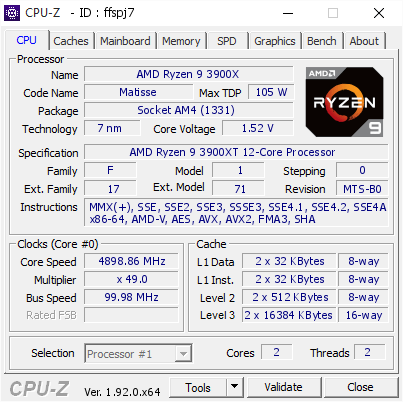
[ffspj7] Validated Dump by Fitvelkiz (2020-09-25 20:00:50) - MB: MSI X470 GAMING M7 AC (MS-7B77) - RAM: 32768 MB
dull ginkgo
I think it was this one? one of these...
https://hwbot.org/submission/4250800_forks_3dmark___time_spy_geforce_rtx_2080_ti_15362_marks
Shows 4.4 on 3dmark.
tall pelican
3dmark is even more off since it'll just make up numbers
dull ginkgo
or this, one of these idek
https://hwbot.org/submission/4245058_forks_geekbench3___multi_core_with_benchmate_ryzen_7_3700x_38784_points

HWBOT
The Ryzen 7 3700X @ 4400.6MHzscores getScoreFormatted in the Geekbench3 - Multi Core with BenchMate benchmark. Forksranks #35 worldwide and #7 in the hardware class. Find out more at HWBOT.
tall pelican
I've seen it say things like 4.6 on my 2700x
dull ginkgo
Forky likes benchmate which doesn't give a cpuz verfication so
eh, 3dmark is usually good enough for all core manual
It's horrible with showing like pbo and default freq
I think it tells me I got like 4.6ghz on a 2700 lol
I'll go see later
upbeat shore
How do u do the oc submissions @dull ginkgo
tall pelican
https://hwbot.org/submission/4560121_fitvelkiz_cpu_frequency_ryzen_9_3900xt_4898.9_mhz?recalculate=true messed around for a bit, this is why the 4.6 isnt impressive

HWBOT
The Ryzen 9 3900XT @ 4898.9MHzscores getScoreFormatted in the CPU Frequency benchmark. Fitvelkizranks #null worldwide and #6 in the hardware class. Find out more at HWBOT.
proven canopy
You have to use benchmate on win 10 + amd.
Lol, my 3700x subs are old/terrible, I'll redo them one day.
dull ginkgo
This man has a seemingly decent wprime score, being world record, 15 minutes.
https://hwbot.org/submission/4341860_tipers_wprime___1024m_core_i5_8350u_15min_43sec_911ms

HWBOT
The Core i5 8350Uscores getScoreFormatted in the wPrime - 1024m benchmark. Tipersranks #4082 worldwide and #1 in the hardware class. Find out more at HWBOT.
And then I go do my run with benchmate :p
https://hwbot.org/submission/4560282_mr1111_wprime___1024m_with_benchmate_core_i5_8350u_5min_1sec_78ms

HWBOT
The Core i5 8350U @ 3589.4MHzscores getScoreFormatted in the wPrime - 1024m with BenchMate benchmark. Mr1111ranks #82 worldwide and #1 in the hardware class. Find out more at HWBOT.
tall pelican
tiper most likely didnt enable wprime to run all the threads, since default is 1
dull ginkgo
Maybe, it's just confusing
proven canopy
The benchmate version defaults to all threads, non-benchmate default is 1.
proven canopy
Devil's canyon overclocking on liquid nitrogen
https://www.twitch.tv/unityoc

 tepid canopy
@dull ginkgo you on?
hard ice
he should be sleeping still
 finite frigate
How’s the graphics score for a 4GB Rx 570?
proven canopy
Seems right, link the result
 thick socket
how is does this look for first attempt at over clocking, besides port royal I have run about 4 games all seem stable
never mind links aren't aloud
 sand solar
Is having my voltage at 1.3500v good for 24/7 use? i have my ryzen 5 1400 oc to 3.8 so i was just wondering if its safe. the max temperature it goes is 74c
dull ginkgo
1.5v....
@sand solar different chips like different voltages, easiest way to tell how much your chip likes is turn on pbo, do a stress test, and see where the voltages hovers.
 sterile flame
That doesn't indicate anything
Og Zen had a max safe voltage of 1.42 at <70°C
1.35 is perfectly safe for him
This guy is trying to read vdroop as if it indicates a safe voltage like some kind of misinformed shaman
dull ginkgo
There is no single "safe" number for anything.
Pbo is the closest you can get to the chip automatically telling you what it likes
tall pelican
Its zen, there is definitely safe voltages
hard ice
@tall pelican you say that with such innocent sounding belief in the ability of users
Sorry, but have you ever actually met a user? I dont expect them to be able to flip a light switch without blowing something up at some point
tall pelican
Shingle said what they are, why should I reiterate it?
hard ice
point being: general statements run a risk of being taken out of context.
which is the stance that Mr1111 has above
tall pelican
No
Mr1111 is taking zen2 misinformation and applying it to zen1
The pbo and assume it hovers at safe voltage was the assumption for zen2 (which turns out to be false because zen2 degrades from overcurrent, not voltage)
hard ice
ask him :)
tall pelican
I know what his train of thought was doing
Amd told everyone what overclocking voltages and temps were safe on zen
hard ice
without asking him, you are doing exactly what i said above: "taken out of context"
tall pelican
Not going to entertain your nit picking. What shingle said is 100% correct for zen
tall pelican
Yes, shingle is on a 3600 on a asrock board from the other night
answers question about zen
posts pic of zen2
Why do you think they're related?
hard ice
i dont think they are related.
as i said, the point of the comment mr1111 was to point out that big sweeping statements about "safe" numbers is not the smartest thing
tall pelican
Its safe as the temperature shingle is at
hard ice
that is the line that would have stopped mr1111 from commenting more :)
because that gives context :)
dark ferry
wut
neon rapids
1.375-1.4v is fine for zen+ right
tall pelican
If you keep load temps under 70c, you can do up to 1.38
manic helm
Finally got in the top 10 US enthusiast league. TIme to go silent for 3 more years.
jade pulsar
lol
tall pelican
wait, I'm #6
proven canopy
Apprentice league is full of people subbing dice as ln2 
dull ginkgo
Didn't notice it was Zen for some reason, so the pbo thing doesn't apply, but there isn't 1 single voltage that marks the line between safe and degradation
finite frigate
Seems right, link the result
@proven canopy can’t link the result I don’t have the pro edition or whatever
tall pelican
Click compare online, the its the link it brings you to
 cerulean juniper
Any able to give me some advice on my Frankenstein 1660?
cerulean juniper
Idk if im supposed to be able to but it can get to 2.2GHz on the gpu and 4.5GHz on the memory. The newest game i have is killing floor two and it runs fine with high settings. Is this just an instance of silicon lottery or am I just being dumb
restive cargo
Other side of the vent is taped off so all the air is forced through the tube.
Gets sucked right into the blower intake on the 1080 Ti.
Later I plan to use to of these tubes on both sides of the vent and tape the middle of the vent off to force the cold air through both of them.
Then make a box cut out to replace that plastic part of the case that's covering those front radiator fans then hook up the chilled air tubes from the vent straight to the box front piece and make all that chilled air go through the radiator.
The box is so I can cut it out evenly and no air escapes on the sides. That way every bit of the chilly goodness gets forced through the rad.
I chose to go with that aluminum tubing over something plastic as aluminum has some thermal insulation property's that will help the air stay as cold as possible as it passes through the tube.
 final whale
lol thats so scuffed
brazen walrus
My god I have legitimately thought about doing that exact thing and was like why has no one done this
It’s been in my head “I need to go to the store and get some duct so I can try this out and see if it works” 
The only downside being that my vents are on the floor
so, that being said
does it work
restive cargo
I will copy pasta my message from another server regarding the performance based on my rough quick testing last night.
"About what you would expect from an A/C.
A/C can only cool so far.
I don't have any exact numers yet but from the bit of testing I did last night the GPU dropped 20C from running on ambient air to chilled..."
Which I'd say is a decent difference.
And that tempature difference is under load.
brazen walrus
Nice!
Much more quiet than having to use a loud fan when trying to get the most you can get out of OC
 vestal topaz
tall pelican
vestal topaz
tall pelican
not really
would have been better to tape on a fan to the end of the ducting, but otherwise that's what you do
dull ginkgo
@restive cargo I think your blower 1080ti needs that air more than the cpu
restive cargo
I did that last night.
 runic sage
how far do you think i could push a 660 2gb
proven canopy
A colder gpu is a faster gpu

 bitter saffron
Has anyone used the CTR overclocking?
 oak hare
Has anyone overclocked trident z neos on a Maximus formula z490 motherboard? Specifically 2x16gb (32gb) 3600. If yes whats your cooling setup like? Is it only safe liquid cooled?
tall pelican
CTR is pretty bad imo. Its just cinebench stable, tells you to run max llc (very bad) and you lose single core boosting
 short blade
my 3600X also fails to even complete the diagnostic
I just want to see what kind of sample it says mine is
99% sure it's a bronze sample lol
tall pelican
can you tell the values that it gives your cores?
https://cdn.discordapp.com/attachments/727092874038214677/760640935893008416/unknown.png gave it https://cdn.discordapp.com/attachments/727092874038214677/760639718865764372/Capture.PNG

 cold jolt
manic helm
cold jolt
manic helm
Bryce: Drops 400 points in one day on HWbot
Me: Better put a few hundred points between me and him to be safe.
Bryce:
tall pelican
yeah, bryce got a bunch from the 3080 and 3090, but it'll eventually fall down when more people with ln2 get cards
manic helm
ya, points disappear quickly on new hardware
Nothing like the pain of opening hardware bot and seeing a bunch "you lost xxxx.x points"
Thats why I only bench my old laptops. Nobody else is going to benchmark a 2011 macbook
all those points are mine
although I do regularly see points disappear on my old gtx470 benches.
short blade
@tall pelican my CCX0 is all 135, my CCX1 is 126 126 121
tried diagnostic 3 times and all failed
tall pelican
it'll spit out 4.3-4.35
short blade
I don't even want to apply the oc I'm just curious to see if it says bronze sample or not LOL
I doubt that
tall pelican
I didnt get any sample rating on mine
short blade
I did a manual OC just for benching today
at unsafe daily voltages
applies 4.35 on CCX0 and 4.3 on CCX1, took 1.413V to even make it through cinebench
I'm pretty sure I have one of the worst 2020 production 3600Xs ever made
year 2020 week 24 batch
tall pelican
I've benched mine at 1.35v and ccd2 does 4.4, but that's about it even up to 1.5 boot voltages
short blade
maximum possible oc at safe voltage is 4.05
tall pelican
uhhhh are you on some crazy low end b350?
tall pelican
what llc?
short blade
3
tall pelican
F I guess
short blade
it's just garbage silicon
tall pelican
if good at least?
short blade
lost the lottery so hard the ticket didn't even have 6 numbers
FCLK runs stable at 1867 but 1900 is impossible to boot
tall pelican
that's a big F
short blade
running 3733 16-16-19-21-36
tall pelican
my friend has a 3900x that's stuck at 1833 IF, but it'll boot and mem test 1900 no problem
tall pelican
over 1833 it drops pcie
short blade
like 1900 decoupled?
oh
yeah I'm rock solid at 1867
I'm doing a 3600X build for a customer who doesn't want overclocking... would it be unethical to bench his and swap it if it's better 😂
if my 3600X is in the bottom 1% of year 2020 production, I wouldn't be surprised
finite frigate
I'm doing a 3600X build for a customer who doesn't want overclocking... would it be unethical to bench his and swap it if it's better 😂
@short blade .....no just dont tell him
short blade
👀
finite frigate
do it
short blade
hey y'all idk if you knew this but I didn't
prime95 has an option to merge all workers into 1 window
it's so much nicer
short blade
@finite frigate I'm trying to push the RX 570 for hwbot
going for the absolute limit of the card
proven canopy
This will go a long way https://www.amazon.com/Universal-Waterblock-Processed-Anti-Oxidization-Technology/dp/B07TP44HS6
Pump ice water through it for some short benches, lol
short blade
yeah think I found the limit lol
okay forks I mean the limits of the card on its stock cooling
you don't have to flex on me like this
😭
final whale
What can i do to keep my room from being dusty
short blade
I don't think this is the channel to ask this question
final whale
i keep sneezing
proven canopy
Just saying those $21 waterblocks are pretty amazing for what they cost
final whale
what channel
proven canopy
Overclock your immune system
short blade
forks I'm not putting a custom loop on every customer build I do lol
proven canopy
I meant you could put together an ali express ice bucket loop for a quick bench run
(if it's worth pulling off the stock cooler)
Which is kind of a pain on some cards
short blade
after that artifacting the radeon software won't start anymore
even after rebooting the pc
weird
had to DDU and reinstall to get it to launch again
short blade
@finite frigate https://www.3dmark.com/spy/14284641 here's the most i was able to squeeze out of the RX 570

3DMark.com
AMD Ryzen 7 3700X, AMD Radeon RX 570 x 1, 32768 MB, 64-bit Windows 10}
1450mhz core, 2000mhz mem
 sleek fjord
you can clock my over
dull ginkgo
Yes
dull ginkgo
@idle remnant why not
brazen walrus
got my fans in today so I can start over clocking that 3090 as soon as it comes in
hoping my 850w is enough to pull these bad boys
 severe forum
Lmao u prob gonna need 1000w
 idle remnant
^^^^
dull ginkgo
damn
 hot socket
Best program to oc a zotac gpu?
I wanna boost my zotac 2080ti to its max speed of 1650mhz ish
But keep it reliable ofc
dull ginkgo
Every GPU OCs differently, don't expect to get any clock you want.
proven canopy
MSI afterburner
 weak oxide
Whats a safe voltage to try in CTR?
tall pelican
1.25v
tall pelican
I can make 1v unsafe
dull ginkgo
TRUST ME I'M AN ENGINEER
proven canopy
z77 overclocking by yosarianilives https://www.twitch.tv/yosarianilives

Twitch
yosarianilives streams live on Twitch! Check out their videos, sign up to chat, and join their community.
 arctic gyro
can u overclock ssd?
arctic gyro
my ryzen7 3700x says out the box it 3.6ghz but when i check the speed in task manager it says its base speed is 4.20 ghz, its that right?
dull ginkgo
@arctic gyro Base clock is 3.6ghz, boost clock can be all the way up to 4.4ghz.
final whale
Just get i7 10th gen if ur only gaming most of the time
short blade
I managed to boot 1900MHz fclk 3800 MT/s with the same timings I had at 1867/3733
now to see if it's stable
weak oxide
Does anyone know why Tras has no effect on lowering it really? Going from 30 to 21 the bandwidth is the same just memory latency has dropped from 63.3 to 63 in aida
hot socket
@dull ginkgo ur so smort pls , is there reason to oc my 9900k to 5.1ghz if it runs at 4.7ish rn
Would the dif be big enough
 weak oxide
@hot socket he’s not
hot socket

 thorn ore
intel?
thorn ore
i used XTU on my last intel machine, was able to push it a little. - https://downloadcenter.intel.com/download/29183/Intel-Extreme-Tuning-Utility-Intel-XTU- - but make sure you have adequate ventilation/cooling if you're gonna do anything serious
Drivers & Software
Intel® Extreme Tuning Utility (Intel® XTU)
i would look up undervolting guides as well
 fluid nova
ok
thorn ore
with a mobile chip you want to basically keep it from getting too hot, so it will sustain boost for longer before it thermal throttles
and undervolting will help you do that
fluid nova
aight thx
 hearty cape
what can i overclock my 1650 super too
sterile flame
1650?
thorn ore
there's no guaranteed oc amount, you have to push it a little at a time and test it
look up a gpu oc guide and use something like msi afterburner to push gpu/mem clocks
 upbeat ingot
Hello everyone, I have a question on how to overclock my RAM so I can get 3600 MHz as it says I should get out of the box. Using CPU-Z it shows that the DRAM frequency is only running at 1799.6 MHz, can I please get help getting my full 3600MHz? My Specs are as follows: MSI X470 Gaming Plus Max Mobo, R5 3600xt, 2x8Gb of Corsair Vengeance 3600MHz RAM, EVGA RTX 2060 KO.
proven canopy
1800mhz dram frequency in cpuz = 3600 mhz "normal" frequency
3600 means 3600 million transfers / second
The ram runs at 1800 mhz but transfers data twice each clock
restive cargo
Double-Data-Rate?
dull ginkgo
aka. You already got it.
final whale
is asus vision g z490 good for oc
might oc my i9 10850k and 3080 when i get
how to oc cpu just change voltage?
cold jolt
its way more complicated than that
wait until you have a system capable of overclocking, then someone can help
cold jolt
yeah, its a nice board
final whale
ok
tall pelican
what's an asus vision g?
there's gigabyte vision g, but you've said asus twice and sassy has confirmed it 😂
 sage cave
I'm super new to over clocking in fact this is going to be my first time. I currently have a Asus Rog Strix 2080 that I want to over clock. I have afterburner to overclock it with and I am wondering if there is anything that I should know in general about overclocking that isn't mentioned in videos or anything specific to my card such as running hotter than others or stuff like that.
dark ferry
Overclocking GPU is hella easy.
Monitor temps, go higher till crash, back off, repeat.
sage cave
Ok thank you
dark ferry
It's not like RAM or CPU overclocking.
dull ginkgo
Literally 1-click overclocking!
Always wanted to get more performance out of your graphics card, but don't know how overclocking works or simply don’t want to risk it? The new OC Scanner feature in MSI Afterburner will do the overclocking for you at the click of a button. It's...
Not a joke
dark ferry
Yes there's the OC Scanner too.
dull ginkgo
Works for easy small auto oc
dark ferry
Yes but it doesn't touch the VRAM.
dull ginkgo
Ya vram is super easy tho
dark ferry
But VRAM is same thing. Push till things get weird. Back off. Done.
dull ginkgo
You just let heaven play in windowed
And mess with slider
It's easy asf
Like you gotta run a run of smth to stress every core clock you try, but mem you can just have heaven
sage cave
ok will do thanks for the help
dark ferry
I wish CPU and RAM overclocking was as simple as GPU.
sage cave
isnt ram overclocking just the xmp profiles or do you mean beyond that
dull ginkgo
Think about it, gpu and vram is on a dif board


 dull ginkgo
Xmp is weak oc
dark ferry
I tried to manual OC my ram once.
I had to clear CMOS a few times and gave up. Set XMP.
dull ginkgo
Manual oc isn't worth unless you got b die or got really lucky
tall pelican
^^^ or some super bad xmp
dark ferry
On Ryzen the difference would be more noticeable.
tall pelican
helped someone the other day that xmp was 2666 with cjr
dull ginkgo
@dark ferry took me 4 tries to get dram calculator values in lol
sage cave
im on intel is it worth setting it to that or no
dark ferry
Wanna come to my house and fix my OCs then?
dull ginkgo
Nah I'm crap with it
tall pelican
it depends on the workload
dull ginkgo
But tRCRD and tRCWR were in a different order in the bios than dram calc
tall pelican
and what I said doesnt change if he's gaming or rendering
dark ferry
I'm not saying there wouldn't be a difference.
tall pelican
dark ferry
And that it wouldn't vary depending on game or task.
I just don't think 3000 vs 3600 is going to be like "omg wow the difference".
sage cave
Ok
tall pelican
it depends entirely on the engine, and yes it can make a big difference
dark ferry
But then again.
People tell me overclocking my CPU doesn't make a difference in gaming.
Fortnite's game engine disagrees.
Big time.
Idk.
Overclock everything.
tall pelican
SotTR
dark ferry
The gpu, the cpu, the ram, overclock your monitor, your drives, overclock your gaming chair. Just do it.
dull ginkgo
I tried to OC my monitor lol
Got to like 147hz without weird crap
And then I was like screw this
dark ferry
My 144hz panel can go to 185hz but I haven't tested overclocking my 240hz panel cause it's gsync and it would seem pointless to overclock above the gsync threshold.
tall pelican
that's what happens with 18 of intel's finest 14nm cores 
restive cargo
Max temp was 109C
I dropped it back to stock so I can learn more about this platform. Apparently 1.300Vcore on X299 is a lot.
That's what spiked my temps when I did that.
proven canopy
It's because your aio is 💩
I was seeing 40C delta over ambient at 1.35 vcore during x265 4k
restive cargo
I do have the AIO mounted wrong.
But my AIO is better than the Corsair 360mm ones.
I have it tubes up because that's how it fits.
So yeah. Not good.
proven canopy
?
sterile flame
My 3600xt does over 5.2 ghz
 coral root
could you oc a 3300x with hyper 212 black
tall pelican
It'll chill them out
 next nacelle
Anyone know a good overclock and voltage for 10700k? Aiming for at least 4.2ghz or more.
 tight quarry
how much overclocking can i do on a 3700x with a stock cooler
preferrably not going over 85 degrees
severe forum
@next nacelle 5.2 @ 1.295v maybe? if ur lucky
tight quarry
@dull ginkgo where is that in the bios
i have an msi mobo
or is it not in the bios?
next nacelle
@severe forum Would I need to just adjust core and volts? for oc
lofty prawn
will i be able to overclock my 10980XE with no cooler? or should i invest in a $5 air cooler that i found by searching for the lowest price on pc partpicker
severe forum
No cooler?!
severe forum
Ummmmmm
lofty prawn
i wanted the most top of the line stuff on the market
lofty prawn
and for some reason the pc wont turn on after i shoved the 10980XE into my X570
severe forum
Umm pls tell me u aligned right way