#overclocking
1 messages · Page 52 of 1
 manic helm
 dull ginkgo
@manic helm fr? What Pentium
manic helm

HWBOT
The Pentium G4600 @ 3708.1MHzscores getScoreFormatted in the CPU Frequency benchmark. intenderranks #null worldwide and #1 in the hardware class. Find out more at HWBOT.

dull ginkgo
You're in first place by 1mhz lol
manic helm
when overclocking a locked cpu you take what you can get
dull ginkgo
Lol
manic helm
102.99fsb and pray for variation in the clock speed to get the screenshot and cpuz verification
 neon rapids
lmao theres only 5 i could buy one and not change it to get 6th
 dark linden
 sterile flame
5.6 is pretty weak
my 8086k did 5.7 on a custom
2 cores 2 threads. Really that's very weak on a chiller, the 8086k did ALL 6 HT off at 5.7 on a custom.
sterile flame
Im the one over here trying to kill an athlon on a wraith spire. Don't trust anything I say
@manic helm wraith spire
dark linden
my 8086k did 5.7 on a custom
@KillziahOC#4638
@KillziahOC#4638
@dark linden
8086 is a much stronger bin than 10600k
Most need over 1.3 for 5ghz on ambient
Even the 10700k's are pretty weak this generation. It looks like the 10900k's got all the good sand this time around
dark linden
@dark linden he left the server
@hard ice
He tries to join every server I am on and harass me
 hard ice
ah
dark linden
Probably can't send screen l shots of most of what he's said but it is not usually even coherent
hard ice
he has some understanding of the tech
dark linden
Yeah but this kind of offsets that
hard ice
you can see this in the short chat i had with him in #graphics-cards last night
aint saying he is sane (but then again, who of us is)
dark linden
My horrendous crime that I committed to cause him to flip out was telling him to be safe if he is building a cascade
hard ice
he seems to be a videocards/wctftech convert/zealot kind of person. IF i was to make a guess based on his statements here on this server.
@dark linden hey, how dare you! :P
hard ice
the horror! (of being nice to other people)
dark linden
I learned my lesson and will never be nice again
hard ice
:(
dark linden
@hard ice I hate you
hard ice
may all your days be as easy as this one then
because if that is all it takes for you to hate someone, you are in for "interesting" times
:)
dark linden
I was just kidding I don't hate you
Just trying to start down the path of never being nice again
hard ice
the day that i worry what someone else thinks about me on the internet is the day i should pull the plug :)
dark linden
Unless it is a hitman off the silkroad then definitely worry
hard ice
nah, it either happens or it doesnt
 faint quest
 🔥
🔥 
sterile flame
i have an i5 8400k and my cpu is running slower and I was thinking about over clocking it and i have a stock intel cooler so if you have any suggestions please tell me
hard ice
get a cooler that has some actual thermal headroom.
sterile flame
Okay, thanks.
 tight plinth
8600k or 8400 non k? There is no 8400k
 signal sun
How’s the 3900x for OCing
 cold jolt
not good unless you have exotic cooling
honestly not even worth it
the actual perf increase from the maybe 200MHz you might be able to squeeze out of it wont be much
signal sun
K thnx
 vapid berry
If it's slowing down, the thermal compound might be wearing out
So before, you had competent paste with an Intel stock cooler, and now you have worn out paste with an Intel stock cooler
New cooler & paste would do :)
 rich dragon
I tried overclocking my R9 3900x to 4.6 but even with increasing the voltage it crashed
any help?
Im using Ryzen Master btw
 twilit hedge
Your chip might not be able to handle that much of an OC
 proven canopy
4.3 all core with an avx2 workload is about the best you can hope for.
Just use PBO
twilit hedge
Here's Silicon Lotteries binning stats
dark linden
Going to be doing 12 -gpu gpupi soon
12x rx 480's
And might do 12x 5700 if I upgrade my mining rig to them once eth dag hits 4gb
proven canopy
What kind of system are you running 12 gpu's in?
Chinese mining board / linux?
That board looks like an m9a
With some kind of hardware bios mod
dark linden
It is an apex ix in fact
I am using it as it was my only free board for testing out gpu bios mods
I have the asrock 13 gpu motherboard but I have access to a gpu server board that can do 12gpus at 4x
What's this wire
@proven canopy
I think it is the bios mod wire I did for coffee lake
But I don't remember
proven canopy
Interesting, I used different solder points for doing the coffee mod
dark linden
I never actually ended up using coffee lake on it
Or ever actual
8700k sat in a box then was sold without ever being used by me
proven canopy
Only reason I bought a 9700k was to learn how to uefi mod lol
Loved that system, daily drove it most of last year
proven canopy
How much do you pay for power?
dark linden
How much do you pay for power?
0.14 per kw/h
proven canopy
I didn't realize altcoin gpu mining is somewhat profitable again https://whattomine.com/
Calculate how profitable it is to mine selected altcoins in comparison to ethereum or bitcoin
damn, that's a lot
proven canopy
Lol wow, 580 makes $1.50 a day
deheck
well
I might pick up ... a lot.. of those
dark linden
Don't
proven canopy
Haven't seen an ROI like that since 2017
dark linden
Dag is about to hit 4gb
proven canopy
vram limitation? or?
proven canopy
I mean, what about 8GB cards
dark linden
And won't be able to mine in about a month
I mean, what about 8GB cards
@proven canopy
It depends if amd gets their **** together and releases a driver that allows a single file to be over 4gb
dark linden
I really hope they don't so my 1070,1080, and 1080ti will bring me 5000$ a month from the difficulty dropping by 70% when no amd cards can mine
proven canopy
Budget gamers would love those cheapo 4GB cards
Same thing happened after 2017 bubble
I've just been folding because why not
But I'm definitely gonna read up on the mining game again haha
dark linden
But like, if 8GB polaris gpu's are $100 ish, that's still a pretty great ROI
Get 4gb if you really want to get some and use hive os. For 80$ cards you hit roi in like two months and at that point eth will no longer be able to be mined so switch to raven coin for another 3 months then sell the cards for 59$
proven canopy
I used to run nicehash on a bunch of 1080s
Ya, I don't expect to make bank off mining at any sane, non-commercial scale, but it's kinda fun to have a few thousand watts of gpu compute running in the basement
dark linden
Currently my rig is at just above 500mh/s
proven canopy
Do you run server psu's / breakouts?
dark linden
750$ a month before power
proven canopy
Those saved me a ton of cash in PSUs
I picked up a bunch of 750w plat HP common slots back then
$10 breakout boards
dark linden
Do you run server psu's / breakouts?
@proven canopy
Ant miner asic psus. 15$ for 1200W
proven canopy
Fair enough. My HP CS's were $20 iirc
proven canopy
I ended up using them for mundane stuff around the house
dark linden
They are really nice for general 12v power
Like for powering a bunch of delta fans for rads and stuff
dark linden
How is that scope? I need one
proven canopy
Old pic
twilit hedge
Okay
proven canopy
It's ok, the analog front end is meh
The 1104x-e just went on sale for 420
The 1202x-e is slow af in x-y mode
unlike the 1104
twilit hedge
That's a decent deal
dark linden
Yeah but that is another 420 I could use to expand my mine
proven canopy
Everyone seems to get the ds1054z
ds1054z is a lot easier to mod to 200mhz vs the siglents
Though they aren't hard
Also 4 channels
twilit hedge
I have an old heathkit o-scope I need to fix up
dark linden
I noticed there is an open outlet in the hallway next to my apartment door that isn't hooked up to my meter and I really want to run a few mining rigs off it then play dumb if the landlord says anything
proven canopy
Also I potato'd that board's bios chip running lie 240mhz reference clock
oops
lol
dark linden
The power resistor for my load tester is a bit bigger than I thought from the pictures
proven canopy
I should've bought this when I had the chance
haha, I just wrap kanthal wire around something ceramic for load
Just to flip, or re-sell to some overclocker
Because that's like half ebay price , almost
dark linden
Your local university surplus has amazing stuff. Mine only has chairs and stuff like that
proven canopy
for quad channel 500mhz, 2.5GS/s front end too
Sometimes, I check often and get lucky occasionally
dark linden
I am shipping your suction line tomorrow @proven canopy
proven canopy

dark linden
As well as the ram
And a few 775 cpus if I didn't forget them
I expect to actually see a single stage from you now though
proven canopy
I just need to pick a capillary size
Probably going with r290
And order a filter dryer, maybe
dark linden
What size compressor
And order a filter dryer, maybe
@proven canopy
Get a damn filter dryer
proven canopy
I could use either an 8k btu or 15k btu
dark linden
A Sud 111 is like 5$
I could use either an 8k btu or 15k btu
@proven canopy
Go with the 15k. 6 ft 7-8 inches 1mm cap tube
proven canopy
Don't remember the displacement from memory
dark linden
Maybe start with 7ft and cut down from there
Or 10ft 1.2mm and cut down from there
For 20cc I use 6 ft 4 inches for 350W load capacity
 strange crypt
You should get at least 15fps on csgo
 chrome crater
Hello .. I bought 3600 mhz ram ddr4 and by default in task manager set to 2100 mhz so I tried to go to bios to oc the ram and enable the xmp .. but in the bios i cant find any of oc stuff , my bios look like this
https://images.app.goo.gl/Sc19LgawuuFWfSgo6
Where can i oc the ram any way to i dont know like unlock the bios ? Or any software or somthing ?
im using omen desktop btw
twilit hedge
What motherboard and CPU do you have?
twilit hedge
What chipset is that?
 chrome crater
Z370
twilit hedge
Where did you get the motherboard?
chrome crater
its came with the pc
twilit hedge
Okay
chrome crater
Looking for upgrade information? Trying to find the names of hardware components or software programs? This document contains the technical details for this product.
this is the pc
twilit hedge
You've checked all the bios menus, even under advanced options?
chrome crater
yes nothing
twilit hedge
You might contact HP to double check
chrome crater
changing the motherboard will work?
twilit hedge
np
Looks like the cheapest currently available is $234 from amazon
So that's less than great
@chrome crater You might consider upgrading your CPU to an r5 3600 and getting an AMD motherboard. It will cost about the same
chrome crater
thanks really helped me out ❤️
vapid berry
That isn't the worst si motherboard I've seen
twilit hedge
Not by far. Standard form factors and connectors, just no XMP

 dark ferry
Ok so I've been sitting stable @ 5ghz all cores 4700 uncore 9700k for close to a week now. I'm idling at 1.375v and sitting at exactly 1.3v under max load High LLC. Temps are fine. Was wondering if this seems like acceptable voltages.
 weak bane
for intel i wuould say so
dark ferry
@weak bane Thanks for the feedback man.
weak bane
No problem i know for amd anything pass 1.55 is not good but for Intel I’ve seen people do 1.5 all the time so that’s fine
sterile flame
Hey guys I want to know if there are any comprehensive guides to overclocking my CPU. I’ve never done it before and I want to boost my gear
I am currently using i5 4670K this is my first PC I built years ago
proven canopy

Well, we skipped a generation on the front page, because overclocking Sandy Bridge and Ivy Bridge were both relatively similar, and relatively easy. The overclocking game, however, is in for a bit of a facelift with Haswell. We have an overclocking guide ready for you on day o...
sterile flame
Okay so what I’m getting from all the info I’m seeing so far is basically you increase the CPU voltage as high as you can without it overheating or becoming unstable
I’m sorry if this sounds like I’m an idiot I’ve just never done this before 🥴
 noble ravine
@sterile flame yeah basically, as long as you have good cooling really
for my computer it has some overclock cpu but i made the mistake of using the cheapest fan and heatsink i could find on amazon
sterile flame
What temperature would be considered too hot for a CPU? 90C? Also let’s say someone over locks their CPU and attempts to bump voltage up. Does the CPU like IMMEDIATELY set on fire? Or Do you have time to stop it?
dark ferry
Depends on the cpu, its thermal limit, the test being used, the duration of the test, etc. The cpu is going to thermal throttle before it gets damaged I would imagine. As long as you haven't messed with the temp limits.
I run a 1hr Realbench for my testing. I consider the 90c I get on two cores for an instant as acceptable, since the rest of my cores are in the mid-low 80s and it only happens for an incredibly short duration. My default thermal limit would be 100c. If it hasn't reached that after an hour I figure it's likely not going to, especially since my usage would never exceed my stress test scenario.
 robust cipher
unless you did something super stupid, it won't burn out instantly. when you boot up, you'll be at idle and when you put it under load then thats when your temps spike
 restive cargo
@short blade Speak here
 short blade
I'm gonna turn it back up to 1.35V and see if that's better
restive cargo
What voltage are you on now?
short blade
1.34
restive cargo
From my experiance on 5.0 Ghz overclocks most Intel chips at least out of the ones I've done... start to get stabil around 1.350 vcore. Anything underthat unless you have a god chip won't be stabil.
And some still won't be stabil unless you do like what you're doing and running an AVX offset.
short blade
yeah it isn't stable at 5GHz AVX 0 even at 1.4V
restive cargo
But as Forks says an AVX offset is for the weak.
short blade
and I can't go higher than 1.4V on a 240mm rad
short blade
I'm aware
restive cargo
At least with standard cooling and not something exotic like liquid nitrogen etc...
restive cargo
Oh yeah for that 1.4 benchmarking would be fine.
Won't hurt it to run it ocassionaly at that voltage.
short blade
even 1.44 should be okay for one benchmark or two if you can keep it cool no?
restive cargo
But overtime it will start degarding the chip and you will have to put more voltage to get stabil once it starts degrading.
I wouldn't
short blade
I'm targetting 1.35-1.36 anyways
restive cargo
I wouldn't go anywhere past 1.410 and even that is pushing it to the limit.
Yes that is good.
Anywhere up to 1.4 is ok for daily use even 1.390 just don't run 1.4 daily.
short blade
I know that 1.4V is the long term limit yeah
proven canopy
My 9900k did 5.0 4.7 ring on air, d15
restive cargo
Love the D15
proven canopy
Not p95 small fft stable, because overheat
restive cargo
Sips buy a d15
short blade
d15 is probably about as good as a 240mm rad though isn't it
proven canopy
z390 dark tho
short blade
yeah this throttles in p95 too but doesn't crash
proven canopy
before the water loop
restive cargo
big boy
dull ginkgo
is dat a
short blade
yeah 1.35 not good either
dull ginkgo
D15
short blade
going back to 1.36
restive cargo
So your at 5.0Ghz with an AVX offset of 1 right now?
short blade
yeah
restive cargo
What's you cashe at?
short blade
...auto LOL
restive cargo
Set cashe to 48, try it there.
short blade
is cache and ring the same thing or something else
cause I don't see anything called ring in the OC section
restive cargo
ring gonna try and make the cashe perform as close to the cpu speeds as posdbile.
short blade
what about current limit
short blade
I'll do min 47 max 48
restive cargo
NO
short blade
do I leave current limit on auto
restive cargo
Set them the same
short blade
ok
restive cargo
Uh
I want to say you set that to max
Type like some random number like 5000 and see what it does.
Wait what's it say when you hover over it.
short blade
I already booted
restive cargo
With it on auto and cashe at 47?
short blade
Yeah
restive cargo
Okay I guess it's fine.
Try it now.
So your at 5.0Ghz with an AVX offset of 1.0 and cashe at 47.
short blade
I don't see a cache speed anywhere in hwinfo64
short blade
yeah I think this is really good for a 7700K isn't it
restive cargo
Eh
short blade
the owner expected 4.7-4.8
seems like above average bin
cinebench looking good so far should I try prime95 first or try 48 cache first
restive cargo
maybe
To know if it's really stabil you have to run P95 without any crashes for 10 min.
restive cargo
I mean if your just benchmarking you should be fine if it passes R20 but for daily use run a P95 test for 10 mins.
small fft to hit it hard.
restive cargo
But did it BSOD?
restive cargo
ok keep going until it bsod
short blade
but no bsod
restive cargo
It's gonna bsod
short blade
7 threads stopped
thread 1 is still going
3 of the stopped threads were able to complete a test before stopping
restive cargo
If you don't want to hit it as hard as P95 does you may want to try AIDA 64 but make sure you only select the cpu to bench and not everything else in your system.
You don't want to have other varribles.
short blade
I'm running out of time btw
I'm doing this for someone else but I only have like 1 hour left
restive cargo
But if you do use AIDA64 it's not near as hard hitting as P95 so you'd have to run it longer to find a potential BSOD.
Like where P95 you only have to run it around 10 mins to find errors, with AIDA 64 you might have to run it an hour.
restive cargo
I don't get why some are stopping, usually if it won't pass P95 the whole system just crashes it doesn't stop threads when they get an error.
That's weird/
It should just BSOD it shouldn't be stopping individual threads.
short blade
ok well thread 1 stopped with an error after 4 tests
restive cargo
That's so weird
short blade
but no bsod still even after all stopped
 short blade
it said that there were rounding errors
maybe it's just extremely slightly unstable
should I up voltage or lower cache speed
restive cargo
What's voltage now?
short blade
1.36
restive cargo
Leave cashe at 47, set vcore to 1.370 and if you want to add the AVX offset of 2 I told you about.

It should be more stabil wiht that.
short blade
I try 1.37V first
short blade
so 1.36 AVX 2?
restive cargo
I'm telling you try AVX offset of 2 with a vcore of 1.360 and It be good.
Might have to do 1.365 but only if 1.360 isn't good enough.
short blade
gonna try cache 46
restive cargo
Eh
I wouldn't
47 is already 3 under the cpu core speed.
What'
What's your memory set at?
Is it XMP and if so what voltage is on the RAM?
short blade
this guy has 2133mhz ram lol
restive cargo
Can you change the cvoltage?
short blade
the what
short blade
no he has 3 mismatched modules LOL
restive cargo
I'd take the 3rd stick out and just run in dual channel.
At least for getting it stabil.
short blade
not my option
restive cargo
Who puts 3 sticks.
like tf
it's either one stick, two sticks, or four sticks.
3 sticks is so weird.
dull ginkgo
can't you just take the 4gb out
short blade
I'm not gonna argue with him about it lol
I'll just recommend that he changes his RAM on his own
 short blade
not a friend
short blade
random guy who messaged my build listing asking if I'd OC his existing system for $50 lol
why not
 restive cargo
Excelent.
dark ferry
@short blade 1.4v in bios isn't always really 1.4v. If you're on 9th gen or higher look at your VR VOUT. That's your real voltage. I run 5ghz all cores 9700k Gigabyte Aorus Pro Wifi with High LLC at 1.415v but my real voltage is 1.3 under max load and 1.375 at idle.
short blade
it's 7th gen
dark ferry
I can't say for certain the same would apply. I would check into it. What chip?
dark ferry
Sent it away, lul. Bye bye. So long.
Can't do 5ghz? You are of no use to me...
Ok I'm done.
proven canopy
vr out is a gigabyte mobo thing
short blade
it was an asus z170
 maiden crescent
dull ginkgo
maiden crescent
dull ginkgo
check pinned
 jade pulsar

sterile flame
don't have time for that rn
Will the lga1151 Asus Prime be able to get the 9900k up to 5ghz? I did hear about temperature issues with the VRMs.
 deft rain
@sterile flame I’m not sure about the cooling issues but that board, if working properly, should definitely get a 9900k to 5GHz
sterile flame
Is that the extent of it?
I' not trying to break any records, I just want to be able to OC at the end of my warranty
deft rain
provided u have decent cooling (a 9900k definitely needs an aio) the advertised boost clock is pretty easy to hit
depending on your board/cooling/lottery u could go higher
dull ginkgo
Just watch your voltage
It's basically guaranteed you'll get 5ghz at some voltage, just don't try to daily 1.5v
sterile flame
I've hear that unless you are doing extreme oc then there really isn't a difference between air and water cooling.
but the 9900k is a hot one
dull ginkgo
Yes
sterile flame
Like, would a Noctua tower cooler work?
dull ginkgo
D15/d15s or something similar yes
dark linden
dull ginkgo
lotta boards
 late comet
@dark linden p5q deluxe?
dark linden
@dark linden p5q deluxe?
@late comet
P5e3 premium
late comet
ah close!
manic helm
so many motherboards
dark linden
@manic helm not nearly enough
I need about 100 asus x48 boards to get one up to my standards
manic helm
LOL, have any spares that are functional trash.
dark linden
I've got extras
I am on the hunt for a 670 fsb 32m board on air 3:5 mem
I don't know if one actually exists but if there is one I will find it
Best I've come across is 665 on ln2
662 air
manic helm
I never really bothered with any ddr 3 boards. I had a 2600 on a h61 board someone gave me but I turned it into my parents computer.
dark linden
I love ddr3 specifically 775
I've probably spent 4k binning boards. I just dropped 500 on two sticks of gtx2 hypers
I've made more than that selling boards though
manic helm
Everytime I go to the dump I keep looking for some good scrap from that generation to steal
dark linden
Asus x48, gigabyte p45 are the only two that you really want
X48 Foxconn blackops is okay
manic helm
Past few months seems to be low end 775 boards everywhere
dark linden
Biostar p45 is good for max fsb cpuz suicide runs
manic helm
I grabbed that msi board but it has 0 overclocking options when I got it powered up.
manic helm
snatched up some cpus but they were both celerons when I wiped off the paste
Last week was all old systems. athlon xp. 1.2 tualatin celeron.
wasn't worth me trying to rip the cases apart to get to the parts
manic helm
lol. Beats my 7 or so I have
dark linden
I think at one point I had 130lbs
proven canopy
I have two, double what I had a month ago though 
sterile flame
Are they all broken? Lol
manic helm
I have a q6600 and wolfdale 4300 may I think it is. the rest are celerons and pentiums.
dark linden
Are they all broken? Lol
@sterile flame
At least 98% of them work
I was binning 775 cpus
sterile flame
Damn
dark linden
I was also binning hypers
Went through 30-40 sticks
But am selling all of them and getting gtx2's. 6-7-6 at 2200mhz with only 1.71v
My best sticks needed 2v for that
And they were considered quite strong
I think my kit of hypers that I got might be the strongest in the world that I know of at least
manic helm
I am probably giving up on the 775 benching. I might be able to push the q6600 a bit on air, but none of these boards are going to do anything for me without vcore adjustment.
Cant justify spending on an old board
Kids started back to homeschooling today so My life is pretty much over for a while.
no time for playing
dark linden
There are probably 40-50 dead sticks
There were only 200 sticks of gtx2 made and they were by far the best bin of hypers by mile and my two sticks are best of 15 tested
I am probably giving up on the 775 benching. I might be able to push the q6600 a bit on air, but none of these boards are going to do anything for me without vcore adjustment.
@manic helm
You in the U.S?
manic helm
ya
proven canopy
Only 200? damn
dark linden
Yeah
They are (almost) impossible to find
I think that there are still two sticks available @proven canopy
If you are up for selling a kidney or two to pay for them that is
dark linden
What sp was your 10900k btw
@proven canopy
63 🤮
Sold it the second I got it
Waiting for them to come back in stock
dark linden
The advantage of LGA
@sterile flame
I store my PGA chips in a box. Just a layer of foam then chips then foam repeating all the way up
sterile flame
Well, you can really throw around PGA chips, can you?
You've got to be more gentle with them
dark linden
I haven't had any issues
sterile flame
If you drop a PGA vs LGA chip a foot, which one is more likely to not work? PGA, right? Or are the pins stroger now
proven canopy
If you're dropping chips like that often, there are other concerns.
 viscid tide
Want to keep my ryzen 5 3600x at 4.0 ghz, at how much peak voltage should I be?
Want to lower my temp as much as possible
Stock cooler 😦
hard ice
@sterile flame what does it say in the topic line of this channel?
jade pulsar
neon rapids
can we add check the pins to the topic thing
sterile flame
I meant overclock my specific system
neon rapids

deft rain
can i ask you about that link?
hard ice
this is a particular case study in why should Naed not be a mod. Because there would be skid marks showing from the kick that would be applied
dull ginkgo
?
deft rain
lol
neon rapids
 pliant lava
Hey all just curious what is the actual performance gain you can expect to see when ocing memory?
dull ginkgo
You don't know until you actually do it and see how far you can go :D
Memory frequency usually doesn't matter too much unless you're OCing <3600mhz for Ryzen. Afaik lower timings lead to lower latency and overall snappiness, some performance gains in programs too.
neon rapids
tldr a few frames
pliant lava
@neon rapids now thats a nice tldr haha
But ok that kinda helps I was talking to you guys the other day about the ballistix vs the Vulcan kit
 uneven jetty
would overclocking a rysen amd 7 3700X worth some of the down falls of overclocking
dull ginkgo
@uneven jetty if you want to negate most of the downfalls, just use PBO
PBO doesn't burn the chip or crash your pc
robust cipher
no
tight plinth
@pliant lava If you're on Intel, you really start seeing the perf differences at like 4000MT/s CL16, which if not GPU limited is about 10% faster then 3200MT/s CL16. Tho that's generally only recommended for people who do comp FPS and need every bit of FPS they can get with their 10900k or whatever they have.
as usually you'll be mostly GPU bound
pliant lava
@tight plinth it will be on an AMD system
neon rapids
anything over 3600cl14 or so is tangible afaik, running infinity fabric at 2:1 is where the benefits stop
proven canopy
You want to run 1:1
Running 1:1 with >3600mhz memory means running >1800mhz on the infinity fabric, which is tricky to get stable
1900IF is definitely doable though, with a good chip. Check the zen2 community OC spreadsheet in the pinned posts.
sterile flame
Can someone explain to me what over clocking does? Sorry if it's a dumb question
deft rain
it makes pc go brrrr
sterile flame
Brrrrr
deft rain
but in reality ur just increasing the amount of info passed through your component
sterile flame
I see
deft rain
makes stuff faster but u have to keep thermals and voltage in check. u dont wanna fry your pc
sterile flame
Like 2-3%?
deft rain
there is safe oc software for pretty much every brand/component out there. however, if u want to max your oc u have to be careful when u manually tweak stuff
really depends
sterile flame
Yea
deft rain
some oc might be 1% or 10%. its regulated by temp, lottery, and power
sterile flame
Dope
Well thanks for the lesson taught me more in a few min than my teachers can teach me.in any subject in an hour
deft rain
👍
sterile flame
Only
cold jolt
wdym 2000w psu
the PCIe power connector would melt at that point if that were actually required
well, because assuming 500w for the rest of your system, and 75w fron the pcie slot, pumping 1425w through that new 12 pin connector is a fire hazard lmao
it has nothing to do with the die temperature
dull ginkgo
@cold jolt Don't take jokes too seriously :P
cold jolt
:P
 rapid grail
dull ginkgo
rapid grail
dull ginkgo
It goes brrrrrr, but it might just stop going brrrrrr
dull ginkgo
lol
sterile flame
PC go.brrrrr
 smoky flower
I have a quick overclocking question. I have a GT 730 in my computer and I was wondering how much I could safely overclock it. (Built on fermi architecture)
 lilac birch
hi guys just question i just start my fresh on pc so i turn it on and direct gos tp msi click bios 5 page and idk how to ext that page
every time i exit its pull me back to same page
deft rain
@lilac birch do u have an os installed?
 gentle schooner
@twin jetty you could find a video on youtube on how to overclock your cpu
proven canopy
More cold more better
short blade
hey forks you here?
proven canopy
kinda
short blade
if cpu voltage is still dropping with maximum LLC and temps aren't at thermal throttle point
what else could be limiting it?
proven canopy
Short/long term power limts
short blade
i set current limit to max
proven canopy
Post the specs
short blade
oh i thought setting manual multiplier would disable those power limits
short blade
it is on
proven canopy
Specs?
short blade
delidded 7700K
ASUS Z170-A
4.9 AVX -1
4.6 ring
ring/core current limit maximum
garbage ram
asus MCE on, power limits all auto
1.38 Vcore
LLC 5 (had it at LLC 7 but it was still dropping)
it's the same guy's rig that i'm working on again
so i should change power limits?
\
proven canopy
Max out the power limits
short blade
what values
short blade
okay
proven canopy
Which the bios will change to 4096 and 255
short blade
okay
proven canopy
Personally, I'd rather run 4.8 all core, 0 avx
short blade
vcore is on manual override
proven canopy
Then run cache on 4.5
short blade
so just leave the bottom two alone?
proven canopy
You can change them, it just doesn't matter
They only matter if you're using adaptive
(don't change them)
short blade
would 4.8 with 4.5 cache be better
proven canopy
That's really strange
proven canopy
Take a screenshot of the full hwinfo64 screen
short blade
he restarted it
the guy gave it to my friend to delid cause i don't have delidding tool
so now im watching my friend over video call
proven canopy
hwinfo64 will tell you what's causing throttling
Also, this isn't a windows power plan setting, is it?
short blade
VID is really low but Vcore is 1.36
@proven canopy
power plan is set to high performance right now
proven canopy
Don't pay attention to vid
short blade
yeah i know vcore is what matters
was just wondering if the absurdly low VID has any significance
we set it back to LLC7
 short blade
i thought throttling is at 100?
short blade
so it's just thermals?
not sure why it would go from 4.3 before delid to 3.5 after delid then
and not sure how this 240mm aio can't handle like 110W
it's definitely mounted correctly
proven canopy
botched delid would be my guess
short blade
i told him to knock it down to 4.8, 0 avx, 4.5 ring, 1.35 Vcore
proven canopy
Did they LM both sides of the die + IHS
Rather, the top of the die and the underside of the IHS
short blade
he used NT-H1 instead of LM
dull ginkgo

short blade
he said he didn't
proven canopy
There's your problem
proven canopy
That's my guess
short blade
i'll let him know
he's asking how he can scrape it off of the PCB
safely
he's not worried about scraping it off the IHS but the PCB he's worried about
@proven canopy
this guide i'm looking at says a plastic credit card is good?
proven canopy
That's what I used
proven canopy
no
short blade
@proven canopy he got all the glue off and remounted it now giving it a test
@proven canopy so it's still shooting up to like 95C but it's actually running at 4.8ghz now instead of 3.5
so yeah the glue was the culprit
gonna see if we can tune the voltage down to get temps down
LLC 6
proven canopy
<1.4v should be fine provided cooling is in check
short blade
yeah the cooling is the weakest link i think
proven canopy
LLC 5 or 6 is the go-to starting point for high end asus boards
Idk about that one
Easy to check anyway
short blade
cause he delidded it again and scraped off all the glue
and remounted it
and the temps are still not good
although no longer throttling
proven canopy
I mean, with normal thermal paste under the IHS - you're not going to get amazing thermals
But at least you shouldn't throttle
short blade
yeah for sure
he doesn't want to take the risk of using LM though since he's not like
competitive
just wants a good daily use OC
it is hitting 95C but doesn't appear to be throttling, just hot
proven canopy
personally, I'd run maybe 4.7 or something, then try go for 4133 cl17 on memory
That's what I did on my 7700k
short blade
forks
the guy who owns the rig is using 3 ram sticks all at different speeds and capacities
LOL
no ram overclocking is happening here
😂
proven canopy
Sorry to hear that
This was my 7700k https://www.userbenchmark.com/UserRun/16911736
 short blade
what cooling did you have?
this is a 240mm rad with 2 fans mounted as intakes in pull config, 2 exhausts, and a bad case
proven canopy
LM both sides of IHS D15
short blade
NZXT H510
proven canopy
Later replaced both with kryonaut
Then repurposed said board/cpu to the newegg minecraft server, then sold it
short blade
yeah you definitely have better cooling lol
proven canopy
M9A board is one of the 🐐 s
$80 used too
And you can mod them to run 8th/9th gen easy
short blade
this one has ASUS Z170-A
short blade
wait really?
whoa
that's crazy
okay yeah so removing the glue did solve the issues
thank you so much forks

love you so much
 next relic
Anyone have any experience with overclocking on a asus z390 e motherboard?
I have some questions I would like to ask
hard ice
have a look at the pins :)
and no, i am not stalking you. I am just one of the few in a different timezone :)
 hard ice
gmt +2 currently
next relic
Aahh I see
proven canopy
Ask away
 prisma saddle
proven canopy
prisma saddle
proven canopy
By zhrooms with help from Will Verduzco Last updated: August 30, 2020 This is an extension of the RTX 2080 Ti Owner's Club thread INTRO If you own an
neon rapids
interesting article
so basically nvidia locked the power limits lower for no solid reason?
proven canopy
Probably reduces failure/RMA rates.
Higher power limit only matters for water cooling anyway
neon rapids
hm
 cerulean flax
Anyone here got a stable 5.1 9900k OC?
 proud hamlet
Hey so I have a budget gaming pc, it can run any game, at pretty much 70fps (except Warzone), but as long as I don't have discord or anything in the background. I run MSI afterburner while I'm playing every now and then and it all points towards my CPU, not my RAM. Is it dangerous to overclock a CPU? Like, would I end up having to buy a new CPU anyway because overclocking would damage it? Sorry if this question doesn't really make sense, I'm currently in class and paying attention to like 5 things at once lol.
proud hamlet
I have an i5-2400 4-core. lmc the motherboard
proud hamlet
alright okay thx
 distant sierra
Quick question, am I not supposed to be able to unlock core voltage in MSI afterburner on a 1650 super? I can't change it for some reason :(
neon rapids
is unlock voltage control enabled under settings
distant sierra
yeah its unlocked, but core voltage is greyed out
distant sierra
is it supposed to be like that?
 viral ingot
https://i.imgur.com/PVn3nhC.jpg
@proven canopy can i know what is the processor cooler i have never see it
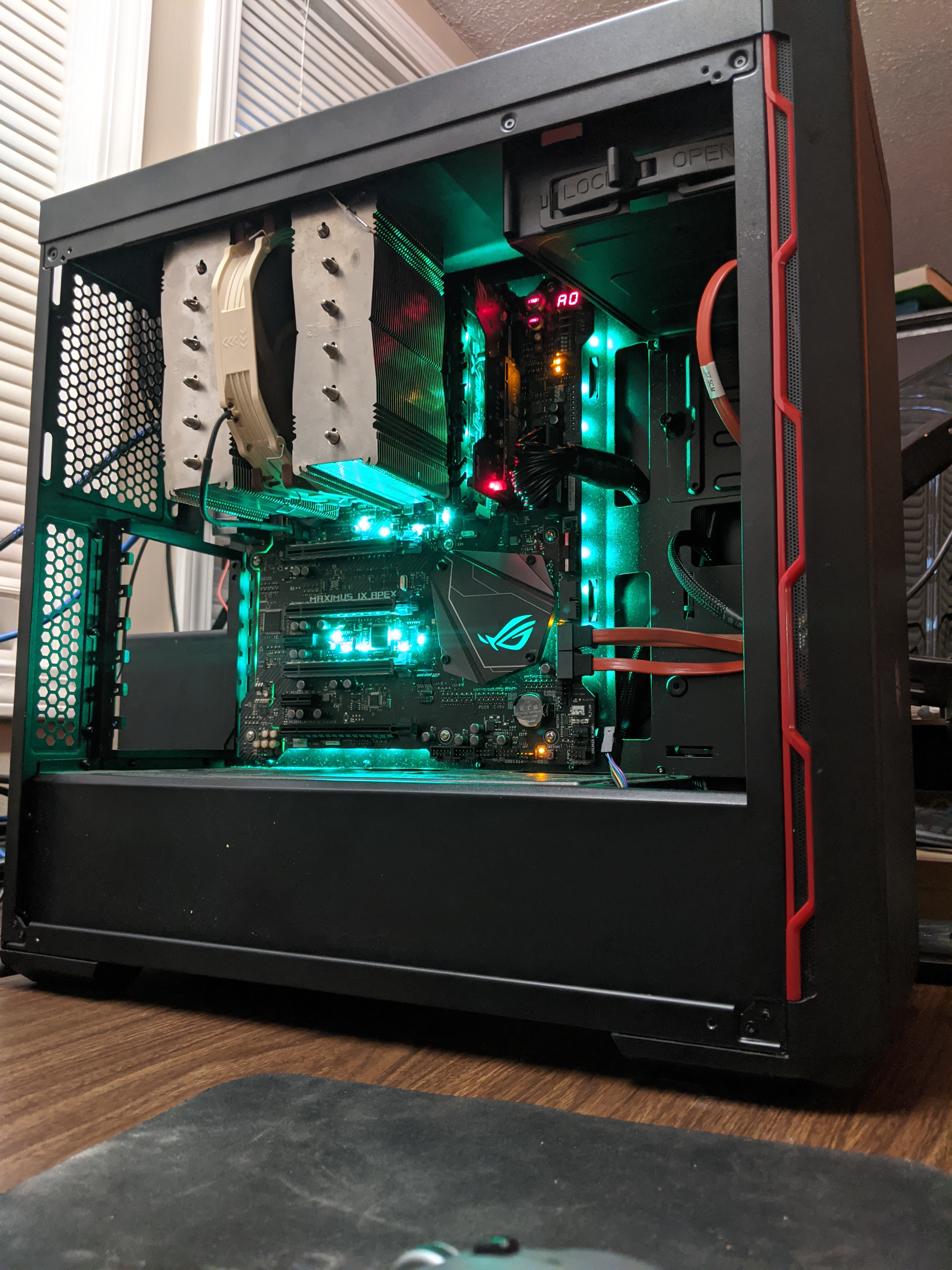
is it an air cooler
viral ingot
no
 twin jetty
Can someone guide me through overclocking my gpu pm pls wen ready
 mild moat

 next nacelle
What is a good oc for 3700x
dull ginkgo
all core ofc
stable under p95 smallfft
That would be a pretty good OC, 4.3 would be decent
next nacelle
Alright thanks
dull ginkgo
@proven canopy I was just giving examples not telling them to do it :(
proven canopy
A (bad) example
 fickle matrix
on my 4690k i was able to get 4.8 ghz, is this a good clock for this CPU? or did i lose the silicon lottery lol
dark ferry
Those bins always throw me off. It's the AVX Offsets. Are you ever really running at the non-avx frequency? I find with a set AVX Offset I am running at the Offset 100% of the time, so why not just set that as the main frequency and be done with it?
Like for the 9700k bins. 100% can do 4.9ghz all cores, but with a -2 offset. Meaning they're running 4.7ghz literally all the time.
Would also be helpful if it mentioned which LLC these values were managed at...
proven canopy
Would also be helpful if it mentioned which LLC these values were managed at...
Not really
The voltages they state are vcore under load.
LLC settings will vary by board.
Configure your LLC such that it gives you the minimum stable load vcore for your specific config.
On asus boards, that's usually level 5 or 6, but results vary.
dark ferry
Yea my system crashes regardless of vcore, llc setting, load voltage, or temps if I go above 4.8ghz.
And I realize llc is different on different boards, but it would at least give you a starting point.
Also those are the load voltages? I'm pretty sure those are the voltages they have set in bios, not the read lowest load voltage.
I doubt anyone refers to their vcore setting as the load voltage readout. That's like me saying I'm running 5ghz at 1.3 vcore because that's my VR VOUT readout load voltage, when in reality my vcore is set to 1.415v in bios.
proven canopy
No
That makes no sense, lol
Point is, you should be checking your load vcore anyway
SL could try to tell you what LLC + bios voltage to enter in, but you'd be a fool to just plug in those numbers and run with it without testing it yourself.
dark ferry
Apparently on Gigabyte z390 boards Vcore is not accurate and you're suppose to monitor VR VOUT.
No one ever said "without testing" but if you knew which LLC and on what type of board you could at least find out how much Vdroop that setting general is and start by trying to match it based on your own board's LLC settings, by testing of course. Just to have a starting point.
Could also help disprove the list. 100% can run this at that setting. I highly doubt it. My chip won't run anything at fixed voltage, period.
I ended up at 4.8ghz all cores with auto vcore and llc. Nothing else is stable. If I switch to Fixed voltage even at this frequency, unstable. Explain that?
I've tried every vcore and llc setting other than Ultra Extreme at 4.8, 4.9, and 5ghz. Literally fixed voltage just plain means no go on my board. So for me seeing a bin list that says 100% of this cpu can do 4.9ghz all cores at 1.337v and 90% can do 5ghz all cores at 1.35v is rather misleading and frustrating.
proven canopy
Insufficient cooling or whatever bin of chip you have can't do those settings.
What chip?
dark ferry
9700k, Gigabyte z390 Aorus Pro Wifi, 240mm AIO.
dark ferry
Off the top of my head the closest I can think of is where I'm at now, 4.8ghz I see it pull up to 160 watts in cinebench and reach 80c after a few consecutive runs. I do not use Cinebench as a stress test. I just don't have the numbers off the top of my head that you're asking.
It takes a few runs back to back before it'll hit 80c on 1-2 cores.
proven canopy
I think gigabyte's "high" llc = .08mohms = asus llc5 = EVGA -25%
dark ferry
I thought I was stable at high LLC tbh.
Was running fine for two weeks.
Realbench would give me temps in the 90s though, but nothing close to the thermal limit and only after an extended period of time.
Then for a reason I can't remember I ran a cinebench and cinebench itself started CTDing without a warning or error window.
So I assumed I wasn't actually stable. This was at 1.415v set in bios, High LLC, VR VOUT reading 1.375v idle and 1.3v max load.
One guys told me the problem was VRM Switching Frequency being set wrong by the manufacturer. Our board doesn't have this setting.
guy*
I haven't even tested my most stable settings so far with OCCT
I imagine it would probably crash.
proven canopy
VRM switching frequency shouldn't matter that much if you haven't changed it from default.
dark ferry
But i was able to use it for two weeks without issues.
I can't possibly go any higher on the voltage.
And these voltages are so ridiculously high compared to what everyone physically sets in their bios.
I haven't met one person who needed to set their bios voltage at more than 1.4v for 5ghz.
I've heard of bad bins, but this doesn't seem like that.
This seems like something simple is being overlooked.
I have all the advanced cpu settings disabled, other than thermal protections.
I'm sure I don't have a great bin but I should still be able to manage 5ghz at lower voltage than this.
Or be able to find stability at close to these settings.
Oh and I tried higher LLC with lower Vcore. Same load voltage, crashed during medial tasks.
Or to be more specific, system freeze.
Anyway, sorry for the ranting and frustration, but I bought a more expensive z390 board after already owning a cheap one, along with a better PSU with the intent of overclocking.
I refuse to accept that 4.8 is all I'm capable off after spending an extra $300.
And maybe it is, but if that's the case it really makes me want to throw this entire pc out the window.
Btw my assumption at the time was that I needed a better VRM and more efficient power for overclocking. Since my first board only had one 4 pin and 6+2 phase power.
Sorry 4 pin, 8 pin, whatever. Can't remember.
proven canopy
Sounds like the chip is/was a low bin and has possibly been degraded, though the voltages and LLC settings you've indicated shouldn't do that, especially so quickly.
dark ferry
I figured the same thing. I can't believe it would have degraded. I only did most of this in testing, Till I stuck with the settings I mentioned for two weeks. And those voltages aren't exactly high, other than what's actually set in bios. But 1.375 idle and 1.3 load shouldn't degrade a chip. At 4.8 and auto voltage it only pulls 1.275 at load. Nothing about MY chip makes any sense.
I feel like there's something wrong with the chip, like from the day of purchase. Though I doubt Intel is going to see it that way and replace it. They'll probably just tell me to Go F Myself.
 left bladeBOT
 JemuzuTTV#3632 has been warned
Reason: Bad word usage
dark ferry
And yea I get they don't SUPPORT overclocking, but that's literally why I spent so much on this system. I can't afford to just go out and replace this. Just once I wanted to have a decent chip. Just once.
Everyone else seems to luck out. Why not me?
twilit hedge
@proven canopy thoughts on increasing TDC?
proven canopy
On what chip?
Just cool it good

With the launch of the Ryzen 3000 series processors, we’ve noticed a distinct confusion among readers and viewers when it comes to the phrases “Precision Boost 2,” “XFR,” “Precision Boost Overdrive,” which is different from Precision Boost, and “AutoOC.” There is also a lot of...
twilit hedge
3950x currently undervolted to 1.1325v, 360mm aio w/ temps around 75-80 under extended load
TDC is set to 95A by default, and it's pegging it as soon as any load spins up
We set PBO to pull the limits from the mobo
 flint sapphire
TDC and EDDC are up to 255A but no significant performance improvements
twilit hedge
Clock speeds are up tho
flint sapphire
Current best Cinebench R20 score is 8287. I know Cinebench isn't the best benchmark but it's what I've got
proven canopy


 proven canopy
Post your system specs or just link the results page
twilit hedge
Ram is crap
flint sapphire
Benchmark results for a System manufacturer System Product Name with an AMD Ryzen 9 3950X processor.
I was messing with undervolting this morning. The link is at 1.20V
Just got a 9116 Cinebench R20
twilit hedge
So higher voltage helped a bit
flint sapphire
Temps up to low 80s
Benchmark results for a System manufacturer System Product Name with an AMD Ryzen 9 3950X processor.
1.25V
 royal lance
@proven canopy Why are your Ram running at 2132MHz 😄
proven canopy
Me? What screenshot
vapid berry
2132, just round it up to 2133 and it's standard speed
sterile flame
Why is the gpu tweak 2 so bad, like the ui for fan customization is straight garbage, also when you to auto overclock the changes you make are randomized even after you set them. msi afterburner vs gpu tweak and why
 next canyon
does anyone know how to overclock cpus?
dull ginkgo
 austere patio
^ ^
 charred inlet
just finished my first real overclock
dull ginkgo
Lol
proven canopy
Weekly remind that https://benchmate.org/ exists, give it a try and post your scores here if you're interested in benchmarking.

BenchMate is a unified solution that defines a common standard for all benchmarks. A well-considered minimum of security and timer reliability applicable to all benchmarks, though much more advanced than everything currently available in this industry.
dull ginkgo
@proven canopy tbh I kinda want to make a bench just for benchmarking but I can't
proven canopy
Most people use their motherboard box
dull ginkgo
I mean
Separate mobo separate drive
Its a weird request but I'd like to keep my screwey bios settings on my main board
proven canopy
Bios profiles are useful for that
proven canopy
But ya, a separate $10 hdd or $20 ssd is ideal for any kind of competitive benchmarking
dull ginkgo
Wait a moment
I can do that
I have a spare team ms30
I forgot
Because windows bloatware stuff
proven canopy
Eh, win 10 isn't that bad, but you can strip it easily
Something like this v

GitHub
PowerShell script for automation of routine tasks done after fresh installations of Windows 10 / Server 2016 / Server 2019 - Disassembler0/Win10-Initial-Setup-Script
The default config is great for benching, not a huge difference though
dull ginkgo
Eh, I have programs and stuff on startup
Too lazy to disable and stuff
Actually I'll read over pinned stuff later
proven canopy
Feel free to reach out if you have any questions, I'm always eager to recruit more people to https://hwbot.org/team/wegg/#Members
proven canopy
unityoc
Overclocking Livestream #86 - 200 Follower Hype, Maxwell binning on Z490
https://www.twitch.tv/unityoc

 narrow jungle
tight plinth
narrow jungle
tight plinth
@charred inlet sorry to break your soul here, but a real OC would be to flash an XOC vBIOS to allow for "infinite" Power Limit and increase Cole Voltage limit. Then OC via voltage/frequency graph (press ctrl+f in Afterburner).
but still, good job. OCs like that can still be a tedious job to OC
proven canopy
You need to waterblock the card to take advantage of increasing power limit much more than ~300-400 watts.
next nacelle
For overclocking a cpu do you only really need to overclock its ratio which is like telling it what to run at and then the voltage you want. Or is there more to that. And also do you need to overclock your ram as well if you want to overclock your cpu?
For reference I am aiming for 4.2 ghz
proven canopy
Post your system specs, an easy way to do that is to run a userbenchmark
dull ginkgo
Things depend on your exact situation
 worldly matrix
 uneven jetty
is over locking stuff worth not having it last a long time or if it’s good enough already should i not overclock
 novel narwhal
who can help
I wanna overclock my ryzen 7 2700x because after effects like stronger core power
hard ice
check the pins @novel narwhal
novel narwhal
I did
cold jolt
all ryzen cpus are unlocked
 versed oasis
what chipsets can overclcok the celeron 450
 idle remnant
probably a rlly old one
 paper osprey
fun fact
you can increase tdp of mobile ryzen laptops
also allows for GPU and cpu overclocking but only like getting stock speeds out of an underclocked version
deft rain
bruh ur nuts
dark linden
Working on one that does -80c fluid temps
paper osprey
damn that must have frosted a lot
dark linden
Also how do you have a 3090
@paper osprey
I don't but the person who is buying this is getting one when it comes out to run it on the chiller
damn that must have frosted a lot
@paper osprey
I use rubberized foam insulation. No condensation what so ever
paper osprey
well I don't know how that's going to work usually water blocks don't come out until about 3 weeks after the GPU is released
And nice rubber foam is the way to go
dark linden
They are going to be running it with a 2080 super until they upgrade to the 3090
dark linden
Is what a liquid nitrogen tank?
The picture I sent was of my home made chiller
Those are two of my liquid nitrogen tanks
paper osprey
It kind of looks like one, due to the warning sticker and reinforced tubing.
Yeah that's liquid nitrogen
dark linden
That is copper pipe. It is a phase change cooler it compresses gas and then evaporates it to cool the heat exchanger
Those pipes don't carry liquid
Well some carry liquid refrigerant but it is a closed loop system
That rectangular thing is a 20 plate heat exchanger where the water loop is chilled
You can see the two blue hoses that carry the coolant for the computer
paper osprey
Damn so like industrial grade or enthusiast grade
next canyon
is overclocking cpu's worth it?
dull ginkgo
Up for you to decide
hard ice
check the pins
proven canopy

Wanted to improve my channel introduction video, so yes this is a partial reupload of the previous 5.8ghz 9980XE video. A mix of short clips from 9980XE and 10980XE LN2 Overclocking sessions to demo the easiness of extreme overclocking when using the X299 DARK motherboard from...
 ornate pewter
I bought G.Skill Ripjaws V 2x8GB DDR4 3600 and just found out it's only running 2133. I have a Ryzen 5 3600 and a B550 mobo and I just found out there's a factor of compatibility (I can't find this RAM on the AMD lists). Can I oc the RAM still? Also, apparently my GPU (Radeon RX 5600 XT) is performing below average. Any way to improve that? (pls tag me if you reply. im gonna forget to come back)
I feel like I messed up because I deeply researched every part before I bought it, and I'm disappointed I didn't come across this.
deft rain
@ornate pewter all ddr4 is 2133. anything above that is a factory overclock that u need to enable
ornate pewter
@neon rapids @deft rain Thanks, yall. I'll look for docp and try to OC it
ornate pewter
Following up, I went into my BIOS and tried to look for RAM OC settings. Didn't find anything called "docp" but I found an Overclocking tab and somehow got it to work. Benchmarks went up from just OCing the RAM alone. Thanks again
manic helm
is it sad that my new laptop cpu is faster than my desktop cpu
manic helm
in R20 its scoring about 4700. Pretty impressed so far.
hard ice
which one?
hard ice
the legion 5?
manic helm
ya, but its the one with a 1660ti and 16gb of ram
hard ice
120hz display and all that ?
hard ice
that is a very nice price imo