#overclocking
1 messages · Page 48 of 1
 jade pulsar
 blazing venture
with one stick, according to the manual
 dull ginkgo
I never

jade pulsar
this is when we need manual mr1 smh
 swift mesa
is there any way i can change it so i get more performance or no?
jade pulsar
in a2 and b2 it should be able to get 2400 right?
blazing venture
put it in slot a2/b2 and set it to 2667
or maybe get a new mobo that isn't weird
😦
swift mesa
lmao
jade pulsar
This just seems very weird
blazing venture
🙂
swift mesa
might just have too
blazing venture
even though the board says 3200(oc)+
dull ginkgo
might take 3rd gen xD
blazing venture
jade pulsar
manual does say 3rd gen can get higher frequency
blazing venture
jade pulsar
unless we reading something wrong?
swift mesa
lol
jade pulsar
maybe those speed is base clock
blazing venture
I just don't know man
dull ginkgo
Naed reads manuals
blazing venture
it's all weird.
dull ginkgo
thats why hes a teachie
blazing venture
even the friggin manual is weird
 jade pulsar
the ram should work in a2 and b2, that should be best config for you
blazing venture
yes
jade pulsar
if it doesn't boot explain in what way it's not booting
blazing venture
I haven't checked the ram QVL
so that might be an issue aswell
I've got alot going on here at the house, so attention isnt good to look through it
jade pulsar
maybe im going insane, i was struggling very much to read english yesterday
swift mesa
lol
jade pulsar

blazing venture
G.SKILL Aegis DDR4 3000 C16 2x8GB
swift mesa
what i don't understand is in that video that i sent the guy had the same CPU as me but he got up to 3200ghz
jade pulsar
ye maybe manual means base speed, cuz the advertised on most ram is a oc
and maybe that why website says 3200(oc)
swift mesa
damn. you guys got any recommendations that i should do?
jade pulsar
put in a2 b2 and tell us what is happening or if you remember what pc did when you tried to boot
dull ginkgo
real weird
swift mesa
ok ghost ill do it in a bit im going to load up the bios and see if there's anything i can do rn
jade pulsar
kk
 hard ice
i love you too Boxie
@jade pulsar @dull ginkgo the manual (numbers etc you find in it) can be considered the "minimum that a board can do"
as in, "what you find in the manual will work, if the parts follow the spec etc etc"
 dull ginkgo
kk
 royal cave
Anyone know how to overclock on an x470 asus prime pro
hard ice
@royal cave check the pins
 normal ether

dull ginkgo
 short blade
anyone know how well this typically overclocks to 3733mhz?
dull ginkgo
Why
 latent wolf
3733mhz is easy to obtain if you set things correctly.
@short blade
So what's a good OC for a Gigabyte RX-5500 XT OC 8gb gpu???
 sterile flame
so i don’t have my ethernet cable plugged in but i want to connect back to my wifi but i can’t find it
 trail tartan
So I own Ryzen, and its been shown that overclocking your RAM. I've been trying to figure out what causing me issues for quiet some times. I am trying to bring the stock 2133 mhz on my G.SKILL TridentZ RGB Series 16GB (2 x 8GB) 288-Pin DDR4 SDRAM DDR4 3200 (PC4 25600) Desktop Memory Model F4-3200C16D-16GTZR
Timing 16-18-18-38
CAS Latency 16
Voltage 1.35V```

to the 3200mhz it is advertised for. I go to bio's and turn on D.O.C.P *from what I know is what asus mobo call their ram profiles* and pick the correct one, ill reboot to window 10 and it was be running at around 1 frame per second. But everything works correctly beside that. I can open programs and it works like that for a hot minute from my testing. I often get scared i'm about to break something due to the 1 fps issue so ill reboot to bios and restore setting but once i reboot ill have 1fps on windows 10 and have to DDU my video card to fix itAnyone know what is causing this?
My RAM, mobo, GPU overclock? I just don't know.
I've also swap gpu and cpu between trying this so it probably isn't my GPU or CPU. 🙂
and timing is left stock atm since if i can't even overclock the MHz i have no real need to mess with timing atm
 sterile ridge
Idk about your mobo but mine has A xmp, why dont you just use that
trail tartan
It isn't called that from what I am aware, I don't have XMP since im on AMD I think?
DOCP (Direct Over Clock Profile), is from ASUS for AMD motherboards and came as the motherboard makers didn't want to pay royalties to Intel to implement XMP on AMD motherboards. It effectively uses the DRAM XMP profile to set up data rates and comparative timings on the AMD motherboards for a variety of data rates.

EOCP (Extended Over Clock Profiles) is Gigabytes version of the ASUS DOCP..```I have DOCP which i assume functions the same
I've asked on Pcmasterrace discord and they has no idea too.
trail tartan
ASUS ROG STRIX X370-F GAMING AM4 AMD X370 SATA 6Gb/s ATX AMD Motherboard
either way my ram overclocking it just breaking my windows. it stable and doesn't blue screen it just 1fps xd
trail tartan
yeah it def doesnt but from what i read DOCP is same thing, maybe it just not prefect no idea. I just don't understand why when i OC ram and it work i get 1fps on my display and have to DDU it
been an issue for 2 years so i just dont touch my ram
sterile ridge
Neither do I sorry
trail tartan
You are fine, it a very odd situation. I know quiet a lot so if someone knows it probably they had the exact same issue before 🙂
might just be mobo or bios it did come out for 1000 ryzens shrugs
dull ginkgo
@trail tartan DOCP is the correct thing for Asus mobos, afaik A-xmp is a MSI thing. I suggest starting with no overclock, and testing one thing at a time
If you feel it's still your ram causing issues, try memtest86 and see if there's any issues with it
I suspect GPU OC might be the culprit, when I pushed my GPU mem clock too far, it basically froze and ran at like 1fps
trail tartan
@dull ginkgo the OC works, my gpu drivers like corrupts when i OC ram but i dont know why haha. I can even run games
maybe ill turn of OC on gpu and OC the ram. The gpu OC stable normally ive used it for a year
 thorn falcon
anyone have an evga 2080 super ftw3 hybrid? if so, what overclocks can you effectively push (ie. for what I want to know, can you play Rainbow 6: Siege and Deliver Us The Moon without driver crashes)?
 iron dagger
Hi guys, I have a motherboard MSI MPG x570 gaming edge wifi with AMD Ryzen 9 3900x, how much Can I overclock it using the BIOS? how much Hz o clock speed? I'm beginner in this. I'm using cooler Corsair h115i
dull ginkgo
Overclock at your own risk
 proven canopy
Check the pinned messages
 winter acorn
Anyone know how to oc my cpu
proven canopy
 drifting turret
I have a 3900x paired with Asus x570-F cooled with deep castle 360 ex, able to do 4.2 all cores at 1.25v. I got it stable at 4.3 with 1.325v but according to forums it seems like that voltage isnt safe for ryzen 3000 chips. Thermals looks fine, idling at 35-40c, when gaming it hits around 55-60c and when i run cinibench r20 it doesnt get past 75c on multiple consecutive runs.
sterile flame
I just finally decided to OC my FX-6300 Black from it's base 3.5 to 4.3 on only AC. Thinking I might try 4.6 for awhile once I get closer to actually being able to get my new system ordered (once parts are actually in stock).
 stone briar
is the 2700x and 2080 super good together
iron dagger
I have a 3900x paired with Asus x570-F cooled with deep castle 360 ex, able to do 4.2 all cores at 1.25v. I got it stable at 4.3 with 1.325v but according to forums it seems like that voltage isnt safe for ryzen 3000 chips. Thermals looks fine, idling at 35-40c, when gaming it hits around 55-60c and when i run cinibench r20 it doesnt get past 75c on multiple consecutive runs.
@drifting turret Perfect! thank you for your response 🙂
 neon rapids
yeah 1.325v isnt good for ryzen 3000, tsmc said it was specified for 1.3V for their 7nm process
sterile flame
how far should i overclock my r7 2700 to? i have an amazing liquid cooler for my cpu
 mild moat
Theres no set limit. Just try and see what works.
But now I'm curious, what cooler do you have lol
sterile flame
I have the enermax AquaFusion 240
And I just want to know how far I can do it without damaging anything in my system
dull ginkgo
depends on each chip
sterile flame
i got it up to 4.4 then it froze my pc 🤣
neon rapids
that means it isn't stable, so either increase the voltage or decrease the mhz
dull ginkgo
Decrease freq
sterile flame
ok
 red frigate
Is overclocking useful?
 still crystal
@red frigate that’s depends on what you’re doing with your computer
red frigate
Hmm
 languid bobcat
One message removed from a suspended account.
jade pulsar
There are no discord invites allowed here
 bold wolf
Hey guys for some reason my i7 7700k @ 4.9ghz 1.27V gets like 980cb at most
Is there something wrong that I did?
latent wolf
What GPU
proven canopy
GPU shouldn't matter
bold wolf
It’s water cooled with an NZXT kraken x53
And it hasn’t been delidded
Would voltaging it higher help it?
latent wolf
Gpu Shouldnt Matter But if the GPU is integrated inthe CPU chip if I recall Ive seen that Cinebench Scores Go down
i could be wrong
bold wolf
No I’m running a gpu with it
proven canopy
unityoc
Overclocking Livestream #72 - Hunting 7G+ 3DM03 Globals on LN2
https://www.twitch.tv/unityoc
 latent wolf
@bold wolf It may be that the Voltage is set to high
1.22 is whats recommended for obtaining 4.8ghz
1.200 is stock voltage
bold wolf
Too high???
latent wolf
1.27 might be for running stock clock speeds
bold wolf
That’s what I have for the voltage rn
latent wolf
Right
bold wolf
latent wolf
The Stock speeds might nto be happy with that Voltage
bold wolf
Should I drop it to 1.60?
latent wolf
I would Drop it to 1.22
latent wolf
Ok
bold wolf
Ima just use cinebench for now
latent wolf
I would Dial it back to base Voltages and Work your way Up till you find one that doesnt cause it to crash
bold wolf
I’m trying 1.23 right now
bold wolf
Ram
latent wolf
ok
bold wolf
It wouldn’t let me change it
latent wolf
Thats odd
bold wolf
I got a score of 1024cb!
latent wolf
Nice
latent wolf
So The Voltage is what was screwing you up
latent wolf
Yeah Actually that is good. 4.9ghz at 1.23v I would assume is a good score from R15
bold wolf
latent wolf
Yep Votage is still To high
bold wolf
Too low u mean?
latent wolf
No
bold wolf
I’ma try 1.24V
latent wolf
The Base Voltage for your CPU is 1.200
latent wolf
If Running Stock Speeds You should leave the voltage set at the Stock Voltage settings
bold wolf
Wym?
proven canopy
Score will be dependent on your clock frequency, less so voltage unless you're unstable.
latent wolf
So Since your Running Stock Clock Speeds You shouldnt need to change the Voltage on the CPU
latent wolf
Set the Voltage to 1.200
proven canopy
Also, what's your goal here? Setting a high R15 score for hwbot? Or finding your maximum sable daily performance?
What motherboard as well
proven canopy
Nice board
bold wolf
Thanks
Well so far it’s at 1.235V and it hasn’t crashed or BSOD
i just did 2 tests in a row
latent wolf
Thats Why I suggested Taking it back to the 1.200 and then Working your way up till it no longer is stable and then dialing back down a notch to the last stable voltage
proven canopy
Most people use prime 95 small fft to test for stability. It's a synthetic "worst case" load, so if it passes that, it should handle any real world use
proven canopy
Thats Why I suggested Taking it back to the 1.200 and then Working your way up till it no longer is stable and then dialing back down a notch to the last stable voltage
This doesn't make sense
Check the overclocking wiki in the pins
bold wolf
Well I did that
proven canopy
Most people test for a few hours at most
latent wolf
Yeah I understand but Sometimes working in Reverse works as well depending on what is taking place
proven canopy
20 mins will usually catch 90% of instability issues
Be careful though - prime 95 is a huge heat load
latent wolf
Like He Got BSOD at 1.23
proven canopy
TBH - when I had a 7700k, I daily'd it at 4.5 all core 0avx , then at 4.7 or something when I delidded/liquid metal
On a D15
bold wolf
I changed it to 1.235V now and so far no BSOD
latent wolf
ok So that seems to be a stable Voltage then
bold wolf
Well ima run prime95 for 20 mins
What do I do on this?
Which one do I Choi’s?
Choose
proven canopy
Watch your temp the whole time
bold wolf
proven canopy
I recommend hwinfo64
Enable the Asus EC sensor if it asks, and watch the "core max" temp
90 is bad, stop the test
bold wolf
Okay
Do I choose small fft or smallest
And I use NZXT cam to check cpu temp is that ok?
proven canopy
My best run

hwinfo64 is best, if you plan to do a lot of overclocking etc, I'd get familiar with it
bold wolf
Alright
proven canopy
Start with blend, my guess is that small fft will immediately hit 100c and throttle
latent wolf
I run my R5 at 1.325 Volts at 4.0ghz Stable with no Issues on a Watercooling loop with a Single 120mm Rad and I top out at like 71-80c While Gaming and Rendering Images
bold wolf
proven canopy
Yes, that's "core max" isn't it?
bold wolf
Just started
latent wolf
@proven canopy You mean Core Max Temp?
bold wolf
Map temp is 75C
proven canopy
@proven canopy My Max temp before thermal throttle is like 90c
You have a different CPU
bold wolf
Avg temp as of now is 64C max temp is 75 C and minimum is 32C
Oh it just raised to 79C
proven canopy
Side note - always pay attention to power draw. e.g. package power, in watts
When asking "are these temps good" etc - always specify what temps and what power load under what cooling
Better yet, give the measurement relative to ambient
bold wolf
It’s at 85C right now
Gotcha
Uh oh
Fans are spinning fast now
Stop at 90C max rightV
proven canopy
On any AIO or any liquid cooler setup - it takes time for the water temp to reach a steady state, constant temp
latent wolf
True Enough Forks AMD and Intel run at different temps and are setup to run at differnent temps overall
proven canopy
It's your call how much room for error you want between your daily settings and what's unstable - if you want to spend the time and effort, sure you can run it right up to that limit
But like I mentioned earlier - for a daily driver system - back when I only used one desktop for everything, stability was king (for me)
So 4.5/4.7 it was
bold wolf
Well I’m trying to push as much performance gain I can while maintaining stability
It hasn’t been delidded aswell
proven canopy
Tl;DR - the 3 fps to be gained from 4.8 over 4.7 to me wasn't worth any doubt of stability
bold wolf
Well I used to run 4.8ghz but it was too unstable for me constant blue screens and game crashes
But I didn’t know how to Oc back then
Until like now
I think 4.9ghz @ 1.235V is the one
latent wolf
Kinda Like me. I try 4.2 and no bueno. I get BSOD or system freezes like crazy. 4.1 is stable but the temps get to high for my liking. So I dialed it back to 4.0 and its stable and the temps dont get to high. Granted mines AMD and your is intel but Stability is the key thing
proven canopy
If I had a zen2 chip I'd run PBO + a -100mv offset
latent wolf
For 4.2ghz Stability?
bold wolf
For me i7 7700k is plenty for now
Alright so 20 minute stress test
And so far it had no BSOD and ran 88C max with an average of 85C
Wow! Back then my cpu scored a 93.5 on userbench but now it scores 103!
Major improvement!!
latent wolf
Yeah and It didnt hit that 90c Mark that Forks was warning you about
I would say that is the best your gonna get
bold wolf
For sure
latent wolf
Its stable and stays under that critical Temp
proven canopy
Picked up an oxy torch?
latent wolf
Uh Oh
proven canopy
I love the look of berznomatic tanks for some reason, over worthington etc at least
 dark linden
Picked up an oxy torch?
@proven canopy
Yeah working on the single stage for mllrkllr88
latent wolf
Hey Forks where you refering to the PBO setting it to -100mv to get my CPU stable at 4.2ghz?
dark linden
Just got csst in for the suction line
proven canopy
Hey Forks where you refering to the PBO setting it to -100mv to get my CPU stable at 4.2ghz?
I meant those are the settings I would personally use based on what I've read around.
I've heard 15% silver silfos brazing rods are a good choice, thoughts?
Also is it worth to buy an actual flaring tool?
dark linden
I'm using 45% for the suction line and 15% for everything else
I use a hand swaging tool
 left bladeBOT
 mythical tech#9899 has been warned
Reason: Bad word usage
left bladeBOT
The name’s Bot, Wegg Bot
 dark ferry
Would you say a 4.8ghz all core oc on a 9700k at less than 1.3v using a z390 Phantom Gaming 4S board is decent? I can't seem to find the magic settings to push it any further and have it stay stable in all scenarios unless I'm missing something. Being that it is an 8 phase board and very cheap VRM heatsinks I imagine I might have hit a ceiling, however the VRM isn't overheating and neither is the chip. I can OC to 5ghz all core but once in a blue moon it will find a scenario it doesn't like and will BSOD or just freeze. As if there is a voltage or power draw inconsistency. I want to say I've tried everything but I'm not the most advanced with overclocking and perhaps someone knows something I don't. Temps are fine in all tests at all overclocks I've tried. Using a 240mm rad.
Also forgot to mention I have tweaked LLC to account for voltage droop as well, however the system is only ever stable at the highest LLC setting when going to 5ghz all core. I find this concerning so I back it off one setting. I might have a fully stable overclock if I knew how aggressive ASRock's LLC Level 1 is on this board. If it's not as aggressive as I think it is, it might be totally fine to use.
proven canopy
Added this to the pins https://siliconlottery.com/pages/statistics
dark ferry
^Does this apply to all core overclocks?
proven canopy
yes
dark ferry
Part of me still wants to believe even with this board I should be able to manage a 5ghz all core at a fixed 1.35v with LLC Level 1 and that hopefully ASRock's LLC isn't so aggressive that it spikes the voltage.
proven canopy
Use a fixed, manual vcore, 1.35 is a bit high, but probably ok if your cooling is up to the task.
Adjust LLC such that you see ~30mv vdroop from idle to load.
dark ferry
So you mean by that no more than 30mv droop.
proven canopy
No, I mean 30 ish mv droop from idle to load is about ideal.
dull ginkgo
drifting turret
Is that a 3600 cl16 trident neo?
I oc'd mine to 3800 cl16 fast preset with the dram calculator, stable at 1.42v
dull ginkgo
I was just storing that
drifting turret
Is that safe voltage for ram?
dull ginkgo
I mean listed reccomended max is 1.37v...
But I was just storing that for usage later
drifting turret
The docp on it was only at 1.35, maybe i should dial it back
dull ginkgo
Mine wasn't stable on fast preset so
I'm storing the safe preset
I'll do it one day
drifting turret
Ahh whats the original freq?
dull ginkgo
3600
drifting turret
Oh I see, im gona go look if 1.42 is safe for the ram lol
dull ginkgo
Aight
drifting turret
Okie seems like its safe if you stay below 1.5v
 devout nimbus
So I am getting very high max temps on my non overclocked i9-9900k... Like it hit 98 degrees on a stress test before I stopped it
But like I'm water-cooled and my coolent isn't getting above 45
So I'm wondering if the stock thermal paste on my CPU block isn't doing enough.... Would you guys recommend that I try adding more thermal paste as well as the stuff that came on the block
proven canopy
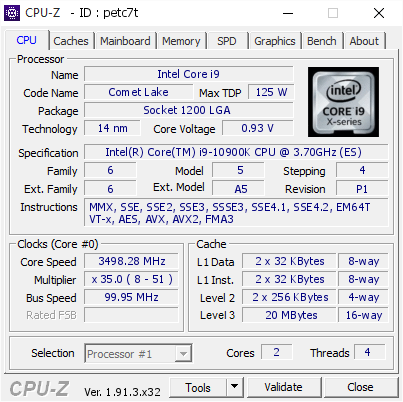
[petc7t] Validated Dump by bianbao (2020-05-14 07:26:43) - MB: Asus ROG MAXIMUS XII APEX - RAM: 8192 MB
dull ginkgo
Very
sterile flame
Trying to find data for pushing this FX-6300 up again. Want to try to hit 4.8
proven canopy
 boreal jungle
7.7GHz overclock on the i9-10900K with LN2: https://wccftech.com/intel-core-i9-10900k-6-6-ghz-cpu-ln2-overclock-ddr4-memory-6-6-ghz-world-record/
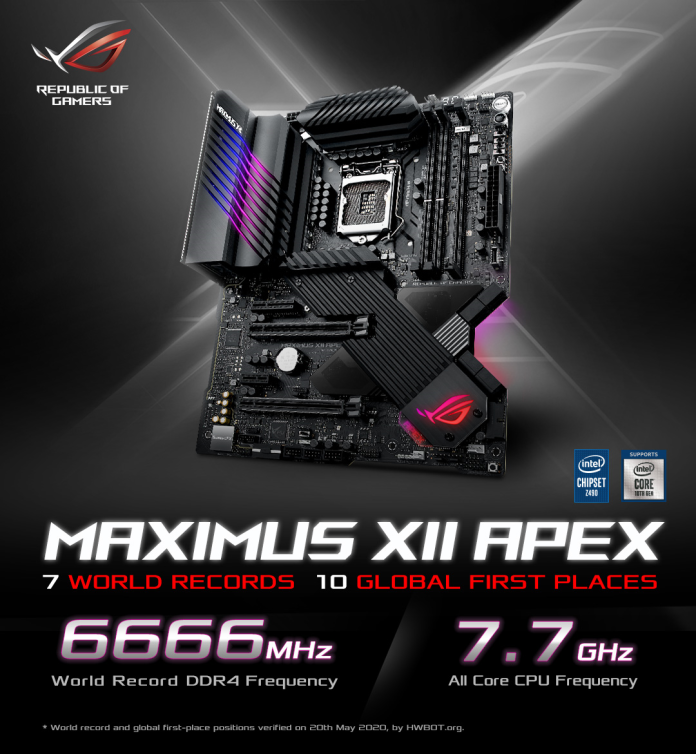
The Intel Core i9-10900K & the Z490 platform have achieved great overclocking feats with the CPU hitting 7.7 GHz & DDR4 running past 6.6 GHz.
 hallow flint
Yo is it true that I rhyzen favors ram
 ruby hound
if you can OC the IF then you can push it up to 3800 mhz for memory and 1900mhz for the flck
sterile flame
reeeeeeeeeeeeeeeeeee
hallow flint
What is flick @ruby hound
ruby hound
FLCK is the Infinity fabric clock speed
the reason you get dimished returns after 3600mhz is because the Infinity Clock isnt in sync with it
sterile flame
mmmmmmmmmmmmmmmmmmm
hallow flint
How to sync
ruby hound
you just ensure the memory speed is the same as FLCK, but remember the memory speed is doubled so 1900 mhz FLCK = 3800 mhz memory
stock FLCK is 1800, hence the dimished returns after 3600mhz mem
whether you can OC the FLCK will be dependent on your processor and is silicon lottery. There are very few that can make if over 1900 FLCK, and some cannot even make it to 1900 FLCK
if you set the speeds and look in ryzen master you can see the flck and memory clocks right next to each other, as long as they match you are good
hallow flint
Alright cool I’m going for 3600 MHz should I do 1850 flck
hallow flint
What is stock flck and does it auto do it if I use xmp
dull ginkgo
there is no stock flck
stock is just 1:1 ratio
with whatever your ram is at
if your xmp is 3600mhz, flck should go 1800
dull ginkgo
lets you
hallow flint
I don’t think that’s safe
dull ginkgo
doesn't mean you should
doesn't mean it's stable
it "lets" you put 1.5v into your CPU, should you do it? no.
hallow flint
What is bin
dull ginkgo
silicon lottery
ruby hound
If you dont want to get into memory OC just set your XMP profile in bios and leave it
dull ginkgo

Tom's Hardware
What is the meaning of binning? CPU, GPU and RAM binning explained.
hallow flint
Mine came at 2667 but the ram it’s self said 3000 so I put it to 3200 now I’m going to try 3600
dull ginkgo
doubt it can go 3600 :p
hallow flint
And on bios theirs two profiles but it lets me change the speed for the profile is that still xmp?
And why can’t I go 3600
hallow flint
So past the presets are not xmp?
dull ginkgo
if the kit is rated for 2667, the chances it'll go 3600 without loosening the timing a lot is very very low
hallow flint
I think it was 3000 but bios put it to 2667 because on the ram stick it says 3000
hallow flint
It’s rgb it should work
hallow flint
Oh it’s water cooled
dull ginkgo
what
god damn it
why the hell did you buy watercooled ram lmao
ram doesn't even need much cooling
ruby hound
you can look around for memory overclocking guides. Its not a simple thing really and I would recommend research first
jade pulsar
proven canopy
Post a picture of that ram waterblock
hallow flint
me?
sterile flame
Hmm, still haven't found actual settings. But did find out this thing can go over 5.0 on just AC. Yikes.
sterile flame
At 4.6 now. Getting close to where I want to be.
 unborn cliff
get the gksill trident z cl15 3600.. i overclocked mine to 4000 and its cl 16 16 16 37 now hah
ruby hound
Yeah the 3600cl15 is a good bin from what I have heard
unborn cliff
just sub timings need to tinker with
they have a cl14 version too but that was alot more expensive
ruby hound
I got some Tforce 4500cl18, cant wait to usher then further
unborn cliff
yea but is it 18, 18 18?
ruby hound
I think so, at 1.45
unborn cliff
i got 2 16gb kits so can get 32gb
especially cause star citizen uses soo much ram
upped voltage to 1.4 since intel doesnt like more than 2 dims
ruby hound
Well I hope they work together for you
unborn cliff
oh yea def do, ran memory test for an hour no errors
just secondary timings are not fun to play around with
ruby hound
Nice
unborn cliff
and asus/intel has no timing calculators, only asrock z370 hah that or amd
ruby hound
The calculator never worked for me, I always do manual
sterile flame
Yo, ordered a rockit cool 9900k delid and direct die complete kit yesterday and its already shipped out yesterday ready to arrive by Wednesday at the latest 👍
unborn cliff
oh
well just be careful with the liquid metal apply on both the block and ihs
make sure what you put it to like water block is nickel plated
sterile flame
I am
unborn cliff
best corrosion resistance against the liquid metal.. copper with tarnish burn some, wont be bad
unborn cliff
you doing gpu and cpu on same?
unborn cliff
damn increase of like 10c overall with gpu blaaah i noticed going from 360 alphacool aio
even with 360 and 240
sterile flame
Im on a 9900k + 5700xt on a 240 medium thickness + 360 slim rad
unborn cliff
30mm?
sterile flame
?
unborn cliff
or 45mm and 30mm rads
sterile flame
45 and 30mm?
unborn cliff
thickness of the radiators
unborn cliff
what brand
sterile flame
I just know that the 240 is a ekwb pe rad and my 360 is an se rad
unborn cliff
45mm pe 240rad
sterile flame
Right
sterile flame
Currently im on corsair sp120’s
But in the future
Depending
What i have, may order some noctuas
unborn cliff
you want real quiet max speed ?
sterile flame
I want the quietest fans with maximum airflow for rads
But the noctuas im looking at are £25 per fan
unborn cliff
this will be quietest at 2.2h20
sterile flame
So id be spending £125
unborn cliff
looking for link to show u
sterile flame
Or £200 if i wanted push pull on the 360
unborn cliff
lol newegg wont let me link it ill send directly
ruby hound
Oh if you want radiator fans look at the Noctua iPPCs
sterile flame
Ye i think i looked at those
However if the temp difference is negligible then id rather not spend so much on fans ya know
 jovial maple
 spring swift
4 ghz should be plenty
sterile flame
I've discovered I don't think I'll buy gskill again. This is the worst ram I've ever had to work with on an OC. Look at it wrong and it won't even go to bios.
dull ginkgo
what
thats...
what happens with any ram in my experience lol
you just gotta reset cmos
whenever you mess with timings that just happens in my experience @sterile flame ¯_(ツ)_/¯
sterile flame
Never had this much issue with other ram though.
dull ginkgo
with lowering timings?
I only really have issues with lowering timings
wrong frequency and it just reboots
sterile flame
Literally changing anythign with it, even getting it to run what are supposed to be it's stock timings and it's blaats half the time.
Although it's apparently a now known issue with this ram.
dull ginkgo
..?
sterile flame
1866 Sniper.
 restive cargo
Who's good at overclocking?
I need someone who knows more than I do.
If anyone can give me a hand with this ping me, I will be back shortly.
This is processor instability maybe.
This problem is happening on this computer.
The specs of it are listed below:
Processor - I7 8700K overclocked to 5Ghz at 1.365 Vcore on all cores.
GPU - Asus Strix RTX 2080 Super at Asus stock OC speeds.
RAM - G.Skill Ripjaws 4, 32GB (4X8) Sticks at 3,000 MhZ
Storage: Samsung 970 Evo 1TB
MoBo: Asus Maximus Hero Z370
dull ginkgo
What about it
@restive cargo if you think it's CPU issue, run p95 for half an hour, see what it does.
restive cargo
According to Intender in a message he sent me.
I see that and I think either drivers or memory
@dull ginkgo Ok I'll close Discord and run P95 for 30 minutes and report back.
dull ginkgo
Usually BSOD is either driver or memory, but since you mentioned CPU OC, it's best to check what's been changed.
proven canopy
What does windows event viewer say?
restive cargo
It always says that for me when the system BSOD.
@dull ginkgo I want to only stress the CPU
Doesn't P95 hit the RAM too?
restive cargo
Yeah I only want to hit the CPU hard for 30 mins
Otherwise I won't know which one it is.
Also, I just reinstalled Windows and all of the drivers for my motherboard so I highly doubt it's a drive issue.
I also checked device manager and there are no yellow marks by any of the drivers saying anything is wrong.
I'm on Windows 10 Pro 64 bit
proven canopy
Depends which prime 95 test you run. Small FFT is meant to run entirely out of the L2 cache.
restive cargo
Another note it was doing this before the Windows reinstall as well, same error same messages.
proven canopy
Blend is ofc a blend.
restive cargo
So which do you recommend?
For mainly just the CPU
I usualy use Aida64 and just stress CPU but P95 works too.
proven canopy
Depends what you're trying to test - for pure core stability under the worst-case thermal loads - use small-fft
restive cargo
Ok small-fft it is.
proven canopy
I mainly use Aida as well.
restive cargo
Ok so I am gonna close Discord and Steam and run Small fft for 30 mins.
If it BSOD then CPU it is.
If it doesn't then it's time for a RAM test.
I have 4x8GB sticks so if it is the RAM I am in for some one at a time testing of each stick.
But CPU first.
Be back in 30
 errant raft
Yeah that's some awesome stuff 4.3 GHz on a dang Ryzen 7 3700x people said it was impossible
unborn cliff
ram 4 sticks youd have to up the voltage of it some
sterile flame
@sterile flame hardly just the rams fault, you realise your ram xmp isn’t even guaranteed since its an overclock to the maximum ddr4 intel or amd spec
I've spent a lot of time looking into what the ram is capable of, on this board, with this cpu.
dark ferry
Looking for some help for my friend who just bought a Ryzen 3700x paired with an ASUS ROG Strix x570-e and corsair vengeance lpx 16gb 3600mhz. He's trying to enable XMP or DOCP for the ram and his system will not post.
sterile flame
@dark ferry because amd
dark ferry
^The most honest answer I've gotten so far. Thank god I got a 9700k instead of 3700x like my friend.
Just... works.
unborn cliff
there is alot more power draw and stress using 4 sticks, if any issues up the voltage of the ram
/r zen_rbx now to compare to a reall 9900kf
hmm it wont let me put pic in grr
cpuz got 5994 multicore, 596 single thread
cinebench r20 5297 multicore on 9900kf
 dapper hound
post in #build-pics
ruby hound
Trying increasing thendram voltage a little and that should help with stability@dark ferry
@unborn cliff I have a 9900kf I am eager to test and see what it can do, hopefully its not a dud
unborn cliff
@ruby hound its not bad, although if i didnt upgrade to it already id prob have gotten 10900k seams to run cooler stock vs stock 9900k vs 10900k because the shaved down die
the downside to f variant is the onboard video on k actually can assist in editing i read even if you doing encoding w/ video card or something like that
dull ginkgo
@dark ferry so did it post before applying the xmp profile? It's still a problem to be solved :p
@errant raft iirc forks also got 4.3ghz on a 3700x on 1.3v :D you can prob compare scores with him
hallow flint
Will enabling over drive on monitor make it get worse overtime?
jade pulsar
overdrive is not recommended @hallow flint
it almost always causes artifacts which are worse than ghosting. if your monitor has a response time setting, i would recommend putting it on the second fastest settings not the fastest
jade pulsar
the advertised response time is the minimum response time of the monitor, it can vary usually around 4-7ms average on a good panel
jade pulsar
 restive cargo
CPU Small FFT ran for 14 hours no issues.
On P95
I'm running blend now to test the RAM.
If it BSOD in 14 hours it's the RAM.
If it doesn't then I have no idea what is wrong.
It's GG
It normally only BSOD when it's idle or I am using Google Chrome.
It's done it a few times while in Chrome.
dull ginkgo
14hours damn
dull ginkgo
Alright so
For some reason, Small FFT crashes on my OC
but blend doesn't. It's not temps, because on blend, it's ~70c

Google Photos
proven canopy
Could still be unstable even if temps are in line.
proven canopy
Rather - you might need x temps for y clocks with z votlage.
One of more must be too high/low.
Then again, small fft is usually far from a daily workload.
proven canopy
Why run a manual 1.3v vcore for only 4.2?
Could just use pbo or even leave it default.
proven canopy

reddit
195 votes and 167 comments so far on Reddit
dull ginkgo
@proven canopy cpu went to 100c lmao on small fft
yea default settings does 1.36v on prime95 blend so
I'm basing my safe voltage off 1.36
proven canopy
Did you follow the guide to find your specific chip's FIT votlage?
dull ginkgo
I mean thats using pbo on prime95
that was what I did
I'll do it again
this part
proven canopy
No night mode? lol
dull ginkgo
I dont use reddit
:p
Forks should I repaste?
just a thought
seems like I mightve made mistakes while pasting
bc I only did dot
proven canopy
Could be worth it to try.
dull ginkgo
Honestly I might just bite the bullet and let PBO do its thing for now
I'll have to find where I left my tube of paste
proven canopy
Also I strongly recommend option 3 from that post.
dull ginkgo
yea
I'll just leave it on pbo
only real reason I dont use PBO was a while back I was seeing it do like 1.45v idling
and I was like wtf
and went manual
wow thats interesting
PBO does 4ghz at 1.27v
under small fft
restive cargo
It's found 3 errors on the RAM so far. I know the screenshot says 2 but it's older. It's 3 errors now.
So now I know it's not the processor and it is the RAM.
I'm gonna let memcheck86 finish it's runs then I am going to start checking stick by stick.
I'm also going to contact G.Skill once I find out what sticks it is and request for RMA.
 hallow flint
Can I overclock m.2
 steep geode
what kind of OCing could I do if I have a i7 9700k and a Noctua NH-U12s black?
proven canopy
Maybe 5.0 all core, 0 avx, 4.7 ring.
proven canopy
Depends on silicon lottery, ambient temp, fan rpm etc.
I daily'd those settings on a D15s most of last year on a 9700k.
If not, easily 4.8 or something.
1.3v vcore
steep geode
oh ok, thats still good
im just waiting for the new 3070 and then i gotta get a board with a PCIe 4.0 then imma do my new build
neon rapids
can i overclock my 660p to tlc
latent wolf
@steep geode What Processor you have? Cause I have a Gigabyte B450 AORUS M and It has PCIe 4.0 as long as you use Bios Version F41. For Some Reason F50 doesnt Support it. I found that out today. I backed my BIOS to F41 from 50 cause of my GPU being a PCIe 4.0 RX-5500 XT OC 8gb
steep geode
i7 9700k
latent wolf
Let me Check but i think the Intel Version of my Same Board Is PCIe 4.0 as well
latent wolf
NP
proven canopy
Even if the board supports pcie 4.0 like gigabyte's z490 - the CPU's don't (yet).
steep geode
oh ok.
latent wolf
With the Ryzen 3000 Series and the New 4000 Series It is
Im not sure on the Intel Side
steep geode
imma just wait to get a pcie 4.0 board until the 3000 series comesout
dark ferry
@dull ginkgo Yes it posts for him without any XMP or DOCP profiles. I forget the frequency they run at out of box. The ram he is using is VENGEANCE® LPX 16GB (2 x 8GB) DDR4 DRAM 3600MHz C14 AMD Ryzen Memory Kit - Black paired with a 3700x using an ASUS ROG Strix x570-E motherboard so there should really be no compatibility issues here. Any thoughts are appreciated.
latent wolf
The Ryzen 3950X series is out
The 4000 Series doesnt come out for another 6 months but will be supported on AMD B450 and Intel B460 Boards from what I read coming from AMD on the GPU side of things
steep geode
no something I dont about that? Thts what im basing my build off of
oh ok
when is navi coming?
latent wolf
July 7th
latent wolf
Umm they are already Out I beleive since the Radeon RX-5700 cards are on the market already
I have a RX-5500
steep geode
well how is the new navi compared to nvidias 2000 series cards? Cuz im sure full specs are out for that
latent wolf
I havent had any problems really other than a VIDEO_TDR_failure at one point but that has been resolved already
latent wolf
AMD Navi has been out since July 7th Last Year from what IM reading
steep geode
Then whats all this talk about there new GPU coming out this year?
latent wolf
Yeah
steep geode
Big navi
latent wolf
Oct this year is what Im reading
dull ginkgo
@dark ferry ask them what the XMP profile is
latent wolf
The Nvidia Killer anyway
steep geode
hmmm. Prolly just get the 3070 tbh
latent wolf
Im happy with my 5500 XT It handles everything I can throw at it
neon rapids
both next generation cards are rumored to be unveiled like September this year
latent wolf
I havent even began to try and OC it yet
steep geode
yeah. but i have a 1070. so im wanting a new build with aa 3070 to future proof myslef for every game
latent wolf
Thats why I went with a 5500 XT. There isnt a whole hell of alot of differnece between the 5500 XT and the 5700 XT when it comes to the Clock Speeds. Only Big difference is the 5500 XT is a 128 bit Bandwidth on the memory and the 5700 XT is a 256 bit
steep geode
true true. hmmm. I guess we will have to see
latent wolf
my FPS is limited by my screen right now so I have Vsync turned on and run about 58fps in everything I play. Now if I had a 144hz Refresh I would be running alot more FPS and OC at that point would probably be worth it
steep geode
what? get that 144hz screen man. I hvae one and its a game changer. You can get them a good prices now
latent wolf
I would OC it to the 5700 XT Clock Speeds at that point
Talking a less than 100mhz on both the VRAM and the GPU
neon rapids
the 5500xt only has 55% of the 5700xt's stream processors also
neon rapids
yuh
dark ferry
@dull ginkgo Are you saying he should contact Corsair and ask them for the individual settings for the XMP profile so he can dial them in manually?
dull ginkgo
@dark ferry somewhat, at least make sure the profile is correct
dull ginkgo
Even if just from the surface
It's a 3600 cl14 kit, if they see the xmp profile says 4000 cl16 for some reason, gotta put in the timings manually
dark ferry
Right on. I think he said it definitely said 3600 but wouldn't post.
dull ginkgo
At that point you could contact Corsair either for an RMA or the specific timings
dark ferry
But I wasn't looking at his UEFI so I don't know that he set the right thing.
It's possible he just set 3600mhz manually instead of enabled the proper profile, who knows.
dull ginkgo
Also check to make sure they did buy a cl14 kit, those are pretty rare to see.
Yea
If he did that...
dark ferry
He said it's definitely the set I mentioned.
dull ginkgo
Eh, alright, but keep it in mind.
Because cl14 kits at 3600 can go for like 200$ for 16gb, most people won't buy it
dark ferry
He bought them specifically to go with his new CPU and mobo for compatibility and cause he knows Ryzen is reliant on ram speed.
He did.
He pays for his upgrades through subs and donos I doubt he was worried about price.
But his FPS has been insanely inconsistent and we've assumed it is because of his ram speed only working at the default speed.
And how reliant ryzen is on ram speed.'
hallow flint
can u overclock ssd?
proven canopy

dull ginkgo
@proven canopy btw know any reason my SSD read is really low compared to rated specs and previous runs of CDM? It's being trimmed, ~80% full
restive cargo
First 8GB RAM stick passed with no issues, onto stick number 2.
sterile flame
what is a good speed and voltage for a 3700x?
^dm me if you could help me oc to the fullest potential safely plzzzzz
blazing venture
sterile flame
wdym check the pins?
blazing venture
we can't just give you a number, each cpu is different.
there are pinned messages to help you get to where you want to be.
sterile flame
where is the pinned message?
dark ferry
At the top. Click the pin icon.
errant raft
Fork did you try to overclock to 4.4 or higher
 vapid berry
Ping pong
 gritty heron
Hi guys, I'm new to the PC world and cheaped out on my CPU in my build.
Does anyone have any resources to help me figure out overclocking? My CPU is bottlenecking my system rn and I'm strapped for cash atm
(I've got the Athlon 3000G if that means anything)
Oh and I have a dedicated graphics card so I've disabled the integrated graphics on the CPU
 near hamlet
Check the pinned thread my dude.
normal ether
@gritty heron
errant raft
@gritty heron I feel as that you won't get amazing results but if you had a Ryzen 3 3300x you will be in a better position
I went to 4.6 GHz on my Ryzen 7 3700x with no problems but I getting a way bigger cooler then my Noctua NF 12A black chromax because I instantly reach 100 C
I'm getting a deep cool assassin 3
proven canopy
What cooler/voltage did you need to make 4.6 stable?
errant raft
1.40 v
High yes but I got a great motherboard
I got the ocp expander on, LLC on level 5, switching on 700khz, protection enhanced.
Got a lot of the knowledge of this stuff by watching Gamers Nexus, Actually Hardcore Overclocking, and me just messing around risking a lot.
I glad I have a gold chip
errant raft
I'm not using no bad motherboard either can ya guess what I have
proven canopy
DS3H?
dull ginkgo
yea lol
 raven olive
no matter what, stll cranking 1.4v through it lol
proven canopy
If anything, a higher end board will read vcore more accurately.
proven canopy
I mean, 1.4v is fine if you don't need that chip to last long in its current state.
raven olive
gta v stable 
dull ginkgo
now that I think about I prob hurt my chip when I was doing 1.35v daily
errant raft
I'm just going to do 4.4 GHz for right now
I may try to lower the voltage to 1.3750 or lower
4.3 GHz is stable at 1.3200 volts
dull ginkgo
I used to have stable 4.3 1.35v not any more
errant raft
@dull ginkgo you made a crazy typo
proven canopy
Why not just run pbo
dull ginkgo
I do now
errant raft
It sucks tbh
dull ginkgo
but 4.3 all core used to get better benchmarks than pbo so yea
well actually I'm on 4ghz 1.25v right now
doing that for daily use
errant raft
So you know CPU do not run 4 volts these days. Back in the 90's they were. I was not burn in the 90's I was born in 2001 I'm currently 18. I collect bunch of old tech and experiment
dull ginkgo
what
theres a space
between 4.3 and 1.35v
4.3ghz 1.35v
It doesn't make sense for 4.3 1.35v
what, 4.31.35v?
errant raft
Oh I'm sorry I didn't notice the space
 spring valve
Who can help me with Fan Curves
 long vine
Is it possibly to overclock an i5-9600k to 5ghz?
long vine
Ok
Does the k at the end mean KabyLake? Because on CPUZ it says coffeelake and I don’t see the guide on reddit for coffeelake
latent wolf
k means It can be overclocked. With Intel k or X means it can be overclocked
bold wolf
Who has a i7 7700k?
 uneven ermine
i have 8700, is that close enough?
bold wolf
Is it possible to overclock a i7 7700k @ 4.9ghz without delidding?
Asking for a friend
proven canopy
Maybe with a big chiller. 4.5-4.7 is about the best most people can do on ambient.
Delid typically gains 200-300 mhz.
bold wolf
Well he has a kraken x53 would it work without delidding?
proven canopy
Try it
bold wolf
His idle temps are around 35-45
On load it’s at 70-75
@proven canopy you have a i7 7700k right? What’s your OC and did u delid?
proven canopy
Best I got on air https://www.userbenchmark.com/UserRun/16911736
I daily'd it at 4.7 all core 0avx iirc
memory at 4133 17 18 18 38 1.45v
bold wolf
What’s temps idle and load?
proven canopy
Don't remember. Idle temps don't really mean much.
bold wolf
ahh okay
bold wolf
So I just got into undervolting my rx5700xt
And it’s at right now 1900Mhz 1040V
1920MHz mem clock
And 0% power limit
And so far on full load its temps are 70C with a. Junction of 85C is that good?
 finite merlin
hey i dont have any gpu cooling problems, is it worth overclocking my RTX 2080?
proven canopy
yes
finite merlin
aight ill probably do that tomorrow, anything i should know beforehand? I plan to do it with MSI Afterburner after doing an OC scan
I already know the basics but is there any info that is often overlooked?
proven canopy
Max out the power limit in afterburner
Compare your scores to similar cards/configs on hwbot
finite merlin
also, if my pc crashes while testing an overclock do i just hold the power button or is there something specific i need to do? sorry if this is a dumb question im new to overclocking
and one more thing, is 650W enough to overclock an rtx 2080 if i also have an i7 8700k?
dull ginkgo
Dunno bout Intel TDPs but you should be able to
If it crashes, just start it up again like normal
It's good practice to disable MSI afterburner's apply on startup when you are messing with values @finite merlin
But that's just me
finite merlin
i dont have it on apply on startup so we are good
and thanks man youve been a real help today
so wait, does the OC only work when MSI Afterburner is on?
finite merlin
oh ok but whats the reason for not having it start on launch
dull ginkgo
Normally you should, but when you're testing overclocking, you don't want it to like boot loop you know
Like if you applied say +1000mhz memory for some reason, and it crashed, there's a chance it'll apply that again on start up and crash :p
finite merlin
oooh okay thanks for that tip that sounds like it would suckkkk
any other random niche tips i should know before trying tomorrow?
dull ginkgo
That was just something that happened to me once :p
People say it's good practice to do put your own fan speed so you can tell temp differences better between OC because auto fan speeds are. Well auto.
finite merlin
is a 650W gold psu enough for overclocking an rtx 2080 (paired with an i7 8700k btw)
neon rapids
yeah
finite merlin
thanks homie
and im boutta run an msi afterburner oc scan, last time i tried it after a little while my monitor went black but my fans were all still on so i just restarted, if that happens again do i just wait for it, or restart again
bold wolf
Is there a major difference between 4.7ghz and 4.8ghz on a i7 7700k?
sterile flame
i wouldnt think so when it comes to performance
proven canopy
100
finite merlin
should you run curve or offset on MSI Afterburner?
I just did a 3dMark test with curve and it worked, but would it be safer or more reliable to just enter in a number close to that?
 still junco
I’m a pc noob. What is over clocking and how do I do it?
jade pulsar
vapid berry
guys where do I put my overclock
 cinder wadi
lmao
vapid berry
😳
cinder wadi
it runs stable too
vapid berry
nice
cinder wadi
Surprised I got memory clock maxed
neon rapids
yuh some of the super cards (dont remember if its just one or all the cards) have underclocked memory
cinder wadi
Why
neon rapids
for manufacturing reasons https://www.overclock3d.net/news/gpu_displays/nvidia_limited_the_rtx_2080_super_s_memory_performance/1#:~:text=Nvidia's original RTX series graphics,with maximum speeds of 14Gbps.&text=The upside to this is,to run at those speeds

OC3D
The GPU's 15.5Gbps memory speeds are an artificial limitation.
might just be 2080S, but either way thats a nice oc
dull ginkgo
it only allows you 1000?
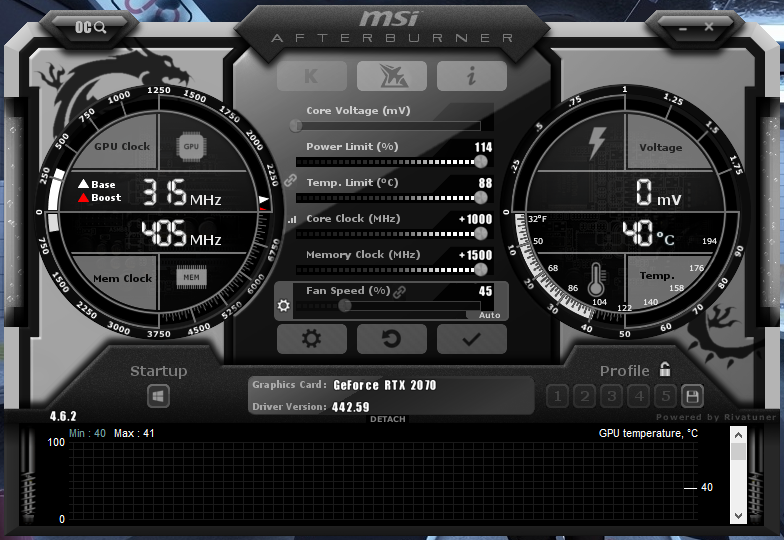
it lets me +1500 on mine
My 2070 is stable up to +1400mhz
cinder wadi
wont let me put 1.5K?
cinder wadi
why no core clock?
jade pulsar
2070 gang
cinder wadi
I get 8000 MHZ you get 6801?
neon rapids
he has a non super
dull ginkgo
its not applied
cinder wadi
Ah
jade pulsar
 cinder wadi
could anyone tell me what the heck this black thing is
jade pulsar
now do i apply?
cinder wadi
ghost i dare
neon rapids
wow kingpin move over
cinder wadi
https://cdn.discordapp.com/attachments/610602203849162772/715753556887732324/unknown.png but wtf is this
 cinder wadi
you see the black thing
jade pulsar
surface of moon?
dull ginkgo
how are we supposed to know context
cinder wadi
that
dull ginkgo
we need context
cinder wadi
That shows up everything in the same spot
dull ginkgo
dead pixel maybe
cinder wadi
How is it a dead pixel when i can take a screenshot
latent wolf
He has a good point. A dead pixel wouldn't show on a screenshot
@cinder wadi Is that with a over locked gpu?
Dam auto corrct
cinder wadi
With overclock and not overclocked
latent wolf
Hmm I was gonna say artifacting if it was just over locked but if it's doing it on both then I don't know
I hate auto correct
cinder wadi
^
latent wolf
Do you have a different gpu you can try and see if it does it then as well?
cinder wadi
No lmao
latent wolf
Ok just an idea for testing anyway
cinder wadi
Imma install the new drivers
see if that does anything
I'm maybe selling this and going mini rtx 2070 super because of an mini itx fish tank build

Doing one of these
left bladeBOT
 Swift#6660 has been warned
Reason: Bad word usage
cinder wadi
...
latent wolf
Ok
latent wolf
Right that ec100
cinder wadi
Yep
left bladeBOT
Swift#6660 has been warned
Reason: Bad word usage


 latent wolf
Hmm bad HDMI cable maybe
cinder wadi
I use display port
latent wolf
Ok bad do cable
cinder wadi
ugh
latent wolf
Darrnit
cinder wadi
Welp I don't have 2 display ports
latent wolf
Display Port cable
cinder wadi
It's werid sometimes its there and its not
left bladeBOT
Swift#6660 has been warned
Reason: Bad word usage
cinder wadi
I swear to god
I can't help the way I talk
Anyways sometimes It's gone imo I think it's a software doing it or something.
latent wolf
Possible
latent wolf
Hmm
proven canopy
That doesn't sound like a cable problem
latent wolf
@proven canopy What Could it be then? Thats the only thing I could honestly think of other than a GPU issue
 violet condor
only thing i could think of is gpu issue
proven canopy

Z490 motherboards for Intel's 10th Gen CPUs, including the i9-10900K & 10600K are all over the place for Vcore, power limits, and Turbo duration. MCE is back in a worse way than last time.
Back-order a GN Wireframe Mouse Mat: https://store.gamersnexus.net/products/gn-wireframe...
jade pulsar
Oh yikes
 manic helm
I think when jayz did his temps video the other day he left everything to auto on his asus and and enabled MCE and it pumped something like 1.5v into his 10900k
neon rapids
pretty interesting video
manic helm
I just checked. Jayz set it to 5.2ghz overclock and left voltage at auto. Went to 1.563v
neon rapids
dang thats higher than i expected
manic helm
ya, never trust auto voltage
neon rapids
ln2 overclocking with auto voltage 
proven canopy

Follow der8auer:
https://www.instagram.com/der8auer/
Support me on patreon:
https://www.patreon.com/der8auer
dull ginkgo
The what
proven canopy
Good way to clean vaseline off your hardware
raven olive
Inb4 "water hurts electronics"
vapid berry
water hurts electronics
manic helm
does it clean the shame off when you kill something
ruby hound
It actually works quite well, just let the board sit for a day or two afterwards, and your good to go mostly. Only heard it used by LN2 OCers to get the vaseline off but it works
I wouldn't out it in with dishes or anything, and would remove the cmos battery, but heard good things from a lot of people
dark ferry
Obviously water doesn't hurt electronics that are not powered on but if you really want to run the risk of having water become trapped somewhere you cannot see where it doesn't evaporate and ruin your board, well, I guess that's a worthwhile risk?
 wooden sandal
does anyone know how to overclock laptop ram from base frequency
errant raft
@dull ginkgo make a desktop into a laptop time!
errant raft
Massive laptop with dual tower cooling and a Titan RTX
bold wolf
Managed to OC my i7 7700k at 4.8ghz @ 1.210V 😍
 tropic zodiac
Anyone here got a 5960x heavily overclocked
I'm just curious what's the max safe voltage to run it at. I have mine heavily liquid cooled running at 1.36v
proven canopy
tropic zodiac
Yeah according to that my voltage is higher than any of those lol but I've had no issues with it for years
proven canopy
Probably fine as long as you cool it.
latent wolf
To much voltage can cause problems in the long run. I wouldnt go any higher
hallow flint
anyone have xpg RAM
 daring night
Hi
What's a good setting for an i5 9600k?
normal ether
uneven ermine
@daring night overlocking is different for every chip
daring night
Ok thanks
uneven ermine
you can google to see what you might be able to get, but overclocking requires extensive testing per chip to make sure its stable
neon rapids
@uneven ermine bro teach me how to overlock
mild moat
Oh oh! Me too!
proven canopy
Teach me senpai
jade pulsar
plz
uneven ermine
overclocking with zack
step one
disconnect all hard drives
you dont want the motherboard getting confused and thinking the hard drive is a CPU!! if it does, hard drive spin go fast and pc takes off like helicopter!
step 2
purchase a NH D15 because you will receive hate and blackmail online if you purchase an AIO. air cool gang will hunt you down.