#overclocking
1 messages · Page 32 of 1
 sudden torrent
I have to agree, at least when it comes to modern boards and based on my limited experience
 clever folio
asrock rgb settings are miserable, everything else works for me
 proven canopy
using anything other than asus bios
mfw
 tall pelican
^^^ this. I've used them all, asrock is the absolute worst, msi next worst, gigabyte you need to bug CS rep for custom bios, and asus crosshair/maximus is the best
And yes, asus has different bioses from prime, strix and C/M
 frigid locust
tall pelican
And yes, asus has different bioses from prime, strix and C/M
frigid locust
tall pelican
And yes, asus has different bioses from prime, strix and C/M
Asus prime BIOS is THE worst tho
I can attest, the prime SUCKS
tall pelican
That's what you get for a sub $150 mobo though
tall pelican
Because the internet told you, or first hand experience?
sudden torrent
They've been actively working to improve that as far as anyone can tell. If you had a bad experience in the past like they made you pay for warranty repair or they just refused to, you can reach out to them now and they'll retroactively fix what went wrong.
Even if the hardware in question isn't in warranty any more
 vale nymph
Tragic
 sleek quest
I got a world record score in a 3DMark (hardware specific)
http://www.3dmark.com/sn/2045050

3DMark.com
AMD Ryzen 7 5700X, NVIDIA GeForce RTX 3080 x 1, 32768 MB, 64-bit Windows 11}

 acoustic crane
frigid locust
Asus has been scummy for a while
acoustic crane
frigid locust
Asus has been scummy for a while
They're still selling *poopy "refurbished" monitors
Granted they're priced pretty cheap
But I'm 2 for 2 on getting scratches/dead subpixel/debris stuck in the panel
tall pelican
I mean, people dont send back good panels
 manic seal
you say that, but people might buy it then use it once then return it
costco had that problem with their tvs during past superbowls and they had to destroy the tvs since they dont sell returns
tall pelican
Yeah, and costco also revokes memberships if you do that with any sort of frequency 
Costco has great customer service and return policy, but you also have to be a decent human being and not abuse the costco overlords
proven canopy
Costco is one of the few good companies all around
 inland rain
proven canopy
Costco is one of the few good companies all around
inland rain
proven canopy
Costco is one of the few good companies all around
can you say in detail?
clever folio
great deals and programs from what ive seen
dont feel scummy lol
i think its more customer orientated tho versus employee
manic seal
inland rain
can you say in detail?
mainly their customer support
inland rain
manic seal
mainly their customer support
Thanks for your reply.
Im a software engineer.
 alpine mantle
okay, this is my last OC/UV run, managed to get the cpu stable on such a low voltage while keeping it slightly overclocked on pcore/ecore/ring
This is hitting on a thin line of stability though as anything lower will cause it to shoot Whea errors


really satisfied with the result tho
P: 5.2GHZ
E: 4.1GHZ
R: 4.6GHZ
-.165mv offset
CPU Lite load: 2
IA CEP: Enabled
OCCT LINPACK: 139w max
R23: 131w max
sudden torrent
WHEA just means "WHEEEEEE A chance for more overclocking fun!"
alpine mantle
sudden torrent
WHEA just means "WHEEEEEE A chance for more overclocking fun!"
nooooooooooooo
proven canopy
overclock

 steady lance
proven canopy
overclock
steady lance
proven canopy
overclock
What in g0d's name am I looking at...
manic seal
phase change cooling
aka they strapped a refrigeration unit onto a cpu
oh cascade as well
they're refrigerating the refrigeration unit via the black cube thing which is a heat exchanger so that it can get even colder
proven canopy
It's a 3 stage cascade, fugger is his username on hwbot if you want to see more
Also the founder of Xtremesystems, he built that unit in college 20 something years ago
manic seal
oh i missed that rotary or scroll compressor under that
lmao i was wondering why there were 2 other condenser units asides from the one big one
manic seal
oh was this a reciever tank? looked like a rotary compressor or smth lmao
 proven canopy
Probably, or a funny looking accumulator
manic seal
cant see the 3rd piston compressor lmao
proven canopy
HWBOT Community Forums
I am selling my 3-stage cascade to make way for my next build, costs are becoming a factor to my goal of -200c. Fully functional, no leaks or issues. R507/ISCEON89/R1150 -110C http://www.xtremesystems.org/cascade/c3.jpg 3x Danfoss SC12 1/2HP Compressors http://www.xtremesystems.org/cascade/c4.jpg...
 restive cargo
If only I wanted to invest in one
proven canopy
You can build that under 2k
clever folio
proven canopy
https://community.hwbot.org/topic/224856-3-stage-cascade-110c-fs/
Whats the point of getting the temp so low?
 sudden torrent
clever folio
Whats the point of getting the temp so low?
sudden torrent
clever folio
Whats the point of getting the temp so low?
When it gets below a certain temperature, the silicon itself undergoes a change that causes less resistance to occur inside of it. This results in better overclocking scores because it will need less voltage to get higher clock speeds and will be more stable at those higher clock speeds. The trick is keeping it below that point for the duration of the test but not going so low it causes problems elsewhere, so you generally target the lowest temp you can get without those problems (cold bug) and let the temp rise a little during testing.
clever folio
sudden torrent
When it gets below a certain temperature, the silicon itself undergoes a change ...
Id think the parts would become pretty fragile under those kinds of testing conditions?
sudden torrent
If you hit it with a hammer sure
It becomes brittle but that doesn't mean it'll break instantly
clever folio
Aw man but i love hitting my rig that costs 10k+ with hammers 
proven canopy
If anything the paste cracks from thermal stress
proven canopy
igor´sLAB
After testing three thermal pastes for the subzero range, i.e. overclocking with LN2, I have a direct comparison of all three pastes for you today, even if it looks a bit niche at first glance.
From the #1 rank on team wegg himself
sudden torrent
So when does splave start passing that stuff out to wegg team?
proven canopy
Already has 🙂
 oak mantle
help how to how to optimize How to optimize the CPU correctly in Ryzen Master. This is how I have it. I want to know if everything is okay or if I need to adjust it better.
 vale nymph
Space heater moment
clever folio
First time overclocking, i can push to 2680 on gpu clock without crashing but i tuned it to 2650 to be safe, good boost from default 2500
Cut out 15mV as well
And get a stable 2400MHz with the vram
Its a nice boost in performance, some stuff its like a 4 to 5% fps boost but most games i can pull about 10% extra perf
(On parts in my user btw)
this is using adrenalin
 kind walrus
Getting out anything from the VRAM is kinda good on a GRE
Most GRE's use minimal binning I've found
clever folio
Couldve definitely been worse, cant say i won the sillicon lottery but not half bad
 kindred harness
Rate the OC
 sudden torrent
Looks pretty good, do you have the compare link? It's hard to see what clock frequency and such it's running at from a chart
kindred harness
sudden torrent
Looks pretty good, do you have the compare link? It's hard to see what clock fre...
What do you mean by compare? I have the rest of the graphs for everything in another screenshot, it's on my computer so can't post rn
sudden torrent
The button that says "compare" under the score
kindred harness
And I only have the demo 3d benchmark so a lot of features are locked
sudden torrent
It'll bring you to a webpage where it uploads the result
kindred harness
Gotcha, ill run another when I get home to see
I was pretty happy with results
My cpu is now clocking 5050mhz constant for the most part, def saving me in modded minecraft lmao
sudden torrent
Time Spy is included in the demo, and has a CPU test if you want to compare that too
kindred harness
Yeah i was hesitate on running that because I didn't know if it was bad to undervolt my cpu and overlock my gpu
But I was not impressed with the underclocking gpu had to offer.
sudden torrent
That's perfectly fine to do
You'll want to run a test to make sure the undervolt is stable though
kindred harness
Yeah everything is running smooth like i didn't do anything so I've been wanting to run it now
That is fair, I saw a couple of post about negative 30 being a bit to much on pbo, but it's been fine so far for me. Hogwarts is running pretty solid
sudden torrent
Unstable undervolt is one of those things that you won't know it's a problem until you get a random blue screen or the computer hard locks
kindred harness
I was more worried about games than benchmark score, but when I finally got a good score on the "main" one i tested out my games and everything seems stable
kindred harness
sudden torrent
Unstable undervolt is one of those things that you won't know it's a problem unt...
Appreciate that, will definitely run the test first thing in the morning when I'm home from work
sudden torrent
I recommend y-cruncher for that. Drop this file into the folder and run it.
kindred harness
Assuming it crashes, just restart and turn back curve a bit in pbo?
sudden torrent
It'll run until you stop it, and it'll keep track of any errors it encounters in a log file
It will tell you which core crashes
kindred harness
sudden torrent
I recommend y-cruncher for that. Drop this file into the folder and run it.
Is that an app?
Sorry this is a bit new to me 😅
sudden torrent
kindred harness
Appreciate that, will look into this as well
sudden torrent
I recommend letting the stress test run about 12 hours. It'll test one core at a time by default so it knows if it crashes.
If it does crash a core you can increase the offset (closer to zero from negative) on that core
kindred harness
Damn lol but okay, good thing is I'm bout to have a long weekend
sudden torrent
You can use the computer while it tests, fps might be impacted if you try to game though
kindred harness
Fair, appreciate that
kindred harness
first one is spy nomad, 2nd is nomad
 kindred harness
 sudden torrent
I meant the address for the webpage (it's public by default anyway) so it's easier to look at but that works
And that appears to be 2 of the same screenshot
Seems like there's room for improvement even if you can't get the core clocks higher, but that's still a solid score. Possibly some driver tweaks would be needed, it mentions LOD being modified in drivers. https://www.3dmark.com/compare/sn/2481046/sn/2354910#
3DMark.com
kindred harness
sudden torrent
Seems like there's room for improvement even if you can't get the core clocks hi...
Interesting I'll have to look into that
Crazy you just pulled my sheet up like that lol
kindred harness
I see, yeh on nomad I couldn't get it to go into boost or my score would've been better
Def gotta look into it cause buddies ran 10° cooler and more better
Assuming he has silicone lottery on his lol
sudden torrent
I deliberately picked a result that was running near the same frequency as you
Both on CPU and GPU
9 degrees isn't going to be 800 points worth of difference
Your video memory clock is a bit lower but nothing major
kindred harness
Yeah steel nomad will not clock at 2850, my games will
kindred harness
Yeah my settings are maxed for oc besides messing w fans
sudden torrent
It's probably more down to the driver settings like I mentioned
kindred harness
Ill look at that when I'm back home
Also that software for the cpu is pretty cool stuff I read about it, slightly scared to download lol
But if it does pi indefinitely on a core/thread how will it know when to stop to go to the next one?
sudden torrent
It switches cores after a set interval of time
There is absolutely no way to damage your system with it
It's just a program like any other. It uses even less of the CPU than an average modern game.
kindred harness
I wasn't worried about damage, just malware, but im sure some of my 2b2t minecraft mods came from sketchier places lmao
sudden torrent
I and several other people use the same software from the same source
I have 3 different versions of it even
kindred harness
Where do I mess with my driver settings?
alpine mantle
I managed to pull a lower voltage thanks to MSI's cpu lite load (MODE 2). Last image is the highest score achieved with this oc.
P-Core: 5.4ghz
E-Core: 4.3ghz
Ring: 4.7ghz
Voltage: Target - 1.140v (-.100mv offset)
I'll probably keep this as my daily from now on. What do yall think?


 broken river
alpine mantle
broken river
alpine mantle
overclocking new processors aren't generally worth it
but it doesn't hurt to try
just becareful when tuning it
don't wanna fry it

then dont do it
overclocking is just pushing your component past their manufactured speeds
☠️
with that 3dvcache i doubt it for gaming
no bruh
because i crave that 1 extra frame?
🗿
um
you can control fan speed via bios
manic seal
fans dont have a clock speed
 manic seal
it really isnt lmao
overvolting isnt exactly good for fans anyways
if you want faster/higher cfm fans, get the fans that is made for that kind of usage
note that some more industrial fans may draw more current, or even require more voltage than conventional pc fans
sudden torrent
Not even remotely close
 manic seal
what did you expect
sudden torrent
Then you definitely don't want to overvolt them to get them to spin faster because that will burn out the motors. And you need special equipment to do it anyway.
 radiant turret
hello, i recently changed my max Freq on my 7900xtx and lowered it 5% to avoid direct X crashed in call of duty and so far it has worked but for some reason i have to change it every time i boot up computer is there a reason why my settings aren't sticking? all this is being done on AMD Software.
alpine mantle
radiant turret
hello, i recently changed my max Freq on my 7900xtx and lowered it 5% to avoid d...
it could be that you have another software conflicting it, by any chance you have msi afterburner installed?
if so make sure no profiles are created and keep startup option grey. Make sure these boxes are checked the same way


There is no way to keep settings fully intact for a reason, lets say if an overclock was unstable which led to a driver timeout it will reset everything back to stock. You can create OC profiles on adrenalin though, if you still have issues either revert to an older stable driver or DDU (reinstall)
 steady lance
No.
Only way to make it more than 3-5% faster is using a custom VBIOS and or LN2 both of which are not recommended.
Also keep in mind that you need to take silicon lottery into account. So the gpu may not even like any oc at all like my 3070.
 abstract wedge
steady lance
Only way to make it more than 3-5% faster is using a custom VBIOS and or LN2 bot...
abstract wedge
steady lance
Only way to make it more than 3-5% faster is using a custom VBIOS and or LN2 bot...
you havent been able to make custom vbios since pascal days
NiBiTor my beloved 
steady lance
abstract wedge
you havent been able to make custom vbios since pascal days
What do you mean? I am pretty sure people have modded the 4090 with a custom vbios here before.
sudden torrent
You don't use a custom vbios, you cross flash from a different model, usually the HOF in the case of the 4090 since they have a 1kW bios that disables all temp limits
steady lance
sudden torrent
You don't use a custom vbios, you cross flash from a different model, usually th...
Oh, I thought a Custom One was used. So the idea is to take the Bios from another model to tell the gpu to avoid all limits?
sudden torrent
Specifically for the 4090 yes
That 1000W vbios is dangerous to use unless you know what you're doing and using sub-ambient cooling
Other GPUs you pretty much just pick the model with the highest power limit and use that
abstract wedge
gpu oc kinda dead anyway
dont we manage to hit cpu limits in some games with 4090 still
(at like 4k)
sudden torrent
Even with a 7800X3D at 1440p ultra yeah you can be CPU limited
steady lance
abstract wedge
gpu oc kinda dead anyway
Not as long as I am still alive haha. But yes.
abstract wedge
5090 gonna be so cpu limited lol
need rkl with arl ecores 
and maybe arl imc
slap in more l3 too 
still loses to 9800x3d
kind walrus
9800X3D likely gonna be cpu limited in many 1440p titles lmao
5090 is gonna be a real 4K card
sudden torrent
4K ultra native with ray reconstruction on
kind walrus
Just hope Devs don't decide to turn it into the 4K60 baseline for their games
So annoying
steady lance
kind walrus
Just hope Devs don't decide to turn it into the 4K60 baseline for their games
It's quite frustrating when devs decide that 60fps with DLSS on Ultra Performance is considered acceptable.
ASA being a good example though it's gotten better it's still very unoptimized.
 hollow aspen
@celest notch What's a VCore?
 celest notch
@hollow aspen you're not getting a bedroom with that attitude
hollow aspen
I'll accept the basement again, hopefully this one doesn't leak!
clever folio
😨
hollow aspen
clever folio
😨
Send help, Rommy forces me to live in the basement, it has no windows!
sudden torrent
Well of course it has no Windows, it was advertised as having no storage so where would you put the OS?
hollow aspen
She uses Linux, she chases me with a bat screaming she's an Ubuntuer
steady lance
sudden torrent
Well of course it has no Windows, it was advertised as having no storage so wher...
Lmao it took me a moment to realize the joke.
vale nymph
hollow aspen
She uses Linux, she chases me with a bat screaming she's an Ubuntuer
She's gonna Ub"punt"u your ass later

 grizzled bobcat
how can i overclock my intel i5 11400h in my lenovo legion 5
manic seal
I don't think you want to overclock that
sudden torrent
grizzled bobcat
how can i overclock my intel i5 11400h in my lenovo legion 5
You can't, but you can try using throttlestop to undervolt it
 normal stratus
I was able to undervolt my 11400h in the acer nitro 5 by about -70mv at the most
 faint tangle
Hey @kind walrus you around?
kind walrus
Henlo
faint tangle
kind walrus
Henlo
So i just built a pc with my friend
Ggood recommended us a 16gb hynix die ram stick so we can add a second one later (budget restraint)
kind walrus
faint tangle
Ggood recommended us a 16gb hynix die ram stick so we can add a second one later...
Ok
faint tangle
Sorry my brain disconnected half way through
 faint tangle
It's a jedec stick, do you have a screen shot of timings i could stick on there?
kind walrus
Well before you do that
Go find the ram details in bios
Confirm the manufacturer is hynix first
faint tangle
It is
kind walrus
Patreon
Get more from Actually Hardcore Overclocking (Buildzoid) on Patreon
faint tangle
Ggood has the ram and it's marketed as hynix so if it isn't ill fight teamgroup myself
faint tangle
kind walrus
https://www.patreon.com/posts/low-effort-rank-77403831
Tyvm
kind walrus
Ye just google a hynix kit
Copy that xmp
Copy the rest from there
Test
Ur good
Ez tune
That should be easy enough to carry over with two sticks but you'll need to reload and retest when the second one shows
faint tangle
kind walrus
That should be easy enough to carry over with two sticks but you'll need to relo...

Does that look right for voltages? Took then from an sp 6000c30 xmp
Some of them anyways
kind walrus
I am not sure tbh
faint tangle
kind walrus
<@654444344274845698> sorry I was on call and I forgot to come back
No izz ok
It's up and running
I did some googling and made sure
kind walrus
Oh ok
I was trying to find my old settings file then I got dragged off by the phone haha
Ok yeah that looks correct @faint tangle mb I took so long
faint tangle
No no worries, we actually went out for lunch we finished with the ram a while ago
I appreciate it v much
kind walrus
Ah alr
sudden torrent
faint tangle
Does that look right for voltages? Took then from an sp 6000c30 xmp
You shouldn't need more than 1.35v if you're only running at 6000, even with tightening timings
steady lance
I have managed to hit the point where 64GB of ram isn't enough sometimes. I am considering looking into a 2x48GB kit of ram. How well can my 7950x3D handle those sticks?
clever folio
steady lance
I have managed to hit the point where 64GB of ram isn't enough sometimes. I am ...
Im scared to ask how 64 isnt enough 
steady lance
clever folio
Im scared to ask how 64 isnt enough <:kekw:741678350791081994>
I have work apps that I need to keep open 24/7, Chrome (8-20 tabs), and Discord those take up about 20ish and when I game my usage spikes to around 40GB. When I am hosting a MC Server or doing CAD or Video Editing I am hitting that limit.
I also terminate all unused apps using Task Manager.
steady lance
Haha yes
But yeah the idea of getting 2x48 is becoming quite appealing and eventually I can reuse my 2x32 for a server which would reduce my mind usage.
clever folio
The true ultimatum is to use all 4 sticks for maximum gigs
clever folio
As long as the minimum highest ram speed isnt too far from the highest shouldnt be an issue
steady lance
Am I able to adjust both kits to be the same speed?
sudden torrent
steady lance
Am I able to adjust both kits to be the same speed?
Yes but it almost certainly won't run at the rated speed of either kit running 4 sticks mixed
steady lance
Best to just buy a kit and fully swap then
Btw if I recall the new 9000x3D chips can be overclocked right?
sudden torrent
steady lance
Btw if I recall the new 9000x3D chips can be overclocked right?
Correct. They flipped the die so now the vcache is on the bottom, and the cores can be more properly cooled. That solves the problem that made AMD lock the voltage on previous gens so now they can be properly overclocked. I've seen a 9800X3D run at 6GHz on an AIO.
steady lance
sudden torrent
Correct. They flipped the die so now the vcache is on the bottom, and the cores ...
awesome!
How much does your 9800x3D run at?
sudden torrent
I don't have one
steady lance
oh wait, I think I am mixing people up lmao
ahh I was thinking of Felix
I wonder how good the 9950x3D will be
sudden torrent
Hopefully they let the drivers cook a bit before launch this time so we don't need to worry as much about core parking
radiant turret
Hello all,
My buddy just expo his ram to 6000 and noe the computer is coming on just no display does anyone have an idea what could be going on?
steady lance
radiant turret
Hello all,
My buddy just expo his ram to 6000 and noe the computer is coming o...
Either the CPU can't handle those speeds or the ram cant run at its rated profile.
I assume he managed to use this ram without the expo enabled?
.
If the heat spreaders on my ram are using thermal pads that means I should be able to remove them pretty easily right?
Also I forget how do I check what chips a Kingston stick uses?


 kind walrus
Those are hynix, likely M going by the xmp
 cerulean moon
need help on boosting my ram, it's currently configured at stock speeds and XMP 1/2 doesn't work because of whatever reason. If I try it, it just doesn't turn on my display and I have to reset cmos. Help !
kind walrus
What's your ram config
sudden torrent
It can take 5-10 minutes to train the memory after changing any configuration related to it
Updated BIOS versions usually help with that
cerulean moon
2666 if I recall correctly, it's rated 3200mhz. I have 2x16 fury beast ram
sudden torrent
Ah DDR4
cerulean moon
sudden torrent
Updated BIOS versions usually help with that
15-20 minutes of waiting, and also did a BIOS update yes
cerulean moon
5600 non x, just OC'd it last night with PBO,
MSI B450m-A Pro II (someone told me VRMs in this mobo are better than the rest of my options I had before
sudden torrent
Pro Max II?
cerulean moon
 cerulean moon
sudden torrent
Pro Max II?
cerulean moon
sudden torrent
Pro Max II?
yes
 cerulean moon
do enlighten
kind walrus
Kingston was known to hate micron for some time
So that's if I'm not mistaken an unusual pairing
But also a very good sign
You likely have 1 of 4 dies
tall pelican
sticks in slots 2 and 4?
cerulean moon
my mobo only has 2 dimm slots
tall pelican
oh awk
cerulean moon
kind walrus
You likely have 1 of 4 dies
what does it mean?
kind walrus
3 out of the 4 are quite good iirc
sudden torrent
Even the bad one of the 4 isn't that bad
cerulean moon
oh the actual dies okay i get it
cerulean moon
dang, i tried to hold off not needing to learn manual ram ocing lol
takes a while but interesting to me nonetheless
so do I just start learning a tutorial now on manually changing their frequencies
since I'd be doing that might as well boost over 3200mhz if i can
cerulean moon
did xmp-2 3000Mhz from 2400mhz lol
booted up first try but I kinda want to try 3200 again cus it might have to do something with ocing my cpu, thoughts?
cerulean moon
i nono wana :feelsweird:
kind walrus
cerulean moon
i nono wana :feelsweird:
Just do it for a day lad
Process of elimination
cerulean moon
I mean I did try last time before with stock
had a nightmare with that for a few hours trying
sudden torrent
You can save your current overclock as a profile so you don't need to totally redo it
cerulean moon
I don't know what the benefit is with running stock cpu speeds though cus I'm happy with my boost and undervolt
sudden torrent
That last one is the potential issue
The undervolt
Too little voltage to the IO die can cause it to fail to run the memory
cerulean moon
how do I test it?
kind walrus
cerulean moon
I don't know what the benefit is with running stock cpu speeds though cus I'm ha...
In real world performance you will gain less than 5% anyway, just try it
kind walrus
cerulean moon
how do I test it?
Very simple, if what wasn't working now works, we got somewhere
Since this is a recent change, a simple flip back will speak volumes
sudden torrent
Generally speaking I'd recommend doing memory before CPU since an overclock on one can affect the other
And memory has a bigger impact
kind walrus
Esp. on ryzen
cerulean moon
okay that's understandable I'll reset back to stock and try 3000mhz on the ram
kind walrus
Memory is like the biggest impact by a mile on ryzen
Vcache is a good example of why memory does a lot
cerulean moon
so if it doesn't run, I lower ram speed until it boots? only then I go back to my cpu boost?
sudden torrent
If you can get the memory to run at 3600 at stock cpu settings then that's a good 15% improvement on CPU performance thanks to the fclk
Vs the 5% you gain from PBO
cerulean moon
thanks very much
cerulean moon
- so use stock cpu speeds
- oc ram, and lower speeds if it doesn't boot, and until it's stable (open a bit more tabs, run discord in bg, play and do some editing for the day)
- if stable, then I resume my cpu oc?
cerulean moon
can you rephrase please lol
sudden torrent
If the memory is stable at 3200 then something you did with the CPU caused this whole thing, so you need to start over with the OC on the CPU
cerulean moon
ah, but essentially everything else is correct
sudden torrent
Pretty much
cerulean moon
coolio I appreciate it very much
sudden torrent
If it's stable at 3200 btw, we can try to push that even higher. 3600 would be a good target.
cerulean moon
but knowing my pc doesn't boot with stock cpu and ram running at 3200mhz do I still do it?
kind walrus
Stick with stock and xmp for now
If it's fine like that, after about a day
Start over
And as we said earlier, start ram first
Bigger impact and more fickle
cerulean moon
yupp gotcha
btw to reiterate the ram out box runs at 2400mhz, and it's rated 3200mhz (which what xmp-1 & 2 would run at) which already didn't work
cerulean moon
kind walrus
It just immediately failed?
yes, it's why I asked about how to remedy this in the first place lol
sudden torrent
With the CPU at stock settings, preferably cmos cleared, and nothing but xmp 1 on, it failed?
cerulean moon
yessir
sudden torrent
That's a bad memory kit then
cerulean moon
need help on boosting my ram, it's currently configured at stock speeds and XMP 1/2 doesn't work because of whatever reason. If I try it, it just doesn't turn on my display and I have to reset cmos. Help !
this what I said
cerulean moon
sudden torrent
That's a bad memory kit then
well it ran before at 3200 xmp-2 completely fine with my R5 2400g
sudden torrent
Right but then we went on that CPU overclock tangent and got sidetracked
 cerulean moon
sooo.. i manually do the ram oc?
1 out of 4 dies can't run X speed studf like that so I have to adjust
kind walrus
Nope
Warranty the ram
Unless you had a static oc on the cpu I doubt it's the cpu at all
sudden torrent
kind walrus
Warranty the ram
1 year warranty mate
Kingston DRAM Warranty Statement
cerulean moon
perhaps it's still under warranty, I remember fully upgrading my pc within the year
kind walrus
sudden torrent
1 year warranty mate
Tf not lifetime???
cerulean moon
I bought it July 1 this year
kind walrus
Warranty then
sudden torrent
Ah you're golden then
cerulean moon
I really hope it's not much of a hassle besides the waiting
sudden torrent
kind walrus
Tf not lifetime???
1 year standard warranty, beyond that you only get a "credit" towards a new kit based on depreciated value
kind walrus
Pfff
That's an instant turn off from me wtf
They're like the first company I've heard that does that
sudden torrent
Still better than corsair
cerulean moon
how does a warranty claim work for you guys?
never needed to return anything before
kind walrus
Similar to returning something
Contact the place you bought, tell them what's happened and you're looking for a warranty claim
They will probably tell you to contact the manufacturer if US
cerulean moon
yikes, this might take a while then
I don't have any other ram to use if I return it
sudden torrent
You can ask if they'll cross ship so you minimize that time between
sudden torrent
kind walrus
They're like the first company I've heard that does that
Found the phrase in the warranty btw, all they have to say is they don't have replacements in stock
If Kingston is unable to repair or replace the product, it will refund or credit the lesser of either the current value of the product at the time the warranty claim is made or the purchase price.
sudden torrent
1 year standard warranty, lifetime depreciated value warranty ig you could call it
lol "lifetime"
**Product lifetime is defined as the normal time expectancy for the use of products in the industry. But the lifetime warranty may be subject to definitions as set by different countries. For Russia, the lifetime warranty is determined to be for a period of ten (10) years from the date of purchase by the original end user customer.
kind walrus
Ok but if it says lifetime that counts
This is legal definition
10 years is long enough really
sudden torrent
G.skill meanwhile still replaces DDR2 if you kill it overclocking
sudden torrent
Sheesh, I'm digging more into what the US defines "lifetime warranty" advertisements as acceptable and it's quite the rabbit hole. It's basically a useless nonsense phrase you throw in to make it sound good. You can arbitrarily set whatever time you want based on your own definition of "expected useful lifespan".
faint tangle
that's predatory as hell
kind walrus
Pretty normal if I recall back the laws we have in my country for lifetime purchase
It can be considered predatory depending on the context
Since in this case it'd be a "computer part" I would expect that to fall under somewhere of about 5 years
Over here we used expected normal life of products as an agreed definition up to a maximum of 16 years
So if I buy say, a tire
The expected life of a tire is normally 2 years
So a lifetime warranty based on the normal use of a tire would be, as you'd expect, 2 years
But on the other hand (I'm gonna refer to this because it's an easy example that I remember) you buy a phone
The normal expectancy of a phone can range between 2 and 10 years depending on the context
And we have rules that permit a lifetime responsibility beyond that of a standard warranty (Note responsibility as a specific word, it's not repair or replace necessarily)
You buy a tv, the accepted standard would be over 5 years
The ambiguity is (at least here it is) in fact rigged in favour of the consumer, because every business would love to give the minimum period then bugger off if they had the choice
So this would be a civil case, as a consumer complaint, and the objective for your case to the court (let's assume the extreme example for a moment) would be to prove ram is intended for as long as the computer (as above, ~5 years as a part)
Depending on the case and scenario, it's very ambiguous and that's intentional to prevent clear cut examples especially in like tech where there's a huge catalogue in every category

 cerulean moon
seller's tryna deny service or smth
 steady lance
cerulean moon
seller's tryna deny service or smth
steady lance
cerulean moon
seller's tryna deny service or smth
This is why I buy almost exclusively from Amazon.
If there are is even the slightest issue so long as I bought it within 30 days it has always been no questions asked guaranteed returns or replacements in my experience.
cerulean moon
steady lance
This is why I buy almost exclusively from Amazon.
no one really buys amazon where I live
i live in ph
shopee is the amazon here basically
steady lance
Gotcha.
vale nymph
steady lance
If there are is even the slightest issue so long as I bought it within 30 days i...
This is why I try my best not to, amazon is being flooded everyday with more garbage and shady third sellers that take advantage of this to keep their own stores at the top of all searches, not to mention selling literally dangerous and harmful products
steady lance
vale nymph
This is why I try my best not to, amazon is being flooded everyday with more gar...
The shady sellers sounds like most retailers honestly. I usually keep my eyes out for who the seller is and because of the return policy I have never had to worry about that.
steady lance
Just got my PC back up and running.
I have updated the bios and I am finally getting around to tuning this 7950x3D and the ram for it
.
First try I got 6600mhz to post and I started with 1.4v Dram, VDD, and VDDIO

first try timings, I left every thing on auto
sudden torrent
steady lance
First try I got 6600mhz to post and I started with 1.4v Dram, VDD, and VDDIO
Is that with UCLK=MCLK on? It defaults to off at that speed
Ah, no it's not
You want to have that on for sure, it's a major penalty if it's off
steady lance
sudden torrent
You want to have that on for sure, it's a major penalty if it's off
Thanks for pointing that out.
I will restart and see if it posts.
@sudden torrent, what are the safe daily voltage limits for Hynix A/M die VDDP, VDDQ, VDDIO?
sudden torrent
The most mine will do is 6200 with it on
steady lance
My previous 7950x3D did 6400cl32. I am not sure about this replacement yet.
I am hoping using this new bios version helps. My previous bios is nearly 13 months old.
sudden torrent
As for voltage limits, let me refer you to this screenshot of one of the top overclockers doing 8000c32 https://hwbot.org/imgs/3083389
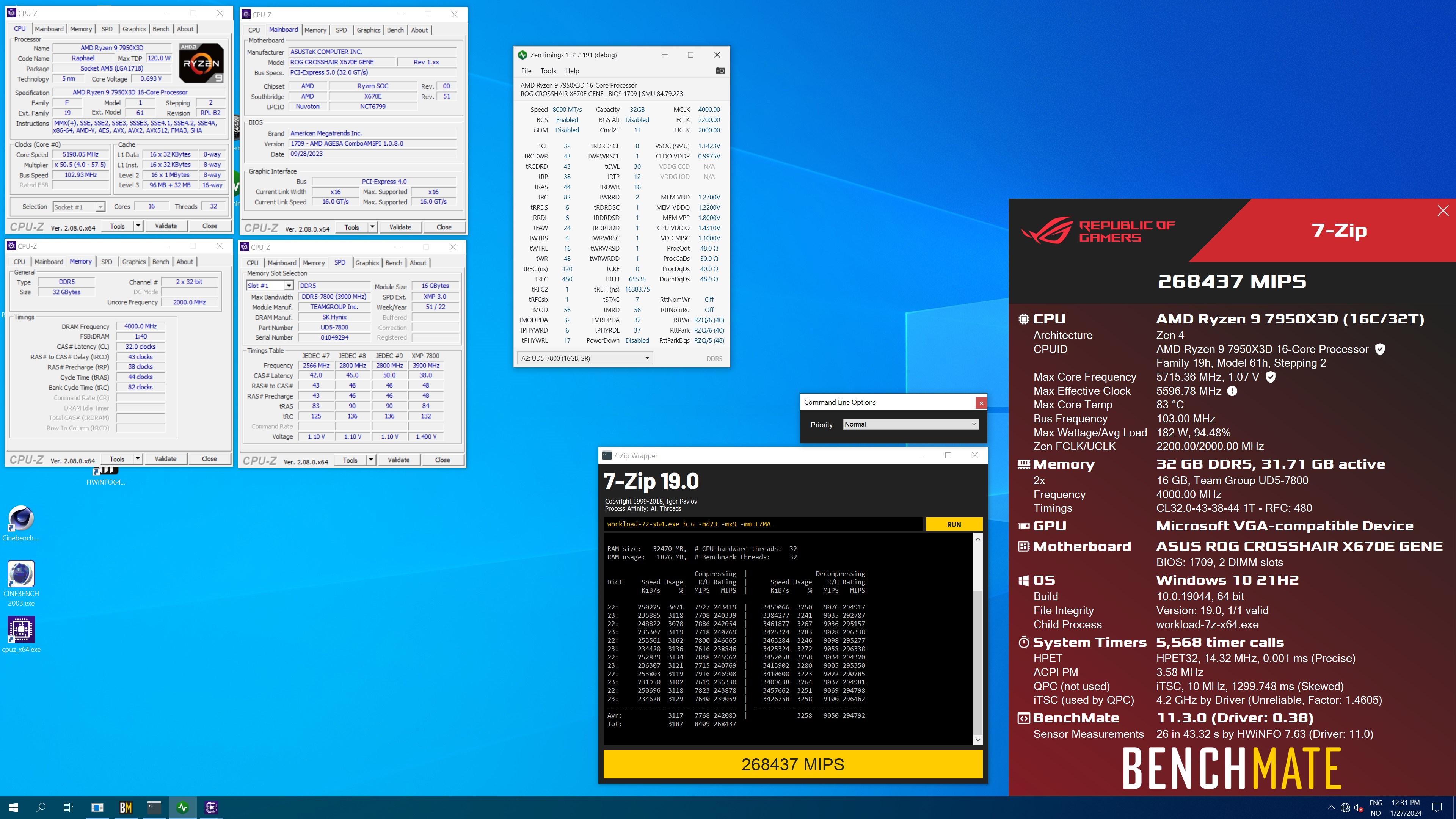 steady lance
<@396513761550270464>, what are the safe daily voltage limits for Hynix A/M die ...
steady lance
steady lance
<@396513761550270464>, what are the safe daily voltage limits for Hynix A/M die ...
Wondering so I can just set those voltages and keep pushing the ram till I know what the limits are.
sudden torrent
Your vsoc is too high, I can tell you that right away
That alone can cause instability, being too high
steady lance
Consider me a complete noob, I forgot what some of these voltages are.
What is vsoc again?
sudden torrent
The one that kills ryzen cpus when it's too high
1.1-1.2V on CPU SoC is typically good
0.95-1.00V on VDDP
 sudden torrent
yep
steady lance
Set it to 1.2?
sudden torrent
Do 1.15V to start
steady lance
What is the difference between override mode and AMD over locking?
Also thank you for helping me.
sudden torrent
Does what I need it to that way, which is hold a constant voltage
Your VDDP is fine, you can drop mem VDD and VDDQ to 1.3V and call it good
Oh and I wouldn't touch VPP, just leave it at 1.8V
steady lance
VDDP is on auto right now.
steady lance
sudden torrent
Oh and I wouldn't touch VPP, just leave it at 1.8V
Understood.
sudden torrent
Huh. Well it's not supposed to be lol. Maybe some sort of auto OC going on in that bios.
steady lance
Should I manually set it?
sudden torrent
Nah just keep it in mind if you have stability issues
steady lance
So:
- 1.3V VDD
- 1.3V VDDQ
What should VDDIO be?
Can you give me a rundown as to what these voltages do? It'd mean a lot to me to understand what it is I am changing. Because the bios info section for them is useless.
sudden torrent
VDDIO scales up with frequency and CL, and is the biggest reason the sticks get hot
steady lance
Gotcha. I am not worried about heat. I have a fan over the ram and room temp is 16c
sudden torrent
The guy running at 8000c32 has VDDIO at 1.43V so there's no shot you need more than 1.38V
I'm running 1.35V myself
steady lance
sudden torrent
The guy running at 8000c32 has VDDIO at 1.43V so there's no shot you need more t...
Was that synced or?
sudden torrent
You mean UCLK? No
steady lance
Yeah
sudden torrent
But at that speed it doesn't matter anymore because UCLK is 2000 again
steady lance
Gotcha I was like how the heck did he get that to sync on a 7950x3D.
So VDDIO scales with frequency and primaries?
steady lance
What about VDD?
sudden torrent
This seems like a halfway decent guide from a cursory glance https://www.tomshardware.com/how-to/overclock-ddr5-ram
DRAM VDD: This voltage is one of the most critical as it powers the memory chips. For everyday use, we recommend keeping it below 1.4V for safe measure.
DRAM VDDQ: The voltage feeds the memory chip's I/O. VDD and VDDQ typically go hand-in-hand. However, in some cases, desynchronizing the voltages and running a higher VDDQ (50 mV - 100 mV) can help stabilize memory overclocks.
steady lance
Current voltages by the way:
- VDD @ 1.3V
- VDDQ @ 1.3V
- VDDIO @ 1.38V
- CPU NB/SoC @ 1.15V
- UCLK=MCLK set to true
steady lance
steady lance
Current voltages by the way:
- VDD @ 1.3V
- VDDQ @ 1.3V
- VDDIO @ 1.38V
- CPU N...
Try posting with these settings at 6600mhz?
sudden torrent
Yeah try it. If it doesn't work try 6400 next.
If 6400+ boots immediately run a memory test
steady lance
I really hope 6600 posts. I spent so many hours trying to get my previous 7950x3D to post at 6600 stable.
Hmmm.
Not a good sign.
I am still on the dram light
steady lance
Reset as in restart?
steady lance
I was not aware of this. I had previously forced it into safeboot by force shutting down the oc multiple tumes
sudden torrent
It's not foolproof and there are times where it won't reset properly
But it was pretty decent when I had my MSI board
steady lance
Guess I will give it a couple more minutes.
If this fails what could I do to try and increase the chances of 6600mhz working?
.
Still no post
Just force shut it down and clear cmos?
sudden torrent
tbh with UCLK it either works or it doesn't, or you spend days figuring out the exactly correct resistances and voltages
You can clear if you want, or put it into safe boot
sudden torrent
Ooh you have a safe boot jumper, that's even better
steady lance
?
sudden torrent
 steady lance
I see the dram light indicating it's cycling
I forced shutdown the PC three times back to back but never got into bios
sudden torrent
You can just touch those jumper pins while you power on and you don't need to do the whole song and dance
steady lance
sudden torrent
You can just touch those jumper pins while you power on and you don't need to do...
I can touch those pins while the PC is on and powered?
sudden torrent
While it's off, touch them with something conductive and press power
steady lance
Gotcha
sudden torrent
You can let off when it posts
steady lance
Yikes 16c air feels like 2c when being blasted by the fans
sudden torrent
Probably more so after getting used to the warm equatorial area
steady lance
Lmao if I didn't heat the home I could have some serious cooling.
-16c right now
So I tried the jumper pins but it didn't safeboot.
Try again? I used a metal wrench
Also Dram is cycling a lot
sudden torrent
It might have a coating on it, try something else
Nickel plated steel is pretty common for tools to prevent rust
If you wanted you could wire the reset button to the jumper instead, so you can just press that while you power on
steady lance
Tried a different wrench hopefully it works now.
@sudden torrent, what could I do to improve my odds of getting 6600mhz to post?
sudden torrent
I can't really suggest anything specific there, just pure luck and trial and error with getting the exactly correct settings
steady lance
Rip.
Also this is becoming frustrating.
3 different tools in a row. Not luck getting into safeboot.
sudden torrent
Guess you could clear cmos with the jbat1 jumper
steady lance
sudden torrent
I can't really suggest anything specific there, just pure luck and trial and err...
What are the maximum safe voltages for VDD/VDDQ/VDDIO on a Hynix IC?
steady lance
sudden torrent
Guess you could clear cmos with the jbat1 jumper
Jbar1 jumper?
sudden torrent
Right next to the safeboot jumper
steady lance
Oh nvm took me a sec to realize.
Next time I buy a motherboard I think I will get one with a clear cmos button.
sudden torrent
That's another thing you can wire to the reset button
In fact that's exactly what I did
steady lance
By reset button I assume you mean the power btn on the computer case?
sudden torrent
Yes
steady lance
FINALLY
sudden torrent
But not the main power button, most cases have a second one intended to trigger a soft reset
steady lance
I am in the damn bios
I see a small button on the fractal torrent
Which wire is that one? I am gonna set it to the cmos like you are suggesting.
sudden torrent
It'll be in with the front panel wires
steady lance
So I bumped up the ram vtages to 1.4 and soc to 1.2
I managed to get to the bios screen but no post yet.
Blue screened.
steady lance
Giving 8000mhz desynced a attempt.
VDD 1.38V and VDDIO 1.43V
Failed attempt. Also I just rewired the reset button. Hopefully it works.
The button does not appear to be working.
@sudden torrent is it bad if I jump the Clear Cmos while the system is on (not posted yet)
Because for some reason if I try to use the reset button while the PC is off it does nothing.
Nvm now it's functioning properly.
Trying 6400mhz.
- 1.2V CPU NB/SoC
- 1.35V VDD/VDDQ
- 1.43V VDDIO
steady lance

Gonna try working my way up. Cleared all the settings and working my way up from XMP.
steady lance
@sudden torrent I got 6400Mhz to post!
My board and CPU seems to really want to stay at 1.3V SoC otherwise a lot of things become unstable below that.
Been this way since I got the replacement.
gonna eat then strart tuning it
for some reason I had to up the voltages to 1.43 for the VDD, VDDQ, VDDIO for it to post
steady lance
K I got tREFI 65,000 to post. For some reason tREFI 65,355 has never posted.
sudden torrent
Yeah that's a common thing
steady lance
sudden torrent
Yeah that's a common thing
Do you know the cause?
I am using TM5 with Anta Extreme 777 profile to check if the OC is stable enough for me to move into the next settings then I will run PCBdestroyer later.
The ram is maxing out at 39c.
sudden torrent
trefi is just one of those platform quirks
steady lance
Gotcha.
I doubt 355 makes a difference when tREFI is at 65K so I am not to worried.
After I am done with tREFI should I do the tertiaries or secondaries?
.
On a side note, is it fine if I leave my VDD/VDDQ/VDDIO at 1.43v? I will try lowering them after timings are done but if I can't lower them without the system being stable is 1.43v fine for daily? I am fairly certain I have a Hynix IC I do not know if it's A or M though.

 sudden torrent
It should be fine
steady lance
Am I able to go higher or stick to 1.43 being my max because I know on my previous 7950x3D bumping them to 1.55v yielded around 10-20% tighter timings across the secondaries and primaries and slightly better tertiaries at 6400mhz.
Gosh I hate autocorrect.
sudden torrent
I wouldn't go higher than 1.45 personally for daily but I know people do higher than that
steady lance
You are pretty conservative and I trust you more than others.
So make 1.45v my ceiling then?
My plan is to start at the ceiling and lower wherever possible once I have my timings set.
sudden torrent
Up to you, there's a lot of things left to figure out about DDR5 still
sudden torrent
Yes I am pretty conservative with my settings. I'm just running at 1.35V right now.
And there's only a sample size of 3 different memory controllers so far to figure out how it behaves
steady lance
I know 1.38v across VDD/VDDQ and 1.43V didn't allow 6400mhz to post for me.
sudden torrent
Could be down to binning, worse bins need more voltage to get the same results. If I'm not mistaken you have a 5600 kit.
steady lance
Unfortunately it appears unless I wanna venture into the 1.6v region I can't get 6600mhz to post (not stable) and I am simply am not comfortable with that.
sudden torrent
I've seen up to 1.7V for benching
steady lance
sudden torrent
Could be down to binning, worse bins need more voltage to get the same results. ...
6000cl32-40-40-80 @1.35v
Though I am running 2x32.
steady lance
sudden torrent
I've seen up to 1.7V for benching
But bad for daily I assume.
sudden torrent
We still don't know, it can take several years to show degradation
steady lance
Also it seems my board/CPU doesn't like going below 1.305v SoC
Board has had it set to that since as far as I can remember and when I lower it my stability goes down exponentially.
sudden torrent
That'll affect UCLK, and above 1.35V is what was known to cause CPU popcorn so that's a hard limit in the BIOS now.
steady lance
Increasing that makes UCLK=MCLK more stable at higher clocks?
I don't think I am willing to risk it though tbh. To much risk for not nearly enough of a reward. I am already doing better than the average with getting 6400 to post synced.
.
@sudden torrent tREFI 65,000 passed TM5 Anta777. Peak temps were 42.5 and 41 Celsius.
Should I do Terts or Seconds now?
steady lance
K gonna do that now. Also really, thank you for helping me and I appreciate the company.
steady lance
By the way, that tip with the reset button that is so freakishly helpful
steady lance
sudden torrent
Overclocking is fun for me
Baruch Hashem to that.
K.
I've changed SCLs to 4 and tFAW to 16. Also voltages for VDD/VDDQ/VDDIO are all at 1.45v now as the ceiling.
sudden torrent
tRAS 30
tRC 68
tWR 48
tRTP 12
tRRD_L 8
tRRD_S 4
tWTR_L 16
tWTR_S 6
steady lance
sudden torrent
tRAS 30
tRC 68
tWR 48
tRTP 12
tRRD_L 8
tRRD_S 4
tWTR_L 16
tWTR_S 6
SCLs and tFaw passed the test.
Should I try to lower SCL and tFaw some more?
sudden torrent
Cool, you can do a few of those next timings at a time or all at once, your pick
SCLs might go to 2
steady lance
steady lance
Should I try to lower SCL and tFaw some more?
If memory serves me right one of these at a certain point makes no difference.
sudden torrent
That's tFAW
steady lance
is 16 that point?
sudden torrent
Yes
steady lance
Gotcha. May I ask the reason?
sudden torrent
tFAW is defined as the window in which 4 activate commands can be given consecutively
Each command takes 4 cycles
4*4=16 min
If it were higher then it would wait out the remaining cycles before more activates can be issued
steady lance
Is this a AMD thing? the 4 commands part
steady lance
sudden torrent
SCLs *might* go to 2
Odd numbers are fine or? If so I am gonna try for 2 and 3.
sudden torrent
steady lance
Is this a AMD thing? the 4 commands part
It's a DDR5 thing, part of the spec
sudden torrent
steady lance
Odd numbers are fine or? If so I am gonna try for 2 and 3.
Sometimes
steady lance
gotcha.
I don't remember if I showed you but I finally got around to upgrading my setup after yapping about for like two months.

Figured you guys would appreciate knowing that all those hours of talk and suggestions weren't for naught.
sudden torrent
I maintain that the contact frame is unnecessary unless you use liquid metal
steady lance
Ahh gotcha. I nabbed it because TG's PTM stuff showed them using the frame with it.
The drive is admittedly a bit overkill but it's been my dream drive for a long time.
steady lance
sudden torrent
tRAS 30
tRC 68
tWR 48
tRTP 12
tRRD_L 8
tRRD_S 4
tWTR_L 16
tWTR_S 6
are there any formulas that should be followed with any of these timings? Also I am gonna try SCLs set to 2.
sudden torrent
Not with those timings
That's just a set of "known to work on hynix" timings
TRRD_L might go lower but start there
Once you have those working then I'd go to tRDRDSD and tWRWRSD 6, odd numbers work on these ones if that fails.
tRDRDSC 1
tWRWRSC 1
tWRRD 2
tRDWR 16
After that is primaries
steady lance
Back
@sudden torrent unfortunately I couldn't get pass bios screen with scl 2.
Is scl 3 something I can try or do those need to be even numbers?
sudden torrent
You can try it
steady lance
Btw something interesting I remembered.
My previous 7950x3D couldn't get Anything lower than SCL 5 to post stable. This replacement has it beat in that department so far.
sudden torrent
Ah nice
steady lance
My previous one did 6400cl30 at 1.55v with very tight secondaries if I recall correctly but struggled like hell with terts.
Hmm. Not a good sign.
It is Cycling the Dram.
By the way, @sudden torrent besides VDD/VDDQ/VDDIO/NB/SoC are there any voltages I can adjust to increase rdm stability?
sudden torrent
Not that I'm aware of
steady lance
Ahh okay.
How risky is it to up NB/SoC to 1.35v? I keep reading that it's safe so long as it is below 1.4V.
sudden torrent
It's theoretically safe
steady lance
Do you think it's too risky?
Does bumping up SoC increase ram stability?
sudden torrent
It can for some timings
I wouldn't do it myself but I'm quite cautious
Eh maybe I would just to see if it helped
Oh but what might also help is settings LLC level 3 from digitall power menu
steady lance
So put LLC to level 3?
sudden torrent
CPU LLC and VDDSOC LLC
steady lance
I see two separate Loadline Calibration Settings.
- CPU NB/SoC LLC
- CPU LLC
sudden torrent
Yes those ones
steady lance
Both have options MODE 1 to MODE 8
sudden torrent
mode 3
steady lance
for both?
steady lance
Yes much better than my cheapo DS3H B450M.
So what does the node do? Is it making the voltages more consistent by overshooting it slightly?
sudden torrent
It's going to undershoot by design, this controls how much
steady lance
Gotcha.
sudden torrent
mode 1 is no undershoot, and can occasionally overshoot
sudden torrent
Sure
steady lance
Hmm it's dram cycling again.
Alright I think I will leave SoC be at 1.3v
Not gonna risk it. I found a reddit full of users who have run 1.35v for months on end. The common consensus is that while the cpu and it's mc will survive, the iGPU seems to die at some point if left enabled.
steady lance
sudden torrent
tRAS 30
tRC 68
tWR 48
tRTP 12
tRRD_L 8
tRRD_S 4
tWTR_L 16
tWTR_S 6
Unfortunately SCL 2/3 is a no go.
sudden torrent
Oh well, not a huge loss
steady lance
So move onto those timings?
sudden torrent
Yep move on
steady lance
Just applied tRAS, tWR, tRD and changed tRDRDSC/tWRWRSC to 1.
K it posted
Hmm it appears tRAS 26 is a no go.
steady lance
sudden torrent
Yep move on
tRAS 28 posted
tRAS 30
tRC 68
tWR 48
tRTP 12
tRRD_L 8
tRRD_S 4
tWTR_L 16
tWTR_S 6
tRC 62 posted.
Gonna try tRC 58
sudden torrent
You're below the register limit now, tRC=tRAS+tRP
steady lance
sudden torrent
You're below the register limit now, tRC=tRAS+tRP
Ahh so there is a formula.
sudden torrent
Yes some of the timing minimums are determined by combining other timings
sudden torrent
Pretty much, but by this point you should be pretty much locked in on those timings
steady lance
Can I still adjust tRAS and tRP individually each first to post so ai knows the values each goes down to?
sudden torrent
Yeah
steady lance
K
steady lance
sudden torrent
Yeah
tRP and tRCD do they need to be the same?
sudden torrent
No
steady lance
Gotcha
sudden torrent
tRCDWR and tRCDRD can also be different
steady lance
Fingers crossed tRC 34 posts.
sudden torrent
iirc tRCDWR doesn't make any difference on AMD, maybe that was DDR4
steady lance
sudden torrent
iirc tRCDWR doesn't make any difference on AMD, maybe that was DDR4
I purchased two items of TG's 40x50mm PTM. If each item comes with 2 sheets that should leave enough for me to change the pads on my ram. Do you think that'd be a good idea?
sudden torrent
No, it's more risky to take the current pads off and there would be little benefit to doing so
steady lance
Part of why I was wondering is because it would also give me an excuse to finally know which ICs are on my ram. Is delidding ram sticks that use thermal pads hard?
sudden torrent
The risk is twofold. You can bend the heatsink so it never sits correctly again, even after bending it back, and if it's especially sticky you can rip the IC right off the PCB.
steady lance
Ahh alright.
Also tRP 32 did not post.
34 posted and that is with tRC synced
@sudden torrent are there any formulas for tWR?
Wait? Why won't it let me set tWR below 48.
sudden torrent
Yeah that's a hard limit
steady lance
Ahh okay. I don't know why but on my previous now 1 year old bios it'd let me change it in bios iirc.
sudden torrent
Yeah sometimes it the bios will let you set it below the register limit and in that case your setting just gets ignored
steady lance
Since I am in the primaries section should I just get tCL and tRCD done with before I go do the secondaries you mentioned?
sudden torrent
No the primaries are the least valuable thing to tune
steady lance
tRTP 12
tRRD_L 8
tRRD_S 4
tWTR_L 16
tWTR_S 6
I am reposting this on occasion to keep it on hand
sudden torrent
You want to do everything else first just in case a primary timing keeps a secondary/tertiary from going lower
steady lance
Gotcha
steady lance
steady lance
tRTP 12
tRRD_L 8
tRRD_S 4
tWTR_L 16
tWTR_S 6
I am reposting this on occasion to...
So these settings and formulas for them?
Also should they be even numbers or can I do odds.
sudden torrent
Yes those next. Evens.
steady lance

Gonna try posting
It's alive!

Going to do a TM5 Anta777 run before I try tuning the settings in more
sudden torrent
Good idea. It should go a bit faster now too.
steady lance
I hope I can get my ram tuned down to 6400cl28 again
2s, 4s, and 8s are definitely my preferred numbers to look at.
definitely not because of using Minecraft to practice math lmao
sudden torrent
CAS is a conundrum. If you set it too low you can actually regress in performance.
steady lance
Really?
Oh btw somehow my bios when I updated it was able to tell my ram has Hynix ics. It had a thing for optimizing ram settings based on ic.
sudden torrent
There's a buildzoid rant about it but I don't feel like digging for it, so I'll leave this one instead https://youtu.be/pgb8N23tsfA?si=nnasM_lQ6Khn5PXB
DDR4 PyPrime 2B record: https://hwbot.org/submission/4758130_rauf
DDR5 PyPrime 2B record: https://hwbot.org/submission/4987588_p5ych0
My Patreon: https://www.patreon.com/buildzoid
Teespring: https://teespring.com/stores/actually-hardcore-overclocking
Bandcamp: https://machineforscreams.bandcamp.com/music
Twitch: https://www.twitch.tv/buildzoid
...
It could be mentioned in there somewhere but idr
steady lance
How do I know if my performance is regressing?
steady lance
Aida64 is paid only now though iirc.
sudden torrent
There's a trial
steady lance
I used it.
Lemme see how much aida64 even costs.
Because iirc they have some good benches to test CPU stability. Correct me if so am wrong.
sudden torrent
So uninstall using revo uninstaller and that should remove the registry data with the trial
steady lance
sudden torrent
So uninstall using revo uninstaller and that should remove the registry data wit...

RevoUninstaller
Clean removal of any program from your PC. Uninstall and remove programs and software in Windows with Revo Uninstaller Pro easily!
That it?
sudden torrent
yep
That's a super useful app too, I keep it installed just in case something goes wrong
steady lance
After all the settings are tuned in do you think 1 hour of OCCT and a round of the PCBdestroyer profile in TM5 ought to be enough to test for ram stability?
sudden torrent
You can skip the OCCT if you plan to run TM5 too
Maybe a few hours of y-cruncher stress test
steady lance
So TM5 (PCBdestroyer) and some Y-Cruncher
sudden torrent
yes
steady lance
My Y-Cruncher install is a year old now should I update it?
sudden torrent
Yes there's a new algorithm to use
steady lance
@sudden torrent I have noticed something interesting with my SoC voltages.
I have it set to auto and I have noticed with each time that I have tuned a timing, the voltage has gone down slightly. Started at 1.305v and now at 1.294v.
sudden torrent
And that's why I don't count on auto
sudden torrent
You can drop this into your y-cruncher folder and run it as a shortcut to starting the test
steady lance
Thank you. Also now we shall tune thy secondaries!
tRTP 12
tRRD_L 8
tRRD_S 4
tWTR_L 16
tWTR_S 6
tRTP 6 failed.
Now trying tRTP 8.
@sudden torrent tRTP 8 actually managed to post somehow
sudden torrent
Test that one right away, at least a quick test
steady lance
Anta777 work?
sudden torrent
yep
steady lance
sudden torrent
Test that one right away, at least a quick test
Is that good or?
tRTP down to 8.
sudden torrent
It's just one of those timings that's a silent killer
You don't know it's too low until you blue screen and lose your boot config
sudden torrent
Yep there it is
steady lance
Odd numbers work for tRTP?
steady lance
sudden torrent
It's just one of those timings that's a silent killer
Are any of the other secondaries like this too?
Because I'd like to keep the process fast by tuning each down till it still posts then do a test at the end of each batch.
sudden torrent
I don't think so
steady lance
All of them need to be even numbered and no formulas right?
sudden torrent
For the secondaries, correct
Tertiaries (turn around timings) can be odd, no formulas
Make sure to save a profile before tightening terts, they're a quick way to lock up during post
steady lance
tRTP is being a real pain up my ass about posting rn.
sudden torrent
Might as well leave that at 12
It's not a big loss in performance and you get more stability
steady lance
8 posted and for some reason 10 caused me to get stuck at boot.
Gonna try clearing the cmos real quick.
steady lance
sudden torrent
It's not a big loss in performance and you get more stability
Yeah if I can't get this to work I will do that for certain.

Praying that this posts
@sudden torrent IT'S ALIBE!
sudden torrent
At some point soon you should set FCLK to 2133 so you can get a minor latency bonus having it run 3:2 with UCLK
The voltages you have now should allow that
steady lance
sudden torrent
At some point soon you should set FCLK to 2133 so you can get a minor latency bo...
K. Should I try for faster if I am able to?
I hate how 2x32GB sticks take so frustratingly long to test in TM5....
sudden torrent
Nah I'd rather have that synced, unless you can get it to 2200 or higher without regression
steady lance
16-18m per run
steady lance
sudden torrent
Nah I'd rather have that synced, unless you can get it to 2200 or higher without...
How does one test for regression?
steady lance
So Aida64 for CAS and Y-Cruncher for fclk.
steady lance
Oh I will just use y-cruncher then
sudden torrent
I'm getting the itch to overclock my system again
I'm just using a basic set of timings right now
steady lance
tRTP 12
tRRD_L 8
tRRD_S 4
tWTR_L 16
tWTR_S 6
tRRD_L refuses to post below 8.
So I will be moving onto tRRD_S
NVM that is already as low as it gets
sudden torrent
Now's a good time to save a profile
steady lance
I have been saving at each step that passed tm5
sudden torrent
The terts ending in DD you can ignore since you only have one DIMM per channel
steady lance
DD stands for dual dimm or double dimm?
steady lance
Terts you said are odds or evens and no formulas right?
sudden torrent
Yep
steady lance
Terts:
- tRDRDSD
- tWRWRSD
- tWRRD
- tRDWR
sudden torrent
Those are the ones left to set yes
SDs you'll have to play around with, maybe start at 6
WRRD 2
steady lance
Lmao I actually just set it to 6 as you said that
sudden torrent
RDWR 16, might go lower
steady lance
 sudden torrent
Looking good. Last thing is tRFC, then you can do tCL and set tCWL to tCL-2
steady lance
Go lower or higher?
sudden torrent
low
steady lance
gotcha..
sudden torrent
And don't worry about tRFC2 or 4
steady lance
I am gonna try tRDWR just so I don't half ass anything then I will immediately move onto tRFC.
steady lance
@sudden torrent seems tRDWR 14 is the lowest I can go and still post. Regarding tRFC I started with 450 and it posted.
sudden torrent
tRFC will fail with heat so you'll need a longer test for that one
Well, you have a fan so it's less of a big deal
steady lance
@sudden torrent so heat is my only concern? What happens if it gets to hot? Error then shut down?
sudden torrent
Error but that's it
steady lance
okay so no permanent damage
Current RAM Overclock Settings.

@sudden torrent I need to go to sleep in a moment. Should I just run PCBdestoryer while I sleep?
steady lance
Hmm, what if I ran Y--Cruncher and PCBdestoryer at the same time?
Would I be able to kill 2 birds with 1 stone?
sudden torrent
You don't have enough memory for that lol
steady lance
rip
sudden torrent
Both of those will try to fill up your memory
kind walrus
steady lance
Hmm, what if I ran Y--Cruncher and PCBdestoryer at the same time?
Not an effective test doing that
steady lance
Gosh I have been at this since like 1PM my time. It's now 12:20AM.
kind walrus
There's no corner cutting
You corner cut by skipping numbers not tests
Do multiple numbers at a time instead of 1 at a time
steady lance
numbers?
kind walrus
Timings
sudden torrent
Yeah we're on the home stretch with that and that's what he did
kind walrus
Ah I haven't been watching
Either way you can't shortcut tests
That's how you get bad results
steady lance
I kept lowering each group of timings till they can still post then once all were done for example terts I then run a test
sudden torrent
There's only tCL and tRCD left once tRFC is proven stable
steady lance
Hynix die of some sort. I can send the picture with the code.\
steady lance
kind walrus
Fan over ram yes or no
Fan over the ram and room temp is 16c.
kind walrus
steady lance
Fan over the ram and room temp is 16c.
You should test in warmer temps
Only do that for benchmarking strictly
sudden torrent
It's alaska m8
steady lance
also all my fans are almost always running 100% down to 70% at the lowest in a fractal torrent
kind walrus
That was unexpected
steady lance
kind walrus
Only do that for benchmarking strictly
It's -20c ouytside lmao.
kind walrus
steady lance
Hynix die of some sort. I can send the picture with the code.\
You need to test if 7800 posts
That's the quickest way to find out
7800 auto timings
If post, A die
If not, m die
Hot af sticks also a sign of m die
Reason I say is because tRFC is directly related to temperature
I usually run wide trfc intentionally so temps don't cause issues
I've dailied B die tuned at over 80C doing this lol
Never degraded
steady lance
After this test is done I can try that.
sudden torrent
I hate that my pmic temp sensor doesn't work above 1.35v
steady lance
Just post? So 7800 all auto timings, voltage, etc and unsynced
kind walrus
Yeah just post
kind walrus
kind walrus
I usually run wide trfc intentionally so temps don't cause issues
One thing that Arshia actually had some idea about and it's only because they were obsessed with trfc until they learned this
Wide trfc makes temps a non issue for a small loss
steady lance
@sudden torrent current settings passed Anta777. Max tempts 42.5c
steady lance
Gonna run PCBdestroyer whilst I sleep and try the 7800 test in the morning.
Night folks



 clever folio
sudden torrent
<a:blobsweat:593765427352436746>
clever folio
sudden torrent
<a:blobsweat:593765427352436746>
When your mom gets into orbit
sudden torrent
Grrrr I'm so close to stabilizing 6400
It boots but errors
It's definitely the UCLK since it's stable with MCLK/2
steady lance
sudden torrent
You can drop this into your y-cruncher folder and run it as a shortcut to starti...
@sudden torrent I am confused, how do I select this? I tried running it in administrator with it inside the Y-Cruncher folder
steady lance
sudden torrent
You should be able to just run it
btw the ram passed 2 rounds of PCBdestoryer (not back to back), and Y-Cruncher's default PiBench 10B Multi-Core with no errors and temps never spiked above 43.5c

So I try running it but it feels like nothing is happening
nvm now it freaking works
today has been a confusing day
@sudden torrent I gotta go in a moment, but when I am back iirc you said to tune tCL, tCWL (tCL - 2), and work up FCLK right? Also regarding the tRFC should I just keep lowing it till 1?
sudden torrent
Did you ever figure out if it's M or A die
steady lance
sudden torrent
Did you ever figure out if it's M or A die
haven't had time to try yet today