#overclocking
1 messages · Page 31 of 1
 modern walrus
Ocbase is the home of OCCT, the most popular all-in-one stability / stress testing / benchmarking / monitoring tool available for PC
GIMPS has free software available for Windows, Linux, FreeBSD, Mac OSX. Contribute to the effort by using your computer's spare processing power.
Prime95 small fft is attempted CPU homicide so be careful lol
 sudden torrent
P95 is known to actively kill Intel CPUs now lol
Thanks to the whole "unlimited power" debacle
 dull ginkgo
Just gotta set proper current limits
 abstract wedge
i dont think current limiting cpu really helps, it still blasts current
only thing u can do is like downclock cpu so current low and then do ur mem stress tests and whatnot
dull ginkgo
pretty sure the CPUs weren't ignoring mobo current limits, just the mobo current limits defaulted to really high?
abstract wedge
afaik, limits didnt really help
i love writing a paragraph only for the s word to get it deleted
dull ginkgo
The "new" Intel defaults might not be low enough but afaik CPU still follows the mobo limits and you can just limit it below the defaults
Although have mobo manufacturers put into place the leaked lowered defaults yet?
 cerulean moon
bios says its vcore is proportionate to the amount of load its using, so it seems like it is increasing in voltage as the load rises
sudden torrent
There's 2 main profiles, Intel Baseline and Intel Extreme. Most boards are now defaulting to Extreme, which is a 250W short limit iirc.
modern walrus
sudden torrent
There's 2 main profiles, Intel Baseline and Intel Extreme. Most boards are now d...
iirc it's a 2600G
sudden torrent
modern walrus
iirc it's a 2600G
I'm aware
modern walrus
oh sorry I'm jumping into the wrong conversation lol
modern walrus
excuse me let me just plow in no big deal
modern walrus
sudden torrent
P95 is known to actively kill Intel CPUs now lol
okay I'm on the same page now derp. iirc just run SSE instruction for Intel cuz ya Prime95 lol
sudden torrent
modern walrus
oh sorry I'm jumping into the wrong conversation lol
The way that conversation went was bouncing off how you said P95 was CPU homicide, and I remarked how it was 100% that on high end Intel, leading to the other commentary
cerulean moon
actually i might just do a light oc since I don't have my tower cooler yet so
sudden torrent
modern walrus
okay I'm on the same page now derp. iirc just run SSE instruction for Intel cuz ...
You should def run AVX512 frfr ||(it's not supported)||
modern walrus
sudden torrent
You should def run AVX512 frfr ||(it's not supported)||
can't you run AVX2 or something tho? I've always hated Prime95
sudden torrent
Yes the older AVX instruction sets work
modern walrus
I don't actually want to know my OC isn't stable I just want it to lie to me lol
jk jk
cerulean moon
by lvl 3 or 2 you mean mode right?
sudden torrent
Yes
cerulean moon
okay all set
sudden torrent
Same thing
modern walrus
I wasn't sure if 1 was the largest or the highest droop so I went with middle
cerulean moon
weird though i don't see any description on em
modern walrus
which board is this? I'll do some homework real quick
cerulean moon
cpu voltage decreases proportionally according to cou load
ah my bad, so it's lower v when higher load
modern walrus
right but iirc LLC is setting a certain resistance (ohm thing)
cerulean moon
 modern walrus
based on the resistance set, the voltage will either drop more or less
modern walrus
cerulean moon
Auto should set AMD's limits which I'd follow unless you want to set them even lower lol
cerulean moon
just following what you guys said
cpu should be running normally more or less during idle right, then it starts doing the thing when under load
sudden torrent
modern walrus
which board is this? I'll do some homework real quick
MSI so higher modes = less droop
Set it too high and I've seen it do inverse droop, higher voltage under load than idle 💀
Yay bugs
modern walrus
usually MSI has a picture that looks something like this
 cerulean moon
i like that band
modern walrus
telling you how voltage behaves relative to the red line (flat one)
cerulean moon
I shouldn't be too aggressive on this then so perhaps mode 4 or 5
modern walrus
I mean, if you really wanna know, set the Core multiplier to like 10x or something really low. Set vCore to like 1.1v then go to windows, open HWiNFO then run something to load the CPU
see how far from 1.1v it droops
write it down or something then go to BIOS again & change LLC by like 1-2 modes & do it again
sudden torrent
For reference when I had my MSI board I never went above mode 4 and I was getting some of the top scores when overclocking
cerulean moon
i actually can't set the multiplier for some reason, it's locked as auto
modern walrus
so you can see which mode keeps voltage higher or lower
cerulean moon
sudden torrent
For reference when I had my MSI board I never went above mode 4 and I was gettin...
hm so i'm getting that mode 2-3 is a lighter oc
modern walrus
lol my Taichi has 3 LLCs & they're like 70 degrees, 45 degrees or flat
sudden torrent
For a daily OC I do mode 3
cerulean moon
gonna be running occt
modern walrus
@sudden torrent knows better than I do here. I've only had MSI boards for Intel so I dunno how they behave with AMD generally
cerulean moon
my cinebench score was like 160 and it's the highest temp i ever seen on my cpu lmao
modern walrus
well then you need to drop some heckin voltage lol
sudden torrent
cerulean moon
i actually can't set the multiplier for some reason, it's locked as auto
Have you enabled "advanced" overclocking mode? It should be at the top of the overclocking menu
cerulean moon
well that was base default, have yet to try it on this mode
cerulean moon
sudden torrent
Have you enabled "advanced" overclocking mode? It should be at the top of the ov...
yup
wow occt ui looks neat
sudden torrent
Hmm. Then it should let you adjust the multipliers unless you have A320, A520, or A620.
sudden torrent
Which multiplier exactly was it not letting you change
modern walrus
strange I can't find a BIOS manual... usually their help strings are decent
 sudden torrent
79 is 100% in spec so you should be good to go higher
sudden torrent
Still safe
cerulean moon
damn really lol
sudden torrent
They're made to run at tjmax 24/7
cerulean moon
really is haha, quite daunting at first for me
everything has normalized it seems 81 at 5 mins
sudden torrent
System fans caught up then, good
cerulean moon
so if it's all fine i should be going for mode 4 now(?)
sudden torrent
Only if you get stability issues when you push clocks higher
cerulean moon
oh so since it's stable so 2?
cerulean moon
that's cool, where do you get that tested?
cerulean moon
alr i'm booting into bios


I can't change any values here
cpu ratio just set at auto regardless if advanced or ez
 sudden torrent
hwbot.org
sudden torrent
sudden torrent
hwbot.org
Dang I'm going through my old 2700 submissions and someone went and dropped me to second since I posted the scores
cerulean moon
guess that's what you'll be doing later then lol
cerulean moon
nice
sudden torrent
Only nice in that it incentivized me to upgrade to AM5
cerulean moon
any thoughts on the pics? if the boost i have now is all fine I might stick with it unless i can tweak some more while I'm in bios
sudden torrent
Not so nice that a critical bios update decided to shove 1.5v into my cpu and kill everything
cerulean moon
i was tempted to upgrade to am5 too with ddr5 and all that from an a320 but everything got too expensive
sudden torrent
cerulean moon
On CPU ratio try setting it to 35x
That will lock it to 3500 MHz.
CPU Core Voltage set to manual, 1.35v
Once you see if that boots then you run a stress test and watch temps again
cerulean moon
cpu ratio is locked, really dunno why
it's in 1st image
there's this one though
sudden torrent
Core control would be disabling cores or threads, don't touch that one
But you can use the AMD overclocking menu to set the ratio even if the main overclock menu won't let you
cerulean moon
as for cpu core voltage it's at auto at 1.356-1.359v but I'll set it to what you said
OH WAIT
YOU CAN TYPE IN THE AUTO
 cerulean moon
lmao i feel like one of those who had to call cs bc my laptop wouldn't open (opened backwards)
okay my bad
sudden torrent
Nah not nearly that bad
cerulean moon
yea just funny
sudden torrent
I've seen people call my company because their monitor wouldn't turn off. I unplugged it and plugged it back in. That'll be $150.
cerulean moon
done 35 on cpu ratio as well as 1.3500
it used to be 3600 freq and slightly higher voltage though
modern walrus
what's the default clock speed?
cerulean moon
what i just said
modern walrus
so you lowered it? lol
sudden torrent
I was running 3523 during all core occt so that's our starting point
It was also at 1.31v during that same test
cerulean moon
ah so you're referring to the test?
sudden torrent
cerulean moon
yep right here
cerulean moon
well I'm sure it was because it was on auto so this current manual setting should be a good start
sudden torrent
Odds are you can get it to 3800 locked on all cores or higher
Yep I like to start my manual tuning where the auto settings take it
 modern walrus
is 2600G like 5600G with monolithic die & what not?
cerulean moon
i didn't touch pss support btw idk what that is
sudden torrent
modern walrus
is 2600G like 5600G with monolithic die & what not?
It's a 2400G, Zen 1 which was always monolithic
modern walrus
cuz 5600G ran pretty high memory frequencies with synced FCLK
sudden torrent
modern walrus
cuz 5600G ran pretty high memory frequencies with synced FCLK
FCLK on zen 1 you were lucky to get 1600, same on zen+.
And you don't have the option to desync
modern walrus
 cerulean moon
btw since cll lowers my v when i run higher loads how does that help with my oc?
modern walrus
I was gonna give it to my dad like this but ended up swapping the 2x8gb for some 2x32gb that was stinky MJR
 cerulean moon
or is that just like a failsafe before i started changing voltage and frequency manually?
sudden torrent
cerulean moon
btw since cll lowers my v when i run higher loads how does that help with my oc?
Normally when you put the CPU under load, the voltage drops pretty significantly. Having a higher mode than the default (mode 1) means less voltage drop. Higher voltage under load means more stability under load at higher clock speeds.
modern walrus
and you don't want flat cuz then transient spikes can damage CPU or something iirc
sudden torrent
With mode 3 I'd expect the set 1.35v to droop to about 1.31-1.32v under full load
cerulean moon
ohh i thought about it completely differently, thanks. didn't know it would drop voltages by default
sudden torrent
It can be confusing, since higher number means lower number lol
cerulean moon
yeah and iirc some mobos do it opposite
modern walrus
more droop is safer & better for thermals but harder to stabilize unless you set some stupid high vCore to begin with--which is also not a good idea lol
modern walrus
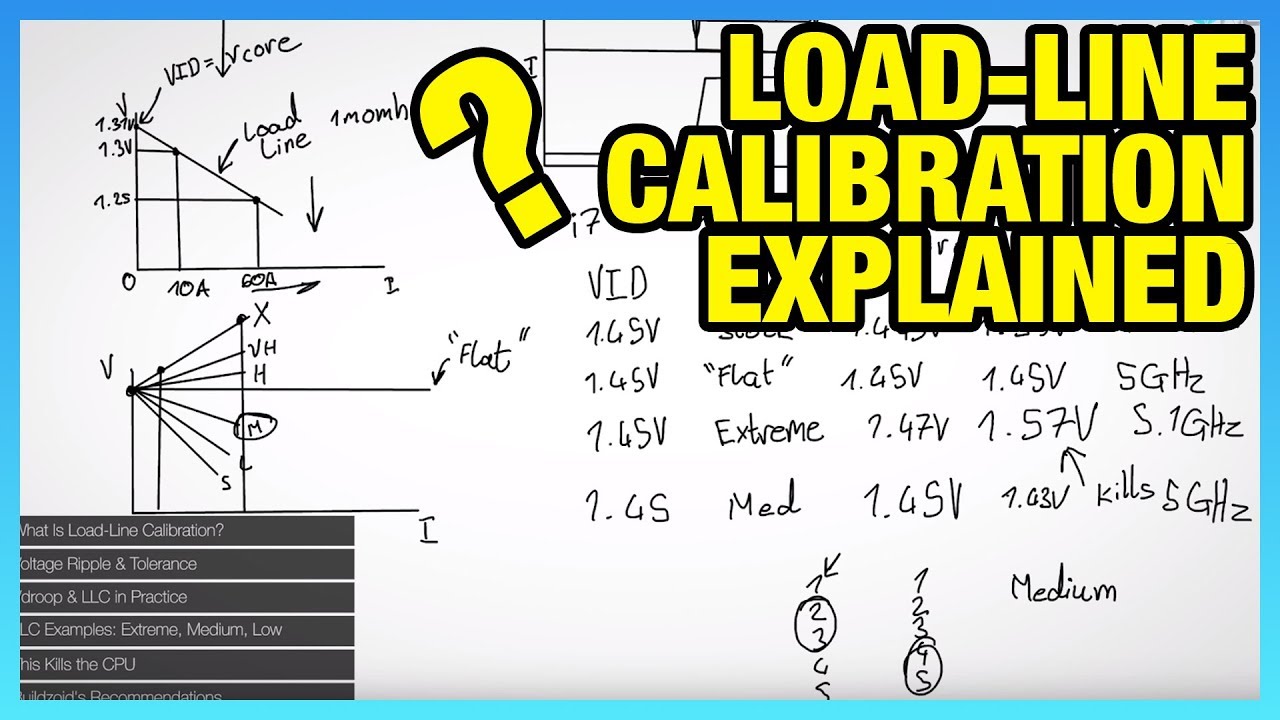
Buildzoid joins to define load-line calibration in motherboard BIOS, then talks about how to ensure you don't kill your CPU with LLC.
Ad: EVGA 1080 Ti SC2 w/ Destiny 2 bundle https://goo.gl/NuWWGU (on Amazon)
We have a new GN store: https://store.gamersnexus.net/
Find Buildzoid's channel here: https://www.youtube.com/channel/UCrwObTfqv8u1KO7Fg...
cerulean moon
what a nice thing llc is
modern walrus
lol damn this video is so old it has a 1080ti commercial in it from EVGA
cerulean moon
I'll wait till 5 minutes then bump my voltage by what amount? as well as frequency multiplier
modern walrus
eh even .1 is a pretty strong increase
sudden torrent
modern walrus
lol damn this video is so old it has a 1080ti commercial in it from EVGA
Great that makes it even more relevant to this because their recommended voltages should be about right lol
cerulean moon
it's avging 2830mhz now after 5min at 1.34v, pretty fine temps
modern walrus
1.3 to 1.4 may not sound like much but lol
2830? didn't you set the multiplier manually?
cerulean moon
yup i remember reading through just bumping by extremely small amounts like 0.025
sudden torrent
cerulean moon
I'll wait till 5 minutes then bump my voltage by what amount? as well as frequen...
Increase frequency until it's unstable, then increase voltage by one bump and retest. Don't go above 1.4v core, especially not without a good cooler.
modern walrus
which OCCT test are you using btw
cerulean moon
modern walrus
2830? didn't you set the multiplier manually?
well i did, and initially it was moving between 2900-3200mhz
cerulean moon
modern walrus
which OCCT test are you using btw
cpu only, default settings
sudden torrent
If you highlight the voltage and press the "+" key it'll go up one step
cerulean moon
wow if this is cpu ocing I don't know how long ram ocing would take to learn and test
sudden torrent
Honestly, with your memory kit and CPU there's not a whole lot you can do
SCLs and tRFC maybe
cerulean moon
pretty much yeah, i wouldn't be expecting much either as long as i have a bit if boost
modern walrus
do CPU>Mode: Extreme>Load Type: Steady>Start at Cycle: 3> Instruction Set: AVX512 or AVX2>Thread Count: what it puts for you (number of cores x2 cuz SMT)
that'll stress it pretty heckin hard
cerulean moon
bumped freq +25 so 3525. or is that too low rn
sudden torrent
modern walrus
do CPU>Mode: Extreme>Load Type: Steady>Start at Cycle: 3> Instruction Set: AVX51...
AVX2 since 512 is only for Ryzen 7000
modern walrus
oh right. Wasn't sure if 2600G has AVX512... none of Zen 3 does? never noticed lol
sudden torrent
You can go in 100MHz steps until you find a limit, then step it down until it's stable
cerulean moon
I'll set it to 3650
sudden torrent
modern walrus
oh right. Wasn't sure if 2600G has AVX512... none of Zen 3 does? never noticed l...
Not surprising since there's not any REAL app that uses it except stress tests and PS3 emulation
modern walrus
lol ycruncher... that's all I know
dude my G7400 has AVX512. I never knew until like a week ago
cerulean moon
I've always liked the stock ryzen heatsink for what its able to handle, and the looks too
sudden torrent
modern walrus
dude my G7400 has AVX512. I never knew until like a week ago
It did originally, unless you got a later model or updated your bios in which case it's disabled by hardware
modern walrus
sudden torrent
It did originally, unless you got a later model or updated your bios in which ca...
works on Unify-X lol
cerulean moon
 modern walrus
Unify-X sets microcode for non-K OC among others
it has "AVX512 Trial Mode" to see if it has AVX512 even lol
modern walrus
this is like one of my best scores cuz of AVX512 lol https://hwbot.org/submission/5591888_ggood003_y_cruncher___pi_1b_pentium_gold_g7400_57sec_686ms
The Pentium Gold G7400 @ 5662MHzscores getScoreFormatted in the y-cruncher - Pi-1b benchmark. ggood003ranks #12 worldwide and #12 in the hardware class. Find out more at HWBOT.


 cerulean moon
I'll keep stress settings at default?
sudden torrent
cerulean moon
Extreme, steady, start cycle 3
modern walrus
sudden torrent
Extreme, steady, start cycle 3
btw I found a gem on archive.org
sudden torrent
There's lots of gems there, you'll need to be specific lol
modern walrus
too bad none of the 3d benchmarks that run best on Win8.1 don't have globals. sad https://archive.org/details/nvcleanstall-474.30-win-8-signed

Internet Archive
This is the NVIDIA 474.30 Windows 7 driver, but it is modded so that the RTX 30 series GPUs can be used on Windows 8 and 8.1. It is not required to turn on...
modern walrus
how are temps?
modern walrus
99C??
cerulean moon
this would be overclocking and undervolting right basically for lower temps, higher speeds?
modern walrus
ya like the goal is to get highest frequency at lowest voltage
cerulean moon
cool cool
modern walrus
while staying within safe temps tho
cerulean moon
which would be like 90?
modern walrus
hiting 99C is counterproductive because the CPU is going to slow down to protect itself
eh 85C is probably safer long term
cerulean moon
never hit 85 for cpu while gaming tbh
modern walrus
what instruction set are you using for OCCT test?
cerulean moon
instruction set is auto but it was on extreme, steady, and 3rd cycle
hella hard on my cpu
modern walrus
ig auto just bounces around with different instruction sets but I'm not sure
cerulean moon
I'm setting volts to 1.3450 from 1.35
modern walrus
but ya, I'd try to get voltage down
cerulean moon
i thought you wanted me to lower by that lol
 vale nymph
(I'll leave now haha)
modern walrus
ah okay that's fine
cerulean moon
seems pretty low for a clock boost
alright I'll keep as is
if temps run fine I'll try 3700mhz
may or may not stop at that lol
modern walrus
ya try to see where voltage doesn't lead to crazy high temps then increase frequency until it won't run anymore
then lower frequency back down a bit & retest
cerulean moon
yeah pretty much
3650mhz 94°
great so far
I'm defo asking much for the stock cooler but I'll have a new tower cooler in a few days
modern walrus
save those BIOS settings or if there's a profile in Ryzen Master or something
sorry I haven't used Ryzen Master in a very long time so I don't remember how but iirc you can save the profile
which cooler are you getting? are you getting thermal paste too or using the one that comes with it?
cerulean moon
one with it
generic
but my friend has a big syringe of it and I'm mostly sure it's also generic
btw 3700mhz 1.3250v
modern walrus
nice nice
modern walrus
see if it'll run with voltage dropped one more step down
cerulean moon
okay on it
modern walrus
cerulean moon
generic
oh I meant which CPU tower cooler
cerulean moon
ah my bad it's the idcooler se 214 xt (think title is right)
just a budget single tower, GN also recommended it as the value cooler
i was gonna go for the pretty decent one which was thermalright something something
for twice the price
cerulean moon
figured i wouldn't need to invest much for a more expensive cooler as I'll only be getting a 5600 and be using that for at least 4-6 years
modern walrus
if you could get 5700X3D or 5800X3D, you'd be set for awhile
cerulean moon
yeah very possible, but as a student with not a stable income 5600 would suffice
modern walrus
how much is 5600?
cerulean moon
6-7k php online
modern walrus
5700x3d is $233 on newegg but it's out of stock
oh heck I'd have to convert that hold on lol
cerulean moon
i bought the 2400g at 7-8k at a physical store during the pandemic 
modern walrus
ah okay so it's like $100 cheaper nvm that's a lot lol
cerulean moon
yeah exactly
honestly more happy with my ram, the hardest process i do is video editing so if i can work editing with a 2400g 1050ti, should be a big marginal difference to now
 faint tangle
modern walrus
5700x3d is $233 on newegg but it's out of stock
faint tangle
modern walrus
5700x3d is $233 on newegg but it's out of stock

AMD Ryzen 7 5700X3D 3 GHz 8-Core Processor (100-100001503WOF)
$192
modern walrus
nice price
faint tangle
7600x $171 and 12700kf is around the same price too
modern walrus
cerulean moon
honestly more happy with my ram, the hardest process i do is video editing so if...
what's ram frequency? ram overclock is even more fun
cerulean moon
96° max 1.32v 3700mhz stable
faint tangle
12600kf $140
cerulean moon
modern walrus
what's ram frequency? ram overclock is even more fun
RUAAHHHH
I'll do more research on that in the future lol
faint tangle
cerulean moon
RUAAHHHH
Are you replacing mobo or nah
cerulean moon
i was boutta cop a550 that's how tight my budget was
gonna try 3750 at same voltages
this is with stock cooler, I'm pretty impressed myself
modern walrus
cerulean moon
all this is very interesting and i like learning
DDR4 overclocking bible lol https://github.com/integralfx/MemTestHelper/blob/oc-guide/DDR4 OC Guide.md

GitHub
C# WPF to automate HCI MemTest. Contribute to integralfx/MemTestHelper development by creating an account on GitHub.
cerulean moon
thanks thanks
gonna go for a jog if 3.8ghz fails
3800 freq is same as 3.8ghz right?
modern walrus
yes
it's just metric measurements
Tera Giga Mega Kilo Hecto Deca iirc
Tera Giga Mega are the important ones
cerulean moon
i mightve won the silicon lottery w this
1st time oc'er it feels like it
lol
wait i might actually have a pretty stable fps now with esports games
i just want above refresh rate
modern walrus
I'd still try to drop voltage if possible. 98C is hot. Don't forget, water boils at 100C lol
cerulean moon
so it's either i boost clocks or lower voltage for temps
yes I'm happy with 3.8
i keep forgetting it's a stock cooler lmao
very happy though i had a good time doing this
cerulean moon
modern walrus
I'd still try to drop voltage if possible. 98C is hot. Don't forget, water boils...
what can i expect to see if voltage is too low for my current clock?
modern walrus
if it's a little too low, the stress test will stop
if it's a lot too low, computer will BSOD
BSOD will probably say WATCHDOG TIMEOUT
cerulean moon
what temps should be fine? 90° under load?
modern walrus
or Kernel something
cerulean moon
I'm at 1.3v still at 3.8ghz so far max is 91
modern walrus
ehh I'd aim more for like 80-85C but for now ig aim for 85C or so then see if temps improve with the new cooler
cerulean moon
ah gotcha
would it be okay if it's 90 something? i wouldn't really be running anything remotely close to that intensive
modern walrus
tbh I don't know 2600G well enough to say yes
modern walrus
well run valorant with hwinfo open in the background & see how temps look after like 20-30 minutes
cerulean moon
wouldn'tve thought of that, good idea
modern walrus
stress tests are good for stability but often don't tell you much about real world performance
like how often are you running every core at 100% like that otherwise? lol
it's also good to test with things you do all the time to see how temps, etc. look when other components are in play as well. For example, will the CPU end up hotter because of the heat coming from the GPU at the same time
cerulean moon
wow people can run 3.8ghz at 1.25v i gotta humble myself loool
modern walrus
lol well you haven't found out that you can't yet so stay positive
cerulean moon
for these cases does it mostly come down to silicon luck at that point?
mobo vrms so and so
modern walrus
keep in mind, ambient air temps matter a lot too. If you're in the Arctic & outside temps are -40F, it's a lot easier to cool than somewhere it's 80F of course
silicon lottery variation can be pretty crazy
cerulean moon
m that's p interesting
modern walrus
AMD or Intel only care that the CPU can hit its specs
they don't care if it barely can or it can go way past them
it's yes or no lol
cerulean moon
1.26v 3.8ghz, if temps are below 90 I'll stop for now and get ready for some meeting
modern walrus
ya & try using the computer the way you usually would & just leave hwinfo open so you can see how temps look
cerulean moon
thanks a lot ggood and @sudden torrent really learned a lot
modern walrus
later after the meeting I mean lol
cerulean moon
I'll actually leave it running while i get ready
cerulean moon
modern walrus
ya & try using the computer the way you usually would & just leave hwinfo open s...
yeah for sure
modern walrus
glad to help. Sorry our schedules are so out of sync. Ping me whenever & I'll get back to you when I can
cerulean moon
gotcha
modern walrus
good luck lol
modern walrus
lmk then haha
 steady lance
If I start overclocking again should I update my bios?
7950x3D and same set of Hynix die ram.
steady lance
modern walrus
or Kernel something
oh g0d you are giving me flashbacks with kernel....
sudden torrent
steady lance
If I start overclocking again should I update my bios?
7950x3D and same set of ...
Not necessarily but you should update your chipset drivers.
This latest version helped a lot with the multi CCD stutter issues in games
steady lance
Oh okay.
 wheat lintel
modern walrus
DDR4 overclocking bible lol https://github.com/integralfx/MemTestHelper/blob/oc-...
wheat lintel
modern walrus
DDR4 overclocking bible lol https://github.com/integralfx/MemTestHelper/blob/oc-...
Integrals guide is honestly pretty bad and outdated at this point with a bunch of meme rules and 💩
Eden’s guide is a lot better imo
cerulean moon
@modern walrus how u doing

huzzah
3.9ghz 1.27v
going to test it in a bit
idle temps 30-40 c
cerulean moon
 modern walrus
wheat lintel
Integrals guide is honestly pretty bad and outdated at this point with a bunch o...
modern walrus
wheat lintel
Integrals guide is honestly pretty bad and outdated at this point with a bunch o...
heck I'll check it out
modern walrus
cerulean moon
<@808772530017665024> how u doing
hanging in there lol
how's it going?
nice cooler
cerulean moon
modern walrus
how's it going?
i figured i'd stay 3.9Ghz clock @ 1.30v
i really don't know if 100 more mhz is gonna have much difference and if it's worth pushing it to slightly higher voltages
the cooling is pretty much not a problem anymore
OCCT: Extreme, Stable, 3rd cycle 70c under load
what do u think tho
modern walrus
cerulean moon
what do u think tho
try running programs, games, etc. you use often & see how it does thermally. Also, did you try either further dropping voltage or see if 4.0ghz can run?
cerulean moon
modern walrus
try running programs, games, etc. you use often & see how it does thermally. Als...
i have not, no
i only finalized on hitting 3.9Ghz while upping voltages until stable
did 1.27v initially, but now at 1.3v stable
modern walrus
oh so you got it down to 1.27? how do thermals look?
ah okay so you can't do lower than 1.3
modern walrus
well just keep in mind, lower temps should help with longevity of the CPU.
that's why I suggested running games, etc. you usually play. OCCT won't tell you if you're gonna be hitting high temps for daily use
cerulean moon
i'm running firefox discord and valorant on high
it's the most taxing thing i might realistically do
modern walrus
how do temps look doing that?
cerulean moon
164 fps capped and constant which is nice with the settings
let me run it for a bit
cerulean moon
modern walrus
how do temps look doing that?
56C maximum lol
modern walrus
oh ya that's fine nvm lol
cerulean moon
flabbergasted rn
hovers around 54-56 with 35-40 idle
so should i take it as a sign to boost to 4.0Ghz
that 4.0 sounds great from a 2400g ngl
and judging from what i'm seeing, the cpu doesn't use all 4.0Ghz when it's not in use, only it does when i run a stress test
i usually see it idle at 300mhz or smth
yeah i think i get it, it basically is like - core usage 20%; so it uses 800mhz is that correct?
 fervent talon
@steady lance how’s the OC doin nowadays
wheat lintel
@modern walrus do I go back to OCing my 4090?
I’m bored and have a spare 1200W PSU to power it
sudden torrent
That's never a bad way to pass some time
modern walrus
wheat lintel
<@808772530017665024> do I go back to OCing my 4090?
sounds like a good reason lol
modern walrus
cerulean moon
so should i take it as a sign to boost to 4.0Ghz
do itt
lol 4400c15 1T rn at 1.7v DRAM
ah DDR4 I missed you
 wheat lintel
When in doubt, 12V
wheat lintel
That sucks
modern walrus
I'm dropping to 1.65v to try again. I think 1.7 was probably too much anyway
it ran it when I was at 2T
heck I should loosen timings, get 1T running then tighten
modern walrus
trying flat 16s at Real 1N
10900K is meh
this one sucks
I think raising SA & IO might've upset it
wheat lintel
Kinda regret getting rid of my 10700k
modern walrus
the problem with 10700K for me is it's pretty worthless on hwbot
wheat lintel
Then again, it’s the reason I got the 13900k
modern walrus
I'm so over 13th gen
I mean, it's still the best CPU I have but the inconsistency is maddening
hopefully yours is more predictable if it's like later batch or something
but I dunno anything about the batches so nvm
wheat lintel
Oh it ain’t predictable at all IMC wise
modern walrus
I got 13900KS the day it came out & it's worse than many non KSs I see on hwbot apparently
wheat lintel
One day I’m able to run 8000 MT/s without any issues at all, next day I can’t even post
modern walrus
that's the inconsistency
like it's fun to bench but trying to get daily stable seems impossible
so much so I didn't even really try
wheat lintel
As a CPU mine has been pretty good but no idea where its limit is because never delidded it yet
modern walrus
it's like, it'll bench 8600 sometimes & then 8k stable seems impossible
wheat lintel
Daily stable for me is at 7800
modern walrus
which board?
wheat lintel
Z790 Aorus Master
modern walrus
CTLvRefUp helps iirc
wheat lintel
Don’t have it on my board iirc
wheat lintel
All I have are RTTs
Don’t got skews iirc, it’s been a minute since I’ve been in the bios
wheat lintel
Yeah I’ve figured out the limits of my setup at this point, put at least 400 hours into messing with it
modern walrus
sounds like my 12900K experience
wheat lintel
7800 is the daily stable limit, 8200-8400 for benching
modern walrus
that's the last time I put full effort into daily stable for post-11th gen Intel
7800 isn't bad I'd be happy with that
sure starting with an 8 is cool & all
wheat lintel
Yeah for a 2DPC board I’m really happy with it
modern walrus
but difference is marginal I imagine
ya that's not bad at all
I was having a heck of a time trying to get even 7200 working on 1DPC Unify-X before I gave up
VT3 is no fun
wheat lintel
It’s not fun at all but once it passes it’s so satisfying
modern walrus
I hate it when it makes it through like 4 hours then derps
it's like nooooooooo
heck I just realized I'm on old BIOS
2022 bios lol
wheat lintel
I’m afraid to update bios in case it ruins my stability
modern walrus
oh ya that part sucks too
I used 37 different BIOS versions on Z790 Apex
I'm so sick of throwing spaghetti lol
wheat lintel
I just settled on the newest one at the time and then stuck with it
modern walrus
Apex had tons of betas
I think after like the 7-8th one there was little to no change frankly
sudden torrent
modern walrus
ig it won't scale over 1.7 or something
1.8 is the highest you'll go without changing VPP, which can make a lot of other things unstable. 1.7 is just a "safe" zone to account for droop.
steady lance
fervent talon
<@217356391675985921> how’s the OC doin nowadays
Currently just running XMP and PBO. I found out that my bios was bugging out and wasn't always applying the proper settings so I cleared the cmos and went to default.
Once I have some time probably this weekend I will update my bios and every thing then try ocing again.
modern walrus
sudden torrent
1.8 is the highest you'll go without changing VPP, which can make a lot of other...
sounds not worth the mission lol
sudden torrent
There's definitely very little gain for a lot of work at that point
sudden torrent
Only worth it if you're going for LN2 records really
modern walrus
steady lance
<@808772530017665024> what are you working on?
10900K & DDR4
my waterblock is heckin trash
steady lance
B-Die?
modern walrus
yes
modern walrus
I'm at 4400c15-16-16-36 presently but my core temps are awful
steady lance
Thought you were shoving 1.7v into your 7900x3D
modern walrus
I'm gonna put another waterblock on cuz this thing is awful
heckin EK
I even cleaned it really well
but the frame on it is slightly bent so it's probably not sitting evenly
sudden torrent
EK really has gone down in quality, even before the big controversy
modern walrus
but it only has to cover the die because the 10900K is delidded & using the direct die frame
sudden torrent
Exactly
modern walrus
it's an old EK Velocity block
sudden torrent
Their mounting system is meh
modern walrus
lol I bought the direct die for 12/13/14th
after that disaster, I'll never buy another EK product again
sudden torrent
Freaking convex plate for a DD kit
modern walrus
well that disaster coupled with two waterblocks with internal leaks or the brand new pump that lasted ~8 months (they replaced it but that doesn't un-melt the tubing mess it caused)
sudden torrent
Whose idea was that
modern walrus
sudden torrent
Whose idea was that
I sanded it
& it was about as good as the Heatkiller IV WITH THE DAMN IHS ON
the LF2 cooled better on this 10900K wth
abstract wedge
ive had lots of success with corsairs newer blocks
ive used i think xc5, xc7 and the newer xc7 as well
cooled 7980xe, 12900k, 13900k
cerulean moon
@modern walrus final is 3950Mhz 1.35V OC
i didn't like going over 1.35v after 4Ghz
70c max stress test
60c max under gaming load
 cerulean moon
prolly not needing to oc even more, i find no better reason to
except for ram i might but my mobo only supports 3200mhz
modern walrus
abstract wedge
ive had lots of success with corsairs newer blocks
I have two XC7s I think but they're the older ones. They're not bad. I dunno why but this Thermaltake W7+ is killing it rn on direct die 10900K. 342w ycruncher only hit 71C
abstract wedge
always awesome when you finally get a good mount
steady lance
modern walrus
I have two XC7s I think but they're the older ones. They're not bad. I dunno why...
jesus christ.
How much wattage is going through that cpu???
Doesn't that cpu have a stock of like 150w?
Wait why am I even surprised... Intel cpus have been power hungry for generations at this point..
steady lance
.
How do I update my chipset drivers? It's through AMD Adrenaline I think but I don't see a option to install/update my drivers.
Or is the AMD Software Adrenaline Edition the same as Chipset Drivers? Because it did give me the option to update that and I did.
sudden torrent
steady lance
Or is the AMD Software Adrenaline Edition the same as Chipset Drivers? Because ...
I have noticed that AMD seems to be bundling the chipset drivers with the GPU drivers, but here's the standalone package if you want it. https://www.amd.com/en/support/downloads/drivers.html/chipsets/am5/b650.html
steady lance
sudden torrent
I have noticed that AMD seems to be bundling the chipset drivers with the GPU dr...
Thank you.
Also I am slightly confused as it says B650?
Aren't chipset drivers for the CPU?
sudden torrent
steady lance
Aren't chipset drivers for the CPU?
Read back what you wrote here
Chipset drivers... are for the chipset
Which interacts with the CPU
steady lance
🤦♂️ gosh I am out of touch.
I have a MSI X670-P board so I assume I should find the chipset drivers for a X670?
sudden torrent
It's the same driver
modern walrus
Chipset drivers, Management Engine, Serial IO, GNA Scoring Accelerator, I really have no clue what any of those do but I install Chipset & ME lol
steady lance
Really? Why do they even separate it then?
sudden torrent
ME being an Intel only thing, with the AMD equivalent being the agesa which is built into the BIOS
modern walrus
iirc those 4 are Intel
my 5900x is on some ancient Aorus BIOS cuz I remember the AGESA reduced all-core
muh frequencies bruh
sudden torrent
The others in that list either have no AMD equivalent or they're included in the AMD chipset drivers
modern walrus
damn I am trying to push this 10900K so hard rn lol
sudden torrent
Funny enough Intel doesn't distribute chipset drivers any more, they rely on the motherboard support pages to update it 💀
steady lance
But does anyone know why they separate the chipset drivers into categories like X670, X670E, etc if they are all the same?
steady lance
sudden torrent
Funny enough Intel doesn't distribute chipset drivers any more, they rely on the...
that seems sketchy....
modern walrus
I'm at 53x multiplier; 100.65mhz BCLK; bdie at 4429c15-15-15-35@1.74v
SA voltage is 1.49; IO is 1.39
sudden torrent
steady lance
But does anyone know why they separate the chipset drivers into categories like ...
It's mostly just indexing on the website, you can have multiple pages link to the same download
modern walrus
I dunno what's up with this thing but even at like 1.6 SA & 1.55 IO, 4533 doesn't wanna run with 2x8 bdie
steady lance
I never messed with OC on 10th gen so idk if those are high or not but I am gonna assume those are some very impressive and slightly extreme settings.
modern walrus
these heckin 4000c14 G.Skill Royal Elite things are overrated
steady lance
look cool though.
sudden torrent
Oh yeah royals are such random bins
steady lance
Speaking of royals any updates on the Trident Z5 Royals for DDR5 yet?
modern walrus
BIOS doesn't seem to approve
steady lance
I remember eye balling them like 6 months ago when they teased it.
modern walrus
 modern walrus
steady lance
I remember eye balling them like 6 months ago when they teased it.
modern walrus
steady lance
I remember eye balling them like 6 months ago when they teased it.
I had some Trident Z5s that I broke
they looked nice
I took the heatspreaders off nonetheless
 steady lance

modern walrus
but then when I tried to remove them to reuse the heckin modules on different memory, an SMD came off with one of the thermal pads
they were only 7200 but heck they were so expensive when I got them
now 7200 is like $130 lol
steady lance
after I get myself a new graphics tablet I am probably gonna save up and purchase a lower end kit just to get the head spreaders.
Maybe.
How are the royal heatspreaders this gen?
modern walrus
sudden torrent
I just noticed, VPP on this board is auto 2.5v
could've sworn 1.8 was typical
I'm throwing spaghetti & setting PLL voltages cuz heck it
sudden torrent
Are you sure it's not 2.5 max
modern walrus
max is 3.770 apparently lol
sudden torrent
wat
modern walrus
(DDR4 don't forget)

I wonder what that DRAM VREF Voltage Control setting does
the only options are "Auto," "by CPU," & "by HW"
steady lance
Ouch...... $200 for 2x16GB Z5 Royals.
Rated 7200c34 @ 1.4v
cheapest I could find on amazon.com.mx
modern walrus
steady lance
Ouch...... $200 for 2x16GB Z5 Royals.
on 7950x, you don't really need 7200
get some of those cheapy Klevs I use & have 64gb lol
steady lance
I just want the heat spreader lmao
sudden torrent
modern walrus
on 7950x, you don't really need 7200
9950X can use it supposedly
modern walrus
$80/stick rn https://www.amazon.com/gp/product/B0CGWFYBXB/ref=ppx_yo_dt_b_search_asin_title?ie=UTF8&psc=1

Overwhelming Performance Improved DDR5 Memory: KLEVV DDR5 memory module delivers starting speed at 5600MT/s, 75% faster than DDR4. Lower Voltage, Highly Improved Performance Built-in PMIC: While achieving 20% lower power consumption compared to DDR4 memory, DDR5 memory can reduce dynamic voltage ...
sudden torrent
We'll find out in under 2 weeks
steady lance
I already got myself a 2x32 Hynix A die kit from Kingston Fury.
modern walrus
oh heck why so fancy? lol
maybe I should grab two more & see what I can OC 128gb to
lol 6000c26 1:1 but 128gb? almost sounds worth it
steady lance
modern walrus
oh heck why so fancy? lol
When I was purchasing it was on sale making it the cheapest kit that hit my criteria which was 6000cl32 at 2x32GB
modern walrus
I got these cuz they were cheapest I could find & I didn't have to remove any stinky heat spreaders
steady lance
Surprisingly kits without heat spreaders cost more at the time.
I got these babies for let's see.
modern walrus
hmm I wonder if I should be running DR for 7zip
sudden torrent
I just got a 5600c40 kit that was guaranteed hynix since I was going to be tuning anyway
Currently 6200c30
modern walrus
steady lance
Surprisingly kits without heat spreaders cost more at the time.
heatspreaders take time to remove; time is money; so, heatspreaders take money to remove? lol
modern walrus
sudden torrent
I just got a 5600c40 kit that was guaranteed hynix since I was going to be tunin...
these klev are same 5600 but c46 iirc
5600c46-46-46-84 is a-die afik
steady lance
Yikes, $220 about.
steady lance
modern walrus
heatspreaders take time to remove; time is money; so, heatspreaders take money t...
Yeah it was weird.
steady lance
steady lance
Yikes, $220 about.
Shocking thing was that this kit was $60 cheaper then the next closest kit at the time of purchasing.
modern walrus
heck, cheap A-die is cheap as heck now. $75 for 2x16 5600c46-46-46-84 https://www.amazon.com/gp/product/B0BPHRVYX9/ref=ppx_yo_dt_b_search_asin_title?ie=UTF8&psc=1

TEAMGROUP T-CREATE CLASSIC 10L DDR5 32GB Kit (2 x 16GB) 5600MHz (PC5-44800) CL46 Hynix IC Intel XMP 3.0 & AMD EXPO Compatible Desktop Memory Module Ram - CTCCD532G5600HC46DC01
sudden torrent
Yep that's my kit
steady lance
I purchased teamgroup originally but during shipping something happened to my kit that they deemed it unshipable and returned it.
sudden torrent
I considered getting 24GB sticks but decided against it. I'll get those in a few gens maybe.
steady lance
the 5600cl46 A die kit that every one kept recommending me
modern walrus
sudden torrent
I considered getting 24GB sticks but decided against it. I'll get those in a few...
lol I got those
I got the 7200 m-die 2x24 & the 2x16 5600
I'm basically a creator now according to teamgroup
steady lance
A or M die is better? I keep forgetting.
steady lance
So A is better on AMD then.
sudden torrent
modern walrus
M comes on 2x24 kits afik tho
It's called M die but it's different from the 16Gb die
modern walrus
Z690 Dark ran 7000c32 1T iirc
oh really? heck
the Kingstons I have were a struggle to stabilize at 7k once upon a time
seems so long ago now. strange
4429c14
think it'll POST?
I don't think it's gonna POST
lol
nvm it POSTed easy wth
this 10900K always hated 1T I dunno why
even on SR kits
I wonder if it would POST XMP on a 2x8gb 5000c28 kit
steady lance
Are you still synced or desynced?
modern walrus
it ran 4533 on a DR DJR kit for like almost 2 years when it was in my son's computer
Intel doesn't do synced/desynced
there's an FCLK I think but it doesn't matter really
it's not like AMD
modern walrus
sudden torrent
It's called M die but it's different from the 16Gb die
when UCLK:MCLK is 1:1, is that the same as running gear 1 on Intel? I never understood that whole thing... maybe trying to draw parallels is an apples & oranges type thing
heck
decoding error at c14
sudden torrent
If you're considering DDR5 for that question then it's like Gear 2 iirc
modern walrus
I wonder if maxmem is a good idea for 7zip
modern walrus
sudden torrent
If you're considering DDR5 for that question then it's like Gear 2 iirc
ya sorry ddr5 only question I meant
steady lance
Oh damn. Not sure if this is placebo but I think I already see a improvement with the stuttering when switching between apps.
I usually feel a weird stutter when first opening my pc and when switching apps.
So far not feeling it.
modern walrus
someone was telling me yesterday that they run 6600c26 at some insane voltages with SOC voltage at like 1.37 or something
steady lance
On AMD?
steady lance
modern walrus
isn't >1.3 SOC a questionable decision?
Afaik yes.
Though was that under load or?
sudden torrent
Yeah that might be a fire hazard if they're unlucky enough
modern walrus
I found it
 steady lance
Would it be beneficial if even a little to update my bios?
modern walrus
so jk on the tCL but still look at that SOC voltage
steady lance
It's been a good few months since I updated.
sudden torrent
1.38 soc 
modern walrus
steady lance
Would it be beneficial if even a little to update my bios?
BIOS update allowed me to run 6400 1:1 on Taichi but it could also be a total waste of time & you lose your OC profiles
steady lance
High soc is fine if the cpu is not under load right?
modern walrus
& even if you manually put the exact same numbers in, it's possible it won't work
SOC drops a decent amount under load
steady lance
modern walrus
BIOS update allowed me to run 6400 1:1 on Taichi but it could also be a total wa...
Well my profiles I found out are janky because my current bios doesn't always apply the settings when saving for some dumb reason.
modern walrus
I set SOC LLC for that lol
steady lance
So I am not to concerned with that part..
modern walrus
but I dunno wth this board is up to
sudden torrent
steady lance
High soc is fine if the cpu is not under load right?
It's current that kills but you can't boot without putting load on the CPU
steady lance
modern walrus
BIOS update allowed me to run 6400 1:1 on Taichi but it could also be a total wa...
Wait, isn't 6400 1:1 normal on AM5?
sudden torrent
You have to be quite lucky
steady lance
sudden torrent
It's current that kills but you can't boot without putting load on the CPU
Gotcha. Thanks for the tip.
steady lance
Really???
I thought I was unlucky when I saw my CPU can do 6400/cl32 synced which I think means 1:1
modern walrus
sudden torrent
You have to be quite lucky
so what do you think the odds are that this is some sort of SPD bug? cuz I'm starting to think this board takes some serious liberties here since I'm set at 1.55/1.45 respectively
 steady lance
I never got around to primaries so idk if my current cpu can do better then 6400 at tighter timings..
modern walrus
is using almost 6w per DIMM normal? that doesn't sound normal lol
steady lance
modern walrus
is using almost 6w per DIMM normal? that doesn't sound normal lol
My kit used around 8W average per dimm.
sudden torrent
steady lance
Really???
I thought I was unlucky when I saw my CPU can do 6400/cl32 synced whi...
For that to be synced your UCLK would be at 3200
6W is normal for a memory stick
modern walrus
sudden torrent
For that to be synced your UCLK would be at 3200
that voltage tho
sudden torrent
sudden torrent
6W is normal for a memory stick
Your GPU memory uses that for every memory die lol
modern walrus
1.755/1.725v VDD/VDDQ? lol
steady lance
yeah that seems off.
sudden torrent
modern walrus
1.755/1.725v VDD/VDDQ? lol
It's the load voltage that matters but the good news is 1.75v won't kill your sticks, at least not right away
sudden torrent
Mine run around that with the stock spreaders and a fan
steady lance
sudden torrent
For that to be synced your UCLK would be at 3200
My UCLK is set = to MCLK so I think so.
So does that mean I actually got lucky with my cpu?
modern walrus
at 6400, I can't run FCLK at 2100 without exceeding 1.3v SOC... would 6200 be better performance since 2067 would be synced FCLK or something? AM5 confuses me
sudden torrent
steady lance
So does that mean I actually got lucky with my cpu?
With the memory controller at least yes, assuming it's actually stable and not clock stretching
sudden torrent
modern walrus
at 6400, I can't run FCLK at 2100 without exceeding 1.3v SOC... would 6200 be be...
Test and find out. The answer will vary by what benchmark you're using.
modern walrus
heck I suppose I should
I never figured out core offset magnitudes
they're at like -15 or something I don't even remember
it seems like there's no effective way to test them anymore
hours of core cycler pass but then crash on R23
like uh
sudden torrent
The thing with the FCLK is there's a very slight improvement in latency running it 3:2 with UCLK:FCLK, some benchmarks like the latency more than the speed and vice versa for others
modern walrus
I could just do all-core testing but then I have the tedious mission of doing each core at a time
how did you test stability for COs?
iirc you did per CCD
sudden torrent
modern walrus
it seems like there's no effective way to test them anymore
What options did you use for corecycler?
steady lance
sudden torrent
With the memory controller at least yes, assuming it's actually stable and not c...
what is clock stretching?
modern walrus
where you put 0 for the size so it keeps switching it up or something
sudden torrent
steady lance
what is clock stretching?
It's difficult to explain, but the result is obvious when it happens because you'll get worse scores at higher frequencies. It's a very common issue on Intel chips.
sudden torrent
modern walrus
hours of core cycler pass but then crash on R23
How many hours because for it to effectively test those settings you'd need at least 2 days
steady lance
modern walrus
how did you test stability for COs?
SHA3 10 rounds, 4 iterations of Core Cycler set to whatever the max setting was called on P95 and then 1 round of OCCT got me extremely stable core offsets on the cores I did using that method.
modern walrus
sudden torrent
How many hours because for it to effectively test those settings you'd need at l...
eh probably like 8-10
hours
sudden torrent
It didn't go through all the cycles then
modern walrus
I gave up tho & just left them where they're at
I think I set like uh, 45 minutes per core or something
steady lance
that got me extremely stable results where I did that..
modern walrus
the problem is it's on my daily & I get impatient
steady lance
I just left Core Cycler ruynning in the background 24/7
I do one core a day roughly was how I went about it.
Unless I am at the computer when it passes then I go back and then rinse and repeat
Do SHA3 first as that's the most sensitive to CO values
Unfortunately my Aida trial ran out and I couldn't finish my method on the final 3 cores or so.
sudden torrent
If you use the complete uninstall method in revo uninstaller that usually lets you reset trial timers
Since it scrubs the registry as well as file structures
steady lance
is revo uninstaller a 3rd party software or?
steady lance
Aida license is like what $40?
sudden torrent
60
steady lance
Any idea what they mean by for 3 pcs?
sudden torrent
And it's only for 1 year
sudden torrent
steady lance
Any idea what they mean by for 3 pcs?
You can use the same key on 3 different PCs at once
steady lance
On a different topic has there been any news on next gen gpus and maybe, hopefully a 8950x3D?
.....
Thank you, Fal.
sudden torrent
steady lance
On a different topic has there been any news on next gen gpus and maybe, hopeful...
9950X3D is due in a few months, expected to launch at the same time as the new chipsets with USB 4 standard
9950X and other next gen non-3D comes at the end of this month
steady lance
oh awesome.
modern walrus
sudden torrent
60
iirc MSI boards come with it or something
I never actually redeemed it lol
modern walrus
I had an engineering key for awhile but when I update AIDA it's like omg need new key
steady lance
Gotcha.
I read some article mention that a multi-gpu graphics card might be releasing?
sudden torrent
Nvidia might paper launch their 5090/5080 in December but most of their production is focused on $20k AI cards right now
sudden torrent
steady lance
I read some article mention that a multi-gpu graphics card might be releasing?
It's one possible configuration. Consider it a proof of concept or engineering sample. It may or may not make it to market.
modern walrus
oh crap I just remembered 10th gen RTL/IOL tuning
modern walrus
steady lance
I am *still* saving up for a new gpu.
lol maybe sell one 7950x?
steady lance
modern walrus
lol maybe sell one 7950x?
My father had a medical problem and later I got sick which ate up every thing I saved.
Father had what is basically a brain eating bacteria, thankfully it's almost gone now.
modern walrus
ah heck I was kidding but I hope your father makes a full & speedy recovery if he hasn't already
steady lance
And I have been coughing and sneezing blood for the past two nearing three weeks now.
modern walrus
and you do too
steady lance
sudden torrent
It's one possible configuration. Consider it a proof of concept or engineering s...
Ahh gotcha
steady lance
sudden torrent
Nvidia might paper launch their 5090/5080 in December but most of their producti...
Makes sense.
steady lance
modern walrus
and you do too
Thank you, I appreciate it.
modern walrus
your lungs okay or?
modern walrus
modern walrus
lol maybe sell one 7950x?
btw if anyone is guilty of hoarding hardware here, it's likely me lol
steady lance
modern walrus
your lungs okay or?
Not sure but I have been getting better.
The docter didn't explain what I had when he gave me the medicine....
steady lance
modern walrus
btw if anyone is guilty of hoarding hardware here, it's likely me lol
xD
I think we both are.
I still have my 10700F, 5700G, and every thing for them
modern walrus
it works out nice for my son. He just got upgraded to 13600K/Z690 Unify-X/RTX3070 for his 7th birthday
I feel you I have 5900x/B550 Aorus Master; 10700KF/Z590 Unify-X; 10900K/Z590 Unify-X (I'm an idiot & got two cuz I forgot to return one to Amazon); a G7400 with no home; 12900K/Z690 Dark KP; 13900KS/Z790 Apex; a random MSI Z490 Gaming Carbon Wifi; a Z590 Aorus Master I've been meaning to mail for weeks now... I think that's all of it
well not including GPUs
I have way too many GPUs & most are only useful for hwbot
others could still be okay
& others are good for nothing at all lol
abstract wedge
steady lance
Wait why am I even surprised... Intel cpus have been power hungry for generatio...
wowza, its crazy when u remove limits and oc cpus the power goes up!
intel power hungry 😡
(me moments after setting my PL1 and PL2 to 9999)
 signal belfry
steady lance
Doesn't that cpu have a stock of like 150w?
signal belfry
steady lance
Doesn't that cpu have a stock of like 150w?
Tbf it’s on 14 nm++++++++
steady lance
True.
 alpine mantle
y-cruncher almost pushed my cpu's power up to 160w

ring ratio hasn't been configured yet so its running stock
so far im satisfied with the undervolt
alpine mantle
oc'd the ring to 4.7ghz, small difference but i'll take it

oc'd the ring to 4.7ghz, small difference but i'll take it

annnnnnnnd it crashed in linpack
lol
alpine mantle
well passed linpack but had to sacrifice both e-core + pcore clocks by -100mhz

lel
the cpu peaked at 150w
so not too bad
ill compare my 5.4ghz oc to the 5.2ghz oc/uv later
 kind walrus
alpine mantle
y-cruncher almost pushed my cpu's power up to 160w
kind walrus
alpine mantle
y-cruncher almost pushed my cpu's power up to 160w
And still somehow alive smh
alpine mantle
kind walrus
And still somehow alive smh
Just built different
kind walrus
Real
 sudden torrent
Too bad one of the likely causes of Intel chips failing is that ring bus running too high of voltage and increasing the clock on it would exacerbate the issue
abstract wedge
is it?
i thought it was a current issue?
just the node being blasted with amps, thus why the 2 higher boosting p cores (at stock) degrade first
faint tangle
abstract wedge
just the node being blasted with amps, thus why the 2 higher boosting p cores (a...
It's also potentially (likely) an issue with the physical manufacturing
Gn made a video, it mentioned the oxidation method? It's honestly above my pay grade education wise
Gn being gamers nexus
sudden torrent
faint tangle
Gn made a video, it mentioned the oxidation method? It's honestly above my pay g...
The oxidation is caused by improperly applying the compound meant to stop corrosion, or other contamination during the process of applying it.
What that means is it requires more voltage to overcome the resistance caused by the oxidation, which can contribute to the rapid degradation and would also explain why not every chip seems to be affected.
sudden torrent
abstract wedge
i thought it was a current issue?
That was initially what was thought to be a cause, but it turns out that's more of a symptom

Intel's 13900k's and 14900k's are crashing at an alarming rate? Why isn't anyone talking about it and what is Intel's solution?
Forum Thread here: https://forum.level1techs.com/t/intels-got-a-problem-13900k-ks-kf-14900k-ks-kf-crashing/213008?u=autumn
0:00 Intro
1:07 The Data
5:08 Data Breakdown
10:17 What's Causing the Problem?
13:30 What's Be...
vale nymph
sudden torrent
The oxidation is caused by improperly applying the compound meant to stop corros...
cue the "my 13/14th gen i7/i9 isn't experiencing this so it must be fake" comments
 frigid locust
vale nymph
cue the "my 13/14th gen i7/i9 isn't experiencing this so it must be fake" commen...
frigid locust
vale nymph
cue the "my 13/14th gen i7/i9 isn't experiencing this so it must be fake" commen...
They're already flooding Facebook
(Most of the commenters are likely not owners of the affected chips)
 sterile ridge
Evc mod who?

 proven canopy
sterile ridge
Evc mod who?
proven canopy
sterile ridge
Evc mod who?
Nice, what card? Looking to bench for scores? or daily
sterile ridge
proven canopy
Nice, what card? Looking to bench for scores? or daily
7900XTX, just daily probably
Doubt I’ll take full advantage of it but it’s just a cool project
First time soldering went pretty well
proven canopy
Yeah, looks good - those stranded wires are hard to solder to small pads like that - but thankfully the SPI dedicated pinout is quite large on most cards
vale nymph
Soldiering looks solid yeah
sudden torrent
Why not? Just because you have EVC doesn't mean you need to push voltage
abstract wedge
what else r u doing with it lul
monitoring vcore?
changing llc?
increasing vrm switching 
sudden torrent
abstract wedge
what else r u doing with it lul
Pushing it when you're benching and fixing voltage stability issues for daily
abstract wedge
fair enough
sounds like a hassle to me personally
but i dont oc daily gpus anyway
what pwm controllers do high end amd even use these days? do cards need evc to read the pwm before gpu bios loads still?
or can u read them in OS now?
 tall pelican
you spend 5 mins once to set it up
sterile ridge
Very easy to setup
sterile ridge
abstract wedge
wait people daily evc's lol?
I mean, if you just increase the power limit to like 7-800 realistically games will only take up to 600(for me so far)
abstract wedge
tall pelican
you spend 5 mins once to set it up
yeah for sure, just cards i used evc on - i needed to read the pwm controller before gpu bios loaded. so id need a 2nd pc to run the run/control the evc
not sure if newer cards or pwm controllers need that
 cyan plume
what oc software do you guys recommend for over clocking a rtx 4090 24g (asus tuf gaming) please ping in response
sudden torrent
cyan plume
what oc software do you guys recommend for over clocking a rtx 4090 24g (asus tu...
MSI Afterburner
 potent fiber
Lunar has a good guide. Stock voltage is more than generous so like Segue mentioned, could check an UV out (combined w/ an oc or not)
https://github.com/LunarPSD/NvidiaOverclocking/blob/main/Nvidia Overclocking.md

GitHub
Nvidia GPU Overclocking Guide. Contribute to LunarPSD/NvidiaOverclocking development by creating an account on GitHub.
sterile ridge
abstract wedge
yeah for sure, just cards i used evc on - i needed to read the pwm controller be...
It can plug right into my own PC now
Whole software for it
Super sick I’ll send a picture tmrw
abstract wedge
yeah ur controller probably lets it read/write after bios loads
think i had a up9512 that didnt lemme do anything unless i did it pre-bios load
not sure if read write is the correct terms even
abstract wedge
my limit was cooling anyway, +150mV offset made clocks worse lol
if i had the means to take it cold, VID mod wouldve probably of been a must
not sure if refin/vref mod would work on the card
 digital dirge
@proven canopy hate to ping you, but I'm not versed in stability testing. I believe prime95 is what I would use to test this 12600k, but I'm not sure what settings to use. I'd appreciate your input.
proven canopy
I would just download benchmate, run ycruncher 1b for mem+cpu, then run the bbp tests for cpu, quick and easy.
If you want something more thorough for mem, try memtestpro, ycruncher vst/similar
digital dirge
proven canopy
I would just download benchmate, run ycruncher 1b for mem+cpu, then run the bbp ...
Gotcha. I'd like to do so, but I'm not in a position for a few days that I can download a 1.5gb installer.
Prime95 not a good stress tester?
I'm just making sure this PC is ready to go. Stock speeds. It was my original PC that I had no issues with, but I sold it to a friend and pretty much from week 1 he had issues. Finally got it back in my possession to troubleshoot. I used TM5 to test the ram which seems to be fine. Now I just need to do the CPU.
proven canopy
p95 is totally fine for testing most aspects of core stability
If I were to sell a gamer rig, I'd do the benchmate stuff because it takes a few minutes and will catch anything obvious, then move on to the rest and run it overnight afk
Give occt a try if you haven't already
digital dirge
proven canopy
If I were to sell a gamer rig, I'd do the benchmate stuff because it takes a few...
I will definitely do this in the future.
digital dirge
proven canopy
Give occt a try if you haven't already
Didn't know this existed. Thank you sir
 sterile flame
I just finished my pc and got everything up-to-date, is there anything you guys would recommend me doing for overclock or anything?
CPU: 12600k
GPU: Geforce RTX 4070
RAM: G.Skill 32GB 6000-36
 potent fiber
Perhaps latest bios if you haven't actually done that. Otherwise, I'd just install windows or do some benches w/ it totally stock 1st.
abstract wedge
proven canopy
If you want something more thorough for mem, try memtestpro, ycruncher vst/simil...
btw Y cruncher VST got phased out, VT3 replaced it.
no clue if its better or not, just know that it works 
kind walrus
VT3 seems good
abstract wedge
yeah it works great, not sure if its faster or better than VST tho.
wheat lintel
More demanding than VST but takes slightly longer
kind walrus
@proven canopy if it's easy enough could you tell me what "ddr5 nitro mode" does in a tl;dr
proven canopy
more fast
proven canopy
mclk can go far past that, uclk sync, eh

 raven quail
I have this graphic card:
Gigabyte GV-N108TAORUSX WB-11GD AORUS GeForce GTX 1080 Ti Waterforce WB Xtreme Edition 11G Graphic Cards
And this screenshot is what my MSI afterburner is showing.
I have never done any overclocking before - my friend gave me an advice to look into that. I dont want to mess anything up lol. Is there maybe a website that shows like "idea" overclocking settings and stuff?
 vale nymph

GitHub
Nvidia GPU Overclocking Guide. Contribute to LunarPSD/NvidiaOverclocking development by creating an account on GitHub.
the 1080 is a pascal card btw
personally gaming has been my stress tests
3dmark doesnt cut it for real world instabilities
raven quail
thanks!
abstract wedge
the world if good gpu stress tests exist 🏙️
 split onyx
So anyone know any surefire/good OCs for a RTX 4080 Super? (Don't want to break it or anything just got it. Zotac Trinity OC White for my card)
split onyx
Yeah, just wanted to know if the 4080 Super had headroom or not like the 4070Ti Super (The reason I went with the 4080 Super over it was becuase it did have a notable step over the 4070Ti Super in a number of the games/settings I played, probably due to it's GPU size difference)
 toxic wren
you bought a 4070 ti super and 4080 super?
ok
well its bc its bc its significantly better than the 4070 ti super
idk if it has any headroom all i know is that modern gpus arent good at oc
 manic seal
yeah most modern gpus and cpus dont have much OC headroom without some exotic cooling solution
they've gotten good at binning the chips
tall pelican
split onyx
So anyone know any surefire/good OCs for a RTX 4080 Super? (Don't want to break ...
crank that power limit and increase the fan profile if you dont want to deal with stability testing
split onyx
toxic wren
you bought a 4070 ti super and 4080 super?
I didn't buy both lol. I went with the 4080 Super after looking at how the 70Ti Super faired versus it
kind walrus
split onyx
So anyone know any surefire/good OCs for a RTX 4080 Super? (Don't want to break ...
What fitz said, crank power limit, and also unlock voltage and increase that
Then whether you get a modest or great result depends on how much you crank core and memory
Stability test? Games are the best thing for that lol
Ada has some pretty great headroom in general
steady lance
Anything interesting happen lately?
sudden torrent
In the world of overclocking? Not really
steady lance
Ahh rip, what about new CPU and GPU improvements in general?
sudden torrent
The only recent launch is the 7600X3D which you can't overclock.
Everyone is scared to overclock their Intel chips now, plus the recent patches kinda kill performance.
steady lance
Ouch.
More and more I am glad I listened to you, Felix, and Bacca regarding going AMD when I made my purchase.
potent fiber
14600K yet to actually replace my solid 12400. 
proven canopy
steady lance
Anything interesting happen lately?
well, team cup is ending in a day and 9 hours https://hwbot.org/competition/HWBOT Team CUP 2024/
Level 2 OC-ESPORTS competition running from 2024-07-15T12:00 till 2024-09-15T12:00.
 shadow zinc
hello
i’m in my bios rn
and idk if i should turn on xmp
do u guys recommend it on or off
 sudden torrent
shadow zinc
do u guys recommend it on or off
sudden torrent
shadow zinc
do u guys recommend it on or off
What CPU do you have and what memory kit
Usually you want it on but sometimes there's a compatibility issue
shadow zinc
sudden torrent
What CPU do you have and what memory kit
5 3600
and a mpg b550 gaming plus motherboard
with ddr4 3200mhz 16gb
i turned it on
my pc is fine
but now my ram is at 3200 instead of 2444 before
or wtv it was before
sudden torrent
Yep should be no issues with that. It will keep games running smoother.
alpine mantle
bro... what is that vcore voltage im seeing?
sudden torrent
That's normal for bios
It's a low load enviroment
Just enough to make it boost but not enough to overheat it
alpine mantle
ah ok
vale nymph
5 billion volts

 restive cargo
alpine mantle
bro... what is that vcore voltage im seeing?
restive cargo
alpine mantle
bro... what is that vcore voltage im seeing?
I mean honestly anything up to 1.5v is fine for a short duration, even 1.6v. It sounds crazy but the CPU will just overheat & shut off before any voltage damage can be done. You DO NOT want to run it at 1.4v or anything higher for a prolonged duration like say a month long or even a week long that's bad. But a few hours while benching won't kill it.
I know this from experience
alpine mantle
restive cargo
I mean honestly anything up to 1.5v is fine for a short duration, even 1.6v. It ...
3+ week response but ill take it
restive cargo
alpine mantle
3+ week response but ill take it
That's how back logged the Techie dept is... lmao
alpine mantle
😂
sudden torrent
Guys help. I'm getting the itch to try to overclock my memory again. Someone stop me from pushing vSoC up to/above 1.3v to get an extra 200 MHz mclk/uclk. There's so many other things I need to spend my time on today.
dull ginkgo
sudden torrent
Guys help. I'm getting the itch to try to overclock my memory again. Someone sto...
WHEA uncorrectable will appear in your dreams
must keep urge away
sudden torrent
I tested fclk stable up to 2133, 2166 saw regression but no crashing, so it would still be stable for 3:2 ratio
It's running at 2066 currently so it's 3:2 for 3100 mclk
dull ginkgo
sounds reasonable enough, you don't need more instability when you can be doing something else
like laundry or something
sudden torrent
It's my day off so the "something else" would be working on refurbishing other hardware to sell
dull ginkgo
make money so you can buy more ram
sudden torrent
That reminds me, I need to sell some hardware to get another AM4 CPU to replace my server
I can scratch the overclocking itch once I have that since I still have my b-die
sudden torrent
I'd argue that my kit of 5600 jedec Hynix M is more fun to play with because b-die is so predictable
restive cargo
sudden torrent
I'd argue that my kit of 5600 jedec Hynix M is more fun to play with because b-d...
Might have missed it but what’s your latency?
sudden torrent
restive cargo
Might have missed it but what’s your latency?
Check this out on @Newegg:Team T-CREATE CLASSIC 32GB (2 x 16GB) 288-Pin PC RAM DDR5 5600 (PC5 44800) Desktop Memory Model CTCCD532G5600HC46DC01 https://www.newegg.com/team-32gb-ddr5-5600/p/N82E16820985008
I currently have it at 6200 c32 with buildzoid easy timings for my daily OC


