#overclocking
1 messages · Page 26 of 1
 steady lance
Installed the file, now what?
 sudden torrent
Reboot and try to run thaiphoon again
sudden torrent
Which file
sudden torrent
Didn't you say you installed it already
steady lance
the file yes, did not execute it though
sudden torrent
Then you didn't install it, you extracted it?
steady lance
No, no. I downloaded it from the website. I have yet to touch it.
sudden torrent
Then you definitely didn't install it
sudden torrent
steady lance
Installed the file, now what?
I was confused when you said this
steady lance
Ahh my bad.
Now it's installed. gonna restart my pc.
actually, gonna update my gpu drivers while I am at it.
Haven't updated them in nearly a year.
back
How long does it usually take Thaiphoon Burner to read ram?
sudden torrent
Less than a minute
steady lance
 sudden torrent
Unless something is interfering by reading the same sensors, maybe hwinfo or something
steady lance
Force close it and retry?
sudden torrent
Sure
steady lance
this is weird, I re-opened it but nothing is visible
sudden torrent
Restart maybe
steady lance
brb then
Any chance that with continued booting, the ram training time will decrease?....
Everytime I boot it's training ram for about 20s.
sudden torrent
You could enable fast boot and it'll just use the last good trained values
 steady lance
Great, it's frozen again....
sudden torrent
"DRAM Manufacturer:" is what you're looking for
steady lance
at least it made it to 52% this time.
sudden torrent
Make sure there's no other background programs running, any little thing can interfere
Discord is fine
steady lance
I only have discord and file explorer open.
sudden torrent
Even in the hidden tray
steady lance
background programs would be nvidia geforce, razer synapse, steam
steady lance
Gotcha. So remove razer before openoing thaiphoon on my next try?
 proven canopy
I wouldn't mess with thaiphoon, much quicker to see what you have by testing what timings are stable.
sudden torrent
Yeah it's nice when it works the first (or second) try but past that... might be better to explore other options
proven canopy
It just guesses based on spd
sudden torrent
What do you think forks, Samsung?
proven canopy
idk, never used samsung
sudden torrent
I thought I remembered something about tRCD not wanting to go below 39 on Hynix
proven canopy
I'd guess it's m-die, maybe a
 steady lance
I had clicked the first one right as you said that....
sudden torrent
That would be slot 1 which has nothing in it
steady lance
For some weird reason, Thaiphoon everytime I repeat this the % goes up. 35, 56%, 63%
steady lance
sudden torrent
That would be slot 1 which has nothing in it
Gotcha.
Maybe that's what my issue has been lmao.
restarting so I can try again cause it frozze
Back again, water delivery had arrived.
..... this is getting really annoying. Thaiphoon Burner keeps reading up to whatever % then freezing.
sudden torrent
Probably better to find out the die another way then
When it works Thaiphoon is halfway ok at guessing but if it doesn't want to work then it won't
steady lance
Yeah I think I am permanently done with Thaiphoon Burner, not once in a year of trying to get it to work has it worked once without issues.
Either way I am safe up to 1.5v on air so I am just gonna set that as my oc limit and depending on how the timings tune it will give good insight as to what ram it is yes?
Now question is, how does this cpu do in R24.
sudden torrent
1.35v - 1.4v should be plenty tbh
But 1.5v would get you slightly tighter primary timings, which doesn't have much effect on DDR5
steady lance
3 rounds of multicore in R24 good idea for how well the cpu is doing under load temp wise?
Or is 1 round enough?
steady lance
sudden torrent
But 1.5v would get you slightly tighter primary timings, which doesn't have much...
Fair, though I am the type that likes to push it as far as I can for the fun of it until I hit dangerous boundaries when it comes to tech.
CCD2 is the x3D cores I am assuming?
sudden torrent
You can tell by the clock speeds, the lower peak one is the 3D. You can always check in ryzen master.
steady lance
Is the difference between the x3D and normal cores really only about 150mhz?
Cores 8-15 which I amm assuming is CCD2 runs about 150mhz faster on average peak
proven canopy
Try rule out a-die first. Set 7200c36 1.45v or something
sudden torrent
On AMD that'll take setting uclk div 2 mode
steady lance
I am on a 7950x3d...... I feel I may run into a different problem before that/
proven canopy
sudden torrent
On AMD that'll take setting uclk div 2 mode
The board will default to it over a certain speed, probably.
steady lance
Is 73.6c peak temperature on the hottest CCD good? CCD2 is 10c lower.
sudden torrent
That's pretty good yeah
proven canopy
7600c36 or something xmp works plug and play on my 7950x3d and hero
steady lance
.....
sudden torrent
Just keeping it under 95C is a feat tbh
steady lance
What kind of a golden sample do you have lmao?
steady lance
sudden torrent
Just keeping it under 95C is a feat tbh
LT720 push/pull P12s with TF7 paste really did it I guess.
proven canopy
I don't daily that system, just needed something to bench a 2080 super yesterday
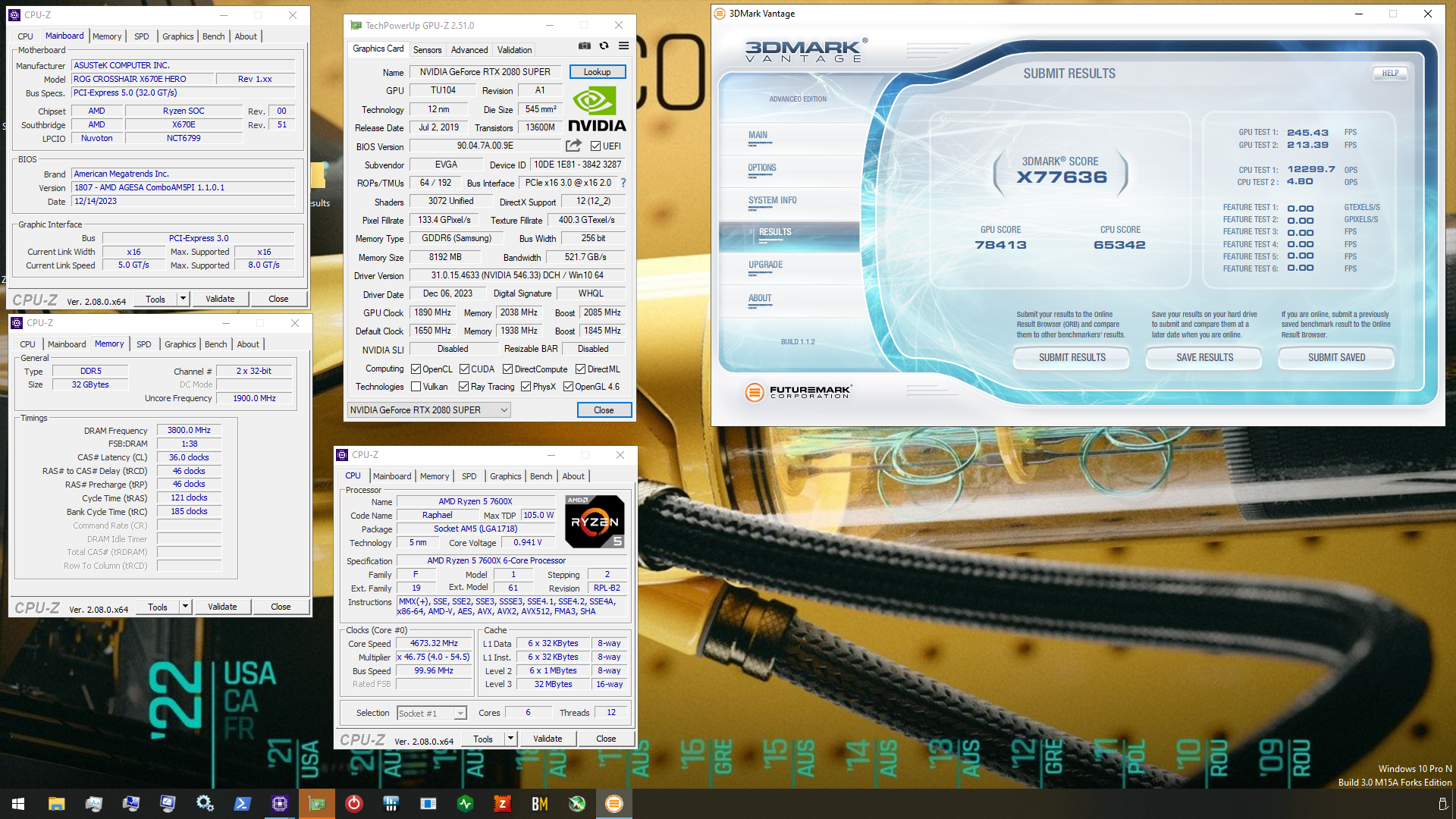
Oh NVM that had the 7600x
But it worked on the x3d as well
 steady lance
I mean this is probably the simplest answer. I can just unscrew the heatspreader on my ram lmao.
sudden torrent
The new versions of bios and such let you run much faster memory, 8000+ stable sometimes, but it has to desync uclk from mclk so it's not good for running daily
steady lance
That said, I am eager to try out my system so I will do that later. Can the thermal paste on the heatspreader be reused? I assume it's uysing thermal pads.
sudden torrent
Probably pads yeah so just don't tear them
proven canopy
It could be good for daily, depends what you do, but I wouldn't recommend it
steady lance
Mostly adobe and I am getting into Blender.
proven canopy
6400+6800 is about the limit of ambient 1:1 depending on imc bin
steady lance
Gotcha.
Hmmm, I feel tempted to bump up my ram speed real quick.
6400mhz a good start?
sudden torrent
That wouldn't rule out samsung if that's your goal
steady lance
Goal is to just bump up the clocks a lil before I relax and play some games.
sudden torrent
If the goal is to find uclk limit on the imc then yeah
steady lance
I will check my dimms directly later.
steady lance
sudden torrent
If the goal is to find uclk limit on the imc then yeah
this is the main goal
gonna chuck 1.4v at it to start, currently at 1.35v
brb
proven canopy
Most ddr5 related voltages will stop scaling far before you hurt something
steady lance
Just to make sure I understand, so DDR5 dimms will usually stop scaling long before the voltage gets high enough to hurt it?

where do I enable this?
steady lance
6400 is pretty stable so far
sudden torrent
steady lance
where do I enable this?
Right click the program and run as administrator, it sets it automatically
steady lance
Weird, I did do that.
sudden torrent
Eh, doesn't matter much anyway. It just lets it use more memory per thread.
steady lance
Also man, this 7950x3D IS AWESOME!
My frames have nearly doubled in most games and more in others.
and that's on higher settings too!
sudden torrent
Considering the 5700g is basically a 3700X + iGPU, that sounds about right skipping 2 generations + 3D cache
steady lance
xD, fair.
sudden torrent
I'm holding out for the next gen to see how the performance bump is. My processor still works great for me, the things that hit it the most that I do don't need the 3D cache and prefer raw clocks.
8000 is supposedly 20-25% better than 7000, which would mean a standard 8000 chip will be almost as good as the 7000X3D ones. 8000X3D would go crazy.
sudden torrent
It got pushed back a little, April-May
steady lance
2024 or?
steady lance
If 8000x3D releases you bet I will probably upgrade, xD.
gonna see if my cpu can handle 6600mhz brb.
Besides DRAM voltage is there anything else I can do to encourage handling of higher memory clocks?
sudden torrent
SoC voltage will help with uclk and fclk
There tends to be a sweet spot for that somewhere around 1.25v, it's worth playing around with if you feel like it's on the edge of stability
Oh and VDDG CCD 1.05v
sudden torrent
Jumpers and buttons are usually fastest, 5-10 seconds
VDDG and VDDP are good up to about 1.25v but you'll start reverse scaling before that
SoC is touchy, too low or too high and it's simply not stable when you're pushing it
steady lance
Gotcha.
Is there a clear CMOS button on the X670-P that I missed by any chance?
I can't seem to find the clear CMOS pins on this mobo?
sudden torrent
The jumper pins are between the RGB and the serial connection on the bottom left
Labeled CLRTC
 steady lance
My layout is different.
sudden torrent
It's in the same spot for both the wifi and non wifi models of Prime X670-P in the manual
steady lance
Thank you very much.
Touch the pin with a metal screwdriver while the PC is powered off right?
steady lance
Press the power button a few times after touching pins?
sudden torrent
Not necessary
steady lance
Ahh okay.
sudden torrent
It's not like removing the battery, the jumper directly drains the caps to ground
sudden torrent
What do you mean? It turning red doesn't mean you can't, it's just warning you it might be higher than you mean to do, potentially dangerous on some memory kits.
steady lance
Does MSI automatically set the uclk for me?
 sudden torrent
Yes
steady lance
Oh neat.
steady lance
sudden torrent
What do you mean? It turning red doesn't mean you can't, it's just warning you i...
No, no I mean if I put in 1.5v it reduces it to 1.43
Oh, I had to enable high voltage mode.
Just to make sure, for FCLK I should really just keep upping it? No ratios or anything?
sudden torrent
Yep
sudden torrent
It's permanently desynchronized from the memory clock so no latency penalty for going out of any ratio
steady lance
Gotcha.
sudden torrent
Watch for WHEA errors with higher fclk, it's the last thing on the list in hwinfo
steady lance
Is being able to run 6400mhz on 7000 series good?
steady lance
sudden torrent
Watch for WHEA errors with higher fclk, it's the last thing on the list in hwinf...
Gotcha.
sudden torrent
It's good but not anything amazing
steady lance
I think I may need to mess with VDDP and SOC for 6400+.
That or I try higher dram voltage first?
 steady lance
Is 1.35v to high for soc voltage?
steady lance
Seems 1.3v is the max soc I can do, and it let's me get into windows with 6600, still crashes when load.
testing out different vddp voltages
steady lance
Man, I am all the way up to 1.2v VDDP I really hope this is enough.
@sudden torrent any idea what else I could try to get 6600mhz to work without destncing?
1.2vddp has caused it to not wanna boot.
 kind walrus
steady lance
Seems 1.3v is the max soc I can do, and it let's me get into windows with 6600, ...
kind walrus
steady lance
Seems 1.3v is the max soc I can do, and it let's me get into windows with 6600, ...
Don't go higher than 1.3, stay under 1.25 at most
Higher than 1.3 was known to literally explode am5 chips at the i/o die
steady lance
Oh
kind walrus
6400 is good as it is
steady lance
Will bring it back down to 1.25v so then
My mobo let's me set it up to 1.3
Felix you know anything else I could try?
Increasing dram voltage did not help as far stabilizing goes.
kind walrus
AM5 is very on or off for stability
i.e the settings will definitely work without a doubt, 99% guaranteed
Or you hit that slight 1% where it's a touch unstable
Or it's horribly unstable, bad settings, just won't work at all
This is my experience anyway
6600 is unlikely to work unless you have a lot of luck and great settings on your hands
steady lance
For me 6400 worked without issue. 6600 is being a pain.
steady lance
I can boot and do most things but when load hits then poof at 6600.
kind walrus
steady lance
I can boot and do most things but when load hits then poof at 6600.
This is absolutely unstable
Just settle for 6400
Test it properly, and settle
steady lance
Yeah fair. Also found out my PC boots with VDDP up to 1.15v
Anything past that it's hit or miss.
Should I do FCLK or cas next?
proven canopy
steady lance
Touch the pin with a metal screwdriver while the PC is powered off right?
You can do it while on, but yeah
Did you figure out what IC you have?
steady lance
Not yet, wasn't in the mood to take out my ram and unscrew the heatsink lmao. Will do that tomorrow.
proven canopy
I wouldn't do that, unsure how the heatsink is attached to your sticks, but yeah
steady lance
proven canopy
I wouldn't do that, unsure how the heatsink is attached to your sticks, but yeah
Kingston Fury Renegade, it has 2 screws on each dimm.
So I am assuming I can just unscrew it.
proven canopy
Yeah, but whatever thermal tape/stuff between the heat spreaders and the ICs might not reassemble so well. I think you could figure out if it's a/m/b within 30 mins of testing
steady lance
I am done with frequency, should I do cas or FCLK now?
proven canopy
Post a zentimings
steady lance
Okay.
Loading up the profile for what got 6400mhz stable, I started with 1.4v.
I wonder if the default 1.35v would be enough for 6400mhz.
Booting into Windows ATM.

 steady lance
Sticking with 1:1
proven canopy
Unsure if the voltages there are reporting correctly, but you can't go wrong with 1.4/1.4 vdd/vddq for daily
kind walrus
steady lance
Kingston Fury Renegade, it has 2 screws on each dimm.
What's the xmp of the fury renegade
 kind walrus
7800?
steady lance
proven canopy
You can see capacity at the top as well
Oh missed that lmao.
steady lance
kind walrus
What's the xmp of the fury renegade
2x32 6000cl32
kind walrus
steady lance
2x32 6000cl32
Odds are A, especially as to my knowledge they reserve A for renegade
steady lance
Ahh okay.
kind walrus
You could test it by trying to boot like 7600 in complete desync
On a new enough agesa it might do it
proven canopy
Almost every chip can do 7600 boot on a-die, most can do 7800, some can do 8000, few can do 8000+
steady lance
Sure, guess there's no harm in trying.
kind walrus
Yeah I've never tested desync so I wouldn't know
My x3d rig is currently apart, about to stick rom's 1600W in it
steady lance
Just gotta boot my PC up first lmao.
The ram training time is horrific sometimes to where reboot is faster then waiting.
Guess that's the price I gotta pay for 2x32.
proven canopy
kind walrus
Yeah I've never tested desync so I wouldn't know
speedge https://i.imgur.com/DgGeAeG.png
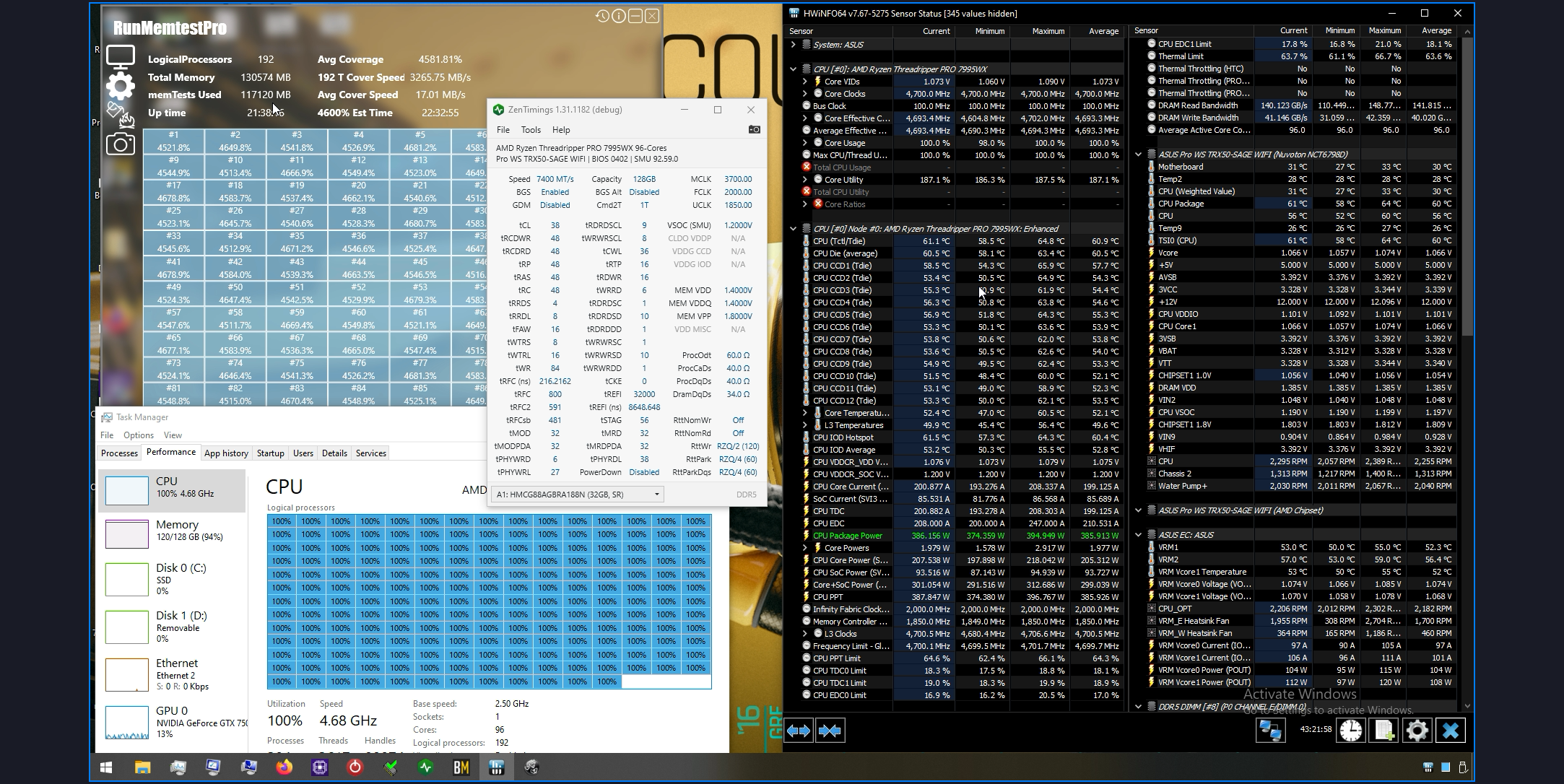 steady lance
Pic of the build btw.
 proven canopy
The newer agesa is faster to train imo
steady lance
I am on newest bios.
Need to clear my CMOS, 1.2v VDDP seemed to off messed up my bios or smth.
kind walrus
proven canopy
speedge https://i.imgur.com/DgGeAeG.png
Nyoom
steady lance
Booting into Windows and testing if 6400mhz is stable at the xmp voltage of 1.35 instead of 1.4
steady lance
Xmp is 6000cl32 @1.35v
proven canopy
ycruncher vst, or just running 2.5b would be the first thing I try
Then memtest/tm5/etc overnight
kind walrus
Yeah I did TM5, VST, cycle 18 OCCT and one other y cruncher test
I went for a wide range rather than thorough coverage
proven canopy
Figure, might as well let it test while you 
steady lance

Current settings. Only thing different from XMP is 2200 FCLK and 6400mhz instead of 6000
proven canopy
I would use y-cruncher 1B to gauge your performance gains. Fun to see the time go down as you tune.
Starting at trrds, I'd try:
4
8
16
8
16
auto
steady lance
Will look into that later.
proven canopy
Easiest way to run it - https://benchmate.org/

Download BenchMate for free to measure the genuine performance of your system with professional quality
7zip is also pretty good
proven canopy
proven canopy
For 1:1 -
@steady lance TBH, I'd start trying these timings a few at a time, test a bit, save bios profiles as checkpoints, then let it run tm5 overnight
kind walrus
steady lance
Current settings. Only thing different from XMP is 2200 FCLK and 6400mhz instea...
You can use mlc gui or something like 3dmark to gauge your fclk performance btw
steady lance
Hey! I finally got cl28 to boot.
steady lance
kind walrus
You can use mlc gui or something like 3dmark to gauge your fclk performance btw
Ahh ty.
kind walrus
Fclk seems even less black and white on AM5 than it did on AM4, it's hard to tell if you're using the best setting without testing
For mine it's 2133, even though 2200 is perfectly stable
kind walrus
Not really much point to pushing cas latency down just fyi
steady lance
True but it doesn't hurt.
kind walrus
It benefits a couple of resulting timings, but cas latency itself does basically nothing
proven canopy
3dm11 physics is one of the best ways to see if you're getting fclk regression
kind walrus
Noted
steady lance
3D Mark 11?
kind walrus
Someone put me onto mlc gui, so I ran 10 tests of each setting for an average per
sudden torrent
Make sure you're testing to make sure you're not losing performance by dropping cas that low
steady lance
I can lose performancd by dropping cash to much?
sudden torrent
Yes, it sounds weird right?
steady lance
Yeah. Also meant cas not cash lmao.
proven canopy
Just run ycruncher 1b through benchmate after each adjustment as a quick check
steady lance
I'd have much bigger issues if I kept dropping my cash lmao.
Oh wow my ram sticks are really cold despite being 1.5v dram
Will up it to back to c28 then run tests tomorrow.
steady lance
proven canopy
Just run ycruncher 1b through benchmate after each adjustment as a quick check
Aight.
 wheat lintel
steady lance
True but it doesn't hurt.
wheat lintel
steady lance
True but it doesn't hurt.
It doesn’t benefit that much tho
Almost no performance improvement
kind walrus
One could say, a non-zero % improvement
sudden torrent
If you count 0.2% as non zero
steady lance
got these timings stable so far.
 sudden torrent
You're supposed to start with the tertiary timings, that's where your biggest gains are
 zenith palm
Also tfaw is a good one to start with too, speeds up ram testing
sudden torrent
SCL and tFAW yeah
proven canopy
I usually just go 4/8/16 to start, test with ycruncher 1b as a quick performance test
 steady lance
sudden torrent
You're supposed to start with the tertiary timings, that's where your biggest ga...
steady lance
sudden torrent
You're supposed to start with the tertiary timings, that's where your biggest ga...
I see. Going to finish up primaries later then do that next.
sudden torrent
For reference
wheat lintel
steady lance
I see. Going to finish up primaries later then do that next.
Don’t bother with primaries, do those last
They barely improve performance at all
Start with secondaries, then tertiaries then finally primaries
Easy timings for AM5 https://m.youtube.com/watch?v=dlYxmRcdLVw

Text version: https://www.patreon.com/posts/low-effort-rank-77403831
My Patreon: https://www.patreon.com/buildzoid
Teespring: https://teespring.com/stores/actually-hardcore-overclocking
Bandcamp: https://machineforscreams.bandcamp.com/music
Twitch: https://www.twitch.tv/buildzoid
Twitter: https://twitter.com/Buildzoid1
Facebook: https://www.fa...
kind walrus
@proven canopy any idea if C5 post code is typically motherboard or cpu?
proven canopy
re-insert the dimms
kind walrus
Yeah no tried this a good dozen times now, still C5
I've managed to get it to train with only a dimm in slot 2 (2 slot board) but it would freeze or load super slow into the bios
I think the slot or cpu is buggered
 cloud raptor
My memory kits heating up to 56C at OCCT memory test  is this safe for ddr5 kit ?
steady lance
What OCCT settings should I run for mem test?
steady lance
Gonna do some ram oc so and I decided to start with tertiaries like you guys said. These are the tertiary timings right?
 sudden torrent
steady lance
Gonna do some ram oc so and I decided to start with tertiaries like you guys sai...
sudden torrent
steady lance
Gonna do some ram oc so and I decided to start with tertiaries like you guys sai...
Yes, the first ones to do are the ones that end in "SCL" to 4 and tFAW to 16. That'll speed up your memory testing a LOT and net a decent overall performance gain.
steady lance
sudden torrent
Yes, the first ones to do are the ones that end in "SCL" to 4 and tFAW to 16. Th...
Gotcha.
steady lance
sudden torrent
Yes, the first ones to do are the ones that end in "SCL" to 4 and tFAW to 16. Th...
Doe tertiaries prefer any kind of ratio or?
Just set SCLs to 4. Time to see if it boots then if it's stable.
How do I restore a setting back to auto in MSI bios?
4 did not boot. Upped dram from 1.47 to 1.5 and changed SCLs to 6.
Just booted

SCL 6 is stable.
Welp SCL 4 did not boot but I at least got a dram light this timf.
Time.
Gonna try SCL 5 at 1.5v dram
SCL 5 does not boot at 1.5v
Moving onto Tfaw.
Hmm, low on time. Will tune tFAW tomorrow.
How much time should I wait on AM5 for boot from bios?
sudden torrent
steady lance
Welp SCL 4 did not boot but I at least got a dram light this timf.
Loosen tCL to get SCLs to 4, it's worth it even on DDR4 and even more so on DDR5.
Primaries should be on auto, they're literally the last thing to touch on D5
steady lance
Gotcha. Will try that later.
Right now I just want my PC to boot.
For some reason my SCL did not work on second tries and later.
Fal'Cie, what OCCT settings do you recommend I use for ram stabillity?
sudden torrent
85-90% usage, the rest on auto/default, that's fine for a quick test
steady lance
Gotcha.
What were the other programs you guys have been recommending to me for ram performance tests?
sudden torrent
TM5 with the anta extreme profile loaded is good
proven canopy
I would go yc 1b/2.5/5b whatever the highest you can run, then tm5 overnight or memtestpro if you have it
Throw in linpack, yc vst/vt3 if you want
If you have a negative voltage CO set, test with corecycler
steady lance
sudden torrent
TM5 with the anta extreme profile loaded is good
I believe that's what I have.
steady lance
sudden torrent
TM5 with the anta extreme profile loaded is good
How do I confirm I have the profile loaded?
sudden torrent
It says in the test window when you start
 steady lance
proven canopy
I would go yc 1b/2.5/5b whatever the highest you can run, then tm5 overnight or ...
steady lance
proven canopy
I would go yc 1b/2.5/5b whatever the highest you can run, then tm5 overnight or ...
yc stands for Y-Cruncher right?
 proven canopy
Yes
sudden torrent
steady lance
Down where it says "customize:" it says the loaded profile. You want the extreme anta one.
Run it as admin if you're not. If you are, then don't. That usually clears up the error.
steady lance
Gonna reinstall TM5 first.
steady lance
sudden torrent
Down where it says "customize:" it says the loaded profile. You want the extreme...
TM5 refuses to load the config?
It's not giving any errors now but when I load it, the config is not ABSOLUTE
sudden torrent
When you hit "load config" and it closes, when you open it the config isn't the one you selected? Is that what you're saying?
steady lance
sudden torrent
When you hit "load config" and it closes, when you open it the config isn't the ...
Yeah.
steady lance
tFAW 16 is stable.
sudden torrent
You can pretty much follow these timings. You have dual rank memory so the things he says "only relevant for dual rank" you'll want to tune too. The old fashioned "trial and error" way.
https://www.patreon.com/posts/low-effort-rank-77403831
Patreon
Patreon is empowering a new generation of creators.
Support and engage with artists and creators as they live out their passions!
Oh and if you're running at 6400 you'll want tRFC to be a bit higher than 500 probably, tRFC 2 and 4 don't matter since AMD doesn't use them.
steady lance
Gotcha.
steady lance
sudden torrent
Oh and if you're running at 6400 you'll want tRFC to be a bit higher than 500 pr...
Yeah I am running 6400.
steady lance
Is turning fast boot on a bad idea if I am overclocking ram?
Cause the boot times are horrendous.
kind walrus
Some say memory_context_restore off as well but I haven't had the longevity with am5 to know if that tracks myself
kind walrus
steady lance
30s-1m training time is obnoxious.
Again, fact of life for AM5
steady lance
Well in any case, I am trying to tune TRDRDSC rn.
kind walrus
Call this bad advice if you will but for AM5 I really just shotgun almost all the numbers in one sitting
kind walrus
It either works well, works terribly, or fails when the dimms are too hot afaik
kind walrus
steady lance
Really? How do you figure out what went wrong when a error occurs?
It's pretty black or white in my experience
 mental turret
kind walrus
It either works well, works terribly, or fails when the dimms are too hot afaik
mental turret
kind walrus
It either works well, works terribly, or fails when the dimms are too hot afaik
(ddr3 corsair dominator ram fan ftw)
kind walrus
mental turret
(ddr3 corsair dominator ram fan ftw)
I nearly bought one of those
Years ago
mental turret
I have an extra if you want it
steady lance
Also idk why the guide says to set TRDRDSC/TWRWRSC to 1 when it's 1 by default lmao.
mental turret
nvm you live in AU
kind walrus
I'm good lol
kind walrus
steady lance
Also idk why the guide says to set TRDRDSC/TWRWRSC to 1 when it's 1 by default l...
Some boards will train it to 1, some won't
steady lance
Oh really?
kind walrus
Depends on dimms, IC's, bios etc
steady lance
Mine has it listed as 1 by default.
kind walrus
Motherboard training algorithms are created by people
So, ymmv
It's better to list the change in the guide no?
Otherwise you'd have no idea
mental turret
do you know what DIMMs you have? in terms of IC anyway @steady lance
steady lance
Does upping CPU SOC voltage help with tuning tRDRDSD?
steady lance
mental turret
do you know what DIMMs you have? in terms of IC anyway <@217356391675985921>
Likely Hynix. 6000c32/38/38/80
kind walrus
Higher cpu pops
steady lance
Yeah not DRAM lmao.
Does upping VDDP voltage help with tertiary timings by any chance?
Cause I can't get tRDRDSD lower for the life of me so far.
kind walrus
Not really
You can really push dram vdd/vddq together to see what results you might get
But pushing beyond like, 1.4v? You'll get someone low returns imo
steady lance
I am running 1.5v dram ATM.
kind walrus
That's pretty high for 2x32
Be a warm dimm
If it was M that would throttle in stress
steady lance
Warm but not hot after multiple TM5 runs.
steady lance
Gotcha.
kind walrus
You'd know if it was M by now
steady lance
Haha well that answers things.
kind walrus
Daily up to like, 1.6v is fine
Before you want a fan
But you should already see marginal scaling by now for little changes
steady lance
Good to know. I am gonna try 1.6v and if tRDRDSD still doesn't go lower then I give the f up.
Cause this is like my 7th try now without boot.
kind walrus
If it's not working for terts I doubt upping vdd/q would do much if anything
Ddr5 is like
You set terts first
And never go back
steady lance
I love ATX boards now lmao. The CMOS pin is so easy to reach compared to my old board.
kind walrus
Yeah if it goes from perfectly fine to not booting at all
I'd say that number just won't work
steady lance
I wonder if I can get SCL 3 to boot with 1.6v dram.
kind walrus
I'd maybe even step it back an extra magnitude to make sure it's stable
I really doubt lol
steady lance
Worth a try?
kind walrus
Timings I'd worry about would be primaries and trfc, maybe trc, tcwl
The rest should be set and forget
steady lance
Gotcha.
kind walrus
If it won't boot with a secondary it probably never will (under reasonable circumstances)
Same for terts
Intel it's sort of the same but it takes a lot more patience with voltages for D5
steady lance
I am a try SCL 3 at 1.6v dram for the fun of it. I give up on tRDRDSD/WR
steady lance
kind walrus
Intel it's sort of the same but it takes a lot more patience with voltages for D...
Seriously....?
Cause I can't tell you how many times I had to clear CMOS by this point...
Seeing the CPU and RAM LEDs turn on Everytime I boot my PC scares the life out of me haha.
kind walrus
Yeah imo just avoid pushing the envelope
AM5 is very black and white
Unlike intel which is a voltage and stability puzzle with D5
steady lance
Ohh this is interesting not in windows yet but I got to ram training.
Btw my dimms seem to hover around 50c when under load is that good or bad at 1.5v?
steady lance
I am more worried about during After Effects lmao.
My D4 kit went through hell whenever I did Adobe AE.
How long should I wait before I consider the ram training a failure?
This bend in the bottom fans bracket is going to drive me insane.
It just occured to me I have been trying ram settings meant for a 2x16gb kit at 6000 on a 2x32gb kit running at 6400... No wonder they aren't working the same.
steady lance
got tFaw to boot at 14

Decided to tune tFaw some more. Upped DRAM to 1.6 till I can't reduce timings anymore then I will reduce dram till unstable.
steady lance
Does it hurt to have it lower though?
 steady lance
Really? That seems fishy to me xD.
kind walrus
I didn't make that rule ask anyone else lol
steady lance
Well tFaw 14 is stable so I guess I will just leave it at that if it doesn't hurt me. My dimms are averaging around 58c during load in TM5 at 1.6v.
Up to around 62c peak so far
mental turret
What about tCWL 🧐
kind walrus
Reliable enough
kind walrus
You can factor in a trend from a relative reading
steady lance
Dimms peaked at about 65-66c.
Just finished the TM5 test.
Is it safe to say that this is Hynix A die then?
Heading to bed. Night guys.
sudden torrent
steady lance
Decided to tune tFaw some more. Upped DRAM to 1.6 till I can't reduce timings a...
FAW stands for Four Active Window. It's the minimum number of clock cycles you can put 4 "row active" commands in. That command happens to be controlled by the SCL timings, which are set at 4. 4x4=16, so that's the lowest tFAW can currently go. You can set it lower, but it will still take 16 cycles for 4 activate commands.
steady lance
sudden torrent
FAW stands for Four Active Window. It's the minimum number of clock cycles you c...
Gotcha. Thank you for the explanation.
steady lance
Seems my ram at 1.5v 6400mhz, tFAW 16 and SCLs set to 4 is semi stable in my most ram demanding game ark.
Definitely not a heat issue cause my ram was not hot at all, just slightly warm.
proven canopy
You can check dimm temps in hwinfo.
I think most measure from the pmic, unsure
High temps just mean lower stable refi mostly
My 4x 32 DR a-die is unstable at 60c 65k refi, but stable at 90c+ 32k with a hair dryer on them
steady lance
proven canopy
My 4x 32 DR a-die is unstable at 60c 65k refi, but stable at 90c+ 32k with a hai...
Lmao, an actual hair dryer or a active ram fan.
proven canopy
The build was going into a server for a customer, needed to test max temp stability.
steady lance
Did you actually use a hair dryer?
Seems tFAW 16 is stable.
haven't had any crashes in Ark:SE.
Then again the crash could've just been cause of the game lmao.
proven canopy
Yes, it worked well for testing.
kind walrus
steady lance
Did you actually use a hair dryer?
It's a good idea to run furmark while you do the ram test to check things like trefi
GPU ramped up under the fans isn't as dramatic as a hair dryer but does dump heat over the dimms all the same
steady lance
I turned SCL up to 5. Now my ram has stopped causing sudden crashes.
sudden torrent
steady lance
Then again the crash could've just been cause of the game lmao.
This is highly likely in my experience lol
kind walrus
steady lance
I turned SCL up to 5. Now my ram has stopped causing sudden crashes.
AM5 is black and white I keep saying this lol
steady lance
sudden torrent
This is highly likely in my experience lol
Lmao especially considering the game I was playing is Ark.
steady lance
Yeah so far it seems SCL 5 is perfectly stable.
What does upping VDDP voltage affect for the ram?
sudden torrent
VDDP is one of the fastest ways to make your memory unstable
steady lance
sudden torrent
VDDP is one of the fastest ways to make your memory unstable
Gotcha, so don't mess with that.
What timings would upping SOC voltage affect?
sudden torrent
None in particular. That's for frequency mostly.
steady lance
Tuning tWTRL.
32 is XMP, 28 booted. gonna keep tuning in groupings of 4 till unstable then increase by 2.
My current timings.

Lmao.

tWTRL 28 is stable
steady lance
Can upping Dram voltage to 1.5v cause certain timings to be unstable?
 static oasis
steady lance
Lmao.
static oasis
steady lance
Lmao.
I see you got some liquid nitrogen cooling there
steady lance
Running a round of TM5 to see if tWTRL 26 is stable.
steady lance
tWTRL 26 is stable, 24 unfortunately gave BSOD.
steady lance
I finally figured out what was causing the occasional ccrash lmao.
At least I think so.
Seems it's SCL.
steady lance
steady lance
Can upping Dram voltage to 1.5v cause certain timings to be unstable?
Fal'cie do you by chance know which timings?
 frigid cedar
I always tune my tertiarys and secondary so this question is kind of irrelevant but I think this servers better then the internet in terms of actual answers
I've gotten 6200 working but what's the best xmp you could probably get on a 12th gen ddr5 controller varying between 6400-6800 at like 1.4 volts?
sudden torrent
Depends more on the motherboard than the controller
And yeah we've got several of the top hwbot overclockers advising us here
frigid cedar
Still on a 4 slotter BUT Hi falcie! Good to see you're still moderating
frigid cedar
I kinda disappeared for...a year? Or so but you've always given good advice and it's just generally good to see ya in chat
It feels like coming back to animal crossing and the villagers forgoring
kind walrus
frigid cedar
I've gotten 6200 working but what's the best xmp you could probably get on a 12t...
Depends on IC and board, but in the right circumstances the 12th gen ddr5 controller is very quick
frigid cedar
Well I have samsung B-die Rev 4.1 in a 4x16gb (I know i shouldnt be using 4x16) and a z690 aorus xtreme
kind walrus
5s16b?
Uh
You'd probably be lucky to get 6200 to even make windows
On that combo
Z690 gigabyte has arguably woeful ddr5 overclocking
The boards were lucky to get anything over 6000 in some cases
And 4x16gb ram can be more problematic for stability over 2x32gb
frigid cedar
I have 6200mhz working so you'd say that's peak?
kind walrus
I would say that's really good yes
5S16B peaks around like, 6600, 6800 daily to my knowledge (it may be a little better nowadays) but you have 4 sticks, that's pretty impressive
frigid cedar
While a little sad I guess that's a pretty good answer
kind walrus
I would also check you aren't slamming the hell out of your cpu based on your voltages
If you have crazy high imc volts like vdd2 well north of 1.35V, I'd consider toning it down
I believe cpu vdd2 is the one to worry about
It might be cpu vddq, been a minute, need a refresher
frigid cedar
I'm a voltage coward I don't put anything above 1.4
frigid cedar
People use 1.45 and I cannot bring myself to lmao
kind walrus
There have been observable cases for intel 10nm to have degradation over 1.35
frigid cedar
That's good info there
kind walrus
As well as ICCmax should stay under 200A iirc typically
frigid cedar
It's been a long journey and a lot of scamming off of buildzoids more extreme settings
kind walrus
frigid cedar
That's good info there
Since I've been out of the space a while I hear things every now and then, I'd definitely double check these things
frigid cedar
Honest truth:
kind walrus
There are observable cases with raptor lake and refresh that too much multithread torture can lead to degradation
I haven't seen alder lake, but wouldn't count it out
It's all 10nm
frigid cedar
From what I hear 12th is a bit under so I like to keep my expectations low
kind walrus
Under?
frigid cedar
I have undervolted P cores and overclocked e cores it's funny because it's 4.9ghz all p core 4.0ghz all e core and about 28256 cinebench r23
My config is goofy because I don't believe in over volting for .1ghz
frigid cedar
We are at like llc low and .08 offset it's prolly like 1.28v and I just leave performance on the table
kind walrus
Ye
frigid cedar
I've been running this since Ig all of 23?
kind walrus
So you're probably fine
When I say over 1.35 I say in the sense of load voltage at full
frigid cedar
I am just an absolute nut and can't leave settings alone
I guess optimally if I could afford to shill out swapping from xtreme to tachyon and 4x16 to 2x32 would be best but I just don't want to
If it ain't broke don't fix it
kind walrus
I wouldn't really bother
frigid cedar
Samsung really good from testing I should say as these are my 5600mhz 1.25 volt set from ddr5 release
If I didn't mention
kind walrus
Honestly unless you went full ham, made a reasonable exchange to something like a z790 white apex or a unify or edge itx
Or maybe gigabyte z790x
2x32 or 2x16 Hynix A
You wouldn't see meaningful improvement
And I say that after sunk cost already implying it wouldn't be lol
Cos even tachyon won't do that well
frigid cedar
I've heard that apex and the evga two slotter do best I guess I said tachyon more as a 1:1
kind walrus
They do ye
If you want best eatx, probs z790 kp
Best overall, white apex
Best gigabyte? Z790X
Z790X they finally kinda figured it out
Best bang for the buck would be the itx msi z boards
Grab one of them used you're definitely underpaying for close to peak
frigid cedar
As I said Definitely glad I came here memory reviews online are just sales pitches and compliments
kind walrus
A lot of oc places will just tell you to get the best
Or recc some stupidly expensive kit if it's not t-create 5600 CL46's
There are a lot of ways to skin a cat, but I would also objectively weigh up the benefits
frigid cedar
As I said its kinda lazy for me but kinda not
kind walrus
You would see a significant double digit improvement with these changes (and a newer cpu) but it's still widely exaggerated benefits, the value really doesn't exist
frigid cedar
I'm no frame chasers for sure
kind walrus
Like I'd still say a 12900K is perfectly viable
It may not run every gpu at 1440p, but it's more than ample for everything else otherwise
frigid cedar
There's one avenue left untouched I'll ask you about
kind walrus
Sure
frigid cedar
Alder/raptor have a pretty infamous flaw I'm sure you know and that would be the ring/cache clock with e cores enabled
frigid cedar
Oh wow didnt know they fixed that for raptor anyway I can take it from 36 to 41-43 without too much testing at the upper limits
Should i?
frigid cedar
Okay so I already leave it at stock 36 the 41-43 was purely just seeing but you're saying I could leave it at 41? Most likely but obviously stress it?
kind walrus
I would ye
It's not a huge gain but a gain nonetheless
I just would always check and double check
frigid cedar
You seem to get how I do so ill trust that
Sure some people like to disables stuff for peak p core but I just want my whole chip overall better
kind walrus
I'm the kind of person that rather do a whole lot of new work to check my work rather than find out later and reinstall my windows

I hate redoing things
frigid cedar
R24 was my bane
kind walrus
Ye
frigid cedar
R24 forced me to re evaluate stable settings that work with 1000% coverage
kind walrus
Oh I thought you meant R23
frigid cedar
But im also on windows 11 and I've been told it's scheduler goes schizo with stress tests
kind walrus
I wouldn't use cinebench for stability
Anyway I'll bbl
Good chat mate
Hit us up if you got more questions
I gotta run
static oasis
Should i undervolt my 6950 using amd adrenalin? Or do you recommend other software?
If you recommend afterburner over that one i can do that, if it's additional software to one's i don't have its one of the twos
steady lance
static oasis
Should i undervolt my 6950 using amd adrenalin? Or do you recommend other softwa...
Personally I use MSI Afterburner. Pretty easy to use and customizable.
proven canopy
Use morepowertool
kind walrus
MPT stonks
 alpine mantle
RDNA 3 no mpt FAT L
frigid cedar
kind walrus
Hit us up if you got more questions
I fixed the issue!
It was my llc
I was so confused why lowering my undervolt wasn't fixing my stability but it never was that it was my vdroop
Going from Normal to low brought me from 1.174 to 1.224
I can now run the stuff I thought was just bad scheduling crashes
frigid cedar
Which I never actually set by the way
That's actually the gigabyte z690 auto
Just straight maximum vdroop?
But like easy win there I'll take the +50mv over setting an avx offset
kind walrus
frigid cedar
Just straight maximum vdroop?
fr? wth
frigid cedar
Yeah it also just froze at one step above auto so I'm keeping it at low which is two steps above auto
kind walrus

 sudden torrent
What's fantastic is when a higher llc level makes the voltage RISE instead of droop
frigid cedar
sudden torrent
What's fantastic is when a higher llc level makes the voltage RISE instead of dr...
(Proceeds to set it to ultraextreme)
 short blade
steady lance
short blade
steady lance
Here are my current ram timings, what should I tune next?

I've tuned, tFAW, SCLs, tWTR L/S, and Frequency to 6400.
proven canopy
rrds to 4/8/16
steady lance
proven canopy
rrds to 4/8/16
Are you referring to RDRDSD and RDRDSC?
proven canopy
 steady lance
I got tRRD S/L tuned to 6/8

What should I tune next? Also, should I be concerned if HWinfo says that my PMIC temperture exceeded threshold? My Ram hovers around 57-62c under load according to it.

 steady lance
tRDRD = 8
tWRWR = 16
is that good?
How do I figure out what to set tREFI to?
I've finished all secondaries and tertiaries.
 latent wave
steady lance
How do I figure out what to set tREFI to?
latent wave
steady lance
How do I figure out what to set tREFI to?
you can max that out if thermals support it, i just set mine to like 50000 because the gains after that are pretty small with lots of heat gain
 steady lance
latent wave
you can max that out if thermals support it, i just set mine to like 50000 becau...
steady lance
latent wave
you can max that out if thermals support it, i just set mine to like 50000 becau...
At what thermals should I stop?
latent wave
i dont remember I havnt touched ram and while sorry
steady lance
Ahh okay.
 steady lance
Currently my tREFI by default is around 12000 or smth last I checked, it always changes when I reboot since it's on auto.
latent wave
just set it to 50k and forget it should be fine
thats what actually hardcore oc said to do and he seems smart
steady lance
Worth a quick try then.
To my surprise, my mobo actually sets most timings near it's limit by default pretty accurately.
Been using it for references and usually it's spot on
kind walrus
Meanwhile me with my ram idling at 45
steady lance
 deft quiver
Ideal below 40
deft quiver
Ideal below 40
DDR5? that seems way to low.
sudden torrent
Most people don't push their ddr5 past 1.35v so that's about right with a good heat spreader
sudden torrent
"Ideally" which isn't always "realistically"
sudden torrent
You must have good airflow
steady lance
deft quiver
I never gone past 50c at 1.65v
That's under heavy sustained load?
Mine hover around 55-62 under heavy sustained load at 1.5v.
deft quiver
Yes
steady lance
Albeit my fans are pretty low RPM wise, could probably turn it up to help since I am using a Fractal Torrent.
steady lance
deft quiver
Yes
What die are you using?
I likely have Hynix A die, wondering if it'd be fine if I pushed the voltage higher.
sudden torrent
steady lance
Albeit my fans are pretty low RPM wise, could probably turn it up to help since ...
The problem is there's no fan near the memory to blow air between the sticks
deft quiver
steady lance
What die are you using?
A die
steady lance
sudden torrent
The problem is there's no fan near the memory to blow air between the sticks
I cranked up my fans from 20% to 100%. According to HWinfo after a 8HR OCCT run 85% auto, my ram was around 45c average.
steady lance
Any tips on how to install a 120/140mm fan for the ram in a fractal torrent without it looking horrible?
sudden torrent
I hung an 80mm or 60mm from the grille above the memory
alpine mantle
imma attempt to undervolt igpu voltage for no reason later
 steady lance
Is it fine if I pushed my ram voltage to like 1.6-1.65v range?
Actually, on second thought would the returns even be worth it in the slightest?
 faint tangle
I dont think 1.65 is safe for daily, I don't know about temporary
I've also never tuned ddr5 so take what I say with a grain of salt
steady lance
Gotcha.
I will keep it at 1.5v for the time being then.
Should I do FCLK or Primaries next?
I already did secondaries and tertiaries.
deft quiver
faint tangle
I dont think 1.65 is safe for daily, I don't know about temporary
It's fine smol risk
deft quiver
steady lance
Is it fine if I pushed my ram voltage to like 1.6-1.65v range?
Safe is up to around 1.55 ish
deft quiver
alpine mantle
imma attempt to undervolt igpu voltage for no reason later
Have fun
alpine mantle
deft quiver
Have fun

steady lance
I upped voltage to 1.55v DRAM. Tuning tREFI, is there any specific formula I should use or just keep upping it till instability/artifacting?
steady lance
Decided to up my dram to 1.6v and see how much tighter I can push my timings since my thermals are presonable now with the fans set to a higher rpm
btw MSI sets my DRAM, VDDQ, and VDDIO voltages to the same, so is it a concern if the other voltages are up to 1.6?
scl 4 is now stable!
steady lance
just installed a fk120 fan incase of high temps.
directly above my ram blowing tons of air down onto it.
temps are looking quite good. and so far, timings are dropping pretty nicely.
Dang this fan is powerful. Makes the 140mm fans I have from Fractal and my P14s/12s feel like a joke. If only it had rgb.
steady lance
I am so far reaping some decent gains from going to 1.6v.
Dropped tRDRDSC timings by 3 so far, and SCL dropped by two and stable.
steady lance
By installing the fan my ram temps despite being upped from 1.5v to 1.6v, has dropped about 20c on average during load to the low 40s range from mid-high 60s.
steady lance
faint tangle
I've also never tuned ddr5 so take what I say with a grain of salt
Out of curiosity, may I ask what setup you're running?
steady lance
sudden torrent
I hung an 80mm or 60mm from the grille above the memory
Thanks for the idea. Worked out nicely.
My current settings (passed TM5), gonna run it overnight on OCCT to finalize stabillity.
 faint tangle
steady lance
Out of curiosity, may I ask what setup you're running?
faint tangle
steady lance
Out of curiosity, may I ask what setup you're running?
Part List - Intel Core i5-13600K, GeForce RTX 3060 Ti LHR, Phanteks Eclipse P360A ATX Mid Tower
The ram is at 3600c16, but i haven't actually tuned it. Just spent like 10 min getting that to work with some settings sips told me
steady lance
I see.
faint tangle
Idt I will actually tune it unless I go to something similar in perf to an xtx
steady lance
steady lance
My current settings (passed TM5), gonna run it overnight on OCCT to finalize sta...
for some reason I am getting t he odd feeling that I actually have Hynix M die.
faint tangle
I do plan on doing another build soon, I've been thinking of taking the mobo/ram for that and going to a d5 mobo
steady lance
timings seem to scale a little too well with voltage.
faint tangle
That would be ideal
steady lance
true.
cause my ram for the most part is doing single rank Hynix A die timings pretty well at similar DRAM voltage.
Well I am a go to bed now, nice talking to you, Bacca.
steady lance
faint tangle
I do plan on doing another build soon, I've been thinking of taking the mobo/ram...
Neat, D5 has definitely been more fun to tune then D4 in my experience.
faint tangle
Actually slight issue, my mobo is atx and I wanted to do at most an matx mid tower build
Was just mapping it out and realized
I could do a 7600 itx build
I'm either gonna do budget with like a 12100f or smthn along those lines, or 7600
kind walrus
steady lance
for some reason I am getting t he odd feeling that I actually have Hynix M die.
you'd know if you did because 1.6V would DEFINITELY need active cooling
It's A die
1000%
My M die can overheat at like, 1.45V lmfao
well not overheat but spew a buttload of errors at like, 80C+
I think you need to loosen something, my tune is quite similar but I'm only on 1.4V
steady lance
kind walrus
you'd know if you did because 1.6V would DEFINITELY need active cooling
I've got a fk120 fan blowing directly down onto it.
steady lance
kind walrus
I think you need to loosen something, my tune is quite similar but I'm only on 1...
I see. Yeah probably A die then.
steady lance
kind walrus
My M die can overheat at like, 1.45V lmfao
This is with active cooling?
kind walrus
no
steady lance
kind walrus
you'd know if you did because 1.6V would DEFINITELY need active cooling
My ram was averaging 55-62c under load at 1.5v (prior to having active cooler) is that overheating?
.
Also, is there anything I can do besides opening up my ram to figure out if it's A or M die? Like apply certain settings or smth in bios.
steady lance
@kind walrus, should I be worried about VDDQ and VDDIO voltage also being 1.6v?
 steady lance
Seems your VDDQ/IO is also synced?
After I tighten up my timings at 1.6v, how should I tune tRFC?
kind walrus
My personal opinion is that's a lot of voltage for 6400
this kit is m die
if you were running something really tight like cl28 at 6400 I'd understand 1.6v
not a lot of point to it tho, frequency is what counts
steady lance
kind walrus
if you were running something really tight like cl28 at 6400 I'd understand 1.6v
I haven't tuned primaries yet
I know my ram is capable of cl28 though.
sudden torrent
Primary timings have next to no effect on D5 anyway
It's not worth increasing voltage for them
kind walrus
pretty much
if you're struggling to stabilise with 1.6v I would also say good luck with lower primaries
steady lance
I only upped to 1.6v to see how far I can push my ram tbh. previous timings listed were stable at 1.5v.
steady lance
sudden torrent
Primary timings have next to no effect on D5 anyway
Why is that?
sudden torrent
That's a question for the engineers
I'm not one, so I only know what the buttons do and not why they do.
I assume that it's related to how each stick has two 32 bit channels instead of the single 64 bit on DDR4
kind walrus
Cas latency itself offers basically little to no improvement, it's only the resulting timings that are influenced by it
like TCWL and TWRpre
that have actual gains
and those aren't that big either
tWRPRE I believe isn't even on AMD anyway iirc
or not exposed
kind walrus
kind walrus
Cas latency itself offers basically little to no improvement, it's only the resu...
this is even more so on DDR5 btw
steady lance
Gotcha.
steady lance
Managed to drop tWRRD from 8 down to 3.
Lmao, HWinfo thinks my ram is in the negatives for a moment
You guys think my ram will survive at least two years with this voltage?
kind walrus
don't really know tbh
we've only had ddr5 out in the wild for like less than 2 to begin with
somewhere near 2 years
steady lance
I see.
Btw I just got tRDWR 14 to boot, gonna try 12 now.
Is there any point for me to tune tRDRDDD/tWRWRDD?
The guide Fal sent says that to leave on auto if I am running multi-rank but did not explain why.
tRDWR 12 did not boot, trying 13.
Hey it booted!
Bloody hell?!
Each D5 dimm is drawing 30-35w watts of power.
Is that normal?
steady lance
Thank gosh lmao.
kind walrus
That's better
steady lance
Lmao, that scared the life out of me.
kind walrus
That's exactly how much I'd expect
steady lance
I was like how the heck does ram draw 30+ watts
Btw tRDWR 13 seems to be stable.
With that, my tertiaries have been fine tuned.
Now back to re-tuning secondaries.
Btw my ram is averaging about 50c under sustained load.
If I turn my ram fan from 80% to 100% that drops to 45c.
kind walrus
At 1.6?
steady lance
kind walrus
At 1.6?
Yes.
kind walrus
I swear that's A die
steady lance
Is M die really that much hotter?
steady lance
Should I do tREFI or secondaries next?
kind walrus
Trefi do 64k or 32k or don't bother
steady lance
Nothing in between?
kind walrus
Arguably one of the more important settings
Eh, 50K?
You want that ideally as high as possible
steady lance
Is there a formula or is it like other timings where you just keep upping/lowering it till unstable.
kind walrus
If you need to halve it then you want other things loose imo
kind walrus
steady lance
Is there a formula or is it like other timings where you just keep upping/loweri...
Not to my knowledge, and lowering one by one you'd be dead before you finish
💀
steady lance
True. So 10k at a time then drop by 5k?
I tried 50k earlier back at 1.5v which caused some visual artifacting. Should I try it again now that I am at 1.6v?
kind walrus
I'd just try max trefi
64k
50k
32k
I wouldn't bother with anything in between
You'd have an impressive level of patience to truly root every number out
steady lance
xD I have been at this for weeks lmao.
kind walrus
I spent just over a day on mine
steady lance
I hear there might be a formula for calculating tRFC or smth like that, is it true or false?
kind walrus
Yes
There is
But on D5 not a lot of point to it
You get some gains the lower you go but you do add instability very quickly
steady lance
Could you tell me the formula in case I wanna try it?
kind walrus
I like to run trfc quite loose, so my ram doesn't care if it's 80c
kind walrus
steady lance
Could you tell me the formula in case I wanna try it?
Can't remember
steady lance
Ahh okay.
Should I just set it to auto for a baseline then keep turning it down till unstable?
64k tREFI booted.
So far no artifacts
My board has the tREFI up to like 65.6k if 64k is stable should I just max it?
Oh dang, with the tertiaries and tREFI tuned in, my DRAM read and write bandwidth both went up by 3-4Gbps.
kind walrus
You could max it
If you wanted to
If you auto it then boards will train like
1.6K...
3K...
Useless numbers
steady lance
Yeah, my board trained it to 12.6k.
Wow, tREFI really made a difference in my average read bandwidth and a nice buff to my write bandwidth. Is that normal?
Write went up by about 3Gbps and Read went up by 4.5Gbps.
sudden torrent
Yes that can happen because it doesn't spend nearly as many cycles refreshing data
More time for other commands
steady lance
Gotcha.
steady lance
What DDR5 heatsinks would you guys recommend? I plan to do a lot of D5 OC for the foreseeable future and I figured it woulf be nice to have a good set of heatsinks to use across the dimms I buy.
steady lance
I got 65k tREFI to boot, for whatever reason 65,535 refused to boot.
faint tangle
steady lance
What DDR5 heatsinks would you guys recommend? I plan to do a lot of D5 OC for t...
I would just strap a good fan on top of them imo
steady lance
faint tangle
I would just strap a good fan on top of them imo
I got a nice fan on them already, think it's a FK120 directly above zip-tied to the grill in my Torrent.
Was just thinking that it'd be nice to have a visually nice and very capable heatsink that I could transfer over as I get more kits.
faint tangle
Ah
steady lance
the FK120 is somehow pushing more air and static pressure then my fractal torrent's 140mm both at 100% by a large margin
albeit is definitely louder though
sudden torrent
The case fans have resistance from the filters
steady lance
Comparing it to my exhaust filter when I have the side panel off.
resistance is definitely noticable on my rad.
kind walrus
steady lance
What DDR5 heatsinks would you guys recommend? I plan to do a lot of D5 OC for t...
Ek monarchs if you want something to assist but really the fan should be enough
wheat lintel
loop the ram
steady lance
wheat lintel
~~loop the ram~~
How hard would that be?
I honestly considered the idea of a 140mm rad in the back.
steady lance
Occured to me that my CPU has an iGPU. Will disabling it help me with my ram oc?
sudden torrent
Generally no unless you're doing some crazy XOC stuff
sudden torrent
Extreme Overclocking. LN2, LHe, even dry ice. Anything subzero cooling I'd say qualifies.
steady lance
Ahh gotcha.
Glad you tol;d me.
How hard would doing a 140mm ram loop be?
And would there be any noticable benefit over just getting a good pair of passive copper heatsinks?
sudden torrent
Real world at reasonable daily voltages, there won't be any difference between a fan over the ram and direct liquid cooling
If you were trying to push it as hard as you could at risk of breaking it and going for 1.9v 12000 c30 or something then I could see looping it
steady lance
Gotcha so no point in doing a loop.
Any good passive copper heatsinks you guys would recommend?
Also, Fal do you know the formula for tuning tRFC?
sudden torrent
What do you mean by "formula"? Like how many cycles it spends refreshing per second?
steady lance
I read somewhere that tRFC is set based on like one timing * another timing or smth like that.
It did not specify which timings.
kind walrus
steady lance
How hard would doing a 140mm ram loop be?
There's really no point
kind walrus
steady lance
Any good passive copper heatsinks you guys would recommend?
Also, Fal do you kn...
 steady lance
Aren't the EK Monarchs all water-loops?
kind walrus
No
steady lance
I went to their site and I did not see any passive.
kind walrus
You can just buy the sinks
They have the option to be looped
But you can just get the sinks and they work
steady lance
Oh okay. So they work as passive and have the option for looping?
kind walrus
Mhm
steady lance
JESUS?! 140$?
...... the website had them listed at like $40.
that's why...
On Amazon, someone is reselling them for 3x the price.
steady lance
DDR5 sticks that I got from Kingston.
kind walrus
Kingston fury? Or renegade?
sudden torrent
steady lance
I read somewhere that tRFC is set based on like one timing * another timing or s...
The tRFC number is related to frequency vs nanoseconds.
As a common example, B-die DDR4 is known to be easily stable around 140ns. Lets say you're running the memory at 5200c22 and want 140ns. You'd set tRFC to 364. This may help https://gcdr.net/ramcalc.html
steady lance
My plan is to get a nice pair of heatsinks I carry over to all my ram in the future.
steady lance
kind walrus
Kingston fury? Or renegade?
Fury.
steady lance
sudden torrent
The tRFC number is related to frequency vs nanoseconds.
As a common example, B-d...
thanks, would this work the same for D5?
kind walrus
And just a warning, if you intend to delid ram every time you get it, more power to you, but it carries the risk all the same
sudden torrent
Same formula at least since it's time based
kind walrus
Hair dryer
steady lance
I got one that gets pretty hot.
kind walrus
Until warm enough that the heatsinks peel off gently with the glue soft
But not too hot
As you might cook the chips
steady lance
sudden torrent
The tRFC number is related to frequency vs nanoseconds.
As a common example, B-d...
So I put in my first cas latency and my frequency then put in whatever tRFC value it gives me?
steady lance
kind walrus
Until warm enough that the heatsinks peel off gently with the glue soft
Gotcha. So warm it up and slowly test if the heatsinks peel off as I go.
sudden torrent
Frequency, CAS, then either change tRFC (ns) or tRFC1 value and you'll get the other value automatically
kind walrus
steady lance
So I put in my first cas latency and my frequency then put in whatever tRFC valu...
CAS shouldn't play into it iirc
It's like
Ns = expected freq/2000 or something
It's been a while but I definitely don't remember using cas
sudden torrent
It's in the form that's the only reason for it
steady lance
Use zenTimings for my tRFC input value?

