#overclocking
1 messages · Page 25 of 1
 rose bison
 sudden torrent
Oh dang when did hwinfo add presentmon stats?

 alpine mantle
Frick it I'm going XMP for real now
Tried memtest86 without cpu oc (all voltages default except vccsa which is 1.0v) to test if the overclocked ram is stable. Nope
Tried 1.1v
Nope
Tried 1.2v
Nope
With or without CPU oc it will fail
When setting vccsa to auto, the mobo decides to increase it to 1.35v
Default XMP hits 1.15v
Perf impact:
Y-cruncher 2.5b
3600mhz + tuned timings: 86 seconds
3200mhz (xmp): 96 seconds
💀
 marble abyss
what to use to benchmark and overclock video card automatically
alpine mantle
marble abyss
what to use to benchmark and overclock video card automatically
For benchmarking
-3DMark Timespy and newer
-Unigine Superposition
-Geekbench 6 (vulkan/opencl)
-Use games lol
For auto gpu oc (not recommended)
-MSI Afterburner Oc scanner
-for amd gpu (auto oc on adrenalin control panel)
alpine mantle
Update: I'm now using the auto VCCSA the motherboard placed for the 3600mhz tune. It's at 1.35v but it seems like memtest86 is not receiving errors, it's been 2 hours but it's not done yet
Will update if it passes or not
 kind walrus
86 I think is ok to get into like, windows? without much trouble
use a better test like TM5 Anta777, Memtestpro, OCCT cycle 19(?) large, linpack, y-cruncher etc
to get a better stability result
86 I find good because you can clear the first hurdle without really screwing up a whole iso
then using one or more of the others to properly check the tune
alpine mantle
kind walrus
then using one or more of the others to properly check the tune
Yes but that's the thing, I tried HCI mem test for over 12 hours, cruncher vst, and even occt for an extended period of time when tuning the ram to 3600mhz. It was stable for a few months until now I started getting bsods, after checking with memtest86 I couldn't believe I've gotten an error.
kind walrus
86 gets a lot of flack but I've noticed the same thing myself before
alpine mantle
TM5 doesn't even work for me anymore as it would "stop" testing
kind walrus
v dd2?
alpine mantle
Don't have that
alpine mantle
MSI pro z690-a
kind walrus
you have vdd2
alpine mantle
When I had the bsod I was running on 1.0V VCCSA
But it was stable on y-cruncher vst
kind walrus
unless I'm miistaken and it's a ddr5 thing you have vdd2
make sure vdd2 is under 1.35
 alpine mantle
It's totally fine
Ram is bs
Good news, it passed with the auto system agent voltage of 1.35v @kind walrus

So it could be that the motherboard knows how much to put in order to make it stable
I already tried VST with 1.35v and it is fine
Hopefully 1.35v doesn't HURT the imc on daily
kind walrus
try anta777 then
alpine mantle
I don't even know what's the limit of VCCSA
alpine mantle
I'll do an overnight run with it, but as I said TM5 is legit broken for me
It would be blank or stop after like 15-30 minutes of testing
alpine mantle
Alright
How long should I run?
Or what's the minimum amount of hours to consider it "stable"
 kind walrus
alpine mantle
Or what's the minimum amount of hours to consider it "stable"
kind walrus
alpine mantle
Or what's the minimum amount of hours to consider it "stable"
1 hour is the free limit
iirc you should get errors by 15 min if unstable
kind walrus
if yo13900k
f
whoa
ok didn't type half of that
if you're worried, run vccsa 1.3
I think 1.35 is mostly ok tho
at least I haven't really heard any degradation stories under that
(different if we talk about cores)
alpine mantle
I know that 1.1v-1.2v doesn't work as I already tested that
So maybe 1.25-1.3v may be possible
alpine mantle
Yes but I ran 1.0v for a few months till now
😂
Alright I'll try 1.3v
Seems like a fine line of stability and safety
Should I try memtest86 again tho?
kind walrus
I'd love to say run ram 1.4v
but idk what your die is
cos you can compensate lower SA a bit with higher VDD
alpine mantle
According to thiaphoon burner it's a-die or somrthing
kind walrus
ajr?
alpine mantle
I haven't taken off the heatsink of this chip
alpine mantle
Lol
alpine mantle
Ye?
kind walrus
I thouught 1.15v vsoc was ok for zen 3
was told by many it was
turned out, no, died after 2.5 years
 alpine mantle
Well... The motherboard isn't pushing too much, it's just using what's best
I doubt it would "degrade"
kind walrus
you know what I mean tho
alpine mantle
Yea
I'll stay with 1.35v for now and daily it
After the last two occt tests
I'll update if anything odd happens afterwards
Hopefully not corruption XD
alpine mantle
For a while
Hehehehe
@kind walrus this occt version seems to have infinite time

Mines is free I haven't paid it

 alpine mantle
I really don't like to use stress tests that uses a crazy amount of cpu power
Especially when the power bill is wack
😂
kind walrus
💀
 mental turret
L computer
alpine mantle
mental turret
L computer
L platform really
Well
Linpack passed 1 hr with 1.3v on the vccsa
🗿
mental turret
Should upgrade to x79
 little lantern
are you able to see profiles on 3dmark or search 3dmark scores by user
a friend of mine did some runs but they dont remember their password
and they didnt submit to hwbot
alpine mantle
little lantern
are you able to see profiles on 3dmark or search 3dmark scores by user
yes you can do that
you can also submit 3dmark scores for hwbot
alpine mantle
mental turret
Should upgrade to x79
LMAO
alpine mantle
1.3v VCCSA also failed on memtest86
keeping on xmp now
not wasting more time
atleast CPU/GPU oc are stable
little lantern
alpine mantle
yes you can do that
really?
I couldnt find any search function that allowed me to input a user
do you have a link to what you're thinking of maybe
kind walrus
@short blade jog me up on this again
What temp were you seeing b die errors?
It's been way too long since I did this, I'm readjusting trfc
I definitely have vsoc degradation but not nearly as much as I thought (thx cmos battery 💀 )
So redoing my old tune to be a bit more conservative
 short blade
~46
 steady lance
kind walrus
I definitely have vsoc degradation but not nearly as much as I thought (thx cmos...
steady lance
kind walrus
I definitely have vsoc degradation but not nearly as much as I thought (thx cmos...
The CMOS battery can degrade?
My ram has been able to hit the same clocks but is unstable lately, could VSOC degration be the cause? Reducing the ram speed to be very low doesn't fix the instability.
kind walrus
steady lance
The CMOS battery can degrade?
No, it runs out of charge
And yes it could be the cause if the motherboard is old enough
steady lance
kind walrus
No, it runs out of charge
Are CMOS Batteries easy to replace, like I can just pickup anyone or do I need a specific one?
kind walrus
CR2032's are found almost anywhere you find batteries for sale
steady lance
That's the battery used on motherboards?
Does a CR2032 battery run out of charge that quickly?
I am on a B550M DS3H if it makes a difference.
kind walrus
Idk
It's the first time I went through this sort of thing, I'm not the person to ask about it
 wheat lintel
Probably is just the mobo being 💩
steady lance
wheat lintel
Probably is just the mobo being 💩
I am guessing you mean my motherboard?
sudden torrent
steady lance
Does a CR2032 battery run out of charge that quickly?
Usually within 2-4 years
steady lance
sudden torrent
Usually within 2-4 years
Do you guys think it's my ram that's unstable or possibly the battery losing charge?
Had the board for about a year and when I run TM5 I get errors at low and high speeds, also I seem to crash more often in ram intensive tasks but I can't say for sure that it is the ram.
sudden torrent
What does hwinfo say your vbat voltage is at
 sudden torrent
That's a touch low but should still be ok for another 6 months at least
Probably just the ram
mental turret
jedec ram ftw
short blade
wow
3.144 after 1 year???
just handed off a 10 year old z97 with vbat reporting 3.300
 timber hound
steady lance
It's a year old.
timber hound
steady lance
It's a year old.
It shouldn't die that fast I've had cmos batteries last 16yrs
At least my daily cpu did
sudden torrent
Some of them are designed to recharge and those ones will last longer. Most OEMs will take the cheap route and use ones that last 2-4, maybe 5 years.
timber hound
My 5900x build is on year 3
timber hound
Well 3yr in december
kind walrus
I changed boards partway cos I was both young and stupid
And also prime sucks as a board

steady lance
So is something wrong with my battery then?
sudden torrent
It's still in the acceptable voltage range, and should last you another 6 months - 1 year at this rate
steady lance
Can a overclocked cpu cause ram to give errors and cause the occasional crash?
sudden torrent
Crashing yes, ram errors maybe. If you undervolt too much using PBO for example, threads can crash during memory tests which can make the test program think it's memory failure.
steady lance
Gotcha.
What would you say is the best way to go about trouble shooting my problems?
sudden torrent
Set everything back to stock, cmos clear works, and see what happens when you test again
steady lance
Aight. Will try that when I have some time later.
 proven canopy
Test one thing at a time. p95 small fft or similar for pure cpu, ycruncher for cpu + mem. OCCT makes this easy if you want a plug and play test suite. Also check out benchmate.org
steady lance
I have OCCT, TM5, and Core Cycler.
wheat lintel
Now what’s the chance of this cpu being dead because of the PCB being nicked on the left side
 wheat lintel
Yeah I see copper
I wonder if by some chance it still works tho
It looks almost as if I just hit a ground plane
Also what do those contacts by it actually do?
mental turret
what chip is that
sudden torrent
Looks like 11th gen something
sudden torrent
And I was just thinking "wait no the die would be bigger on 11th"
Soldered doesn't mean can't be delidded
wheat lintel
Yeah I know
In hindsight I probably should’ve just used a delid tool but oh well
At least I didn’t bust out the hammer and chisel
sudden torrent
What did you use? Floss?
wheat lintel
Razor blade
sudden torrent
Oof that explains it
wheat lintel
Tried floss but it wouldn’t break the silicon
Only spent $20 on this CPU so not a big deal if it’s dead
sudden torrent
One way to find out
wheat lintel
Just waiting for the Apex to come in
Bruh why are LGA1151 CPUs so damn expensive?
Just looking at possibilities for if this cpu actually is dead
sudden torrent
It's called a bell curve
 peak flint
Is there a way I can OC my CPU without my PC freezing up?
peak flint
No matter how low I go (aside from base speed) it still does that
 faint tangle
Wait yeah he did
alpine mantle
peak flint
No matter how low I go (aside from base speed) it still does that
Have you raised the core voltage? What's your CPU/mobo/cooler?
alpine mantle
faint tangle
Wait yeah he did
Why?
peak flint
alpine mantle
Have you raised the core voltage? What's your CPU/mobo/cooler?
i5-9600k, MPG Z390, Coolmaster 212 (I think)
alpine mantle
Put a space on that i5 lmao
Almost caught me off guard
Did you only try to change the CPU multiplier or you touched something else like bclk
Also, how far did you oc? You should try increments of +100mhz instead of going +800mhz or something
faint tangle
peak flint
i5-9600k, MPG Z390, Coolmaster 212 (I think)
What are Temps like and what oc are you doing
peak flint
I know I had around 75c when gaming
faint tangle
Did you change voltage and mhz, or just one of them
peak flint
Mhz
faint tangle
That's probably why, whatd you do?
peak flint
I think I had an offset of .50v?
sudden torrent
That's too much voltage
sudden torrent
I'm able to do +200 at a negative voltage offset for reference
faint tangle
If you did +.5v you mightve degraded the cpu too
sudden torrent
That's definitely getting into irreparable damage territory
faint tangle
Thank God lol, much better than .5
peak flint
Lol
faint tangle
- or -?
peak flint
faint tangle
What is that total?
9600k is safe at a daily 1.4v iirc
Fal would know better than me probably
1.4v you'd probably need a better cooler than a coolermaster 212, so I'd probably say 1.35
peak flint
I can't remember the name of my cpu cooler
sudden torrent
faint tangle
9600k is safe at a daily 1.4v iirc
Idle would probably be higher, but yeah load voltage up to around 1.4v should be ok for that node
short blade
+0.5v 
wheat lintel
short blade
+0.5v <:MonkaChrist:699323785601482793>
Hey sips, I got an idea
Wait, is it possible to delid a 3700x?
short blade
I think am4 delid tools exist
it's soldered though and you'll have to mind the pins so it's annoying
short blade
well same thing lol gotta be careful keeping the pins safe
sudden torrent
short blade
it's soldered though and you'll have to mind the pins so it's annoying
Stab them into some foam and it's less of a concern
alpine mantle
 wheat lintel
It’ll live
short blade
ehh put some flex tape on it
 wind prairie
Just chuck it in the furnace itll be fine
peak flint
faint tangle
1.4v you'd probably need a better cooler than a coolermaster 212, so I'd probabl...
It is in fact a cooler master 212 hyper black edition
sudden torrent
That was a pretty safe bet, it was a very popular cooler for that platform
But now it gets stomped on by $20 coolers
short blade
eh... stomped on seems like exaggerating a bit?
sudden torrent
Ok, it gets stomped on by $35 but still can't compare to $20 ones
short blade
$20 coolers means you're competing against other 4 heat pipe single towers
yeah they're better through better design but idk about stomped on
yeah the $35 coolers are OP lol
couldn't believe how well the pa120 handled my friend's 9700k
peak flint
sudden torrent
Idle would probably be higher, but yeah load voltage up to around 1.4v should be...
Is it safe even for a cooler master 212?
sudden torrent
That'll depend on your load temps
peak flint
I see
sudden torrent
You'll probably want to aim for less than 80C on that CPU, technically the max is 100C but it'll make it less stable the higher it gets
 sudden torrent
If you set the core voltage it'll override the offset, making it run at full voltage all the time which increases your power and heat at idle and at load
Just use the offset
peak flint
And what do I do if it keeps locking up?
sudden torrent
A 9600k might have trouble running 4.7GHz all core
peak flint
Hmmm
sudden torrent
Especially on air cooling
peak flint
Ok. So what is your suggestion?
sudden torrent
Reduce the 3, 4, 5, and 6 core loads to 45x
peak flint
Ok
wheat lintel
peak flint
XTU 
peak flint
What's wrong with them?
peak flint
Ooooh
wheat lintel
XTU sometimes sets thing wrong or doesn’t set things at all
peak flint
Gotcha
peak flint
So I did the CPU overclock in BIOS but when I open task manager I don't see any changes
steady lance
Finally found the problem causing my pc to randomly crash.
It seems my old CPU OC is no longer fully stable.
Went back to stock for a couple days and no crashes.
peak flint
sudden torrent
Reduce the 3, 4, 5, and 6 core loads to 45x
I set those loads in the BIOS but in BIOS it says 4.0 and 3.6 in HWinfo
sudden torrent
peak flint
I set those loads in the BIOS but in BIOS it says 4.0 and 3.6 in HWinfo
Is that at idle? Because that's your normal base frequency
 sudden torrent
peak flint
sudden torrent
peak flint
Bios isn't a load test, it just goes up to base frequency
peak flint
sudden torrent
Bios isn't a load test, it just goes up to base frequency
Ok. So how can I tell if my OC is working?
sudden torrent
Run cinebench r23 single and multi core tests, and watch the frequency and temperature
peak flint
sudden torrent
Run cinebench r23 single and multi core tests, and watch the frequency and tempe...
Still the same
sudden torrent
It only went up to 4.0 in the single core test? What temp?
sudden torrent
What temp though
peak flint
The offset voltage and cpu speed. The offset voltage being .050, the CPU being 47 for cores one and two and 45 for the rest
sudden torrent
Try without the offset maybe, stock voltage is always higher than it needs to be and you're not going much over stock max
peak flint
Yeah same results
I think I fixed it. I set the max and minimum processor state to 100%
sudden torrent
High performance power plan basically. Interesting.
peak flint
That's what I had. It just was a custom processor state
That said there's no offset and so far so good
Although why have 47 for the first 2 cores but the rest is 45?
sudden torrent
Because the usual max for a single core load is 46, and multi core is closer to 41. So it's a fair bit of an overclock already for multi core.
peak flint
I see. Should I also turn my offset back on?
sudden torrent
If it's stable then no
peak flint
Gotcha gotcha
sudden torrent
No need to add more heat to do the same work
peak flint
I see
sudden torrent
If you like you can dial in the overclock more. Start by seeing how high you can get a 2 core load to boost at stock, and if temps are still good you can add more voltage then to get more clock speed.
peak flint
As in regular voltage right?
sudden torrent
Offset voltage
sudden torrent
Seems like 48 is about the average people get on air cooling for a 9600k
You might get more if you're lucky and keep temps low
peak flint
Mhm
 alpine mantle
short blade
<@255061019322351618> perhaps this will be possible to daily
alpine mantle
short blade
<@255061019322351618> perhaps this will be possible to daily
4000mhz CL15 tune is wild, especially with the rest of the timings.
short blade
eh it's kinda loose but I'm running low voltage
 scenic vine
alpine mantle
4000mhz CL15 tune is wild, especially with the rest of the timings.
scenic vine
alpine mantle
4000mhz CL15 tune is wild, especially with the rest of the timings.
4k15 is nothing extreme, esp for 🐝
short blade
still wrestling with my stupid imc over 4133
don't think the kit can do 4000 14-14-14
but in any case I can settle for 4000 15-15-15 daily
short blade
true, time to go back to 3600 1T for smooth mousefeel
wheat lintel
Eyy still #1
 faint tangle
wheat lintel
Eyy still #1
faint tangle
wheat lintel
Eyy still #1
With only ocing my gpu, I got 25th for 3600/3060 ti somehow
With 13600k I'm 7th, again only gpu
And ddr4 lmao
 void laurel
Thanks for all the help in the other thread. Time for more questions. I'm purchasing a 13700KF (3.40GHz) gaming computer, would i need to overclock for more demanding titles? If so, is there a safe overclock range that I can leave it at?
 dull ginkgo
Overclocking is not necessary for gaming, it performs well enough stock, it's more of something you do for fun than for pure daily performance
void laurel
dull ginkgo
Overclocking is not necessary for gaming, it performs well enough stock, it's mo...
So overclocking the core 3.4 Ghz to 4 Ghz wouldn't make a game run smoother or faster? Even on ultra graphics?
dull ginkgo
void laurel
So overclocking the core 3.4 Ghz to 4 Ghz wouldn't make a game run smoother or f...
Modern CPUs will boost on its own without any user intervention, it can boost up to 5.4ghz depending on temperature, power, and load.
void laurel
dull ginkgo
Modern CPUs will boost on its own without any user intervention, it can boost up...
Oh thanks, haha I feel stupid.
But gotta make sure if i'm going to be dropping 3k on a new system
sudden torrent
Overclocking typically gets you about 5% more gaming performance if you spend a good 2 days straight on it. It's fun seeing "big number go up" but realistically the 5% difference is imperceptible.
 short otter
340 watts from my 13700k with a -100mv offset when doing p95
my artic ii can't even keep up
it's so weird because cinebench pulls just 210 watts compared to p95
wind prairie
short otter
my artic ii can't even keep up
What are temps looking like
wind prairie
short otter
340 watts from my 13700k with a -100mv offset when doing p95
Also p95 is p95 its kinda meant to just rip your cores
For multi core workloads it really isnt
short otter
For a 13700K it's not too bad
96 degrees pcore 91 encore without throttling but barely
I was trying to do thermal test and the fact that the liquid freezer ii struggles is wild
Wuh do people over 16 cores on Intel do??
wind prairie
short otter
I was trying to do thermal test and the fact that the liquid freezer ii struggle...
LF2 isnt that great for 1700, deepcool is better because of the shape of the coldplate but a fix is to get the thermalright bracket
Try using it
short otter
Y'all I'm not crazy ofc I got the contact frame
wind prairie
Meanwhile you cant even overclock your cpu
wind prairie
short otter
Y'all I'm not crazy ofc I got the contact frame
Oh
Whats the measured vcore on loads
short otter
I'll check later when I'm back at my computer
wind prairie
Ight
 deft quiver
short otter
340 watts from my 13700k with a -100mv offset when doing p95
deft quiver
short otter
340 watts from my 13700k with a -100mv offset when doing p95
Lol my 13600k does that
340 watts
wind prairie
Tf
Im barely drawing 175w full load with my 13600k at 5.2 Pcore and 3.9 Ecore
Like 1.27v
alpine mantle
im running up to 163w full load with my 13600k at 5.4 Pcore and 4.3 Ecore around 1.170v
you need to undervolt and optimize your cpu
@deft quiver
deft quiver
wind prairie
Im barely drawing 175w full load with my 13600k at 5.2 Pcore and 3.9 Ecore
5.7 p 4.3 e 5 r 1.41 v
alpine mantle
WOW
deft quiver
alpine mantle
WOW
I daily lower e cores
Cuz then my voltage goes past my cooling capacity
alpine mantle
ah i see
wind prairie
deft quiver
5.7 p 4.3 e 5 r 1.41 v
Thats a lotta voltage jesus christ
deft quiver
wind prairie
Thats a lotta voltage jesus christ
Na
I been running it for over a year and no degradation really
Like just 10 more mv to make it stable
short blade
5.7p...
my 13700k can't do 5.5 daily stable lol
guess it got binned down for not making the cut for 13900k frequencies
settled for 5.4p 4.8r 4.3e @ 1.35v idle 1.26v load
can bench 5.6p 5.0r 4.5e
but too much voltage
kind walrus
Could be worse
mental turret

We sponsored ourselves! FOR A LIMITED TIME, get 10% off of GN solder mats, Large Modmats, Medium Modmats, and tools on the store! https://store.gamersnexus.net/
This livestream features the AMD Threadripper 7995WX PRO CPU getting overclocked with water and with liquid nitrogen. We plan to set world records with both. The 96-core CPU will be over...
sudden torrent
@proven canopy
proven canopy
lol yes
 signal belfry
short otter
340 watts from my 13700k with a -100mv offset when doing p95
signal belfry
short otter
340 watts from my 13700k with a -100mv offset when doing p95
well it is p95 tbf
my i7 10700k draws 325w in p95 
gotta love 14nm+++++++++
short otter
signal belfry
well it is p95 tbf
Fun fact for this I didn't realize that my AIO is faulty
I have artic shipping me a new gasket and coolant
My radiator missing a good ounce or so of coolant so there are air bubbles in my loop
signal belfry
dang. I prob wouldnt have figured that out if it was my aio
sudden torrent
There's a big air bubble in mine too, it's not a big deal as long as the rad is above the pump. It's also not audible with the pump below 80%.
short otter
Mine is audible at all speeds now
short otter
Rad is above pump but water level is barely
If that makes sense
That sounds is the reason why I suspected something was wrong
Googled "air in pump liquid freezer ii no leaks"
And that's where I found out about the recall
mental turret
lol my 2nd best stick of ddr3 died
short otter
Company?
 sudden torrent
Oh then it's your fault
mental turret
Yes
short otter
gskill replaced a 2GB stick of ddr3 last year that I killed overclocking
Their customer service is absolutely fantastic
sudden torrent
Physical damage though?
short otter
Lifetime warranty no joke I guess
short otter
sudden torrent
Physical damage though?
Probably not
faint tangle
Anyone available to help me do some quick settings on rev e?
Not going to spend a ton of time tuning, just some basic stuff
proven canopy
64c world record on cpu profile https://www.twitch.tv/seby9123
 mental turret
 proven canopy
Motorola razr
mental turret

 sudden torrent
Make a snow cone
proven canopy
Why is your rod so short? 
alpine mantle
💀
proven canopy
3dmark black friday sale https://benchmarks.ul.com/3dmark?_ga=2.18366832.832431559.1694493126-994295001.1690373475#windows

Benchmark your PC, tablet and smartphone with 3DMark, The Gamer's Benchmark. Free download, start benchmarking today.
kind walrus
@modern walrus interesting discovery
either I'm just stupid or cycle 18 OCCT is extremely good for checking PBO + CO on Zen 4
 modern walrus
kind walrus
<@808772530017665024> interesting discovery
modern walrus
kind walrus
<@808772530017665024> interesting discovery
Never owned Zen 4 but core cycle used to be meta for PBO+CO on Zen3
modern walrus
kind walrus
<@808772530017665024> interesting discovery
GitHub
Stability test script for PBO & Curve Optimizer stability testing on AMD Ryzen processors - sp00n/corecycler
sudden torrent
Core cycler is still good, current meta is y-cruncher. VST mode is good but there was a new one iirc.
proven canopy
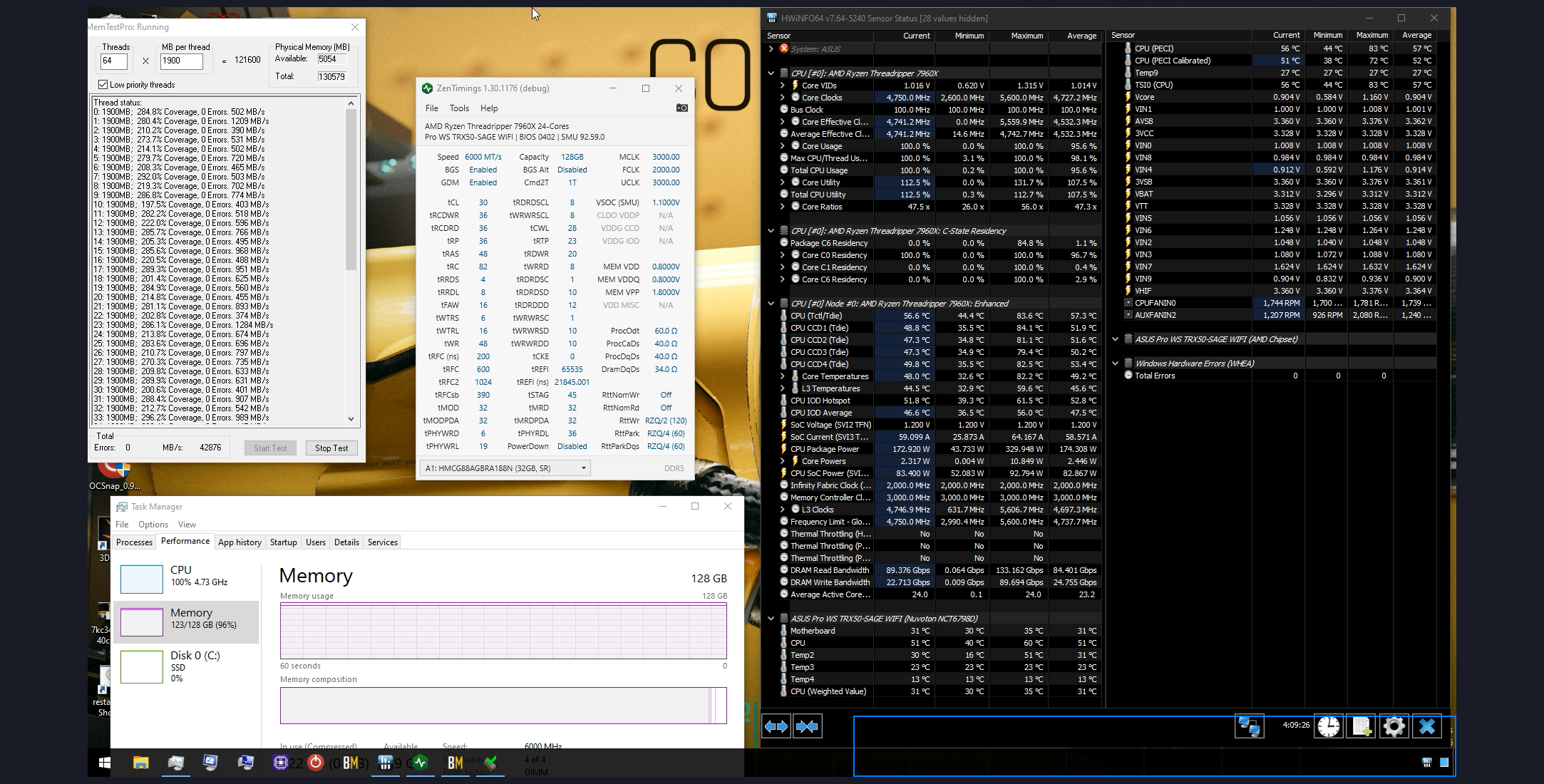
This has been stable through 4 runs 25B, mtp, haven't run CC yet, but -40 CO all core
https://i.imgur.com/FKJBS85.png
 modern walrus
Ah okay. I know ycruncher VST is the fire for daily stable memory overclock (whatever that is)
proven canopy
afaik vst is the meta for imc, decent for ram
IME, 25B on HEDT/workstation hits memory so hard that nothing really gets through
My hwbot subs on 10b had to be relaxed far from what I ran on 1B/2.5B
modern walrus
I haven't done daily stable mem oc since 12900K on dark with mdie lol
proven canopy
I haven't since my 3990x daily lol
I want to set and forget this for the next year or so
Or at least until I switch to wrx90
modern walrus
proven canopy
afaik vst is the meta for imc, decent for ram
I got an EVGA 2080ti black for $200 in Kyoto lol
I know v exciting.
proven canopy
Why though?
modern walrus
proven canopy
Or at least until I switch to wrx90
How much memory are you gonna run on that monster? Intel IMC doesn't seem to care about DR/SR for 2x24gb/2x48gb I hear?
proven canopy
It's 4x DR AGBD
modern walrus
proven canopy
Why though?
Gotta win enthusiast this year dammit
proven canopy
modern walrus
Gotta win enthusiast this year dammit
If you need hwpoints, why not 13900ks + legacy gpu?
Just run a train of 50 pointers
Pick up two 295x2's and do the same with globals, 500 easy
modern walrus
That's what I've been trying to do
HOF 970 did alright
980ti wouldn't work with GOC but I gotta retest when I'm back stateside
2080ti hopefully
Plus ace up my sleeve is 4090 HOF from are globals
modern walrus
proven canopy
If you need hwpoints, why not 13900ks + legacy gpu?
I think I borked my KS. C2 doesn't even wanna run 59x stable anymore lol
proven canopy

modern walrus
proven canopy
<:GarbageCan:895087539717804072>
Gonna delid 13600K & see if that helps. I already delided G7400 by accident lol
proven canopy
Just hop up to apprentice or extreme and never have to delid or LM again
 desert spear
Is there any reason i should have All core set to Turbo Ratio
 mental turret
FIVR sucks
proven canopy
pebkac
scenic vine
Real
 balmy aspen
This the correct place to undervolt?
 alpine mantle
yeas
balmy aspen
So I would change the internal cpu vcore offset in order to undervolt?
alpine mantle
yea
make sure its on the negative tho
you can do it like -50mv or maybe -100mv if the cpu is stable
dont go too low though
balmy aspen
So if R23 won’t run I need to change the undervoltage, correct?
Do I do anything with BCLK adaptive voltage?
alpine mantle
ya if r23 crashes or fails to run you have to up the undervolt, and DO not change BCLK voltage
only focus on the core
balmy aspen
So it should look something like this?
 alpine mantle
yes
now you can do a 30 minute stability test to check if the cpu is stable
if you think it takes too long you can try -100mv each time before the system goes bsod
balmy aspen
What would tell me that it’s stable? That it finished the test? Or is there something else I’m looking for
I’m trying to control my temps on my 14700k, reaching 90C plus and throttling while playing video games like call of duty
alpine mantle
balmy aspen
What would tell me that it’s stable? That it finished the test? Or is there some...
if the 30 min test has passed it shows that the cpu is fine, but i recommend additional software like OCCT to ensure that its actually stable
one software is not enough imo
alpine mantle
balmy aspen
I’m trying to control my temps on my 14700k, reaching 90C plus and throttling wh...
what cooler are you using? these cpus are tough to cool anyways
balmy aspen
alpine mantle
if the 30 min test has passed it shows that the cpu is fine, but i recommend add...
I will download it. Assuming I need to close all programs other than OCCT and R23?
balmy aspen
alpine mantle
what cooler are you using? these cpus are tough to cool anyways
Deepcool Lt720 360
alpine mantle
balmy aspen
I will download it. Assuming I need to close all programs other than OCCT and R2...
you really dont have to unless you're going for a score
alpine mantle
balmy aspen
Deepcool Lt720 360
oh thats a good one
balmy aspen
Mx6 thermal paste with contact frame
alpine mantle
balmy aspen
Mx6 thermal paste with contact frame
so you did everything right
its just that the bios overfed it
balmy aspen
So with offsetting that is lowering the stock vcore? Or do I need to offset AND lower the stock vcore?
balmy aspen
So at idle voltage is getting up to 1.400V and 40-44C
balmy aspen
After negative offset
alpine mantle
oh
yea it does that
try running cinebench r23
and check the temps
id like to set a target for all cores, like 90c max
or maybe 85c
if it exceeds that and doesn't crash ill just lower the offset again
balmy aspen
after 10 seconds, R23 multi core
 balmy aspen
i turned it off, but those are the maxes
 alpine mantle
sheesh
my cpu is 100w less on all core
ok
its time to lower the offset again
add another -50mv
balmy aspen

 balmy aspen
if this doesnt work, do i need to set power limits or temp limits?
alpine mantle
power limits most likely
but thats the last thing id do
might lose some performance on it
sudden torrent
Less likely to lose performance in games but in all core tests yes
balmy aspen
 alpine mantle
give a shot ye
balmy aspen
 alpine mantle
bruh
whats your pc case?
how many fans installed?
is the fans properly installed right?
these dang cpus getting hot -_-
alpine mantle
oh
you know what
run cinebench r23 for 30 minutes
then play a game to see if temps are better with the undervolt
if its not any better and still throttles its time to lower the power limit
most of the software aside from stress testing wouldn't go for all cores
so temps should be a bit better hopefully
 alpine mantle
i stopped using XTU long ago
balmy aspen
XTU
 alpine mantle
its too finicky on my pc so i used the bios instead
balmy aspen
so you think with setting in bios my temps should be better?
alpine mantle
its more the same but with no overrides when XTU isn't present ig
like what falcie said, with a power limit it shouldn't hurt performance all that much

the cpu is very capable
so try limiting the cpu to an acceptable temp
something like 90c max all core is ok
balmy aspen
I’m going to play a game of call of duty and see what my temps do
Going to use hw monitor and xtu for temps
alpine mantle
👍
balmy aspen
throttling only happened once
 balmy aspen
ok so the first SS was graphic quality set to balanced
this SS was graphic quality set to min

first SS, about 130-140W for cpu, 2nd SS about 140-145W
seems stable yeah, temps just high
alpine mantle
I see
balmy aspen
balmy aspen
throttling only happened once
Another game with same graphic settings. No throttling, wattage was about 120-130, voltage about 1.35ish sometimes higher sometimes lower, highest temp was like 80ish

voltage still around 1.3-1.4
I just want to prevent super high temps. I live in a winter state so I understand my temps might be a little higher than they should be. But I feel like 85-90C is really high, also isn’t thermal throttling a bad thing?
alpine mantle
thermal throttling is useful to keeping the cpu from exceeding over 100c
if it does the best it can do is automatically shutdown to prevent further damage
balmy aspen
so throttling isnt a bad thing?
sudden torrent
The CPU is designed to be able to run at the max rated temperature 24/7/365, thermal throttling is just how it stays within that rated temperature.
It can mean you lose some performance because it's reducing the clock speed to lower the temp, but it's not inherently "bad"
alpine mantle
^^^
balmy aspen
no throttle, these were the numbers. reset it and played 1 game

So is there anything I need to worry about? This cpu just runs really hot then? Should I adjust anything else?
sudden torrent
Yes that CPU just runs hot, for several reasons. Which I why we don't recommend the i7 or higher for just gaming, in some cases you can get worse than i5 performance because of heat.
93C is acceptable
alpine mantle
sudden torrent
Yes that CPU just runs hot, for several reasons. Which I why we don't recommend ...
this is similar to the i5-1135g7 vs i7-1195g7 fiasco
😂
no way its happening on desktops too
sudden torrent
It already happened on desktop
alpine mantle
breh
sudden torrent
I forget which but I think one of the GN reviews of coolers pointed out how bad the situation is
alpine mantle
they really need to "chill" with these modern cpus
 alpine mantle
everyone NEEDS A NUCLEAR REACTOR TO POWER DA SYSTEM
sudden torrent
On that note we're surprisingly getting closer to cold fusion
That superconductor discovery jump started it again
alpine mantle
sick
balmy aspen
so its just hot af. got it. Think it would be worth it to undervolt a bit more or just leave it as is
sudden torrent
You could knock a few more degrees off with more undervolting, but the lower the voltage the more you risk instability.
balmy aspen
So maybe like -80?
alpine mantle
Doubt it would make a difference temp wise
sudden torrent
You were stable at like, -0.070v right? You could try -0.080
alpine mantle
But why not?
balmy aspen
I’m at -0.075 right now
Seems like temps will sky rocket when trying R23, I guess I could just try little by little and play a game. If game crashes or runs poorly then it is unstable?
sudden torrent
That's the point, R23 is a stress test meant to show a worst case scenario
mental turret
ycruncher >
sudden torrent
That's good for memory and IMC testing mostly but it can be used for CPU testing in general
I still need to try R24, it's supposed to be very different kinds of load from R23
In fact I think I'll do that now
modern walrus
alpine mantle
they really need to "chill" with these modern cpus
I see something in your future
 alpine mantle
😂
steady lance
modern walrus
I love this lmao.
deft quiver
@sudden torrent hi fellow Schroeder enjoyer
alpine mantle
 deft quiver
alpine mantle
https://tenor.com/view/bruh-gif-22596911
deft quiver
alpine mantle
https://tenor.com/view/bruh-gif-22596911
?
alpine mantle
what cpu do you have?
deft quiver
13600kf
deft quiver
5.7 4.3 5
alpine mantle
5.4 4.3 4.7
deft quiver
alpine mantle
5.4 4.3 4.7
Low
alpine mantle
meh, did it to save power
still an oc tbh
the cpu is already good no need to oc more unless going for point
alpine mantle
as long as its cool its fine
deft quiver
deft quiver
alpine mantle
as long as its cool its fine
105c
deft quiver
alpine mantle
never mind
I don't care if it breaks I buy another
alpine mantle
hmm 84c neat
alpine mantle
deft quiver
I don't care if it breaks I buy another
chill lmao
deft quiver
alpine mantle
chill lmao
What's ur sp
alpine mantle
sp?
deft quiver
alpine mantle
sp?
Nvm
deft quiver
alpine mantle
ram oc made my cinebench r24 score go up a bit
That's new
deft quiver
alpine mantle
r24 is slightly more aggressive than r23 for stress testing
Use occt
deft quiver
Occt small sse
Large avx2
Na
Linpack extreme
Linpack is to extent for me
Extreme
alpine mantle
ya i use extreme
deft quiver
Occt is good enough
alpine mantle
can find whea errors fast
modern walrus
steady lance
I love this lmao.
Lol thanks. I was very happy how easily I was able to paste the picture over the other picture in Paint
modern walrus
alpine mantle
5.4 4.3 4.7
L2 Cache voltage to 1.355 & ecores to 46x! The e in ecore must be defeated. Jk I have no idea what "safe" L2 cache voltage is (so don't do this) but I can sometimes get 47x to run a little north of there.
alpine mantle
modern walrus
L2 Cache voltage to 1.355 & ecores to 46x! The e in ecore must be defeated. Jk I...
Yea I never touch that if there is little info about it, other than that im very satisfied with my daily oc
Very good perf/power
I wonder how low (voltage) a 13600k can get at stock
modern walrus
you could mess with it in OS with XTU but you'd wanna set bios back to default & I've had issues with XTU setting persisting after uninstall so nvm. You could set offset voltage & keep dropping it to find out but V/F curve would probably be better since an offset that works for all-core may not let you boost fully on single-core anymore. I dunno how ur board works with TVB but I can get a couple cores to 62x but it doesn't wanna run all-core over 58x with TVB
you'd wanna manually set the temp targets & downbins for each because otherwise it'll start to drop frequency at relatively low temps (like 70C or something I forget)
alpine mantle
Lol so much info
I was thinking about doing a V/F curve before but I just decided to oc the traditional way
 stiff bay
Just hit enabled xmp in bios and pc crashed a few times/games were crashing left and right
is that an auto xmp thing? i guess i need to change values manually?
faint tangle
stiff bay
Just hit enabled xmp in bios and pc crashed a few times/games were crashing left...
What kit of ram is it
And what cpu/mobo do you have
It sounds like either an unstable xmp, cpu can't handle the ram speed, or could be something wrong with the ram/mobo/cpu, but the first two are more likely
stiff bay
faint tangle
What kit of ram is it
Part List - Intel Core i7-12700K, Radeon RX 7800 XT
faint tangle
What voltage is the xmp?
stiff bay
i gotta check, just hit enable in the ez mode bios
stiff bay
faint tangle
What voltage is the xmp?
would it tell me in that ez mode version where i see the ram speed change? or do i need to look into the adv bios
faint tangle
stiff bay
would it tell me in that ez mode version where i see the ram speed change? or do...
I'm not really sure
Try doing a custom xmp, do 6000 cl 32-40-40-84 at 1.4v
That should very easily be stable
stiff bay
faint tangle
What voltage is the xmp?
Default
 stiff bay
trying out the second profile before swapping values
faint tangle
stiff bay
trying out the second profile before swapping values
What ended up happening
stiff bay
faint tangle
What ended up happening
Second profile works for now. 6000 38-38-38-78 1.25v
faint tangle
stiff bay
Second profile works for now. 6000 38-38-38-78 1.25v
Ah alr
Could def do better unless the ram is defective
It's gauranteed hynix, so you can try setting a custom xmp higher than that
Could try 6000c32-36-36-74
At 1.4v
stiff bay
ill try that forsure
faint tangle
stiff bay
ill try that forsure
It's possible the board you have or the cpu you have doesn't like 6400mhz, but if what I said above is stable you could try 6400
deft quiver
faint tangle
Could try 6000c32-36-36-74
Probably can do 28-36-36-60
Ddr5 hynix is safe till like 1.65 v
faint tangle
deft quiver
Probably can do 28-36-36-60
ye i was just giving a conservative "oc", since it was failing what shouldve been stable previously
deft quiver
faint tangle
ye i was just giving a conservative "oc", since it was failing what shouldve bee...
Just raise the voltage
And stick a fan
faint tangle
not everyone wants a fan on top of the ram, and again it was to test if the ram is ok, in case of a bad stick
deft quiver
faint tangle
not everyone wants a fan on top of the ram, and again it was to test if the ram ...
What board is it
faint tangle
stiff bay
https://pcpartpicker.com/list/GtNxbL
.
deft quiver
Meh
 opal sundial
Hi. My PC seems to just out of the blue just decide to shut down and restart when I start up more "intensive" games. But it is very inconsistent. One day I can run Fortnite with no problem, but when I try to run Chivalry 2 it will just shut down and restart my PC. And then vice versa, I can run Chivalry 2 for about 30 minutes before it shuts down, and I can't even run fortnite at all. At first I thought it was a power issue because I was running a Ryzen 7 5800X and an RX 7600 OC on a 550w 80 Plus Bronze PSU. So I upgraded to a 850w 80 Plus Bronze, which granted, isn't the best but it is more than enough for my needs at the moment since the RX 7600 only a 175w GPU. But that still didn't fix the random shutdown issue when running certain games. I also upgraded my cooler to a be quiet! Dark Rock 4 Pro because my temps where quite high, which fix the heat issue, but still didn't fix the shutdown issue. I have also tried undervolting my CPU and optimizing the core curves in Ryzen Master, and I have turned on ECO mode, which worked for a day, and then the shutdowns started happening again the very next day, which makes me think that my PC is somehow trying to automatically change a set of settings which is in tern causing this issue. I have provided screenshots from Reliability History (1) which relates to the shutdown, and Event Viewer (2) which there are a LOT of errors of.


I custom built my PC at the beginning of this year, so I have been struggling with this issue for about 11 months now. I keep trying temporary fixes which work for 1 - 3 days, but then the shutdowns start occurring again.
Any help on this issue will be greatly appreciated. (I just wanna play videogames normally again. 😂)
Even when my CPU is at 100% utilization when loading game emulators for my old games it doesn't crash. And I was looking at Ryzen Master right before the shutdown and the TDP was only around 65% when the shutdown occurred last time.
So I have a feeling this maybe an auto overclocking issue in the BIOS but I am not 100% sure. And I don't want to mess with the BIOS yet until I have some clarity on what I need to do, because I don't want to have to update my BIOS unless absolutely necessary.
One last thing, I can run PUBG at max settings 60fps and my PC won't crash, which makes no sense since it is probably more demanding than fortnite, Chivary 2, or Crossout. (I am so sorry for the long string of texts, but I wanted to give as much detail as possible for any info that could help resolve the issue.
sudden torrent
opal sundial
Hi. My PC seems to just out of the blue just decide to shut down and restart whe...
What power supply exactly, because wattage and 80+ efficiency rating tells us nothing.
 tall pelican
sudden torrent
What power supply exactly, because wattage and 80+ efficiency rating tells us no...
tall pelican
sudden torrent
What power supply exactly, because wattage and 80+ efficiency rating tells us no...
850w 80+ bronze, but no brand referenced
opal sundial
sudden torrent
What power supply exactly, because wattage and 80+ efficiency rating tells us no...
It's a Thermaltake Smart BM3
opal sundial
tall pelican
850w 80+ bronze, but no brand referenced
Sry... I got so caught up in explaining the other stuff. 😅
opal sundial
I've looked at quite a few AMD support forums and a lot of people seem to be having the same problem as me, so I think I might just have a faulty unit, but I'm not 100% sure yet.
 barren ridge
opal sundial
barren ridge
opal sundial
You think so?
I know it's an 80 Plus Bronze but it's an 850w, which means I'm getting at least 700w, which is more than enough for my rig. And Thermaltake is a pretty good company.
short blade
random shutdowns could be unstable ram
i don't think that specific event viewer error is meaningful
you didn't mention ram at all so just bringing that up
can't find any info on the TT smart BM3
TT smart BM2 is pretty mediocre but should handle an rx 7600
seems independent power supply reviewers are becoming a rarity as of late
all i can find about the BM3 is press releases
opal sundial
short blade
you didn't mention ram at all so just bringing that up
I have two DDR4 8GB 3600mhz (running at 1064.5 right now) G.Skill sticks running in dual channel

I've run the windows Memory Diagnostic program multiple times over the past few months but it hasn't found any errors.
I've also swapped my RAM slots a few months ago, so they are in the other two channels right now, but that didn't fix my sudden shutdown issue sadly...
opal sundial
I'm gonna try and update my BIOS and see if that helps.
mental turret
I have acquired more ewaste for HWbot
 steady lance
I am about to buy the parts for my new system, would like some help with ram. I heard this kit is good for ocing? https://www.amazon.com.mx/gp/product/B0BPHRJX6F/ref=ox_sc_act_title_1?smid=A1G99GVHAT2WD8&psc=1
7950x3D + MSI X670-P Mobo

TEAMGROUP T-CREATE CLASSIC 10L DDR5 64GB Kit (2 x 32GB) 5600MHz (PC5-44800) CL46 Módulo de memoria de computadora Ram - CTCCD564G5600HC46DC01
sudden torrent
steady lance
I am about to buy the parts for my new system, would like some help with ram. I...
yes, should be hynix according to felix iirc
Could have been pato, either way smart people say it's hynix so good for OC
wheat lintel
I have the 2x16 kit of it, it is Hynix A-die
proven canopy
pog
 upper rover
hey can i get help overclocking my 5600x and 3070?
opal sundial
upper rover
hey can i get help overclocking my 5600x and 3070?
Do you already have MSI Afterburner installed?
The auto overclocking feature that's included with the program should be enough to make noticeable differences. You can also manually oc to squeeze a tiny bit more performance out but every card's voltage limit is different.
wheat lintel
Auto OC is hot garbage and shouldn’t be used
GitHub
Nvidia GPU Overclocking Guide. Contribute to LunarPSD/NvidiaOverclocking development by creating an account on GitHub.
steady lance
What is the difference between Hynix A and M die?
wheat lintel
H16A can hit higher frequencies but slightly looser timings than H16M
H24M hits higher frequencies than H16A tho
sudden torrent
It's mostly differences you'll see running at 7000+ which you won't be doing on AMD unless you hate yourself
 static oasis
mental turret
I have acquired more ewaste for HWbot
static oasis
mental turret
I have acquired more ewaste for HWbot
eWaste gang
steady lance
sudden torrent
It's mostly differences you'll see running at 7000+ which you won't be doing on ...
I see, also what do you mean unless I hate myself?
I know I can use PBO on the 7950x3D, can I adjust voltage on the non-X3D ccd?
sudden torrent
steady lance
I see, also what do you mean unless I hate myself?
You can run the memory faster if you desync UCLK but that incurs a latency performance penalty. It's similar to running Intel in gear 4. Unless you're running extremely high speeds (8000+) the penalty is so severe you're better off staying synced at 6000-6400.
steady lance
Yikes.
Not sure what G4 on Intel is exactly but Latency means the response times would be much slower right?
sudden torrent
Yes
steady lance
Man I am excited for my cpu to arrive in a few days 😄
Only took a year to finally get it lmao.
sudden torrent
Because normally UCLK=MCLK, but if you go above what your CPU is capable of on UCLK you need to run it as UCLK=MCLK/2
So latency at the same speed is effectively doubled on the UCLK, and you need to run the memory much faster to compensate
sudden torrent
MCLK is memory clock speed, UCLK is the clock speed of the memory controller itself
steady lance
Gotcha, what does the U stand for?
sudden torrent
No idea lol
steady lance
Does FCLK stand for Fabric Clock Speed then?
sudden torrent
Yes
steady lance
I wonder, you guys know of any really in depth guides on cpu and ram oc I could torture my eyes with later?
sudden torrent
On AM4, you want FCLK=UCLK=MCLK for best results.
On AM5, FCLK is desynchronized always so you don't need to worry about that. You want to get FCLK as high as it'll go without errors.
steady lance
sudden torrent
MCLK is memory clock speed, UCLK is the clock speed of the memory controller its...
On D5 the memory controller is on the memory itself or did I remember it wrong?
sudden torrent
No that's the PMIC you're thinking of
Power management integrated circuit
It used to be on the motherboard
steady lance
Ahh okay.
sudden torrent
Now it's on the memory so you get more consistent voltage
steady lance
sudden torrent
On AM4, you want FCLK=UCLK=MCLK for best results.
On AM5, FCLK is desynchronized...
So on AM5 I want UCLK=MCLK and FCLK to be as high as it can go stable?
sudden torrent
Yep
sudden torrent
No just a 5800X
steady lance
I can't seem to find a clear answer if I can adjust voltage on the non-3D CCD.
sudden torrent
You can ask @proven canopy because I don't remember
steady lance
Ahh okay.
steady lance
steady lance
I can't seem to find a clear answer if I can adjust voltage on the non-3D CCD.
I keep seeing mixed answers so I have no idea lmao.
steady lance
wheat lintel
H16A can hit higher frequencies but slightly looser timings than H16M
So based off what TSP said, Hynix M die is preferred for AM5?
What's the safe voltage limit on Hynix ICs?
cause I am gonna push it as soon as I find my system stable within a week or testing or so lmao.
sudden torrent
Either is great, but M is slightly better.
I've seen people run it up to 1.7v with a fan directly over it
steady lance
What would you do without a fan over it?
sudden torrent
steady lance
What would you do without a fan over it?
For daily, I wouldn't do over 1.5v personally. If you're just finding the limits, odds are you'll know the ceiling because it'll either stop scaling or reverse scaling to voltage.
steady lance
Gotcha.
kind walrus
steady lance
I can't seem to find a clear answer if I can adjust voltage on the non-3D CCD.
No
steady lance
Ahh okay, well no biggie.
mental turret


 abstract merlin
:(
sudden torrent
I saw a blue screen earlier today that said "syste problem:$ We'll rest"
It's fun what you can corrupt it to say sometimes
mental turret
I also got it to just say "your device ran into a probem" with no other text
sudden torrent
"Your problem"
Has to be my favorite. Yes. Yes it is.
mental turret

static oasis
sudden torrent
I saw a blue screen earlier today that said "syste problem:$ We'll rest"
Pc just asking for some sleep
mental turret
 static oasis
Eat the processor
alpine mantle
lick it
 bleak sable
I’m messing with my H8C kit, it’s rated for 3600CL16. I loosened timings and upped voltages but wasn’t able to get 3800 stable with a 1900 FCLK for some reason
ATP should I just desync them in stable at 3800 with 1800 FCLK
4000 MCLK and 1800 FCLK stable
short blade
try 3733/1867
a lot of zen 3 chips can't do 1900 fclk
3733/1867 will give you much better performance than 4000/1800 lol
4800/1900 was significantly worse than 3800/1900 on my 5800x
dunno how high you have to go for desync to be worth it exactly but it's definitely nowhere near 4000
tall pelican
cjr is also super weird in that some do super good, others barely do xmp
this was my kit way back when
 mental turret
https://www.twitch.tv/antitux XOC stream for country cup

Twitch
I do things to computers with cold stuff. I try to make it as fun and enjoyable for everyone! Bookings for live shows: bookings@antitux.dev
steady lance
What speeds on DDR5 kits basically guarentee a Hynix IC? 2x32GB if that affects it.
faint tangle
steady lance
What speeds on DDR5 kits basically guarentee a Hynix IC? 2x32GB if that affects...
5600+ cl32 or lower
also 5600c46 i believe
i know at least t create classic 5600c46 is gauranteed hynix, but im not certain if it's all 5600c46 kits
faint tangle
mental turret
https://www.twitch.tv/antitux XOC stream for country cup
i read that as xqc and was wondering when tf that man child got into overclocking
steady lance
faint tangle
5600+ cl32 or lower
Is this likely Hynix then? 2x32GB 6000cl32

Supera los límites como nunca antes con la memoria Kingston FURY™ Renegade DDR5 , diseñada para un rendimiento extremo en las plataformas DDR5 de última generación. Mejora tu sistema y dale el impulso que necesita para mantenerse en la delantera con una memoria ultrarrápida de hasta 7200MT/seg*. ...
faint tangle
gauranteed to be yeah
steady lance
Ahh neat.
bleak sable
I’m a bit confused, how should I treat tRFC I have 4 different ones
tRFC1/2/4, tRFC1, tRFC2, and tRFC4
steady lance
I believe tRFC should be lowered as much as possible if I remember right and that it affects performance a lot more then other timings.
kind walrus
bleak sable
tRFC1/2/4, tRFC1, tRFC2, and tRFC4
16gb yes? just do trfc1
the others don't apply
bleak sable
kind walrus
16gb yes? just do trfc1
16gb overall but it’s H8C
kind walrus
bleak sable
16gb overall but it’s H8C
set it to 280
bleak sable
It’s 260 ns lol
kind walrus
oh so you are looking at the formula lol
use the formula lol
yeah I did it wrong mb
524 down to 486
anywhere in there is good
go higher if you have temperature instabilities @bleak sable
kind walrus
ye
bleak sable
I got a 9 fan setup lol
kind walrus
but if you have trouble tightening other timings, loosening trfc can give you higher temperature tolerance
bleak sable
I can send my timings

 kind walrus
yes it should be at tcl 18
opal sundial
bleak sable
This is what I got so far
Holy crap that's a bright rgb keyboard
Noice 👌
 sudden torrent



You can start with undervolting using PBO
Oh and push your fclk higher, every tick is worth it, even just going from 2000 to 2033.
I've seen 2200 stable but 2100 and below are easy
If you have hynix memory you can follow this, doesn't matter if it's M or A die. Based on your XMP timings you might have Samsung though. https://youtu.be/dlYxmRcdLVw?si=dNhvfx6ZoQFhe1Tk

Text version: https://www.patreon.com/posts/low-effort-rank-77403831
My Patreon: https://www.patreon.com/buildzoid
Teespring: https://teespring.com/stores/actually-hardcore-overclocking
Bandcamp: https://machineforscreams.bandcamp.com/music
Twitch: https://www.twitch.tv/buildzoid
Twitter: https://twitter.com/Buildzoid1
Facebook: https://www.fa...
Or if you prefer just the text https://www.patreon.com/posts/low-effort-rank-77403831
steady lance
Isn't 6000cl32 guarenteed hynix?
I believe I can simply unscrew the heatsinks on my Kingston sticks to confirm though.
sudden torrent
The issue is the other primaries, samsung can do super low tCL and lower on the other primaries, a normal hynix xmp is something like 32-39-37
You can take off the heat spreaders or try loading thaiphoon burner's report
steady lance
Do you have the link to the official thatphoon burner download?
sudden torrent
steady lance
freeware or shareware version?
sudden torrent
Free
steady lance
won't download?
sudden torrent
The shared version lets you write your own XMP profiles or fix corrupted EEPROM
Does it give you an error message when downloading
steady lance
no
sudden torrent
It downloads fine for me when I click the link
sudden torrent
The link above?
I changed it to be a direct download
Maybe an ad or ad blocker is interfering with the button
sudden torrent
Make sure you have the chipset drivers installed or you'll only get an error when loading it
steady lance
In the event that it is samsung, is 1.5v still the safe limit?
sudden torrent
For daily use without a fan, around there yeah
It's basically the same samsung B die as DDR4 but on a DDR5 stick, so it's safe up to and above 1.7v with some extra cooling
proven canopy
Do you have gskill
steady lance
Kingston Fury Renegade, 2x32 6000cl32
sudden torrent
B die is fine for Ryzen 7000 since you don't need it to clock super high anyway, but it'll limit you further down the road when we're able to take advantage of 8000+ memory.
steady lance
Gotcha.
sudden torrent
Hynix can already hit those numbers pretty reliably, but the memory controllers can't
steady lance
Does Thaiphoon run invisible in the background till it's done?
sudden torrent
No it opens a window
steady lance
Weird, lemme force close it then
sudden torrent
Did you extract it
steady lance
yes
sudden torrent
Chipset installed?
steady lance
How do I check?
sudden torrent
You just installed the OS so you would know if it was, since you have to go out of your way to do it
steady lance
I just followed the windows promts so I am guessing no?
sudden torrent
Yeah you need to download from here https://www.amd.com/en/support/chipsets/amd-socket-am5/b650
steady lance
I am on a X670-P or does it not matter?
sudden torrent
Same driver