#overclocking
1 messages · Page 22 of 1
 mental turret
Nope
 short blade
sad
mental turret
There's a couple 4xxx-something dual rank S8B sticks I could test
But yea they're a higher bin than yours
 finite frigate
balls
 restive cargo
Serisoley
 mental turret
VST>
short blade
mental turret
VST>
I've found VST to be pretty ineffective on TGL and RPL, not sure about RKL
 wheat lintel
Uhh, my ram grew a XMP profile???
 mental turret
"grew"? lol
 alpine mantle
Y-cruncher VST hits hard on raptorlake ngl
I had to find the right SA to stabilize it
And im STILL NOT DONE WITH THIS TRASH AH OC
 sudden torrent
wheat lintel
Uhh, my ram grew a XMP profile???
sudden torrent
wheat lintel
Uhh, my ram grew a XMP profile???
I assume you're talking about EXPO memory? Yeah DDR5 can have up to 5 profiles, 3 factory set (EXPO/XMP) and 2 user programmable. You might have 2 EXPO profiles and one XMP, or vice versa. Or the factory could be lazy and only program 1 profile.
wheat lintel
sudden torrent
I assume you're talking about EXPO memory? Yeah DDR5 can have up to 5 profiles, ...
This is a JEDEC kit
Never had a XMP profile
 kind walrus
I didn't know there was a stardew valley aspect to ram
sudden torrent
wheat lintel
Never had a XMP profile
You sure you didn't program one of the 2 programmable profiles? Some software might have done it.
wheat lintel
100%, only ever used it on fork’s iso
It’s gone now after I restarted my PC a few times but it was weird
sudden torrent
Trippy
wheat lintel
Either way, I got 7800 posting again now to just try to get it to stop erroring
sudden torrent
The jedec bin for 6400 is also slightly higher than that. 46, 52, or 56. The only thing I can think of is the motherboard doing weird things like an auto generated profile.
wheat lintel
Yeah JEDEC bin for this ram is 5600c46-46-46
alpine mantle
Anybody got a good way of finding memory errors fast?
sudden torrent
Ycruncher VST
alpine mantle
I've tried various programs like tm5 absolut, ycruncher vst, occt mem avx2 and sse, also prime95
All in 2 hours tho
sudden torrent
Ah, well you're probably stable enough for gaming or benching then
If you need 100% rock stable never crashes ever you want a 48 hour test
alpine mantle
Na man im not even halfway done with the timings XD
alpine mantle
sudden torrent
If you need 100% rock stable never crashes ever you want a 48 hour test
GYatt
Ycruncher VST does find errors but thats tied to the mem controller imo
short blade
alpine mantle
Anybody got a good way of finding memory errors fast?
it's time.
take the plunge
purchase karhu
alpine mantle
No
short blade
with the amount of time you've spent on this it's unironically worth it
sudden torrent
I'll adjust a couple timings and run VST for 15 minutes, call it stable enough, and move on to the next timings
short blade
IME karhu is just better than everything else lol there's a reason it's paid software ig
sudden torrent
And if you're getting memory controller issues you're not stable
alpine mantle
Right now i got HCI memtest running for the night before i go to sleep
alpine mantle
sudden torrent
And if you're getting memory controller issues you're not stable
Never did after adjusting my VCCSA just right
short blade
karhu can find errors in 1 minute that VST, FFT, TM5 can't find in 168 hours and HCI takes 1 hour to find
HCI is probably the best for this platform if you rule out karhu
alpine mantle
But... Y-cruncher fricken pi 1b and 2.5b will troll me
With that stupid coefficient error
short blade
is your cpu at stock btw?
alpine mantle
That was yesterday doe
No
Before you blame the cpu...
The thing was is that if i dont oc it, i get errors for some odd reason
Its like the ram likes the 4.8ghz ring oc and such
I tried linpack and had no errors
sudden torrent
Probably it likes the increased voltage more than that
alpine mantle
The funny thing is, i kept the voltage the same when its not overclocked
And instability happens
Yo... My rig is really weird
alpine mantle
short blade
HCI is probably the best for this platform if you rule out karhu
So far it done 2 hours in HCI and no errors... Yet
So imma wait 13 more hours (full 15 hour run) to ensure it works
alpine mantle
🗿
It's just for one timing change tho
To save time and after all this I'll let it run for days
I haven't been using my pc for nearly a week
- data loss
short blade
life is better after giving up and settling for 3600
alpine mantle
short blade
life is better after giving up and settling for 3600
Honestly im getting closer to that
short blade
no more worrying about anything
alpine mantle
I have a 3600CL16 tweaked profile that i want to revert to
4000mhz CL18 doesn't seem worth it
It's too much stress for crapperlake
short blade
i just saved the 4133 as a bench oc profile
and am happily dailying low freq now
running tighter timings than 4133 so it's really not significantly worse in gaming
alpine mantle
Hey man if its stable its good
Infact better than xmp atleast
If i give up ill load up my 3600 tune and call it a day
Ffs
sudden torrent
short blade
life is better after giving up and settling for 3600
I could have probably done 3800 if I put another week into it but I did exactly this. 3600 14-13-12.
short blade
i just don't care enough to find the max freq i can run without any boot to boot variance
tight 3600 is fine
short blade
alpine mantle
Infact better than xmp atleast
it's definitely a lot better than xmp lol
not even close
alpine mantle
I checked thaiphoon burner (i know this software aint 100% correct) and it reports the ram as A-die (22nm)
short blade
it's not like i just downclocked 4133 to 3600 and called it a day
sudden torrent
Yeah I had 3800 stable for a bit but it didn't survive a retrain
alpine mantle
short blade
it's not like i just downclocked 4133 to 3600 and called it a day
Because the primaries are pretty low
short blade
all the timings are redone as well
alpine mantle
Especially with the extra tweaks
short blade
dropped from 2T to real 1T
alpine mantle
Finally
short blade
dropped all primaries
dropped tWR and tRTP
dropped tCWL
dropped RTLs a lot
dropped tRDRD_sg and tWRWR_sg
dropped all tRDWRs
alpine mantle
trrds/trrdl/tfaw made my ram perform worse, so im skipping that
alpine mantle
Tcwl is my next timing to tweak
short blade
i can get 4133 to survive 100 retrains
and then it fails the 101st and ruins a gaming session for all of my friends
alpine mantle
Did you put your mobo on slow training? @short blade
short blade
no
alpine mantle
Mines on auto
short blade
i put it on disabled
sudden torrent
I maxed my training times
alpine mantle
So how does it exactly work?
short blade
it doesn't help even if i have it do a full retrain on every boot lol
alpine mantle
Oh
short blade
it autos to disabled
disabled means it won't do a full retrain if you just boot without changing timings
alpine mantle
I see
short blade
did you notice the orange dram light takes much longer when you change timings
alpine mantle
YEs
short blade
that's why
alpine mantle
Annoying ass light when i see red
short blade
it's doing a full retrain when you change anything ram related
but otherwise it doesn't bother
alpine mantle
Oooooooo
short blade
changing cpu voltages won't trigger full retrain either
short blade
SA, VDDQ, e-core L2, some of the PLLs, VTT, VDIMM, and VPP will
alpine mantle
Mem freq
short blade
as well as any memory setting obviously
short blade
well
alpine mantle
VTT doesn't seem to work
short blade
it's a pretty important voltage lol
alpine mantle
Me don no
short blade
i found values between 1.2-1.25 to be helpful for 4133
alpine mantle
How much does it affect your wattage/thermals?
short blade
not measurable
sudden torrent
If your CPU cooling is good it's not significant
short blade
pretty sure we're talking about fractions of watts difference here
alpine mantle
Ok
Man... I wish there was an all round test (free of course) that would detect errors fast, tells you what's wrong and what to do to fix it... Bro, i know its unrealistic but if it ever happened, that developer would be a hero
So much time saved lmao
sudden torrent
When things try to be an everything program it rarely goes well
alpine mantle
True...
sudden torrent
Take OCCT for example
short blade
what's wrong with occt
sudden torrent
It failed to detect any issues with my GPU even though I'd crash almost immediately loading 3dmark
short blade
interesting
I have the opposite experience on almost every gpu I've ever tried
you can get absolute meme ocs through 3dmark
alpine mantle
Different instructions be messing with components
And 3dmark hits hard on gpu
Especially timespy for some reason
short blade
usually can run time spy like 150mhz higher than what's actually stable
sudden torrent
Nah I mean it crashed loading 3dmark
As in when it's detecting hardware
alpine mantle
My 6700xt would crash on timespy with unstable clocks but would pass something like superposition or occt
alpine mantle
sudden torrent
Nah I mean it crashed *loading 3dmark*
As in when it's detecting hardware
Oh
sudden torrent
But the VRAM test didn't find jack
short blade
3dmark loading applies a stress load to cpu and gpu, not the hardest though
sudden torrent
Yep so it can detect the max clocks
short blade
I find occt 3d to be a pretty good test as long as you adjust shader complexity/usage limit low enough to not power throttle
definitely better than anything in 3dmark
alpine mantle
Just did 2 hours of HCI on my CL18-20-20-40 ram, so far no errors
short blade
usually have to run shader complexity 1 with GPU usage limit at like 60
sudden torrent
Hmm. Do you think it'll help my temp sensitivity issues if I delid my rams and slap on a bunch of rpi heatsinks?
That's all that's really keeping me from running 1.6v daily
I got 3800 c13 to post at 1.65v
short blade
i was gonna offer you my spare ddr3 heatsinks
but then i remembered you run 4 dimm
💀
sudden torrent
Yeah
short blade
i only got 2 left
sudden torrent
Hmm I think 7mm should be just the right height to fit between sticks https://www.amazon.com/Easycargo-Heatsink-14x14x7mm-Conductive-14mmx14mmx7mm/dp/B079FP1FWR

10pcs 14x14x7mm anodized black aluminum heatsink include pre applied heat conductive adhesive tape for optimum heat transfer. These heat sinks have profiles which are short enough to fit within cases. These heat sinks kit can be applied on other devices to cool processor, MOSFET transistors, regu...
At least each stick is only single rank
wheat lintel
short blade
i was gonna offer you my spare ddr3 heatsinks
👉 👈
restive cargo
Gonna overclockt he Tesla
sudden torrent
I'm going to assume you mean the Tesla GPU and not your car
I'd love to see someone overclock a car though lol
 alpine mantle
Real
sudden torrent
Oh, well, someone already did this apparently https://ingenext.ca/products/ghost-upgrade?variant=39621778833599

Ingenext
It's almost scary.. You need to have the right motor (980 or 4D1). Here's a video to help you find the number motor. The Ghost doesn't work with the 990 & 780 motors. The update transforms your dual motor into a Performance It adds 150 HP to your car... You'll be able to do 0-60 MPH in 3.2 seconds (Model 3) Improv
+150HP with a little attachment
 proven canopy
Mick benching for the oldzen comp. 2700x doing 4133 on 4gbit cjr https://www.twitch.tv/mickulty

Twitch
PyPrime with Hynix on a 2700X at 4133Mbps(!!) because PreviousSlayer made me (Oldzen RAMvenge hwbot competition)
sudden torrent
That's an insane frequency on that CPU! It doesn't let you desync fclk
I never would have dreamed of getting a 2700x to 2066 fclk, I can barely do it on a newer cpu lol
proven canopy
Very impressive indeed
mental turret
current first place used 3200g, iirc there's a minor difference but i forget
sudden torrent
Minor? It's an APU! It's VERY different. Monolithic for one, so it can run much higher frequency without desync.
mental turret
pretty sure the 2700x is as well
sudden torrent
No it's chiplet
Hmm actually no I think you're right
I forgot they didn't do any higher than 2700X in that gen and kept it monolithic
Ah right and the 1950X was technically threadripper
finite frigate
proven canopy
Mick benching for the oldzen comp. 2700x doing 4133 on 4gbit cjr https://www.tw...
this guy is pretty fun to watch
its like actually pretty interesting
alpine mantle
I give up on the 4000mhz ram oc
Im clocking down to 3700 to see if i can fine tune it
I still got the 3600mhz stable profile so ill do that if this method fails
sudden torrent
3800 is often more stable than 3733 for sync reasons
alpine mantle
On raptorlake?
alpine mantle
Huh i see
finite frigate
sudden torrent
3800 is often more stable than 3733 for sync reasons
3800 is hard to get stable g1
do 3733, it is much easier to get stable

this applies to modern platforms too
well, more modern
1.33 ratios over anything basically
alpine mantle
finite frigate
3800 is hard to get stable g1
Very true, its hard to hit stable 3800 CL16-18-18-38 without a big voltage bump from my end
3700mhz boots no problem
finite frigate
yes, do 3733 or 3866 lol
sudden torrent
Ah true that does assume you can get G1
alpine mantle
That's 133mhz, its unstable for me xD
finite frigate
zen behaves differently, you want even numbers on all of it basically
finite frigate
finite frigate
this applies to modern platforms too
just this is for rocket lake, you can bump up the grreen stuff on adl and rpl
 ancient bridge
finite frigate
yes, do 3733 or 3866 lol
ancient bridge
finite frigate
yes, do 3733 or 3866 lol
but I want 3900
mental turret
 ancient bridge
no
finite frigate
why
 sudden torrent
Only if it's the good kind of pot
 mental turret
Volcano X >


It's official. Far(t) XOC Lab's binning department is now operational

 finite frigate
mental turret
Volcano X >
finite frigate
mental turret
Volcano X >
isnt it lie way more expensive over the volcano
ancient bridge
mental turret
It's official. Far(t) XOC Lab's binning department is now operational
YIPPPEEE
finite frigate
proven canopy
Mick benching for the oldzen comp. 2700x doing 4133 on 4gbit cjr https://www.tw...
hes going for sub 14 on piprime

pb is 14.141 rn
proven canopy
finite frigate
this guy is pretty fun to watch
That's why I post them 🙂
finite frigate
proven canopy
That's why I post them 🙂
forks knows when things are interesting?!?!
proven canopy
finite frigate
pb is 14.141 rn
 ancient bridge
proven canopy
ancient bridge
proven canopy
Is that brutus
finite frigate
i wouldn’t be able to fit them under my aio
alpine mantle
Even 3700mhz won't work
Wasted all my time + data for nothing
Never doing this crap ram oc again...
finite frigate
alpine mantle
Even 3700mhz won't work
just do 3600 tune lmao
alpine mantle
finite frigate
just do 3600 tune lmao
Yea that's what i did just now
I have a safe 3600 profile tune i did a while back
I'm just gonna skip mem oc entirely
Its not worth it
Doing one final HCI run before I install windows on my nvme and call it a day
It's been nearly a week
finite frigate
alpine mantle
Its not worth it
always worth it to do basic things
32768 trefi, 4/4 TRRD_S+L 16 tfaw
alpine mantle
Even touching trefi would bring errors
The kit is trash
The solution is to buy a better kit, turn on xmp, and forget
And raptorlake is a pain to figure out
So im not wasting more time on this
finite frigate
any tuned kit is going to beat literally any xmp
alpine mantle
Bro... Im done with this ok, I'm not going to risk losing data for some fps bump
Even if im using a flash drive as a temp os
finite frigate
we are not the same
alpine mantle
Oh well
finite frigate
i do anything for .3% fps more, youre happy with your rig B)
alpine mantle
Yea i had the same mentality days before, not anymore
sudden torrent
short blade
life is better after giving up and settling for 3600
A wise mushroom once said
finite frigate
a wise mushroom can shut up cause he spent like4 months on his tune
alpine mantle
I spent a few days tuning my 3200mhz kit to stable 3600mhz
sudden torrent
Exactly, learn from the mushroom's mistakes
alpine mantle
I should've stopped there before i saw that new bios update not too long ago
Man i wish i can go back
finite frigate
sudden torrent
Exactly, learn from the mushroom's mistakes
ill follow the path
alpine mantle
Overclocking over XMP is far more easier than overclocking it off imo
But that's just me
Anyhow, I'll run linpack tomorrow to ensure my cpu is not going bonkers
finite frigate
youre supposed to leave XMP on when you oc
alpine mantle
Cya
finite frigate
finite frigate
youre supposed to leave XMP on when you oc
most boards are generally like this
my msi z270 board literally wouldnt oc mem unless you had oc on
alpine mantle
finite frigate
youre supposed to leave XMP on when you oc
When it was on it didn't want to hit 4000mhz even if the primaries was changed
It was when turning it off made a difference
finite frigate
weird
alpine mantle
Bruh how lmao
finite frigate
(i love you good luck on 3600)
alpine mantle
Ah thanks
It should work, but if i see one error tomorrow morning I'll lose my mind XD
Aight cya fr
finite frigate
meanwhile im restarting my 3733 tune
the odd feeling that its unstable looms over me
sudden torrent
alpine mantle
Overclocking over XMP is far more easier than overclocking it off imo
It's not just you. I find things are MUCH more stable if I turn on XMP, reboot, and then overclock instead of just applying my known good timings.
wheat lintel
finite frigate
my msi z270 board literally wouldnt oc mem unless you had oc on
XMP turns on a bunch of training settings in your bios
I manually turn them on and it’s been almost exactly the same as having XMP on while overclocking
finite frigate
thats the wack part, i have turned them on
any form of mem oc you did wouldnt apply without XMP on
wheat lintel
Oh that’s really wack then
finite frigate
it would just go to the highest rated jedec spec the sticks were
alpine mantle
Wow... Even with my "stable 3600 tune" ITS STILL GETS ERRORS

This kit is TRASH
im fricking done
ancient bridge
alpine mantle
Wow... Even with my "stable 3600 tune" ITS STILL GETS ERRORS
LMFAOOO ITS NEVER STABLE
DONT YOU GET THAT
alpine mantle
I get it now
ancient bridge
😭
alpine mantle
Either the kit is ass
Or the whole platform is
Im running linpack now to check if my cpu oc is fine ffs
ancient bridge
im fine with 3900 if it alows me to play games without crashing
would like 4000 but its a no go
Spent too much time
alpine mantle
It's not the games im worrying about, but keeping it stable enough to not get data loss
alpine mantle
This whole ordeal is miserable
Why waste days tuning ram when cpu/gpu matters more
Atleast those two components don't corrupt your friggin data
For just .02% fps increase
ancient bridge
alpine mantle
Why waste days tuning ram when cpu/gpu matters more
Because uh
better frame times
alpine mantle
Boi you know I don't have an amd cpu for years
Lol
Im now checking if 5.4 pcore/ 4.3 ecore/ 4.8 ring is stable in linpack for 2hours at 1.17v with an undervolt. If it is ill install windows @ancient bridge
ancient bridge
alpine mantle
Im now checking if 5.4 pcore/ 4.3 ecore/ 4.8 ring is stable in linpack for 2hour...
2 hours 😭
alpine mantle
Hey man, it detects errors faster than any other test i tried
So if it can do 2 hours its stable as i never gotten any bsods
How long do you stress your cpu lmao
ancient bridge
alpine mantle
How long do you stress your cpu lmao
I dont
LMFAO
U dont need to
12700k 😮💨
 alpine mantle
Lol
I'd rather stress for error free gaming danny
And non gaming
I got my 13600k bsoding when watching a video
ancient bridge
alpine mantle
I'd rather stress for error free gaming danny
Whenever I crash its warzone and my gpus fault
I might just undervolt it
Oc doesnt help much
other than mem on that card
alpine mantle
Speaking of undervolt i may tweak my gpu after this
ancient bridge
Dont oc your daily 👍
alpine mantle
Fact
I'd rather not touch ram for daily, unless im going for scores
The other two definitely tho @ancient bridge
As they are easier to fix
Imo
ancient bridge
true
ancient bridge
Slov blew up more hardware while trying to upload a score
 sterile flame
No clue what happened but now it's not posting
I thought I smelt smoke but dunno
What do I do 😭
ancient bridge
Bro does not know how to troubleshoot
go get a multimmeter and test for power
(I think ya killed it)
 mental turret
sterile flame
mental turret
sterile flame
The smoke smells awful
short blade
bro don't inhale it 💀 air out your room and go outside
ancient bridge
short blade
bro don't inhale it 💀 air out your room and go outside
outside?
Whats that
sterile flame
short blade
bro don't inhale it 💀 air out your room and go outside
It reminds me too much of welding TBF
restive cargo
sterile flame
What is that thing
sterile flame
restive cargo
What is that thing
Multimeter
alpine mantle
I managed to oc to my 13600k to something pretty good/stable
5.4 ghz pcore
4.3 ghz ecore
4.8 ghz ring
At 1.17v adaptive with an offset of -0.050v
So its around 1.18-1.186v full load
After looking at my xmp default speeds/latency, its pretty dang bad but I'll live with it
Now testing a whopping 5.5ghz under 1.2v using r23
I hope windows 10 doesn't mess with the multicore too much
Ah it crashed lmao
Aight 5.4 is my best result under 1.2v
short blade
alpine mantle
After looking at my xmp default speeds/latency, its pretty dang bad but I'll liv...
you're really just going back to xmp?
alpine mantle
Yes
I legit give up
It's that bad
Even my safe 3600mhz tune had 1 error on a 12 hour HCI overnight run
Wtf is the point
Cpu maxing out at 172w cinebench r23
Pretty dang good imo
Has enough temp to turbo 5.4ghz
short blade
sounds like a subtimings issue
alpine mantle
short blade
sounds like a subtimings issue
I guess it is
Oh well
It's fine, my mystery kit is not even good
There's barely any useful data about it
wheat lintel
Just set tRRDS/L/tFAW to 4/6/16 and tREFI to 42069 and call it a day if you want easy
alpine mantle
Bruh lol
mental turret
STAY JEALOUS OF MY DDR3


 latent wave
i did a thing, 2x trident z5 neo 32gb 6000 cl30

my first manual ram tune. Followed a guide, now it's time to do it myself
sudden torrent
Cinebench doesn't care about memory much at all, as long as it's not so slow it's an obvious bottleneck like using DDR4 2133 on a 13900k
Nicely done shaving some time off y-cruncher though
latent wave
oh ok ill stop testing cinebench. Wish my luck i dont even know what an fclk is
sudden torrent
All you really need to worry about with fclk is getting it as high as you can while it's still stable
You don't need to sync it or anything
proven canopy
Test with 7zip, ycruncher, and if you want - x265 and geek3
latent wave
how much faster does ram get from here (on AM5)? Is sub 300 on y cruncher unreasonable?
sudden torrent
From here it depends on your luck. Sub 300 is possible.
You've done the "safe" overclock so far with the EZ mem timings, now it's going to be about how far you can push it
proven canopy
10b?
latent wave
proven canopy
10b?
what u mean?
latent wave
the newest one?
proven canopy
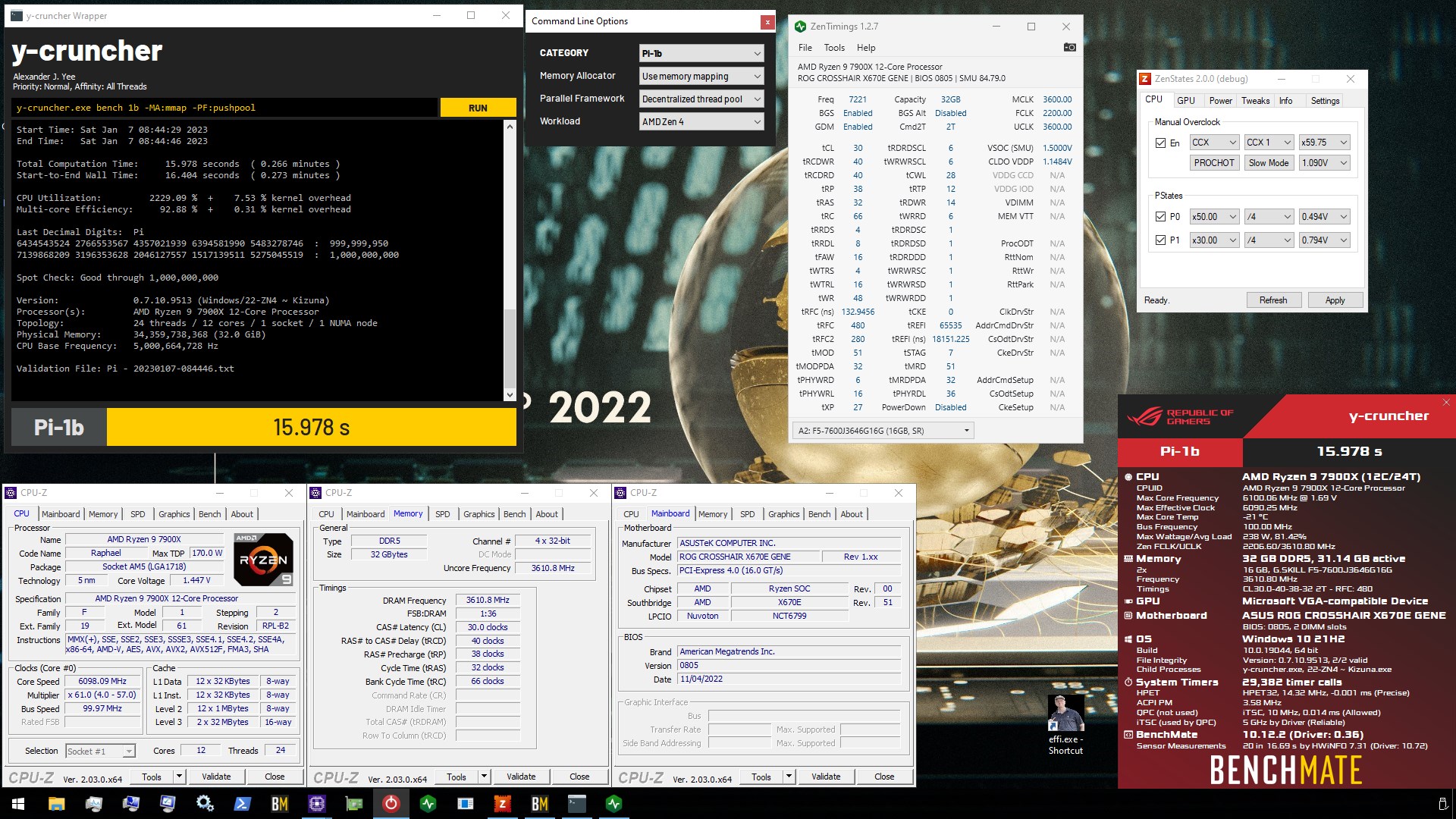

Download BenchMate for free to measure the genuine performance of your system with professional quality
sudden torrent
10b calculation mode, so it's calculating 10 billion digits of pi
latent wave
ill have to go check, whatever the 44gb option is
proven canopy
Yeah, that's 10b
wheat lintel
Is that the 32 or 64Gb kit?
latent wave
the kit
proven canopy
1b needs 4.3GB, 2.5 12 GB or something, 10b 44.3 GB I think
wheat lintel
Finally some competition, I got the same kit that I’ve been working on tuning. Still not done yet
latent wave
wheat lintel
Finally some competition, I got the same kit that I’ve been working on tuning. S...
this exact one https://pcpartpicker.com/product/Xg2WGX/gskill-trident-z5-neo-64-gb-2-x-32-gb-ddr5-6000-cl30-memory-f5-6000j3040g32gx2-tz5n

G.Skill Trident Z5 Neo 64 GB (2 x 32 GB) DDR5-6000 CL30 Memory (F5-6000J3040G32GX2-TZ5N)
sudden torrent
Is a memory overclock ever really done though? There's always one last thing to tweak, one last voltage to bump...
wheat lintel
Yep that’s the one I also got
sudden torrent
And oops now there's a bios update so you have to start over
wheat lintel
sudden torrent
Is a memory overclock *ever* really done though? There's always one last thing t...
Exactly why I ain’t done
latent wave
wheat lintel
Yep that’s the one I also got
what cpu? does cpu affect these scores?
wheat lintel
I’m on a 13900k
latent wave
7800x3d
latent wave
could we battle over specfic timings?
wheat lintel
Im thinking about buying an AM5 platform in a month or two
sudden torrent
Some timings would be comparable but overall no the two platforms are too different
wheat lintel
^
latent wave
i support, 7800x3d ftw(3)
latent wave
it is very much a gaming cpu ye
sudden torrent
I disagree, it's also useful in some AI processing
wheat lintel
Isn’t AI mostly gpu?
latent wave
sudden torrent
I disagree, it's also useful in some AI processing
isnt ai mostly gpu? And wouldnt the more core 7950x3d be better?
wheat lintel
Personally for me, 13900k whoops anything else out there
latent wave
crys but 13900KS
wheat lintel
Better silicon and that’s it
sudden torrent
How's your power supply holding up with that OC 13900K? 
latent wave
or get a KF cause some of those are just KS with a failed igpu
wheat lintel
sudden torrent
How's your power supply holding up with that OC 13900K? <:kekw:74167835079108199...
Perfectly fine actually LOL
latent wave
how ru cooling it?
 latent wave
oh nice
proven canopy
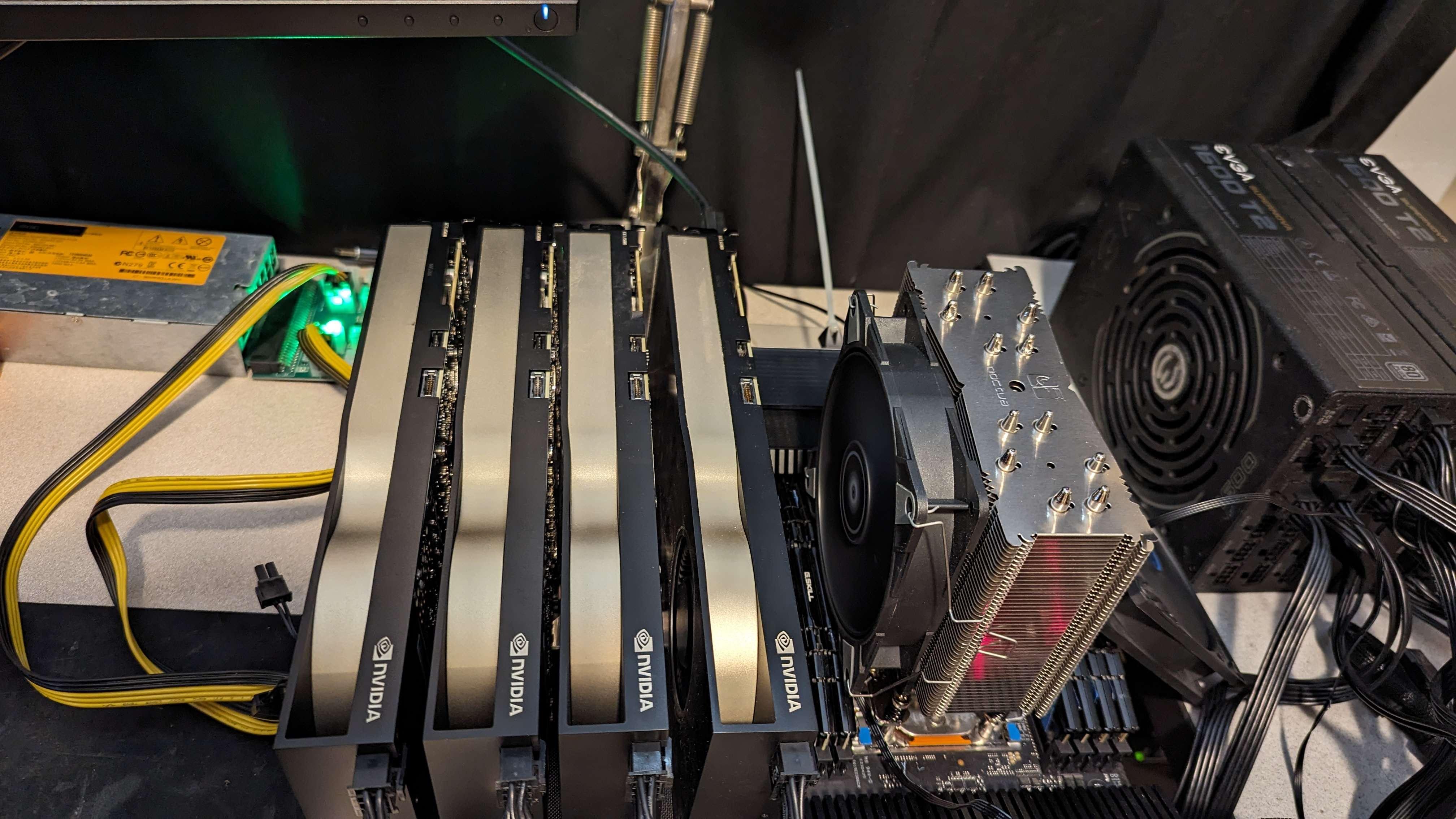
At least you only have to use a single psu 🧯 https://i.imgur.com/kO48gP9.jpg
 wheat lintel
proven canopy
At least you only have to use a single psu 🧯 https://i.imgur.com/kO48gP9.jpg
wheat lintel
proven canopy
At least you only have to use a single psu 🧯 https://i.imgur.com/kO48gP9.jpg
I accept donations
latent wave
sidenote, anyone know if college dorm wattage usage is monitored or can i crypto mine off the free electrictiy
proven canopy
I could've run two, but the cables didn't reach
wheat lintel
latent wave
sidenote, anyone know if college dorm wattage usage is monitored or can i crypto...
They’ll find you eventually
We did it, and we got shut down after a few weeks
proven canopy
latent wave
sidenote, anyone know if college dorm wattage usage is monitored or can i crypto...
Have you calculated how much you'd make off only 15 amps worth? And what temp that'd make your room?
latent wave
i need the 4090 for excel
mental turret
wheat lintel
I accept donations
would you like me to donate something to you
wheat lintel
mental turret
would you like me to donate something to you
Depends
4090 sucks for mining
sudden torrent
proven canopy
Have you calculated how much you'd make off only 15 amps worth? And what temp t...
If you can even pull 15A on the shared circuit
sudden torrent
Roomate turns on a microwave and power goes out lol
wheat lintel
My suitemates moved into my room when we were mining because their room was unlivable
proven canopy
Mythical ran cables in from his neighboring rooms through the drop ceiling and ran a few KW of antminer asics
wheat lintel
proven canopy
Mythical ran cables in from his neighboring rooms through the drop ceiling and r...
LOL
latent wave
sudden torrent
Roomate turns on a microwave and power goes out lol
actually yes, i am conserned if i am playing fornite and roomate needs his daily dose of ramen
proven canopy
Modded?
wheat lintel
I replaced the thermistor circuit in them to let me cool lower than 60F
proven canopy
And you need two of them? Do you live in phoenix?
wheat lintel
proven canopy
And you need two of them? Do you live in phoenix?
Nah, that’s just me liking overkill
And they were cheap
I live in NY
proven canopy
I just chopped the ntc thermistor off my 15k unit - soon to be single stage
Found it in the shed, just needed a $15 capacitor
wheat lintel
I can get my ambient to be around 5-6C
proven canopy
What refrigerant do they use? I assume r410a?
wheat lintel
Middle of the summer in a winter jacket
wheat lintel
proven canopy
What refrigerant do they use? I assume r410a?
Should be, yeah
Only issue rn is sometimes dealing with the radiator fins freezing over
Well coils but it spreads to the fins too
latent wave
proven canopy
4090 makes $.30+ an hour on vast.ai
thats enough for free games
plus im going to school up north so its mostly cold
wheat lintel
I go to school in upstate NY, and it still gets extremely hot if mining
We were mining in -20F weather and the room still was hitting almost 100F sometimes
sudden torrent
Run it 24/7 getting $0.30 an hour and you can get a $60 game every 8-9 days
Not including transaction/pool fees so probably closer to 9
wheat lintel
@mental turret https://www.ebay.com/itm/115872849770

eBay
Find many great new & used options and get the best deals for Lot of 3,802x RAM | DDR DDR2 DDR3 DDR4 | SK Hynix Samsung Micron Kingston Axiom at the best online prices at eBay! Free shipping for many products!
Found something for you
sudden torrent
A bunch of it is sodimm though

But jfc 1152 DDR3-1600 sticks
Offer 3k and they might just take it
wheat lintel
Now if we all pitch in a bit we could get a wegg hwbot team ram stash
sudden torrent
The question is who gets to store all those sticks
That's a few square feet worth of ram
Ooh and I just realized we have no way of telling if any/all of it is rdimm
Like those 16GB DDR3 sticks could totally be ECC RDIMM
kind walrus
Let's store it in Australia
this is by far the most central place for the Newegg HWBot American team
wheat lintel
Airport ram OC go hard

 sudden torrent
"The terrorists have won this round"
Old lady next to you starts panicking
ancient bridge
LMFAOO
alpine mantle
💀
wheat lintel
 zenith palm
just dont play CSGO <:brrrr:1115231149782999101>
zenith palm
just dont play CSGO <:brrrr:1115231149782999101>
That’s the only game I got installed on this laptop 💀
sudden torrent
I think my next benching platform will be my old laptop, if I can get the GPU to play nice with Windows.
There's not a lot of S1G4 processors that have been benched on hwbot, so I stand to gain tons of points if I just buy up all of the processors that can fit in the socket.
Cooling is easy, I already replaced the stock fan with a better one and the laptop is sadly limited to 35W processors. Which isn't too bad considering it came with a 25W single core model. (If only I could find that old processor... I'd bench it too)
A quick bios mod (and hopefully not bricking it) and I should be able to do some minimal overclocking at least.
Each processor is an easy on the wallet $15 or less
sudden torrent
Yeah I TRIED THAT remember?
 sudden torrent
$15 is a lot cheaper than $90
sudden torrent
You know your laptop is slow when 3dmark's recommended bench is ice storm
ancient bridge
sudden torrent
$15 is a lot cheaper than $90
nuh uh
 ancient bridge
mental turret
3dmark doesnt reccommend a bench because my laptop doesnt work
ancient bridge
mental turret
3dmark doesnt reccommend a bench because my laptop doesnt work
I cant wait till it is
x79 lappy seems fire
mental turret
assuming i can fix it
theres basically 0 info on this laptop when it comes to repairability
these things are so rare these days
no parts for it either, or they're insanely marked-up
sudden torrent
All it can run is Ice Storm and Cloud Gate, no DX11 
And cloud gate runs at 3 fps
A whole 720 pts
644 on graphics
proven canopy
I think there's a steam achievement for 666 points TS or something
sudden torrent
I think there used to be but it's not showing any more. There used to be one called "leet treat" if you get a score that had 1337 in it too.
3dmark '05 runs at a solid 15 fps
On a laptop from 2010
ancient bridge
sudden torrent
On a laptop from 2010
That is incredibly sad
sudden torrent
It's ok I'll figure out what part of this encrypted bios is controlling the GPU clock speed and I'll get it from 505 to 550 at a minimum, I'm just running baseline stuff right now
I already got as far as decrypting it, now I play around
Cooling isn't an issue, I'm hovering at about 60C with zero help or mods
latent wave
should I disable ECC in bios for my ram.
Like I assume ECC would slow it down a but at the same time I will be using this pc to run science stuff in R
sudden torrent
ECC does slow it down a bit but if you need your calculations to be exact it's worth the trade
sudden torrent
Probably nothing noticeable
sudden torrent
And I've just discovered that Afterburner can overclock my GPU after enabling "extend official overclocking limits" and "unofficial overclocking mode" 
No bios modding required
latent wave
heres an odd one. I set tCL to 30 in bios, boots as cl40.
all other timings are set to the what I set it to
latent wave
huh, cl38 boots as 38
sudden torrent
I've never seen a fps counter just read "0" before but apparently 3dmark vantage will on this gpu. I'm running at about 2 seconds per frame.
latent wave
spf
short blade
i got a reading of 0.3 fps in time spy extreme
3 seconds per frame lol

3DMark.com
AMD Ryzen 5 1500X, AMD Radeon R5 240 OEM x 1, 16384 MB, 64-bit Windows 11}
sudden torrent
I wish I could run time spy and see how bad it is but no dx12. Just 10.1 😭
Welp the test finished after running for 20 minutes and producing a total of 682 frames
It gave me an error saying to lower the preset lmfao
wheat lintel
What gpu?
wheat lintel
Ahh
I’m boutta be in the same boat with my FX3800 lol
Except it doesn’t even have DX10
wheat lintel
Yep that’s it, weird everywhere I’ve seen says it only does DX9
sudden torrent
It's feature level is 10 though so it'll struggle in anything running 11
Like how mine is only feature level 9 but supports 10.1
Oh hey your FX card has the same performance as my 5770
1GB gang
sudden torrent
Seems easy enough

 sudden torrent
Not by modern standards but yes
I'm sure you can get some floss in there while you have the heat gun going, should be pretty straightforward
wheat lintel
Do you think I’d see an improvement in temps?
sudden torrent
If you get a good mount sure
finite frigate
wheat lintel
Do you think I’d see an improvement in temps?
if you can get the cooler on
sudden torrent
Oh what have I done? I started a pcmark vantage test and it's estimating it'll take 2 hours to complete...
Whatever I'll run it overnight
finite frigate
lol
latent wave
anyone else pay the $5 in the mail to memtestpro. It screams scam to me
zenith palm
Now that's what i call sus
finite frigate
latent wave
anyone else pay the $5 in the mail to memtestpro. It screams scam to me
mem test pro proves.... ineffective in my testing
buy karhu ram test
finite frigate
tm5+anta extreme1/pcbdestroyer if youre not using karhu
ycruncher is good, probably wont guarantee stability
latent wave
ok
also side note, i got an y cruncher error after 2.5 hrs on cl38, my kit should be cl30. oh well
finite frigate
latent wave
also side note, i got an y cruncher error after 2.5 hrs on cl38, my kit should b...
you can see full timings with zentimings if on amd or asrock timing configurator on intel
 latent wave
yeah im using zen timings
latent wave
finite frigate
zen timings or bios
its weird, i set it to cl30 in bios, and it boots as cl40
finite frigate
really weird, what board is this?
latent wave
ace
finite frigate
ace is doing this?
finite frigate
try 32,34,36, etc yknow
latent wave
G.Skill Trident Z5 Neo 64 GB (2 x 32 GB) DDR5-6000 CL30 Memory (F5-6000J3040G32GX2-TZ5N)
like i already got it faster than expo thanks to actually hardcore oc but a bit annoying
finite frigate
are you trying like flat 30s or 38's?
this is a hynix kit, you wont be able to do flat timings
ex: 30-30-30
latent wave
sorry not familar with the lingo, flat means all primary timings are the same?
finite frigate
yeah
latent wave
whats the name of primary timings again i dont wanna pull up bios during my stress test
 latent wave
so i have 40-40-40-28
finite frigate
you can just like screenshot your zen timings
latent wave
sry was looking for them but i got it
finite frigate
latent wave
so i have 40-40-40-28
i think your issue is that youre probably trying flat timings instead of tailoring to hynix's usual behavior
you could try 36-40-40
but honestly, probably not worth it
if you tuned anything else
latent wave
ive done very loose tuning following this guide https://www.youtube.com/watch?v=dlYxmRcdLVw&pp=ygUtZXogbWVtIHRpbWluZ3MgYWN0dWFsbHkgaGFyZGNvcmUgb3ZlcmNsb2NraW5n

Text version: https://www.patreon.com/posts/low-effort-rank-77403831
My Patreon: https://www.patreon.com/buildzoid
Teespring: https://teespring.com/stores/actually-hardcore-overclocking
Bandcamp: https://machineforscreams.bandcamp.com/music
Twitch: https://www.twitch.tv/buildzoid
Twitter: https://twitter.com/Buildzoid1
Facebook: https://www.fa...
latent wave
finite frigate
but honestly, probably not worth it
but if cl38 gave me errors, why would 36 be stable?
finite frigate
latent wave
but if cl38 gave me errors, why would 36 be stable?
cause i think you were trying flat timings, so 30-30-30, and whatever else you tried
latent wave
38-40-40 is flat?
latent wave
yes
38-40-40-28 gave me the error i mentioned in y cruncher
latent wave
i never actually stress tested 40-40-40-28 so let me run that for 8 hrs
zenith palm
latent wave
is y cruncher fine?
ive been told if doing y cruncher, use FFT only if youre testing timings
latent wave
so my pc randomly shut off during y cruncher lol
its an Event 41: kernal power. Guessing my ram oc istn stable
let me try tm5 and see what happens
 sudden torrent
It has a finishing point where the test completes
Depending on size and speed of memory it can take 1-3 hours
sudden torrent
You can always run ycruncher vst for as long as you want
It stops automatically on any errors too so you'll know by the fan noise dropping lol
zenith palm
On 13th gen ddr4, trying to lowerr trcdw(r?) from trcd(rd?) But it just is keeping the same timing as the trcd any ideas?
short blade
this OEM board has some fascinating bios settings


 finite frigate
short blade
this OEM board has some fascinating bios settings
finite frigate
short blade
this OEM board has some fascinating bios settings
its kinda dope tbh
sudden torrent
Asrock OEM PG board goes hard
sudden torrent
Because you want to know what's the best you can do in any situation, whether that's a latency or raw bandwidth sensitive application
finite frigate
sudden torrent
Because you want to know what's the best you can do in any situation, whether th...
ok fair
i do want to see latency on gear 2 high freq
i'll be mad at myself if i end up dailiying gear 2
god damnit the latency is kinda close
55ish ns vs 45ish ns on g1 full tune
and im not even done
💀
sudden torrent
That is 20% more latency though
finite frigate
if this ends up as a usable stable tune... maybe
4533 is a cool not loser freq to daily like 3733 is
gear 2 instabilities are what scare me
ancient bridge
ancient bridge
I'd go with gear 2 🌚
(Praying on your downfall)
kind walrus
4533 gear 2 sounds like it'll be a bit better
finite frigate
gear 2 is impossible to get fully stable
idk, we'll see how this ends up
4533 just sounds cooler than basic 3733
finite frigate
4800+ is impossible to get stable on 4 dimms
i can do it on 2
but i dont have 16gig dimms
ancient bridge
finite frigate
4800+ is impossible to get stable on 4 dimms
Was kidding
finite frigate
finite frigate
4800+ is impossible to get stable on 4 dimms
errors in pcb des in like an hour
ancient bridge
Stable
finite frigate
thats like 24 cycles but still
short blade
sudden torrent
Asrock OEM PG board goes hard
it's not even a PG board
it's a Z590-c/ac
bottom of the barrel
sudden torrent
Phantom Gaming is on the top of the bios, PG
short blade
look how long 64gb at xmp takes to test lmao
 short blade
sudden torrent
Phantom Gaming is on the top of the bios, PG
short blade
sudden torrent
Phantom Gaming is on the top of the bios, PG
it's a PG bios but not a PG board
sudden torrent
Wack
finite frigate
short blade
look how long 64gb at xmp takes to test lmao
jesus
are they doing 10th or is this rkl based?
finite frigate
short blade
look how long 64gb at xmp takes to test lmao
990 trfc i smell hynix

it is dripping hynix
 ancient bridge
Command rate 2 cringe
finite frigate
dr, 32gb dimms cr1 likely isnt possible]
latent wave
Turns of the ez mem tuning by actually hardcore oc is not stable on my ram
sudden torrent
Especially not at 7200MT/s
finite frigate
sudden torrent
Especially not at 7200MT/s
thats 3600
asrtc doesnt do real freq it does effective
finite frigate
latent wave
Turns of the ez mem tuning by actually hardcore oc is not stable on my ram
tbf he did say it was for single rank 16gb dimms lol
sudden torrent
Ah right it's DDR4 I forgot
finite frigate
mhm
latent wave
That’s fine, I’ll use expo as a starting point
sudden torrent
I just glanced at it lol
finite frigate
latent wave
That’s fine, I’ll use expo as a starting point
this is the way brother
you can use stuff as a basis, but better off seeing how the die behaves online then tuning from recorded behavior
latent wave
Is one cycle of the extreme atat77 stable or should I do multiple. Currently at 2 hrs no errors
latent wave
So it’s normal for it to cycle a few times, got it
finite frigate
i believe extreme1 is 3 or 5 cycles
sudden torrent
That depends, how stable are you looking for? If you need it gaming stable, then once the test finishes I'd call it good. If you need it production stable, you need a 48 hour test minimum.
finite frigate
latent wave
So it’s normal for it to cycle a few times, got it
mhm, some tests even have over 32 cycles
my preferred short-test is 32 cycles and takes about an hour and 40 minutes to complete fully on 32gb
latent wave
I currently only need gaming
latent wave
I could always revert to expo for productivity stuff
short blade
finite frigate
are they doing 10th or is this rkl based?
10700K
finite frigate
oh
short blade
found something interesting btw
sudden torrent
Production you want to revert to jedec tbh, even expo needs to be tested in serious workloads
finite frigate
i have no doubts that a 10700k could struggle with 64gb at 3600 xmp
short blade
the 3090 was black screening at +0/-502 any time it went past idle clocks
finite frigate
short blade
the 3090 was black screening at +0/-502 any time it went past idle clocks
eeeeeeeeeeeee yikes
short blade
thought it was a degraded gpu or vram
but I raised VCCIO when I applied XMP and now it's running +105/+1200 perfectly stable
finite frigate
yeah sounds about right
sudden torrent
Wait what
finite frigate
10th+ high capacity doesnt sound fun
short blade
went from 600 driver crashes at +0/-502 to running max load with an overclock
finite frigate
sudden torrent
Wait what
unstable ram causes gpu drivers to have a flip
happens when i try too aggressive settings
short blade
finite frigate
unstable ram causes gpu drivers to have a flip
that was with ram at 2133 jedec
now it's at 3600 XMP
already stability tested the ram, it's fine
finite frigate
yeah i still think the imc was having a flip
64gb does not sound fun
id up SA too
sudden torrent
I agree the IMC was trippin but I guess the memory was so slow it didn't affect that
short blade
the auto VCCIO was 0.96v, I'm wondering if VCCIO affects the GPU even if ram is stable
finite frigate
possible
short blade
VCCSA/VCCIO autoed to 1.04/0.96 at 2133 jedec
finite frigate
.96 is lower than it should be from factory iirc
short blade
no
finite frigate
interesting
short blade
10th gen datasheet says 0.95 for up to 2933 jedec
finite frigate
interesting
short blade
I was lowkey surprised that 1.15/1.15v is enough for 64gb 3600
finite frigate
sounds about right, if its xmp i dont imagine the imc is wanting to die
if you were tuning id tell you to send like 1.3/1.3
idk cml behavior very well
i can help a bit with rkl stuff tho
and kaby
short blade
I wonder what auto would be
finite frigate
despite my hatred for kaby
short blade
I don't think CML is very different from KBL
finite frigate
memory controllers are very different
short blade
same architecture just refined
pretty much just the same memory controller with higher clock expectations no?
the boards are better on average too
finite frigate
10th lacks io2, and has lower voltage tolerances on sa in general
i wouldnt feel comfortable sending 1.6 through a 10th gen imc
short blade
huh, I didn't see something named IO2 on either 7700K I used
short blade
short blade
I don't think CML is very different from KBL
KBL is kaby lake
short blade
lol
short blade
I have experience with 11th gen too sir
finite frigate
im able to get some ok freq on kbl
short blade
well both of my 7700Ks were on midrange Z170 so
finite frigate
3600 worked instantly on my z270 tomahawk
short blade
not good for ram oc lol
finite frigate
def not lol
short blade
Z270 was a big improvement since Z170 was first gen ddr4
both of them were stuck at 3200
finite frigate
finite frigate
3600 worked instantly on my z270 tomahawk
and people got 4000 on good dimms
short blade
I was also using very low end ddr4 kits so
finite frigate
i dont have good test dimms for my kbl rig
short blade
maybe they could have done better with better kits
finite frigate
perhaps
finite frigate
and your 4080 is still faster 💀
short blade
about to have to restart occt cause it's hitting the 1 hour mark
well my 4080 does +1675
finite frigate
my 2070s does something silly
i forgor
i dont daily oc on my 2070s
i do power limit undervolt lol
with basic 750mem offset
short blade
it finally crashed at +1600
finite frigate
1400 it is
short blade
probably +1550 is stable and peak perf is somewhere between 1500-1550
finite frigate
wanna know whats funny
my re-tune of 3733 is better in every way besides twr and trtp
so re-tuning was actually worht it
considering i shotgun clocked like crazy
idk how it was ok for so long before finally showing instability
i need to look more into rev.e behavior but i cant find toooo much
kind walrus
short blade
probably +1550 is stable and peak perf is somewhere between 1500-1550
If it's anything like mine, I was stable up to about 1600, but perf regression started after 1150
short blade
interesting
kind walrus
You can run it higher with ecc enabled but slower perf
Or well, I can
I have a sample size of 1 for Ada
short blade
this isn't ada
it's a 3090
my 4080 does up to +1750 stable but peak perf is at +1675
kind walrus
Oh I thought you meant the 4080 mb
finite frigate
i havent properly overclocked my 2070s yet
short blade
my 4080 also has no ECC option
finite frigate
ram and cpu oc is so much more interesting
kind walrus
Interesting
short blade
there are 2 SKUs of 4080 and mine is the newer one
kind walrus
Yes ga103
short blade
I only found that out because I couldn't flash the vbioses from TPU lol
no
not that
kind walrus
Oh
kind walrus
Oh oops
short blade
maybe it's disabled on 301
 finite frigate
301-0 should be a better bin overall or something
short blade
but yeah
finite frigate
nvidia revisions are really weird
short blade
I couldn't flash any vbios on tpu database
finite frigate
yeah cause they have press samples
kind walrus
Might be something significant to it
short blade
I had to get an unverified vbios
kind walrus
Ah
short blade
I don't really have a reason to open the card
finite frigate
short blade
I had to get an unverified vbios
im happy i already have the best possible card model
short blade
temps are perfect
finite frigate
i just recently opened my 2070s lol
short blade
I'm not enough of an enthusiast to hope repasting drops my temps from 45.5c to 45.4c ngl
finite frigate
evga's factory paste is balls
short blade
bigger chance that I make it worse than better lol
I'm sure someone else has cracked open a 301
finite frigate
you never know how bad the factory mounts are
short blade
I think asus is pretty good at that
short blade
when I repadded my 3090 strix I had to repaste it too obviously
but I could never get the hotspot delta as good as it was from the factory after that
finite frigate
💀
short blade
well, that could partially be because more heat was being removed from the vram into the cooler too
short blade
but from the factory the hotspot delta was like 17c and after repasting it was 18c
short blade
hmm
150 is kinda high, not the best board
offer 130, see if they'll accept or counter 140

 short blade
this zotac 3090 is officially a better sample than my strix 3090
short blade
it's doing 1905mhz at 906mv
my strix did 1905mhz at 925mv
finite frigate
finite frigate
and it doesnt have the mounting hardware
short blade
ehh that's not hard to replace tbh
like $7 on amazon or $3 on aliexpress
gotta factor it into the price though
finite frigate
fair
short blade
or if you get a cooler that doesn't use the stock backplate you're fine
finite frigate
its almost worth it to me but i want ryzen 5k
short blade
lol, maybe you can eventually pop in a 5800x3d and daily it
finite frigate
that chip is too expensive for me to want to daily it
short blade
pointless before a gpu upgrade though
finite frigate
300$ chip that has no oc benefit
short blade
eh, you can still pbo it and bclk on some boards
finite frigate
true, but oc is why i own intel lol
short blade
in a way it's kind of nice how easy it is to get the 5800x3d stable
finite frigate
this 11700k is the most fun ive had overclocking
it takes whatever voltage i want and is relatively cool in most workloads
2700k was really fun too cause it was the same way
i'd enjoy ryzen to learn its memory oc behavior
short blade
honestly, there's not much to it
it's easier than intel
but yeah can be fun to experience new platform for the first time
finite frigate
i just dont want to spend 500$ for a "science" scenario
my rev.e stops scaling past 1.6
odd
short blade
have you set VTT?
finite frigate
no actually
finite frigate
where the balls is that in giga bios
finite frigate
short blade
try 0.7
wouldnt it be less?
short blade
doing literally anything in gigabyte bios = lol good luck
finite frigate
VTT is half of ddr voltage by jedec
finite frigate
ight 💀
short blade
rev. e likes low VTT
finite frigate
next time i bios
short blade
it's possible your kit won't be the same, but it's worth a shot
finite frigate
ill play with vtt
i know a lot of boards dont like going below half of vdimm though
since half is jedec spec
short blade
btw, it's entirely possible that lower than 0.7v will be better
I'll leave that to you to figure out
finite frigate
yeah
short blade
0.7 is just a good starting point
finite frigate
more voltages yay 😐
i hate rev.e
why didnt i buy bdie
its so easy to get into at first but once you want to tune tune
its
unfun
oh you want lower than 500 trfc? no
you want a respectable trcd value? no
lower than 36 tras?
no
alright i found VCCVTT
oh there’s the real one
dram termination
sounds about right
latent wave
I have no of errors

 scenic vine
Vtt may or may not matter depending on the the chips
Iirc older micron was a lot more sensitive to high vtt when it came to clocking
finite frigate
i have 2022 3200 C16 C9BLM rev.e
finite frigate
scenic vine
Easy enough to test though
yeah doing that now
scenic vine
What are you trying to achieve
finite frigate
seeing if my board will allow 5000 on 4 dimm