#overclocking
1 messages · Page 21 of 1
 wheat lintel
 kind walrus
I thought you use ddr4 now
 mental turret
kind walrus
I thought you use ddr4 now
mental turret
kind walrus
I thought you use ddr4 now
both
kind walrus
Ah I'm disappointed
mental turret
well i have a couple dimms that are ddr3.5
 eternal relic
far, can u actually throw things far? if so, throw ur ddr3 collection into the ocean to prove it 🙏
kind walrus
mental turret
well i have a couple dimms that are ddr3.5
Oh you mean like samsungs s16b
 short blade
but seriously, where did dell find 40-39-39? is that an actual jedec spec?
mental turret
mental turret
well i have a couple dimms that are ddr3.5
@kind walrus
 kind walrus

 alpine mantle
Bruh me don't know
mental turret
same ICs they used on ddr4
short blade
anyone pay like $2849058902 for the jedec pdf?
alpine mantle
Dell made my i3 10100 prebuilt run 2666mhz at ass timings
 short blade
mental turret
same ICs they used on ddr4
short blade
mental turret
same ICs they used on ddr4
how does that even work
eternal relic
im sure i can find some goober on hwbot with the ddr5 jedec files
mental turret
short blade
how does that even work
same dram package, ddr3 pinout
kind walrus
Wow that's like, almost as fast as 3200
alpine mantle
Imma see if i can attempt 4000MHZ CL17-17-17-40
short blade
is 40-39-39 an actual jedec spec or is dell just being silly goofy? the only 4800 40-39-39 kit i can find is a ripjaws sodimm kit
alpine mantle

kind walrus
short blade
is 40-39-39 an actual jedec spec or is dell just being silly goofy? the only 480...
Hol up lemme get my sodimm kit out
short blade
"insane, the peak of ddr3 manages to match early hynix afr 3200 poop bins 😍"
there you go
short blade
that's not it
kind walrus
Have to look on the laptop ig
short blade
they just haven't heard about the other timings yet
why do you think corsair xmp crashes so often
please be patient they are learning
alpine mantle
Ram checking makes me sweat
 kind walrus
alpine mantle
Ram checking makes me sweat
kind walrus
alpine mantle
Ram checking makes me sweat
Bro go do some exercise
short blade
condiments spotted
alpine mantle
kind walrus
Bro go do some exercise
I already am with this horrible ah ambient temp in my room
kind walrus
Open a window
short blade
every night i open my balcony door wide open from 9pm to 9am
alpine mantle
kind walrus
Open a window
I'll open you instead
short blade
resets my room to like 20c
alpine mantle
Sheesh

 alpine mantle
Ok its probably not tras
short blade
one of my friends had that kit
kind walrus
it's in the spd
short blade
kind walrus
it's in the spd
damn, i thought dell was gaming 😔
alpine mantle
Rated E die and up
wheat lintel
…I’m going to shoot myself
I updated my bios, lost my profile I had saved for my DDR4
I know, I’m just lazy
And also I need to figure out my RTTs and 💩 again because I don’t have a screenshot of those
 ancient bridge
wheat lintel
I updated my bios, lost my profile I had saved for my DDR4
ancient bridge
wheat lintel
I updated my bios, lost my profile I had saved for my DDR4
Same thing happened to me
😒
Luckily u had an asrock timing screenshot
wheat lintel
Ram has been delidded

Well, half delidded
Other half doesn’t want to come off but single rank sticks so I doubt it’ll matter
mental turret
wheat lintel
Ram has been delidded
With what
mental turret
wheat lintel
Other half doesn’t want to come off but single rank sticks so I doubt it’ll matt...
Wait why'd you delid to begin with
wheat lintel
mental turret
Wait why'd you delid to begin with
Better temps
wheat lintel
mental turret
With what
Used a hot air station
Turns out there was no thermal pad between the die and heat spreader
mental turret
wheat lintel
Better temps
Really? What was the heat spreader on it lol
wheat lintel
mental turret
Really? What was the heat spreader on it lol
Some thin piece of sheet metal

Don’t question the 3 keyboards
Restarting this ram, started off with GDM off and 1T and it doesn’t error so far
mental turret
And that made temps worse you said?
I guess if there was no thermal interface then thatd make sense
I'd pop it back on with a thermal pad
wheat lintel
I got a P14 blowing over the ram, having it delidded is the better option I think
Either way, I slapped on the timings of my old time and it’s letting me do GDM off now
No idea how that works but I’ll take it
wheat lintel
 latent wave
why are u cooling your 3rd keyboard
latent wave
why are u cooling your 3rd keyboard
Lol that ain’t plugged in
It’s kinda just there
latent wave
buddy u gotta keep your fingers cool or else your gaming will throttle
fan = better gamer
 signal belfry
Watercool the ram
kind walrus
Air cool the fingers for less reaction throttling
mental turret
signal belfry
Watercool the ram
 mental turret
 alpine mantle
Its not being detected anymore, and booting takes forever to load up bios
Damn my whole windows is gone
 signal belfry
alpine mantle
Bro i think my nvme died after the ram oc
signal belfry
alpine mantle
Bro i think my nvme died after the ram oc
How do u break an nvme with a ram oc?
alpine mantle
I have no clue
Usually if the ram corrupts the nvme or any other drive the data is lost, but the drive aint dead
signal belfry
My guess is that the nvme didn’t have dram on it so it was using your boards ram
alpine mantle
I mean if i can remember, the pc didn't boot at 4000 CL17-17-17-40 and the led indicator wasn't on, so i turned off the pc, removed one ram stick and turned it on so the motherboard can revert back to ram default
alpine mantle
signal belfry
My guess is that the nvme didn’t have dram on it so it was using your boards ram
My mp34 has dram tho
It takes MINUTES to boot into bios
wheat lintel
mental turret
Time to custom loop
mental turret
If I daily'd 4x8GB bdie for some reason I probably would considering I wanted to custom loop anyway at some point
though id rather daily 4x16 M16B
or 2Rx8 S8B
whatever gives me capacity and isnt slow lol
alpine mantle
signal belfry
If it’s the same might be the os
No, as i said its not showing up on the bios anymore
signal belfry
Oh that’s very weird for a ram oc
I’ve never heard of that before but u could try like reinstalling your bios
Might fix it
alpine mantle
Yea im reverting the bios right now
And the last thing i would do is create a windows installation on my usb to see if the drive is there
If it is, it means all data is corrupted/gone
If its not, then its dead
Reverting bios didn't do anything, so its def not a bios issue
ancient bridge
Bro broke the 4tb
alpine mantle
Not the 4tb
The 1tb (boot drive)
To be honest, i doubt it was the ram that killed it but the fact that it was too hot
The funny part that it has a capable heatsink but I've put it through numerous cpu stress testing
But i dont know yet
alpine mantle
Alright.. I got my answer, the drive is dead
-Its not detected in bios
-Its not detected in the windows setup tool
-It does not work in nvme slots 1/2 (didn't try the rest since im lazy to remove the others)
-Reverted bios
-Cleared cmos
-checked the DP cable (i heard it can cause a problem for some reason)
I guess i should avoid teamgroup mp34 or something
Because ain't no way a ram oc (not even changing trefi) can damage it so hard it craps out
Guess I'll get an extra drive for backup purposes
ancient bridge
alpine mantle
I guess i should avoid teamgroup mp34 or something
I think
I think it was a user error
ancient bridge
alpine mantle
Ok then
Yeah idk just really weird lol
alpine mantle
It's not the first time a ram oc almost broke it
But it was a quick fix
Now, its an entirely different issue
I'll just avoid this nvme from now on
short blade
did you happen to touch bclk at all
alpine mantle
Bro no
BCLK lock on 100mhz was enabled though
But i had this on for MONTHS
I'm conflicted if i should RMA it or consider buying a different nvme drive
@short blade
signal belfry
alpine mantle
I'm conflicted if i should RMA it or consider buying a different nvme drive
I’d go different nvme drive
The price differences between brands for 1tb nvme is like 5-10 bucks
So I’d go Samsung they’re the best
alpine mantle
yea thats what im thinking, silicon power has never let me down (YET)
i heard samsung was pretty good too
short blade
i dunno, probably a one off
how many team mp33s and mp34s have we recommended on this server
alpine mantle
i have an mp33 for emulation and it still works (for now)
 sudden torrent
I got 3800 c12 gdm off to boot at 1.7v. It wasn't stable but dang that's the best I've ever booted.
 restive cargo
I'm just so out this game in the OC world it's sad
sudden torrent
sudden torrent
I got 3800 c12 gdm off to boot at 1.7v. It wasn't stable but dang that's the bes...
Ok so I've determined that it's temp sensitivity that's keeping that from being stable. Dropped the voltage. 3800 was bench stable but failed stress tests, so I'm sticking with 3600 for now. I'm at 14-12-13-28 so far.
Next step would be a delid and/or water cooling.
I'm 100% sure it's the adata sticks because of the RGB on top
eternal relic
disable rgb or set it to red

 proven canopy
Do that through zenstates instead
wheat lintel
Zen states?
Also I tried using PBO and for some reason, I try to launch and my ram OC isn’t being applied
But it’s being applied when PBO is off
sudden torrent
Here's where I landed. Passed 2 hours of VST but there's some retrain instability. I think I'll leave GDM on for daily.
 sudden torrent
Considering minimum tRAS = tRCD(RD) + tRTP, I could set it lower but the IMC won't let it be lower
Right, I could set it lower but it won't do anything since tRAS is the time between ACT and PRE commands (ACT to READ = tRCD, READ to PRE = tRTP)
lol
Alright I'll set 21 just for you
Indeed
But it would use the actual tRAS, not the fake one I set right?

 wheat lintel
sudden torrent
Can't get tRC lower?
Dem terts tho
wheat lintel
sudden torrent
Can't get tRC lower?
Dem terts tho
I lose performance if I bring it down
wheat lintel
sudden torrent
Must have the voltage pretty high too
1.55V
My board won’t let me, minimum of 2
short blade
vbios flash success
 alpine mantle
I managed to get 4000MHZ CL18 on my ram oc
So far it did Y-cruncher VST for 2 hours which is enough for me
Im playing it safe now as im using a flash drive (windows 2 go) for oc and bench purposes only... I won't let a drive fry again
 short blade
time to see if this 4080 is a good sample or not
restive cargo
Believe and it will be
short blade
it's a good sample
 short blade
need to figure out why my CPU is not passing the CPU test portion of time spy rn 💀
getting solid graphics score though
should be #1 on hwbot
sudden torrent
Doesn't hwbot require ECC to be on
short blade
wdym?
sudden torrent
For the 4080/4090
short blade
vram ecc?
sudden torrent
Yes
sudden torrent
No
short blade
how do I turn it on then
I'm pretty sure my vram is stable
it's running a bit below the max it can pass with
was testing vram performance sweet spot
do you think my cpu is bottlenecking
 sudden torrent
That is the flattest line I've ever seen
short blade
strix vbios things
sudden torrent
Oh wait that's clocks
sudden torrent
Nah I thought it was frame rate lol
short blade
oh
I actually haven't checked the temps
I assume they're ridiculous
quad slot cooler and I'm running 100% fans
this card is so big I had to remove my bottom fans
sudden torrent
I'm sure it's ridiculously low if anything, they use 4090 coolers on most 4080s
short blade
support bracket more important than 2 bottom fans with a card this big lol

 sudden torrent
Yes it will
short blade
sad
sudden torrent
By about 1500 points or more
 short blade
sudden torrent
nvcp specifically
short blade
sudden torrent
nvcp specifically
where? i don't see it
sudden torrent
Should be below "manage 3D settings" and above "configure surround"
short blade

nope
nothing
i also checked all of the 3d settings
no ecc setting
i'm on the latest driver
i wonder if it's just automatically on since i have the newer revision 4080?
sudden torrent
Hmm, looks like some cards have it and others don't?
All the 4090s have it but not all 4080s
It would say in your timespy results page whether it was enabled, or even able to be used
short blade

3DMark.com
Intel Core i7-13700K Processor, NVIDIA GeForce RTX 4080 x 1, 32768 MB, 64-bit Windows 11}
i see nothing about it
sudden torrent
Yeah that's weird. I saw something about a bug related to this too, but that was back in december. I don't know if it was fixed.
 finite frigate
sudden torrent
All the 4090s have it but not all 4080s
finite frigate
sudden torrent
All the 4090s have it but not all 4080s
i'd imagine strix would since its highest end
 finite frigate
maybe in nv profile inspector
sudden torrent
Well I'd say go ahead and sub it. If it gets taken down you'll be told why.
sudden torrent
short blade
should i be worried about this lol
Nah that's a motherboard setting
finite frigate
they dont take down subs even if it isnt right 💀
sudden torrent
Really? Because I've had subs get taken down
short blade
 finite frigate
ive only had like 2/70 subs get taken down, otherwise i deleted them myself
short blade
nice
 sudden torrent
short blade
sudden torrent
short blade
Motherboard setting, not OS
finite frigate
a good core on 40 series?
sudden torrent
finite frigate
ive only had like 2/70 subs get taken down, otherwise i deleted them myself
It's more likely they get taken down if it's high up on the leaderboard
finite frigate
whats that in percents 💀
short blade
0.66% lol
finite frigate
LOL
sudden torrent
Margin of error, lesgoooo
finite frigate
raaah
 short blade
sudden torrent
Margin of error, lesgoooo
short blade
sudden torrent
Margin of error, lesgoooo
i mean... in benchmarking, 209 pts is not margin of error
finite frigate
bench tse, fse, and fs
finite frigate
what core offset can you do?
short blade
running +165/+1675 with voltage pinned at maximum 1.095v
sudden torrent
I'm surprised I don't see any subzero subs for the 4080
sudden torrent
There's a couple that say they used a chiller but they still had over 50C
finite frigate
sudden torrent
I'm surprised I don't see any subzero subs for the 4080
cant do much with like 420w max
until we get a tdp unlocked vbios from XX brand
or people want to shunt their cards
short blade
being subzero would still help even without shunt
sudden torrent
Sure but putting a pot on it will still let you run lower voltage
finite frigate
im sure a 4080 will draw 800w+ if it could
short blade
need epower too at that point
finite frigate
sudden torrent
Sure but putting a pot on it will still let you run lower voltage
i mean yeah, but what is that getting you, 200mhz?
short blade
200mhz is a lot lol
finite frigate
yeah its a lot but look at ambient vs subambient
sudden torrent
Oh do you mean +200 instead of +165?
finite frigate
no lol
short blade
running TSE now
sudden torrent
200MHz is a huge difference in benches
short blade
man this 4080 is so ridiculously large
makes my 3090 strix look like an SFF card
I actually do not think I could close the side panel even if I wanted to at this point lmao
sudden torrent
I want to do -200 core now to show lol
finite frigate
sudden torrent
200MHz is a huge difference in benches
yes i know that, but if you look at the difference between like a 3090 on and off sub ambient, the clock difference is wild
200mhz is a lot, not as much as it could be though
short blade
whoa, globals
 finite frigate
yes i know that, but if you look at the difference between like a 3090 on and of...
finite frigate
finite frigate
yes i know that, but if you look at the difference between like a 3090 on and of...
the difference is almost 600mhz wr to wr
short blade
damn i have way higher graphics score than the people beating me but my ddr4 is holding me back
finite frigate
short blade
damn i have way higher graphics score than the people beating me but my ddr4 is ...
d4 make me sad :(
 finite frigate
nice
sudden torrent
finite frigate
yes i know that, but if you look at the difference between like a 3090 on and of...
But that's what's so surprising, no one has bothered to sub with LN2 even though there is definitely gains to be had
finite frigate
tse is more fun than ts
finite frigate
sudden torrent
But that's what's so surprising, no one has bothered to sub with LN2 even though...
i think its cause the mountings are different/people want to get the best possible subs
sudden torrent
Gravity mounted pot would still beat stock
finite frigate
so theyre just waiting
finite frigate
sudden torrent
Gravity mounted pot would still beat stock
but is it worth lol
sudden torrent
You're talking to overclockers
finite frigate
i think most of the top ocers would just wait for 4080/90 pots would come out
and time has shown that
lol
sudden torrent
We will double power consumption if it means a 5% boost in scores, worth doesn't matter
 short blade
damn this 4080 is making me want to get ddr5 now
finite frigate
short blade
damn this 4080 is making me want to get ddr5 now
FOR THE BENCH!!!
finite frigate
finite frigate
(at least on time spy)
splave did ln2 4090 on port royal
at almost 4ghz
short blade
this is the most tempted I've ever been to get ddr5 💀
finite frigate
7000 c28 is calling you
short blade
why only 7000 😦
short blade
I wonder if max achievable ddr5 freq and max achievable ddr4 freq on the same chip are correlated
4133 gear 1 is the limit on ddr4 for this chip
sudden torrent
short blade
I wonder if max achievable ddr5 freq and max achievable ddr4 freq on the same ch...
afaik the DDR4 and DDR5 IMCs are physically separate
short blade
I know that
sudden torrent
If they're cut from the same silicon wafer then that would be the only correlation I can think of
sudden torrent
Why not get DDR5 and find out if there is (at least on your chip)
short blade
another front pager
 sudden torrent
Noice
short blade
sudden torrent
Why not get DDR5 and find out if there is (at least on your chip)
I am poor
it makes so little sense to swap out this working z690 and 32gb b-die
sudden torrent
So then stop being poor? Just get more money? If you're homeless just buy a house? /s
short blade
ahh you're right it's that damn avocado toast stopping me from buying an apex
finite frigate
SO TRUE
sudden torrent
Yeah that 50 cents a day on avocado adds up fast you know
short blade
(I have never purchased avocado toast)
finite frigate
💀
mental turret
avocado*
finite frigate
sounds like california so roll with it max
sudden torrent
mental turret
avocado*
You're faster than my autocorrect
sudden torrent
Stupid phone keyboard always misspelling things
mental turret
user error perhaps
short blade
true I can't afford ddr5 because I'm busy paying california rent
sudden torrent
I swear this phone has gotten dumber. It used to be so much better.
mental turret
sudden torrent
I swear this phone has gotten dumber. It used to be so much better.
its learning from its user
 short blade
my phone tried to autocorrect "what's" to "whea"
sudden torrent
mental turret
~~its learning from its user~~
No it's learning from OTHER users is the problem, stupid AI
short blade
certified ryzen moment
finite frigate
short blade
certified ryzen moment
BHAHBHBHAB
bro has had so many whea errors on that 5690x it came back to haunt him
short blade
I'm going to name my firstborn child whea
5690x is what we call my 5800x because it was worse than your average 5700x
finite frigate
sudden torrent
5690X
his cpu was so garbage we couldnt even call it a 5800x
short blade
probably worse than a below average 5700x
the "best core" couldn't do better than 4.65ghz
finite frigate
yeah it was dookey
sudden torrent
Oh wow. You found it. The baseline CPU they made the spec for.
short blade
literally lol
core 0 couldn't do -1 at +0 boost override
at +200 boost override it needed +5
which negated the benefits of using boost override anyways
finite frigate
meanwhile my 11700k being the opposite of your bin
short blade
my 13700k is slightly above average I think so
I'm happy
this 4080 seems quite a bit above average so I'm happy
finite frigate
whats crazy to me is that ur ts score is still slower than a 4090 in port royal
sudden torrent
Meanwhile I can do 5150 if I do 102 bclk
short blade
finite frigate
whats crazy to me is that ur ts score is still slower than a 4090 in port royal
I don't have 4090 money 😦
sudden torrent
Not many do tbh
 finite frigate
shhh
short blade
surely I can't be asked to enable something that's not supported lol
probably just has to do with my new revision idk
sudden torrent
Yeah that's so weird. Why would they even phrase it like that (nvidia 40XX GPUs must have ECC enabled) if some 4080s can't do it?
sudden torrent
I guess we'll find out soon
short blade
saved port royal for last cause I have to downclock to pass it lol
finite frigate
sounds like good ol port royal
finite frigate
sounds like 40 series
short blade
big difference from my 3090 strix that was barely not throttling during benches
I love this card already
 sudden torrent
short blade
another front pager
sudden torrent
short blade
another front pager
I'd say yes
kind walrus
🇼
short blade
damn I had to downclock all the way to +120 to pass PR
I ran TS/TSE at +165, FS/FSE/FSU/CG/SD at +180
sudden torrent
Sounds about right
short blade
sudden torrent
I'd say yes
it's funny I got 2 front pagers but the second one pushed the first one off lol
sudden torrent
You know what that means
You need to improve the other score
Or at least get a third front page
 sudden torrent
Yep that works lol
short blade
damn, three front page subs today
sudden torrent
Your 5800X was bad but was it this bad? I just came across this pic again lol https://media.discordapp.net/attachments/903768190717411339/943988484711014480/20220217_135227.jpg

65th out of 57 
I hated that thing so much
short blade
yeah I remember getting 64th out of 59 or something like that
in cinebench
with a 1.4v manual oc
sudden torrent
I understand your level of pain now then, having experienced a similar level myself
finite frigate
(this platform can also take like 3v and be fine probably)
short blade
managed  in every gpupi category
ooh another front page

in total 4 front pagers today, not all at the same time though 💀
sudden torrent
Second page is still a feat
finite frigate
im curious to see what i can get out of my 11700k 45w
@short blade what program do you use to swap power modes that looks all nice
short blade
why need program when batch file do trick
finite frigate
short blade
why need program when batch file do trick
why many word wen few word do trick?
short blade
yes
restive cargo
Is that the stripper batch file Forks made me run that one time?
short blade
restive cargo
Is that the stripper batch file Forks made me run that one time?
no it's just power modes and refresh rate
i do use a program for the refresh rate change but it's just a simple command line program so i can call it in the batch file
restive cargo
Ah
 dapper drum
@short blade I finally figured it out. I got a stable 3600 oc with my ram


 short blade
bro 💀 just post asrtc
your vccsa/vccio are... really high
are you sure you need that for 3600?
like 1.15 each should be enough
i think you are gonna degrade the cpu pretty quickly with those vccsa/vccio
mostly the vccio
dapper drum
Wait really?
@short blade

Do you have any recommendations? Should I go lower on them?
short blade
short blade
like 1.15 each should be enough
.
short blade
dapper drum
<@122901618369757184>
oof guess it doesn't work for you then
looks like right version so idk
dapper drum
The software?
short blade
yeah
dapper drum
Shoot-
Well I’ll try lowering the voltage
My computer is being finicky right now, so whenever I get the chance I’ll let you know 🙏🏾. I appreciate this advice btw
I didn’t want a fried cpu when I came back from work one day.
short blade
finicky?
dapper drum
The two main voltages that help with memory overclocking for these CPUs are SA voltage (also known as VCC-SA or System Agent voltage) and IO voltage (also known as VCC-IO). 1.40 V SA should be a good start. Even higher voltage might help stabilizing 2200+ MHz or 4RPC at lower frequencies though it generally won’t be needed for most setups. Up to 1.50 V should be safe (as specified by Intel), though even higher voltages have not proven to be harmful in medium-term tests. The IO voltage is slightly more complicated as it typically has a sweet spot, beyond which more voltage doesn’t help or even makes stability worse.This can be anywhere from the high 1.2 V range to the low 1.4 V range depending on the specific CPU. Generally I recommend starting at 1.30 V. Ambitious users may fine-tune it which could help if a certain frequency is right on the edge of stability.
That’s what the guide mentioned btw
dapper drum
short blade
finicky?
It’s just in regards to my wifi connection. I gotta fix that before I deal with my computer at the moment
If I go lower will there be enough voltage to support the frequency?
dapper drum
🫠🫠
short blade
you're only at 1800MHz
dapper drum
My fault… I thought it was talking about frequency
short blade
it is
dapper drum
I really gotta learn the terminology
short blade
your frequency is 1800MHz
short blade
3600 megatransfers/second
dapper drum
Ah wait
short blade
is 1800MHz
dapper drum
How high would you recommend if it isn’t stable?
short blade
is your gear mode manually set to 1?
short blade
if it's not stable with 1.2 then there's something else wrong
no way 3600 can require more than 1.2
dapper drum
Alright
That’s understandable. I’ll set it to 1.15 first
I’ll try it in roughly 20 minutes
I think it should be stable because I did the rest of the guide nearly identically
Left mem test and OCCT on all night
Probably not the best idea since now I know the voltage was too high
But I don’t think too much damage was done
I’ll definitely put it down though and run mem test for about 20-30 minutes to be sure
sudden torrent
Hey new world record
 dapper drum
All I want bruh
I bought a computer thinking that I would assemble it, do some light tuning and boom. All set
And of all things to this day Ram is kicking my ah
Maybe I could just reduce the stress by buying a kit with a real high xmp
But aye it is good knowledge ig
sudden torrent
TBF ram is the hardest thing to fully tune. If you wanted a quick OC that would get you about 85% of the way to a full tune that's an option, but the full tune can take literal days including stress testing time.
dapper drum
Yessir y’all know your stuff and do teach well too
It’s likely for the best anyway
Knowing the fact that too high of a voltage could degrade a cpu quickly
And knowing how to properly tune it could be the difference of a good gameplay or having to buy a new expensive processor
sudden torrent
At least you're not tuning a Ryzen system, setting SoC too high on that will make it less stable than keeping it at 1.1-1.2v
dapper drum
Hell… Thank the lord I stick with intel
I’d probably just sell my pc atp if I had a ryzen system
sudden torrent
Ryzen is extremely picky on several voltages. Some prefer to go up, others down. Put VDDG at 1.1v? Now you can't post.
dapper drum
Jesus 😭. It’s that finicky?
sudden torrent
25mV can be the difference between stable and crashing in 5 seconds
dapper drum
Jesus almighty. And the fact that you have to tune it to your own silicon
Because I’d imagine tunings aren’t universal
sudden torrent
Indeed, there's no universal settings. Every IMC is different slightly.
I got lucky on mine, I don't need very much voltage for anything.
dapper drum
May the lord have mercy on their souls
dapper drum
sudden torrent
I got lucky on mine, I don't need very much voltage for anything.
That’s really amazing no lie. Not to mention you and mushroom are like hella good at tuning in general from what I’ve heard
Mushroom mentioned a while ago that like
He got a 3600 on DDR3 before I think?
sudden torrent
That could be a thing that happened yeah
dapper drum
I could be wrong
But yeah, the fact that severe overclocking exists is crazy. I actually JUST recently learned about processor overclocking with LIQUID NITROGEN
sudden torrent
I got to learn from some of the best people willing to share their knowledge, like @proven canopy
dapper drum
It’s the smartest damn thing
sudden torrent
Most of what I know beyond the absolute basics I learned here
dapper drum
Shoot this server is full of hella smart people. The reason why I was able to even attempt this overclock in the first place
dapper drum
sudden torrent
Most of what I know beyond the absolute basics I learned here
Yessir that’s awesome. I’m on that journey too
ancient bridge
Quite a few have taught me a ton
short blade
sudden torrent
Ryzen is extremely picky on several voltages. Some prefer to go up, others down....
hahahahahahaha
cries in raptor lake
set vddq to 1.325? stable
set vddq to 1.320? your OS is gone
set e-core l2 to 1.22? stable
set e-core l2 to 1.225? no post
set vtt to 0.700? stable
set vtt to 0.705? no post
set vdimm to 1.600? stable
set vdimm to 1.610? no post
sudden torrent
Yes your trials are well documented. Very... very, well documented.
sudden torrent
AM5 is a fair bit better when it comes to that from what I've heard, true
short blade
sudden torrent
Yes your trials are well documented. Very... very, well documented.
people I've never met are pinging me to talk about my b-die spreadsheet lmao
sudden torrent
I've seen that 
short blade
man that 7800x3d figured out all the voltages and resistances for stable 6400 without even trying
it was beautiful
sudden torrent
My 5800 kinda did the same thing. When I first got it I just set it to 4000 with fclk at 2000 and... oh it's running
I had to up VDDP to get it more stable but that was it
dapper drum
@short blade 1.5 crashes almost immediately, but 1.2000 on both is stable 🙏🏾. Imma try to go a bit lower in between to see how close I can get to the lowest value possible
dapper drum
Scratch that… These values are the only ones I’ve gotten so far to be stable

I’ll attempt tomorrow morning to lower them in increments of 0.01
alpine mantle
short blade
_cries in raptor lake_
This stupid architecture + ycruncher makes me CLINICALLY INSANE
I CANT SEEM TO GET 4000MHZ CL18-20-20-40 STABLE FFS
I tried changing many voltages
Fricking vddq set higher than 1.2 won't post
Even setting it lower would cause errors on the test
Fricking SA can't even do well at 1.15v or 1.3v but somehow 1.25v made the stress test last longer
Oh even setting the dram voltage higher (stable was 1.4v, anything higher or lower is TRASH) would not work... I hate this, can't believe i lost data over this 
And here's the weirdest part before i go, Y-cruncher would crash faster on 2T INSTEAD OF 1T, NOT ONLY THAT BUT IT WOULD DO THE SAME IF THE CPU IS NOT OVERCLOCKED

Raptorlake is hella weird
ancient bridge
alpine mantle
I CANT SEEM TO GET 4000MHZ CL18-20-20-40 STABLE FFS
Ayyyy the two of us
alpine mantle
ancient bridge
Ayyyy the two of us
Lmao
ancient bridge
4000 just doesn't wanna
finite frigate
ancient bridge
Ayyyy the two of us
take 3733 copium
ancient bridge
Stuck with peasant 3900
 finite frigate
i know my monitors are dirty stfu
 ancient bridge
Interesting
alpine mantle
finite frigate
i know my monitors are dirty stfu
No fx, 0/10
finite frigate
the fx rig is next to me
ancient bridge
I liked it the way it was tbh
alpine mantle
finite frigate
the fx rig is next to me
11/10
finite frigate
ancient bridge
I liked it the way it was tbh
cables bothered tf outta me
ancient bridge
Loll
 ancient bridge
finite frigate
ancient bridge
finite frigate
Okay thats a better picture lol
 sterile flame
Any notable previous Intel platforms that would be worth giving a try?
I haven't had much luck with FM2+/AM3 so either it's just the hardware I got or I'm doing it wrong
finite frigate
sterile flame
Any notable previous Intel platforms that would be worth giving a try?
haswell, x79, x99
sandy/ivy is fun as aplatform to ram voltage into
haswell is thee first real fun intel platform
finite frigate
sterile flame
I haven't had much luck with FM2+/AM3 so either it's just the hardware I got or ...
have you done any of the FX series
sterile flame
finite frigate
have you done any of the FX series
Not yet
Only touched A series and Phenoms
finite frigate
so you havent had fun
sterile flame
Nope
finite frigate
neither of those platforms are fun
sterile flame
finite frigate
haswell, x79, x99
Are these hard to find second hand?
At least the decent stuff and not absolute eWaste?
finite frigate
haswell is like the most common intel platform
im sure you can getg a board and cpu for around 100 bux'
ancient bridge
finite frigate
haswell is thee first real fun intel platform
Sandyyy
ancient bridge
sterile flame
Are these hard to find second hand?
I have a few I'd like to get rid of 😘
finite frigate
sandy is legit ram voltage hope cool
ancient bridge
Lmaooo
finite frigate
haswell is slightly less ram voltage
ancient bridge
I'll get into that eventually
ancient bridge
finite frigate
haswell is slightly less ram voltage
I haven't gone over 1.32💀
Cause air cooler
ancient bridge
LOL
 ancient bridge
If I ram voltage I might be able to get more than 4.85 out of this 4770k
finite frigate
fs
ancient bridge
Same clock as my 5900x lmao
 sterile flame
ancient bridge
I have a few I'd like to get rid of 😘
sterile flame
ancient bridge
I have a few I'd like to get rid of 😘
Gimmie gimmie gimmie
ancient bridge
sterile flame
Gimmie gimmie gimmie
Mhmmm
ancient bridge
finite frigate
ill put it in my wall and do nothing with it
That's basically what they're doing now
finite frigate
bro some gooch gotta buy my fx comp
ancient bridge
Along with the pile of ram on my desk
finite frigate

 alpine mantle
@finite frigate is it a bit worrying to stress test a cpu for hours (it gets hot) while the nvme is installed?
iirc my NVME is right under the cpu
kind walrus
Does it have a heatsink
alpine mantle
and looking back at how my MP34 has been deepfried i hope it doesnt happen
alpine mantle
kind walrus
Does it have a heatsink
yes, it has the mobo heatsink
kind walrus
It's fine
alpine mantle
kind walrus
It's fine
ugh... ok man, the cpu rn is around 90c at 150w and the ambient is 27.7c
the ram oc is doing well atleast
alpine mantle
kind walrus
Ssd's like being warm
im using (windows to go) samsung stick as the oc os
kind walrus
80C happier af
alpine mantle
the data got corrupted once but it was easy to install a fresh version agian
alpine mantle
kind walrus
80C happier af
so basically, they are masochists
finite frigate
alpine mantle
<@369668313208324100> is it a bit worrying to stress test a cpu for hours (it ge...
what temps are the nvme hitting
alpine mantle
finite frigate
what temps are the nvme hitting
i uh dont know LMFAO, i forgot to install crystaldiskinfo
finite frigate
what felix said, really only the controller needs to be cold, the nvme storage itself like to be really warm
alpine mantle
ah, ok
ok last question... How long do i run y-cruncher?
so far its been 3 hours lols
kind walrus
Depends how sane/insane you want to be
alpine mantle
well to REALLY MAKE SURE, imma stop it at 4hours
because i running it at 4000mhz CL18
kind walrus
I'd argue a few hours to at most a day of ram testing is "good enough" and with different tests
alpine mantle
definitely
kind walrus
But everyone has a different threshold
alpine mantle
i stopped using TM5 and started using HCI
kind walrus
Or mtp
ancient bridge
kind walrus
I'd argue a few hours to at most a day of ram testing is *"good enough"* and wit...
I run ycruncher 2.5 once and call it stable
alpine mantle
the general rule for me is that if y-cruncher doesnt crash within 2 hours its stable
and move on to the next software
kind walrus
ancient bridge
I run ycruncher 2.5 once and call it stable
Love u too big d
alpine mantle
ayo?
ancient bridge

alpine mantle
XD
ancient bridge
kind walrus
He's perma friendzoned
When am I not
kind walrus
Yesterday never
ancient bridge
kind walrus
~~Yesterday~~ never
Always either cockblocked or friend zoned SMH
kind walrus
ancient bridge
Always either cockblocked or friend zoned SMH
Idk what else you expect at your age
Like a 7 year old asking papa for a sip of his bourbon
💀
ancient bridge
kind walrus
Idk what else you expect at your age
That's true
finite frigate

 scenic vine
finite frigate
scenic vine
finite frigate
man rip seahawks
ancient bridge
finite frigate
This is not build pics lil bro
finite frigate
ancient bridge
This is not build pics lil bro
shut up loser
 wind prairie
alpine mantle
the general rule for me is that if y-cruncher doesnt crash within 2 hours its st...
wind prairie
alpine mantle
the general rule for me is that if y-cruncher doesnt crash within 2 hours its st...
My rule is if it can run occt for 30 min its good
If it can run fortnite its stable
Ue5 update did something
alpine mantle
Lol
I wonder if i can run 4000CL17-19-19-38, so far 4000CL18-20-20-40 has been stable at 1.4v dram/1.27v SA/1.2v VDDQ
But I don't want to go through that hassle
Gonna do an occt linpack run and move on
alpine mantle
._.
You gotta wait, BUB
Is 4000mhz CL18-20-20-40 better than 3600 CL16-18-18-38???
 faint tangle
alpine mantle
Is 4000mhz CL18-20-20-40 better than 3600 CL16-18-18-38???
faint tangle
alpine mantle
Is 4000mhz CL18-20-20-40 better than 3600 CL16-18-18-38???
depends on cpu
with most amd cpus hell nah
alpine mantle
Lol
faint tangle
I think it'd be close in a lot of scenarios as long as the cpu can handle it in gear 1 though
alpine mantle
Got WHEA error on OCCT linpack, gonna bump up the core voltage by a bit
proven canopy
finite frigate
neither of those platforms are fun
phenom is very fun - with ln2
alpine mantle
I had a critical_process_died because i accidentally moved the usb stick (has os im running on), imma consider occt linpack stable lolz
ancient bridge
Bros running his os on a flash drive
That won't last long
Or is that just SD cards that don't like random reads/writes
ancient bridge
mental turret
(you should try it)
Truw
dapper drum
@short blade Hey mushroom. I put my vccio and vccsa at 1.2000 to attempt to figure out what the issue may be. Because if they aren’t supposed to go above those values then like you mentioned there should be a different issue
Can I ask what the possible other issues are? Could my timing’s possibly be off? Or something else?
short blade
they're fine to go above those values, but it shouldn't be necessary for 3600
dapper drum
Well yessir I understand, but you mentioned possible cpu degrading
With such high voltage in proportion to the frequency being ran
If 1.2 is possible to reach
Maybe I should try to reach it?
Or 1.15
short blade
I don't think your cpu would have degraded that quickly
dapper drum
Alright alright
I had my vccio set at 1.3 and my vccsa set at 1.4 I think. Are those values viable?
It did show the 1.4 on the vccsa end as red text
 finite frigate
proven canopy
phenom is very fun - with ln2
finite frigate
proven canopy
phenom is very fun - with ln2
lmao
short blade
what's the difference between "cpu vccio" and "vccio mem oc" 🥴
wonder if you need to set both
I've always just seen a single vccio voltage
finite frigate
short blade
what's the difference between "cpu vccio" and "vccio mem oc" 🥴
probably before and after post
alpine mantle
I tried replicating moving the usb stick to trigger critical_process_died
Nothing happened 
I guess i gotta check the cpu
 humble jay
short blade
what's the difference between "cpu vccio" and "vccio mem oc" 🥴
humble jay
short blade
what's the difference between "cpu vccio" and "vccio mem oc" 🥴
Higher end z590/b560 boards split up vccio into two parts. The main part does nothing at all for oc, VCCIO mem oc helps a lot just like on skylake, and also isn’t fragile like on skylake (benched 1.7v VCCIO mem oc on ambient ez)
short blade
thanks
I've only used b560 with 10th gen so I'm assuming it's not a thing on 10th gen
humble jay
Then yeah not needed so high, but it’ll most likely be fine forever
short blade
just feel like it's a sign that something else is the problem
alpine mantle
Alright did a 2hr 10 minute stress test on linpack and it passed, that means the cpu is alright and there is no bsods
Let's gooo
Gonna tweak the remaining timings later
proven canopy
lol

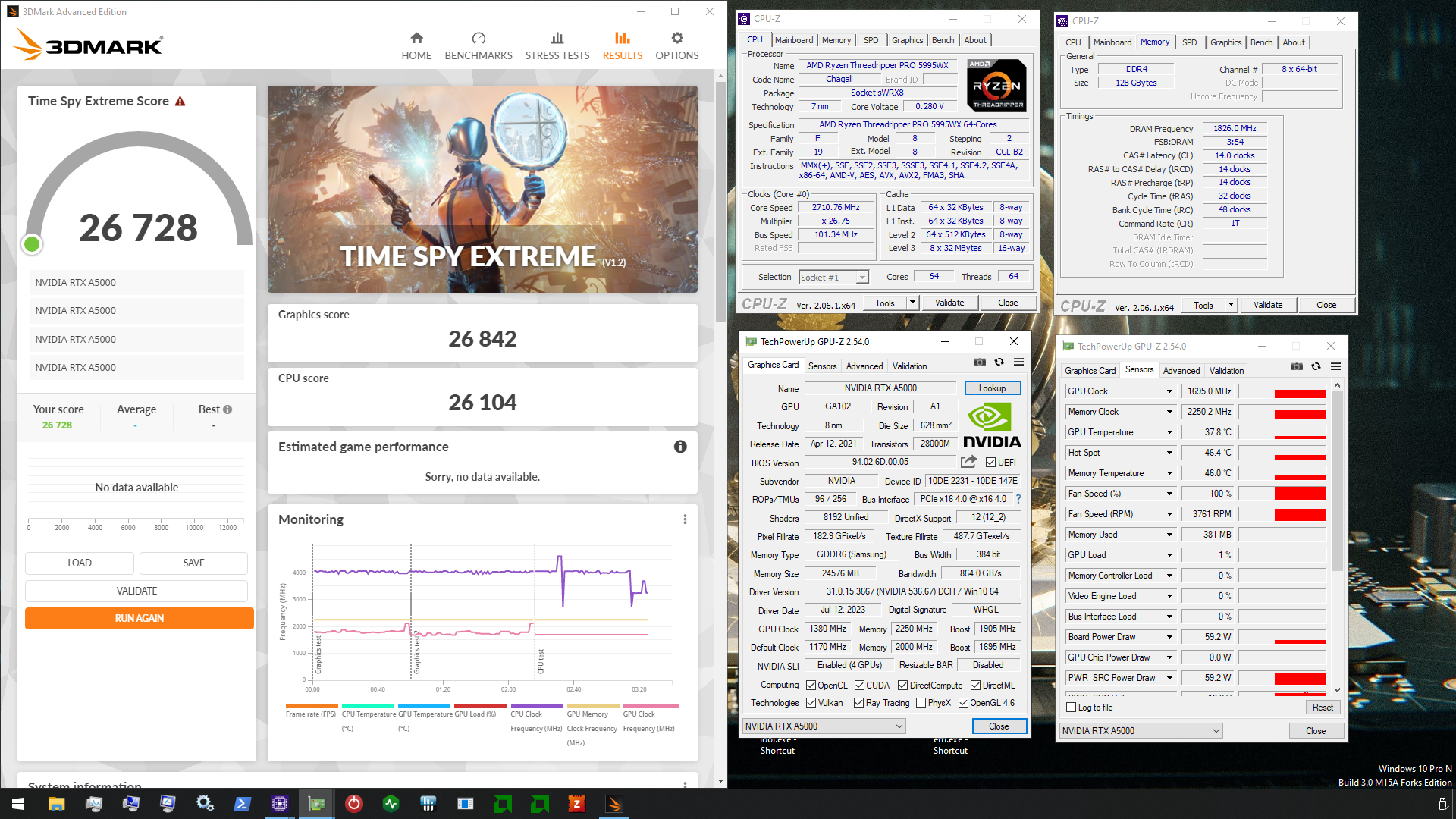
3DMark.com
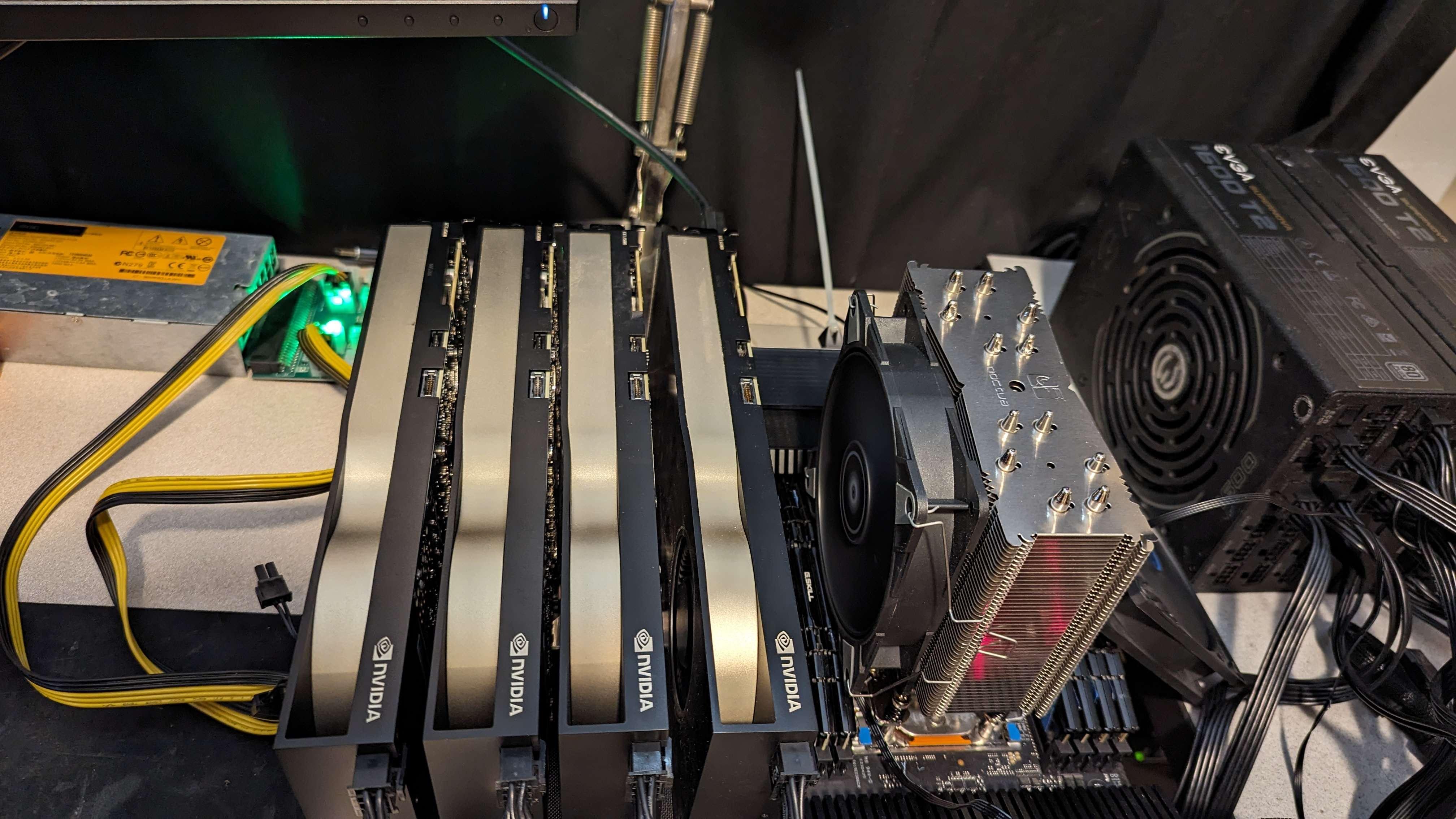
AMD Ryzen Threadripper PRO 5995WX, NVIDIA RTX A5000 x 4, 131072 MB, 64-bit Windows 10}
proven canopy
 sudden torrent
How do you even get ahold of quad A5000s
Those things are ridiculously hard to find right now
kind walrus
That whole system is just a scary amount of dosh
mental turret
sudden torrent
How do you even get ahold of quad A5000s
munee
alpine mantle
That money be overflowing DAYUM
proven canopy
sudden torrent
How do you even get ahold of quad A5000s
Bought them a few months ago in a large lot of hardware back when they were 800 eBay or so. I plan to park them in a server that should rent out for 1k as month once I'm done messing with them for hwbot stuff
short blade
i think i should just daily 3600 tight timings until i sell this system for the sake of my sanity lol

surely boot to boot instability won't be a problem at 3600 right
scenic vine
Shirley
alpine mantle
Why is it that changing trrds trrdl and tfaw to lower values give me worse performance and latency?
Like my default is 10/15/56 and would have 62.5k mb/s read, 60k mb/s write, and 62.1k mb/s copy with 54.7ns
And 4/4/16 is 60k mb/s read, 60k mb/s write, and 57k mb/s copy with 57.6ns
This is not only happening in aida64 but y-cruncher 1b aswell
Like default would be around 29 seconds
And the tweaked one is around 31
Imma test 6/6/24 and see if its any better as 4/6/16 was not ok either
Huh... I went back to the default timings and its reporting almost the same way, why is it fluctuating like this?
Ycruncher went up to 30.8 secs
 dull ginkgo
Do 5 runs each and average the run time
alpine mantle
Ah ok
dull ginkgo
Also maybe it's barely stable and perf is worse from correcting instability
short blade
did you ever figure out which IC you have?
alpine mantle
Nope
short blade
try 4/6/16 and 6/6/24
alpine mantle
I tried 4/6/16 and it was a tad better but not as good as default
short blade
it's common to be unstable with 4/4/16 on some hynix ICs especially as freq goes up
alpine mantle
I thought it was due to the memory being unstable and correcting it like what MR1111 said
Legit thought about raising vccsa
short blade
i don't think voltages will make a difference with rrd/faw
short blade
that should have been disabled from the start
also
running aida in safe mode might get you more consistent results
it's just not a great bench anyways though
alpine mantle
IMLC GUI was consistent though
short blade
oh you're running IMLC
alpine mantle
Ye and aida with ycruncher 1b
short blade
IMLC can't run in safe mode but yeah it should be better than AIDA
i'd just try game benchmarks personally
SOTTR is nice for testing ram scaling
short blade
you're running windows off of a flash drive?
short blade
💀
short blade
mine can too but i think the write speeds and randoms are pretty bad
alpine mantle
Bruh
Got a coefficient too large after testing for the third time on y-cruncher 1b
WTF WAS THE WHOLE POINT OF Y-CRUNCHER VST?
short blade
i have honestly not found VST to be very helpful
my laptop passed VST at a MUCH higher frequency than was actually stable
and my desktop passed VST at MUCH lower voltages than were actually stable
short blade
lol
yeah i'm just dailying 3600 now
not gonna keep the system for much longer
i stopped caring
alpine mantle
Frfr
I won't do a ram oc again, just buy a better kit, turn on xmp, and be done with it
FFS
short blade
raptor lake is just a broken platform for daily ram oc
short blade
alpine mantle
I won't do a ram oc again, just buy a better kit, turn on xmp, and be done with ...
just buy a better platform tbh
daily ram oc on zen 4? done in 2 days
short blade
when i did the daily ram oc on the 7800x3d
it figured out all the voltages and resistances for 6400 automatically
and was perfectly stable after that
no boot to boot variance
alpine mantle
Wow
alpine mantle
😲
alpine mantle
But raptorlake... Whooo boy
short blade
no randomly turning on your pc on one day and it bsods opening discord
alpine mantle
Amd magic
short blade
not like i'm not pushing it hard either
3200 MCLK 3200 UCLK 2200 FCLK
pretty much pushing it as hard as it can possibly be pushed
alpine mantle
I don't understand how does one daily VCCSA AT 1.45v
short blade
i had vsoc at 1.25v
alpine mantle
People setting ram to 1.6v
short blade
well below explosion range lol
alpine mantle
Lol
short blade
haven't had a single complaint about it despite it running a daily ram oc on the edge
alpine mantle
I see
short blade
6400 synced is pushing it to the edge on zen 4
alpine mantle
I dunno how zen stuff works but cool
short blade
alpine mantle
I don't understand how does one daily VCCSA AT 1.45v
im dailying 1.000 SA now btw lol
alpine mantle
short blade
im dailying 1.000 SA now btw lol
That's pretty good
My lowest daily SA was 1.15v
short blade
 alpine mantle
Saving power and lasting the chip
That's really solid for 3600mhz
Hol up... I also daily 3600mhz not too long ago
Does raptorlake FAVOR 3600MHZ?


 alpine mantle
The lowest for me was around 3-4w
short blade

4080 is also super efficient at idle
i wish i had a wall meter lol
i wonder how much power i'm drawing in total
alpine mantle
Do you want... A sonoff S31?
short blade
most of my fans turn off at idle too
including psu fan
only my radiator fans are on and spinning at 700 rpm
alpine mantle
I honestly don't know if 1.275v SA is a "safe" daily
short blade
wonder if i can get total system power draw to 20w
short blade
alpine mantle
I honestly don't know if 1.275v SA is a "safe" daily
100%
mental turret
alpine mantle
I honestly don't know if 1.275v SA is a "safe" daily
It is
short blade
i was dailying 1.365v and that's still safe
alpine mantle
Whoa ok
alpine mantle
mental turret
It is
Aight
short blade
up to 1.45v you're fine, 1.45v is unlikely to actually get you anything though
mental turret
Speaking of imc
alpine mantle
Apparently setting my dram to 1.41v can't boot
mental turret
I need to bin IMC for my edussy
alpine mantle
mental turret
Speaking of imc
Frick the imc
Frick raptorlake
Frick intel
Frick ram
mental turret
Walling at 2860C13 with my best chip
alpine mantle
Jk
short blade
I'm running pretty low vdimm now too
3600 14-14-14-18 1T at 1.48v
not bad for a 3200c14 bin honestly
considering it's DR as well
1.48v is not bad
tWR 12 is also stable at this low of a frequency
alpine mantle
Isn't jedec state that max vdimm is 1.5v for safety?
short blade
yes
alpine mantle
Aight
short blade
b-die, rev. e, and djr can easily ignore that lol
you can daily b-die/djr at over 2v if you can keep it cool enough
dunno about rev. e
mental turret
short blade
3600 14-14-14-18 1T at 1.48v
Try 4200C12 🥴
short blade
but I was fine dailying >1.5
short blade
mental turret
Try 4200C12 🥴
I'd need gear 2 for 4200 💀
I can boot 4200 gear 1 but can't get it to run for more than 5 minutes
alpine mantle
I can boot up to 4133 but the ram kills the OS
short blade
4133 gear 1 is max "stable"
alpine mantle
gear 1 same
short blade
4133 12-12-12... maybe possible at 2.2v or something lol idk
4133 15-15-15 takes 1.58
4133 14-14-14 bootable at 1.70 I think
not stable but bootable
short blade
probably need subambient cooling if I wanted to actually try 4133 12-12-12
short blade
ah yes
mental turret
short blade
4133 12-12-12... maybe possible at 2.2v or something lol idk
The worst of my sticks could do it with about 1.9V
short blade
4133 12-12-12 2v xmp bin 💀
mental turret
Most bdie doesn't scale that high past 1.95 or so
alpine mantle
Its gotta be safe
short blade
I'm not sure that this kit could do it at 1.9
it's not the best kit
given what I need for 15-15-15 stable and 14-14-14 bootable