#overclocking
1 messages · Page 16 of 1
 hot parrot
Forgot to put memory tab 😭

 short blade
you can load the result file back into 3dmark to take a new screenshot
 mental turret
short blade
time to try the other voltages 🙂
mental turret
short blade
time to try the other voltages 🙂
(more)
mental turret
Vdimm
short blade
i'm at 1800% rn with 1.225 e-core and 1.370 sa
mental turret
Do you record what each stick was rated for
mental turret
I mean all of them
short blade
?
short blade
you think i have this much b-die to bin?
short blade
mental turret
I'm actually convinced you're an insane person now
this
short blade
the real insane thing is trying to daily a gear 1 oc on this broken platform
short blade
i tried downclocking to 4000 at felix's insistence
did nothing to change the insane voltage sensitivity/boot to boot variance
so went back to 4133
i'd rather just do a new ddr5 build than downclock any more than that tbh
but yeah i'm just running these while i do my homework 🙂
kind of ironic that i'm learning about memory paging/TLB while inducing paging and TLB errors in the system i'm using to learn about them on
 ancient bridge
mental turret
ancient bridge
mental turret

 sudden torrent
The digital snow means it's working
hot parrot
sudden torrent
The digital snow means it's working
I think I corrupted an asset
It would suddenly crash at any speed at near the end of first graphics test
 steady lance
hot parrot
It would suddenly crash at any speed at near the end of first graphics test
steady lance
hot parrot
It would suddenly crash at any speed at near the end of first graphics test
oh lmao I remembner that happened to me.
Reinstall of timespy fixed that
hot parrot
I did that but was a hot day so didn't bother benching after reinstalling lol
But I always have some issue with timespy
I hate that bench
steady lance
yeah timespy at least the demo in my experience is always a bit buggy
hot parrot
I never have issues with firestrike though
I wish firestrike was still the more popular bench
short blade
interesting, i have issues with fire strike but not time spy
mental turret
@ancient bridge subbed anything to hwbot yet on the new chip?
ancient bridge
mental turret
<@852241324886720583> subbed anything to hwbot yet on the new chip?
I was waiting for u
lol
mental turret
right now
sudden torrent
ancient bridge
I GOT CLASS
 mental turret
you could miss all thye classes you have left and im sure youd be fine 
ancient bridge
 mental turret
RRAAAH
ancient bridge
mental turret
you could miss all thye classes you have left and im sure youd be fine <:kappa:8...
I mean after we do our da we can do whatever aslong as we sign into homeroom lol
mental turret
huh?
mental turret
ancient bridge
hot parrot
http://www.3dmark.com/fs/30196273
So close to 80k

3DMark.com
AMD Ryzen 7 7700X, AMD Radeon RX 6950 XT x 1, 32768 MB, 64-bit Windows 10}
 eternal relic
evc
 wheat lintel
@modern walrus finally had a chance to check my ram’s label. Turns out it’s A-die, not M-die like I thought
steady lance
What GPU benches do you guys recommend for stabillity testing besides timespy cause that's rather buggy towards me sometimes?
 proven canopy
Buggy? Usually we'd recommend looping TS GT2
steady lance
I forgot what was his name but like me it would work with or without gpu oc and next moment it'd crash right after the first timespy test even without oc.
When that happens it requires a full reinstall to fix or restart.
Okay it was BiostarOC who had the same issue.
proven canopy
Ensure your cpu/ram/system are stable first with occt/vst/etc
Rule out everything else before you dial in gpu
steady lance
proven canopy
Ensure your cpu/ram/system are stable first with occt/vst/etc
I did.
Ram, cpu both are overclocked and very stable
 modern walrus
wheat lintel
<@808772530017665024> finally had a chance to check my ram’s label. Turns out it...
modern walrus
wheat lintel
<@808772530017665024> finally had a chance to check my ram’s label. Turns out it...
that's good news, it should clock higher
steady lance
Okay so +165 core is what's stable on my 3070.
Now to do memory.
Starting with +300 and I will up by 50 each time.
 zenith palm
steady lance
Starting with +300 and I will up by 50 each time.
zenith palm
steady lance
Starting with +300 and I will up by 50 each time.
You can probably get up to at least +600 btw so maybe start there to save a few steps
Iirc mine got to around 850
steady lance
it seems I got +165 core and +750 mem without touching voltages.
 scenic vine
You can't properly adjust voltages on modern Nvidia cards via software
You can tweak the vf curve for core, but that's all you get
The voltage slider doesn't actually do anything
steady lance
Oh, so there's no point in using it?
steady lance
Upping the voltage helped me get +850 mem stable.
gonna see if I can get +900 stable
hot parrot
Finally got fed up with mpt and amd drivers reinstating a 500w power limit for no reason when voltage is set over 1270mv and bought an evc
Gonna also shield the emi sensitive traces on my pcb
 tall pelican
hate to break it to you, but that voltage slider is for core, and not for mem
zenith palm
Also make sure your power slider is all the way up
eternal relic
i miss x299 fivr 
 humble jay
Buy 3435X
 latent wave
 steady lance
zenith palm
Also make sure your power slider is all the way up
steady lance
zenith palm
Also make sure your power slider is all the way up
already is.
steady lance
tall pelican
hate to break it to you, but that voltage slider is for core, and not for mem
rip just noticed that.
it seems memeory is only stable at +700 I will try later to see if there is a middle ground between +700 and +750 that's stable.
zenith palm
What are you using to test for stable btw?
steady lance
games.
I'm running MW2 to test for stabillity since it stresses the gpu better than Halo does.
zenith palm
Good good
scenic vine
Try valheim 
hot parrot
eternal relic
evc
Bought one now lol
Got tired of my GPU acting up
It would randomly reinstate it's power limit
For literally no reason
On random days
At random times
eternal relic
solder on some headers to card
firmware update the evc before u do anything as well
hot parrot
eternal relic
solder on some headers to card
Doesn't oc formula already have a solder joints just to make connecting it easier

This thing
hot parrot
Bought the current Elmor evc2
 kind walrus
Evcs2?
hot parrot
Evc2se
hot parrot
How would I go about updating firmware for it?
hot parrot
Gonna repaint the case for it to match build better
eternal relic
hot parrot
yeah, solder on 3 headers to those pads
so u can plug in and out evc with ease
what i did was solder wires to pads and run them to edge of card where i put on male headers
evc comes with all of the wires and stuff, makes it really easy
tall pelican
hot parrot
How would I go about updating firmware for it?
there's directions on elmor's page
 wind prairie
That cpu record holy

 sudden torrent
Seby and Splave reppin that wegg team 🏆
eternal relic
 hot parrot
wind prairie
That cpu record holy
hot parrot
wind prairie
That cpu record holy
Based
zenith palm
sudden torrent
Seby and Splave reppin that wegg team 🏆
We have splave?
Also suprised 13600k is winning?
mental turret
zenith palm
We have splave?

sudden torrent
zenith palm
We have splave?
He's only the #1 contributor on our team lol https://hwbot.org/team/wegg/
mental turret
He joined relatively recently
zenith palm
Lol shows how much attention i pay to hwbot
zenith palm
mental turret
He joined relatively recently
Ah that explains it
Haven't been on there in like a year because of final year of college
mental turret
Yea i havent subbed anything in months 
sudden torrent
Weather has been too hot for me to sub lately
Last subs I did were a marathon midnight session with near freezing temps letting the rad chill for a couple hours, and then running the system outside
About as good as I can do on ambient lol, next step would be ice bucket
proven canopy
Lol yeah, splave, akm, and salty hopped over from OCN recently.
mental turret
OCN 🤮
Wegg 
sudden torrent
zenith palm
Also suprised 13600k is winning?
That's because only subs with 14 or 10 cores, depending on the bench, were valid. The one that surprises me is the max cpu frequency was 13600kf. Did no one have a decent 13900ks?
wheat lintel
I still need to actually submit to HWBot
proven canopy
Run some benchmate, makes it easy. Check the rules page for each bench, just need two cpuz windows usually.
Start with r20, ycruncher 1b, and 7zip
proven canopy
I want to see it get globals
wind prairie
sudden torrent
That's because only subs with 14 or 10 cores, depending on the bench, were valid...
Lucky bin ig
 sudden torrent
You expected more than 50%?
 restive sequoia
sudden torrent
You expected more than 50%?
restive sequoia
sudden torrent
You expected more than 50%?
i mean ts cpu score is not inline with irl fps it seems
nowhere near 12900k numbers
sudden torrent
I don't know who told you the 7600 would compare to the 12900k but it compares more to the 12600k/13400
Enable PBO, it'll boost your performance for basically free
restive sequoia
sudden torrent
I don't know who told you the 7600 would compare to the 12900k but it compares m...
its a bit above ig ts just does not like amd
 sudden torrent
Yeah you need to enable PBO to get the non-x up a bit past the performance of the x model
There's a clock speed difference and PBO fixes that
ancient bridge
Also 3dmarks cpu score doesnt depict how the cpu actually performs in game
especially on amd
it favors intel ALOT
sudden torrent
There's also a good chance you're putting a GPU bottleneck on your system and your benchmark numbers won't match as a result
Since HUB did that testing with a 3090 ti vs your 3080 ti
sudden torrent
Oh I thought you meant the fps numbers weren't comparing in game to the 12900k, I was mistaken then
The 7600 has a lot fewer cores than the 12900k so ofc your 3dmark scores won't be close lol
That's a multi core test
ancient bridge
That too
scenic vine
restive sequoia
nowhere near 12900k numbers
Timespy cpu scales with core count
And also scales different on Intel vs amd
7950x doesn't even come close to a 13900k in timespy
 alpine mantle
gonna finish this ram oc, primaries left to tweak. No I wont tweak TREFI if you're wondering
 alpine mantle

scenic vine
Better not tweak trfc then
scenic vine
If you are willing to tweak trfc, why not trefi?
alpine mantle
pretty sure trefi has more risk
scenic vine
Nope
also, risk of what exactly?
did someone instill an irrational fear of corrupting windows or something
alpine mantle
it doesn't corrupt windows? I thought it was temperature sensitive
alpine mantle
I have A-die according to thiaphoon burner
scenic vine
Thaiphoon is unreliable
It just reads the SPD, and if the SPD is blank it just guesses
alpine mantle

scenic vine
90% of the time the SPD is not programmed correctly
The only kits ive seen with consistently programmed SPDs are micron
What kit is it?
alpine mantle
its a silicon power turbine 32gb ddr4 3200mhz
scenic vine
No way to find out for sure without removing the heatsinks, but the SPD should have the correct manufacturer at least
You can also just test it to see if it matches XYZ characteristics
 sudden torrent
The only "adjusting" that typically needs to be done for tREFI is to set it to 65535 and forget it
alpine mantle
sudden torrent
The only "adjusting" that typically needs to be done for tREFI is to set it to 6...
the catch?
scenic vine
sudden torrent
The only "adjusting" that typically needs to be done for tREFI is to set it to 6...
Thats on begger LGA 1200 and below
1700 lets you go all the way upto 240k
sudden torrent
Sheesh. Yeah I haven't touched 1700 yet.
alpine mantle
WTF
sudden torrent
alpine mantle
the catch?
None usually unless you're very unlucky
scenic vine
if your IMC is runnning on the edge of stability, tREFI can tip it over, but looking at your setup it isnt likely
alpine mantle
 scenic vine
I assume you dont have dram temp sensors
alpine mantle
ok
scenic vine
Just for future reference or if anybody is interested
Stock xmp, nothing but refi adjusted


 alpine mantle
if imma tweak it, imma have to do some temperature testing
sudden torrent
Gaming is still a good stability test ye
scenic vine
For ram, not really
You can game on some horribly unstable setups
But you can also crash on some single stress test focused setups
sudden torrent
Alright I'll specify, gaming in addition to other usual tests is still a good stability test

 dim plank
I have read that AMD SOC voltage shouldnt go beyond 1.3V but what about the CPU voltage?
sudden torrent
That'll vary a lot depending on a lot of factors. Are you talking about the auto/boosting voltage or a static voltage?
In general, on auto, the CPU will be at a much higher voltage when it's idle or under low load and the voltage will go lower when it's heavily loaded. This is all perfectly normal. 1.45v when idle is common and won't hurt anything.
dim plank
I see. I am just trying to remember those max voltages. I already lost track considering its already years since i built my pc. The current ASUS motherboard issues got me thinking to review what inputs I have made.
Thanks.
sudden torrent
The current issues have nothing to do with CPUs from a few years ago. It's only related to Ryzen 7000.
The max "safe" voltage under load is a topic of much debate.
scenic vine
If you keep vcore, LLC and scalar on auto the SMU will prevent the cpu from running at unsafe voltages
ancient bridge
sudden torrent
The current issues have nothing to do with CPUs from a few years ago. It's only ...
We don't really know for sure yet right?
Since it's still new
 manic seal
imagine not putting 240v into your cpu smh
manic seal
lmao
steady lance
Hehe.
hot parrot
At what point does high frequency noise on 12v rail matter
Cause I can trade lower input cap filtering on my card for higher bulk capacitance for lower voltages drop at load spikes hopefully
sudden torrent
The point where it starts to cause issues in other components
hot parrot
Basically I have some low ear bulk caps coming in that would let me double my input capacitance but I could put behind them some high esr tantalums but it would make filtering worse
But would give me another 440uf*7
mental turret
hot parrot
At what point does high frequency noise on 12v rail matter
What board are you using where that'd actually be a concern?
wheat lintel
How difficult is it to unlock a 7900xtx?
 night grail
hot parrot
6950xt oc formula
night grail
hot parrot
6950xt oc formula
bad idea honestly
that GPU already has good filtering across most of the spectrum
BZ even said this
hot parrot
Yea but I'm putting on it like 1000w instead of 500w
So a lot more voltage drop at load
night grail
thats an XOC card...
hot parrot
So more input capacitance matters a lot
night grail
its built for that already
if you wanted just stack them alongside what is already there but dont remove components to do it
hot parrot
Gonna have to remove the input caps to fit my low ear caps
But I could fit the tantalums on the back
But they are high esr
scenic vine
have fun, but its not gonna make a significant improvement
tall pelican
hot parrot
Yea but I'm putting on it like 1000w instead of 500w
given my reference was fine with dailying 700-800w continuous and 1kw+ peaks, I'd assume ocf is fine as is
hot parrot
tall pelican
given my reference was fine with dailying 700-800w continuous and 1kw+ peaks, I'...
Not worried it can't handle load just want to reduce the voltage drop
hot parrot
scenic vine
have fun, but its not gonna make a significant improvement
I agree but it's gonna be under soldering iron anyways
So even if it only helps 20mv it's worth
tall pelican
Well that's why you have a vrm that you can tell to give it more voltage
humble jay
just stack them pls, the POSCAPs that are there stock are good
use a tiny piece of solder wick to make bridges
hot parrot
tall pelican
Well that's why you have a vrm that you can tell to give it more voltage
I'm talking voltage drop at input
tall pelican
Dats what a mosfet is for
hot parrot
Will negatively impact output behavior if the voltage the controller is working with drops
tall pelican
VIN doesn't need to be 12.0000v, it can go down to like 11v and be fine
sudden torrent
10.8V is the low end of the spec
hot parrot
Fine but not ideal
tall pelican
Its fine because it doesn't make a difference
hot parrot
Especially not when I'm trying to push card to it's limits where 1mhz means stable or unstable lol
hot parrot
tall pelican
Its fine because it doesn't make a difference
Meh, with some of my more tuned overclocks it could mean stable run or unstable run
tall pelican
For reference, laptops use the same mosfets, and chargers with range from 18v to 21v
hot parrot
Again
My concern isn't damage
It's having as stable of an output voltage as possible
Vin dropping will cause vout to have a sort of transient issue for a bit
tall pelican
VIN isnt going to affect VOUT
hot parrot
It will
Will it be a major difference
Probably not
Especially cause card is well made
Will there be a difference though?
Yes and if I already have the soldering iron out I'd like to minimize it
I would fill in or upgrade the missing output caps too but idk what output caps the card uses stock
Plus it will be cool to know I have the best 6950xt PCB + some more kek
alpine mantle
did 2 hours of ycruncher vst, thats enough for me


didn't mess with primaries as it gave me worse results lol
ancient bridge
alpine mantle
What happened to the 3900😭
hot parrot
alpine mantle
These are my old ddr4 3600 settings


On zen2
If you have bdie try stepping everything up a few knotches from here then work down and it should get you to a similar place
 finite frigate
woppa
hot parrot
Also do you need bench stability or daily stability?
Cause if just bench stability you can probably punch that in with enough voltage no issues without needing to adjust it with good airflow over dies
I think daily I lowered cl a little if I'm remembering right but tightened some other stuff a tiny bit
ancient bridge
hot parrot
If you have bdie try stepping everything up a few knotches from here then work d...
It's a cheapo silocon power kit
Mystery meat die
And yeah he was going for daily
hot parrot
I wish I had a CNC machine
So I could design my own mounting for my direct die am5 loop
Like a to the right and down offset flat plate with a flat top screw just to be tightened on with nuts
alpine mantle
hot parrot
These are my old ddr4 3600 settings
wow i wish i had a good kit
🗿
well im going for overall stability so I just have these values
the silicon power ram sticks have little information but they just work i guess
I never took the time to remove the heatsink
alpine mantle
hmm
manic seal
hot parrot
I wish I had a CNC machine
cnc isn't required, just some machining skills
cnc is handy for making a batch of parts, but conventional machining is nice
uhhhh that being said you still need the tools for it lmao
or see if you have a makers space near you
wheat lintel
CNC gets better precision than the average machinist
Especially when you need to make a cold plate
manic seal
that's fair
or i mean
you could use a surface grinder
get something perfectly flat
 sterile flame
Should I be focused much on my FSB:DRAM ratio or DRAM timings for basic overclocking on a X4 955 BE?
I'm finally taking some time to learn how to OC since I don't work too often during the day
I think I'll fiddle around with timings after I find a good spot with the FSB and CPU-NB I like
mental turret
sterile flame
Should I be focused much on my FSB:DRAM ratio or DRAM timings for basic overcloc...
CPU & DRAM frequency/timings via multipliers & BCLK
Those poopoo DDR3 dimms you bought against my recommendation aren't going to do you well though
Unless you got other ones since then
sterile flame
mental turret
Unless you got other ones since then
Nope not yet, I still haven't figured out my max BCLK yet
I'm gonna try to go through all my DDR3 kits and do that
I'll keep an eye out for a new DDR3 kit though if there's any you recommend
mental turret
Just post what DDR3 you have that you'd use and I'll look them over
sterile flame
mental turret
Just post what DDR3 you have that you'd use and I'll look them over
This is the only kit I have for benching (8GB)
 sterile flame
mental turret
<:deadass:1088884666041372713> <:deadass:1088884666041372713> <:deadass:10888846...
sterile flame
mental turret
<:deadass:1088884666041372713> <:deadass:1088884666041372713> <:deadass:10888846...
Yeah, I need a new kit
I haven't even checked the max BCLK on it either like I said
@mental turret, I forgot I'm willing to spend a good amount if it'll last me awhile
Probably all the way up to $50 or so
Though I don't wanna go overkill
mental turret
you wont need more than ~25
sterile flame
mental turret
you wont need more than ~25
Soooo, would you be willing to point me towards the right direction?
mental turret
🥱
ancient bridge
sterile flame
Soooo, would you be willing to point me towards the right direction?
Would you be willing to listen LOL
sterile flame
ancient bridge
Would you be willing to listen LOL
Yes
I don't care about aesthetics
mental turret
ancient bridge
mental turret
 sudden torrent
Hey @mental turret I just got done poking around in that socket again and it's booted right now. It would freeze after a couple hours idle before, fingers crossed.
Do you know if that board auto negotiates the Ethernet port to be crossover if I plug it into another PC to share Internet?
Seems like the kind of feature a xeon should have
Dang
❄️
Starting to think the CPU might be toast, there was a small crater by one of the pin pads. I'm sure I have all the pins fixed by now.
mental turret
sudden torrent
Do you know if that board auto negotiates the Ethernet port to be crossover if I...
Never needed that board for that use-case. Could try googling it. I'd assume it does do that though. Would be surprising if it didnt
sudden torrent
Yep it has auto mdix so it'll negotiate the link as needed
Intel gave an error when I looked up the datasheet for the interface so I had to dig it up third party 
It's kinda funny, I haven't had to wire a crossover cable since college because everything I could have needed it for has that feature
Except the xbox 360, you could connect two of those together using a crossover to do more local players in halo
But I never had enough friends to need that...
sterile flame
mental turret
what CPU and mem freq are you at
X4 955 BE and I wanna say 800MHz?
I ended up switching back to FM2+
My 990FX was being stupid and saving some BIOS settings but not others
BCLK and multiplier was all wrong as well as voltages
mental turret
sterile flame
X4 955 BE and I wanna say 800MHz?
i was asking about cpu frequency as well
sterile flame
2.3GHz?
mental turret

sterile flame
I was running x10.0 multiplier and 230BCLK
mental turret
why do you have the multi so low
mental turret
matt's competition on hwbot?
sterile flame
Yeah
sterile flame
I wanted to
I just haven't gotten around to it, been busy with other stuff
But I'm finally free to start actually learning the basics of overclocking
mental turret
nice
AM3 is a bit of a tough platform to start off on but there's still a lot to learn/do. It's also cheap which is a bonus
sudden torrent
It's cheap because no one wants it
Want my FX 8300? I'll pay you to take it off my hands ||/jk||
kind walrus

sterile flame
mental turret
AM3 is a bit of a tough platform to start off on but there's still a lot to lear...
I’ve made noticeable amount of progress learning the basics of Phenom II overclocking today
I think that’s all that matters to me, eventually I hope to get to a point where I get a score worth uploading
mental turret
sterile flame
I’ve made noticeable amount of progress learning the basics of Phenom II overclo...
Wanna type it out here as a little recap?
I'm curious anyway
sterile flame
mental turret
I'm curious anyway
I started off with learning about mostly North Bridge and how that kinda sucked on the Phenom II so it’s touchy and you gotta match it with the HTT
I started adjusting voltages myself as well, I believe I set CPU at 1.55v, CPU-NB and NB at 1.3v and DRAM at 1.750v
I touched a little of the DRAM timings as well, specifically the refresh cycle or whatever you call it and another thing I forget the name of
I think I set the refresh cycle thing to the max (42?)
mental turret
sterile flame
I touched a little of the DRAM timings as well, specifically the refresh cycle o...
tREFI
iirc
sterile flame
Screwed around with the HTT, DRAM, NB frequencies as well lowering them
Yeah I think that’s it
I also tried to get AMD Overdrive to work as well today to do small tweaking in OS but the BLCK wouldn’t budge
mental turret
Don't sweat much or invest a lot of time on DRAM OC atm, those dimms you have atm barely have headroom anyway. Focus on learning the platform's quirks and how to make it overclock.
I assume you plan to submit scores to hwbot as some point?
sterile flame
Yeah, I’m hoping so I just need to actually get a stable overclock and possibly something worth uploading and not some garbage overclock
I haven’t quite yet learned what’s a good stable overclock and what’s a bad stable overclock
But yeah I kinda threw the towel with the 990FX and went back to a A88X hoping I’m gonna have better luck
Otherwise I’m thinking it might be a RAM issue limiting me
Just making do with what I have ATM
mental turret
sterile flame
I haven’t quite yet learned what’s a good stable overclock and what’s a bad stab...
Don't concern yourself with this, if it works, it works. What matters if getting the score and screenshot/valid file
sterile flame
Yeah, I think I had my X4 955 BE running at 3.8GHz but it crashed when I tried to do Cinebench
I didn’t know what was wrong so meh
I think I have a screenshot of it somewhere
One sec


More so photos but whatever
I probably shouldn’t run the stock cooler forever too, should look into an AIO if some sort TBH
If they still do AM3 mountings that is
ancient bridge
mental turret
Don't concern yourself with this, if it works, it works. What matters if getting...
Me with multiple invalid subs
proven canopy
Air or custom loop, aio is 🤢
ancient bridge

sterile flame
proven canopy
Air or custom loop, aio is 🤢
I’ve always wanted to do a custom loop TBH
Just seems expensive
Might grab a Peerless Assassin if AIO’s aren’t that useful
ancient bridge
Its not too pricey
Forks showed me the other day haha
If you do ice bucket
All u need is a block pump and tubes
proven canopy
ancient bridge
Forks showed me the other day haha
Been recommending that cooler to him for a month lol
Rather, the phantom spirit
mental turret
sterile flame
I think I have a screenshot of it somewhere
Read the rules for each benchmark you plan on doing before benching
sterile flame
That wasn’t for the comp
proven canopy
 sterile flame
I was just fiddling around at that point
ancient bridge
Blocks are like 40 for a decent one such as the alphacool xp3 brass (they have cheaper for 20 https://www.amazon.com/Water-Cooling-Waterblock-Copper-Channel/dp/B013JD2CVO) pumps are 30 (https://www.amazon.com/gp/product/B0BVQZ6H5H) and tubing is cheap lol

Yochaqute Aquarium Submersible Fountain Pump: 550GPH 30W Ultra Quiet Adjustable Water Pump with 6ft Power Cord for Small Pond | Fish Tank | Waterfall | Garden | Hydroponic (2 Pcs)
kind walrus
@sterile flame u already have a phantom spirit right
kind walrus
Ya I thought so
proven canopy
Glad to hear
ancient bridge
proven canopy
Been recommending that cooler to him for a month lol
Lolll
kind walrus
Just use that for everything
sterile flame
Saving it for my main rig though unless it would be that beneficial to use it now
sterile flame
I mean that goes for saying yeah
ancient bridge
If you have a way to get your ambient temp down such as a window ac try that aswell
ancient bridge
Then go in your basement haha
sterile flame
It gets below freezing in my basement sometimes because my parents refuse to turn on the heat during the Winter
“Put on a jacket”
sterile flame
But yeah I think ambient temps are fine as far as I can tell
I think my main issues RN are just instability, I need to work on getting more stable overclocks
It’s either this or that is too high or too low, I struggle finding the middle ground
sterile flame
ancient bridge
Blocks are like 40 for a decent one such as the alphacool xp3 brass (they have ...
To be completely fair that’d be a fun project
ancient bridge
sterile flame
To be completely fair that’d be a fun project
Yepp
Im gonna be doing it soon
I was warned the cheaper blocks with acrylic tops are prone to cracking from the cold
sterile flame
ancient bridge
Im gonna be doing it soon
So I’d just have to get those as well as reservoir and tubes?
ancient bridge
Cause yk plastics get brittle when cold
ancient bridge
sterile flame
So I’d just have to get those as well as reservoir and tubes?
You wouldnt need a reservoir for ice bucket
the pumo is submerged
sterile flame
How does ice bucket even work?
ancient bridge
hence the aquarium pumps
ancient bridge
sterile flame
How does ice bucket even work?
You get a cooler fill it with ice and water and submerge the pump lol
just a chilled loop
sterile flame
A literal bucket with ice…
ancient bridge
it works with aios but not as well since some aios have kinda weak pumps
ancient bridge
sterile flame
A literal bucket with ice…
Cooler preferebly but yeah LMAO
kind walrus
I'll pum-
ancient bridge
its just a chilled loop
ancient bridge
kind walrus
I'll pum-
STOP
kind walrus
U know what I won't
ancient bridge
Bruh
sterile flame
Like it’s just dumping ice water onto your PC but with extra steps

 ancient bridge
sterile flame
Any other absurd ideas?
ancient bridge
sterile flame
Any other absurd ideas?
Uhhh window ac
sterile flame
That already exists stupid
ancient bridge
its exactly what you think
ancient bridge
sterile flame
That already exists stupid
So does ice bucket "stupid"
sterile flame
I’ll make your face an ice bucket
kind walrus
I'll stupid u in a minute
kind walrus
Frfr
sterile flame
Yeah but I dunno what to look for
I just realized the more I pour into this the longer it’s gonna take to build my new main rig
steady lance
ancient bridge
Bad examples but you get the point
Did that actually work?
steady lance
How does it perform compared to water?
ancient bridge
steady lance
How does it perform compared to water?
Significantly better
I mean
its chilled lmao
steady lance
Fair.
Hmmm. What if the water was chilled and you had fans moving the chilled water through the rad?
steady lance
What it used a system similar to a propeller to move the water?
ancient bridge
steady lance
What it used a system similar to a propeller to move the water?
Why not just use an aquarium pump to circulate water
Or dont use a rad
mental turret
sterile flame
Like do I wanna spend my time overclocking or gaming
overclocking
can learn a lot of skills and valuable info pertaining to computer hardware/(some)software just from getting into benching
sterile flame
I would hope so
I’m hoping to get my A88X board running tomorrow and praying my A8-5500 ain’t gonna be an issue
ancient bridge
mental turret
can learn a lot of skills and valuable info pertaining to computer hardware/(som...
Yeah, tell me about it haha
I've learned alot from you and a few others
restive sequoia


one hell of a generational leap
have to see if there is any way to get 40k gpu score
restive sequoia
oh my cpu score went down 300 points for some reason
seems like typical ts variance
scenic vine
ancient bridge
Goodluck keeping your room cold in the summer now
Their power draw really isn't that far apart
eternal relic
switching from 7980xe to 12900k got my room insanely cooler heh
finite frigate
eternal relic
switching from 7980xe to 12900k got my room insanely cooler heh
yeah cause you went from 888w to 200w
 signal belfry
eternal relic
switching from 7980xe to 12900k got my room insanely cooler heh
signal belfry
eternal relic
switching from 7980xe to 12900k got my room insanely cooler heh
These things are great coolers for rooms
 manic seal
how many joules/s of heat transfer
wheat lintel
@kind walrus Is my vram just bad or am I doing something wrong that I can’t get above 2728 MHz?
kind walrus
wheat lintel
<@101107951401455616> Is my vram just bad or am I doing something wrong that I c...
It's not bad if you're already at 34K
You might want to increase voltage up tho to see if you can increase mem clock
restive sequoia
Only gpu out there that can do 10k or above 👀
 manic seal
Speedway is... uhhh software rt? Iirc
I never use it either so I could be completely wrong
sudden torrent
restive sequoia
Only gpu out there that can do 10k or above 👀
Is that yours? SUB IT that's a hwbot #1
Current #1 https://hwbot.org/submission/5279830_takukou_3dmark___speed_way_geforce_rtx_4090_10874_marks

HWBOT
The GeForce RTX 4090scores getScoreFormatted in the 3DMark - Speed Way benchmark. Takukouranks #1 worldwide and #1 in the hardware class. Find out more at HWBOT.
It's not worth global points but it's worth hardware and team points. Ignore me if you have ECC disabled though.
restive sequoia
sudden torrent
It's not worth global points but it's worth hardware and team points. Ignore me ...
Oh it was default
Guess that is disabled
Oh it is disabled by default it seems
mental turret
@sterile flame order 4 of these https://www.ebay.com/itm/173978139762

eBay
Find many great new & used options and get the best deals for SAMSUNG 2GB DDR3 1333MHz ECC RAM 2RX8 PC3-10600E M391B5673GB0-CH9 Unbuffered at the best online prices at eBay! Free shipping for many products!
you're welcome
sterile flame
mental turret
<@456226577798135808> order 4 of these https://www.ebay.com/itm/173978139762
I really appreciate it
Am I gonna use all four at once since it’s gonna be 8GB?
mental turret
you could order 8, keep the best 4 and return the rest as per their 60 day policy.
only use all 4 at once if you need 8GB
otherwise just run the best 2
sterile flame
mental turret
otherwise just run the best 2
Okay okay
Alright well I’ll get on that
wheat lintel
@modern walrus I’m finally back to tuning this ram, can get 7000 stable fairly easily
mental turret
@short blade https://www.ebay.com/itm/235053896724 lmao

eBay
Find many great new & used options and get the best deals for G.SKILL Trident X Series 16GB (2x8GB) 2666 MHz DDR3 21300 (F3-2666C12Q-32GTXD) at the best online prices at eBay! Free shipping for many products!
you should buy it
because i dont want to
short blade
why would i want this 💀
wheat lintel
@kind walrus it’s weird, I can’t get my gpu score above 31k now
I don’t know what I did
mental turret
short blade
why would i want this 💀
some of the fastest 8GB sticks you can buy
high-density stuff
not benching relevant but it's interesting
short blade
I don't even have a ddr3 platform anymore
 short blade
I didn't want to bring three computers back home lmao
I sold the PC to my friend so she can finally stop gaming on a macbook
hot parrot
Should be able to take top 7700x score once I tune memory and set a manual oc

Or just tune bclk further even tbh
wheat lintel
I’m finally 21st on time spy for my hardware config but im noticing that I need higher clocks than basically other people to get similar scores
It’s weird, people are getting 33-34k scores with the same clocks I need to just get over 32k
I’ve got lower temps than them too
manic seal
Skill issue
sterile flame
clock stretching?
wheat lintel
Shouldn’t be
zenith palm
wheat lintel
It’s weird, people are getting 33-34k scores with the same clocks I need to just...
Overall score?
If so mem oc maybe
wheat lintel
zenith palm
Overall score?
Just graphics score
zenith palm
wheat lintel
Just graphics score
Checked the mem clocks?
Could just be better bins or something
wheat lintel
Yeah checked them
It’s weird tho, because apparently liquid devils are prebinned
Guess the other ones are just cracked
zenith palm
Afaik no bins are manually done anymore so theres gonna be variation
restive sequoia
sudden torrent
Is that yours? SUB IT that's a hwbot #1
I have subbed one and now need to wait for some sort of verification
manic seal
Imagine binning manually frfr like what is this, the stone age frfr
mental turret
manic seal
Imagine binning manually frfr like what is this, the stone age frfr

my spreadsheets dont exist
manic seal
Imagine using spreadsheets amirite so cringe
mental turret
manic seal
Only nerds would use spreadsheets frfr
kind walrus
wheat lintel
<@101107951401455616> it’s weird, I can’t get my gpu score above 31k now
Did you update windows
wheat lintel
Nope
Also, looking back on it, never got my gpu to 34k, not sure how we got that number
This is where I’m at rn https://www.3dmark.com/spy/39408961
3DMark.com
Intel Core i9-13900K Processor, AMD Radeon RX 7900 XTX x 1, 65536 MB, 64-bit Windows 11}
kind walrus
wheat lintel
It’s weird tho, because apparently liquid devils are prebinned
They are
kind walrus
wheat lintel
This is where I’m at rn https://www.3dmark.com/spy/39408961
Are you on win 11 22h2
wheat lintel
Yeah I’m on win 11
kind walrus
Windows settings
wheat lintel
Wdym?
kind walrus
It's an observed issue
Idk why
But even I had this problem
It just hates time spy
Also
When you oc the card
Did you go memory first?
Or voltage and clock
kind walrus
Yeah you do mem first on radeon
And try as hard as you can to get 2750+
Then worry about clock
Clocks barely matter like mem does
Mem matters way more
wheat lintel
If my core is too high, could it cause my mem to not clock high?
kind walrus
Yes
Absolutely
Also
Once these cards pass about 2750, iirc it's a SOC that gets triggered? It changes significantly, and you get a big perf boost
That's why I keep saying that number
wheat lintel
I brought my core down to 2700, trying mem at 2768 rn
kind walrus
It's been a bit but it's a significant number
wheat lintel
So having my core at almost 3000 really hasn’t been boosting my performance too much?
kind walrus
There's a thread on OC.net called the merc310 owners thread. Boatload of info about this stuff
kind walrus
wheat lintel
So having my core at almost 3000 really hasn’t been boosting my performance too ...
Yep
wheat lintel
Wdym?
kind walrus
TS I peaked around, 3200 iirc
Keep going
It's running good mem now
When you try this again you'll probably get better results
wheat lintel
Nope, artifacting again at 2768
wheat lintel
Okay, rn it was at 1075
LOL
I’m loading up my bench bios profile
Should be fun
I should actually take the time to fully tune my ram
All it’s set to is 7000c40-42-42 with everything else XMP
And it’s stable
kind walrus
And just for note btw
Voltage scaling means jack for these cards
Some cards run terribly fast at 1.1V
Others and 1.035V
Mine at 1.07V
There's no consistency
wheat lintel
Ahh ok
wheat lintel
Still artifact at 2752
kind walrus
Hm
Maybe it's the driver
Also btw, run 3dmark independently if you want better results
Use ur steam version to get the codes
22.12.1
Iirc that was a good driver for TS
I think also 23.2.1?
Try those drivers then try 2752 next
If not you might need to just accept the mem isn't great
wheat lintel
Microcenter return policy, no questions asked
kind walrus
Omg
wheat lintel
may or may not have done with it my DDR5
My OG DDR5 kit couldn’t even get 6400 stable at reasonable timings
kind walrus
You don't even know if it's broken yet
Also
You're only 5% off with like, an hour of tuning
Keep going
wheat lintel
Fair
kind walrus
They made later updates to allow the benefits over 2750 to be active below it too
But a bad oc is a bad oc
Keep going
You won't master it in one
I restarted a good few times before I finally dialled it properly
restive sequoia
yk which gpu to get for more then 35k gpu score
kind walrus
He's not after more than 35K
restive sequoia
suddenly cant get the same score sounds worrying to me
sounds like degradation sort off
kind walrus
If he evc'd he could do 38K with an xtx anyway
kind walrus
restive sequoia
sounds like degradation sort off
No
wheat lintel
restive sequoia
suddenly cant get the same score sounds worrying to me
…never broke 33k yet
kind walrus
These cards run 800W without dying
wheat lintel
Good luck degrading a card with locked voltage too
kind walrus
He's trying 500W
restive sequoia
wish i could touch 40k but cant without some crashes
kind walrus
Cos gigglebit sucks for oc
wheat lintel
How do I run timespy without steam?
wheat lintel
Gaming OC especially sucks
kind walrus
wheat lintel
How do I run timespy without steam?
You download the standalone version then copy your codes over
restive sequoia
there is a settings tab in the 3d mark web page where you will see this

@kind walrus have you done 40k yet?
kind walrus
Pretty sure I did
restive sequoia
Like kinda triggered only like 500 points away but those 500 points are like being the hardest
kind walrus
Ah idk actually if I did
I have no score and when I did this 39K was top 100
I mustn't have submitted it
Looking now 44K is the peak which is higher than I remember
💀
restive sequoia
yeah saw some peeps doing like 3900mhz on the core
4090ti should be easy over 40k as it is supposed to be like 10% perf more
hot parrot
Tightening timings on my a die kit now 1 timing at a time
What can I expect for trfc1 ?
Rn I'm at 415 and so far still stable at 6200mhz
wheat lintel
Im not 100% sure but lowest I managed to get stable was 400ish at 7000mhz with my A-die
kind walrus
hot parrot
Rn I'm at 415 and so far still stable at 6200mhz
Iirc 400-460 is where a lot of people end up on intel
Don't ask me about Zen 4, haven't done it yet
short blade
I got 150ns on my mystery hynix
480 at 6400
maybe mine is m-die then
cause 415 is a lot lower than i would have been able to do at 6200
kind walrus
Iirc I landed on 420 or 440 on 7800 on the UX
Subtimings are less the issue on intel it's more just the voltages in agreement
You can cheese a lot of the timings on the 32gb kits to a repeatable set of numbers like terts especially
Might be different per use case or board but that was my experience with it
wheat lintel
I’m slowly getting around to tuning my ram kit again now that I can do 7200 on it
+1200 over XMP is actually pretty nice
hot parrot
I'm at 380 rn @kind walrus
Probably gonna start tightening other timings then come back to it
kind walrus
Ya don't run it too tight, it can affect stability still
hot parrot
Been running stability test on it and no errors yet so I could probably tighten it a bit more but I want to tighten other settings first. What's a normal twr?
Rn I'm at 48
Trying 42
Won't boot with 42
That might be too tight lol
short blade
wheat lintel
+1200 over XMP is actually pretty nice <:weggChefKiss:904600580419387413>
i did this on ddr4

wheat lintel
short blade
i did this on ddr4
I’m used to my RevE not wanting to do anything higher than +400
short blade
i did it on rev. e
wheat lintel
I think my IMC was just 💩
short blade
😔
wheat lintel
short blade
i thought you got 7200 mt/s on 64gb of ddr3
That DDR3 go crazy
hot parrot
 wheat lintel
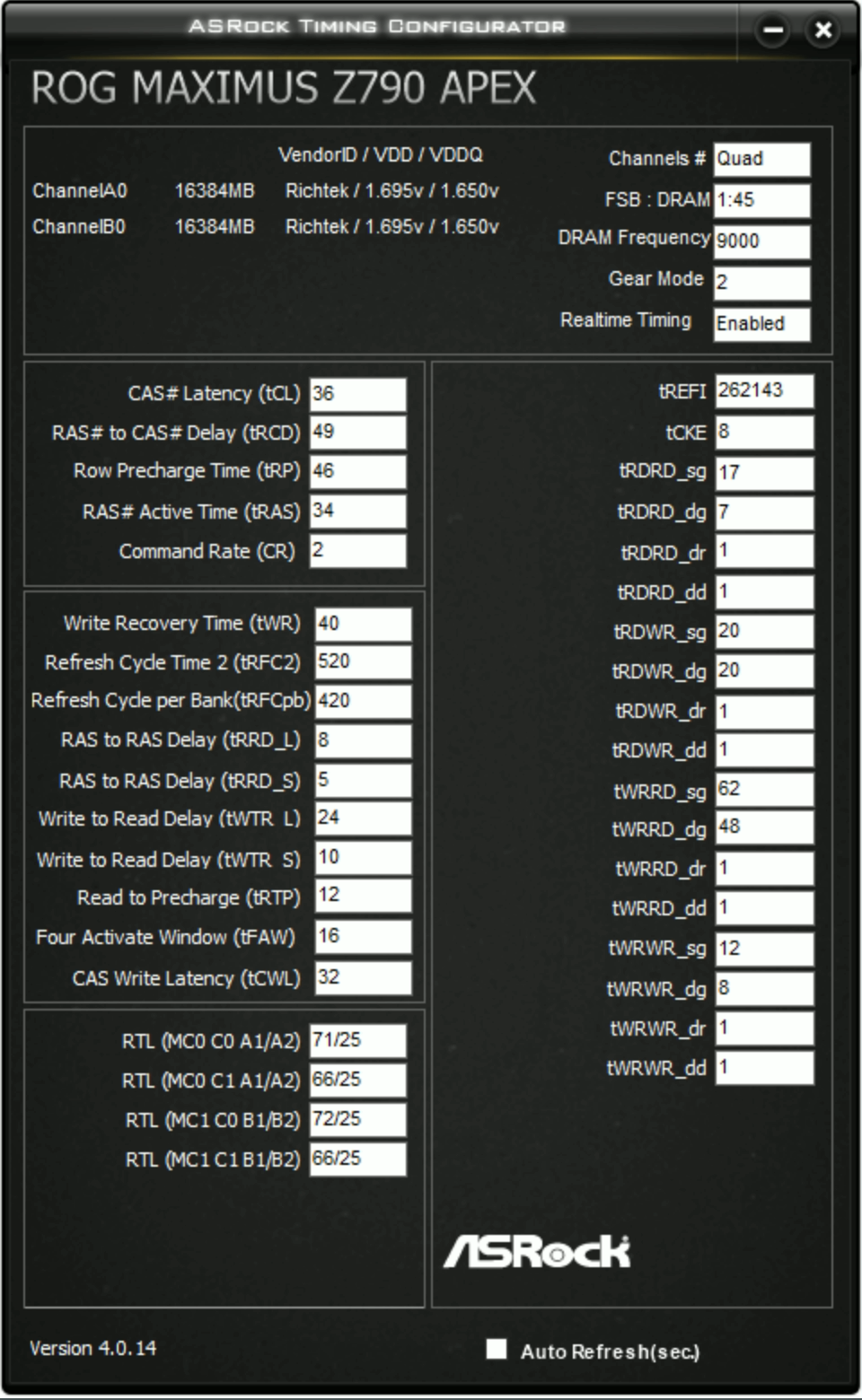
See if you can get your tREFI to 262143
mental turret
wheat lintel
That DDR3 go crazy
me
kind walrus
wheat lintel
See if you can get your tREFI to 262143
Doesn't work on Zen 4
wheat lintel
kind walrus
Doesn't work on Zen 4
Damn it doesnt?
I’m back to climbing the TS leaderboard, up to 18th
hot parrot
I could test it
wheat lintel
Decided to say screw it to the GPU and accepted that it’s stuck at 32.5k, now just pushing my cpu
Idk why, but I can’t go up past 5.7 GHz on my cpu for it
proven canopy
wheat lintel
Idk why, but I can’t go up past 5.7 GHz on my cpu for it
Could try bclk down for the systeminfo scan, that's the hardest part.
5.8 is hard on a 13900k
 wheat lintel
proven canopy
5.8 is hard on a 13900k
wheat lintel
proven canopy
5.8 is hard on a 13900k
The weird part is I can do 6.0 easily all core on other benchmarks, it’s just timespy that doesn’t like it
hot parrot
Timespy is annoying ASF @wheat lintel
wheat lintel
Wdym by bclk down tho?
hot parrot
There's a reason I'm not trying for timespy top spot for my parts
That program doesn't work half the time
Corrupts itself super easily too
proven canopy
wheat lintel
The weird part is I can do 6.0 easily all core on other benchmarks, it’s just ti...
What other benchmarks? ycruncher? r23?
wheat lintel
Yeah both of those and r20
Wait, I think I’m dumb, I just realized I accidentally forgot to set one of my cores to 60x
wheat lintel
Z790 Aorus Master
I’m going to bring everything down to 59x and see how that goes
Does AVX offset affect time spy at all?
wheat lintel
Yeppp, i figured out what i was doing wrong. fixed it and my cpu score went up by 2k https://www.3dmark.com/3dm/95869127
3DMark.com
Intel Core i9-13900K Processor, AMD Radeon RX 7900 XTX x 1, 65536 MB, 64-bit Windows 11}
hot parrot
I might need to change my LLC
My CPU is more stable under load than idle lol
When I lower voltages curve it crashes always in idle but seems perfectly stable when fully loaded lol
 undone flame
Does anyone have this kit?

I managed to get it to run at 7000Mhz and latency is 61NS
proven canopy
hot parrot
My CPU is more stable under load than idle lol
That's a curve optimizer problem. Test with corecycler
restive sequoia
with the previous cpu gpu score got reduced by more then 10k
 hot parrot
@proven canopy managed to get it stable at 5.6ghz all core finally
ancient bridge
hot parrot
<@546791995830566912> managed to get it stable at 5.6ghz all core finally
What cpu?
ancient bridge
ooooo
hot parrot
Main issue is getting it stable at boot rather than at load
It boosts single core too much
Unless I dial in voltage perfectly
scenic vine
hot parrot
<@546791995830566912> managed to get it stable at 5.6ghz all core finally
Now run YC SFT (13)
hot parrot
scenic vine
Now run YC SFT (13)
Nah
It'll be stable but will clock down
Tuned it to stay cool enough for benches
hot parrot
Only reason I'm using pbo with bclk
Meh, it's gonna be stable on any use
Just will heat up and down clock on ycruncher
Would make more sense to use 102bclk and -10 more mv for that
Ngl my mobo is carrying me in this ic cause voltage regulation is so consistent
Allows me to really dial things in
proven canopy
hot parrot
<@546791995830566912> managed to get it stable at 5.6ghz all core finally
For benching? Why would you run that all core for daily
proven canopy
hot parrot
Ngl my mobo is carrying me in this ic cause voltage regulation is so consistent
Almost any board should be able to do that, cooling matters far more, and there's only so much you can do without a delid and or LM.
hot parrot
proven canopy
For benching? Why would you run that all core for daily
For benching
Although I may do the 102bclk profile for daily
Cause it's a lot easier to keep cool and still insane boost
proven canopy
2% isn't an insane boost
proven canopy
It'll affect all clocks - by 2%
hot parrot
It also changes how the algorithm behaves and the max allowed values when using pbo
It caps clocks too soon on 100bclk
But 103 it boosts too high while booting
102 is a nice sweet spot
Super stable at low voltages and easy to cool so doesn't drop clocks
@proven canopy kinda sucks that my bios locks me to 1.3v soc
Would be nice to get 6400mhz stable for benching
And would only probably need like 1.35v
proven canopy
soc only does so much, and 1.3 isn't that bad, play with vddio, vdd, vddq, other cpu side voltages.
6400 benching should be easy on m/a die.
hot parrot
Already at 1.5v memory and 1.8v controller voltage
My chip just doesn't have a golden bin imc
I'd probably need 1.35v soc for 6400
Cause I can get kinda barely into windows at 1.3v sometimes
1.35 would probably get it stable
Kinda thinking of buying another evc for mobo just for soc lol
proven canopy
hot parrot
Already at 1.5v memory and 1.8v controller voltage
Controller voltage? What's at 1.8?
hot parrot
proven canopy
Controller voltage? What's at 1.8?
Idk why I said controller voltage. Was multi tasking
Meant vpp
proven canopy
Oh, that's normal
For benching on a/m die, you can turn it up past 1.7, it'll stop scaling before you do anything dangerous.
hot parrot
Might not on my cooling kek


Highest temp I think I ever reached on my ram was 34c
And that was an oddball reported temp I think
Cause it went back down to 33
mental turret
I approve of the ram heatsinks
finite frigate
mental turret
I approve of the ram heatsinks
lokey i think those are sick
wheat lintel
proven canopy
For benching on a/m die, you can turn it up past 1.7, it'll stop scaling before ...
1.7 is fine on A-die?
Oh damn, 7800 MT/s here I come
proven canopy
I can't say what definitely won't kill or degrade your ram - but I can say that many of us have benched a-die to 1.7v+ without noticing any degradation on cpu/mem
wheat lintel
I didn’t want to go past 1.575 at all LOL
And I was getting 7200/7400 stable with that
proven canopy
1.6-1.7 is normal benching range for a-die ime
You usually have vddq a bit lower, like 1.62 vdd, 1.6 vddq
wheat lintel
Oh ok, that makes things a good bit easier I think
I’ll try it out tmrw after work
Also is 1.35 Vout on a 13900k fine?
Can’t find much online about safe voltages for it
proven canopy
e.g. seby did this at 1.695 vdd, 1.65 vddq https://i.imgur.com/j7ToSer.png


 wheat lintel
Oh wow
proven canopy
wheat lintel
Also is 1.35 Vout on a 13900k fine?
Pretty sure vout on giga boards just measures vrm output voltage for vcore
wheat lintel
I’m on a 64Gb kit so I doubt I’ll be able to get that high LOL
proven canopy
2x32 dual rank a-die?
wheat lintel
proven canopy
Pretty sure vout on giga boards just measures vrm output voltage for vcore
What should I be looking at then?
wheat lintel
proven canopy
2x32 dual rank a-die?
Yep
proven canopy
wheat lintel
What should I be looking at then?
That
Isn't it called vr_out in hwinfo?
proven canopy
Idk, most of us in the US use the apex, the germans have tachyons
None of us bench cpu/mem on anything but asus, some guys have darks
wheat lintel
Because some places I’ve seen say no more than 1.3V, some say 1.4V
proven canopy
When you're in the range of 1.3-1.5v benching - you're not risking killing the chip. At worst, you'll slightly degrade it. If you're really worried, test every once in a while with fixed settings for min voltage 10/10 passes r23 or similar.
Even if you lose 100 mhz, nbd, learn from the mistakes, and all computer parts lose value in time anyway.
That said - I've yet to ever degrade a chip, but I don't bench hard ambeint.
wheat lintel
Yeah I’m just worried about degradation a bit
But honestly if I degrade from 6.1 to 6.0, not really a big deal
I don’t run it OCed for daily
proven canopy
It takes a lot of abuse to degrade from an average chip to not being able to run stock.
And unless you have a golden chip - even the worst case of degrading 100mhz+ for benching use case won't matter in the long run.
wheat lintel
I only really bench like maybe once a week or so, so I doubt I’ll actually degrade it too much
wheat lintel
I really need to start uploading, I’m on the wegg team but never actually uploaded anything
And I do have some decent scores
wheat lintel
Well did, I lost some of my time spy ones on older hardware
You think this is worth uploading? https://www.3dmark.com/3dm/95869127
3DMark.com
Intel Core i9-13900K Processor, AMD Radeon RX 7900 XTX x 1, 65536 MB, 64-bit Windows 11}
proven canopy
If you bench ambient, you have 3 months to try for #1 rookie league
Should go for it
proven canopy
wheat lintel
You think this is worth uploading? https://www.3dmark.com/3dm/95869127
lol, what's the harm? Why not?
wheat lintel
True
proven canopy
Just go look up the card on hwbot and see how it stacks up vs other ambient
There's no shame in being #30 of 120
finite frigate
anbyone have some dirt cheap bin rejects?
mental turret
finite frigate
anbyone have some dirt cheap bin rejects?
which chips
finite frigate
mental turret
which chips
D4, literally anything, dont care what it runs at, dont care wat capacity, just that it works
finite frigate
kaby, 7700k, z270
mental turret
would make more sense to ask for binning rejects in hwbot or that poopoo reddit overclocking discord
finite frigate
fair
sudden torrent
Got some 16GB 3200c16 C Die
finite frigate
probably out of my price range 💀
ill just wait until i can actually get something usable-ish for cheaper
sudden torrent
I'll dm you
ancient bridge
finite frigate
probably out of my price range 💀
Wait a minute I have ram but it would prob cost just as much to ship as the stuff i linked
ancient bridge
finite frigate
<3
Dont make him change his mind LMAO
finite frigate
ancient bridge
Wait a minute I have ram but it would prob cost just as much to ship as the stuf...
is it poopoo garbage or usable enough
ancient bridge
Its rated for 3200 c16 but it was stable at 3600 c18
finite frigate
straight up need it to work and kinda function
finite frigate
ancient bridge
t force 8gb x2 dimms
dm pics?
ancient bridge
finite frigate
dm pics?
Theyre delided lmao
but i have the spreaders
if u wanted
finite frigate
WHY
ancient bridge
mental turret
buy lga1150
No he bought my wams
finite frigate
I NEED TO FINISH MY KABY RIG FIRST