#overclocking
1 messages · Page 8 of 1
 sudden torrent
 pallid nest
sudden torrent
Except in games you end up with lower numbers because the processor isn't boosti...
pallid nest
sudden torrent
Except in games you end up with lower numbers because the processor isn't boosti...
Oh
 mental turret
 sudden torrent
0.964 VTT really is insane for most
 scenic vine
depends on which VTT 
 frosty plinth
So I overclocked my GPU with with AfterBurner and ended up stable around a total of 1950MHz Core and 8000MHz Memory on a 3070. Does that seem pretty good?
It ended up being +200MHz boost on Core and +1000MHz boost on Memory
I know little about overclocking, just trying to get the most out of my hardware and saw this was the most recommended way to get a boost
scenic vine
Ampere tends to do >2000mhz, but pulls a lot of power while doing so
I think my 3070 did something like 1980mhz@0.95v
frosty plinth
That sounds about the same for me. From what I can tell it draws nearly the same power as stock but with a performance boost
scenic vine

925mV
the card would do 2000+ easily, but needs more voltage which would push power and throttle back down
 eternal relic
shunt and voltmod 
scenic vine
No reason to
 potent fiber
My 3080 at 925mV "+60"(1920mhz) was faster than stock & 60w lower, lol. W/ 3770 I got around 15600 gfx score. Not a chance to install OS on the new build yet. That 3070 sure isn't far behind (my gpu).
frosty plinth
I ran the free version of TimeSpy and this is what it spit out

So pretty comparable to what I’ve seen out there
I also found out my card was running hot because I accidentally locked the fan speed to 30% lol
 undone flame
Anyone play with HP V10 ram?
 short blade
my golden sample 3070 did 2160mhz core and 2063mhz vram (8250 mt/s)
flashed it to 350w vbios so it was purely voltage limited

3DMark.com
AMD Ryzen 7 5800X, NVIDIA GeForce RTX 3070 x 1, 16384 MB, 64-bit Windows 11}
I don’t remember what the offsets were
think it was +270/+1250 locked at 1.1V
15488 on ambient air
too bad I don't own it anymore
such a good sample
stock tuf cooler was able to handle 325w at 49c
frosty plinth
Dang, my PNY card can keep the thing ultra cool at the expense of sounding like a jet engine
short blade
which model?
I just had a pny 3070 pass through my hands recently
got a crazy deal on it
it wasn't as good of an overclocker though
frosty plinth
PNY GeForce RTX 3070 8GB XLR8 Gaming REVEL EPIC-X RGB Triple Fan LHR
short blade
think I got it to 2085mhz core and 7900 mt/s mem
frosty plinth
What a mouthful of a name lol
short blade
same one
mine was pretty quiet
got it for $269, the whole build ended up being $646
I didn't run 3dmark on it but I did run superposition
actually maybe I did let me check
frosty plinth
That’s crazy, paid $500 new for mine. I’m guessing you bought used?
short blade
ok nvm I did, I just didn't upload it
 short blade
frosty plinth
That’s crazy, paid $500 new for mine. I’m guessing you bought used?
short blade
frosty plinth
That’s crazy, paid $500 new for mine. I’m guessing you bought used?
yes
bought it from a miner in thailand lol
came very clean and in perfect condition though
he also put a bag of thai candy in the package
frosty plinth
Lol, that’s great
 frosty plinth
Man, I guess it pays to shop around
short blade

I hunt for deals as a hobby lol
though my personal pc is also almost all used deals
frosty plinth
I literally just built my PC and I’m still looking for deals on parts, it’s a problem 😅
How hard is it to improve 3D mark GPU scores? Like how big of a difference is a 14,500 score compared to a 15,000 score?
short blade
you’d probably need to buy a new gpu to beat 15488 without hardmodding
it’s silicon lottery
each chip has a different maximum potential
that tuf 3070 was an incredible lottery winner
and I also flashed a much higher power limit to it
I’ve owned 7 3070s and seen as much as 20% variance in time spy between best and worst
frosty plinth
Ya, I’m aware, I’m just saying is 14500 like having $10 and 15000 like having $20? Or is is more like 15000 is $100
short blade
13458 was the best this one could do
 short blade
frosty plinth
Ya, I’m aware, I’m just saying is 14500 like having $10 and 15000 like having $2...
short blade
frosty plinth
Ya, I’m aware, I’m just saying is 14500 like having $10 and 15000 like having $2...
more like the latter I guess

both overclocked 3070s
frosty plinth
Dang
short blade
it’s definitely not linear
potent fiber
Cpu likely a small factor. Doubt "120mhz" higher would do even 5% by itself. Great score on that right one though. Not far behind me.
 proven canopy
mental turret
proven canopy
mental turret
 mental turret
mental turret
mental turret
@modern walrus @short blade
short blade
potent fiber
Cpu likely a small factor. Doubt "120mhz" higher would do even 5% by itself. Gre...
ram tuning does seem to have some impact on 3dmark graphics score
not just cpu score
so there's that
potent fiber
I would figure, plus that other 3070 is far the other way being 13500ish. 
short blade
mental turret
<@808772530017665024> <@122901618369757184>
I'll sell you 10 hwbot points for $1
mental turret
50 for 4 dollars
short blade
deal
mental turret
bet
short blade
send me x79 board I'll daily it
mental turret
actual cap
no you wont
I dont have an extra x79 board but I do have an extra x99 board
(I have 2 dead x79 boards)
short blade
I mean I'm pretty sure x79 can run the 2 games I play perfectly fine lol
x99 wouldn't be ddr3
would I even notice the difference between x79 and my 13700K?
probably not
I guess rgb would be annoying to handle
that's about it
actually it seems not all of them have nvme boot?
I only have nvme drives lol
mental turret
short blade
would I even notice the difference between x79 and my 13700K?
which games lol
almost definitely
mental turret
short blade
actually it seems not all of them have nvme boot?
pretty sure a lot of mainstream x79 boards can be bios modded to boot off nvme
short blade
mental turret
which games lol
league and genshin lol both super light games
I'm legit at 3% cpu usage while gaming
mental turret
My working x79 boards are rare/collector
i could send you one that's probably fixable but i dont care enough to fix
short blade
I have zero experience fixing boards lol
mental turret
fr?
sudden torrent
mental turret
hwbot points may not be real but neither are reddit points
mental turret
clown points
sudden torrent
Those can be exchanged for a random loot box of clown dreams too
Not all of them are nice
 kind walrus
Loot box has a 5% chance of reroll, 95% chance of balloons 🎈
undone flame
Can anyone explain single rank vs dual rank ram?
I mean I understand dual uses both sides of the board and etc the basic stuff. But beyond that are there any benefits?
proven canopy
undone flame
Can anyone explain single rank vs dual rank ram?
 pallid nest
mental turret
even i wouldnt daily x79
pallid nest
mental turret
even i wouldnt daily x79
See x79 bad

 sudden torrent
pallid nest
Why is this man talking to a wall....is he crazy????
sudden torrent
pallid nest
Why is this man talking to a wall....is he crazy????
I know right? I don't know why he bothers
pallid nest
sudden torrent
I know right? I don't know why he bothers
Probs gets high points in hwbot but idk what that is I'm a gamer
Gaming brrrrrr
mental turret
pallid nest
Probs gets high points in hwbot but idk what that is I'm a gamer
LOL not even close
mental turret
its funsies
 mental turret
post a link to it
eternal relic
inb4 "+6 hardware points"
mental turret
AAAAAAAAAAAAAAAA
sudden torrent

HWBOT
The Core i7 2700K @ 5400MHzscores getScoreFormatted in the SuperPi - 32M benchmark. jiacheng_liuranks #null worldwide and #65 in the hardware class. Find out more at HWBOT.
||/s||
sudden torrent
yes hence the spoiler
eternal relic
jia my beloved
 dapper hound
Jiacheng eating ln2 cake
 proven canopy
That ram gives me pain
mental turret

proven canopy
 kind walrus
Theo doesn't invest in fps, he invests in maximum pixels per second 
 faint tangle
Pc unstart
 split zodiac
how do you overclock your gpu?
 static oasis
MSI afterburner would probably be the best choice
static oasis
You want to know how to actually oc a GPU? Like just boosting the frequency?
static oasis
Well, after you make your own oveclock profile in afterburner and set it to start with windows it'll always use that setup with your frequency curve
split zodiac
oh alr thanks
static oasis
Even in game
You may want to check a tutorial on yt for overclocking GPUs cuz it's be harder to explain it here
split zodiac
ok
scenic vine
Nvidia GPU Overclocking and Undervolting Guide: https://github.com/LunarPSD/NvidiaOverclocking/blob/main/Nvidia Overclocking.md

GitHub
Nvidia GPU Overclocking Guide. Contribute to LunarPSD/NvidiaOverclocking development by creating an account on GitHub.
faint tangle
static oasis
Well, after you make your own oveclock profile in afterburner and set it to star...
never do this until you know it is stable
ever ever ever
because if you do an unstable oc and it auto starts with windows you can't turn it off
static oasis
Yeah but no
If you set a unstable freqency and the system crashes soon after it won't apply the last change so nothing will happen on the next startup
Btw I didn't mean to just set high freq and run it like you want, I mean testing the oc for stability and then use it whenever u want
static oasis
faint tangle
because if you do an unstable oc and it auto starts with windows you can't turn ...
Had experience, even TS didn't save my CPU undervolt when it crashed
But yeah it'd be possible for it to save the config and start it up every time you log in
If that happens I guess you could go in safe mode and disable afterburner at startup
short blade
faint tangle
never do this until you know it is stable
ehhh
you can be unstable but stable enough to get into windows fine
it's not THAT dangerous
just don't put +1000 core
and also yeah safe mode is a thing
static oasis
short blade
just don't put +1000 core
Exactly
short blade
you shouldn't do it until you know you have some semblance of stability but you don't have to wait 6 months to make sure you're 100% rock solid stable before you do it
static oasis
Btw if you boost like 1000 MHz the pc will just crash instantly and shut down in a matter of seconds
So basically nothing will be saved
"like if everyone just casually boosts by 1ghz"
short blade
my new card is unstable at +12 lmao
kind walrus
Guys
static oasis
kind walrus
Guys
mh
kind walrus
If an oc profile is unstable you can hold alt+z(?) When you load into windows to undo the oc
The mo' you kno'
static oasis
You can? Is it only for afterburner?
kind walrus
 kind walrus
static oasis
You can? Is it only for afterburner?
kind walrus
static oasis
You can? Is it only for afterburner?
I only use afterburner tbh cos evga just doesn't seem to offer anything
Or adrenalin/mpt/mct for amd
kind walrus
They need to fix the v/f curve limit on it tho
static oasis
Why?
 static oasis
Oh I understand...
Like if any 40 series card can achieve that 
It'd be good to create a toaster
kind walrus
Mine hits 3105
static oasis
Wha
kind walrus
It does
static oasis
Aren't 40 series like 2.5ghz
kind walrus
That sounds like base or boost clock
4090's all ballpark between 2905 and 3150MHz
Iirc
static oasis
Ok, I guess I missed something here
Write an email to MSI and tell them to change the max frequency on the curve editor 
Or just try this ^


 static oasis
Jus do it
kind walrus
I guess we both learned something today
static oasis
Right now
static oasis
kind walrus
I guess we both learned something today
Yep
 kind walrus
If not any gains then well, at least I got the experience
static oasis
gn for me
kind walrus

mental turret
@proven canopy on LTT's newest vid 

 sterile flame
Should I have Gear Down Mode on or off
kind walrus
On is much easier than off
Slightly slower than off (also defaults an even cas latency) but much easier to stabilise
pallid nest
mental turret
<@546791995830566912> on LTT's newest vid <a:kekbomb:662791814448807963>
is this true??
sudden torrent
pallid nest
is this true??
Yes. Do not doubt the word of Buildzoid.
Really though as much as people say "don't buy Samsung ddr5!" Ryzen 7000 loves it. It doesn't clock as high but the timings are pretty low.
pallid nest
sudden torrent
Yes. Do not doubt the word of Buildzoid.
Really though as much as people say "do...
my ram is samsung sad
sudden torrent
It's fine
mental turret
sudden torrent
Yes. Do not doubt the word of Buildzoid.
Really though as much as people say "do...
you're giving him too much credit.
sudden torrent
He's speaking from the perspective of an average consumer so in this case he's right, it's hard to stabilize higher speeds.
I was only joking I know he's not infallible.
kind walrus
sudden torrent
Yes. Do not doubt the word of Buildzoid.
Really though as much as people say "do...
Hynix is still better afaik
Hynix has wider primaries but everything else can get really tight
S16B is just meh
sudden torrent
It also costs twice as much
sudden torrent
A die or M
kind walrus
M
M can run even tighter timings too lol
$105 actually
PSD532G4800K
https://pcpartpicker.com/product/Zq2WGX/patriot-signature-line-32-gb-2-x-16-gb-ddr5-4800-cl40-memory-psd532g4800k

Patriot Signature Line 32 GB (2 x 16 GB) DDR5-4800 CL40 Memory (PSD532G4800K)
Went back through my messages
sudden torrent
4800 tho
Average person won't bother overclocking it
Especially not from scratch like that
The video in question specifically talked only about XMP
kind walrus
Just dial in the better xmp like 5600 28 and it'll work
Dodging the point anyway that hynix is cheap and affordable
sudden torrent
What better XMP? It's only a 4800 kit
And EXPO is a lot more than just primaries so it's hard to find specifics about profiles
You are right though it has gotten to be much cheaper if you're willing to put the work in
kind walrus
Pick and choose the better xmp honestly it'll work 9 times of 10
I don't know what expo adjusts cos I don't have a board but I bet asking in the right discord would get you those answers
In any case samsung seems to be taking the lower price bracket pretty hard rn cos no one I guess wants them
Only a matter of time before they come out with something better ig
sudden torrent
EXPO changes secondary and tertiary timings too
kind walrus

sudden torrent
I don't have the list of exactly which ones, I can't seem to find the one I found before
kind walrus
Kingston seems to be pretty open about it

LOL
Found them @sudden torrent
Sorry that's 2x8 hold on
So basically it does trc, trw and trfc's as well as primaries
mental turret
i forget if bz did any ddr3 oc videos
kind walrus
Would you watch them
mental turret
out of curiosity yea
kind walrus
Fanboy
mental turret
though knowing him he'd probably say something like 2gbit ddie is the best ddr3 ic for overclocking
kind walrus

mental turret
 eternal relic
he's talked about d3 a fair bit
early bdie vids he says smth along the lines of "on ddr4, u really only want bdie for performance. where as on ddr3 there's mant options"
mental turret
that doesnt sound like a "fair bit" to me
eternal relic
nah he's said similar stuff ina bunch of vids
mental turret
like what
eternal relic
no i will not provide examples 
mental turret
dummy
 zenith palm
kind walrus
Kingston seems to be pretty open about it
zenith palm
kind walrus
Kingston seems to be pretty open about it
Smh not even tfaw


 mental turret
X299 moment
eternal relic
im pretty sure i have paste in my socket thats gimping contact causing me to drop a channel
the curse of always applying excessive amounts of paste 
kind walrus
X299X 10980XE & XFX 7900 XTX & XPG SpectriX S70 Xtreme 2TB
eternal relic
4x8gb LPX
kind walrus

eternal relic
screw rgb
X = fps
 restive sequoia
Gpu vrms temps under 60c drawing 350watts is on the good side right?
restive sequoia
Hotspot is around 85c
eternal relic
did u replace pads?
restive sequoia
No I only did repaste
restive sequoia
I was talking about vrm temps not core temps
eternal relic
ur vrm thermistor has a hotspot probe?
 eternal relic
probably the same probe
restive sequoia
but that temp is around 57c under 350w load after 10mins soo was wondering if that is better then avg or not
scenic vine
zenith palm
Smh not even tfaw
I mean tbf ddr5 runs at min tFAW on auto
zenith palm
scenic vine
I mean tbf ddr5 runs at min tFAW on auto
Oh sweet i didn't know that
 frigid cedar
12th gen uncore overclocking does anyone have a rough range of clock ratios and voltages?
I use my e-cores so unless I oc it it's just 3.6ghz which is natural I just am hoping for more
scenic vine
Ring will usually max out near ecore clock, possibly a little higher
Iirc I ran 53/40/41 on my 12900k
frigid cedar
Best advice I've got yet I've got my E cores at 40 as well so I guess I'll just go up in increments till it reaches them thanks!
frigid cedar
Well damn that worked I guess I'll just try for more now
frigid cedar
So far 4.2ghz works but seems negligible to 4.1 so maybe diminishing returns
 dawn crag
Any good videos on basic ram and cpu overclocking?
mental turret
check the pins
kind walrus


The 3DMark.com Overclocking Hall of Fame is the official home of 3DMark world record scores.
Fastest 7900 XTX Fire Strike
Took a bunch of other high scores with this card but need to try it with the apex next (that and my other cards)
I had 1st in TS for this card too but I lost it before I uploaded it
XFX Merc310
3DMark.com
Intel Core i9-13900KF Processor, AMD Radeon RX 7900 XTX x 1, 32768 MB, 64-bit Windows 10}
eternal relic
very nice scores
 open iron
yo is it possible to overclock a ryzen 5 5600x to 4.8 ghz on a b550 motherboard?
static oasis
Not really, that CPU can reach 4.7 at some pretty low voltages too but 4.8 i don't even know if someone did that, many people report that past 4.7 the chip just isn't stable
open iron
static oasis
Not really, that CPU can reach 4.7 at some pretty low voltages too but 4.8 i don...
i seen people overclock it to 4.85 ghz before and on the msi after burner while gaming it says the cpu is boosting to 4.65 ghz
static oasis
Some people got 4.8 with like 1.4v+ and temperatures up to thermal throttling, you'll need a good cooler for that
open iron
static oasis
Some people got 4.8 with like 1.4v+ and temperatures up to thermal throttling, y...
is the ak 620 enough?
open iron
static oasis
Some people got 4.8 with like 1.4v+ and temperatures up to thermal throttling, y...
also does the power delievery overheats
static oasis
Mmmh... Not sure
I guess a water cooler would be the best choice, even a 240mm
static oasis
open iron
also does the power delievery overheats
Nah
1.4v @4.7/.8ghz won't do much, the sockets together with the overall motherboard is designed to keep up much power hungry CPUs
open iron
static oasis
1.4v @4.7/.8ghz won't do much, the sockets together with the overall motherboard...
ah
btw i have another older cpu that i want to play around with overclocking
the i7 3770 non k version
plannning to spend like 50$ to get a z77 mobo or something
static oasis
It's probably not worth it unless you want to just play around with that CPU cuz it won't become a good one just from an overclock
If you do it for fun then it's ok...
Your choice
open iron
yeah i have a older pc that i want to give it to my friend and i wanted to overclock the cpu abit to give it to him ( he only plays minecraft and some esports )
static oasis
open iron
i seen people overclock it to 4.85 ghz before and on the msi after burner while ...
4.85 is single core boost, and -0.2ghz is when all cores are boosting that's why
That's how most and CPUs work
open iron
static oasis
4.85 is single core boost, and -0.2ghz is when all cores are boosting that's why
ah
static oasis
open iron
yeah i have a older pc that i want to give it to my friend and i wanted to overc...
Oh wait
Your saying the non k ver of the i7...
You could do bclk oc
open iron
static oasis
Oh wait
Your saying the non k ver of the i7...
ill just mess aroudn wtih the bios\
cuz my goal is to get the max boost to 4.1 .4.2
static oasis
It is a locked CPU, you can't control the frequency, you could do undervolting but if you want a higher freq you should go bclk from like 100 to 133mhz but trust me most of the system will be affected and could be unstable
open iron
static oasis
It is a locked CPU, you can't control the frequency, you could do undervolting b...
there is torturial on youtube for overclocking them i think
static oasis
But I guess it won't be possible since a 33% oc over 3.9ghz (for the i7 boost clock) would mean 5.1ghz
That's like... Impossible
Or at least not worth trying
open iron
my target is 4.1 not 5.1 ghz
static oasis
How are you going to get that?
If you motherboard allows you to set bclk to like 105/110mhz then it'd be possible
But most mobos have already given frequencies like 100/133/167mhz or similar things
Maybe even 125
open iron
static oasis
How are you going to get that?
If you motherboard allows you to set bclk to like...
i seen people change the cpu core ration limit on youtube
static oasis
Maybe 125 can be done since the CPU frequency is 4.8
static oasis
open iron
i seen people change the cpu core ration limit on youtube
For k CPUs, it's not possible for non k
As far as I know
open iron
static oasis
For k CPUs, it's not possible for non k
i think you can change the ration limit for non k cpu
static oasis
Unless some particular motherboard or software out there lets you do that but it'd be a standard for overclocking all non k CPUs out there
 static oasis
Oh well
Look at what they did to get it to that frequency then...
open iron
static oasis
Oh well
Look at what they did to get it to that frequency then...
cpu ration mutilyers
zenith palm
static oasis
Some people got 4.8 with like 1.4v+ and temperatures up to thermal throttling, y...
1.4v is so dangerous on ryzen
sudden torrent
zenith palm
1.4v is so dangerous on ryzen
Nah it'll just degrade a little faster
static oasis
zenith palm
1.4v is so dangerous on ryzen
Cmon my 3600x ran on 1.45-1.5
zenith palm
that is so bad for degredation
static oasis
Now it's undervolted to 1.2
sudden torrent
With the right cooling it's fine. Ran 1.45v on my 2700 to find it's max clock under water. It got to 4450 iirc.
static oasis
And underclocked too
sudden torrent
Zen 3 usually wants a little less voltage just because it's so hot already
static oasis
Should start overclocking it a bit, I had to use 1.2 because it would get to 80c in the summer
I wanna do 4.6 on my 3600x
Do you think 1.25 will keep up for that frequency?
zenith palm
its not so bad on zen and zen+ iirc but zen2 and up
sudden torrent
That's a dice roll on the silicon lottery
static oasis
static oasis
I wanna do 4.6 on my 3600x
Do you think 1.25 will keep up for that frequency?
Currently running 1.2 @4.25ghz
Chat gpt had suggested that a 3600x could run stock freq with 1.3v, that's pretty close to what I use
I should ask him for 4.6
sudden torrent
Now that's a dangerous game asking a bot
Next thing you know it'll tell you to run 1.7v through SoC
static oasis
I know which voltages are good a which ones are bad for a CPU... And I'm not the type of person to set 1.5+v on a cpu
scenic vine
I wouldn't run more than 1.2-1.25vcore on zen2 unless you get fit vcore and current and stay within those bounds
sudden torrent
So what you're saying is I shouldn't be doing 1.3v vcore daily on my 5800X
Even though temps are as good as they get on a 420mm
kind walrus
Yes
For a little benching it's ok but you should never daily it, leave it to PBO to peg it as high as it wants
There were stories of people degrading over 1.2 static

Long time ago now
If you're smart with pbo you get far better results anyway
proven canopy
Everyone should use pbo + co for daily on modern ryzen and threadripper
sudden torrent
Problem is what I typically do benefits from an all core load and I get better, more consistent results with a static 4.8Ghz than PBO boosting to 5.1
kind walrus
I mean hey, we're 3 guys in a discord sure so if you haven't really noticed any degradation yet then you're probably right
But you do remove all those protections going static
And degradation as far as I'm aware comes from current being too high (pbo has a scalar option for this)
This explains why you've had such a hot 5800X
I was under the impression your IHS was messed up lmao
sudden torrent
Nah it was hot before I went static. I had a negative offset and PBO set before and it was still boosting to 5Ghz.
Ofc I only had a 240mm then
scenic vine
sudden torrent
So what you're saying is I shouldn't be doing 1.3v vcore daily on my 5800X
The trigger response is yes, but there's been some decent evidence that somehow zen3 is way more durable than zen2
So you could be just fine
Although if you tune pbo limits and co you should have better all core and low load freq
sudden torrent
+200 (5050 max because it has a boost from the factory already)
I'm nowhere near my set limits, this is in R20
 eternal relic
anyone know what sensor this actually is? curious

on z690 stix-a d4 with a g6900
im assuming it's just this

 finite frigate
eternal relic
on z690 stix-a d4 with a g6900
finite frigate
eternal relic
on z690 stix-a d4 with a g6900
this is also the case for my z68 board, so its not just you
in my case it reads IO temp and som,ething else
 kind walrus
yup it's a thing on my two asus boards as well
 digital dirge
My Dell laptop has this as well.
static oasis
Same for my Dell venue, a bunch of useless sensors like ambient temp that shows 42C
finite frigate
eternal relic
idk first asus board im actually ocing
me as well, lol
like felix said, prolly normal
scenic vine
sudden torrent
+200 (5050 max because it has a boost from the factory already)
I'm nowhere near...
Limit tuning is weird, there's a sweetspot

For example
sudden torrent
I have it set to MSI's "motherboard limits" setting which gives me 500W PPT, 144A TDC, 192A EDC so I'm right around the peak of those charts
scenic vine
That's for a 5950x
scenic vine
How many points do you get in R20 with your allcore and pbo settings?
kind walrus
@alpine mantle from another discord
 kind walrus
Yes 💀
sudden torrent
Well according to TPU it supports DX12... but only at feature level 11 
static oasis
Today I want to overclock.
Ram first, I got some Corsair 3200mt/s c16, can i simply boost to 3600 without changing anything else? + What software should I use to test stability? Aida64?
I hope the 400mhz boost is possible without touching anything else
- i have a 3600x, and i don't know we'll those things about memory ratio like 1:1 1:2 or stuff like that, I just heard about it a few times
eternal relic
figure out what die the 3200 c16 is first
send corsair version number, it should be on the label
zenith palm
Unless you're really lucky you'll have to do 3600c18 at least
static oasis
eternal relic
send corsair version number, it should be on the label
Uuh
Let me see if I already have a pic on my phone
Nope, I don't have one.
I don't really want to open the case. Why do you need it anyways? I mean could I try just changing the frequency... You wanna know what ics my ram has, hynix, micron, Samsung...
static oasis
Talking about my CPU overclock these are the current settings, last time I change them was like one year ago and I know some of them have been changed when I did my first undervolt. And if I remember correctly Risen made me change those settings to what they are now, so should I make any changes?


Not sure if it was Risen or another techie/mod
static oasis
eternal relic
figure out what die the 3200 c16 is first
Can I figure it out in some other way just than taking out my ram?
I don't really want to take it out
scenic vine
You could try oc blind but it'll be way more of a hassle
CPUz SPD tab should give you the manufacturer at least
After which you could test the dimms to see which ics characteristics they follow
static oasis
Should I go max 1.25v on the 3600x?
scenic vine
1.25v is the blanket suggested manual set vcore for zen2, if you want to know your actual limits you need to find fit vcore and current
 alpine mantle
kind walrus
<@255061019322351618> from another discord
alpine mantle
kind walrus
<@255061019322351618> from another discord
That bypassed dx12 GTX 560 is crayzee, it lost the battle but it lost the war as well
💀
kind walrus

static oasis
kind walrus
Don't set any manual voltage whatsoever
I always used that because offset does almost nothing, -.1v made it crash at stock freqency
It has always been manual 1.2 @4.25mhz
static oasis
scenic vine
1.25v is the blanket suggested manual set vcore for zen2, if you want to know yo...
Idk why but all stock without changing anything (how it used to be a year ago) my 3600x ran about idle at 1.45v
scenic vine
Idle runs at high voltage because it has low current draw
Run something heavy like occt small with adequate limits and see the load voltage
static oasis
So should I be safe running constant 1.25 at a stable freqency I'll have to find out?
static oasis
scenic vine
Run something heavy like occt small with adequate limits and see the load voltag...
At stock settings it used to lower to 1.2v when boosting, that's how I found the perfect spot for my undervolt, the only thing I didn't understand at the time was that 4.4ghz was single core load and 4.2 all core, that's why it took me some time to get stable 1.2v 4.25mhz ALL cores
I first went to 1.2v 4.4ghz all cores and that's why it always crashed
But at least now I know how it works and my goal is to get 4.4ghz all core with the lowest possible voltage like, hoping 1.25 will work
alpine mantle
always having issues with b660 lolz
 eternal relic
3200 c16 is the lucky dip bin that can be like anything, so if ur lazy to open ur case u can open cpu z and see what manu it is at the least
and just guess from that
static oasis
1.25v looks reasonable on my 3600x I don't think it'll degrade as much some people say
static oasis
eternal relic
3200 c16 is the lucky dip bin that can be like anything, so if ur lazy to open u...
I'll open it later
Need to get a haircut now bye
static oasis
Why is my cinebench like 200/300 points lower than what it was 10 months ago? I didn't change a thing on my settings wat the heck
@eternal relic

And imma ask this another time, manual constant 1.25v is it safe for 3600x?
People say you should never go above 1.3 with constant voltages on zen2 (read it from some Reddit posts)
So what ics does it have?
static oasis

This is the lost from Corsair, and of course there's not my rev (4.33)

But I guess it should be Samsung b-die..?
kind walrus
8gbit samsung D
Tho even then they can ignore revision numbers and still stick whatever as far as I've learned about it
But samsung something, presumed D
static oasis
I'll find out how flexible the ram is with both timings and frequencies
I'm now overclocking my 3600x, stable in cinebench r23 1.25v @4400mhz all cores :]
I already see that it's more than 9700 points
Rn it is running 4.4ghz in cinebench with 1.219v so I guess 1.250 is more tha enough for this frequency... Hope I can get it to 4.6 with tha air coolah
I got max +3°C compared to the previous OC.
And 9W more
static oasis
static oasis
Why is my cinebench like 200/300 points lower than what it was 10 months ago? I ...
Had to set cinebench priority to normal cuz it was set to below normal 😐
That means I have to do all the tests once again :[
static oasis
Is it normal for the CPU to be stable in p95 (normal priority) and cinebench crashes if I set it to normal (usually after 5-6mins) with the overclock (1.250v @4400mhz)? I mean, p95 is way more stressful, that's where it should crash right? Also the wattage doesn't exceed 1.220v (even if I set 1.250) under load so I guess it's a cinebench problem or maybe windows can't handle all the stress when setting priority to normal (usually it is set to below normal)
sudden torrent
static oasis
I'll find out how flexible the ram is with both timings and frequencies
BZ seems to like it
 sudden torrent
static oasis
Is it normal for the CPU to be stable in p95 (normal priority) and cinebench cra...
sudden torrent
static oasis
Is it normal for the CPU to be stable in p95 (normal priority) and cinebench cra...
Yeah that would be pretty normal. Stable in one thing doesn't mean stable in all.
The voltage you've observed is vdroop, you can fix that with load line calibration.
 static oasis
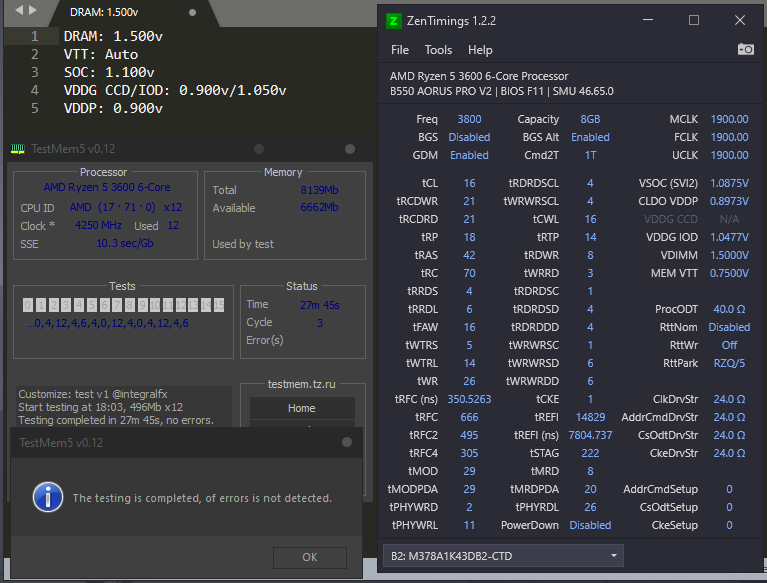
So I could possibly get 3600c16? Maybe c17...
But if I'm changing frequency and latency only should I just change those values or also other ones like voltages and other subtimings?
static oasis
sudden torrent
Yeah that would be pretty normal. Stable in one thing doesn't mean stable in all...
Yea, I know that, in some scenarios it crashes but it's strange that at "normal" priority it crashed two times, first one there was a message saying the information abt the crash are available in some folder and the other one just closed/crashed the app without any time of message or crash report. Also the actual max voltage the CPU exceeded was 1.22v instead of the 1.25v i set as constant voltage in bios
That's why I'm thinking it could be a windows problem not keeping up when setting priority to normal or high
I should check that by setting all my CPU values to stock and see if it still crashes
sudden torrent
static oasis
So I could possibly get 3600c16? Maybe c17...
But if I'm changing frequency and ...
3600 c16 is a reasonable target, or if you're willing to do 1.5v c14 is possible
eternal relic
cas barely matters 
short blade
the amount of people i see on HWS selling a unify-x and saying they never/barely oced is... interesting
 kind walrus
short blade
okay but apex is like
"yeah more money more better"
it's weirder to me to buy a unify and not oc
kind walrus
Apex is as much in that same category lol
But also DDR5 and the stigma of 4 sticks is a thing
People don't like empty dimm slots
short blade
kind walrus
Apex is as much in that same category lol
i agree but
apex is like
yeah let me just buy the most expensive board it has to be better right
unify doesn't have that segment going for it
short blade
just buy a godlike
kind walrus
People are also super brand loyal or aesthetic obsessed
And unify is full blackout
No rgb no nonsense
short blade
not a true msi fan if you don't buy a godlike every generation
upgrade z690 godlike to z790 godlike
kind walrus
Ew
Lol
But yes there are people like that too
Some who buy maximus extremes or formulas
Buy the highest price white mobos cos they can
short blade
more money more better
kind walrus
We get people through here who buy Aorus xtremes
Those have made me laugh cos the late ones have been horrible
 short blade
yeah but you called a gigabyte product bad
kind walrus
I did
short blade
you've been expelled from the hivemind
short blade
they bundled one of those with my 3080

good thing i didn't actually try to power the 3080 with it
short blade

vetroo is sending me a 1000w psu with 2x 12vhpwr
gonna be fun to open
2x 12vhpwr seems completely pointless
kind walrus
There was one guy who bragged about in the oc discord, owning an 850gm
Saying nothing was wrong cos it was newer
short blade
850w is futureproof for upgrades bro!
kind walrus
I think it popped and killed his x570 💀
short blade
ok but what is the point of this anyways

i think even 4090 doesn't support dual gpu this gen right?
kind walrus
Something like, really bad happened and he lost a mobo and I think a 5700g
Only 1000w but 1200w of 12vhpwr?
Maff
short blade
apparently it and the segotep psu i was sent are both speculative B now
for $0 that's better than a kick in the teeth
kind walrus
Eh I wouldn't know, not using that tier list anymore
I gotta get stuck into aris reviews soon
short blade
i gotta take some pictures of the insides when i get it
eternal relic
1000w scam, it's only 999.6w 
 sudden torrent
short blade
2x 12vhpwr seems completely pointless
sudden torrent
short blade
2x 12vhpwr seems completely pointless
It's for that HoF 4090 you totally have
eternal relic
it's even white, made for a hof build
short blade
just not a very exciting card so easily forgettable you know
eternal relic
so true
sudden torrent
Wasn't it forks that ran 1kW through a dual 8 pin?
short blade
kind walrus
Forgettable like the fact 1 12vhpwr is good enough for 1500W let alone 660
BUT MUH REDDIT POST SAID IT MELT
kind walrus
I think it was galax labs that pushed a 12vhpwr over 1500W
I forget now
Something like 1550W
short blade
i saw a render of a 12vhpwr with a built in fan lol
 kind walrus
short blade
i saw a render of a 12vhpwr with a built in fan lol
kind walrus
short blade
i saw a render of a 12vhpwr with a built in fan lol
Doesn't beat the hdmi I saw with a built in 3090
Thx amazon
short blade

kind walrus
God that was ages ago I could try dig it up
Nah no idea where I last had it
It was an amazon article for a hdmi cable that pointed to the pcb in one end and said GeForce RTX 3090™️
eternal relic
ive pushed 800-900w range thru my 2x8pin 2080ti
1 8 pin is slightly melted
16 vs 18awg matters when that much current is going thru them 
kind walrus
Fan probably might've helped if not already
Bruv imagine to go with your ddr5 waterblocks you got waterblocks for your 12vhpwr
We sending these tubes everywhere now
Cool the ram, the vram, the 12vhpwr, the mobo vrm, the ssd, the pch, pch #2 (x670e), wifi, the-
short blade
we need to custom water cool the user
 dull ginkgo
potent fiber
dull ginkgo
potent fiber
Above 2khz is often quite problematic w/ many games also. 
eternal relic
kind walrus
Fan probably might've helped if not already
i put a lil 9500rpm 90mm on them whenever im running high load now lol
ultraflo's my beloved
sudden torrent
My 80mm only gets to 6k before my motherboard overloads 
I put it over my memory and cap it to 60% max to keep it from screaming and making my ears and caps pop
finite frigate
kind walrus
Fweeeeee
me when supercharger on inline4
sudden torrent
That's more of a fweeeEEEEE💥
static oasis
Now running some test on my overclocked 3600x, I set 1.25v in bios and it runs 4.4GHz fine apparently, except cinebench if I set it's priority to normal (it crashed after some minutes), what I don't understand is that, why? Hwinfo reports that the CPU it's running 1.169v under cinebench load l and never even exceeds 1.200v idle. So why is it crashing, I don't get it.
With the other configuration, 1.200v set in bios @4.25ghz, hwinfo reports 1.200v under cinebench load, even if it is a lower frequency...? What's going on?
Aaand now cinebench with normal priority isn't crashing after 2*10minutes runs..? 9911 points wooah
scenic vine
static oasis
Now running some test on my overclocked 3600x, I set 1.25v in bios and it runs 4...
Which voltage sensor are you looking at?
Svi2 tfn is the accurate one
static oasis
scenic vine
Which voltage sensor are you looking at?
Core VIDs
static oasis
scenic vine
Svi2 tfn is the accurate one
Oooh
That makes sense.. thanks, I'll try some more tests
scenic vine
Yeah vids are useless with manual vcore
static oasis
I guess I'll have to set voltage to something like 1.255
Hope I'll get this CPU to 10k points in cinebench without cooking it
It gets to 76C in p95 while pulling 104W, but that's fine for an arctic freezer air cooler
static oasis
Why does the CPU ratio turn red if I set it to 45 in bios? 
And why can't I set 1.245v (it automatically sets to 1.2375v) lol
@scenic vine do you know why?
static oasis
There's no + button on MSI click bios 5
Hehe
I could try instead setting 45 multiplier, even if I don't know why it becomes red
sudden torrent
static oasis
There's no + button on MSI click bios 5
But there is on your keyboard
sudden torrent
static oasis
Hehe
I could try instead setting 45 multiplier, even if I don't know why it beco...
Red means not recommended by the bios for that chip. That's all.
static oasis
sudden torrent
But there is on your keyboard
It doesn't work
static oasis
It simply skips 0.0125v at a time
@sudden torrent what program would be the best in your opinion to test CPU stability (and ram too because I want to overclock later): Occt, y cruncher, Aida64,... Apart from p95
static oasis
1.25v 4.4 all cores isn't stable unfortunately, let's see +0.0125
static oasis
Finally finished overclocking my 3600x, I stopped at 4.3 because 4.4GHz didn't keep up with the voltages on the table and I should have increased the voltages even more which is a no for me: both for the high temperatures but also the max recommended voltage (even if it wasn't that close).

so OC #6 is the one I'll probably be using, but I'm not too sure because it's a 120 point difference in cinebench but with a 2C temperature difference too (compared to OC#1)... Not saying that it is going to be a problem but I don't feel like it is worth it.
scenic vine
sudden torrent
Red means not recommended by the bios for that chip. That's all.
Red is completely arbitrary, take no note of it
scenic vine
Yeah because 1.3sa on CML is danger zone
It's arbitrarily set by the bios maker, based on their opinion and not really anything else
mental turret


 mental turret

Check out Goliath today using the link below and save 20% today: https://lmg.gg/Goliath-Technologies
Create your build at https://www.buildredux.com/linus
It is nearly impossible to cool Intel’s 13th gen CPUs.. so we got a 5000W industrial chiller!
Discuss on the forum: https://linustechtips.com/topic/1492779-the-god-of-computer-coolers/
Che...
sudden torrent
Not cold enough. We need to go lower. 5 Kelvin should do it.
mental turret
it doesnt go into the negatives apparently
guess im not surprised considering what that unit's actual use-case is
bit disappointing though
 ancient bridge
Still has a crazy amount of cooling capacity
Ig you can call it
Put one in my basement 🗿
scenic vine
Try it on 7800x3d
ancient bridge
sudden torrent
Never mind the obvious bottleneck of the IHS
Intel fault nahhh the multi thousand dollar cooler
eternal relic
a modded 2kW portable AC that u can get for free on FBMP can take coolant to -20c
sudden torrent
That's a janky AF mod though
ancient bridge
What's life without a bit of jank
scenic vine
A longer life
eternal relic
zenith palm
For those who have g skill ram, there's a hwbot comp atm and even if you don't get one of the top 9, 3 randomers who complete all stages will be chosen to get a 7200mhz kit iirc
zenith palm
sudden torrent
Pretty sure my C-die wouldn't get me much 😅
true but what if you where the 1/3 lucky ppls
ofc no point for you since no lga1700
pallid nest
I habe G.skill but idk how to mess with DDR5
sudden torrent
pallid nest
I habe G.skill but idk how to mess with DDR5
You can do a hwbot sub with the special rules anyway, even with XMP only or even jedec timings. You could get lucky.
Honestly though, you don't really need it. But if you did win it would be good to sell.
pallid nest
proven canopy
Want a chance to win a kit of 7200 gskill ram? Make a submission for every stage to enter for the random drawing of 3 kits.
https://community.hwbot.org/topic/223382-gskill-world-cup-online-qualifier-2023-1st-of-march-till-april-10th-2023/
Feel free to reach out for help if unsure how to make a valid submission. Basically just copy this screenshot
https://community.hwbot.org/uploads/monthly_2023_02/Stage2.png.36bb66d0c60a09c9e4436f5fcd06049a.png
HWBOT Community Forums
Important links PR link at G.Skill page E-sports page GENERAL RULES ● Participants must use Intel LGA1700 Platforms. ● Participants must use commercial available G.SKILL DDR4/5 memory only. ● Must use commercially available components (ES hardware is not allowed). ● HWBOT and G.SKILL reserve the ...
 proven canopy
Want a chance to win a kit of 7200 gskill ram? Make a submission for every stag...
mental turret
proven canopy
proven canopy
Want a chance to win a kit of 7200 gskill ram? Make a submission for every stag...
mental turret

eternal relic
my gskill a0's stopped booting on my z690 entirely and im too lazy to troubleshoot anytime soon
mental turret
scenic vine
Oh great the drama comp
eternal relic
yeah the drama sorta compounded together to demotivate me from subbing 
scenic vine
The rule change was total bs
 humble jay
Most boards would be banned under it, would have been silly in the end. Like if you wanted to compete for ddr4 only strix A z790 allowed lol
pallid nest
just use stock bios 
sudden torrent
You'd think that would be allowed but no, manufacturers can change their sites so the specific bios you use has to be uploaded to the specific forum post
 steady lance
Out of curiosity can I OC my ram on the B450M Tuf motherboard I have?
I have some 3000mhz Cl16 Oloy ram
scenic vine
Yes
steady lance
Are there any good guides on ocing ram? Considering doing so for the funzies.
zenith palm

Also on b450 you have a hard cap of 1.5v but unless you get lucky i don't see you needing that voltage anyway
steady lance
k.
 rose bison
doing per core oc for an intel 7820x.. 12hrs in..
sudden torrent
Seems about right tbh
Getting it to the absolute max takes a lot of time and effort, as well as a nice spreadsheet
rose bison
Using good ol printer paper and pen
hard part was purging the 2 aios I strung together, green coolant is not good for you lol
mental turret
ooo lga2066 ocing
rose bison
best core is currently 1.284v 5.0ghz
2nd coolest one too lol
had x79 last time, heard there is a xeon unlocked with 8 cores
sudden torrent
You're probably thinking of the 1680 v2
Great chip, 8c16t
I have the 1650 myself, 6c12t
rose bison
thats the one, would have liked to buy it, stuck with the 3960x I got used for like 2-300 can
also a lot of fun 😄
mental turret
sudden torrent
You're probably thinking of the 1680 v2
cant believe you would see someone talking about overclocking x79 and not immediately ping me smh
mental turret
rose bison
had x79 last time, heard there is a xeon unlocked with 8 cores
whats the best that 1680v2 did?
I love that chip
rose bison
the 1680v2 was a full die version of the consumer line
also xeon means good screening, so it would prob be similar oc potential
sandy or ivy im not sure
sudden torrent
mental turret
cant believe you would see someone talking about overclocking x79 and not immedi...
It was only mentioned in passing, he didn't have one he said he wanted one
proven canopy
Misery loves company
mental turret
I LOVE X79
I LOVE X79
I LOVE X79
I LOVE X79
mental turret
proven canopy
Misery loves company
im going to convert you
We've already begun the process, fellow R4BE owner.
proven canopy
More of a g34 guy
mental turret
disgusting.
proven canopy
mental turret
We've already begun the process, fellow R4BE owner.
Points are points
mental turret
I'll have to clean out your basement of that inferior ewaste
kind walrus
mental turret
We've already begun the process, fellow R4BE owner.
Weird question isn't that board silver
mental turret
Only high-end ewaste allowed in our domicile
sudden torrent
I'm going to have to buy a X79 board with some of my tax return I think
kind walrus
I'm thinking of a different one nvm
sudden torrent
I'd love to upgrade from this locked HP nonsense I have currently
mental turret
sudden torrent
I'm going to have to buy a X79 board with some of my tax return I think
:)
rose bison
x299
sudden torrent
I already have a meshify C sitting doing nothing
mental turret
not sure why you would spend money specifically on x79 for just server use though
kind walrus
Meshify c my beloved
mental turret
not to mention when you already have a z420
sudden torrent
rose bison
x299
I would but I already have a 1650
sudden torrent
mental turret
not sure why you would spend money specifically on x79 for just server use thoug...
So I can bench it too ofc
mental turret
sudden torrent
So I can bench it too ofc
VALID.
I might be spending upwards of 150 dollars on bulk DDR3 within the next month btw @sudden torrent
@proven canopy buy all 97 of this (it's a business expense of course)
https://www.ebay.com/itm/173978139762

eBay
Find many great new & used options and get the best deals for SAMSUNG 2GB DDR3 1333MHz ECC RAM 2RX8 PC3-10600E M391B5673GB0-CH9 Unbuffered at the best online prices at eBay! Free shipping for many products!
rose bison
sudden torrent
I would but I already have a 1650
could also wait for next hedt, then x299 will be worth pennies
mental turret
rose bison
could also wait for next hedt, then x299 will be worth pennies
it wont get that cheap so fast
boards will retain their value like x79 and 99 did
sudden torrent
What I really need is an A750 for my server
mental turret
chips will get cheaper but not by much
proven canopy
Honestly with free binning labor, that seems like the play for good gdie assuming the ecc sticks are better bin
rose bison
mental turret
it wont get that cheap so fast
saw a 7920x I think on new egg for sub 300 new
proven canopy
sudden torrent
What I really need is an A750 for my server
For plex? Do you do that much transcoding?
mental turret
there's no evidence to support the ecc udimms are better on average than non-ecc samples from what me, sparky, and redux could tell
proven canopy
rose bison
saw a 7920x I think on new egg for sub 300 new
bruh, no, why? What for?
mental turret
rose bison
saw a 7920x I think on new egg for sub 300 new
thats not a good price honestly
sudden torrent
proven canopy
For plex? Do you do that much transcoding?
4K makes it HURT
proven canopy
How much remote play do you need?
rose bison
mental turret
thats not a good price honestly
lol
sudden torrent
Actually I can't do remote play but I'd like to be able to do more than a single 1080p stream, which is all I can do now.
And the A380 can't even do a single 4k stream without buffering
rose bison
proven canopy
bruh, no, why? What for?
canadian?
mental turret
thatd be what, ~250 USD? even then, not good
oh
218
i still definitely would not
rose bison
mental turret
thatd be what, ~250 USD? even then, not good
ahahaha
think it was 14 core, could disable bad cores
mental turret
why would you disable cores though
rose bison
better gaming on just 10 higher clocked!
mental turret
if you're just gaming why would you be using x299 at all?
mental turret
I mean, I won't judge, I was dailying X99 until recently
Zen 2 isnt a high bar
Do you already have a board or something? Even then, I'd just sell the board (or repurpose it for a better use-case), and invest in LGA1700 or something
rose bison
ive had it for years, i still have a mono block I havnt used for it yet
it will be a server one day
maybe next hedt
o my bad
yea, I do a bit of everything
sorry thought you said its no good for gaming
mental turret
welp, fair enough
keeping/using hardware because you like it and it happens to be good enough is a good reason
x79/ddr3 💪
sudden torrent
Too bad sapphire rapids is so much worse at almost everything, even price, compared to epyc genoa

 mental turret
i will get all the 7zip MIPS
proven canopy
Can't wait until I can sub 96c storm peak for a (redacted) second ycruncher gold
mental turret
Can't wait till you let me borrow your 96c storm peak because you totally trust me with any and all of your hardware to bench with however I want
sudden torrent
pours LN2 straight on the chip with no pot
ancient bridge
Wow
sudden torrent
Because then you don't get that LN2 cooled VRM and memory slots
rose bison
"looks of into space" he's right,
scenic vine
steady lance
Are there any good guides on ocing ram? Considering doing so for the funzies.

GitHub
C# WPF to automate HCI MemTest. Contribute to integralfx/MemTestHelper development by creating an account on GitHub.
 signal belfry
Did they ever make one of those for ddr5?
mental turret
people just havent gotten around to actually writing it down in a public manner yet
same reason why the ddr3 IC thread is still so out of date
sudden torrent
When DDR5 gets more mature and a general set of rules applies to most of the current set of dies, I'm sure a new guide will be made. Until then, AHOC has settings and timings for you to copy for all the dies.
rose bison
i remember when ddr was faster then ddr2
sudden torrent
And now you can say you remember when DDR4 was faster than DDR5
sudden torrent
Wake me up when DDR3 can get to 4800 c14
rose bison
LOL
mental turret
sudden torrent
Wake me up when DDR3 can get to 4800 c14
done
potent fiber
Heck, where's ddr5 that could even do 5100c19 like the Rev N.
sudden torrent
Wait... I searched that wrong
Still not 4800 though https://hwbot.org/submission/2573743_sofos1990_memory_frequency_ddr3_sdram_2310.1_mhz

HWBOT
The DDR3 SDRAM @ 2310MHzscores getScoreFormatted in the Memory Frequency benchmark. sofos1990ranks #399 worldwide and #1 in the hardware class. Find out more at HWBOT.
sudden torrent
potent fiber
Heck, where's ddr5 that could even do 5100c19 like the Rev N.
DDR5 is fundamentally different than DDR4 so CAS matters a lot less
But it'll happen eventually I'm sure
potent fiber
Skill issue
mental turret
sudden torrent
Still not 4800 though https://hwbot.org/submission/2573743_sofos1990_memory_freq...
this will be.... exceedingly difficult to even get close to
assuming i even do
sudden torrent
I expect a nice long nap then. Wake me when you have the WR at least.
mental turret
kinda hard to beat sponsored guys with endless supplies of hardware and ln2
sudden torrent
mhm
mental turret
not to mention their skill 
mental turret
it's actually harder than you might expect to even find high-bin 1R MFR for sale anymore
best bin i've gotten so far is 2666C11
id like 2933 stuff
 tall pelican
https://cdn.discordapp.com/attachments/902660521889759263/1084929128035274762/20230313_130021.jpg ddr2 be shredding ddr5
 proven canopy
mental turret
kinda hard to beat sponsored guys with endless supplies of hardware and ln2 <:co...
proven canopy
mental turret
kinda hard to beat sponsored guys with endless supplies of hardware and ln2 <:co...
But when you do, it's even more satisfying
mental turret
proven canopy
But when you do, it's even more satisfying
EXACTLY
thats why i always have extra pairs of pants while benching
scenic vine
Wicking away extra moisture
eternal relic
mental turret
not to mention their skill <:JJKDamnBroSkull:1005956384338235392>
just be splave with bare minimum ram oc knowledge
just get cpus that do ln2 clocks without a cooler at all 
scenic vine
You're just mad you don't have his level of a-die optimization
short blade
@mental turret @kind walrus the new buildzoid video... I feel so vindicated
he's going through all the weird issues I'm going through
passing VST and failing tm5 on same settings
passing 12 cycle tm5 and instantly bsoding VST on same settings
passing tm5 12 cycles then running it again on the same settings and failing in 4 minutes
passing tm5 and then failing HCI
passing HCI and then failing tm5
it's all there
I'm not alone
at 1.32v?
sweet, glad it was a simple fix
games work?
niiice
I'm ready to settle for 99% stability instead of 100% stability like I'm used to
I figured I was just doing something wrong this whole time
but if buildzoid is getting the same unexplainable issues I am then maybe it's the IMC
even downclocking to 4000 is randomly unstable sometimes
and other times 4133 won't error for 100 hours
I can't post the video cause I can't guarantee all 61 minutes are profanity free lmao
mental turret
short blade
passing VST and failing tm5 on same settings
passing 12 cycle tm5 and instantly...
tbf he kinda sucks at mem oc in general, especially ddr5
short blade
so many comments sharing similar experiences
sudden torrent
It's not just him yeah. It's also got little to do with the OC itself when it can pass a battery of tests run for 12 hours straight, and then just randomly gets 90 errors 10 hours into the test.
This is all still technically first gen DDR5, so ofc there's going to be problems pushing the limits.
 sudden torrent
Gear 1 at 4133? Not bad at all
I'd call 5 hours good enough for gaming too personally
short blade
sudden torrent
I'd call 5 hours good enough for gaming too personally
aaaaand I just got a bsod at idle
sudden torrent
That's usually tREFI being too high iirc
kind walrus
just dial your oc down ffs
You keep telling me it's stable then this happens lmao
If that's not coping idk what is 💀
short blade
it can pass VST and absolut but cannot handle league of legends lobby i guess
short blade
kind walrus
just dial your oc down ffs
that's the thing, even 4000 is sometimes just randomly unstable
how far back do i go?
3600? 3200?
short blade
what if the same things happen at 3800
kind walrus
you should know if it does or not already 💀
short blade
i guess stress tests are just useless for this platform or what
kind walrus
when you're on the limit higher is not necessarily better
short blade
it's just dumb bc like
how do i tell when i've backed down enough lol
apparently stress tests can't tell me
now my discord keeps crashing
 short blade
maybe i should just refund the 13700k and get ryzen 7000 and cope harder
 mental turret
short blade
maybe i should just refund the 13700k and get ryzen 7000 and cope harder
short blade
mental turret
short blade
maybe i should just refund the 13700k and get ryzen 7000 and cope harder
short blade
but is it not ridiculous that stress tests cannot tell me how much to turn it down
just got another bsod
going to 3600 now
kind walrus
Aren't you running like, tCWL at tCAS-3 or something
Consider reeling back those below theoreticals as options too
short blade
even tCL -5 passes all stress tests
-3 is the loose option
oh well
guess I'll just have to trial and error it if stress tests are useless
dropped it to 4000
not gonna bother to run any stress tests
sudden torrent
short blade
i guess stress tests are just useless for this platform or what
No, stress tests are just bad at finding issues with the refresh interval. Lower tREFI. When the data is actively being used it's stable, but when it's stagnant it gets corrupted. That indicates it needs to refresh the cells more frequently.
 barren ridge
wam oc misadventures
short blade
sudden torrent
No, stress tests are just bad at finding issues with the refresh interval. Lower...
never had such an issue with my other intel platforms
even if it's a tREFI issue i'm still blaming raptor lake for it
ive done ram oc on haswell, skylake, kaby lake, coffee lake, comet lake, tiger lake, and alder lake
none of them behaved like this
sudden torrent
Yes the memory controller is still partly to blame. Every time Intel does this thing with 2 different DDR gens in one platform, that happens.
There's a reason all the DDR4 memory records are still held by 11900k
short blade
5 out of 7 of those prior platforms had hybrid controllers
but fair enough
guess i will skip every intel gen with a hybrid controller from now on
sudden torrent
I have a similar personal rule. I skip the first gen on every new platform.
short blade
funny thing is the first gen on this new platform was perfectly fine
sudden torrent
4 sticks?
short blade
never had any issues pushing the 12100 to the absolute edge of what its 0.946v locked SA could do
no, 2 sticks
the 12100 took tighter subtimings like a champ on the same board and same ram
sudden torrent
No I mean DDR5 is most certainly not perfectly fine, so by principle I skip the gen entirely
short blade
this is ddr4
short blade
wasn't an option
i had usb dropout
and i'd rather be limited to ddr4-3200 than have to live with usb dropout
sudden torrent
I get that, I'm just saying this is my personal rule. There's always extenuating circumstances.
short blade
well, time to cut tREFI in half and see if it works
I really doubt that tCWL = tCL - 3 is the problem here
tCL - 4 was rock solid on the 12100
I did have to run tREFI lower on the 12100 but I attributed that to the lower frequency
i guess "discord crashing" is the new stress test
but honestly the biggest problem is that it's inconsistent
could be fine today and not fine tomorrow
7800x3d looking tempting now
short blade
well it's working for now
restive sequoia
on the recent bz video
 scenic vine
💀
mental turret
restive sequoia
trusty 7500 seems to be squeezing everything outta 3060ti
 mental turret
I should really put together a doc to serve as an updated version of the ddr3 IC thread
that forum post is missing a lot of good info

mental turret
yes
mental turret

My Patreon: https://www.patreon.com/buildzoid
Teespring: https://teespring.com/stores/actually-hardcore-overclocking
Bandcamp: https://machineforscreams.bandcamp.com/music
Twitch: https://www.twitch.tv/buildzoid
Twitter: https://twitter.com/Buildzoid1
Facebook: https://www.facebook.com/actuallyhardcoreoverclocking
#overclocking #ddr5 #intel
proven canopy
Skill issue
kind walrus

More information about Hetzner AX52 Servers:
https://derbauer.hetzner.com/en/AX52-en/
Elmor EVC:
https://elmorlabs.com/product/elmorlabs-evc2se/
Support me on Patreon:
https://www.patreon.com/der8auer
Music / Credits:
Outro:
...
steady lance
kind walrus
https://youtu.be/ySxNdg13y9A
Pcb starts melting xD.
finite frigate
me when oberclock?
mental turret
@proven canopy you dont have a functional SS/cascade yet right
mental turret
whats needed to make that happen
proven canopy
Brutus needs to sell me his 20 lb tank of r507