#building-and-recc-chat
1 messages · Page 1320 of 1
 flint sapphire
flint sapphire
flint sapphire
Yes it’s local and it’s in writing on their website

 restive halo
Will I have to do anything if upgrading my 3700x to a 3900xt
 livid spire
do you already have the CPUs?
my 3900X heats up a bit on the big wraith
if you're planning on slapping that
during summer time things might go a bit worse. it'll survive tho still
with a 360 AIO it shouldn't be a problem, but buy a different CPU if you want upgrade
restive halo
livid spire
during summer time things might go a bit worse. it'll survive tho still
I have the 3700x in it now but the 3900xt was given to me for free. I have https://pcpartpicker.com/list/NfnxY9
PC Builder - AMD Ryzen 7 3700X, GeForce RTX 3060 Ti, Corsair 4000D Airflow ATX Mid Tower
@livid spire Is it worth the upgrade if it was free and by what I have
livid spire
yeah i'd slap that thing in personally
that cooler would do it justice (for a LF2 360 myself as well)
restive halo
@livid spire Heard. Thank you
livid spire
👍
 humble fossil
se cooler master cases
 meager dew
probably gaming, but im in no position to buy it lol
 unborn mesa
Ayo whered you get the hat
 dense palm
So I guess my cooler got stuck somewhere unknown
unborn mesa
dense palm
So I guess my cooler got stuck somewhere unknown
Explain
dense palm
Was supposed to come Monday. Did not.
The only update from Amazon was: "shipment delayed"
which was on tuesday
no other update past that
Called customer service, said they will refund and I can keep the item
 desert gulch
thats neat then
dense palm
said will come by yesterday or today
 hybrid ether
Anybody have a recommendation for an L desk?
unborn mesa
Brooo no @dense palm
Same thing happened to me
It got canceled
Then i got it the next day then got charged twice had to call them to get one charge off my account
dense palm
Well we shall see
kinda annoyed since everything is supposed to come by today or tomorrow
unborn mesa
Itll be ight
dense palm
I ordered the 280mm version of AIO fan
maybe I will order the 240mm since it can come in 2 days
 still roostBOT
 rychlost#6398 has been warned
Reason: Bad word usage
dense palm
Same *thing * can happen again
 bold prism
What’s a good software to check on my pc parts?
 frank stirrup
bold prism
What’s a good software to check on my pc parts?
frank stirrup
bold prism
What’s a good software to check on my pc parts?
what pc part do u wanna check
or what aspect of pc parts
theres no single program really
 potent portal
meager dew
probably gaming, but im in no position to buy it lol
potent portal
meager dew
probably gaming, but im in no position to buy it lol
4k 60Hz isn't very good for gaming. Look at 1440p high refresh instead. You can use this to filter for features you want. https://www.rtings.com/monitor/tools/table

RTINGS.com
Next gen 4k high refresh should become more common but if you get a 60 Hz panel now you're stuck.
desert gulch
bold prism
What’s a good software to check on my pc parts?
hwinfo64 is a great place to start
highly reccomended accurate hardware monitoring software
 potent portal
restive halo
How do I get rid of this?
potent portal
restive halo
How do I get rid of this?
Run as administrator?
restive halo
potent portal
Run as administrator?
I'll try
@potent portal Also I switched out my cpu and now nothing even turns on?
restive halo
Nothing still
 runic smelt
Hey guys has anyone had problems with Ryzen 7 5800x overheating? I’m using a 360mm aio, switched to it from a 240 so I know it isn’t the cooler.
 mossy venture
runic smelt
Hey guys has anyone had problems with Ryzen 7 5800x overheating? I’m using a 360...
mossy venture
runic smelt
Hey guys has anyone had problems with Ryzen 7 5800x overheating? I’m using a 360...
yes, but on a 360 you should be very fine
restive halo
I don't understand how just swapping the cpu made the entire system not get power at all?!
mossy venture
what 360 is it?
runic smelt
It’s an Msi core liquid, but as soon as i fired it up and looked at temps it was at 104°+
runic smelt
I’ve re thermal pasted it a few times now and i took it out and put it back in, could it be anything to do with mobo?
mossy venture
doubtful
how much thermal paste are you using
msi also doesnt have a good reputaton with aios
runic smelt
A pretty good amount
mossy venture
@earnest olive you know anything about the core liquid 360?
runic smelt
Before this 360 i used a Cooler master ml240 and it was still super hot
 earnest olive
v1 or v2
mossy venture
how much paste compared to this
 earnest olive
there was a recall for coreliquid v1
runic smelt
Probably more than that
earnest olive
I put a 240 coreliquid v1 on a customers build
was very good at first
but later on she told me she got shutdowns and 100c idle
RMA it and got a coreliquid v2
works great
mossy venture

MSI MAG CORE LIQUID 360R 78.73 CFM Liquid CPU Cooler (MAG CORE LIQUID 360R)
earnest olive
but yes the coreliquid v1 has been recalled for pump failures
so you probably have a pump failure
runic smelt
I’ll go check which one it is
mossy venture
when did you buy it?
earnest olive
but
is it v1 or v2
it should say on the box if it's v2
in the product name
can't miss it
runic smelt
It’s from my girlfriends dad so i’m not sure when he got it or anything
mossy venture
ah
runic smelt
Just finding the box
earnest olive
it's possible a store sold you new old stock of v1
luckily msi customer service was completely painless
runic smelt
Pretty sure it’s v1
runic smelt
But the other cooler I had was the same temps
Could too much thermal paste cause this?
earnest olive
what was the other cooler
maybe you mounted both of them wrong
or maybe they both had bad pumps
if they're both coreliquid v1 that's very possible
 wary tundra
I just switched out my 3600 for a 5600x and my pc won't post
earnest olive
did you bios update
runic smelt
Cooler master ML240, and it only started yesterday overheating. I had an os on it last week and was able to play games and everything fine
mossy venture
wary tundra
I just switched out my 3600 for a 5600x and my pc won't post
did you update bios
wary tundra
I have a asus b450 f motherboard
restive halo
Reseated ram. Took out close battery. Made sure psu is on. Still nothing
earnest olive
b450 needs bios update for zen 3
wary tundra
I have a static orange light
mossy venture
wary tundra
I have a asus b450 f motherboard
put the 3600 back in and update bios
or that mobo might have a bios flash button
some asus boards do, not sure which
earnest olive
runic smelt
Cooler master ML240, and it only started yesterday overheating. I had an os on i...
yikes
before/after temps?
for me the coreliquid v1 was getting 18c idle when I installed it
when I got it back from the customer it was 100c idle
runic smelt
I hadn’t even checked the temps before while gaming, but around 40-50 when i did check
earnest olive
and it was hitting 100c idle with the ml240?
runic smelt
Yeah
earnest olive
and you swapped it out for coreliquid v1 and got 100c idle again?
runic smelt
And the before temps were with the 240, then they randomly got high that’s why i switched
runic smelt
No haven’t touched over clicking settings
earnest olive
idle
mossy venture
though even that wouldnt make sense
earnest olive
100c on ryzen with 90c throttle limit
mossy venture
what are you viewing temp with?
runic smelt
BIOS
earnest olive
basically the only way to get 100c on ryzen is to effectively not have a cooler
if you're at 100c it means your cooling is so ineffective that even thermal throttling is failing
and it should slowly rise until 105c and shut down
runic smelt
I saw it hit 114 then shut it off
earnest olive
oh wow thermal shutdown is that high on ryzen?
thought it was 105
guess it's 115 then
mossy venture
how do you have the aio mounted?
runic smelt
Yeah i shut it off on my own though so i’m not sure what it is
earnest olive
well, we can assume that the first cooler was mounted correctly
since temps were fine for some time
just unlucky early failure
coreliquid v1 could be bad mount or could be failed out of the box
since that unit has extremely high failure rate
mossy venture
are the fans spinning in the aio as well?
earnest olive
I'd try remounting the coreliquid first
runic smelt
I’m pretty sure the core liquid was previously working in another build
Yeah fans are spinning
earnest olive
no fan spin wouldn't cause 114c in bios in short term
it would take a while to saturate heat as long as the pump is running
runic smelt
Yeah kt was 114 after running for about a minute not even
runic smelt
Okay
earnest olive
if temps are still high go RMA it and MSI will send you a coreliquid v2
v2 doesn't have the problem
mossy venture
runic smelt
Okay
what case is it as well?
earnest olive
they also pay for shipping both ways
runic smelt
It’s a corsair 4000x
runic smelt
Yeah it’s not the case
mossy venture
yeah, just curious to see where its mounted
earnest olive
nothing else it can possibly be besides bad mount or dead pump
even if it's a stupid bottom mount it wouldn't be this bad
runic smelt
Could it be anything in the bios
earnest olive
man
mossy venture
no
earnest olive
earnest olive
nothing else it can possibly be besides bad mount or dead pump
did I not just write this
mossy venture
earnest olive
did I not just write this
i mean how bad would it be if an aio was mounted on something solid
and cooling itself with hot air
earnest olive
still not 114c in 1 minute
mossy venture
oh it was that fast?
earnest olive
unless you're literally putting it in 114c air
runic smelt
It’s mounted properly and the other aio got those temps, I just put this in and it was at 100 so i shut it off
mossy venture
didnt realize it was that fast
earnest olive
in which case
no you're not because you're dead
it would still take a while to saturate the whole radiator with heat even if you were purposefully blocking natural convection
desert gulch
earnest olive
just unlucky early failure
How'd he mount it
Don't those pesky MSI core liquids have pumps in rads?
earnest olive
I mean his case does not support a bottom mount which is the only orientation that actually kills coolers
desert gulch
Not that one
runic smelt
I can’t send a pic for some reason
earnest olive
desert gulch
Don't those pesky MSI core liquids have pumps in rads?
yes but the way it's placed makes it not possible for the pump to be the highest point in the loop
desert gulch
Ah ok
earnest olive
it's like in the middle of the radiator
desert gulch
Still wacky ngl
earnest olive
so no matter how you orient it it's just not possible
earnest olive
desert gulch
Still wacky ngl
might be due to asetek patents
cause they're not partnering with asetek
I think the company is called apaltek
for coreliquid even if you mount rad on bottom of case the pump won't be highest point in the loop
and if you top mount it parts of the rad will still be higher than the pump
and if you front mount it either way it won't be the highest either
but front mounting is probably best for it anyways
earnest olive
just remount it to try
runic smelt
Okay
earnest olive
there's only 2 possible reasons
worth trying the one you can actually do by yourself
not that hard to remount it
don't even bother with new thermal paste
for just testing if the cooler even works
runic smelt
Okay remounting it
I really don’t think it’s the cooler though, if it is why did the other cooler randomly get such high temps
mossy venture
its very unlikely the cpu
runic smelt
Would be a pretty big coincidence for both to break at the same time though
mossy venture
i cannot think of anything the pc could do that would cause that
mossy venture
where do you have the aio sitting at in the case out of curiosity
is it on the mesh on the side panel?
runic smelt
It’s in the front
mossy venture
...on the glass part?
mossy venture
okay so the mesh on the side panel
runic smelt
If you’re looking at the inside of the case it’s to the left of the fans
runic smelt
But like, both? The first one worked fine until randomly last night, and this coreliquid was also working really recently
mossy venture
its possbile
runic smelt
Bout to put in a Vetroo lurker v360
restive halo
@mossy venture On your 3060ti do you have separate Cords coming from the psu or a split
mossy venture
?
restive halo
@mossy venture you have the pcie Cords that split at the end for 2 connections or do you have 2 separate Cords coming from your psu to the gpu
mossy venture
my card is 1x8 pin, but you should use two different 8 pin cords if you have a 2x8pin model
restive halo
Ok so all I did was switch the CPU and now nothing gets power at all
mossy venture
try putting the old one back in and updating bios maybe?
since technichally 3900xt did release after 3700x
restive halo
Ugh lol
mossy venture
and if on very old bios would need a bios update
does it not boot at all?
or does it boot into bios
restive halo
Nothing
mossy venture
im not too sure
make sure cpu power cable is fully plugged in
might not be bios, could wait for someone elses answer
restive halo
@mossy venture do I have to re apply thermal paste if I'm just checking for bios?

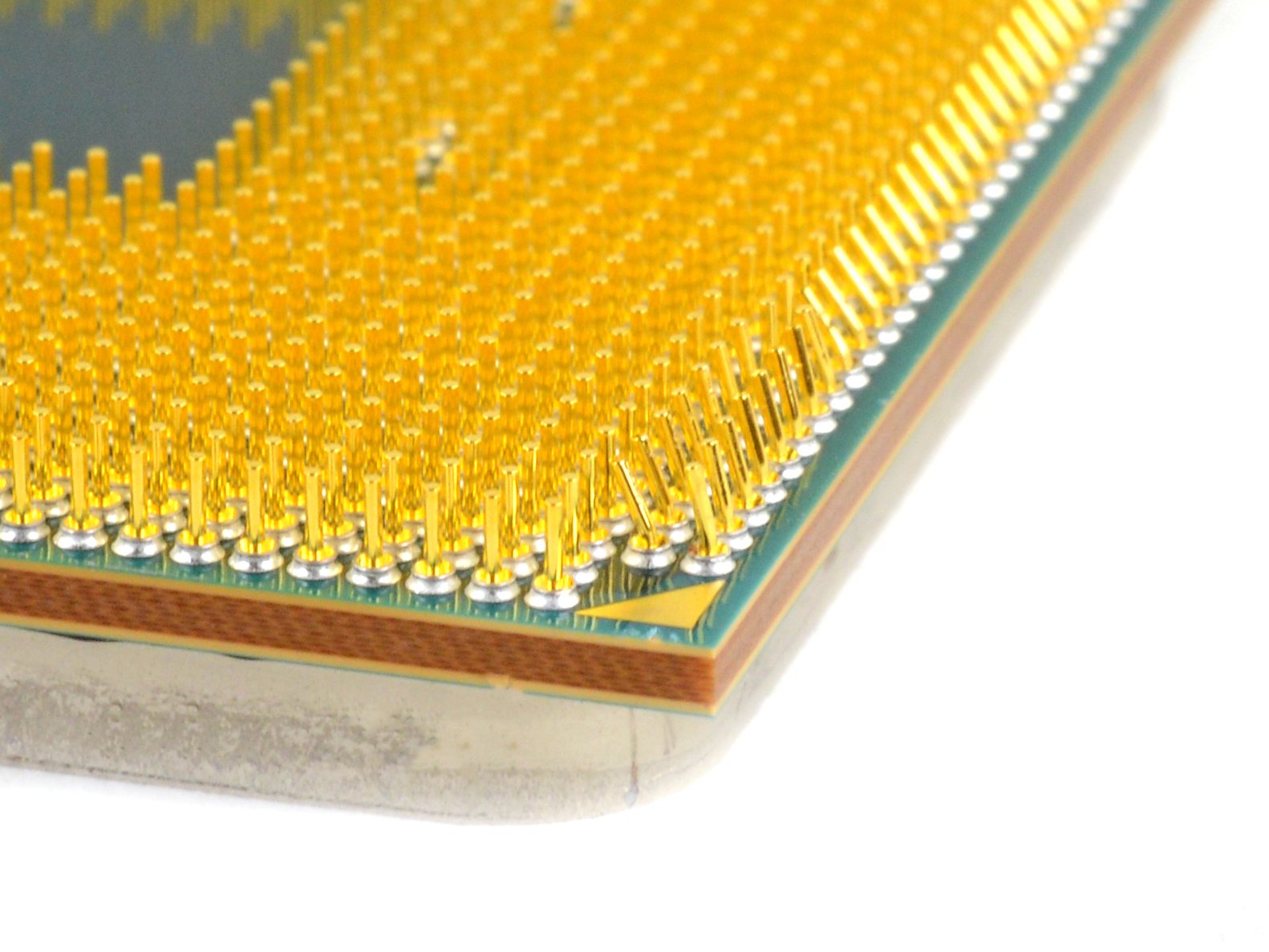
Safe way to fix this??
mossy venture
that one looks like its blackened
somehow
could try bending them back into place
 rich void
That looks like the lighting but idk
iFixit has some info on this: https://www.ifixit.com/Guide/How+to+Fix+Bent+CPU+Pins/140367
iFixit
A guide on how to straighten bent pins on pin grid array (PGA) CPUs.
Haven't done it before so can't vouch for their specific method
 winter marsh
MC Hammer has arrived!!!!

I don’t have the AIO yet, so I think you know the song….

Maybe you don't so here's a hint....

 limber star
Hi
Anyone able to help?

I took off gpu brackets on the back of case but when removing it feels like motherboard is coming with the gpu?
Is there a latch or something I’m supposed to press
rich void
Yes, there is a lock on the pci-e slot
I think it is in that pic. It's a little lever that you can depress. I think it is on the left of the slot in that pic
potent portal
He means this
 winter marsh
Push down locks are modern, Pull Tabs are from the AGPx era
And it's time to build a budget gaming PC for a Co Worker
 leaden plume
How do I install the motherboard through the io shield prongs
dense palm

Model Pure Loop 280mm Dimensions radiator, incl. fan (H x W x D)-317 x 140 x 52(mm) Socket compatibility- Intel 1200 / 2066 / 1150 / 1151 / 1155 / 2011(-3) square ILM; AMD: AM4 / AM3(+) Fan model- number 2x Pure Wings 2 140mm PWM high-speed Noise level (dB(A)) @ 25 % / 50% /100% rpm 22.5 / 26.8 /...
What are your thoughts about this
mossy venture
do you desire an aio
desert gulch
What CPU?
 mossy venture
wait
just so you know
use a piece of paper towel to do it
dont just dump it on
i would take it out first
and make sure it is dry before putting it back
limber star
Ohh ok thank you
About to install it shortly
Wish me luck
😁

I take this ssd and put it on my new motherboard right
dense palm
Well I want an AIO for the RGB and cooling
But if others offer quieter sounds and similar performance I might just take it
since its taking forever to get it
dense palm

ARCTIC, a leading manufacturer of low-noise PC coolers and components, initiated and continues to shape the trend towards quiet cooling systems. In addition to an extensive range of CPU/GPU coolers and fans, ARCTIC produces high-quality monitor arms and wall brackets as well as practical tech equ...
how is this one
potent portal
Good for a 12400
 strong raft
Non duo is only $40, but I'll say also glance at the $40ish peerless assassin. Perhaps slight overkill but will be nice n quiet
 fierce lark
Dang
limber star
I’m getting overcurrent after installing new motherboard?
dense palm
ordered the esports duo
potent portal
limber star
I’m getting overcurrent after installing new motherboard?
What do you mean? The power supply turns off? The bios is showing a warning?
limber star
@potent portal it’s on now
But I can’t leave bios
):
I think my ssd isn’t in all the way.. I guess
Is there a way to check my ssd
I’m bios
I’m
In**
potent portal
You've probably got a loose/misplaced something then
potent portal
You can see if the SSD shows on the main screen
potent portal
Seems right
limber star

Haha dang ok I’ll try again. It fit in tight etc
That’s so weird
@potent portal
Wait
Am I supposed to plug something into the ssd

All I did was put it into the ssd slot.. do I need sata or something
I re did it and it’s tight in there
potent portal
The one under the heatsink? No that's just direct board contact
limber star
Still not working
potent portal
Which drive did you get?
 potent portal
You might need to manually set the slot to PCIe 3.0 mode
 limber star
potent portal
You might need to manually set the slot to PCIe 3.0 mode
limber star
potent portal
You might need to manually set the slot to PCIe 3.0 mode
One of these ?
 spice prairie
Any tips to improve my setup?

 vague oracle
And switch to CocaCola
potent portal
Going to have to block you now
vague oracle
You wouldn’t 😘
potent portal
(jk I don't care that much)
 little osprey
what's some good sites to sell my pc on?
vague oracle
FB marketplace, JAWA, Craigslist, etc
spice prairie
little osprey
what's some good sites to sell my pc on?
I would sell locally due to pc’s being high value and i dont like the idea of shipping it out
potent portal
Local is safer too, for both of you
vague oracle
^
spice prairie
^
little osprey
wth is a jawa
 little osprey
no
vague oracle
New EBay style website that’s basically meant for selling PC parts and PCs

Jawa is a marketplace for PC gamers, built by PC gamers. Sell PC parts and custom builds quickly and hassle-free, and find the best deal son computer parts to upgrade your rig.
little osprey
ah
 south cliff
f
wary tundra
hey I just installed my 5600x and im not getting that high of a performance boost as I thought I would
also temps are much higher
would I need to get new drivers?
desert gulch
No
Most games are GPU bound so most likely you wont see a ton of difference depending on the CPU you upgraded from
wary tundra
3600 to 5600x
potent portal
Are you on Windows 11 by chance
wary tundra
I used artic silver paste and I have a h100i
 jagged ember
240mm?
potent portal
Arctic silver 4? Eh, could be worse
potent portal
Ok so the 11 bug when you swap CPUs doesn't apply
strong raft
limber star
Gen 3 so I was gonna suggest just trying the other 2 slots
potent portal
I'd guess it's just a bad mount on the CPU, take off the block and put it on again. No need to repaste.
meager dew
potent portal
Next gen 4k high refresh should become more common but if you get a 60 Hz panel ...
ah alright
desert gulch
Yeah no need to remount then
wary tundra
just the performance is wack
wary tundra
Im playing cyberpunk at 1440p medium to high settings and before the upgrade i got 45 fps in more populated areas and with the new one I get like 50
but higher temps
red dead at medium to high showed no difference
other games like rocket league and fortnite run fine
 frank delta
1440p is more gpu intensive anyway
wary tundra
also one more thing every time I click on something else my cpu goes crazy and the temps go high
like if I click on another discord server it shoots up
potent portal
I hope that's 52 under load and not idle
wary tundra
52 idle omegalol
potent portal
Yeah bad mount
 potent portal
Still, with a liquid cooler you want idle much lower
wary tundra
true true
frank stirrup
desert gulch
<@122901618369757184> whats your 5600x idle?
5800x
 desert gulch
frank stirrup
5800x
desert gulch
frank stirrup
5800x
he had a 5600x at one point
unborn mesa
@earnest olive
 desert gulch
under a 360 rad
desert gulch
yea
earnest olive
debloated OS
gaming on the 5800x rn at 38c
look at the cpu usage lmao

genshin takes less cpu than icue
wary tundra
my cpu utilization be shooting up for no reason
im trying to put off re mounting my cooler
I promie I will do it
updated drivers and its lowert but still wack
 earnest olive
thats completely fine temps
wary tundra
idle
wary tundra
yea
still roostBOT
 ye#2714 has been warned
Reason: Bad word usage
earnest olive
because you're using the computer? lol
 obsidian wigeon
^
obsidian wigeon
it's normal behavior lol
wary tundra
so plus 20c when I click things is normal?
earnest olive
earnest olive
how many background tasks do you have
if you are gonna ignore questions then im not bothering to answer yours

obsidian wigeon
that's completely normal
wary tundra
Idkkkk how to answer ittt
earnest olive
then say so lmao
 earnest olive
show your system tray
 obsidian wigeon
even windows components
wary tundra
 earnest olive
thats not your system tray
wary tundra
thats all
frank stirrup
earnest olive
show your system tray
 earnest olive
frank stirrup
earnest olive
frank stirrup
🤢
obsidian wigeon
tfw i hide my system tray icons
 earnest olive
...
obsidian wigeon
not that
frank stirrup
earnest olive
🤢
u know u like it dont lie
obsidian wigeon
it's on the right side
wary tundra
currently malding
 earnest olive
click the arrow
obsidian wigeon
frank stirrup
win 11 gang
wary tundra
 wary tundra
yes
obsidian wigeon
that explains
earnest olive
lmao
obsidian wigeon
icue eats up cpu
earnest olive
if you have icue, your system has never been idle
obsidian wigeon
use openrgb
earnest olive
you have a ton of background processes and you're in a vc and have multiple softwares open
it's not idle
lol
wary tundra
I will close then
wary tundra
I understand I just have never had this issue
obsidian wigeon
you probably just never noticed it
wary tundra
maybe
potent portal
That and the 5600X is naturally hotter than the 3600
obsidian wigeon
yep
frank stirrup
potent portal
That and the 5600X is naturally hotter than the 3600
ur naturally hotter than the 3600
:)
earnest olive
my 5600x ran 20c hotter than my 3600 with same cooler same case same power draw
earnest olive
now get rid of icue for openrgb and set some stuff to not autostart
wary tundra
I got rid of icue
earnest olive
like, permanently
 autumn wolf
so much cpu being eaten up 
 autumn wolf
i like my cpu being eaten up at 0%
frank stirrup
autumn wolf
i like my cpu being eaten up at 0%
thats how much cpu its leaving free for u actually
earnest olive
all i remember is icue using more cpu than my games when i tried 3 keyboard effects
16% of a 5800x
autumn wolf
only person i know that has resources eaten up is mando since they have a lot of corsair stuff and a big profile for their setup
restive halo
@sullen spoke
 unborn mesa
Is changing a cpu basically plug and play or do i gotta update bios
frank stirrup
unborn mesa
Is changing a cpu basically plug and play or do i gotta update bios
depends
frank stirrup
old cpu and bios version?
also either way staying on the latest non beta bios always a good idea
@unborn mesa
 fossil cedar
Not always but generally
@unborn mesa you're okay because you're going from 5700g
Although check to see if there was security patches in the later ones good to do if so
unborn mesa
fossil cedar
<@355164035387490306> you're okay because you're going from 5700g
Ah ok thx
unborn mesa
fossil cedar
Although check to see if there was security patches in the later ones good to do...
Where i check this
fossil cedar
On the motherboards website under the support tab
Easiest way is googling the board
 fossil cedar
Ye
frank stirrup
fossil cedar
Not always but generally
id say always on non beta
fossil cedar
Fair
 ionic sentinel
Hello everyone
I upgraded my motherboard from b450f to ASUS X570-E I get black screen with Qcode 02
Any recommendations would be greatly appreciated
This motherboard requires bios update to run my ryzen7 3700X , I have already updated the bios and cleared cmos, tried different parts since I have 3 computers so I basically swiped all parts but the motherboard is not willing to work on this cpu you might now think that the cpu is dead but it works fine on the other 2 computers and I have also tried different display port, HDMI and many different things like different bios versions, the pc is working fine on ryzen 7 2700X but when I try my ryzen 7 3700x I get a black screen with q code 02
I really just wanna give up at this point but I still have some feeling its a stupid fix since i have seen many people who had the same issue with ryzen 7 3700x and X570-E... I tried everything they recommended but unfortunately none worked for me
PC parts
RX6700XT
RYZEN 7 3700X
X570-E
32 GB RAM CORSAIR RGP PRO 3200HZ
850W
vague oracle
You don’t have to update bios to run a 3700x
ionic sentinel
Warning: The Asus ROG Strix X570-E Gaming ATX AM4 Motherboard supports the AMD Ryzen 7 3700X 3.6 GHz 8-Core Processor with BIOS version 0707. If the motherboard is using an older BIOS version, upgrading the BIOS will be necessary to support the CPU.
ionic sentinel
I tired before updating the bios same thing
frank stirrup
ionic sentinel
I tired before updating the bios same thing
u sure the cpu is ok?
vague oracle
Did you try reseating the ram?
ionic sentinel
Yes I have tried that and also swiped all parts except the case
If I press F1 the q codes changes and pc seems to restarts or boot with no display
 frigid night
frank stirrup
also either way staying on the latest non beta bios always a good idea
frigid night
frank stirrup
also either way staying on the latest non beta bios always a good idea
Oh, I thought it was best to stay on whatever bios the mobo came with unless you had an issue.. so... should I update my bios to the latest? I'm currently on stock.
unborn mesa
frigid night
Oh, I thought it was best to stay on whatever bios the mobo came with unless you...
Basically what they said to do
frank delta
@late fjord cheap fans for the dub😎
 late fjord
frank delta
<@357075195313520641> cheap fans for the dub😎
late fjord
frank delta
<@357075195313520641> cheap fans for the dub😎
That's the next thing on my list lol. They push enough air and my pc is cool enough. But would like some better quality and better looking fans lol
frank delta
late fjord
That's the next thing on my list lol. They push enough air and my pc is cool eno...
Same here I just got some cheap up here fans to keep my system cool while I wait get quality fans
late fjord
Was thinking about aome lian lis to match the case. But I've heard mixed reviews so I'm not sure
mossy venture
late fjord
That's the next thing on my list lol. They push enough air and my pc is cool eno...
Artic p12s
frank delta
mossy venture
Artic p12s
See you recommend good stuff but aesthetically garbage
mossy venture
frank delta
See you recommend good stuff but aesthetically garbage
There's an rgb version my guy
And they look perfectly fine
late fjord
They would match my aio since it's artic
mossy venture
P14s also exist, same thing just 14cm instead of 12
late fjord
Yeah the fans I have now are one of the cheap ones with the remote control lol
frank delta
rich void
Aesthetics is also quite subjective
True opinions do exist
rich void
frank delta
True opinions do exist
I guess if the fan literally looks like a pile or bag of garbage
frank delta
rich void
I guess if the fan literally looks like a pile or bag of garbage
I’m trying to load pc with the thermal take ring quads but they are expensive af
rich void
Just say no to RGB and save some money
Embrace the T30
Make your PC function as a hovercraft on the side
strong raft
Sunon & Delta say hello. did you order a tornado 
 livid cobalt
Guys questions. rtx 4090 + 4k 120hz or 4090 + 2k 120hz/144hz
unborn mesa
4k ofc
Sn depends if you want performance or quality
Im guessing itll perform better with 2k for competitive gaming
4k for casual
livid cobalt
Can 4090 run 120hz in 4k? like red dead redemption 2
unborn mesa
Most likely since im pretty sure a 3090 can
rich void
livid cobalt
Can 4090 run 120hz in 4k? like red dead redemption 2
The 4090 hasn't even been announced yet, wait for reviews
With 30 series the sweet spot imo is 1440p
strong raft
We'll see, but 4090 is supposedly 2x speed of "3090" although I normally say 3080 ti since 3090 isn't really impressive in games. 4k in most stuff seems reasonable.
strong raft
Exactly
rich void
It's basically just the Nvidia hype train imo
livid cobalt
rich void
The 4090 hasn't even been announced yet, wait for reviews
I was thinking about getting a 4k 120hz monitor or a 4k 60hz monitor
rich void
I wouldn't get a 60hz monitor at any res
strong raft
4k good, 60hz is scary. I grew up with nice CRTs, many young people nowadays didn't. I mean they didn't get used to almost no ghosting/input lag, etc. 
livid cobalt
lol
rich void
strong raft
4k good, 60hz is scary. I grew up with nice CRTs, many young people nowadays did...
Didn't get big and strong from lifting those behemoths either 😆
strong raft
Only 40 or 50 ish lbs also. Wasn't fortunate enough to get the bigbertha 21" models.
rich void
I can't remember how big my crt was back in the day, it was an armful though
strong raft
🤣 better gif than expected.
rich void
It was somewhere between 17 and 21in iirc
I also don't know if it was actually good, but I liked it at the time
vague oracle
I used to have one massive CRT TV in my basement before hurricane Sandy came along
strong raft
I had at least 2 that were a ViewSonic G90F. 90 meant 19" (18" viewable) & the F meant flatscreen actually. So awesome in FPS games. 1280x960 res was my usual.
vague oracle
It was like ~45” iirc and it was way too damn heavy
rich void
vague oracle
It was like ~45” iirc and it was way too damn heavy
Yeah that's a team lift
vague oracle
I still remember my mom telling me “don’t sit too close or you’ll fall through the floor” 
strong raft
Hah, reminds me my 27" Curtis mathis tv was a 1 person but the 32" front room tv was a 2 person lift*
rich void
vague oracle
I still remember my mom telling me “don’t sit too close or you’ll fall through t...
 mossy venture
livid cobalt
Guys questions. rtx 4090 + 4k 120hz or 4090 + 2k 120hz/144hz
mossy venture
livid cobalt
Guys questions. rtx 4090 + 4k 120hz or 4090 + 2k 120hz/144hz
What
4090 doesn't exist
Get a 1440p 165hz monitor, or a 4k 120-165 if you really want 4k
But 4k gaming kinda a meme
And 60hz sucks for gaming
unborn mesa
mossy venture
4090 doesn't exist
Ayo what
rich void
unborn mesa
Ayo what
It's not on the market yet, so doesn't exist
unborn mesa
It doesnt exist for consumers yet basically?
rich void
It hasn't been officially announced, it hasn't been reviewed by third parties, it hasn't been released
rich void
Well Nvidia has GPU dies that will presumably go to a 4090 product, or something like it, but yeah for consumers it's basically just the vague idea of the next gen of Nvidia GPUs
unborn mesa
Isnt a 3090 like somewhat newly released?
rich void
I think you mean 2020 there
 rich void
Well they're wrong 😆
unborn mesa
🤷♂️
rich void

NVIDIA
Experience games at stunning levels of detail, at high resolutions and framerates. And further accelerate and improve your experience with NVIDIA DLSS, NVIDIA Reflex, and other groundbreaking technologies that are coming to Fortnite, Call of Duty: Black Ops Cold War, Cyberpunk 2077, Valorant, and other blockbuster titles.
unborn mesa
Considering i didnt hear about a 3090 till around January 2022
rich void
Nvidia official announcement right there
rich void
Right near the top
Article is from September 2020, lists 3080 releasing 9/17/30 and 3090 on the 24th of the same month
If you look at any other source it'll back this up
frigid night
so the wiki says that the 3090 was released September 24th of 2020
rich void
"The new GeForce RTX 3080, launching first on September 17, 2020"
3090 released a week later
Seriously dude. If you read the announcement it is crystal clear
They don't announce a GPU a year early
frigid night
so looking at the wiki.. it shows that the Ti versions were released in 2021-2022... however the 3060 Ti says it released in 2020 while the regular 3060 released in 2021...
rich void
That's accurate
frigid night
yeah
frigid night
yeah, but how comne the base 3060 released after the Ti verrsion?
 stoic island
Why not
frigid night
I'm new to the pc scene so something like that seems weird when all the others follow a pattern?
stoic island
They went top to bottom for the product stack
rich void
frigid night
I'm new to the pc scene so something like that seems weird when all the others f...
They typically release more powerful cards earlier
stoic island
Like 3090 3080 3070 about same time, 3060ti, then 3060
unborn mesa
Anyway i dont have nvidia gpu so havent looked into it like that
3090ti was released this year tho wasnt it
rich void
3070/80/90 Ti cards and the 3080 12gb are basically refreshes
stoic island
3090 ti was just an addition
rich void
Like the super series of cards from Turing
rich void
Basically Nvidia wanting more money
unborn mesa
rich void
Basically Nvidia wanting more money
Thats any company tbh
Amd with the 6950
frigid night
I remember when I first started building this pc.. there was only th e3090.. then all of a sudden people were tlaking about the Ti and I was like wtf.
rich void
unborn mesa
Thats any company tbh
Did I say it wasn't?
unborn mesa
rich void
Did I say it wasn't?
No just adding on
 rich void
😆
little osprey
😳
flint sapphire
 cease
cease
 rich void
As long as that isn't your ambient 😆
mossy venture
rich void
As long as that isn't your ambient 😆
34.5 idle is fine, idle Temps don't speak for load temps
rich void
mossy venture
34.5 idle is fine, idle Temps don't speak for load temps
I think you missed my joke
34.5 ambient sounds pretty uncomfortable to me
It's great for an idle temp on a CPU or gpu
mossy venture
rich void
34.5 ambient sounds pretty uncomfortable to me
It's great for an idle temp on a ...
Sorry thought you were using ambient and idle interchangeably
rich void
mossy venture
Sorry thought you were using ambient and idle interchangeably
No worries, it wasn't a great joke anyway 👍
rich void
wary tundra
it is 95 in my room

 lilac lava
43c last summer when my AC died. Not fun.
mossy venture
holy crap where do you live
rich void
That is pain
lilac lava
Northern California. Gets to -40c in the winter too.
rich void
I think we've had 110 here
mossy venture
farenheit, ofc
rich void
Ah maybe not quite 110 f (but mid 100s)
lilac lava
Yeah hottest ive ever been in is when I was working for the California Highway Patrol, and I was in the death valley resident post, and it was almost 130. Official temp was 129.8
mossy venture
i would literally die
lilac lava
Actually build related we had to put in a commercial AC system for his radio base station and PC, when they upgraded to 10th gen i7 it was overheating.
still roostBOT
 Buunbun#1769 has been warned
Reason: Bad word usage
Buunbun#1769 has been warned
Reason: Bad word usage
Buunbun#1769 has been kicked
Reason: Too many infractions
mossy venture
bruh
 unborn mesa
@mossy venture what temp should i use to heat up my thermal paste so cooler comes off?
rich void
I'd just slam it with full load for a while
earnest olive
prime95
the more important thing is to twist instead of pulling
AM4 socket sucks
gives up as soon as it detects 0.00001 N of upward force
potent portal
That's exactly what happened to my 2700. I even tried twisting but that just ended up bending more pins when it twisted in the socket
rich void
Ooof
potent portal
It still works lol
Just have to disable OCP because I guess one of the sensor pins is still bad and it reads like 400A
I did everything I could to kill it because I didn't expect it to last, so I slammed 1.5v into it and did a ton of benches, got several 🏆 on hwbot.
earnest olive
potent portal
That's exactly what happened to my 2700. I even tried twisting but that just end...
jesus
yeah im glad AM5 is moving to better design
unborn mesa
Its cool
5900x is in
Tryna see which thermal paste to use tho
I got deepcool’s unknown thermal paste
And arctic mx-4
@earnest olive help pls
earnest olive
🗿
fossil cedar
mx4 or whicher is open
earnest olive
i am trying to work
unborn mesa
Oh i wouldnt know
unborn mesa
fossil cedar
mx4 or whicher is open
Both is closed
Or open since cap came off easy asf
 potent portal
MX4 is good, better than a tube of unknown substance or quality
unborn mesa
potent portal
MX4 is good, better than a tube of unknown substance or quality

Used mx4
Now to update bios
potent portal
That looks like they knocked off thermal grizzly
potent portal
It looks almost the same but the logo
 unborn mesa
I read someone to just buy separate thermal paste than what they come with so i bought mx4 a while back
rich void
I've been using NT-H2 lately myself
unborn mesa
That ones better comes with its little spreader attached
rich void
It's like NT-H1 but...different?
unborn mesa
rich void
It's like NT-H1 but...different?
Leveled up
potent portal
H2 is newer model
rich void
Yeah, it's exactly 1 better
rich void
potent portal
H2 is newer model
Yeah I realize
potent portal
 rich void
It's also just very similar to H1
potent portal
unborn mesa
Or can i use beta
B550 or X570?
unborn mesa
550
potent portal
Up to you, it's old enough that beta should be stable too but there's always that small risk
Now on my X470... Beta is the only way to go because MSI decided only beta bios would support 5000, non beta only goes to 3000
rich void
potent portal
The one integer increase is for the one degree better performance 😆
unborn mesa
Beta is from 4/29
leaden plume
Which one is usb2 or usb
 unborn mesa
Do i just run biosrenamer?
 potent portal
The renamer is for using the flashback
potent portal
If you're updating inside bios you can just leave it
unborn mesa
Im on my laptop
leaden plume
leaden plume
Which one is usb2 or usb
They dont say which usb is which
unborn mesa
So just out files on usb and connect to pc?
potent portal
leaden plume
They dont say which usb is which
That one is 2.0
 potent portal
unborn mesa
So just out files on usb and connect to pc?
potent portal
unborn mesa
So just out files on usb and connect to pc?
Yep
leaden plume
Is it just me or the motherboard looks dusty
potent portal
The focus and glare make it hard to tell
unborn mesa
potent portal
Yep
Saying file selected is not proper bios
potent portal
Did you extract the zip file?
unborn mesa
Yes
potent portal
It might be you picked the wrong model on the website, the wifi and non wifi for example use different bios
potent portal
Nah not needed
unborn mesa
What get the wrong file?
potent portal
Yep
unborn mesa
Hope its a good mount on cpu cooler this time
potent portal
There's actually 4 different versions of my motherboard, and 2 of them you can only tell the difference by looking at the model code in bios
potent portal
For now you can run Linux off a live usb, so you can at least test the pc and use it almost normally
unborn mesa
Pc has windows bro
Was just swapping cpu and adding better cooler
I just ordered another 2tb nvme of storage for more storage
potent portal
Oh I thought when you said "wait for ssd" you meant you didn't have storage lol
unborn mesa
Nahh i got a boot drive and a external hdd for my games
Bad mount 💔
69c on idle
Wait nvm its dropping maybe lower
potent portal
Give it a few minutes yeah
leaden plume
I cant find my audio cable
potent portal
lol I was about to say... how are you alive lol
potent portal
Crank up your cpu fan and see what difference it makes
unborn mesa
How i do that
potent portal
It could be the default fan curve is really warm and quiet
unborn mesa
73c
leaden plume
I think I just broke my motherboard
potent portal
unborn mesa
How i do that
Armoury crate
potent portal
leaden plume
I think I just broke my motherboard
How so?
leaden plume
I missed one of the pins of the usbc port and smoke came out
Dont ask me how there was smoke there but smoke came out
potent portal
unborn mesa
Its deleted
Try this then https://github.com/rem0o/fancontrol.releases

GitHub
This is the release repository for Fan Control, a highly customizable fan controlling software for Windows. - GitHub - Rem0o/FanControl.Releases: This is the release repository for Fan Control, a h...
unborn mesa
thx didnt wanna download it again
leaden plume
I cant find the audio cable
potent portal
leaden plume
I cant find the audio cable
The one for the case?
leaden plume
Yeah
potent portal
What case is it?
leaden plume
4000x
 rich void
leaden plume
Dont ask me how there was smoke there but smoke came out
rich void
leaden plume
Dont ask me how there was smoke there but smoke came out
Was it plugged in and/or powered on?
leaden plume
rich void
Was it plugged in and/or powered on?
No
Thats why I wonder how there was smoke
rich void
Really odd
leaden plume
But I eventually put the usbc in right
potent portal
The fans are already ramped up pretty high too, yeah probably bad mount
unborn mesa
dang it
ngl dude i have no clue how to use this
imma use msi afterburner to check since itll let me set it to 100%
yea bad mount
70c with fans at full speed
potent portal
Afterburner is for the gpu though
unborn mesa
yup just remembered that
im tired asf man tryna do this so i dont have to do it later
potent portal
You could do argus monitor instead. It's a paid software but has 30 day trial, and a little bit better interface.
unborn mesa
downloading
have no clue how to use the one u sent me
shouldve just got an aio tbh
leaden plume
Where would the jfp cables go
 potent portal
19
leaden plume
Idk
unborn mesa
potent portal
Afterburner is for the gpu though
its a bad mount
potent portal
No, 15 is the serial header
leaden plume
Whats that for
potent portal
Monitoring hardware typically these days, nothing you'll ever use
strong raft
Nah* my bad, it's 19 as fal said. Jfp literally means front panel (pwr switch & such)
unborn mesa
im gonna remount it
potent portal
If you follow the line on 14 it points at clrtc, but 10 is USB
10 circles the two headers
3 technically
leaden plume
O
potent portal
Just one is a single port header
strong raft
The mobo itself is usually more detailed, so will say F_usb or something near a header. Some manuals aren't great.
potent portal
Here's for the front panel buttons and such
 little osprey
i just built my pc and i there is a weird robotic sound which i think is coming from the gpu? what should i do
unborn mesa
Not enough paste 🤦♂️
little osprey
should i rma it
potent portal
little osprey
i just built my pc and i there is a weird robotic sound which i think is coming ...
Is it coil whine? https://youtu.be/HP73edpQwgc?t=93
Coil whine can be caused by video cards, motherboards, power supplies, or even slight incompatibilities between these items :(
leaden plume
I dont have an hdd led cable
little osprey
potent portal
Is it coil whine? https://youtu.be/HP73edpQwgc?t=93
sounds like it yeah, im completely new to this, is coil whine bad?
potent portal
leaden plume
I dont have an hdd led cable
Skip it then
potent portal
little osprey
sounds like it yeah, im completely new to this, is coil whine bad?
It's totally harmless but if it's annoying enough to you then you can RMA it
leaden plume
Whats this for
 little osprey
potent portal
It's totally harmless but if it's annoying enough to you then you can RMA it
little osprey
potent portal
It's totally harmless but if it's annoying enough to you then you can RMA it
is there anyway to safely get rid of it apart from rma?
potent portal
little osprey
is there anyway to safely get rid of it apart from rma?
No. Occasionally getting a different PSU will help but it's not something a user can fix.
potent portal
leaden plume
Whats this for
Fan control hub
leaden plume
potent portal
Fan control hub
I assume the 3 already connected are the ones that were preinstalled with the case?
potent portal
Yep
leaden plume
So I dont need to mess with those wires?
potent portal
Nope. The ones coming from the bottom are going to be power and motherboard connection probably though.
unborn mesa
Fal how do i make sure its a proper mount?
Cpu and cooler are drying from alcohol rn
potent portal
Screw a little in on each side making sure they're even
If you have 4 screws on the mount, go in diagonals
unborn mesa
I have 2
 worn wave
leaden plume
Whats this for
worn wave
leaden plume
Whats this for
Corsair RGB hub
unborn mesa
But they annoying to screw in cuz when i get one to grab the other side lifts up
potent portal
You'll want it as tight as you can get it using just your fingers
Yeah coolers are just a pain in general like that, it doesn't get easier with experience lol
unborn mesa
potent portal
You'll want it as tight as you can get it using just your fingers
Thing is i cant get to the screws with my hands
dense palm
Any version of win10 should be fine right?
unborn mesa
Yea
dense palm
Guess I will order an usb one then
potent portal
It's a lot cheaper to use your own usb and get a $20 key
And tbh you don't even need to activate Windows
unborn mesa
Fal what pattern should i use cuz i used 5 dots
I guess i didnt do them big enough or sum
potent portal
You can pre-spread it, that way you know it covers the whole thing
dense palm
idk it feels like the "grey" area when buying keys from 3rd party
unborn mesa
This okay?
 potent portal
dense palm
idk it feels like the "grey" area when buying keys from 3rd party
potent portal
dense palm
idk it feels like the "grey" area when buying keys from 3rd party
It is a little grey market but they're valid keys
unborn mesa
Fal?
potent portal
Probably more
strong raft
If you care to take the time, could just spread it thin over the ihs w/ an old credit card or w/e. I know the main die isn't large, but it's nice at least seeing a nearly covered cpu w/ fresh paste.
leaden plume
There are 4 cables in the front panel and theyre not in the manual
unborn mesa
@potent portal i dont think it worked
its on there decently tight still at 69c with just normal start up running
potent portal
"Decently tight" or as tight as you can get it?
potent portal
leaden plume
There are 4 cables in the front panel and theyre not in the manual
What case? I don't think you said when I asked earlier
 potent portal
This one connects to the power supply sata connector

The other 2 look like fans but it's hard to tell at that angle
leaden plume
potent portal
The other 2 look like fans but it's hard to tell at that angle
They come from the fans but im not sure where they go
potent portal
If I could see what that says I could tell you for sure
 potent portal
This one is definitely fan power based on the clip
 leaden plume
Theyre both the same thing
leaden plume
potent portal
This one is definitely fan power based on the clip
So where do they go
potent portal
Fan headers on the motherboard
They control the fan speeds
And report tachometer speed
leaden plume
Does it matter which fan header
potent portal
Not really
 cyan ravine
Ideally at least one of the cpu cooler fans go into the CPU_Fan header, but not really as long as at least one fan of any description is in the cpu fan plug then it should be fine
potent portal
Just not the cpu fan or pump ones
cyan ravine
Oh yeah not the water pump one lol
leaden plume
Yeah
I have two other cables that come with my aio
And one of them I connected to cpu_fan already
cyan ravine
leaden plume
I have two other cables that come with my aio
Just into other fan headers
Unless they're like a USB or argb/12V RGB cable
unborn mesa
potent portal
"Decently tight" or as tight as you can get it?
As tight as i can get it with the little tool they gave me
It hasnt gon past 70c so far im gonna test it underload on warzone see how it does
leaden plume
Is this for fan rgb or for fan power
 leaden plume
Damn
My motherboard doesnt have enough fan headers
My motherboard only has 2 cpu_fan and 2 cha_fan
worn wave
PC fan header splitters or even hubs are quite cheap
leaden plume
How much fan headers come with a fan hub
potent portal
I've seen 12 fan hubs
worn wave
How many fan ports do you mean? Depends on which hub you buy, usually 6-8 on average.
potent portal
Simple splitters are cheaper and you should be able to run 4 fans on a single header with no extra power
potent portal
You can get two 3 way splitters and use 2 headers
winter marsh
my favorite adapter is 4 pin to SATA
strong raft
Molex* to sata 