
#building-and-recc-chat
1 messages · Page 1270 of 1
 kindred pawn
 earnest olive
cpu common options?
kindred pawn

 earnest olive
go back and try NBIO common options?
 kindred pawn
Sends me to gpu host translation cache
 white flame
Is the ryzen 7 5800x3D cpu worth waiting for to do a brand new build?
white flame
Would you go with higher clock speed then?
kindred pawn
earnest olive
looks promising
Still no
kindred pawn
earnest olive
just try to return the 5700g for a 5600x/5800x
I already have it in the pc with the paste and stuff thoufh
earnest olive
depending on where you bought it from, still returnable
kindred pawn
Plus it's out of return time period anyway
earnest olive
or could sell it secondhand
I've never tried to disable the igpu on a ryzen apu before, only on intel
so no idea where they put it
 desert gulch
It's Asus, they have weird names for everything
Wanna enable xmp? Nah, we call it docp over here
 obsidian wigeon
docp is such a needlessly weird name
desert gulch
obsidian wigeon
docp is such a needlessly weird name
exactly
asus takes something simple then renames it so its hard for the average user to find
earnest olive
desert gulch
Wanna enable xmp? Nah, we call it docp over here
Ai OvErClOcK tUnEr
 toxic wraith
what can happen if a gpu comes in contact with water?
 fossil cedar
Take out of pc if in and leave it somewhere to dry for like a week
 median inlet
Can someone make me a pcpartspicker list for my friend. He wants to include a gpu and his budget is $1,500 at least and $2,000 at most
 stoic island
median inlet
Can someone make me a pcpartspicker list for my friend. He wants to include a gp...
stoic island
median inlet
Can someone make me a pcpartspicker list for my friend. He wants to include a gp...
What use case
median inlet
What is he going to use the pc for? Not 100% sure what you mean
 frank stirrup
median inlet
What is he going to use the pc for? Not 100% sure what you mean
frank stirrup
median inlet
What is he going to use the pc for? Not 100% sure what you mean
why does he need a pc
what is he going to do on the pc
median inlet
frank stirrup
why does he need a pc
Mainly wants to use for gaming but also will probably spend time on YouTube or discord
frank stirrup
median inlet
Mainly wants to use for gaming but also will probably spend time on YouTube or d...
can you just tell him to come on here
and ask
since he has his own discord?
will be much easier
median inlet
I just texted him and that’s what he said
frank stirrup
text him again
and tell him to join this server
and ask his question himself
is the invite
median inlet
He said he is busy now but he just wanted to figure out a list
frank stirrup
tell him to ask here when hes not busy
median inlet
I can’t just get a list for him?
frank stirrup
Not without having answers to many questions we will have
its far easier to have him ask directly
median inlet
What questions?
median inlet
A list? I meant someone make a pcpartspicker list for him
frank stirrup
and i meant have him join here and ask someone to do that
so we can talk to him directly
 gritty rover
I got my motherboard, SSD, and thermal paste :D!

Gpu comes tomorrow
Along with psu
I’m so excited
frank stirrup
pogger
gritty rover

frank stirrup
what cpu and cooler?
gritty rover
I’m getting a cooler master aio but haven’t purchased it yet
gritty rover
I got an icore 5 11600
frank stirrup
whats the budget for cooler?
gritty rover
Oooh :<
Hmmm Nothing past $100
Or $140
I also couldn’t decide on a case, I want one with good airflow
gritty rover
But still sleek and not too big
frank stirrup
gritty rover
I also couldn’t decide on a case, I want one with good airflow
p400a
fossil cedar
If going p400a get the 360mm
gritty rover
Hmm, I could just keep the thermal paste since it didn’t cost too much and I don’t mind having extra
frank stirrup
and if you can spare the extra moners
gritty rover
I got it for like $6 ish
frank stirrup
gritty rover
Hmm, I could just keep the thermal paste since it didn’t cost too much and I don...
i mean no point in having it just lie around
you get more than enough with the cooler
and you can spend the 6$ towards a arctic freezer 360mm
gritty rover
True but itd be a hassle to return it and I could just give it to my uncles or a friend
frank stirrup
or an arctic freezer 280 argb if you want that
frank stirrup
gritty rover
True but itd be a hassle to return it and I could just give it to my uncles or a...
your call
gritty rover
Yea
frank stirrup
just get the arctic freezer 280/360mm
frank stirrup
they be available in argb and no rgb
 neon condor
Just very genetic
frank stirrup
get what you want
frank stirrup
neon condor
Cooler master aios are meh
bryce late
frank stirrup
neon condor
NZZT Krakens are good
ok someone demote this guy
gritty rover
I don’t think my budget can afford nxzt
neon condor
Hahah
frank stirrup
gritty rover
I don’t think my budget can afford nxzt
he was trolling
gritty rover
Ohhh okay
neon condor
Best option is custom water cooling imo.
frank stirrup
get the arctic freezer
frank stirrup
neon condor
Best option is custom water cooling imo.
and make a wall of rads?
and point a pipe from the air con on them?
gritty rover
Okie
Oh yeah
What are some good fans
I had got some cooler master fans
But
Idk
It’s the argb ones
gritty rover
 frank stirrup
Get arctic p12 fans
frank stirrup
best bang for the buck
neon condor
Artic p12s or p 14 I'd you need 140s.
gritty rover
ARCTIC P14 PWM PST A-RGB 0dB (3 Pack) - Case Fan, 140 mm PWM, Optimised for Static Pressure, Semi-Passive: 0-1900 RPM, 5V 3 Pin A-RGB LED - Black https://www.amazon.com/dp/B09LR5D2XQ/ref=cm_sw_r_cp_api_glt_i_MQG03XBSDNRWX1WNMCGX

ARCTIC offers innovative solutions incessantly - changing impossible user requirements into new. Always focused on our customers, ARCTIC is devoted to deliver excellence through a strong dedication and a high sense of commitment. In light of the ever-changing consumer landscapes, we aspire to con...
Are these good
neon condor
I'm running all p12s in my case.
gritty rover
Ima return the
Fans and thermal paste since I’m going to return the fans
Plus
I don’t like mismatching fans
Can’t have an artic aio and cooler master fans 
neon condor
I'm used to the all black Artic fans.
But I assume the RGB ones are the same.
Blade design looks the same.
gritty rover
Ooo oki oki
Phanteks Eclipse P400A ATX Mid-tower (PH-EC400ATG_BK01), Mesh Front Panel, Tempered Glass, Fan Controller, Black https://www.amazon.com/dp/B07TYR1P1G/ref=cm_sw_r_cp_api_glt_i_6J9XQEVC634H80B3ARWA

The Phanteks Eclipse P400A breathes performance with its full metal mesh front panel. Thanks to engineering improvements we have been able to create an Ultra-Fine Performance Mesh that brings best possible performance while keeping dust from entering the system. With the integrated 3-Speed Fan Co...
Is this one :oo
gritty rover
Sudbeidjek
gritty rover
fossil cedar
Just an fyi you can't top mount the aio in that case
Ohhh okay
360 aio
I think I can get it
gritty rover
Okay I put in return for thermal paste n fans
Gonna see if I can get the arctic p14
frank stirrup
wait
dont get any fans
you dont need em
@gritty rover
p400a comes with 3 fans
your case can fit 6
aio takes the rest of the 3
gritty rover
:oo!!
Sweet
I’ll upgrade to different fans in the future then
I’ll return it tomorrow or today, idk if ups is open today
Wait I’ll do it tmrw, ups closed today
:D! Thanks for the help
Now things be more affordable for me 
toxic wraith
frank stirrup
p400a comes with 3 fans
i think it comes with two no?
frank stirrup
toxic wraith
i think it comes with two no?
digital comes with 3
toxic wraith
frank stirrup
digital comes with 3
o
stoic island
P400a non-digital comes with one fan front one fan back, p400a digital comes with 3 fans front
 frozen mirage
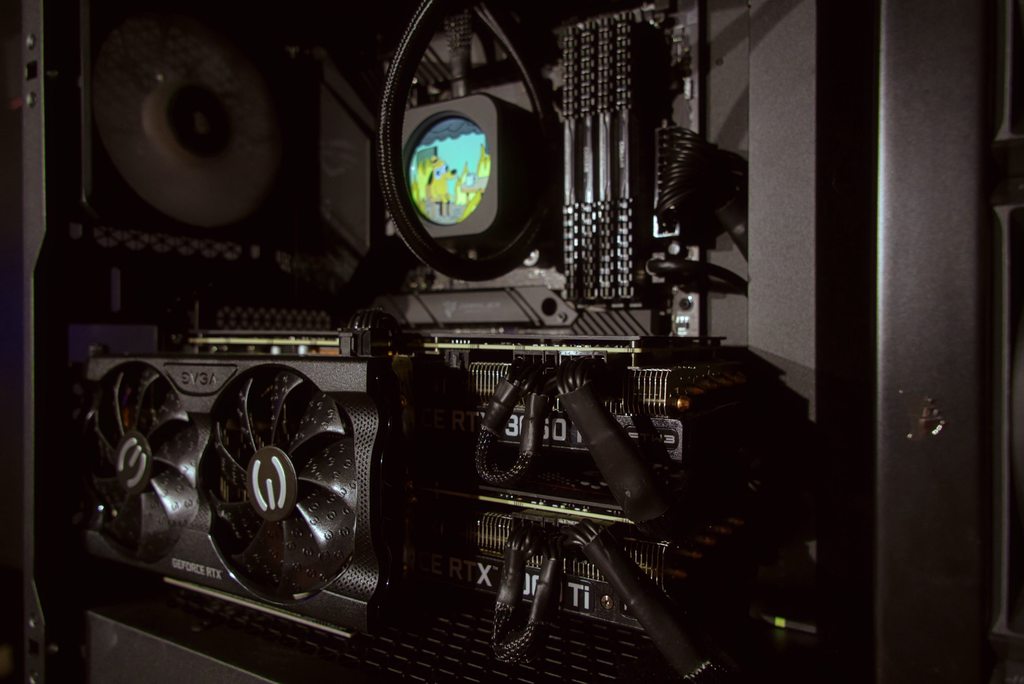
Anyone here running dual GPU?
 frozen mirage
@earnest olive I'm headed there! Had a quick question for you though!
I just installed a new PSU for the increased wattage with the new GPU. After install when I crank the 2 GPU at max wattage the PSU humms/buzzes. It shouldn't do this right? If I power limit the GPUs It doesn't do it.
fossil cedar
 hallow glen
Best cheap mobo for a 10100
earnest olive
frozen mirage
I just installed a new PSU for the increased wattage with the new GPU. After in...
hallow glen
Best cheap mobo for a 10100
earnest olive
frozen mirage
I just installed a new PSU for the increased wattage with the new GPU. After in...
coil whine
not really an issue besides noise
frozen mirage
@earnest olive everything is brand new. It doesn't do it if I power limit one of the GPU. Only if both are max power.
 south kite
^^^^ the higher power causes vibration which makes a coil whine as said above
south kite
 leaden bay
Can someone tell me if my list is valid
leaden bay
Can someone tell me if my list is valid
I’d switch to 12600k/Z690 better value at m.2 and PSU
fossil cedar
leaden bay
Can someone tell me if my list is valid
do you already have a gpu? and whats the budget
gritty rover
leaden bay
Can someone tell me if my list is valid
I’d recommend getting the airflow version of that case, it’s a few extra dollars but it’d be a lot better
fossil cedar
h510 airflow is a rip off and meh at best
gritty rover
Tru
But I didn’t know if they wanted to swap
There’s some other white cases out there
Phantek
 formal girder
A 4000D airflow would be a great case for their use
 analog hearth
he’s probably not gonna respond ever again lol
fossil cedar
H510 airflow is a bad phanteks p360a and you can quote me on that
gritty rover
Corsair 4000D Airflow Tempered Glass Mid-Tower ATX PC Case - White https://www.amazon.com/dp/B08C74694Z/ref=cm_sw_r_cp_api_glt_i_14CP7GY57ECAF51J32TY?psc=1

The CORSAIR 4000D AIRFLOW is a mid-tower ATX case with easy cable management and exceptional cooling. A steel front panel offers optimal airflow to your components, accompanied by two included 120mm AirGuide fans designed with anti-vortex vanes that enhance cooling. The CORSAIR RapidRoute cable m...
analog hearth
fossil cedar
H510 airflow is a bad phanteks p360a and you can quote me on that
“H510 airflow is a bad phanteks p360a and you can quote me on that”
~ Pato
fossil cedar
Lol
formal girder
Motor is on it today lol
gritty rover
Ayooo there’s 2 fans that comes with it it’s pretty cool
 urban valley
Heyo..ive got some questions about some issues im havin with my rig
formal girder
Go ahead
gritty rover
now I’m considering the 4000d but I was gonna get the phantek p400a not sure on which I should
urban valley
So my pc has been randomly locking up lately, like I have to hard reset it each time
Theres no software issues because it even does it after I did a full wipe and reinstall of windows
And im starting with the cheapest options of either my HD is going bad (plausible as its like 6 years old and not a SSD) or my ram is bad
analog hearth
i would imagine it’s either the storage or the RAM. but before diving into that, update your graphics drivers
stoic island
time for some stress tests perhaps
 flint sapphire
It’s the Hdd I’d bet
urban valley
@stoic island it does it randomly even in low stress moments of just having discord open
analog hearth
a 6 y/o HDD is probably going to be the issue
stoic island
Grab crystal disk info or hd sentinel and just check SMART status real quick
fossil cedar
Are you running any overclocks either?
urban valley
Not that I know of
stoic island
urban valley
<@278694081440251905> it does it randomly even in low stress moments of just hav...
Stress tests let you target one component at a time, doesn't matter if it crashes in low load or higher loads, if you stress test the specific component that's failing, it should crash, therefore telling you the fault.
urban valley
I should preface that by saying my best friend mailed me this rig from Canada for my birthday last year and its run fine until like..beginning of Jan this year
analog hearth
I recommend Crystal Disk Info to check the hard drive health, as Mr1111 said
urban valley
Okay, ill give it a shot
But it also has a tendency of locking up once i even load into windows
analog hearth
ye that'll narrow some stuff down (hopefully)
 still roostBOT
 🌈Ducky🌈#0630 has been warned
Reason: Bad word usage
analog hearth
maybe a bad drive sector?
urban valley
🤣 I get maybe like..2-3 minutes of time before it decides to lock up
formal girder
gritty rover
now I’m considering the 4000d but I was gonna get the phantek p400a not sure on ...
The 4000d has nice cable management spacing
urban valley
Typically
stoic island
p400a better airflow and digital comes with more fans
urban valley
I do also have new ram AND an SSD otw already since they're easily the cheapest things to replace
analog hearth
I've said it before, but check the graphics drivers
urban valley
So either way I think I'll have the problem solved but if its neither of those things, im not sure where to look next
Im tryin to do that now
And get the crystal disk info
 long rock
This new HDMI didn’t fix my GPU crash issues , I hate this
I ran DDU a week ago
Basically my monitor randomly goes dark, my earbuds start shocking me and my monitor goes to no signal, then I have to restart my PC and re install my drivers
stoic island
long rock
This new HDMI didn’t fix my GPU crash issues , I hate this
Tested all the windows debugging and tested all the other components?
analog hearth
long rock
Basically my monitor randomly goes dark, my earbuds start shocking me and my mon...
that sounds like a whole system issue lol
probably the motherboard
stoic island
what mobo?
formal girder
I've had hard locks from faulty ram before and one fatal from a bad hdd that had I guess came from an old pc that was tossed around I was pulling the pictures off of it and boom crash lol
analog hearth
I didn't know you can be static shocked right from the device (rather than from static buildup, like normal)
long rock
B450 Tomahawk Max, just got it this year and don’t plan on replacing for a while
urban valley
@formal girder that relieves my nerves a little bit because it makes me feel like I'm atleast on the right track
analog hearth
formal girder
I've had hard locks from faulty ram before and one fatal from a bad hdd that had...
usually how it goes lol
stoic island
long rock
B450 Tomahawk Max, just got it this year and don’t plan on replacing for a while
Bios update might help, with the usb issues on b550/x570 and all, and some reports on b450
 potent portal
long rock
Basically my monitor randomly goes dark, my earbuds start shocking me and my mon...
potent portal
long rock
Basically my monitor randomly goes dark, my earbuds start shocking me and my mon...
Did you have your dad test for a bad/false ground like I said?
long rock
I need to still
urban valley
Also..I find it incredibly ironic that I just started school back up for a bachelors in IT..and my computer decides now is the time to break
potent portal
If it's a bad ground that can kill your computer, sooner you check the better
long rock
What would he need to test? Like the outlet or the PC?
potent portal
The outlet first
gritty rover
formal girder
The 4000d has nice cable management spacing
Ohhhh okay :o!
still roostBOT
 GM 2 Ton Specialist | DaveBeee#7165 has been warned
Reason: Bad word usage
analog hearth
urban valley
Also..I find it incredibly ironic that I just started school back up for a bache...
"started back up" and they haven't taught you the basics of IT yet? I learned that in half a semester in a Cybersecurity program lol
long rock
I’m just worried my mobo is messed up somehow
analog hearth
weird how they teach it
formal girder
But as Mr1111 said the p400a has better cooling and more fans in the case but it really comes down to what you prefer more
long rock
I’ve got a P500A and love it btw
potent portal
If the outlet is fine you can test the power supply on the pc using the pinouts of the cables, and if that's fine then you can test the motherboard ground points
formal girder
I have 5000d and I have no issues what so ever and cable management has been a breeze for me and cooling is outstanding
stoic island
p500a quirks doesn't apply to p400a and 5000d quirks doesn't apply to 4000d, keep that in mind
gritty rover
What are quirks
stoic island
p400a doesn't get the nice screw box like p500a does afaik, and 4000d has less space than 5000d
urban valley
@analog hearth tbf, its all online so there's not a whole lot of "practical" experience and its been a good 5 years since I was last in college and it was mostly generic math/english/ etc classes
stoic island
Probably similar
gritty rover
Oooh oki oki
analog hearth
urban valley
<@263791870281383937> tbf, its all online so there's not a whole lot of "practic...
oh gosh I took that route at first and know what you're talking about
gosh I hate that lol. I actually decided to switch to an associates program and go for certs because of that
urban valley
I cant say I'm not getting the practical experience now though 🤣
analog hearth
super annoying and dumb
urban valley
I was just hoping I'd get my parts by this past Friday because now I'm a week behind in school since my pc decided to say "naw"
analog hearth
like yeah I can think more algorithmically but honestly if I just put research into a good associates program and certs, I'll come out the same way anyways. and quicker
urban valley
But weather got bad so everything got delayed cause I was in the middle of that bad ice storm
It was incredibly bad timing for everything to go wrong at once
long rock
For fricks sake it did it again
analog hearth
update mobo time
long rock
Dads not home rn so I’ll have to get it tested later
I don’t have the money rn
I’d need to prolly pay monthly lol, I’ve got savings goals I’m trying to meet
potent portal
You could try having no peripherals plugged in except keyboard and mouse and see if that helps. Could be a short on one of those.
urban valley
True..a short on anything plugged in could affect the whole pc
long rock
I feel like it’s the earbuds possibly
urban valley
That was one of my first steps was unplugging everything unnecessary to help narrow it down
potent portal
If they're cheap that could be
long rock
Cause they shock me multiple times in the right ear when it happens
analog hearth
sometimes a whole PC won't function because you're using DP and not HDMI. it's extremely rare, but I guess it's possible
urban valley
I also have an issue where only 2nof my usb ports work on the mb when everything should be fine, but I received it that way so I never figured out what that problem was
analog hearth
probably just broken USB ports
urban valley
Possibly..the front 2 don't work and only 2/6 work on the back
analog hearth
damn that sucks lmfao
gritty rover
formal girder
But as Mr1111 said the p400a has better cooling and more fans in the case but it...
Ohhhh okay okay
I think im going to go for the p400a since it has more fans and it’s a bit cheaper, i dished out more money for a good aio :D!
analog hearth
I'm getting Optiplex vibes from these issues lmao
potent portal
urban valley
Possibly..the front 2 don't work and only 2/6 work on the back
Have you installed the drivers?
urban valley
So I dont know..and I feel like maybe the front 2 dont work because of the cords coming from the chassis itself dont have a USB portion from what I can tell
Ive tried to by just doing the windows troubleshooting and stuff
And had no luck
formal girder
gritty rover
Ohhhh okay okay
I think im going to go for the p400a since it has more fans and...
Good choice
potent portal
My motherboard has 3 different drivers for the usb, and only 2 work on a fresh install. I need to get the third from msi when I reinstall.
analog hearth
like why is that lol
urban valley
@potent portal dont be surprised when I hit you up once I get the lock ups resolved to try and get my USB stuff fixed 🤣
potent portal
Feel free to ping me, and there's plenty of other people that can help here too if I'm not available
urban valley
Ive got an asus strix z-370h mb
analog hearth
I need snacks
urban valley
And I know the bios itself is current because I did update that when I started troubleshooting the lockup issues
flint sapphire
Snacks sound good. 
urban valley
Bring me some snacks too pls
fossil cedar
Did someone say snacks? 
analog hearth
I want Korean corndogs
urban valley
I just wanna be able to do schoolwork and play XIV and hunt: showdown 

 gritty rover
Ooooo
formal girder

analog hearth
I love Korean corndogs
fossil cedar
analog hearth
and corndog*
What's the difference?
gritty rover
Sounds interesting combo
analog hearth
fossil cedar
What's the difference?
dog wrapped in cornbread instead of a white or wheat bread bun
fossil cedar
Ahh
analog hearth
gritty rover
One is fried
neither is fried lmao
formal girder
I fry corndogs
analog hearth
ah
gritty rover
The hand made ones are deep fryed
But ones that are frozen are prefried
And just frozen
I haven’t had handmade corn dogs in
Forever
analog hearth
now I want some
I could go to Chinatown after work in a few minutes to get Korean corndogs if I really wanted to
yo but my Chinatown is sketchy :(
gritty rover
analog hearth
I could go to Chinatown after work in a few minutes to get Korean corndogs if I ...
!!!! Do it
Oh dang :((
analog hearth
there are also Korean corndogs with potato chunks on them with brown sugar(?)
oh yuh

 vernal dirge
@spice bear right here.
 spice bear
So how long does it take to install all software needed on your pc when building it?
 neat sand
You mean hardware? Or software like drivers after you build?
fossil cedar
spice bear
So how long does it take to install all software needed on your pc when building...
Honestly it depends, not too long, windows will be the longest, then your drivers and then any other software you want
spice bear
Okay bc I'm building a PC next weekend and just wanted more tips is all
vernal dirge
spice bear
Okay bc I'm building a PC next weekend and just wanted more tips is all
Ask away my dude. @fossil cedar is one of the smarter ones here.
Just don’t DM, do it here.
spice bear
Alrighty
south kite
Knowing everything I need and gigabit internet, takes me 45-60 min to install windows and all the programs I need
spice bear
See I've never done this before but my aunts gonna help she's done this before too
Been gathering parts for 3 months starting with the 3070
long rock
Alrighty drivers are re installed, it seems to be a driver issue perhaps
Frick
I go to plug them in and it crashes again
I hate this so much
I gotta re install drivers again
 woeful storm
Worst case scenario local tech store should be able to fix for 100 or so
long rock
For the 10 millionth time ugh I hate re installing drivers
woeful storm
Also feel free to call and ask around some techs will help over the phone
 celest horizon
Why do you have to keep reinstalling drivers
long rock
I may just take it in if I can’t fix this
Because my PC goes into no signal mode, and the earbuds start shocking me, and I have to force shut down and then nothing works unless I re install my drivers
woeful storm
Oof
long rock
This is all o do in my free time now
woeful storm
Forks myte have some insight im still fairly new
long rock
All I do is restart and install drivers and all that
celest horizon
What mobo
long rock
I need to get dad to test some grounding stuff on the outlet and PC
celest horizon
Yeah.. do you have a dmm?
celest horizon
Multimeter
long rock
Yeah
Imma prolly get a new set of like, earbuds or a nice headset, I think my earbuds are causing a short or something
celest horizon
Check if your case is grounded, find a way to measure between it and the sink or something. Rather, check if the outlets in that circuit have a functional ground. I ran into this problem recently, 3 prong outlets in the room, ground just wasn't connected. Measured 100v between my pdu and true ground
long rock
It’s sitting on a wood desk so it should be grounded
celest horizon
What?
long rock
And usually when I get to the drivers screen asking if I want to install, it tells me the driver version and has Repair in paranthasis
My case
celest horizon
Well, I think a lot of things could be at fault here, just have to narrow it down one at a time.
What does the desk have to do with ground haha
long rock
I may try and play without sound but it defeats the purpose of playing
I figured since it’s sitting there it must be grounded to something
celest horizon
It (should) be grounded via the ground pin/wire from the psu to the wall
long rock
I tried using a different port on my PC for my earbuds too
celest horizon
Both will be from the same DAC, if that's at fault, both the rear and front audio jack will have issues
celest horizon
It make the sound
 celest horizon
Try run occt and figure out if your cpu or mem are unstable
 grim fog
ROG b550-f or Asus Prime b550 Plus for $100 second hand?
Other options around that price are MSI B550 Tomahawk or MSI Gaming Plus
long rock
What’s OCCT
south kite
long rock
What’s OCCT
Program used to stress test your system
potent portal
Free version limits you to 1 hour at a time. I'd start with the memory test.
long rock
Ugh Ty
Ighty
So how long should I run it for
It’s looking pretty normal tbh
Ight 6 mins in, it’s looking pretty good, should I switch?
Imma move to 3D which presumably means GPU
It was 5 secs in and said error detection, I haven’t re downloaded drivers yet
I’m so tired of this, having to constantly re download drivers
😭😭😭
This will be the third time today
long rock
i think imma try gpu again now that i got drivers
Imma run it for 5 like I did with CPU and memory
VRAM next for 5 ig
Nothing popped up with the GPU
Nothing on the V Ram either
Guess I’ll test power next
nothing in power, i may check my motherboard bios
Hmmmm
Well, the most recent update is 9/29/21 and I’ve had the motherboard about that long
Longer than that tbh
frozen mirage
analog hearth
he’s probably not gonna respond ever again lol
Did he respond?
formal girder
No
long rock
Alright I’ve been playing for a while and had no crashes, I feel like it’s something with my earbuds
Because I haven’t been using them
so i dont think its drivers related which is good
long rock
i wanna plug my earbuds back in but i dont want to find out if thats gonna throw me back in the no display loop again
ive gone like 3 hours no crashes
Yup
It’s an issue with my earbuds because the moment I went to plug them in, it crashed
Well that’s good to know at least
south kite
Interesting
long rock
So now the question is something about a ground pin from my PC to the wall not working right maybe?
My GPU only has 1 HDMI port, would it be a pin on that cable? Or a cable that runs out of the power supply
Because it’s screwing up my drivers every time it shorts out and I have to re install them every time
Now it’s not doing it, that’s so odd
I’ve been plugging it in and taking it out and it’s not shorting anymore which is odd
What the heck
I wonder if maybe I’m asking too much of the outlet and I need more power than it can provide and it has to shut something off maybe? Idk, I need to check this ground pin on the PSU cable ig
Ground is the bottom I think?

Dammit mom and dad are busy watching TV and idk if I can test the stuff tonight because they always go to bed early and idk how to work the meter
lol
potent portal
It's quite possible, likely even, that the headphones themselves or your headphone jack are the issue
 strong raft
It could be the power bar on the desk acting up, but might be thinking of someone else
potent portal
Especially from what you've said so far
I had him check if it was the power bar by plugging straight into the wall
long rock
Dad said the grounding is fine, I prolly just need a new headset
Idk, he got all mad when I tried to do things myself
I guess I’ll just make do without sound for now
 tribal pebble
I’m having some trouble and I’m hoping someone here can help me out. My computer is running fine, except I can’t run any games. When I try to run they might get through the main menu and then close to the desktop. It’s in several game apps to include Steam, GeForce Experience, and EA Beta. I’ve installed fresh Windows, checked drivers. I’ve upgraded my psu, and even replaced my motherboard. I’m at a loss as to what’s causing it. No error messages pop up. My build is
Ryzen 5-5600X
MSI B550 Gaming Edge WiFi
2x16 DDR4 G.Skill Ripjaws 3600
EVGA 3070
1tb Samsung 980 Pro, 2tb Samsung 870 QVO
EVGA 1000W PSU
Lian Li Galahad 240 AIO
Lian Li Lancool Mesh II
long rock
I’m so stupid, I don’t even know what I’m doing and then I try and figure it out myself and I can’t because I don’t know what I need. Oh well
We aren’t tech people and it sucks
south kite
tribal pebble
I’m having some trouble and I’m hoping someone here can help me out. My computer...
Can you run a GPU benchmark like 3Dmark?
south kite
Hp parts are typically proprietary so your unlikely to get the front panel to connect
A maybe new psu also
tribal pebble
south kite
Can you run a GPU benchmark like 3Dmark?
I’ve ran 3D Mark without issue and Unigin Superposition
 oak kayak
Check windows event viewer after game fails
tribal pebble
oak kayak
Check windows event viewer after game fails
I’ll check that out tonight for sure
south kite
tribal pebble
I’ve ran 3D Mark without issue and Unigin Superposition
You got your chipset drivers directly from AMD?
tribal pebble
south kite
You got your chipset drivers directly from AMD?
I downloaded my chipset driver from the MSI mobo page
south kite
tribal pebble
I downloaded my chipset driver from the MSI mobo page
Not recommended
tribal pebble
south kite
Not recommended
I’ll download new drivers tonight from AMD and run them
south kite
Yeah maybe try fresh windows with drivers direct from AMD
Then Gpu drivers directly from NVIDIA
tribal pebble
south kite
Yeah maybe try fresh windows with drivers direct from AMD
So I need to do another fresh windows install? I can’t run drivers from their website as is? First time running into this issue so just want to understand all aspects of it so I can troubleshoot better in the future
south kite
It’s possible but the current drivers will still be there. If they are the issue then You aren’t removing them.
Doesn’t hurt to try just downloading the AMD ones first and see if it fixes it
But personally I’d start from scratch
tribal pebble
south kite
Doesn’t hurt to try just downloading the AMD ones first and see if it fixes it
Right on. I’ll keep you posted when I try it out. Thank you very much
south kite
No problem
 bright dome
you guys are the best, thanks for helping all of us out, here in this page
south kite
Probably labeled docp
 feral bobcat
south kite
Probably labeled docp
feral bobcat
south kite
Probably labeled docp
i know
south kite
Do you know how to get to bios?
 tight sorrel
X570e? what make? what model?
fossil cedar
tight sorrel
X570e? what make? what model?
I'd hazard a guess with x570 rog e
 carmine swallow
Has anyone used the asus TUF h570 board with 11th gen i5 cpus?
Thinking of getting it but idk how good the board is and I can’t find any good reviews for it
fossil cedar
Don't bother, get a 12400 and a b660
fossil cedar
Ahh, what country?
carmine swallow
Canada
Also something preferably from Amazon cuz I got a 200$ amazon gift card
I found asus strix b560 and asus tuf h570 at around that price. Idk tho
fossil cedar
carmine swallow
Anything in an atx size?
carmine swallow
This one doesn’t have usb c. I kinda need a usb c port lol
fossil cedar
Do you really neeed it?
carmine swallow
Yes
fossil cedar
Also do you mean the header or the port
carmine swallow
Header
fossil cedar
Btw if you don't have type c on mobo everything else will work bar the header
Oh woops my bad i went to us pc part picker in fist place
carmine swallow
Yea I end up doing that and get so happy when I see cheaper prices on nicer mobos
Only to be left with disappointment when I switch to Canada 😭
fossil cedar
carmine swallow
Yea I end up doing that and get so happy when I see cheaper prices on nicer mobo...
This would would be best
carmine swallow
I actually did end up finding that thanks
fossil cedar
Np
toxic wraith
whats a decent gpu for my first pc?
fossil cedar
toxic wraith
whats a decent gpu for my first pc?
What's your budget
fossil cedar
You deleted? Was it not 700-800?
toxic wraith
fossil cedar
You deleted? Was it not 700-800?
im just gonna wait for the prices to go down
fossil cedar
Fair enough
toxic wraith
fossil cedar
https://pcpartpicker.com/product/hPfnTW/silicon-power-xpower-gaming-16-gb-2-x-8-...
yeah you recommended that to me before i put it on my list
wait nvm it was a bit different u sent the turbine i think
tight sorrel
fossil cedar
With a gtx 1660 super upgrade
https://www.hp.com/us-en/shop/ConfigureView?langId...
https://www.youtube.com/watch?v=4OZGmWZyhac
rather not

We secretly tested HP’s support quality alongside its assembly and parts selection competence. This review of the HP Pavilion TG01-1160XT prebuilt shows why it’s so bad.
Sponsor: be quiet!'s Silent Base 802 https://geni.us/DaGYu
The HP TG01-1160XT was purchased as a PC in our $1000-$1500 price range for prebuilts. This follows-up previous benc...
fossil cedar
tight sorrel
https://www.youtube.com/watch?v=4OZGmWZyhac
rather not
Yeah but for under 700$ you're not getting better
And just clean install windows
tight sorrel
zero upgrade path
frank stirrup
I mean if you have only a 700$ budget, ur not looking to upgrade
fossil cedar
Well yes but you can still use some stuff but beat at the budget
frank stirrup
nor do you have the budget
tight sorrel
frank stirrup
I mean if you have only a 700$ budget, ur not looking to upgrade
you do know upgrades dont happen immediately, but in the future, when ones money state changes? come on RAWR
frank stirrup
tight sorrel
you do know upgrades dont happen immediately, but in the future, when ones money...
It does allow for ram upgrades
and a cpu upgrade in the same generation
and a cooler upgrade
Id say thats good enough
if you upgrade any more you have to buy new components anyway
might as well buy a new computer
tight sorrel
frank stirrup
and a cooler upgrade
not on that motherboard you cant
frank stirrup
also most people who buy prebuilts do it because they dont trust themselves to or dont want to work on their own pc
fossil cedar
tight sorrel
not on that motherboard you cant
You can actually mount the Arctic freezer i3 or whatever it's called iirc
tight sorrel
frank stirrup
also most people who buy prebuilts do it because they dont trust themselves to o...
no one is arguing agianst prebuilts in general
frank stirrup
tight sorrel
not on that motherboard you cant
yeh you can
there are a few coolers that fit
tight sorrel
if you guys think advising him to buy a bad machine, even though it is cheap, is good thats on you
frank stirrup
also keep in mind that the pc that pato recommended has an amd cpu
dont look at the mounting on an intel board
and make assumptions
mounting is bound to be different
Neither pato nor I would ever recommend something we wouldnt buy if we had that budget
tribal pebble
So I wrote earlier about my games closing and crashing. I just checked the event log and it showed “display driver nvlddmkm stopped working and recovered”. Any thought to help?
frank stirrup
ddu

GitHub
Contribute to NeweggTechie/Graphics-cards development by creating an account on GitHub.
tribal pebble
frank stirrup
ddu
I literally just an hour ago did a fresh windows install and graphics card driver install straight from Nvidia’s website. You really think that’ll do it?
frank stirrup
tribal pebble
I literally just an hour ago did a fresh windows install and graphics card drive...
run ddu
and install an older driver
not the latest one
tribal pebble
frank stirrup
and install an older driver
Seems to have done the trick for now
tribal pebble
frank stirrup
and install an older driver
Thank you
frank stirrup
no worries
 cyan spear
What are these for?
 fossil cedar
They're sata ports
cyan spear
Okay ty
Has anyone connected the rgb fans in the corsair 4000x? Im javing some trouble figuring it out
tight sorrel
cyan spear
Has anyone connected the rgb fans in the corsair 4000x? Im javing some trouble f...
shoot
cyan spear
With this thing
 tight sorrel
hard to make out, but that doesnt look like an RGB hub. thats just a fan speed (PWM) hub
 cyan ravine
It's the rgb hub that comes with corsair cases
For corsair stuff
Not all corsair rgb though
tight sorrel
ok, so whats the issue?
fossil cedar
tight sorrel
hard to make out, but that doesnt look like an RGB hub. thats just a fan speed (...
I think Corsair gives a combo hub with the 4000x, i could be mistaken tho
cyan spear
^
Yeah i think i got it
I may have left the extra sata cable at home lol
You connect the usb 3.1 cable to sata
tight sorrel
ok, just so you know, corsair has their own rgb connectors, so only corsair peripherlas can connect to that hub
cyan spear
Yes
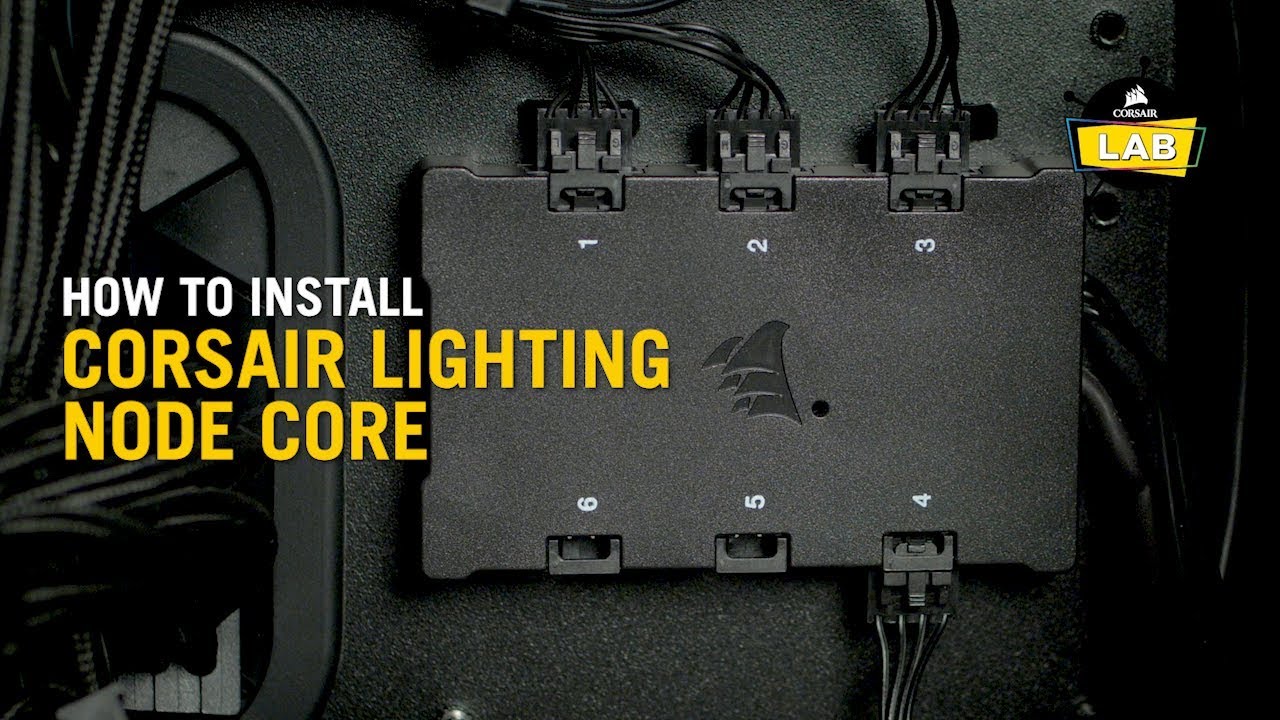
The CORSAIR Lighting Node CORE gives you control over your case and fan lighting with brilliant patterns and effects. Paired with our powerful iCUE software, you can also synchronize with your other compatible devices such as CPU coolers, keyboards, mice, headsets, and a host of other products.
For more information about the CORSAIR iCUE ecosys...
tight sorrel
no, conect the usb cable to usb 2 hub
cyan ravine
Both the sata and usb connectors need to be hooked up
tight sorrel
sata is power, thats easy
cyan spear
Yeah i have the usb cable hooked up
tight sorrel
but usb goes to the USB 2.0 header
cyan spear
I just dont have a sata cable on me
tight sorrel
your PSU is modular?
cyan spear
It is
tight sorrel
so yu dont have a free SATA connector on any of your connected components?
cyan spear
Let me check again, my cables are a mess
I should probably organize them before i close this up
tight sorrel
seems like you got this bud, were you just looking for validation?
tight sorrel
no worries
tight sorrel
the only thing I can htink that you might need to confirm is the order of the ports on that hub
I think corsair is finicky with making sure that you have to use the ports in order
 worn wave
^^^
cyan spear
Yeah they have to be in the right order, I made sure they were
worn wave
If you only have 4 fans for example they need to be in the ports labeled 1-4
tight sorrel
so you cant connect 4, 5 and 6 with 1 2 and 3 free for example
also, and this is a boit off topic, if you dont have a free USB 2 header, and you get the right cable, you can connect the hub to an external USB port
cyan spear
I just needed to connect to the sata cable, found a spare thing to connect to
Thanks fir the help
tight sorrel
pleasure
fossil cedar
Shoot your question
 mortal ferry
I am planing on getting a ryzen 5 5600g and a 1650 SC ultra, is that a good combo, or can i get somthing else with the similar price point.
mortal ferry
around 700$ CAD for both cpu and gpu
fossil cedar
mortal ferry
around 700$ CAD for both cpu and gpu
Including case storage ram etc? Or just cpu and gpu?
mortal ferry
fossil cedar
Including case storage ram etc? Or just cpu and gpu?
just cpu and gpu
mortal ferry
1200$ CAD
mortal ferry
oh wow this is pretty good, thx so much
fossil cedar
You're welcome


 fossil cedar
 unreal bison
I am still looking for a whiteboard for my lian li mini + rtx 3080
unreal bison
I am still looking for a whiteboard for my lian li mini + rtx 3080
What cpu and what country and what exact case
unreal bison
fossil cedar
What cpu and what country and what exact case
Should get i9 12900k or ryzen 5900x, and Lian Li o11 dynamic mini
fossil cedar
unreal bison
Should get i9 12900k or ryzen 5900x, and Lian Li o11 dynamic mini
12900k or even 12700k would be the better choice
Are you in the US?
unreal bison
Yeah
I am just don’t know which motherboard should I get though
It’s really hard for me to choose there’s a plenty of options to choose from
fossil cedar
Do you plan to OC?
fossil cedar
I'd consider this one then
https://pcpartpicker.com/product/pLjBD3/gigabyte-z690-aero-g-ddr4-atx-lga1700-motherboard-z690-aero-g-ddr4
unreal bison
fossil cedar
I'd consider this one then
https://pcpartpicker.com/product/pLjBD3/gigabyte-z690...
I like Asus more
fossil cedar

unreal bison
fossil cedar
<:modelbrand:743668525922648165>
fossil cedar
unreal bison
Model over brand
unreal bison
Oh
fossil cedar
Youd literally be paying like 80$ just for asus instead
unreal bison
Oh ok
fossil cedar
No point going ryzen 5000, intel 12th gen kicks it's ass in games
tight sorrel
not just games bud, accross the board
fossil cedar
tight sorrel
not just games bud, accross the board
Well 5950x can still hold the multicore crown
tight sorrel
right, fair
 neat depot
Could I receive some help please. Will the noctua nh-d15 and nh-u12a both fit in Corsair 4000d airflow case? L1200 mount i7-10700f
 jagged ember
yes, case clearance for coolers in the 4000d shouldn't be any issue
jagged ember
neat depot
Could I receive some help please. Will the noctua nh-d15 and nh-u12a both fit in...
but i'm assuming you're going to be using one of those two coolers and not both at the same time
neat depot
Lol yes just one, thanks@jagged ember
 shrewd fjord
Hey pato
fossil cedar
Hello
shrewd fjord
How does my build look ^
fossil cedar
shrewd fjord
How does my build look ^
Cpu cooler is oof and terrible price imo spent too much on motherboard, ram price looks ehh psu but overpriced, fans idk about rest looks decent
gritty rover
Hmm
I could send link to the motherboard I had got
MSI B560M PRO-VDH WiFi (mATX, 11th/10th Gen Intel Core, LGA 1200 Socket, DDR4, PCIe 4, CFX, M.2 Slots, USB 3.2, 2.5G LAN, DP/HDMI) https://www.amazon.com/dp/B092HLGFXK/ref=cm_sw_r_cp_api_glt_i_8Q5JT059SB5TT7QHQRC2?_encoding=UTF8&psc=1

PRO series helps users work smarter by delivering an efficient and productive experience. Featuring stable functionality and high-quality assembly, PRO series motherboards provide not only optimized professional workflows but also less troubleshooting and longevity.
shrewd fjord
Other than overpriced will it be good for 1080p?
gritty rover
It went up a lil bc of amazon’s flux but yea
fossil cedar
shrewd fjord
Other than overpriced will it be good for 1080p?
Yeah
fossil cedar
gritty rover
MSI B560M PRO-VDH WiFi (mATX, 11th/10th Gen Intel Core, LGA 1200 Socket, DDR4, P...
Nice board
gritty rover
Thanks pato
fossil cedar

gritty rover

 serene hedge
unreal bison
B550 a amd
serene hedge
unreal bison
B550 a amd
that's the one i'm getting
also, is getting a 1650 worth spending $329
earnest olive
no
 olive kraken
Is there any performance gain (photo editing) from 128GB ram @3600mhz CL16 to 4000mhz cl18?
(Cpu would be 5900x)
earnest olive
lol, have fun running 128gb @ 4000c18
not a chance your CPU will run that in 1:1 mode
you'll lose performance from making that switch
olive kraken
Just asking for a friend he has no clue which would be the best option
earnest olive
go for the 3600c16
I benched 3800c12 vs. 4800c16 on my 5800x
it wasn't even close, 3800c12 destroyed it
gotta stay 1:1
fossil cedar
olive kraken
Is there any performance gain (photo editing) from 128GB ram @3600mhz CL16 to 40...
3600cl16
potent portal
It's also quite likely the imc couldn't handle 128gb at that speed. Lots of people have problems, even at 64gb.
 dense ravine
CPU: AMD Ryzen 7 3800X 3.9 GHz 8-Core Processor ($339.00 @ Amazon)
CPU Cooler: Enermax Aquafusion 240 79.8 CFM Liquid CPU Cooler ($89.99 @ Amazon)
Motherboard: ASRock B550 Phantom Gaming-ITX/ax Mini ITX AM4 Motherboard ($188.50 @ Amazon)
Memory: Corsair Vengeance RGB Pro 16 GB (2 x 8 GB) DDR4-3200 CL16 Memory ($87.99 @ Amazon)
Storage: Samsung 970 Evo Plus 500 GB M.2-2280 NVME Solid State Drive ($69.98 @ Amazon)
Storage: Seagate Barracuda Compute 2 TB 3.5" 7200RPM Internal Hard Drive ($46.99 @ Amazon)
Video Card: MSI GeForce RTX 3060 12 GB GAMING X Video Card ($834.97 @ Amazon)
Case: Cooler Master MasterBox NR200P Mini ITX Desktop Case ($96.50 @ Amazon)
Power Supply: Corsair SF 600 W 80+ Gold Certified Fully Modular SFX Power Supply ($99.99 @ Newegg)
Operating System: Microsoft Windows 10 Home OEM 64-bit ($108.78 @ Other World Computing)
Total: $1962.69
Prices include shipping, taxes, and discounts when available
Generated by PCPartPicker 2022-02-07 14:35 EST-0500
Thoughts?
fossil cedar
dense ravine
CPU: AMD Ryzen 7 3800X 3.9 GHz 8-Core Processor ($339.00 @ Amazon)
CPU Cooler: ...
You can post the pc part picker link bwre btw also that 3060 price is yikes
dense ravine
fossil cedar
You can post the pc part picker link bwre btw also that 3060 price is yikes
Yeah I’m definitely not gonna buy the 3060 at that price, just had it on there by default. Also considering swapping it for a 3070
fossil cedar
dense ravine
Yeah I’m definitely not gonna buy the 3060 at that price, just had it on there b...
Could you send the pc part picker link? I'll make a few edits of what I'd do
dense ravine
fossil cedar
dense ravine
https://pcpartpicker.com/list/Xp4qsL
For 2k, this
https://pcpartpicker.com/list/y3rRBj
dense ravine
fossil cedar
For 2k, this
https://pcpartpicker.com/list/y3rRBj
https://pcpartpicker.com/list/MgD7PX
How about this? Started fresh and tweaked some parts
fossil cedar
dense ravine
https://pcpartpicker.com/list/MgD7PX
How about this? Started fresh and tweaked ...
Ohh your don't want itx? Do you want to oc?
I'd probably do this
https://pcpartpicker.com/list/LpGhMb
gritty rover
It’s here

 little osprey
Alright it's official, I didn't get scammed. So this deal was too good to be true and was still true

Got the board and cpu for 220
fossil cedar
Sheesh
little osprey

potent portal
Noice
urban valley
Okay so update on my situation..I tried a hdd from my old pc that was working fine before being put into this one..cant even get past installing windows before it decides to lock up on me still with new ram in there
I'm at a loss for next steps
strong raft
It's a sign to install windows to an ssd instead.
urban valley
I do have an ssd otw that should be here tomorrow..I sincerely hope you're right 
strong raft
Haha, for sure it's worth it. Hitting a usable desktop within 30 seconds instead of 2+ minutes is just the 1st difference noticed. Of course hdds are fine for some games/data/backups.
 mossy venture
strong raft
Haha, for sure it's worth it. Hitting a usable desktop within 30 seconds instead...
mossy venture
strong raft
Haha, for sure it's worth it. Hitting a usable desktop within 30 seconds instead...
my old pc took like 5min before i could even open discord
and if i tried to open anything right after boot, id have to restart the pc and give it a five min after boot
awful hdd
funniest part is, when i got my new pc i put the hdd in my pc
it died a week later
the hdd, that is
not the pc
strong raft
Yikes. Both my normal WD10EZEX hdds weren't that bad, and used one as boot only a month or so ago. Standby often and rarely restarting is what saved my sanity.
 ocean solstice
How's my first budget gaming pc build?
GTX 1060 6gb
i3 12100f
B660 motherboard
500gb SSD
16gb 3200mhz ram
potent portal
Not bad, should do nicely even after you get a better gpu later
strong raft
Sure is impressive for a $120ish cpu & is a quad core. Very close to 10600/10700K in quite a few games (even with a 6900 XT in some crazy review). Makes me think of a 7700K w/ 50% more cache and way better performance/wattage.
obsidian wigeon
12100f is stronk
just not enough cores for some games
but vast majority of em runs like a breeze
 limber oyster
Anyone know of a good GPU aio? I want to do a water cool set up for my GPU without the hassle of a custom loop.
 errant fiber
lf2
limber oyster
?
tight sorrel
limber oyster
Anyone know of a good GPU aio? I want to do a water cool set up for my GPU witho...
I doubt you will find one.
potent portal
limber oyster
Anyone know of a good GPU aio? I want to do a water cool set up for my GPU witho...
What exact model of gpu? If it's anything in the nvidia 3000 series it's not possible
tight sorrel
the only one I know if is:

NZXT
Build the Extraordinary with NZXT. Premium gaming PCs, custom gaming PCs, software, and other PC-related products all for the DIY and PC gaming community.
but its not very good
 jagged gull
Any opinions of the asus rampage 4 formula mobo
limber oyster
potent portal
What exact model of gpu? If it's anything in the nvidia 3000 series it's not pos...
Asus ROG strix 3080
obsidian wigeon
jagged gull
Any opinions of the asus rampage 4 formula mobo
not needed unless you're doing extreme oc
it's an overkill board for 99% of people
jagged gull
obsidian wigeon
it's an overkill board for 99% of people
How much would you pay for it if considering it?
obsidian wigeon
well, i dunno really
i can't see myself spending over 300 for a mobo cause i don't need everything
jagged gull
obsidian wigeon
i can't see myself spending over 300 for a mobo cause i don't need everything
It’s got a i7 3930 k cpu and a big ass cooler with it, dude wants $250
obsidian wigeon
oh that's old stuff
jagged gull
Yup
jagged gull
I thought so, just needed a second opinion, thanks
gritty rover
Can I build on a wooden floor?
Thinking of building it this weekend
It won’t really hurt my back much I’m flexible and small so that won’t be an issue
I’m just wondering if the surface would be okay
I know building in carpet is bad
We don’t have any carpet thankfully
 covert vapor
Yeah, but you might end up scratching the floor if you aren't careful so...be careful with the case
fossil cedar
I build on my wooden floor all the time, have not been careful haven't scratched it once
tight sorrel
throw a bed sheet / towel down
fossil cedar
I would actually not advice that
Even tho components are pretty static proof that would be like building on a carpet
tight sorrel
bed sheet on a wooden floor will not build up static
potent portal
limber oyster
Asus ROG strix 3080
Unless there's a cooler made specifically for that model (rare) there's no universal bracket to fit an aio to a 30 series gpu
flint sapphire
Bed sheet on a wooden floor actually could build up some static
cyan spear
little osprey
I like to build on the roof of my house
airflow second to none
jagged gull
Looking for a decent mobo to accommodate a gtx 1060 gpu for the grandson, any ideas
fossil cedar
jagged gull
Looking for a decent mobo to accommodate a gtx 1060 gpu for the grandson, any id...
Depends what CPU you're going to use and what country
jagged gull
Enough to get adequate gameplay and some streaming about mid range with room to upgrade the gpu at a later date, Australia
jagged gull
fossil cedar
Depends what CPU you're going to use and what country
Enough to get adequate gameplay and some streaming about mid range with room to upgrade the gpu at a later date, Australia
fossil cedar
jagged gull
Enough to get adequate gameplay and some streaming about mid range with room to ...
I'd do this
https://au.pcpartpicker.com/list/swvtxc
jagged gull
fossil cedar
I'd do this
https://au.pcpartpicker.com/list/swvtxc
Yup, beauty thanks man👍
fossil cedar
You're welcome
gritty rover
covert vapor
Yeah, but you might end up scratching the floor if you aren't careful so...be ca...
Ohhh I see thanks, I’m def gonna lay down some cardboard or somethin
gritty rover
Wait actually I could build on my wooden dresser maybe
My mom will kill me if I scratch the floors
gritty rover
My family used the dining room table a lot and since it’s out in the open it’d be hard to build plus my little cousin would be around and I don’t trust him to not screw somethin up
I was gonna build it in my room
I’ll probably put fabric or cardboard down on the floor/dresser
Or newspaper
tight sorrel
cardboard would provide the best protection
gritty rover
Alrighty
mossy venture
I like to build mine on a pallet full of copper wire
Personally
Also with a loose, active wire nearby
little osprey
cyan spear
airflow second to none
yea, building on top of windmills is good too.
 frail minnow
little osprey
yea, building on top of windmills is good too.
frail minnow
little osprey
yea, building on top of windmills is good too.
just glue the foot pedals of your cycling machine to the fan and sit on the PC problem solved
long rock
iirc my monitor shorted again last night so i need to re download my drivers againm
eh, maybe not, i think im good
earnest olive
naw I think something is going on with your house lol
faulty drivers does not cause monitors and headphones to short and shock you
urban valley
Question for yall..could bad cables cause hard freezes? Because I've tested a known good hdd from my old pc and it does the same thing as the newer one..but an ssd appears to work so far
earnest olive
it's possible
improbable but possible
never heard of a sata cable intermittently failing
urban valley
Its my gut feeling that its the cabling and not a deeper issue like the cpu or MB strictly because an ssd has been working fine so far
And thats on a whole different port on the mb
earnest olive
well maybe it's the sata power being unreliable
urban valley
Thats what I was thinking
Like maybe not an issue with data transfer but with the power to it
earnest olive
possible
urban valley
I appreciate the help! I'm gonna give this like an hourish and stress test it a bit and see if it still continues to hard freeze and I guess go from there 🤣


 serene hedge
what gpu should i get for $400 or under
potent portal
If you're lucky you can get a 3060 for that, or a 6600 if you're less lucky
serene hedge
potent portal
If you're lucky you can get a 3060 for that, or a 6600 if you're less lucky
how would i get that and what are the chances of me getting that?
gritty rover
potent portal
If you're lucky you can get a 3060 for that, or a 6600 if you're less lucky
I got lucky and got a 3060
I got it through the evga bundle
fossil cedar
potent portal
If you're lucky you can get a 3060 for that, or a 6600 if you're less lucky
6600xt is equivalent to 3060 btw, 6600 is more 2060 super level
fossil cedar
serene hedge
what gpu should i get for $400 or under
Should reliably be able to get a gtx 1080
potent portal
serene hedge
how would i get that and what are the chances of me getting that?
6600 is consistently in stock on newegg and others
gritty rover
Ik the ram is kinda crappy but here’s all my pieces

My case is coming tomorrow and it has the fans
And I can’t return the psu bc I got it in a bundle with my gpu
If I return it I’ll have to return my gpu too I think
woeful storm
Comes with that mx4 paste
errant fiber
i think it's mx5
woeful storm
🥶
errant fiber
not even that much different anyways
gritty rover
Mmmm paste
errant fiber
What case did you get?
Also be sure to post build pics, i'm curious how it'll turn out
woeful storm
xD I got mx5 with my mobo and cpu from a lad on the web. Also got corsair tm30 that Isn't opened and the mx4 from the cooler. I have a small stockpile now
But thise temps are nice did some research today and the liquid ii 360 keeps everything way cool
gritty rover
errant fiber
What case did you get?
Phantek p400a!
gritty rover
errant fiber
Also be sure to post build pics, i'm curious how it'll turn out
Aye! Will do
formal girder
With the LF2 I just used NT-H1
fossil cedar
formal girder
With the LF2 I just used NT-H1
Why lol it comes with mx4 or 5
formal girder
I had a spare tube of NT-H1 laying around
bright dome
is there some secret to getting Windows 10 or 11 for cheaper then 100.00?
gritty rover
You can get windows 10 for free from Microsoft’s site
Then just update to the 11
But
The activation keys are what cost money
Unless it’s pro version or somethin
strong raft
Got an old Win7 key to use? That's what I did.
strong raft
Yep, and being logged into MS account on win7 pc then logging on with Win10 pc, might not even have to enter the key. I don't remember.
bright dome
hhhmmmm, now i gotta try to find my old 7 case/key lol
gritty rover
I’m gonna get my mom’s old one
fossil cedar
bright dome
is there some secret to getting Windows 10 or 11 for cheaper then 100.00?
not volume license for cheap (code BST for 20% off)
https://www.vip-urcdkeys.com/microsoft-windows-10-pro-oem-cd-key-global_1966-20.html
For 2 keys
https://www.vip-urcdkey.com/microsoft-windows-10-pro-oem-cd-key-2-pc-.html
Buy Microsoft Windows 10 Pro OEM CD KEY GLOBAL at Urcdkeys with immediately delivery now. Full of stock, Fantastic Prices.
The best store to buy Microsoft Windows 10 Pro OEM CD-KEY (2 PC) - www.vip-urcdkey.com, we are provide you Safe and Legit Microsoft Windows 10 Pro OEM CD-KEY (2 PC) cheap buying service, Come and Enjoy!!!
strong raft
gritty rover
I’m gonna get my mom’s old one
Long as that old key/pc isn't in use & online at same time as new pc using same key. My old Win7 setup is fully intact, but it's just an old drive & kept mainly as a backup of the nonOS files on it.
gritty rover
strong raft
Long as that old key/pc isn't in use & online at same time as new pc using same ...
Ohhhh aight
bright dome
so the above links are legit, as long as I download the SW from microsoft first the buy the key ie... the link you listed then all is good?
fossil cedar
Yeah
bright dome
ok ty
fossil cedar
Or you can leave it unactivated
bright dome
this is for the new build im doin, got the wife to okay buying everything in one go. FYI I have decided to go with the i7 thats about the only change i did to your build.
strong raft
Good idea, i7 might please more overall in the longterm. Yeah, on Microsoft website is a place to DL Win10/11 to a flashdrive, then you'd boot from that drive & install the way it's done these days. Having an ssd & decent usb3 flash drive, install will be done within 20minutes probably.
bright dome
okay, @fossil cedar i made some other changes but can you look at this an advise pls
wife is letting me go to tops 3k
wont be over-clocking so hoping this will last at least 5-7 years
woeful storm
That cooler being swapped for a liquidfreezer ii 360 aio would work wonders
Alienware 240Hz Gaming Monitor 24.5 Inch Full HD Monitor with IPS Technology, Dark Gray - Dark Side of the Moon - AW2521HF https://www.amazon.com/dp/B087N4LQPN/ref=cm_sw_r_apan_glt_i_7XEF69QYTJNVFJ577SJ3

New Alienware 25 Gaming Monitor. 24. 5” monitor with a 240Hz refresh rate, a true 1ms GtG fast IPS response time and intense color coverage from every angle for seamless gaming.
Used for $222
strong raft

woeful storm
Mines used came in great condition*
fossil cedar
bright dome
okay, <@!191276897227898880> i made some other changes but can you look at this...
Id do this
https://pcpartpicker.com/list/L4yQ78
bright dome
okay, done. I'll be ordering everything this weekend. having my son and his bestfriend come over and help me put it together. will post pics...
woeful storm
Also something to consider the 6800 xt is about 200 more. But if minecraft or something with raytracing is in your agenda you'll want a nividia gpu
bright dome
never really got into minecraft, actually only been playing rust and conan, rust with my younger group of friends and conan with my friends my age lol
waiting for a game coming out this summer, forgot what the name is
fossil cedar
enjoy and good luck
fossil cedar
bright dome
never really got into minecraft, actually only been playing rust and conan, rust...
yeah like worm said the gpu is too much hope youre not ordering it for that price
fossil cedar
https://pcpartpicker.com/list/cCsjXy id do this
or if going 3070, this https://pcpartpicker.com/product/mLYmP6/gigabyte-geforce-rtx-3070-lhr-8-gb-gaming-oc-rev-20-video-card-gv-n3070gaming-oc-8gd-rev-20 even tho the price is a yikes
still roostBOT
 Avirel#1638 has been warned
Reason: Bad word usage
bright dome
thanks guys
fossil cedar
You're welcome
bright dome
what word did i say?
fossil cedar
Sorry actually I'd beef up the power supply for this one
https://pcpartpicker.com/list/JTdvKp
fossil cedar
It's okay lol the bot filters it 😛
bright dome
Note:The ARCTIC Liquid Freezer II 360 56.3 CFM Liquid CPU Cooler may require a separately available mounting adapter to fit the MSI PRO Z690-A WIFI DDR4 ATX LGA1700 Motherboard.
swo how do i find the mounting adapter?
strong raft

ARCTIC offers innovative solutions incessantly - changing impossible user requirements into new. Always focused on our customers, ARCTIC is devoted to deliver excellence through a strong dedication and a high sense of commitment. In light of the ever-changing consumer landscapes, we aspire to con...
fossil cedar
bright dome
Note:The ARCTIC Liquid Freezer II 360 56.3 CFM Liquid CPU Cooler may require a s...
It's should be included in the box
strong raft
Linked only if you find out it's not included.
bright dome
I'd rather order it and not need it, then need it and not have it lol
fossil cedar
To be honest, I've heard no complaints from people of it not being included for months now so I'd doubt you need it
bright dome
kewl, thanks again for the help peeps, like I said I'll post pics when complete. might be a hot minute with the way shipping has been in general lol
strong raft
Here in CA, my prime shipping has been 7-8 days. 💩
fossil cedar
Good luck
bright dome
baby delivery this is easy and quick, they calol me when they at least 5cm so i dont have to wait lol
gritty rover
:oooo yooo
urban valley
I need a thermal paste recommendation please, I didnt realize how many options there were and its a bit overwhelming 
gritty rover
Artic
strong raft
Arctic mx-5, mx-4, mx-2. I got mx-2 because the 8g tube was priced liked 4g tubes. Not sure which is really best, but overall they're similar
gritty rover
Arctic
urban valley
Thats what I was lookin at..whats the difference between mx4 and mx5?
little osprey
can someone make me a pcpartpicker list.the buget is 1,500 dollars
strong raft
urban valley
Thats what I was lookin at..whats the difference between mx4 and mx5?
They each have various consistency mainly. Their amazon page should say which might be "better". Almost doesn't matter.
gritty rover
My discord laggin so much I can’t tell what was sent
strong raft
urban valley
Thats what I was lookin at..whats the difference between mx4 and mx5?
I guess mx-5 might technically be best, but who knows.

 unkempt oxide
Ik it’s very bad to stand on carpet while building a pc so if I just put a slab of plywood ontop of my carpet and stand in that is it fine?
On*
desert gulch
Preferably just don't stand on carpeted area
Build it on a kitchen table or counter with some cardboard
Plywood on carpet shouldn't generate static electricity but still meh
little osprey
i build on carpet all the time
desert gulch
Yeah it's not a high risk but the risk is still there
I've done it before but I also grounded myself fairly well
little osprey
heck ive even grounded myself on my computer to turn it on lol
desert gulch
Yes
 rancid sonnet
I have a mpg b550 gameing plus and its stuck in bios after bios update. Need help what do I do
potent portal
Clear cmos
potent portal
little osprey
hi guys, need opinion on this build
12400 beats the 5600X now https://pcpartpicker.com/list/Tr6P6r
woeful storm
The platinum corsair is alittle much could get a 850wat corsair psu for less I believe
potent portal
It's SFF
woeful storm
And then if you need to stay in cost to get the 12600k on newegg you could get a b660 mobo.
frank stirrup
woeful storm
And then if you need to stay in cost to get the 12600k on newegg you could get a...
Bruh
woeful storm
Ye?
frank stirrup
K series cpu with non z board
woeful storm
I think the k model is the cheapest rn and even if the board can't OC it should still be just as good right?
potent portal
Made a few more edits https://pcpartpicker.com/list/63bGXy
potent portal
Thanks. I need to get faster at making them really. Maybe keep a few saved.
frank stirrup
potent portal
Thanks. I need to get faster at making them really. Maybe keep a few saved.
Same tbh. Pato is crazy at pcpp lists
potent portal
How well does the 360 fit in the O11 mini?
potent portal
I'd have to look a review to see if it would interfere with a side fan but yeah it should be ok
little osprey
Those EK AIO are like 300+ here in canada and theres no SN570 avaiable everywhere. The 970 is on sale for $139 from $189 CAD
I also seen lots of reviews about the CM sfx loud fan noise
obsidian wigeon
i mean
there's arctic liquid freezer ii rgb
for 137 cad
and 163 for argb ver
potent portal
Ah so we're working on cad then, that changes things
little osprey
obsidian wigeon
there's arctic liquid freezer ii rgb
Is it way better? Its $60 more than the lc240
potent portal
little osprey
Is it way better? Its $60 more than the lc240
How's that look? https://ca.pcpartpicker.com/list/pckRBj
little osprey
Thanks! Is that a good ssd?
potent portal
MP33 is great for gamers
One of the ones we recommend a lot. Not the best but great for the price and games don't need the best of the best anyway.

GitHub
SSD buying guide & tier list, maintained and updated by select editors - GitHub - windshields/stoRAGE-consumer-SSD-buying-guide: SSD buying guide & tier list, maintained and updated...
potent portal
Happy to help
fossil cedar
frank stirrup
Bruh
12600k b660 actually makes sense
frank stirrup
fossil cedar
12600k b660 actually makes sense
keep scrolling
fossil cedar
I see
rancid sonnet
potent portal
Clear cmos
I did that still locked in bios