#building-and-recc-chat
1 messages · Page 924 of 1
 split latch
 zealous edge
Had a feeling it needed BIOS update from the start.
 earnest olive
click properties
zealous edge
But like 1111 said,better to try the easy steps first.
earnest olive
this should say FAT32
split latch
zealous edge
Had a feeling it needed BIOS update from the start.
That’s what i was thinking
earnest olive
mine says NTFS because that's my internal hard drive not a usb stick
so don't worry about that
split latch
But I didn’t know because mr 1222 or what ever said it prob won’t be
zealous edge
Mr 1222 lmao
earnest olive
the number g r o w s
 hollow grail
@stoic island haha mr 1222
split latch
Where do i go from here
zealous edge
hollow grail
<@!278694081440251905> haha mr 1222
Its Hella funny isn't it?
earnest olive
that's what it should be
earnest olive
just follow the steps in the guide i sent you
zealous edge
Thats good
earnest olive
and you will be fine
zealous edge
Went to the washroom sorry
earnest olive
if you got to the POST screen then you most likely do not have a hardware problem
so your build should be good to go after bios update
split latch
Okay
@earnest olive yeh i got to the screen then it like froze or what ever
That one dude had the same issue as me
earnest olive
yeah that's completely expected
earnest olive
you just need to understand what a bios actually does to understand why that's expected
 little osprey
Lol I think it was just because I hadn’t configured the bios
zealous edge
earnest olive
you just need to understand what a bios actually does to understand why that's e...
Yeap
earnest olive
bios is responsible for talking to everything and starting things up
but ryzen 3000 and ryzen 5000 speak a different language
and it only knows how to speak to ryzen 3000 out of the box
so the bios update teaches it the language of ryzen 5000
zealous edge
And thats why it doesn't know what to do with that chip.
split latch
Ahhh
earnest olive
it's stuck there without update because they don't understand each other so it can't proceed
split latch
Makes more senses
 past harness
earnest olive
it's stuck there without update because they don't understand each other so it c...
past harness
earnest olive
it's stuck there without update because they don't understand each other so it c...
You were the guy helping me earlier right
past harness
I have the boot issue
split latch
I don’t see my motherboard on here?
earnest olive
ASUS Global
you can download bios from here
the instructions are talking about a different motherboard but it's the same process
you just need the bios for your own motherboard
past harness
Wdym
earnest olive
not you
past harness
Ok
split latch
Ahhh
earnest olive
tell me more about your boot issue @past harness
it was a metaphor for having a lot of things to do.. lol
no i have not been sitting here slowly eating food for 4 hours
zealous edge
earnest olive
it was a metaphor for having a lot of things to do.. lol
Ikik lmao, I'm just messing with you haha.
earnest olive
slowly making my way through a nice strong coffee though
split latch
So far
earnest olive
my girl looks at me like i have 3 heads for liking black coffee
zealous edge
Haha
split latch
This look right?
zealous edge
Black coffee is the best
past harness
earnest olive
tell me more about your boot issue <@!553332976155361280>
Basically I’ve been told many ways to try and fix this nothing has worked I can boot to my other hard drives that have windows but not my m.2 witch has my windows and some other stuff on it from before I switched the mobo and it shows a m.2 connected in bios but I don’t get an option to boot to it
earnest olive
unzip it
zealous edge
Ppl are like how do you drink that
earnest olive
have you verified that the m.2 drive actually works?
past harness
Yes
earnest olive
what motherboard do you have?
zealous edge
past harness
Basically I’ve been told many ways to try and fix this nothing has worked I can ...
Cpu and mobo?
past harness
I can boot to with my old mobo
earnest olive
extract all
split latch
I’m a mainly Mac user so i don’t understand this sorry
earnest olive
all good
past harness
I have a R7 3700x and my new mobo is a mpg b550 gaming plus
earnest olive
so your issue is that the m.2 drive doesn't show up when you're configuring boot priority in bios?
earnest olive
yes
past harness
earnest olive
so your issue is that the m.2 drive doesn't show up when you're configuring boot...
Yes
zealous edge
M.2
earnest olive
have you tried booting with all other drives detached?
m.2 drives do not need external power
past harness
earnest olive
have you tried booting with all other drives detached?
Yes
split latch
How do you connect a m.2 to sata
zealous edge
Lol mbmb
earnest olive
does it boot with other drives detached?
past harness
No
earnest olive
interesting
zealous edge
Thought it was an hdd for a sec idk why lmaoo
past harness
Lol
past harness
Yes
split latch
What now
zealous edge
Did you make sure to put it in the right way?
past harness
Eternxl I’m not the special
zealous edge
Ppl force it
split latch
You could put it in wrong
zealous edge
I've seen it first hand
split latch
Technically
earnest olive
so your old mobo booted into it no problems?
zealous edge
Lol
past harness
Yes
split latch
What to i do with the tile
earnest olive
does your new pc recognize it when booted into a different windows install?
like
in windows
past harness
Yes
earnest olive
so your pc sees it fine but it won't boot into it
earnest olive
yeah
split latch
Okay
earnest olive
now eject the usb and use it to flashback on your pc
past harness
I go into bios and click the storage icon and it pops up saying m.2 slot one is taken and the id of the drive next to it
 calm dove
yo
past harness
Did that
split latch
@earnest olive it says to do this too tho
earnest olive
shouldn't theoretically be necessary but perhaps something is wrong with your bios
earnest olive
you don't need to use the button if you are able to get into bios rn
calm dove
are 4k tv worth it in 2021 ?
split latch
Yes
zealous edge
I'm going to go now
earnest olive
just put the file on a usb and use the flash utility built into the bios
split latch
Me)
split latch
Okay
past harness
earnest olive
this is hard talking to two people at once lol
I can wait
earnest olive
see the m-flash button at the bottom left @past harness
you can just use that
m-flash from bios is quite a bit more straightforward than bios flash button
past harness
Yea but I gave up trying to download the update on to a flash
split latch
@earnest olive what do i do on that root step
earnest olive
just make sure the bios file is not in any folders
when you click to open the usb
that's the root directory
split latch
Like this
 severe axle
@ember frost you should also flip those bottom fans
split latch
Okay so take it out now? @earnest olive
earnest olive
yes you can eject from your laptop now
earnest olive
off but plugged in with power supply switched on
split latch
Okay
I can’t even press the bios flash button down
It’s like stuck
Oh never mind i did it
earnest olive

split latch
but idk if it’s actually gonna work
It’s just blinking fast
Ima give it like 15 minutes
Just in case
@earnest olive it’s been going for about 12 minutes now
Is that bad
Actually 15 now
And the light hasn’t stopped
Should i unplug it
Or what
split latch
The lighting slowed down for like a minute and now it’s going fast again @earnest olive
 left gull
is it cool if i put my pcpart picker link for someone to look at?
earnest olive
sure
 oak jay
so im gonna get some files off a hdd i have that has an os on it, if i plug it into my pc, and boot the pc up, will it automatically boot to my normal drive or will i have to select it?
split latch
@split latch these people on Reddit tecfomendded to press the button again and wait
His is doing exactly what mine did
@earnest olive *
 balmy patio
left gull
https://pcpartpicker.com/list/422pW3
balmy patio
left gull
https://pcpartpicker.com/list/422pW3
what budget are you aiming for?
earnest olive
@left gull looks fine but there is cheaper same performance memory available
or not much more expensive for higher performance
@split latch i'd let it sit for a while longer
left gull
oh cool thanks for the advice!
earnest olive
if it's still not done after 30 mins you can try
@oak jay define normal drive? it'll boot to whatever boot priority in bios is set to
you can manually choose which drive to boot to
earnest olive
then just make sure your bios is set to boot off of your main drive
oak jay
if i plug it in the boot up withh it defualt to my main drive or get confused
ok
so when it boots up selsct the main one
will it prompt me?
earnest olive
no, it's a bios option
you can tell the bios in what order to look for a bootable drive
earnest olive
just move its priority higher
split latch
My bios flash back button is like stuck in place, and recommendations on how to fix it
Like it’s stuck
oak jay
needle nose pliers
earnest olive
might be a manufacturing defect on the button
oak jay
ok gonna try that
earnest olive
you're unable to press the button again?
oak jay
Where do I change the boot priority?
earnest olive
click F7 to go into advanced mode first
oak jay
Ok
earnest olive
it's been a while since i used an msi bios so you'll need to provide pictures along the way
earnest olive
new build?
oak jay
Yes
oak jay
Ok
earnest olive
for boot priority you will go to settings>boot
oak jay
Did that
earnest olive
what do you see now
oak jay
I’ll send pic
oak jay
?
earnest olive
bios is updated?
 stoic island
nice
oak jay
earnest olive
congrats
split latch
LETS FO
earnest olive
did you have to press again or just wait?
earnest olive
the other person
split latch
earnest olive
did you have to press again or just wait?
I just turned psu off and back on
Lol
oak jay
Oh
earnest olive
so you can configure stuff like xmp
split latch
AIII
earnest olive
@oak jay looks fine i think you should just give it a try
earnest olive
yeah
earnest olive
most users only need to turn on xmp
stoic island
@earnest olive was the issue bios update? wasn't paying attention
earnest olive
yes, 5600x in b550
earnest olive
not at all
split latch
The temp
earnest olive
just needs an extra step
split latch
Is the temp bad?
earnest olive
that's normal
stoic island
anything <85c you don't even need to care about normally
split latch
28
split latch
Lol
earnest olive
is that the vrm temp?
split latch
No
stoic island
earnest olive
i don't think motherboard should ever be hitting 85C
ahem, x570 gaming edge wifi would like to have a word with you
 small osprey
48 is fine for cpu
split latch
Okay
earnest olive
my motherboard reports a motherboard temp and a vrm temp
split latch
How do i turn xmp on?
earnest olive
so i think motherboard temp is something else
earnest olive
ryzen idling at 48 isn't a big deal
stoic island
hehehehe
stoic island
anyways, I'd imagine a temp sensor on the VRMs
earnest olive
ryzen spiky
stoic island
I mean, where else would they slap a temp sensor
 wanton cliff
stoic island
hehehehe
wanton cliff
stoic island
hehehehe
The numbers, mason, what do they mean?
earnest olive
@stoic island i'm fairly certain motherboard temp and vrm temp are not the same thing
earnest olive
my motherboard has 2 temp sensors for the motherboard that are separate from vrm temp... don't ask me why
split latch
Anyone know
earnest olive
@split latch you will choose that when you are installing windows
split latch
Yeah but it says boot priority
earnest olive
you can do that later
 muted patio
I SEE RESIZE BAR
split latch
It’s at 3.7 ghz is that bad
muted patio
I'm excited now lol
earnest olive
that's normal
 restive nebula
split latch
It’s at 3.7 ghz is that bad
restive nebula
split latch
It’s at 3.7 ghz is that bad
what cpu
earnest olive
5600x
restive nebula
i think
earnest olive
3.7 is the expected base clock
oak jay
Does the hdd have to be in the proper area or can it sit outside the case?
split latch
Ah
restive nebula
its supposed to base 4.2 no?
restive nebula
3.7 jr right
muted patio
Base 3.7 boost 4.6
earnest olive
@oak jay you can literally dangle it from the top of your case like a pinata as long as it stays plugged in
oak jay
Ok
stoic island
@muted patio iirc AGESA 1.2.0 rolling out in the recent few days too
split latch
Where do i turn xmp on at @earnest olive
muted patio
My board has Resize BAR available but it's BETA BIOS so I'm noping out for now
earnest olive
@split latch not familiar with asus bios it's either under ai tweaker or advanced
try ai tweaker first
earnest olive
some boards call it xmp some call it docp
muted patio
Asus is all DOCP
earnest olive
but everyone just calls it xmp because it's literally the same thing
split latch
Do i put it on profile one?
earnest olive
except asus
split latch
?
earnest olive
yes
split latch
Okay
It’s going at 3200 now
I think
What do i do now?
Just noticed one of my fans isn’t spinning
little osprey
is it plugged in...
muted patio
@stoic island Interesting BIOS notes....... "Version 3402 Beta Version
2021/01/1420.22 MBytes
TUF GAMING X570-PLUS (WI-FI) BIOS 3402
Update AMD AM4 AGESA V2 PI 1.2.0.0"
little osprey
WELL GO LOOK LOL
little osprey
...
split latch
And it was a pan. In the ass getting that back panel closed
i don’t wanna imagine doing that again
Hahaha
stoic island
Yas
little osprey
Turn pc off and open it. I have ASUS and it only says NA when not plugged in for Me
little osprey
Can't G.SKill do it?
stoic island
ah
little osprey
I know G.Skill 4000 but for zen3
stoic island
prob ask forky bout it laster
split latch
So where do i go now?
earnest olive
ugh
muted patio
FCLK won't do go that fast
split latch
@earnest olive
earnest olive
gigabyte is being lazy
little osprey
Yeah
little osprey
My 3700x can only do 1800 ish like you said
earnest olive
i want 1.1.9.0 at least so i stop getting whea errors
did you set xmp/docp to profile 1?
split latch
Yeah
earnest olive
then that's all you need to do
now you can save and exit and install windows
have fun
little osprey
Is timing them basically just halfing FCLK
Because I tried 2000, 4000MHZ yeah impossible
But 1800 3600 worked
muted patio
Yup
little osprey
Well Yeah I heard that. But thats the gist of OCing right?
Trial and error lol
Pulling out cmos
earnest olive
mine does 1900 but i had an older one that only did 1867
oak jay
Is this bad
little osprey
with FCLK
muted patio
not when it comes to FCLK
little osprey
Any other settings I need to tweak?
muted patio
Zen 2 won't do 2K
little osprey
Well yeah I get that
muted patio
Zen 3 won't really either until BIOS updates
little osprey
Zen2 max is like 3600
earnest olive
ain't true
little osprey
But to overclock
earnest olive
👀
little osprey
Ok
split latch
Ok i got more questions
earnest olive
1900 on zen 2 
earnest olive
just save and exit
split latch
How do i save
earnest olive
f10
oak jay
Is the sound in the video I sent bad?
earnest olive
that means it's not recognizing the usb as bootable
split latch
It’s loading
earnest olive
you ran the windows 10 installation media creation tool on it?
split latch
WIDNOWS
split latch
earnest olive
congrats
stoic island
do da thing
split latch
Thank you
split latch
Does anyone have the windows keys that work when your offline?
oak jay
Hard drive
split latch
Like for free
earnest olive
are you doing things with the hard drive
oak jay
Yes
stoic island
Don't need a windows key
oak jay
It’s opening something
earnest olive
normal
stoic island
just use unactivated
oak jay
Ok good
earnest olive
hard drives are pretty loud when you are doing something that requires constant seeking
stoic island
@split latch like when it asks for a windows key, there's like a skip for now button in the corner
oak jay
I have lost data to hdd faliure once it’s not gonna happen again
little osprey
My hdd died yeah
split latch
Which one boys
little osprey
Or is starting to
earnest olive
just laser each bit of data into a block of steel and give it an epoxy finish
now your data is preserved
😛
little osprey
Whatever key you got
stoic island
your choice
split latch
I don’t have a key
stoic island
home for now
earnest olive
you don't need a key to use windows
stoic island
you can upgrade later if you want
earnest olive
it will just annoy you about activating it occasionally
stoic island
without key you won't be able to use the stuff pro gives on top, might as well go home
oak jay
I’m in the hdd folder what thing do I open to access the files?
split latch
Okay
little osprey
Damn you were right
earnest olive
well we don't know what files you're trying to move off of it
little osprey
I can run 1800 fclk fine
oak jay
Stuff on the desktop and all that
earnest olive
desktop files from the old windows install?
split latch
What type of installation do i want?
earnest olive
D:\Users\<username>\Desktop
split latch
?
oak jay
Ok
stoic island
I mean
oak jay
Opening that
split latch
Upgrade or custom?
oak jay
It stopped towards the end
stoic island
I think Zen 2 can do 1900mhz FCLK max if you get good bin
split latch
@stoic island
oak jay
Of the loading bar
earnest olive
yeah 99% of zen 2 chips can do 1800 fclk
but good samples can go higher
mine does 1900 fclk completely stable
 quiet root
i am looking for a PCIe x16 2.0 video card that is window 10 compatible. i can not seem to identify such a card ?
stoic island
I believe custom
split latch
earnest olive
very rare to see any zen 2 going higher than 1900
split latch
Which do i want
earnest olive
@quiet root pcie 16 x3.0 and x4.0 video cards are backwards compatible
split latch
Well i just pressed custom
stoic island
@quiet root Do keep in mind PCIe is backwards compatible, you can slap a PCIe 3.0 card (most cards) in a PCIe 2.0 slot without much problems
oak jay
It’s loading into the user folder but it stopped at the end is that normal?
muted patio
quiet root
i am looking for a PCIe x16 2.0 video card that is window 10 compatible. i can ...
They don't make them anymore. So get any GPU which will work just fine
split latch
So i guess custom it is
earnest olive
if you were to get something like a gtx 1650 super it would work fine
and not be bottlenecked meaningfully by pcie 2.0
split latch
Do i install windows on my ssd?
stoic island
Yes
oak jay
Yes
earnest olive
pcie 2.0 is pretty old you'd be looking at a gtx 580
stoic island
shouldn't take that long
earnest olive
gtx 600 series was pcie 3 already
split latch
I TINISHED MY PC BOYS
earnest olive
hard drives can take a while to seek
split latch
are you proud of me
earnest olive
give it some time
oak jay
Very
split latch
Thank you @earnest olive
oak jay
I remember when I finished mine
split latch
And everyone
split latch
Can i use wall paper engine without windows being activated
earnest olive
no idea sorry
stoic island
3$ ebay key if not :P
oak jay
I paid full price for some reason
I regret it now because I’m broke
Still not making progress
Should I be worried
balmy patio
eh it really isn't something to regret
oak jay
It’s like 400 go of data so maybe it just has to read it all
split latch
 sharp viper
question. so i was throwing old parts together because i had enough for a whole pc and it was working fine and i got windows installed and everything. but today when i went to power on, it stays on the bios screen and i cant do anything. ive tried removing one ram stick at a time and it still did not work. any suggestions?
i also think it could be a failing motherboard but i havent had this issue before
 exotic marten
Make sure right boot drive is selected
sharp viper
Yeah
muted patio
How old is the board?
zealous edge
@split latch Np man
sharp viper
Not sure on the exact age but it’s old
muted patio
Ah
CMOS battery went dead
Lost the BIOS settings
Get a new one
F1 to enter setup then, check BIOS settings, save and exit
I'll bet it boots
And I'll bet if you power it off it does it again until you get a new BIOS battery
sharp viper
Keyboard won’t work with this pc
It’s stuck on this screen
And I know it’s not the keyboard because I use it for my main rig
muted patio
If the board is that old it might not accept usb keyboards until a vuos setting is changed
Older buos had a setting for that
sharp viper
it worked before
it was setup already
but i got home and whent to turn it on for my nephew and it will not boot
zealous edge
Vint
Curious question
Do you know how long the CMOS battery can last for
I had a 10 year old Dell PC and the battery never died once.
sharp viper
they can last for a decade i believe
around there
but im betting the old motherboard is fried... imma look into getting a replacement but i built this for my nephew so he can learn how to upgrade, but i never got it to him. might move him up to am4
muted patio
If youre getting a bios screen its not fried
muted patio
Probs needs a ps2 kb or an adapter.
little osprey
im really only gonna use my pc for work and some games like valorant, overwatch, and minecraft
so could i do with a 1660 or maybe a 2060?
sharp viper
Like I said it worked fine with a usb motherboard when I had it as a main pc, and when I rebuilt it
little osprey
i think my only requisite for the list would be to play games at like 144 fps consistently
 rich helm
@little osprey change out that storage for a 500gb m.2 nvme ssd
Team mp34 is a good budget one
stoic island
helix-l decent
little osprey
rich helm
<@456226577798135808> change out that storage for a 500gb m.2 nvme ssd
smash player?
because same
also that doesnt answer my question but
okay
 tame hazel
How high of an overclock can a AMD Ryzen 9 5950X CPU have with an AIO cooler?
sharp viper
so i just took the cpu out and put it back in and the same thing. tried messing with the ram and that didnt help either. i literally have no idea whats happening and cant find answers lmao
little osprey
 wanton cliff
tame hazel
How high of an overclock can a AMD Ryzen 9 5950X CPU have with an AIO cooler?
wanton cliff
tame hazel
How high of an overclock can a AMD Ryzen 9 5950X CPU have with an AIO cooler?
Depends on the cooler, depends on the quality of the silicon, depends on the board and how good you are at overclocking, and a few more factors
muted patio
sharp viper
so i just took the cpu out and put it back in and the same thing. tried messing ...
I told you. Cmos battery dead need a ps/2 kb
 winged tinsel
Is it bad if my pc completely loses power for like 5 seconds while I’m gaming?
 ripe wedge
sharp viper
found a broken capacitor
ripe wedge
sharp viper
found a broken capacitor
sad
wanton cliff
winged tinsel
Is it bad if my pc completely loses power for like 5 seconds while I’m gaming?
What PSU do you have?
winged tinsel
Phanteks amp 750w
wanton cliff
You should be fine then
Check your connectors and wires
Especially the one connecting into the PSU
winged tinsel
Yeah the power went out to my house just for like 5 seconds
winged tinsel
Yeppers
wanton cliff
You’ll be fine then
winged tinsel
Thanks for the help
 fast dust
Can anyone put me together a good value AutoCad build? Ive asked about it here before, but I really have no idea what id look for/whats good for the software.
Dont have a price range, just a good value, maybe mid range one?
Thanks in advance, if anyone knows what autocad does well with
wanton cliff
I don’t even know what AutoCAD needs
earnest olive
@fast dust https://www.pugetsystems.com/recommended/Recommended-Systems-for-Autodesk-AutoCAD-134/Hardware-Recommendations you might found puget systems a helpful resource for these kinds of workloads

Puget Systems
Our Recommended Systems for Autodesk AutoCAD are application tested and optimized to give you the best performance and reliability. View our hardware recommendations.
they have a lot of writeups for different productivity softwares
little osprey
autocad needs everything lol
earnest olive
the cpu recommendation is a bit outdated, get a 5600x if you can, otherwise look for the 10600K
earnest olive
it's recommending a quadro p2000 as the highest end option that makes much sense
little osprey
min 16gb ram i7 and if you doing 2d modelling gpu is not that important . but for 3d modelling autocad recommend Quadro card
earnest olive
16gb enough outside of fringe cases
fast dust
So, 10600K, P2000, 32gb ram, then?
earnest olive
don't need 32gb unless they plan on having multiple projects open at once
fast dust
Alright
 cunning sundial
Anyone know if you can customize the postcode display on a mobo? It'd be pretty cool to put cpu temp on it.
earnest olive
a quadro P2000 isn't strictly required
they said that it's the highest end model that they can recommend
little osprey
p2000 is not good model for 2021 to be honest
hollow grail
@fast dust i have a laptop that can do autocad if they need one
little osprey
actually rtx series have same render performance
hollow grail

 fast dust
Gotta have the ID-Cooling Cooler lmao
 fast dust
I know it is
earnest olive
you don't need something super beefy to run single threaded workloads on a 10600K
it will do a great job
fast dust

hollow grail
i mean 3.5k but whos counting
sharp viper
i basically have a useless 1050ti now..
hollow grail
earnest olive
lili do you sell gtx 550ti renamed to gtx 1050ti 😳
i dont lol
i only sell server pulls
fast dust
How much would you pay for a P2000?
hollow grail
true
earnest olive
the msrp is 425
hollow grail
fast dust
How much would you pay for a P2000?
like uhh 300 max?
earnest olive
300 used sounds reasonable
fast dust
Hikers
hollow grail
thats pascal
fast dust
*yikers
hollow grail
kinda old
earnest olive
do any miners use quadros? lmao
hollow grail
earnest olive
do any miners use quadros? lmao
some
but theyre more expensive than consumer
so
little osprey
quadro is good for modelling and rendering
hollow grail
theyre just binned consumer cards with better prod drivers
fast dust
What’s the difference between 2000 and 2200
little osprey
I also loving pascal cards
anyone wanna hop in vc to help me fix this corrupt ssd
or chat
hollow grail
fast dust
What’s the difference between 2000 and 2200

TechPowerUp
Leading tech publication with fast news, thorough reviews and a strong community.

use their database
earnest olive
holy crap this case
hollow grail
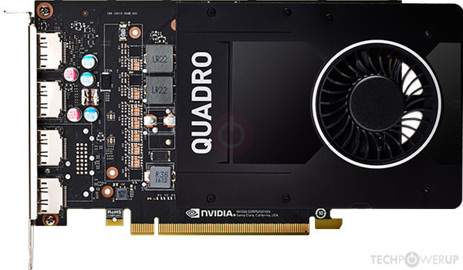
TechPowerUp
NVIDIA GP106, 1480 MHz, 1024 Cores, 64 TMUs, 40 ROPs, 5120 MB GDDR5, 1752 MHz, 160 bit
cunning sundial
Lili, what rgb software do you use to link all your rgb?
earnest olive
hollow grail

TechPowerUp
NVIDIA GP106, 1493 MHz, 1280 Cores, 80 TMUs, 40 ROPs, 5120 MB GDDR5X, 1251 MHz, 160 bit
 gusty abyss
I have an old quadro lying around, I wonder which model it was
hollow grail
cunning sundial
Lili, what rgb software do you use to link all your rgb?

GitLab
Open source RGB lighting control that doesn't depend on manufacturer software. Supports Windows and Linux. ASUS, ASRock, Corsair, G.Skill, Gigabyte, HyperX, MSI, Razer, ThermalTake, and more...
fast dust
More cores and little faster clock
earnest olive
i want to build a pc in the big chungus unit edition
fast dust
Same

 hollow grail
basically 560ti
earnest olive
power
fast dust
Sips, I’ll just use your list as a baseline, maybe try to get used quadro, thank you
 fast dust
😚
earnest olive
oh btw
apparently the silicon power sponsorship offer was legit
i got a response from them
fast dust
earnest olive
apparently the silicon power sponsorship offer was legit
Oooo poggies

Which products they sendin you doe
earnest olive
they just said some of their gaming dram
didn't specify exactly
wonder if they will send the 4133mhz stuff
xmp is 4133c19 which is worse than my 3800c16 but i wonder if i could drop the clocks and tighten the timings
might be b-die
fast dust
That’d be sick
cunning sundial
@hollow grail What rgb software do you use to sinc all your rgb?
fast dust
cunning sundial
<@730975292755279933> What rgb software do you use to sinc all your rgb?
Read above lol, she sent it
 solid dust
Ok, I’m kind of a noob at PCs, I can build them and know what each part does but I’m not sure with compatibility and stuff like that, is this is a decent part list?
The case was just for me to get an estimate, my cooler comes with a back fan so I don’t need one in the case
 quasi snow
solid dust
quasi snow
solid dust
what's your overall budget?
muted patio
That power supply NO
 fleet pagoda
Are u gaming?
quasi snow
that ssd and psu both aren't good choices
muted patio
They literally blow up lol
earnest olive
that cooler price offends me
muted patio
Phanteks AMP for $109
solid dust
@quasi snow around 1500, I have a monitor already
earnest olive
$165 for a 240mm aio
muted patio
Canada?
fleet pagoda
@muted patio did i tell u i got my pc built and running
solid dust
@fleet pagoda the majority yes, but also running other programs like solid works
fleet pagoda
I finally got a good mobo
solid dust
And blender
muted patio
But yeah, please change that PSU
They literally blow up
Phanteks Amp. Seasonic Focus, Superflower Leadex or something else
solid dust
Ok. Thanks
quasi snow
fleet pagoda
Spent all my money on my pc now i cant afford games😹
quasi snow
this is the cheapest between amp and focus
fleet pagoda
I have the AMP 750w gold
muted patio
Also, that SSD. haven't heard of em
solid dust
Same, I just looked up random ones
quasi snow
 slim gate
hey guys, anyone care to help me figure out an alternative to the 3080?
muted patio
probably an OEM for other brands
earnest olive
really expensive though
quasi snow
slim gate
hey guys, anyone care to help me figure out an alternative to the 3080?
the 3080 doesn't really have any alternatives because it's a brand new high end card
quasi snow
there's the 6800 xt but that's not gonna be any easier to find than the 3080
fleet pagoda
Yah
slim gate
@quasi snow what if i just got a 3090?
quasi snow
3090 is like 700 dollars more
fleet pagoda
I got my 3070 off bestbuy surprisingly i was so late to getting on there when they were in stock and lucked out
earnest olive
https://pcpartpicker.com/list/jm9sPV i replaced the cooler, ram, ssd, and psu @solid dust
$165 for a 240mm aio made me throw up a little
😄 😄 😄
slim gate
i literally just need to get my render rig up and running. would the 3070 be better for rendering than 2x2080s? @quasi snow
quasi snow
what are the advantages to a z490 if you're using a locked processor
muted patio
Upgradability down the road
quasi snow
slim gate
i literally just need to get my render rig up and running. would the 3070 be bet...
I don't think so but I'm not as knowledgeable as other people here for that sort of stuff
muted patio
Also, I wouldn't trust those Liqmax AIO's as far as I could throw one
They clog up
grow stuff inside
solid dust
@earnest olive thanks, I don’t know prices so I can’t tell if I’m getting ripped off or not 😂
fleet pagoda
My friend wants to upgrade his pc he told me his specs and ive never heard of the processor
Its a AMD FX(TM)-4300 Quad Core Processor
muted patio
New motherboard time
earnest olive
i know what you're talking about @muted patio and those were the TR liqtech ii coolers
they fixed it
muted patio
Wasn't just TR though
muted patio
fleet pagoda
Its a AMD FX(TM)-4300 Quad Core Processor
Time for new MB, RAM and CPU
fleet pagoda
And its he has a 1050ti w it
muted patio
earnest olive
i used it in a build it was fine
How old is it?
earnest olive
how long ago did i do the build?
4 months
considering it's been 10 months since GN talked about them
and i'm sure he would have something to say if the third revision had similar problems
i don't see a reason to not use it
i've had bad experiences with asus before but i'm not writing off the whole company
solid dust
Other than everything else would you say my mother board is good at least? It’s the MSI MPG Z490 ATX lga1200
earnest olive
for a 10400F it'll be fine, and i kept it there because i assumed you liked the design or something
but it's not great
solid dust
Idk I picked a random one
earnest olive
the cheaper Z490-A Pro actually has better vrms
something to consider if you are planning to upgrade later on
but if you're just going to keep the 10400f in there then it doesn't really matter

Google Docs
Main
2020-09-05,LGA1200 VRM list by /u/qhfreddy,Format based on the AM4 VRM list by Cautilus,Thanks to asdkj1740 @OCN for compiling many sources in this thread: http...
you might find this resource helpful if you're considering upgrading to an overclockable chip down the line
solid dust
Ok, I revised everything, and just wanted to make sure everything was right. I really appreciate all of your help!
solid dust
The case was just sort of to slap on there, I need to check the sizes
ripe wedge
the main thing spook to me is that aio
solid dust
More for a price estimate
ripe wedge
do you want an aio or would you be fine with air cooling?
solid dust
I kind of wanted an aio, I found this Corsair one but it was 165
solid dust
The main reason I wanted an aio is because I’d keep my pc on the floor, I have hardwood and no pets and just to limit cleaning I guess
ripe wedge
ah well a radiator would still get stuff stuck in it
id rather suggest getting an air cooler that for sure will last rather than a cheap aio that might not last a very long time
solid dust
Ok. Thank you!
ripe wedge
ill look and see if there are any decent cheap aios real quick tho
solid dust
Price isn’t really the biggest issue
ripe wedge
ah
solid dust
Like, I made more because of covid based on my location so I’m not short on money
I guess, idk
ripe wedge
so maybe ill look for something that will be overkill for now but if you wanted to upgrade your cpu down the line it will handle it amazingly
so you like the aesthetics of an aio better?
solid dust
I originally had the Corsair h100i platinum se
ripe wedge
that ones not bad
solid dust
I don’t really mind the aesthetics that much so anything goes
ripe wedge
this is like extremely overkill for an i5 10400f but will give you tons of room for upgradibility
cpu wise
solid dust
I might upgrade to an i7 in a couple years, but I don’t necessarily plan on it just for the things I’m doing
ripe wedge
id just need to make sure that case would fit it tho 
solid dust
Yeah, I’m changing it rn lmao
It wouldn’t have enough room for everything and good cable management
ripe wedge
TD500 mesh is a nice case
thats what I have
this would be a really good aio if you wanted an aio
solid dust
My brother bought a like a custom 32 inch case and he has a 650 graphics card and only uses his for RuneScape
ripe wedge
gtx 650? lol
solid dust
Yeah
solid dust
Yeah just his case can fit like a mini fridge inside it
ripe wedge
geez lol
solid dust
I got the cooler you said to get, and sorry to keep asking, but would you have any better recommendations for my motherboard or is that one fine?
ripe wedge
ah the 360mm freezer II?
solid dust
Yea
ripe wedge
well lets for sure make sure a case can fit it
solid dust
I plan on just getting a big ass case so I can put whatever I want in later and so building it is easier
ripe wedge
let me take a look at that mobo
ah ok then I think I have an idea of what would be good
let me see if I can find it
theres a big boi
let me see what else I can find full tower
ah this is the dual pc case I think
 proper badge
I just built a new pc and whenever I launch destiny 2 it jumps my cpu usage to 100% and it definitely shouldnt be hitting that with a 5800x anyone have any idea why?
 glass dome
https://pcpartpicker.com/user/PlainRicey124/saved/ Is this build goood for a sub 1k range?
ripe wedge
does it go back down after the game launches? @proper badge
proper badge
no it stays at a constant 100%
ripe wedge
solid dust
I plan on just getting a big ass case so I can put whatever I want in later and ...
as for that mobo its fine for now but it might struggle down the line with upgrades.
like if you tried to put a 10900k in it for example it might not do as well
ripe wedge
proper badge
no it stays at a constant 100%
ah. hmm im looking
muted patio
Are you playing WIndowed-Borderless?
proper badge
Im on fullscreen
solid dust
Thanks so much for you help @ripe wedge I really appreciate all you’ve done for me
 still roostBOT
 vintageRacer79#5330 has been warned
Reason: Duplicated text
muted patio
dang nabbit Weggbot
GO here
Method 2

I don't know why but Antimalware Service Executable is using 80% if my CPU. I did anything to try to stop it but it didn't work. Stopped the windows defender, adding the file to the exclusion list,
ripe wedge
glass dome
https://pcpartpicker.com/user/PlainRicey124/saved/ Is this build goood for a su...
id look into the corsair 4000D airflow case rather than that case, also the psu is meh, id recommend getting something like an rm750x or even rm650x
glass dome
well I have the 3 rgb fans bundled up plus the rgb controller for a less of a cost so I don’t really know
ripe wedge
solid dust
Thanks so much for you help <@251874205753147394> I really appreciate all you’ve...
np, if you have anymore questions just come here and ask. people love to help here
glass dome
and the psu I can’t return
ripe wedge
oh well it might be fine
just keep in mind that case has less airflow than like a 4000D airflow
glass dome
I plan to have all the places with fans filled so I guess it would be fine
glass dome
yeah I kinda made that while
ripe wedge
actually one thing
glass dome
there was no stock
ripe wedge
the ram, id suggest getting 3600mhz ram instead of 3200
glass dome
mk
ripe wedge
ryzen prefers faster ram like 3600
glass dome
You think the 3600 will bottle neck the 3060 ti?
proper badge
muted patio
https://answers.microsoft.com/en-us/windows/forum/all/high-cpu-usage-because-of-...
Its definitely not the anti malware
ripe wedge
nah
glass dome
mm ok
muted patio
Heh
ripe wedge
a 3060 ti will be fine with a 5 3600
muted patio
Valorant ANti Cheat is nasty
ripe wedge
3060 ti is about 2080 super level, and a ryzen 5 3600 can handle a 2080 ti fine which is rtx 3070 level