#building-and-recc-chat
1 messages · Page 896 of 1
 keen zealot
 civic tusk
If so then why is it listed on all amd motherboards other than asus ones
 wanton cliff
I will die on this hill btw
wanton cliff
did you follow the video I sent?
 muted patio
You have to pay Intel Royalites to use XMP lol
civic tusk
Yeah think that in msi if I'm right
muted patio
It really comes down to that
keen zealot
So any idea why my the RAM OC won’t work
 fossil halo
wanton cliff
did you follow the video I sent?
fossil halo
wanton cliff
did you follow the video I sent?
i did
i got 0 threats
im like kinda spooked
bc
 viral ore
keen zealot
So any idea why my the RAM OC won’t work
viral ore
keen zealot
So any idea why my the RAM OC won’t work
start with what ive suggested twice now
wanton cliff
as I thought
viral ore
then we can think more
fossil halo
i installed this sus video editing software a bit back
keen zealot
Yeah, I will. Just taking the battery out now
civic tusk
I agree the cmos reset is a good place to start
keen zealot
Just wondering why a setting won’t work when people say it will
viral ore
battery out, unplug the system, hold the power button
fossil halo
and i instantly delted it right after i realized how stupid of a decision i had made
wanton cliff
fossil halo
i installed this sus video editing software a bit back
which one?
civic tusk
I am confused on why it's not working though what cpu is he using?
fossil halo
idk the internet had mixed opinions whether it was safe or not
viral ore
keen zealot
Just wondering why a setting won’t work when people say it will
my current best guess is the XMP profile dram voltage is too low
the board isnt properly adjusting for voltage drop
and its just enough to make the dram unhappy
muted patio
Well, there is a new stable BIOS update as well but they reported it didn't work
wanton cliff
manually do voltage then
viral ore
3200 1.35v with auto timings should always work
civic tusk
Do we know what cpu he is using
viral ore
if dram voltage is the issue
wanton cliff
civic tusk
Do we know what cpu he is using
yes
viral ore
5800x
keen zealot
Give me a bit, battery is hard to get to so I need to remove the GPU
viral ore
so thats def not the issue
civic tusk
Ah so not a mem controller issue
muted patio
BIOS right now for 5000 series is all over the place
Lots of issues with mem and other things
especially on x570
viral ore
could be old AGESA version messing things up
muted patio
That's why I'm thinking a BIOS update to V14 should be tried again
wanton cliff
fossil halo
is videopad safe?
no idea tbh
civic tusk
viral ore
could be old AGESA version messing things up
Surely to get it to work though he would have had to flash the bios anyway and that would be the latest one would it not
civic tusk
Ah well this could be the issue then
muted patio
Some mobo manufacturers have done multiple updates since the new CPU AGESA
some haven't
keen zealot
I flashed v14 and it caused my pc to boot only to bios I read of windows, so I flashed to v13
muted patio
I'd try V14 again and check boot order
keen zealot
Instead** of windows
wanton cliff
fossil halo
ill run a deep scan after school
just download bitdefender real quick
fossil halo
free?
muted patio
The update probably squashed the boot order
viral ore
keen zealot
I flashed v14 and it caused my pc to boot only to bios I read of windows, so I f...
thats not that hard to fix
wanton cliff
fossil halo
free?
yeah free version does the job
civic tusk
muted patio
I'd try V14 again and check boot order
This ^^^^
keen zealot
Alright, battery has been out back in, lemme plug the pc back in and boot to bios
viral ore
keen zealot
Alright, battery has been out back in, lemme plug the pc back in and boot to bio...
pro tip, with things like this i prefer to just leave the battery out
it isnt really necessary
muted patio
wat
viral ore
then, once the system is working you can just pop it back in and reconfigure with your known good settings
muted patio
Just, don't unplug it from the wall
or flip power switch off. I really wish every MOBO had a BIOS Reset button
instead of the silly jumper
viral ore
ive been spoiled by my x299 dark
civic tusk
Some don't even have the jumper
viral ore
just click the button, poof, takes me right to a clean slate bios config in like 10 seconds
still saves my profiles
fossil halo
@wanton cliff it crashed again while downloading bitdefender 😳
civic tusk
Absolute bargain tbh
viral ore
ik, i think they were just dumping stock
civic tusk
What you got in it
civic tusk
V nice
keen zealot
Okay, so you guys were saying my first action should be to update the BIOS to v14, right? Should I use my laptop and flash, or can I do that with the actual PC
wanton cliff
fossil halo
<@!305102062121648138> it crashed again while downloading bitdefender 😳
oop
civic tusk
Upgrade that 1080 though lol
viral ore
civic tusk
Upgrade that 1080 though lol
been trying 
fossil halo
wanton cliff
oop
do you know what could be the issue im so spooked rn
wanton cliff
viral ore
10920x, 4x8gb b die, 1080 FE
1080 vs 2060?
civic tusk
viral ore
been trying <:peepoSadSip:641081095479361536>
I feel ya
wanton cliff
fossil halo
do you know what could be the issue im so spooked rn
honestly no
do a CMOS rq
fossil halo
whats that
civic tusk
keen zealot
Okay, so you guys were saying my first action should be to update the BIOS to v1...
X570 tomahawk has bios flashback feature so just use that
viral ore
keen zealot
Okay, so you guys were saying my first action should be to update the BIOS to v1...
use the laptop to put the bios rom onto the flash drive, update through the bios
civic tusk
^
keen zealot
Alright, one sec
viral ore
flashback works to, either way is fine
muted patio
Don't forget to rename the BIOS file, MSI is picky
 mild tartan
i have ordered a odyssey g7 i am going to include my pc specs below. i am trying to upgrade my pc to run it at 240 hz what i need to know what i need to change without breaking the bank thanks.
mother board/ m5a99fx pro r2.0
GPU/ GTX 780
CPU/ AMD FX-8350
ram/ 16 GB
wanton cliff
fossil halo
whats that
take out the CMOS battery (known also as a Button Battery) for about 10 minutes with power supply off
viral ore
mild tartan
i have ordered a odyssey g7 i am going to include my pc specs below. i am trying...
everything
wanton cliff
mild tartan
i have ordered a odyssey g7 i am going to include my pc specs below. i am trying...
literally everything
keen zealot
Rename it to what? Last time I flashed to v14, I just downloaded it and then flashed it
viral ore
that cpu is not gonna have the frametimes necessary to run any newish game at 240fps
wanton cliff
do it then
viral ore
keen zealot
Rename it to what? Last time I flashed to v14, I just downloaded it and then fla...
default is prolly fine, unless manual says otherwise
but it you left it alone before, then its fine
wanton cliff
altho i hate bitdefender, you need to do a deepscan and that requires other antivirus software to be uninstalled
because bitdefender is the most thorough
fossil halo
aight
keen zealot
Sorry, laptop is old and slow. I’ll let you guys know when I have the new bios downloaded and ready to flash
mild tartan
i was thinking about just getting a 2080 but i see now i probably gonna have to do allot more
keen zealot
Wow, I can totally see how spoiled I’ve gotten just by having this pc for 2 weeks vs my laptop. I feel so impatient waiting for it to load
muted patio
2080 has been discontinued, I wouldn't count on too much more stock coming in for those.
mild tartan
crazy how things old so fast lol
viral ore
yeah
civic tusk
2080 also been replaced with better for less money (when you can find them)
 little osprey
Ayy
mild tartan
what is it now
little osprey
Should I get a 3000 series laptop when they come out
civic tusk
well 3060ti beats 2080 performance
mild tartan
ah i see
wanton cliff
mild tartan
i was thinking about just getting a 2080 but i see now i probably gonna have to ...
3080 same MSRP as 2080, much more powerful
Good luck finding one tho
wanton cliff
civic tusk
well 3060ti beats 2080 performance
2080 super as well
mild tartan
yeah ive seen that wow
im using ge66 raider with the 2070 super as my main rig may have to use it for awhile
civic tusk
@viral ore anyway i believe we got off on the wrong foot no malice was meant with discussions before was just trying to have a discussion
viral ore
yeah i feel that, im very much used to people just showing up here and arguing constantly
for no good reason
so i usually automatically brush people off as trolls
civic tusk
Yeah not me just looking to help out
viral ore
even when they arent
keen zealot
Alright v14 is downloaded, flashing to v14 now
civic tusk
had discussion with lili and mr1111 anyway was good
viral ore
yeah thats fine, ive been here for a while, most of us regulars see people show up trying to "help" so when someone wants to have a discussion about something thats against the "norm" we kinda just assume lol
so im sorry bout that
civic tusk
Yeah no harm done dude
 olive sentinel
Whats a budget friendly gpu for video editing?
civic tusk
You going to be gaming too?
olive sentinel
a little bit
civic tusk
Maybe something like a used vega 56 then
If you undervolt it and then oc it can get some decent performance out of it
What psu do you have?
olive sentinel
okay what a new one cause ive had problems with used stuff.
i dont have a psu the only stuff i have is a case and the cpu
civic tusk
For new there is nothing worth buying apart from the new gpu's out and they are very hard to come by
olive sentinel
whats a good website to get used equipent without getting riped off
keen zealot
Okay, v14 brought me to the BIOS again
civic tusk
keen zealot
Okay, v14 brought me to the BIOS again
Okay try to enable the xmp profile again
civic tusk
olive sentinel
whats a good website to get used equipent without getting riped off
Depends on the country
keen zealot
Before that, I need to figure out why in v14, my PC only boots to BIOS instead of windows
civic tusk
That will just be your boot order
keen zealot
Boot priority has hard disk as first
civic tusk
Is that where the os is installed?
viral ore
there is probably an entry of your SSD as a legacy device, and one with it as a UEFI: device
keen zealot
But wait, I just realized BIOS version says E7C84AMS.140
viral ore
i would start by disabling CSM in the boot options
keen zealot
Is that normal
muted patio
yeah, that's correct
viral ore
yeah, could be written out in the bios as compatibility support module
either way, disable it
keen zealot
viral ore
it just becomes a hassle if all you're doing is running windows
 plush mist
ah yes msi bios
plush mist
bios version is just what version it is
viral ore
that looks fine to me
plush mist
yea
keen zealot
Im not seeing csm
viral ore
i think its disabled
msi probably just renamed it "boot mode select"
and UEFI is what you want
keen zealot
Alright
muted patio
It has the u for the boot icon
viral ore
if you hit F7, does it take you to an advanced menu?
muted patio
In the boot priority up top
keen zealot
Yes
viral ore
yes theres an advanced menu?
just work in that
its easier to find what you're looking for
msi has a history of messing that up too...
civic tusk
Yeah the newer msi bios i actually find harder to navigate than the older ones
keen zealot
Oh, I found the CSM toggle, it’s set to UEFI like you said
keen zealot
Alright, so set from auto to 3200
civic tusk
try 3600 tbh
viral ore
and is there an option to manually set dram voltage?
civic tusk
There is no reason it shouldn't work really
keen zealot
Yeah, DRAM Voltage is set to auto
civic tusk
yeah and 1.35v is normally enough for 3600
viral ore
but set voltage to like 1.37
wee bit higher than what the kit is rated for, because some boards are lazy with dram voltage
keen zealot
keen zealot
Okay, done
viral ore
save and exit
civic tusk
is xmp even enable there
keen zealot
Disabled
civic tusk
looks like 2133 at the top
keen zealot
Yeah
viral ore
no idea tbh
keen zealot
Should I leave it disabled for now
viral ore
xmp? yes
keen zealot
Alright, saving now
viral ore
well, honestly at this point you could enable xmp then increase voltage
but doesnt really matter, we are just testing
keen zealot
Alright, speed is at 3600 and posted, but still going straight to bios
viral ore
dope
now, enable xmp, with default voltage
once that boots, we will fix windows not booting
keen zealot
Should I leave the frequency at 3600 or change back to auto
civic tusk
Enable the 3600mhz xmp profile
viral ore
setting xmp should automatically reset that
civic tusk
and leave everything at auto
viral ore
change it back to auto to be safe
keen zealot
Well I set the volts back to auto, so change it to 1.35 before saving or
viral ore
set that to auto too
keen zealot
I don’t know if it matters, but it’s listing my auto as 1.392v
viral ore
thats not high enough to prevent post, but strangely high
keen zealot
Let me save and exit and see what happens
viral ore
ok
civic tusk
Yeah i always thought xmp default voltage was 1.35
viral ore
for 3600, yeah
civic tusk
yeah it same at 3200 too
keen zealot
Okay, it posted but now the voltage says 1.216V
muted patio
Seems like the auto voltage is spooped
civic tusk
Are you not looking at core voltage there
viral ore
thanks msi, i dont know anymore
muted patio
XD
viral ore
vcore is like 1.4
civic tusk
best to send pic
keen zealot
I’m just looking at DRAM Voltage
viral ore
yeah send pic
keen zealot
viral ore
man i hope this version of the bios isnt also a pos
i guess HWinfo could maybe tell you once windows boots
muted patio
That or CPU-Z
civic tusk
yeah
keen zealot
Wait a minute, with XMP enabled, my DDR speed is back to 2133
viral ore
oh, i think memory training on xmp failed...
muted patio
Yes
viral ore
but this bios version is smart enough to recognize that
civic tusk
What is profile 2 for xmp?
viral ore
probably identical
muted patio
I would just set it manually, 3600/1,35V and make sure the timings are correct
viral ore
it usually is
keen zealot
They both say DDR4 3600MHz 16 - 19 - 19 - 39
viral ore
could be secondary and tertiary timing differences
muted patio
ya know what would be great? if the manus documented this stuff in their manuals -_-
civic tusk
Well the voltage is abit more reasonable now at least
viral ore
maybe if they would stop wasting time with a fancy bloated gui bios...
keen zealot
So I’m good to just leave everything in auto with profile 2, sounds like?
keen zealot
So now how do I get back into booting windows instead of bios lmao
little osprey
I had same problem xd its about boot options
keen zealot
The only thing that fixed it when I tried v14 was switching to v13
muted patio
Can you manally boot to Windows from the BIOS by selecting the boot device?
 river sinew
I upgraded my PSU and GPU and when I started my computer back up my monitor stays on “signal not found” can anybody help me with this?
Don’t want to spam this chat 👀
viral ore
river sinew
I upgraded my PSU and GPU and when I started my computer back up my monitor stay...
what GPU? dont forget the PCIe power cables
keen zealot
Gonna be a stupid question, but how do I manually select it in bios
viral ore
keen zealot
Gonna be a stupid question, but how do I manually select it in bios
i have the same question too
it varies
i literally couldnt tell you lmao
little osprey
muted patio
Can you manally boot to Windows from the BIOS by selecting the boot device?
I had same problem with msi bios but there was something I changed about boot options I don't remember what and it worked
keen zealot
This was my boot screen
muted patio
I know ASUS Bios, I don't know MSI Bios but there's a way
viral ore
your system does not like xmp...
little osprey
ok it shouldn't be uefi
keen zealot
That doesn’t do anything
civic tusk
@viral ore You think we gonna have to help him manually set the timings and that
keen zealot
Oh, guys ignore the speed in the boot pics
civic tusk
keen zealot
That doesn’t do anything
So when going to boot option 1 and pressing enter it doesn't pull up another menu
 drowsy thorn
i am ordering cable extensions for my build, curious how do i figure out if i need an 8+6 or a 8+8?
river sinew
viral ore
what GPU? dont forget the PCIe power cables
It’s a evga rtx 3070 xc3 ultra. The psu cables were 2 double 6+2 pcie cables I first used one double 6+2 and it didn’t work then tried using 2 double 6+2 cables but only one 6+2 connection from both double cables
viral ore
did we try xmp with a forced 1.37?
keen zealot
It’s still 3600, that was taken before profile 2
little osprey
no no it's not about xmp if it directly goes to bios on msi . i had same problem . its about boot options
 solid verge
gota love those ram sicks
viral ore
or did we just take the bioses word for it
viral ore
oh sweet
civic tusk
little osprey
it shouldn't be UEFI on boot menu problem is there
civic tusk
It should bring this menu up
viral ore
little osprey
it shouldn't be UEFI on boot menu problem is there
what should it be?
civic tusk
Should be the actual disk
muted patio
Didn't he say it was NVME?
M.2?
I wonder if it needs to be enabled in a setting somewhere?
keen zealot
Yes, SSD is nvme
little osprey
viral ore
what should it be?
Legacy
civic tusk
Nah that should be on UEFI for NVME
little osprey
keen zealot
Current screen
there should boot node select is allow you select another mode
viral ore
keen zealot
that is so confusing wth am i looking at
little osprey
I had same issue before
viral ore
so CSM is... on?
keen zealot
CSM is off, UEFI is on
viral ore
well, turning on csm cant really hurt anything, i would give it a go
even though you cant install windows 10 in non uefi mode anymore
so
UNLESS
your HDD has the bootloader
keen zealot
Side note, when I set the toggle to off, Hard disk pops up
keen zealot
Just the one SSD
little osprey
there should be this pop up on boot options on bottom
thats why it going to bois
I had same thing
 still roostBOT
 SassyFish256#5719 has been warned
Reason: Bad word usage
civic tusk
tut tut sassy lol
viral ore
trying to type too fast
civic tusk
was that a warning from a typo
viral ore
yes lol
civic tusk
lol
little osprey
@keen zealot go to bottom UEFi hard drive bbs priorities and select ur drive easy
muted patio
Ah, what a simple slip of the fingers can do XD
keen zealot
Lmao unless I misunderstood the toggle and CSM was ON? But when I set it on, UEFI highlighted, when I set it off CSM highlighted
viral ore
thank u bot for doing your job
keen zealot
Alright guys, setting the toggle booted to windows
viral ore
keen zealot
Lmao unless I misunderstood the toggle and CSM was ON? But when I set it on, UEF...
no one really knows, all we can do is guess
viral ore
keen zealot
Alright guys, setting the toggle booted to windows
thats all we care about, screw msi bios
keen zealot
Ayyye thanks so much guys! How do I check to see if RAM is actually at 3600 without bios?
muted patio
CPU-Z or HWINFO64
viral ore
easiest option is task manager, but sometimes it doesnt report it correctly
civic tusk
Beat me to it
viral ore
if it still says 2133, check one of the two options vintage listed
civic tusk
Happy days
keen zealot
Thanks guys! Sorry I was a hassle lmao
muted patio
Not your fault MSI BIOS is oof
civic tusk
It's cool i enjoy a challenge
keen zealot
Sweet, so I have the newest nonbeta bios and oc RAM
Niiice
Tomorrow when my fans and hub come in, I’ll post a pic of the final build
wanton cliff
My friend got a 3070
 dreamy lantern
ow
little osprey
I still waiting for card too 
dreamy lantern
i have 1050ti you have nothing to worry about
little osprey
where the heck is that damn cards
muted patio
hide and seek masters
 normal berry
Just got a 3070 at MicroCenter this past Friday. They have some set aside if you are looking into full builds. Would just call and ask if they have them in stock for the build.
wanton cliff
normal berry
Just got a 3070 at MicroCenter this past Friday. They have some set aside if you...
Looking for something (preferably 3080) by itself
river sinew
I replaced my 5700 xt with a 3070 today but now my monitor just says signal not found
😩
wanton cliff
river sinew
I replaced my 5700 xt with a 3070 today but now my monitor just says signal not ...
To be sure, you plugged it into the GPU, right?
Not the mobo?
river sinew
Yea
normal berry
wanton cliff
Looking for something (preferably 3080) by itself
Ahh got it, would just be on the lookout on their website or call once a week or something.
wanton cliff
Yeah I already have a build
Just need a new PSU (any suggestions for 3800x and 3080?) and the card itself
river sinew
wanton cliff
Not the mobo?
Not the mobo. I plugged it into the first DisplayPort slot on the gpu
river sinew
When I first started it up I plugged my two monitors into it
One into the 1st the other into the second. Both didn’t work
So I plugged one into the third and that didn’t work either
Also tried with a hdmi and that didn’t work
wanton cliff
Oop
He gots a dead card
Either that or power isn’t plugged in correctly or something
 ripe wedge
reseat the gpu
wanton cliff
Make sure power is plugged in correctly
 pliant lake
Does you motherboard show any post codes?
And yeah, reseat
ripe wedge
reseating means taking the gpu out and put it back in
wanton cliff
Make sure all your pins (should be 2 8pins on the 3070, might be a 12-pin) are in correctly as well
ripe wedge
fyi
wanton cliff
He has an FE card right?
Can’t remember if he said
If so, I believe it has an included 12 ping adapter
muted patio
yes
wanton cliff
You need to make sure that the 2 8pins are plugged in correctly
 formal cosmos
how many 120mm fans can i use on this mobo with no fan splitters https://pcpartpicker.com/product/T3XYcf/asrock-b550-pro4-atx-am4-motherboard-b550-pro4
muted patio
- 4 x Chassis/Water Pump Fan Connectors (4-pin) (Smart Fan Speed Control)*****
wanton cliff
So, in layman’s terms, 4 of ‘em
river sinew
ripe wedge
reseat the gpu
Just reseated it. Plugging it in now
ripe wedge
ah good
river sinew
wanton cliff
Make sure all your pins (should be 2 8pins on the 3070, might be a 12-pin) are i...
My PSU came with 3 double 6+2 cables. I am using 1 of those double cables. so one cable plugs into the PSU and splits into 2 6+2 connections both going into the gpu
muted patio
Ah
No
One separate cable for each connector please
You will need 2 of the 6+2 pin cables
wanton cliff
2 from the same works fine for my 5700xt but yeah
muted patio
Not for a 3070
Power draw exceeds the single cable rating
Plus one cable supplies RAM and the other the actual GPU die. They're split somehow, similar to that
I can't remember the exact details
river sinew
muted patio
You will need 2 of the 6+2 pin cables
I tried it with 2 and it didn’t work either. But that was before I reseated it. Haven’t turned on the pc yet so I’ll unplug it and try running it with 2 again
muted patio
is there an error light on your motherboard?
Speaking of which, what CPU and motherboard?
river sinew
Ryzen 9 3900 xt
Asus pro ws x570 ace
muted patio
Interesting choice
river sinew
It was a Newegg build
river sinew
I don’t know anything about PCs tbh
wanton cliff
Also tfw you don’t even game on your computer anymore, just admire it and try applying overclocks to no avail
muted patio
Oh wait, it does
Up by the RAM slots
Are any of those on when you go to boot it up?
river sinew
Just closed it back up. Let me plug it back in and check
Gonna be hard to check because my radiator fans seem to block them
Is there any issue if I start it with the case open?
 next kestrel
nope
river sinew
next kestrel
nope
Ty
dreamy lantern
just making MSI MAG B550M MORTAR can use a m.2 as a boot right
river sinew
muted patio
Are any of those on when you go to boot it up?
There’s a white light where it says VGA
muted patio
Yes
It can boot M.2
Ok, so definitely a VGA error
I'd suggest a CMOS reset by shutting off the power supply and removing the battery
for a couple minutes, then put it back in, turn power supply back on and boot again
Keep in mind this will wipe all your BIOS settings like XMP, etc
 modern shadow
Making a build for a friend, 3000 aud budget. Any help?
memory intensive games, not too demanding
river sinew
muted patio
I'd suggest a CMOS reset by shutting off the power supply and removing the batte...
Ok so I turn the pc off then turn the PSU switch off and unplug it for a couple of minutes?
muted patio
take out the battery on the motherboard
The little silver shiny one, after you disconnect power
muted patio
YW
fossil halo
wait
this is a bit of a dumb quesiton
but
are the temps i see in nzxt cam in fahrenheit or celcius
or kelvin? 🧐
lmao the last one was a joke but whats the answer
dreamy lantern
is the GIGABYTE B550M AORUS PRO-P better then the MSI MAG B550M MORTAR ?
dreamy lantern
is there anything wrong with the GABYTE B550M AORUS PRO-P
viral ore
would take b550 gigabyte over msi any day
dreamy lantern
B550M AORUS PRO-P price changed to 130usd
fossil halo
honestly
viral ore
makes the model number longer
fossil halo
go for the asus one
its like 159 or so
worth the extra money
thats the tuf gaming one
i think they have a standard asus one also that is like 120
viral ore
i would take the aorus pro
fossil halo
bc asus is much better for many things like they have better itnegration with other brands like corsair
and asus's software is usable
princess sara do you think you know what was happening
civic tusk
What do you mean better integration?
 winged tinsel
Is it bad to close Microsoft onedrive?
dreamy lantern
?
 gleaming quartz
winged tinsel
Is it bad to close Microsoft onedrive?
gleaming quartz
winged tinsel
Is it bad to close Microsoft onedrive?
no... unless you have used onedrive to store actual vital stuff
onedrive is a piece of garbage imo
viral ore
civic tusk
What do you mean better integration?
for people who use RGB software 
civic tusk
Urgghh
civic tusk
Imagine buying corsair fans anyway apart from their ml fans
dreamy lantern
the -p had bad reviews on new egg so
next kestrel
it really does pay off tho
river sinew
muted patio
YW
Ok so after taking the battery out for a couple of minutes my secondary monitor booted to this screen
civic tusk
Here's an idea wouldn't it be nice of someone just standardised it already
river sinew
 severe axle
the -p variant is better though
severe axle
cooler running vrms
dreamy lantern
dreamy lantern
the -p had bad reviews on new egg so
look at newegg
severe axle
gn/buildzoid said make sure to get the -p variant
viral ore
dreamy lantern
look at newegg
newegg reviews dont mean nothing
viral ore
most buyer reviews on retail sites are useless
its a good indication of the odds of getting a DOA board tho
civic tusk
Yeah most bad reviews are based on problems between chair and pc not the actual part themselves
river sinew
muted patio
Now boot to BIOS and setup your drive boot order
How do I set up ram timings?
civic tusk
Not all but most
@river sinew DOCP there on the left or are you talking manual timings
modern shadow
What cooler would I need for a i7-10700kf
wanton cliff
river sinew
How do I set up ram timings?
Oooh, TUF X570
civic tusk
modern shadow
What cooler would I need for a i7-10700kf
Sycthe fuma 2 is one I like to go for quiet and good cooling
river sinew
muted patio
halfway down on the left
It had disable and profile 1 I click on profile 1 and this popped up
muted patio
OK
civic tusk
What is the ram
muted patio
Another screenshot?
river sinew
river sinew
civic tusk
Yeah that noticfation is nothing to worry about then
viral ore
thats good, hit save and exit
muted patio
Yep
civic tusk
Asus bios is so much easier
wanton cliff
Asus bios is best bios
gleaming quartz
what about dell?
river sinew
That good?
wanton cliff
Yep
Alright I’m this close to level 29, someone help me by conversing with me so I can get my level up
civic tusk
I have msi myself at the minute because no good value options existed for asus mobos at the time for b450
And the bios on this is the older less gui focused msi one
Much better imo
next kestrel
i have asrock because it was 50$ open box at microcenter
civic tusk
Is this for meep?
civic tusk
Not amazing but certainly good for $50
wanton cliff
Indeed
I would take that deal any day if the week
Alright
I need like 2 more messages
Need to wait 30 more seconds
civic tusk
Hmmm how did you think ces went
civic tusk
Amd little disappointing I thought
 proper tulip
what do you guys think of this pc https://pcpartpicker.com/list/XLKyQD my friend is saying i should get the same one, prices not right, idk why they are like that
 rocky ocean
How much power do I need for a 3090
wanton cliff
A few things
civic tusk
3600 pretty bad value right now
proper tulip
yea ik
wanton cliff
You don’t need to buy it separate
proper tulip
its just what he bought isk why
fossil halo
rocky ocean
How much power do I need for a 3090
quite a lot
proper tulip
the main parts are what im talking about
gleaming quartz
some cpu coolers come with thermal paste, some dont
rocky ocean
Would 750 be enough?
proper tulip
is it mainly a good build?
wanton cliff
Otherwise it’s a pretty good build
civic tusk
rocky ocean
How much power do I need for a 3090
Depends on the cpu you are using
proper tulip
ok thanks
wanton cliff
If you really want to go AMD then at least get 3600mhz RAM
civic tusk
Can oc that kit to 3600mhz
wanton cliff
Wouldn’t recommend
gleaming quartz
i would say go for a 3700 for amd
civic tusk
Why not it's micron e die
wanton cliff
gleaming quartz
i would say go for a 3700 for amd
Yeah
wanton cliff
civic tusk
Why not it's micron e die
Just going factory speeds is safer.
Silicon lottery and all
civic tusk
Yeah I suppose but defo think it could run 3600 maybe 3466
civic tusk
Like you said depends on silicon lottery
wanton cliff
How is the die on TridentZ?
civic tusk
It's b die depending on the kit
rocky ocean
civic tusk
Depends on the cpu you are using
I got a AMD 3700x
civic tusk
rocky ocean
I got a AMD 3700x
750w then
rocky ocean
Sweet
wanton cliff
For a 3090?
civic tusk
Yeah
wanton cliff
You are crazy
rocky ocean
I have everything at my house and I’m just waiting on these damn graphics cards
wanton cliff
Recommended PSU is 850w, and that’s assuming your GPU doesn’t have a massive power spike (which Ampere, and the 3090 in particular does more often than any other GPU series)
 small osprey
1000w wouldnt even be overkill
wanton cliff
There is a lot more to it than just that
small osprey
maybe a little bit
civic tusk
And the 175w is on a full load stress test for the 3700x
wanton cliff
900w is the bare minimum I would recommend for a 3090 build
civic tusk
That's overkill imo
small osprey
not really
wanton cliff
Like Ssenti said, even 1000w isn’t overkill
civic tusk
Explain how
small osprey
it’s basically minimal
wanton cliff
Power spikes
civic tusk
The 3090 does not power spike over 100w
small osprey
depending on ur cpu and other stuff u might even want a 1200w
rocky ocean
Ok so I should probably stick to a 3080 which was my main focus, was curious about the 3090 cause I could buy one rn
small osprey
most ppl dont need 3090 for gaming tbh
for 3080 i would say 750 minimal, 850 better
civic tusk
The 3090 is a bad purchase really for the price
civic tusk
And 750w would be fine for a 3700x and 3080
wanton cliff
Should be fine
small osprey
mm
wanton cliff
Hopefully
 rocky ocean
So if I did want to upgrade my cpu what would I get? And would I need more power than 750?
wanton cliff
rocky ocean
So if I did want to upgrade my cpu what would I get? And would I need more power...
Likely yes
 tough kettle
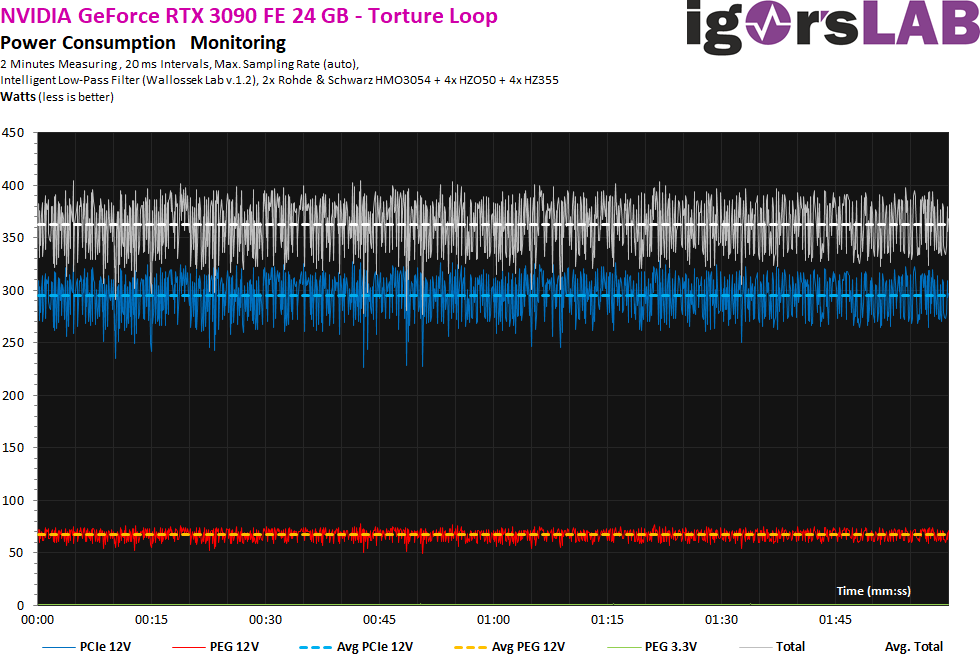
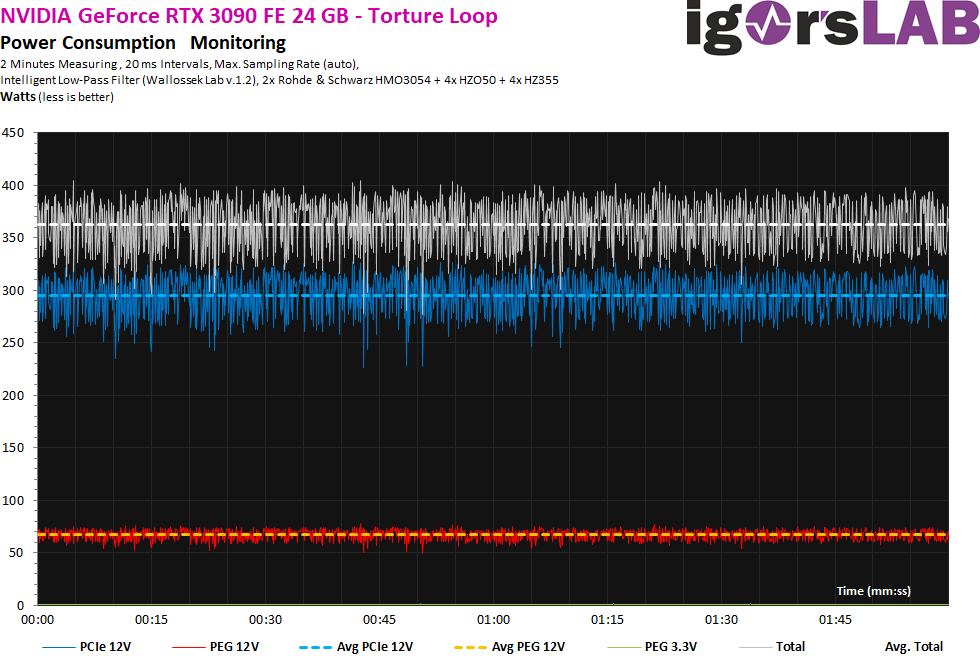
does not even go above 410 watts
civic tusk
Exactly what I was saying
But no 1000w apparently
Yeah maybe if you got a heavy oc'd 10900k in there
wanton cliff
Not only that but it also gives some upgrade room
civic tusk
Upgrade room to what lol
rocky ocean
So next step above 3700x would be the 10900k?
rocky ocean
Oh
civic tusk
rocky ocean
So next step above 3700x would be the 10900k?
No lol I was just using it as an example
 desert gulch
Like horrible value
civic tusk
Don't buy a 10900k
next kestrel
after 3700x I'd say 5800x
desert gulch
Isn't 3800xt after 3700x?
civic tusk
Tbh 5600x is even an upgrade from 3700x
civic tusk
Ipc improvements though make multithreaded performance similar between the two
next kestrel
like going from a 1700x to an 1800x
civic tusk
And gaming performance is defo better with the 5600x
rocky ocean
Any recommendations on monitors
desert gulch
Depends on game
civic tusk
3600 ain't even a great deal right now
rocky ocean
I don’t think 1k on a 144 Hz dell monitor is a good deal
rocky ocean
Yeah
civic tusk
Gigabyte m27q is a good reasonably budget 1440p monitor
rocky ocean
This is the one my friend recommended
desert gulch
🧢
civic tusk
M27q has pretty wide colour gamut support last time I checked
And accuracy is decent iirc
My guess is this is for gaming though tbh
rocky ocean
Wait is the monitor good or not
rocky ocean
O
desert gulch
Monitor would be okay for like around 300
rocky ocean
Sooo what’s a good 1k monitor budget isn’t really an issue
civic tusk
Gigabyte m27q is good
If you have more to spend go for:
LG 27gl850/gn850
Dell 2721dgf
desert gulch
Don't spend 1k on monitor
rocky ocean
Ooo I will look into those Hursty
desert gulch
1k will get you like 3-4 rly good monitors
rocky ocean
Why can’t I get 3-4 1k monitors lol
civic tusk
Because it would be pointless
rocky ocean
True
rocky ocean
Hello :)
wanton cliff
little osprey
Anyone here?
My apologies, looking at today’s AMD keynote
little osprey
What's up?
wanton cliff
That’s not quite what this chat is for
little osprey
OK
wanton cliff
More for talking about computers/questions about computers
little osprey
Yes
wanton cliff
On the other hand, have y’all seen the new AMD mobile processors?
little osprey
NO
little osprey
I have an ask
wanton cliff

AMD says RDNA 2 GPUs will come to laptops before July More RX 6000 desktop GPUs are on the way as well.
Read our full story on Engadget:
https://www.engadget.com/amd-ryzen-5000-mobile-cpus-for-laptops-performance-claims-170001568.html
Get More Engadget:
• Like us on Facebook: http://www.facebook.com/engadget
• Follow us on Twitter: http://ww...
wanton cliff
little osprey
I have an ask
Ask away
rocky ocean
I know that Nvidia announced the 3060
little osprey
I want a good laptop
wanton cliff
Also they announced new Milan processors (Zen3 Epyc)
rocky ocean
IMO don’t go for alien wear
wanton cliff
70% better than 10th Gen XEON
wanton cliff
little osprey
I want a good laptop
Wait for February, if you can
New laptops tbr then according to the keynote I linked above
little osprey
OK i will wait
wanton cliff
Well, new mobile processors with said laptops
rocky ocean
Those things are gonna be gone in seconds
wanton cliff
Yep
Friend was able to do - get this
Get a 3070 5 minutes after a drop
On Newegg
rocky ocean
😳😳😳
wanton cliff
That was today at 7:35 EST
little osprey
How to start programming
wanton cliff
little osprey
How to start programming
Idk, codecademy?
rocky ocean
That is a completely different ballpark
rocky ocean
The 3080s are so damn illusive
wanton cliff
Indeed
rocky ocean
I only see 70s and 90s
little osprey
OK
rocky ocean
Yeah but no sites are selling them
wanton cliff
Newegg?
rocky ocean
For me I can never find em even with notifications with discord and Twitter
wanton cliff
They always drop on Newegg at 7:30 PM EST every day
And now it is entirely possible to get one
Apparently
Get your F5 key ready just in case tho
rocky ocean
My god your a life saver
little osprey
guys my build booted up on the first try
wanton cliff
love it when that happens
rocky ocean
muted patio
Mond-Thursday
Do you mean Monday through Thursday or just mondays and Thursdays, just to clarify
wanton cliff
sorry wrong place
rocky ocean
Gotcha
 verbal quarry
whats a good 850w psu?
 stoic island
Revolution D.F.\
verbal quarry
also will the 3080 run on a 850 without issues?
muted patio
yes
muted patio
Looks good. Mobo is a bit overkill but I get the RGB theme
rocky ocean
Is someone able to tell me the difference between these two 3080s I want to learn what it is saying
verbal quarry
one is white and one is black
muted patio
Probs clock differences too
verbal quarry
probably
rocky ocean
What is the clock
verbal quarry
i wouldnt know sorry
vintage what are some good aios
im looking at a iCUE H100i
also looking at the pro xt version
 dense sonnet
Whats the point you can't buy them 😒
verbal quarry
oooh you were talking about the 3080s
i thought you meant the aios i was talking about
sorry about that
 urban trellis
@verbal quarry the icue H100 is a good aio it comes with pre applied thermal paste and it also looks clean and keeps temps low so I would get that one
urban trellis
The included ones
verbal quarry
yes
muted patio
RPM's don't matter, CFM does
verbal quarry
what is cfm?
urban trellis
Oh
muted patio
RPM is sort of irrelevant except for noise with high RPM fans
verbal quarry
interesting ok
urban trellis
So your telling me that I thught my amd stock cooler was good cuz it did 2800 rpm
But that didn't matter at all
verbal quarry
lol
muted patio
CFM matters more
urban trellis
Yea I understand now
muted patio
Cuz you could have a fan at 1400 RPM move the same amount of air lol
verbal quarry
will it actually tell you what it is?
urban trellis
Probably won't cuz I've never heard of CFM and I've seen lots and lots of fans
urban trellis
Yea
verbal quarry
welp here goes a few more hours of research xD
urban trellis
Lol
muted patio
This is why we hate the NZXT cases. No matter how many fans you add, you're still sucking air through straws instead of a screen door
verbal quarry
oh speaking of cases
muted patio
RPM all you want, you can't move any more air than you can pull through the tiny side holes
verbal quarry
mine came in today
urban trellis
Which one?
verbal quarry
Rosewill Prism-s black
urban trellis
Nice
verbal quarry
yes its a very sturdy case
urban trellis
I recently built my pc and I got the Corsair icue 220t and it came with 3 sp120s
muted patio
Is that front panel solid?
still roostBOT
 Lightning7319#4402 has been warned
Reason: Bad word usage
muted patio
It's not as bad as the NZXT, the holes are bigger
urban trellis
Nzxt is trash
muted patio
intake on the bottom, exhaust the side and rear
verbal quarry
the reason i got it and my thought process
was that a single fan will be intake for the radiator at the bottom
2 will be intake for the gpu
urban trellis
Ur gonna put a rad at the bottom
muted patio
nah, side mount rad should be OK tubes at the top
urban trellis
Oh ok
verbal quarry
i was gonna try to do tubes at the bottom xD
urban trellis
Wait vintage will I have good airflow with 6 120 mm fans 1400 rpm 3 intake and 3 exaust
urban trellis
Bruh I just learned what CFM is today
stoic island
neutral is good
desert gulch
like with a ton of fans h510 is still crap
urban trellis
Icue 220t case sp 120 fans
desert gulch
mr1 i have near neutral
muted patio
Neutral or slightly positive is good
desert gulch
3 120 intakes
urban trellis
Yea
stoic island
I think I have barely positive
desert gulch
since 140 pushes alot more than 120
stoic island
2x140+120 intake, 2x(crappy)140+120 exhaust
desert gulch
i have a p14 aswell
 shadow wyvern
Yeesh, i thought 25 c was good
desert gulch
using 3 crappy 120 fans from uphere for intake
25 is good
its like barely above room temp
by like 5-10 degrees f not c
wanton cliff
Is 3 intakes (1 stock case fan from the P400, 2 Noctua 12x15 PWM 55.44 CWM) and 1 outtake (Phanteks stock case fan from P400) good enough to keep away high temps?
urban trellis
If anyone needs a 3070 or 3090 come to canada for some reason there is stock here on acctual retail price
shadow wyvern
Thats pretty good for trashy built in fans
wanton cliff
urban trellis
If anyone needs a 3070 or 3090 come to canada for some reason there is stock her...
Scalpers are starting to get bored the world over, thankfully. My friend was able to get a 3070 5 minutes after a drop today on Newegg.
shadow wyvern
i might buy new fans for the front and back, but besides that im fine for cooling
desert gulch
yeah
muted patio
Better to match CFM than just fan size and RPM
verbal quarry
so the pre installed rosewill case fans. are they decent?
desert gulch
i think so
wanton cliff
verbal quarry
so the pre installed rosewill case fans. are they decent?
Same question but P400
urban trellis
Im so pissed that I can't afford a 3070 cuz I'm 13😭😭😭😭😭😭😭😭😭
wanton cliff
Bruh moment when you reveal that’s you are a minor on the internet
shadow wyvern
i bought a case 1111 recommended its great besides hiding all of the cables lol
they were all the way back in the drive bay, almost had a panic attack
verbal quarry
ok so the rosewill rgbf-s12001 fans
muted patio
P500A best case
verbal quarry
have 1800 rpm
muted patio
verbal quarry
and 41 cfm
shadow wyvern
thats nice ssd placement