#building-and-recc-chat
1 messages · Page 643 of 1
 stoic island
 wide estuary
Should i just go with the build you did but change the psu?
stoic island
I think it'll be useful for both of us to go over reasoning behind stuff :)
wide estuary
Wanna talk it to a dm lol
stoic island
If you really want to sure but this works
wide estuary
Either way. I’ll let you eat and we’ll run through everything lol
stoic island
Dinner isn't very good but what other choice do I have :(
wide estuary
😂 better than starving
stoic island
It's interesting at least
wide estuary
Chicken and rice
wide estuary
Aye 😂😂😂😂
 lean rapids
can someone give me feedback on this im new to building pc's
https://ca.pcpartpicker.com/list/
wide estuary
Sweet. I think dm will be better as it might get confusing
stoic island
sure
@lean rapids Starting from the top, CPU cooler is unnecessary most of the time, stock does fine. Best to get 3600mhzc16 ram is budget allows. A400 is a crap SSD, grab something like a vulcan if you want 2.5in, and a team MP34 for m.2. Barracuda compute 2tb is just a bit more than that 1tb drive. GPU is decent ig, could be better. You can save money with cheaper case and fans.
lean rapids
ok thanks for the feedback
 late pilot
what is the benefit of a tinted side panel?
 prisma stag
Do 3 pack fans come with nuts for part of the case that is not threaded?
 cursive wharf
To be more specific, screws are self tapping screws that tap the fan frame
 desert gulch
Exactly
 shell wind
can someone suggest a monitor abot 24 in for me
stoic island
What res, budget, and refresh rate
stoic island
??
under 3hzz?
all I gotta say is
take that last requirement off for your own good :P
 balmy patio
shell wind
balmy patio
shell wind
lol
balmy patio
that could also work for you
 little leaf
For 250 you can get 1440p
stoic island
usually around 280$ mark is where I start reccomending 1440p144hz
shell wind
above 24 in
balmy patio
what graphics card do you have?
i ask that because the monitor you choose can vary depending on if you want to take advantage of your card's capabilities
shell wind
above 24 in
stoic island
why
shell wind
Cause i like bigger
stoic island
bigger does not mean better
stretching a 1080p panel from 24in to 27in makes it look bad pixel density wise
balmy patio
eh i mean it really depends what youre doing
stoic island
Yes
it looks bad
Think about it, 24 inch 1080p panel and 27 inch 1080p panel both have the same amount of pixels
all the pixels are spread out evenly
so on the 27in monitor, 1080p has to be stretched out more
shell wind
can i get one with more pixes
stoic island
making the pixels more aparent
Yes, but it's going to be harder for the 2060s to run
I personally believe the sweet spot for switching from 1080p to 1440p to be a 2070 super.
Here's a 27in 1440p monitor for reference for pricing if you're curious :
https://www.newegg.com/p/N82E16824737008
stoic island
don't think about it that way
think about it as a ton more pixels in a completely different panel
2560x1440 is kind of a lot more than 1920x1080
shell wind
Do i need a 2070 super?
stoic island
no
shell wind
for that
stoic island
I mark 2070s as a good point to run everything well on 1440p. 2060s works but don't expect 144fps ultra on aaa games.
stoic island
no
stoic island
I say no to both.
balmy patio
and dont get fooled by the 24, it might look small but its about the perfect size if one of the only things youre going to do on it is play video games
stoic island
"seems"
balmy patio
well yeah, if you think about it, youre far away from a tv, so you cant really distinguish the pixels
on a smaller screen, more pixels is better because youre closer to it
 vital warren
24inch monitor is great
shell wind
But what if i get more pixels
balmy patio
then itll look better
here lemme ask you a question @shell wind , you know the game minecraft, right?
late pilot
Do you recommend a seasonic FOCUS gx 550 or 650 for a rtx 2060 and r5 3600?
late pilot
20 bucks more
 austere wren
is it a super tight budget?
 calm crypt
^
austere wren
^
 near crag
Hey is there a place or site I can go to to get a price check on my current build? I'm looking to sell it but I don't know what's a reasonable price. Would I just add up all the parts individually and subtract x amount because it's used or is there an easier way?
prisma stag
o my god
just unboxed my power supply and boyyyy is this intimidating
so many cables
i think imma watch a how to video lol
quick question
my motherboard has cpu power 8 piun and cpu pwer 2 4 pin
do i need both those plugged in?
 prime anchor
hey
stoic island
@prisma stag second 4 pin is 99% of the time optional :)
and also, all of them should be labeled
and most of them only go in 1 way.
prisma stag
do i have to plug in all the pci cables?
stoic island
On the GPU yes.
 trail ravine
https://pcpartpicker.com/list/3x6px6
any recommendations?
prisma stag
mr111
stoic island
yas
prisma stag
i just got her put in
the only thing i dont have installed is the gpu and the storage, can i turn her on to make sure the fans spin?
stoic island
@trail ravine might want to consider 3600c16 ram, otherwise fine
there's no reason to
prisma stag
ok
stoic island
no purpose behind it
prisma stag
true
just wanted to make sure i had it plugged up right
but u think i should wait till its all done?
stoic island
I mean, that's a really simple quick check that you'd have to do anyways if you needed to troubleshoot later
no real reason to do it now imo
stoic island
you can do it if you want, just no reason to, it's a no upside no downside just a waste of your time kinda thing
prisma stag
yes
stoic island
because I think it just doesn't do anything if no cpu/ram
anyways
cable checking time
prisma stag
ok awesome
stoic island
the 8 pin is enough
stoic island
lol is the switch on the back turned on
 still roostBOT
 ↇ͋͋͌ ﭑṏℛ͖͖͚[i9-10900k ~ 2080ti]#6735 has been warned
Reason: Bad word usage
balmy patio
nice build
prisma stag
Thank you, only thing i havent put in yet is the gpu
balmy patio
nice
prisma stag
yes but there are cheaper and near as effective air coolers
prisma stag
yea my next build will be with just a noctua
balmy patio
nice
prisma stag
do u got a build or are u bout to build?
balmy patio
im planning to build one
prisma stag
awesome , there are plenty of routes u can go
balmy patio
yeah, well so far im doubting if i should stick with the amd stock cooler or go with something else (i dont plan on overclocking)
prisma stag
what cpu
balmy patio
a 2600x
balmy patio
nah man its fine dw
 granite imp
Cpu temp holding steady at 65° after 5 minutes of prime95 small fft stress test. Is that a good temp? All air cooled.
 prisma lynx
Ok guys, I finished building my pc and it turned on, and all the lights and stuff was on, but then it turned back off, I'm pretty sure it's because when I clicked the power button, it did not come back up. My question is, does anyone know how to fix a un stuck power button?
 junior crescent
Would this be a good streaming/Gaming setup and pc??? https://au.pcpartpicker.com/list/jDTryk
 potent prairie
PSU is not good
SSD is decent, but not amazing
Also, don't waste your budget on a retail copy of windows... get one off ebay for $5
@junior crescent It's slightly overbudget and I'd wait for 3060... but: better RAM, GPU, Mobo, SSD, and PSU
 solar thicket
@junior crescent hey, wait until the new steel series apex keyboard comes out. It’s only like 10 dollars more, and truly mechanical.
@junior crescent yeah, the apex 5. And my mistake, it’s already being sold on amazon.
 floral flare
@junior crescent It's slightly overbudget and I'd wait for 3060... but: better RAM, GPU, Mobo, SSD, and PSU
@potent prairie looks cool, but wait for the 3070
potent prairie
Yep. Or 3060, as he is already a little over what he originally had
 minor lynx
what 3000 series gpu for i5-9400f?
 fluid raven
3060 Ti

nah but fr up to 3080 should be fine, the "ssd reading" technology is supposed to help with cpu perf anyway
 languid adder
Do u know if An Intel Core I7 6700 @3.40 GHz Cpu and Acer Aspire T3-710 Motherboard (Prebuilt) Handle a 1650 super
stoic island
@languid adder why not
The motherboard isn't an issue, as long as it has a PCIe 16x or 8x slot.
The PCIe standard itself forces it to be able to support 75w
stoic island
@earnest ravine why so little storage
 earnest ravine
im little amount of storage because im getting this @stoic island https://www.amazon.com/dp/B00TKFEE8K?tag=pcpapi-20&linkCode=ogi&th=1&psc=1
 autumn wolf
also why a 4tb external hard drive?
and 32gb of ram
unless you do some heavy work and need to transfer stuff back and forth between places
stoic island
Statik do the thing
 languid nimbus
White case with black components 
autumn wolf
what thing
earnest ravine
lol i will change it right after im donw with class
languid nimbus
I’m just used to seeing white case with white components but there’s not a white 3080 yet I think
It’ll still look pretty cool tho yeah
I like how those cases in particular look
stoic island
Yea there's nothing wrong with it :p
autumn wolf
stoic island
All white is easy to get dirty and for things to stand out
autumn wolf
i still dont know what thing youre talking about, mr1111
stoic island
edit list is the thing
autumn wolf
its the light
 stoic island
@earnest ravine
https://pcpartpicker.com/list/YbjBgJ
earnest ravine
i play high definition games
stoic island
...?
if it's gaming, you don't need 32gb unless you're trying to run 8k
I thought you were editing or smth else
autumn wolf
is the system just for gaming or do you plan on using it for other things as well such as photography, videography, rendering, etc
earnest ravine
what about 4k
stoic island
4k should be fine with 16gb
earnest ravine
what about for streaming and recording
autumn wolf
16gb should be fine
earnest ravine
what about streaming
autumn wolf
which i wouldnt recommend on a single pc setup for recording and/or streaming
earnest ravine
ok
autumn wolf
nvidia has nvenc so you dont need a high core/thread cpu
stoic island
I left the barracuda out because planned 4tb external
and what's with the rgb fans :P
autumn wolf
i still dont see the need of that external unless they have it already or plan on using it for transfers between areas
and why not, might as well stick to the rgb theme and cooler master
autumn wolf
could take them out if they want to save the 60
stoic island
@earnest ravine are you already going to be getting the external either way?
earnest ravine
no
stoic island
what was the external for at first then?
earnest ravine
i did not know it was external i was not paying attetion
stoic island
ick
autumn wolf
actually
stoic island
then barracuda it is then
stoic island
hm the p12 pack is back in stock
earnest ravine
https://pcpartpicker.com/list/JW4YPn changed the ram @stoic island
autumn wolf
up to you ultimately since its your build and money, but a suggestion as im being biased with my name and also because its cheaper
earnest ravine
true
autumn wolf
and i was playing a bit of devils advocate of doing no rgb
earnest ravine
but the cooler master one comes wit rgb
autumn wolf
i just realized the value between the 1 fan and the 5 pack
1 is $10.50 while the pack of 5 is $31
stoic island
@autumn wolf 10$ shipping on 5 pack
autumn wolf
oof
earnest ravine
https://pcpartpicker.com/list/JW4YPn i think this is the one
autumn wolf
still decent value
earnest ravine
but idk about the storage i liked the p1
stoic island
P1 is QLC rated for 2000/1700
MP34 is TLC rated for 3000/2600
Basically 50% more speeds :P
no
you just need 1 more on the td500 mesh
for rear exhaust
no need to fill every fan slot out
earnest ravine
ok
stoic island
4000d airflow doesn't come with fans I think so
autumn wolf
i had the 5pack because of the corsair case since it only came with 2 fans
autumn wolf
think the fans in the 4000d are worse than ml fans so the 5 pack wouldve been good to replace the 2 fans and whatever else you need
need foods now
 warm badge
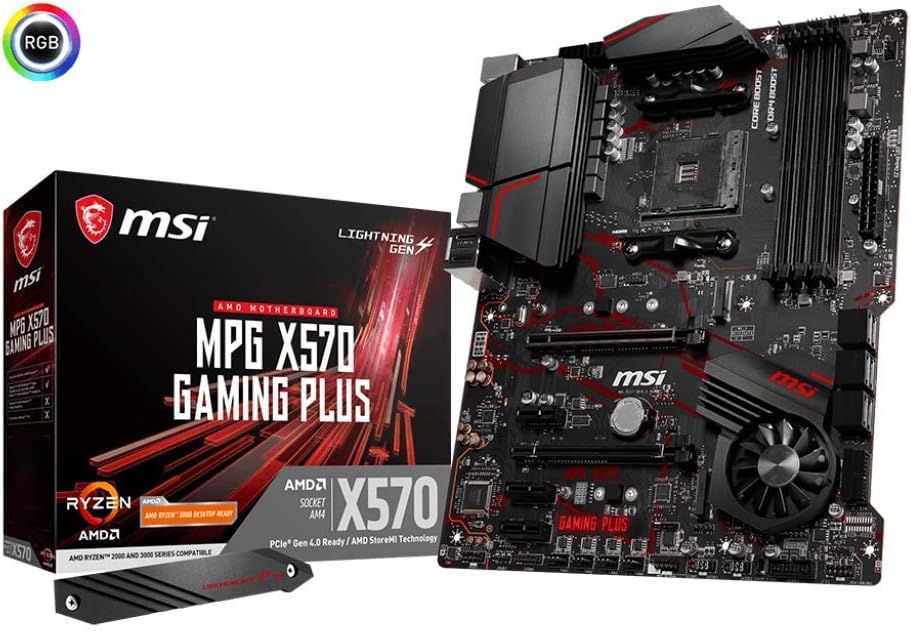
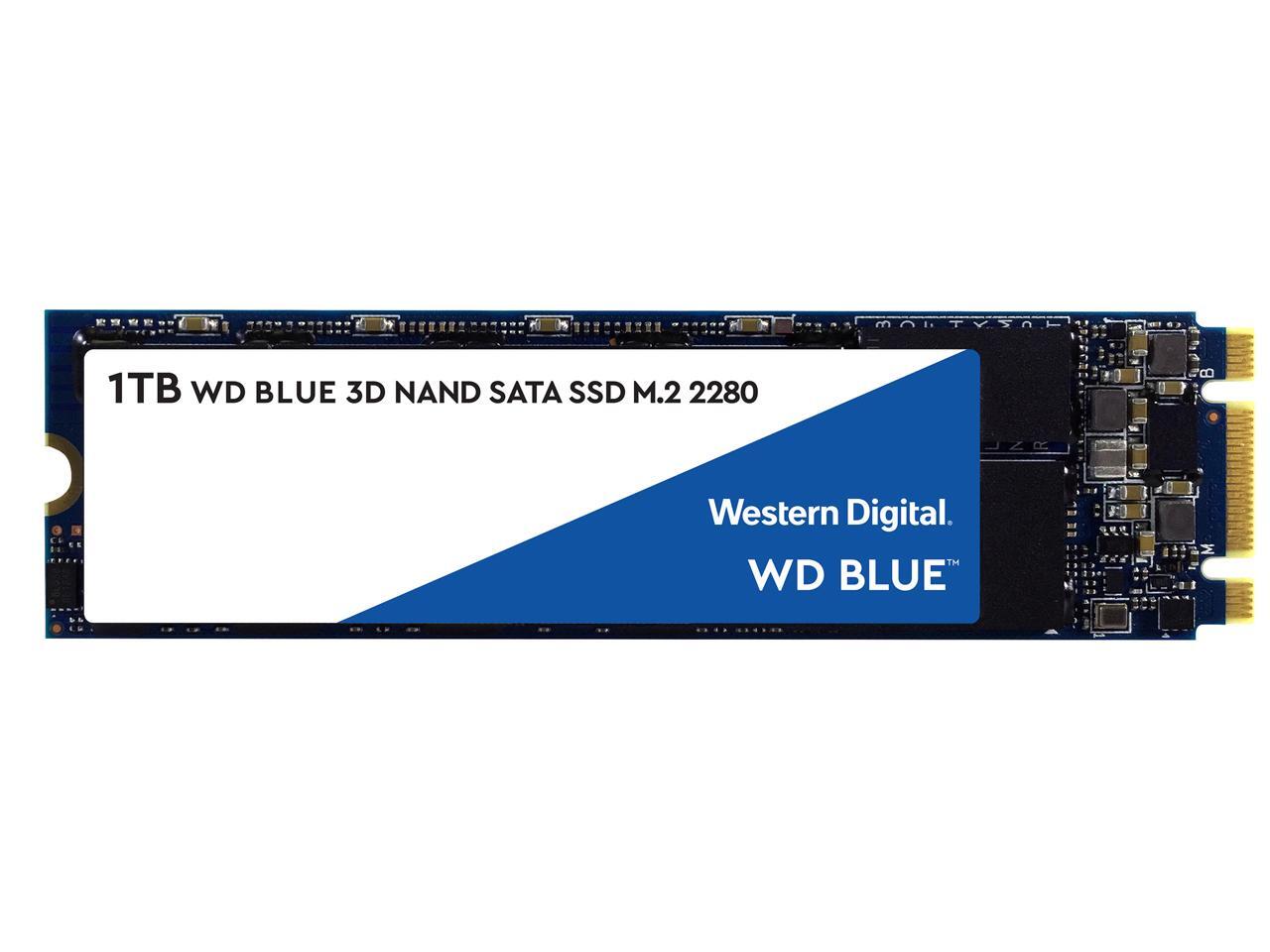
it's m.2 SSD

 stoic island
Yea I see the issue
Use the second M.2 slot
1st is only NVMe, doesn't support SATA
 keen depot
why are you getting that ssd anyway
stoic island
yea m.2 blue is a big rip
warm badge
I didnt know
stoic island
and sata m.2 drives lead to confusion like that :P
keen depot
its alright, we all make mistakes
 lyric thistle
I'd only use a Blue SSD if you don't have access to an m.2/NVMe slot, which I don't, so I do have a Blue
stoic island
At least you didn't make as bad a choice I did with a team MS30 lmao
@lyric thistle yea 2.5in blue is pretty good, but m.2 blue is big rip
warm badge
whats bad about it, what am I gonna run into?
lyric thistle
It's still a good SSD, just not a good purchase
 polar prism
What about the nvme sn550?
warm badge
oh
stoic island
nothing, it just takes place where you could've gotten much better performance at the same price same slot
@polar prism no
polar prism
Why
polar prism
So other than being overpriced Samsung is okay as well as crucial?
lyric thistle
Don't worry too much about the Blue, it's still a good drive and you'll see a world of a difference from a hard drive with Windows/other OS installed on it
stoic island
@warm badge the critique here is "drive is good, but there are much better m.2 options for the price."
@polar prism all depends on model
warm badge
its working now, thanks
stoic island
You're welcome :)
 wheat coral
https://pcpartpicker.com/list/x3ymvW
hey feel free to change it but is this a good pick of parts for a 250$ upgrade
cannot go over 250
feel free to ping me if you make anychanges at all
 pliant wren
https://pcpartpicker.com/list/TgWzn7 Rate my build?
wheat coral
oh god
stoic island
I rate it What the hell/10
calm crypt
Athlon and gt 710???
pliant wren
Do you think i can run vr?
wheat coral
easily (please dont take that seriously)
pliant wren
I knew it (I am joking as well)
calm crypt
Lol
 strong radish
What size ssd and hard drive for gaming do you guys recommend
stoic island
512gb NVMe SSD + 2tb Hard drive is a pretty common option to start off with
(MP34 512gb for 63$, Seagate Barracuda 2tb for 55$).
strong radish
I have a 4 year old 1 tb hard drive do you think it will break
stoic island
use crystal disk info on it
strong radish
What’s that
stoic island
good tool

Crystal Dew World [en]
About CrystalDiskInfo A HDD/SSD utility software which supports a part of USB, Intel/AMD RAID and NVMe. Standard Edition Shizuku Edition Kurei Kei Edition Download System Requirements OS Windows XP/Vista/7/8/8.1/10Windows Server 2003/2008/2012/2016/2019 Architecture x86/x64/AR...
tells you about health of drive :)
stoic island
vista installer
strong radish
Heath status is good
stoic island
Then it should be fine.
 grim yew
i just got a amd 3200g 4 core for $89.00
stoic island
NVMe is barely more expensive than Sata nowadays
strong radish
10 dollars is the difference in 500 Gb
stoic island
for 500gb, it usually 53$ SATA Vulcan, 60$ NVMe P1, 63$ NVMe Mp34.
yea
it's getting very close
and M.2 is much faster, and much easier to install
strong radish
I found a western digital 500 gb for 58 dollars
calm crypt
Way to much @strong radish
stoic island
and not all SSDs were created equally
lyric thistle
Better not be WD Green
calm crypt
Get a seagate 1tb for around 50 bucks
stoic island
is ok
strong radish
Send me best 500 Gb ssd
stoic island
I'll give you both the M.2 and 2.5in options
strong radish
Thx
stoic island
the reason is hmb
instead of dedicated dram
also slower (~2gb/s r/w instead of ~3gb/s r/w)
strong radish
What’s hmb xd
stoic island
dram, except uses system ram.
It's Dedicated Dram > HMB > No dram
just stay away from drives with no dram
strong radish
strong radish
Dang
lyric thistle
SN750 has DRAM
stoic island
mp34 is my default suggestion
strong radish
Thanks for the help
stoic island
You're welcome
strong radish
Another question what ram should I get I have intel i5 9600k and I’m on a budget so no rgb
stoic island
What Motherboard
strong radish
Z390 h
stoic island
And do you already have those or
strong radish
Yeah
 little osprey
what psu should I get? I have a 1650 super and intel i3 9100F, 16GB of ram 2666MHZ
strong radish
Use the psu calculator on PC part picker
little osprey
ah ok thanks
stoic island
strong radish
Ye
little osprey
wait what they have that holy
little osprey
I COMPLETELY FORGOT ABOUT WINDOWS
strong radish
Why is Corsair ram so muchhhhh
trail ravine
lmao yea get a cheap key moon
trail ravine
do not pay for a full key
strong radish
Overpriced man
stoic island
I linked a kit of ram above
trail ravine
corsair very overpriced
stoic island
but there's like no white ram lol
little osprey
wait where’s the psu calculator
strong radish
But willl it look good in my white pc case ahah
stoic island
I suggest you just give up on getting white ram at a decent price
trail ravine
g.skill ram better >:)
stoic island
It's still good
stoic island
@little osprey click on this thing
strong radish
It’s the td500 mesh
stoic island
td500 mesh is great
little osprey
ok ty
stoic island
anyways tis will do just fine for you @little osprey
https://www.newegg.com/evga-500-br-100-br-0500-k1-500w/p/N82E16817438145
@strong radish I love the industrial-ish look of the CM H500 lol
little osprey
oh I only have 246W
strong radish
Yeah
little osprey
lol
strong radish
Well I guess you really do have to give up aesthetics if your on a tight budget
trail ravine
^^
little osprey
yes
trail ravine
im making an itx build in the node 304
little osprey
once your over 1K$ you can add rgb
trail ravine
so i dont have to worry about rgb or anything
strong radish
I already have a pc I’m just changing out the case, ram, and gpu
trail ravine
well my budget is 1k and i wanna put every dollar into performance
stoic island
ofc
trail ravine
so
stoic island
it's possible, just not really reccomended
little osprey
wait what about Corsair cx450?
little osprey
is cx450 better for my setup
stoic island
@little osprey I suggest you not, since it only has 1xPCIe power.
CX is a great series of PSUs, but the 450w model is one I don't like to recommend because of future proofing.
strong radish
Still contemplating of if I am gonna get a 3070
stoic island
heh
I'd wish you luck for getting one if stock goes anything like 3080 and 3090 launch lol
strong radish
Lol
little osprey
ah ok
thanks
the scattervolt discord was spamming to me to get the Corsair cx450
stoic island
the hell is a scattervolt
Ask them about the single PCIe power.
CX is a great series of PSUs, but I don't like the 450w model for upgradability sake.
little osprey
WHY THE HELL IS EVGA BR 500W 60$ NOW
little osprey
IT WAS 38$ ON WALMART
shell wind
is it hard to build a gamin laptop
stoic island
@little osprey if it was, prob pricing error, it was 50$ flat on walmart before
shell wind
is it hard to build a gaming laptop
trail ravine
yeah the prices for stuff on pcpartpicker seem to be a bit wonky
like it said the r5 3600 was $175 on amazon so i shit my pants and went and looked and it was 205
 small osprey
is it hard to build a gaming laptop
@shell wind there is no way to build a gaming laptop
U have to buy one
trail ravine
well you can buy a low spec one and upgrade it but you cant really build one
lyric thistle
My aunt has a Toshiba laptop that has an upgradable gpu
trail ravine
although toshiba is outta the game now right?
small osprey
Well yea u can upgrade but not build from parts
trail ravine
yea i think they left the laptop market
although toshiba is outta the game now right?
lyric thistle
🙃
pliant wren
You guys said my previous build wasn't that good ( https://pcpartpicker.com/list/TgWzn7 ) So i made a new one (https://pcpartpicker.com/list/Mr7sHB), tell me what you think
little osprey
stoic island
For reference, RMx is Tier A, CX is Tier B, BR is Tier C, and some very unsavory PSUs like EVGA W1 is in Tier D
For reference, RMx is Tier A, CX is Tier B, BR is Tier C, and some very unsavory PSUs like EVGA W1 is in Tier D
lyric thistle
Ngl I hate the idea of a high capacity drive
Something starts to go wrong and you got a lot of data to backup
warm badge
30 second startup is nice 
warm badge
it's actually probably closer to 15
lyric thistle
I think my Blue boots Windows in like 15
warm badge
it's actually probably closer to 15
I'm told I exaggerate, so I wanted to give my estimation some room
little osprey
evga br is so expensive thooooo
aaaaa
what’s a good cheap 144Hz monitor
what’s a good cheap 144Hz monitor
little osprey
oh I’m using Walmart to get my parts
affirm
shoot my budget is gonna be over 700$
DAMNIT
stoic island
God damn it why xd
little osprey
it’s 560$ on Walmart and amazon combined
stoic island
What's with people and amazon
little osprey
idk I trust it the most
little osprey
Walmart has affirm and I have no idea how to save money
I FORGOT IT ABOUT SCHOOL
OH MY GOD
I FORGOT ABOUT SCHOOL
little osprey
WHAT THE HELL
keen depot
@polar prism eh, not really
 whole stag
Very
polar prism
Okay, I am able to get all the parts for my PC except ram so i am trying to figure that out
Cl18 is the only kind availble
polar prism
little osprey
so I’m too late for school
is the viotek gfv22cb good
it’s 129$ on Walmart and it’s 144hz
polar prism
Btw I already have the GPU and I am getting a discount on the case and PSU
little osprey
AOC ISNT ON WALMART WTF HAPPENED
shell wind
please sned me a kink ti diwnload windows 10 pro
keen depot
oh thats why youre getting cl18
@polar prism are you okay sacrificing the RGB for cheaper and better ram?
polar prism
I would rather go with corsair just because I trust them more than other companies but if you have suggestions I will look
keen depot
@little osprey avoid viotek
-someone who bought a viotek
@polar prism
also
that nvme
polar prism
lmao you say that to everyones build
keen depot
case is good
little leaf
your mobo is 200 dollars
little leaf
gpu is 100 dollars over msrp
polar prism
yeah, Im getting the PSU for 112 and upgrading to the 3080 through step up
polar prism
so I will just pay an extra $100 for the 3080 since I just send them the invoice
trail ravine
 little leaf
biggest problem for me is the mobo and ssd
keen depot
change out the ram and the ssd
trail ravine
that list pains me
trail ravine
so much wasted moneyy
keen depot
you could probably go for a b550
keen depot
theres barely any difference between b550 and x570
keen depot
he needs an adaptor @little leaf
little leaf
wdym?
little leaf
I would just get a b550 pro vdh wifi
polar prism
The b550 aorus with wifi is only $20 more than that one and 20 less than the x570 so thats fine
little leaf
polar prism
I'll definitely go b550 and might get that ssd
small osprey
does the Asus ROG STRIX B550-F GAMING (WI-FI) motherboard have built in bluetooth?
little leaf
@polar prism the mp34 is litteraly the same as the sn750
 cloud oasis
If u need wifi get this https://www.amazon.com/Cudy-WE3000-3000Mbps-Wireless-Bluetooth/dp/B082NZYDDM
potent prairie
If it works then yes :)
 viral ore
you gotta boot from it
polar prism
Okay thanks, I went with the team group ssd it looks good
strong radish
How do you move windows from a used hard drive to a new nvme
lyric thistle
Drive clone
strong radish
What
 foggy hazel
@strong radish by making a clone of the old drive onto the new drive
(also known as a bit for bit copy)
 slow wraith
Help
I dont have an extra conputer and i need windows 10, what do i do?
Im so confused on how that works
foggy hazel
if you dont have a working machine, you either find someone that has one. OR you pay for the retail version of windows that comes on a usb stick
lyric thistle
Could probably download it on a library computer 😉
slow wraith
Wanna see my list
lyric thistle
Then again maybe not
lyric thistle
Remove period so it doesn't hyperlink
slow wraith
Nope
lyric thistle
Remove period further to left

Micro Center
Create your dream PC with our Custom PC Builder tool and get everything you need to complete the PC build at your local Micro Center.
¯\_(ツ)_/¯
shell wind
I got a key for windows 10 pro and don't know how to enter it
I have windows 10 home now
I tried installing pro but it never gave me the option to choose between pro and home
small osprey
if u went through the installation process and entered the windows 10 pro key it shouldve installed windows 10 pro
u probably got a windows 10 home key instead
stoic island
@lyric thistle heyo
little leaf
@slow wraith is that your list?
slow wraith
I have bought the gpu, motherboard, ram, case fans and cpu
@little leaf i need the file
Or whatever
Idk how it works
little leaf
just down load it off microsofts website
slow wraith
@little leaf i broke mines accidentally and thats why im building one
little leaf
so you have no where to go to download a file on to a thumb drive
slow wraith
@little leaf nope
slow wraith
Nope
little leaf
I guess you have to waste 100 dollars
slow wraith
Yup 😔 🥛 👇
little leaf
also
Are you sure there is absolutly no one
like anyone that will download it for you
little leaf
that'll work
slow wraith
Idk if i can download it there
little leaf
litteraly any computer
little leaf
no you need a thumb drive
balmy patio
a usb is faster than an sd card i believe
 sweet warren
languid nimbus
sweet warren
languid nimbus

 vernal phoenix
keen depot
vernal phoenix
keen depot
@desert gulch lol
desert gulch
lol
desert gulch
you see the vid ltt did on a 1tb card?
keen depot
yes
 polar python
polar prism
polar python
polar prism
switched from 1tb nvme to 500gb cause 1tb is more than I need rn
Ill wait till black friday deals to get more storage
slow wraith
@desert gulch i bought mines on wish too
Sucks
Never buying there bc stuff dont arrive in time or at all
 chrome rampart
sorry 1185G7 CPU
prisma stag
@polar python For the budget you have i'd give you an 8/10, nice setup will let you do alot of things.
polar prism
Does anyone have a good reasonably new build guide for a pc? I build one a few years ago but some things are different so I want to watch a video that can help
potent prairie
Check LTT
 marsh kiln
Or bitwit
polar prism
okay cool thank you
marsh kiln
And another good one is jaystwocents and no problem
potent prairie
AMD 4000 is to be announced early October, right?
marsh kiln
Not sure someone else might know
 night iron
October 8 @potent prairie
marsh kiln
@bosswoman3 thanks I was actually wondering that to I will put that on my Google calender now thanks again
junior crescent
Would this be a good pc build for streaming/Gaming and is the setup good?? https://au.pcpartpicker.com/list/GWxVdm
 ripe wedge
wat kinda file is that
 clever root
lol
stoic island
Lol
 inland atlas
viral ore
inland atlas
viral ore
kekw
clever root
well my phone
clever root
oh ok
ripe wedge
weird that it didnt automatically embed
shell wind
can someone help me in os and software
inland atlas
They are a rookie @ripe wedge
ripe wedge
ah
makes sense then
didnt put it together lol im going back and forth to discord and my programming
inland atlas
All good
prisma stag
hey guys trying to take what cords i dont need out of my case
do i need the peripheral cable in my psu?
junior crescent
Qould this be a good streaming/gaming pc and setup for the price https://au.pcpartpicker.com/list/GWxVdm
stoic island
I don't like the looks of it
 stark bramble
for 2700, ehhh...
whole stag
Maybe a new case
junior crescent
Is the pc at least ok
whole stag
Yeah specs wise is good
stark bramble
its not bad, just hella expensive
 wheat summit
new sticker
junior crescent
Everything is expensive in Australia
whole stag
Get a case with a mesh front for maximum airflow
stoic island
@junior crescent PC is meh, peripherals is where I think you need an overhaul
whole stag
@wheat summit Phanteks P400A 👀
stoic island
is it for gaming?
stoic island
I say add peripherals to this list
https://au.pcpartpicker.com/list/6RqWYH
stoic island
if it's for gaming that is
junior crescent
Yea
stoic island
if you want video editing or whatever, change it back to a 3700x.
stark bramble
ohh
stoic island
like @junior crescent this at least for the main monitor
https://au.pcpartpicker.com/product/HBRzK8/aoc-c24g1-240-1920x1080-144-hz-monitor-c24g1
junior crescent
Ok
 serene osprey
hey @stoic island could i bother you with a quick question
serene osprey
i’m building a pc but i am waiting for the 3080 , is there any reason to buy the rest of the parts now or should i just wait to buy them all at once
polar prism
all at once
polar prism
yep
serene osprey
ty guys
stoic island
all at once
polar prism
also if you buy all now and wait until the 3080 if something doesnt work you might be outside of the return date
balmy patio
would you guys recommend using pc part picker or the one at newegg?
stoic island
buy all at once.
Pcpartpicker, more places it pulls pricing from, and more variety from other stores.
granite imp
@viral ore does that mobo have a cooling fan built onto it?
stoic island
@granite imp what mobo
stoic island
love that noctua sticker :)
viral ore
is good sticker

 junior crescent
Is this better??? @stoic island https://au.pcpartpicker.com/list/67dv8M
junior crescent
Can someone just look and see if this is good
 rustic sandal
@wary geode what gpu is that in your pic? Also looks great
 wary geode
gtx 1070 aouros i got for 130 :))))
wary geode
I KNOW IT LOOKS AMAZING
 tame tangle
i just built my pc and in a benchmark it said the cpu is way below average in performance it is a ryzen 3 3100 how can i fix that?
stoic island
@tame tangle don't worry too much about it lel
junior crescent
Is this good for streaming and Gaming https://au.pcpartpicker.com/list/J3Ttx6
@stoic island
ripe wedge
@junior crescent doesnt look terrible
prisma stag
Hey guys if I want to run dual displays. Ill have one of my monitors that is 165hz and the other is 60hz.. Does running these dual lower the performance of my 165 hz monitor?
 orchid matrix
Not that I know of I use a 60hz and a 75hz
prisma stag
what about one being 1440p and the other 1080p?
orchid matrix
I’m not sure both of mine are 1080
I wouldn’t think so
Also do you know of any 22” 144-240hz monitors for $150
stoic island
@junior crescent if you only game and stream, 3600 is good.
 radiant palm
Hello I came on here to see if anyone knows of any decent build specks that won’t brake the bank for a pc. I want something that will help with school but still play like small games nothing too crazy. I mostly just want to start with something small now so when I feel like I can do more I can upgrade the pc. If anyone has anything please let me know by private message or just by saying it in chat like a place to by or anything.
stoic island
@radiant palm gib budget
It's simple, give us what you can spend, and we give you what you can get for the price.
Different people have different sense of scale for economy
I can say 1000$ build is a budget build, or say even a 2000$ build is a cheap budget build, or say ~800$ for a budget build.
So, give us any budget, and we'll give you what you can get for the budget :p
rustic sandal
Also @wary geode are those the newer cooler master fans? Bc they’re cheap and they look great, I thought about getting some
wary geode
the ones in my build?
rustic sandal
yes
wary geode
oh i had it come with my m240r
its buetiful under the right software
its like the cooler master pro version or whatver i think they expensiveeee
wait i might be wortn
belive its those
yo i got nitro nerddss

ripe wedge
@wary geode imma be getting those fans for my future build
best bang for buck I think. also will match my TD500 mesh preinstalled fans
little leaf
Those are pricey
ripe wedge
the coolermaster fans?
little leaf
Ya
ripe wedge
what would you recommend then
for price point
if u think thats pricy then look at corsair fans lol
ripe wedge
$130 for corsair rgb fans
little leaf
Not really
Sp120 +hub is like 70
But either way
I like uphere or. Asia horse for budget
But not for midrange
ripe wedge
what would ya say for midrange
https://pcpartpicker.com/list/287mdm heres my list of parts
ripe wedge
I mean
shell wind
I'm having trouble downloading discord on my pc
ripe wedge
its kinda high end
little leaf
And you can get a 3080 there
ripe wedge
I already have the 2070S
little leaf
Whats the purpose?
ripe wedge
I want an actual desktop lol
this egpu setup isnt great
also performance loss with egpu
ripe wedge
yea
little leaf
And sell the 2070s
ripe wedge
well if I can get my hands on one yea
little leaf
Either way purpose?
ripe wedge
gaming basically but I multitask a ton
wary geode
here jake
little leaf
Ok so a 10600kf
wary geode
shell wind
I am having trouble downloading discordb on mybpc
ripe wedge
@wary geode those are pretty nice ill think about them
wary geode
i have the white ojne
little leaf
Sunday just google
ripe wedge
@shell wind whats the issue
you download the discord installer then click it and install it
shell wind
Send link plz
little leaf
Jake
ripe wedge
https://discord.com/ @shell wind

Discord
Discord is the easiest way to talk over voice, video, and text. Talk, chat, hang out, and stay close with your friends and communities.