#building-and-recc-chat
1 messages · Page 639 of 1
 stoic island
yes run good
 prisma stag
wtf
 muted wasp
but its not in stock until oct 10 on amazaon
prisma stag
dude is getting 100fps avg on warzone with 1080p
stoic island
exactly
prisma stag
63*
stoic island
60fps is about the point I say it's a good experience
prisma stag
i think that would be a great temp card for me
o wait
he was using this one
ASUS ROG Strix GeForce GTX 1660 Super Advanced 6GB Edition
stoic island
they're all close enough
prisma stag
would that be much different than a GIGABYTE GeForce GTX 1660 SUPER DirectX 12
stoic island
remember, all the GPUs came from Nvidia. The only real difference between AIB cards for you is just the different shroud/cooler
prisma stag
ok absolute last question
im deciding between these 2
$249.99 GIGABYTE GeForce GTX 1660 SUPER DirectX 12 GV-N166SGAMING OC-6GD 6GB 192-Bit GDDR6 PCI Express 3.0 x16 ATX Video Card
$239.99 GIGABYTE GeForce GTX 1660 SUPER DirectX 12 GV-N166SGAMING-6GD 6GB 192-Bit GDDR6 PCI Express 3.0 x16 ATX Video Card
one says oc one doesnt
what does the oc mean lol
 balmy patio
oc means overclocked
stoic island
oc means overclocked
 spiral zealot
yeah, they will sometimes push a slight overclock on the cards compared to nvidia stock specs
stoic island
on a 1660 super an oc amounts to basically nothing for ya
prisma stag
ok its only 10 bucks more imma just get it then
now to just make sure my stuff is compatible with it
like fitting in case and right connections
im running a ryzen 7 3700x with a msi x570 pro carbon and a td500 mesh
form factor on the card is atx which my motherboard is atx aswell
so i think all is good
and my max gpu length is 410mm and this card is only 280mm
 edgy steppe
I NEED HELP: B450 steel legend mobo, ryzen 5 3600, 16gb ram gskill, 1660 super gpu, and stock cooler. I changed my stock cooler to the wraith prism cooler and my pc started to crash and now it won't even let me boot to windows
prisma stag
@stoic island do u see any compatabilty issues with what i said above?
if not im gonna go ahead and buy it
@stoic island i hope i didnt just screw up haha, if i didnt screw up thanks for the help
also @spiral zealot ty for the help
prisma stag
mr1111
o ok
good
im just gonna sell it cheap when i get my 3080 but i think itll be good just to hold me over
or
i might turn it into a budget build for a friend or something haha
stoic island
You could keep it around or do that
 still roostBOT
 Sawzall2#6735 has been warned
Reason: Bad word usage
 lime forge
lets not avoid word filter please @prisma stag.
stoic island
yes
 granite imp
She’s alive!
But I enabled xmp profile, just wondering why it shows two different memory frequencies?
stoic island
leave it for now
usually right side is "now" and left side is "settings to apply later"
granite imp
Okay. So check back on next boot?
stoic island
or check back in windows
granite imp
And does it matter that I plugged my ssd into the sata port 3 and not 0 or 1?
stoic island
not really
granite imp
@viral ore thank you so much for your help!!!
 viral ore
np
 dapper solstice
ill make you a list
 white osprey
can somebody help with an internet problem? I dont think its something I would call my isp for
white osprey
well my download speed used to be 300-400mbps, lately ive been getting about 20-30 mbps
im thinking maybe a bad ethernet cord or something?
 chrome ruin
hm
white osprey
its only when using my computer the download speed is 20-30mbps
chrome ruin
is it only you computer
chrome ruin
and your computer is wired right
white osprey
yup
chrome ruin
optic cable and everything
white osprey
i thought you meant wired connection as in ethernet
it used to work fine using the same ethernet cable a few days ago
white osprey
ok
chrome ruin
is the router in your room
white osprey
yup
chrome ruin
though so
chrome ruin
ah ok
you could roll the cable up in a circle where u dont need it and hang it on the side with a tac or if you have a cable holder
prisma stag
yo weird name that i cant quote guy
u need help with build?
o wait
it was @dapper solstice
do u still need help
stoic island
@chrome ruinwants a 600$ build I think?
@quartz falcon uhhhh I kinda assumed someone else was gonna make you a list when I went, you still want a list for a decent streaming pc?
chrome ruin
yo weird name that i cant quote guy
@prisma stag ?
prisma stag
@chrome ruin
 quartz falcon
@stoic island that would be awesome. Thank you.
stoic island
Since it just has to stream for the console, it won't be too powerful itself for games, but it can game decently.
granite imp
So normally with fans. The center part that has the Logo or the sticker or whatever is the side that sucks are in, right?
So like with the front of a case, you put the fans in with the logo facing outwards so you could see it, and it would be sucking air into the case from the front?
stoic island
@quartz falcon smth like this should work fine. Windows key goes for ~5$ on ebay.
https://pcpartpicker.com/list/Fysfsk
Streaming from console only really requires you do have a decent encoder, which NVENC is
You might even be able to get away with less
but eh
that's also a decently capable gaming machine
chrome ruin
weird question could you connect two pc's so that they could share the load
chrome ruin
cool cool
stoic island
latency is a really big factor
chrome ruin
rando question sorry lol
stoic island
There's also multi GPU thingies, like crossfire, NVLink, and SLI, but they're not very efficient
not really random
dapper solstice
dang i just finished
stoic island
It's a completely valid question.
dapper solstice
i guess i was too slow
stoic island
As long as it ain't no "hey guys can I have free pc", any question is a decent question :P
chrome ruin
huh
im still here lol
As long as it ain't no "hey guys can I have free pc", any question is a decent question :P
@stoic island have you ever gotten that lol
stoic island
look around lol
chrome ruin
oh no lol
stoic island
every few hours someone comes around asking for a free pc or a "old pc you don't need anymore"
white osprey
ok i think download speed is only bad when using steam and certain speed tests
not getting consistent results
dapper solstice
well i made a list but its more or less the same as Mr1111's list https://pcpartpicker.com/list/hRjQCL
prisma stag
@chrome ruin https://pcpartpicker.com/list/WGmjYH
stoic island
@dapper solstice I'd go 1650 super for NVENC
because streaming
@chrome ruin oh yea if you were the one asking about a 600$ build, this works lol
https://pcpartpicker.com/list/Fysfsk
prisma stag
$100 bucks more here https://pcpartpicker.com/list/WGmjYH
chrome ruin
lol
prisma stag
@chrome ruin
chrome ruin
so like its nothing special
its just enough to run simple games and high def
and more complex games at moderate right
prisma stag
watch on youtube search "cpu of choice @ gpu of choice" benchmark

Games Tested:
@0:08 - Player Unknown's Battlegrounds
@1:02 - Apex Legends
@1:56 - Call of Duty Modern Warfare
@2:50 - Red Dead Redemption 2
@3:45 - Counter Strike: Global Offensive
@4:40 - Shadow of the Tomb Raider
@5:33 - Assassin's Creed Odyssey
@6:27 - AC III Re...
chrome ruin
oh
ya im running seige and mc a lot
lol
im a basic gamer
but in dire need of an upgrade
white osprey
ok well my internet speed only slow when using steam
ill just sum it up to steam being steam
ty for help
 cunning knoll
i got all my parts for my pc what else do i need to actually build it?
prisma stag
phillips screwdriver
cunning knoll
thas it?
prisma stag
well i mean u could get an anti static strap but yea thats about it
cunning knoll
do i need that
prisma stag
i mean not really but some people use it just to be extra careful
 languid nimbus
A magnetic tray helped me a good bit so that you can keep up with all the little parts, but obviously not a mandatory thing
 onyx lava
850watt or 1000watt for 9900k + 3080?
prisma stag
850
onyx lava
u sure?
prisma stag
While NVIDIA recommends a 750W PSU for the RTX 3080, it tested a system with 10th Gen Intel Core i9-10900K processor (CPU).
 vocal hare
9900k was less efficient right?
and 750 is a pretty safe number
to cover their butts
incase somebody really skimps out on a psu when they shouldn't
 vital warren
200 on windows 
 hardy cairn
lol
vital warren
and im pretty sure u can get a much better ssd at that price
 little osprey
i got windows for $6
hardy cairn
ah ok. I had a samsung before and trusted em. I'll keep looking about!
vital warren
i'd get a 2tb nvme ssd over sata
little osprey
but damn you're going all out on that build
im jelly
just make sure you get a good cpu cooler
hardy cairn
My house burnt up in april. I was just starting up a 3D freelance business.
from home. . .
little osprey
damn
hardy cairn
so this is more of a workstation than a pleasure pc. but it'll double as both.
vital warren
i'd head over to #storage-devices so someone can find you a good 2tb nvme ssd
little osprey
when you get a pc like that it will definitely bring pleasure by just looking at it
what cpu cooler you getting joe?
hardy cairn
not certain yet. had a few buddies that were saying so long as I'm not overclocking, I should be ok with stock. I'll take recommendations though.
also thanks dwella! I'm looking through some storage as we speak!
prisma stag
check out the kraken coolers
little osprey
if you are not looking for any rgb i'd gladly recommend the artic liquid freezer 2
vital warren
oh and #old-cooling if you want some suggestions for air coolers/aios
or right there^^
hardy cairn
thank you all!
little osprey
if you want rgb then kraken or corair
corsair
yeah you better update me when you finish this beast, def wanna see it
hardy cairn
if it's not rgb, how do we know it's working?
little osprey
theres an app called nxzt cam
it shows cpu temps
idle should be 30-40c and load under 60c
hardy cairn
The parts must glow to operate effectively
little osprey
the cooler i recommended only has one plug in and everyone else is already pre wired. you just need to plug into the cpu cooler slot. it has a little fan on it aswell and itll spin
hardy cairn
awesome!
little osprey
with any cpu cooler, you'll hear water sounds at first for maybe 10 minutes
thats the bubbles going away and liquid getting into proper place
aio cpu cooler that is
hardy cairn
good to know!
hardy cairn
thanks, I'll post the build when it's done. it'll be a few months.
 keen depot
@hardy cairn I'm guessing 3d modeling from the build?
hardy cairn
yep, and game design
keen depot
Nice
hardy cairn
you in the field?
hardy cairn
ah, neither do I! 😆 But, I'm getting there. one nice thing about being poor and temporarily burned out of your home is that you learn how to save.
been saving for months at a minimum wage job for this. it's kinda my Hail Mary.
keen depot
ah yes
keen depot
They're all good
vital warren
yep
hardy cairn
thanks! I'm noting all of this.
vital warren
gamersnexus on youtube does some good case reviews and reviews of many other components i'd check him out
prisma stag
i3 9100 omegalul
vital warren
and the new zen 3 cpus are being announced on the 8th as well so
might wanna check those out at the time if you wanna wait
keen depot
Well, those won't come out for a while still
vital warren
yeah that's true
keen depot
Early 2021
hardy cairn
cool. I was considering waiting till then and buying these cpus when they drop. and my house won't be built till november at least.
so I got time
again, thanks for the help everybody. I've been out of building for several years. you've all helped tremendously.
vital warren
this is a list i put together and kept mostly white components as you seemed to want that
hardy cairn
wow! thanks!
keen depot
At first I was wondering how it was only 1800
Then I realised the 3090 didn't have a price
keen depot
Bh is a bit wack
vital warren
i'll just put 1600 to be safe
hardy cairn
it's around 1600-1700
vital warren
hardy cairn
Thanks! holy cow! you work fast!
vital warren
@prisma stag could look used at used gpus maybe try to snag an rx 580 or something around 100
can save a few dollars on ram too
hardy cairn
I'll look into it. although, I'm definitely rolling the 3090. I do a lot of gpu renders in my work. saves so much time, and this one's gonna save even more.
vital warren
that pc will def be a beast
should get your work done no problem
and if you want to game that's no issue either
 brittle citrus
Quick question, anyone know if u can split an addressable header?
I have 2 RGB products but only have 1 addressable header on the motherboard
Case fans/radiator fans
hardy cairn
thanks so much, again! I'll let you guys get back to being awesome!
 foggy hazel
@hardy cairn check back in about 1-2 weeks before you buy
prisma stag
@vital warren can i put a 1650 and a 3080 in the same case and use em both for extra power
hardy cairn
ok!
foggy hazel
@hardy cairn simply to verify that things are still okay list wise
vital warren
wait you want to sli a 1650 and 3080?
prisma stag
yes
foggy hazel
@prisma stag for gaming? no
vital warren
i wouldn't even want to put a 1650 near a 3080 for gaming
foggy hazel
for gaming? no
vital warren
a 3080 itself will run whatever game you're playing fine
 lyric thistle
 cursive wharf
@vital warren trio kinda sucky. Low PL, poor PCB as a flagship, just overpriced for what it is. Tbh I see it as worse then FE
 azure sable
what do i do when it’s saying this
and when i put my thumb drive in it says error loading operating system
little osprey
a8 9600 gtx 960 4gb 16gb ddr4 tomahawk b350 240ssd and 500hdd for 350 good?
 broken basin
I think make sure bios in Uefi mode @azure sable and not both legacy/uefi
azure sable
where would that be under if i have a rog bios
@broken basin
oh i found it
which one should i set it as then
uefi only?
my brain hurts but it’s worth it in the end
broken basin
uefi only?
Yep
azure sable
okokok
it’s still saying i need to turn off secure boot in bios but idk where that is
freakin poop
i have a asus rog strix b450
 junior crescent
Is the pc parts good for streaming/gaming for the price https://au.pcpartpicker.com/list/jw6Z4n
Could i make any changes
 desert gulch
Rgb fans do be expensive
 austere condor
there are several changes i would recommend, yes
@junior crescent
little bit impressive that you've managed to make that PC part list cost almost $1500 with lower end hardware
 desert gulch
Id say faster m.2
austere condor
there's still some changes i would make, but let me see what some of the AUS prices are
desert gulch
Like mp34 or sn750 if it goes on sale
junior crescent
I play Gta, wow and valorant
desert gulch
Are you gonna be editing alot?
junior crescent
Yea i do edit alot
desert gulch
Ok
austere condor
what program
junior crescent
Adobe premiere
austere condor
is the RGB a must?
 hard badge
https://pcpartpicker.com/list/R7y2K4 are these good together? The case is needed due to me going overseas. I already own the GPU, so I'm not buying that right before RDNA 2(which will likely come out when I'm overseas).
hard badge
Yes and No. was looking at the 3700x before and that wouldn't fit. but the GPU will fit in the Case
 little leaf
The psu is a little pricey
hard badge
True, But I'm always bad at picking those
I want 750W so I can possibly upgrade to a 3080 sometime next year while I'm still in the middle east.
little leaf
Mobby dont need an after market cooler
hard badge
Oh right, was looking at the stock coolers for the 3700x before
austere condor
took a bit of a different take on this one.
going with a R5 3600 over a 2700x. you'll see better gaming performance, but in streaming, if you do a lot of heavy on screen effects, or multiple cameras, you'll see a performance loss over the 2700x. Adobe uses the GPU now for exporting, so CPU cores are no longer as important, the 3600 is fine at doing full 1080p playback in timeline, and can handle 4k playback.
no aftermarket cooler
A Pro Max is a good board, a better B550 is only $10 more, worth the small extra cost.
MUCH better memory by a large amount. Ryzen's IMC has issues with LPX memory.
1TB NVMe over a sata M.2 is definitely going to be nice, but i sacrificed the 2TB HDD extra storage for it.
biggest difference in performance you'll see here is the 2060 super vs the 1660 super. night and day difference. grate price for gaming and editing work, and you'll have Nvenc for stream encoding.
great performing case, still get the RGB fans
decent PSU for the price.
https://au.pcpartpicker.com/list/DbrBf9
@junior crescent
@hard badge if you plan to travel with a PC, i highly recommend a mini ITX slim build. i personally had one as my main rig for a few years because i had to travel across the country a few times a year for extended amounts of time
they are great because you can fit them in most carry on luggage in an airplane, with a monitor
you said you already own that GPU?
hard badge
Yes i do
was originally going to move my 2nd PC into the case, but decided I might as well build a new PC entirely so I can use the USB 3.0 ports. originally was going to put a A320k-m/2700X/5700XT in there. Which would mean I can't use the USB C on the front.
The budget isn't an issue to me. I'll be over there for a year. and where I'm going is tax free lol
austere condor
you can fit a 3700x in a mini ITX if thats something you were wanting to do @hard badge https://pcpartpicker.com/list/CgHtmg
hard badge
I had already ordered the case because i needed it to get here sooner. I don't have a lot of time until I deploy 😭
 molten cedar
I need a new cpu and motherboard any suggestions? I currently have a Ryzen 5 2600and b450 motherboard but tryna upgrade to really use my 2070 super
languid nimbus
What’s your budget?
molten cedar
400 ish? For both 450 max @languid nimbus
foggy hazel
@molten cedar what exactly is it you think you will gain from upgrading that?
i am asking to make sure you are not upgrading in vain
molten cedar
Honestly nothing, should’ve been more specific. I’m gonna be giving my little bro my Cpu and motherboard for his budget set up and will need a whole new gear for myself. @foggy hazel
foggy hazel
ah
b550 and 3700x is what you will be aiming at
https://pcpartpicker.com/list/rkPvrV <- thats the result for a workable solution @molten cedar
IF you are dead set on ATX it will be about 10-20 usd more
because the above list is micro atx
molten cedar
What abut a x570 board? Heard they were solid with a 3700 X?
foggy hazel
unless you need a gazillion pcie 4.0 lanes, there is normally not any gain to get with a x570
b550 has pcie 4.0 on the first pci-e slot and the first m.2 slot
x570 has it on all of them
both are guaranteed bios support for the zen3 chips that are coming later this year
does that answer your question @molten cedar ?
molten cedar
Yeah. The b550 is perfect than? I’ll go with that and the 3700X. Any specific brand of motherboard you solely recommend? Besides the Msi pro one you sent ? Just keeping my options open
foggy hazel
nah, not really, its not about brand as such
its more about which model that offers the IO you want
IO = does it have usb C on the back? does it have headers on the board for the front panel?
do you need 8 usb ports? or maybe 12?
etc etc
so its just a question of having a look around
and dont trust the vendor sites for that info :)
always check the mainboard manufacturers page for the board :)
molten cedar
Makes sense, thanks a lot for your help. Really appreciate it
 small heron
@foggy hazel is there wuch thing as a 3.0 header spliter
Cuz my mb has 1 3.0 header
I ned 2
 robust plover
What is a good cpu and gpu bundle for $650
stoic island
@robust plover if you want bundle savings, look around microcenter, or are you talking in general?
robust plover
General
 shell wind
its 1920 x 1080
 whole stag
Ok
shell wind
i have 2060 super
robust plover
And I need amd
robust plover
New
shell wind
how do i check my drivers
 sullen spoke
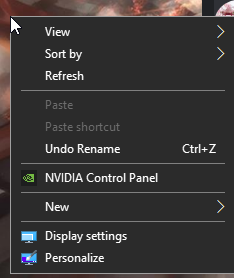
if you have driver you can go to control panel and check version, if not you can download drivers from nvidia website just google nvidia drivers https://i.imgur.com/E3t99kD.png
 robust plover
I want nvida
whole stag
Ok
shell wind
@sullen spoke
sullen spoke
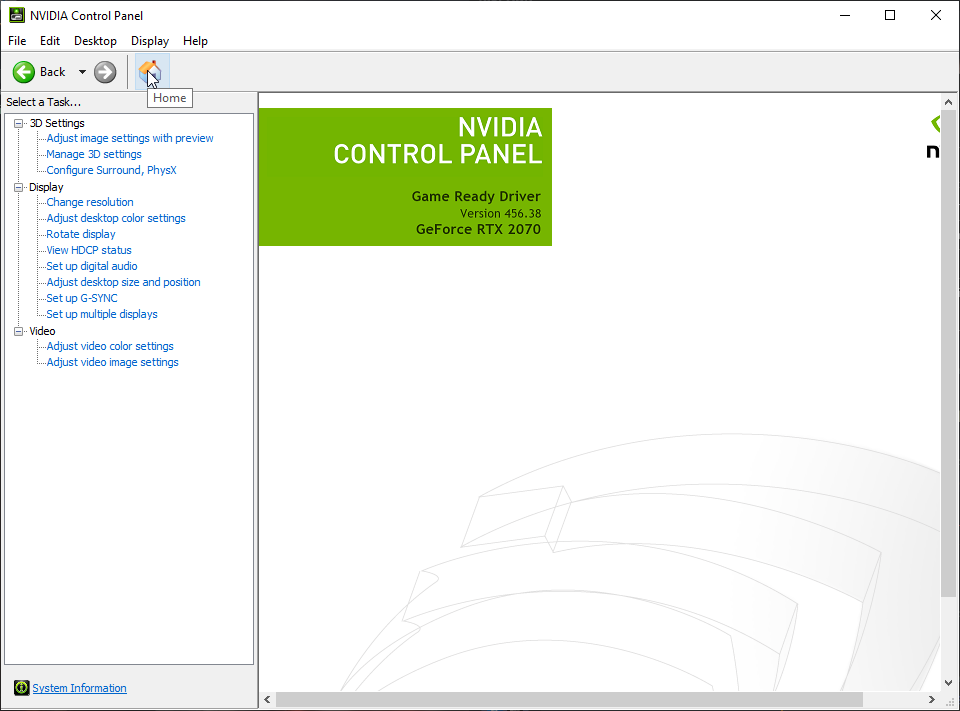
click home icon and it show version https://i.imgur.com/GnJGc1z.png

 shell wind
432
robust plover
Ok
shell wind
now what @sullen spoke
robust plover
Is it am4 and is it good
shell wind
?
robust plover
Ok
sullen spoke
I would update driver first
sullen spoke
You can download from nvidia website
sullen spoke
I just realize I have to go somewhere so I run, but @stoic island can help 🙂
stoic island

NVIDIA
Download the latest official GeForce drivers to enhance your PC gaming experience and run apps faster.
@sullen spoke in the middle of class lol
ill try
sullen spoke
Lol oof
robust plover
Is the ryzen 7 3800x and the 2060 ko a good pair
stoic island
and leave the rest alone
sullen spoke
Ya short explain, search up your gpu there, GeForce 2060 super, not the notebook one, and you can install
stoic island
@robust plover for doing what
robust plover
Gaming
robust plover
Is the 3800x bad
still roostBOT
 Sundayy25#5174 has been warned
Reason: Bad word usage
stoic island
@shell wind I'm back
keen depot
hola
stoic island
once you scroll down there should be this
shell wind
i did thi and downloded it and nothing cgabded
it may jst be nin game?
but i dont know how to fix it either way
stoic island
ick you could just use geforce experience
geforce experience is easier imo than manual download
brittle citrus
Anyone know how many LED fans I can daisy chain to one ARGB port??
shell wind
my pc is blury could it ne the monitor
 kind flax
Hello I have a question regarding swapping ssd from an old system to a new one
Will windows 10 boot up normally with all my files
im using the same CPU, GPU, RAM but new motherboard
 polar python
x570 or b550
kind flax
B550
desert gulch
B550
kind flax
I have a micro atx motherboard swapping to a mini itx
desert gulch
Unless youre going with like a 3950x and a 3090
sullen spoke

polar python
oo yea
stoic island
take a picture with your phone of what you think is blurry?
just telling us "blurry" doesn't help us too much
it could be motion blur somewhere, overshoot, low refresh rate, etc.
 small osprey
wut monitor u have?
shell wind
it was depth fov i got it
stoic island
alright
little osprey
Are there any better fans I should look for for the mx330g?
Or are the ones I have added good,m
stoic island
really iffy looking fans...
@left bone the mx330-g air is in stock now, it's a mx330-g execpt kitted out with fans
god damn
 left bone
did u mean to tag @little osprey
stoic island
discord is wacky
I type @ joe and he's the first entry on the list
and it pinged you
somehow
stoic island
YOU'RE NOT EVEN ON THE LIST HOW'D I PING YOU
left bone
because im that godly
little osprey
LMAO
@stoic island and ight I'll check it out thanks
Check this out on @Newegg: COUGAR MX330-G Air Black Steel / Tempered Glass ATX Mid Tower Computer Case https://www.newegg.com/p/N82E16811553054?Item=N82E16811553054&Source=socialshare&cm_mmc=snc-social-_-sr-_-11-553-054-_-09252020
@stoic island this one?
spiral zealot
almost identical, just didn't come with any fans except a single rear, but it has 3 rgb strips in the front panel
little osprey
Check this out on @Newegg: COUGAR MX331 Mesh-G Black Powerful Airflow Mid-Tower Computer Case with Stunning RGB and Tempered Glass https://www.newegg.com/p/N82E16811553062?Item=N82E16811553062&Source=socialshare&cm_mmc=snc-social-_-sr-_-11-553-062-_-09252020
@spiral zealot this one?
spiral zealot
yep
you can't tie the front panel RGB into a controller at all, it just replaces the reset button
but it's got a lot of options
i just use a static color on mine right now
using cougar RGB case fans as well
little osprey
That looks dope asf
spiral zealot
little osprey
Looks gd
spiral zealot
it's super easy to build in and has solid airflow
i'm running 2 intake and 3 exhaust, which isn't ideal for pressure, but i prefer the look with 2 top fans
 wary geode
@wary geode
little osprey
I'd really like it be rgb, but there's not many with the style I like
spiral zealot
what style of rgb are you after?
spiral zealot
you could look at the oloy warhawk rgb, it has a dramatic full-lit top bar like the adata
little osprey
I have the z1, but rn I have to remove them and reseat them whenever I turn my desktop off
spiral zealot
that's what i'm using in my rig
little osprey
I was thinking oloy but I've been told theyre slow timing
spiral zealot
i have a 4x8 kit running 3200mhz cl 16
16-18-18-36
https://www.newegg.com/oloy-16gb-288-pin-ddr4-sdram/p/N82E16820821162 here's the 2x8 kit
spiral zealot
so you could just buy 2 of those
little osprey
Was just about to ask about that
spiral zealot
not as ideal as a matched 4x8 kit, but it should work in theory
3200 should be fine for 2 kits to run together
little osprey
I have adata xpg z1, but I need to reseat them everytime I restart my desktop. They won't be registered otherwise
New issue
spiral zealot
the only real flaw with the oloy RGB led's is that the center one is brighter than the rest, because it's so close to the diffuser
the ends are a little bit dimmer as a result
but it still looks pretty good
i posted a pic of my rig earlier in chat if you scroll up, and you can kinda see it there, but it's pretty minimal
spiral zealot
oh yeah, i'd get it from amazon at that price
spiral zealot
technically yes, but the chance of issues getting them to match up with speed/timing and be stable is high
spiral zealot
you can, but depending on the die quality on each stick, they might not all run happy at the same settings
you usually have to end up clocking lower and running really loose timings to get everything to play nice
little osprey
Oh....that's great......
spiral zealot
which is why the ideal situation is to have a full matched set, but if you can't, then at least having 2 of the same kit from the same brand gives you a better chance of things working together
little osprey
My ram cards aren't even being read anymore
spiral zealot
oof
little osprey
They're a month old
little osprey
It's a new issue
Like 3 days ago kind of new
There we go
Now they're being read
But yeah....should definitely replace them
The 32gb version is $95 @spiral zealot
Should I get the 32gb?
spiral zealot
4x8 or 2x16?
little osprey
2x16
little osprey
Buy OLOy DDR4 RAM 32GB (2x16GB) Warhawk Rainbow Light RGB (Non-SYNC) 2666 MHz CL19 1.2V 288-Pin Desktop Gaming UDIMM (MD4U1626190BKKDA): Wall Art - Amazon.com ✓ FREE DELIVERY possible on eligible purchases
spiral zealot
they're also non-sync, which i think means they only run rainbow pattern
you can't control them at all
little osprey
I don't really do much rgb editing tho
My gpu, mobo, and 2 of 6 fans are rgb, but I don't edit them
spiral zealot
eh, if you're just gonna run the default rgb rainbow anyway
little osprey
I'm also thinking of getting an rgb cpu cooler like the thermaltake ux1000
spiral zealot
i don't have any experience with that one myself, so i can't say anything good/bad about it
little osprey
I've been told ux1000 is bad, but I meant the style
 earnest ravine
https://pcpartpicker.com/list/RRb9q3 could i get someones opinion
little osprey
Hi can someone help me i got the ASUS PRIME B360M-A LGA1151 and this processor Intel Core i5-9400 Coffee Lake LGA 1151 the motherboard says it support 8th gen but this intel is 9th gen will it still work?
 trail ravine
@earnest ravine why get a 4tb external drive?
 mild trout
About to build this beast cya virgins
 cloud oasis
Here it comes
mild trout

cloud oasis
-2k
prisma stag
what should i start first?
cloud oasis
And set everything neatly
little osprey
Actually
cloud oasis
so u know where everything is
prisma stag
what about static on my body, how do i get rid of it
cloud oasis
U can use latex gloves
little osprey
I'd put the cpu into the Mobo, attach the cpu cooler, and then put mobo into case
cloud oasis
Im oretty sure
prisma stag
i aint got latex =[
little osprey
Latex gloves, ground yourself before touching them, don't do it con carpet
@prisma stag you got anything metal?
Knives, table, chairs?
prisma stag
well the mobo came with a conductive grid bag
so im gonna lay the mobo on top of that
cloud oasis
Use the mobo box
prisma stag
and my desk is cast iron so ill hold my foot on the cast iron
cloud oasis
Free workstation
prisma stag
ok guys here we go
wish me luck
wait
does the corsair h100i cpu cooler already have thermal paste on it? cause i aint got any
prisma stag
can i send u a picture of it
prisma stag
i trust yall more than google
little osprey
Lol
little osprey
Lol
prisma stag
llmfao i got a finger print on it now
little osprey
Yeah just googled it
It should be fine
I did the same to my cooler
You can always run to best buy and get some for under $10
little osprey
I will
stoic island
Usually 2&4
prisma stag
ok ill be back once i have this ram installed lol
little osprey
your motherboard will die and so will your ram
prisma stag
o god
how hard do i push this dang ram
nvm i got it
ok ram installed
now cpu time i guess
um
which way do i orientate the cpu
prisma stag
i found it now
i gotta match the arrows
ryzen 7 3700x
into a msi pro carbon x570
woot woot
cpu is in
now time for storage
i know where the ssd goes but im not sure where my seagate hard drive goes
whole stag
@prisma stag is it matched with the triangle
prisma stag
ya i got cpu installed
whole stag
Ok good
prisma stag
now moving to cpu cooler i guess
whole stag
Yes dont push down on it
prisma stag
i let it fall in place
whole stag
No pressure on the cpu cooler while installing
prisma stag
only thing that got pushed is the lever bar
ok good to know that too
dont push on cpu cooler
prisma stag
i gotta read this cpu cooler instructions b4 i attempt
my mobo has a backplate do i have to change it to the corsair cpu cooler backplate?
whole stag
Yes
 obsidian wolf
So i follow the thing a guy from this chat tell me
to go build pc
and yes something was imcopatible
and now i wanted show yall my new build
prisma stag
guys i think i screwd up
the bracket that is on my cpu cooler doesnt line up with ANY holes on the motherboard
@stoic island
obsidian wolf
what do you guys think?
prisma stag
yes
obsidian wolf
Like in how long will it last till i need to upgrade it
little osprey
A while
I'm running a 5 3600 and a 5500xt and I can play most games at 1920x1080 at 100+ fps
little osprey
At ultra graphics
little osprey
@prisma stag see the black holders?
obsidian wolf
I need somebody that knows a lot about it because im about to spend a lot on it
little osprey
Take them off
little osprey
@obsidian wolf no problem
little osprey
Turn it 90° clockwise
prisma stag
like where only 2 screws line up?
little osprey
If 2 line up the rest should too
prisma stag
yes
little osprey
Cause tbh, if this was me, no offense to you, but I'd put the stock cooler on.
But if you need it....idk
I'm running stock myself
prisma stag
salve i thjinik i figured it out
i havent attempted it
but i think i can redneck engineer it in
prisma stag
ive figured out
that bracket wont be used
i will be using a differnet one
ill be usimg these 2 i do believe
little osprey
@prisma stag Chauntalei has the answer
 hardy shadow
^
little osprey
Also, nice gun
prisma stag
yea that is right
but
im not using that bracket
im keeping thoose black thingso n
that u had me remove
and these brackets go on over it

Corsair sent us one of their brand new H100i Pro RGB AIO water coolers to check out. In this video I'm going to show you how to install The Corsair H100i Pro RGB on your AMD/Ryzen based system.
Corsair H100i PRO RGB: https://amzn.to/2PHKSXf
GS Tech Help: https://discord.gg/p...
look at the 5 minute mark
prisma stag
o ok all good
im learning my self too haha
now i got to figure out how to change the brakcet on the cpu cooler part
little osprey
GL
Everything else but CPU cooler I can help with
@raven crystal I have a few questions
Since we have the same case
What mobo do you have?
prisma stag
msi x570 pro carbon wifi
i figured out that first bracket was for intel
the bracket im using now is for amd
little osprey
Lol was asking Orthusaku what mobo he had
prisma stag
o lol
little osprey
Yeah, we have the same case so I have a couple questions for him
foggy hazel
@obsidian wolf that list is missing a ssd
prisma stag
@foggy hazel
how tight do i tighten those 2 thumb screws
@foggy hazel @stoic island
foggy hazel
they are springloaded screws iirc
foggy hazel
can you confirm there is a spring between the screw and the plate it screws into?
foggy hazel
ah, they just use a washer
it basically serves the same purpose :)
just screw until it does not go any further
a bit at a time on each side ofc
prisma stag
ok
its bending the bracket
those washer looking things are not washers its all one piece
foggy hazel
then stop
prisma stag
ok i got it installed
now time to figure out these cables
=[
sucks cause i know absolutely nothing lol
foggy hazel
reading the manual is the answer :)
prisma stag
ofc naed but i still have questions..
foggy hazel
and those you can ask
little osprey
yep let us know we will be happy to help
prisma stag
i cant figure out where to put them on motherboard
prisma stag
this my cpu cooler
 analog hearth
Top: looks to be for a fan
Bottom: drive
 raven crystal
@little osprey I am using the asus x99 usb 3.1
foggy hazel
@prisma stag top is a 3 pin fan header.
Bottom is a male sata power plug (it connects to the psu)
prisma stag
thank you naed
foggy hazel
sorry for delay
foggy hazel
(on call with someone else at the moment too)
prisma stag
idk how to put motherboard in
foggy hazel
is this a new build or?
prisma stag
yes
foggy hazel
then test that it actually starts before putting it in the case
prisma stag
ok
foggy hazel
which leads back to, follow the manual :)
prisma stag
reee
 night storm
Mind if I msg you Naed?
granite imp
I forget who was wanting to put their pc on their floor. But here’s what I use and just picked up another for my wife’s pc, just the cheapest black shelf available at Walmart. Looks nicer than just plain slab of wood, is cheaper than a pc stand, and has some sort of outer material that cleans easier than bare wood. I think I paid like $9 🤷🏻♂️
foggy hazel
@night storm you can, but i am on a call with someone else, so i am slightly distracted
prisma stag
naed
just put my cooler in
if its touching my ram is that ok?
i mean it fits but its touching the ram
foggy hazel
show picture
foggy hazel
hm, that is imo not smart
prisma stag
take it out and by shorter ram?
 dense jasper
will someone make me a pc part list for my 9 yr old son
little osprey
@raven crystal mind if I dm?
prisma stag
@foggy hazel can i mount my radiator on my front case fans and then just mount my cpu cooler fans straight to the top of the case?
little osprey
Sorry for late reply, had to cook dinner
@prisma stag I recommend doing top
Depends on case and mobo
foggy hazel
@prisma stag case model?
foggy hazel
also @little osprey, the build you "okayed" from @obsidian wolf earlier? it looks to be missing a SSD. Please keep a lookout for that in the future :)
ah yes, also known as the case with the silly clearance at the top case @prisma stag
prisma stag
would my idea work naed?
can i mount my radiator on my front case fans and then just mount my cpu cooler fans straight to the top of the case?
raven crystal
@little osprey sure
little osprey
👍
dense jasper
can someone make me a pc part list so i can make my 9 yr old son a gaming pc
foggy hazel
@prisma stag elaborate, because i am not following your logic :)
prisma stag
so instead of mount my cpu cooler fans on my radiator
can i mount my cpu cooler fans to the top of the case alone
and then
little osprey
@dense jasper what games?
little osprey
@prisma stag you'll need to take the fans out
So like have the cpu fans and radiator separate
prisma stag
yes
instead of the cpu cooler fans on the radiator, ill have the front case fans on it
little osprey
@dense jasper I can make one, but need a bit more info
prisma stag
and have the cpu cooler fans on the top of case
dense jasper
ok my budget is 600 @little osprey
little osprey
What games^?
prisma stag
?
dense jasper
he likes to play roblox, minecraft, house flipper and pc building sim
dense jasper
could you make me a parts list on pcpartpicker.com
prisma stag
naed u there?
foggy hazel
@prisma stag as mentioned, i am in another support call at the moment
so my attention is split
prisma stag
can anyone help me
dense jasper
thx
prisma stag
im stuck
little osprey
I'm not sure if you can@prisma stag
prisma stag
i might just buy a bigger case
foggy hazel
@prisma stag show me a picture from the side please :)
little osprey
Doesn't look like you can
foggy hazel
straight from the side "into" the case please
little osprey
Judging from the Mobo slot holes
foggy hazel
aye
prisma stag
foggy hazel
that does not look like it is actually touching
prisma stag
it is
i have to push it down just a little bit towards the back to get the screws in
that right there is unscrewed
foggy hazel
okay
different ram is the safe option
technically it does not matter, i just personally dont like have parts touching like that
prisma stag
ok thank u