#building-and-recc-chat
1 messages · Page 610 of 1
 stoic island
that reminds me, ima get aida64 on my school laptop :D
 ancient plinth
Ok. I'll come back witht he error code when I fix the monitor
 ripe wedge
👍
ancient plinth
Thanks for the help
ripe wedge
np
stoic island
I didn't even know it used ddr3 sdram
 little osprey
Ouch
 hearty mist
@ripe wedge that’s such a bad chipset for the price
ripe wedge
what is?
hearty mist
Word
 warm bay
Hey so I just bought this G Skill ram from Amazon a week ago at $57 dollars.
I recently found what is basically the same ram with a lower latency of cl16 for like $20 more. Will the latency of having cl18 ram be almost negligible to buying the cl16 instead at a higher price. I'm not worried about penny pinching or anything but if it really doesn't matter I'm fine with what I have.
 little leaf
Not that much of a difference
I wouldnt worry to much it not worth the time to return and then not have a pc for a week
warm bay
Okay good to hear, thanks
 gentle scroll
Heyo new here, I have many questions. anyone got time?
little leaf
Yes
gentle scroll
So, long story short, I'm trying to get a gaming desktop
 wary geode
yes
little leaf
Budget
wary geode
food
gentle scroll
but im on a time constraint of about a month to get it all together
gentle scroll
and a budget of about 1200-1300 dollars
i already have a monitor, but im on the fence about it and im ready to return it if i can get something better
 vital warren
got a link for the monitor you have?
gentle scroll
So, I don't care about rgb for anything except the keyboard and maybe some basic light strips.
I can post i quick pic from mobile if that works. if not ill just find it but itll take a sec
vital warren
link would probably be better
gentle scroll
k
wary geode
i got chu
https://pcpartpicker.com/list/n9RPjp @gentle scroll
Should be great I did include rgb but that doesn’t affect price I would recommend if you want to have it cheaper get a 2060 super and buy like a rmx 850 w
Or more storage lol
Rgb doesn’t affect cost tho so your fine maybe like 2-3$
vital warren
just throw in a 2tb hdd for $50 down the line when you do need more storage
little leaf
3700x is useless here
little leaf
Its 200
little leaf
There is no point to spend money u dont need to
wary geode
3700x is kinda killer
and i would like to have a air cooler with the 3600 cause tuhe stock aint thta good
so itll be maybe like 225-250 anyways so spen the extra for the 3700x lol
sure its overkill but who doesnt need that
little leaf
People whi dont wanna spend more money
wary geode
lol i mean who knows the 30 series might perfectly pair to the 3700x
idk lol what about flight sim might give a lil boost
 unkempt jolt
Nothing worse than waiting on foundation parts like the case and motherboard to come in to start the build.
 deep skiff
lol ya my psu came like 5 days after the rest of the parts for me
unkempt jolt
I got my liquid CPU cooler first even though I ordered the case, motherboard and CPU first...
little osprey
Anyone know what kinda build is better? An intel or ryzen build?
unkempt jolt
Anyone have an complaints about using add-in card SSD? Motherboard has 3 card plug ins so I know one will be for the graphics card, another one for a sound card. But worried about taking the last slot for the SSD Incase I would ever want to run two graphic cards.
@little osprey depends what type of motherboard you have. People say that intel is more overpriced and you can get more cores for less money with ryzen
little osprey
I did hear that. I used neweggs part picker for an intel build and it was a pretty good build tbh
unkempt jolt
Yea I prefer intel too. I think the i7 10th gen is a good starting CPU. It’s almost as good as the I9 but cheaper.
little osprey
Motherboard is a msi pro z490 with an intel17 10700
unkempt jolt
Getting unlocked was also a must for me but i don’t know what your budget is
little osprey
As long as its under 2000 im good
unkempt jolt
2000 for the CPU alone? lol
little osprey
Oh no lmao
unkempt jolt
You could easily get the i9 unlock
little osprey
The whole build
unkempt jolt
Oh okay
little osprey
My build alone is around 1400 and 1700 including the monitor
unkempt jolt
I think the the i5 or i7 unlock would be fine for your build then . If you can overclock then you could run games and extra stuff with that
Lol
little osprey
We are?
 fast dust
Freak thought I was in tecc deals
little osprey
Lol
unkempt jolt
Don’t cheap out on the cooling system if you do a i7 or I9 and plan to overclock
little osprey
Yeah im not using the stock cooler and i dont plan to use liquid cooling either.
fast dust
On an overclocked i9 you’re gonna basically have to use water cooling
little osprey
Nah its an i7 and i dont plan to overclock either
fast dust
Gotcha, yeah you could use a beefier air cooler
Also, don’t build now. Wait a week or two for RTX 3000 series to come out
little osprey
Yeah ive heard intel stock coolers are pretty bad
fast dust
10700 probably doesn’t even come with a stock cooler
little osprey
does intel even give stock coolers
lol
I dont think mine does but i am getting one
fast dust
They give them on low end CPUs
little osprey
I just looked it up and it says it they do have stock coolers
unkempt jolt
Anyone have an complaints about using add-in card SSD? Motherboard has 3 card plug ins so I know one will be for the graphics card, another one for a sound card. But worried about taking the last slot for the SSD Incase I would ever want to run two graphic cards.
@unkempt jolt sooo no complaints about using add in cards for SSD?
little osprey
I dont know much about builds. this will be my first ever build
Oh and for the 3000 series i dont think it would even be compatible with an i7. Im getting a evga 2070 super
unkempt jolt
Theres a lot of YouTube videos about builders. I like watching the LynusTech ones but they build a lot of high stuff so it’s just nice to dream
little osprey
^
Ive seen a lot of crazy builds and i can only dream being able to do that and even keep them
fast dust
3000 series would 800% definitely be compatible with i7
I am positive
As long as you have a beefy enough PSU for it
little osprey
600w good enough?
unkempt jolt
I think 600w is good for that
fast dust
Probably, unless you’re getting a 3080 or 3090. Those are rumored to use a looooot if power, but 3090 is probably or do your budget
But also, wattage =/= quality what make and model 600w?
Gotta be lvl 3 to post links or images btw
little osprey
u have to be level 3
dm the link
or take out the https
https://
Its a thermaltake 600w 12v 80plus gold
fast dust
What model
unkempt jolt
Use that link to add in all your parts. It helps to see if they are compatible and tells you how much watts you need minimum
https:// pcpartpicker. com/
little osprey
fast dust
There are a few 600w 80+ gold thermaltake PSUs, all varying in quality
fast dust
Yeah no. Bad PSU
little osprey
Really? I just used neweggs pc builder and thats what i got
thats really not good
and this shows everyone part
not parts only on newegg
Any recommendations?
unkempt jolt
Maybe go with modular if you wanted to have a clean looking build.. it cost a little extra though
little osprey
Alright ill see what i can find
fast dust
Do Corsair RM or RMx. Those are good units
little osprey
Alright ill check em out rn
 spiral zealot
that's a pretty crazy difference @earnest olive
i'm running an H100i v2 on a threadripper, tubes down, and I idle at 33-35C, load hits 70-75ish
er, tubes up
 earnest olive
interesting, might just be due to difference in the case
spiral zealot
but the barbs are still above the level of the pump
earnest olive
this one's an h100i rgb platinum se, not sure how different those would be
spiral zealot
which was the main thing i was aiming for
earnest olive
yeah tubes up definitely should still work most of the time or this wouldn't even be a conversation point
but for this specific build the tubes down was definitely far superior
spiral zealot
yeah, definitely. i just find it really interesting how much of a case by case basis this kind of stuff is
earnest olive
@tawdry tiger any way you can switch that AIO to a top mount
little leaf
Heres another one
little osprey
earnest olive
looks a little precarious as is
do you have the clearance to swap that fan and rad
or is mobo heatsink blocking it
 tawdry tiger
@earnest olive didint think of that tbh! worried the fan will impede the look of the cpu blck..
earnest olive
well the way it is right now is probably gonna be bad for your temps at best and dangerous for your cooler at worst
and you're already putting a 120mm rad with a 10700K
definitely worth a try
have you tested temps yet? since you can still get that running on igpu
tawdry tiger
idles around 28c atm. but true. so 240mm recommended and throw it in the front?
earnest olive
temps are probably gonna be a bit higher once you toss in an rtx 30xx
tawdry tiger
no doubt yea
earnest olive
since that card is gonna be throwing a whole lot more hot air into the case
120mm might be okay at stock if you can get it top or front mounted
i just upgraded a customer's 7700K rig in the same case using a 240mm AIO and it was already struggling a bit
10700K should be about double the power consumption of 7700K for the same OC
granted that 7700K was at 5GHz
fast dust
@fast dust www.newegg.com/corsair-rmx-series-rm650x-2018-cp-9020178-na-650w/p/N82E16817139232?&quicklink=true
@little osprey yep thats it
tawdry tiger
120mm fans look dumb af in front tbh. hmm ok, didnt quite think that through totally. thank you. i have mine at 5ghz atm
earnest olive
is that rad fan mounted as pull intake or push exhaust
cause it looks like pull intake to me but i can't quite tell
tawdry tiger
both you see are exhaust and 2 140mm in front as intake
earnest olive
i think having an intake there is gonna really mess with your temps once the gpu is in
ah
yeah it just looks kinda precarious to me because your tank is lower than your pump and the tubing is almost touching the top fan
definitely worth playing around with that rad placement
tawdry tiger
if i flip it where it is to have tubs down it blocks the pcie slot, even with an extender cable, hence its positioning. and yes, it almost touches the top fan. i might try and mopunt it on top though like youve said, or just get a 240 for the front eventually.
earnest olive
you can see how i mounted it in #build-pics
but the 30xx card is probably gonna be longer than the 1070 in there
if you had tubes down you could have the tubing rest on top of the gpu once installed
or put some kind of insulating pad on top of gpu to rest the tubing on
tubing won't be damaged from contacting backplate
tawdry tiger
i was going to vertical mount the gpu, but i didnt think about it kissing the glass..
and tubes down blocks pcie.
earnest olive
yeah so i was saying something like this
but if you're looking to vertical mount might be different
deep skiff
rip
 still roostBOT
 Atom1002#4721 has been warned
Reason: Duplicated text
earnest olive
@little osprey you can't post links until you get a color role from level 3
dm it to me and i'll post it for you
little osprey
it let me post it i just deleted it
tawdry tiger
yeah i see what youre saying bleach. ill have to mess around a bit with it once i have a card in there
little osprey
i was just tryna post my build to see if yall can tell me if its good or bad and what i can change to make it better
little leaf
Dm it to me
earnest olive
yeah for sure you should experiment with a few different configs
just wanted to point out what i noticed
tawdry tiger
oh no thank you, i appreciate it
earnest olive
i've been researching AIOs lately for a few customer builds
little leaf
I have no money
tawdry tiger
i deff do some more research. i just know the rad wont work tubes down where it is without blocking the main pcie. to i might try top, i just feel itll look ugly lol. so far temps are awesome though.
earnest olive
yeah but you gotta account for the 300+w heat spitter you're about to put into it
tawdry tiger
truth. which in turns means i might have to switch to a 240 front rad yea?
earnest olive
being able to run the system off of igpu for now is cool though, i have ryzen so i can't
tawdry tiger
yeah it wont be 28 for long lol
earnest olive
it would definitely help
tawdry tiger
hmm ok
earnest olive
240mm aio is generally recommended to run 10700K/10900K with power limits off
or NH-D15
mild overclocking OK on those too
won't be pushing 5.4
little leaf
Aio looks better
still roostBOT
 TeaBagTheDead - puritania#4474 has been warned
Reason: Bad word usage
earnest olive
i've also heard enermax AIOs have some issues with corrosion
 trail canyon
i just built my first pc and it looks fine, everything is lit up, but it won't connect to my monitor :( ive dried the dp and both hdmi connection things and they both arent working does anyone know what i should do
tawdry tiger
ive oced it to 5ghz and i havent seen any heat spikes even playing a few *** games off the intergrated. but again like you said that will certainly change. whoops, language, my bad.
little leaf
Debug lights?
trail canyon
yeah
tawdry tiger
honeslty ive never used enermax, but i wanted the white.. good to know though ty. ill keep an eye on it
earnest olive
have you plugged monitor cable into the video card or the motherboard
you should plug the cable into the video card
tawdry tiger
^
little leaf
Debug liggts?
earnest olive
yeah do you have any debug lights or post code display
trail canyon
i dont have anything coming up, just the no signal
little leaf
On the motherboard
gentle scroll
hello
had a question about if there was a better monitor than the one i have currently for the same price
little leaf
earnest olive
@tawdry tiger https://www.youtube.com/watch?v=nttKqzQiZEo this refers to their threadripper coolers but i wouldn't be surprised if it happens on their other coolers

The original Enermax Liqtech I TR4 liquid coolers are plagued with corrosion, gunk/build-up, blockages, and more corrosion.
Sponsor: Buy PowerColor's Red Dragon Radeon™ RX 5700 (https://geni.us/7WSE5 on Amazon)
The original Liqtech I TR4 coolers should probably be formally r...
gentle scroll
yeah but im also supposed to meet a guy here about desktop building too
tawdry tiger
ill take a peak in a bit, thank you.
 tawdry tiger
🙂 i appreciate it
gentle scroll
frick, why cant i post the link
gentle scroll
kk
spiral zealot
the enermax problem was with their v1 coolers
so anything that's listed as a v2 or whatever term they use, has had changes made to the coolant
to prevent that from happening anymore
spiral zealot
i think for the liqtech, they're just calling it the Liqtech II
and that's the improved version
tawdry tiger
*wipes some sweat but still eyes the cooler
spiral zealot
oh wait, maybe not all of them are better, heh
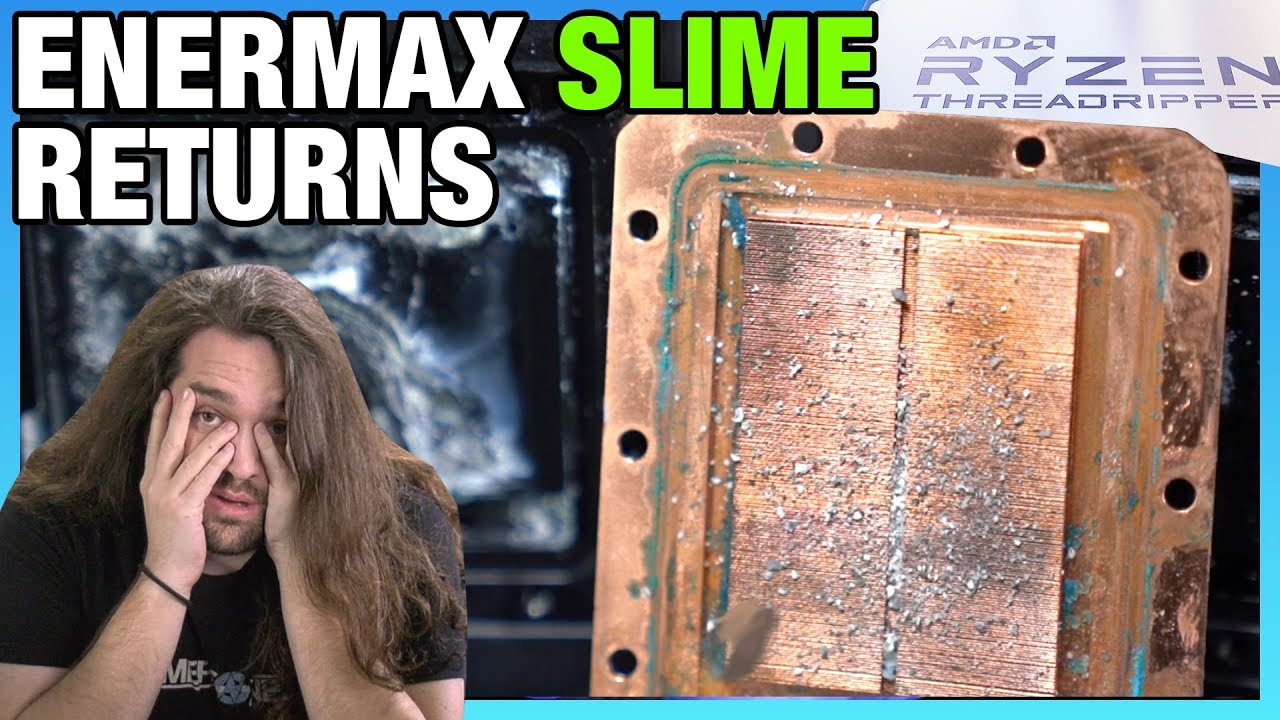
Enermax said it fixed its AMD Threadripper liquid coolers with the Liqtech II. We sent them off for X-Ray spectrometry and more, and it appears Liqtech II is also impacted.
Sponsor: Visit https://BuyRaycon.com/gamersnexus for 15% off your order!
Watch our original failure ana...
but again, it seems to be threadripper primarily?
tawdry tiger
*facepalm. ill check it out in a bit. thanks guys. any top tiers in white? lol
spiral zealot
corsair is the first one that comes to mind. arctic might have one in white as well
tawdry tiger
alright ill have to check again, when i built it to where it is now ener was literally the only white.
spiral zealot
corsair definitely has a white one
oh, deepcool has one as well
i think it's the captain EX 240 or something
tawdry tiger
yeah im looking at the corsair now, extra 70 bucks though, ouch. though seemingly worth. no issue with the enermax, but time will tell i suppose.
spiral zealot
yeah, and honestly the enermax non-threadripper ones might be fine
all of the issues ive heard have been TR-specific
which makes me wonder if they changed their coolant formula for that one in particular
tawdry tiger
right, hm.
gentle scroll
alright im back, i got my monitor issue sorted (guess i got the right one). so now i have some questions about building. anyone available?
gentle scroll
so im trying to build something within the time constraint of one month. my budget is about 12-1300 dollars. and i already have a mouse and keyboard.
and a monitor
gentle scroll
for what?
little osprey
3000 series im guessing
 desert gulch
rtx 3000
gentle scroll
when that supposed to come out?
desert gulch
announed the 31st
little osprey
reveal is sept 1 and theyll announce release date then
desert gulch
they will announce it the 31st is what i meant
spiral zealot
shipping date is unknown right now though, but yeah, announcement early next week
gentle scroll
to clarify the only reason im putting a time restraint on myself is because im deploying in the next 2 months ish so if i dont have one ill have to wait
 merry edge
Do motherboards come with instructions on what to install first to last?
gentle scroll
Ive got no problem with going for the lower version though if it means i can just upgrade later
earnest olive
yes
earnest olive
imo install ram first
due to cooler clearance
for stock cooler it won't be an issue
little osprey
ive seen builders do cpu. ram. ssd
earnest olive
but for aftermarket it can
desert gulch
yea
i do cpu cooler b4 ram
since its easier to screw in without ram
but only if i know itll clear the ram
earnest olive
it depends on the cooler
earnest olive
i'm at 12 builds now and cooler clearance has only been a consideration on 1 of them tbh
desert gulch
yeah
earnest olive
m.2 might also be easier to put in before aftermarket cooler, but stock cooler won't affect it
little osprey
im still debating wether to build my pc with intel or ryzen.
earnest olive
depends
desert gulch
Budget?
little osprey
1500
earnest olive
are you gaming only? what gpu do you have?
little osprey
thinking 2070super
earnest olive
you need to have at least a 2080 super for a 10600K to be worth it
earnest olive
but really just wait for ampere
little osprey
yeah pretty much but if i can get 2080 within my budget ill go for that
little osprey
super?
vital warren
2080s build with ryzen 5 will be around 1300 ish
little osprey
yeah thats what i meant
vital warren
^
gentle scroll
so what all should be on my shopping list as for whats require to even build a pc
like i said im a litttle babby at this
earnest olive
https://pcpartpicker.com/list/L68tjp quick example of the "minimum" build where intel beats ryzen imo
didnt put a lot of time into that list so don't take it as gospel lol
little osprey
i5 is best you can do? i had a i7 10700 with same motherboard and ram but with a 2070 super and corsair rmx 750 full modular
idk which cpu is better
gentle scroll
ah so cpu/cooler/motherboard/ram/memory/storage/videocard/case/powersupply is that right?
 foggy hazel
@gentle scroll ram and memory is the same thing
earnest olive
i mean 10th gen intel running at stock with power limits off can make a 240mm aio sweat already
gentle scroll
sorry, i was just looking at the link and got storage and memory mixed
foggy hazel
nothing to be sorry about, it was more so you didnt double up on things :)
earnest olive
we're all here to help or learn so there's no need to apologize
we were all beginners once
gentle scroll
still what should i all go for since theres so much stuff to choose from. like i said earlier my budget is 12-1300
that way i have a half decent shopping list if i at lest have the names
i have word pad open so im ready to get learnt
earnest olive
are you looking for any aesthetic options or just maximum spending on raw performance?
gentle scroll
performance all the way
earnest olive
and how about noise? does fan noise bother you
gentle scroll
kinda yeah, but im not sure how well my headphones will block it out
earnest olive
don't go intel if you're only getting a 2070S
and that cooler is going to struggle really hard with a 10700K
CL18 RAM is not good
meshify C with only stock fans suboptimal
vital warren
id switch case to the td500 mesh or maybe a phanteks case
little osprey
damn ok well lemme change some stuff
earnest olive
meshify c is a great case but you gotta add fans to it
little osprey
What about p500a stock is that ok
spiral zealot
@gentle scroll yeah at a 1200-1300 budget, ryzen is probably the way to go. in terms of it being a performance focused build, is it just straight gaming? or will there be any streaming happening as well?
gentle scroll
gaming
vital warren
that 2060s is way too much
little osprey
oh wat i thought it was a 2080s lol
spiral zealot
@gentle scroll do you need compact form factor, you said you're getting deployed, so i imagine easy to transport is probably important to some degree
if you're taking it with you
gentle scroll
no, my deployments are of the naval variety. so the pc stays home
spiral zealot
aha ok
gentle scroll
one thing though
spiral zealot
just asking because smaller form factor sometimes comes with extra cost
little leaf
@little osprey as I said
Wait
You have a under 2k budgrt
You can get a 3080 at launch
So just
Fking wait
little osprey
@little leaf ik just looking for some potential builds
little leaf
 cursive fiber
quick question, I bought some case fans from my friend and they are Aigo rgb fans and to control them you have to use a remote, but it isn't working so is there a way I can troubleshoot it or is their a way I can reset the remote? Any help is appreciated.
cursive fiber
It was working before he gave them to me
So I would think that the tab would be gone
It's kinda of a cheap brand so the remote might be dead but is there a way I could reconnect the remote to the hub through like a button maybe?
spiral zealot
@gentle scroll something like this, since you aren't streaming, you can do with a 5700XT and ignore all the nvidia 3000 series stuff that everyone else is talking about - https://pcpartpicker.com/list/fyqZtp - and maybe throw in a couple extra case fans for the front panel of the case
stoic island
Some changes to change it up again
https://pcpartpicker.com/list/VBhz27
@little osprey
little leaf
stoic island
@spiral zealot wdym? 3060 is gonna be in that price range, it might beat 5700xt, we should still sit and wait
I'm talking raw perf wise
Ignoring nvenc rtx
spiral zealot
he is deploying soon so if he doesn't build it soon, he has to wait until he comes back
spiral zealot
that's the announcement, we have no idea when cards will ship
little osprey
^
little leaf
If he waits 3days
stoic island
That's why we should wait and see, doesn't hurt to see before you buy
spiral zealot
ok fine, whatever
stoic island
If you can wait, you should wait
No one wants to buy a GPU, to find out it's outdated 2 days afterwards
gentle scroll
okay, so then as far as installation of all the things go. got any links to things i can look at?
yeah im fine with updating later
anything thats outdated, ill just sell if i can
spiral zealot
there are lots of how to build videos on youtube, anything from like linus tech tips or bitwit will help
but if you want to wait to see what nvidia has to offer, you can still use the parts list i sent, just wait on the gpu, everything else will still be relevant
gentle scroll
quick question tho, when you say gpu, does gpu=cpu? idk
earnest olive
back if anyone needs help but it looks like some people have come in
spiral zealot
gpu = video card
gentle scroll
ah, i see
earnest olive
gpu = graphical processing unit, it's part of the video card, but most people use video card and gpu interchangeably
little leaf
If u buy then it becomes out dated you lose money right at purchase lmao
deep skiff
yeah its just easier to say gpu
earnest olive
gpu shorter
gentle scroll
so is the nvidia the one they were talking about that gets announced on the 30th or something else entirely
spiral zealot
yeah, nvidia has a new line of video cards being announced on monday/tuesday
gentle scroll
how long until they get released after announcement?
spiral zealot
and performance figures are still up in the air as how it compares to their current cards, and the competition that AMD currently sells
no clue
earnest olive
when you see something like "EVGA GeForce RTX 2070 Super 8GB KO GAMING", "GeForce RTX 2070 Super 8GB" is the GPU+VRAM and "EVGA _____ KO GAMING" is the video card portion
spiral zealot
for the 2000 series of cards, they shipped a month after announcement
announced 8/20/18, shipped 9/20/18
earnest olive
i've heard that for 3000, FE should be available on 9/21 and AIB models 9/28
gentle scroll
i still have to wonder about pricing for it though
earnest olive
water blocks will be available around the same time as FE
little osprey
If its like that for the 3000 series im going to wait either way. I was planning to buy parts as i can but it seems its better to buy all of them at the same time
spiral zealot
there are rumors for pricing, starting at $400 for the lowest end card, and $1400 for the highest, but we also don't know which cards will be available in the initial announcement
the $400 card might not come out until later
gentle scroll
ah
spiral zealot
yeah, everything is still rumor
foggy hazel
Jensen is notorious for holding the price until the last second
Jensen = CEO of nvidia
earnest olive
anyways, regardless of the price, you'll still get more performance for your money with 3000 than 2000
and of course higher resell value
gentle scroll
wait so theres different grades for each gen too? how do you know the right one to get then?
spiral zealot
i was recommending 5700XT for @gentle scroll because he's deploying soon, and if 3000 doesn't ship in time, he's hosed
and he has to wait until he gets back
foggy hazel
budget and reviews @gentle scroll
spiral zealot
and all he's after is straight gaming performance with a 1200-1300 budget, so i recommended 3600 and 5700XT
but then everyone screamed about waiting for 3000 series
so w/e
foggy hazel
sounds solid enough @spiral zealot
gentle scroll
i think ill try that then
earnest olive
5700XT can be had in a build much lower than 1200-1300 tbh
spiral zealot
i put together an $1100 parts list
foggy hazel
also re: everyone screamed about 3000: Welcome to the server, people dont read :)
spiral zealot
buy a nice keyboard/mouse or something
nice mechanical keyboard
good headset if you don't have one yet
foggy hazel
a good set of headphones is a good investment too
earnest olive
invest in a nice monitor
yeah i bought a $120 pair of sennheisers 4 years still going strong
spiral zealot
yeah, any leftover is definitely worth putting into peripherals
gentle scroll
ok, well i already have a keyboard/mouse care to do a review real quick?
that and i have a half decent monitor i guess
stand by for details
actually, how long until i can post links so that i dont get my pp slapped
foggy hazel
you can post now
spiral zealot
you're good now, that green = level 3
gentle scroll
okeydoke
brb grabbing links then
having some trouble finding a link for the keyboard
but ill go with the one i think it is
only thing is it says on the back that its the KB DS4200 GAMING Keyboard
i got it for cheap as a deal on newegg when i got my laptop
foggy hazel
its just a standard membrane keyboard
earnest olive
if you're happy with it, you don't need a new one
gentle scroll
yeah, i just want to know if theres anything competitively better so i can set my sights for later
gentle scroll
foggy hazel
just like the keyboard. IF you like it, keep it
peripherals are talked about a lot, but ultimately, they are a personal choice. Beucase YOU are the one that has to use them every day
gentle scroll
alright then last question with the setup that mentioned earlier [ https://pcpartpicker.com/list/fyqZtp ] is the monitor im using good enough or should i go for better: https://www.asus.com/us/Monitors/MG248QR/?SearchKey=mg248qr/

ASUS USA
Combining flexibility with responsiveness, the MG248QR features 1ms response time, 144Hz refresh rate, Full HD 1080p resolution, built-in speakers and extensive connectivity (DisplayPort/HDMI/DVI) to game on any platform. ASUS Eye Care helps gaming marathoners reduce eyestrain...
spiral zealot
way better than my monitors lol
gentle scroll
send it then. looks like i have a lot of work to do.
foggy hazel
this gets us to the headset/headphones+mic
gentle scroll
oh yeah
1sec
frick i have to dig up the box real qick since it doesnt say i think
not sure if link is working i kept getting an error
but, its the MSI Gaming Headset S BOX
foggy hazel
their site seems to be having trouble right now
gentle scroll
ok ill try to find a diff link
foggy hazel
no need
foggy hazel
its a OEM headset, the chance of it actually sounding decent is slim to none
earnest olive
sennheiser 
 fleet pagoda
Motherboard:ASUS Prime Z390-A, Intel Z390 Chipset, LGA 1151, HDMI, ATX Motherboard
Motherboard:No Internal USB Hub
Processor:INTEL Core™ i5-9400F 6-Core 2.9 - 4.1GHz Turbo, LGA 1151, 65W TDP, Retail Processor
Processor:No CPU Overclocking
Video Card:EVGA GeForce® GTX 1650 SUPER™ SC ULTRA GAMING, 1530 - 1755MHz, 4GB GDDR6, Graphics Card [VR-Ready]
Is this good
fleet pagoda
1.2
fleet pagoda
Wth☠☠
foggy hazel
IF that is a pre-built: what are the rest of the specs
is there a monitor included etc etc?
fleet pagoda
It comes w nothing
foggy hazel
@gentle scroll as for headset, just about anything from one of the bigger brands will be an upgrade.
earnest olive
yikes
gentle scroll
ill be back in a bit. but when i do should i come back here for headset questions like specific brands or is there another chat for that
foggy hazel
@fleet pagoda which company has the stones to charge that much for "that"?
earnest olive
most of them probably
fleet pagoda
Its the Intel Z390 2-way GPU Tower Gaming Desktop
foggy hazel
#peripherals-and-displays is where we normally ramble about that @gentle scroll
spiral zealot
@fleet pagoda is it an amazon listing?
fleet pagoda
No
foggy hazel
you should be able to see a fair deal about it IF you scroll back a bit :)
fleet pagoda
Its on some website ava direct
spiral zealot
ok, just making sure. amazon is full of those kinds of 'deals'
gentle scroll
okey doke thanks for all the help byebye
foggy hazel
enjoy, and best of luck :)
earnest olive
assuming prebuilt uses crap ssd and psu like every other prebuilt
gentle scroll
you too. looks like youll need it
foggy hazel
https://www.avadirect.com/Intel-9th-Gen-Coffee-Lake-R-Core-i5-i7-i9-Z390-Chipset-2-way-SLI-CrossFireX-Custom-Gaming-PC/Configure/12383260 <- that the one @fleet pagoda ?

AVADirect Custom Computers
Intel 9th Gen Coffee Lake-R Core™ i5 / i7 / i9, Z390 Chipset, 2-way SLI® / CrossFireX™ Custom Gaming PC
fleet pagoda
Yes
earnest olive
completely garbage
fleet pagoda
Tbh i only wanted it bc it looks cool
What should i look for i have a budget of like 1k
earnest olive
prebuilts are basically never good value
earnest olive
you looking for a pc ASAP or willing to wait like a month for next gen parts
fleet pagoda
I can wait ye
earnest olive
come back in like a month then
fleet pagoda
Kk
 analog hearth
Several questions:
- Does a CPU need to be a low-enough temperature for a PC to sleep?
- I’ve swapped my RX 5700 for a 2080 Super sort of recently and now my CPU’s temps suddenly jump mega high. Any explanation for this? I’ve read that GPU swapping can result in higher temps due to higher voltages
analog hearth
HW Monitor
spiral zealot
you can actually use msi afterburner with rivatuner stats to monitor CPU temp
analog hearth
that too
spiral zealot
that's what i use to monitor gpu/cpu temps and usage
if i need an overlay while i'm in a game or whatever
if i'm doing stuff on the desktop like cinebench or whatever, i use hwinfo64
 errant berry
oh i already got afterburner
analog hearth
just use afterburner
spiral zealot
if you installed rivatuner along with it at the same time, you can go into the settings menu, and then to on-screen monitoring
spiral zealot
and configure what you want to display in the OSD
it's packaged with afterburner
so you probably did?
errant berry
oh then i probably did
little osprey
weggbot on a rampage
 olive kraken
Does anyone know where I can get sleeved cables for Small form factor builds? More specifically an M-atx build
I feel like regular cables might be too long but if there is no shorter way I'll just deal with it
 hoary flower
I need help with my first build. I’m looking at a Ryzen 5 3600 for my cpu, I have other parts picked out but still stumped on my motherboard
I’m more concerned about WiFi and Bluetooth
So I don’t know if I should get one with it built in or buy an adapter
hoary flower
Trying to make the process as simple as possible 😭
errant berry
lemme find one for you tho
hoary flower
Honestly I’m new to the building pc so it could be possible 🥴
 lyric thistle
There's X570s with and without WiFi
errant berry
this one has wifi
i thought i remember seeing one
idk if this one has bluetooth tho
olive kraken
@spiral zealot thank u
lyric thistle
The WiFi boards tend to be more expensive, but you could probably get an adapter for a non WiFi board and spend about the same
lyric thistle
Should have Bluetooth
 sacred path
I have a budget of around $700-$800 most likely $700. I have 2 choices I build a gaming pc or get a gaming laptop I don’t have much space for a full setup in my room so gaming laptop seems better and I need a webcam for school but I want power and a 144hz with 10m or lower but I can’t find anything can you guys help should I wait till the rtx 3000 series comes out and see if prices go down.
olive kraken
Wifi isn't ever going to be constant
errant berry
gotcha
olive kraken
That's why its wifi
errant berry
i just didnt know if it would be better built in or not
hoary flower
I was going to do
Ryzen 5 3600
( possibly) msi mag b550 tomahawk
Gigabyte Radeon rx580
Evga 500
WD blue 500gb
errant berry
whats your budget tho
hoary flower
Trying to stay budget friendly of like 700-750
hoary flower
Where ?? Link that
sacred path
True but you also need a flash drive to install it too the pc
hoary flower
That’s fine I can buy a flash drive or I have plenty but you’ve used it before and no issues ?
sacred path
Many people buy the keys for cheap should work great
errant berry
spiral zealot
i haven't bought from ebay myself, but plenty of folks here have
errant berry
yea just buy windows off of ebay
spiral zealot
i bought mine from gvgmall and it was like $15 or something
errant berry
but that is what id do for a 700 build
spiral zealot
they're usually just reselling OEM/bulk keys
errant berry
if any of yall see anything wrong correct me please
olive kraken
If you DIY gaming pc is cheaper, but laptop is portable
errant berry
true
olive kraken
Unless u go small form factor but it is still a pain
olive kraken
Also, new GPUs will have no problem running at 144hz
errant berry
mhm
olive kraken
I'd say wait, also YES 700 gaming laptop not going to be great
errant berry
lol
hoary flower
Well is there anything I should change for my build?
spiral zealot
i put this list together for someone on a $700 budget - https://pcpartpicker.com/list/xfNbq3 - goes down to the r3 3100, but it's still a solid CPU and cheaper than the 3600 by like $80 right now
and lets you fit a 1660S in
errant berry
ah
sacred path
Yeah but my biggest problem is buy the accessories I would have to buy over $300+ that’s why it’s hard I could buy a laptop that can get 144hz no problem then buy a 144hz monitor
spiral zealot
and the 3100 is still a solid 4c/8t
sacred path
Yeah the ryzen 3 3100 is as good as the ryzen 5 3600 when it comes to gaming
errant berry
dang really
spiral zealot
i would recommend the 3300x but that one is impossible to find anywhere
errant berry
i never looked at it
spiral zealot
so the 3100 is my budget alternative
hoary flower
Make sense
errant berry
whats the base clock speed tho
spiral zealot
3.6 on the 3100
errant berry
oh that isnt bad at all
spiral zealot
boosts to 3.9
errant berry
actually pretty good for 120
olive kraken
the extra cores help but for budget 3100 is best
spiral zealot
will be totally fine w/stock cooler
errant berry
yea
spiral zealot
and you could probably shave a little off if you dropped to 3200mhz ram
spiral zealot
i think you can get the 3200mhz kit for $57?
spiral zealot
errant berry
id put that on for budget builds instead but i just see the 3600 kit
spiral zealot
$695
if you have the budget to go to $750 you can upgrade the SSD
and get an nvme drive w/dram
errant berry
beautiful
spiral zealot
but this was for someone who had a hard $700 budget, so i went for the 2.5" w/dram instead
 modest kindle
The actor of black pather just died
errant berry
ya
modest kindle
from cancer
errant berry
it is sad indeed
idk if that pertains to a build
but sure
i see that it says the bios would sometimes need to be updated for that board, is that true @spiral zealot
spiral zealot
that was true when ryzen 3000 first came out
but most boards will come from the factory with the right bios now
spiral zealot
yeah it's a fair warning to post there, but it's mostly irrelevant now
unless you happen to get a piece of old stock that's been lying around for a while
 jagged ember
If that happens you could just get a boot kit
errant berry
good point
spiral zealot
yeah, AMD will send you a loaner CPU so you can boot and flash the bios
jagged ember
However unlikely that would occur
errant berry
yea
jagged ember
Good to know, though
errant berry
indeed
jagged ember
Lol I never looked into it
errant berry
me neither
errant berry
lol
errant berry
just request a better cpu than the one you have and return the worse one
easy upgrade
spiral zealot
lol they send you like an athlon 3000g
errant berry
ohhhhh nvm
spiral zealot
just enough to boot and flash the bios
errant berry
ya i dont want that lol
spiral zealot
oh wait, not even that
errant berry
what is a tr 1920x
spiral zealot
an athlon 200ge
errant berry
ive never even heard of that
spiral zealot
threadripper 1920x
spiral zealot
i started doing a lot of virtualization stuff for work
errant berry
ah
spiral zealot
so i'm doing a lot of learning and experimenting on my personal machine
sacred path
Have you guys seen the Acer Nitro XV240Y it’s really good for its price can’t find it any where other than Newegg and no you tubers made reviews I think it’s brand new
spiral zealot
so i just switched over
errant berry
how many cores does that one have
spiral zealot
12c/24t
spiral zealot
it was a bit of a sidegrade, i used to have an r5 2600, so i gained cores/threads, but went from zen+ to zen 1
but it was a cheap switch
spiral zealot
i just needed the cpu/mb, and i picked up a new set of ram to go quad channel
errant berry
its pretty good
little osprey
I want to steal that BB8
 granite gust
Which is the better build? 2003 was the last time I build my own PC... So I'm out of the loop, would love advice
First Build TOTAL : $1,786
AMD Ryzen 7 3800X 8-Core, 16-Thread Unlocked Desktop Processor with Wraith Prism LED Cooler AM4 $ $339
GIGABYTE X570 AORUS Elite Wifi (AMD Ryzen 3000/X570/ATX/PCIe4.0/DDR4/Intel Dual Band 802.11AC WIFI/Front USB Type-C/RGB Fusion 2.0/M.2 Thermal Guard/Gaming Motherboard) AM4 $ $209
MSI Gaming GeForce RTX 2070 8GB GDRR6 256-Bit HDMI/DP DirectX 12 VR Ready Ray Tracing Turing Architecture HDCP Graphics Card (RTX 2070 Ventus GP) $ $443
G.SKILL Trident Z Neo (for AMD Ryzen) Series 32GB (2 x 16GB) 288-Pin RGB DDR4 SDRAM Desktop Memory F4-3600C18D-32GTZN $ $149
Western Digital WD_Black SN750 500GB NVMe Internal Gaming SSD - Gen3 PCIe, M.2 2280, 3D NAND - WDS500G3X0C $ $70
Power Supply 750W Fully Modular 80+ Gold Certified with Addressable RGB Light - Vairous Color Mode, GAMEMAX RGB750-Rainbow $ $119
NZXT H510 Elite - CA-H510E-B1 - Premium Mid-Tower ATX Case PC Gaming Case - Dual-Tempered Glass Panel - Front I/O USB Type-C Port - Vertical GPU Mount - Integrated RGB Lighting - Black $ $141
Corsair LL Series, LL120 RGB, 120mm RGB LED Fan, Triple Pack with Lighting Node PRO- White, Lighting Node PRO Included, LL120 RGB White $ $147
Corsair Hydro Series, H100i RGB Platinum SE, 240mm Radiator, Dual LL120 RGB PWM Fans $ $169
Second Build TOTAL : $1,683
AMD Ryzen 7 3700X 8-Core, 16-Thread Unlocked Desktop Processor with Wraith Prism LED Cooler AM4 $ $289
ASRock B450M Steel Legend Socket AM4/ AMD Promontory B450/ DDR4/ Quad CrossFireX/ SATA3&USB3.1/ M.2/ A&GbE/MicroATX Motherboard $ $117
XFX RX 5600 XT THICC II PRO -14GBPS 6GB GDDR6 BOOST UP TO 1620MHz 3xDP HDMI Graphics Card RX-56XT6DF46 $ $270
XFX RX 5600 XT THICC II PRO -14GBPS 6GB GDDR6 BOOST UP TO 1620MHz 3xDP HDMI Graphics Card RX-56XT6DF46 $ $270
OLOy DDR4 RAM 32GB (4x8GB) Warhawk Rainbow Light RGB (Non-SYNC) 3600 MHz CL18 1.35V 288-Pin Desktop Gaming UDIMM (MD4U0836180BKKQA) $ $129
Seagate BarraCuda 2TB Internal Hard Drive HDD – 3.5 Inch SATA 6Gb/s 7200 RPM 256MB Cache 3.5-Inch – Frustration Free Packaging (ST2000DM008) $ $54
Gigabyte AORUS RGB NVMe M.2 512GB High Performance Gaming, Integrated Heatsink, Toshiba 3D NAND, DDR Cache Buffer, 5 Year Warranty SSD GP-ASM2NE2512GTTDR $ $119
GAMEMAX Power Supply 850W Fully Modular 80+ Gold Certified with Addressable RGB Light - Vairous Color Mode, RGB-850 $ $139
Thermaltake Core P3 ATX Tempered Glass Gaming Computer Case Chassis, Open Frame Panoramic Viewing, Black Edition, CA-1G4-00M1WN-06 $ $139
Thermaltake Pure 14 ARGB 5V Motherboard Sync/Analog Controller TT Premium Edition 16.8 Million Colors 9 Addressable LEDs 140mm Hydraulic Bearing PWM Case/Radiator Fan, 3 Pack CL-F080-PL14SW-A $ $58
Enermax Liqmax III 360 - Triple 120mm Fan aRGB {5v 3-Pin} - Dual Chamber AIO CPU Liquid Cooler - Intel/AMD AM4 Support - 300W+ TDP Cooling; 5v 3-Pin ARGB; ELC-LMT360-ARGB $ $99
lyric thistle
😳
little osprey
Didn't enermax aios have problems?
little osprey
Don't take my word for it tho I just saw a couple gamer Nexus videos maybe he's referring to a different model
granite gust
lol
 plush wigeon
https://pcpartpicker.com/list/8rPCjp is this good now?
analog hearth
@plush wigeon go with Ryzen and get a better PSU
plush wigeon
$1000 is the max I'll go @analog hearth
analog hearth
Yeah, so go Ryzen
Originally, my PC costed me $1100 with a 3600 and 5700. But prices have gone down. It’s definitely doable
plush wigeon
https://pcpartpicker.com/list/MQxwNq here's the updated list
 small heron
Prbly gonna break 1k after tax
errant berry
ya thats what happened to me
there is a setting to where you can set sales tax on pcpartpicker
you just have to make an account
 tiny forge
No lol, I'm just gonna let it be, my head is too messed up right now.
Cable management is stressful
tiny forge
Yeah
 solemn valley
What are ur specs? Seems like u got the same cooler and ram as me
foggy hazel
no worries @solemn valley :)
tiny forge
GPU : 2060 Super | CPU : i9-9900k | PSU : Corsair RMx 1000 W 80+ Gold | LCooler : Corsair H100i RGB PLATINUM 75 CFM Liquid CPU Cooler
I should've gotten a 2080 Super, only $200 price gap
foggy hazel
@solemn valley btw, if you want to do a bit of custom DIY on that case. A filter on the "grate holes" in the back helps a fair deal on dust buildup
solemn valley
@tiny forge Thats dope man, I was thinking about getting an i9 but I ended up getting the i7 9800. Needless to say I feel the same way as you wjth the 2080 super card
Even if the fan blows air out? Would that be okay?
foggy hazel
the holes "around" the fan
solemn valley
Ohhh ok cool
foggy hazel
see the exposed ones above the fan itself :)
foggy hazel
whatever you can get your hands on really, which are also easy to clean for you
i have previously taken apart old case filters and rigged them with small magnets for stuff like that
sadly, i cannot show you, because i dont have a case with a solution like that in the apartment
solemn valley
I was thinking something with mesh. I have this on the top of my case. Ill attach in build pics real quick
foggy hazel
re: picture: aye, that could work
solemn valley
Oooo
foggy hazel
and yes Wizard, that could also work
solemn valley
Yeah that looks good, I could prob rig something together
foggy hazel
if you have a recycling station near you, it should be possible to scavenge a old case filter
that you can cut up
foggy hazel
or look at the local used market, might be someone that has some spare you can get for free/shipping
and you are very welcome :)
 signal fractal
Hey question, anyone familiar with the Phanteks p400a case, putting together a new build and trying to figure out if I’ll be able to fit a gpu vertical mount into the case or if one would even work with it?
 latent storm

eBay
Condition is Used. This was my first card and i loved it so much it performs excellent. As you can see in my pc build. (So many people i know used it as their background 🤣). But during the build the plastic broke on the right side but not the pin.
thoughts?
signal fractal
Thanks @foggy hazel !!
solemn valley
Looks good @latent storm
I'm always careful buying things on ebay though. Depending on the sellers rep
latent storm
from what i can see he has a 5* rating from 5 different people
solemn valley
Although
foggy hazel
@latent storm you seeing it at 520 right?
latent storm
i am
solemn valley
I did find same card brand new for cheaper
latent storm
...
solemn valley
Best buy
foggy hazel
a new card. is cheaper and has full warranty
@solemn valley you cannot post links until you are lvl 3 (your nick turns green) (its our anti spam bot in action)
latent storm
thats awkward i was on the uk pcpp site and it said like 550 pounds or something
latent storm
im not
i clicked on a uk pcpp link from another server and it kept me on the uk site
solemn valley
What kind of monitor and gpu u got now?
foggy hazel
@latent storm a general piece of advice. IF a card is being sold above MSRP, something is weird.
this is a old one, from before the 2060 got its msrp adjusted to 300
latent storm
What kind of monitor and gpu u got now?
@solemn valley i have just an old 1080p 60hz monitor that i bought off my friend and i have a 1050ti
@latent storm a general piece of advice. IF a card is being sold above MSRP, something is weird.
@foggy hazel yeah i figured, i didnt think to look at new pricing and thought that was a good dealk
solemn valley
I'd say upgrade gpu. Going from 1050ti to 2070 super is a huge gain
Games will run so much better
foggy hazel
hey, at least you didnt already buy it @latent storm :)
latent storm
right that would've been a mistake lol
 vocal hare
Rm850x is kinda cheap rn you guys think I should go for it?
I'm thinking of building something with a 3070 and the new ryzen 5 when it comes out
 hollow grove
hearty mist
hollow grove
hearty mist
Yeah
solemn valley
If u buy a 3070 ull be good for like 10 15 years lol
 silk estuary
foggy hazel
silk estuary
foggy hazel
that is a case of "need VS want"
plush wigeon
@small heron no sales tax here for me
 proud pivot
I'm looking for advice on building a gaming computer as part of a two computer setup. Would this be a good place to use?
deep skiff
sure
errant berry
what is a two computer setup tho, like 2 computers working in unison?
bc ive never heard of that
or like a sli/crossfire thing
proud pivot
Friend are getting back into PC gaming and I'm interested in joining them. Currently I have a Imac 2017 and use a benq SW271 as an additional monitor. My current plan is to build a sub $1,500 pc as a dedicated gaming rig and switch the inputs on the Benq when I want to play. I use the Imac for work and photo editing, and I'd like to continue to do that. I'd love some feedback on how to efficiently have 2 computers working in the same space. Is it possible to have a keyboard/mouse that works with both simultaneously? Is there any other synergies that I'm not aware of? Has anyone done something similar?
lyric thistle
one computer plays games, the other streams it with capture card
errant berry
gotcha
lyric thistle
that's one way of using two computers
proud pivot
@errant berry No. I'm not even sure that's possible, especially considering they would be different OS.
errant berry
yea i see what you mean now
proud pivot
I'm not looking for a dedicated streaming rig either.
 ripe quest
@proud pivot do you need peripherals included in the 1500 dollar budget?
errant berry
Gabe's stay on top tho
ripe quest
oh whoop
errant berry
lmao
ripe quest
mb
errant berry
no gabe is the name of a king
proud pivot
I'd need a mouse/keyboard. Not a monitor.
errant berry
ok
proud pivot
I do not really need advice on build parts like a CPU/GPU. I've built gaming rigs before and pretty comfortable in that department. What I'm trying to get feedback on is integrating a additional computer into a current setup. Someone told me I should look into a KVM switch? All that stuff is alien to me.
errant berry
ohh
ripe quest
hmm ok
errant berry
idk ab that stuff
ripe quest
misunderstood you
errant berry
thought you just didnt know any of the newer parts
foggy hazel
@proud pivot could you elaborate on what you THINK you are supposed to gain by that?
proud pivot
That's ok. I wasn't entirely clear. This is probably a more unique request than y'all usually get in here.
errant berry
yea
ripe quest
you could get another monitor and hook that up to the mac
and have a dual monitor setup
but that would really be a pain
errant berry
idk if the mouse would connect to both tho
ripe quest
true
errant berry
bc they are different pcs
ripe quest
the only way that could work is bluetooth connectivity
errant berry
ya
proud pivot
@foggy hazel It's my understanding that Mac OS does not support many games. I'd also have less frames and graphics comparative to a dedicated gaming rig.
errant berry
the g305 would be good for a mouse then
lyric thistle
monitors should auto source if they're decent models, keyboard/mouse is a different story
foggy hazel
its not a problem @errant berry & @ripe quest it is quite literally what a KVM switch is used for
ripe quest
honestly i think that if you have a 1500 dollar budget the pc that you could build would be a lot better than your mac at photo editing
proud pivot
@ripe quest you're absolutely correct, but I like how the mac integrates into my work. The integrations to my phone and such really make my workflow easier.
ripe quest
oh ok
foggy hazel
2sec Caleb, let me just grab a link
ripe quest
idk about this stuff then
proud pivot
@foggy hazel I'm open to bootcamping if I can play most games at a decent setting, but I'm totally unfamiliar with that process and I do miss my old gaming rig haha 😫
foggy hazel
well, the imac will be limited on the GPU side
unless you are willing to go with a external GPU that is
proud pivot
Absolutely. I have a Radeon Pro 570.
foggy hazel
but that in itself is a solution in search of a problem
proud pivot
Last time I looked into external GPU's it was a pretty sub-optimal
foggy hazel
btw, while i search: could you talk a bit about your benq, because that is one lovely monitor (that i am yet to have facetime with)
proud pivot
Ideally I can get a pretty good PC that would be easier to switch between my mac and gaming rig. I think that's where components like the KVM switch come in, but I have no idea how they work and would prefer not to spend hours learning it.
Oh god it's amazing, especially for photo editing. I love it.
foggy hazel
calibrated out of the box right?
or?
side question: you are using which monitor input on the benq at the moment?
proud pivot
It does come calibrated yes
was pretty spot on, but I haven't tested it lately as I've been busy with real work.
proud pivot
Yes I believe it's in the display port, but HDMI ports are available.
foggy hazel
perfect
 odd crypt
Hey is this a good 1000$ build
́͛ͦ ͦ͊̽҉̴̬́ ̂͋ͤ ̂ͦͪ ͧ̌̑ ̅̀͐҉̫̭̀ ͛̓̎҉҉҉̣̯̗ ͛̀̈́ ͯ̇ͭ ̓̃ͫ ̈͗ͧ ͐͊̿ ͂̑ͮ ͮ̆̚ ͐ͧ͐҉̵̧̛ ͋̉̚ ̐ͩ̑ ͥ̀̚ ͑̐͗҉̞̻̮
foggy hazel
just so you are aware: a KVM switch can be something as simple as a "dumb" box that you connect your pc's, monitors and keyboard/mouse to. And then when you press a key on the switch (or in software) you switch from one machine to the other.
proud pivot
That sounds like it would really help with the setup
Does that work between two OS? How do I initiate a switch?
foggy hazel
it just takes the input
so it goes around the machines
they dont know it as such
http://www.tesla-smart.com/page1588?product_id=440 <- example of one
proud pivot
Do components need to be hardwired into the switch or is there bluetooth capabilities? Currently I use the magic keyboard.
foggy hazel
the magic keyboard would not work with a regular kvm switch
kvm switches are normally made for wired connections
proud pivot
And how would I find peripherals that work with a switch and both a windows/mac OS?
ok
that's not a deal breaker for me, although I do like the magic keyboard haha.
foggy hazel
the windows/macOS part can safely be ignored
you can think of the KVM switch as a bundle that contains all the output/inputs to your machine (monitor/keyboard/mouse)
and depending on what you press on the KVM it either gives access to the imac or to the pc
does that make better sense?
proud pivot
It does. I'm assuming headphones and microphone would also be able to hook into the KVM switch as well?
odd crypt
Hey could someone help
foggy hazel
@odd crypt have patience.
proud pivot
Why do you say that? Does the sound output not work properly?
ripe quest
sure
foggy hazel
it works "okay"
ripe quest
@odd crypt you have a 800 dollar budget right?
foggy hazel
@proud pivot all of this might be quicker to do in a voice call if you want?
odd crypt
Yea
proud pivot
Sure bud
ripe quest
ok
proud pivot
sorry to spam up the chat guys
foggy hazel
let me just grab some headphones
@proud pivot you can either join one of the voice channels below or we can do a private call. Its your choice.
proud pivot
@foggy hazel I'm in general 1. Let me make sure my mac is setup properly.
ripe quest
yeah np
the system is pretty solid
pc part prices are pretty high atm so you might want to wait a bit
and dont get windows at full price
 marble laurel
I have a ryzen 5 3600 and rx590 and i want to upgrade to a ryzen 7 3800 and a rtx 2070 super. which should i upgrade to first or should i do them at the same time?
 cursive wharf
Those parts seem like they can hold you off until new gen
Is there a need rn to be more powerful?
marble laurel
my gpu tends to stop working sometimes and my roommate has the same one and hers stops working A LOT but she has an nzxt 510 case so i assume its just an overheating problem (maybe?). i dont know if its bc thats just how the graphics card is or if i need more fans in my case.
it doesnt stop working a lot, maybe like once every couple of weeks. but w hers, its an everyday thing
marble laurel
im a college student with like $2 to my name
marble laurel
Yea i built my pc when i was in highschool