#building-and-recc-chat
1 messages · Page 588 of 1
 tepid basalt
 jade kestrel
that's why it's a hex shape
 white osprey
I could fit 1 screw in
tepid basalt
the mobo stands on the stand off
white osprey
The mobo goes down about half way
white osprey
But its crooked
tepid basalt
the mobo stand on it
jade kestrel
picture?
tepid basalt
can you just insert the mobo and then show me a picture?
jade kestrel
They just aren't lined up
white osprey
They dont make contact
When i go to put in the screw it wont work
It works woth the top left one tho
jade kestrel
All I can see is that it's not lined up properly
white osprey
But thats the only one
 viral ore
Make sure all the standoffs installed in the case line up with the holes in the board and there are no extra standoffs that shouldn't be installed in the case
One of the standoffs is an alignment pin. It's the one on the center
The board sits on top of it
white osprey
The alignment pin is skinny then fat
white osprey
Pushed it all the way to the left
And now doesnt line up
At all
Ill put the io shield back in
viral ore
Are there standoffs in the case that shouldn't be installed?
white osprey
viral ore
Not all motherboards use all the preinstalled standoffs
white osprey
The alignment pin is skinny then turns fat
viral ore
I don't see any standoffs...
jade kestrel
Where are the standoffs? I see none in that pic
viral ore
I see the alignment pin
tepid basalt
this case looks kinda bad...
viral ore
Install the standoffs into the case that are required by the board
jade kestrel
It won't "go down" because the standoffs aren't there for it to sit on.
white osprey
viral ore
Blurry much?
jade kestrel
should be a bunch of those
viral ore
Yes
A full mATX board uses all 9 standoffs, but not all motherboard manufacturers include all the holes in the motherboard
Using the motherboard as reference install the needed standoffs
jade kestrel
looks like this one should use 8
 robust plover
What's a good 170 dollar gpu
white osprey
Should alignment pin and standoff be same size
 slender owl
@white osprey I’m guessing you got your cpu to fit?
white osprey
Yes but idk if it works
Im assuming it does
A few hrs later im barely getting my mobo in the case
 buoyant flame
What do you use your pc for @SassyFish256#571
viral ore
gaem
buoyant flame
What does the dual cpus help with tho?
white osprey
Fish, should alignment pin and standoffs be same height?
buoyant flame
Just bragging rights?
 limber yew
so can anyone help me pick out parts for my pc plz?
viral ore
Idk yet, mostly testing software
I wanna set it up so I can log into VMs from anywhere
Then I wanna build an HA cluster
But I need moar machines
limber yew
do u know what 2 (12 core cpus) ur getting?
viral ore
Probs the 2695 v2
limber yew
amd?
viral ore
Like ~200 each
I'm thinking they'll get cheaper over the next few months
Even then, 24/48 for 400 dollars is pretty good
limber yew
400 is already cheap for 2 (12) core cpus
viral ore
400 gets me a 12/24 3900x on the amd side of things
And ram is way more expensive
Server DDR3 is practically free for me
I work in a datacenter 😋
limber yew
oh cool and ram isnt too bad depending on what ur getting
im getting a ryzen 9 3900xt for my first build but im waiting for newer graphics cards
 little osprey
I’m downloading the Windows 10 media on a new pc but don’t know if it’s 32bit or 64bit
How can I check Thanks
tepid basalt
is that a modular?
little osprey
My RAM is 32gb will that be the same as processor bit rate?
 silk estuary
As long as your fan doesn't blow in and your power switch faces the outside of the case you're fine
white osprey
Ty
robust plover
What is good to run r6 good
 deep skiff
2080 ti
robust plover
What is a good 170 dollar gpu
 sand falcon
One is slightly wider
sand falcon
Yeah
sand falcon
Any of them
little osprey
You guys reccomend any good full/mid tower cases that have nice airflow?
Was looking at the meshify c, thoughts?
sand falcon
That's a good one
deep skiff
yea
deep skiff
u can just slide it in
 jagged ember
Yeah
deep skiff
yuh
jagged ember
Just saying, maybe get a Linus video up
white osprey
Plugs facing towards bottom?
jagged ember
Whatever way allows better cable management ig
white osprey
Does it matter which slot
white osprey
Wdym
white osprey
So i bend the black hinges for the hdd to fit?
sand falcon
Slide those little rail thingies out, and there will be screw holes in them you can attatch the drives to. Then slide them back in with the drive. There should be more precise instructions in your manual
No bending
Read the manual
sand falcon
General rule of thumb: RTFM
white osprey
Found the warranty
jagged ember
I'm going to guess the screws go in after you slot the HDD in with those metal slides
white osprey
What about the hdd plugs
jagged ember
Wait what plugs
white osprey
For the hdd
To the psu i think
Or maybe the mobo
Pretty sure its psu
Sata cord
jagged ember
ooh, the sata power and data right
does your case have space in the back for cable management?
white osprey
Yes
But right now im beyond confused
Ill just start back up tmr
Ty for help every1
Ill unfortunately need more tmr
 noble vapor
Yeah I have a friend with a pair that really liked them
tepid basalt
personally, i'd steer clear of any headphones from razer
jagged ember
lol yeah
tepid basalt
big nope
tepid basalt
their mouse is good
their keyboard is fine, I personally hate the space bar
others like it tho
their rgb is one of the best, tho I hate rbg so idc

 sullen spoke
As a audio enthusiast I would highly recommend getting good headphones from companies like sennheiser, audio technica, beyerdynamic, etc. rather than gaming headphones
noble vapor
Well I don’t really want to spend over 150 $ on headphones due to my interest in other things and the nari ultimate was very visually appearing to me
sullen spoke
Sennheiser pc37x good budget headset at 120usd
noble vapor
Oh nice I’ll look into it thanks.
sullen spoke
Np
 proven sand
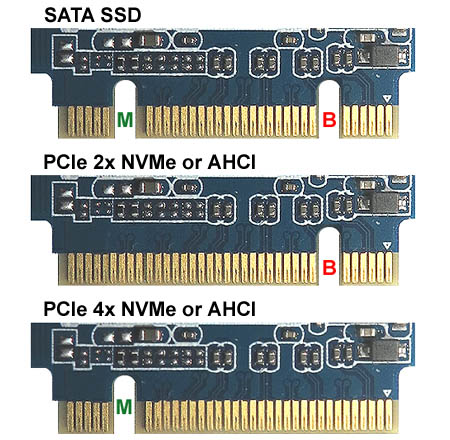
If Im looking at a SSD, WD Black M.2...
NVMe or PCIe?
 edgy viper
what do you mean nvme or pcie?
sand falcon
nvme = pcie
sand falcon
Same basic protocol
The only thing keeping you from plugging an m.2 ssd into a pcie x16 slot is the shape
edgy viper
no, nvme is the protocol, pcie is the interface
sand falcon
They are both pcie, are they not?
sand falcon
Is nvme not on pcie?
edgy viper
it's how it interfaces
nvme uses pcie but it's not the same thing
you theoretically could have pcie without nvme or vice versa
sand falcon
Does it not transfer data using pcie packets?
edgy viper
pcie would be your mouth and nvme would be the language
sand falcon
See my above question
edgy viper
I mean yes, but they can exist independently.
 sand falcon
Agreed
Give me an example of an implementation of nvme that does not use pcie lanes
And does not transfer data using pcie packets
edgy viper
At the current moment there isn't one, but it doesn't mean they are the same thing
proven sand
...This is why I ask
sand falcon
According to nvme:
It is the industry standard for PCIe solid state drives (SSDs) in all form factors (U.2, M.2, AIC, EDSFF)
@proven sand Can you link the one listed as pcie and one of the nvme ones?
 sand falcon
Look, I get what you are thinking. It's a protocol that runs over pcie.
 eager chasm
 sand falcon
But that's the same as saying that a usb keyboard with software controlled lighting isn't actually usb, since it uses a custom protocol to control it
NVMe is a layer on top of pcie
edgy viper
yes, but your graphics card does not use nvme but does use pcie
sand falcon
Yes
proven sand
sand falcon
For hard drives, it pretty much does
That was my point
I apologize for miscommunicating
edgy viper
no it's okay lol
proven sand
edgy viper
Did I show you my new ssd speeds? 😄
sand falcon
@proven sand Avoid that one listed as pcie. It's overpriced and I'm not sure why
eager chasm
^
sand falcon
I was thinking it might be a pcie4 model, but nope
eager chasm
the only difference between those 2 is one is 500GB and one is 256GB, and the 500GB is cheaper

sand falcon
Yup
edgy viper
probably cause it's a 3rd party on amazon
proven sand
Was just curious if there was a difference between the two
Since theyre listed differently
edgy viper
for those no
eager chasm
about 256GB is the difference, and the price
proven sand
My plan was to get the NVMe 500 gb anyways.
sand falcon
The difference is one is a rip off
proven sand
Meant the concept of PCIe vs NVMe, not the prices of the products in particular.
edgy viper
I have a 512gb boot
sand falcon
smh 32GB is all you need
edgy viper
until you get a windows update ^
eager chasm
NVMe just means it uses PCIe, really no difference to the average user when talking about SSDs
sand falcon
That does remind me, I should update my computer
edgy viper
I can't use linux 😦
sand falcon
Why not?
edgy viper
Premiere
edgy viper
Video editing on linux is just meh
edgy viper
does it support 8k yet?

 edgy viper
hard to use a vm when editing 8k video lol
sand falcon

edgy viper
any overhead sucks
edgy viper
Don't need one just have one 😛
proven sand
OOF
edgy viper
We output in 4k most of the time anyway 😄
proven sand
anything above 4k is eh-
edgy viper
but I wrote it off as a business expense
proven sand
Isnt 1080 about the highest a human can process?
edgy viper
lol
sand falcon
No
sand falcon
It all depends on the screen size
edgy viper
mhm
sand falcon
What level? 6?
edgy viper
0
sand falcon
Oh
edgy viper
It's my scratch disk
sand falcon
Just going for speed then
edgy viper
mhm
proven sand
Ive always been kinda iffy with 4k. 😛
sand falcon
Why not pcie gen 4?
eager chasm
I use 1080p cause I like MAXIMUM FRAME RATE
edgy viper
double the price for not much of a gain
eager chasm

proven sand
Ive been using 1920x1080 res since I can remember-
edgy viper
and with any of the current gen 4 ssds at 500gb each the write would be lower
the phison controller is slower at 500gb
sand falcon
I love watching things in 4k, but I use my good ol 1280x1024 for pretty much anything
eager chasm
most of my games will run between 100 and 165fps at 1080p ultra settings, just how I like em
sand falcon
I thought the new one Linus tested saturated it?
sand falcon
Ah
edgy viper
the honey badger has 8 ssds tho
and custom firmware
I've talked to Mark from liqid a bit about it
sand falcon
It's a cool drive
sand falcon
Looks like power distribution and a couple of lanes?
edgy viper
well the card came with the mobo
sand falcon
strx4 mobo?
sand falcon
That would explain some things
edgy viper
it's actually in a x16 slot and my gpus are in x8 slots lol 😄
edgy viper
I had to move the gpus because I had to put the ssd in a x16 to get it to recognize all 4 drives
sand falcon
Bifurcation issues?
edgy viper
yeah
x8 lanes are only physically x8
but the gpus don't saturate the x8 so it's fine
sand falcon
Yeah. Ours don't really even saturate the x4
Technically they do, but that's only for like the first half second. Given that runs last hours, it's not really worth
edgy viper
ah yea, which gpus?
edgy viper
nice
sand falcon
I love the system
edgy viper
ooh I leveled up
sand falcon
🥳
sand falcon
I think three
sand falcon
They're stupidly powerful
edgy viper
I wonder what your 8 p100s gets in octane
silk estuary
@sonic tapir is that a Mr. Meseeks?
 sonic tapir
@silk estuary yes it is hahaha
 still roostBOT
 Madgadget#4042 has been warned
Reason: Bad word usage
silk estuary
oops
sand falcon
bad
silk estuary
@sonic tapir nice bro
edgy viper
My dual 1080tis are about 450
sand falcon
I'd bench it, but we currently have four of them in use
sand falcon
Is 1468 for a single tesla?
edgy viper
pcie vs sxm2
sand falcon
Ah
edgy viper
the 8 is running on pcie
sand falcon
These are pcie
sand falcon
Scaling a multi GPU array across a single task is difficult
sand falcon
Oof
Granted, this guy seems to be using an array of 4 GPUs, so there's that
I don't question the choices of the people who use this thing
edgy viper
yeah
sand falcon
Okay, I take that back
edgy viper
Raid 0
sand falcon
There's a guy that logs in and trains AI on a single CPU thread, no GPU whatsoever
That I question
edgy viper
so get an i5 2500 and it's faster lol
edgy viper
well yeah, but for his case
sand falcon
His case I ignore
edgy viper
thats what I was laughing at
sand falcon
Yup
edgy viper
like mines not made for single core, but mine would still kill it
sand falcon
We have something like 500 CPU cores and an array of GPUs... and... you run on one thread
edgy viper
yep lol
sand falcon
And only allocate yourself 1GB of ram
edgy viper
does it cost less?
sand falcon
It's free for them to use
edgy viper
doh
sand falcon
They can use the whole slew of cores and 4TB of ram if they want
edgy viper
Maybe he doesn't know how?
sand falcon
I'm thinking he just doesn't know he has it configured that way
edgy viper
yeah possibly
 muted bison
can somebody help me
edgy viper
go for it esac
sand falcon
You have to include resource allocations with the program, so that's probably it
sand falcon
Cool
muted bison
but like what parts and power support for the case
sand falcon
What's the budget?
muted bison
700
sand falcon
Nice
If it's an ATX power supply, it will work with pretty much any case. Was there any particular case you have in mind?
muted bison
yea it's a pretty cheap one but i'll show u
sand falcon
You'll probably have to dm it. You can't post links or images yet
muted bison
yea
sand falcon
I have a similar case. It's not the best for cable management, but it will fit standard components
Interesting that the blue one is $1 cheaper
Will you need wifi?
muted bison
so i will do the blue one but when u say wifi like a part for the pc or actual like wifi
cuz i have wifi
sand falcon
For the PC
If you can hook up over an actual wire, that would be best
Faster and cheaper
muted bison
oh no i can't
muted bison
so will i need a part?
sand falcon
Either a part, or a motherboard with wifi built in
muted bison
k thanks i put it in the cart
so the case comes with fans and stuff so will i still need to find cooling and stuff
edgy viper
I have wifi on my board and I'll pretty much never use it
sand falcon
Was there any particular CPU you were looking at?
little osprey
2080 super or radeon rx 5700 xt
 nocturne folio
i found a case thats as sleek as the nzxt cases its in a bitwit video but i cant find the name to the case given its not the focus of the video
tepid basalt
2080 super or radeon rx 5700 xt
@little osprey if you have the cash to consider 2080s, why bother thinking of 5700 xt ?
little osprey
I just build my first pc and i didn't download anything( like windows any driver etc.) but i open my bios and in bios my cpu (r5 3600 w/stock fan) is 64,65 celsius. Is that normal?
tepid basalt
a bit too high
 regal jackal
idk
tepid basalt
but it also depends on your room
airflow
still
use it
if it throttle then you should recheck
little osprey
After 10 min work is 64 and 65 celsius
little osprey
I think airflow is good because i put on my desk
white osprey
These were the only instructions given on how to install storage
Which way should the hdd be facing?
 modern wedge
Cable hookup to the back and and down
There's videos on YouTube for your style case I found but I cannot post it here
white osprey
I think i found the video
The one by pcpartpicker
I got the hdd in but now i have no clue what psu cables matches what
 austere condor
@foggy bough GTX 1080ti's are worth $400-$450 used
but i bought that one for $340
 woven wedge
Nice
 placid umbra
alright here
woven wedge
I don’t know a whole lot about how much streaming uses the gpu but I have this 2060 and it does fine for a single pc stream. What card do you have now
placid umbra
gtx 1050
woven wedge
Have you tried streaming from It already?
woven wedge
Yeah a 1050 is getting older
placid umbra
yea lol
woven wedge
What’s your price range
Also I recommend lowering your games graphics setting when streaming to lighten the load
woven wedge
Aight Ima do some research real quick brb
placid umbra
aight ty
austere condor
should still be able to stream off a 1050 using Nvenc if you set up your settings properly
what OBS settings are you using?
also, you do have to keep in mind what game you're trying to stream
placid umbra
yea
woven wedge
I have tried streaming from a 1059 and it wasn’t to great too
placid umbra
well the game i would stream most is overwatch
nocturne folio
https://ca.pcpartpicker.com/list/qRBpCL how bad is it
 severe knoll
I need help with getting the right build
woven wedge
So I found that there are several 2060s in that price range. Being that I have one and and got a pretty good stream off of it I think a 2060 would work pretty good
placid umbra
alright ty!
woven wedge
Also look around for a good deal cause I got a my 2060 for only 200
austere condor
try:
Output > Streaming tab > turn on advanced output mode > Encoder Dropdown (choose Nvidia Nvenc) > Rate Control dropdown (set to CQP) > CQ level (lower number, higher quality. try 27-30)
woven wedge
Make sure it is the (new) encoder
austere condor
should be able to stream with those settings @placid umbra
placid umbra
ty guys!
severe knoll
I need help with getting the right build
austere condor
H100i plat is a very expensive cooler for its performance, but i get you're trying for a color scheme.
should be able to get a B550 board for the same price as the tomahawk max, there are a couple that are better from what ive heard
ram is kinda meh on speed
MX500 is a great SSD, but your in the range of being able to afford a NVMe, should jump for it
that is an incredibly expensive fan to put in the back of the case @nocturne folio
white osprey
Need help with psu cables
They all look the same
Have no idea where they go
When i look at vids its not really clear
austere condor
you ever play that game as a kid, where square block goes in square hole, triangle block goes in triangle hole?
basically the same thing
austere condor
all the cables are keyed for the spot you need to plug them in at. just look at the pins, and look at the plug
white osprey
Cables
austere condor
might seem overwhelming at first, just work through it
white osprey
Says one end says psu and the other says cpu
I plug psu side into psu and cpu into where?
woven wedge
The mother board
 analog hearth
The CPU power will usually be at the top left of the motherboard
Fully modular PSU? Make sure the CPU cable is plugged into the correct output on the PSU
analog hearth
Yeah, just make sure you have the correct cable going into the correct PSU socket. The CPU power input should be at the top left of your mobo
At least three (from the PSU)
analog hearth
CPU power, ATX (24-pin), GPU power (if applicable), and HDD power
analog hearth
PCIe is for the GPU
You’ll need it if you have a GPU that requires extra power that can’t be handled from the PCIe slot
white osprey
2070S
analog hearth
That’ll use the power cables (PCIe)
white osprey
The sata cable is 6 pin?
analog hearth
I think it might depend on the PSU (but don’t quote me)
analog hearth
I mean, the SATA power cables will have SATA connectors on them
white osprey
1 has like 4 on 1 wire
analog hearth
Yeah
white osprey
So i use that one?
white osprey
So then what are the other slots for
analog hearth
Other slots on what? The PSU?
white osprey
Theres 4 sata
On the 1 wire
I use one for the harddrive
What do i use the other 3 for
analog hearth
You don’t have to use the other three
analog hearth
Highly doubt it
analog hearth
Use both, the CPU and PCIe power outputs on your PSU
@shell otter that’s perfect lolll
white osprey
What does the L mean on my psu
analog hearth
I'd imagine that's the 24-pin connector
 shell otter
@analog hearth just playing with my radiotor 😹😹😹
analog hearth
that's awesome lol
analog hearth
10 and 18 what?
analog hearth
uhhh I'm not sure where that goes. I think imma have to recommend to do more research about your PSU. because I don't know much about it either lol
analog hearth
sorry :/
analog hearth
like, idk what the L is lol and I can't find any information about that
and I've never seen an 18+10-pin connector
white osprey
The M/B is for the mobo right?
analog hearth
I'd imagine it should be for the mobo
white osprey
And its usually 24 and not 18 pin connector?
analog hearth
yes
 vivid nova
guys could you please help me pick parts! I have a list.
amd ryzen 3 3300x
b450 pro mobo
amd rx 570 4gb graphic card
ram 16gb(8x2) 2666MHz
240gb ssd + 2TB HDD
450w corsair cx450
corsair 100r cabinet
This is tight budget build!
Any suggestions or any other alternate parts?
 outer heart
what do you want to stay under?
 reef pelican
hey ryan
 autumn wolf
in that image, that connector to the right of the "ultra durable" is the cpu connector
 opal stratus
Yo I’m starting my build could someone help me out?
opal stratus
Check the manual 👍🏼
white osprey
Which one
 weary bluff
Yes
autumn wolf
youd have to go to gigabytes site for that board in order to get the full detailed manual
but yes as pengu said, the hd audio goes where you were pointing
 meager radish
They should go on the white header to the right
It looks like is has the pinout under it as well for them
meager radish
You are correct yes
white osprey
What do i look up to find how they go in
meager radish
The pinout is under the header
 fast dust
Wait what? All of the pins should be used
white osprey
Direction matters right?
meager radish
Yes directions do matter with + & -
fast dust
meager radish
Not necessarily if he doesnt have a case speaker then it wont be used
fast dust
Yeah but case speaker is like never attached to the case itself
meager radish
his front panel header is larger than the one you showed
white osprey
- means which way?
meager radish
- goes to + and - goes to -
meager radish
Power and reset does not matter which orientation
opal stratus
Can someone help me with airflow?
fast dust
Sure pengu
opal stratus

COUGAR
COUGAR QBX comes here to conquer the world with three big weapons within its compact body: Its dimensions, its expansion potential and its unrivaled cooling.
I’ve got this case
fast dust
Mhmm
meager radish
I use to have that case it was fire
opal stratus
I’ve got the optional 80mm fan and slim fans on the way
fast dust
Mhmm
opal stratus
And I just got extra fans laying around, so like what’s the optimal set up lol
fast dust
Let me look
meager radish
Side intakes really and the rear as exhaust worked for me on that case really well
opal stratus
Yeah it’s so affordable @meager radish
fast dust
Lol. Looks like this is what they recommend
fast dust
Which looks about right since that gets air to the GPU and CPU well. Yw
white osprey
But not in what direction
meager radish
do you have an aio cooler or an air cooler
fast dust
The letters face down Gunther
meager radish
Nope keep that
fast dust
Out
opal stratus
Ok
opal stratus
Ah ok
fast dust
Hey magic pants I like your pfp
meager radish
Its amazing isnt it
fast dust
Definitely
meager radish
Badlandchugs is a beast
fast dust
Dude tried to chug the ocean
meager radish
Have you seen him chug the thick water
fast dust
Yes
opal stratus
He’s so nice too
fast dust
Ram could be a little faster. But it’s okay
Case is a slightly weird choice, but if you like it, cool
fast dust
MX500 is a pretty good choice, but it’s only SATA, but also we never really need NVMe
outer heart
what do you think would be a good replacement for ram
fast dust
Something that’s 3600MHz CL16 since Ryzen likes fast RAM, but 3200MHz is okay
 open gazelle
https://pcpartpicker.com/list/7qDdZf
Made a little list for a friend, what ya'll think? Anything to swap out? Must have WiFi / Budget: $1200 in American freedom dollars / Must have monitor
meager radish
Faster speeds with lower timings should be ideal for ryzen like 3200mhz cas 14
Expensive but good
outer heart
would his ram be good for me?
fast dust
3600MHz CL16 is about as fast as 3200MHz CL14
outer heart
it’s just $2 more than current
meager radish
honestly it should be alright that’s a lovely build
fast dust
Nope
opal stratus
Ok ty
opal stratus
I thought it was supposed to be intake in the front?
meager radish
Both should work
fast dust
@open gazelle 3600X isn’t worth it. Just stick with regular 3600.
Why spend more on a cooler? 3600 comes with one that’s good enough
RAM is CL18. CL16 or better is preferred
Why a 650w PSU? That system can run off of a 450w. So 450w-550w will work totally fine. No need for 650w.
Use all these things to save money and get an RX 5600 XT or RTX 2060
meager radish
Front intake, side intake and rear exhaust.
If you have the fans top can be an intake as well
fast dust
Yes blue is intake
meager radish
sata 0 is the first but it shouldnt matter
Sata 0 for your windows drive and the others for extra drives/dvd drive
white osprey
I have m.2 ssd for windows
Ia there extra steps or smth i have to take to install windows on m.2?
meager radish
Just need a usb with windows and boot from the usb drive to install it on the ssd
open gazelle
@fast dust https://pcpartpicker.com/list/3Tv7Qq
Might be a hard $1200, but I'm not even so sure about that, so I'm just gonna assume
meager radish
@white osprey since I cant put MS links try to download windows 10 installation media tool
white osprey
What is that
I thought u just download windows on flash drive
Then install on m.2
meager radish
Yes that’s what you need for windows to be on the usb
white osprey
When i go to windows website can i download it their
16gb flash drive is okay right?
opal stratus
Yeah
fast dust
@open gazelle wdym?
meager radish
@opal stratus yes that should be good, as for the noctua fan I made a mistake on that. It should be facing the opposite way
open gazelle
But everything look okay? I added what you said since they did make sense
fast dust
Yes. It looks good. Although I’m not very sure about how good the monitor is
meager radish
Ah you changed it yeah thats how its supposed to be
open gazelle
Gonna be tweaking that monitor around a bit
fast dust
Yeah looks like the monitor is a VA panel. Not the greatest
fast dust
Top
open gazelle
Top bus lane
fast dust
Top slot
white osprey
Just the first one?
fast dust
The one right next to the SSD
white osprey
Or top 2
open gazelle
For context, modern cards use x16 speeds, anything else / SLI (who even uses this anymore???) goes to the lower rails
fast dust
Just the top one
meager radish
Yeah slot under the m.2 ssd
open gazelle
@white osprey
meager radish
I think hes talking about the pcie rear covers
open gazelle
You open 2 grates on the back. How're you gonna connect the HDMI / DP cables?
white osprey
Idk what a DP cable is
open gazelle
Displayport, another type of monitor cable
meager radish
The best type of monitor cable ever
silk estuary
Newer than hdmi
open gazelle
HDMI 2.0 is pretty good tho'
white osprey
I have a hdmi
silk estuary
right? Or am I stupid?
meager radish
Well as for gsync hdmi isnt supported
open gazelle
They're both good. ^
white osprey
My monitor is freesync
meager radish
Use display port to use adaptive gsync
meager radish
Not really, gsync isnt really that great if im gonna be honest nor is freesync they do have their underlying issues when enabled
open gazelle
White stuff?
open gazelle
Oh yeah it's the stopper. Take it off. DON'T AND I MEAN DON'T put your fingers on the gold rail
analog hearth
I think you should do way more research
open gazelle
Hold the card from the sides, fans, just don't touch the rail
white osprey
Gpu is the last part i gotta put in
analog hearth
ah okay
white osprey
How do i take it off?
meager radish
I think the white hes talking about is the PCB
white osprey
meager radish
Yeah you can put the card in, that’s part of the card and I would not remove it
white osprey
So theres nothing to take off?
meager radish
You’re set
meager radish
yeah if he removed that you could have had an expensive paper weight if it went wrong
open gazelle
Lmao paper weight
meager radish
Should be alright
white osprey
This may take a while
I cant tell if im getting it in
And i dont want to push it when its not in
meager radish
If you look at the slot on the motherboard push the pcie lock down
white osprey
Oh
It was up
Ok i think i got it in
Do i need to push them up to get the gpu out
I just wanna make sure its actually in
still roostBOT
 Gunther#2253 has been warned
Reason: Bad word usage
meager radish
Should be alright since the sticker is on it
meager radish
For what?
meager radish
Yup
meager radish
Yes that should be alright
white osprey
HDMI goes gpu into monitor?
little osprey
Yep
I'm having trouble with a system I just bought from a friend as far as if everything is connected properly and this kinda my first time with dealing with a system by myself
Plus it's an Intel build and all the cables are a jumbled mess tbh so I don't know which is which
meager radish
What seems to be wrong with the system?
fast dust
You don’t know where to plug in cables, am I correct?
meager radish
Well if the system turns on is a good start to finding the issue
little osprey
So display port from gpu to monitor isn't working and the keyboard turns on but none of my mouses stay on or even turn on
The system turns on and all the lighting including an LED display at the front of the case showing temps show a reading
As well as all fans are operable and all lighting is as well
meager radish
would you be able to provide pictures of the system internals?
little osprey
Sure
Gimme a sec
Mind you cables are in a rats and I definitely want to set that right since it's messing with me and making me kinda mad looking at it
meager radish
Should be alright, just making sure that the connections are snug is a good start
little osprey
Sent in #build-pics
 steady hill
So which ram is better optimized for intel 10900k? Seems like a lot of them are AMD optimized
meager radish
Ok lets begin @little osprey, I have you tried to use an hdmi cable to boot just off intel graphics to see if it boots
little osprey
Issue is that my monitor has no HDMI port just display and VGA and some other one
meager radish
@steady hill amd optimized are optimized for intel as well, ddr4 4000 cl 18 or lower should be good
meager radish
@little osprey, the board does have vga port as well do you have vga cable that you can use to test?
steady hill
Is there a substantial difference between Corsair dominators vs LPX?
those dominators are pretty pricy
meager radish
ok, you could also try hdmi to your gpu as well since your dp cable could be bad, but if the motherboard hdmi boots then there could be issues with the gpu
 arctic jungle
@steady hill dominator looks cool, thats abt it
meager radish
@white osprey you choose to boot from usb in the motherboard bios
meager radish
Hmm if not that I would go to reconnecting the cables and if that does not work then I believe you might have a bad power supply
little osprey
True
meager radish
The power cables for psu
meager radish
Try the delete key
white osprey
I dont have the flash drive rn so ill dl windows later
But ty to everyone who helped
little osprey
I have another PSU if the PSU is the issue I'll put that new one in
meager radish
awesome, dust could be an issue as well which could be fixed with a paint brush really. But the power supply is the first thing i’d switch and try out
little osprey
Oof I just realized how dusty my gpu is oyy
meager radish
I would give everything in that case a good clean for optimal performance, the fans as well. But making sure everything works before doing it will definitely help you from getting a headache
little osprey
Got it also i found some cables and I wanna find out if they're important or not
meager radish
What are the cables? 
little osprey
Probably cables to plug into the motherboard from an old system or from a different system we're not familiar with
The build is a little old
meager radish
Do they light up at all they look like leds but they dont really matter as long as the power and reset are working
As in the buttons
little osprey
Yeah the power button worked but I'm not sure about all the other stuff like the reset or the USB and audio ports on the case so I might have to move it to my other case if anything
Also I just realized that the fan was face down in the case but the case did have standoffs at the bottom so I'm not sure if the PSU got choked or if it's just old and dead somehow
meager radish
Ah even if the psu did work I would replace it anyways since older psu’s like that are ticking time bombs
little osprey
True
meager radish
Another case would be great for that build, once you get it cleaned up and tidy please do post your work on the build pics 
little osprey
Absolutely
Posting my psu in build pics to show what I'm putting in
 sharp perch
Can someone help me make a build
meager radish
Hopefully the new psu will fix the issue @little osprey the new one looks great!
sharp perch
@autumn wolf can you help me
little osprey
@meager radish thanks and hopefully it does
 plucky cradle
Gigabyte Radeon Rx 5700 Xt Gaming OC 8G or Sapphire 11293-03-40G Radeon NITRO+ RX 5700 XT 8GB GDDR6 Dual HDMI or the Sapphire 11293-05-40G Radeon Nitro+ RX 5700 XT 8GB GDDR6 Dual HDMI
deep skiff
:v the last two are the same
the nitro has a better cooler than the gigabyte but the gigabyte is usually 30-40 cheaper, i'd pick it, it still has a decent cooler
plucky cradle
no one has a higher memory speed and base clock speed which is the last one
ok but should I get the 430 one or the 450, the 430 one has a memory speed of 14 but the 450 has one of 14.4 and a higher baseclock spped
meager radish
the power color red devil would be a good choice as well
deep skiff
the second nitro+ is slightly overclocked from the factory but it has the same cooler and is the same card, with overclocking they should be the same
yea red devil is a great card too
plucky cradle
is red devil better then the sapphire
deep skiff
i'd say theyre on par
the gigabyte one is 20 cheaper than the nitro+ and the nitro+ is 10 cheaper than the red devil
meager radish
nitro does seem like a good deal since it does have an oc bios
plucky cradle
ok so is it worth the extra 20 for the higher specs?
the first nitro+ is this Base clock 1770 MHz
Game clock up to 1902 MHz boost clock 2010 MHz
Memory speed 14 Gaps. Power consumption-265W
PCIe 4 0 4 Outputs 2 x DisplayPort 1 4 2 x HDMI 2 0
deep skiff
up to you if the 20 is worth a cooler/quieter card
plucky cradle
the second one which is the more expensive is Base clock: 1840 MHz
Game clock: up to 1965 MHz
Boost clock: up to 2035 MHz
Memory speed: 14.4 Gbps
4 Outputs: 2 x DisplayPort, 2 x HDMI
PCIe 4.0
meager radish
nitro would be the better deal since the red dev does have the same pre oc
plucky cradle
which one is better the 1st or the 2nd one?
deep skiff
whats the price difference
deep skiff
if u wanna overclock at all the first one is fine
you can get it to perform as good as the second one with a easy overclock
 stark bramble
if u can fit it into ur budget tho i suggest a rtx 2060s
plucky cradle
really is it better then the 5700 xt or is it just prefrence
stark bramble
lower latency
meager radish
for a few frames its really not worth it
deep skiff
eh 5700xt has better performance it just doesnt have as many features
plucky cradle
my cpu is a amd ryzen 7 3700x
meager radish
adaptive sync is pretty much the same for both it's really just features and personal preference
white osprey
is there any software you have to download for a monitor
or do u just plug it in and play
im leaning towards no software