#building-and-recc-chat
1 messages · Page 524 of 1
 pastel briar
 spice shore
hey so i’m wanting to build my first build and i have about 700 dollars i need help
 potent prairie
What do you want to do with it
spice shore
i’m hoping to build a mid gaming pc with maybe 70+fps and 1080 but i think that’s gonna cost more than700
@potent prairie
potent prairie
Lemmie see, I think someone smarter than me had posted a machine perfect for that
potent prairie
Yeah
spice shore
ok just tell me if you find it
 little leaf
potent prairie
little leaf
potent prairie
$800 PC that could easily handle most 1080p games on medium or high: https://pcpartpicker.com/list/9tWhx6
I didn't make this list, but I can make suggestions to take it under budget
little leaf
need a cheap but reliable power supply for that
spice shore
ok what’s your suggestions
potent prairie
Oh. Perfect :)
spice shore
thanks
potent prairie
Np, just stole the list :)
pastel briar
@little leaf depending on your build a good rule of thumb is to get at least 80+ bronze, some brands I have had good luck with (though most of these are either Tier 1 or Tier 2 PSUs anyways) are Corsair CX series (if I need something that fits in the budget range but gives me good quality), Silverstone, and currently run a Corsair SF 550W PSU (IIRC its a platinum)
For more on what I am talking about as far as the tier list is concerned (the higher the tier the better Tier S being the really good ones and Tier 1 being the top end, and going down (any thing from T4 or lower just stay away from these please) you can visit https://linustechtips.com/main/topic/1116640-psu-tier-list-40/
also reason why I say stay away from the Tier 4 or lower PSUs (note if there are any more tiers beyond Tier 4 they also are being included in the stay away warning). I hope this info help answer your question and sorry for the wall o' text but I figure I might as well help you get the best for your build.
As for any psu decision please make sure you get a quality psu, don’t cheap out or worse don’t get one of the Chinese IEDs
(See pictures for the afore mentioned "Chinese IEDs" as they show why you should NOT cheap out on the PSU at all) Sorry for a wall of text but I would rather impart a wall of text that gives you knowledge to use then to let you risk your life, house, family or safety of all mentioned with the Chinese IED.
Linus Tech Tips
PSU Tier List 4.0 rev. 12.4 welcome to the brand new PSU Tier List! Created and maintained by @DatTestBench, @Stefan Payne, @GreatMasterAden, @Juular, @Elisis, @Maurice from Madagascar and @LukeSavenije Last Update: 12-04-2020 Tiering of various units is opinion based off repu...
little leaf
@pastel briar I've been using that already
pastel briar
ok cool, I just saw your comment of "I want a cheap PSU" and with PSUs that is one thing you do not want to go cheap on
potent prairie
@pastel briar
80 percent above? That seems excessive
little leaf
no like cheap to the point where I get the cheapest possible reliable one
spice shore
it says there are problems with this build
little leaf
what does it say
little leaf
your not level 3 yet
spice shore
oh
little leaf
you need to be blue
potent prairie
Pm me the link, I can send it for you
https://www.ebay.com/itm/193450841617
$40 for a c tier 500watt
https://www.ebay.com/itm/133405874404
$55 for the same c tier in 600 watts

eBay
Find many great new & used options and get the best deals for Thermaltake TR2-500NL2NC ATX12V & EPS12V Power Supply - 72% Efficiency - 500 W at the best online prices at eBay! Free shipping for many products!

eBay
Thermaltake TR2 600W. Does not include wall power cable Intelligent Cooling Fan: adjusts fan speed based on demands! Cable Management Optimized - COOLER RUNNING COMPUTER GUARANTEED! Over-voltage, Over Power, Short Circuit Protection work to create a “Bullet-Proof” Protecti...
https://pcpartpicker.com/list/9tWhx6 (for @spice shore )
pastel briar
@potent prairie 80% above? no the PSUs are rated in efficiency as in 80% efficiency, unless your trying to ask something different?
 stoic island
@pastel briar should edit your block of text to not include the "tier 5 or 6" from the other tier list
pastel briar
perhaps, thanks for the catch
stoic island
Also, you might want to use 80+ since that usually means 80+ efficiency rating
potent prairie
Well I thought you were saying
Take the pcpp recommendation and multiply it by 1.8
pastel briar
i believe that might have been someone else then?
stoic island
In your block of text you said "get at least 80% above your rated power equipment"
Maybe you mean get at least 80+ rated power supply?
pastel briar
give me a min and ill read it again for context perhaps I did mean 80+
ok I changed it so it makes more sense
sorry if it confused you
@stoic island enjoy, again thanks for the catch
stoic island
Lemme edit out the tier # stuff that was referring to other tier list
pastel briar
I don't know what number scheme the LTT one uses, last I remember they had numbers at one point
stoic island
@Squidkiller_38 [i79700k 2070S] depending on your build a good rule of thumb is to get at least 80+ bronze, some brands I have had good luck with (though most of these are either Tier A or Tier B+ PSUs anyways) are Corsair CX series (if I need something that fits in the budget range but gives me good quality), Silverstone, and currently run a Corsair SF 550W PSU (IIRC its a platinum)
For more on what I am talking about as far as the tier list is concerned (the higher the tier the better Tier S being the top end, and going down (any thing from Tier C or lower just stay away from these please) you can visit https://linustechtips.com/main/topic/1116640-psu-tier-list-40/
also reason why I say stay away from the Tier C or lower PSUs (note that any more tiers beyond Tier C they also are being included in the stay away warning). I hope this info help answer your question and sorry for the wall o' text but I figure I might as well help you get the best for your build.
As for any psu decision please make sure you get a quality psu, don’t cheap out or worse don’t get one of the Chinese IEDs
(See pictures for the afore mentioned "Chinese IEDs" as they show why you should NOT cheap out on the PSU at all) Sorry for a wall of text but I would rather impart a wall of text that gives you knowledge to use then to let you risk your life, house, family or safety of all mentioned with the Chinese IED.
Linus Tech Tips
PSU Tier List 4.0 rev. 12.4 welcome to the brand new PSU Tier List! Created and maintained by @DatTestBench, @Stefan Payne, @GreatMasterAden, @Juular, @Elisis, @Maurice from Madagascar and @LukeSavenije Last Update: 12-04-2020 Tiering of various units is opinion based off repu...
LTT tier list use letters
At least they do now
Usually anything above C is fine
I go for B+ and above whenever possible
pastel briar
ah ok, that would be why some confusion may have been going on 😄 sorry about that
stoic island
Hey, you should get used to the LTT tier list, we like using and referring to it :D
pastel briar
that is usually what I referr to, I just remember when it was numbers, not letters 😄
stoic island
Fair nuff
stoic island
Mine too :D
pastel briar
mine have the power of hamsters....I win 😄
stoic island
My friend has the power of guinea pigs!
pastel briar
damn....
 floral walrus
based off what they said about mine, skip the raidmax psu and find a more reliable one
 tepid basalt
 little osprey
I’m not made of cashy
 uneven wraith
Has Anyone here done any setup upgrades recently? I’m looking to buy a GPU and a case.
uneven wraith
Pretty low, probably $500.
little leaf
for both gpu and case
little leaf
ok what do you have now?
little leaf
Ye
little osprey
if you can splurge more get a 2070 super
uneven wraith
That might work, I meant used stuff, which is why I asked if anyone had done upgrades, but a 2060 might be decent.
I was looking at a 1660 for a while
little osprey
if you go to build pics, the case on the right is the fractal meshify C\
little leaf
Ok james
uneven wraith
I’ve also got an extra fan
little osprey
above the video of my custom loop dragonball theme is the H710i case
but full modular psu are the best
little leaf
50-60 dollars case
Here what are the parts you havr
Like what processor and what mobo
uneven wraith
I’ve got an I5 7th gen, 16 Gb ram, MOBO, cpu cooler, and a fan
little osprey
uneven wraith
I’m not exactly sure of either as I bought them used, but I can check.
little osprey
gotta be careful with used as wlel
uneven wraith
Yeah, I knew the guy though.
Played with him online for a while too so I saw how his stuff ran.
little osprey
👍
uneven wraith
I know he paired it with a 1660 TI which ran quite well
little osprey
1660ti is good
little leaf
How mcuh u pay for it all?
little osprey
if that's what you can manage
uneven wraith
$150
little osprey
150 for all of that?
little leaf
Thats really good
little osprey
should be able to pull from serial
little osprey
lol oops
little leaf
I57th
little osprey
ahhh older
uneven wraith
Like no markings whatsoever on the board. I can take some pics in the morning.
little osprey
weird, most boards have alot of markings or names on them
uneven wraith
Yeah this one is pretty bland
It’s a smaller board, 2 ram slots and just the one GPU slot or whatever the hell its called
little leaf
What cpu though
uneven wraith
Uh lemme see
little leaf
Any company name on ur board?
little leaf
Oof ok thats ddr3
little osprey
pretty dated
uneven wraith
Yeah I’m probably gonna get a new one at this point
Might just sell the whole thing and start fresh
little leaf
I mean the i57400 was selling on ebay for 100 bucks
 fringe wharf
how can you tell what you need in a case
uneven wraith
I mean for ram, a MOBO and the CPU I could probably get my $150 back
 foggy hazel
@uneven wraith that sounds like a ITX board
little leaf
Ye
foggy hazel
cpu-z should be able to tell you what board it is
little leaf
Or a badly spaced matx
foggy hazel
"It’s a smaller board, 2 ram slots and just the one GPU slot or whatever the hell its called"
little leaf
Thats often what pre built matx boards have
foggy hazel
they have 1*16 and 2-3 other slots
uneven wraith
I mean even ddr3 would run better than my current setup by farrrrrr lol
I’ve got an HP laptop rn lol
fringe wharf
?
foggy hazel
@little leaf yes, because its a custom oem board
if its anything like any of the newer omen mainboards, its a ... silly ... layout, in a overpriced machine :)
 hushed cipher
guys and girls i really need help im getting a gtx 1660 but my power supply doesn't have pci-e power so can i use SATA to 8 pin
 subtle halo
if not then buy new psu
i dont know about sata to pcie power stuff.. can that supply large current?
hushed cipher
well from the video i watched the card will pull 75 wats from the place it slots in and then 50 wats from the pci-e power so im not sure
 ripe ermine
Anybody have recommendations for motherboards compatible with Ryzen 7 3700x?
 cloud drum
@am4
 sudden turret
?
 sudden turret
no
I'm just outdated
😄
When I bought mine, they were not 3k ready.
must have been recently updated and shipped with proper bios
some of their images still lack it
sudden turret
it'll down clock the highest ram to match the lowest.
still do not recommend mis-matching ram.
sudden turret
did you get your aio tubing adjusted and the fan flipped?
sudden turret
welp.
cloud drum
I dont really have anywhere to move the radiotor
I tried doing it when i first installed it
sudden turret
I didn't say remove the radiator
just need to flip the fan around, so it's pushing air out.
sudden turret
yes
cloud drum
cloud drum
outside of the case?
sudden turret
what? no..
if you flip the fan around.. it will push the air out the back.
so you end up with better air flow, like this
 still roostBOT
 Tifa#0001 has been warned
Reason: Bad word usage
cloud drum
is this really hot \
sudden turret
yeah that's a bit on the warm side..
that's at idle?
why does the fan say N/A
is it even spinning?
cloud drum
yah its spinng
sudden turret
if the fan is hooked up to the cam hub, should be reading the RPMs.
unless you don't have the pump connected.
cloud drum
its conected
sudden turret
or we in C or F
cloud drum
wha
sudden turret
Celsius
sudden turret
it's still a bit on the warm side.. 64c at idle .. something ain't right
cloud drum
yah
sudden turret
verify pump is 100%
cloud drum
i over clocked it too
sudden turret
what cpu
sudden turret
it shows it at 4.2ghz
sudden turret
was thermal paste applied
cloud drum
yah
sudden turret
What header did you connect the pump to
foggy hazel
Perhaps you should go have a nap and come back when you are actually sober and rested @cloud drum
sudden turret
explain how you connected the fan and pump up.
cloud drum
So the pump
I placed the radiator above the GPU and cooler ontop of the CPU and hooked up all the cables onto the mobo
And screwed in everything
sudden turret
so if its like that.. make sure the block is securely on the cpu, head to bios and remove your overclock. then check the fan settings in bios and make sure cpu fan 1 is at 100%
sorry I'm getting busy dealing with my kids, it's early morning and they require attention.
sudden turret
that the only thing I can think of why it's such a high temp at idle
either the pump isn't pumping hard enough, or you totally butchered your OC settings.
or a mix of both.
lets not give bad advice.
 oblique comet
So, for the case case.
Cooler Master Q300L
Fractal White Case
Cougar MX330
They all sitting at almost the same price, which one you think would be best to get?
little osprey
Up to u.
sudden turret
which fractal case.
foggy hazel
<- because he is part of the group that cleans up after people that think something like that is "fun"
oblique comet
little osprey
<- because he is part of the group that cleans up after people that think something like that is "fun"
@foggy hazel proven facts for maximum cooling efficiency
sudden turret
Someone who might not know any better, would do just that, crank those scews down and break something.
save your jokes for #general-chat
foggy hazel
@little osprey you have been here long enough that you should know that context is very important.
little osprey
Forgive me senpai
sudden turret
I would get the Fractal case, it has the best air flow of the three.
sudden turret
well, that Cougar might have it beat actually
Yeah I'd def go with the Cougar case
little osprey
Check the fans> elaborate
sudden turret
Tifa, what motherboard
cloud drum
Msi
sudden turret
more info please.
sudden turret
@oblique comet the cougar has psu shroud, and tempered glass panel, I'd go for that one
little osprey
What are u tryna check tho? For the fans
cloud drum
K
cloud drum
still roostBOT
Tifa#0001 has been warned
Reason: Bad word usage
sudden turret
alright
sudden turret
lets see what you did in Overclocking tab now... 😐
sudden turret
and enable A-XMP
sudden turret
save/exit
cloud drum
Ok let's see if NZXT sees the fan
sudden turret
you should see better temps, and as long as you fixed the fan on the radiator, you should be good to go
and not be idling with high temps.
sudden turret
let it sit for a bit
 cursive wharf
Also note if default voltage was messed from mobo settings then idle temps can be made much closer to load temps
So I wouldnt really be looking at idle temps unless load temps overheat it
cloud drum
Ok
sudden turret
hei it was 65c at idle
cloud drum
I'm back at the BIOS
cursive wharf
again, messed default voltage on a basic 120mm AIO can do an okay amount
Esp if fin density on the AIO isnt all that high
cloud drum
How do you adjust the water cooler settings
cursive wharf
Idk where exactly, but BIOS has fan speed settings. Change those to change AIO fan/pump RPM
sudden turret
I believe that was the smart fan setting was for
cause it showed the temp stepping all being 100%
for the pump
sudden turret
cloud drum
Do i
sudden turret
well you said it was disabled at first
I assumed you enabled it, like you showed in this picture.
sudden turret
enable
cloud drum
Task manager
sudden turret
ryzen master, cpu-z
oblique comet
https://www.newegg.com/thermaltake-ps-ttp-0600nnfagu-1-600w/p/N82E16817153395?Item=N82E16817153395
600W Gold for 70$ is great, right?
cursive wharf
@oblique comet Not great, because it's probably a terrible PSU. No real PSU reviews or info in it. Thermaltake doesnt even have a page for it on their site. So cant even get on paper specs let alone actual performance. Please do note that "80+ gold" says nothing about PSU quality, nor does brand, and nor does wattage
 silver bolt
I have 4 slots for ram. Do all 4 sticks have to match? I currently have 2x8gb. If I bought 2 more do I need to be the same ones
sudden turret
ideally, yes.
oblique comet
@oblique comet Not great, because it's probably a terrible PSU. No real PSU reviews or info in it. Thermaltake doesnt even have a page for it on their site. So cant even get on paper specs let alone actual performance. Please do note that "80+ gold" says nothing about PSU quality, nor does brand, and nor does wattage
@cursive wharf Thats a bummer because I already paid for it 😦
sudden turret
oof
oblique comet
I had a Thermaltake PSU that had a 6 year warranty and it actually worked for more than that, so I chose Thermaltake and I found that one that was gold cert, thought it was a a good bargain
pastel briar
@oblique comet While I understand you already paid for it, please be careful, I would be cautious about using it, I usually am very weary about using generic labeled PSUs, I call them Chinese IEDs for a reason...
oblique comet
I'll try to sell and get another one once I get it
pastel briar
see if you can cancel the order, usually most places can, especially if you tell them it was a mistake
 eager chasm
80+ gold is an efficiency rating, not a reliability/quality rating
here is a quality tier list from the pinned messages
https://linustechtips.com/main/topic/1116640-psu-tier-list-40/
Linus Tech Tips
PSU Tier List 4.0 rev. 12.4 welcome to the brand new PSU Tier List! Created and maintained by @DatTestBench, @Stefan Payne, @GreatMasterAden, @Juular, @Elisis, @Maurice from Madagascar and @LukeSavenije Last Update: 12-04-2020 Tiering of various units is opinion based off repu...
if the wrong corners are cut to get an 80+ gold rating that can make it an extreme hazard
 celest horizon
🧯
pastel briar
@oblique comet depending on your build a good rule of thumb is to get at least 80+ bronze, some brands I have had good luck with (though most of these are either Tier A or Tier B+ PSUs anyways) are Corsair CX series (if I need something that fits in the budget range but gives me good quality), Silverstone, and currently run a Corsair SF 550W PSU (IIRC its a platinum)
For more on what I am talking about as far as the tier list is concerned (the higher the tier the better Tier S being the top end, and going down (any thing from Tier C or lower just stay away from these please) you can visit https://linustechtips.com/main/topic/1116640-psu-tier-list-40/ (@eager chasm has also posted the same link)
also reason why I say stay away from the Tier C or lower PSUs (note that any more tiers beyond Tier C they also are being included in the stay away warning). I hope this info help answer your question and sorry for the wall o' text but I figure I might as well help you get the best for your build.
As for any psu decision please make sure you get a quality psu, don’t cheap out or worse don’t get one of the Chinese IEDs
(See picture for the afore mentioned "Chinese IEDs" as they show why you should NOT cheap out on the PSU at all) Sorry for a wall of text but I would rather impart a wall of text that gives you knowledge to use then to let you risk your life, house, family or safety of all mentioned with the Chinese IED.
Linus Tech Tips
PSU Tier List 4.0 rev. 12.4 welcome to the brand new PSU Tier List! Created and maintained by @DatTestBench, @Stefan Payne, @GreatMasterAden, @Juular, @Elisis, @Maurice from Madagascar and @LukeSavenije Last Update: 12-04-2020 Tiering of various units is opinion based off repu...
stoic island
Where's da IED pic
pastel briar
scroll up some
cloud drum
Do AMD cards overheat
cloud drum
is that the same with cpu too
stoic island
@cloud drum the temp of the component depends on what's being used to cool it
Generally, AMD CPUs are actually cooler as they usually draw less power.
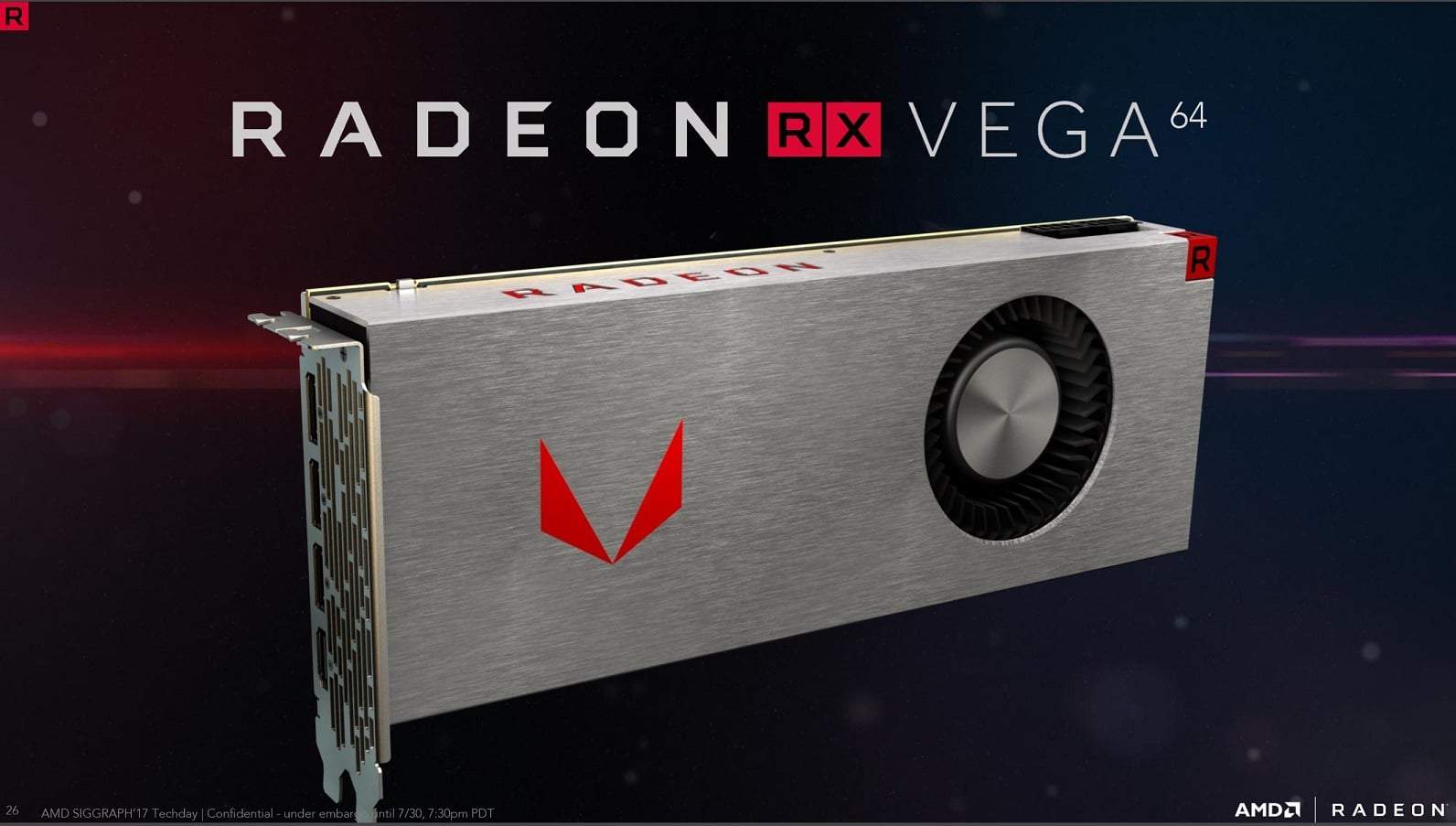
The reason why AMD has a bad reputation for their GPUs overheating is due to them making bad blower reference card designs.
For example, this was the cooler for the Vega 64, an extremely hot card due to its high power draw.
https://www.custompcreview.com/wp-content/uploads/2017/07/amd-rx-vega-64-siggraph-techday-slide-deck-30.jpg
 cloud drum
OH I C
fringe wharf
how can i tell what size a motherboard is
stoic island
@fringe wharf like a product page or from an image
 cold sorrel
I'm actually glad I decided to wait on buying the rest of my parts... I really like what I'm hearing about the AMD B550 boards. Maybe I'll actually be able to make the room in budget for a 2060 Super after all.
stoic island
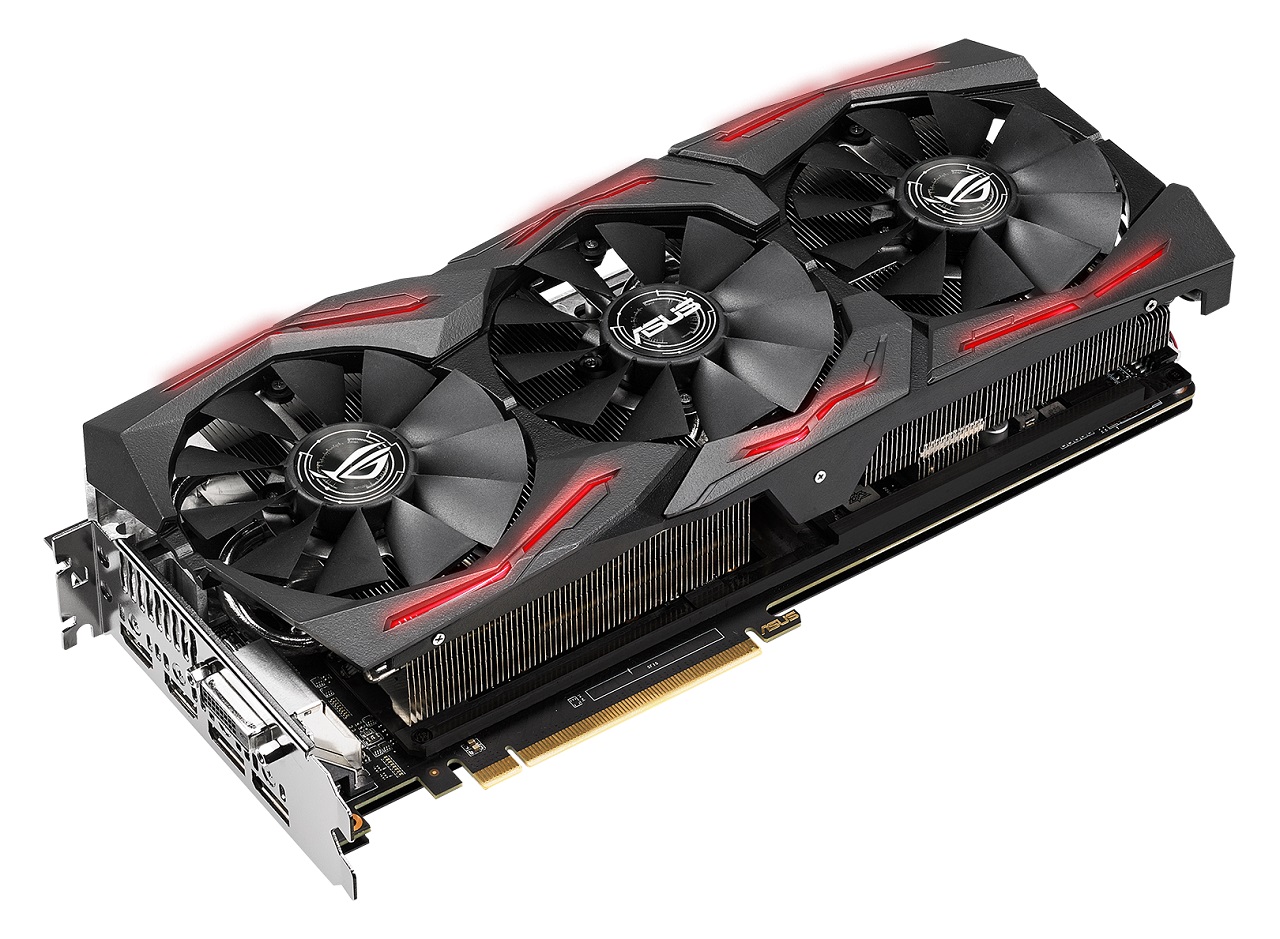
@cloud drum but that's just the reference design, AIB partners usually make better coolers like this one for ROG strix Vega 64
http://cdn.wccftech.com/wp-content/uploads/2017/07/ASUS-ROG-STRIX-RX-Vega-64-Graphics-Card.jpg
 modern shadow
is the rx 570 8gb going to be a visual improvment over the gtx 1650 non-super?
pastel briar
@fringe wharf look on the specs where it will give "form factor" typically
stoic island
@modern shadow meh, doesn't seem like it
https://www.videocardbenchmark.net/compare/Radeon-RX-570-vs-GeForce-GTX-1650/3741vs4078
I trust passmark over UB
@oblique comet why such a random comment?
oblique comet
coming from the whole gold thermaltake PSU thingy
pastel briar
@fringe wharf This should help you out some as well
stoic island
@pastel briar it's hard to tell irl, so :p
pastel briar
@stoic island well that is why I provided that picture to better assist....
pastel briar
well look at it like this, if you knew nothing of computers and I said "get an ATX" case and "ATX mother board" would you be able to tell me how many holes are going to line up? probably not, at least this way I can at least give you a visual guide so if say you receive a mini itx board by accident, you can know that, remember its about making sure anyone who asks questions here is able to gain the knowledge they are seeking....I could just simply give you the answer but would that ultimately help if you were on your own needing to figure out the same situation that I originally gave you the answer for?
@fringe wharf Some more knowledge drop on you, to help you out, and hopefully allow you to make more sense of what I am giving you
stoic island
Usually, the reason for asking about different sizes of boards is to distinguish the size of boards in indistinguishable prebuilts, so that's what I'm gearing my information towards.
fringe wharf
ooo thx for all the info. I was wondering because i wanted to know what size case to look for
but i think i got it now
 obsidian basin
How many case fans do I need??
 fast dust
Depends on your internal components, your case, how much temperature your components make, etc
Usually for a mid range build 2-3 case fans (plus the cpu can of course) is okay imo.
For high end I like to go with 5.
That’s just my opinion though
@obsidian basin
obsidian basin
I was thinking 3 front 1 rear 2 top?
stoic island
3 is standard in normal cases
Depends on how many your case can hold @obsidian basin
 granite imp
@obsidian basin what cpu and gpu are you putting in your build?
my case came with 3 front and 1 rear. I'm adding 2 to the top, so just what you're thinking. honestly my temps are just fine as is, but I'm doing it anyway.
spice shore
could someone help me out because im gonna be building for the first time and i have around 700 and a good monitor and im hoping to build a gaming pc that has 1080p and medium settings with 90+ fps
spice shore
ok can u help me out
fast dust
I can’t make a part list right now though...
spice shore
@fast dust dang
fast dust
@spice shore I don’t think I’ll be able to design one for a while sorry. Someone else would be happy to help
@stoic island usually has a bunch of part lists at different price points though
 glass swift
@spice shore i'd be happy to give it a whirl
fast dust
He’s looking for a $700 pc
stoic island
Things might be OOS so I'm gonna edit off this list
https://pcpartpicker.com/list/GMJbf9
Damn I had a 3000g in that gotta change it lmao
 wary tundra
@upper fable I cant ask in build pics, but what are your specs?
sudden turret
specs
are as followed
Red, Red, REd, and Red.
😄
and a gundam
that's probably red.
wary tundra
a little bit of blue
granite imp
I did see a hint of red in there...
looked like it could have been some rgb lighting. but couldn't really tell.
too much glam.
no glitz.
spice shore
so @glass swift just tell me when u do a list
granite imp
tk
i got a list for you
just put a build together earlier
came out just under 700
stoic island
This is fairly good
https://pcpartpicker.com/list/LmDwXv
 upper fable
Zoid and solid snake thank you very much, Nothing crazy
mobo: ASRock 570 Extreme 4
CPU: ryzen 5 3600x
Ram: Geil 16gb 3200
PSU: thermaltake 750 full modular RGB
Case: Cougar Conquer custom painted
Weakest is GPU: 1060 6gb
@wary tundra
stoic island
Take out the CPU cooler and my list goes under 700$
 glass swift
knock 20 off of the case cuz its on sale
wary tundra
I want to try
spice shore
@glass swift thanks
wary tundra
https://pcpartpicker.com/list/8rckPn I wanted to try to make a list using the new 3300x for around $700
 vagrant gulch
Just wanted to ask does anyone else have this type of problem with the ATXPWR1 with their PSU? Can I just leave it or do I have to plug it in cause it won't fully go in.
cloud drum
im sure you can leave it
vagrant gulch
Alright, thanks.
cloud drum
thats the 24 pin connector right?
fast dust
Try it without the 4 pin. If it works, cool. If not, then you’ll have to put it in
 silk estuary
Anyone got any recommendations for a wifi card/wifi USB adapter?
fast dust
Oh I use one of those hold on lemme get the link
 dire finch
Same
fast dust
Wireless USB WiFi Adapter for PC - 802.11AC 1200Mbps Dual 5Dbi Antennas 5G/2.4G WiFi USB for PC Desktop Laptop MAC Windows 10/8/8.1/7/Vista/XP/Mac10.6/10.13, WiFi USB Computer Network Adapters https://www.amazon.com/dp/B07V4R3QHW/ref=cm_sw_r_cp_api_i_LtWTEbGE21DC2
Here’s the one I use. It’s nice and fast and I’ve had no problems
Its also plug and play
If you’re on windows
Make sure it goes in a USB 3.0 port or better though
vagrant gulch
Seems like it's doing fine. Thanks guys.
dire finch
I need to get a power over ethernet adapter for my pc. Rn with my wifi I am getting 500 kb
fast dust
Yikessss
fast dust
@silk estuary would that one work?
silk estuary
@fast dust that's great, thank you
fast dust
No problem man
silk estuary
I'll get that for now and if i want I'll get a wifi card for a pcie x1
fast dust
I think PCIe cards are ugly. That’s why I got USB. Do whatever you want tho
dire finch
I'm glad I upgraded from a 570 to a 2070 cause on my 2nd pc I was using a 670 4gb
Rx 570
fast dust
Dang that’s a massive upgrade
dire finch
Yeah it has been a great upgrade
fast dust
Good for you dude
little osprey
i might be buying a used 570 untill ampere comes
fast dust
Used parts for the win!
little osprey
they are like 50 bucks used lol
silk estuary
I'm buying a used mobo, so yes, used parts ftw
little osprey
im also debating wether its worth risking a used 2700, instead of grtting the 3700
fast dust
The best deal I can get on a used 570 right now is $80
little osprey
80 for me too technically, but thats CAD
little osprey
im sure you could fine em for 60 in the states, haggle down to 50
fast dust
I’ve been looking for like 2 weeks 
Only bought one for $80 cause that’s the best I could get
little osprey
i am in the city so that helps i guess
fast dust
I’m in a city too but Facebook marketplace keeps being dumb so I’m forced to use eBay
That might be why though...
little osprey
2700s are also going for 200
fast dust
Ryzen 2700s?
little osprey
yeah
fast dust
I bought one new not too long ago for something like that
But the was before the virus...
🦠
little osprey
new?
fast dust
Yep
fast dust
I don’t remember exactly though. It was maybe 4 months ago
little osprey
atm here the 2000 series cost more then 3000 xD
i dunno if its just stock issues, or if canadian supply of them is just done
silk estuary
4.5
little osprey
oh damn not bad at all for ryzen
stoic island
Base Clock 3.9GHz
Max Boost Clock Up to 4.5GHz
little osprey
oh i meant all cores manually
little osprey
i almost ordered my build cause this msi b450 came up, sold out instantly tho lol
stoic island
wait for tuf b450m pro
little osprey
i know yall love the tuf but unless its on sale its almost as much as the p50 on x570 here
180 vs 200
silk estuary
I just got myself a great condition asrock extreme4
upper fable
ayyyy I love my extreme 4
silk estuary
Niiiice
little osprey
so im waiting for restocking
upper fable
watcha getting
little osprey
hopefully when its restockedit wont dwindle in 2 days lol
upper fable
Aren't power supplies getting hard to get still?
silk estuary
I snagged mine of newegg
upper fable
Damn some sick stuff
silk estuary
Yuhh
Gonna get a 2060 KO Ultra tho
If i really want a better one later on I'll get it when prices dip when the new gpus come out
little osprey
or you could go without rgb and get a 2080 lol
upper fable
I'm still waiting on upgrading my card, I want to see what amd has to offer
stoic island
x570-p is good
silk estuary
I'm not gonna spend 650 on a gpu rn
stoic island
2070s is good
upper fable
I don't blame you
little osprey
yeah buying a pricey gpu at the end of its life cycle, not for me
upper fable
^
little osprey
turing willbe outdated soon, ampere is coming
its been 2 years or something since it came out
and it may be a huge jump considering consoles are beast mode
pastel briar
yup and consoles will hopefully play the whole we got to pass up PC again game, and keep driving hardware and game development for the better 😄
little osprey
consoles even get ray tracing, turing will become known for having pretty bad ray tracing
pastel briar
and as for buying a high price GPU at close to EOL yea I will wait until the new stuff comes out and I can get the GPU at reduced cost....
little osprey
that too
im still deciding whether i get my platform now with a used 570, or just wait altogether
ryzen 3700 sounds pretty safe to me tho
 paper magnet
wanted to thank @sudden turret and @foggy hazel again for all their help a few days ago on my first build and being highly patient with me. Computer has been running so smoothly the last few days, got my rgb splitter cable to synch up all my lights yesterday and will in the next few days install it in, just to sore from work to do it now.
 buoyant flame
Ya please do that 
paper magnet
i will when i get the cord set up and all the lights match up
my OCD brain cant stand not being able to control the lights on the front panel
modern shadow
is it worth it to buy a cooler to oc a ryxen 5 1600AF?
 lyric thistle
AMD stock cooler from 2010
 midnight pelican
ur an amd stock cooler
lyric thistle
UwU
 sullen spoke
owo
little osprey
g skill aegis or ripjaw usually, get a cl 16
 thorny bronze
ok thats what i thought
little osprey
sometimes the corsair ones go on sale
sudden turret
ohboy
granite imp
need halp.
dual monitors. window on main monitor minimized when clicking over on the second monitor. anyone know how to stop that?
nevermind. fixed it
 little osprey
there is a cx 550 being sold for.... $9,999 xD
oblique comet
whats the best 3200mhz ram
@thorny bronze TeamGroup on newegg Vulcan 3200mhz cl16 for 60$
cold sorrel
You know, I am kind of glad now I got forced to wait on buying most of my build. I'm thinking of definitely getting a b550 board once they release instead of the more expensive x570.
 vague crystal
potent prairie
vague crystal
potent prairie
One that I think naed made for me: https://pcpartpicker.com/list/rBKgHB
For $1000 which is a bit over 900 euros
 wheat stratus
What would be a nice looking case with good air flow under $80 USD?
wheat stratus
thanks
little osprey
ive heard the gaming plus is just like the tomahawk?
 earnest olive
no rgb support, probably slightly worse vrms
good board if you don't care about rgb, but get the MAX edition
little osprey
ah, yeah its the max
earnest olive
be aware that b450 won't be officially supported for ryzen 4000
there are probably other differences i'm missing but it's definitely a fine board
little osprey
well it's for a 3700, choices are that for 160 or asrock for 120
little osprey
i dont plan on overclocking though, maybe asrock would make more sense
earnest olive
do you plan on upgrading to ryzen 4000
little osprey
no
earnest olive
or sticking with your 3700x for a while
little osprey
as long as possible
earnest olive
for a 3700x i don't think i would cheap out on the bottom tier boards
gaming plus max should be fine
earnest olive
i have a tomahawk max myself
don't spend 160 for it, canada computers has it for 150
little osprey
yeah i saw that.. but if getting it all from newegg totals an extra 40 in the end, worth it for me
GIGABYTE B450M DS3H picked this board up and a ryzen 5 3600 for my in-laws new pc build, lol no gaming happening on the pc just a web browser and picture storage. will toss one of my old GPUs in it 950
earnest olive
sounds like you could have saved a lot of money going athlon 3000g / r3 1200 + a320 board
little osprey
Wanted mid range at least
earnest olive
for web browsing and picture storage?
little osprey
ivealso been thinking of a used 2700 instead
little osprey
yeah just gaming
earnest olive
2700x loses to a 3600 for gaming
little osprey
well prob will do other things im sure on. mymother in law does ancestry and some normal workstation stuff
nvenc for streams
i dont plan on buying any top tier gpus though
earnest olive
3600 is fine for all games at the moment
you could buy a 3600 now and in a few years buy a cheap used 3700x
little osprey
i just eant to be stutter free as long as possible
earnest olive
whats your gpu?
little osprey
im waiting for next gen, but 3060 type tier
earnest olive
3600 holds up fine with a 2080ti at 1080p ultra tbh
little osprey
ima buy a used 570 for now lol
earnest olive
so if you're looking to save money just go 3600 and buy a 3700x later on
once games start really utilizing those 16 threads
you can sell the 3600 down the line
little osprey
i know for a fact they will though, and considering that i rather just get it now
my one major stipulation is 8 core im not budging lol
earnest olive
honestly if you're only going for a 3060 i doubt the 3600 will have much of an issue keeping up in future games either
fair enough
little osprey
perhaps, but if not then il get a higher tier card in the future to pair with the 3700
earnest olive
should go 3700x then cause 2700x loses to 3600 firmly
i did some research when i was building cause i noticed 2700x was really cheap
little osprey
yeah 200 vs 440 bucks tho is a pretty bad deal lol
sudden turret
3700x so good
earnest olive
zen 2 is just way better than zen+ even if its 6 cores vs 8
12nm down to 7nm
nice ipc improvements
little osprey
also having the pins on the cpus sketches me out with used a bit
although ive bent then back into place with sucess before lol
earnest olive
i dont know how well a 2700x would keep up with a 3060
i imagine it would be ok
im going to assume a 3060 is going to be similar in performance to a 2070
little osprey
in non ray traced yeah, in ray tracing quite a bit better though
earnest olive
but i think you'll start seeing problems if you decide further down the line that you want higher than a 3060
yeah thats true cpu kinda goes out the window if you turn on rt
little osprey
yeah exactly, i like to get one gpu upgrade in my build if possible
before changing platform
little osprey
200 used, vs 440 for a new 3700
little osprey
yeah
earnest olive
3700x is listed for 428 on pcpartpicker
idk i dont think just strictly looking at core count is that important, from what i've seen the 3600 even beats the 2700x in many workstation tasks let alone gaming
little osprey
do think a 3700 would last me a second gpu though? i dont typically buy a new part for only 20% gain or something
earnest olive
6 better cores vs 8 worse cores
oh for sure
a 3700x will be a fantastic processor for the next 5 years at least i think
maybe less fantastic after 3 years or so
but still competent
little osprey
my thinking is that console gets 8, if i get six i will see stutter, im very sensitive to it it seems
earnest olive
well sure but console is using zen 2 cores too
little osprey
i dont expect them to be crazy faster than 3000 series while in console form, im mostly worried about GPUs, which is way im getting a 570 placeholder lol
earnest olive
if you're firm on getting a 3060 then 2700x should be fine
if you end up deciding you want a 3080 then it'd probably be a little less fine
little osprey
if its less fine on a 2700 wouldnt it also be less then perfect on a 3700?
earnest olive
nah a 3700x vs a 2700x is a very very large gap lol
little osprey
cause yeah my thinking was like get a used high end card eventually, or whatever the mid tier is in a few years from now
earnest olive
ok not THAT large
but
its definitely significant
3700x is gonna be like 20% better in both gaming and productivity
it's also easier to cool so if you get a decent cooler you might be able to push higher clocks with pbo
105w tdp on 2700x vs 65w tdp on 3700x
little osprey
odc about overclocks really, 3700 isnt that great at it anyway to my knowledge
earnest olive
pbo is automatic boosting algorithm
just turn it on and forget about it
free performance
little osprey
oh i see what you mean
earnest olive
i believe 2700x doesnt have pbo
little osprey
im so tempted to make it a relativley silent noctua build... lol
so is pbo effected by motherboard vrms too?
eager chasm
PBO is a 3rd gen Ryzen feature
but can still be used on a 400 series board
the 3700X will perform much better at a much lower power consumption than a 2700X
little osprey
but will lower mobo temps also mean higher clocks? or is it just taking the chip into consideration
 analog hearth
celest horizon
analog hearth
celest horizon
Just run zen2 at default unless you're a tryhard who competes for imaginary internet points
little osprey
i always got coolers for silence not performance anyway lol
now i get both in one
should i learn how to clock memory timings?
eager chasm
no need, usually you turn on XMP which is (usually) the default rated setting for a given ram stick and let it go to town
The stock Wraith Prism cooler is pretty quiet
it does the job well unless you are doing something insane with the CPU
and it's quite possibly the coolest looking cooler ever made
cloud drum
how come this 24 pin connector wont come out
its so tight
same with the cpu 8 pin connector
lyric thistle
the clamp
make sure it clears
and it should be a bit tough to pull out
not like pulling a refrigerator with one finger tough
cursive wharf
but like pulling a refrigerator with 2.5 finger
 floral gale
hi guys
which mainboard is good for amd ryzen 9 3900x ?
lyric thistle
oh ok
eager chasm
most boards B450 and up can use the 3900X, but i would suggest looking at X470 or X570
little leaf
any good mobos for a 600 dollar am4 build?
pastel briar
If you can find it the Gigabyte X470 Gaming 7 Wi-fi is a good one
little leaf
its 110?
pastel briar
it varies in price but will avrage around that price point, its more or less the all dancing and all singing board, and has 10+2 VRMs
floral gale
i thinking about MSI MPG X570 GAMING PRO CARBON WIFI Gaming Motherboard AMD AM4 SATA 6Gb/s M.2 USB 3.2 Gen 2 Wi-Fi 6 HDMI ATX
but no where have it now 😦
 noble rover
You should wait for The Asus TUF gaming X570 Plus wifi when it’s back in stock
floral gale
:))
stoic island
Or MSI x570 tomahawk
 sudden solstice
yo i had a question about a case im going to buy "Thermal take V200 TG RGB" im wondering if the fan cords are separate or all together, need to know if i need to buy an extension cord becuz my motherboard only has 2 fan slots
 wide sparrow
Problem solved
 lime forge
ive bought a couple of the deepcool ones i linked
never heard of the brand you put, but
¯_(ツ)_/¯
they probably both work.
deepcool one comes with a sticky thing on the back so you can stick it to a side of your case
for management
sudden solstice
would there be such thing as a bad fan power supply cable
o nice
the side ?
like its showing ?
sudden solstice
o
lime forge
so its not floating around your case
sudden solstice
yeah i see okay thnx so either would work
but by any chance do u know about the case ?
or could u see ya know
lime forge
what?
stoic island
Too lazy to check for PSU, but that PSU bad iirc. Ram is a bit overpriced, SSD is bad as it is dramless.
Silicon power A80 256gb should be nice ssd
little osprey
Can u link a cheaper ram
stoic island
wary tundra
https://pcpartpicker.com/list/8hvdYH My friend requires excessive white build, I give excessive white build
you could get so much more performance but he said white
little leaf
Need a 600 dollar build
Was thinking 3100or 3300x and 1650 with 16gigs of tforce ram
But need help picking a cheaper mobo and psu and case
For case i might go with phantek p300
Maybe something like this but need help cutting corners in some places https://pcpartpicker.com/list/ wasnt sure what mobo to use so I threw the tomahawk in
 rough hawk
I think you meant to send a different link, that one is just the default link to lists
little leaf
Nah sorry bout that one
Im on my phone didnt copy full link
@earnest olive https://pcpartpicker.com/list/bYjBdm
Also its 1am and im kinda not in it
rough hawk
You could switch the 1tb hdd out for the 2tb Seagate hdd, it won't save you much but it's more storage for less money
little leaf
The person im making this for doesnt need 2.2tb of storage
earnest olive
well they are trying to cut corners not expand
that is a really expensive 1tb hdd though
and its only 5400rpm
earnest olive
maybe cut the ssd then lol
thats double the cost of a normal 1tb 7200rpm
u could either go cheap ssd + cheap 1 tb
or cut the ssd and go this hybrid drive... ive never used a hybrid drive before dunno how they perform
little leaf
earnest olive
u want to keep it strictly under $600?
as a tomahawk max owner, buying it is only worth it if they're planning to upgrade to a 3700x+ later on tbh
b450 apparently will not support ryzen 4000
tomahawk max is kinda overkill for this budget i think
consider downsizing that to gaming plus max if you want to stay with a pretty good board, but a 3100 should be fine on a cheap bottom tier board tbh
a 3100 is not going to be the hardest chip to run
little leaf
@earnest olive gettinng 20 dollars off the ram from a friend so its fine
My other friend is fine paying the bit more but not too much
earnest olive
imo downside a few things and up the gpu to a 1650 super
let me put a list together
earnest olive
none of these components require insane power delivery/vrm quality/whatever to run, so you'll get more performance by squeezing as much gpu budget as possible
assuming this is for gaming
i dont think a 3100 would be considered for workstation
little leaf
Ye just want better upgradable paths
earnest olive
considering the case has only one fan and you'll be using stock cooler, i think adding one case fan is worth the money
earnest olive
oh you want this to be upgradable
then probably downsize gpu all the way to a used rx 580 for now
if you want it to be upgradable you're gonna want a much better psu
ram could definitely be better
though if you're getting it for $40 it's hard to argue
actually
let me take a look first before i say this
psu prices are moving rn so its hard to say
little leaf
Ye
little leaf
Thats fine but if it lowers thatd be better
earnest olive
hm
the psu eats up a lot of the budget but its a quality modular 650w gold psu with a 7 year warranty
this is what im looking at right now
little leaf
Ok looks good
earnest olive
like honestly the psu and mobo are a bit way too much for the current build but they will handle a fat upgrade very nicely
little leaf
Ye
earnest olive
the psu should be enough for a 3950x+3080ti
little leaf
I think if he ever needs it he can upgrade it
earnest olive
and the mobo vrms are good enough for a 3950x
if ddr4 is cheaper in a few years could pick up discounted 3600mhz ddr4
cause ddr5 coming
but ddr5 will need some time to mature probably so we'll see
little leaf
Or you could get 4000mhz kits
earnest olive
not really worth
you have to decouple the infinity fabric for that
how far the infinity fabric can oc is based on silicon lottery i believe, but for the most part its 1867-1900mhz
i run mine at 1867mhz with my ram at 3733mhz to maintain coupled mode
little leaf
My head is slowly getting more and more drowsy
cursive wharf
For Zen2, not Ryzen as a whole
earnest olive
ah yeah
well hes talking about 3rd gen parts
but i guess its still good to say that
thoughts on the list btw? second opinions are good
cursive wharf
Anyways I'd change a few things for that build a little bit ago
earnest olive
he wants to potentially upgrade it to a higher end zen 2
so i put way more budget into the mobo and psu than necessary for now
the case is pretty whatever but its already over budget
i dont think this ssd has cache/dram either
little leaf
Ah does it not
earnest olive
i think at this budget its ok
little leaf
Didnt look much into if it has dram
earnest olive
its annoyingly difficult to figure out if some of these ssds have or not
cursive wharf
Also wow, that RAM deal
earnest olive
given the budget and constraints i think this list is the best i can come up with
but hei is a smart guy he might have different things to say
earnest olive
if it has dram thats a really sweet price
little leaf
And pny pretty trust worthy pretty sure
cursive wharf
nay, it does not
still roostBOT
 Squidkiller_38#1510 has been warned
Reason: Bad word usage

 little leaf
Ahhhh
cursive wharf
250gb: $39 for cheapest DRAM SATA SSD, $40 for high end SATA SSD, $46 for decent NVMe
So I mean, SATA in itself is kinda eh at 250gb
earnest olive
fatty dove ssd 
little leaf
Fatty dove bad ish
According to ltt
They said it has dram
But it starts slowing down after multiple writes
earnest olive
u cant expect that much out of such cheap drives
itll boot windows faster than a hard drive
thats about it
cursive wharf
I know this ended up being a bit more, but I went with trying to fix quality of life issues. I assume budget is $650 putting mine $37 over budget
https://pcpartpicker.com/list/RnYmHB
-CPU: 3300x is better then 3100 clock for clock by like 20% due to amount of cores per CCX
-Mobo: Sound chip, LAN chip, dual M2 slots, etc. mATX TUF Pro is a minor improvement over Tomahawk in build quality while being cheaper, but of course OOS
-Storage: Went with DRAM NVMe cuz only $7 more over cheapest DRAM SATA and 2tb HDD cuz barely any more then 1tb
-PSU: Cheaper for the cost savings and budget allocations
little leaf
@cursive wharf was supposed to be 600 dollars
cursive wharf
oof
little leaf
We all went a tiny over budget
cursive wharf
well... $87 over budget needs to be reconsidered then
little leaf
Ye
cursive wharf
Well, new thing
https://pcpartpicker.com/list/fN3gmg
-mobo: About same quality as Tomahawk except for VRMs. But still good enough for upgrades because isnt trash. Also have at least two system fan headers
-Storage: Cheapest DRAM SSD
little leaf
Thanks
cursive wharf
Do note I was a little bit lazy on mobo filter. So might have missed a board that'll have a good deal later on (rn the selected mobo is cheapest okay board tho)
So potential missed deals could happen if this list will be put off for like one+ week
little leaf
Ye