#building-and-recc-chat
1 messages · Page 506 of 1
 modern shadow
no price limit?
@stuck tide Yes. https://pcpartpicker.com/list/rmZB7T
 stuck tide
minus that xD
modern shadow
💸
modern shadow
you can get a pretty good one
 fresh crag
I've got a ryzen 3 3200G currently (I recently had to get a new cpu in a hurry with very little money), now I can afford to upgrade and I'm wondering if ryzen 7 is worth springing for over ryzen 5? Still on a budget but most don't look terribly more expensive?
 weak arrow
What’s a 5700xt price
 fiery jay
There is an ASRock Taichi 5700 XT for $420.
fiery jay
Yet a non-XT is about $100 less?
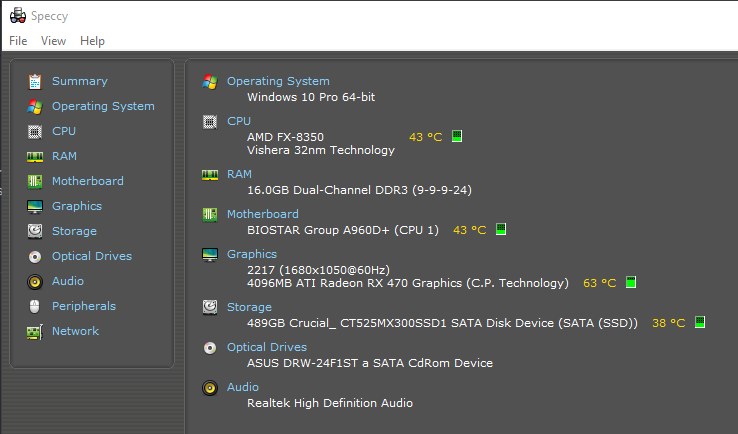
lol I am probably gonna run this FX-8350 w/ RX470 into the ground, or until Neverwinter becomes too laggy for it like what happened w/ my FX-6300 & R7 260X. 😛
weak arrow
What’s better 2060 or 5700
fresh crag
Welp I went for a ryzen 5 3600x, hopefully that'll be improvement enough
fiery jay
Vega 56 for $260 vs. RX 5600XT for $10 more but the 56 has 2 GB more VRAM?
weak arrow
I don’t understand which is better 5700 or 2060
fiery jay
Depends on what you are doing.
The 2060 would work in GPUGrid but, I think that they are NVIDIA only.
weak arrow
I’m doing streaming an gaming and occasionally some ph
fiery jay
I would look up benchmarks for both cards. 🙂
 still roostBOT
 ShriggaBoi999#8281 has been warned
Reason: Bad word usage
weak arrow
I got banned from saying f myself
fiery jay
Do what now?
weak arrow
😂 I’m going to watch benchmarks now
fiery jay
😄
 vapid star
Quick question, I have a 2600, 16gb 3000mhz (oced to 3200) ram, and a 580 strix edition. What would be the best component to upgrade out of the three?
 warped moat
@fresh crag the 3600x is plenty for most gaming tasks
 lofty coral
I'm looking to upgrade my wonderful electronic baby. I'm looking at the Ryzens, always been an AMD girl.
Suggestions on which Ryzen would let me do some basic gaming (Star dew Valley, path of exile, etc...) some video and photo editing. Nothing heavy just some tutorials and how to's.
Looking at the CPU / MB bundles. The 2 prominent bundles include the Ryzen 7 3700X or the Ryzen 5 3600X.
Thoughts and experiences would be appreciated.
Feel free to ask any other needed info for a suggestion.
I currently have the AMD FX-8100
 chrome cliff
I'm currently using a ryzen 5 2600x and its actually pretty great so i imagine the 3600x is even better.
and if u want a gpu upgrade go for the Rx 570 or 580
lofty coral
Thanks!
chrome cliff
No problem! They are a great combo and I'm able to run any game at max setting so it'll easily be able to run the stuff you mentioned and they are both relatively cheap and you could probably get them both for under 400
and without a doubt you'll be able to do video editing.
 foggy hazel
@lofty coral what kind of budget are you thinking about?
and does it include just the machine itself?
or do you need monitor/mouse/keyboard?
are there any parts in your current machine that can be moved over?
maybe the case?
as for the: 3600(x) vs 3700x
depending on price of the specific parts, it boils down to 6 core vs 8 core
which is normally/generally condensed to the question: gaming or content creation
also: there are no stupid questions, only silly answers :)
lofty coral
I'm pricing out now so I can determine what my budget is going to be.
I dont need to spend thousands since I am not on this PC all day long. Typically for a few hours at night and in the weekend.
I've got a complete setup. Just looking to upgrade the internal bits.... new CPU, MB, and ram for now.
foggy hazel
are you currently using a ssd?
lofty coral
Yes.
foggy hazel
good
lofty coral
1TB Samsung 850 pro 🤤
foggy hazel
you are aware of the pcpartpicker site?
lofty coral
It's been a while since I built a desktop so I need to find all the sites again
lofty coral
Thanks!
foggy hazel
that is what we (builders) generally use for sharing builds
lofty coral
Thanks
foggy hazel
because it looks up the region shops and helps us avoid running around in circles looking for that one odd little shop etc
lofty coral
Sweet
foggy hazel
but as said earlier: Ask if you have questions, and we can answer then :)
lofty coral
Awesome thanks you all!
foggy hazel
you are very welcome, best of luck :)
 deft zephyr
I am trying to build a pc around 700-800 dollars AMD With a gtx please help
foggy hazel
@deft zephyr can you push your budget to 825?
foggy hazel
https://pcpartpicker.com/list/syZJ27 <- then that is a very solid build
the challenge is going to be that specific mainboard thou
it jumps in and out of stock multiple times per day
deft zephyr
Okay then i will have to wait
foggy hazel
and a couple of notes on parts
deft zephyr
How is the AMD ryzen 5 1600
foggy hazel
the ram, yes, its higher speed than what you actually need, but current pricing makes it silly to go lower
the 1600 AF is basically a 2600 with a different label on it
the AF part is important to note thou
deft zephyr
To what the RTX 2060 compare to?
foggy hazel
in what regards?
deft zephyr
Like why should i get the 2060 compared to a 1660 super or something else
foggy hazel
its a hard question to answer when i dont know, what you know :)
deft zephyr
I can understand
foggy hazel
https://www.anandtech.com/bench/product/2542?vs=2515 <- dont just look at the summary (those are always a bit wonky on that site)
GPU 2019 benchmarks: Compare two products side-by-side or see a cascading list of product ratings along with our annotations.
basically the thing to take away is this: at your budget, i dont see a reason to NOT go 2060
deft zephyr
I see you are right
And how does the CPU handle Video editing or streaming, recording
foggy hazel
just about as well as any other 6 core cpu does :)
deft zephyr
Alright thanks
foggy hazel
meaning : good enough :)
deft zephyr
this is perfect for me
foggy hazel
be aware of the following
deft zephyr
How upgradable is this?
foggy hazel
yes, the SSD is not super huge, but i put priority on having a good ssd VS bad sdd + hdd
deft zephyr
Yeah i agree
foggy hazel
because a HDD is a 3-4 minute install upgrade down the line
deft zephyr
I have no problem with the ssd
foggy hazel
as for upgradeability
well, the board can handle a 3900x easily enough
so there is that option down the line
thats the 12 core version of the 3600
deft zephyr
Do i need fans or more?
foggy hazel
as it is, is plenty
there is a cpu cooler in the box
there are fans included with the case
everything should be there :)
deft zephyr
Alright so it will be cool good
foggy hazel
okay, then you know that reading the manual is not a bad idea and taking your time is also a good idea :)
deft zephyr
Okay
foggy hazel
any other questions @deft zephyr ?
deft zephyr
The case, the Micro ATX doesn't that mean it is small
deft zephyr
So everything wont be crammed and if i would like to upgrade to some parts that might be bigger i will be fine?
foggy hazel
oh yes, no problems at all
its not a tiny case
as in, its not ITX
also, remember, no hdd/sdd out in the case itself
the a80 will be installed ON the mainboard
deft zephyr
Yes yes i know
foggy hazel
meaning, even less things taking up sapce
(yes, you might know, but i cannot read your mind :) )
deft zephyr
Ok im sorry thanks
foggy hazel
nothing to be sorry about :)
deft zephyr
And if i want to put a hdd or ssdd nothing will be a problem right?
the 2060 is out of stock
 sullen spoke
the fbi 
foggy hazel
@deft zephyr patience is required
things jump in and out of stock
it was in stock 45 minutes ago
deft zephyr
Wow thats crazy lol
foggy hazel
i know, because i did another build list and i checked specifically at that time :)
sorry. 48 minutes ago
deft zephyr
So by tommorow there should be more?
foggy hazel
but yeah :) patience
deft zephyr
Okay
deft zephyr
Okay
foggy hazel
because they are doing "rolling stock" updates
meaning, drip feeding their stock online
foggy hazel
save up all the money first
deft zephyr
Ye
foggy hazel
then come and post the list i made for you
and ask us to check if it still makes sense
deft zephyr
Okay
foggy hazel
it wont take more than a couple of minutes for us to check :)
deft zephyr
The price of my list jumped to 847
foggy hazel
probably because something else went out of stock somewhere
deft zephyr
Ok
deft zephyr
I would also like to know about to 450W because isnt that low especially if i want to pugrade?
foggy hazel
a top of the line 3950x with a 2080 TI can run on a 550
deft zephyr
A 450?
foggy hazel
people VASTLY overestimate what they actually need
the 550 i mention is a 550watt psu
a 450 will be more than enough for your system and upgrades for a good while
deft zephyr
Ok good
foggy hazel
and frankly, it is an area where you dont have all that much choice
the PSU has to be a decent quality
but prices are bonkers
deft zephyr
I would also like to knew at what prices i should be buying these parts
foggy hazel
hence that specific model :)
ask us again when you have the money
because any answer i give you "now" will be useless in X time
deft zephyr
You are right
foggy hazel
its not that i dont want to give you some numbers, but they will only serve to muddle your understanding of things
and i honestly dont see a purpose in doing that
foggy hazel
the cpu and everything else is fast enough
so your question is akin to asking: if using another 100usd in budget a bad idea? no. it isnt. It is after all another 100 in budget :)
deft zephyr
You are right but i will have to work extra hard for that 100 dollars
How much better performacnce is it?
@foggy hazel
foggy hazel
see the link earlier :)
just plug in the 2060 Super instead of the 1660 Super :) @deft zephyr
it is up to you, to decide if that uplift is worth it for you
foggy hazel
2517?vs=2515 <- that is how it should look at the end :)
deft zephyr
so RTX 2060 Super 2517?vs=2515
deft zephyr
Is the zotac brand trusted?
deft zephyr
yeah but ussualy wouldnt other brands be more trusted like EVGA or Msi?
deft zephyr
Ok
foggy hazel
and any of them would LOVE for you to think that their brand is the ONLY brand
 twilit escarp
foggy hazel
twilit escarp
foggy hazel
well done @twilit escarp
deft zephyr
you are right i am sorry
foggy hazel
again, nothing to be sorry about
deft zephyr
something weird is happening
sullen spoke
?
sullen spoke
evga is nice
deft zephyr
The one if from best buy
sullen spoke
the only one that best buy has for good price is the reference card
seems to be sold out hto
deft zephyr
ill just have to wait
sullen spoke
does it have to be from best buy?
deft zephyr
?
foggy hazel
@deft zephyr the "best buy" requirement is not something you have voiced before now :)
deft zephyr
Yeah i see it good
nah imma get the 2060 i does not matter most of the games i will be playing will not need all that
deft zephyr
@foggy hazel is there a possibility for a better cpu?
foggy hazel
at your budget, everything is just about a trade-off
but if you are willing to trade-off something else for a faster/better cpu? then yes
deft zephyr
yeah instead of getting a 2060 super
foggy hazel
however, for a gaming rig, what i linked you is about as solid as it gets without you wanting to set the rig on fire in 6 months
IF you are sticking to the 2060
but are willing to spend UP to, another 100 usd
then the 3600 becomes an option
foggy hazel
yes
deft zephyr
Is it worth it?
foggy hazel
same answer as earlier, only you can decide that
deft zephyr
The other option is completely fine for edeting and gaming right?
foggy hazel
as said earlier, everything is a trade-off
and you are the only one able to tell IF you are okay with the trade-offs
deft zephyr
what does that mean
foggy hazel
so far, you have not given much indication of what exactly you are going to be doing
and as long as you dont share info, i cannot comment on that info
deft zephyr
Mostly for playing games and for edeting and streaming
foggy hazel
"editing" <- i work with people that consider a 64core machine the minimum they want to touch for that
deft zephyr
the hell
foggy hazel
i also work with people that are happy as they can ever be with their 4 core machines
foggy hazel
and since i cannot read your mind, how are we supposed to know any of that?
in theory, it is going to be fine
but as i said, if you dont give details, we cannot comment in a realistic way on your situation/questions
deft zephyr
What details will you need>
foggy hazel
when you say editing: what do you actually mean
when you say streaming: what do you actually mean?
etc etc etc etc
deft zephyr
editing: videos, and for streaming like streamning games
On twitch
Editing game vids
foggy hazel
please try and consider details that it could be practical that we KNOW, so we can actually help you.
for a pocket watch ?
for a 8k stream?
etc etc
deft zephyr
No no 1080p im sorry
foggy hazel
please help yourself so we can help you
deft zephyr
I would like to stream 1080p, video games and for edeting i would like to edit vidoe games on 1080p rendering aswell
Hopefully that is the info you need im sorry
foggy hazel
again, nothing to be sorry about
for the conditions you have set, yes, the 1600 AF will be okay
the 3600 will be better
deft zephyr
i feel like i am irritating you because i am not as smart as you when it comes to pc parts
So the card will work no issues for the conditions?
foggy hazel
as you have outlined it, i dont see a problem
 young pebble
I have a question about ram I have 16 gigs of 3000mhz and 16 gigs of 3600mhz if I just set them all to 3000mhz it should be fine right
They are the same sticks of ram brand and model
foggy hazel
its going to impact performance a fair deal @young pebble
but yes, it will technically work
 exotic vale
hey guys i recently started my first pc build and i have the phanteks p400a case which i love and i really enjoy building with it but the fans have 3 ping DRGB yes DRGB connectors on them, but the motherboard i have (the MSIB450 tomahawk max) only has 4 pin input slots, is there anyway i can get the LEDs to plug in, like is there an adapter or fan hub i need to buy?
foggy hazel
@stoic island was it you that had the phantek p400a too?
deft zephyr
Alright last question super sorry @foggy hazel will a AMD Ryzen 5 2600X be good instead of what i have
foggy hazel
nothing to be sorry about
deft zephyr
Im asking to much and you know it lol
foggy hazel
as i said earlier, there are no stupid questions, only silly answers
no, you are curious, so you ask. if i didnt want to answer, there is nothing anyone can do about it :)
deft zephyr
Mhm true
foggy hazel
re: 1600 AF VS 2600x, basically the same cpu
its one of those "just nod your head and say yes" situations
deft zephyr
Will it perform better or is it practically the same thing?
foggy hazel
the 2600x is a bit better
deft zephyr
But for the price it is not worth?
foggy hazel
but, if you are buying a 2600x, go for a 3600
exotic vale
hey guys i recently started my first pc build and i have the phanteks p400a case which i love and i really enjoy building with it but the fans have 3 ping DRGB yes DRGB connectors on them, but the motherboard i have (the MSIB450 tomahawk max) only has 4 pin input slots, is there anyway i can get the LEDs to plug in, like is there an adapter or fan hub i need to buy???
deft zephyr
It gives me a warning saying it is not compatible and it scares me cause i will not know what to do
 still slate
Hi! I want to surprise my nephew with a new SSD Drive for his gaming PC...but I’m not sure which one to buy. Any recommendations? He has a An HP Pavilion Gaming Desktop 690-0073w and said he’s already run out of room.
 dreamy tendon
Hi all! I just finished building my first PC and now wonder if I should get a surge protector for it. I spent a lot of money on it and the last thing I'd want is for my components to get fried during a thunder storm! If so, what do you recommend? Any advice would be appreciated
 sudden turret
@dreamy tendon yes
thats like saying I bought this 100k dollar car and dont have it insured 😛
and really any decent surge protector will be fine.
dreamy tendon
yeah true lol
sudden turret
just don't get a really cheapy one
warped moat
@deft zephyr that’s just telling you that b450 mobos need a bios update in order to use 3rd gen Ryzen cpus
Mobos are updated before they leave the factory
So unless you get some like 9-10 month old stock it’ll work fine
Even if you get unlucky you can contact amd to send a boot kit to update the bios yourself
 rapid nest
does anyone know how to download windows to a usb
 fast dust
Go to windows website and hit something like “create bootable media”
I don’t remember exactly what it says
dreamy tendon
@rapid nest Google "Windows 10 installation media" and click on the first link
rapid nest
ok
 exotic lichen
Can someone tell me how you can tell the difference between intake and outtake fans?
sullen spoke
intake blows air into pc and outtake out of the pc. usually outtake fans are by the rear io and top, intake is usually on the bottom and/or front of the case
any fan can be intake or outtake as long as you put it in right (like facing the right way)
exotic lichen
Ty @sullen spoke I just found out about water cooling! Amazing!
 thorny pewter
whats the best pc case under 80 dollars
fast dust
@thorny pewter USD?
thorny pewter
yessir
 stoic island
Focus G is a good one for the ~60$ mark, not sure at the 80$ mark tho.
fast dust
NZXT H510?
fast dust
okay
I have Darkflash DLM21 and I like it
There is a mesh front panel version for good airflow too
sullen spoke
many people don't like nzxt for airflow
I think unless you really care about airflow nzxt is fine
Fractal Design is nice too
stoic island
why choke your airflow when you can just ... not?
fast dust
Lol
fiery jay
Long ago, I had a case w/ horrid airflow. Needed to use a PCI slot blower fan to exhaust it. That & the front fan barely ran. lol
sullen spoke
I mean like, I don't understand why nzxt gets so much hate, it's not the worst thing in the world
stoic island
It's like apple, it looks nice, but performs badly for the price, and just performs badly overall
 unkempt ibex
@foggy hazel @stoic island Im about to order the parts are you guys sure this is good for my Gpu and cpu https://pcpartpicker.com/list/vhm8CL
also after if i do get these would i need to do anything in the future?
foggy hazel
@stoic island check the absolutely LOVELY shipping on that list on the CX :)
@unkempt ibex that list is going to need some adjustment now
unkempt ibex
oh no why
foggy hazel
because 200 usd for a psu is bonkers
foggy hazel
just a different PSU hopefully
foggy hazel
seems solid enough
unkempt ibex
actaully the shipping for the psu is 105 maybe off ebay or somewhere else it wouldnt be that much
foggy hazel
but, i am currently devouring dinner, so it will be a bit :)
unkempt ibex
ok
stoic island
lmfao
that shipping xD
cx450w doesn't look bad rn
@foggy hazel thoughts on the 450w price?
it's high for what it usually is, but corona pricing
foggy hazel
its okay, i just cannot remember what GPU it is @unkempt ibex has
@stoic island and that sentence above was supposed to have been two :) re: cx-450 price For the current situation/world: its good enough :)
 wary tundra
hey naed I have a question before I recommend something to someone
wary tundra
whats your thoughts on the seasonic s12iii
wary tundra
do you know of any cheap reliable 500w psus
foggy hazel
cx 550 (2017 edition)
wary tundra
yea
I was thinking for future upgrades it would be nice to have a higher wattage
cx550 maybe but with their current system 450 is enough
foggy hazel
think about this:
people absolute LOVE the idea of expandability
as in, the mere thought they can upgrade their machines later on? yum yum yum!
how many people do you see come here to ask for help for 1 part vs a full build
people love the idea, but they really dont upgrade as much as they love to think they do :)
wary tundra
thats a good point
foggy hazel
mind, you are going to (most likely) get a fair amount of resistance from the person you are talking with, if you mention that
but imo, it IS a conversation that is worth having with them @wary tundra
especially with the current situation (price/stock wise etc)
deft zephyr
@foggy hazel instead of the Mobo u gave me i got another one with the ryzen 5 3600
wary tundra
yea its sad to see all the power supply's sell out
foggy hazel
@deft zephyr and which board is that? and what total price?
wary tundra
5 of my friends are wanting to build a pc this summer and Im struggling to find a psu that isnt sold out
thanks for the help
foggy hazel
@wary tundra find listings for units that are okay, and give them strict orders to check those listings 10 times / day
its not like they are busy doing anything else :)
reason for the multiple checks per day is the "rolling stock" update that the e-shops seem to be doing (at least the bigger ones)
deft zephyr
around the same price with the ryzen 5 3600 and the motherboard is MSI B450M PRO-VDH MAX
wary tundra
Ill tell them to sign up for stock notifications
deft zephyr
@foggy hazel
wary tundra
and also check
foggy hazel
@wary tundra dont sign up, it will most likely be too slow
and they will be lazy about it
if they have to manually check, you can also point at them, when/if they whine about their machines not being done
@deft zephyr that board is 85-90 usd
deft zephyr
Its 80
foggy hazel
if in a combo, i could see that
so i dont see the "around the same price" part really sticking
deft zephyr
It is 90
But i got it because the max edition supports the ryzen 3rd gen
guaranteed
deft zephyr
No it is by itself
foggy hazel
you never actually asked how that warning worked
deft zephyr
No i did not
foggy hazel
its a warning that was put up, because boards that were originally made for the 2nd generation of ryzen cpus, got updated to support the 3rd generation.
BUT, that was a process that happended over time
deft zephyr
BUt i searched the board u reccomended to me and peoplpe say it is bad a
foggy hazel
But, more importantly, the e-shops had stock, which complicated matters even further.
deft zephyr
And the new board has better reviews
deft zephyr
No people say that that specific motherboard is bad
I have no idea i was told by like 2-3 people it was bad
foggy hazel
let me guess... VRM
deft zephyr
???
foggy hazel
did they actually give you a reason? or did they just stick their finger up their behind and declare it bad?
deft zephyr
yeah lol they just said it was bad
foggy hazel
so, technically, if i say it is good 3 times, it will be a neutral board?
deft zephyr
i am very guillable right now because i have no idea about no motherboards
foggy hazel
you are very welcome to invite any of them here
foggy hazel
i would LOVE the entertainment of hearing exactly why it is bad :)
deft zephyr
But the motherboard is perfect
foggy hazel
which one?
foggy hazel
the Pro Gaming is real darn good for its price point
(even thou it has a silly name)
deft zephyr
Yeah i just dont know right now i wish i knew sooo much more of what it makes a motherboard a good motherboard
foggy hazel
it boils down to features and what you are going to use of those features
the rest is 99% marketing fluff
deft zephyr
For my build it is your motherboard correct?
deft zephyr
Hmm and how would i know it is compatible with ryzen gen 3
foggy hazel
check the manufacturers page :)
foggy hazel
https://www.asus.com/Motherboards/TUF-B450M-PRO-GAMING/overview/ <- that should be page you are on
 deft zephyr
Perfect i will get this motherboard
Thank you so much, you know alot more
but i will be going for the ryzen 3600
foggy hazel
that is a solid choice
but remember. IF you are NOT buying right now, save up the money, and ask us again before you do buy :)
foggy hazel
because we keep track of things, so you dont have to :)
just remember to save the Pcpartpicker list as a bookmark :)
or make an account on their site
whatever you want really :)
deft zephyr
I never asked about the case
Nah it should be fine
The guy told me why this it was bad
https://docs.google.com/spreadsheets/u/1/d/1d9_E3h8bLp-TXr-0zTJFqqVxdCR9daIVNyMatydkpFA/htmlview#gid=639584818
@foggy hazel
foggy hazel
now, please scroll up a bit here
deft zephyr
im gonna be completely honest i have noo idea what that is
foggy hazel
just until you see my comment about my guess
deft zephyr
Your guess was VRM i remmeber
foggy hazel
yes
here is the reason
That list is a "tier/rating" list of boards, rated by their ability to Overclock
which is the one area that VRM's matter
deft zephyr
Mhm.
foggy hazel
you have never, not once, said the following (or close to): I want to Overclock my cpu
foggy hazel
meaning, it is silly beyond compare to recommend you a part, that is based on the assumption of you doing something, which you have not expressed any interest in
re: cpu capable: very much so
young pebble
Naed should I just stick with the 16 gigs of 3600 and sell the 3000 MHz
deft zephyr
Alright then what does the motherboard that cost more have that the other doesnt have
foggy hazel
@young pebble if someone is willing to give a pretty coin for the 3000 ? yes
young pebble
I was thinking 50 is that too much
foggy hazel
@deft zephyr see, that is a really good question :) thank you for asking :)
deft zephyr
I just want to learn
foggy hazel
The Pro Gaming has the following advantages: Better soundchip, a second m.2 port
and imo, a solid backplane layout
deft zephyr
Wow and that extra m.2 port can help so much with extra storage am i right?
foggy hazel
yes basically :)
foggy hazel
you are very welcome @deft zephyr
unkempt ibex
@foggy hazel so what should i do about my psu i have a 2080
foggy hazel
that is a good question @unkempt ibex
deft zephyr
His words: the VRM is what controls the voltage to your CPU. If you have sh- VRM your motherboard will overheat, your CPU won't achieve the speed it's supposed to reach and will slow down
foggy hazel
@deft zephyr please by all means, invite him here. I really could use the entertainment
@unkempt ibex let me just have a look :)
deft zephyr
i told him but i dont think he will accept
foggy hazel
shame
unkempt ibex
wait what
young pebble
Is there anyway to do sli without an X570
deft zephyr
That statement is not true right?
fiery jay
I remember the old 3DFX SLI. 😛
foggy hazel
@deft zephyr in the way you are asking, no.
@deft zephyr its complicated
the long story short is this: You have nothing to worry about
fiery jay
Ain't SLI done via software, now? Used to be w/ an SLI Bridge.
deft zephyr
Ok so my cpu and ram will work to the fullest non overclock potential without overheating and "loud noise"
foggy hazel
yes
deft zephyr
Well ok
foggy hazel
@unkempt ibex got the option of shelling out 80usd right now?
unkempt ibex
wdym
foggy hazel
nvm, stock jumped again
unkempt ibex
oh
fiery jay
I find it crazy how the EVGA 650 N1 sold completely out, since I bought mine in late OCT.
deft zephyr
He said he wont arggue and said"One board is 100, and another one 90, If anything save 20 dollars"
unkempt ibex
so what power supply you thinking?
foggy hazel
still hunting something in stock @unkempt ibex
unkempt ibex
ah ok @foggy hazel
deft zephyr
@foggy hazel the market is super wierd the rtx 2070 is the same price as the rtx 2060 s
deft zephyr
Do i get the rtx 2070???
 cursive wharf
Most 2070 that're same price as 2060S have worse coolers
But if a good cooler, you'll get like 1% better perf.
Realistically, just get one with a good cooler
deft zephyr
2070 is slightly better performance for the same price
Link one please?
A "good one"
cursive wharf
Also, are you going to stream/record? If not then why not 5700XT?
foggy hazel
he is going to stream (at least he mentioned that earlier today)
deft zephyr
BOTH @cursive wharf
No no no no no i will not get anything other then a geforce
that is just my preferences
foggy hazel
@cursive wharf side question: you got any idea about any decent Tier A psu being in stock?
that isnt the Seasonic PX (because i am aware of that one, at 120-ish)
deft zephyr
@foggy hazel Im asking rn if the rtx 2070 compatible with my build so like there is no bottle neck or anything that wont fit due to me getting rtx 2070?
foggy hazel
that budget keeps going up and up and up
cursive wharf
kinda yeah. Tho getting the correct model would be weird. No way to easily identify if you get the 2019 or 2020 version unless asking seller. 2019 has some small issues with high power GPUs but 2020 is good
https://pcpartpicker.com/product/fndxFT/antec-high-current-gamer-gold-650w-80-gold-certified-fully-modular-atx-power-supply-hcg650-gold
deft zephyr
@foggy hazel You are correct i need to sstop
cursive wharf
so idk about that option. Looking for safer option now
foggy hazel
it will be paired with a 2080 (Hei)
deft zephyr
OK thats it do not help me any more if it is for more expesnive things @foggy hazel Lol thanks
Ok thank you so much for your help
foggy hazel
you are very welcome @deft zephyr :)
cursive wharf
deft zephyr
Oh and would a nzxt case work the h510 mid case because it is cheaper and looks much better
foggy hazel
you remember the warranty on the RMx @cursive wharf ?
cursive wharf
never looked into warranty so idk
cursive wharf
2060S seems to have best cooler in the ~$400 range
https://pcpartpicker.com/product/2Xyqqs/pny-geforce-rtx-2060-super-8-gb-dual-gaming-oc-video-card-vcg20608sdfppb-o
foggy hazel
@deft zephyr look into what is actually included with the case
and how the airflow is
@unkempt ibex, so, 2 options for you
unkempt ibex
ok
foggy hazel
on is 115 usd with shipping: 550w, Gold efficiency, 10 year warranty
stoic island
Hmm.. Is the cooler on this card bad?
https://pcpartpicker.com/product/H7MTwP/msi-geforce-rtx-2070-8-gb-ventus-gp-video-card-rtx-2070-ventus-gp
foggy hazel
the other is 127 usd with shipping: 550w, Platinum Efficiency, 10 year warranty
those are the options that are actually in stock right now
deft zephyr
@foggy hazel what exactly should i be looking for
stoic island
(Material of front panel)
foggy hazel
and for the case itself, what kind of airflow it allows by way of design
foggy hazel
@deft zephyr also, no need for comments like the one in #graphics-cards
deft zephyr
yeah ok
foggy hazel
use your time on researching the case you want instead
deft zephyr
u right
cursive wharf
@stoic island not so great. The heatsink is really thin. Also seems like general Ventus lineup is not so amazing for 20 series
foggy hazel
a retailer can say "oops! that was a misprint!", manufacturer doesnt have the luxury of that :)
deft zephyr
alr
foggy hazel
@unkempt ibex you caught the comments in there?
cursive wharf
you'd get a higher boost/quieter card with a better cooler that's $10 more
if you do the rebate then that Ventus card would be worth it ig
unkempt ibex
@foggy hazel yes, what exackly is the difference between them?
stoic island
I mean I'd like to know if theres any noise issues or any of that
deft zephyr
https://www.nzxt.com/products/h510-matte-white found the real link

NZXT is a leading manufacturer of computer cases, cooling, motherboards, RGB lighting and fan control, empowering the PC gaming community with refined hardware solutions since 2004.
foggy hazel
@unkempt ibex slight price and a slight efficiency (the last one really doesnt matter much imo)
stoic island
Because RTX 2070 still has 2300 cuda cores against the 2060 super at 2176 cuda cores
deft zephyr
ok
cursive wharf
boost makes that difference negligible
unkempt ibex
oh
deft zephyr
The nzxt has 2 120m fans and support for 4 more, made out of SGCC Steel, Tempered Glass and 7 expansion slots @foggy hazel
it supports Mini-ITX, MicroATX, and ATX
foggy hazel
i know
deft zephyr
so.. can u replacE'
foggy hazel
you are the one that has to decide what is better
deft zephyr
But it is compatibl, for me the NZXT is far better
foggy hazel
(and so far, you have only barely scratched the surface of what makes a case a case)
foggy hazel
correct
deft zephyr
I think i will go for the nzxt it looks much cleaner and it is cheaper
foggy hazel
you get what you pay for
deft zephyr
Not all the times but i agree with you
unkempt ibex
foggy hazel
that isnt an actual link
deft zephyr
Should i get rgb
foggy hazel
IF you think that is what your budget should be used on. Sure!
deft zephyr
Cant i find like really cheap rgb?
foggy hazel
read again
deft zephyr
Just to make it look decent cuz my old pc looked really ugly
foggy hazel
long story short: its complicated
unkempt ibex
what do u mean, there’s up and down sides Or...
foggy hazel
https://www.youtube.com/watch?v=7VzXHUTqE7E <- actually watch that

We're answering the question of whether "liquid cooling or air cooling is better," ft. the Noctua NH-D15, Deepcool Assassin III, NZXT Kraken X62 / X72 (280mm, 360mm), and more.
Sponsor: Buy Thermal Grizzly Conductonaut on Amazon (https://geni.us/1D8Eeq) or Hydronaut paste (htt...
and then we can talk
i mean, you are asking the wrong questions :)
unkempt ibex
What do you have @foggy hazel
 viral ore
no
foggy hazel
@unkempt ibex in which of the machines?
modern shadow
So, I saw a eBay deal, a cx650m for around $70. Is that a good deal? I think it’s brand new
 buoyant flame
Its not a good deal and thats a meh psu
exotic vale
hey guys i recently started my first pc build and i have the phanteks p400a case which i love and i really enjoy building with it but the fans have 3 ping DRGB yes DRGB connectors on them, but the motherboard i have (the MSIB450 tomahawk max) only has 4 pin input slots, is there anyway i can get the LEDs to plug in, like is there an adapter or fan hub i need to buy???
foggy hazel
@exotic vale there is zero reason to spam the same message in multiple channels
People will answer if they know the answer or are willing to try and figure it out with you.
 pliant belfry
Huge question. I just started taking streaming seriously and I am currently playing on a crap laptop meaning I can currently stream one or two games. I build a pc and I’m trying to get the lowest price possible but get something out of the computer to where I can stream and game at the same time without having problems
I have something built but I’m open to comments or suggestions
foggy hazel
@pliant belfry send me your link as a DM
the bot will keep eating your links until you reach lvl 3, its our spam prevention system :)
pliant belfry
I noticed haha
foggy hazel
on behalf of @pliant belfry
https://pcpartpicker.com/list/tVyW7T
pliant belfry
You sweet soul you
foggy hazel
you could save a fair deal of money by going with a equal but cheaper ssd
and sticking with the stock cooler (which is actually decent)
and ram should be upgrade to 3600 instead
want me to make the edits and show you?
pliant belfry
That would be nice thank you:)) this is my first build and I have no idea what I’m doing
foggy hazel
https://pcpartpicker.com/list/wwWrhg <- here are the aforementioned edits @pliant belfry
however, i just had a look at the case
and it doesnt look like it comes with any fans
and it is also double the normal price for no reason at all
you can see this by clicking the link for the Case itself and seeing what the other vendors want for it
there is some vendor on Amazon just gouging the heck out of it
also, please notice/remember the following: There are no stupid questions, only silly answers
so feel free to ask if there is something that doesnt make sense
pliant belfry
So did you put in a different case or do I need to find another one? Also I’m not really fond with monitors so I hope the one I had was okay
foggy hazel
i did not change the case, because i wanted to talk with you about it first
do you care/want the case to be a flashy thing?
or is something "simple" in looks okay with you?
pliant belfry
I would like to at least have the side glass panel but nothing too crazy. Just something that holds it together haha.
Just makes it easier for me to have a side glass panel
foggy hazel
2options for you
options/suggestions


have a look at both
dont worry about the specs as such
just look at the visuals of it
pliant belfry
The second one is sickkk
foggy hazel
done
pliant belfry
Now if I wanted to add a cooler would I be able to?
foggy hazel
aye, you can add whatever you want really
think about this thou
where do you get the most from your budget
because there are 2 things to still cover as such
one is the GPU
the other is the monitor
pliant belfry
Should I be getting a different gpu rather than the one I have in there?
foggy hazel
type wise? that is up for debate
specific cooler wise? yes
definitely
it isnt going to cost you anything more
but it will cut a bit on the noise
pliant belfry
I kinda liked the gpu I have. I didn’t want to go too low but not too high so I went with the 2070 super
foggy hazel
aye, you will be keeping the 2070 Super
just the specific model (which basically comes down to cooler type/style)
pliant belfry
Oh yeah I have no idea what to do there
foggy hazel

that is how the new one would look
slightly bigger/bulkier
which there is plenty room for
pliant belfry
I guess I’m good for whatever would be best. I have no idea
foggy hazel
consider it a upgrade that makes your system more silent, for no extra cost
performance will be the same
monitor choice is a bit more complex
do you want some actual background info so things might make a bit more sense to you?
pliant belfry
No it’s alright :)) I kinda get it with the performance just slightly different models.
All I know with monitors is someone told me to have 144hz and to have at least 24inches
foggy hazel
the information question was in regards to monitors :)
foggy hazel
https://www.gamersnexus.net/guides/1890-panel-comparison-tn-ips-pls-va-crt <- please read this quite short article

Today we will be focusing on the differences between IPS, TN, PLS, and VA panels, but we will also be covering CRT for grounding, despite CRT not being an LCD panel type. -
its not exactly super new
but it is very much relevant still
unkempt ibex
@foggy hazel so what should i pick liquid or air, i watching the video and he made it seem like air was better
foggy hazel
watch the video again
unkempt ibex
I watched the whole thing he was definitly leaning towards air
foggy hazel
then my previous comment should be quite logical
unkempt ibex
alr ill just get the noctura
foggy hazel
@stoic island could you walk @pliant belfry through any questions they might in regards to monitor choice on this build ? https://pcpartpicker.com/list/XfJkyk
because i am out for the night :)
foggy hazel
i would not
unkempt ibex
ok lol
foggy hazel
because warranty etc etc
foggy hazel
one of the servers has a CLC
and with that, i am out for the night, it is well past midnight here
 meager relic
Night
My computer is overheating, or something, it constantly freezes when I use YouTube on chrome.
I've never had issues with chrome before..
The pcnonky recognizes 8 gigs of ram not in total of 16..
I can go on YouTube and stream exactly what I see. Before I drop more money into this pc
https://www.youtube.com/user/miketucker32547 this is where il be livestreaming to.

YouTube
Welcome to evilytwisted's channel. mainly ill be posting videos about the games i love playing. if you know of a game i should play just message me.
pliant belfry
I mean I think the monitor is okay. I just need something that’s going to do the job and looks nice but isn’t going to burn a hole in my wallet
cursive wharf
ah, youtube crashing randomly on chrome? Been having that issue too
weak arrow
pliant belfry
Now when it says compatibility issues should I be concerned ?
fiery jay
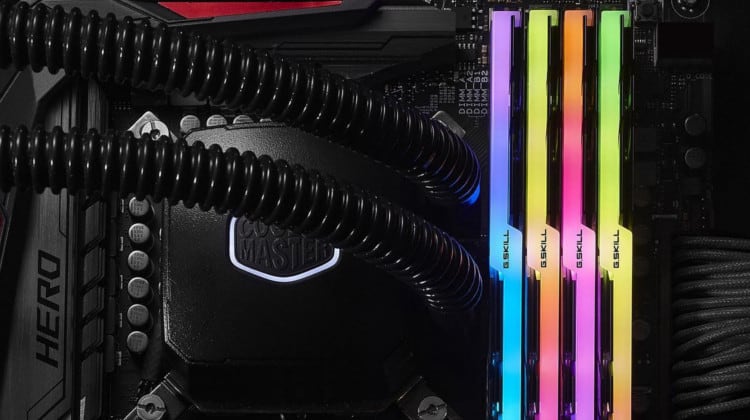
Dual Channel mode or Single Channel?
fiery jay
Tech Guided
One common question that first-time builders and gamers have when they are choosing their memory is whether or not they should get a single stick of RAM or two sticks of RAM that equal the same capacity as the single stick. Most people will say that it is better to get two sti...
Might be in Single Channel mode.
meager relic
Im running 2 sticks tho
fiery jay
In possibly different channels.
meager relic
fiery jay
Run Speccy & see what it says.
meager relic
Run what?
 fiery jay
CCleaner people, yes.
meager relic
And it's not freezing
For now
Ok
Nvm
It frozed
But it survived longer
@fiery jay
meager relic
The graphic card says it's over locked.
But I don't overclock anything
And the fans don't work properly on the gpu
fiery jay
Hmmm...
meager relic
No
fast dust
Have you done anything at all to the GPU?
meager relic
No
fast dust
I bought a used GPU with messed up fans. To fix it all I had to do was jiggle the fan port.
meager relic
Besides removing it to figure out what's wrong ..
fast dust
Don't know if you'd be comfortable taking the cooler off the card though
meager relic
And you would be correct
I did a live video..
YouTube
Welcome to evilytwisted's channel. mainly ill be posting videos about the games i love playing. if you know of a game i should play just message me.
That's me messing with it
Fyi the other videos are cringy af
fast dust
Don't really know then, man. I'm not very good at fixing stuff. My specialty is just building the PCs themselves
meager relic
I'm gonna bring it in for diagnostic
fast dust
Sounds good. Sorry I couldn't help
 fiery pier
@foggy hazel I am currently changing my power supply..
I have found a problem. My old power supply doesn't have a USB 3.0 power connection
foggy hazel
i hate seagulls, i really really really hate seagulls.
on that cheery note:
@meager relic your GPU fans are not busted, they just dont spin until there is a reason for them to spin.
@fiery pier there is no such thing as a "usb 3.0 power connection"
so, there must be a misunderstanding/mislabeling somewhere
@meager relic based on the picture you posted above. Please read the manual. Those 2 sticks of ram are in slots 1 and 4 (from the cpu respectively). Generally, they are supposed to go in slot 2 and 4 (from the cpu respectively)
but, check your manual.
foggy hazel
it says very clearly exactly which slots the ram are supposed to go in, when you have 1, 2, 3, 4 sticks of ram
@fiery pier thats not power. Thats the USB connection for the front of the case
fiery pier
Ah
meager relic
Naed I appreciate your help, but if I may ask respectfully.. why are you still up?
foggy hazel
seagulls
meager relic
Ahh
foggy hazel
currently, they seem to be having a "best of seagulls doing impressions of broken fog horns" competition on the roof of the next block over
meager relic
Can I ask what country or state your in? I'm guessing your coastal
foggy hazel
denmark, and yes, coastal
meager relic
Ahh
foggy hazel
its normal for the season
in a couple of weeks, i will be used to it again
welcome to spring/summer here really
but as i said. Check your manual
meager relic
Not suggesting this.. but would be funny if you were to place laxative coated bread all over the place.....
cursive wharf
more like hell
foggy hazel
you only suggest that because you have not seen how much of a mess they can make even without bs like that.
meager relic
I lived in fort Walton Beach Florida
Gulf of mexico
6 years
I'm all to familiar
I was in Florida when Katrina hit
foggy hazel
@little osprey
 little osprey
I have started getting Memory management blue screens since I got my upgrades
Any clues on how to fix?
foggy hazel
you running mixed ram?
little osprey
Nope just the two sticks of 16 Gb I got from new egg
foggy hazel
you are not trying to run them at a forced speed?
little osprey
I dont know how to do that
foggy hazel
you are AMD right?
little osprey
I think so
foggy hazel
cpu?
foggy hazel
ah, you are the one with the really low budget build right?
foggy hazel
hm
remind me of your mainboard again?
(and no, you were not the build i was thinking of, just checked my list)
little osprey
ahh
Number of cores 6 (max 6)
Number of threads 12 (max 12)
Manufacturer AuthenticAMD
Name AMD Ryzen 5 1600
Codename Summit Ridge
Specification AMD Ryzen 5 1600 Six-Core Processor
Package Socket AM4 (1331)
CPUID F.1.1
Extended CPUID 17.1
Core Stepping ZP-B1
Technology 14 nm
TDP Limit 65.0 Watts
Tjmax 95.0 °C
Core Speed 3398.0 MHz
Multiplier x Bus Speed 34.0 x 99.9 MHz
Base frequency (cores) 99.9 MHz
Base frequency (ext.) 99.9 MHz
Instructions sets MMX (+), SSE, SSE2, SSE3, SSSE3, SSE4.1, SSE4.2, SSE4A, x86-64, AMD-V, AES, AVX, AVX2, FMA3, SHA
Microcode Revision 0x8001137
L1 Data cache 6 x 32 KBytes, 8-way set associative, 64-byte line size
L1 Instruction cache 6 x 64 KBytes, 4-way set associative, 64-byte line size
L2 cache 6 x 512 KBytes, 8-way set associative, 64-byte line size
L3 cache 2 x 8 MBytes, 16-way set associative, 64-byte line size
Max CPUID level 0000000Dh
Max CPUID ext. level 8000001Fh
Cache descriptor Level 1, D, 32 KB, 2 thread(s)
Cache descriptor Level 1, I, 64 KB, 2 thread(s)
Cache descriptor Level 2, U, 512 KB, 2 thread(s)
Cache descriptor Level 3, U, 8 MB, 6 thread(s)
FID/VID Control yes
# of P-States 3
P-State FID 0x880 - VID 0x32 (32.00x - 1.237 V)
P-State FID 0xA8C - VID 0x50 (28.00x - 1.050 V)
P-State FID 0x107C - VID 0x68 (15.50x - 0.900 V)
this stuff?
foggy hazel
i have that text log here in a window
little osprey
Yup
foggy hazel
you kept the mainboard right?
little osprey
Yes
foggy hazel
so, that means you are still on the MSI b350 Bazooka
little osprey
I am guessing
pliant belfry
Can we just take a sec and thank Naed
foggy hazel
what you MIGHT have to do is update the bios, but please dont do that randomly @little osprey
i am looking at the manufacturer support page for your board here, and one of the newer bios revisions has some memory compatibility stuff listed
which MIGHT help
not a guarantee, but it could be worth a shot
little osprey
Im down for it
foggy hazel
But, as i said. DONT DO THIS randomly
and i dont have the time for helping step you through this right now (because i am supposed to sleep)
little osprey
Very well
foggy hazel
but, when i am actually awake or one of the other confident techs are around, it should be a fairly simple process.
BUT, i would very much like to have a recheck of mainboard etc before then
just to make 100% certain etc etc etc
because flashing with the wrong file is NOT smart :)
little osprey
Maybe I can find one of the other techies
foggy hazel
maybe Forks has the time, maybe
Hei might also be able to help, dont know how much experience he has with that part of it thou
@pliant belfry thank you kindly.
and with that said. i am going to try the whole sleep thing again
 latent storm
is there any problems with trident z neo ram?
 tawdry kayak
Ended up going for the ASROCK x570 tb3 itx board for my sentry 1.1 revival build
I want to pair it with that new Acer portable screen to go mobile once the pandemic is gone.
I personally sell square trade and have filed claims for some guests.. Seems like a no brainer to buy a $23 plan on a $220 motherboard that could easily have an electrical failure.
stoic island
... rma?
tawdry kayak
... rma?
@stoic island fair point. I'm not too familiar with how flexible RMA's are
little osprey
What's a good mobo for the 3700x in the $150 range
unkempt ibex
Why are parts so expensive now
stoic island
Corona
 empty mantle
unkempt ibex
empty mantle
unkempt ibex
Ah
 neat crystal
@little osprey get a x570 not b450
stoic island
@neat crystal ... and why is that?
neat crystal
dude its 2 am for me
stoic island
What, you get pcie 4.0, which nothing really utilise.
neat crystal
if u really what to know search it up
neat crystal
its also thrid gen ready
neat crystal
well some arent
still roostBOT
 Kneesargo#0157 has been warned
Reason: Bad word usage
neat crystal
and other stuff that might be important
stoic island
... You know what utilizes that right
and what CPU they're getting
stoic island
Yep
neat crystal
why
stoic island
Cheap
And has everything you need
Good sound card, 2 m.2 slots, same amount of SATA ports, same amount of Pcie x16 slots
neat crystal
also isn't their a pc part shortage or something
stoic island
just 2 less x1 slots, which are basically useless right now
Annnd that board is in stock right now so
Doesn't apply there
unkempt ibex
@stoic island which is better
let me know i already have 2080 and i7 8700
also getting a different psu for the one list
 lofty sequoia
Anyone online rn?
Cannot seem to find out where to connect this case fan into since it’s a 3 pin and cannot find a 3 pin on my motherboard
 full seal
You can connect a 3 pin fan to a 4 pin motherboard fan header. The plastic guide should line up and just omit the 4th pin for PWM signal.
lofty sequoia
Yes thank you I wasn’t even thinking about that ))
 tepid basalt
@unkempt ibex if u r using 8700, what's the point of buying 3200 ram? they don't have rgb from what I see
 coarse coral


 jovial bridge
I got the TUF X570-plus wifi. I don't really care about PCIE 4.0. I wanted dual m.2 nvme. A few reviews said that it was a good "bang for the buck"
I don't like going super cheap on anything. I guess it comes from learning about builds from hardcore overclocker friends. I actually just found the thread from our old forums ( I also had help from another gaming forum, but that site no longer exists).
foggy hazel
@jovial bridge understanding the conditions/context of "why" someone recommends a given part, is just as much a part of figuring out a build as the parts themselves :)
and using parts that someone, that expect to OC heavily, for a build that will be stock for all its life ... that is imo a very weird selection :)
jovial bridge
All of my systems were built with overclocking in mind, even if they were more on the lower end.
This one probably not due to the known OC issues, but I still can tinker
foggy hazel
aye, which means, YOUR build wont be stock all its life, which means there is some amount of logic behind going with OC features
jovial bridge
I may beef up the cooling and stuff later
I want decent VRMs, like BZ says
I don't fully understand VRM design yet. I just want to know if it can handle it. I can figure out clocks, timings, multipliers, etc later.
I already know I'm going to tighten the CL
 marble shuttle
Hey guys I'm in need of help with my ram not being able to run in dual channel. I'm using a MSI MPG Gaming Pro Carbon AC mobo with G.Skill Trident Z Royal 3200mhz 16gb (2x8gb) dual channel ram. I've tried just about anything referred to me and nothing. Even replaced the ram and mobo. Is theres something I'm missing? The pc will boot up with either ram on DimmB2 but not DimmA2 and DimmB2 which is what the mobo manual says is the dual channel configuration.
I've tried checking my cpu socket pins, making sure I have even pressure with the cpu cooler, updating bios, clearing cmos, then updating bios again, installing all drivers, nothing so far. Just the same problem.
little osprey
b450 tomahawk
foggy hazel
@marble shuttle remember, we cannot read your mind.
Have you tested the 2 sticks of ram in each possible combination that you can?
specifically thinking about the mainboard slots here
deft zephyr
Hello naed since i went with the new cpu and will possibly go with the super or 2070 do i get a new PSU , the price of the one in my list is 72 dollars where i can get more watts by the same company for less
 eager chasm
RIP 2 chats now...
eager chasm
seems like who ever is doing it is targeting the chat being used manually...
deft zephyr
no mods on?
 odd nebula
Guess not
foggy hazel
they are working on it
eager chasm
mike is on mobile
eager chasm
inb4 this chat gets flooded too cause it's being actively used and they want to disrupt us
lol
deft zephyr
Idek why this discord is so chill
foggy hazel
because running around in a panic is not going to help anyone
deft zephyr
ye
oh i forgot to ask you, does my motherboard come with wifi or will i have to use my adapter?
it is the Asus TUF B450M-PRO GAMING Micro ATX
foggy hazel
it does NOT come with wifi, because you did NOT say you wanted/needed WIFI
and iirc, you are still saving up for your build right?
little osprey
Hello