#building-and-recc-chat
1 messages · Page 501 of 1
 stoic island
 foggy hazel
@white shale yes, the cooler designs matter for stuff like noise, but generally, performance wise, its very close
stoic island
Only real difference between different 2070 in terms of performance is if they did any factory OC.
foggy hazel
@unkempt ibex https://www.fractal-design.com/products/cases/define/define-c-tempered-glass/black/ <- what is your take on something like that?
 stoic island
Just a question, but meshify C or define c?
foggy hazel
that is why i am asking him @stoic island
 white shale
Next item is either a new chair or main monitor so I can move my other monitor to the side! And I ordered the MSI GeForce RTX 2070 DirectX 12 RTX 2070 Armor 8g OCV1
 unkempt ibex
@foggy hazel looks good but not a fan of the front panel
white shale
Not sure about the factory OC if any there, I'm newish to building PC's xD
unkempt ibex
Not too picky so it doesnt matter a ton
foggy hazel
@unkempt ibex look again :)
unkempt ibex
wdym @foggy hazel
foggy hazel
@white shale dont worry about it :)
stoic island
I have the MSI Geforce RTX 2070 Duke OC :D
foggy hazel
 stoic island
Factory OCs doesn't really matter, they barely make a difference
white shale
Thank you all so much!
unkempt ibex
i cant see the fron panel @foggy hazel
stoic island
Nearly all tower cases have fans on the front. The panel might look solid, but usually there are mesh parts on/near the front that let it take in air.
foggy hazel
@unkempt ibex i misread your earlier post :)
unkempt ibex
ah
stoic island
(I misread it too xD)
unkempt ibex
oh okay ig whatever does the best/helps airflow would suit me best
 unkempt ibex
ah ok
thats fine
i think it would be cooler if u could see the fans in the front but doesnt bother me
foggy hazel
again, you can get whatever case you want really
if you want a pink one with unicorns? sure!
it is your choice :)
unkempt ibex
what website would you recommend using for cases?
unkempt ibex
yeah sure!
foggy hazel
whatever really
stoic island
So you want RGB on the front of the case, and semi-transparent mesh or glass on the front panel?
unkempt ibex
Yes
stoic island
(Just trying to figure out what you want)
unkempt ibex
of cource
stoic island
If this wasn't out of stock, this would be good for you?
https://www.newegg.com/black-cooler-master-masterbox-mb311l-argb-micro-atx-tower/p/N82E16811119380
stoic island
Well that one is mATX ... just noticed that
unkempt ibex
whatever case is pretty much fine to me
stoic island
But anyways naed you know any good rgb cases rn?
 royal spindle
Best mobo for 2.75 slot gpus? wanting to build an i9-9900k with dual evga 2080 super xc ultra
foggy hazel
i dont do the whole RGB stuff
stoic island
I mean, the H500 in that first image could be good
foggy hazel
i prefer windowless cases with decent cooling :)
stoic island
p400a is pretty expensive rn sadly
unkempt ibex
what should my budget be on cases im looking rn
unkempt ibex
yeah
stoic island
basically any case that's not outrageous
unkempt ibex
i mean i want to go with a theme like that goes with my GPU
unkempt ibex
ah ok
foggy hazel
https://www.asrock.com/mb/photo/B365 Phantom Gaming 4(L2).png <- this is a suggestion for a mainboard
that kinda matches what the Omen has
stoic island
does B365 allow for higher mem freq or anything?
foggy hazel
sensible pricing
stoic island
because b360 doesn't
foggy hazel
its cpu limited Mr1111
stoic island
huh
foggy hazel
yes, it can go over, but doesnt matter much
stoic island
alright
td 500 mesh is nowhere to be found....
But ima just leave this as my suggestion for now
https://www.amazon.com/Cooler-Master-MasterCase-Mid-Tower-Controller/dp/B07DRVHBWK/
stoic island
Yea. I'm looking in the ~100$ price range for cases rn
unkempt ibex
i have a budget of 450 give or take and i want to get the best performance with good airflow
stoic island
H500 with the mesh front has very good airflow as far as I'm concerned
unkempt ibex
ok thats fine
stoic island
Heres the GN review on the H500
https://www.gamersnexus.net/hwreviews/3334-cooler-master-h500-case-review-recommended

The newest Cooler Master Mastercase H500[X] case is the H500. Not the H500P, or the H500P Mesh, or the H500M. Just plain H500, but not the identically-named NZXT H500, or the H500i, or the Thermaltake A500 we saw at Computex, nor the Corsair 500D. If NZXT comes out with an H50...
unkempt ibex
ok sure ill do that case
oh so i have a ton of wiggle room
could i get better ram?
foggy hazel
btw @stoic island that board is close to the TUF Pro - Gaming in feature set
unkempt ibex
or i also need a cpu cooler right?
stoic island
Oh really
stoic island
Interesting, I guess that should be the go-to board for intel?
foggy hazel
depends on the generation support you need @stoic island
unkempt ibex
what about i forget the nam ebut its a water cooler and its like 80 bucks
foggy hazel
@unkempt ibex i didnt make a cooler choice, because i wanted you to settle on a case first
stoic island
That's the only good lower price range AIO I know of
foggy hazel
because case can limit what cooler etc
stoic island
That case supports up to 240mm on top.
unkempt ibex
how many fans on top 3?
stoic island
2 fans on top
unkempt ibex
ok
stoic island
Naed, what is with you and pink xD
foggy hazel
that is as fast as it goes really
foggy hazel
different board then
unkempt ibex
or whatever would make the maximum performace
pretty much for this i want performace and cooling
foggy hazel

TechPowerUp
We take a close look at memory speeds, latencies, and command rate on Intel's latest Core i7-8700K with Z370. Scenarios tested include fail-safe 2133 MHz, the platform default of 2666 MHz, and overclocked memory speeds ranging from 3000 MHz to 4000 MHz - at various timings.
take a good hard look at that article
notice the green line
unkempt ibex
green line?
foggy hazel
read the article, it will make sense :)
unkempt ibex
i did
foggy hazel
no, you didnt
unkempt ibex
ok i skimmed it
foggy hazel
its a 11 page article, you didnt read it
 sudden turret
lol.
foggy hazel
go back, read it
stoic island
there are multiple pages
foggy hazel
i dont link things like that for "fun"
stoic island
not just that page
foggy hazel
its something you might benefit from too @stoic island
stoic island
Though I think this page might be the one you're looking for
https://www.techpowerup.com/review/intel-core-i7-8700k-coffee-lake-memory-performance-benchmark-analysis/9.html
TechPowerUp
We take a close look at memory speeds, latencies, and command rate on Intel's latest Core i7-8700K with Z370. Scenarios tested include fail-safe 2133 MHz, the platform default of 2666 MHz, and overclocked memory speeds ranging from 3000 MHz to 4000 MHz - at various timings.
foggy hazel
it answers a question you asked earlier :)
unkempt ibex
oh so 2666 runs the best?
foggy hazel
Please read again :)
stoic island
Naed
unkempt ibex
2666 works the best?
unkempt ibex
what ever is the best im down
unkempt ibex
remember we are at like 380 my budget is around 450
foggy hazel
@unkempt ibex just because you have room in a budget, does not mean you have to use it
unkempt ibex
Sure but i want to have good performace
foggy hazel
and you still dont have a cooler.
unkempt ibex
True
stoic island
But anyways, it looks like from the article, frequency and latency trade blows?
foggy hazel
yes
stoic island
aye
foggy hazel
and, the "swing" of performance is about 7% from worst to best
which is basically nothing
stoic island
also, the little research I did told me that aegis is basically ripjaw without as big a heatsink? is that true?
unkempt ibex
Ok so whatever ram u guys think is best is fine
stoic island
Alright
foggy hazel
@stoic island got a link for some?
unkempt ibex
Ok so that ram
foggy hazel
stoic island
side note, this is all I can find
unkempt ibex
Should i do 32gb of ram or 16 fine
foggy hazel
that is a question we can answer after the cooler question
 lofty sequoia
Hey guys I need some help with some last pieces for my pc build such as a power supply and any other recommendations can someone give a hand?
stoic island
At this point, it's just what looks "the best" to you.
unkempt ibex
Yeah true
stoic island
Any decent cooler can do you good
No need for AIOs, they're quite expensive relatively
foggy hazel
https://pcpartpicker.com/list/vhm8CL <- personal choice
stoic island
I like the u12s too, chromax makes it look nice.
stoic island
Well, it's noctua stuff, it'll be reliable, and you can use it for many years and multiple builds.
unkempt ibex
That’s fine
foggy hazel
i dont disagree with that @stoic island
unkempt ibex
What’s the difference from a liquid cooled and a noctura
foggy hazel
@lofty sequoia send me the link as a pm, i will post it for you :)
@unkempt ibex cost
stoic island
(especially with Noctua offering to ship free upgrade brackets whenever you switch to a new platform, all you need at that point is thermal paste, and the cooler comes with a tube that is good for multiple applications.)
foggy hazel
on behalf of @lofty sequoia https://secure.newegg.com/wishlist/sd/KFZ5QMzqZx0=
stoic island
If you got some time, this is a good video to watch
https://www.youtube.com/watch?v=7VzXHUTqE7E

We're answering the question of whether "liquid cooling or air cooling is better," ft. the Noctua NH-D15, Deepcool Assassin III, NZXT Kraken X62 / X72 (280mm, 360mm), and more.
Sponsor: Buy Thermal Grizzly Conductonaut on Amazon (https://geni.us/1D8Eeq) or Hydronaut paste (htt...
Interesting to say the least.
foggy hazel
but, keep in mind, you really really really do NOT need a liquid cooler on your cpu @unkempt ibex
stoic island
@lofty sequoia I assume your budget is 1700$?
foggy hazel
aye @unkempt ibex
lofty sequoia
@stoic island It's a bit more I just need to know which power supply and whatever else would be recommended for the build
it can go a bit past 2K
stoic island
Well, is it alright I critique other parts of your build?
foggy hazel
does it have to be "all" newegg @lofty sequoia ?
lofty sequoia
go ahead @stoic island
@foggy hazel I'll be using some parts from my current pc so not really.
stoic island
Alright, first, I'll move everything over to a pcpartpicker list, as I find that easiest to work with.
lofty sequoia
But for main parts I'd prefer new just in case
foggy hazel
@stoic island i will make one for him
unkempt ibex
Should I order the parts then
stoic island
I mean moving the wishlist build to pcpp
unkempt ibex
Huh
lofty sequoia
@foggy hazel sorry no it doesnt need to be, I dont mind purchasing from multiple sites
stoic island
Heres the list if you put everything in PCPP.
https://pcpartpicker.com/list/8XM8CL
So, which parts do you already own?
unkempt ibex
The gpu and cpu
stoic island
Alright, what is your budget for the upgrade?
stoic island
huh
thats
So you don't own the ssd, ram, mobo, or case?
(marked the cpu and gpu as 0) This is already 700$.
https://pcpartpicker.com/list/th2Ryk
lofty sequoia
This will be a new build, I have a graphics card and a SSD already but Ill be keeping the ssd maybe selling my old card
stoic island
Um... Is the wishlist your current build or your planned build?
foggy hazel
@unkempt ibex you are ready to order the parts on YOUR list
@stoic island i think you might have read one of them as the other :)
stoic island
yea...
lofty sequoia
@stoic island MY wishlist is my new build project 🙂
unkempt ibex
I had a different motherboard
foggy hazel
(now you know why i use the @ so much)
unkempt ibex
@foggy hazel where was the list u had
foggy hazel
https://pcpartpicker.com/list/vhm8CL @unkempt ibex here is yours :)
stoic island
@lofty sequoia So, What is the budget for everything else other than the CPU, GPU, and SSD?
stoic island
(And please tell me anything else you own that you're planning to use again)
lofty sequoia
@foggy hazel If my current SSD has my OS and everything else can I just put that SSD into my new PC or will I have to buy windows 10 for the new PC?
foggy hazel
@unkempt ibex yes :) Remember, the CPU is just there to make sorting things easier :)
@lofty sequoia you can keep your current license
lofty sequoia
@stoic island Just reusing the SSD I have inside and possibly the HDD for school and random file storage
@foggy hazel Perfect
stoic island
And Budget?
foggy hazel
and i think that is all you need @unkempt ibex ?
unkempt ibex
I think so
I mean I’m definitely gunna need help dissembling it and building it lmao
lofty sequoia
@stoic island roughly $2200 would be my ideal max but if I dont need anything else past this CPU fan I added to the list and a power supply im open to ideas
stoic island
huh alright
foggy hazel
@unkempt ibex re: help pulling apart and putting back together. That is the easy part. So dont worry about that.
Re: Moving data: nope, the drives will be moved over.
lofty sequoia
@stoic island I should have more wattage than my pc requires but how much should i give or take on the matter?
lofty sequoia
@foggy hazel Sounds good I was gonna ask if i should just go with a 600
stoic island
Yes, 650w is all you need unless you run dual GPU or HEDT CPU.
foggy hazel
only reason that the previous system doesnt have a 550 is because of Covid
stoic island
Enermax revolution d.f is still in stock at 110$.
lofty sequoia
I mean would running a 1060 and a 2070 be a good idea? I should i only have the 2070 installed? Never had two installed at the same time
lofty sequoia
@foggy hazel great
foggy hazel
and dont worry about the @ part, that was only when we had two conversations going :)
it just makes things a bit clearer in those situations :)
 weak arrow
Hi can some one tell me if the pro m2 max is good
lofty sequoia
Alright well I got my build to around $1750 is there any other recommendations someone would make to that list?
foggy hazel
@weak arrow see #cpus-mobo-and-memory
stoic island
I would recommend NH-U12s as a CPU cooler if you haven't put one in yet
lofty sequoia
I had a master hyper 212 I'll take a look at that one
foggy hazel
the Hyper 212 and the U12 are in very different leagues
lofty sequoia
sounds good I'll def go with the U12 then
foggy hazel
its basically "just" physics :)
a chunk of metal helps
@lofty sequoia convenience wise, in the longer term, adding in a m.2 drive at some point might make life nicer for you
unkempt ibex
@foggy hazel do u think its gunna be a nice pc just wondering u seem like u know a lot
foggy hazel
its going to be a decent rig yes :)
unkempt ibex
Stable FPS?
foggy hazel
as stable as the parts can deliver yes
lofty sequoia
@foggy hazel Would it be easier to install those instead of the 2.5"? I have one of those and plan on installing that into my new PC upon completion.
foggy hazel
well, the convenience part of m.2 is that there are no cables, and only 1 screw
lofty sequoia
I see, I have cables so personally I wouldnt mind plus this computer will be larger than my current small tower
foggy hazel
aye aye, it is why i started the suggestion with "Convenience wise"
lofty sequoia
Lastly do you have a recommendation for a 650W powersupply?
lofty sequoia
Awesome, thanks you two!
foggy hazel
you are very welcome :)
 polar goblet
What difference does having a better motherboard make?
Comparing the
MSI MPG X570 gaming pro $259
MSI MPG X570 gaming edge $200
foggy hazel
@polar goblet MSI has a "add to compare" button on their site :)
polar goblet
Only difference is
Pcie x1
LAN
So just a better WiFi connection?
 sullen spoke
vrms too
the pro has better power, but it might only make a difference if you are getting a high end cpu like 3900x or above and overclocking
polar goblet
I’m going to
3900x or 3950x
Overclock every now and then for mining when I’m not at home
lofty sequoia
@foggy hazel What is more preferred amd or intel motherboard and cpu? I have a intel on my list but my friend is insisting i go with the ryzen
foggy hazel
@lofty sequoia didnt you already own the CPU?
lofty sequoia
Yes, but im getting a new one since I currently have a I7-4790 in my current rig
rather just upgrade everything since its a new pc build
foggy hazel
ah, there was a misunderstanding then
lofty sequoia
No worries
foggy hazel
lets just clarify things a bit then :)
good :)
reason for all of these question is that it would be silly to do a lot of work on the gpu, if the rest of the system doesnt work
lofty sequoia
understood
foggy hazel
and that was meant for the other channel :)
 buoyant flame
foggy hazel
buoyant flame
foggy hazel
but the topic is close enough :)
@lofty sequoia lets take it here in public, other people can benefit from it too then :)
lofty sequoia
sounds good!
lofty sequoia
correct, but I'll be buying a second one to seperate the OS from the gaming files
lofty sequoia
Negative that will be the only parts I will be adding to my new build
foggy hazel
okay
so, basically what you are asking is this: What build can i get for X budget? and should it be amd or intel?
lofty sequoia
more so for the second question, my buddy was telling me to go with the AMD however I've had both and have liked the intel more, but if one is better for gaming then I'm willing to maximize it. I wasnt sure how much I should really be spending on a motherboard since he told me $240 was a bit high even with the current deal for that and the CPU on newegg
foggy hazel
lets flip the question a bit
lofty sequoia
Ok
foggy hazel
you seem to be willing to pay 1600 for your new system, based on the PCPP list
is that a fair assesment?
lofty sequoia
Correct Im willing to pay even as much as 2200$ but if I dont need to spend as much then I see no reason to
narrowing it down, which is the better motherboard ASUS TUF Z390-pro gaming motherboard vs the ASUS ROG Strix Z390-E Gaming LGA 1151 (300 Series) if that helps. Lets say I stuck with the Intel
foggy hazel
@lofty sequoia
https://pcpartpicker.com/list/hNXHsk
that does everything your previous list does
 fast lantern
Does anyone know if there will be any performance differences between the asrock b450m pro4 and the asrock b450m pro4-f?
foggy hazel
performance wise, no @fast lantern
foggy hazel
the board is the board
fast lantern
Okay, thanks
foggy hazel
@lofty sequoia and that list includes the extra SSD for the OS seperation
https://pcpartpicker.com/list/fqYrn7 <- that included 2 drives, just for the heck of it
and a 12 core cpu
lofty sequoia
@foggy hazel thank you, now for the original list you helped me with (Intel) the two motherboards I listed which would be more preferred? I personally dont see too many differences between the motherboards except the pricetag diff
foggy hazel
main difference is optane support @lofty sequoia
lofty sequoia
Should I get that or no?
unkempt ibex
@foggy hazel
foggy hazel
optane is just about useless @lofty sequoia
unkempt ibex
U sure that’s the best cooling for my cpu
foggy hazel
@unkempt ibex remember what i said about the article link?
but, please do tell me. What have you found that makes you ask that?
lofty sequoia
sorry last question, so between the strix and the TUF z390 series which would you go for?
foggy hazel
whichever one you want really
and nothing to be sorry about.
there are no stupid questions, only silly answers
lofty sequoia
ok almost forgot! for front usb ports what would you recommend ?
foggy hazel
whatever you need/want
lofty sequoia
❤️
foggy hazel
however, keep in mind, your mate has a very valid point about the AMD platform
as things stand, right now, the intel platform is "just" more expensive for no real tangible benefit
stoic island
This board might become a pretty good high end board
https://www.youtube.com/watch?v=O2KbpmMg44M
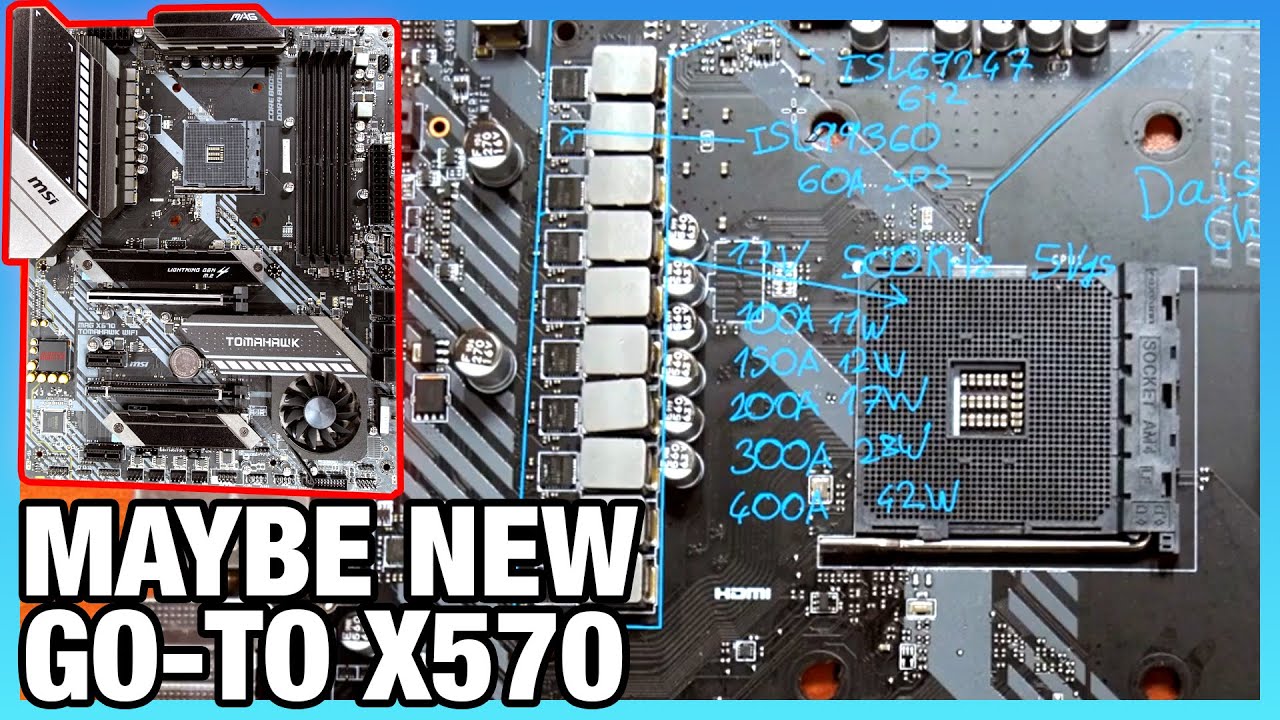
MSI's X570 Tomahawk, on paper, fixes many of MSI's VRM thermal issues by building one of the most powerful VRMs on a board at its price. Buildzoid reviews the VRM design here.
Sponsor: Corsair's Hydro X Water Line on Amazon (https://geni.us/MZpxBRN)
In this video, we're looki...
wifi too
 slim nacelle
Ryzen 5 2600X,Corsair AIO cpu cooler,16Gig Flare X, Vega 56,Gigabyte X470 Ultra Gaming, Corsair CZ 750M psu,DIYPC Vanguard-RGB Black case .
Looking to do mild upgrade. Going to get new GPU power cables for sure. And thinking Ram. Not sure though if I should go for replacing my 16 CL 3200 ram with 18 CL 3600 or just doubling my existing ram?
 latent storm
why would you get cl18 3600?
slim nacelle
Either way its about the same price to buy another 16 gigs of the 3200 16 CL Flare X or replace the Flare X with 16 gigs of 3600 18 CL Geil. Just not sure what one would benefit me more.
Im not well versed of ram. Wasn't sure if the faster ram would benefit my system more than the extra ram.
I have about 150 dollars to spend. So I figure 4) to 50 dollars on some cables and the rest on ram.
 kind shuttle
hey where's the best place to receive some feedback on a build
completely new to pc building
sudden turret
right here.
kind shuttle
sweet!
foggy hazel
@kind shuttle send me the link, and i will post it for you
on behalf of @kind shuttle https://pcpartpicker.com/list/TPn79G
stoic island
huh
kind shuttle
keep in mind I have virtually no idea what Im doing except for the minimal research/advice I got from friends
stoic island
windows ebay key :p
foggy hazel
@kind shuttle know/understand the following: There are no stupid questions, only silly answers.
kind shuttle
I think I'm secure enough to survive discord but I appreciate the advice hehe
foggy hazel
some people are afraid to ask.
hence the comment
max budget with monitor is 1100?
and you are located in the US?
kind shuttle
yep. US and my budget is around 1000 but going a over a little is prob fine
Id rather set myself up to have something i can upgrade
kind shuttle
well
foggy hazel
stock is horrible
and prices are silly
that doesnt mean we cannot look at a build for you, but please keep in that in mind :)
foggy hazel
20-50%
kind shuttle
is that some parts or all
foggy hazel
and that is me being "nice" about it
stoic island
everything is weird
stoic island
Naed, thoughts about this plus like a ebay key?https://pcpartpicker.com/list/YzCLHB
foggy hazel
think about this, a good psu 3 months ago would have been 70-ish usd, now it is 85+
kind shuttle
ok lets pretend Im going to buy in the next week
 hybrid mason
yea me too
foggy hazel
kill the hdd and go full ssd @stoic island ?
and we cant do better on the monitor price wise?
stoic island
sata?
foggy hazel
as "only" go 144hz on the monitor?
stoic island
idk monitor stock has been horrible recently
stoic island
foggy hazel
@kind shuttle Your audio gear? is it usb or minijack based?
kind shuttle
like my headset?
foggy hazel
aye
kind shuttle
the difference would be two audio jack cords vs 1 audio/1 usb/
?
iyk what im saying
foggy hazel
do you have any gear right now?
if you do. what plugs does it have
that is the question :)
kind shuttle
i have a headset Ive used on my pc /xbox
it has 1 USB connector and 1 audio jack conenctor
foggy hazel
usb based then
okay
@stoic island do you remember which low price board it is that is born with 3rd gen support?
stoic island
kind shuttle
take ur time my dudes
stoic island
theres the msi A320m a pro max for 60$
kind shuttle
does it matter which games i want to run
foggy hazel
i know i will remember it when i see the bios names, because they are "weird"
kind shuttle
or is it kind of 1 size fits all
foggy hazel
MSI B450M PRO-M2 MAX <- that was the one i was thinking about
because that is a potential 20-ish that could be pumped into something else @stoic island
because perhaps stretching for something like a 2060 is really tempting
stoic island
not many places to shave off cost
foggy hazel
re: monitor: and yes, stock is indeed silly, nothing "interesting" is available
stoic island
unless we go 1600af
foggy hazel
yeah .. dont want to
foggy hazel
part names and suggestions being exchanged @kind shuttle :)
https://pcpartpicker.com/list/2Tq3vW my slight change on the GPU
together with the MAX board brings us to 1051
kind shuttle
nice
foggy hazel
its @stoic island you should be thanking, its his work :)
kind shuttle
thanks @stoic island
foggy hazel
and yes, i know it is above your original 1000, but imo, it is worth pushing for
kind shuttle
thats prob fine
foggy hazel
and something to remember, if you show it to someone else and they complain about the PSU size, please send them this way, i could use the entertainment :)
kind shuttle
thanks for the help!
stoic island
You're welcome, but Naed definally takes credit.
kind shuttle
does the case matter?
foggy hazel
you are very welcome
as in, you dont want a tightly sealed box
but aside from that, not really
kind shuttle
ok so the one I picked is fine?
foggy hazel
aye
foggy hazel
you both need and want the ssd
that was part of what Mr1111 and me talked about
going with just a ssd, but with more storage vs the first model suggested
gives you slightly less overall storage
but, a much better experience using the system
kind shuttle
great
foggy hazel
any other questions @kind shuttle ?
kind shuttle
monitor advice
foggy hazel
ask away :)
kind shuttle
ok
stoic island
Most people easily notice a difference between 75hz and 144.
kind shuttle
damn
i was hopeful
I lied...1 more question out of curiosity
Why that graphics card as opposed to another brand/model
foggy hazel
because it is the cheapest 2060 series card on the market
stoic island
(I think they mean as opposed to AMD).
kind shuttle
What’s the advantage compared to other graphics cards
Not cuz I wanna replace it I just don’t know what makes a card good or not
foggy hazel
price/performance is good vs what else is on the market
 modern shadow
yes
kind shuttle
Do I need anything else to built it
Or would I b able to as soon as all those parts came
modern shadow
probably the second one
foggy hazel
@kind shuttle time and patience, together with a screwdriver
 shy basin
I need a build for $2000
stoic island
eh, this works.
https://pcpartpicker.com/list/nTvWwh
modern shadow
why not trident Zs
stoic island
Zotac is just okay
Case is out of stock
PSU wise revolution D.F is better than RMx
The fans are... Well they're expensive Corsair rgb fans, whatever.
Ima just retrofit my build
 grim silo
So I got some psu cables from cablemod, but there is a "missing" pin in the motherboard side connector of the 24 pin that dosent match the missing one on the cable that came with the PSU
Should I be worried?
stoic island
What do you mean?
@grim silo missing in what way?
As in there's an extra 4 pin next to the normal 24pin?
On the motherboard?
grim silo
Can I pay pictures here? Figure it's easier to show than explain
stoic island
Sure
 sudden jetty
NO
NO
What’s a good build for gaming and streaming with the 1600af and 2060ko for around 700-800 USD
sudden jetty
my fortnite clan
grim silo
This is both ends of the cablemod 24 pin
sudden jetty
but what is for this
grim silo
So the second from the top left on the motherboard side (bottom) and the two on the right connector for the psu side
stoic island
Weird, have you tried plugging it in instead of the usual one?
sudden jetty
What’s a good build for gaming and streaming with the 1600af and 2060ko for around 700-800 USD
 still roostBOT
 kiythefast#8321 has been warned
Reason: Bad word usage
 wide sparrow
Never going back to vinalla MC
sudden jetty
What’s a good build for gaming and streaming with the 1600af and 2060ko for around 700-800 USD
foggy hazel
@sudden jetty patience is something you really should learn to use
grim silo
Reason why I was concerned is it dosent match this which came with the psu
sudden jetty
my firend is rushing me
foggy hazel
@sudden jetty not our problem.
sudden jetty
What’s a good build for gaming and streaming with the 1600af and 2060ko for around 700-800 USD
idc
grim silo
It's a GM 650 sfx if that helps
stoic island
Gonna go off this
foggy hazel
@grim silo check your manual for the PSU
stoic island
Hmm weird
sudden jetty
pls just help my friend and answer
What’s a good build for gaming and streaming with the 1600af and 2060ko for around 700-800 USD
 lime forge
youre not gonna get help if youre rude 🙂
sudden jetty
sorry
lime forge
please post the question just once, someone will respond if they have the time.
grim silo
The manual dosent seen to have much in the way of specifics on cables
Other than which ones are included
foggy hazel
give me a sec @grim silo
stoic island
Huh
Idrk these things eh
To me, it looks like the 4th pins from the right are just ground pins?
 sly python
@foggy hazel question im also getting a wudfrd.dll error, linked to USB, narrowed down the device but removed it then the error moves to another usb port device, no matter what devies are in the error occurs. The driver \Driver\WudfRd failed to load for the device this also happens in event log when the computer freezes. ive uninstalled all UBS drivers using a remote program and rebooted and let them reinstall issue still happens, a couple posts say goto run + services - services.msc and modify Windows Driver Foundation.. how ever in my services.msc i have no such service
could my mobo be dying as well /facepalm
stoic island
Now that's a question that's way out of my league and hard for me to research on Google with mobile :p
stoic island
Hey, worth a try to at least figure out which ballpark the issue is.
foggy hazel
@sly python i will have a look when i am done with @grim silo
sly python
ive done all but the services.msc one due to not having that service lol
stoic island
Naed, I believe it should be safe to try that cable and see if it works? Or do you think we should just be more cautious.
sudden jetty
did yall forget about me
sly python
kiy im sure they they will get to you soon 🙂
stoic island
One at a time, still working with Outlaw15.
foggy hazel
@stoic island trying to verify that it isnt a mixup with the cables
foggy hazel
because i sure as heck dont want to say "okay" to something that causes a smoke cloud
sudden jetty
im actually a good kid yk
stoic island
That is true
sudden jetty
SO ANSWER
weak arrow
Who is this kid being so annoying
sudden jetty
im not annoying
stoic island
Patience.
https://pcpartpicker.com/list/4hTJGc
foggy hazel
@grim silo still around?
grim silo
Yep, what ya got?
foggy hazel
based on what i am seeing, something is off
grim silo
With the extensions or the ones that came with the PSU?
foggy hazel
extensions
grim silo
Hmm
foggy hazel
the 24 pin section is what i have been focusing on
so, i would strongly suggest that you have a chat with cablemod customer service, just to check. But i am fairly limited in that i cannot 100% verify the schematic i am looking at here @grim silo
but, as i said earlier, better safe than sorry
 cedar spindle
Anyone have Corsair ll120s?
grim silo
Sounds good. I'll see if I can reach out to them. I bought the kit from microcenter so I guess I can try stopping by there if they know anything
Thanks!
cedar spindle
Are the screws supposed to be this hard to screw? Lmao
sly python
@grim silo if you havea fry's local they sell extension cables you could take yours in and just compare it to one in the store
foggy hazel
@grim silo you are very welcome, and do make certain you talk with cablemod about it, just to make certain that the person you are talking with, actually 100% knows what they are talking about
grim silo
@sly python Unfortunately I don't think there are any Fry's in the DC area
sly python
/shurg
sly python
@foggy hazel ive learned reseting a stable system is bad and not to do it again LOL!
foggy hazel
now you know why most technicians are VERY loathe to "just flash the bios!"
sly python
lol
i flashed them but that was one of the last attempts haha
i just find it of that one of the "solutions" that's i posted above is not an option on my side.
sly python
and im getting curious if usb ports causing errors could also be a sign of a mobo dying? (ive also unplugged the front ports and am plugged directly into the back of the mobo)
sly python
ha just got a pop up about a usb device not working properly again how ever its all working just fine.
Windows has stopped this device because it has reported problems. (Code 43)
A request for the USB device descriptor failed.
 warm nova
I get those popups when my phone is connected sometimes
foggy hazel
@sly python check all your cables
sly python
all i currently have plugged in are mouse and key ( from my 2nd pc)
they are all good no kinks no signs of issues
foggy hazel
as in, check IF you can trigger that pop-up by wiggling cables
sly python
yea
foggy hazel
you might not be able to "see" the problem on the cable
warm nova
what keyboard is it
sly python
was a razer chroma black widow 2 now its a 2 weeks old razer huntsman
warm nova
some mechanical keyboards have a switch to select the polling rate of the keyboard. check that
foggy hazel
@warm nova you thinking, over polling?
warm nova
I personally have never had an issue with my corsair, but some people have
It will make the usb port crash if it polls too much
foggy hazel
so yes, you were :)
warm nova
I have had that problem with my g502 when its set to 1000
massive lag spikes and disconnects
which is another thing, check the mouse polling rate. A lot of them will default to 1000 which is way too high
stoic island
Really? I've always had my mouse at 1000.
foggy hazel
@sly python did you see the comment the other day about scaling the complete system back to the minimum amount of components and trying from that state?
@stoic island take note of the "some people have" part
that is the important bit
sly python
yea i tried that some what lol reduced it to one monitor 1 stick of ram and just a mouse and key inside the case i cant reapply unplug much as its a liquid cooled system
foggy hazel
you might, personally, go blissfully unaware through a minefield :)
sly python
i had the gpu unplugged as well just supported by a cardboard box
stoic island
I mean, I didn't see a "some people" in the 2 messages I quickly read, that's why the assumption was made :p
foggy hazel
:)
warm nova
the some people was from me
polling rate issues are really hard to nail down unless you know specifically what you are looking for
foggy hazel
and to add to that: and you specifically are being VERY methodical about testing it
warm nova
for the device thats not working can you get a device id from device manager
that is the device with the code 43
sly python
yea i just moved the device to another port lol
wide sparrow

grim silo
@foggy hazel found a post on Reddit from a few years back. Seems EVGA has a different pinout for their sleeved cables and stock cables and the cablemod cables are based on the sleeved ones
https://www.reddit.com/r/buildapc/comments/412yvv/troubleshooting_cablemod_eseries_24_pinout_wrong/?utm_medium=android_app&utm_source=share

reddit
8 votes and 13 comments so far on Reddit
Gonna stay safe and wait to hear back from cablemod customer support but it's looking promising
foggy hazel
nice find @grim silo and exactly as Japetto is talking about in the reddit thread. "If Cablemod offer their guarantee ... "
sly python
@foggy hazel we can get back to my issue later its getting late and ill just deal with the crashing for now lol, at least till the PSU arrives and hey maybe the PSU will solve all my issues. 🙂 you've been a great help and i've enjoyed our conversations 🙂
 cold sorrel
I still am highly tempted to just go ahead and buy the keyboard, then wait out the rest of the shortage. To test if it works I can always connect it to my laptop.
https://www.newegg.com/p/N82E16823201111?Item=N82E16823201111
 dense bane
hey guys i have a big noob question.. if im going to upgrade my mobo/cpu/gpu should i just go ahead and fresh install windows 10?
 compact hill
foggy hazel
compact hill
foggy hazel
@sly python lets see how things work out with the psu :) and likewise :)
@viral ore got a stand for that monitor mate!
or place it on some books or something
 celest crest
@compact hill I didnt ask the question but I am switching to amd from intel, what do I do?
dense bane
no i'm not @compact hill i'm sticking with just intel but im afraid previous drivers from my gpu could confuse the new gpu i guess?
celest crest
Aye I am switching to amd from intel and I wanna know how to delete intel drivers I don't need afterward
 viral ore
your reinstalling windows, correct?
celest crest
I am yeah
viral ore
then dont worry about it
celest crest
Should be
What drivers do I need to get after i install windows for amd? does windows automatically install the ones I need for amd? Isnt their oc application I should get?
celest crest
what r the amd programs I should install then
viral ore
well, if you have an AMD GPU, you can get the drivers for that
that will come with an assortment of programs
celest crest
hmm
viral ore
your cpu doesnt need anything. the only programs you would get would be to overclock it
dense bane
what about for me. i wont re-install windows. i'll just swap out gpu and cpu and mobo.
is it necessary to re-install in this case?
viral ore
it might work, it depends
foggy hazel
necessary? no. Recommended? yes
viral ore
windows can usually detect hardware changes, but as naed said, a reinstall is preffered
foggy hazel
reason for it being recommended? People are not smart.
dense bane
what do the smart people do then
celest crest
Do you suppose I should still reinstall if I am only swapping my cpu and mobo
viral ore
i would say try and boot windows anyway after the part swap
foggy hazel
@dense bane know what part of the system to actually blame, IF something doesnt work.
viral ore
no reason not to, if it works, it works, otherwise, you can just reinstall
celest crest
I will try boot first then try out that recovery/reinstall option in windows 10 settings Intender told me about
foggy hazel
what you have to keep in mind Vex is this: Have a bootable usb media ready BEFORE you do the swap
dense bane
i was thinking this ^
foggy hazel
in that case, IF things dont work out, you are not running around in a panic
foggy hazel
you are welcome, and best of luck @dense bane
viral ore
or google drive
cold sorrel
Yeah, back up anything you want to hang onto.
I have an external hard drive I will be backing up to when I build my new system. Hopefully it's still got enough space left for everything
cold sorrel
Maybe later today I'll check it and make sure it's still good. I have things on there that I didn't want to keep on my laptop, but didn't want to get rid of. (Most some modded setups for games I'm not currently playing.)
 little osprey
Any good cube case's where I can lay my motherboard flat down that are for sale?
 eager chasm
There are a few Silverstone itx cases like that
stoic island
No
There is no need for that unless for some reason 2 more cores is paramount to your success
 woeful agate
how bout for gaming @stoic island ?
woeful agate
future proofing?
stoic island
Current games barely take what, 4 cores if optimised?
foggy hazel
its ALL about what you actually need, with the things you do
stoic island
6 cores still aren't fully utilized
And single core perf is what you're looking for in games
and same generation same iPC :p
woeful agate
kk
polar goblet
@stoic island
I’m going to go with the 3950x cpu what motherboard do you recommend?
Still the MSI MEG X570 Unify?
Comparing the Gaming Edge, Gaming Pro Carbon, Unify
stoic island
One sec
The reason I recommended unify because it's an amazing board, with great VRMs and wifi
polar goblet
Gotcha. The VRMs matter during overclocking?
Or could ya explain that for me pls?
stoic island
Here, look at this
Had to zoom out because the difference is quite a bit
Tier A is maxed out 3950s on ambient, aka air cooling.
Therefore Tier S- is basically maxed out 3950x on AIO and water
VRMs matter during overclocking
it's like the power supply for the cpu
polar goblet
What do you mean by maxed out?
stoic island
The max you can OC it
polar goblet
Ah so with the better motherboard I can OC the cpu more without it crashing?
Or how does it affect it?
polar goblet
Oh okay so the way they have everything installed while OC the cpu it’ll get hotter on the lower end motherboards
polar goblet
Ah okay. Ill have to do some research on VRMs to understand them more!
Thank you for giving me a understanding!
Such a major help
Gonna go with the unify
My build:
Corsair Crystal 280x Black
MSI MEG X570 Unify
Ryzen 3950x
GSkill NEO 32GB (2x16) 3600
Samsung SSD 860 EVO
EVGA 750w
stoic island
Pcpartpicker always useful :D
eager chasm
@stoic island technically a very small selection of games will use all 16 threads equally, but it's still the case that most games use 4 core or less effectively
polar goblet
After looking it seems like the
Samsung SSD 860 EVO SSD
And
Samsung 860 EVO M2
Are pretty much the same price.. Is m2 better?
stoic island
Ryoku
They never put full load on more than 4 cores
that is what I'm referring to
Wait crypto
I thought we suggested 860qvo to you?
polar goblet
Lol I didn’t know there was a difference
polar goblet
What the difference between EVO and QVO?
stoic island
if you want even faster storage (not practically faster, just faster transferring files), we have other options
Qvo is just a cheaper sata drive
It uses QLC, which is a bit slower than tlc.
polar goblet
I’m just trying to get something good that’ll work good
stoic island
Qvo works good.
polar goblet
Seems like EVO is faster
stoic island
Evo is just expensive
You can get that performance from other avenues.
Can you link your pcpartpicker?
I'm forgetting the specifics of your build and I don't want to pepper you with random questions lol :p
Well, max rated speed is actually the same lol
Anyways
@polar goblet you there?
respond whenever you're avaliable.
no hurry
stoic island
you got a CPU cooler?
polar goblet
I don’t 💀
Gonna need one by going with the 3950x instead of the 3900x huh?
stoic island
Yea
polar goblet
Will this all fit in the
Corsair crystal 280x ?
I didn’t see it on pcpartpicker
 merry palm
Hi can some one make me a gaming and streaming build for 600-700 usd please🙏😁
merry palm
K thanks
stoic island
@polar goblet it's in there, but I dont think it fits in the 280x.
Because the 280x is a micro ATX case
and the MSI Unify is a full ATX board
modern shadow
@merry palm are you buying now, or after the whole corona thing?
merry palm
I’m working for the money and buying the parts as I get enough
merry palm
Oh it’s ok I just want ur best thoughts
polar goblet
Welp there goes another $100 to upgrade to the 680x instead of the 280x to fit the motherboard 😢
kind shuttle
I would appreciate some additional opinions on this build: https://pcpartpicker.com/list/2Tq3vW
sidenote: mr1111 and naed already helped but the more the merrier
foggy hazel
@polar goblet thats a lot of money for a case like that
@kind shuttle considering your budget, there isnt anything else to do
kind shuttle
completely respect that but consider the perspective of a young man who knows nothing about computers and is about to blow a grand on one
 coarse moth
Opinions on a build for my mom, just wants something dead simple: https://secure.newegg.com/wishlist/sd/qqNgFilxOdmFDsJA1rEurg==
kind shuttle
nothing personal
modern shadow
https://pcpartpicker.com/list/7TjGNq here you go @merry palm
foggy hazel
@kind shuttle i dont take it personally, i am way too old for that :)
modern shadow
ask for other's opinion though
merry palm
Ok
foggy hazel
@modern shadow he aint going anywhere without memory or drives
coarse moth
@kind shuttle I think you could get a better price on that display
modern shadow
forgot
kind shuttle
@foggy hazel its good to see there are some people left on the internet who have maturity above a 6 year old child
foggy hazel
diapers dont fit my slim behind @kind shuttle :)
merry palm
Thank u
foggy hazel
@coarse moth availability
kind shuttle
let me return the favor and reccommend some huggies adult size
foggy hazel
no thank you, i am trying to quit, i have heard they are bad for your health in the long run, and they get addictive too
:P
:)
modern shadow
https://pcpartpicker.com/list/sNW9vW @merry palm All good, I guess...
ask others though
updated
merry palm
Should I go for the 2060 ko
stoic island
300$.
polar goblet
@stoic island
Lmao bro I’m rekt. I didn’t even think about a monitor while building.. I’m gonna have to switch it to the 3900x cpu.
Everything else can stay the same ya?
Just gonna swap out the 3950x and get a 3900x
stoic island
Usually if you're looking in the 300$ range, it's the best option you got
Sure
What kind of monitor do you want?
1440p or 1080p?
merry palm
I’m 14 I play on Xbox kbm but the input delay is horrible and I want to switch to pc and I just want to build it so I have absolutely no clue about any of this
polar goblet
Idk yet; haven’t even dived into monitors yet. So no clue tbh
stoic island
So, how large a monitor do you want?
Also, what GPU did you have before? My memory is crap :p
I would suggest this monitor as a pretty good 1440p monitor
https://www.newegg.com/p/N82E16824475051
It's VA, not IPS, but it's got good response time and refresh rate
foggy hazel
thats some expensive parts with no real benefit imo
polar goblet
$1500-$2000
But I also got to get Windows 10 and a monitor
foggy hazel
i see 400-ish usd being used for no real benefit
stoic island
I thought there was a bigger budget...
At that point, the unify board would not make too much sense.
polar goblet
I can afford all that I got on there.
But why wouldn’t the unify be good for it anymore?
foggy hazel
ask the question in a different way
What does the Unify give you that is worth 300?
that a 200-ish board doesnt
stoic island
Naed, that was my mistake, I assumed there was a large budget for a 3950x, so I went to one of the best boards I knew.
polar goblet
I mean I can get that board for the extra $100.
If you were to put $100 elsewhere other than the motherboard where would you put it?
Or which motherboard would you recommend?
foggy hazel
also, a question for you @polar goblet : what comes first, performance or looks?
polar goblet
Looks I want that case. Because it looks really nice.
Performance I think everything I have performs really well no?
So performance yes is #1
But looks do matter to me
 young bough
Hey, I got a stupid question that I need some help with
foggy hazel
lets compare two builds @polar goblet
@young bough there are no stupid questions, only silly answers
polar goblet
Ok 👌🏼
young bough
I feel the need to upgrade my PC, my motherboard and CPU is old and I can't upgrade to anything better with that motherboard, an ASRock Z77 Pro4. I use an i7-2600k which base is 3.4 GHz, I'm thinking about moving to an AMD Ryzen 5 3600 that is 3.6 GHz, but now I have an accompanying newer motherboard and DDR4 Ram
Is it worth it to really move up from what I have to that, because they're almost exactly the same in terms of processor power, save the more abundant cores for the Ryzen and a more compatible motherboard and better RAM
young bough
Budget is kind of in the air for rn because this is a future investment in the coming months. I'm looking at right now around 400
Oh no links
AMD Ryzen 5 3600 6-Core, 12-Thread Unlocked Desktop Processor with Wraith Stealth Cooler with B450-F Gaming Motherboard (ATX), name of the processor and motherboard
stoic island
Well, to upgrade you'll need CPU, Motherboard, and Ram. I would suggest Ryzen 5 3600, Asus Tuf B450m pro gaming, and G.skill Ripjaw V 3600mhz cl16 2x8gb.
But some other things to consider, was that PC a prebuilt?
young bough
It was a custom prebuilt yeah
stoic island
Do you know what power supply, and what case?
young bough
I bought it online from a private seller
Thermal Take 500 W and Thermaltake Versa H22
foggy hazel
@polar goblet sorry for the delay, pcpp was being annoying
@polar goblet can we agree that your previous linked build was 1500?
stoic island
Seems fair enough
 crude otter
So, was putting together some parts to start a build, mind if I post and get some opinions?
stoic island
We don't mind, go ahead.
foggy hazel
because this, is functionally (based on what you have talked about so far, better performance for lesss, https://pcpartpicker.com/list/2LXfCL
 wary geode
Yeah it’ll be fun to do
crude otter
stoic island
Can you put that in a pcpartpicker.com list?
crude otter
Never used that, I'll try it out
stoic island
I already see some things I'd like to critique, but that site makes things much easier
young bough
Why would you recommend the TUF B450 over the ROG B450?
stoic island
Better sound chip, and better VRMs iirc
wary geode
Yeah I agree with him
wary geode
Does he need 32gb what are you going to do with the computer?
I mean it’s good and all just seems too much and unessary if your just gonna game
Correct me if I’m wrong but the 710 doesn’t give the greatest airflow even for that amount of money
There are better options I would like to say
If I’m wrong please correct me
foggy hazel
@young bough the B450M <- the m part is important, because that brings the board down a good 20+ usd
stoic island
That too.
foggy hazel
@wary geode its his list, we have not remotely started digging into it yet :)
there are a bunch of things "wrong/weird" with it :)
wary geode
Ohhh ok lol missed that part
foggy hazel
there is no way i would recommend something like that @wary geode :)
wary geode
Ok np
foggy hazel
edited the list, because i for some reason had forgotten the gpu
crude otter
Thanks naed, its gonna be high end gaming/vr, and the case was mostly cable management perks I suppose
young bough
The B450M supports 3rd gen AMD? it's just weird seeing the price drop from before I'm so paranoid aha
stoic island
Well, we can do some work the list to provide more performance and maybe even better looks for the same price jlrogers.
Yes, it does support 3rd gen ryzen, according to Asus' website.
crude otter
Was thinking of paying the little extra to go to the nitro+ GPU, but didnt know if it was really worth it
I also do a touch of 3d rendering, however not much
young bough
"MSI ProSeries AMD Ryzen 2ND and 3rd Gen AM4 M.2 USB 3 DDR4 D-Sub DVI HDMI Micro-ATX Motherboard (B450M PRO-VDH Max)"
A lot cheaper motherboard I found
Is that still good?
stoic island
Not a great board
Worse audio, worse VRMs.
That's a cheaper option for builds that need to save a buck.
young bough
ASUS TUF B450M-PRO GAMING AMD Ryzen 3 AM4 DDR4, HDMI, Dual M.2, USB 3.1 Gen 2 and Aura Sync RGB LED Lighting Micro-ATX Motherboard
Thoughts?
That's the one I believe you and Naed recommended to me
 karmic idol
can i not send pc part picker lists here
polar goblet
@foggy hazel
Hey the only difference in between the
GSkill neo 32gb 3600 and the
Ripjaws 32gb 3600
Is the RGB lighting?
polar goblet
Ok thanks.
Now with all these different rgbs.
I got the case fans with Corsair, motherboard using aura, ram using whatever lighting.
Will all these match up in 1 program and run the same lighting?
karmic idol
yo is there a way i can send my pcpp list for you guys to see
 cursive wharf
@polar goblet check on companies site for that. Should have something somewhere about what RGB software works
 icy plume
@karmic idol there should be a link for you to copy up near the top in a green bar
i'm pretty sure you can just click on it and it'll copy the link for you automatically
foggy hazel
@karmic idol just send the link to me, and i will post it for you
cursive wharf
Not level 3
karmic idol
yeah but when i send it mee6 messages me saying i cant send pc part picker links
foggy hazel
on behalf of @karmic idol https://pcpartpicker.com/list/BdK79G
karmic idol
i have about $1000 to upgrade and ive already bought the cpu and ram
 humble jacinth
Can someone tell me the main difference between Radeon and NVidia cards? And why Radeon are a lot less?
 fast dust
Nvidia tends to have better drivers
polar goblet
Do y’all use 2 hard drives?
Or just one?
Getting a 1TB M2 drive.
Not really going to be storing to much of stuff on here, maybe just some music files and game downloads.
What would y’all keep on that 2nd drive?
Like keep windows files and games files on 1 drive? Or?
fast dust
I have a 500gb NVMe SSD and a 2TB HDD. SSD for boot drive and YT videos, as well as like editing software or something, and teh 2TB HDD is for games.
Lots of people will use an SSD for a boot drive and an HDD for games
 lyric thistle


.png) fast dust
fast dust
Yep Radeon made by AMD, Geforce is made by Nvidia. AMD cards usually use more power, am I correct?
polar goblet
Okay so maybe buy a HDD for storing game files such as fortnite.
Or storing temporary videos in editing?
fast dust
Of course. SSDs are faster. I'm just saying that when you have an HDD without an OS on it it'ss be a lot faster than normal. My 7.2k RPM HDD loads games really fast because it's a secondary drive
foggy hazel
if you dont need the raw storage, just stick with a ssd @modern shadow
modern shadow
k