#building-and-recc-chat
1 messages · Page 454 of 1
 foggy hazel
 cloud dome
what atx cases do you guys recommend?
foggy hazel
@cloud dome lets take it in #cases-psu-and-cooling :)
cloud dome
alright
 zenith glacier
Any idea why my keyboard have some keys bugged
 sterile wave
What kind of bugs
 fossil hedge
the memory is that bad? I mean I understand its not 3600, but speed supposedly does not matter with threadripper, so in that case I can just drop the ram to 2400 speed at ddr4, for a bit cheaper, that leaves me with your recommendation of a better card, which in this case you said a used 1070 is my best option,
you don't like my psu, so sure I'll replace it for something 10 USD more. the issue is of course that you argued that quad channel memory is better then my 16 gig kit. thing is I don't have that kind of money for 32gbs ram...
foggy hazel
yes, which is why we are debating back and forth :)
 muted patio
More is better and speed does matter. Not sure where you heard otherwise. You want at least 4 sticks for TR
fossil hedge
well I know speed does not normally matter but ryzen somtimes can use some of that speed. if speed does not matter for the tr4 platfrom is there a minumum speed I should look at?
zenith glacier
@sterile wave like three keys are bugged. Like 1 number ended typing 11 at once. ESC acting like mouse click
‘ key ended up ‘2
sterile wave
Damn that's wuite funky
sterile wave
Latest drivers, firmware, everything of that sort installed?
zenith glacier
Yes everything
sterile wave
Try a different USB port maybe
zenith glacier
I did
fossil hedge
@muted patio the cheapest is 120 USD for ddr4 2400, 32 gbs ram. that is again the cheapest for quad channel memory
fossil hedge
126 for 2666 quad channel
which brings my system up to 900 USD
which is above, 850.
foggy hazel
let me ask in a slightly different way. Do you have any income?
fossil hedge
a very minute one.
foggy hazel
hm, so not a realistic chance of doing it piece meal
fossil hedge
I mean I could just wait around for a few monthes parting out parts
 wintry cedar
does anybody know where to find UV LED strips with either 4 pin RGB or Moxxel?
i tried searching amazon and newegg but nothing!
 celest horizon
If this the x399 1920x build
wintry cedar
thanks @fossil hedge
fossil hedge
btoot is just looking for leds.
@wintry cedar I have the iq of the averge rat, but if you just use honey or amazon I garntee you can find a better price then I.
wintry cedar
xD thanks mah dude
 polar holly
those arent UV i believe they are just rgb led
fossil hedge
I thought purple was UV
so I need quad but it costs twice as much, I need a better psu but I costs 10 USD more, and so far my cooler is fine just annoyingly expensive
polar holly
no uv is a different type of light than color
foggy hazel
@fossil hedge you have sadly placed yourself between a rock and a hard place. By buying the parts that you did
fossil hedge
foggy hazel
the solution is to go low on the gpu side of things
celest horizon
What wavelength? Like 405nm? Or blacklight?
fossil hedge
there thats uv
well my issue is that I am pretty sure I was planning on upgrading later,
foggy hazel
yes, but there is a cost of entry (as you are figuring out now)
fossil hedge
well I could just not buy the quad channel ram.
the hard place is not such a hard place.
foggy hazel
for cad work, the ram is imo more important than the gpu you can afford
celest horizon
How familiar are you with the x399 platform, or the zenith extreme board in particular?
foggy hazel
me or him?
fossil hedge
I see but to be fair I have run on 4 gbs ram for the past like 2 years. it works its just bat. so if I bought even 16, its going to be ok,
polar holly
hedt is a different set of rules than a consumer pc
celest horizon
Him, fwiw, I think this is one of the most challenging platforms to coax into stable performance even for the threadripper enthusiasts
foggy hazel
yes
celest horizon
It's a t top board btw
foggy hazel
and i say that as a person that has worked with the platform a fair deal
fossil hedge
I understand, but anything better then my laptop is still on a toaster oven, therefore having a few bits more performince lost for a bit until I can afford a secound batch of ram is somthing I am willing to do
foggy hazel
2sec, let me check something real quick @fossil hedge
fossil hedge
ok
muted patio
Is your software even going to use all these cores?
foggy hazel
solidworks loves it Bekora
fossil hedge
fusion likes ram and solid works likes cores and ram.
celest horizon
Tl;Dr If the parts selection process is any indication of what kind of quality of life experience to expect throughout the building, config, troubleshooting, tweaking et Al, you've got 80% of the work ahead of you
polar holly
Yeah i switched to a trx40 system for it. it was the best for designing furniture
foggy hazel
hmm
polar holly
i personally did that change i dont expect you to buy a $2,100 cpu
fossil hedge
ok.
foggy hazel
and nothing to be sorry about @fossil hedge everyone has to learn at some point :)
polar holly
its main use is animation but lets be honest it at the point its that cpu its good for most things
fossil hedge
I have a tincy bit of experince, that in my head is inflated.
I have built like 5 systems and saved about 4 of them from death.
foggy hazel
@cursive wharf what psu was it you "reluctantly" agreed to at the 80usd price point?
650watt is what is needed
fossil hedge
it was a 500 watt 80+ gold psu https://pcpartpicker.com/product/3pqdnQ/xfx-power-supply-p1550gts3x
(550 watt)
so if I need 650, thats about 8 USD more.
foggy hazel
lets wait on Hei for a recommendation :)
"just that gold was necessary for tr4" <- no, not really. So i think the context was lost on that bit of info :)
celest horizon
Looks like a seasonic oem, solid, but needs a sharp discount to stand out.
muted patio
Tier B PSU, better than the Rosewill
foggy hazel
hm
fossil hedge
well so far everbody told me that my 1000 watt 80+ bronze was not sufficant for tr4.
muted patio
Had nothing to do with bronze
nor the wattage
had to do with the quality which was rated D by LTT.
celest horizon
Nothing stops one from skipping leg day, but it's a worthy effort 
fossil hedge
I see. so ltt did not like it.
celest horizon
By ltt he means Luke savejiejne.
fossil hedge
as in linus tech tips forums?
muted patio
As in 7 people that test and rate PSU's on their forums
fossil hedge
is there a link to that that I could have so I can look at the list?
foggy hazel
@fossil hedge the context you might be missing is the utmost importance that a PSU can have on stability
celest horizon
Who else tests there? The only active reviewer I noticed was Jonny guru who ragequit because everyone kept misconstruing his advice
polar holly
Linus Tech Tips
PSU Tier List 4.0 rev. 6.8 welcome to the brand new PSU Tier List! Created and maintained by @Princess Luna, @DatTestBench, @Stefan Payne, @GreatMasterAden, @PSUGuru, @Ave with a model o and @LukeSavenije Last Update: 03-01-2020 Tiering of various units is opinion based off r...
foggy hazel
hence why we keep on talking about it
muted patio
welcome to the brand new PSU Tier List! Created and maintained by @Princess Luna, @DatTestBench, @Stefan Payne, @GreatMasterAden, @PSUGuru, @Ave with a model o and @LukeSavenije
Last Update: 03-01-2020
foggy hazel
think of the PSU as the heart of everything.
celest horizon
To clarify, I like Luke, he's exhaustive with psu research
foggy hazel
nothing happens if it is not in good condition
and sadly, it is the first thing that people skimp on, because they dont understand what it actually does
(and that is a general thing, not aimed at you Warlord)
fossil hedge
I see. the power supply I need needs 2 eps connectors.
thats why there all pricy.
or at least it needs to support 2 eps connectors.
foggy hazel
yes, because you have a platform that eats 3 times the power that your laptop does
for the cpu alone
celest horizon
I hate to say that 1 8 pin might work, but that's another $50 tires on the Ferrari issue
foggy hazel
dont even think about it
fossil hedge
technically it eats 2.5 times my laptops power draw.
foggy hazel
yes, for the cpu alone
fossil hedge
yeah.
polar holly
No alwasy plug the correct amount of connections into threadripper its unstable with them all
fossil hedge
without, them all I think you mean.
but I get the point
don't skimp on the power supply
polar holly
no i mean with them
foggy hazel
anyone feel like looking for the best gpu they can, quadro if possible for 80-100usd?
ebay looking
polar holly
that doesnt mean they are good we mean a good one
foggy hazel
because location info makes it a "fun" search for me
muted patio
At this point, OP should get a quality PSU, proper QTY of ram, and the cheapest GPU to put out video possible. If, like everyone says, the software likes RAM/CPU cores
foggy hazel
that is what we are aiming for Bekora :)
foggy hazel
he himself aired the 850 target,
fossil hedge
ok.
foggy hazel
we can hit that with a 90-100usd psu and a 80-100 gpu
polar holly
nah between ram and a psu he sould have maybe 100 for gpu
naed beat me to that comment
foggy hazel
sorry mate :)
polar holly
lol all good just didnt want to look i was disagreeing with you
celest horizon
That was my conclusion lol.
foggy hazel
cheers for clarification :)
fossil hedge
can you look over this now, https://pcpartpicker.com/list/8HYdFG, and tell me if the ram, gpu or power supply are in any way out of the line for threadripper.
polar holly
i will slap one togehter fo you
fossil hedge
ok cool.
muted patio
That PSU is a D+
foggy hazel
@polar holly
https://pcpartpicker.com/list/LqxgPn
<- starting point
muted patio
Not recommended
fossil hedge
really?
muted patio
at all
celest horizon
Good for fireworks
foggy hazel
ofc without the rosewill
muted patio
Didn't you use the link we posted in here when you asked for it??
fossil hedge
yes. but its hard to find the psu there.
foggy hazel
Breathe Bekora :)
celest horizon
That 80%is looking like 90
foggy hazel
Forks/ hm?
polar holly
whats his max budget for these three parts
fossil hedge
for the parts exculding the motherbourd and cpu its 410
seeing that I already bought those.
foggy hazel
so, ram+cooler+psu (and ideally a gpu)
polar holly
https://pcpartpicker.com/list/RNLcMc here is my take with a little over on cost
fossil hedge
yes ideally a gpu.
polar holly
@foggy hazel your take on that list
fossil hedge
well I can give you mine for all its worth. which is not much. its about 52 USD over. its got a rather nice but expensive psu. and the ram is slightly overpiced.
well mabey its not its just better qualty ram.
polar holly
https://pcpartpicker.com/list/RNLcMc i can read swore that psu was 650 fixed it lol thanks for being able to read @foggy hazel
polar holly
Thank you im using mobile so its kinda weird to fix links.
foggy hazel
(sometimes pcpartpicker is a PITA)
foggy hazel
@fossil hedge remind me again which quadro it was you had found for close to nothing?
fossil hedge
well you people sied it was garbige so I removed it, but its a 15 USD for a Quadro 4000
there was also a AMD FirePro W5000 for the same price
foggy hazel
the current situation is this
IF you are willing to trash your game performance, we can get everything else with parts that you wont curse in a year
polar holly
isnt 1920x not great anyways in game
foggy hazel
it is not fantastic, but it has gotten better. not much, but a little.
the trashing part is because we are basically cutting out anything that resembles a modern GPU
fossil hedge
well I kindof wanted to video edit be we can table that.
fossil hedge
I mean for budget wise right now.
foggy hazel
quite literally for doing just about anything.
polar holly
like for him the best way would be for him to get enough to buy it after all these good parts
foggy hazel
aye, which is why i am debating the following.
polar holly
or to just to look for a used like 1070 or 60
foggy hazel
@fossil hedge buy that quadro 4000 or the W5000
they will act as "good enough" for now
fossil hedge
ok.
foggy hazel
take the rest of your money that is leftover after having bought a proper PSU, cooler and 4 sticks of ram.
fossil hedge
ok.
foggy hazel
and save it. and keep saving it until you have the money for something that is a bit more modern
i would recommend keeping a fairly sharp eye on the classifieds in your local area
heck, there might be people in college that are willing to donate some unused hardware (that is faster)
fossil hedge
I see. I mean I found a 40 USD nzxt case.
foggy hazel
your mate had a case for you (you mentioned this earlier)
polar holly
good thing he isnt in my area i bought every good priced gpu yesterday.
foggy hazel
case is a luxury right now @fossil hedge
foggy hazel
aye, it should be
fossil hedge
ok. I mean its a bit of a not name brand.
foggy hazel
https://pcpartpicker.com/list/Nb8Z27 <- that is the current result, with oloy
fossil hedge
this was rated in there B catagory, https://pcpartpicker.com/product/8PJtt6/evga-supernova-g1-650w-80-gold-certified-fully-modular-atx-power-supply-120-gp-0650-x1
and I just want to know if that is fine.
 pearl warren
Anybody know anything about what is coming at CES from AMD and NVIDIA?
foggy hazel
wait and see @pearl warren less than a day for amd
there are plenty of rumours, but they are just that, rumours.
@fossil hedge no idea about that specific unit.
@cursive wharf you available?
 latent bronze
@pearl warren rumor has it that sometime this month will be the RX 5600 XT
 tranquil dust
Wow lots of pings
 vestal cove
 stoic island
Idk why I get better 3dmarks benchmark results from 4.3ghz all core manual oc than PBO boosting to about 4.35ghz at times
 rapid ridge
What's the best 240mm AIO in the under-100 range? I'm thinking the Deepcool captain (https://amzn.to/35o8XJi) looks good but idk about aios that much
 cursive wharf
@foggy hazel for the 650w? CX for $70 or RM for $100.
@vestal cove apart from being very overpriced and will underperform a lot for the budget, sure I guess.
foggy hazel
thank you Hei
 jaunty karma
@cursive wharf
I need your opinion
What do you think about
Coolermaster masterwatt650 tuf gaming edition 650watts 80+ certified bronze?
@cursive wharf
foggy hazel
@rocky dirge nah, thank you for asking thou :) we ended up going a completely different path on it :)
 rocky dirge
ok cool
I'm waiting for CES announcements, but I'm hoping whatever amd announces will push down used 1070 prices 🙂
foggy hazel
i am curious "how much" they are going to tell us
latent bronze
@upper condor are you sure you were looking https://pcpartpicker.com/product/Hwkj4D/lian-li-pc-o11dx-atx-full-tower-case-pc-o11dx
foggy hazel
because the rumours are very firmly in the "silly season with a boatload of silly on top" at the moment
rocky dirge
if that triggers mass selling on ebay, great 😉
mining sales have already pushed rx card prices down alot, maybe rumors will do the same to pascal cards
foggy hazel
i doubt it
 valid heron
 dusty peak
Anyone know what minimum cpu i would need to not bottleneck a 5700 XT? I currently have a R5 2600X.
rocky dirge
oh thats a good match, depends on what resolution and settings you want to play at though
dusty peak
Im trying to get like entry level 4K and mostly 1440/1080p
 dry tinsel
no PBO option in my BIOS
so i managed a modest overclock to 3.6GHz base clock
nevermind: i have base clock
prime95 killed it
muted patio
B450 board or A320?
dry tinsel
B450
muted patio
Yeah, going to depend on the board if PBO is there or not
dry tinsel
i see
this is the B450 I AORUS PRO WIFI itx board
gigabutt of course
and yes i wound my way through the whole confusing bios
latent bronze
Did you update your bios as well?
muted patio
AMD CBS option
NBIO Common Options
XFR EWNhancement
Accept
Change PBO to Enable
muted patio
Well, It's kinda buried in a weird way lol
latent bronze
Anni check to see if you are using up to date bios as well
dry tinsel
using the latest BIOS
also the option isn't there
i found CBS and then went in and that's as far as i got
confirmed no PBO on this board
I actually just updated the bios a bit ago because i was gonna try an overclock
it did not work
R7 2700, dunno if that matters, is it a 3rd gen feature?
latent bronze
I am using a Asus Prime B450M-A/CSM board and i have that option
just never bothered the enable it
muted patio
Should be 2nd gen feature
latent bronze
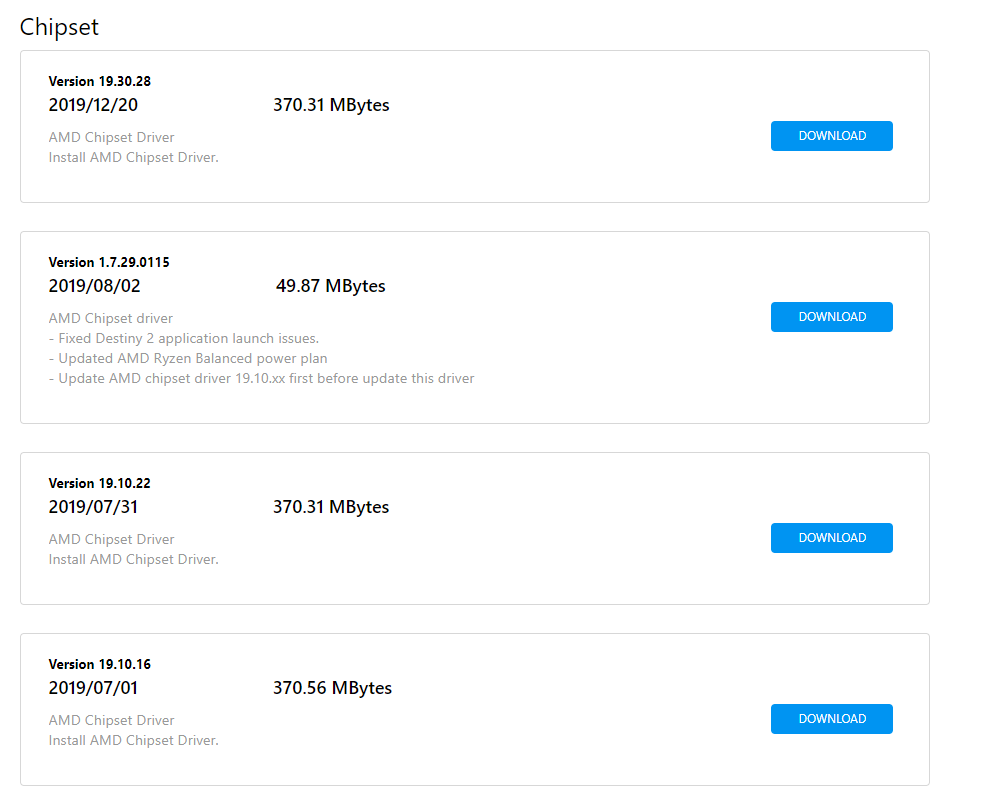
Did you also update your chipset?
latent bronze
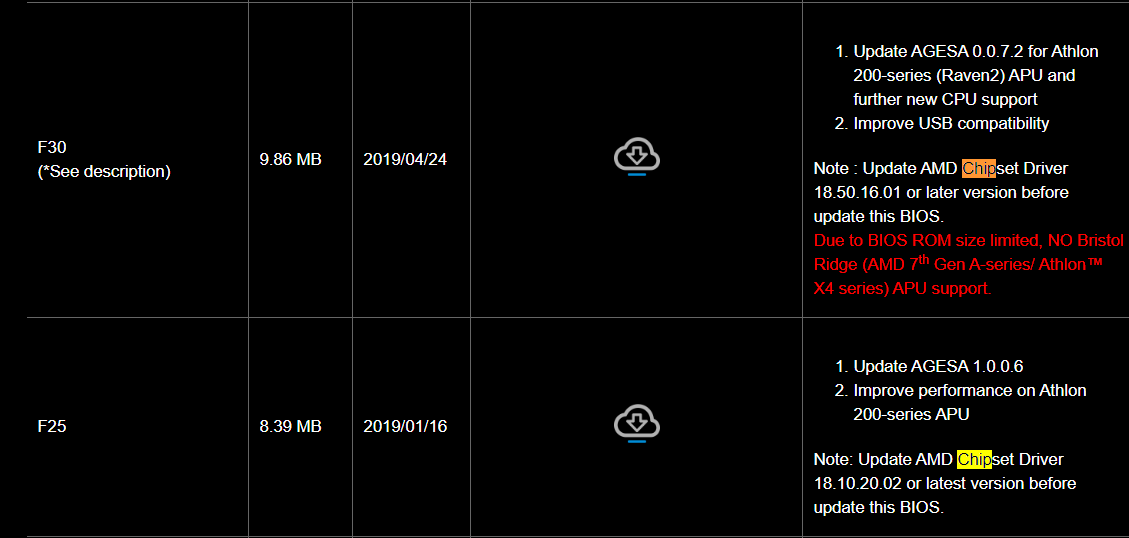
This is from a AB350 board i was looking at which when you look in the bios update list you would also see this https://i.gyazo.com/2a50487fc782fb858c80a8518d8f73bc.png
 dry tinsel
the only thing i see is EC FW update tool
my bios doesn't show anything like that
and it was at F41 out of F50 already so there were no special instructions
just install F50
latent bronze
dry tinsel
i like how they're not supporting bristol ridge anymore
dry tinsel
it's on auto
muted patio
change it to Enabled
latent bronze
Asus would take those updates and make it their own as well https://i.gyazo.com/bbdd57f949aee6e9a04370e94016c2b4.png
 dry tinsel
installed chipset driver, core performance boost only has disabled and auto as options
left it on auto
i believe this is the end of the road in terms of options for boosting performance - though the performance of this thing is far beyond what i expected
 celest fjord
Upgraded my boot drive figured I would show the difference.
Ryzen 3800x
Asus Tuf X570 gaming plus (wifi)
Evga GTX 1080
XPG 1tb Gen4 M.2 (Left) Samsung 970 evo Gen3 250gb M.2 (Right)
I was using the program Passmark to test the speeds of the various drives and these are the results.
 fleet talon
I bought the Corsair Crystal 680x. Should I keep the 3 front fans in place and mount my h115i pro on top? Not sure how I should configure the fans lol
 grizzled escarp
Why would one install a psu up instead of down? I'm putting it on a solid wood bench with only two fans in the system right now
 gentle fossil
@grizzled escarp you mean the fan?
grizzled escarp
Yes sorry
gentle fossil
sometimes it's just better to have the fan pointed up
like some cases may not have ventilation holes below where the psu goes
grizzled escarp
It has that if I put the fan downwards
gentle fossil
weird
facing the fan up wouldnt fix anything bc whatever that is would just land on ur gpu or something
grizzled escarp
It's the dust filter if I install fan face down I'm only able to use 3 screws to hold it to the case. With fan up I can use 4 screws to hold it to the case
grizzled escarp
Because half of it won't clear to allow screw to go into the hole
grizzled escarp
I had to wedge the psu up a bit to have it clear the screw hole it was weird but all 4 are in now
 little osprey
So both of my displays went out twice in the span of two hours... I had Steam Open, I was playing Factorio. I Was on Chrome watching videos. I had my Radeon Tuning Software up and Discord. The Screens would freeze for less than a second and than both Inputs would go out, however audio was still playing though my headset. This was both instances.
 analog hearth
What’s your Radeon driver version?
The 2020 drivers are having quite the issues and I’ve been having that same issue as well
That same issue on the 2020 drivers, that is
System just locks up. Audio doesn’t play. Displays will just suddenly say “No signal”. If we’re having the same issues then it’s probably just the drivers
analog hearth
Yeah. That’s your problem. It’s best you either roll back if possible to 19.12.1 or just wait for AMD to fix the issues
little osprey
God knows when that will happen
little osprey
@analog hearth glad to know its not just me... Well sorry its happening to others but you know. Lol
analog hearth
:)
rapid ridge
What's the best 240mm AIO in the under-100 range? I'm thinking the Deepcool captain (https://amzn.to/35o8XJi) looks good but idk about aios that much
grizzled escarp
I was able to get it to post got everything wired back up and it turns on but my case fans won't turn on now I'm using the molex connection
 eager chasm
Sata or NVMe?
little osprey
And not extremely expensive
eager chasm
Ah sata then lol
this sabernet is $110, it's NVMe
https://www.newegg.com/sabrent-rocket-q-1tb/p/0D9-001Y-00024?Description=NVMe 1 tb&cm_re=NVMe_1_tb-_-9SIAME8ARP9899-_-Product
little osprey
Nvme
eager chasm
it's about as good a price you are gonna get on a 1TB M.2 in either type
rapid ridge
Sabrent Rocket drives are pretty well priced for 1tbs
little osprey
Any 2tb?
rapid ridge
Anything 2tb is GOING to be expensive buddy boi
eager chasm
just click the 2TB on that Sabernet page
rapid ridge
generally around 250
eager chasm
$220 for that sabernet 2TB
little osprey
And also if i put in another storage do i have to reinstall windows or can i just transfer it between
 lime forge
intel 660p 2tb goes for $185 on sale
rapid ridge
What do you mean by that? If you put in a nvme drive and another drive, do you have to install windows on both?
no
lime forge
you cant move windows like that
eager chasm
you should be able to transfer the windows over if you are using a Microsoft account to log in
lime forge
gotta reinstall, but just log in
little osprey
No. Cus i have a ssd rn and i want to replace that with a m.2
rapid ridge
If you'd want to use the NVME as your boot drive, yes, you'd have to install windows on the new one
 sand prairie
going from what to what? from SSD to M.2?
eager chasm
2.5 SSD to M.2
little osprey
Yea
sand prairie
pretty much what suspio said, if you don't care though it's totally possible to do a transfer of windows
eager chasm
Make sure to set up a Microsoft account if you haven't already, it lets you transfer windows activation over without a new key
cursive wharf
@eager chasm Do note that is the Q variant, which isnt as good as the standard non q
eager chasm
?
cursive wharf
Sabrent Rocket Q
eager chasm
Oh, well he asked for cheap m.2 it fit the bill 
cursive wharf
Cant say that the Q is good. May lack a good controller or cache
dry tinsel
it's QLC with SLC cache
as the drive fills, the speed goes down (mainly write speed)
at 75% it's worse than a mechanical HDD
the way the SLC cache works is it treats QLC you're not using as SLC and uses only one layer (this is faster) but you exhaust the SLC cache and it's not good
the sabrent rocket standard model has i believe DDR4 cache and a good controller
extra $20 is a small price to pay
 tight bluff
The normal sabrent rocket is fine, the rocket Q not so much.
little osprey
@late ice what case is that?
 glad dragon
Skrt skrt
 charred scaffold
Hey all, new to the channel but not new to builds! Looking to upgrade something on my pc build but not sure what yet
 sudden turret
welcome to the discord! 😄
charred scaffold
Build currently consists of AMD Ryzen 7 1700, Asus ROG B350-F Gaming, 2x8 GB DDR4 TridentZ F4-3200C16D-16GTZR RGB Ram CL 16-18-18-38, EVGA RTX 2070 Super, Samsun 960 EVO M.2 500gb, and a Samsung 860 Evo 250 SSD, Cooling is Corsair HT100i Liquid cooler
sudden turret
upgrade cpu?
charred scaffold
If I stay in the 7 it doesnt make since to upgrade to the 2700x in comparison
I would have to jump to the 3rd gen to see an drastic improvement
The Ryzen 7 1700 is solid low voltage proc, that does well OC
I thought about increasing ram, but have had no bottleneck issues. But I'd get a better deal on the 2x16 gb Tridentz 3200 than getting 2x8 more of the same stick
Thought about rolling the dice to see if I mix those 16's with the 8's to get 48gb's, I doubt the dual channel would work. (XMP, or DOCP profiles)
Then again the X570 was also a thought for the new PCIe 4, and get one of either Corsairs new M.2's or the WD Black
 muted dawn
Anyone know if this ram is good? https://www.shoppingexpress.com.au/buy/kingston-hyperx-predator-rgb-16gb-2x8gb-3200mhz-dd/HX432C16PB3AK216
 charred scaffold
Thanks for the input, but I've been pretty happy with G'Skills TridentZ performance thus far
sudden turret
hyperX is decent @muted dawn
charred scaffold
It is, not shooting it down at all
 vivid atlas
Good ram @muted dawn
charred scaffold
should, if you manually step the voltage
vivid atlas
U could I think
charred scaffold
how much though depends on the rest of your setup
muted dawn
What u need to know?
charred scaffold
your proc and motherboard plays a role in oc
muted dawn
Proc?
muted dawn
Ryzen 2600
sudden turret
what mother board ddo you have.
muted dawn
um
charred scaffold
and having a power supply that supplies adequaate voltage helps also
charred scaffold
then yeah, I run the b350 and I oc my ram over 3200
muted dawn
Hmm ok
charred scaffold
but 350watt psu is low for OC
sudden turret
he said 550
charred scaffold
I mean 550
muted dawn
really damn
sudden turret
that's plenty for a slight ram oc..
muted dawn
I guess not much FPS gain over 3200mhz from what I’ve seen
sudden turret
you wont notice any gain really.
charred scaffold
for single, but wehn stepping ram above the advertised, might require to oc the cpu to get stable numbers
muted dawn
Yeh guess I’ll wait till I can get a proper cooler for the cpu
Hopefully my gpu comes tomorrow so I can build my first pc
Think it’s ok if I use my mobo box as a car ?
case
sudden turret
for a quick testing, yes.
muted dawn
not for longer ?
sudden turret
I mean, I wouldn't do it long term.
muted dawn
Yeh but my case coming later I think and if my gpu come tomorrow I have everything but the case
sudden turret
you could slap it up together to test everything and make sure it's good to go.
which is idea anyways.
before putting it in case.
you don't want to do a full build, then realized your mobo is DOA 😛
muted dawn
What if case comes 2 days after think I’ll be ok using it onto of mobo box
sudden turret
I don't see why not.
muted dawn
ok hopefully the gpu doesn’t fall over
sudden turret
just make sure it's somewhere so it's not going to get touched/bumped
jayz 2cent did a video about it
using mobo box.
muted dawn
What he say?
sudden turret
no such thing as watching to many tech vids :p
muted dawn
Aight cya ima go watch some dramaalert
charred scaffold
I agree, can never watch too many tech vids
Ive done alot of builds, and do alot of hardware repair. But i enjoy watching what others do.
vivid atlas
https://pcpartpicker.com/list/DgrYWb Thoughts on this
charred scaffold
you like those spinner drives?
I'd trade both of those drives out for a 1tb M.2
but thats my opinion
Intel has a M.2 that in comparison is faster than both thouse drives for under a hundred
https://www.newegg.com/intel-660p-series-1tb/p/N82E16820167462 looks like the price went up
tight bluff
660p were nice to start but they arent the best for the price.
charred scaffold
the price was at under a hundred before christmas
tight bluff
Speaking of which, is there any significant benefit of getting a Sabrent rocket for Pci 4.0 over 3.0?
As far as I can tell there isnt one.
charred scaffold
Crucial MX500 M.2 1 tb is at 107.99
If you have a board that runs PCIe 4 then your read/write speeds can go up to 5k
but running an older board at PCIe 3 using a PCIe 4 M.2 you wont see the difference
vivid atlas
What’s the cheapest way to divide storage
tight bluff
Divide?
cursive wharf
@vivid atlas BX500 is a bad buy, carbon pro is kinda eh for its price, cx650 makes no sense as a PSU of that quality should stay as 450 or 550w, and consider the AMD 1600 AF as it's literally a 2600 but for $85
tight bluff
Can always get a 1tb m.2 SSD for 100-110. Or you can maybe get yourself a 500gb SSD (not m.2) and 1-2tb HDD
a 1tb WD blue hard drive is 35, you can get a 500gb for about 50
If you REALLY didnt care about SSD storage and wanted it primarily for boot only and a few programs, a 250gb SSD will set you back like 25-30
To be fair 250gb is enough for boot, getting main programs opened and even putting a couple of the AAA high storage requirement games you play most on if you're very careful about not letting junk fill it up
charred scaffold
I agree, pointing or downloads folder/documents,videos,etc to a seperate drive
vivid atlas
Is the 1600 AF on pcpartpicker ? Can’t see it 😦 btw thx for tips @cursive wharf
And Nomad I’ll try and change the drives then, let me see what I can do
tight bluff
Yeah first thing I did with my current SSD + HDD setup when I built it was to redirect Desktop + Documents + Downloads + Music/pictures/videos folders to my HDD.
tight bluff
Just make sure you get a WD Blue for good value HDD storage, try and avoid Seagate.
vivid atlas
Why, are they bad ?
tight bluff
Least reliable drives on the market.
charred scaffold
I run a 6 TB WD MyBook Networked to hold all that stuff
tight bluff
A 1tb WD blue is only 35, a 250gb WD green SSD is 25, so thats a pretty decent setup for 60.
WD blue seem to be the most reliable HDDs on the market, WD black seem to be the best performance HDDs on a lower budget, they just sort of cover every ground and have the least issues of any storage manufacturer.
cursive wharf
Kinda not really. Seagate gives out some unreliable drives, but most of them are rather reliable. They do have a fair bit of botches tho of really unreliable drives
3tb being the most unreliable of Seagate
charred scaffold
Ive found the Seagates have a high failure rate, being that I am a warranty certified tech for the Major PC/Laptop Manufacturers
tight bluff
I was going to say there was a guy here who had something to do with handling hard drive returns and said WD were the most reliable and Seagate were the least, in terms of someone having first hand experience with many drives to determine failure rate.
tight bluff
Working in professional data recovery I see thousands of drives that have failed. Seagate has far and away the absolute highest failure rate of any brand. You may notice another answer on here references Backblaze’s statistics and erroneously conc...
charred scaffold
Im surprised Dell uses Seagates as a prefered consumer based spinner
but thats what I replace alot of for failed HDD
vivid atlas
Let me check what is available locally
charred scaffold
Samsung 970 EVO 500gb is running at 89.99 evo plus 250 is running 76.02
cursive wharf
Seagate does game some reliable drives. Tho most aren't, just need to know which to choose
Also ew, Samsung 970 Evo (plus) is overpriced
vivid atlas
1600 AF doesn’t seem to be available where I live, the cheapest 6C is the 1600X, followed by 2600
charred scaffold
It is but hands down has the best chipsets on the market followed by wd black m.2's
vivid atlas
Sorry for changing topics 😅
tight bluff
charred scaffold
but again samsungs spinners was garbage
cursive wharf
Samsung is only worth it for the Pro, the evos make no sense from competition
As Evo plus is literally barely any better then say Sabrent Rocket
charred scaffold
I feel that the 2070 was a better card due to the bad batches of gddr6 chips on the 2080's
tight bluff
Its a super.
Which is why a 2080S makes more sense than 2070S for value.
If it was 2070 vs 2080 Id have gone 2070.
charred scaffold
true
tight bluff
The main reason I went for EVGA is the RMA process just in case so. Risk is a non issue
charred scaffold
still look out for fragments, if you start seeing those on the screen then you have one of the 2080's with the bad gddr6 chips
I have the evga 2070S and it has been great, but I bought it a year ago
before i replaced 20 of the 2080's for thaat gddr6 issue
tight bluff
I could have waited for new GPUs but, if I didnt plan to upgrade any time soon Id have gone for the 2080 TI so somewhat makes sense. From what I can tell, there seems to be no reports of that issue for the supers, mainly every issue seems focused on the 2080TI
charred scaffold
bad pallet I guessing
yeah, manufacturer's don't usually use the S models, its either base or Ti's
Has anyone tried the Seagate Firecuda 510 m.2?
tight bluff
Unlikely anyone here has, but to be fair have you seen the Facebook ad for it?
Every comment is just slaying Seagate for their drives failing
I bought a 4tb Seagate drive, because of data selling whatever the very next thing I saw on FB was a seagate ad for it, read the comments, cancelled my order and got a 4tb WD Blue.
charred scaffold
well they havent been known for their past drives
tight bluff
That moment when your advert costs you a $100 sale rather than gets you it..
charred scaffold
yup
tight bluff
Not to mention they paid for the data to show me that ad in the first place.
Buying that 2080S has left me with like £80 to survive on until payday.
charred scaffold
I have a 150 dollar amazon gift card burning a whole in my digital wallet
hole*
tight bluff
Buy three live lobsters. Leave good reviews
charred scaffold
wished it was for newegg
tight bluff
In the UK, newegg is one of the most expensive options for everything, never the cheapest or best for anything.
sudden turret
can't blame newegg for that
tight bluff
Mostly I can't, but the international RMA is a bit of a meme for sold by newegg items.
Not to mention the kb articles contradict themselves like 5 times over.
fossil hedge
my issue is that I will get money, later, and the ram that I found is fairly cheap. its 2x16gbs,
and for the time the ram will operate fine, I do believe, it might like quad channel, but at the moment it should function correct
celest horizon
Do you think the zenith extreme board will play nice with either 2x16 or the evetual 4x16?
foggy hazel
it works with 2*16
fossil hedge
I mean the objective is to upgrade later to 4x16
and the power supply is in the B rating from ltt
fossil hedge
I will not come running.
foggy hazel
i cannot stress how bad an idea i think it is, but it is ultimately your choice.
celest horizon
My bet is that happens anyway because that board will have a tantrum over 4x16 dual rank dimms
fossil hedge
could you explain to my like I am a idiot, why you think its a bad idea.
foggy hazel
Forks / ive had dual dimms in it. But way more specific memory and way more expensive
because the platform (threadripper) is known to be SUPER picky about ram
fossil hedge
I see, so I need quad channel?
foggy hazel
remember how we talked about you having put yourself in a hard spot
that is part of it
celest horizon
Not saying it's impossible - but I'd guess memory config is familiar for you
foggy hazel
you dont "need" it. it can work with dual channel.
foggy hazel
BUT, i dont trust any user to not set fire to themselves when push comes to shove.
hence why i say what i do
and as i said about the EVGA psu's yesterday. i know nothing about them. You will have to ask someone else about that.
fossil hedge
I see, but I did have the B rating from ltt which is why I trusted it,
foggy hazel
that is your choice
muted patio
EVGA BQ is Tier C
foggy hazel
i am not willing to say "that is okay". Because i simply dont know.
fossil hedge
oh.
celest horizon
What was wrong with whatever we found for the psu yesterday? Why the second/third/x th thoughts?
fossil hedge
they were 10 USD more.
and I have the function of a greedy pratt with half the intelligence of a cynic.
foggy hazel
@fossil hedge just in case it is not clear. it is not that we dont want to help you. But we cannot work miracles.
fossil hedge
I understand that.
foggy hazel
just wanted to clarify. Because text can lack clarity.
fossil hedge
If I could magically pull 1000 USD budget out of my arse what could I do.
muted patio
That EVGA has poor filtering but OK ripple and voltage control tests. It's just average.
foggy hazel
wishfull list building is a waste of everyones time.
imo
you have the budget you have. It will requires compromises from you.
fossil hedge
well. I do have that money. I just don't want to use it.
foggy hazel
that is entirely on you
you set a budget, and until you set a different one. We cannot say anything different
celest horizon
what evga, the bq? Guessing it's a cwt? I just read the tom's, / tech powerup aris reviews for a TL;DR
muted patio
The BQ
It's missing an entire row of filter caps internally but does OK on voltage control and ripple
foggy hazel
it is 2*EPS right?
celest horizon
Missing? The review says that?
Filter capas are cheap, surely that's a design choice
muted patio
The review I read did, yeah. Blank spots for caps
celest horizon
Might have in-cable caps
muted patio
 fossil hedge
gtx titan used for 120 USD, quad channel memory, and a actuily B rated psu which I thought I put on there but did not.
probably should have asked if a titan is good for cad.
foggy hazel
it is okay
fossil hedge
is there a better option?
celest horizon
why the titan again?
fossil hedge
cad?
muted patio
PSU is much better there
celest horizon
Just to be sure - could you link the exact titan? There were a bunch with confusingly similar names
foggy hazel
if the same as yesterday, it is a titan black
fossil hedge
thats the titan.
eager chasm
🤔 Me thinks you are pinching pennies in all the wrong ways
fossil hedge
what?
foggy hazel
so, not the titan black.
fossil hedge
it lookes like just a gtx titan.
it outperformed a the wx 5100 in a render...
could proububly buy the AMD Radeon Pro WX 3100 which is going to be more reliable.
foggy hazel
okay, do i really want to go into this? ... yes, fair enough. In for a penny and all that
celest horizon
I mean this with no /s - that comboo of parts, I hope you're accepting of all kinds of bug chasing / troubleshooting
foggy hazel
make a decision and stick to it. Because if you think you are having a hard time with things now? just wait until you try and get it running stable
eager chasm
and you don't wanna cheap out on the PSU, that will make stability and longevity of the system a nightmare, especially if you are trying to get higher end parts on the cheap
fossil hedge
what, do I need to change to make it not be a peace of crap.
the psu, is not cheap,
celest horizon
Sell the board for $300, cpu for $120 ebay
edit - CPU market price is $225 ish*
But hey, challenge can be fun and rewarding, you'll learn a lot along the way
fossil hedge
you don't like my cpu.
foggy hazel
no, not the point
celest horizon
It's fine
fossil hedge
you don't like the intire idea?
foggy hazel
you are reading things like the horned one reads the tome of history
you are trying to shoe-horn a build with a budget below the entry point for the platform
fossil hedge
I see.
foggy hazel
@fossil hedge consider this. IF you were a client of mine, i would sit you down at a table, with a timer.
and i would not be happy about it, but at least i would be paid to watch you waste your own time being indecisive about things.
And i would sub-contract out the support calls to someone else in the field that i dont like
because what you are doing, and how you are doing it? not looking like it will be any kind of "interesting" to work with
so again, it is not that we dont want to help. but we cannot make miracles happen.
celest horizon
If you were putting an engineering sample epyc 7702 into a mod bios supermicro board - that'd be the "good" kind of headache build
Same chance of success , but you get the idea
fossil hedge
as in you don't want to have this conversation. which is fair. I am indecisive, slow, uneducated, and ill prepared. I am working on a budget far lower then needed, with a cpu I have little knowledge of, talking to people who tell me I am doing it wrong, which I understand and fully comprehend. I stated I could get more money because eventually, I will get more money. that is quad channel memory, from g.skill who are a reputable brand, the power supply is fixed, and you have so far told me it just wouldn't work because it will be buggy. I get that I am going to set the house on fire, I am rather good at doing that. the gtx titan I understand is slower then the average card but has a 50% score comparsion to the top card in cad tear cards, and it has relative performance when it comes to video editing. I get that the core is old, and so far as you have told me buggy, I was basically parting out the system as if it was the one for school because the school at on point had a threadripper and it ran like gold, and I liked that. its a cheap card like you had ounce said, near a 100 USD, and I got quad channel ram. I feal like I did it right and you call me indiscisive, which again is absultily fair I have been wasting your time for about 6 hours, as I try to find a better deal because I have no money. I will do so no further.
foggy hazel
You are again reading what you want to read.
until you start reading what is actually said. I can only repeat what i have said before.
celest horizon
From what I've seen, all of our parts, build path recomendations took those factors into consideration - though maybe without explicit clarification for the reasoning
foggy hazel
the reasoning was there in the back-forth between us (people giving advice) Forks
celest horizon
The message seemed clear to me as well - I try to be concise I guess, "try" haha, I usually err far towards the wall of text
foggy hazel
we all do, because we cannot read the minds of the people that ask questions or give answers
celest horizon
Anyway, no derision intended, but we help because we like to help, all voluntary in here 🙂
eager chasm
Kinda hard to build a decent computer with no money
cursive wharf
depending on the platform you try to go for and how high end you go kinda makes the budget. You are trying to make a decently high end CAD machine with a fair few cores and a decent GPU. With TR and a good CAD GPU you're looking at a pretty decent budget. With TR and a titan/decent quadro prices are going to be a fair bit above your budget. You probably wouldve been better off with a standard ryzen and titan/quadro setup. As such my suggestion would either be the same as Naed where to sell the CPU/mobo and get lower end ones for slightly more budgetting room, or to save up more money @fossil hedge
muted patio
It's not even that. The budget isn't sufficient for the Threadripper build they have. Nothing more or less. Better off selling the TR parts for cash and asking us to build a CAD worthy PC that is inside their budget. Very simple.
celest horizon
I thew this together making an indecisive mix of what's best for the user vs my own pet-peeves https://pcpartpicker.com/user/UCAUCA/saved/hFFJbv
 kindred musk
Ok Boys this is gonna be a big ask, I Dont know nuthin about AMD builds but i need a Build Around 2.5K CAD that uses AMD (Full ATX size)
cursive wharf
careful there, that's 1660 non S for 1660S price
celest horizon
well - 3900x, x570 /taichi/crosshair/master, $150 psu, could go 750w ti at that budget if wanted, get 2x16GB 3600 cl16/18 mem - rough idea , gpu, - the 5700xt pulse/nitro , or a 2070 super ftw3 would be nice
foggy hazel
@kindred musk start by listing what you need it for, preferences etc and what it has to include?
cursive wharf
and tbh I'd say 3950x for x570 (ignoring the whole gen4 stuff here), 3900x can run on a decent amount of b450 mobos with moderate OC
kindred musk
@foggy hazel Ah My apologies I only need it to be Able to run High tier games maybe some streaming, and it 100% needs 32 gigs ram
at minimum
cursive wharf
gaming and streaming but needs 32gb ram? Why tho?
celest horizon
I wouldn't buy a new $100 ish b450 to put a 3900x in it, that config is what you upgrade to off a 3600/b450 tomahawk when the 3900x is $250 next black friday etc
foggy hazel
monitor?
kindred musk
No monitor Just tower Stuff, I run alot of stuff in the background
cursive wharf
I mean I havent heard of the tomahawk lets say not being able to handle the 3900x that hard
foggy hazel
what resolution are you planning to play at?
kindred musk
Uh Im not sure i dont need 4k but i would like an RTX card if able
celest horizon
Seems a bit silly to put a $500 chip on a $100 board that uses $5 in IC's for the FETS
eager chasm
even TRYING hard I hardly ever use more than 16 of my 32GB, for every day use 16 is plenty for gaming and streaming with plenty left over
kindred musk
i heard that AMD CPU's bottleneck With non AMD cards
eager chasm
not really
muted patio
Ehm, no that's a falsehood
foggy hazel
@kindred musk no, that is false.
kindred musk
Huh
cursive wharf
I mean technically true, 200GE with 2080Ti
eager chasm
you will bottle neck with a crappy AMD cpu just like a crappy intel
kindred musk
Hmm Interesting
cursive wharf
but same for Intel pentium with 2080Ti
kindred musk
Im not very well versed in PC building
foggy hazel
no worries :)
cursive wharf
@celest horizon bit silly, but we are talking about a cad machine with room for a decent titan/quadro. Afaik there isnt really a real horrible downside to it, just feels like it
kindred musk
So What would a good Game/Streaming AMD build look like? (Tower Only)
if i put only 2.5k in
kindred musk
Flashy, No sound Requirements, A window, Prefferably big but not HUGE you know?
celest horizon
If streaming is of interest, nvidia's an easy choice, liekly that 2070 super or similar. Anywhere from a 3600 to a 3900x would be great, or go $300 x299 board / $1k 18 core cpu and never look back 🙂
cursive wharf
"huge" is opiniated and not a fact
celest horizon
Check out the F31 suppressor or meshify line
foggy hazel
remember CAD, so prices are a bit wonky.
foggy hazel
and availability is weird up there
kindred musk
CAD Our Glorious
Currency
celest horizon
Solidworks like single thread performance IME - , 2k parts = you'll appreciate >16GB <32GB main memory
cursive wharf
not really
celest horizon
oh that cad
foggy hazel
yes, that CAD
cursive wharf
availability is a bit wonky on Amazon, but in general is basically the same as US
kindred musk
Canadian economy is in shambles! 😄 things are hella expensive up over here
foggy hazel
Hei / seasonic can be ... interesting .. up there
kindred musk
the issue for PC parts is that alot of stuff has really high Shipping costs
and that damage isnt uncommon in transit
cursive wharf
I mean if you try to import then yeah. But if you use a canadian site then shipping isnt that pricy
foggy hazel
what are your storage requirements @kindred musk ?
kindred musk
1tb SSD not the motherboard one
I have stuff that i plan to wipe and then move to my new Pc
foggy hazel
any reason for not using a m.2 (what you call the motherboard one)?
kindred musk
Im unfamiliar with the benifits of it
And Like i mean im physically putting my Old hard drives into the new PC after a fresh wipe
foggy hazel
no cables and no downsides
kindred musk
any heat?
foggy hazel
not that you have to worry about
cursive wharf
well, downside technically is price, but price hikes isnt much
foggy hazel
that is evened out by the technically faster speeds imo Hei
and yes, measureable differences etc etc etc
cursive wharf
Also as I said for file transfer, that can be done on LAN. Connect your two PCs to the same internet and you'll be able to transfer the files through that internet. Note, this isnt tied to WAN and your internet providers speed. So even if you have 10mbps Internet your LAN transfer speed will be limited by the router/switch and ethernet cables (usually either 100mbps or 1000mbps)
celest horizon
Because of market share - 2.5" /m.2 ssd sata vs m.2 2280 NVME is surprisingly small, and the NVME drives have obvious benefits
But someimtes you see a 1TB teamgroup 2.5 for $60 ish on sale
foggy hazel
remember what kind of build it is going in
cursive wharf
Sunbow x3 or LITE 3d 1tb is usually $81 and EX920/Mushkin pilot is like $110, Sabrent Rocket is like $120
so it is a decent price hike
with the benefit of speed
celest horizon
$30 to upgrade to an EX920 is a very, very attractive option imo
cursive wharf
yes, it can be. I just feel like saying "none" for downsides makes no sense. There is, just that it is comparatively minor due to perf increase
foggy hazel
its a technical downside that does not matter for a build at this budget (<- yes, i should have said this originally, that is my mistake)
cursive wharf
Lets spend 1k of the budget on a 4tb NVMe :D
https://ca.pcpartpicker.com/product/r3RgXL/sabrent-rocket-4-tb-m2-2280-nvme-solid-state-drive-sb-rocket-4tb
but yeah in all seriousness, for the budget there should def be at least some NVMe
celest horizon
~~get an optane 280 GB for $200 ~~
cursive wharf
Lol
Also, how recent was the Rocket 4tb? I only learned about it like 4 days ago
foggy hazel
@kindred musk you need more storage than the 1tb?
foggy hazel
okay
@cursive wharf a psu 650-750 watt at 175 cad max?
@kindred musk how does this for a case look to you?
 cursive wharf
might as well just go for kinda stupid high end?
https://ca.pcpartpicker.com/product/LkM323/corsair-hx-platinum-750w-80-platinum-certified-fully-modular-atx-power-supply-cp-9020137-na
foggy hazel
Hei, i ask because i dont really like the cad prices for seasonic 750 units
aye, that works
kindred musk
Something like https://www.newegg.ca/black-fractal-design-meshify-c-dark-tg-atx-mid-tower/p/N82E16811352072?item=N82E16811352072&source=region&nm_mc=knc-googleadwordsca-pc&cm_mmc=knc-googleadwordsca-pc-_-pla-_-cases+(computer+cases+-+atx+form)-_-N82E16811352072&gclid=CjwKCAiA0svwBRBhEiwAHqKjFuQ_s9CxXzOptnY7b3YekV8cNe80sGQ0zkMtkU_3nJw8d8tpOronrRoCMMcQAvD_BwE Is more what im looking for
but not that exactly
My buddy had some of the front USB ports Stopped working
foggy hazel
the easiest way in regards to the case, is for you to find the one you want
because at that budget, it is a question of "do you like the looks of it"
kindred musk
Im sure il find something in that CASE then 😄 , I guess im gonna have to get out there and look for cases in the flesh
Cause i feel like i need to SEE it
foggy hazel
aye, that is fair. one minute and i will have a suggestion for the rest of the build
am i the only one having trouble with pcpartpicker timing out on me?
keep in mind, this is a build that is fairly overkill in a lot of regards.
and there are some fairly easy things that could be changed if you want to lower the budget
and dont worry about the compatibility problem it mentions, that is only for the old revision of the cooler (which hasnt been in circulation since before 2019)
@kindred musk
and as usual (especially for the lurkers), the parts listed are ones i have worked with. There are plenty of things that could be changed, so do chime in. But remember. CAD prices.
 shut rampart
for a $35 upgrade should I buy this?
https://www.amazon.com/dp/B07B41717Z?tag=pcpapi-20&linkCode=ogi&th=1&psc=1
I have this right now
https://www.amazon.com/AMD-Processor-Wraith-Stealth-Cooler/dp/B07B41WS48/ref=sr_1_1?keywords=amd+ryzen+5+2600&qid=1578340495&s=electronics&sr=1-1
foggy hazel
i personally think it is worth the upgrade
shut rampart
meh I will wait it for it to sell
kindred musk
@foggy hazel thanks for the help there chief! :D
cursive wharf
yes, buy two
foggy hazel
and lock slots for the future?
cursive wharf
well usually you should buy the kit with the same part number (people just buy a new kit with different part number) and mix/match RAM
so might as well make proper upgrading
foggy hazel
i mean, if you buy 4 sticks of 8, you are filled on that board
any upgrade from that point results in either selling or having un-used sticks
cursive wharf
so by that you force people to sell and buy a proper full kit of the same RAM
foggy hazel
you lost me there Hei
cursive wharf
chapter one of "the desktop story": built PC with 16gb (2x8) of corsair vengeance ram (part # 1111111111)
chapter two of "the desktop story": upgraded PC with additional 16gb (2x8) of corsair vengeance ram (part # 11111111312)
-thus you have now mixed/matched RAM
chapter one of "the desktop story the 2nd": built PC with 16gb (4x4 [4x4 is usually more expensive but ignore it]) of corsair vengeance ram (part # 1111111111)
chapter two of "the desktop story the 2nd": sold original RAM and bought more corsair vengeance RAM totalling 32gb
-removes all the chances of someone buying and mixing the RAM
foggy hazel
you are worrying/talking about something completely different from what i am talking about
 grand jackal
So whats the best way to learn how to build pcs?
foggy hazel
there is a total of 4 slots on that board. There are two (general) ways of filling those slots.
cursive wharf
research. lots and lots of research
foggy hazel
either by going 4*8 (now or eventually) or by going 2 * 16 (and eventually adding 2 * 16 again)
i am advocating for the 2*16 because the customer wants 32 as the starting point
cursive wharf
my point with going 2 * 16 and then a year down the road another 2 * 16 is that more that likely the RAM bought will be different
as people tend to miss the whole "compare the part number" and just compare names
foggy hazel
(added benefit/detail, when he gets around to wanting/needing more, the 8gig sticks would be fairly useless for most things)
we are agreed Hei. we just talked about 2 different things
different sides of the same coin really
and yes, people dont check the part numbers
they claim they did
but they generally dont.
cursive wharf
well apart from it being hard to get rid of due to age and ddr5 most likely, forcing them to reset their RAM just makes it better then random add seems a bit better
foggy hazel
aye, but that part is way down the line (ddr5)
cursive wharf
I mean like 2 years i think right? Next next AMD release, most likely
If so that doesnt seem like a bad time to upgrade from 32gb of RAM as well tbh
foggy hazel
aye, 2 releases from now (5xxx series)
that will be the start of it.
time will tell what the prices look like at that point
cursive wharf
prices are probably going to be bad on the RAM side as with what seems to be any new DDR release
foggy hazel
aye
cursive wharf
then I assume CPU and mobo prices staying near whatever price current market is
Which hopefully will be more or less the same
foggy hazel
we can hope :)
little osprey
lmao i can’t find a screw for a m.2
because i found an old m.2 drive i have an wanna install it to see if i can get the data off of it but can’t find a screw that fits
foggy hazel
that is why you leave the screws in the mainboard
little osprey
i only got one
foggy hazel
if your board has two m.2 slots, you have had 2 screws
you might have dumped it when you originally installed the mainboard
little osprey
i just put everything in a box and i’m not seeing it in there
i mean there’s a chance it fell out of a bag in there
found it were good
 safe field
In what ways can I afford to cut corners on an HDD purchase?
I have a 480GB SSD and I would like to pair a 1 or 2 TB HDD with it
And I'm wondering how exactly the data transfer rate and RPM will affect my ability to store games and code on it
tranquil dust
is this chat active?
muted patio
mebbe
tight bluff
@safe field Honestly, games you play most frequently on the SSD, games without huge loading times on the HDD, you can easily even go with something like a WD Blue for that and other data if budget is a concern.
stoic island
So is there anywhere I could buy like a single replacement m.2 screw
muted patio
Do ytou have a standoff to test the thread sizes in?
I'd say go to a Tacoma Screw or Fastenal or a PC Repair shop
stoic island
Well I have one of the screws if that would help
Its also not urgent I'm just wondering
muted dawn
U need 2 m.2 screws to put a m.2 sad into mobo?
muted patio
Nope
Just one screw plus a standoff
It's going to be hard to source for a single screw.
muted dawn
@muted patio do some mobo come with stand-off installed?
muted patio
Not that I've seen. they're usually in a packet with the screws
muted dawn
Ok
@muted patio My pc case coming today and I have all the parts but my gpu think it’s ok if I assemble everything but gpu until it arrives?
muted patio
I prefer to assemble outside the case and test before putting everything into the case
muted patio
It's up to you though
Just harder to troubleshoot with everything in the case sometimes
muted dawn
Hmm I see
muted patio
Ultimately up to you
muted dawn
hopefully nothing goes wrong
muted patio
Odds are good you won't hve an issue but if you do, it's just twice the work
foggy hazel
always, even after all these years, always test boot outside the case.
tight bluff
Can anyone suggest a very cheap ebay buy for an old AM4 CPU for bios updates?
muted dawn
I’m looking forward to building so if there’s an issue I don’t mind fixing it 🙂
stoic island
I have a nvme m.2 that just replaced a sata m.2, I might want to have both in my build
But I dont have another screw for the second ssd
stoic island
I thought that program was temporary?
muted dawn
@stoic island didn’t ur nvme come with 2 screws?
tight bluff
Yeah but that seems like hassle then return shipping on the loaner CPU etc
stoic island
@muted dawn what no
The screws are supposed to come with the mobo
My mobo only had 1
muted dawn
@stoic island oh because my m.2 ssd came with 2 screws
stoic island
The heck
muted dawn
I’ll send screenshot
tight bluff
Oh really? Nice.
muted patio
But for the record, they send you an Athlon 200GE for the upgrade.
So if you want to buy one get one of those
tight bluff
Not viable on a larger scale but perhaps Ill buy some 2000 series because of the price drops for projects coming up anyway. Just that means I wouldnt always have one on hand.
muted dawn
@stoic island
tranquil dust
Guys best case with a psu shroud for under $100. go
And free shipping
I actually need one
foggy hazel
@rocky dirge you watching the keynote?
stoic island
Im watching it rn
cursive wharf
What is this, AMD keynote or smth?
foggy hazel
aye

scroll from the bottom up @cursive wharf
(i dont watch them live, my eyes roll too hard listening to the PR)
hm, if that works as simply as that, then Smartshift is going to be nifty on the mobile side of things
cursive wharf
I mean I cant really watch rn cuz im in class. Just wanted to know
foggy hazel
what i linked is just a liveblog, so just text and pictures
also, smartshift smells a LOT like a console feature
cursive wharf
What I cant wait for is Zen2 laptops. Going to be not super hot laptops that perform rather well
foggy hazel
that is what i am talking about :)
tight bluff
Zen2+ laptops (4000 series) were just announced. Well, one specific one was.
cursive wharf
mobile is one gen behind
foggy hazel
depending on the rest of the specs, that Dell machine is very tempting.
cursive wharf
so 4000 mobile is Zen2
tight bluff
Its 5600M
cursive wharf
Also lol, wonder what they did to pull this horrible 9700k perf
foggy hazel
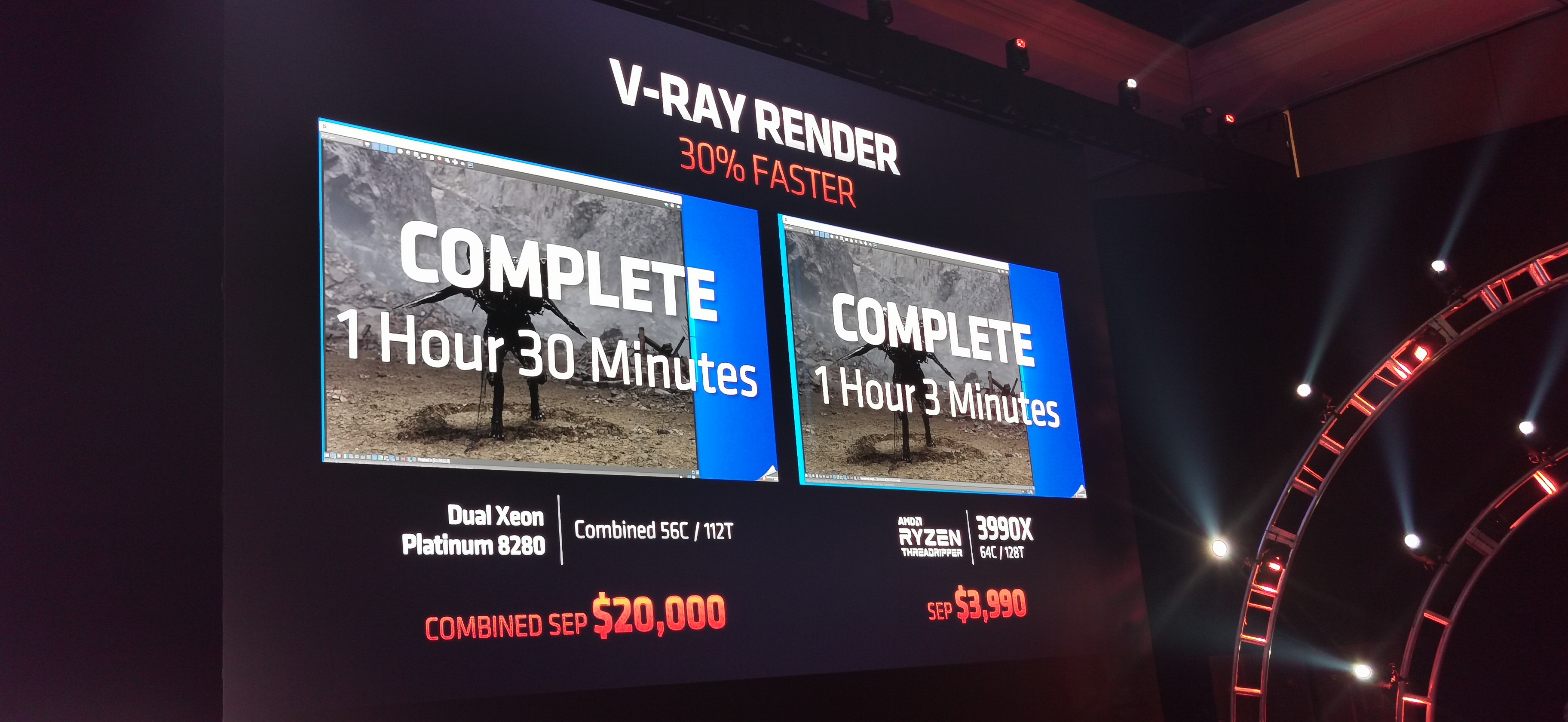
well well, hello 3990x
cursive wharf
Cuz I reallly doubt the 4800H can beat the 9700k
foggy hazel
64core TR chip, that is going to make a lot of workstation owners wallets go up in flames
4k in price is not bad at all
foggy hazel
indeed
cursive wharf
or spend 3k for Intels 28c right? Totally a better deal

 cursive wharf
Also isnt intel mobo more? Could be wrong here so idk
I checked a really long time ago
so I dont really remember, or maybe im just going insane
idk
foggy hazel
new TR boards are not that cheap either
cursive wharf
Yeah I guess there is the new TR boards as well
foggy hazel
they only doubled the price of the 32core version, that is very very reasonable
aye. 279, jan 21
rocky dirge
279 is a bit high for me, but supposedly it's 1070 ti performance
rocky dirge
ouef, don't know if it will have any effect on used 1070 or 1660s pricing
tight bluff
It was vs the 1660 TI, and showed 10-15% improvements. But they might have been selective about their games so take that with a pinch of salt
foggy hazel
time will tell when we get the benchmarks
rocky dirge
AMD just keeps that pain train rolling against Intel
I think I might just go for 1070 because C:S and xplane eat up VRAM like I eat cheese
 prime spear
yea but what about gddr6?
cursive wharf
@tight bluff They should some specific games
prime spear
does that not put any effect onto anything?
cursive wharf
compare perf with 5700xt
foggy hazel
nothing solid to compare with really
we dont have the system specs yet
for what it is worth, IF those graphs are completely bonkers, that would be first time in a while
zen2 was under promised if you looked at their presentation benchmarks
not by much, but it was faster than they showed
that is ofc not a guarantee
rocky dirge
@prime spear I'm looking at some xplane benchmarks, and the 1070 barely edges out the 1660s, but keep in mind used 1070s are cheaper too 😛
foggy hazel
Su does not seem to like smoke and mirrors
rocky dirge
the 1660s matches my current rx580 (aka rx480) performance
cursive wharf
I mean I dont really remember much of other CES but I woulld expect people to complain if Su overpromised on the CPUs (given how much people complain about GPU overhype)
foggy hazel
the problem is that Raja Koduri overpromised a LOT, so it is just good PR to stick to how it is
latent bronze
How would a 1660 match up with your 480/580 when most games out there the 1650 Super matches the 580
cursive wharf
probs 2% better on average
latent bronze
Well from a lot of game benchmark results the 1650 Super tends to be on par with the RX 580 and the 1660 is still higher in performance from the 1650 Super
certain Nvidia titles of course the 1650 Super would be better than the 590 but a lot of benchmarks i have seen would usually have it a frame higher or a frame lower than the 580
tranquil dust
Someone want to help me with a case that doesn’t have $200 shipping
stoic island
wdym
stoic island
2x4 kit of ram?.. okai
 cedar portal
budget is an issue and i wanted an NVME drive
also, it's a 1600 "AF" not a marked 2600
cedar portal
it's well reviewed
stoic island
also you could've went g.skill ripjaw 3200mhzc16 for 70$ but if your budget is really that restricted idrk
cedar portal
and for $10 more than that I could could've gotten trident
the memory kit i ordered tested to within margin of error to the g.skill
cedar portal
considering i'm coming up from an I3-4130 and DDR3 it's a step up
foggy hazel
do yourself a favour and keep an eye on the ram market, so you can upgrade to something a bit more longevity focused :)
latent bronze
If you're just gaming you don't really need a NVMe
cedar portal
i have a couple of my games on a sata SSD, but i still boot off of disk
latent bronze
you should never have your OS on a HDD if you own a SSD
the order should of been in reverse being the OS on the SSD and your games on the HDD
foggy hazel
as a barebone upgrade that will be built on over time. It is a solid start @cedar portal, enjoy the upgrade when you get the parts :)
cedar portal
this is what is being replaced
https://pcpartpicker.com/list/TjCZ27
i will say that that i3 was a little monster for a long long time
latent bronze
@cedar portal if you're just gaming really you won't notice any difference between a Sata SSD and a NVMe
cedar portal
the NVMe will be the new OS drive and probably WoW and Destiny
keeping in mind my personal rule of not loading SSDs past about 75%
muted patio
The only benefit to NVME is large file transfer speeds
latent bronze
Ok well just so you know the difference you would see for those games would be 0 to 0.3 seconds
muted patio
Otherwise, OS loading and game loading are comparable to SATA SSD
latent bronze
@muted patio you forgot for heavy encoding work loads
cedar portal
i guess so, but the price difference between an M.2 sata and NVMe is negligible, so why not have that benefit, even if i never use it
cursive wharf
That's a dram-less NVMe tho