#building-and-recc-chat
1 messages · Page 419 of 1
 little osprey
 latent bronze
If you have no more fan headers on your board for powering the fans that is your only option
little osprey
Ok an I just ran in to a problem
Liquid Cooling is hook to my MOBO
Back fan has no spot for power
O wait I might have power for it
 tidal bluff
no more fan outputs on the mobo?
might need a fan controller for all those fans. my case came with one so i didnt have to worry about it
but is looking alot better
little osprey
Update
little osprey
It's to short
tidal bluff
ah
later u can get some cable mod cables if u want it ran in back
i bought a kit for mine so all my power cables are red
and have combs on them
but its mainly preference
little osprey
Huh
little osprey
O ok I see what your saying now
What I just did will that help some with the Temp in my Gaming PC
tidal bluff
maybe i know my temps went down but i have a huge case and demands alot of airspace
 tropic horizon
so when your unboxing your mobo is their like a matt your supposed to put it on
latent bronze
You can put it on top of the box
the anti static wrap it comes with you can put that under if you want as well
tropic horizon
ty
 tame crystal
Has anyone ever dealt with this company/case before? https://www.amazon.com/darkFlash-Mid-Tower-Computer-Tempered-Pre-Installed/dp/B07F1YSB9M/ref=pd_sbs_147_21?
latent bronze
You want a mesh front panel not a glass one
Just from looking at it there is very little to no airflow from the front
Already from this image it does look like there is no airflow https://images-na.ssl-images-amazon.com/images/I/71A9BMX7gtL._SL1500_.jpg
 tame crystal
Hmm, guess I'll stick with either the TT Core X71 tempered glass edition or the Rosewill Nighthawk Z-RGB
latent bronze
Heck this one looks better https://www.amazon.com/darkFlash-Mid-Tower-Computer-Tempered-Pre-Installed/dp/B0787TJ6WL
tame crystal
I saw that one.
latent bronze
This is the Rosewill case but you would have a very similar look if you install RGB fans on that case https://www.rosewill.com/wp-content/uploads/2019/04/01-3.jpg
 tame crystal
Yeah
latent bronze
Rosewill cases as well from my experience i have no issues with them
one company i try to avoid now is Deepcool for cases
 plush merlin
im trying to get the corsair 570x for black friday and is listed at 120
it says that you save $20 mail in rebate card
does that mean im not paying 120$/
?
latent bronze
You're paying 120$ now and you have to send in the rebait by mail in order to get back the 20$
which is normally sent by a pre paid credit card
plush merlin
so what if I dont do that will I pay 140 instead?
 dark raven
No
latent bronze
Well i did a mail in rebait and got a 50$ master card so ya pre paid credit card
dark raven
Unless it says after mailing rebate
Master card gift cards are still gift cards
Can you spend more than what was issued on it?
plush merlin
so if I paid with a credit card I wont get the 20$ saved?
dark raven
Credit cards are used to buy on a given loan or credit
No no
You buy it, then mail In something then you get a 20 dollar visa or MasterCard gift card
When it arrives
latent bronze
or sometimes American Express
 floral barn
So I am re-mounting my gpu when I get home, right now it is horizontally mounted on my mobo, I will be mounting it vertically with a vertical mount bracket. My question is, will I have to do anything, like in the bios, once I change the mounting position? Or will everything stay as is
 deep skiff
should stay as it is
floral barn
Ok so once I unplug it and mount it in the new spot and plug the riser cable in everything should still be the same.
deep skiff
yeah
 quick raven
Can someone help me build a computer for this black friday? I mostly play modern warfare but plan to play more graphic intense games in the future. My budget is a bit over $1000 and hopefully some good deals on black friday. I was thinking maybe i7 with 1080ti?
deep skiff
for new ones
they have nearly no stock, so they increase the price like crazy. I'd say on the used market they're like 350-400
floral barn
On Newegg I see a bunch of refurbished for 600-800
floral barn
Ahhh
deep skiff
here's what for around what they sell for https://www.reddit.com/r/hardwareswap/comments/e09kie/usacah_gigabyte_2080_ti_2slot_3_fan_evga_1080_ti/

reddit
Update: Both gpus are sold. ----------------------------------------------------- Hello, ~~I'm selling a 2-slot Gigabyte 2080Ti for...
floral barn
Thats a tough call for me, not a fan of buying used components. But hey to each it’s own.
deep skiff
i'd recommend a 5700 xt, its around $400 for nearly 2070 Super performance
 olive ledge
Whenever I turn my pc on it takes me to the bios to boot windows and it makes me have to override it to boot every time How Do I Fix This
 fluid raven
should be a default boot device option in there, otherwise idk
 golden forge
I currently have a i7 8700 cpu. If I get the 9900k, will I need a new mobo?
 glossy pebble
hello i was wondering if any of you guys could help me pick parts for a decent gaming PC for around 800-850$, im new when it comes to PC parts thanks in advance
fluid raven
@golden forge check chipsets. I believe i9s require the z390 "3000 series" motherboards
Oh also don't get a 9900k you dingus

golden forge
I know I know
I was only going to get the 9900k if I didn't need a new mobo. I would have saved a couple hundred dollars
Now I know that I need a new mobo SO, I am looking at a 570 mobo and the 3900k.
fluid raven

 austere condor
i woulnt recommend using an i9 9900k in a H310, but, B360, B365, H370, Z370 are all compatible with the 9th gen CPU's, including the i9 9900k, as long as you have the latest BIOS from the manufacture and it has 9th gen support. @golden forge
im currently running an i7 9700 in a Z370 motherboard in one of my systems
just needs the BIOS update for 9th gen CPU support
@glossy pebble I would start with something along the lines of this:
 severe oxide
Reconsidering my choice in case now, should I get a lancool II instead of an O11 dynamic? I love both and neither really has any cons but I don’t know which I’ll prefer
Idk if it matter but here’s my parts list
Wait
Damn, sorry, gimme a sec
 rotund radish
why are you going for 850w here?
severe oxide
Just a really good sale I saw an ad for
rotund radish
partpicker shows it for 75$ on newegg 5d ago
probably answered my own question here
austere condor
for the 850W?
severe oxide
Ya
austere condor
thats pretty good
rotund radish
oh no, I'm looking at 650
severe oxide
Ya, I’m very surprised
austere condor
cases are highly subjective. the 011 dynamic is not very good for an airflow case, but it excels when running a custom loop. im not familiar with the Lancool II
rotund radish
yeah 850 for 70 bucks is kinda wow
severe oxide
The lancool II comes out December 10th, check out some reviews it’s pretty spectacular
rotund radish
maybe I'll buy myself one of those rm650x for 75$ on friday
severe oxide
I was unaware of airflow but I will be watercooling soon enough
rotund radish
if there will be nothing good for 650i
severe oxide
Ya I’ve kinda plotted everything out but I’ll probably have to redo it all cus new deals pop up
I’m probably gonna spend the entirety of Thursday and Friday sitting with my face in my laptop frantically typing and trying to find better and better deals but it’s gonna get done some way or another
Oh the other thing I’m absolutely psyched for is it occurred to me that my desk is gonna need some revamping for this and when I plotted everything out I realized I may as well just make the whole wall a big desk space and it’s gonna curve onto the other walls and I’m gonna put my pc and 2 monitors on it, a writing space, a project space, and the same for my brother and god DAMN is it gonna be nice
I’ve never had a set up even remotely close to this and I’m stoked
rotund radish
I kinda standing at this build as of now: https://pcpartpicker.com/list/wB968M Want to build it around corsair icue and rgb so have to go asus other msi (because icue seems to conflict with any other rgb soft except asus aura). Might also throw in another ssd and 16gb ram more depending on final price on friday.
not sure if I need to pull the trigger on case now since newegg says sale on it ends in 2d
severe oxide
I’m gonna sound like a big nay sayer for this one but I have a couple objections. First I’d say don’t get the 9700k, you can get 8 faster cores for less, 3700x for example. Also as attractive as it is AIO cooling is usually pretty much the same as air cooling but more expensive, a good Noctua or a scythe mugen 5 will perform the same or better for way less. And if ur gonna overclock u should get more than 650 in my opinion, not necessary but I mean ur spending $140 on the PSU anyway so u may as well get that 850 for $70 or something, I believe I saw a 750 for like $55, it’s gonna be on the Newegg Black Friday or cyber Monday sale I forget which, basically I think u can do better for the PSU
austere condor
first i'd disagree that the 3700x isnt a faster CPU than the 9700k, as the 9700k is ~15% faster than the 3700x, so im not sure where you're getting that from.
asetek 280mm AIO coolers are all about the same in terms of performance, and they are pretty decent for cooling, depending on the fans being used. clearly this one has been picked out to fit with a RGB theme. not saying the H115i is the best, but, its more than fine to run a 9700k, even with a bit of overclocking. if he wants to pay the extra $40-$60 to have the asthetics of a RGB AIO liquid cooler, that seems fair to me.
and I agree with you somewhat on the PSU, the RMi is meh, and there are better units for WAY cheaper. @severe oxide @rotund radish
but the wattage amount is more than fine
15% faster CPU for $13 more seems like a no brainer to me
rotund radish
I am intel fanboy thus 9700k. Aio for looks
austere condor
3700x has its usecases, but its definitely not gaming, lol. horrible value for a gaming CPU
rotund radish
Not looking to overclock much and I think 200w extra should be fine. Might go 750 tho. Also yes, amd for adult people, intel for pew pew boyz
austere condor
if you're not overclocking, you dont need such an expensive board. even if the asus ROG was actually good, lol
rotund radish
Does newegg had black friday/monday ads up? Because all I saw was presale which is kinda meh
rotund radish
I’m running asus for hooking up aura to icue since it seems no other brand can do. I’m waiting for sales to hit and look if its gonna be less overpriced. 500d just looks nice to me
Rmi also there to track price, will probably go rmx if it doesn’t drop
austere condor
shaved off over $200 on the price, for objectively better hardware. especially for the price
but still sticking to the RGB focused looks you're wanting
ended up going with the Whisper M 850W just because it was a good deal, lol. the EVGA G3 650W was only like $4 cheaper
but yeah, thats what I would recommend going with
better for your wallet, same performance, same looks
rotund radish
Why not gaming x trio? Same price, should be more quiet than 2 fans. Also mobo and card gonna be out of sync with fans and i will have to throw in commander pro in. Nonetheless seems nice and will consider
500d is essentially 570x with commander pro glued inside and slightly more space
austere condor
$689.99 on sale
after rebate, and with BLACKFR35 coupon code
@rotund radish
thats why 😄
 old charm
I showed my build to my boss and he recommend I get a "better" video card. What do you guys think?
https://pcpartpicker.com/list/XLMz7T
 rough loom
never hurts
old charm
any recommendations?
 marsh trench
Hey all just curious if this is a decent monitor for 1440? And at a decent price for 300? Acer XF270HU 27"
 coarse coral
2070 super
it's 1440p, 144hz 4ms and ips, its good if you're into non-competitive games and prefer color accuracy
marsh trench
So va over ips?
 sudden turret
ips greater than all
severe oxide
God how am I not tired I was up at 3:00 am watching YouTube videos and talking in discord
Wait what? The 9700k is faster than the 3700x? Damn I must’ve missed a memo
Wait
No I’m looking at benchmarks and I’m quite certain the 3700x is faster
severe oxide
Which would make sense, same core count but 3700x has twice the threads and higher single core speed, the thing that holds back Ryzen most in gaming (as I understand it) is that the infinity fabric doesn’t utilize 8 cores together as well as ring bus, which might be mitigated by zen 3, I’m gonna go learn more about the ring bus and stuff but I believe that’s the main reason Zen’s faster processors don’t game the way they “should”
 shy coral
what virus/malware protection do you guys use for gaming builds? this is my first build and i just want to make sure its protected
@here
severe oxide
Oh damn I forgot about that, I’ll have to research that one Linus did a video on, I think it’s called bit defender or smth but I’m pretty sure McAfee’s decent
shy coral
okay thank you @severe oxide
 drowsy yacht
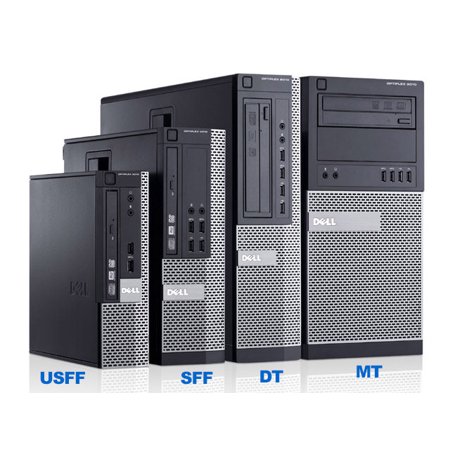
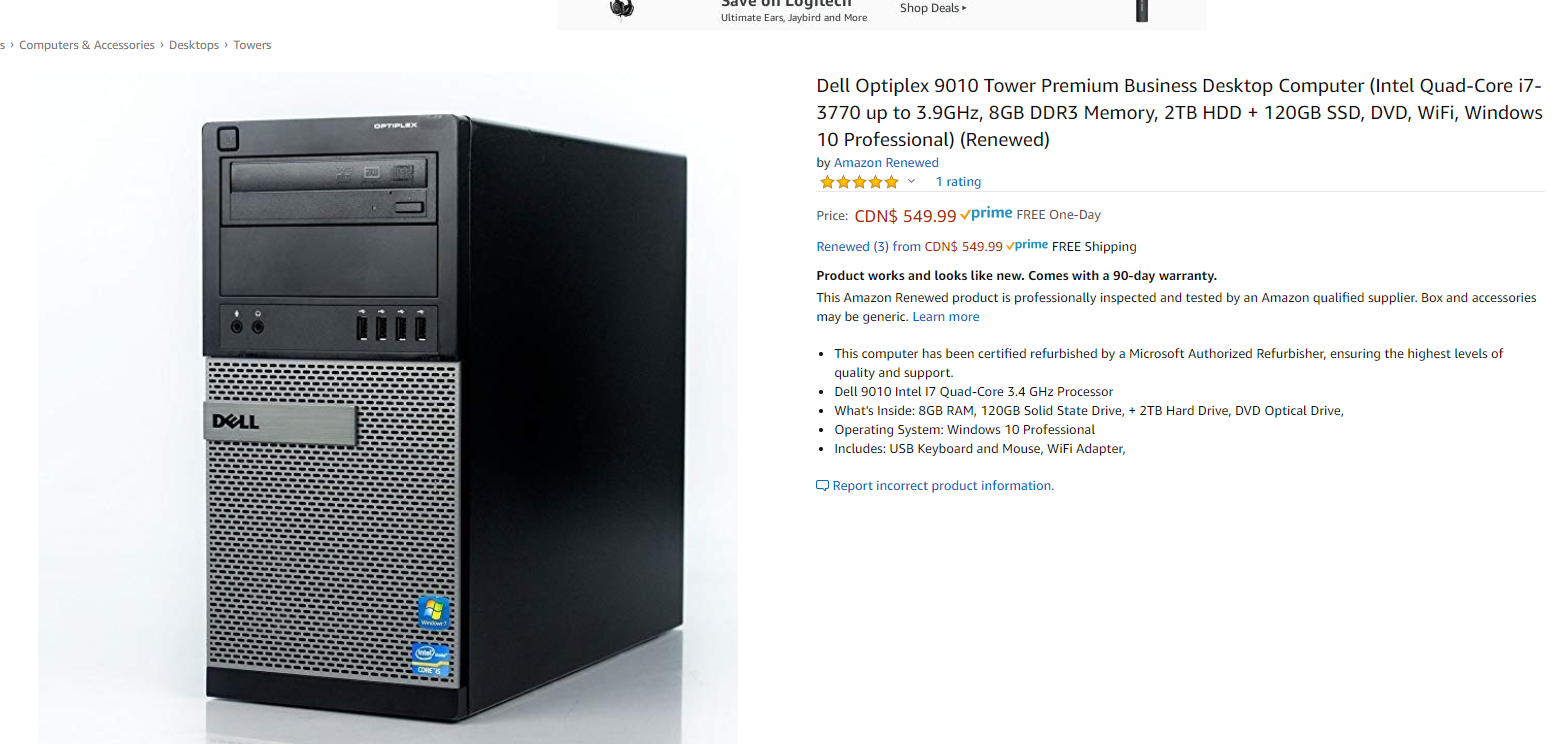
@lime forge Hello. Based on your recommendation, which I appreciate, I'm looking at the MSI Radeon RX 570 DirectX 12 RX 570 ARMOR MK2 8G OC 8GB 256-Bit GDDR5 PCI Express x16 HDCP Ready CrossFireX Support Video Card...will this fit in the Dell Optiplex 9010 Intel Quad-Core i5 (3.2GHz), 16GB RAM, Choose Up to a 2TB HDD or 240GB SSD, DVD, Windows 10 Pro, WiFi, Keyboard and Mouse (Renewed)?
sudden turret
small dell
drowsy yacht
@lime forge Thanks. I'll ask the broader group.
sudden turret
You probably would need a low profile GPU.
so I doubt any current GPU would fit in it.
latent bronze
Well for the Dell systems you have these https://i5.walmartimages.com/asr/844c5f08-c813-45e1-b1a2-78b9bbf6372c_1.8200af15d25fb14e4f700b5bcff9b0de.jpeg?odnHeight=450&odnWidth=450&odnBg=FFFFFF
 sudden turret
latent bronze
sudden turret
latent bronze
So really which model lol
 lime forge
yeah it won't fit
sudden turret
Dell Optiplex 9010 is SFF
even if they managed to squeeze the card in, it would underperform terribly.
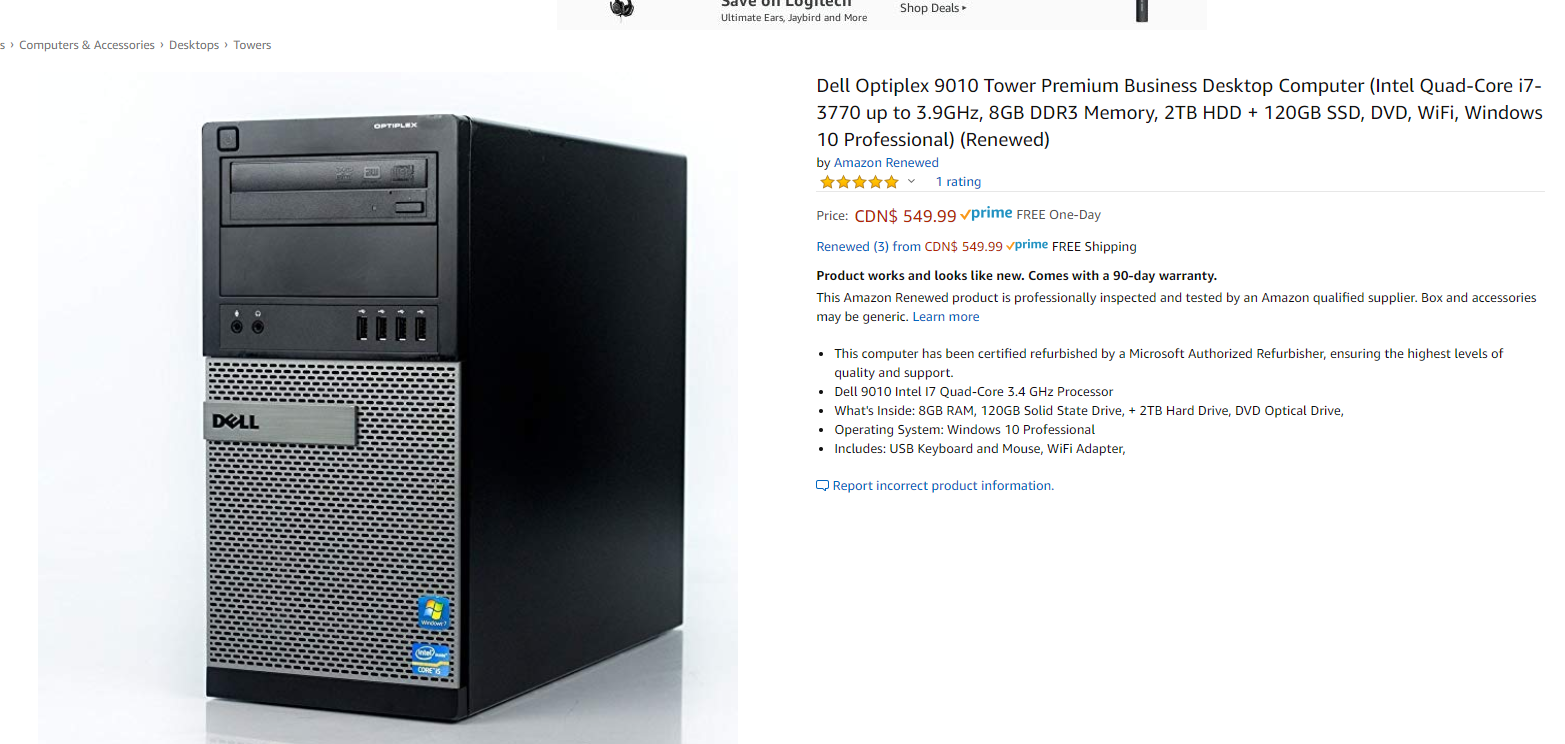 sudden turret
thats the i7
drowsy yacht
I'm looking at the Dell Optiplex 9010 Intel Quad-Core i5 (3.2GHz), 16GB RAM, Choose Up to a 2TB HDD or 240GB SSD, DVD, Windows 10 Pro, WiFi, Keyboard and Mouse specifically for building a gaming PC...any recommendations for graphics cards? Any suggestions on a different PC that is more compatible for a RX570 graphics card?
latent bronze
That case can fit all budget GPU's
sudden turret
yeah but it aint going to power it
latent bronze
But also if it is with 250w would need to replace the PSU
sudden turret
better off getting a Console
latent bronze
It would be able to power the RX 550/GT 1030 with no problem
latent bronze
Yeston makes a single slot RX 550 😛
sudden turret
at this point, with this low of a budget it's not worth getting.
latent bronze
If there was a system with like a 4790K in it for like 300$ i would say it is worth it
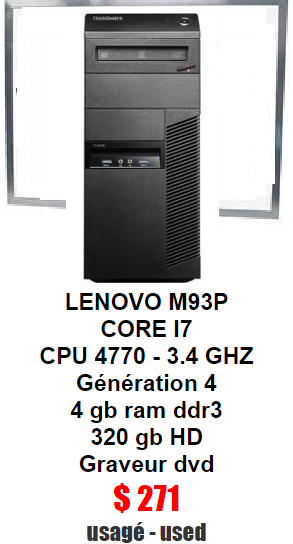
Or like this here in Canada for used PC stores selling systems like this is worth it https://i.gyazo.com/f9452885a700e678ed6d48cefabbd529.png

If he was able to find a system similar to that with a lower price it would be worth buying and slapping in a SSD more memory and a GPU
sudden turret
eeh
latent bronze
Well remember 271 Canadian is like 210 US
so really it would be like 350$ US for a complete system and that i7 isn't going to die out anytime soon
latent bronze
You'd be surprised how many people still uses hard drives as a secondary drive
especially with the whole StoreMI thing
 latent bronze
Hard drives will always have a place cause come on where are you going to get like 4TB of storage for like 60$ to 70$
rotund radish
On ssd in like 5 years?
little osprey
If anyone is willing to help me I would greatly appreciate it >< I will be in voice chat. I am trying to transfer my pc to a new case
little osprey
I am failing at connecting cables :( please help
coarse coral
@little osprey still need help?
little osprey
Yes D:
coarse coral
what exactly do you need help with
little osprey
Figuring out where to plug in cords into the mother board. Well just cords in general
coarse coral
okay, do you have pictures of the cables and the motherboard
little osprey
Right now I'm just trying to connect fans ... I think my motherboard only has 3 slots I think >< but my case has 4
little osprey
What does the mobo manual say? Usually the first section has very helpful diagrams
coarse coral
if you really need to plug in more fans you need to buy a fan splitter cable
something like this, doesn't have to be this brand https://www.newegg.com/p/N82E16812162059
@little osprey
latent bronze
Well that brand is actually really good
little osprey
RIP. I mean I dont need to. But my case just has 4 fans.
latent bronze
If you want to use fan headers on your board to power them up you will need a splitter
little osprey
So I guess I'll just buy a splitter then !
latent bronze
I bought that one from Silverstone before and it never failed me
latent bronze
That is for addressable RGB
latent bronze
If you're board doesn't have it you cant use it
little osprey
I hate life D:
latent bronze
would be like this on your board https://external-preview.redd.it/hmtEXZCEin17vKiBzpgneMVGKqkx9vbUwmJkn19vSvk.jpg?auto=webp&s=a87d691965509fa1999d8a3de56f5deec6f9d519

You could always power the fans as well using the power supply which will give the RGB effects just you wont be able to change the colors
@little osprey did you go for a cheap board?
little osprey
Oh I found it
I kinda bought a prebuilt computer uhh about 2 years ago and now I'm updating it
coarse coral
thats an ARGB plug, your motherboard doesn't have a port for that so you can't use argb
oh it scrolled down and updated
didnt see all the messages
rofl
latent bronze
theo you know what to do
little osprey
Uhh D: I feel like I'm literally updating my entire system at this point.
coarse coral
?
little osprey
What's a good motherboard...
little osprey
Upgrade probably
coarse coral
and that means you're going to reuse your current cpu?
coarse coral
o boi
lol
run this for us and post the results page https://www.userbenchmark.com/

Top Market Research & Genuine Product Insight from our Users. Quickly find category leading products with UserBenchmark.
little osprey
I'm sorry :,(
coarse coral
it's okay
little osprey
I cant D: cuz I need to put the pc together first :_:
coarse coral
oh
hard for us to determine what is reusable or upgradable without knowing the exact specs 
coarse coral
alright
so the motherboard you want to get is prob the z370 since that will support that argb plug and prob has more case fan headers for your case
now you need a brand
there asus and stuff
little osprey
Uhh let's say Asus
<--- dumb person that only knows computer make images look pretty.
coarse coral
unfortunately i cant find any asus boards that are z370 with argb just rgb.
little osprey
At this point I dont care of the brand.
I am literally going to vest buy right now because this computer will not defeat me!!!
Do I need to upgrade the processor
Honestly. Just tell me now D: I'm tired of running around
 open plume
Anyone active I need help
coarse coral
with @open plume
the 7700 is still a very good cpu for its age @little osprey if you don't mind not using the argb cable just for pretty lights its still good system overall
little osprey
I am upgrading my motherboard right now.
coarse coral
D:
little osprey
So I figured what else
Just like ... I'm defeated man xD
I just wanted a case with pretty lights
 little osprey
Btw theo I super appreciate your help and patience while I have a mental breakdown about this computer. You are the best
coarse coral

latent bronze
You could always go with ASRock as well they're a very good company
coarse coral
oh hell im stupid
you're still on z270
not 370
but still 270 mobos doesn't have argb
so out of luck D:
little osprey
So what bare minimum do I need to have argb
coarse coral
cpu, motherboard with argb ports, new memory since the one that came with your computer is slow.
OR
little osprey
CPU is whatexacrly.
coarse coral
you can bypass all of that
little osprey
Like i7 thing
coarse coral
and buy corsair 3p ack fan with the corsair hub
it comes with a liughting node pro that you plug into the usb header on your motherboard
and then you use corsair icue to control the rgb
lime forge
^
you dont need the ARGB header for corsair fans
well, these ones, im not sure for all
but yeah, i have a pack similar to those, and they dont need a rgb header
lime forge
yeah
little osprey
What is a cpu
lime forge
Processor
cpu is just the short term
it technically stands for Central Processing Unit
so yes, your i7
coarse coral
little osprey
So intel i7 and all that right?
coarse coral
the dark red is the usb header
little osprey
Ok and memory is like the short little sticks you slit in
 polar holly
I am hype got a order of 2 3970xs
little osprey
Ok. So upgrade the memory, motherboard and processor. Got it !
I should just buy a new computer at this point >.*
If I do get a new processor do I need thermal glue or anything like that?
lime forge
i would, yeah
it only costs about $7-$10 though
i recommend this
(amazon link because Corn sells it on newegg)
little osprey
Ok what about this.
Cuz I think it's cheaper than me replacing every god damn thing
Please just say yes ;_; I am so defeated
 gusty granite
guys I have a question. I’m gonna build my first pc. However I don’t have enough for a graphics card. Can I just build it without the graphics cards and later on just pop it in?.😬i believe the cpu has integrated graphics
coarse coral
i mean you can if the motherboard supports it. just dont expect to game heavily on it
polar holly
@gusty granite also look for used hardware thats decent usually somewhat less expensive
gusty granite
CPU:
Intel Core i7-9700K 3.6 GHz 8-Core Processor
CPU Cooler:
be quiet! Dark Rock Pro 4 50.5 CFM
Motherboard:
MSI MPG Z390 GAMING PLUS ATX LGA1151
Memory:
G.Skill Ripjaws V Series 16 GB (2 x 8 GB) DDR4-3200 Memory
Storage:
Crucial P1 1 TB M.2-2280 NVME Solid State Drive
Video Card:
EVGA GeForce RTX 2080 8 GB FTW3 ULTRA GAMING Video Card
Case:
Phanteks Enthoo Pro M TG ATX Mid Tower Case
Power Supply:
EVGA BQ 750 W 80+ Bronze Certified Semi-modular ATX Power Supply
What you guys think for a first build^
coarse coral
i mean if money is not an issue it's a really good pc @little osprey spec wise.
the 1060 you currently have and the 2070S is a huge jump
Based on 765,196 user benchmarks for the Nvidia GTX 1060-6GB and the RTX 2070S (Super), we rank them both on effective speed and value for money against the best 626 GPUs.
little osprey
I really appreciate everyone's help while I am trying to understand all of this
latent bronze
2060S is still a huge jump from a 1060
 lethal trout
So Newegg customer support told me this was the best place to get sold on upgrades I could potentially use
am i talking to the right thread
rotund radish
Yeah
Go on newegg, sort by price expensive first, proceed to buy stuff.
||i’m waiting for my comission newegg||
lethal trout
sweeeeeet u must be a tech guru
but seriously there is no place for a hands on sales rep? somebody i can talk to about specs and compatibility?
rotund radish
Ask your question and we might give you the answer you are looking for
 tropic estuary
Got these parts today for 276 after taxes. Only need the MOBO, CPU, and storage to complete my build
Im excited hehe
tropic estuary
Uh, i thought the PSU was 650w lmao
Oh what are those
How much does it affect the PSU?
Just noticed the price on the RAM
It was 69.99 this morning lul
rotund radish
That was 3000 one probably
rotund radish
69.99 price was for 3000 i mean
tropic estuary
Ye its a low price
Bestbuy had the 3200 kit for 69.99
Amazon also has the price rn
 tulip jolt
Whats a good nic card that will do up to 1 gigabyte
latent bronze
with or without wifi
rotund radish
amazon shows 95 for me 🤔
it shows 69.99 on pcpartpicker but if I follow link its 95
 gloomy rock
I bought a 3000 MHz 16gb kit on Newegg for $55 not too long ago. 3 weeks maybe? They had a sale
Keep an eye out for good sales.
little osprey
Question, if i just back up my old PC onto a harddrive, does that transfer all my stuff into it? or do i still need to manually drag and drop everything into the harddrive
little osprey
Depends on wat u choose to backup @little osprey
@little osprey and u should try #general-chat or #storage-devices
 latent jacinth
What size ssd would you recommend if I’m only going to be installing windows 10? I’m buying other drives for games/storage
latent bronze
240/250/256gb
latent jacinth
I was going to use an m.2 drive for windows but I’ve read some pretty negative things about it online. Not sure if I want to go that route anymore.
latent bronze
There is negative things for everything really
rotund radish
its not m2 tho yes it is
 round flare

latent jacinth
Corsair iCUE 220T
austere condor
@little osprey in here
but yeah, ive been working on my overclocks for the 7980xe
and i jsut got this 2nd 1080ti today
so i plugged it in for the memes
and im gonna run some benches
little osprey
Lol
austere condor
im really close to being top 100 for for fastest CPU for 3Dmark
just a few more %
and ez
little osprey
Nice
If you get it
Linus Tech Tips will be sponsored by paywire again lol
My money calls it
little osprey
That’s not very communistic of you...
austere condor
fluid raven

So you got any advice for second hand hardware or are you just constantly rolling the dice?
latent bronze
If you have money try doing bids on ebay and try to win and also look at the sellers sell reviews cause there are times people will have like 90% to 100% positive on their account but it is only from buying
fluid raven
Oh I see
I've considered buying some secondhand stuff to get my little brother into pc building
austere condor
constantly rolling the dice
but
if something shows up not as advertised
im protected with Paypal buyer protection
fluid raven
Ooo
 maiden iron
Hey, has anyone done a build with a graphics card on a Pcie riser?
lime forge
i have
latent bronze
If your case has a vertical mount it is not that hard
maiden iron
Should I just buy the first thing I find on Amazon? I just wanna fit everything in a less tall form factor. I'm migrating my old components into a VCR that I gutted
My PSU doesn't fit either, does anyone make PSUs that are less... cuboid?
latent bronze
what are you trying to shove in it anyways
maiden iron
The aluminum that used to house a VCR
 real spindle
I have a question im new to building pc okay so if my case says ssd 2.5 and hard drive 2.5 and my ssd and hard drive is 3.5 will that be to big of a difference to we’re it won’t work
coarse coral
Which case @real spindle
 sick bane
New to this is this a good place to get advice on a new gaming laptop?
sick bane
GeForce GTX 1660 Ti 6 GB GDDR6
Intel Core i7 9th Gen 9750H (2.60 GHz)
8 GB Memory 512 GB NVMe SSD
little osprey
I personally am not a fan of msi laptops
sick bane
I currently have one but also got recommended this one https://www.newegg.com/obsidian-black-acer-aspire-7-a717-72g-700j-gaming-entertainment/p/N82E16834316435?Item=N82E16834316435
But i thought the first one was a good deal with $250 worth of free gear
sick bane
which is better
round flare
1660ti will suffice
little osprey
I ran fortnite on a 1050 on medium settings
And got like 80-90 fps
1660ti is like twice that
sick bane
Okay thank you
 frigid root
what do u guys think about this for some upgrade from my 570 and paring it with a 3600
latent bronze
You know you can flash the 5700 non XT to be in about the same performance as a 5700 XT
and spend less
frigid root
.... the sapphire is for a part of the aesthetics of my build and could I oc it to be around a 2080ti at stock?
round flare
wouldn't it run hotter if you flash it though
(keep in mind I know nothing about stuff like that pls)
latent bronze
If using one that has a dual or triple fan not really but if it is a blower then that side panel is always off
@frigid root You have to remember that some games the 5700 XT can be on the same performance as a 2070 Super/2080 but a lot of other games can be at the same performance as a 2060/2060 Super
latent bronze
Nachos it is amazon it does tend to get over priced on there
 pulsar garnet
@frigid root 5700 XT is roughly the same as a 2070S. I have that exact same card and it's really good. I get ~100FPS at 1440p max settings on about everything I play.
Also don't flash a 5700. It voids the warranty and that's not good.
frigid root
ok
 ashen gull
anyone on who could help me with component compatability?
coarse coral
sure @ashen gull whats up
ashen gull
building my son an entry level gaming pc and was looking at an RX 580 GPU and a Ryzen 7 2700 using a b450 tomahawk max mobo. Any issues there?
with this ram: G.SKILL Ripjaws V Series 16GB (2 x 8GB) 288-Pin DDR4 SDRAM DDR4 3200 (PC4 25600) Desktop Memory Model F4-3200C16D-16GVKB
coarse coral
give me a few min @ashen gull i need to check if the mobo will accept the mobo just fine.
ashen gull
Thanks
coarse coral
4 x DDR4 memory slots, support up to 64GB
Supports 1866/ 2133/ 2400/ 2667Mhz (by JEDEC)
For AMD Ryzen Gen3 (R5/R7/R9)
Supports 2667/ 2800/ 2933/ 3000/ 3066/ 3200/ 3466/ 4000/ 4133 MHz (by A-XMP OC MODE)
For AMD Other CPU
Supports 2667/ 2800/ 2933/ 3000/ 3066/ 3200/ 3466 MHz (by A-XMP OC MODE)
it supports 3200 speeds from that kit, but the compatibility list doesnt have it listed for 100% compatibility, it should still work tho
the kit isn't specifically made for amd cpus
ashen gull
You have a recommendation around the same price range? The mobo is $115
little osprey
Got a pcppartpicker prospective part list?
ashen gull
Thanks. I am checking it out now. That should help
sudden turret
theo
coarse coral
what
sudden turret
find me an rgb mobo for 7700, around 100 bucks
 little osprey

eBay
ASUS ROG Maximus IX Apex, LGA 1151, Intel Motherboard. Condition is Used. Motherboard still functions perfectly as intended and is great for overclocking.This motherboard comes with most accessories except for Sata cables.
 maiden iron
Thinking about it. Kindof Think I should just wait and see what amd does next tho....
Could also put onea these in my current mobo. Would help with my GPU being throttled.
maybe if I can find the usedness
 vital geyser
What you have right now
maiden iron
a Ryzn 3 1200
maiden iron
getting around 60-80fps in Destiny
round flare
wtf
maiden iron
it's the CPU for sure
maiden iron
RX 580
maiden iron
yeah I was anticipating a cpu upgrade eventually
lol sometimes if there are a lot of players and ads it'll drop into the 40s
but mostly 60-80
vital geyser
So is the upgrade coming?
maiden iron
I might just wait a while if I can't find a used one
Amd is still in competition with intel
maiden iron
lol I need more of the dead presidents
for that
@round flare What kind of OCin have you done to your system?
Also what settings in destiny and in Radeon
maybe we should take this covo to a diff thread
pc gaming maybe
latent bronze
@round flare You forgot to ask him what res and settings
because it would be pretty much impossible to get over 60 fps with a R3 1200 maxed out at 1080p
maiden iron
see where we continued it\
in PC gaming
yeah no not maxed
but tbh 1080p has a limit to the detail it displays
latent bronze
Reason why it would be impossible is cause the recommended is a 1600
latent bronze
The thing is Destiny 2 favors Intel and Nvidia a lot more
latent bronze
Recommended for AMD is a R5 1600 and for Intel is a i5 2400
maiden iron
I was getting over 100fps in a lost sector once, but I was the only player character in that instance
latent bronze
I get 160 fps 1080p maxed out with my R5 2600 and 1660
maiden iron
Also
latent bronze
If i was using something like a i7 8700 pretty sure i could get over 200
maiden iron
in PC gaming thread?
latent bronze
@maiden iron If you want something better than the 1200 i would go for the 2600
latent bronze
I know it is what i am using
 keen wagon
I upgraded from an FX-8350, such a massive difference
latent bronze
The only way i would suggest the 2600X is if said person doesn't overclock
maiden iron
ahhh
yeah 2600
I said I was thinking about getting one earlier in this thread
My mobo has a bios update for it so
latent bronze
What is your board as in is it a A320, B350 or B450
maiden iron
B450
keen wagon
They're pretty good boards imo
latent bronze
bios update would be more for 3000 series then
maiden iron
Ahhh gotcha
latent bronze
But still about 100$ for that CPU you should grab it while you can
20$ more than the 1600 and performs like the 1700/1700X
maiden iron
Yeah If I can't find a barely used one I'll just order one off new probs
So I have spare Pcie slot
any ideas for something to put there?
1x slot
latent bronze
@maiden iron if i was to build a system mainly based on playing Destiny and maybe other games like Overwatch/Overwatch 2 i would build this for myself https://pcpartpicker.com/list/CKYmrV
Also look at the performance difference https://i.gyazo.com/ff5914f589caa042a59855246c639927.png

Also the only reason why in that build there is no case is because id actually make my own
latent bronze
Well it is a system for games that favors Intel and Nvidia more
maiden iron
fair
latent bronze
and i said for myself cause if i built my own case it would be big enough to fit on my desk but small enough to not be noticed
maiden iron
right
Tbh I've been thinking about emptying out a cabinet below my monitor and cutting two holes for Dryer tubing to run outside
At least durning the winter
that lil cab would totally keep my tems under control
temps
during the summer I'd just vent the hot air outside
I live in The basement rn XD
it's funny cause my dad lives here too
but it's my grandma's house
lol he just moved upstairs when she left
And I moved in
No rent?
All I have to do is put up with my dad?
ok then
He pretty much ignores me
It's great
I have friends over sometimes too
What do you think to use for filtering for that cool air supply?
I could cut up a hepa filter
little osprey
Check out chillbox builds on overclock.net - I'm playing around with a few ideas related to such
latent bronze
For my case if i was to build it myself i would have to use aluminum metal sheets and wood
This guy actually helped me out to see what i can actually do with wood and PC parts https://youtu.be/K8hLXJUQFoc
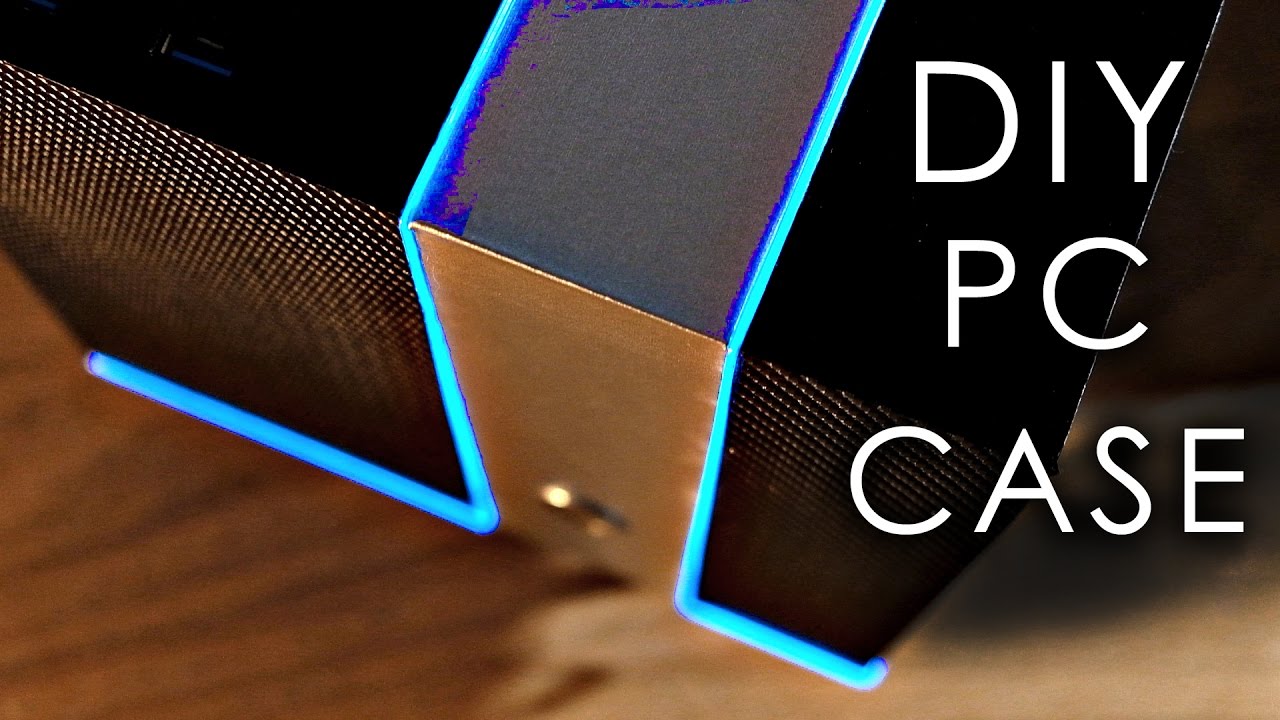
In this video we'll be making a sweet-looking PC case from scratch, using cheap materials & basic hand tools! Also available in kit form! http://diyperks.com...
For a case like that you could also build your own fan area's (of course using mesh) cause i could have in the front and side like a 200mm fan and the rear and top a 120mm/140mm fans
the outside as well i could use the new ARGB light strips to make it look fancy
maiden iron
I am just gonna grab some artic mx-4 unless someone has an alternative and compelling suggestion?
latent bronze
Well i use Deepcool Z9
latent bronze
Well it is their top brand non conductive thermal paste
I went for this cause i wanted to try something different that i haven't used and never heard of before
maiden iron
gotcha
maiden iron
@latent bronze what would you reccomend in 256gb Nvme
Most of the ones I found so far have lower read writes than the 500s
latent bronze
the one's i mentioned before should have 250/256 versions
also less storage means less speeds
maiden iron
Because it can't be distributed as much?
latent bronze
Well here this is my boot drive which is a 240gb 2.5" SSD https://i.gyazo.com/b34a4348e664dd4780c88df6754a802a.png

same drive but 1tb version for my games https://i.gyazo.com/279f84f79149137ed9cd3fefbeef109e.png
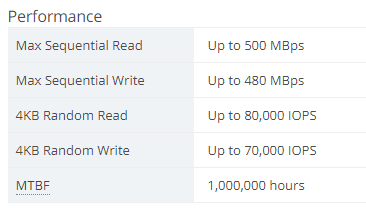 maiden iron
hm
latent bronze
i can't really explain the why for larger storage having faster speeds
real spindle
Okay guys I need help so I just built my first pc and for some reason I start it and it runs for maybe like 15 secs then it shut down the restarts what should I do ???
maiden iron
hmmm. By starts what do you mean?
Do you boot into an Os?
or see bios prompt?
or?
real spindle
No I haven’t boot into a os
And like it powers on and light up and fans start moving then it restarts
maiden iron
ahhh.
Check that all your components are secured
then clear the cMOS and try again
if still no boot
real spindle
Cmos?
maiden iron
maybe find other hardware to boot
and update bios
yeah
the lille circular battery on the mobo
take that out and wait a few min
or if you can find two contacvts on the mobo lbaled cmos clear
power off and short those
real spindle
Wym by short them
maiden iron
touch something metal across tyhem
a piece of wite
wire
a screwdriver
the end of a hedset
lol
a headset jack
or plug in a button there and use that
real spindle
Okay which thing should I touch with metal
maiden iron
if your case has a restart button as well you could repurpous that for a moment
instead of shorting it
what is your mobo?
actually all your parts
you could have compatibility issues
real spindle
I’m using a b345m gigabyte i5 9600kf rtx 2060 gg oc
real spindle
Uh oh
rough loom
does a b345m even work with that processor?
maiden iron
but you are trying to put an intel processor into an am4 socket.
real spindle
Ughhhhhh omg!!!
pulsar garnet
Oml
maiden iron
That would be why it won't post
real spindle
I read and people said that they use i5 9400 with that processor
I mean mother board
rough loom
what is even a b345m. i cant even find it? a b350?
 real spindle
It said it’s compatible with intel 9th gen
real spindle
No
rough loom
are you getting any on screen messages?
real spindle
No I’m not
rough loom
so it power cycles and shuts off
real spindle
I have no clue
rough loom
could try using only 1 ram stick, and no graphics card to see if it posts than sticks
maiden iron
^^
latent bronze
What is the rest of your specs and the GPU
rough loom
also make sure your not using a PCI cable from the psu as your cpu pin and all that
maiden iron
rtx 2060
real spindle
I did rtx 2060 gg oc
latent bronze
and the PSU is?
real spindle
600w revo bron
latent bronze
with a 9900KS and 2060 should of went a little higher in my opinion
latent bronze
Still would of went for 650w or 700w
rough loom
psu is fine for that
honestly start with the basics and work from there. CPU, cooler, power, ram
if you can get it to post and stick without restarting than you keep adding
real spindle
Alright got it
maiden iron
So sabra sells 17oz containers of hummus now
Lol my diet alreADY contained TOO MANY BEANS
now it will even more
real spindle
maiden iron
Between Taco bell, actual Hispanic food, and hummus, I'm basically a human bean.
possibly not even human
I could be a queso bean
Which reminds me I need more cheeses
I done cooked too many things
latent bronze
Mmmm taco's
 undone geyser
Hi everyone! 🦁 Man this is an weird Intel VS amd test LOL! 😄 https://www.tomshardware.com/reviews/intel-amd-hedt-pancakes,6366.html?fbclid=IwAR1fsCs-HE2XiHmIQP7gmzaBXxCfnDju3SgKfWRWnqxqrfMJvDojVla1FRs

Tom's Hardware
We took some of Intel and AMD’s most powerful HEDT processors and turned them into stovetops to make some truly regrettable pancakes.
maiden iron
Hahah that's great
 olive harbor
Hey guys, was wondering what is better 128GB (8x16GB) Corsair DDR4 Vengeance LPX Black, PC4-32000 (4000), Non-ECC Unbuff, CAS 19-23-23-45,
Or 64GB (8x8GB) Corsair DDR4 Vengeance LPX Black, PC4-33000 (4133), Non-ECC Unbuffered, CAS 19-25-25-45, what is the best ram here for latency if someone can help this will be mainly for gaming?
coarse coral
pretty sure you wont see much of a 2-9 fps difference after 3200c14 @olive harbor
either one is fine
just pick one that your motherboard will support
because those are pretty niche ram speeds and timings
deep skiff
but why would you need 128gb of high speed ram?
it really won’t see much performance, and for gaming you only really need 16gb
 sand rampart
Hello guys I am looking for my new PC build - not for gaming.
I wonder to buy those components:
*Ryzen 9 3900x,
*ASUS AMD AM4 ROG Strix X570-F or ASUS TUF GAMING X570-PLUS (WiFi is not necessary and I won't waste extra $100 for WiFi),
*CHEAP GRAPHICS CARD, LESS THAN $400,
*CORSAIR VENGEANCE LPX 64 GB 3600 (2 X 32GB) OR G.SKILL RIPJAWS V SERIES 64 GB 3200 OR 3600 (4 X 16 GB)
*BE QUIET! PURE POWER 11 700W 80 PLUS
what do you think ?
 stark spruce
If you are not using it for gaming what will it be used for?
latent bronze
@sand rampart Honestly motherboard wise id go ASRock over Asus
sand rampart
@stark spruce for numerical simulation and CAD
@latent bronze you mean ASRock X570 Phantom Gaming 4 ?
latent bronze
Was thinking a little more the Steel Legend series
@sand rampart This one pretty much https://www.newegg.com/p/N82E16813157894
Under 400$ for a GPU you have this one as well https://www.newegg.com/zotac-geforce-rtx-2060-super-zt-t20610e-10m/p/N82E16814500471R
stark spruce
What you have listed there should work fine for your purpose. I'm not into the finer details of what board/brand is better like some of the more knowledgeable members but the specs you listed are good.
latent bronze
If i recall CAD works better with Nvidia over AMD
I remember a few months back in another discord someone was saying that you needed Cuda Cores for it
lime forge
does amd have a quadro equivalent?
sand rampart
AMD FirePro ?
latent bronze
@lime forge https://www.newegg.com/p/N82E16814105087 This is the Quadro equivalent
But don't expect to play games on it
lime forge
limit 20 per customer 😭😭😭
latent bronze
Why do you need a work station GPU?
little osprey
It's hard to sound fair comparing OpenCL to CUDA at face value - Nvidia cards could see a 20% markup and HPC users would still flock to team green
little osprey
Any way I can modify and upgrade a desktop laptop?
Would like it to handle gaming
Needs new batteries obviously cause it’s shot I just want to upgrade the internal cpu gpu and the ram
rotund radish
External video card maybe
rotund radish
Idk if they still make them
little osprey
im building with a corsair 220t and using the corsair 100i, this guy did it but is it at all bad to have the fans like this where 1 is not on the radiator for a 9900k https://gyazo.com/b3beed2ae45f6beefb7c8e21027bb1b2

 sudden turret
yikes.
rotund radish
Big bad, put fan in place
sudden turret
card to long
rotund radish
Actually even better for 9900k
sudden turret
just poorly built, imo.
sudden turret
I take that back, their might be room
little osprey
sudden turret
sudden turret
@little osprey
little osprey
@sudden turret
sudden turret
don't be annoying 😐
little osprey
😩
little osprey
ah i guess it does work. thanks you sir @sudden turret
sudden turret
np lol.
little osprey
l||o||l
little osprey
Hey everybody, first time on here. I'm looking to buy a desktop from Newegg but I need some help choosing the right build.
Here's my current build
anything that I should upgrade for the deals this week?
little osprey
Mostly video editing and working in the Adobe suite. I want something fast, lots of RAM but video card doesn't need to be amazing since I won't be gaming. I'd like to keep it close to $1k.
sudden turret
you looking for prebuilt? or build yourself?
little osprey
Either. I'm not opposed to building it myself. I know how to assemble one, I'm just not super savy with the techs.
sudden turret
wow all the ryzen workstations are out of stock lol
 sharp viper
Hey guys I have been waiting to start buying parts but I wanna see what you all think of my list
latent bronze
I know this says gaming on it but this is the cheapest system i can find that can do all those without any problems https://www.newegg.com/abs-mage-m-ala147-gaming-entertainment/p/N82E16883102831
sudden turret
he is going to probably want something with at least 32gb ram
might have to just piece one together.
cheap gpu and the rest into ram / nvme drive
but I've never built a video editing rig.
would def want it to be a Ryzen build though
@sharp viper don't really see any issues with that set up
sharp viper
Alright thanks bro
 shut olive
How’s my build? https://pcpartpicker.com/list/sZbcb8
 noble ravine
how hard would it be to deck out a rugged laptop? could i buy a rugged dell and put a i7 and gtx1660 in it and be able to run any game?
 limpid merlin
@noble ravine https://pcpartpicker.com/list/Ffq9rV better spec system for less
noble ravine
😩 thats quite a bit more expensive...
i just need to know which has a better proccessor
limpid merlin
I was comparing it to the other pcpartpicker link you posted
this one https://pcpartpicker.com/list/sZbcb8
noble ravine
they are different brands so it perplexes me
i must posted that pcpartpicker on accident. never even heard of the site lol
but id love to know which proccesor is better for games https://www.newegg.com/black-msi-gl-series-gl65-9sc-003-gaming-entertainment/p/N82E16834155298?Item=N82E16834155298
https://www.newegg.com/black-force-asus-tuf-gaming-fx505dt-eb73-gaming-entertainment/p/N82E16834235185
of these 2 new eggs which is better for gaming
limpid merlin
ooooooh
I'm dumb
pinged the wrong person 🤦♂️
@shut olive here's a better spec system for less (same core components as what you posted) https://pcpartpicker.com/list/Ffq9rV
there we go, at least I pinged the right person this time
noble ravine
Id still love an answer please lol
plush merlin
how often does newegg restock items specifically gpus
 wanton marlin
Hi i am build new pc motherboard ASRock X399M TAICHI sTR4 with AMD 2nd Gen Ryzen Threadripper 2920X 12-Core, 24-Thread, 4.3 GHz Max Boost (3.5 GHz Base)
G.SKILL Ripjaws V Series 16GB (2 x 8GB) 288-Pin DDR4 SDRAM DDR4 3200 (PC4 25600) Desktop Memory Model F4-3200C16D-16GVGB
SAMSUNG 970 EVO M.2 2280 1TB PCIe Gen3. X4, NVMe 1.3 64L V-NAND 3-bit MLC Internal Solid State Drive (SSD) MZ-V7E1T0BW
ROSEWILL ATX Full Tower Gaming Computer Case, Supports up to 420mm Long VGA Card, 5 Fans Pre-installed, Fan Speed ...
plush merlin
i saw some ripjaw ram at a higher speed of 3600 mhz for $70 you should check it out
round flare
get neo sticks for ryzen
plush merlin
round flare
they were made specifically for it so
little osprey

wanton marlin
would rtx 2070 be better then two other cheaper cards
little osprey
Gaming? no
wanton marlin
video editing and part time gaming
little osprey
Spend the $ on big, fast nvme ssd's an x570/3900x or x299/x399 + big memory, nice monitor vs that second 2070 imo. To get more performance, bump up to a 2070 super + , or just go 2080 ti
coarse coral

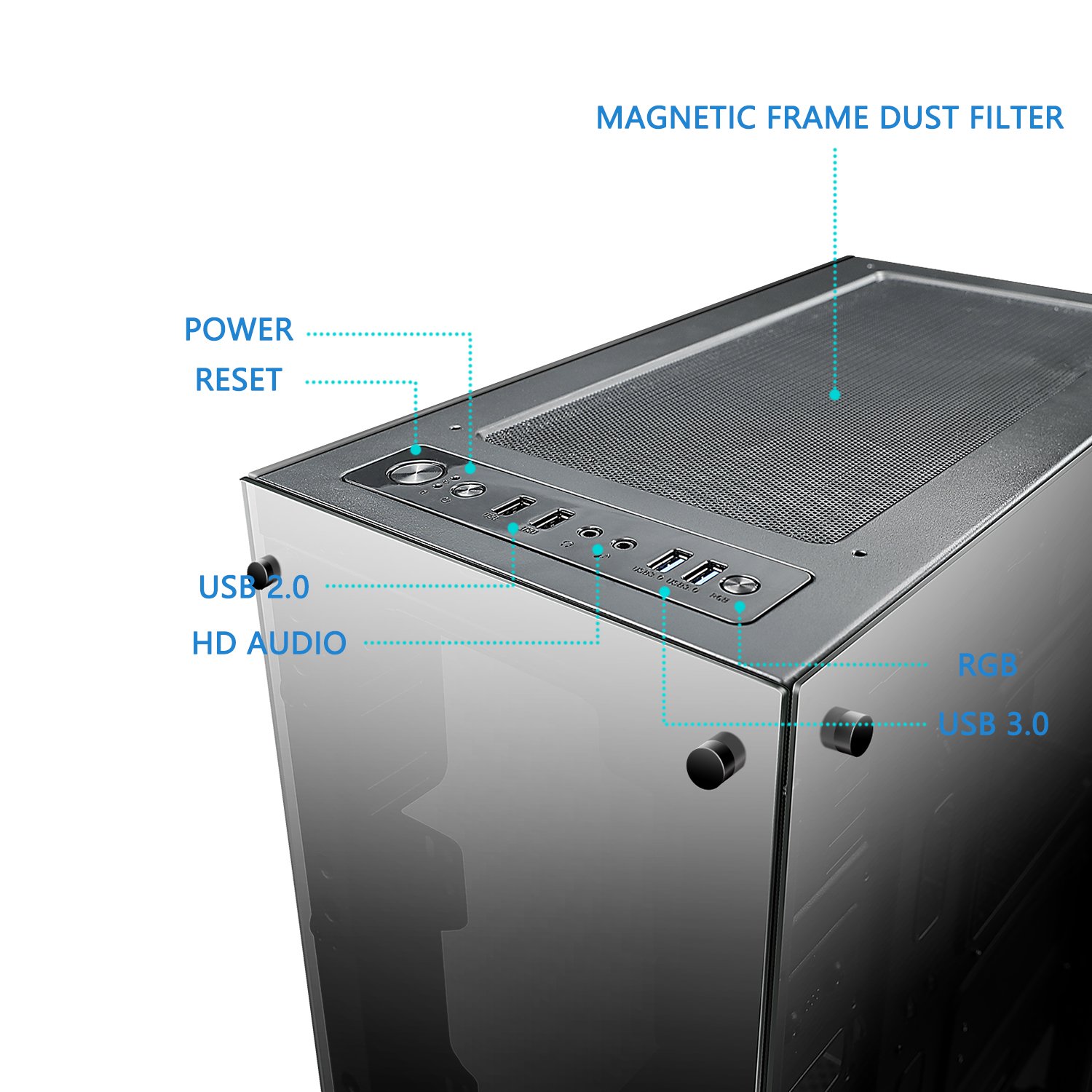

 wanton marlin
what power supp i need
coarse coral
whats your current build so far @wanton marlin
 narrow marlin
can anyone help me in finding compatible parts?
latent bronze
@narrow marlin compatible parts for what
narrow marlin
Intel - Core i7-9700K Octa-Core 3.6 GHz
latent bronze
So your looking for everything else then
latent bronze
1080p or 1440p
 finite sable
hes not really gaming with it
finite sable
i just wanted something aster than what i have now so it could keep up with aving 4 demdning apps open at a time
a digital audio work station and external audio interface app
a browser
@latent bronze
latent bronze
Only reason why i added in a GPU anyways just in case his friend would asked him to play a game with him and so he would be able to play it
tropic estuary
How much thermalpaste should i put on a gpu dye?
finite sable
pea size
tidal bluff
pretty sure same as cpu
just dont overpaste
redoing a heatsink or putting on a new waterblock?
tropic estuary
Redoing a heatsink
Just repasted it like an hour ago
I put a little more than peasized
Thermal paste says its non contuctive
Its the TM30
I think from corsair
tidal bluff
did the thermal pads look ok?
latent bronze
If it has thermal pads
 plush shale
Apologies for bothering you. I had a question. I was going If to buy this Graphics Card (https://www.newegg.com/p/N82E16814137338), but I just saw it is out of stock. Is there a way to see when it is going to be back in stock? If not, do you guys know the average re-stock time? Thank you for your help.
little osprey
Newegg isnt the only place that sells pc parts
rotund radish
and it is kinda in stock
plush shale
It's about $500 - $600 more though.
plush shale
I tried Amazon, but Amazon is out of stock too, and it's a different seller.
Before:
little osprey
Idk where your lookin but its in stock for me
little osprey
He said 700 more
plush shale
By other sellers.
plush shale
Do you guys know the average restock time?
little osprey
Aurus is so much better imo
plush shale
Black Friday sales do not effect this product for some reason.
little osprey
lol
plush shale
There was never a sale on it.
plush shale
3 Display Ports.
little osprey
DP > HDMI for almost all monitor use
But id rather have hdmi since i hav a bunch of those cables
plush shale
You guys know a similar graphics card?
little osprey
EVGA
The EVGA GeForce RTX 20-Series Graphics Cards are powered by the all-new NVIDIA Turing architecture to give you incredible new levels of gaming realism, speed, power efficiency, and immersion. With the EVGA GeForce RTX 20-Series gaming cards you get the best gaming experience...
plush shale
(About same stats and price)
little osprey
code gets 5% off
Better deals sold out earlier it seems, just b-stock left, fantastic b-stock deals imo - but only 1 year warranty fwiw
Not a bad price - the gaming x trio has the highest power limit, remember though, the X is meaningless, buy x/nonx whichver is cheaper
little osprey
ftw3's is 373w, with the bios flash the gaming trio's hit 404? or something watts
plush shale
Never heard of it before.
plush shale
I am no professional, nor have I ever build a PC, but considering that 850 W is overkill for a 2018 Ti, H100 Water Coller (I think), and i9 9900K, I think 750 W is good.
plush shale
This one is kind of expensive.
The 850 costs less.
I found a good 850 W power supply for $80.
But I think $139.99 is overkill.
little osprey
850w is well within reasonable range. Said range is wide, and deals vary, pick based on review research, current sale availibility, and aesthetic /brand preference.
plush shale
little osprey
PSU's can last a decade, $200 850-1200 watt titanium units have 12 year warranties for a reason.
plush shale
That's the one I am going for.
little osprey
Now how about a water cooled loop / i9 / case fans / 2080ti sli/
tidal bluff
even my 750 g3 has a 10 year warranty
little osprey
Ya
tidal bluff
EVGA
EVGA SuperNOVA power supplies are well known for their extreme efficiency, performance and reliability. In fact, over the last 3 years EVGA SuperNOVA power supplies have won over 70 awards from leading review sites. It is EVGA�s dedication to performance that has created...
little osprey
But corsair products r my go to
tidal bluff
thats mine
little osprey
And i need a white psu for my build
Lot of people hate on the G3 - for dumb reasons imo - just make sure the fans spinning and don't short the main +12V and you're fine. I use one as a bench supply
tidal bluff
o its a great supply just wish i coulda waited
little osprey
It just has a secondary feature as an arc welder, so be careful
tidal bluff
g5 came out 3 months later lol
tidal bluff
i got it cause its evga
little osprey
?