#building-and-recc-chat
1 messages · Page 408 of 1
 latent bronze
 next tangle
And if it doesn't work out, I have a chance to be a doctor.
 little osprey
That's a very, very uncommon double major , double majoring in engineering isn't usually worth your time or effort.
latent bronze
When that came out about 20 friends messaged me to build them a system
 rough loom
thats a very expensive double major too
 pulsar garnet
Krayola you're 12
next tangle
@little osprey I have heard about that but my parents own a business that makes machines that AMD and other used
They actually used to work with AMD
The electrical engineering could help out with their business
little osprey
Ya, that too, 6 years from now, who knows how education will be structured.
next tangle
They make laser technology, circuit boards
Correct
@rough loom True
@pulsar garnet True
I'm studying for a scholarship
I'm asian so my parents want to me do a lot..
 still roostBOT
 MeraTheWolf#1242 has been warned
Reason: Bad word usage
latent bronze
Being asian has nothing to do with anything really
rough loom
Just know thats gonna take a ton of effort and studying
latent bronze
i know cause i am asian
pulsar garnet
Don't bother with a double major. Just do something you think is interesting but also worthwhile.
next tangle
I have a friend that's viatnemese and he has true asian parents, they make him study and play tennis professionally LUL
little osprey
Well, it's a very common trend for Asian parents in the US to have high expectations for their kids in school. e.g. the "why you no doctor yet" meme
pulsar garnet
And again you're 12, slow down bucko
pulsar garnet
ok
next tangle
I like doing my own thing, making my own money and helping others
@little osprey LUL true
little osprey
If anyone has actual build chat questions, maybe move this to.. idk where
rough loom
should go to general
next tangle
OOF NOT AGENT
pulsar garnet
Move to general @next tangle
next tangle
mk
little osprey
eh
pulsar garnet
Anyways
pulsar garnet
I can't wait for my i9-9900K and Z390 Xtreme. It's gonna be nice.
little osprey
#500102781240344576 could be interpreted as such hahaha
Which extreme? The gigabyte?
pulsar garnet
Any idea for a good cheap temporary cooler for 9900K while I wait for that aorus 360mm?
Yeah aorus xtreme
next tangle
lmao
little osprey
What coolers do you have laying around.
pulsar garnet
I have an H105 in my old build
next tangle
@little osprey do you actually have a core 2 duo and a 2080 ti, wouldn't that have a major bottleneck?
rough loom
that would work
next tangle
lmao
pulsar garnet
I could pop that over
little osprey
Lol, do you think I turn my nose up to every AIO regardless of use cse?
I changed my nick to this because I wanted to put them together to test for fun
little osprey
Since I was in the process of re-arranging the rest of my hardware.
next tangle
@deep skiff https://www.ebay.com/i/283429359144 now that's a steal 🙂

eBay
Find great deals for Intel Core 2 Duo E8400 CPU Processor 3.00GHz/6M/1333 LGA775 SLB9J socket 775 EU. Shop with confidence on eBay!
pulsar garnet
Yeah, it's a 240mm so it'll do fine
little osprey
Ya, h105 is perfectly fine, some peole (bless them) actually choose that cooler for 9900k builds
pulsar garnet
H105 isn't even sold anymore is it?
little osprey
Just adjust the clocks, vcore accordingly, or - run plain stock.
rough loom
I would run stock imo till you get the good hardware
little osprey
Idk, h100, h110, athey're all 240 I think.
pulsar garnet
I'll probably run on stock settings until I get the 360
next tangle
gEt tHe rOg rYuJiN 360 mm cPu cOoLeR!!
little osprey
Anyway, I'll throw together the buld in my nick tonight so I can change this stupid cringe tag back to something else that's maybe half has off-putting
little osprey
I couldn't find the socket 775 mount for the zalman 9700, so I zip tied it on with the AM3 bracket.
next tangle
Oh speaking of upgrades a little bit ago 😉
I know I've been talking a lot about it
But I'm settled on taht
rough loom
ill give it to gigabyte. they have nice design
next tangle
that*
@rough loom But I heard Gigabyte isn't as trustworthy
Or is that only for AMD GPUs
next tangle
Just the Vega 56 then?
pulsar garnet
It's like everyone has had a bad experience with one brand and promises to never use it again
next tangle
True
little osprey
 next tangle
@little osprey so you aren't lying?
rough loom
oh boy thats an oldie
little osprey
Lol, did you think I was? That'd be a massive waste of everyone's time
little osprey
Yes, but that's the point, just interesting to see if and what happens
little osprey
I ran timespy on the 2500k/2080 ti
next tangle
spends 1K for a GPU just to see what happens
little osprey
Just to grab the #1 for config haha. Internet points man...
 rough loom
eh. no more of a time thing than sitting on facebook arguing with people or browsing memes
next tangle
sorry edited it, meant Paul
little osprey
?
next tangle
@rough loom AKA moms looking at minion memes
@little osprey I guess you didn't know, a little bit ago, paul was fighting for number 1 against some random people on timespy
and other apps
little osprey
Paul?
pulsar garnet
Who the heck is Paul lol
next tangle
Also, I found the Tomahawk refurbished for 78.99$ and has the MSI warranty with it
Paul's Hardware
pulsar garnet
Zsa Zsa Gabor
next tangle

YouTube
Tech reviews, tutorials, PC hardware and do-it-yourself computer building are my favorite things, so that's what I make videos about. Message me on twitter i...
little osprey
ah. I mean, overall #1 is usually vince, luumi, rauf, OGS, etc
next tangle
Trye
True
And LTT
I think
Oh the reason why I switched from a used 1070 to a new 1660, is because my dad said what if something goes wrong and it's the 1070's fault and the 1070 listing doesn't come with a warranty
little osprey
If warranty and customer service is high priority, EVGA is often the crowd favorite.
next tangle
@little osprey I'm still unsure, https://pcpartpicker.com/list/XvkCpG that or https://pcpartpicker.com/user/KrayyonHD/saved/WfTRkL that
next tangle
If I get the 2nd one, I can get some parts https://pcpartpicker.com/list/LhLv8Y for that
little osprey
Same advice as always, 3600, tomahawk are good picks, can't really go wrong with those.
I'll post a prospective build for once. 8AN SS braided tubing , anodized aluminum fittings, 60 psi diapham pump, using R410a->R134a cascade chiller. Unsure about coolant. I want to see how the chinese knockoff waterblocks compare to heatkillers.
https://puu.sh/Ehs0D/71855a4259.png
 latent bronze
Id laugh if the 580 he has in the list ended up being a mining card
little osprey
At worst, the fan bearings are worn out, remove and zip tie a $5 120mm over the finstack. I might do the same on my triple slot card because EVGA uses tiny whiny fans.
 vernal phoenix
hey all was wondering if someone can help me with a cpu upgrade recommendation --- i have an old Asrock X99 Extreme Mobo with a Intel Core i7-5820K -- Looking to get another CPU that works well on this board -- but trying to get into video editing -- i got a budget of about $600-700
 dusk snow
Quick Question. Is there a way to make two monitors the same display and have the third be different? I'm working on a display tablet for illustrations and would like it to mirror the main display so I can manage the colors easier but I still want my third display monitor for multitasking.
 zenith glacier
anyone have issues with 436.60 driver nivida?
next tangle
@zenith glacier What GPU do you have?
@vernal phoenix With that budget for just a new CPU for that motherboard, is overkill, it'll be a lot better if you just go with a new chipset, https://pcpartpicker.com/list/sfybsZ there.
little osprey
😩
If you've got a 4k budget, don't pinch pennies on the kf
Asame thing, why go for the z390-A Pro of all boards for a 4k build, especially when he wants at min 32GB , apparently 64
Lastly, if you're going to recommend ballistix sport, pick either the 3000c15 or the 3200c16, not the 3000c16, bad!
little osprey
Haha nah you're goood man, we ended up chatting in #cpus-mobo-and-memory . To be fair, maybe he'll end up on a cheaper build and save some $ for some network hardware or more storage/peripherals down the road. Even I regret getting a higher end x570 board.
little osprey
Gigabyte board kept boot looping, don't have a 775 cooler so eh. This is cooler anyway imo, and I can always test with an i3 2120 -de-lidded .
next tangle
Oh you know how to de-lid?
little osprey
It's not super hard on some chips with a knife, the IHS is just attached with silicone RTV goop. I used the Die mate 2 tool on my 7700k though.
next tangle
What does de-lidding it even mean?
Sorry I meant
What does it even do?
Like what are the effects and pros and cons
 silver lion
Do you think this would be good enough for the 144fps cap on fortnite?https://pcpartpicker.com/list/
latent bronze
@silver lion You need to copy the one with the letters after the list part
next tangle
above compatability
silver lion
silver lion
maybe 160?

 latent bronze
Get an RX 580 then
silver lion
ok
next tangle
And remove that cpu cooler
silver lion
why
silver lion
I nEeD tHe rGb fOr eXtRa fPs
latent bronze
@silver lion here https://pcpartpicker.com/list/4JHfMZ
Also a cooler CPU is a better CPU
The RX 570 8gb is also far better than the 3gb 1060
next tangle
True
silver lion
ok thanks
latent bronze
You're putting him over his budget which is a bad build
next tangle
Like he already wasn't lol
silver lion
i wanna do one of those 1660 XC
silver lion
yeah i guess
next tangle
They're a little more expensive
silver lion
https://pcpartpicker.com/list/X9Q3cY probably fdvdoing this
latent bronze
You know he said he wont really overclock so a single fan AIO is fine
next tangle
Yeah but so is the stock cooler
latent bronze
But would have better cooling
latent bronze
Also the MSI armor cards tend to be on the loud side
next tangle
Not as easily*
silver lion
the armor will be the only one in budget
silver lion
not really
next tangle
Oh
latent bronze
@silver lion check your DM
silver lion
so do i go with the rx 580 armor or not?
latent bronze
Let me ask you this what games do you plan on playing?
silver lion
fortnite, rainbow six seige, and maybe apex.
latent bronze
For those games you can use a RX 570 8gb or a 580 4gb
latent bronze
You would be using Ryzen Master for that
latent bronze

Just a quick video on how awesome AMD's Ryzen Master software is. Keep in mind this is for AMD Ryzen CPU's only so Intel users can take a hike. #Ryzen #AMD #...
If you plan on overclocking you wont need the X version
silver lion
lol
little osprey
If you plan on overclocking you wont need the X version
next tangle
@little osprey What are the pros and cons of de-lidding?
silver lion
do you think i could oc this mac
latent bronze
Well they both overclock to the same speeds
next tangle
Do you recommend me doing it?
next tangle
Who?
latent bronze
I have never touched a mac in years so no clue lol
next tangle
@little osprey Do you recommend me de-lidding the 2600x I'm getting? And if so, what tools do I need?
little osprey
no
next tangle
How come?
silver lion
4 GB 1333 MHz DDR3
little osprey
- you shouldn't de-lid Ryzen's, eats the type of metal
silver lion
AMD Radeon HD 6750M 512 MB
next tangle
Oh how come?
next tangle
Oh all good!
silver lion
my 2011 i mac has 64 gb of memory, i9 9900k, two 2080ti's, and 12 tb of storage
little osprey
But 2, de-lidding voids warranty, as far as I can tell, it would be terribly irresponsible of me to recommend you do something that's so easy to ruin a $200+ chip
latent bronze
are you even able to delid ryzen's?
meaning how they're designed compared to Intel CPU's i have never seen anyone delid one
silver lion
English pls
latent bronze
Delidding is mainly this https://www.gamersnexus.net/media/k2/items/cache/9fd7904a388a488789cce12ebbc2a649_XL.jpg
 little osprey
If you have an important question, ping me
latent bronze
people does it to put better thermal paste
little osprey
Also, I posted pics lol
silver lion
Ecks is playing WoW
little osprey
Kinda, it's largely because the black silicone RTV is too thick and expands
latent bronze
WoW classic
cause i prefer the vanilla style
And talent tree's https://i.gyazo.com/76f8640175739916bf388063d18e3ef7.png
 silver lion
Ok, Im out. Thanks Ecks and Krayola.
latent bronze
peace
 valid apex
hey looking at building a new gaming rig and have a very noob question. how do i make sure it's got bluetooth?
latent bronze
You can get a motherboard with built in bluetooth or use a bluetooth dongle
I use the bluetooth dongle cause it costs less 😛
still roostBOT
 wicketlxix#3497 has been warned
Reason: Posted an invite
 coarse coral

pulsar garnet
People who just come here and post invites...
 tacit edge
hey all
i need a new pc, and i thought y'all might be able to help
here's my list
i somehow need to get myself a half-decent pc for under $550
 short arrow
Just off the bat, I would recommend downgrading the CPU, getting a better gpu
tacit edge
ok
short arrow
Like a 580/590
tacit edge
i'd need it mostly for photoshop
short arrow
Well, wait then
tacit edge
and 3d modelling
short arrow
Yeah, that stuff is pretty cpu intensive, i thought you were just going for gaming
tacit edge
light gaming
but mostly heavy office workstation kind of stuff
for display i'd use a pen graphic tablet
short arrow
Yeah, that stuff is pretty cpu intense
tacit edge
i thought graphics is important there too?
tacit edge
ah
short arrow
Just to earn you though, the armor cards are very hot
 frail zealot
Now that I have a 144hz monitor instead of 60hz, should I be shooting for above FPS? Does hz = FPS? Please help
above 60 fps*
frail zealot
Ok, so what exactly does the extra 84hz get me?
tacit edge
fps is still dependent on fps speed
its smoother for things where you do get high fps
some people say it is really much nicer
frail zealot
Ok, for instance, battlefield 5, I have the option to run it at high for 65 fps, or medium for 95 fps
Which would you do?
tacit edge
but if you cant net that high fps, it doesn't really matter
i'd go medium
but my current specs is amd a8 radeon r5 graphics so i deal with all sorts of lag
in my limited experience, higher graphics doesn't really make it that much nicer
frail zealot
the 65fps doesnt lag at all, but do you mean Im missing out of frames by not being nearer 144?
short arrow
If you want detail, go for the lower fps
tacit edge
no i'm saying higher fps is more important because higher fps will look nicer, while better detail doesn't look that much better
short arrow
If you want fps, go for the lower detail
short arrow
^^^
frail zealot
Doesnt it cap at 60fps? or it doesnt do that anymore since I have a 144hz monitor?
tacit edge
it depends on the game
usually u have to raise the max fps setting in graphics settings
now that you have the faster monitor it can cap higher
frail zealot
All my games are based around getting the best quality while retaining 60fps, now that I have a new monitor, should that change from 60 fps to something else?
what # fps? 100? 120? 140?
tacit edge
it depends on your preference of smooth shapes and shadows vs smooth motion
that's a personal thing
me, i just go lowest graphics settings so that I can even get above 5 fps
but if you have an actual computer, that's your thing
frail zealot
I have a gamiong rig
tacit edge
i'd test out both to see what pleases you more
frail zealot
so whats the max fps I can pull now? 144?
tacit edge
yes
frail zealot
so hz is related to fps?
tacit edge
yes
frail zealot
ty
tacit edge
hz is how many fps your monitor can display
tacit edge
np
frail zealot
so since you know what you are talking about
should I be lowering my settings to get closer to 144?
tacit edge
again that is fully on you
frail zealot
purely preference?
tacit edge
yeah
frail zealot
I dont know the difference yet
frail zealot
Battlefield 5 runs fine at 65fps and looks beautiful, when i run it at 100fps it runs the same but doesnt look as good
tacit edge
if you want it beautiful then go with 65
frail zealot
maybe I cant notice the 35fps difference? not trained to notice it?
ive never played above 60 tho so idk what to even look for
its just what, smoother?
tacit edge
buttery smooth motion, yeah
frail zealot
hmm
tacit edge
if you don't mind me asking, what did your rig cost?
frail zealot
I got it on xmas for $900, but I've added a 1tb SSD and this 27 inch 144hz monitor
 naive plume
You’ll notice a major difference going from 60 FPS to 144 FPS.
frail zealot
@naive plume Even with lower graphics settings?
Id have to go from very high to medium/low
each threshold is about 15-20fps
naive plume
I missed what build you have, what cpu and gpu do you have
Did you go into your display settings and activate your monitor for 144hz? If not, then you’re not truly getting 144.
frail zealot
tacit edge
both display settings and in game fps cap are important
frail zealot
I have two choices: one is PC 1920X1080 144HZ, the other is HD 1920x1080p 60hz
tacit edge
144
tacit edge
literally everything but the psu and ram is rgb
naive plume
Scroll down to the pc tab under that ultra hd stuff
frail zealot
naive plume
That’s what you want
frail zealot
thank you
monitors are new to me, Ive just used whatever my dad handed down for the last 15 years XD
naive plume
Now your games can run 144 as long as you’re not blocked by vsync
tacit edge
oh the horrors of driver-land
frail zealot
so I should be lowering the settings until I get as close to 140fps as I can?
rough loom
up to you and what you like honestly man
staying around 70+ means its a smoother gameplay experience
frail zealot
I feel like I wasted $300 on this monitor if Im only running at 60fps still, like what was even the point then?
naive plume
It all depends! I’ve never played bf5, so I don’t know the graphical settings in there. Most games you won’t see much graphical problems with lower settings, but bf5 you might
rough loom
but 60 fps is smooth anyways
tacit edge
but if nice shaders and smooth shapes really make you happy then go for that
rough loom
Ive got games that flux between 40 fps and 120. you can tell the difference
tacit edge
I was playing Deep Rock Galactic yesterday and ultra graphics and low graphics literally looked the same lol
rough loom
was it a waste? no
frail zealot
oh yeah I notice when it falls below 60, I just don't notice above 60
naive plume
I’d shoot for a minimum of 120fps
tacit edge
np
naive plume
Now that you have it setup for 144 you’ll be able to hit those numbers! Or Atleast come close. A 1660 should be able to handle it
rough loom
massively better
tacit edge
which in turn is massively better than integrated graphics
naive plume
Lol a toaster is much better than integrated graphics!
latent bronze
For about the same price as the 3gb 1060 you can get a 4gb 580
tacit edge
i don't know, maybe i should game on my raspberry pi instead of my laptop? 🤔
naive plume
Lol
latent bronze
or save a little for a RX 570 8gb
naive plume
The rx 570 is what I’m sticking in my sons build
latent bronze
the 570 is still a good card i am using that now
tacit edge
so is model number or graphics buffer more important?
ie should i go for a 8gb instead of 4gb or a 580 instead of a 570?
latent bronze
Well until next month when i buy the 1660 >_<
naive plume
8gb is better
latent bronze
If you have the money you can go for it
tacit edge
which has better price to performance?
rough loom
mostly depends. Usually the higher card model means more raw computing performance. The vram buffer allows either higher Resolutions or better textures and AA settings
naive plume
You’ll have more graphical memory to throw around with an 8gb
rough loom
maxing out a graphics cards vram means stuttering and performance hits
latent bronze
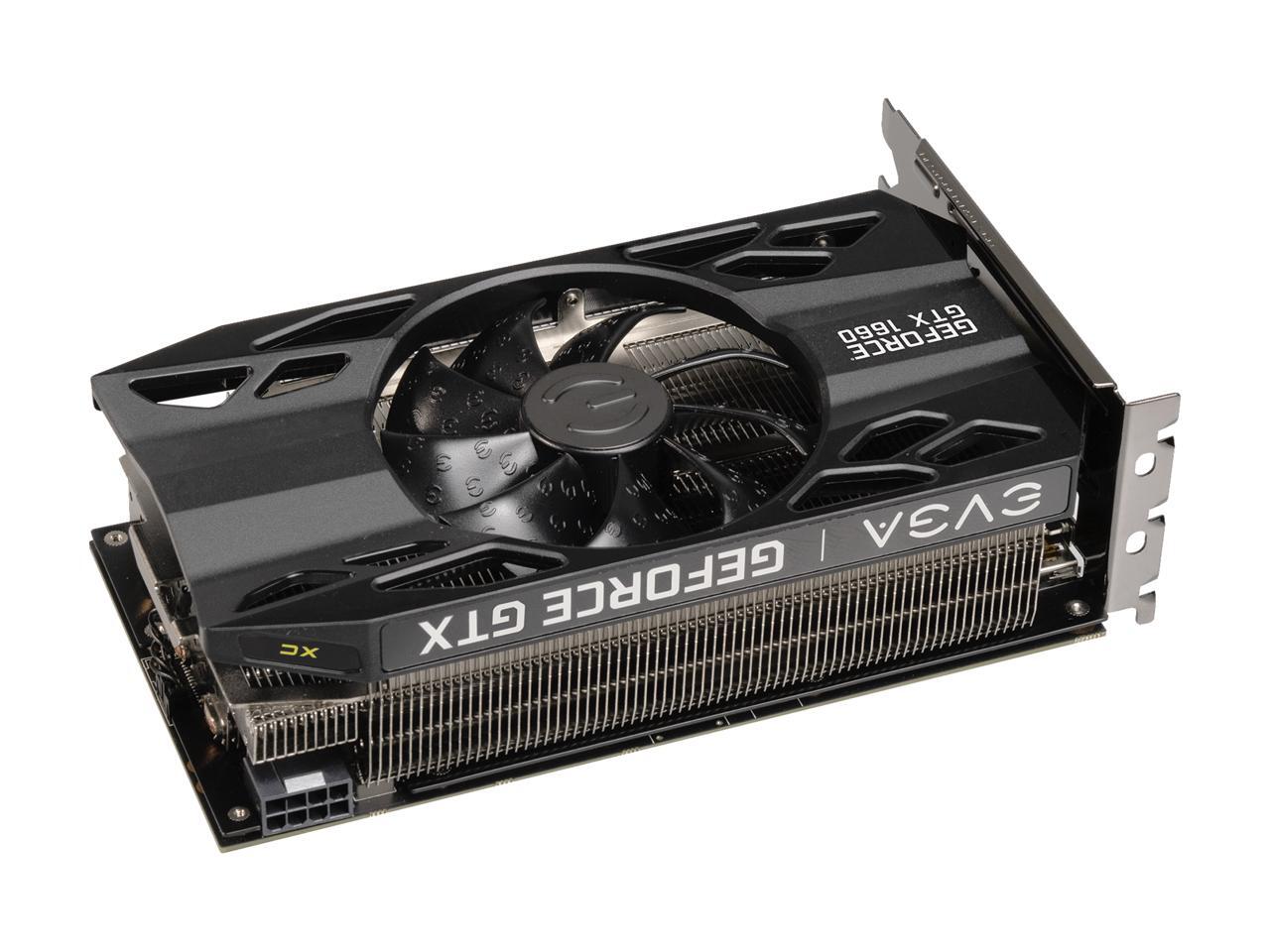
@tacit edge This is the 1660 i am going for as well lol https://c1.neweggimages.com/NeweggImage/ProductImageCompressAll1280/14-487-437-V04.jpg
 tacit edge
but if it's for modelling and photoshop and not gaming?
latent bronze
Look at that thiccness
naive plume
That’s a big mofo! -that’s what she said
rough loom
it looks so funny being thick and short
tacit edge
you need a whole nother case just for the card then lol
latent bronze
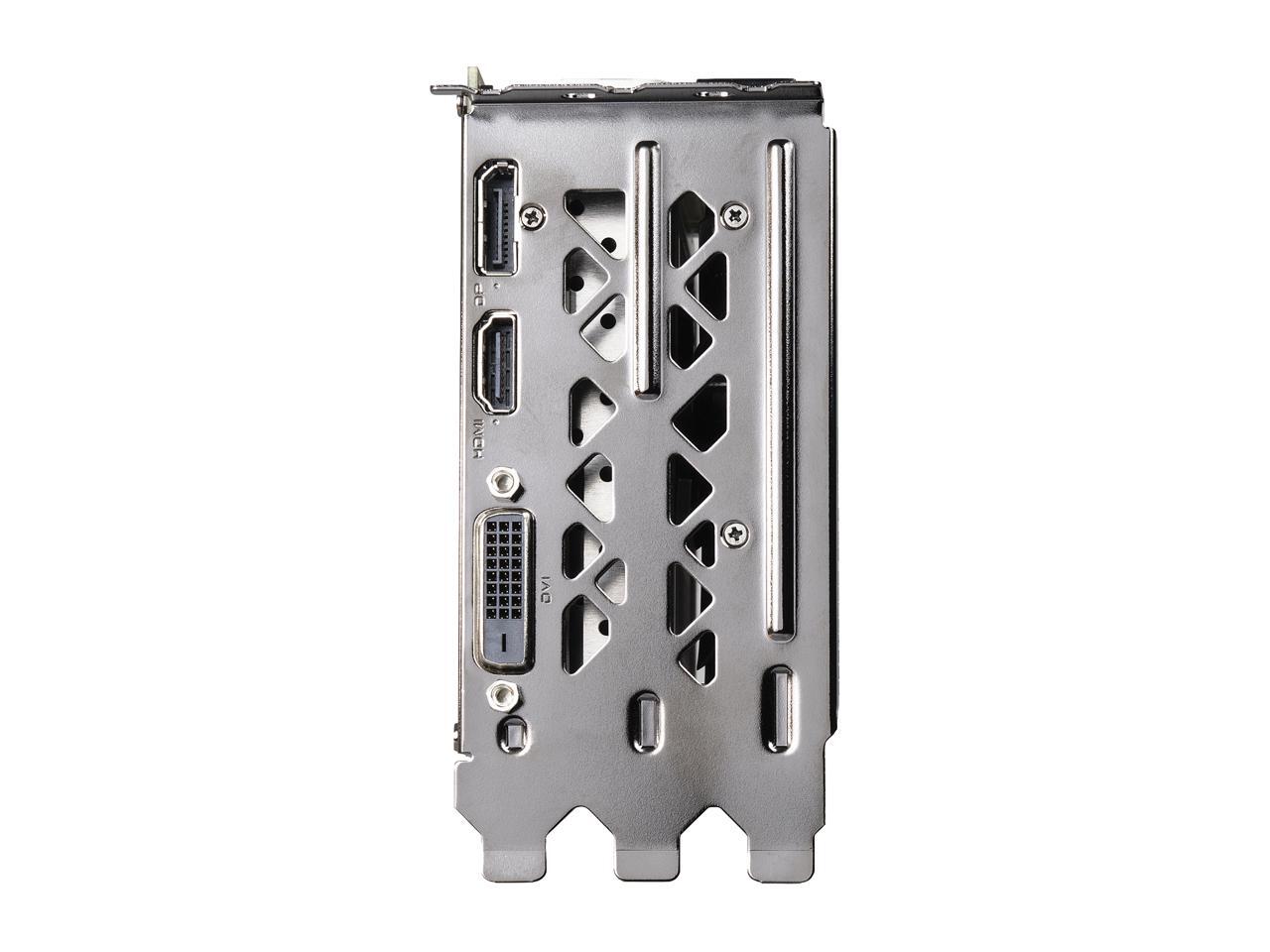
This is how big it is https://c1.neweggimages.com/NeweggImage/ProductImageCompressAll1280/14-487-437-V03.jpg
 tacit edge
how expensive is it?
naive plume
Will it even fit in your case?
latent bronze
In Canada..... 300$
tacit edge
wowo
tacit edge
enigma decoder has entered the chat
latent bronze
That is before i placed my system under my desk lol
tacit edge
that's a lotta rgb
naive plume
I need a can of air duster
tacit edge
individually addressable?
latent bronze
addressable and it comes with the case
latent bronze
@tacit edge That is the case which you can get one in black as well just would cost more since that one is a open box one
tacit edge
nice
i can't afford that though lol
my budget is $550 or so
and I don't care about appearance at all
rough loom
I dont understand why everyone here pushes that rosewill case
tacit edge
because people here like cases that look nice
personally i'm fine if it looks like it's from 2005
as long as it runs fast 😠
rough loom
I want top end airflow in a case
tacit edge
for cooling purposes?
rough loom
yep
tacit edge
does it make that much of a difference?
rough loom
cool components = happy components
latent bronze
It has a side air vent
rough loom
yea. your getting into the cougar conq and open cases
latent bronze
yes but you would have to have something to have the motherboard on still
tacit edge
i mean i could build something out of wood
are there any integral parts that i'd be missing?
rough loom
yea. just mount some fans for vrm cooling
tacit edge
vrrrrrrm vrrrrrrm
rough loom
cases are mainly there for structure. protection, and air direction
naive plume
I’ve always been afraid of the no case builds! I like know air is being pushed through and helping to get rid of some of the heat.
I guess as long as your cpu,gpu, and fam are staying cool, that’s all that really matters
latent bronze
@rough loom watch from this point in the video https://youtu.be/OA5qp6126MI?t=31
rough loom
the only thing to worry about on a open bench is just vrm and passive cooling of the board
Ive watched it. I wasnt really impressed
latent bronze
Still for the air the be exhausted from the rear and side is a better option especially since you have no idea what kind of desk said person it using
if someone is using a small desk and only able to have the case on the floor you have no idea if there is even enough room for the top to exhaust out the air so by having it on the side makes it better
rough loom
plus my case is so big it could never fit under my desk or even on the desk
its on the floor and nearly as tall as my desk
and weighs 60 lbs
with components inside
naive plume
60 pounds? Wtf you got in there, a small child
latent bronze
This is what mine looks like under my desk
Also if i am using a case that is only using 4 fans and has great thermals i will push it
naive plume
Does new egg sell stream decks?
 sudden turret
I wonder what mine weighs.
latent bronze
over 9000!!!
sudden turret
😐
latent bronze
sorry i meant over 8000
sudden turret
pls dust it.
rough loom
I did, thats only after 2 months
sudden turret
even if it's a piece of cardboard.. or piece of wood.
rough loom
theres no bottom intake. why would it matter?
sudden turret
carpet. matters.
latent bronze
carpet = hazard
latent bronze
I am using foam pads and a riser for my tower
rough loom
thats the dumbest thing ive heard yet. Its a metal.. Full metal case. its grounded
and its on wheels
sudden turret
ok.
rough loom
its litterally grounded TO THE WALL
latent bronze
Where are the wheels?
rough loom
under it
its a good 1 inch off the carpet
if your gonna complain about a case. atleast know about the case
sudden turret
🤔
rough loom
or know how electrical grounding works
the 3rd plug on a PSU to the wall is the ground. specially for discharges incase its needed
rough loom
I mean apprently not
latent bronze
Mera you said it is 1 inch off the floor so i would like to know in that image where are the wheels since they should be visible
tacit edge
that's why it's dangerous to saw the third prong off, it could kill you
because not grounded
rough loom
I need to vaccum again. cats man...
tacit edge
what do you have that weighs 60lb, a giant server rack RAID array?
rough loom
bunch of HD's in those racks inside, two graphics cards, heavy 1,000 watt psu. AIO and the case itself is 35 pounds without fans in it
you could be in a earthquake. part of your house fall on this case, and the components wuld still survive
latent bronze
If you have cats why is your case on the ground instead of like on a table
rough loom
no room unless I bought a side table just to put my PC ontop
rough loom
I plan to get a different case anyways with my next build
H500M and swap out the HD's to SSD's. shorter and lighter
tacit edge
what are the cards?
rough loom
1070's
 elfin flicker
That comment about grounding to the wall... you realize silicon is a semiconductor, right?
rough loom
I dono I would guess around 1800-2200 if i bought everything at the same time
tacit edge
whoof
rough loom
yea but its not a isolated thing. its attached to a board thats grounded to the case and PSU, thats grounded to the wall
if you hit just the cpu or a board that was sitting on carpet or something than thats an issues
you would have to hit a grounded board with an insane charge to damage it
like purpose caused damage, specially modern mobos
tacit edge
"why didn't my pc survive the lightning strike?"
elfin flicker
You also have to consider that your computer is really just a bunch of tiny electrical components working together. Sure, as a whole your mobo can take a lot. PSU even more so. But that tiny transistor isn’t going to survive being the victim of any significant ESD
rough loom
also the wheels of my case are plastic, meaning they cant conduct charge anyways
elfin flicker
I’m not saying you will have a problem, I’m just saying if you spend >1k on something you should consider the best way to care for it. Your PC your call my guy
rough loom
honestly there was a few sets of videos a while ago that purposely tried to kill a mobo with ESD. It didnt work
tacit edge
probably depends on the pc
rough loom
the charge that was required was well more than anything natural or accidental could create
tacit edge
and what you're willing to do to it
rough loom
if my PC was like 90% plastic or something I would be worried
solid steel on plastic casters raised off the carpet by them, grounded to the wall, that has a beefy Surge protector plug between it and the wall
tacit edge
what do you do with your pc that requires so much storage though?
rough loom
I used to do youtube a while ago. and just have games and movies and stuff. Nothing fancy
if I needed more storage I would of made a NAS or something
tacit edge
mm
rough loom
Maybe once we have our hardwood floors replaced Ill ask for some leftover stuff and make a carpet platform for the PC untill I get a long computer desk
 chilly monolith
Hey everyone, I'm about to purchase a full pc build and I'm trying to figure out compatability issues with my gpu aio cooler and cpu aio cooler. Please help so i don't need to refund anything. I want to use the nzxt 210i case and fit a kraken x52 240mm rad in the front for the cpu but also fit a evga 2080 super hydro ftw with a 120mm rad on the back fan placement but idk if it has enough clearance to fit without hitting the cpu cooler on the cpu socket... Parts list https://pcpartpicker.com/list/r4KZx6
 feral sparrow
Hello
 quaint terrace
https://pcpartpicker.com/list/vjx6Mc
thoughts? budget is $1600 usd
 deep skiff
quaint terrace
deep skiff
quaint terrace
thanks
quaint terrace
o: what is
 valid dagger
Are you planning to OC a lot?
quaint terrace
just a little
valid dagger
The CPU cooler that comes with the ryzen is a pretty good cooler
Wraith prism is nice
Id honestly, for more speed, use the wraith prism that comes with the cpu and get much better ram
Ryzen lovessss 3600 ram
quaint terrace
Noted
valid dagger
And find samsung b die ram 3600 if possible but thats being real nitpicky
Otherwise good build! About the same as mine
latent bronze
@valid dagger Do you know anything about Ryzen because the 3600X comes with the Wraith Spire
the prism is the higher end CPU's
valid dagger
@latent bronze which is still a great cooler:)
@latent bronze idk what is wrong but you have been real passive aggressive
Has anything I have said made you mad in any way?
latent bronze
I was correcting you
little osprey
Do you know anything about correcting?
valid dagger
@little osprey😂 😂 😂
 astral hatch
Can someone make a pc part picker list with a Ryzen 5 3600 and it be under 850
 acoustic birch
ok does anyone know a good computer build with a Ryzen 7 3700x, i got a few builds in mind but i feel as im paying more than i need to so im wondering what other people suggest
(pl msg me if you have an suggeestion)
quaint terrace
You mean ryzen 7 3700x ? @acoustic birch
sudden turret
@valid dagger Im using the prism right now too, It's amazing
valid dagger
sudden turret
especially once you've downloaded the program from coolermaster to control the rgb
valid dagger
Got mine today
sudden turret
can do some really cool stuff with the 'mirage' effect
valid dagger
Oh sweet! I got a gigabyte motherboard
Think i might use that program to control my rgb
valid dagger
Would you reccommend coolermasters rgb program over gigabyte
Got the aorus pro wifi
little osprey
@sudden turret What AGESA version you on? Did you get those PSU issues figured out?
sudden turret
That gif is the mirage effect, it's spinning at 62%
@little osprey once I installed the RMA I haven't had a single hiccup.
@valid dagger you can better control the prism with coolermaster prog.
I still use fusion for my other rgb crap.
valid dagger
Ah word
little osprey
Speed fan is a good option for those who don't like the software options offered by the mobo vendor, or use a lab PSU 🙂
valid dagger
@acoustic birch i have a list for the pc i made with a 3700x
So i have a question, i put everything together and i got the gist of that, then software side i install windows, then I update all the drivers and such?
deep skiff
valid dagger
@astral hatch if you change your gpu to a ryzen 5700 itll be within 850
astral hatch
The case cost isn’t on there. It’d be 70$
 cunning jacinth
hi, can someone please tell me where I can get a custom PC built. I have all the specs ready in PCPartPicker already
i do not feel comfortable assembling the parts myself
cunning jacinth
kind of intimidating, ive never tried it. are there any services where i can give them the list of what i need and they can sell a custom desktop with those specs?
valid dagger
Me either! Im building my first one this weekend
Can i send you a guide?
Ease your mind a little?
cunning jacinth
yes, please. that would help a lot
valid dagger
Its a text guide and it is step by step! Lemme find it
cunning jacinth
thank you
valid dagger

Tom's Hardware
Are you looking to build a PC but intimidated about how to put the parts together? Learn how to turn your components into a desktop with our step-by-step guide.
This takes you through everything very simply and thoroughly
cunning jacinth
wow.. thank you.
valid dagger
No problem
cunning jacinth
ill read through this
astral hatch
I’m building my first one too! But hey, ready to add a skill👍🏻



 valid dagger
No problem! Need any help let anyone know and we can for sure give help
cunning jacinth
I will be using this as a home server to host some websites
so it would be good if its reliable and does not have issues in a few months
let me see if PCPartPicker will allow me the save the link to share
valid dagger
Pls do
cunning jacinth
i would be keeping this system in a garage in Southern California where its hot most of the year
would you know if the way i have configured it allows it to have adequate cooling and no compatibility issues?
i would like to have one NVMe drive as a primary to run the operating system, one NVMe to store the database and then the remaining to large sata 8TB drives for files set up on a raid 1
valid dagger
No compatability issues at all
But youre gonna want a closed loop cpu cooler
For sure
cunning jacinth
im checking on google about what that means now
cunning jacinth
ok i found it. once there, i need to select water cooled option i think
cunning jacinth
ok. its not allowing me to choose closed loop as an option. is there a silent cooler that you recommend for this processor that i can search for in pcpartpicker?
valid dagger
cunning jacinth
thank you. i think i added it, can you please see if its correct https://pcpartpicker.com/list/9mzfrV
cunning jacinth
would there be a sizeable jump in performance from 3200 type RAM that is currently there to a 3600?
cunning jacinth
i didnt know the cores were made of Chrome 🙂
will change it to 3600 now, thank you for telling me
valid dagger
No problem!
cunning jacinth
everything else is ok. my main goal is really high speed to load the websites fast
i meant is everything else ok?
latent bronze
You can always overclock the 3200MHz memory to go to 3600MHz
cunning jacinth
thats interesting. would I be able to do that running linux, possibly Ubuntu or CentOS?
brb in 2 hours
latent bronze
starting the timer
 stark spruce
@cunning jacinth please don’t have Newegg in your username. It could be misconstrued that you are affiliated with Newegg
 digital cipher
im looking to do a build but use half of parts i already have currently i have a hp omen 870-224 so i have a i5 core and a gtx 1060 card but im looking for a better case and motherboard and maybe few other upgrades
any help would be great
astral hatch
https://pcpartpicker.com/list/v7qmPn
Opinions? I want to keep that Team RAM
valid apex
any thoughts or advice on this one? it's my first build https://pcpartpicker.com/list/GGXkcq
i picked the RX 5700 XT card instead of the RTX 2060 S recommended by partpicker because userbenchmark.com ranks is significantly faster
@digital cipher check out pcpartpicker.com and userbenchmark.com i found those both super helpful
tacit edge
is it really that worth it to get ram with a better clock speed?
because to be in budget, I'd have to drop from 16gb to 8gb ram
deep skiff
@valid apex dont get the blower. get the pulse or any other dual/triple fan models
pulsar garnet
Wait for the Sapphire Nitro+ lol
valid apex
@deep skiff which one is teh blower?
deep skiff
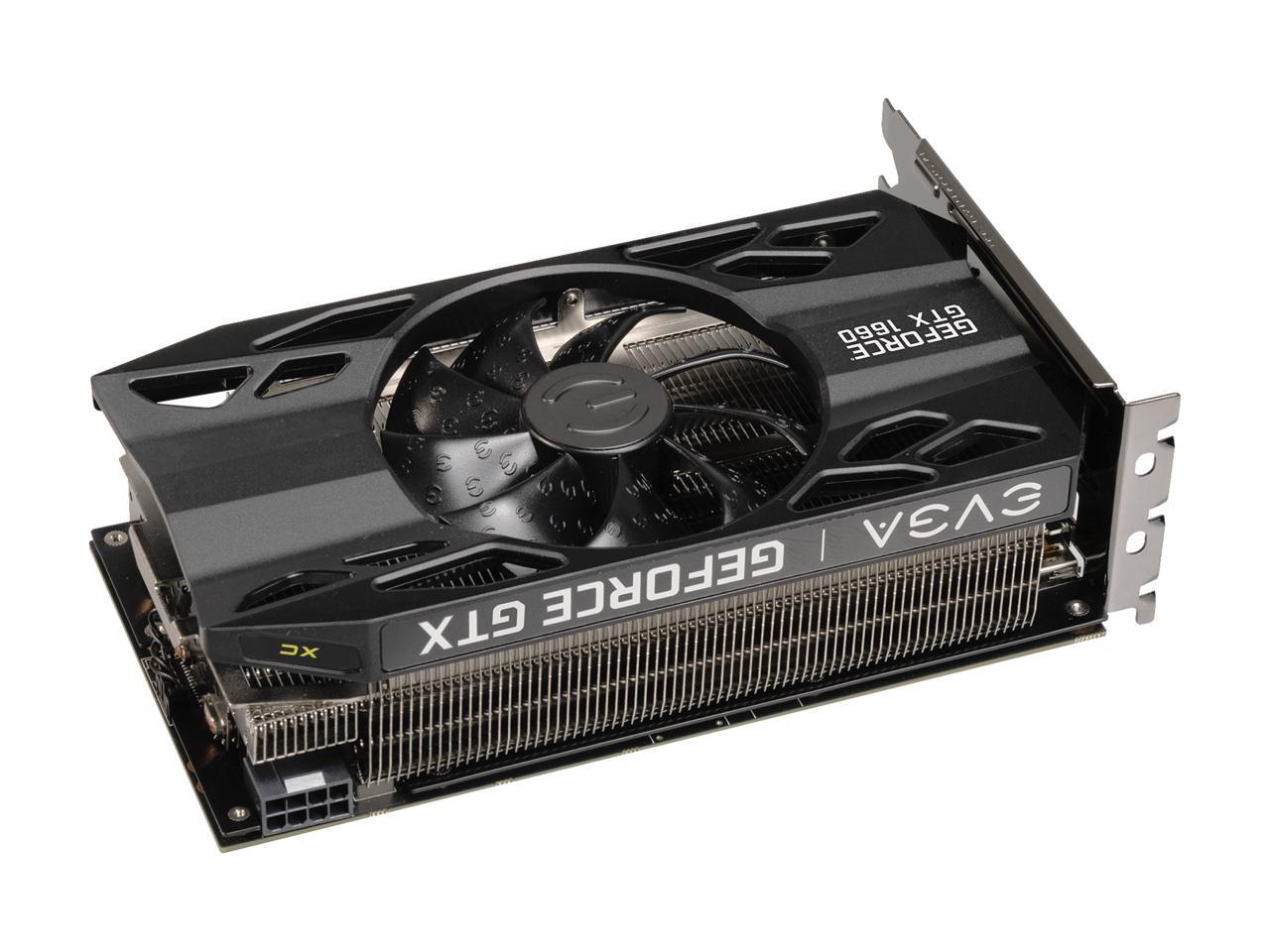
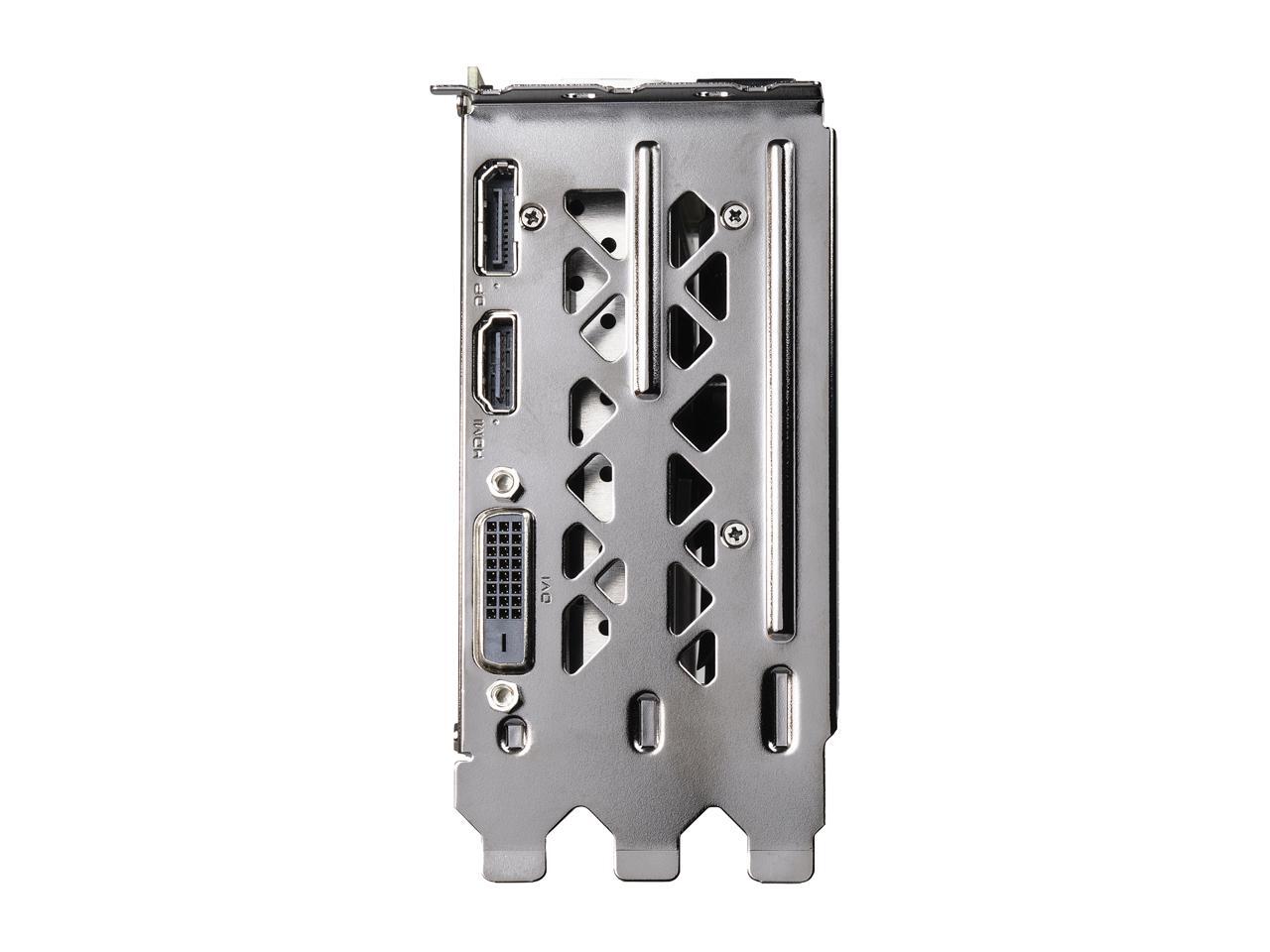
the ones that look like this
valid apex
ya sweet thanks. this is the one i was looking at -- https://www.newegg.com/powercolor-radeon-rx-5700-xt-axrx-5700xt-8gbd6-3dh/p/N82E16814131753 -- is this a good one?
deep skiff
yeah that and the pulse are good at the price range
valid apex
thanks @deep skiff !
astral hatch
So no opinions lol
 odd shadow
Need help finding cable sleeves compatible with my build https://pcpartpicker.com/user/lecs1957/saved/#view=DZCPnQ . I was looking at these on newegg but i dont know if they are compatible. https://www.newegg.ca/p/N82E16812987042?Description=cable sleeving&cm_re=cable_sleeving-_-12-987-042-_-Product
latent bronze
Try this site https://mod-one.com/custom-pc-cables/
Shop now for Custom Sleeved PC Power Supply Cables! Select from a wide range of colors produced by MDPC-X of Bavaria, Germany.
 noble mist
Neeed help
I just built my first pc and my keyboard works fine the rgb turns on so I know it’s working
But the mice and headset won’t turn on
latent bronze
Did you try all the usb ports?
latent bronze
even the front ports?
latent bronze
Could be a bad board or you don't have enough juice
Those are the only 2 things i can think of at the moment
Other option i think you can try out is going in here with your mouse plugged in and do a repair https://i.gyazo.com/bfb8f240fa264530f87cbce51b032cce.png
 noble mist
What do you mean by not enough juice
quaint terrace
i think he meant power
latent bronze
pretty much
little osprey
It lives https://puu.sh/Eiwtq/ca85ad0a12.jpg


 patent lava
Feedback please on https://pcpartpicker.com/list/n7Z2QZ
 agile bear
That’s not a braided cord built is ruined
@patent lava you can get cheaper rgb ram
Also why a second evo?
Will you really notice the small difference in speed?
 lament blade
Hey so I’m trying to build my first pc but I’m running into a problem and I’m not sure what it means
I’m not sure what this means
 short basalt
It means that you need to add a CPU cooler to cool the CPU, and also maybe upgrade the motherboard
use a newer model
lament blade
This is my first time so I’m not quite sure
I just don’t know what the second error is
agile bear
You can’t overclock with b360
Also b360 was made for 8th gen so it needs a bios update to support 9th gen and a bios update usually requires a 8th gen cpu
I believe
lament blade
I’m trying to make a pc for long VR sessions and maybe recording but I want to keep it as small as possible
So I need to find a new motherboard that supports the cpu?
short basalt
and add a cooler as well
lament blade
I’m trying to keep it under 1500 what do you think would be a good option?
short basalt
Making a list rn
agile bear
lament blade
Oh awesome thanks
agile bear
Just limit your motherboard to z390 to have best compatibility and overclocking
short basalt
lament blade
And I should use micro atx not itx correct?
short basalt
I made this
lament blade
Is this what you use?
short basalt
No
it's a 1500 dollar build
I have an old and bad pc... it has an FX 8350 and a DDR3 ram... and the video card is GTX 1050 ti
rather bad but I dont have the funds to make a new one
agile bear
You can use micro atx that’s just what came up when I did my search
lament blade
Oh awesome wow
I’m trying to stick to a micro atx tower though bc I want it as small as possible
agile bear
Also if the 2070 super isn’t in stock you can buy directly from Nvidia
lament blade
I travel a lot so I want to make it small enough to fit in a suitcase
And move it between rooms in my house regularly for VR
agile bear
Then I’d say go mini itx
lament blade
Would my current case work with a mini itx board?
patent lava
@agile bear mind if i PM
lament blade
Would that be harder to work with? Also I really like the look and price of the one I have
I changed the motherboard this is where I am rn
Also for CPU cooling I was thinking something like this https://pcpartpicker.com/product/JYCD4D/corsair-h100i-rgb-platinum-750-cfm-liquid-cpu-cooler-cw-9060039-ww but since this is a first build and it will be moved around a lot should I stay away from water cooling?
 tidal bluff
is that all u can fit is a 2 fan clc?
if u can fit it this one might be better https://www.newegg.com/evga-clc-360-liquid-cooling-system/p/N82E16835288014?Description=evga clc&cm_re=evga_clc-_-35-288-014-_-Product
but its a triple
lament blade
I think it only fits two
And also I rlly want rgb but I don’t need it lol
Thx for the help btw
lament blade
Is that a better option than this https://pcpartpicker.com/product/JYCD4D/corsair-h100i-rgb-platinum-750-cfm-liquid-cpu-cooler-cw-9060039-ww and also since I’ll be moving it around a lot is water Cooling a bad idea
I plan to take it with me to Europe every summer and move it between rooms in my house almost weekly
lament blade
https://pcpartpicker.com/product/RcdFf7/cooler-master-masterliquid-ml240l-rgb-667-cfm-liquid-cpu-cooler-mlw-d24m-a20pc-r1 is this a good option or would it be unreliable
latent bronze
@lament blade That is also a good cooler
lament blade
I think I’m going to go with it because I’m getting close to going over budget and I want to try to find some places to save money here
Also would this be everything I need or am I forgetting something? And also does that power supply look like it would work?
latent bronze
For the master liquid there has been a lot of good video's on it
lament blade
Oh great
latent bronze
Also why not get a 3600X instead of the 9700K?
performance between the 2 CPU's are almost on par with each other and you would be under your budget
latent bronze
yep 6 cores 12 threads
3700X is also slightly cheaper than the 9700K
Also you can still use a Nvidia card with a AMD processor in cause you didn't know cause some people thinks you need to go AMD with AMD
lament blade
Would I have to change my build around for that though? I’m okay with spending a little extra if the performance is the same
Also am I forgetting anything I know I need like thermal paste but what other stuff
latent bronze
@lament blade What color do you like blue, red or green
lament blade
Red? Why
latent bronze
lament blade
Oh wow
latent bronze
You can also add in a SSD to have a similar price to what you had before
lament blade
Thanks for making this list
There’s just like a small problem I don’t want to be rude but it has to be micro atx or itx I need to keep it small
I plan on moving it around my house almost weekly and traveling with it often
latent bronze
The addressable RGB fans you can replace them as well cause the cooler master AIO is also a solid color only
actually i think you can remove them since you would have all the fans you would need in that case already
latent bronze
The case you picked out was micro atx
lament blade
Yeah
lament blade
It looks a little to big though
latent bronze
it is wide not tall
Also would have better cable management
Remember the system you had before it was 1453$ right
https://pcpartpicker.com/list/TJVBDx This is with those fans removed and a SSD installed also replaced the memory for 4x8gb memory clocked at 3200MHz
Also how come you needed 32gb of memory?
lament blade
I’m willing to spend like 100 over 1500 bc I plan on ordering most of it on Black Friday
I plan on using it for long vr sessions and I want to have the space to run more programs for things like full body tracking with a Kinect and for my racing wheel and recording and other things
latent bronze
Ok
latent bronze
and if you plan on spending a little more then why not this https://pcpartpicker.com/list/FXPzK4
tidal bluff
i would go 2 sticks dual channel
wow a 2080 super with no rgb? i mean its like 700 bucks
lament blade
As of right now this is where I am but I might change the cpu
tidal bluff
id stick with the 2070 super
lament blade
And also maybe the 2080 super but that may be a little over kill and it doesn’t have the rgb lol
tidal bluff
thats what i plan on buying
i wish mine had rgb lol this 1070 white led looks like crap with my whole rig lit up red
latent bronze
Well for VR nothing is really overkill
still roostBOT
 itsCheezeStik#7618 has been warned
Reason: Bad word usage
latent bronze
PSU and Case will always have the included cables
tidal bluff
heres one with rgb but a lil more expensive https://pcpartpicker.com/product/qHNgXL/evga-geforce-rtx-2080-super-8-gb-xc-gaming-video-card-08g-p4-3182-kr
latent bronze
Also you said you're buying most of these on black friday so if you think about it most of these might be a lot cheaper
tidal bluff
yea thats true
or might change ur mind on some parts as they might get cheaper
u have a good month to go
lament blade
Yeah that’s a lot more for that gpu but if I can snag one on Black Friday I might go with that
latent bronze
month and a half
lament blade
My psu should be good right? And also do I need anything for like Bluetooth or stuff like that
latent bronze
When gaming in VR there it nothing overkill to be honest especially with some games out there
For a 2070 Super/2080 Super i would suggest at least 700w
tidal bluff
the vr does also matter on which setup for vr u use some have higher resolutions than others
like oculus headset is lower resolution than vive
lament blade
I use a Samsung Odessy so I have about the same resolution maybe better than the Vive pro
latent bronze
For PSU's you can go for something like this https://pcpartpicker.com/product/pt2rxr/evga-b3-750w-80-bronze-certified-fully-modular-atx-power-supply-220-b3-0750-v1
Or like this https://pcpartpicker.com/product/xTMwrH/evga-supernova-g1-750w-80-gold-certified-fully-modular-atx-power-supply-120-gp-0750-x1
tidal bluff
i use a evga 750 g3 and i run a ryzen 7 1700@3.8ghz 16gb ram , gtx 1070 sc, m.2, ssd,hdd and custom liquid cooling
latent bronze
I use ThermalTake and Cooler Master for PSU's but i always hear great things for EVGA PSU's
latent bronze
I just remembered today is Wednesday lol
@tidal bluff time to start shopping lol https://www.evga.com/products/feature.aspx
 lament blade
I think I’ll try the first one bc it’s the cheapest lol
latent bronze
@tidal bluff take a look 80$ for a 1000w PSU
latent bronze
Ya but 80$ for a gold rating PSU
lament blade
tidal bluff
i dont buy used psu
latent bronze
Who said they're used
tidal bluff
its b stock
bstock is used gear
im a evga affiliate i know what theyre bstock is lol
lament blade
Okay so I guess I’ll try the g3?
lament blade
latent bronze
Well i would honestly buy this for 100$ https://i.gyazo.com/09156a027b355faea4872285dfdd0387.png

 tidal bluff
i went with it cause its more efficient than bronze and i will always go gold if not platinum next time
latent bronze
might be a 3gb but still could make some good money in return
tidal bluff
nah i have a hard time selling stuff now lol
been trying sell some 2x4gb 3200mhz gskill for 30 bucks forever
even listed my whole pc for 1300 nothing
latent bronze
Oh i wouldn't sell it as is i would build a system with it and make more
tidal bluff
i tried getting just 1300 for my rig and no biters
latent bronze
depends on the rig you have
Overall i would build a i3 system or a 1st gen Ryzen 3 system with that GPU
tidal bluff
CASE: EVGA DG-87 Supercool Case
MOBO: ASRock X370 Gaming X (updated bios to ryzen 3000 series)
CPU: Ryzen 7 1700 8 core 16 thread @ 3.8 GHZ
GPU: EVGA GTX 1070 SC
RAM: G.SKILL TRIDENT Z DDR4 3200Mhz 16GB
CPU Cooler: XSPC Custom Loop Liquid Cooling System
SSD: Intel 530 Series SSD 128GB
SSD Intel 760p 512GB M.2 2280
HDD: 1x Seagate Barracuda 1TB 7200 RPM 64MB
POWER: EVGA SUPERNOVA 750 WATT G3
thats off my ad
after christmas itll get a new gpu to 2070 super with a hydro copper waterblock and hardline
was just hoping to sell it and build a new one
latent bronze
It is not a bad system but i wouldn't spend 1300$ for it
latent bronze
what matters more is everything inside the case
tidal bluff
full atx
lots of space for cooling
internal temp is 27c
the case alone is like 45lbs
latent bronze
Most of those parts alone sells for little on the used market
When people would mainly buy a system no matter how nice the case is they are buying what is inside of the case
lot of people can message you for what you're selling and say they can get it for almost half of what you're selling it for to be honest
tidal bluff
not from the facebook marketplace in my local area
they sell some worse than mine for higher
latent bronze
Ya but do they actually sell cause some people will remove ads and try selling in other places
tidal bluff
one has a i76700k and gtx 1070 no watercooling for 800 lol
latent bronze
You know the market place works out for negotiating as well cause someone could ask for the system for like 550$ and the person could agree to it
tidal bluff
1000 lowest?
latent bronze
Try selling it for 1000$ instead and i got a feeling more people will bite
tidal bluff
gotta rebuild a new pc with the money lol
hmmm replacing it would cost me extra 250 which aint bad
thats with a strix x470, 2700x, i have 8gb ram on shelf, evga 750g3, 1tb m.2 intel 660p, evga rtx 2060 super, evga dg77 tempered glass case
so better gpu, cpu and motherboard than i have now
latent bronze
Why not go for the 3600X since it would perform better then the 2700X
latent bronze
Well if i am able to stream with no problems with a 2600 i would think a 3600 would stream better
tidal bluff
with the 3600 i cant update the bios tho
ill be selling my ryzen 7
wouldnt i have to get a x570 series
latent bronze
@warm nova do you have that image list for the bios flashback?
trying to look for it on here but can't find it
@tidal bluff certain boards has flashback bios which can update without using a CPU which you can use after updating but i can't find the list they posted awhile back
latent bronze
It should have it i believe
but still need to see the list cause someone else is wanting a B450 board but wants a 3600
 warm nova
only asus 400 board that can do it is the ch7
its mostly msi boards
@latent bronze
latent bronze
Wasn't there a bigger image?
warm nova
you have to open the image
latent bronze
i did
warm nova
click on it and then open original at the bottom of the pic
latent bronze
ok there you go
warm nova
if your on mobile, you may have to download it
latent bronze
@tidal bluff my suggestion is to buy your new system first use the 1700 to update the bios and then you can use the 3600 after
Well there is that or the other method which is contacting AMD for them to send you a 200GE to update the bios and then mail it back to them
warm nova
ya, if you have a first gen cpu, buy the best board you can get in your budget. Dont limit yourself to boards with flashback unless its a feature you want.
little osprey
I think it's just a useful feature to have if you're worried about dodgy mobo vendor bios updates / crap AGESA updates every month, higher risk of bricking it seems
tidal bluff
im selling it as a whole pc so i wont have a 1st gen to use
latent bronze
Well you have the other option i mentioned
warm nova
yes, all the gigabyte boards have that feature. Another option, although I havn't seen them anywhere for sale yet are the msi max b450 boards. The max are slightly updated versions of the older b450 boards but with a 32mb bios chip and will support ryzen 3000 out of the box.
I have also heard that some retailers are starting to get some new b450 and x470 boards in stock that have ryzen 3000 bios on them already, but without being able to put your hands on the box and look at it to see if it has a sticker stating its ryzen 3000 ready there is no way to know for sure.
tidal bluff
might just fork out the cash for a x570 strix
latent bronze
intender in time there will be new one's preloaded with the new bios because an A320M board i bought for my cousin actually said back then it was 2000 ready so in time you will see like B450 boards say 3000 ready on the box
valid dagger
X570 work for ryzen out of the box right? @warm nova
latent bronze
Why wouldn't it work out of the box?
elfin flicker
X570 are designed to work with ryzen 3rd gen right from purchase
warm nova
^
Ya, like I said they are already leaving the factory with the ryzen 3000 bios on them, but you never know how old the stock an online retailer has is. I still see people on the aorus forum and discord getting 300 series boards that don't have a 2000 bios.
agile bear
@edgy copper please match your fans with just nzxt fans on the rad and the lian li as bottom intake
It’s aesthetically better in my opinion
 edgy copper
@agile bear I setup the fans incorrectly so the top is intake while the bottom is exhaust
I might switch that NZXT fan back in though
rough loom
what would I even need for 4x 200mm Coolermaster RGB fans + 1x 140mm rgb fan. anything else besides the coolermaster controller?
or can you control that much off a newer mobo
anyone know?
 scarlet quarry
@rough loom that's insane, not sure why you'd need that many 200mm fans either 😂 that's some hella airflow potential
sudden turret
lots of airflow with low decibel.
scarlet quarry
True
Honestly idgaf if my rig sounds like a fighter jet, long as it's performing well and nice and frosty
Lol but that's just me
valid dagger
Hello
 vague willow
Hi
valid dagger
@vague willow i need to know what cord goes where for the psu
I dont wanna fry the system lol
 autumn wolf
cables should be labeled as well as the actual power supply, depending on your psu, the power brick could have them boxed
24 pin should be 2 plugs and one long one, the one with the split should be like an 8 and 16, plug that one into the power supply
valid dagger
Yeah i see a cpu cable, is there supposed to be another? Cause i see a 8 pronged spot and a 4 pronged spot
autumn wolf
which cable is it exactly cause some cables are split
and which cables are you trying to plug in
autumn wolf
cpu goes into the motherboard (normally its top left on the motherboard) the other end goes into one of the psu slots