#building-and-recc-chat
1 messages · Page 361 of 1
 crude onyx
 formal girder
Thermalright C12C would do ya well
crude onyx
i was considering these instead
ARCTIC P12 PWM: 0.3 sones so around 15-12db
be quiet! Shadow Wings 2: Second option, expensive but appealing cause quiet
the C12C seems loud
 tawny violet
@vague oracle I just got a stupid idea
Meshroom S V2
ATX mobo
big GPU
280mm rad internally
360mm with their funni external mount
Well big
it's small in size but big in power (because watercooled)
that being said, the riser might have a hard time going through to the GPU
 shrewd gale
I hacked my way
 jagged ember
 plucky timber
Adware more like
they make so much money from selling your data it's straight up more profitable for them to make it free so more people would install it
 frank frost
Hi, a friend is asking for a build including monitor for under $1500
What GPU would be worth at that price
4060?
 teal dome
frank frost
4060?
teal dome
frank frost
4060?
U can do better I think
frank frost
What would you recommend
4070/5070/5070ti, 9070/9070xt are impossible to get at MSRP
teal dome
frank frost
4070/5070/5070ti, 9070/9070xt are impossible to get at MSRP
That's true but it's possible to get them msrp, just build whenever you can buy the gpu imo
 fallen sphinx
frank frost
4060?
fallen sphinx
frank frost
4060?
A 1300$ custom build should NOT have a 4060
 hollow gulch
frank frost
Hi, a friend is asking for a build including monitor for under $1500
hollow gulch
frank frost
Hi, a friend is asking for a build including monitor for under $1500
so full pc with monitor for $1500?
what res, 1440p?
hollow gulch
frank frost
Hi, a friend is asking for a build including monitor for under $1500
https://pcpartpicker.com/list/8239XR
gpu: https://www.ebay.com/itm/167426550440
cpu: https://www.aliexpress.us/item/3256807897785967.html
Part List - AMD Ryzen 5 9600X, Radeon RX 6900 XT, SAMA SV01 ATX Mid Tower

eBay
Units show signs of wear/prior use.
 forest lava
@cyan ravine Forgive the ping- I've returned to tackling the issue with my PC, and I have some info that might help with troubleshooting
It's gotten really bad lately, and my PC does the full shutdown more regularly than it ever has before. Sometimes having a smaller window on screen will cause it, other times just gaming normally with no signs of overheat or stress causes it
But I've done testing and it's definitely not graphics. The shutdown occurs immediately, with no prior sign or cue, and even shuts down fan activity (which is odd because in the past the fans would go overdrive when this happened), keyboard (including rgb), and every other device connected to the pc
hollow gulch
You can get their aqua elite v4 240mm aio for $43
forest lava
Which means it's not my drivers/graphics being iffy, but rather something else wrong entirely
I'm gonna take the entire pc apart today
 vague oracle
tawny violet
that being said, the riser might have a hard time going through to the GPU
vague oracle
tawny violet
that being said, the riser might have a hard time going through to the GPU
Yeah with an ATX board you need like a 200mm riser cable iirc
forest lava
What can I use to wipe off old paste if I don't have alcoholic wipes?
 undone maple
Should I sell my 1650 super and spend a lil more for a 4060
 stoic island
forest lava
What can I use to wipe off old paste if I don't have alcoholic wipes?
stoic island
forest lava
What can I use to wipe off old paste if I don't have alcoholic wipes?
Anything that won't flake off or leave debris
hollow gulch
undone maple
Should I sell my 1650 super and spend a lil more for a 4060
Get a used 3070
Seen them for $260
undone maple
hollow gulch
Seen them for $260
I seen a 4060 for 200
tawny violet
vague oracle
Yeah with an ATX board you need like a 200mm riser cable iirc
v2 has that iirc
Female Reverse 200mm PCIe 5.0 Riser Cable
forest lava
Currently redoing my paste and swapping the cpu cable
also gonna try booting the pc with a single stick of ram
undone maple
hollow gulch
Show me lol
Sent it to u
hollow gulch
There's no price
vague oracle
tawny violet
v2 has that iirc
Mine came with a 135mm
tawny violet
Yeah that wouldn't work
but the longer one would
I do wonder tho
can you still watercool if you have an ATX board?
or it'd take up too much space
 vague oracle
I mean, using that long of a riser with an ITX board would be an actual pain in the ass
tawny violet
Tru
frank frost
hollow gulch
so full pc with monitor for $1500?
Yep
frank frost
hollow gulch
what res, 1440p?
They didn't tell me but i wouldn't use 1080p in that budget
tawny violet
Unironically I might just
Forego the custom loop initially and just 360 AIO the 9800X3D
Leave the GPU air-cooled
And custom loop it if the AIO dies or I have excess income
I mean there's not that much of a point to custom loop
frank frost
hollow gulch
https://pcpartpicker.com/list/8239XR
gpu: https://www.ebay.com/itm/167426550440
...
I don't think they'd be willing to buy on AliExpress or a used GPU since it's their first build
tawny violet
Even 5090s are really good aircooled and I can do static OC on the 9800X3D with an AIO
Keep watercooling as like a prestige project and go straight to hardline
hollow gulch
frank frost
I don't think they'd be willing to buy on AliExpress or a used GPU since it's th...
Used gpu is like the only thing u can get rn, and that's fine you can still get a 9600X for around $200 not on aliexpress
It's also a lot better than what you had suggested, 6900 xtxh beats the 4070 super
 snow dragon
Nah you know bruh 
tawny violet
@vague oracle you reckon that going hardline right off the bat if watercooling is smart?
Or should I try soft tubing first (though arguably it'll never look as good as a proper hardline setup
Okay is he getting automodded or he's just deleting every message after pinging me?
Like I'm just curious
snow dragon
tawny violet
Okay is he getting automodded or he's just deleting every message after pinging ...
Brotha weird like that fr
Making us look crazy
tawny violet
Alright screw this
snow dragon
tawny violet
<@480883524203839508> you reckon that going hardline right off the bat if waterc...
Its probably gonna suck a lot
And I think soft tubing doesnt look bad really
tawny violet
You can technically like just do a fitting for every bend
But that'd be expensive as heck
snow dragon
I think these look really cool
 snow dragon
I think these look really cool
snow dragon
snow dragon
I think these look really cool
Typically I only see these where the tubes are black but there are white ones too
 lone flame
snow dragon
I think these look really cool
lone flame
snow dragon
I think these look really cool
 snow dragon

tawny violet
I don't like soft tubing
lone flame
i used to think soft black tubing wasnt that good looking but i think ive changed my mind
tawny violet
It looks wonky
tawny violet
It looks wonky, cheap and lazy to me
And in something like the Meshroom S v2
You kinda need very squared away runs to clear things
snow dragon
 stoic island
tawny violet
It looks wonky, cheap and lazy to me
stoic island
tawny violet
It looks wonky, cheap and lazy to me
wonky cheap and lazy becomes
easy to bend, cheap to replace, easy to maintain
tawny violet
IMO a well planned loop can still be very much easy to maintain
It's not like a soft tube loop isn't also a pain in the ass to maintain
You still need to disassemble everything to clean it up
stoic island
no matter what, it's going to be a bit harder to drain the loop with hardline tubing rather than soft tubing
tawny violet
Y'know like scrub the blocks and res
stoic island
just need to run new distilled water
tawny violet
Unless you can use one of those killcoils with distilled water and just leave it in there
stoic island
whatever coolant you are using should not be leaving any sediment behind
or bacterial or algae growth
if it is, you need to change coolants
 weary galleon
Wait I'm not supposed to be using creek water?
stoic island
lol
tawny violet
Lmao
 stoic island
where's the boris vodka pc
tawny violet
But yes
Distilled water and a killcoil SHOULD be long term maintainable
weary galleon
stoic island
where's the boris vodka pc
I was boutta say lmao
stoic island
tawny violet
But yes
Distilled water and a killcoil SHOULD be long term maintainable
don't need killcoil
snow dragon
Yall remember the post malone build jay made
tawny violet
stoic island
where's the boris vodka pc
Broke iirc
stoic island
the new one broke iirc
snow dragon
I dont remember if he used real bud light or not
stoic island
old one ran for a while
weary galleon
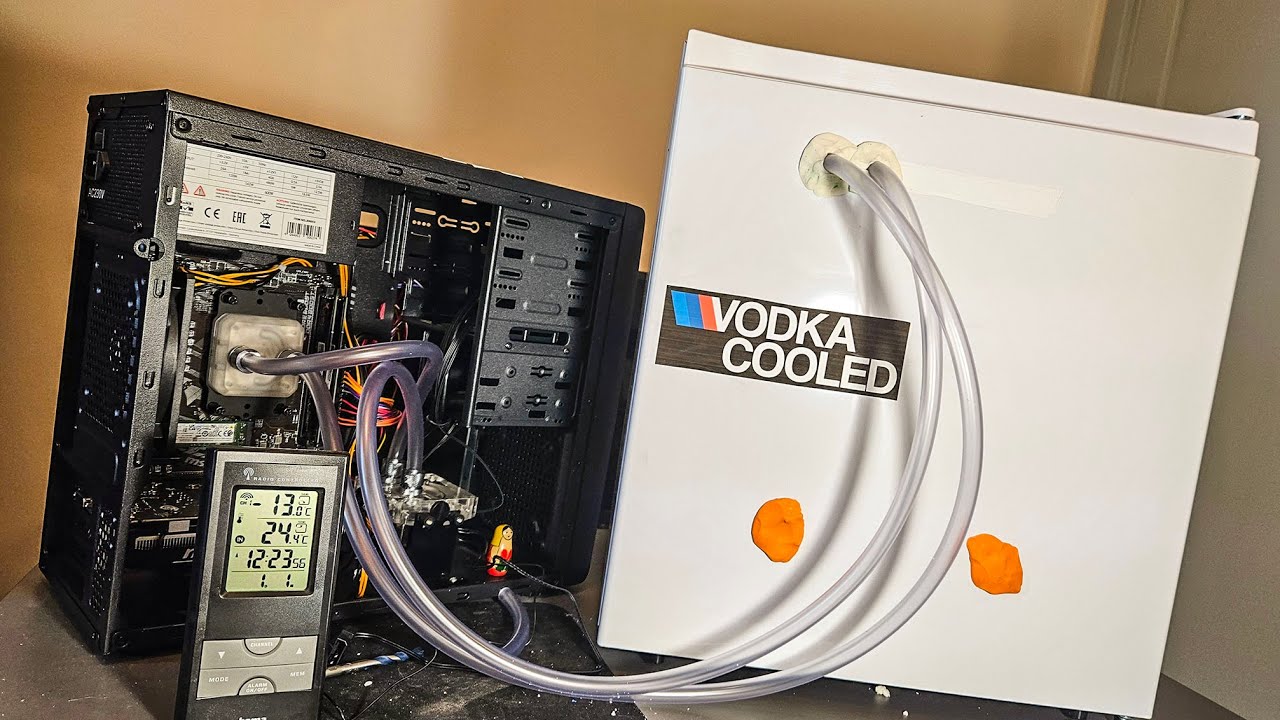
The Vodka Cooled PC 1.0: https://youtu.be/IYTJfLyo_vE?si=PFaux3Iqkjx1np2N
Proudly powered by YOU on Patreon: https://patreon.com/lifeofboris
True Slav Merch Shop: https://www.borismerch.com/
Boris Gaming Gear: https://uvi.gg/weslav/
Background music: uamee - Bad Neighbors
https://youtu.be/l52PSM8xdLE?si=X-LfVsdYLdldVO5J
00:00 intro
01:14 1. Fin...
snow dragon
The condensation rig
stoic island
yea that's the new one
stoic island
I'm just against anything solid inside the loop
snow dragon
You dont need the coil just add a lil bit of some additive
stoic island
should just use something like alphacool's coolant mix thing, nothing to break off or damage things from inside
tawny violet
Even the clear mix has particles in it tho
Like most block mfg keep saying not to use premix stuff cuz it'll clog the blocks
And yet EVERY mfg sells it
stoic island
It's water with propylene glycol to prevent corrosion and growth and some ph stabiliser, there's nothing else added in the alphacool mix
stoic island
tawny violet
Like most block mfg keep saying not to use premix stuff cuz it'll clog the block...
btw which block mfg does
snow dragon
 dusky hearth
metal like copper or something
dusky hearth
metal like copper or something
Yeah they can cause issues depending on the materials you use
stoic island
bykski literally tells you in the block manual that it's meant to be used with a specific premix coolant
alphacool doesn't say anything about not using premix
frank frost
hollow gulch
Used gpu is like the only thing u can get rn, and that's fine you can still get ...
Alright thanks I'll let him know!
vague oracle
tawny violet
Anyhow
What's wrong with killcoils?
Mixed metals bad and good coolant already has bacterial growth inhibitors
Just get DP ultra coolant and you'll be set
vague oracle
tawny violet
<@480883524203839508> you reckon that going hardline right off the bat if waterc...
My first build was hardline but I'm already fairly mechanically capable so it wasn't that difficult, it's definitely doable but soft tubing is the easier way to go
Especially in a SFF, soft tubing makes life a bit easier
 upper ore
So PC is turning on and everything looks fine. But keyboard, mouse, and monitor aren't displaying and turning on. Should I reset the CMOS?
 languid nimbus
stoic island
alphacool doesn't say anything about not using premix
languid nimbus
stoic island
alphacool doesn't say anything about not using premix
Ayyyeee happy birthday man
stoic island
:)
plucky timber
stoic island
:)
Happy birthday!
stoic island
Thanks
 crimson zinc
upper ore
So PC is turning on and everything looks fine. But keyboard, mouse, and monitor ...
crimson zinc
upper ore
So PC is turning on and everything looks fine. But keyboard, mouse, and monitor ...
Might meed to update drivers, replug everything in, then if that doesn’t work, clear cmos and report back
upper ore
crimson zinc
Might meed to update drivers, replug everything in, then if that doesn’t work, c...
Will do
 wide drum
https://www.rtings.com/monitor/reviews/dell/s2417dg
What's one of these monitors worth these days?
I am considering throwing it in with my old build when I try to sell it:
Lancool 2 Mesh
5900x
evga 3080 ftw ultra
x570 tomahawk wifi
gskill trident z neo 32gb dd4 3600 cl 16
All someone needs to do is add a PSU and m.2 and theyre ready for 1440p gaming.

RTINGS.com
The Dell S2417DG is a good 1440p gaming monitor with G-SYNC variable refresh rate support. It has a TN panel with mediocre picture quality due to the poor native...
upper ore

This is so weird I normally just have the option for xmp but I don't have it. I just have docp
Do I need to do anything else? Like what's up with the BCLK frequency?
tawny violet
stoic island
btw which block mfg does
Alphacool I remember immediately
stoic island
I don't see them saying that anywhere
 stoic island
tawny violet
stoic island
tawny violet
It has to do with other manufacturers adding particles for their colored coolant lol
in pastel liquids specifically
nothing to do with premixed in general
especially not premixed clear coolant
tawny violet
I'd rather just do distilled
much cheaper
I can get a 5l jug of distilled water for the same price as a liter of premix
lone flame
@cyan ravine I got my new PSU in yesterday, coil whine is completely gone now I love it
I went in with the mindset I was going to try and properly manage my cables too and I think I made it worse
It’s such a rats nest back there I don’t have the patience or skill to properly manage that mess
stoic island
I mean you can buy proplyene glycol bulk for relatively cheap and mixed it with distilled yourself
think alphacool sells a jug or smth like that
plucky timber
Yes
stoic island
70c on CPU is fine, I'd be worried if you're hitting high 80s on GPU though
Default temp limit for Nvidia is like 85c iirc
Tjmax is like 90
plucky timber
ohh gpus throttle that low?
plucky timber
I see
Imagine having no airflow tho (NZXT case scenario)
GPU just getting absolutely choked
snow dragon
Yeah I think amd gpus were also around nvidias limit until rdna came out
When rdna came out thats when they said over boiling temperature is perfectly ok
 molten ferry
hey, Had to move my pc today for the maintnece to work in my room. Im getting no display from my graphics card when i plug an hdmi cord into it tried multiple monitors dosent work. i have it on now plugging into the motherboard when i use device manager and look at the device status it has no driver updates and says that its working properly. any help would be appreciated
snow dragon
Be like that sometimes fr
languid nimbus
At least that’s all it was, glad to hear
Hate moving pcs something always messes up lol
 grave crescent
Need some help I just built my pc and it was fine for a little bit I had time to download discord and synapse and Radeon drivers but now it keeps freezing and giving me different errors
I had some random OneDrive error, then it blue screened with CRITICAL_PROCESS_ERROR, then had the error FileCoAuth.exe - Application Error, then it came back on for a few seconds before freezing and giving me atieclxx.exe - application error, the same blue screened again, now it’s booted into the recovery screen saying windows didn’t load correctly
 jolly riverBOT
DDU (Display Driver Uninstaller) Guide by Pato
https://github.com/NeweggTechie/Graphics-cards/wiki/How-to-use-DDU
GitHub
Contribute to NeweggTechie/Graphics-cards development by creating an account on GitHub.
snow dragon
Also run command prompt as administrator and run: sfc /scannow
grave crescent
It only stays on for a few seconds
snow dragon
sfc /scannow will look for and repair corrupted files if it comes across any
snow dragon
grave crescent
It only stays on for a few seconds
Ok boot into safe mode with networking and get ddu that way then
You can do this by holding shift and pressing restart
grave crescent
It’s running for now maybe it will stay long enough idk
snow dragon
Safe mode will turn off the driver
grave crescent
I turned xmp back off to see if that helped
snow dragon
atieclxx.exe is from the amd driver
grave crescent
Ah ok
snow dragon
So go into safe mode with networking and download ddu to uninstall the radeon driver
grave crescent
Did it and now I’m locked out because it said pin isn’t available give me a minute
grave crescent
It literally won’t work in safe mode
Every work around I’ve tried leads me back to needing my pin and it for some reason isn’t able to sign me in with my pin in safe mode
I could just be dumb though
Ok did it just did It without safe mode hopefully this works
snow dragon
grave crescent
Ok did it just did It without safe mode hopefully this works
Did what without safe mode
grave crescent
Ran did
Ddu
It seemed to be fine for a little bit but it just now blue screened on me
Says windows recourse protection found and repaired corrupt files
snow dragon
Oh did you run that sfc command
grave crescent
It runs for a little bit and then all of a sudden hovering over stuff and clicking on stuff doesn’t work while visual things are still running (video or whatever it may be) and then it crashes
Yeah I just did
Built this pc 3hrs ago
Just got that atieclxx.exe application error again
snow dragon
Which driver version did you get
grave crescent
Latest
snow dragon
Try the previous version
stoic island
dism and then sfc
snow dragon
Sfc didnt fix anything
grave crescent
I was curious and let it run just watching yt after running ddu and it blue screened again after acting weird
Had a black square in my screen
stoic island
what was the error code?
grave crescent
Same thing critical process error
stoic island
yea you should do dism then sfc, then check drive info with crystaldiskinfo or hwinfo64 or equivalent
grave crescent
Says it found corrupt files again
Not sure what I’m looking for on crystaldiskinfo but it says drive health is good 100%
stoic island
good enough
grab occt or furmark or 3dmark or equivalent and run GPU stress tests and see if anything happens
grave crescent
For fun I just ran sfc scannow again and it claims to have found corrupt files again
stoic island
you have run dism right?
sounding more like windows is just borked and best to clean install at this point
grave crescent
Yeah I typed in that command exactly as you sent it
Would it be a bad idea to reinstall using the same drive as before
stoic island
you should make a new installation media
same physical drive is fine, just should make a new install just in case
grave crescent
I don’t have another usb can I just reuse it and have the new media creator reformat the drive
Ok
stoic island
download the media creation tool again before doing it if you haven't already
grave crescent
After I do that how do I go about the clean install
snow dragon
When you run it there should be the option to wipe the drive and install it again
grave crescent
Ok
Hey on the bright side so far leaving it running doing absolutely nothing hasn’t crashed it!
forest lava
I've made quite a bizarre development on researching the issues with my pc
My PC has been randomly doing a full crash while playing certain games. In the past, this happened with Shadow of Mordor, the Modern Warfare II campaign, Senua's Sacrifice, and Battlefield 1, but has since expanded to Warzone and COD MP and gotten so bad that I could not even play a match without the entire PC full crashing. This crash comes with no cue- no lag, no irregular temps, no strange sounds or smells, just an immediate screen blackout and keyboard rgb shutoff, and my PC ceases all activity except for fan rgb.
(I've explained this before but just going over it just in case the info helps).
I recently realized however that sometimes, smaller windows (non fullscreen windows) may occasionally cause my PC to start lagging REALLY badly, I'm talking less than 1fps. And this can happen with a web browser, video player, clipping software, or practically any other app. Recently I've found that it can also lead to the same exact crash that happens while gaming. I did some testing and tried running a long gaming session without any windows open in the background (only letting medal and discord run in the background), and I didn't have a pc crash once
Now my questions are:
- Why would something as simple as smaller or split windows kill my PC?
- Why do frames on other apps fail to update properly when a game is running in the background?
- Why does this crash happen during full gameplay (i.e. in a match), but not in the firing range? Why does it happen in the aforementioned games, but not in Overwatch?
- What components would I even look out for at this point?
stoic island
Graphics drivers would be the most likely problem
secondary to that is monitor/graphics settings, gsync/freesync/vsync, bfi, that kind of thing
upper ore
So i am completely stuck and don't know what to do anymore. So pretty much I gave my girlfriend my old pc to play her games on while I do my own thing. I had it working and she was playing on it. On Monday she was playing on it on and off all day. Probably turning it on and off everytime she would stop playing it. She called me the first time saying that windows was saying her pin was wrong when it was exactly right to login in. So she changed it and got in and started playing it. Then a few hours later she turned it off again to take a nap. After the nap she tried to get back on and it wouldn't even post and the keyboard and mouse wouldn't turn on. I reset the cmos and I got it to post into the bios. But right after the bios goes away it goes black again.
 obsidian wigeon
Intermittent issue.. hm
Try to boot without the cmos battery
Remove it from the board
upper ore
obsidian wigeon
Try to boot without the cmos battery
Removed and starting but not posting
obsidian wigeon
Have you tried swapping psus?
Or verifying cable connections
Tho no post.. I'd suspect ram myself
Worth a try to boot with one stick
upper ore
That language mod bot is bugged. I didn't say a single bad thing.
obsidian wigeon
rip
upper ore
Well one sec let me re type that out...
So I don't have another powere supply. But riddle me this i recently lost my old power supply cable during a move so I bought one on Amazon. Would that be messing anything up?
upper ore
obsidian wigeon
Worth a try to boot with one stick
Removed one and no post
 obsidian wigeon
Try a different slot
upper ore
So had it on 2,4 now I'm doing 1,3 and nothing
upper ore
obsidian wigeon
Try a different slot
Should I have the battery still out because I put it back in
obsidian wigeon
Oof..
Well, that either confirms that the ram is ded
Or that all mobo ram slots are ded
Ram being dead is more likely tho
upper ore
I just changed the ram back to my old set because the newer ones were dead 😵💫
obsidian wigeon
Do you have a diff mobo to test the ram in?
upper ore
I have a different pc yes in worried I feel this pc is cursed lmao
obsidian wigeon
I just hope it's not the board that's ded here
upper ore
But I might need to work on this after work tonight. I have to get ready for work and leave soon.
upper ore
obsidian wigeon
I just hope it's not the board that's ded here
Could the new cord have fried anything?
upper ore
upper ore
So I don't have another powere supply. But riddle me this i recently lost my old...
.
obsidian wigeon
I don't think so
As long as you made sure it works with your exact model of the psu
But if not.. there's a chance
It wouldn't even turn on tho lol
If it fried smth on the board
It's on, but doesn't post
upper ore

This power cord is designed to work with most PCs, monitors, scanners, printers and other devices that use the 3-pin shroud power connector. Cable features an AC style plug (NEMA 5-15P) on one end and a computer style receptacle (IEC-320-C13) on the other end. The female connector plugs directly ...
obsidian wigeon
Usually a dead giveaway of dead ram
Yeah, that stuff is standard
That wouldn't be my concern
obsidian wigeon
You're welcome
upper ore
Any ram suggestions? I just had 2 kinds of G.skill ram die on me and I'm losing faith in their products. Lol
grave crescent
stoic island
download the media creation tool again before doing it if you haven't already
I genuinely just blue screened while reinstalling windows
It’s got to be hardware somehow
grave crescent
Might have found the culprit
grave crescent
I think the mobo might be bad or something
Started getting red light for cpu and cleaning mobo and reseating cpu didn’t work so I reseated connections on mobo and it worked long enough to reinstall windows, drivers, and 2 games. Tested 1 game for 5-10 mins and then downloaded the other and ran it and maybe 5 mins in the pc just shut off entirely
Then I turned it back on and tried the game again but before it even had time to launch I got critical process error bsod again and I’m getting yellow lights for ram now on startup where I was getting green before
 urban oyster
it means you need more ram for the game possibly?
urban oyster
grave crescent
Then I turned it back on and tried the game again but before it even had time to...
@grave crescent
urban oyster
but your also getting a red light on cpu?
stoic island
grave crescent
I have 32gb 2x16 6400mt/s cl32
Xmp/expo off?
grave crescent
First game I had it off but I did turn it on maybe 5 mins before the pc shut off entirely
To the 6400mts profile
 turbid charm
I want to upgrade my 10yr-old pc. What components should I upgrade? Or should I just do them all?
weary galleon
turbid charm
I want to upgrade my 10yr-old pc. What components should I upgrade? Or should I ...
What are your current specs? You may be able to keep some stuff but a fresh build might also be a good idea
stoic island
grave crescent
To the 6400mts profile
Do all testing right now with it off
turbid charm
my mobo is Asus M5A97 LE R2.0; my gpu is Asus GTX660; I've got a 2TB HDD and two G.Skill 8gb RipJaws
stoic island
turbid charm
my mobo is Asus M5A97 LE R2.0; my gpu is Asus GTX660; I've got a 2TB HDD and two...
Would recommend starting over again assuming budget allows for it
turbid charm
I'd like to allow for it
snow dragon
grave crescent
To the 6400mts profile
What cpu you got
If ryzen its probably because it cant run the 6400 speed
crimson zinc
turbid charm
I'd like to allow for it
What budget do you have?
turbid charm
well, I'd like to stay around $1000, and use the same cooler master haf 922 case that I've got
I'm not sure what the cpu is, but I'm sure it ain't great
hollow gulch
upper ore
Could the new cord have fried anything?
probably not but its most likely low quality
stoic island
turbid charm
well, I'd like to stay around $1000, and use the same cooler master haf 922 case...
What are you trying to use it for?
hollow gulch
turbid charm
well, I'd like to stay around $1000, and use the same cooler master haf 922 case...
thats quite outdated..
turbid charm
playing minecraft and editing videos
the case is outdated? as a mid-tower, wouldn't it still handle new components?
stoic island
cooling is a bit wack but it'll fit everything still
half of your front intake is blocked by drive bays when comparing it to more modern cases
turbid charm
oh, okay, I see
stoic island
Single front intake, up to single top and single rear exhaust

something a bit more recent, td500 mesh for example, triple front intake, up to triple top mount, single rear exhaust
 hollow gulch
with 1k total you could easily get a $70 case
stoic island
if you need all of the drive bays, more recent cases typically only have ~4
stoic island
turbid charm
playing minecraft and editing videos
any particular editing software?
turbid charm
no, I certainly don't need all those drive bays, most of mine have been empty.
it's probably stupid, but I've only ever used Blender to edit videos.
stoic island
Blender is one of the few places Intel still has the advantage in for current gen, if you plan on staying with using blender for what you're doing
stoic island
turbid charm
it's probably stupid, but I've only ever used Blender to edit videos.
can't really find any reasonable cheap GPU so just plopped in a 7600 just as an example, but here's an example for what could be done keeping the same case and mostly focusing on blender performance
https://pcpartpicker.com/list/34dkRV
Part List - Intel Core Ultra 7 265K, Radeon RX 7600, Cooler Master HAF 922 ATX Mid Tower
turbid charm
that looks good, do you know if those parts are all compatible with each other? that's what I worry about the most.
stoic island
pcpp does most of the automatic checking
but there's not much you can do if coolermaster doesn't tell you how tall of a CPU cooler your case supports
all I can tell you is the cooler in the list is 154mm tall and you may have to eyeball it or measure the inside of your case
turbid charm
I would have to know how the motherboard sits in the case, as well, wouldn't I? to figure out the space I've got to fit the cooler?
 naive latch
Should I buy a 7600 rn I’m assuming gpu prices aren’t going down anytime soon
fallen sphinx
stoic island
can't really find any reasonable cheap GPU so just plopped in a 7600 just as an ...
Why intel
More importantly why core ultra
hollow gulch
naive latch
Should I buy a 7600 rn I’m assuming gpu prices aren’t going down anytime soon
you can most likely get one used for cheaper
stoic island
fallen sphinx
Why intel
blender
naive latch
Where should I look for a used one
stoic island
I wouldn't actually buy a 7600 new rn, it's just there as a placeholder in the list
naive latch
Where should I look for a used one at they’re all sold out on newegg and idk when they’re coming back
stoic island
fallen sphinx
More importantly why core ultra
Blender is the one place where core ultra has a measurable advantage lol
 stoic island
naive latch
Where should I look for a used one at they’re all sold out on newegg and idk whe...
stoic island
naive latch
Where should I look for a used one at they’re all sold out on newegg and idk whe...
generally the best deals are local through facebook marketplace, ebay is fine but generally higher price but also with better buyer protection
naive latch
Or is there any cards you’d recommend to get new that aren’t crazy expensive that can run games good
I seen that 6700 and 6600 are pretty cheap but I’m not sure how well they’d run the games I play
stoic island
What exactly do you play outside of minecraft?
wait wrong person
what do you play?
naive latch
Tarkov and rust mainly but I play a lot of games those are the most demanding games though
stoic island
tarkov would be the most intensive, 7600 would do fine for 1080p med for tarkov, would get an upgrade if you want to do 1440p though
hollow gulch
naive latch
I seen that 6700 and 6600 are pretty cheap but I’m not sure how well they’d run ...
id try and get a decent gpu with 12gb of vram at least, youd be set for awhile
6700 xt cheapest youll get with 12gb
close to $300 used last i checked
naive latch
Would that be near a 4060
hollow gulch
its better than the 4060
stoic island
wouldn't be too worried with vram with cards of this tier, wouldn't run over 1440p with them anyways
4060 is around a 7600, 6700xt is ~10% better
naive latch
I’m not too familiar with amd I’m and nvidia user
Okay I’ll look for a 6700xt thank you
 stoic island
3600c18 is just gonna be random die, it won't oc well at all
naive latch
 upper ore
stoic island
3600c18 is just gonna be random die, it won't oc well at all
upper ore
stoic island
3600c18 is just gonna be random die, it won't oc well at all
I don't plan on doing anything to it. It's gonna go in my old pc for my girlfriend to use. The old sticks of ram died and I need replacements. If there's something better for cheap I'm willing to get something else.
naive latch
Is this deal too good to be true
grave crescent
stoic island
Do all testing right now with it off
Should I try updating bios as well? Not sure how risky it is if something hardware wise is actually faulty. I have a x670p pro WiFi with a bios flash button
stoic island
upper ore
I don't plan on doing anything to it. It's gonna go in my old pc for my girlfrie...
it'll do fine for that
stoic island
grave crescent
Should I try updating bios as well? Not sure how risky it is if something hardwa...
Do some testing before updating bios, it may help in the way of agesa update helping with stability, but kinda sounds more likely that ram is unstable at xmp rn
upper ore
stoic island
it'll do fine for that
Like minecraft, balders gate, rivals and games like that.
And maybe genshin lol 😆
stoic island
naive latch
Is this deal too good to be true
pretty reasonable as a used card, take the usual steps to be safe buying used, ask for evidence of it working
stoic island
upper ore
And maybe genshin lol 😆
none of them are that demanding on the ram lol
naive latch
Okay and it says returns accepted does that mean it has eBay protection or that the seller accepts returns
stoic island
naive latch
oh and btw, MSI Mech tends to run pretty hot, keep that in mind
stoic island
naive latch
Okay and it says returns accepted does that mean it has eBay protection or that ...
for ebay? generally both
naive latch
What brand would you recommend
grave crescent
I’m on my knees begging for something to work rn for real
stoic island
try not to go by brand whenever possible, every brand makes good and bad models
mech just happens to be a bad model
naive latch
I might buy it just because it’s only 200 and all the other used ones are going for like 285
grave crescent
Sfc found no integrity violations so I’m running Minecraft right now and it’s constantly failing to load chunks
Giving me an error that’s constantly quickly cycling through a bunch on different chunks that it’s failing to load
Xmp disabled btw
weary galleon
naive latch
Is this deal too good to be true
It's a little sus, I'd expect 6700xts to be closer to 275
naive latch
That where most of them are this ones protected by eBay so I’m debating on buying it or not right now
grave crescent
Ok can I send pictures in here or no
weary galleon
grave crescent
Ok can I send pictures in here or no
You should be able to
grave crescent
Tried to launch hwmonitor because my gpu feels warm and everything started bugging again but differently this time

This is repeatedly popping up
Before it blanked the background taskmgr also gave me an error like this
grave crescent
Not turning while at 53c though?
I restarted windows and it had cooled to 53c by then but still
stoic island
relatively normal still
grave crescent
Wait wtf
Is it normal for the left side of my gpu to be able to come out of the mount
I’m gonna say no
 fickle bolt
Uhhhhh what brand of motherboard you got there, chief
grave crescent
Bc the other slot doesn’t do that
Bruh wtf there’s no way they properly remanned this mobo
This is why I want to blame the mobo so bad
A clip on one of the ram slots was half broken and there were metal chips where my m.2 mounts
And now this
And all these issues
naive latch
6700xt and a 3070 are going for about the same prices 6700 has 12gb of ram which one should I go with
Used prices
fickle bolt
6700,3070 prob isn't worth it in 2025, imo
naive latch
Well I found a good deal for a 6700xt but I’m scared it might be too good
fickle bolt
U got a Pic?
naive latch
 fickle bolt
What marketplace is that on?
fickle bolt
Hmm
fallen sphinx
stoic island
Blender is the one place where core ultra has a measurable advantage lol
Damn
fickle bolt
I'd say it's cheap but be cautious, look at reviews from the guys other stuff, and make sure you're able to refund it if necessary
naive latch
I can refund it I’m pretty sure and all his reviews are good but none of them are tech products
 naive latch
 grave crescent
All of a sudden out of nowhere it jumped from 70s to 110 and the fans turned all the way up
Wondering if I should repaste the gpu but I’m not sure why it would need that it couldn’t be that old
hollow gulch
grave crescent
Is it normal for the left side of my gpu to be able to come out of the mount
pcie slot? no lol
grave crescent
Yeah that’s what I meant I might have to build the pc out of the case because I’m not confident the left side is seating properly but the other slot holds it a lot better at least
This mobo has a second reinforced slot
hollow gulch
110c isnt safe
grave crescent
Yeah I’m wondering if my issues are actually multiple things. Ram instability and gpu overheating combined in to one mess of issues
hollow gulch
grave crescent
Yeah that’s what I meant I might have to build the pc out of the case because I’...
u want to use the topmost x16 slot though
naive latch
Opinion on a 3070\3080 rn or should I just go for a 4060 for a little more used
hollow gulch
if you want the 3080 get the 12gb model, not the original 10gb crap one
6700 xt would be your best value
naive latch

eBay
Card only no box or accessories.
naive latch
hollow gulch
if you want the 3080 get the 12gb model, not the original 10gb crap one
Thoughts on this seller
snow dragon
naive latch
I can refund it I’m pretty sure and all his reviews are good but none of them ar...
Id say go for it
6700 xt is a good card
naive latch
I’m trying to but chase has other ideas😒
 naive latch
You think it’ll pair good with a 5800x3d
 grave crescent
hollow gulch
yeah that needs to be repasted
grave crescent
hollow gulch
yeah that needs to be repasted
Repasted the card and now hot spot peaked at 87c with only 1333rpms
 zenith cargo
is there a solution to color banding?
every monitor I've owned I constantly see those poorly gradient squares
its annoying
obsidian wigeon
sounds like your monitor is compressing its output
zenith cargo
starting to think its my gpu
obsidian wigeon
check display settings in your gpu drivers control panel
and also check windows display settings
hollow gulch
zenith cargo
is there a solution to color banding?
Oled
zenith cargo
hollow gulch
Oled
already have it yet here I am 💀
stoic island
Nvcp on the page where you set refresh rate there's a drop down menu of compression settings
zenith cargo
stoic island
Nvcp on the page where you set refresh rate there's a drop down menu of compress...
im on amd
any way to change it on radeon software?
stoic island
It's in there somewhere, I just remember where it is for Nvidia
stoic island
zenith cargo
any way to change it on radeon software?
here

 stoic island
zenith cargo
I've had it on that option, but now that I turned off DSC, 10bit wont enable
stoic island
zenith cargo
I've had it on that option, but now that I turned off DSC, 10bit wont enable
Likely the refresh rate you're setting is too high for the cable or the port
Set a lower refresh rate and then do standard RGB with 10 bit color
zenith cargo
nvm found the prob

damn
those damn squares
still see em

doesn’t look as bad as the pic but they’re still visible
snow dragon
Are you using hdmi
snow dragon
What refresh rate and resolution
zenith cargo
monitor*
lowered it down to 60hz
using 1440p
maybe it’s a bad gpu 🤷♂️
bought it off ebay
snow dragon
what card is it
zenith cargo
2 years ago
asus tuf
6900xy
xt
the aliasing is horrible in games too
my 1080p monitor with a 3060 looked sharper than this
snow dragon
Have you tried a diff cable
 gentle pollen
fallen sphinx
Isn’t nvidia miles better for blender
gentle pollen
fallen sphinx
Isn’t nvidia miles better for blender
yes.
a 7900xtx performs about as bad as a rtx 3070.
snow dragon
Thats that amd advantage 🦾
gentle pollen
But yeah if someone does Blender or 3D design in general, AMD is not recommended imo.

I don't know why I felt the urge to post that.
zenith cargo
snow dragon
Have you tried a diff cable
I did but with my previous monitor, results were the same
stoic island
zenith cargo
still see em
Are you sure dsc and any other possible compression features are off?
And try just native 8 bit color
No dithering or anything like that
Half the time the 10 bit option is 8 but with dithering
plucky timber
gentle pollen
But yeah if someone does Blender or 3D design in general, AMD is not recommended...
Yeah I use the intel igpu
💪
zenith cargo
read some posts on asus's web and it seems like other ppl are having the same issues

looks like the issue is being ignored judging by the threads
 analog hearth
gentle pollen
But yeah if someone does Blender or 3D design in general, AMD is not recommended...
analog hearth
gentle pollen
But yeah if someone does Blender or 3D design in general, AMD is not recommended...
Why not? I do 3D printing. I only use TinkerCAD when designing my own things but I don't have many issues with it (tried with AMD, Intel, and even on my M3 MBA and M4 Mac Mini)
Slicing is a bit different
gentle pollen
analog hearth
Why not? I do 3D printing. I only use TinkerCAD when designing my own things but...
I don't have experience with TinkerCad so I can't speak to that but in my experience and based on google Radeon cards don't perform well in Blender..
analog hearth
Oh for Blender
wide drum
Anyone able to give me an idea of how much I could try selling this for? Would just need a PSU and storage, and maybe a new AIO.
Lancool 2 Mesh
Noctua NF-P12 case fans
ARCTIC Liquid Freezer II 240 (5 years old)
AMD Ryzen 9 5900x
EVGA 3080 FTW3 Ultra 10GB
MSI Mag X570 Tomahawk Wifi
G.SKILL Trident Z Neo 32GB (2x16) DDR4 3600 CL16
Acer Predator XB271HU 27 inch WQHD IPS 144Hz
analog hearth
At least
obsidian wigeon
(a 4060 prebuilt is 1k+ new, without monitor or any peripherals that aren't e-waste)
so yeh, a 5900x pc with 32gb ram, a good board and a 3080 WITH a monitor included
will definitely be able to fetch more cash
naive latch
Any good cheap motherboards that’s am5 and has WiFi
obsidian wigeon
gimme a sec
depends on which cpu you wanna pair it with
but most boards should handle even a 9800x3d
obsidian wigeon

Gigabyte B550 AORUS ELITE AX V2 ATX AM4 Motherboard (B550AORUS ELITE AXV2)
this is good for the 5800x3d
and yes, you need ddr4
naive latch
One last question I got the red dragon 6700xt and I know it’s a big card you think it’d fit in a mini or should I go for a mid
For the case
hollow gulch
naive latch
Good am4 boards are cheaper
Yes. I got an x570 for $80 on ebay
Don't buy new am4 boards, waste of money
naive latch
That’s where I’m looking rn
hollow gulch
👍
obsidian wigeon
used would be wiser indeed
i missed that part
as for ram i'd probably shop used too tbh
cheaper that way
hollow gulch
Well ram prices are pretty normal still
obsidian wigeon
if new

G.Skill Ripjaws V 32 GB (2 x 16 GB) DDR4-3600 CL16 Memory (F4-3600C16D-32GVKC)
this would certainly do decently
naive latch
Thank you guys
hollow gulch
That's the best new kit yeah
Used you could get a good deal,
less likely. The board you can easily save money on
hollow gulch
zenith cargo
looks like the issue is being ignored judging by the threads
So they won't rma?
wide drum
obsidian wigeon
It's easily worth 1k+
Build Boi said the build was $1-1200 before I added the monitor, just not sure what to start it at. I don't want to go to high, but don't want to sell myself short either.
wide drum
I guess I could start it at 1400 and see, worst that will happen is annoying comments
weary galleon
@plain cobalt I have a very similar build and I actually found that the gpu runs cooler without the case fans under it.ight be worth trying if your gpu temps are high
snow dragon
Oh yeah the fans are directly below it
Almost touching it
Yeah when its like that its better to not use them at all
Becomes a bunch of turbulent air
upper ore
Is there an app where it can check the life of some of my pc parts? 🤔 That would be cool to have for my old pc.
dusky hearth
upper ore
Is there an app where it can check the life of some of my pc parts? 🤔 That woul...
there's not really any accurate method of checking the condition of any pc component
especially not in software
even drives with SMART data, the "drive remaining life" is just an estimate and the drive can fail even if it still says like 99% life remaining
or it could continue working for years after it says that the remaining life is 0
upper ore
I had a feeling I just thought it would be sweet to have! My older pc is getting up there but I don't know what all is going out. So having something like that would be awesome!
dusky hearth
most likely things to fail first would be the fans and the drives
everything else should be fine generally
if the mobo or psu is over 10 years old, those may be the next to go
though more modern mobos have better caps that might not fail as fast as the older boards
naive latch
What psu wattage would you recommend for a 6700xt and a 5800x3d
obsidian wigeon
650w would be plenty
naive latch
Check this out on @Newegg:Crucial Pro 32GB (2 x 16GB) 288-Pin PC RAM DDR4 3200 (PC4 25600) Desktop Memory Model CP2K16G4DFRA32A https://www.newegg.com/crucial-32gb-ddr4-3200/p/N82E16820156326?tpk=1&item=N82E16820156326
What do you think about this ram
And what’s a good 650w psu
stoic island
Kyber is well priced rn
naive latch
For the psu?
stoic island
naive latch
Check this out on @Newegg:Crucial Pro 32GB (2 x 16GB) 288-Pin PC RAM DDR4 3200 (...
3200c22 is relatively pretty slow
Ye adata xpg kyber
naive latch
What’s a good ddr4 ram
stoic island
For a 5800x3d?
stoic island
If you want it to be cheap, 2x16 3600c18 is fine
https://www.amazon.com/dp/B087XHN92L

KLEVV BOLT X 16GB Kit (2x16GB) Gaming Desktop DDR4 RAM Memory 3600MHz XMP 2.0 High Performance.Kruze denim, The latest brand to bring you the latest in mens jeans.
stoic island
naive latch
Can only find the kyber in the 850 version

XPG Kyber 650 Gold 650W ATX 2.0 (KYBER650G-BKCUS)
naive latch
Thank you
grave crescent
I have to do more testing to see if I’ve fixed my blue screening but do you reckon if I’ve fixed it I could push my ram to xmp profile 6000mt/s cl30?
grave crescent
I saw someone say reseating their m.2 drive fixed their critical process died bsods so I did that but haven’t had more than 30-60mins to test and in that time it was fine
stoic island
There's always a good number of possibilities for every failure, just have to guess and check
If it works, great, if not, try something else
 wide cobalt
Anyone have thoughts or recs on these pc specs (https://pcpartpicker.com/list/nRtvv4) This is meant to be a semi budget option mainly intended for video editing with a bit of gaming
Part List - Intel Core i5-14600K, Radeon RX 6800, Corsair 3500X ATX Mid Tower
stoic island
wide cobalt
Anyone have thoughts or recs on these pc specs (https://pcpartpicker.com/list/nR...
What's the reasoning behind the ram choice there?
wide cobalt
Nothing in particular, mainly familiarity with corsair, but the 64gb is based on the ceiling on budget
open to other suggestions
stoic island
wide cobalt
Nothing in particular, mainly familiarity with corsair, but the 64gb is based on...
I can't really recommend Corsair for ram, but the speed and latency on that kit is also very slow, do you need 64gb or can you go lower?
2x24 is generally easier to run and enough for most people
wide cobalt
Oh, ok what are some better brands? 64 isnt mandatory but 32+ is prefered
stoic island
wide cobalt
Oh, ok what are some better brands? 64 isnt mandatory but 32+ is prefered
For ddr5 ram, anything but Corsair, Corsair locks pmic voltage while every other manufacturer doesn't
wide cobalt
is G.skill decent? Ive been wary in the past from some recommendations but i could be wrong
stoic island
Now that I look again 2x24gb prices aren't as good as I remembered, best to stick to 2x16/2x32 for now
G.skill is fine, about as average as you get
stoic island
wide cobalt
is G.skill decent? Ive been wary in the past from some recommendations but i cou...
This is well priced rn
https://www.newegg.com/patriot-64gb-ddr5-6000/p/N82E16820225339
wide cobalt
ok thanks, does the rest of the build look decent after this change?
stoic island
You can save $20 on the mobo without really losing anything, and are you set on getting that case?
wide cobalt
Thats the one the person Im helping build it picked out, but they are hard sold on it yet
stoic island
Unless you really like the aesthetics, a $90 case that doesn't include fans isn't that well priced
I need to double check what the alternative fish tank options are but in general you can get better priced cases that do include fans
wide cobalt
Oh thats my bad
stoic island
..?
wide cobalt
I meant to put the argb version, its 5 dollars more for 3 fans at the front

The CORSAIR 3500X ARGB Mid-Tower Glass PC Case is your gateway to a superior PC build with easy lighting, combining builder-friendly features with a stunning wraparound tempered glass aesthetic. Three pre-installed RS120 ARGB fans deliver high cooling performance and simple motherboard lighting c...
Still not sure if its the best but I picked the wrong one on the list
stoic island
Yea that's a bit better, do you like the fish tank look?
wide cobalt
Thats what they picked, so i guess so
stoic island
Cases are a lot about the aesthetics, pick whatever you like best, but some cheaper alternatives include
https://www.newegg.com/black-thermaltake-view-380-tg-argb-mid-tower-chassis/p/N82E16811133544
And
https://www.newegg.com/black-sama-sv-01-atx-mid-tower/p/2AM-009W-00063
wide cobalt
Got it, Thanks
naive latch
https://pcpartpicker.com/list/DhQmRV what yall think also if you wanna help me fill in the blanks
Part List - AMD Ryzen 7 5800X3D, Radeon RX 6700 XT
stoic island
wide cobalt
Got it, Thanks
Some case alternatives in general include
https://www.newegg.com/p/2AM-000Z-000D6
And
https://www.newegg.com/black-sama-matx-atx-micro-atx-mid-tower/p/2AM-009W-00047
fallen sphinx
naive latch
https://pcpartpicker.com/list/DhQmRV what yall think also if you wanna help me f...
I’m guessing you’re Alr on am4?
naive latch
yeah its my old cpu building this pc for my gf
doesnt have to be super over powered just want it to run all games decently
stoic island
990 Evo is kind of a wacky ssd
naive latch
i know but i already had one
stoic island
It performs like a very early gen 4 drive
naive latch
got it on sale like 2 years ago for 50 dollars and never used it
stoic island
What do you already have then?
naive latch
cpu gpu and ssd
stoic island
Can mark as purchased lol
naive latch
i didnt know that
wide cobalt
stoic island
Some case alternatives in general include
https://www.newegg.com/p/2AM-000Z-000D...
Thanks for the help
stoic island
Gear wheel next to each part, enter price, mark as purchased
stoic island
Smth like this should work fine
https://pcpartpicker.com/list/6Jc9XR
Part List - AMD Ryzen 7 5800X3D, Radeon RX 6700 XT, SAMA 3509 ATX Mid Tower
You can swap back to the a620 if you like the look of it but pa120 performs effectively the same
naive latch
okay thank you
also i have the red dragon version of the 6700xt you think itll fit the case
its a big ass card
naive latch
okay thank you
upper ore
@stoic island So ive been curious for awhile now on how everyone here that helps people get so knowledgeable when it come to trouble shooting problems with computers and mid maxing pc builds for everyone. Like i can build a pc and solve basic problems with it. But i would like to become more knowledgeable in everything computers.
stoic island
naive latch
also i have the red dragon version of the 6700xt you think itll fit the case
Red devil? That card is 320mm
stoic island
upper ore
<@278694081440251905> So ive been curious for awhile now on how everyone here th...
Experience and a lot of exposure to this stuff
Lots of videos and articles out there
upper ore
stoic island
Experience and a lot of exposure to this stuff
Any tips? lol
stoic island
Look at lots of reviews, lots of news articles
upper ore
stoic island
Look at lots of reviews, lots of news articles
For parts or problem-solving?
stoic island
Knowing more about parts helps you with troubleshooting
Keeping up with news helps with knowing what problems are there
snow dragon

naive latch
stoic island
Red devil? That card is 320mm
would the montch x3 mesh be a good case cant get my new egg to work for orders so i got on amazon and its teh same price
stoic island
That should work fine too
naive latch
stoic island
That should work fine too
says the bios could need updated for the motherboard
The MSI B550M PRO-VDH WIFI Micro ATX AM4 Motherboard supports the AMD Ryzen 7 5800X3D 3.4 GHz 8-Core Processor with BIOS version 7C95v2A. If the motherboard is using an older BIOS version, updating the BIOS will be necessary to support the CPU.
thats what it says you think itll be fine
stoic island
pro vdh wifi has flashback if needed
but the chances of needing to do it is like 10% considering it would have to be stock older than early 2022
naive latch
stoic island
pro vdh wifi has flashback if needed
just ordered it all thank you so much for your help bro
grave crescent
I think something in my gpu is buzzing when games are running
I’m going to stress it with aida64 rq bc it might be why I’m blue screening
stoic island
coil whine is generally not related to stability issues
grave crescent
Yeah I’m going insane with this
Hotspot is peaking at 99c while being stress tested while global is at 73c and there’s actually less buzzing with the stress test than I had before
It’s still more stable than it was since the gpu was also overheating g before but I’m so lost about this bsod. I’ve been got this thing built outside the case now just to make sure nothing was shorting on the case and that the gpu was fully seated
stoic island
grave crescent
Hotspot is peaking at 99c while being stress tested while global is at 73c and t...
coil whine is generally correlated with fps, stress tests are usually only really like 60fps, games where you can hit 200+ is where it becomes more obvious
grave crescent
Ah ok
I just was able to play 2 rounds of fn and the second one the game started freezing and stuttering and dropped to like 2fps and audio was stuttering too before my screen just went black and keyboard and mouse turned off
Pc just restarted no blue screen or anything
grave crescent
Now it’s gone no boot after it restarted from a windows memory diag test
Resetting cmos didn’t work
formal girder
@fallen sphinx really clean build and nice cable management and to top it off you had used a white/clearish zip ties to blend it in very nice choice
fallen sphinx
formal girder
<@981674102215569408> really clean build and nice cable management and to top it...
Ty ty, you don’t wanna see the inside but yeah 🙂
formal girder
Can’t be worse than mine lmao, it’s the reason I got a 5000D hidden cable compartment
fallen sphinx
I’m too lazy to unscrew part of the case
 formal girder
You can see through, that’s 200% better
 plain cobalt
weary galleon
<@201631133853679616> I have a very similar build and I actually found that the ...
plain cobalt
weary galleon
<@201631133853679616> I have a very similar build and I actually found that the ...
mostly for the AIO above. 9900X is pretty toasty. 70C-ish in CB23 with MCE disable, power package around 165W. But burst to tjmax at 95C when enable MCE.
Only results in 200-300mhz more with power limit lifted. (240W-ish without power limit)
weary galleon
Keep in mind that Ryzen am5 chips are designed to sit at 95C under load, but yeah I suppose feeding that aio more air is good
grave crescent
I have a ram stick reporting a high of 250C in HWMonitor while I’ve been stress testing
Not sure when it happened or for how long but It doesn’t make sense because it’s sitting at 42c rn
dusky hearth
grave crescent
I have a ram stick reporting a high of 250C in HWMonitor while I’ve been stress ...
If you have more than one software monitoring sensor values, sometimes it's an error
Most of the time even
grave crescent
What I figured but I’m wondering why mostly because at this point I’m chasing every lead that might mean something
Next steps are buying a couple flash drives so I can run memtest86 and update bios but my bios is a 2024 version so I don’t see why it couldn’t handle anything I’ve got but still worth a shot I guess
wide cobalt
Can someone recommend some good motherboards for either Intel® Core™ i7-14700K or Intel® Core™ i5-14600K and a xfx swft 319 rx 6800,
Currently we have thison the list https://www.amazon.com/dp/B0BZT9YDT8?tag=pcpapi-20&linkCode=ogi&th=1 or the option to buy this used https://www.amazon.com/MSI-Z790-Motherboard-Supports-Processors/dp/B0BHCJ1QK8/ref=sr_1_2?crid=2EGJ1ULBFMYA2&dib=eyJ2IjoiMSJ9.b6t0jzCe8LplcFhsbs1rB1PsvMx6BIRVhf3HtT1Y3ICv7kSVIteR6uTMUAJezb6WbWjrh3XLoakoKG6SMucUY7TDQV3X5i6zYiS4YqCsSXrgWa2SDuZJwWhA-zr8aGVSdyVthV1JQSw4D7LFCzfDO5FIzn959HB5pzlP_lA9gii2G0Hyn_n8LJpVHiW6vdDPt54TxJnvujgYoMx2ykSjSKeD42QsF5apNPTUHxMHyVAmg-YqjViZj_60Ut0o9iPaFtVAdhCCr5gXjtd1RsAZAyVj7W7lQ-cYDzoONQbAdUQ.Mi0M_y2PfgoOnJI4KzRCfGRhWpBCrARJ1-OgmtxwXIU&dib_tag=se&keywords=msi+mpg+z790+carbon+wifi&qid=1744383171&s=electronics&sprefix=msi+mpg+z790+carbon+wifi%2Celectronics%2C139&sr=1-2, for reference they are offering th last motherboard and the Intel® Core™ i7-14700K together for 450 used, where we were planning to buy Intel® Core™ i5-14600K new on amazon for 200 and the other motherboard for 179, any thoughts?

The ASUS ROG Strix B760-A Gaming WiFi white and silver scheme motherboard is designed with boosted power delivery and optimized cooling to cope with the demands of powerful 13th Generation Intel® Core™ processors. Along with Wi-Fi 6E and PCI Express® 5.0 for superfast transfer speeds and storage,...

MPG Z790 CARBON WIFI employs carbon black color scheme and RGB lighting to show off different personality and identity. Besides being stylish, it is also powerful. The MPG series brings out fashionable products by showing extremely unique styles and expressing a conceited attitude towards the cha...
 mystic dune
wide cobalt
Can someone recommend some good motherboards for either Intel® Core™ i7-14700K o...
mystic dune
wide cobalt
Can someone recommend some good motherboards for either Intel® Core™ i7-14700K o...
<@&1344087154988421151> i think this is the right techie that you can get some help from
fallen sphinx
wide cobalt
Can someone recommend some good motherboards for either Intel® Core™ i7-14700K o...
I wouldn’t go with Intel
wide cobalt
I know, but for the price point these are the best options i could find and they are local
fallen sphinx
wide cobalt
I know, but for the price point these are the best options i could find and they...
You also need a much better cooler than amd CPUs, depends on what you do but I really wouldn’t go with Intel
naive latch
Any good cheap 1440p monitor suggestions
 chrome nest
 naive latch
Just ordered that one like 45 mins ago😭
naive latch
Yeah
grave crescent
Could my ssd possibly be causing random bsod and windows to stop responding sometimes? My ram has passed memtest86 and nothing is overheating as far as what’s being reported to me but my drive has been failing to get through chkdsk c: /f /r /x
It won’t run with windows on but when I open it in the advanced options before booting to windows it fails at step 4 with a couple errors
Brand new Klevv CRAS c910
stoic island
Run testmem5 with anta777 config for ram testing, SSD being dead is possible but generally less likely


 stoic island
Run chkdsk with the /r flag to try and repair
 shut rampart
ran chkdsk /f & /r and restarted both time both took less then 2mins to finished but still errors
forest lava
If your GPU were to just suddenly disconnect, could that cause your PC as a whole to just shut down?
Like
Not shut down, but go completely blackout, with all peripherals losing lights, with only the case fans remaining on
I'm theorizing that my issues are coming from my GPU having a potential connection issue
stoic island
anything not meant for hotswap being disconnected can cause it to shut down
forest lava
stoic island
anything not meant for hotswap being disconnected can cause it to shut down
That's what I expected. I'm theorizing that I keep getting full system failures because there could potentially be something wrong with my GPU connection. I noticed one time during a COD DX12 crash that my refresh rate dropped to 60, matching along with what happens whenever my pc switches to my igpu
I also sometimes hear the windows disconnect sound randomly during productivity use, shortly after a full screen frame freeze
stoic island
forest lava
That's what I expected. I'm theorizing that I keep getting full system failures ...
If your monitor is plugged into your GPU, there's nothing that can swap it to the iGPU
But uh the symptoms in general just sound like bad drivers
forest lava
stoic island
If your monitor is plugged into your GPU, there's nothing that can swap it to th...
That's... Even odder then. I've had times where my windows settings doesn't recognize my dgpu after a system failure and drops my refresh to 60hz
forest lava
stoic island
But uh the symptoms in general just sound like bad drivers
I'm not sure how I'd fix this. I've DDUed my PC who knows how many times at this point
Even updates since November hasn't fixed the issue
stoic island
forest lava
That's... Even odder then. I've had times where my windows settings doesn't reco...
that sounds like driver issues once again, you may notice that after DDU and restarting, before installing drivers again, refresh rate will reset and it won't be recognized as whatever it is, likely show up as "microsoft basic graphics adapter" or something of that sort
What GPU is it?
forest lava
RX 6800
stoic island
Don't think there are known issues on current driver versions, but it's still possible that it's a driver issue, I'd try to roll back drivers to what you last remember being stable
forest lava
I've had these issues since building it. I rebuilt it using different cables the first time I noticed it but nothing's fixed it so far
stoic island
I'd try reseating your CPU then
stoic island
there can be weird things with bad contact on CPU leading to weird stuff if some of the pins responsible for the PCIe bus don't have good contact, it has mainly showed up on lga1700 with contact frames
 night aspen
Im new to this server and building PC's, I asked two friends who knew a decent bit and one made me a list of parts he thinks is pretty good but he said I should double check somewhere like here, is this the right channel to do something like that in this server?
plucky timber
night aspen
Im new to this server and building PC's, I asked two friends who knew a decent b...
Yes
night aspen
plucky timber
Yes
Alright
CPU:AMD Ryzen 7 9700X 3.8 GHz 8-Core Processor
CPU Cooler: NZXT Kraken 360 78.02 CFM Liquid CPU Cooler (He said that this one might be water cooled which can be somewhat high maintenance which I don't exactly want if possible)
Motherboard: Asus PRIME B650-PLUS WIFI ATX AM5 Motherboard
Memory: Corsair Vengeance 64 GB (2 x 32 GB) DDR5-5200 CL40 Memory
Storage: Crucial P3 Plus 1 TB M.2-2280 PCIe 4.0 X4 NVME Solid State Drive
Video Card: MSI VENTUS 3X OC GeForce RTX 4070 SUPER 12 GB Video Card
Case: CORSAIR 6500D AIRFLOW Mid-Tower Dual Chamber PC Case OR Fractal Design North XL ATX Full Tower Case
Power Supply: MSI MAG A650GL 650 W 80+ Gold Certified Fully Modular ATX Power Supply
This is the full list of parts that we picked out
plucky timber
oh boy
night aspen
I was told by another friend it should have 2+ fans, and gen 5 m.2 lane on the motherboard (unsure what this is)
night aspen
Do you have any recommendations?
plucky timber
I'll revamp the list and explain the differences
night aspen
Alright, thank you a bunch
Also, my budget is 2.6K but keeping it around 2-2.3K would be best
plucky timber
You'll be surprised with the final price
night aspen
I am excited to see it then
plucky timber
Part List - AMD Ryzen 7 7700, GeForce RTX 5070, Fractal Design North XL ATX Full Tower
I'm not happy about the gpu price
I'd look around for a better priced gpu but in this market it's pretty difficult
But anyways
I've swapped the 9700X out for a 7700 because for some reason the 9700X is at $319
which, for the marginal gains, is not worth the extra cost
the CPU cooler is completely unnecessary, and if you do prefer a liquid cooler for aesthetic reasons, I could provide some recommendations for that if you'd like
The memory is a huge one
- DDR5 5200 CL40 is... pretty bad by DDR5 standarsd
- It is corsair vengeance, which is pretty much the WORST memory kits you can buy
for the GPU I just swapped it out for a better priced one... still not optimal but the current gpu market is on fire
I've kept the case
Final price $1588.81
outperforms the original list
for quite a bit less
night aspen
plucky timber
the CPU cooler is completely unnecessary, and if you do prefer a liquid cooler f...
Yeah I would prefer no liquid cooler if it is unnecessary
plucky timber
there are advantages to both
I'd say you run the risk of the pump dying with liquid coolers
but generally that's not a concern
dusky hearth
More points for failure
plucky timber
but for the 9700X/7700X it's completely unnecessary
they're very efficient chips
props to AMD
plucky timber
dusky hearth
More points for failure
got any GPU recs aside from the $699.99 5070?
the market gets worse every week I swear...
dusky hearth
I haven't kept up with the market since 2022 lol
plucky timber
at least msrp was still a thing back then
honestly I'm surprised there is $1.5k options in 2025
dusky hearth
Real (ish)
plucky timber
yeah but it wasn't as bad back then
you could at least get... something
without all this price inflation
night aspen
plucky timber
https://pcpartpicker.com/list/dN63jn
I dont know much, but I had heard some complaints about the 5070, are any of them reputable?
night aspen
Other then that though, of course I do not know much but it looks great
plucky timber
I genuinely wouldn't recommend those
dusky hearth
night aspen
I dont know much, but I had heard some complaints about the 5070, are any of the...
What type of complaint
plucky timber
but the 5070 is solid in price/performance in 2025
night aspen
dusky hearth
What type of complaint
I never looked much into PC building until now, but it uses ai and that it isnt much better then the 4070 super
but i seriously dont know if that is or is not true
night aspen
plucky timber
but the 5070 is solid in price/performance in 2025
I will take your word on it then, thanks
dusky hearth
Ahh
dusky hearth
night aspen
I never looked much into PC building until now, but it uses ai and that it isnt ...
Technically true but the AI is a feature only on some games
And you can disable it
night aspen
dusky hearth
And you can disable it
ah ok, so it is of no issue
plucky timber
at $699 it's not ideal
I'd look around for better priced gpus tho

oh it's not available
wtf
night aspen
plucky timber
do you know when it may become available?
night aspen
rip
plucky timber
2025 is a very bad year for gpus
night aspen
are there other alternatives you could maybe recommend just incase it isnt available for a bit?
plucky timber
not for $699
unless you are able to find any gpus for a similar price/cheaper
do you have access to a microcenter?
night aspen
plucky timber
unless you are able to find any gpus for a similar price/cheaper
about this, anything in specific you could recommend for me to look for when looking?
plucky timber
RTX 4070 TI
RTX 4080
RTX 5070
RX 7900 XT
RX 7900 XTX
RX 9070
RX 9070 XT
they vary in performance
current market sucks
night aspen
hmmm alright
plucky timber
You may also want to consider a used graphics card
night aspen
ill save those
plucky timber
Sounds stupid I know
but the market is so bad that we're seeing 1k+ pcs with used graphics cards
night aspen
plucky timber
You may also want to consider a used graphics card
well with your build, its already 500-700 beneath the price i want to keep it around
if I do have to spend a little more I can afford it and am fine with it
plucky timber
well the thing is
It's not worth that much (the gpu)
the market is just stupidly inflated because of various reasons
that 5070 I wouldn't recommend under ordinary prices
but the current market is so bad that $699 is somehow decent
night aspen
unfortunate
stoic island
going by MSRP, the 9070xt would be the exact same price as the 5070 in the list, but by current in stock prices....
stoic island
some stick around for hours at ~800 on amazon sometimes
night aspen
hmm, well overall the pc looks great but I will keep an eye out for any of the gpu's you recommended at a decent price
Thanks a bunch for the help, and hope you have a good day or night
plucky timber
Good luck with the gpu hunt
night aspen
thanks
obsidian wigeon
plucky timber
the 5070 is roughly equal to the 9070 right?
9070 is a bit better
plucky timber
Hmm
obsidian wigeon
and the gap is even further shown when there's games that uses up more than 12 gigs of vram
plucky timber
Sadly the price shot up
Couldn't even find 9070s at $699 anymore
We live in a cope market
$699 gpus are the norm now
Reminder that $699 was the msrp of the 1080ti
 lean thistle
https://pcpartpicker.com/list/26MPh7 hows my list
Part List - AMD Ryzen 5 7500F, Radeon RX 6700 XT, SAMA SV01 ATX Mid Tower
crimson zinc
lean thistle
https://pcpartpicker.com/list/26MPh7 hows my list
Maybe just change the nvme to a little cheaper, and you’re fine
 velvet hatch
when plugging in cpu fan rgb header, does it matter which motherboard rgb header you plug it into? also if the motherboard only has one 3-pin rgb header do i need to daisy chain the cpu fan rgb with the case fan rgb?
obsidian wigeon
you can buy a hub
but daisy chaining also works
you wouldn't be able to get different rgb effects tho
it'd sync with the case fan
tawny violet
IIRC even with a hub it would sync
Unless it's a mfing Corsair hub but then you have iCRINGE
 barren flint
https://pcpartpicker.com/list/2VDPnp can someone please rate this build
Part List - AMD Ryzen 7 7800X3D, GeForce RTX 4080 SUPER, Lian Li O11D EVO RGB ATX Mid Tower
And possibly help me improve it?
fallen sphinx
barren flint
https://pcpartpicker.com/list/2VDPnp can someone please rate this build
What the…
hollow gulch
barren flint
https://pcpartpicker.com/list/2VDPnp can someone please rate this build
👎
What's your budget
stoic island
barren flint
https://pcpartpicker.com/list/2VDPnp can someone please rate this build
What's your goal for it and do you already have any of the parts?
hollow gulch
barren flint
https://pcpartpicker.com/list/2VDPnp can someone please rate this build
https://pcpartpicker.com/list/bMKPh7 idk where the 4080 super is coming from so
Part List - AMD Ryzen 7 9800X3D, GeForce RTX 4080 SUPER, Thermaltake View 380 ARGB ATX Mid Tower
fallen sphinx
hollow gulch
https://pcpartpicker.com/list/bMKPh7 idk where the 4080 super is coming from so
Why is the ssd so expensive for 2TB
plucky timber
barren flint
https://pcpartpicker.com/list/2VDPnp can someone please rate this build
What is your budget and what are you using the computer for?
grave crescent
never got any errors when testing ram but it wouldnt get further than partway through pass 2 on testmem5 so i pulled a stick and did it again and it crashed, so i switched sticks and so far good results. My best guess for this is bad ram stick? its branmd new but not unheard of i guess
dude wtf no lie right after i sent that i tried to open task manager and my pc froze and restarted itself
stoic island
you can check the log.txt in tm5's folder if it just disappears when you get back to it, and it'll log if it had any errors
 barren flint
plucky timber
What is your budget and what are you using the computer for?
barren flint
plucky timber
What is your budget and what are you using the computer for?
3500-4000 for just gaming
barren flint
stoic island
What's your goal for it and do you already have any of the parts?
Gaming I have none of them wanted a review of it before I bought anything
A friend made it for me and I honestly wasn’t very trusting of it
stoic island
barren flint
Gaming I have none of them wanted a review of it before I bought anything
IF you are sure you want 4k oled, and you like the fishtank look, this would be a start
https://pcpartpicker.com/list/yffM2x
Part List - AMD Ryzen 7 9800X3D, Radeon RX 9070 XT, SAMA SV01 ATX Mid Tower
the 9070xt is a placeholder, GPU availability and prices are terrible rn
I'd recommend going 1440p oled, but it's up to you
You'll prob want a slightly better GPU for 4k oled, there's $1500-2000 of budget left for the GPU, wouldn't really recommend 4090/5080 in general, but there's not exactly any other options at the top end rn
crimson zinc
I’d think going 4090 would be a safer bet, due to pricing difference in the 5080
plucky timber
barren flint
A friend made it for me and I honestly wasn’t very trusting of it
Rightfully so
Above $3000 in current market conditions will get you little to no performance per $100 spent over a certain threshold
Even if you had the money
I wouldn't spend over $2000 on the pc (not including monitor)
Maybe $2500 max
I'd go with Mr1111's list
GPU would be the trickiest part
The current GPU market is absolutely bonkers
 raven pebble
Will this be an okay way to mount an aio? (I know the brackets are on upside down rn cause cpu is still in transit)
 stoic island
Nothing wrong with top mount
raven pebble
stoic island
Nothing wrong with top mount
How the pump would be mounted on cpu most are on right but since I have an astral card I'm trying for there not to be a lot of slack where top fan on gpu is which is why I put the pump lines on the left side
 topaz rose
https://pcpartpicker.com/list/zYgXZc is this good for my friend, he uses his pc for VR, he runs a 3560x7120 VR
he alr got the ssd and stuff
hollow gulch
topaz rose
https://pcpartpicker.com/list/zYgXZc is this good for my friend, he uses his pc ...
Budget?
This is an odd build...
 raven prism
GUYS
sorry
does anyone have any good recommendations of pc cases i can get size of the case mid tower im trying to build my first pc for my bday
and not trying to mess it up lol
just need one thatll keep my parts well over time
thoughts opinions appreciated thanks
oh wait is this wrong chat
topaz rose
hollow gulch
Budget?
It doesn’t exist 😭😭 end quote
https://pcpartpicker.com/list/hFrHQd added his ssds
grave crescent
If I replace my motherboard what brand would be safest to go with? I was thinking about a msi b850 tomahawk max or some AsRock motherboard for a little more affordable option
I’m just not confident in this sketchy reman msi x670 board
barren flint
stoic island
IF you are sure you want 4k oled, and you like the fishtank look, this would be ...
I don’t really want anything from the build my friend just made it and wanted to know if it’s any good if things need to be replaced with what you think is better I’d greatly appreciate it
fallen sphinx
topaz rose
https://pcpartpicker.com/list/hFrHQd added his ssds
wtf
topaz rose
fallen sphinx
wtf
my friend has... alot of money for his very expensive VR hobby
he makes 16gb vram.. not enough
fallen sphinx
analog hearth
what happened?
Bricked motherboard or ram
fallen sphinx
Great question
analog hearth
What's the PC's behavior?
analog hearth
I mean it's not going to boot without storage lol
fallen sphinx
analog hearth
I mean it's not going to boot without storage lol
Bios
analog hearth
Do you have a bootable USB?
fallen sphinx
It reset bios every single time I turned it on, and when the ssd or usb was in it boot loops
analog hearth
hmmm
fallen sphinx
analog hearth
I mean the POST screen shows up for a split second. Have you tried spamming the BIOS key?
fallen sphinx
I’ve tried quite literally everything…
analog hearth
Pull CMOS?
analog hearth
(PSU off during this btw) Take the battery out, leave the computer unplugged, press and hold the power button (PC will be on for like a split second, wait for it to turn fully off, then let go of the power button)
fallen sphinx
I don’t believe I’ve done that