#building-and-recc-chat
1 messages · Page 339 of 1
 pearl gulch
 manic cloak
most random question, does your monitor power on when the pc attempts to turn on? so any no display signal, etc?
 potent portal
Ok that's not their best fan but it should still be better than the thermalright ones
 cyan ravine
PC off ofc
 vale birch
manic cloak
most random question, does your monitor power on when the pc attempts to turn on...
vale birch
manic cloak
most random question, does your monitor power on when the pc attempts to turn on...
yes, the monitor is powered on (not showing no input popup) and psu plugs I think are all connected
manic cloak
Have you tried motherboard’s display/hdmi (ik you put new ram in, but were searching for issues,) tried only one stick from the Lenovo in each slot, you could also reseat your cpu but I don’t think you should until there’s “no answer” after troubleshooting for a bit
Probably the last thing you’d want to do considering ripping out your cooler, repasting and etc just to be at step 1 again
pearl gulch
what's the best way to make sure my memory won't have clearance issues in my build? We talked about this briefly last night I think and they said I 'should be ok'
but I'll be scavenging parts from my current PC to finish this new one and don't want to spend more than 1 day down a computer.
manic cloak
pearl gulch
what's the best way to make sure my memory won't have clearance issues in my bui...
Are you doing an air cooler?
pearl gulch
yes
manic cloak
Which one, your ram model, and what’s your case?
pearl gulch
Part List - AMD Ryzen 7 9800X3D, GeForce GTX 1080 Ti, Thermaltake S100 Snow Edition MicroATX Mini Tower
I'll be figuring out the PSU next, just worried about the clearance warning.
closing in on the final steps before I can go buying all my parts.
pearl gulch
yea, I'll be taking it off my current pc
manic cloak
Is it a small cooler or does it hover over your current ram
Because it’s only 123mm tall
pearl gulch
let me double check....
manic cloak
And your new case or current, idk yet has 165mm clearance
pearl gulch
it does not
manic cloak
Oh your perfectly fine then
The only “Issue” I saw was if it did hover over your ram, you’d have to slide the fan higher up on the tower
But you’ll be perfectly fine cause it seems like it won’t
 manic cloak
Ya that should be fine but is that by chance a 90mm fan?
pearl gulch
uhhh the cpu fan?
manic cloak
Yes
pearl gulch
not sure, but they came with the one on my list i linked
manic cloak
Not 100% but I think that’s a smaller tower cooler with a small 90mm single fan
And I don’t think those can cool a 9800x3d under decent load, I could be wrong somebody fact check me
pearl gulch
Size 92x92x25 mm

The NF-A9 is a highly optimised, premium quality quiet 92mm fan. Featuring Noctua’s AAO (Advanced Acoustic Optimisation) frame as well as sophisticated aerodynamic design measures such as Flow Acceleration Channels, the NF-A9 further improves the renowned quiet cooling performance of the award-winning NF-B9. The PWM version sports Noctua’s custo...
i know almost nothing about cooling, i used to just get stuff and hope it works.
is there a number somewhere that they say 'needs this much cooling at load'?
vale birch
manic cloak
Have you tried motherboard’s display/hdmi (ik you put new ram in, but were searc...
wdym about the mobo display/hdmi? I've still been doing the 2 factory cards in 2 slots but will try 1 card 1 slot next (if that works then what?) Not pro enough to be comfortable reseating the cpu...I thought the ram wa going to be a cake walk, at least has been a handful of times in the past for me
manic cloak
vale birch
wdym about the mobo display/hdmi? I've still been doing the 2 factory cards in 2...
Your cpu (7900/x?) should have graphic capabilities, I’d just like to see if you can plug in your display/hdmi cable into the motherboard instead of the gpu, just in case the pcie on your motherboard went poof or something
It’s just my short idea of figuring out whether it’s the motherboard or some other part that went to blitz after the ram was inserted
 vocal hare
manic cloak
And I don’t think those can cool a 9800x3d under decent load, I could be wrong s...
vocal hare
manic cloak
And I don’t think those can cool a 9800x3d under decent load, I could be wrong s...
I mean 92mm hella low prfile coolers are used in ssf build no?
i swear half the 9800x3d ssf builds use a Thermalright AXP90
i recognize if because its a very distinct looking cooler

hard not to with those colors
vale birch
manic cloak
Your cpu (7900/x?) should have graphic capabilities, I’d just like to see if you...
Got it. It is a 7900 but not seeing how I could hook in the hdmi
 manic cloak
vocal hare
I mean 92mm hella low prfile coolers are used in ssf build no?
manic cloak
vocal hare
I mean 92mm hella low prfile coolers are used in ssf build no?
I’m just not 100% cause 3xd’s like getting hot, plus who know if the sff under volt or not
vocal hare
but really arent most low profile air coolers like 92mm fans?
i mean i gusess it depends on what you define as decent load
manic cloak
vale birch
Got it. It is a 7900 but not seeing how I could hook in the hdmi
Uhhh that’s an intel b660 lenovo board, I’m guessing yours doesn’t have a hdmi port on the motherboard? Like where the rest of your usb ports are
vocal hare
most people with a x3d chip probably arent doing much over gaming
pearl gulch
vocal hare
I mean 92mm hella low prfile coolers are used in ssf build no?
So my cpu cooler (Noctua NH-U9S) comes with 2x NF-A9 PWM fans.
FAN Specification
Static pressure 2,28 mm H₂O
Static pressure with L.N.A. 1,53 mm H₂O (Low-Noise Adaptor) ** Did I use this when I installed the fan? How to I know?
The 9800X3D requires... (haven't found this out yet)
Default TDP 120W
So I just need to figure out what cooling / static pressure I need to cool 120W TDP, right?
manic cloak
manic cloak
Uhhh that’s an intel b660 lenovo board, I’m guessing yours doesn’t have a hdmi p...
It should be an external port btw
vale birch
manic cloak
Uhhh that’s an intel b660 lenovo board, I’m guessing yours doesn’t have a hdmi p...
no none there
pearl gulch
so unless I'm doing some crazy multitasking (I tend to make my gpu pretty hot, but I've never really checked my cpu), I think I should be ok.
Pretty sure I used the LNA
a lot of it depends on the ambient temp and my room is annoyingly cold a lot, so I'd say I'm on the lower end of worrying about ambient temps...
manic cloak
vale birch
no none there
If I’m reading this right, this is saying your max memory capacity is 32gb out of all 4 slots, not 32gb per slot

I could be completely wrong though, have you tried rebooting with the OEM ram?
vocal hare
i mean looking at hub in their gaming test its like 93w
vale birch
manic cloak
I could be completely wrong though, have you tried rebooting with the OEM ram?
I think they mean 32GB total but Crucial and some others online say its actually 128GB. I'm currently booting with the factory ram in the configuration it was in before I started this mess
manic cloak
vale birch
I think they mean 32GB total but Crucial and some others online say its actually...

Reddit
Explore this post and more from the techsupport community
 plucky timber
Is it DDR5
manic cloak
It is
plucky timber
The issue with DDR5 is using more than two slots
manic cloak
He’s already memory trained
But he’s on a prebuilt motherboard from lenovo
And the screenshot I sent like 5 minutes ago state that his models motherboard supposedly supports a max of 32gb
 weary galleon
vocal hare
weary galleon
vocal hare
It's not-quite-tua
manic cloak
So I think his system is stuck on a boot cycle
vocal hare
weary galleon
It's not-quite-tua
ugly as sin cooler
manic cloak
Cause the memory channels are overloaded and can’t match with so and so, just reading from that Reddit comment afterall
weary galleon
vocal hare
ugly as sin cooler
Pretty sure they have silver/black ones as well lol
manic cloak
vale birch
I think they mean 32GB total but Crucial and some others online say its actually...
Ehhh I’d stick with what the lenovo manual says, I can link it to you if you’d like.
plucky timber
OEMs can be very annoying with non-supported configurations
manic cloak
It does say the max memory is with Lenovos memory offerings, but it’s their board. They can easily limit how much memory it’ll take
It’s either reseating your CPU with the original memory in, get a new motherboard, or keep troubleshooting and find a way out of an endless boot cycle without using the system itself
 rain carbon
plucky timber
Copper all the way
rain carbon
plucky timber
Copper all the way
It depends on the build, but i do prefer copper, general noctua coloring and just softer browns on pcs, gives it a very rustic look i like
vale birch
manic cloak
Ehhh I’d stick with what the lenovo manual says, I can link it to you if you’d l...
I have it. I even chat with Lonovo sales prior to purchasing the additional ram and they confirmed it would be able to handle / compatible with DDR5-5600 cards. I've seen others on reddit having similar issues some have gotten it workinng though I'm not reproducing their results obv
manic cloak
vale birch
I have it. I even chat with Lonovo sales prior to purchasing the additional ram ...
Well yes I’m sure they said it’s compatible with other sticks of ram, but they’re talking about the motherboard.
Cause what I’m thinking is that they thought you were replacing the ram sticks from the prebuilt with new ones, not adding an additional 32gb
vocal hare
yeah mix matching kits is not the greatest
vale birch
could just 1 attempt to boot with the 4 sticks cause the mobo to bust?
plucky timber
vocal hare
yeah mix matching kits is not the greatest
Especially if they have different dies and bins
vocal hare
plus cpus are so sensitive to ram now
plucky timber
In ideal conditions mixing should be the same die, same bin, same CL and same frequencies
Which...
Might as well just buy the same kit
plucky timber
vocal hare
plus cpus are so sensitive to ram now
Plus DDR5 shenanigans
Does XMP work with four sticks?
plucky timber
Yeah
vocal hare
oem parts are always a gamble
plucky timber
DDR5 is plug and play until you decide to use more than two sticks
And with OEMs
Well
💀
vocal hare
plucky timber
DDR5 is plug and play until you decide to use more than two sticks
or you wanna go past 600mhz
6000*
support is so poor even on higher end mobos
vocal hare
like i remember like so many x870 boards failed 8000mhz
plucky timber
(intel runs worse even with better ram 🤦♂️ )
vocal hare
from thehub roundup
vale birch
yea, I don't think it can even clock over 4400. don't really need the speed just the memory. I'm probably just taking her to best buy tomoorrow
plucky timber
I mean
vocal hare
you do need the speed
plucky timber
4400 is atrocious for ddr5
vocal hare
ryzen is hella memory sensitive
thats why everyone throws around the 6000mhz cl30 sweetspot
vale birch
I upgraded the gpu from the 4070ti to a 4090 and the power to a 800w block but it still craps out on some basic stuff
vocal hare
i mean its a b650 board no?
plucky timber
But generally 6000 C30 kits are well priced enough
vocal hare
vale birch
I upgraded the gpu from the 4070ti to a 4090 and the power to a 800w block but i...
you what
plucky timber
Sometimes there's well priced 6400
vocal hare
6400 cl32 is close enough sometimes
plucky timber
What do you need the ram for?
vocal hare
depends
plucky timber
AI?
vocal hare
800w for a 4090 and a 7900 is a lil close aint it?
vale birch
yea, I'm training model checkpoints and had some shards that need merging which should be a simple ram process but kills every time
plucky timber
Same kits?
plucky timber
vale birch
the 4090 needs 400 but rarely uses that
It's more vram intensive so I'm not surprised
plucky timber
For larger models the 4090 gets bottlenecked to hell by vram
plucky timber
vale birch
thats the factory kit and purchased another 2x 16GB crucial
Yeah...
DDR5 is already janky with four dimms
Mixing memory probably contributes to the instability
vocal hare
isnt a FE 4090 like 450 and a 7900x like 170 w?
plus like 50- 100w for everything else
plucky timber
Well I mean
If the gpu doesn't run at full load
I'm not sure how the power consumption looks like on a 4090
vocal hare
fair but some aibs chug more no?
plucky timber
But if it's being choked by vram it might not run at 100%
manic cloak
This is likely “OEM” 4090 btw
vale birch
the gpu was pulling 150-300 tops when running at 99%
vocal hare
i mean idk what the wattage for the usage case
plucky timber
I think you might be better off getting something like specialised AI hardware
But anyways with your current configuration
There is a chance that getting a matching kit would help stability
I wouldn't count on it
vocal hare
plucky timber
I think you might be better off getting something like specialised AI hardware
$$$
plucky timber
Especially considering the OEM motherboard
plucky timber
vocal hare
$$$
Well with how much he's spending on it already it's not too far off
vocal hare
true
plucky timber
But then again
vocal hare
i just shudder looking at things like h100s
 vale birch
I mean they're really trying to box out consumer gpu for AI
vocal hare
oh the new lil box nvidia showed off?
plucky timber
Yeah
plucky timber
vale birch
I mean they're really trying to box out consumer gpu for AI
Yeah with how limited you are with vram
You'll really struggle with larger models
Consumer grade hardware is really handicapped for AI applications
If you're running smaller models they're ok
vocal hare
digits has 128gb of unified memory
plucky timber
Yeah it's a lot less constrained
With consumer grade hardware
Even if you somehow cluster 2 5090s
It'll cost more than a single digit
Yes it'll have more processing power but the vram is going to bottleneck it to hell for larger models
vocal hare
i mean a aib 5090 almost cost as much as one now
vocal hare
astrals are what like 2800+?
plucky timber
Thanks nvidia
plucky timber
vocal hare
i mean a aib 5090 almost cost as much as one now
For JUST the gpu
The digit is an entire computer
plucky timber
Well I doubt it'd be $3000 for the whole thing tbh
It says starting at $3000
But still factoring other costs a ssd
Still destroys any gpu in terms of value when it comes to AI use cases
vocal hare
specialized hardware is just kinda hard to beat
plucky timber
*for larger models
Even for smaller models tbh you can probably run several off a single digit
Tho I wonder if the availability is good
With the whole AI craze
vale birch
a craze thats just gonna get crazier
vocal hare
deepseek about to buy 2 billion worth and say they spent couple mil
plucky timber
I'm more leaning towards smaller and more efficient models
Than large and brute force models
vale birch
oh yes, they're coming. devs in china got our backs lol
plucky timber
I'd say in a couple years we'll be seeing smaller models that can do a lot more than the large and resource intensive models of today
Because if the goal is mass adoption
vocal hare
i mean the race is pretty heated rn and there is a lot of money flow
plucky timber
That resource requirements has to come down
plucky timber
vocal hare
i mean the race is pretty heated rn and there is a lot of money flow
I mean on the hardware side
vale birch
just thinking that in a year or so if you can't build a product of your own then your job might be choopped
plucky timber
Eh
vocal hare
vale birch
just thinking that in a year or so if you can't build a product of your own then...
suuuure
plucky timber
That's fear mongering
I don't doubt the usefulness of AI but I don't overestimate it either
vocal hare
think we're still a while away from it being effective enough to actually replace that many jobs
unless you're unitedhealthcare and wanna use AI for processing
plucky timber
AI can get rid of bloat in a company
But I don't think it'll be going after the higher salary jobs that requires a more diverse skill set
vocal hare
yeah I just dont agree with AI use in processing insurance claims
vale birch
salesforce just cut a huge chunk and plans for more...idk. not trying to stoke fear, but we're also dismantling every safeguard we have atm
 jagged ember
That's what we envisioned AI to replace anyway
plucky timber
I mean with the advent of the internet
jagged ember
Tedious monotmous work
plucky timber
A lot of traditional marketing has been deemed obsolete anyways
It's just the nature of that industry
vale birch
fair
vocal hare
highly doubt we'll have ai doing intensive surgeries any time soon
plucky timber
Technology is very disruptive in that sector
jagged ember
Ai might assist in surgeries
plucky timber
I'm more interested in AI in rescue robots
jagged ember
But only on the imaging front as far as I can tell
vocal hare
assist maybe
plucky timber
Accessing terrain where it's dangerous for a human
I might get into robotics tbh
Sounds like a good career
vocal hare
kind of competative aint it?
plucky timber
I'll literally be the terminator of jobs
plucky timber
vocal hare
kind of competative aint it?
Well it's also booming
Along with the AI craze
vocal hare
i mean working at nvidia is lucrative
plucky timber
vocal hare
i mean working at nvidia is lucrative
I don't like nvidia's business practices but it seems like a good place to work at for engineers
vale birch
project management, data + market research, product development, marketing are depts I'm already seeing shaved down to minimum teams
plucky timber
Depends
vale birch
ooop the tower just just shut itself off
plucky timber
It depends on what kind of project it is
vocal hare
plucky timber
I don't like nvidia's business practices but it seems like a good place to work ...
aint over half of them millionaires
plucky timber
More simple and monotonous jobs can be shaved down by AI
Something like keeping track of the budget
That can be automated
plucky timber
I bet most of them aren't engineers
vocal hare
i mean yeah not all 30k employees would be
amazon germany has the 7900xtx rn
delivery date of early march is rough
plucky timber
is XTX scarce now?
vocal hare
same
plucky timber
I don't even have a desktop but who knows if I would need one couple years down the line
vocal hare
my plan on 5080 launch was that i'd go for a 7900xtx if i couldnt get one
but i was real sick and needed sleep after a class thing
plucky timber
Probably dodge a bullet with the 5080
vocal hare
and in hours poof
plucky timber
With the whole 12vhpwr shenanigans
vocal hare
they were gone
vocal hare
i mean seems like a 90 series thing
sub 900 for a xtx isnt bad
but idk how good the tuf is for the xtx
plucky timber
The XTX cards are generally well built across the board
vocal hare
nah just a pulse
plucky timber
I've never seen them release a bad card
vocal hare
but the tuf is the only one on sale
if the xfx magnetic was in stock and a smidge cheaper i'd like that
i mean thats just amazon in germany yeah?

christ its a chonker
quad slot is certainly something
vale birch
thoughts on trainium?
vocal hare
@plucky timber what do you think
plucky timber
hm?
vocal hare
i throw my hat in on the tuf
if I can manage to get a saphire before the tuf ships I guess I can just cancel
hmm with a possible month of wait maybe not
cyan ravine
Tuf is one of the best ones
Not the highest vbios tho
It's kinda like
A nitro+ but less power
Halfway between pulse and nitro?
vocal hare
so what go for it?
vocal hare
880
cyan ravine
Solid
vocal hare
but it is coming from germany
cyan ravine
If you got nothing cheaper that's an excellent one
cyan ravine
vocal hare
but it is coming from germany
Amazon buyer security tho
 forest lava
My computer crashed yesterday while playing Hellblade and now my computer does not recognize my GPU whatsoever
I wanted to ask what steps I should take to address this problem before trying to mess with it
 analog hearth
?ddu
 jolly riverBOT
DDU (Display Driver Uninstaller) Guide by Pato
https://github.com/NeweggTechie/Graphics-cards/wiki/How-to-use-DDU

GitHub
Contribute to NeweggTechie/Graphics-cards development by creating an account on GitHub.
analog hearth
Follow that guide
 tawny violet
@cyan ravine is a 6900XT that's confirmed to have an XTXH core (Asrock Formula OC one here) actually capable of hitting 6950XT performance?
weary galleon
seems like if it could, they would have sold it as a 6950xt
tawny violet
I mean ASRock didn't sell a 6950XT to my knowledge
Wait they did
Okay then what the hell is the difference between a 6900XT and a 6950XT???
Same core, same VRAM, just an overclock
The XTXH core of the Formula OC can do the same bloody OC for crying out loud
Like the price difference feels pretty important in that case

@rain carbon you have a GRE
How does it compare to a 6900XT?
rain carbon
Lemme buy a 6900xt rq and ill tell you
tawny violet
Other than the power draw, I know the 6000 series needs more power to get the framerates
But that's a trade I'm willing to make
rain carbon
Yee thats a big one
In turn i also get better noise and cooling
Albeit its got mad coil whine lmao
I mean its got more gimmick and gizmo lol
Will have longer driver support
Its on navi 31 as well
In pure rastor gre doesnt lead much
Its like an 8% performance jump?
5 to 8
tawny violet
And the GRE is way more expensive than it really should be at this point
tawny violet
16 gigs VRAM I mean yeah is a bummer
But that's applicable to the GRE too so it's not like that's a handicap
So like
That 6900XT is kind of singing to me
rain carbon
16 is more than enough for the gre
tawny violet
A siren song if you will
rain carbon
But 6900xt is an easy great card
tawny violet
It's telling me go buy rn
rain carbon
Both cards are good at reasonable prices NOT WHERE YOU LIVE
Where you live gre is ASS
Not even a competition
rain carbon
Breaks card
Gre has more rops, more memory bandwidth, higher mem clock, twice as many transistors, smaller manufacturing, twice as many tflops, more rops, everything else is pretty similar
vocal hare
GPU market has me so sad rn
 tawny violet
rain carbon
Yeah 6900xt is still very prevalant lmao
tawny violet
rain carbon
Yeah 6900xt is still very prevalant lmao
For reference
A new 7800XT costs more than the used 6900XT
vocal hare
its really dependant on what you want from it
rain carbon
tawny violet
For reference
A new 7800XT costs more than the used 6900XT
Not a hard competition imo
Unless the price is close
Then 7800xt might genuinely be worth it
7800xt is still an amazing value card
vocal hare
driver support is important too
vocal hare
though both are pretty good about keeping old gpus alive somehow
rain carbon
Its got higher end components that might be worth the extra
If its between new and used it gets wirey
tawny violet
rain carbon
Then 7800xt might genuinely be worth it
That's my new card in consideration actually
vocal hare
I mean new game ready drivers still have 700 series
not that you can get much out of a 750 ti now
tawny violet
It's either a used 6900XT or a new 7800XT
vocal hare
if its close enough
tawny violet
IDK if the 7800 will age worse tbf
tawny violet
vocal hare
if its close enough
The problem is that it's really not that close
The 7800XT is 50k HUF more (180k vs 225k)
vocal hare
I personally prefer my parts new but some people dont have the luxury
tawny violet
It's not a very close match @rain carbon
vocal hare
plus used market is doodoo rn
tawny violet
And my guess is that the 6900XT is going to remain viable for longer
At least until drivers are supported
vocal hare
why would you say that?
tawny violet
More raw horsepower (Allegedly)
vocal hare
i mean look it up
vocal hare
not quite the same but https://www.youtube.com/watch?v=gmMYDg_ALWM&t=1111s

Sell your old GPU on Jawa to fund your upgrade: https://bit.ly/JawaOwenGPUSep23
The RX 7800 XT is the best $500 GPU. But is it worth spending an extra $100 to buy an RTX 4070? Or an extra $130 to buy an RX 6950 XT? Let's find out by testing them in the newest games including Unreal Engine 5, Starfield, and more at multiple graphics settings incl...
6950xt
tawny violet
I might just go for the new card anyway
Cuz then I can give my sister an upgrade too later
Y'know
Waste not, want not
Except I want badly lol
vocal hare
looks like the 6950 xt edges it out
but idk the difference between the 6950xt and the 6900xt
cyan ravine
tawny violet
<@101107951401455616> is a 6900XT that's confirmed to have an XTXH core (Asrock ...
Yrs
Yes
The only thing that stopped OCF hitting it always was the driver lock on the ram
6950 had an unlock, meaning it always had a slight advantage
vocal hare
@cyan ravine bro i still havent touched my build since friday
vocal hare
no I havent
i mean i still have my 3080
but yeah I rather just slap the new card in there

 vocal hare
if I do snag a 7900xtx that comes in like within the next week i might just sell the rm850x to my brother and lose out 20 dollars and nab the core reactor 2
give myself that extra piece of mind
because he'd be the one getting my 3080 likely and a nicer never 850w that isnt multirail might be better for him
still have books on that side panel though
loool
and ngl still nervous about the slight scuff on the pcb but as you've seen from the pic its like genuinely a non issue
if anything before the picture I made it seem way worse than in actually was
but I guess since I just finished my exam I could use a bit of my time seting up the new pc
i stilll have to scour my current one and see what i need before i pass it off
cyan ravine
RMx units can basically be used like +200W overspec for years and they won't die
They're intentionally overbuilt af
vocal hare
because like its a fresh start i'm not bringing any of the old drives over
ikik
just extra piece of mind for like a couple dollars aint too bad
cyan ravine
Fair ok
vocal hare
honestly i would prefer getting like a shift
cyan ravine
GV1000 is usually pretty cheap
vocal hare
now that the case im using has normal mounting
cyan ravine
GV1000 is like the best 1000W and it's stupid cheap
vocal hare
because I hate taking out psus
cyan ravine
It's similar quality to rmx shift
vocal hare
to plug in cables
and i didnt plug any pcie and or 12v because I still dunno what card im ending up with
vocal hare
i did place that order on the german 7900xtx but i'm hoping an oppurtunity arises before then so i can just cancel it
 vocal hare
I got so disappointed by the fake 4080S drop on nvidias website
i thought my rat race was finally over
"sorry there was a problem on our end"
but yeah I gotta figure out my important stuff
like my nand backups for custom software 3ds
damn do i look at a3 builds sometimes and go if only
 vocal hare
crazy that a3 can just handle a full sized 160 like that
yeah 90 degree one i always feel have the largest issues
cyan ravine
The best 90 degree ones are full cables with terminals
vocal hare
oh wow thats a 2024 1000x too based on the grate pattern
clean cable management
i imagine itd be worse witha 360 on top though
vocal hare
you'd have to shift the psu like 2 slots down yeah?
cyan ravine
2 or 3
vocal hare
feel like if its a x3d going over a 240 is probably a bit extra
even if a 360 isnt that more expensive
the psu management just seems like itd be easier
cyan ravine
360 can make a tiny bit of sense with an overclocked 9800X3D but yeah you're right
weary galleon
or 280mm if the case is wide enough
cyan ravine
For the most part a 240 or dual tower is fine
And for older 7800X3D a single tower works well, even a stock cooler
vocal hare
dual tower seems like a hassle to work around in the case
cyan ravine
Stock cooler is like 3% slower than a full aio
vocal hare
i mean i already find it a hassle in full size builds
cyan ravine
weary galleon
or 280mm if the case is wide enough
A3 unfortunately isn't
vocal hare
honestly even if its not needed to be that low profile I wouldn't mind the 92mm termalright cooler
its just a matter of vrm clearance
cyan ravine
cyan ravine
Stock cooler is like 3% slower than a full aio

My Patreon: https://www.patreon.com/buildzoid
Teespring: https://teespring.com/stores/actually-hardcore-overclocking
Bandcamp: https://machineforscreams.bandcamp.com/music
Twitch: https://www.twitch.tv/buildzoid
Twitter: https://twitter.com/Buildzoid1
Facebook: https://www.facebook.com/actuallyhardcoreoverclocking
#amd #ryzen #7800x3d
cyan ravine
vocal hare
its just a matter of vrm clearance
Axp120-x67 does 200W
Tall af clearance too
vocal hare
they just seem easier to install too
idk if you could tell, im not a fan of working with dual towers
weary galleon
the value of thermalright dual towers is just kinda nuts
vocal hare
i swear when im mounting it always gives me trouble with the mounting screws
like i think im threaded and doing it properly but im just not
cyan ravine
The value of an A620 SE is insane tho
The amount of cooling in $30 is pretty wild lol
weary galleon
yeah any decent dual tower for $30 tbh
vocal hare
flat top too
looks cleaner than the thermalrights
that is just a clean look

ima be real though
i hate the fan mounting
weary galleon
thermalright does have the royal knight which is a similar flat top look. $6 more expensive though
vocal hare
i'm so ocd about it
and the clips just kinda hurt when you're readjusting for the 5th time
weary galleon
the one thing I do prefer on my hyper 212 vs my assassin x is the fan clips
they're attached to the fan so they dont fall off
 vocal hare
even thinking about the scrape bothers me, even though ill never see it and realistically that area is built for slight scuffs
 weary galleon
though I would guess you could get those clips elsewhere and attach them to some thermalright fans
vocal hare
i hate being like this
its always like this for me with anything new and over a $100
when its fresh in my mind it wont leave but a month down the line i'll probably forget it exist
actually im like that with cheap things too
like screen protectors
i'm so damn obsessive over perfect installations
vocal hare
weary galleon
they're attached to the fan so they dont fall off
right i wish more had that clip design
but I uh may have broken the clips on a very old 212 evo
 dusky hearth
vocal hare
i'm so damn obsessive over perfect installations
dusky hearth
vocal hare
i'm so damn obsessive over perfect installations
nah
nothing worse than a bad screen protector installation
i effed up one and took it off and put a new one on lmao
vocal hare
yeah but sometimes you get it perfect and months down the like alike a hair somehow gets under it
because of a tiny lil gap someewhere along the edge
vale birch
Update on the ram swap no post issue. Went to Best Buy and the tech there did some tests. Installed 64Gb of ram and got the computer to post with the 4090 removed, and also got it to post with a diff 4090 they had in store. Its still under warranty so I can send in for RMA but I still feel like it seems odd. I only lifted the 4090 out once to reset the cmos
dusky hearth
vale birch
Update on the ram swap no post issue. Went to Best Buy and the tech there did so...
no POST but also no lights?
i think i saw you ask about this yesterday or such
vale birch
no de-bug lights
vale birch
That's what the tech was saying
cyan ravine
That would suck
But also maybe the pcie slot isn't preferred in gen 5
Some cards are like that
Want forced pcie gen modes
Others also have issues with cables not giving enough to 12v power to have it run
It sounds pretty conclusive though yeah
I woulda asked the bloke if you could trade 4090s

If the one you have works in another pc
vale birch
I should have had him test this one in another pc
cyan ravine
Yeah cos then you can rule out the card being bad and instead it's some sort of bad handshake with the parts
It reset the bios correct?
They always do with ram changes it's rhetoric
So maybe lenovo had a certain setting enabled to run the 4090
Hint hint
vale birch
I don;t know if I got the hint. lol.
cyan ravine
Lol
vale birch
There wouldn't be a scenario where just pulling the 4090 out of the slot would fry it?
cyan ravine
Go test the card in another pc
And then if it works
Go find if you can from lenovo
The default bios settings for your computer
Cos a reset bios will not be using the lenovo spec
Lenovo would have changed things around
And those little things may be what you need to get the 4090 to work

vale birch
So get it running on another gpu and update bios
cyan ravine
vale birch
So get it running on another gpu and update bios
Recover settings, not update, update will reset all settings again
The settings lenovo used were very likely not default
vale birch
got it
vocal hare
vale birch
Update on the ram swap no post issue. Went to Best Buy and the tech there did so...
your best buy just has 4090s just chillin?
forest lava
analog hearth
?ddu
I ddued in the past on three different occasions now and my problems have persisted, this is the first time it's reached this point though
 crimson zinc
vocal hare
your best buy just has 4090s just chillin?
crimson zinc
vocal hare
your best buy just has 4090s just chillin?
Some tech stores keep them on hand for problem solving issues/tech tests/etc
pearl gulch
So I'm pretty close to done here, but my cpu cooler came into question last night.
https://pcpartpicker.com/list/rVpPQd
Someone was worried it wouldn't cool enough, so I'm about to replace the Noctua NH-U9S with a NH-D12L, unless people here disagree.
I think the only question would be, does the change in my width/depth affect my RAM clearance. looks like it is 30 mm larger in width and 18mm larger in depth?
I'm also being recommended to use a graphene/graphite pad instead of thermal paste.
Part List - AMD Ryzen 7 9800X3D, GeForce GTX 1080 Ti, Lian Li Lancool 207 ATX Mid Tower
i changed the psu and case from the last conversation, and my friend thinks my gpu's thermal wear and tear may warrant me replacing it (after hearing that with a single game running, I'm sitting at around 84 celsius, and idle im at 64 celsius), but that it may also be my current computer's case.
vocal hare
pearl gulch
So I'm pretty close to done here, but my cpu cooler came into question last nigh...
X3d chips just don’t get that hot that I’d be worried
Especially if you’re just gaming
As for the gpu, I mean 1080 ti is the goat but it’s definitely on the way out
pearl gulch
I don't know what 'just gaming' means, but I tend to overdo it a bit
 mossy venture
vocal hare
As for the gpu, I mean 1080 ti is the goat but it’s definitely on the way out
mossy venture
vocal hare
As for the gpu, I mean 1080 ti is the goat but it’s definitely on the way out
ehhh
on the way out is a bit of an exaggeration imo
it's not far behind the 4060
pearl gulch
right but baseline aging out would affect performance, right?
pearl gulch
vocal hare
Especially if you’re just gaming
example, I often have 2-3 games running at once, while watching some kind of media.
I'm also a wannabe game dev (need to deal with some rendering or cad-like software on occasion).
vocal hare
mossy venture
on the way out is a bit of an exaggeration imo
I mean it’s not far off the 3060/4060 but it lacks the extra features, instead it has more ram
Like it’ll still work, it’ll still game but it is comparable to cards that are sub 200
Which is fine if that’s all you want from a card
pearl gulch
then there's the fact I might not need to upgrade the gpu
pearl gulch
mossy venture
?
gpu's can wear and tear over time, right?
pearl gulch
oh no, I wouldn't do that. I would just put it in another computer 😛 not my main pc
mossy venture
if you haven't replaced pads/paste on it that'd probably be a good idea
pearl gulch
I didn't even think that they were built in a way to allow you to perform maintenance on them
mine is 4 years old and probably due some maintenance
and it might have been used when it landed on my lap
mossy venture
yep 100%, personally i didnt with my 3060 ti because i feel like I'd break something
I've got very unsteady hands
but following a tutorial, everyone says it's pretty simple/easy
vocal hare
pearl gulch
I'm using it until I find what I want
Ok considering the rest of the build I figured
pearl gulch
maybe I'll do that for my 1070 ti's as well
I'll have an army of lil' 1070 and 1080's small form factors eventually... doing nothing? hmm...
mossy venture
lmao
pearl gulch
https://www.newegg.com/p/2MB-001D-00037
And I was just looking for one more stamp of approval before this. I like the idea of using this as a replacement to thermal paste, but it sounds like there's a bit of a 'that's blasphemy' community around this
oops. replaced link.
mossy venture
you need paste and pads, but felix and fal know a lot more about this than me
you need the right size pads for your card too
pearl gulch
yea that link is for am5
and my 2 other friends say you don't need paste AND pads, but the paste can help keep them in place
mossy venture
pearl gulch
and my 2 other friends say you don't need paste AND pads, but the paste can help...
you need both
afaik
@cyan ravine
cyan ravine
pearl gulch
https://www.newegg.com/p/2MB-001D-00037
And I was just looking for one more stam...
What's this going into
pearl gulch
cyan ravine
What's this going into
uh AMD Ryzen 7 9800X3D 4.7 GHz 8-Core Processor
Noctua NH-U9S 46.44 CFM CPU Cooler or NH-D12L
cyan ravine
Don't need it
mossy venture
pearl gulch
https://www.newegg.com/p/2MB-001D-00037
And I was just looking for one more stam...
I thought you were putting them in your 1080 ti?
cyan ravine
Just use mx-6
Use kryosheet for something like XTX
I would use the larger of those two btw
Offset mount if you have it
pearl gulch
mossy venture
I thought you were putting them in your 1080 ti?
oh no, but i did think about it. friend mentioned that I shouldn't because he doesn't know or use them that way.
cyan ravine
You don't need kryosheet for anything less than an XTX
pearl gulch
what is xtx
cyan ravine
Nothing below that or even above it needs it
pearl gulch
I mostly wanted to use it because it's less maintenance
cyan ravine
pearl gulch
what is xtx
Amd 7900XTX
That's not-
You'll be changing it again later
Lol
Take it from the guy in chat with ptm
It's not as peachy as it sounds
Temps are good, it's not cheap
pearl gulch
darn. peachy is what I was looking for
cyan ravine
But it's still essentially paste
Lol
The navi 31 gpus are basically the only cards that truly want them
Due to heat density
Any less is useless
But for anything else, good paste is just fine
Go and get a tube of MX-6
Here's something for a bit of context
On a stock cooler, vs a full aio or even water
A 7800X3D improves a whole 3% under full power
pearl gulch
I mean, it was more of a , 'how stupid is this' question over 'how cost efficient is it'
cyan ravine
Now the 9800X3D, has a little bit more to give with pbo, but we aren't talking stock coolers here
Well hang on I'm getting round to it here
pearl gulch
lol
cyan ravine
A noctua cooler, especially two of which known to be fine with 120W cpus
You won't see much if at all change on a 9800X3D with kryosheet
AM5 is infamous for having very little cooling needed due to the inefficiency of it's design
So really the result will be, you'll try the kryosheet
Improve like, 4°?
Which sounds cool and great
pearl gulch
but then
cyan ravine
Until you realise you're at 72C anyway
So it made no difference

$7 tube of MX-6 is peak 👌
MX-6 lasts a long ass time
I went two years with zero temp changes on MX-6
It's the best paste I've owned to date
You can expect that out of a kryosheet
pearl gulch
depends on if you were scarred 8+ years ago by ruining a computer because you couldn't apply thermal paste
so alternative options make you wet
pearl gulch
that is something we talked about
cyan ravine
No conductive pastes
pearl gulch
the appeal was still there because of what happened, but yea, I hear your point
cyan ravine
Ye
pearl gulch
added the mx-6 to my list 😛
cyan ravine
You can dunk a whole pc in a new age paste and it'll turn on lmao
 covert vapor
Did they finally discontinue Arctic Silver?
pearl gulch
so basically, thermal paste is now dummy proof.... just a little bit after I dummied a computer
cyan ravine
Yeah you're fine now
I think the only conductive left is obviously liquid metal, but also cooler master had a diamond one
I believe it's "semi-conductive"
It's not like dangerous but it's advised to be careful with it
Liquid metal on the other hand, extremely conductive, avoid using the stuff
For the truly insane/elite/no just actually insane tbh
cyan ravine
covert vapor
Did they finally discontinue Arctic Silver?
I'm not sure tbh. They likely long have but you still see it appear from time to time
MX-6 is just always better tho really
pearl gulch
cyan ravine
It's not as peachy as it sounds
well, only thing my friend says is that he has the kyro-whatever on 4 of his computers and doesn't use thermal paste with it and basically uses it so he doesn't have to ever clean up the solution to re-apply.
You mentioned it isn't as peachy as it seems. any context on that?
I'm already sold on keeping to thermal paste for the cost efficiency, but just looking to hear more. I do not like cleaning up and re-applying paste, but now there's the conflict of 'you need paste with it' and then my friend using it without paste.
not to mention whatever makes them 'not as great as they seem'
cyan ravine
pearl gulch
well, only thing my friend says is that he has the kyro-whatever on 4 of his com...
Never clean up? What
I'm pretty sure kryosheet is identical to any ptm
And ptm I've cleaned a LOT of in the past
It's not special in that regard
It's great for temps and longevity
However my point is it makes no sense in what you need it for in which good paste should be ample
Buy once for like $35 every few years, or buy once for several years at $7
Considering the degree of difference this would make to the pc it's really not worth it
Let alone kryosheet alone basically being ptm and you can get ptm for way less in much more quantity
A good paste will last as long as ptm/kryosheet as long as the heat density isn't ridiculously high, which is exactly what this 9800X3D situation is lol
Let's keep things in perspective here. You had a 10900K or something like that right?
That was just shy of 5 years ago
If in 5 years you say "No I'm still never upgrading again" you may have made that worth it with kryosheet/ptm
But if in 5 years you say "It's time for me to upgrade" you're changing cpu and cooler again lol
MX-6 I can pretty strongly warrant it has at least 2 years of non-stop life in it, 2.5 is easily doable
pearl gulch
sorry, you keep saying ptm, what dat
cyan ravine
So the difference is you are basically avoiding 1 paste change in your upgrade cycle for $28
cyan ravine
pearl gulch
sorry, you keep saying ptm, what dat
It's what kryosheet is based off of
The original is called honeywell ptm
A 2.5mm sheet of phase change thermal paste
pearl gulch
i was told this one didn't phase change, hmm
cyan ravine
They perform identically but you can buy it from like joyjom or even LTT store for way less
I need to also point this out
 pearl gulch
rip
cyan ravine
Lol

Like I'll admit there's a market for this kinda thing
But 9800X3D is not that market
Lol
pearl gulch
copy copyt
cyan ravine
Here's mx-6 vs kryosheet


And PTM is comparable
MX-6 in this test btw is not cured, neither is kryo
MX-6 will drop off a little then settle in
Kryo and ptm both can "cure"
They improve with weeks of time
Kryonaut btw, never buy
Useless paste
I bought loads of it, 6 month repaste cycle
MX-6 is as good and lasts way longer
But if you want something that's a halfway house of both, PTM is good, and not conductive
LTT store is currently the only source I know for guaranteed ptm
It's also a pita to apply
But I strongly encourage MX-6 here
If this was something else like a 14900K, XTX, even a 5090 tbh
Really high heat chips
High density loads
That's where this better stuff really shines
For normal stuff MX-6 just rocks
It holds up tremendously well with time
(unless ofc you get a bad batch, like a faulty product of anything else, it happens rarely)
We used to have Joyjom as a source of genuine 2.5mm ptm. It worked really well and cost like half or less than half of kryosheet
cyan ravine
I bought a LOT of kryo over the years
I even did the stupid and bought extreme at the end of it thinking it'd be better
And it was, for like, 2 weeks

Then I learned the painful truth about paste and kryo
Lmfao
Extreme was evaporating literally in days
dusky hearth

pearl gulch
How would I downgrade a hyper m.2 into an ultra m.2 so it reads my ssd? I'm in bios now trying to figure it out, but no luck

There's another ssd in m2_1 that isn't being detected. If I swap the ssds, the detection issue remains in the same spot. Someone said I might just need to change the setting on the m2
 plucky timber
That's marketing
It doesn't actually mean anything
Where is the drive not recognised?
In windows?
You probably just need to initialise the drive
pearl gulch
Well, I'd get you more info, cept, im In my uefi
Initialize? It's not being recognized in uefi
pearl gulch
Z590 phantom gaming 4
p1.90
plucky timber
Which m.2 slot is the klevv occupying?
plucky timber
What processor are you using?
pearl gulch
And the m2_2 slot, I've never seen.
Cpu is an Intel 10th gen. We already identified that it doesn't support 4th Gen ssds, but can still run them at half speed
plucky timber
That explains it

The slot would not work at all
You'll have to use one of the other m.2 slots
If you have any available
pearl gulch
Damn, so that's a hard no.... the m2_2 is the e key wifi slot (seems wrong but I can't find it otherwise)....
pearl gulch
Nah. This was just supposed to tide me over until I finished the new pc... I'll just wait
pearl gulch
Was mostly using as a learning experiencd
 golden viper
Looking to upgrade to am5. Is it really worth the price to get the ryzen 7 9800x3d instead of the ryzen 9 9950x?
I mainly game and that's about it. Very rarely do I use the pc for anything else.
plucky timber
Anything that is not an x3d isn't worth over ryzen 7000
I'd either just get a Ryzen 7000 or go all in on the X3D
Ryzen 9000's value is abysmal aside from the X3D
You barely get any performance uplift
golden viper
Which ryzen 7000 would be best for gaming? And somewhat future proof?
plucky timber
Depends on your budget
golden viper
Well I'm looking at the ryzen 7 9800x3d currently a dumb it's like 600$ which is ridiculous
plucky timber
For the whole pc?
plucky timber
What do you already have and what's the budget for the whole upgrade?
golden viper
My pc is...
I9 9900k
7900xt
prime Z390-a
750w psu
3tb m.2
2tb hdd
32gb ddr4
I was about to spend 1k. But I have ram and mobo picked out.
Just didn't know if it was worth going 9800x3d or if I could get away with another am5 cpu that's good for gaming.
plucky timber
Do you need a new cpu cooler?
golden viper
No
golden viper
So just go 9800x3d then
plucky timber
If it is within your budget
golden viper
I have my mobo and ram picked out already
plucky timber
You can easily fit a 9800X3D in a 1L upgrade budget
The cpu is very pricey at the moment
Hence why I included the 7600 list too
golden viper
Just didn't know if there was a good option that wasn't 600$ forna cpu
plucky timber
So you could decide if the X3D is worth it
plucky timber
golden viper
Just didn't know if there was a good option that wasn't 600$ forna cpu
The Ryzen 7 7700X is practically the same in gaming as the Ryzen 5 7600
So the 7600 would be the best value pick if you want to go cheaper
golden viper
Hmmm I'm not opposed to paying up for good parts. Just thought 580 for that 9800x3d was wild.
golden viper
Well looks like I have a decision to make lol
golden viper
That's wild
golden viper
What about the 9950x?
plucky timber
How much is it?
plucky timber
I mean it's... Decent
But I wouldn't buy it as a gaming cpu
Over cheaper options
You won't be seeing much performance uplift relative to how much more you're paying
golden viper
So that 7600 or 7700x would be better?
plucky timber
In performance/$ in games? Absolutely
golden viper
Ok for sure. You think the 7700x is somewhat future proof?
plucky timber
Eh
Nothing is future proof
Considering how this entire generation is a stagnation yeah ryzen 7000 still holds up really well today
plucky timber
It's like Ryzen 9000 never happened aside from the 9800X3D
plucky timber
mossy venture
7800x3d is $370 on aliexpress atm
What about tariffs?
mossy venture
No clue
plucky timber
I'm a bit hesitant to recommend AliExpress cpus these days due to tariffs
mossy venture
golden viper
Ok for sure. You think the 7700x is somewhat future proof?
The links are in #tech-deals if you feel like looking
plucky timber
But it is a good option to explore
golden viper
I'd love to go 9800x3d
mossy venture
plucky timber
I'm a bit hesitant to recommend AliExpress cpus these days due to tariffs
Worth looking at what the price comes out to, I'm pretty sure the list price would be higher if tarrifs were affecting them
plucky timber
You're paying almost double the price of a 7800X3D if that aliexpress deal is legit
golden viper
No clue how to.figure out the tariffs
plucky timber
Or at least 50% more
mossy venture
golden viper
No clue how to.figure out the tariffs
Just add one of the cpus to cart and go to check out
golden viper
And how do I know it's legit without paying up lol
plucky timber
I mean legit in terms of the price being the final price
mossy venture
The seller is legit, I checked them for all three links I posted
golden viper
There was an Amazon listing for 333f for 9800x3d but I got scared because it was a new store front with 0 items sold.
mossy venture
7700 at $164 is fantastic btw
mossy venture
golden viper
There was an Amazon listing for 333f for 9800x3d but I got scared because it was...
Yeah nah
Fake
plucky timber
Yeah amazon has just as many scams as AliExpress imo
mossy venture
Oh also
7500f at $130 or the 7700 at $164 with plans to upgrade to a 9800x3d or equivelant later is a good plan too
Can resell it for as much if not more than you paid for it
plucky timber
If you think about it like this
Getting a 7500f now
And then waiting for 9800X3D to drop in price
mossy venture
7500f is a 7600 without an igpu btw
plucky timber
You might not have to pay more money than what you will be paying now
For an X3D
That is, assuming that the X3D will drop in price
mossy venture
7500f goes for $160 plus on the US market
It'll maintain most it's value at least lol
7700 is probably somewhere around $190-200
golden viper
Hmmmmmm
mossy venture
I'm talking used btw
plucky timber
Considering how Ryzen 9000 is abysmal
mossy venture
7500f can't be found in the US other than the second hand market
plucky timber
Ryzen 7000 will definitely keep its value for a bit
golden viper
The 7700x id like 270 on Amazon
mossy venture
Ye i mean used
mossy venture
plucky timber
In games you won't be seeing much uplift relative to how much more you're paying
Those cores are useful
Just not as much in games
ooo that's a decent price
golden viper
Got the link to that 9800x3d on ali?
mossy venture
7800x3d is $370 but no 98 sadly
golden viper
Ohhh i thought it was a 98
plucky timber
Yeah 9800X3Ds have been going through price shenanigans
I haven't seen a single MSRP chip
golden viper
Well guys i appreciate the help. I have some thinking to do and a decision to make. Love my phanteks case BTW
plucky timber
Good luck on your deal hunting
golden viper
P500a love it
mossy venture
I wonder if 9600x3d is coming
golden viper
 golden viper
Upgrading. It's a z390a mobo and i9 9900k
plucky timber
Yooo
golden viper
Stole it from my son. It's a mewtwo
mossy venture
golden viper
I have the mobo and ddr5 picked out just need to male a decision on cpu
mind if I ask which?
golden viper
Asus x870 and Gskill z5 trident6000
plucky timber
6000 c30?
mossy venture
could I suggest some alternatives?
golden viper
Yup
mossy venture
unless you need the pcie lanes x870 doesn't really offer any benefits
golden viper
Trying to stay white build
plucky timber
Oh white build
mossy venture
32gb ram?
plucky timber

TEAMGROUP T-Create Expert 32 GB (2 x 16 GB) DDR5-6000 CL30 Memory (CTCWD532G6000HC30DC01)
mossy venture
Part List
plucky timber
This is a pretty good kit
mossy venture
yeah either kits fine
mossy venture
or https://pcpartpicker.com/product/vHNscf/asrock-b850-steel-legend-wifi-atx-am5-motherboard-b850-steel-legend-wifi
https://pcpartpicker.com/product/4jKscf/msi-x670e-gaming-plus-wifi-atx-am5-motherboard-x670e-gaming-plus-wifi

ASRock B850 Steel Legend WiFi ATX AM5 Motherboard (B850 Steel Legend WiFi)

MSI X670E GAMING PLUS WIFI ATX AM5 Motherboard (X670E GAMING PLUS WIFI)
they'll all provide the same experience really
golden viper
I was looking at that asrock
mossy venture
the steel legend is one of the best b650/b850s under $250
fantastic board
that said there's $120 boards that can handle a 9800x3d w/o issue
these have a fair bit more features/ports and nicer aesthetics tho
golden viper
mossy venture
https://pcpartpicker.com/list/zfmnBL
I tried to avoid this ram kit.
mossy venture

Silicon Power XPOWER Zenith RGB Gaming 32 GB (2 x 16 GB) DDR5-6000 CL30 Memory (SP032GXLWU60AFDH)
otherwise back to g.skill https://pcpartpicker.com/product/Q6Jp99/gskill-ripjaws-m5-rgb-32-gb-2-x-16-gb-ddr5-6000-cl30-memory-f5-6000j3040f16gx2-rm5rw

G.Skill Ripjaws M5 RGB 32 GB (2 x 16 GB) DDR5-6000 CL30 Memory (F5-6000J3040F16GX2-RM5RW)
assuming you want rgb anyways
also you're not planning to do 4x16gb right?
golden viper
The rgb is meh. Don't care if it's there but has to come at the right price.
mossy venture
this'd be good then https://pcpartpicker.com/product/ypRwrH/silicon-power-xpower-zenith-gaming-32-gb-2-x-16-gb-ddr5-6000-cl30-memory-sp032gxlwu60afdg
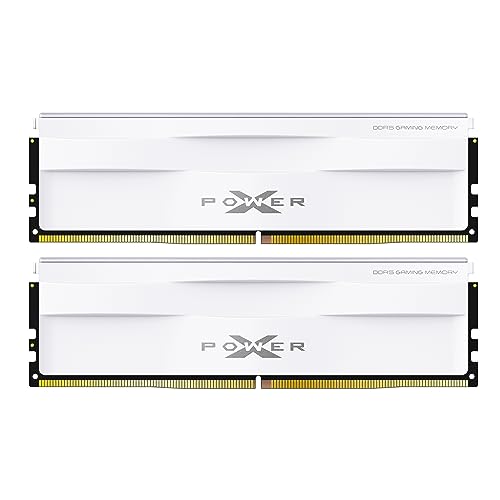
Silicon Power XPOWER Zenith Gaming 32 GB (2 x 16 GB) DDR5-6000 CL30 Memory (SP032GXLWU60AFDG)
plucky timber
The teamgroup kit is pretty aesthetically pleasing imo

Kinda reminds me of those nzxt motherboards
Here's a picture I stole from someone else
 golden viper
mossy venture
this'd be good then https://pcpartpicker.com/product/ypRwrH/silicon-power-xpower...
golden viper
mossy venture
this'd be good then https://pcpartpicker.com/product/ypRwrH/silicon-power-xpower...
Not going to lie i saw this and didn't choose it because I was un familiar. I'm going to try to stick to G.skill just because I'm familiar with it.
weary galleon
golden viper
Not going to lie i saw this and didn't choose it because I was un familiar. I'm ...
Under the heatsink they're all pretty much the same
plucky timber
Hynix?
mossy venture
Silicon power is good, same warranty as g.skill too. It's your money/pc so I won't tell you what to buy, but I have recommended their ram hundreds of times and only one person has told me they had issues with them, and no quality control is perfect
plucky timber
It's either micron/hynix memory dies
mossy venture
6000c30 is all hynix
plucky timber
SP and TeamGroup have pretty good quality control
Way better than corsair
Ok to be fair that's a low bar
But still
They're fairly good
mossy venture
Corsair is corsair
At least their psus are good, and they don't even make those
Your rm750x will hold up great
plucky timber
Yes
golden viper
I don't need the lanes from the 870?
plucky timber
Asrock makes better mid range boards than asus on average these days
plucky timber
golden viper
I don't need the lanes from the 870?
With the cpu lanes alone you probably have excess
golden viper
I don't like the asus tax either.
plucky timber
It's more that they're just not that good in quality in general
At least for the low end to lower mid range
Their higher end boards are good but overpriced
golden viper
I only picked that asus 870 board because I liked it's looks plus it had all the things I need.
plucky timber
Funny how Asrock used to be a joke a couple years ago
plucky timber
ooo nice
I remember back in the 2018 pcmr era
People used to make fun of asrock users
Rightfully so a lot of times
Their boards used to be... Not so good
They've really stepped up their game in recent years
Especially with AMD boards
They were one of the first vendors to offer bios versions for newer AM4 cpus
Extremely based
golden viper
I'll probably grab that asrock board. Thi k I'll have to bios update to make it current?
rain carbon
I have an am5 asrock
rain carbon
Literal only thing i dislike about it is its whine and rgb stuff sucks
plucky timber
And when that batch was released
rain carbon
Was 100 bucks
golden viper
White is my build choice and rgb doesn't bother me
plucky timber
Gonna check if it has flashback rq