#building-and-recc-chat
1 messages · Page 322 of 1
 fossil cedar
 potent portal
Or gigabyte for that matter, 30 series has PCB cracking issues that can be hard to see
 plucky timber
oh I was more worried about their return policies
you know how asus customer service is
 hardy remnant
Inno3D
fossil cedar
potent portal
Or gigabyte for that matter, 30 series has PCB cracking issues that can be hard ...
Don't forget the cap ROLLING out of my 3070
plucky timber
wait
potent portal
A valid concern but they have been getting better at least
potent portal
Yep fell right out of the gpu
fossil cedar
Just went ya yeet
fossil cedar
Gigglebyte
fossil cedar
Lemme try find the thread
plucky timber
sometimes you get good stuff, most of the time it's mediocre
and then you get uhh

their motherboards have been pretty solid lately
at least the mid range ones
 plucky timber
what is this a lego set?
fossil cedar
I was on call at the time and i just went silent in shock
plucky timber
Imagine if it was a 3090
$2000 gpu and the cap just pops off
WHAT THE HELL IS THIS

Is this a $2000 blower
why does this exist
fossil cedar
Luckily things worked out well for me because i had bought the 3070 for €700 and had a good bit of time mining on it .... The 3060ti i was getting for my friend had just arrived so i was able to use that and since gigglebyte where like nope we don't do rma repairs in Ireland.. the retailer will give you a full refund or you can choose another card same price (by this time 3070s had shot to like 900 and where LHR)
plucky timber
AHAHHAHAHAHAH
 fossil cedar
plucky timber
why does this exist
fossil cedar
plucky timber
why does this exist
Almost all server cards are blower style because it works better in a server chasis
Ohh
plucky timber
fossil cedar
Almost all server cards are blower style because it works better in a server cha...
ok that does make sense
hardy remnant
I can't even install it, keeps crashing before it
fossil cedar
But yeah tldr i got 700 refunded got a 3060ti FE (so for like 450) instead of 3070 and managed to grab a 6750xt for the friend
fossil cedar
hardy remnant
I can't even install it, keeps crashing before it
Uhh sounds like your windows install is heavily borked then
Because it's literally a file that unzips
plucky timber
do you have an igpu?
hardy remnant
yes
hardy remnant
I mean I get visual artifacts, the bluescreen is also heavily glitched
fossil cedar
plucky timber
let's try to rule out gpu issues first
If they cant even get ddu to "install" then windows is the issue
More than likely
potent portal
hardy remnant
I mean I get visual artifacts, the bluescreen is also heavily glitched
The blue screen being borked is a strong indication of a memory problem tbh
fossil cedar
@hardy remnant just to be sure the "installer" just inzips a file it doesn't install
hardy remnant
ok
plucky timber
is the memory running at stock xmp?
fossil cedar
Or prebuilt
plucky timber
true
hardy remnant

G.Skill Ripjaws S5 64 GB (2 x 32 GB) DDR5-5600 CL30 Memory (F5-5600J3036D32GX2-RS5K)
hardy remnant
plucky timber
so memory isn't overclocked?
not overclocked
plucky timber
oh 64gb
hardy remnant
as far as i know
plucky timber
CL30?
that's not bad tbh

yeah looking at all the pcpartpicker kits
your kit is actually pretty good
as far as 64GB kits go
hardy remnant
and the mb is b650 pg, cpu is amd ryzen 9 9750x3d
potent portal
That might have been that early problem kit that needed more voltage
plucky timber
launch ddr5 shenanigans?
hardy remnant
oops I thought that was the part list
oh it's having major issues again, blackscreen after ddu finished
potent portal
Yeah there was one or two early g.skill kits that had issues, but if you add more voltage it was fine

 hardy remnant
alright after the ddr the screen now freezes with every input and goes black, then goes back to a semi frozen screen

aaand it's black again
and it crashed
oh!! it recognized the card
potent portal
sheramigans?
hardy remnant
how do I fix them?  this is my first pc build upgrade so to say
plucky timber
ram ran-
hardy remnant
I'm...not very knowledgeable
potent portal
Start with one stick at a time
If you have issues still, switch sticks
And slots
hardy remnant
to get it to be recognized properly?
potent portal
To get it to stop blue screening lol
hardy remnant
oh lmao
plucky timber
is it A1 B1 or A2 B2
hardy remnant
no, I didn't think it was what caused the issue
I can try
the ram has never had any issues for a year but I guess that also depends on mobo D:
potent portal
Yeah sometime even the CPU
There's an issue on Intel caused by the uneven mounting pressure where RAM channels can drop out entirely or be spotty
hardy remnant
mmm this is amd though, it seems to be stable now that the driver for the card is installed...
potent portal
Yep just saying, lots of factors at play here
hardy remnant
I'll try to set some things up, if I encounter another weird crash like that I will troubleshoot the ram
fossil cedar
hardy remnant
mmm this is amd though, it seems to be stable now that the driver for the card i...
Just because it's not a known issue for amd doesn't mean it's not possible to happen though
hardy remnant
very true
 potent portal
Oh yeah, see Nvidia in their infinite wisdom decided to make the GPU x8 instead of x16, so they slapped a nvme on there to use 4 more lanes
You need a motherboard that supports bifurcation to use it
plucky timber
bitcoin miner's dream
 cyan ravine
Or a gpu that can bifurcate itself
potent portal
GPUception
potent portal
Yes and that was exactly the issue that the 3050 and 6500 xt suffered from
hardy remnant
It booted with 1 ram stick just fine, but the gpu still has no image
I'm running one monitor over the cpu intigrated graphics
cyan ravine
Reboot again
hardy remnant
it is being recognized
hardy remnant
m ok, so only connect a display to the gpu?
cyan ravine
Yep then reboot again
hardy remnant
ah it runs!
cyan ravine
AM5 moment
hardy remnant

sigh alright, time to check the ram
what's a good way to test if everything works alright?
oh and I should probably try to seat it in the pcie 1 slot again....
cyan ravine
plucky timber
and 9000 is like skylake
More like 9000 is skylake +
And 10000 will be skylake ++
cyan ravine
hardy remnant
what's a good way to test if everything works alright?
Testmem5 is very straightforward
plucky timber
is raptor lake bulldozer?
cyan ravine

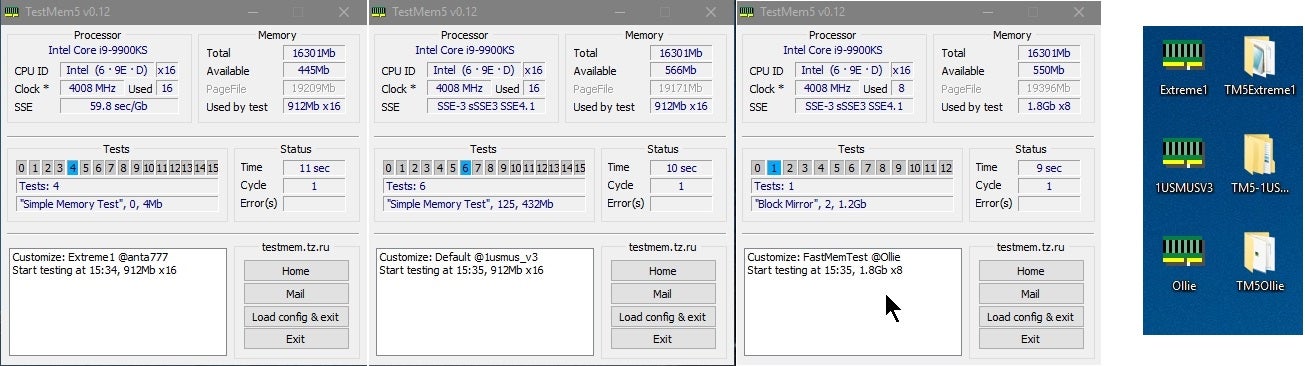
Overclock.net
I really want this pinned or something
Maybe it is pinned
And I just haven't realised/forgotten
plucky timber
the ssd tier list should be pinned too
and that tomshardware reference chart
this one

this is stupid useful
cyan ravine
We used to have one but yeah
Recognising any potential bias in RT
The toms one is decent
plucky timber
yeah it's pretty good for gaming workloads
cyan ravine
Some would say more, others less one way or another
plucky timber
I'd say it's a good reference to gauge the price/performance
if someone puts a nvidia card in just look for the closest radeon
unless they're doing ai or something
plucky timber
skylake 2.0
cyan ravine
B580 was the last ship leaving
Even with the issues it's still a strong prospect knowing it'll get better
 plucky timber
I could put an antenna on my mini pc
hardy remnant
test with reseated ram & 16x pcie slot: booted, very weird size for everything, very crunchy like 144p and after getting to desktop and trying to open something it crashed
hardy remnant
ah bluescreen sorry
plucky timber
hello sassy again
cyan ravine
Hi
 tawny violet
Do you need more than 32 gigs for gaming today?
or rather
can you actually benefit from it
plucky timber
it'd still be dual channel right?
cyan ravine
Not really unless it's like star citizen
plucky timber
since it's ddr5
tawny violet
I know you don't need it
cyan ravine
plucky timber
it'd still be dual channel right?
No
tawny violet
but can you benefit from it
cyan ravine
plucky timber
since it's ddr5
Quad
tawny violet
plucky timber
with a single stick
I mean in a kit
plucky timber
with one stick?
cyan ravine
tawny violet
but can you benefit from it
No
tawny violet
2 sticks
cyan ravine
plucky timber
with one stick?
1 stick is dual ye
hardy remnant
and the card is not being recognized again...it might be that pcie slot
tawny violet
if you go 48 or 64 gig and you use a single stick you might as well not even try
plucky timber
yeah it shouldn't gimp performance too much on a single stick
tawny violet
I'm not talking single stick tho
cyan ravine
hardy remnant
and the card is not being recognized again...it might be that pcie slot
Again question what was the app you crashed on
tawny violet
I mean two
hardy remnant
just trying to open settings
tawny violet
like you're supposed to do it
cyan ravine
hardy remnant
just trying to open settings
What board is it
hardy remnant
Inno3D 4070 ti
hardy remnant
no
cyan ravine
Ok no it'll be ram
hardy remnant
guh
cyan ravine
I'm very sure
cyan ravine
It's either ram related or some dirty power feeding into the i/o die
If you can make it into windows somewhat successfully try a test for me
Copy a file, specifically copy it to another drive if you can
See if anything happens to your mouse and keyboard
cyan ravine
With one stick of ram
hardy remnant
ok!
cyan ravine
If you get nothing
Try changing slots
With 2 sticks
If that doesn't work try jedec/xmp off
If that doesn't work try a second computer to set up memtest86
cyan ravine
cyan ravine
If that doesn't work try a second computer to set up memtest86
Which I don't normally recommend but that on a usb can help
Ye
cyan ravine
cyan ravine
Which I don't normally recommend but that on a usb can help
Then use that usb to run memtest86
If you get immediate errors then the ram is VERY unstable
Memtest86 is not reliable, but good enough when windows literally won't work
Access the settings on the memtest screen before it starts to set the cpu to run in parallel for better coverage
Oops I meant memtest86
You can run it straight from the usb via bios
Skipping windows
Memtest86+ is the same thing but a lot better
Still don't recommend it normally tho
But ye I would be suspecting not the gpu rn
If you got a very clear picture with no obvious socket damage then I'd be thinking elsewhere
hardy remnant
hmmm I see
cyan ravine
If you've tried it yet, also running windows straight from the motherboard display ports could also reveal this behaviour
Like
You boot with the iGPU, zero problems
No gpu inserted
Or many problems, thus it's not gpu whatsoever
cyan ravine
cyan ravine
You boot with the iGPU, zero problems
This would imply bad power more than a bad gpu
Either way unless the 4070Ti is like half desoldered itself I am doubting the card rn
hardy remnant
i booted into windows with 1 ram stick, the one that worked like a charm before, it still had the crunchy 144p look with everything being large, i tried to open explorer and it bluescreened
hardy remnant
alrighty!
cyan ravine
Gpu out
If same issue, ram or i:o/ram related
If no more issues, then we can suspect the gpu again and dirty power
hardy remnant
D: long boot
cyan ravine
That's not a bad thing
 mossy venture
Ddr5 takes a while to train
cyan ravine
It will also retrain a long time when the ram config changes yeah
mossy venture
I almost turned my friends build off while it was training bc i forgot abt that
hardy remnant
mhm post status checker for vga and dram are on
cyan ravine
Yep keep waiting
hardy remnant
switched to slots a1 & b1
cyan ravine
hardy remnant
mhm post status checker for vga and dram are on
My board has done this before and still posted
hardy remnant
my post status checker blink every time I boot and then go off
I thought it was normal for the board
hardy remnant
it's just steady in vga and dram
cyan ravine
Then it's still training
hardy remnant
it usually jumps to boot and cpu after and then goes off
hardy remnant
ok!
cyan ravine
If still nothing then try reseating the ram again
Make sure it clicks
Ram slots click on top and bottom
Or if they don't the latch still comes up all the way
hardy remnant
yup I heard them click twice, once on each side, the latches were not loose
I made that mistake the first time I built this thing
cyan ravine
Good just checking
hardy remnant
It's still training, no change
should I let it run a little more?
it is 64 gigs...
cyan ravine
If you cant then remove the battery
Hold the power button for ten seconds
Put battery back
Same idea
This is obviously with the pc off at the back
cyan ravine
Yep
hardy remnant
alright, it's training again.
cyan ravine
After 10 minutes try 1 ram stick
After another 10 minute attempt
Try only mouse keyboard monitor
After another 10 minute attempt, swap the cpu power cables and remove any internal usb/sata
After that, assume a fatal issue for the ram or cpu
Actually no
cyan ravine
cyan ravine
After that, assume a fatal issue for the ram or cpu
Try a different monitor cable first
THEN
After that, assume above
So one or the other needs a warranty claim
Since the board is getting stuck on ram training I will assume ram first
But we'll know after these next steps
hardy remnant
ok!
cyan ravine
The board could also be related with bad traces but given the behaviour I'm really not suspicious of it
Not unless those two are addressed first
hardy remnant
it's not even been a month since I bought these (mobo & cpu) so I think I can still send them back no issue D: I just hope it's not the RAM
I still have the intel cpu and mobo and could test those if nothing works
cyan ravine
If it's an option yeah
You could test on those after
That will really confirm things
hardy remnant
but that one doesn't have integrated graphics...I still have a really old 1060 ti around i think
hardy remnant
yeah
cyan ravine
As long as it has pcie 3 it's fine
hardy remnant
it does
cyan ravine
It'll work
Render at stupid high settings and you'll see that 4070ti for what it really is lmao
hardy remnant
oh there is another thing I could check that read, overtightened cooler on the am5
it's still not posting
cyan ravine
hardy remnant
oh there is another thing I could check that read, overtightened cooler on the ...
On any platform ye but unless you tried to wrench the cooler with a screwdriver I really doubt it
Unless you bought one of those contact frames, which you don't need for am5 at all
hardy remnant
mhm! I'll check it either way since it's been 10min
cyan ravine
They do nothing
cyan ravine
Yeah no I doubt it unless you wrenched the cooler on
The stock ilm makes it pretty resilient
hardy remnant
i loosened them a little bit, reseated ram into the same 2 slots
if this doesn't work I'll try 1 like you suggested
cyan ravine
Alr
Just be careful your temps may go way up
Lol
You will want to repaste it if it works
Paste gets squeezed out when you install a cooler, doesn't really unsqueeze when you unscrew lol
hardy remnant
alrighty
 jagged ember
Punch CPU
hardy remnant
cyan ravine
Keep going with the easy stuff
I wrote down what was tested as far as I could remeber while waiting for the memory training:
What I've tried:
GPU issue:
got recognized in PCIE 3 slot - 1 RAM stick in B1 - display worked fine (started with having the HDMI cable connected to MB -> seeing the nvidia card being recognized: switched to GPU output, worked)
After updating graphics drivers for nvidia (and booting with only a display to the gpu): PCIE 1 does not get recognized - weird pixel size (everything is super large) - a lot of artifacting - starts crashing
Disconnected everything apart from mouse, keyboard & 1 HDMI to MB cable
RAM in A2 & B2 - GPU inPCIE1: starts bluescreening when trying to open system settings, artifacting
RAM in A2 & B2 - HDMI to CPU onboard graphics: normal - worked until reboot (blackscreen on reboot)
RAM in A1 & B1 - no GPU - loosening CPU cooler: Stuck in ram training
CMOS Reset, reseated A1 & B1 - no GPU: stuck in ram training
1 RAM in A1 - no GPU: Stuck in ram training
1 RAM in B2 - no GPU - changed cable: Stuck in ram training
Post status checker: always stuck with VGA and DRAM lit up
Removed 1x M.2 NVME - 1 RAM in B2: after a few seconds goes to "Your system needs to be repaired" I can boot into BIOS
hardy remnant
Would getting into BIOS with both ram sticks confirm that it may be a windows issue?
cyan ravine
Ok I've changed my tune that sounds like the io die
hardy remnant
oh
hardy remnant
yes
cyan ravine
Ok windows cooked itself
hardy remnant
guh
cyan ravine
Do you have a second pc rn
hardy remnant
I have a laptop
hardy remnant
yup
cyan ravine
Perfect
Use it to do the memtest86 steps I posted above
Now that it posts
Try running that test using the boot section in bios to start it
(It'll appear in a list with windows)
Instructions are as above
If it has errors there then it's definitely ram
If not then it might be power/io instead
Not that memtest86 is any metric of stability but you wouldn't fail it if you weren't having issues like this
hardy remnant
ok on it
also would it be a good idea to boot windows from a stick and format the drive? if windows is cooked
I'll do the memtest86 first
hardy remnant
I forgot to put the second ram stick in before running memtest 
but it's on test 10, almost done and no errors yet
cyan ravine
Ok so ig we wait a bit then
hardy remnant
mhm
hardy remnant
Memtest86 is done, 0 errors, it's not the ram 
hardy remnant
alright
hardy remnant
so before changing the cable i wanted to try and reinstall window because the last installation was majorly botched / blackscreened and this time it worked without any issues...
cyan ravine
Ok
hardy remnant
if it restarts without issues I'll try to slot in the second ram stick when changing the cpu cable, if that works fine too I'll try the gpu
it's updating amd drivers right now
cyan ravine
I mean it's not out of the question but I am curious about the hardware state as well
hardy remnant
yeah me too, but i suspect the drives the most right now
i took them from my intel build, the first fresh install was blackscreened, the second one too
ok time to try the ram....if this is all just a botched windows install I will cry
cyan ravine
Try new cpu cables first
Swap them to the psu spares if you have any
Don't mix any from other psus
hardy remnant
yup! I only have the spares
works
slotting the other ram into A2 also works
I'll try the gpu
hardy remnant
woah what it actually clipped in...that is the first time
ok it booted....
device manager has the card as "Microsoft basic display adapter" with a warning sign
and with the drivers installed it recognized it...time to see if the output works
 dusky hearth
It didn't clip in before 🧐
cyan ravine
hardy remnant
device manager has the card as "Microsoft basic display adapter" with a warning ...
What's the warning say if you click properties
hardy remnant
dusky hearth
It didn't clip in before 🧐
no, no matter what I did it just would not
it fit in closely to what it is now
but it has never been this snug
cyan ravine
Hmmm
hardy remnant
I don't know what changed, maybe there was some dust in there that stopped it from going in all the way
hardy remnant
i do not think it was the ram, that ram worked for a whole year without any issues
I think it was a majorly botched windows install that just couldn't boot
hardy remnant
don't scare me like that
 frigid night
cyan ravine
I'm still sus tbh
frigid night
cyan ravine
I'm still sus tbh
Yeah, but you know that some things look like other things when something is funky
cyan ravine
frigid night
Yeah, but you know that some things look like other things when something is fun...
Ik
hardy remnant
that ram was pricey 
cyan ravine
But the system had problems with the gpu out
So I'm not convinced of any source issue yet
hardy remnant
anything specific i should test run?
cyan ravine
I'm still thinking it's power related
cyan ravine
hardy remnant
anything specific i should test run?
Still thinking to try spare cpu cables
hardy remnant
yes
hardy remnant
🫡
cyan ravine
It's sus that we had no resolution but if we have no more symptoms it's a dead end
It might return again
frigid night
I had an issue once with ram in a build. Would not post. I tried reseating/ swappin/1 stick/ the other stick/ different slots/ all of that. nothing worked. Then I put them back in the same order I had them in both slots and it worked.
cyan ravine
Can't do anything about it rn tho
hardy remnant
I'll try to see if anything is off / stress test
cyan ravine
frigid night
I had an issue once with ram in a build. Would not post. I tried reseating/ swap...
Chaos theory: pc builder edition
frigid night
That was about 2 years ago and the issue never came back lol
It's PC.. sometimes things go funky for no reason and then somehow corrects itself
hardy remnant
if there's something funky I find I'll come back to annoy ya'll with it
I still have about a week to return the parts for the full amount, so might as well see if they 100% work now
cyan ravine
Here's hoping
 muted shore
You guys gotta give him a medal for being here always
Helped me build my pc too
Very generous helpful person

 rain bloom
Whoever said the eagle hawk b650 had driver issues was not kidding, the wifi driver was not installed so I had to bring it over from a flash drive. Anything else I should look out for?
I’m on a small boot drive while waiting for my main drive replacement to ship
 little osprey
So there's water reservoirs for pc walls on direct cpu cooling, looks cool and just want to master the craft, that's what I'm doing @analog hearth
little osprey
 analog hearth
Just get a normal PC water cooling setup
analog hearth
Just get a normal PC water cooling setup
I already have a normal PC
I just wanna learn direct water cooling
analog hearth
I'm not the guy who helps
I'm the guy who says "go google it. The information is out there"
little osprey
Information is very limited on direct water cooling, and not many straightforward tutorials
analog hearth

Thank you to Corsair for sponsoring this tutorial! See all that Corsair Hydro X has to offer and start planning your next loop using the Custom Loop Configurator at https://www.corsair.com/us/en/hydro-x-series-custom-cooling
Learn more and become and EVGA ELITE Member at http://www.evga.com/ELITE
Enter Associate Code Jayztwocents at checkout ...
little osprey
Better to talk to a pro in person than looking up things and not finding them
analog hearth
I mean idk man the info seems to be out there
little osprey
analog hearth
https://www.youtube.com/watch?v=5ZnDESqJdyU
Already watched it
Not in depth
And i need the wall reservoir not the cylinder
 rain carbon
little osprey
So there's water reservoirs for pc walls on direct cpu cooling, looks cool and j...
rain carbon
little osprey
So there's water reservoirs for pc walls on direct cpu cooling, looks cool and j...
 analog hearth
fr
I don't like being that guy who goes "I don't even know what you're trying to do" despite knowing what he's doing but I actually don't know what he's trying to achieve
A photo or something would be nice
 analog hearth
ohhhhh
this guy I swear
anyways
those are only exclusive to some cases. You'll have to make sure the case is compatible with one. If its compatible, it'll have an optional purchase (that being the "wall reservoir"). Some cases just come with it, but that's dependent on the case itself
analog hearth
not boom

 rain carbon
Just like, google "wall water reservoir pc case"
rain carbon
rain carbon
Just like, google "wall water reservoir pc case"
With that exact search
You just gotta look a little fr
Are you looking for the reservoir alone?
This is actually a pretty cool case ngl, id grab this myself lmao
 little osprey
analog hearth
not boom
little osprey
analog hearth
not boom
Exactly my problem 😭
little osprey
rain carbon
This is actually a pretty cool case ngl, id grab this myself lmao
I have the case rn, it'll be my experimental case
analog hearth
"cases with integrated reservoir" is what you should be googling
dusky hearth
rain carbon
https://tenor.com/view/flushing-the-toilet-basically-homeless-toilet-pc-computer...
it's mildly ironic that this toilet design makes it water saving
though the question is if lowering the amount of water flushed by like 70% would cause it to not flush properly if you unload a log
rain carbon
dusky hearth
though the question is if lowering the amount of water flushed by like 70% would...
Plunger moment
dusky hearth
technically a plunger is meant to suck crap out
rain carbon

 fringe rose
uhhh im guessing i press down on the pin to pull it out? but it's also stuck?

same with the yellow and black one

 weary galleon
fringe rose
uhhh im guessing i press down on the pin to pull it out? but it's also stuck?
weary galleon
fringe rose
uhhh im guessing i press down on the pin to pull it out? but it's also stuck?
These are notorious for being really hard to get out because of the friction lol. Light just need to pull harder or wiggle it. And yes you'll need to press on the clip to release it
fringe rose
ooo alr ty!
i just hope i wont break my old mobo scared to cuz first time replacing it 😭
fringe rose
weary galleon
These are notorious for being really hard to get out because of the friction lol...
what about the yellow and black cable one? that one also stuck
weary galleon
Same technique for getting it out. Shouldn't be as hard though
fringe rose
very important question
does this work at all or no? im not sure if my psu came with a cable meant for rtx 2070 super...
 plucky timber
Why don't you have the full 8pin plugged in?
fringe rose
was wondering if it worked or not i think it does since it slotted in perfectly
im using the cables that came with my psu
plucky timber
Well it does but
It's a full 8 pin
You got the other half of the connector just dangling off
fringe rose
oh i had it dangling off to make sure if it was the right one or not in pic, jus made sure jus now it did work
plucky timber
Is the other connector a 6 pin then?
fringe rose
yurp
plucky timber
Should be fine
Just make sure you plug the full 6+2 pin in
So you get the full power
Are the two power connectors on separate cables btw?
 desert lantern
Okay!, So I was here last time about the pc that wouldn’t turn on but now it’s the same issue but a new reason.
I bought a new psu and plugged everything in but now my pc won’t turn on at all and it’s kinda alarming, wondering if anyone could help me out?
mossy venture
can i see the full parts list
desert lantern
mossy venture
can i see the full parts list
I’ve already inserted them, but I’m sure I can find a photo somewhere
 versed current
Can I build an am5 pc for around 730$?
plucky timber
versed current
Can I build an am5 pc for around 730$?
What are you using the pc for?
Gaming?
Productivity?
rain carbon
such as?
versed current
Like Minecraft with mods or shaders
mossy venture
would you be willing to order the cpu off aliexpress?
versed current
Fortnite
rain carbon
you can get away with some integrated chips
versed current
mossy venture
would you be willing to order the cpu off aliexpress?
No
mossy venture
it's an official amd cpu, just not sold in the US
versed current
I just want a normal build of any of u guys wanna make one
mossy venture
Part List - AMD Ryzen 5 7600, Radeon RX 7600, Phanteks XT PRO ATX Mid Tower
then that's what youre looking at for am5
plucky timber
7500F can match the budget right?
versed current
Yea
plucky timber
I mean for $800 this is the best you can get
versed current
That’s what I said
plucky timber
Unless you go AM4
versed current
plucky timber
I mean for $800 this is the best you can get
I do like it
rain carbon
if they arent doing anything intensive couldnt they get away with something on the 8000 series processors?
mossy venture
Part List - Intel Core i5-12600KF, Radeon RX 7600, Cougar Archon 2 Mesh RGB ATX Mid Tower
plucky timber
The 7600 is not a bad gpu for it's price
rain carbon
to hold off and buy a gpu in the future?
versed current
Do u think it’ll get like 250 fps on Minecraft with low end shader
plucky timber
With sodium and distant horizons
versed current
Yea
plucky timber
You could do a lot more than that
versed current
Ok
mossy venture
Part List - AMD Ryzen 5 5600X, Radeon RX 7600, Cougar Archon 2 Mesh RGB ATX Mid Tower
any of these 3 will
rain carbon
mossy venture
https://pcpartpicker.com/list/Tm9gnp
they did specify am5
so i assume upgradability is a big thing here
plucky timber
mossy venture
https://pcpartpicker.com/list/Tm9gnp
7700XT possible?
mossy venture
Not worth over am5

eBay
AMD Ryzen 5 7600 (8C / 16T, 3.8 / 5.1GHz, 6MB L2 / 32MB L3). AMD Radeon RX 7600 8GB GDDR6. 2x 8GB UDIMM DDR5-5600.
rain carbon
couldnt they get away maybe with an 8700g or similar just for minecraft?
what other games do you play
plucky timber
Part List - AMD Ryzen 5 5500, Radeon RX 7700 XT, Cougar Archon 2 Mesh RGB ATX Mid Tower
I tried
Meh build tbh
versed current
Do u think the first build will be good enough if I’m not planning on upgrade for like 4 years
rain carbon
rain carbon
what other games do you play
^
versed current
And does that mobo have Wi-Fi in it?
plucky timber
What games do you play?
mossy venture
when you do upgrade, do you want to keep the motherboard and ram, or would you build a whole new pc?
versed current
rain carbon
^
Like no others unless my friends want me to
versed current
mossy venture
when you do upgrade, do you want to keep the motherboard and ram, or would you b...
I’ll prolly just buy a new one
rain carbon
plucky timber
https://pcpartpicker.com/list/CVVVFZ
this doesnt have wifi no
mossy venture
ok then i wouldn't spend the money for am5
your money would be better spent elsewhere in the build
plucky timber
Yeah I'd just get am4
versed current
mossy venture
https://pcpartpicker.com/list/Kjz4pK
This one
plucky timber
rain carbon
this doesnt have wifi no
Well I mean you can get a laptop wifi adapter
That's dirt cheap
versed current
Everyone also says am4 is like horrible and won’t run fast at all
mossy venture
what's the most you'd spend atm? the 12600kf and 7600 perform very similarly, and if you want the build to last 4 years without upgrades youd want to fit a 7700xt in
plucky timber
Who is "everyone"
versed current
Or is it just a little slower
plucky timber
That's one of the stupidest thing I've heard
versed current
plucky timber
Who is "everyone"
Ppl in other pc build servers
plucky timber
AM4 is not horrible at all
mossy venture
the 5600 is about 20% slower than the 7600
plucky timber
Are they also the same people who say the RX 7600 is a bad gpu?
mossy venture
the 12600kf is about 10% worse than the 7600, but you're going to be limited by your gpu anyways. it makes more sense to get a cheaper cpu/mobo/ram, and a better gpu
versed current
mossy venture
what's the most you'd spend atm? the 12600kf and 7600 perform very similarly, an...
I’d only wanna spend like 750 tops cuz I have to buy windows
plucky timber
Well
rain carbon
rain carbon
couldnt they get away maybe with an 8700g or similar just for minecraft?
opinion on this bacca?
rain carbon
yeah never spend 100
versed current
Yea liek 30
mossy venture
rain carbon
opinion on this bacca?
maybe, but fortnite is pretty demanding
plucky timber
No
versed current
I’m not buying the 100$
rain carbon
actual windows employees dont even do that
plucky timber
Even $30 is overpriced for that broken PoS imo
mossy venture
8700g might not handle it
rain carbon
a lot of em get free codes off github lol
rain carbon
mossy venture
8700g might not handle it
fair fair
mossy venture
versed current
I’d only wanna spend like 750 tops cuz I have to buy windows
hmm
give me a few minutes to fiddle with the list
rain carbon
even with directx 11?
versed current
So can u guys make an am4 with Wi-Fi mobo? With a little rgb on the cpu cooler and case
mossy venture
12gb vram would be ideal for wanting a build to last 4 years
rain carbon
or upscale
versed current
Yea
mossy venture
im going to do lga1700, intel
versed current
I like 12 gb
mossy venture
12600kf
versed current
Minecraft Fortnite
versed current
plucky timber
Do you play AAA?
Never
rain carbon
a used system might flat out just be superior as well if you dont care about upgrading to modern hardware
plucky timber
Do you expect to play AAA in the next 4 years?
versed current
I’m not gonna buy any games that I might not like until way later
mossy venture
budget with windows included?
versed current
plucky timber
Do you expect to play AAA in the next 4 years?
Not rlly
versed current
mossy venture
budget with windows included?
Sure 1 with 1 without if u wanna
plucky timber
Modded minecraft?
versed current
Yea
rain carbon
i hate to be that guy but 🏴☠️
versed current
plucky timber
Modded minecraft?
Yea
mossy venture
alr. would you be open to any refurbished or open box parts?
mossy venture
gonna be very difficult then
rain carbon
trust me when i say windows doesnt even care about money from windows keys
plucky timber
At that budget new parts are bad value
versed current
So I have minimal issues
mossy venture
Part List - Intel Core i5-12600KF, Radeon RX 6750 XT, Phanteks XT PRO ATX Mid Tower
plucky timber
You can get a 2080ti for this budget
mossy venture
thats the ideal version
plucky timber
Just saying
versed current
So do I just go with the 800$ one
versed current
mossy venture
https://pcpartpicker.com/list/Kjz4pK
^
plucky timber
The 12600KF one
mossy venture
nah, that would be worse for you. I'm going to make another option
rain carbon
i like 6750xt more than 7600 for starters
mossy venture
Part List - AMD Ryzen 5 5600X, Radeon RX 6750 XT, Phanteks XT PRO ATX Mid Tower
plucky timber
oh ryzen is cheaper
rain carbon
plucky timber
Here's a stupid thought
i hated using 16gb on windows 11
its painful lol
not worth
plucky timber
Is windows that bad?
plucky timber
Damn
Can't believe they ask money for that crap
Should be free with how ad riddled it is
versed current
mossy venture
https://pcpartpicker.com/list/vN8GJn
How do I put the disc in
mossy venture
the ssd?
versed current
Like with my pc now I have windows 10 pro which I can upgrade to 11 pro for free right?
mossy venture
oh yeah
versed current
Then I can move it to this one with a new key?
rain carbon
i only have a few things open and look how much memory is getting eaten up lmao
 mossy venture
you don't need to buy a key at all
plucky timber
You don't have to buy anything yeah
mossy venture
you can just carry over your current key
mossy venture
either just carry over the ssd and reinstall windows, or download windows onto a USB using windows media creation tool on your current pc
 mossy venture
then when you build the new one, plug the USB in, and it will walk you through a windows install on that pc
versed current
mossy venture
either just carry over the ssd and reinstall windows, or download windows onto a...
I’m prolly gonna put it on a usb
rain carbon
idle, not to mention im very picky about what background tasks i run
 versed current
mossy venture
would you be fine with open box parts from amazon?
versed current
mossy venture
would you be fine with open box parts from amazon?
Like someone returned them?
Prolly
Like the pc I have now is a refurbished one
mossy venture
alr im taking a look through amazon warehouse rq
ill lyk if there's any decent deals
versed current
That I got for 130 with monitor from Amazon so it should be fine
And if not I’ll just return it and get a new one
mossy venture
dell g2724d is $150 new and is great
rain carbon
how did fortnite get so bad it cant run well on a 1650 equivalent anymore 😭 i remember playing that crap on the switch with no hitches
versed current
The one I have now gets 100 fps and my ping is all over the place
And it’s bad at video recording
Which build should I go with
plucky timber
What are your current specs?
mossy venture
there is also another option btw
cyan ravine
rain carbon
how did fortnite get so bad it cant run well on a 1650 equivalent anymore 😭 i ...
Like a couple months ago
versed current
2 tb ssd
mossy venture
you could do a cheap ssd/ram and swap them out later. or check what your current specs are and carry some parts over
2tb ssd is worth keeping fs
even if its as a secondary
versed current
plucky timber
If it's not too old
The pc is like 16 years old parts
And the case is bad
plucky timber
but what are the specs
mossy venture
oh
plucky timber
Is it "like" 16 years old or is it 16 years old
mossy venture
so an hdd not an ssd?
versed current
It’s integrated graphics
plucky timber
Intel?
mossy venture
can you open task manager rq
plucky timber
Ok I'd say it's a bust then
rain carbon
could be sata too
mossy venture
ah
rain carbon

versed current
I’d rather make a new one
plucky timber
Could be a 2tb hdd
versed current
But I want something that will be fine enough so I don’t waste my money
plucky timber
I mean
versed current
I wanna be kinda happy with it
mossy venture
versed current
I’d rather make a new one
understandable, just if you could spend a bit more money towards the gpu then it'll keep up for longer
plucky timber
For a $800 budget this is the best you can get
versed current
Which one do I do
Cuz like I do like these
I’m prolly not gonna be disappointed
mossy venture
mossy venture
https://pcpartpicker.com/list/vN8GJn
this, unless you'd like to do cheaper ram and storage to fit a better gpu in, and swap them out later
plucky timber
I winder if you can fit an 7900XT in for $200 more
versed current
Does the case have any rgb?
mossy venture
no but you can add fans later
rain carbon
pc building new is basically just "here spend just a FEW hundred more dollars here, a few hundred there and boom! value for money!!"
mossy venture
a 3 pack of thermalright c12c fans is $12 on amazon
plucky timber
rain carbon
pc building new is basically just "here spend just a FEW hundred more dollars he...
And also all the NZXT people
And elitests
I hate pc elitiests
rain carbon
pcmasterrace
plucky timber
"3070 is old gpu it's bad"
mossy venture
Part List - AMD Ryzen 7 5700X, Radeon RX 6750 XT, Phanteks XT PRO ATX Mid Tower
cheaper ssd slightly better cpu
rain carbon
i would be so chill with a 3070
plucky timber
Shut up not all of us have disposable income to spend on a gaming pc
rain carbon
peace
versed current
mossy venture
https://pcpartpicker.com/list/vN8GJn
I’m prolly gonna stick with this one
plucky timber
That's worse than the new one
versed current
The new one says compatibility issue
plucky timber
It has bios flashback
You can update the bios when you get the motherboard with a usb stick
plucky timber
lmao
versed current
https://pcpartpicker.com/list/LcWkfd this build good?
Part List - AMD Ryzen 5 5600X, Radeon RX 6750 XT, Montech XR ATX Mid Tower
Does the case work?
versed current
And somone from zachstech discord said the mobo sucked
 jolly riverBOT
zach's computer is slow
mossy venture
It's nothing special but its fine. People who don't understand motherboard branding would say that
versed current
mossy venture
That case is my most recommended atm
Ppl from that server said the mobo would be to small for it
mossy venture
Yes
versed current
I have no idea how mobo work
mossy venture
Nvidia announces new gpus in like two hours
versed current
But everyone has different opinions on the,
mossy venture
No clue how it'll affect the gpu market
mossy venture
But do with that as you will
versed current
I dought it’ll affect the older ones as much
fringe rose
very important but what should i trouble shoot? my pc wont turn on 😭 made sure nvme in right spot, pcie for gpu, the cpu cabel, the power button and reset whatever cable plugged in to mother board from the psu. I dont know what's wrong. idrk if the new motherboard came defective, or psu. not sure. 😔 need suggestions for when i try tommorow (spent 8 hours on building, too exhausted to try rn)
little osprey
My windows 7 won't boot up
mannn
I'm sad
It's only been 3 years
Just a light on, but no display screen
plucky timber
Desktop?
fringe rose
any auggestions before i just bring it to a pc repair shop 😔
dusky hearth
fringe rose
very important but what should i trouble shoot? my pc wont turn on 😭 made sure ...
any signs of life?
fans moving, leds turning on, etc.
when you press the power button
fringe rose
dusky hearth
any signs of life?
no signs of life at all
dusky hearth
there are a few possible causes
mains not working (breaker tripped, faulty receptacle, power strip off/faulty, etc.)
psu not plugged in
psu switch turned off
power connectors not fully in
faulty psu
power switch broken or not plugged in properly
fringe rose
power connectors all in with clip sound as well made (except for the 24 pin but it is fully in even if no clip sound, mightve come defective) 😔 could be the psu maybe
little osprey
plucky timber
Desktop?
Yep, just black screen
fringe rose
dusky hearth
there are a few possible causes
mains not working (breaker tripped, faulty recep...
im tempted to try changing my psu to my old one tommorow but unsure if i should cuz: 1 a lot of time spent and 2, it's 650w which im not sure if enough for all my components (new one i bought is 750w)
dusky hearth
fringe rose
power connectors all in with clip sound as well made (except for the 24 pin but ...
meh, click sound doesnt always happen, just as long as there's no gap between the 2 connectors
i would start by taking off the power switch connector on the mobo, then shorting the power switch pins with a screwdriver or some other conductive object to see if that makes it turn on
usually it would be the top row of pins, pins 3 and 4, though you may want to check the manual to see if it's right
sometimes it's silkscreened onto the pcb, though it's also often tiny like it's for ants lmao
fringe rose
tried that as well earlier, didnt work unfortunately 😔 no signs of life but yeah they are tiny lol.
fringe rose
dusky hearth
meh, click sound doesnt always happen, just as long as there's no gap between th...
think trying old psu even if low wattage a good idea? or do i just bring it to a shop tommorow
dusky hearth
testing with a known good psu would be a good idea, even if it technically doesnt have enough watts for the gpu
but your gpu would be mostly idling anyways, and even if it trips ocp, you should be fine, just need to know that the system is working
most motherboards should have some leds or make the fans spin when it gets powered on, even without a working cpu or other components
of course, if the mobo is dead, it might not do that, but i'd say that is somewhat rare
fringe rose
oooo alr will try the old psu tommorow and if it dont work ill prob just take it to shop, tysm!
but yeah id be concerned if my motherboard were dead, i may be new and took a while to build my pc but im careful enough to not bend a pin 😭
also had the dumb wristband thing that prevents any static
rain bloom
What’s a good free benchmark tool?
dusky hearth
rain bloom
What’s a good free benchmark tool?
what do you need to benchmark
i'd say just use passmark
or smth
rain bloom
dusky hearth
what do you need to benchmark
New computer, wanna test all my parts
dusky hearth
or whatever application you actually want to use it for
rain bloom
Fair enough. I’m on a loaner drive so gonna wait to download games and all that
dusky hearth
do like the blender classroom render if you plan on using it for blender, play a game if you plan on gaming on it, etc.
you could use 3dmark as a subsitute for a game benchmark
rain bloom
That’s the one through steam right?
dusky hearth
cinebench for cpu
you could get it through steam yes
i think there's a standalone download as well
the demo has time spy which should be enough
you can also benchmark cpu with cinebench
though 3dmark also does a cpu benchmark so it's also not really required
rain bloom
If I say that I have 41 fps on steel nomad does that mean anything in particular? Ryzen 5 7600 RX 7800XT 32 GB 6000 mhz Ram if that helps
 maiden eagle
Ok
So my pc died
Did win update with shutdown
Came back later and tried to turn pc on and nothing. No lights no fans, nothing… suspected PSU.. used included tester and got fans to power. Assumed motherboard or CPU shat itself.
Now after installing new B550MK & Ryzen 7- I get same issue. Just nothing….
Probably is power supply then?
dusky hearth
rain bloom
If I say that I have 41 fps on steel nomad does that mean anything in particular...
not really lmao
the results page probably gives estimated fps in games
 manic cloak
So like apparently the 5000s series is coming out at the end of this month?
Is the 5070ti any good
Or 5070 even
Cause it’s advertised as “fast as 4090” which I really don’t believe
plucky timber
5070 looks like it's decently priced until the scalpers will get their hands on it
manic cloak
Unless it’s DLSS + RT or even some AI stuff
plucky timber
manic cloak
Cause it’s advertised as “fast as 4090” which I really don’t believe
100% DLSS bs
tawny violet
plucky timber
100% DLSS bs
5090 with DLSS as fast as 4090 without DLSS lmao
plucky timber
Imagine if they do a 6500XT moment
manic cloak
I’m really tempted to finally switch over to Nivida
I can’t handle my AMD bullcrap anymore
plucky timber
I'd wait for the GN and HWUB reviews first
tawny violet
manic cloak
I can’t handle my AMD bullcrap anymore
nGreedAI has just as many driver issues as AMD
And rn AMD squarely has value
manic cloak
plucky timber
I'd wait for the GN and HWUB reviews first
what I plan but so tempting rn
then I gotta wait for AMDs value drops too..
8000's card?
no clue
manic cloak
tawny violet
nGreedAI has just as many driver issues as AMD
True, but I think it's just the cursed intel + amd drivers
always see people hating on this combo for cpu + gpu, i'm having so many driver issues on some days and not on some days, the list goes on 😭
tawny violet
Just switch to AMD CPU kek
manic cloak
tawny violet
Just switch to AMD CPU kek
honestly plan to since z690 "dead gen"
tawny violet
Do you have DDR5?
Cuz then just CPU+mobo
7500F/7600 and a mid-tier B650 and you're good
manic cloak
tawny violet
Do you have DDR5?
DDR4..
sadly :(
ddr5 was like
300-400 when I bought ddr4
potent portal
Well at least it's only $75 now
manic cloak
true
but i'd rather sell my 13600k first before switching
cause who knows if it'll sit or go fast in my community
issue is i'm still banned from fbm on my main account
I "submitted an appeal" but nothing
tawny violet
Oof
potent portal
Craigslist time?
rain carbon
manic cloak
issue is i'm still banned from fbm on my main account
How does one achieve that lol
fringe rose
random question, should i leave my pc plugged in foe a while then see if it'll finally turn on or nah? i heard from some people who didn't have no signs of life they let it rest like that then it suddenly worked
 crimson zinc
manic cloak
craigslist and like the 100s of other seller platforms
crimson zinc
manic cloak
craigslist and like the 100s of other seller platforms
Mercari
 stoic island
fringe rose
random question, should i leave my pc plugged in foe a while then see if it'll f...
stoic island
fringe rose
random question, should i leave my pc plugged in foe a while then see if it'll f...
It can take up to 5-10min for memory training for first boot
Beyond that there's nothing leaving it on for longer can do for you
fringe rose
oo alr ty!
in a lil ima try 2 things:
remove the psu and do the paperclip test
then try my 650w psu on my pc
i sure hope it's just the psu
fringe rose
okay so i tried swapping psu, doesn't work at all still, ima wait a few mins if it still dont work what should i try doing? (no signs of life at all) or do i give up and bring it to a shop
 flint sapphire
Did you swap cables with the new psu?
fringe rose
yeah that as well
didn't seem to work
i also see no burns or anything on motherboard nor bent pins on cpu.
very weird
dusky hearth
mysterious
fringe rose
this the cpu power cable? im guessing yes but there's like 3 different ones that are similar
 stoic island
check the writing on the side of it
looks like 4+4 which is only used for cpu
but what's written on the connector will tell you for sure
fringe rose
it doesn't say it sadly (old psu that's why)
dusky hearth
a clearer image would help
but the connector will only fit in the connectors that it's meant to go into
they're all keyed with different shapes

it's pretty blurry but judging by the shape of the connector, it's probably eps/cpu power
and seeing that it's a 4+4 also shows that it's a eps connector
since pcie would be 6+2 or 8 or just 6
i honestly dont know why eps is mirrored for the 2nd set of 4, i feel like they could have done it the same so you can put 2 atx12v together to make a eps?
this doesnt matter anyways lmao
fringe rose
ty that worked very well but now ive run into a weird problem
😭 i dont feel it hot at all though on pc
 mossy venture
fringe rose
😭 i dont feel it hot at all though on pc
mossy venture
fringe rose
😭 i dont feel it hot at all though on pc
Did you use thermal paste, did you make sure the cpu cooler is making contact with the cpu, did you take the plastic piece off of the coolers contact (where it touches the cpu) and did you plug the cooler in?
If you did all of that, then you did one of those steps incorrectly
fringe rose
ill prob take out and put the cpu fan in again cuz maybe it's that
mossy venture
This is a new build yeah?
fringe rose
nope, or well, i was putting new parts in but had to put my old parts back in cuz didnt work too well
plucky timber
Still having trouble with the pc eh?
mossy venture
Did you already take the cooler out at all?
And if yeah did you redo the thermal paste when you put it back in?
fringe rose
yeah im retrying sumn rq then ima just reinstall the cpu fan again and hope it wont thermal throttle
manic cloak
rain carbon
How does one achieve that lol
Was underaged, meta somehow got my real age (don’t know how, likely from friends/happy birthday posts) and banned me
I tried submitting a new age/submit my ID appeal, but I haven’t been able to actually get access
No direct appeal for fbm, Facebook has 0 support, it’s great
Anyways one of my friends found this PC case and honestly

Genuine Walnut Wood PC Case, Pre-Installed 4 x 120mm ARGB & PWM Fans, Type-C Port, Panoramic View Tempered Glass Side Panel, Black, ATX Case, Mid-Tower, Mirage 6
I would buy it any day, wood or not I think it has everything I’d ever want in it
fringe rose
alr fixed it fan one corner was slightl disconnected
nvm still thermal throttlin ill just wait for my pc techy friend to come over tommorow and use my laptop instead, weird
dusky hearth
fringe rose
nvm still thermal throttlin ill just wait for my pc techy friend to come over to...
make sure your screws are bottomed out
for most coolers
most coolers use spring tension for proper tension, so you dont need to use a torque wrench
mossy venture
fringe rose
nvm still thermal throttlin ill just wait for my pc techy friend to come over to...
Did you remove the cooler at any point
When you did, if do, did you redo your thermal paste
The second you take the cooler off the paste won't be good anymore, it makes a seal between the cooler/cpu and once broken you need new paste
dusky hearth
yes/no technically
if you just put new paste in, then took the cooler off, you can use that same paste, you can either scrape it back into the center to get good contact, or you can add another small blob in the center
and that should be enough to get the paste to work
though if it's been several months, then it's good practice to clean off the old paste with a paper towel and put fresh paste on