#building-and-recc-chat
1 messages · Page 321 of 1
 cyan ravine
It probably is
Who knows
I do know mbr has the same issue
So size was the culprit
Lol
They need to address that on boards
 cyan ravine
Fat32 and similarly 16gb usbs are old as piss
Bios chips should adapt to a newer spec
 plucky timber
I probably should wipe it and use a different file system
like exfat
every time I write to it using linux it breaks the isos
something something NTFS file permissions
 potent portal
plucky timber
yeah my multiboot is ntfs
potent portal
plucky timber
yeah my multiboot is ntfs
That's because DVD images can be larger than the fat32 limit of 4GB per file
plucky timber
linux doesn't have issue with exfat right?
potent portal
Not as many at least
It's not ideal still but if you need a cross compatible file system it can be a good bet
plucky timber
yeah writing from ext4 to ntfs is buggy as hell
 zinc violet
can anyone help me decide on what to get for my starter pc?
 rain carbon
zinc violet
can anyone help me decide on what to get for my starter pc?
rain carbon
zinc violet
can anyone help me decide on what to get for my starter pc?
Budget? w or w/o peripherals (monitor, keeb, mouse etc)? Priority games?
zinc violet
rain carbon
Budget? w or w/o peripherals (monitor, keeb, mouse etc)? Priority games?
900-1000, no peripherals, and mainly fps games or high graphics story games
rain carbon
zinc violet
900-1000, no peripherals, and mainly fps games or high graphics story games
Would you be willing to use am4 platform for better price to perf at the cost of some upgradability?
Compared to am5
zinc violet
rain carbon
Would you be willing to use am4 platform for better price to perf at the cost of...
as long as it can handle a new graphics card it should be fine
rain carbon
zinc violet
as long as it can handle a new graphics card it should be fine
Part List - AMD Ryzen 7 5700X3D, Radeon RX 7700 XT, Cougar Archon 2 Mesh RGB ATX Mid Tower
Id probably wait a bit to get some other people to cook up as well before sticking to that
Thats a generic list of generally good parts but theres def gonna be better deals lol
Good to get something before tariffs kick in tho
You also might benefit from grabbing something like a used 6800xt
Better perf same or cheaper price
zinc violet
ahh okay
i was also thinking of getting a prebuilt and just swapping parts out but idk thats a good idea
rain carbon
Prebuilts are horrible value
Used builds are a gamble i dont think is worth taking if youre unexperienced
zinc violet
rain carbon
Prebuilts are horrible value
yea i know
rain carbon
There are some competent prebuilds but those are rare to come by and typically even then they wouldnt match just building it yourself
zinc violet
i was going to flip the gpu of it and get a better one
rain carbon
Nah youd just lose money at that point
Youre already at a net negative buying a prebuilt
Plus the only real value in prebuilts is you dont need to put in that extra effort in as the consumer
Think of it like asking someone to make you some coffee. Sure you could explain how you like it, but in the end only you know exactly how to make it the way you want
zinc violet
im not against building it though
ive done research for about a week now, im pretty confident i could build one in under and hour
im just lazy
😭
rain carbon
zinc violet
ive done research for about a week now, im pretty confident i could build one in...
Trust me no matter how much you research itll always take forever the first time 
But i honestly think the experience is just, worth it
Its playing with adult legos practically 🙏
zinc violet
agreed
how i originally thought
i was going to buy a prebuilt for my first one
and just upgrade parts as i go along
then my second one id increase my budget and build a pc
rain carbon
I think buying prebuilt as your first is only worth for like old used 500$ builds
Not even as your first really, theres a lot of good value old builds that perform insanely good for their price
zinc violet
another reason is i wanted to play it a bit before i went back to school
if i built it id have to wait for the parts to come which isnt guaranteed to be here on time
rain carbon
Tbf a prebuilt worth getting wont be from an actual store tho
Youre paying hundreds on building fees alone
If thats fine with you feel free
But i recommend against it
And a prebuilt not from a store will likely not get to you on a finger snap either
I get wanting to enjoy it while you have time, but its just better in the long run trust me 😭
Plus not to mention youll still have to buy games and what not if youre not already in the steam or whatever else ecosystem
Id say wait until one of the techies pops in here like felix, bacca, etc
They could probs help a bit more specifically here
zinc violet
okay
 frigid night
zinc violet
and just upgrade parts as i go along
frigid night
zinc violet
and just upgrade parts as i go along
That's a logical thought. However, many many prebuilts are built with proprietary hardware that leads to a very small upgrade path. So not only did you buy a subpar PC for more than it's worth, but you also spent more money than building your own for almost no upgradeability.
Since you already have the general idea on how to put a PC together, I really recommend pushing the prebuilt idea out of your head completely. Like just forget about it.
cyan ravine
zinc violet
i was also thinking of getting a prebuilt and just swapping parts out but idk th...
You're doing the same thing as building except buying more parts in the process lol
Same amount of work more money spent
frigid night
^
cyan ravine
Equally complicated
zinc violet
cyan ravine
Equally complicated
i need some help putting things together then
i already have some parts but i need to find out the others
frigid night
zinc violet
i already have some parts but i need to find out the others
A good place to start for Felix or others to help you is go to pcpartpicker.com and create a build list of the parts you have.
You can post the link here so people can see what you have and from there they can make an updated list of parts you'd need.
zinc violet
how do you save the link
 stoic island
For pcpartpicker? If you're logged in, you can save the list itself
zinc violet
 mossy venture
Part List - AMD Ryzen 5 7600, Radeon RX 6750 XT, SAMA 3509 ATX Mid Tower
Could spend a bit more for 7700xt
cyan ravine
Honestly all the parts he picked are solid
mossy venture
Psu too?
cyan ravine
Only curious if the 6750xt and the ssd were that price or a different price
Yeah the psu is decent
Yeah my take
https://pcpartpicker.com/product/zQhv6h/asrock-a620i-lightning-wifi-mini-itx-am5-motherboard-a620i-lightning-wifi
https://pcpartpicker.com/product/cCKscf/silicon-power-value-gaming-32-gb-2-x-16-gb-ddr5-6000-cl30-memory-sp032gxlwu60afdeae

ASRock A620I LIGHTNING WIFI Mini ITX AM5 Motherboard (A620I LIGHTNING WIFI)

Silicon Power Value Gaming 32 GB (2 x 16 GB) DDR5-6000 CL30 Memory (SP032GXLWU60AFDEAE)
Use what you bought as long as that ssd was sub 60 and the gpu was sub 330
@zinc violet
zinc violet
cyan ravine
Use what you bought as long as that ssd was sub 60 and the gpu was sub 330
they arent
well
cyan ravine
How much
zinc violet
thats correct
cyan ravine
The ssd is forgivable
Gpu tho, that's a bit much for a 6750
Was it free delivery
@zinc violet
zinc violet
yea i think so
cyan ravine
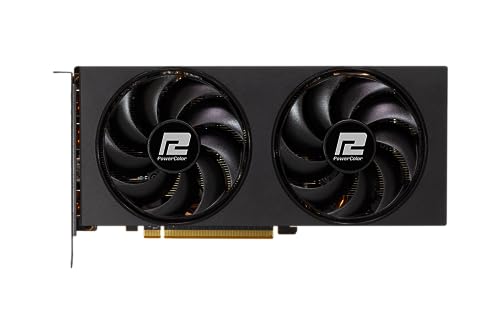
PowerColor Fighter Radeon RX 6750 XT 12 GB Video Card (AXRX 6750 XT 12GBD6-3DH)
Or

Gigabyte GAMING OC Radeon RX 7700 XT 12 GB Video Card (GV-R77XTGAMING OC-12GD)
Along with the board and ram above
Provided either of these two you can purchase for their lowest price there
Then return the one you got
What would change my mind on that is if you paid a fair bit in tax and it doesn't come back
Reason I say that is you sit between a BIG upgrade
And the same performance card for 10% less
Apart from that the parts you picked are decent
I'd go with mine or Bacca's board and ram suggestions
That should finish the pc off
 wary tundra
cyan ravine
Suggestion
https://pcpartpicker.com/product/pk7scf/powercolor-fighter-radeon-rx-...
wary tundra
cyan ravine
Suggestion
https://pcpartpicker.com/product/pk7scf/powercolor-fighter-radeon-rx-...
Would you think maybe it’s a matte grain finish is what causing it to look like that
cyan ravine
wary tundra
Would you think maybe it’s a matte grain finish is what causing it to look like ...
Please reply to the actual message when you respond like a day later lmao
Also no don't think so
wary tundra
Sorry!
 rain bloom
I was able to try this today, red light on the mobo with both sticks. Is SP a trustworthy company overall?
potent portal
Generally they're ok. Every brand has a bad batch once in a while.
For example, early DDR5 G.Skill had an issue where it would be unstable until you added a little more voltage with xmp/expo on
plucky timber
Generally better than vengeance
wary tundra
hooray!
 cyan ravine
rain bloom
I was able to try this today, red light on the mobo with both sticks. Is SP a tr...
cyan ravine
rain bloom
I was able to try this today, red light on the mobo with both sticks. Is SP a tr...
Red light is cpu not ram
Orange is ram
rain bloom
cyan ravine
Red light is cpu not ram
There’s four lights and the one in the top right corner is labeled DRAM and red
cyan ravine
Is this a gigabyte
Gigabyte is the exception to the rule with 4 red lights in a square
Also
2 dead sticks in a kit is extremely unlikely
Did you try 1 stick in multiple slots?
rain bloom
I tried the second slot since that’s what the board said to do. Gigabyte eagle hawk B650
cyan ravine
Try other slots
Dead slot or even dead cpu ram channel is also possible on the same slot
rain bloom
How bad is it if 1 slot is dead? Should I go like 4 1 3?
cyan ravine
Test them all yeah
rain carbon
when do the tariffs go into affect ong
cyan ravine
If the slot is dead then SP offered to send you ram without full testing which is crazy 
rain bloom
So I was out of town and had a buddy build since he was crashing at my place. The one slot testing is the only hands on I’ve done so far, I’ll do the other slots with each stick tomorrow
Note to self: Be present for all builds to prevent future problems
potent portal
The long awaited disappointment build is here https://www.youtube.com/watch?v=5KZ3d_624Ws

Get the LIMITED 2024 Disappointment Shirt in Cotton: https://store.gamersnexus.net/products/disappointment-pc-2024-oxidized-design-cotton
Or in a highly breathable Tri-Blend! https://store.gamersnexus.net/products/disappointment-pc-2024-oxidized-design-triblend - Buying these directly supports our 2025 testing & investigations while also getting...
 tawny violet
Have YOU paid your rental on the Disappointment Build yet?
 plush lily
hi
 plucky bone
hello
plush lily
did you have a similar issue where you downgraded and lost files?
the storage on my computer is still the same like its not like there is more storage
its just not here
plucky bone
im just looking where the email is but... if you didnt back up anything, to other drives, they may not be searchable, or u have deleted those items on the main drive....:: Account Settings Sign In, has to be that same email.... but there's a definately a significant chance that you cannot sign off on files from a previous version of windows for security reasons... im unsure of it...
plush lily
i didn't delete anything though i just used the upgrade to windows 11 button
didn't like it and then clicked go back to windows 10
plucky bone
darn... then you have to use windows customer support and probably explain most of this to them... they're probably just as responsive as i was... although a lot of people are probably getting new computers lol...

 flint sapphire
Why not both
wary tundra
prob both
 dusky hearth
wary tundra
Does this look like gpu artifacts or a bad cable
dusky hearth
wary tundra
Does this look like gpu artifacts or a bad cable
if it shows up in screenshots, then it's gpu artifacts
if it's a bad cable, then it's not going to show up on on a screenshot
SOMETIMES gpu artificing may not show up on screenshots, but if it does, then you'll know for sure
rain bloom
Alright so I’m a chump. Flashed the BIOS to the newest version and now the VGA light is on
potent portal
rain bloom
Alright so I’m a chump. Flashed the BIOS to the newest version and now the VGA l...
clear cmos
reseat gpu
try with no gpu (plug into motherboard)
wary tundra
dusky hearth
if it shows up in screenshots, then it's gpu artifacts
if it's a bad cable, then...
it went away and its been gone for 4 hours now so hopefully its just a one time thing. thank you!
 stray dome
Saved Part Lists
Parts on ordered and will be aricing soon. Was wondering if I will be able to fit the side fan mount bracket with the thermalright peerless assassin cpu cooler.. looks like it will be very tight.
Also what size usb drive should I use for bios flash? And windows
potent portal
stray dome
Parts on ordered and will be aricing soon. Was wondering if I will be able to fi...
If you're referring to the bracket on the mesh panel, the GPU is more likely to interfere with that than the CPU cooler.
8GB or 16GB is plenty for the USB. If it's 32GB or larger make sure it's formatted FAT32.
potent portal
There's probably room still, I'm just setting expectations
Worst case scenario you vertical mount it
 delicate marsh
Hey can someone help with my new build?
I used my boot drive from my previous pc, updated everything, new drivers and all
I can play games and it runs fine. Until I tab out of the game and then everything stops. I can have task manager running and the up time doesn't change, nothing changes, but I can click through the tabs
Nothing stops working they just freeze in place and I can't even shut down my pc when it happens. No programs can open, no functions such as windows key do anything but open the search bar with nothing in it just a plain box. Would love to know why. Thanks
potent portal
delicate marsh
I used my boot drive from my previous pc, updated everything, new drivers and al...
Reinstall windows. No really.
There's no fixing issues caused by swapping drives between computers like this
delicate marsh
Do I need a formatted drive for that?
potent portal
No, you can install into the existing partition and it'll move all the old windows files and user data into a windows.old folder
delicate marsh
Would it need to be on the same drive?
potent portal
No, and I recommend you only have the drive you want to install to in the computer. Windows loves to screw that up.
rain bloom
Alright, I’m into the bios and now my brand new SSD is not showing up as a memory option. I’m so close…
rain bloom
It appears to be inserted correctly?
 stoic island
looks fine
rain bloom
Any reason why a gigabyte eagle b650 AX wouldn’t recognize it?
dusky hearth
Dust
Faulty socket
Socket disabled
rain bloom
How can I check if the socket is disabled?
dusky hearth
Some mobos disable the m.2 slot if there's a SATA drive in the last few ports
rain bloom
That’s the only drive besides the USB I’m trying to install windows off of
dusky hearth
You could try reseating or a different m.2 slot if your MOBO has more than 1 slot
rain bloom
I think any other slots would be covered by the GPU, is that an issue?
dusky hearth
No
 hardy remnant
not sure if this goes under build chat or where else, but in case of a mobo & cpu switch, do I need to prep anything regarding the nvme's / uninstall drivers, wipe them, etc?
or can I just pluck them out and plug in like they are no biggie?
potent portal
If you're moving between CPU brands then you really want to reinstall Windows. Also if you're moving from AM4 to AM5, there's a bug in the chipset I'm not sure was ever addressed where you lose 15-20% of your CPU performance if you don't reinstall.
But if you're moving from, say, Intel 12400 on H610 to 13600K on B760, that would be perfectly fine in most cases.
 jagged ember
In general though, reinstall windows
potent portal
In a pinch, you can usually just pop a boot drive into another computer and it'll run, just not very well in those cases I mentioned so that's a temporary thing
hardy remnant
potent portal
But if you're moving from, say, Intel 12400 on H610 to 13600K on B760, that woul...
I'm moving from a an i5 13th gen to an am5 7950x3D
hardy remnant
jagged ember
In general though, reinstall windows
Augh alright! thanks
potent portal
Definitely reinstall yeah
hardy remnant
okay thank you!
 little osprey
What's the best performing laptop under $500? Not for gaming - but still decently powerful
mossy venture
little osprey
What's the best performing laptop under $500? Not for gaming - but still decentl...
What's it being used for, and do you care if its refurb?

 shut rampart
Yeah I can but no space
plucky timber
Have you tried?
 shut rampart
?
plucky timber
Sometimes with these mounting holes the fans slide around
So the second fan blocks the third one by slightly misaligning
shut rampart
Ok I got it in

Tho I can’t screw in the top fan
Is this going to be a problem
I will just zip tie it
Nvm zip ties doesn’t work
plucky timber
Are they screwed in on the bottom?
You'll get some vibration but
Shouldn't fall off
shut rampart
 plucky timber
Eh it'll be fine
little osprey
mossy venture
What's it being used for, and do you care if its refurb?
Business use and productivity. I don't mind if it's refurbished
mossy venture
what type of productivity?

eBay
Equipped with a blazing fast AMD Ryzen 5 PRO 7545U. 512GB SSD Storage. Multitasking is easy with 16GB of RAM.

eBay
AMD Ryzen 5 PRO 5675U, Quad-core (4 core), 1.50 GHz. This device is a high-performing partner for the work-from-anywhere workforce. Scratch and Dent. 16 GB DDR4. 14" 16:9, (1366 x 768), Touchscreen.
little osprey
mossy venture
https://www.ebay.com/itm/156537599807?
https://www.ebay.com/itm/156327861399?
Not bad, though I will say I run a keyboard a lot better if it has a num pad on the right side.
mossy venture
then you're prob looking at 16-17" options
little osprey
correct
mossy venture
id just look through that sellers laptops, you can filter by category
rain bloom
So upon further testing the SSD I received is non functional (another SSD was immediately detectable in the slot). Team group is pretty good normally right? Is it worth doing an exchange?
mossy venture
yes
 tranquil helm
hey so im having troubles with this pc build
ive been through another psu cause the first got shorted
now im onto a evga white 600
the combo is a ryzen 3 3100 and zotac 1650 oc inside of a old gateway desktop case and i just got the psu and its showing 0 volts on all rails
i plugged everything to the full built pc but i tried turning it on and nothing
please ping me or dm me is you got help for me 🙏
if*
cyan ravine
Did you try the paperclip test on the psu
0 volts on all rails sounds so dead it went to heaven twice
tranquil helm
cyan ravine
Did you try the paperclip test on the psu
i took multimeter to griund and 3v whats the paper clip test
is it to trick the psu cause i didnt know that 😭😭😭😭
cyan ravine
Unplug the psu from everything but the wall
Plug only the 24pin into it
And then
...
One sec
tranquil helm
into the mobo?
cyan ravine
No
 weary galleon
plucky timber
Ryzen 7000 too?
weary galleon
plucky timber
Ryzen 7000 too?
checks to make sure that this 7000 chip isn't zen 2 ok, good, real 7000 series
cyan ravine
It's plugged only into the wall
But you take the 24pin plugged into only the psu
Take a paperclip

Do this
Then turn it on
If the fan spins, it lives
If it doesn't, dead
Though no 12v or 5v is either the most incredible short in the world or the psu is so dead it's ash
tranquil helm
i just bought this
plugged in
tried powering the pc and nothing
idk if its the button or something
maybe the mobo from a earlier short
would that be an issue?
nothing seems visibly damaged
cyan ravine
Just being bought doesn't mean much at all
Seasonic has a jumper for this
You use it day one so you can immediately send it back to them if it's doa
Dead psus aren't common but it's very possible
tranquil helm
yeah ik but i think i shorted out my thermaltake white 500 and took multimeter and had like some life but overrall nothing
cyan ravine
Sorry this is a thermaltake white?
tranquil helm
no its was the first psu i bought
then it shorted i think
now i have an evga 600
tranquil helm
hold on
the package came with giftcards too

shipped straight from evga on newegg
tranquil helm
600w 80 plus standard power supply
cyan ravine
Yeah what's the cpu and gpu being used here
plucky timber
that's a uhh
tranquil helm
tranquil helm
the combo is a ryzen 3 3100 and zotac 1650 oc inside of a old gateway desktop ca...
tranquil helm
plucky timber
my condolences
i needed something cheap and to use for a while while i use an old ass pc case
cyan ravine
So question
tranquil helm
if it works it works
plucky timber
are you using anything with high power consumption?
cyan ravine
Was this thermaltake psu in the pc before
cyan ravine
cyan ravine
Was this thermaltake psu in the pc before
^
tranquil helm
cyan ravine
Was this thermaltake psu in the pc before
yes i used it before
im guessing maybe mobo brick?
cyan ravine
tranquil helm
yes i used it before
And what was the sound it made when it died
tranquil helm
cyan ravine
And what was the sound it made when it died
i have no idea
this was while ago
it just powered off i think
plucky timber
cyan ravine
No
ok probably not a problem then
cyan ravine
Alright
plucky timber
usually I'd call it a bomb but if he's using low power components it won't go off
cyan ravine
Well here's two interesting problems to tackle
tranquil helm
plucky timber
usually I'd call it a bomb but if he's using low power components it won't go of...
she
cyan ravine
#1, stop buying low quality psus
tranquil helm
cyan ravine
#1, stop buying low quality psus
cant, im low on budget
i cant get anything better
cyan ravine
The thermaltake white and the evga you bought are both actively dangerous psus
plucky timber
well the thing is
plucky timber
these psus have the potential to destroy a lot more than itself
cyan ravine
The 1st psu likely killed the pc if it died
There's no safeties in a thermaltake white to protect other parts
plucky timber
the power supply is the only thing you shouldn't cheap out on
cyan ravine
If it dies, it takes whatever's with it usually
plucky timber
well not the only thing
but if you had to cheap out on something
never do the psu
tranquil helm
i literally bought the cpu and gpu for 40 dollars from my one friend thats trusted, he knows it works so
cyan ravine
My bet is the TT white killed it
cyan ravine
tranquil helm
i literally bought the cpu and gpu for 40 dollars from my one friend thats trust...
I know a far better unit brand new for 50
I don't think he cut you a deal at all lad
Not trying to be rude
tranquil helm
no he did, it was just old parts
cyan ravine
Oh the cpu and gpu
tranquil helm
its not bad but not too good for nowadays, just something
cyan ravine
Mb I thought you meant the psu
tranquil helm
cyan ravine
Mb I thought you meant the psu
yeah no
cyan ravine
Well you could try the paperclip test
tranquil helm
lemme scroll up
cyan ravine
But I am very sure that if the thermaltake was in there beforehand with those things then it almost certainly would be the reason I would say
I would trust the evga to at least not initially blow up
Not the TT white tho
Those are infamous for catastrophic deaths
plucky timber
I'd say the evga is fine as long as it's not under too much load
tranquil helm
plucky timber
I'd say the evga is fine as long as it's not under too much load
oh yeah no this build would only be under like less than 400 watts
cyan ravine
plucky timber
I'd say the evga is fine as long as it's not under too much load
That is definitely not one of the ones I'd say this for
plucky timber
is it that bad?
cyan ravine
Low end evga is rubbish
plucky timber
so it's a timed bomb rather than instant explosion
cyan ravine
I'd trust it for 200W max, and accepting the loss of the pc if it goes
The TT white I wouldn't even power on lmao
I've seen so many "gone wrong" videos on that one
LOL
tranquil helm
cyan ravine
The TT white I wouldn't even power on lmao
the tt white did power on i just think i screwed something up
i first thiught i did something wrong but i wasnt used to the way this mobo seated ram and it wasnt fully in, then the psu died before i could reseat it and try
plucky timber
doubt it
cyan ravine
@plucky timber I just did a sanity check on the psu
tranquil helm
plucky timber
doubt it
no i literally didnt seat it all the way in
plucky timber
if the ram isn't seated properly it'd just not post
tranquil helm
plucky timber
if the ram isn't seated properly it'd just not post
yeah it turned on
plucky timber
it usually doesn't detonate the power supply
tranquil helm
meaning it worked
cyan ravine
 tranquil helm
plucky timber
it usually doesn't detonate the power supply
tranquil helm
plucky timber
it usually doesn't detonate the power supply
yeah but i probably screwed something up during it
plucky timber
unlikely
cyan ravine
We are looking at a TT white and EVGA W1
plucky timber
those power supplies really are that bad
plucky timber
they should not be on store shelves
tranquil helm
i have a evga gold 500 bought from fb marketplace lol, but i have no idea if it works cause said mobo and didnt know about test
cyan ravine
Cos it's an old unit
plucky timber
cyan ravine
I don't normally use the cultist list but here you go
It's good to vet out bombs
cyan ravine
tranquil helm
i have a evga gold 500 bought from fb marketplace lol, but i have no idea if it ...
What's the full name
tranquil helm
cyan ravine
What's the full name
ill get it later
cyan ravine
plucky timber
It's good to vet out bombs
I don't trust new cultist stuff
cyan ravine
tranquil helm
ill get it later
Full name matters completely cos a single letter in evga's alphabet and you go from firebomb to highest tier
plucky timber
surely at this point there's CX white labels for sale
cyan ravine
plucky timber
It's good to vet out bombs
Also twist of irony boeing half the reason I still avoid the cultists is they recommended me a psu that killed all those 12900K's if you remember
But their old data still tracks well unlike the new stuff
tranquil helm
sanity check me please
 cyan ravine
Yep
tranquil helm
 cyan ravine
Everything else unplugged
tranquil helm
cyan ravine
Everything else unplugged
yes
cyan ravine
Go for it
cyan ravine
tranquil helm
Decent unit. Miles better than the other two. This will work on that pc
tranquil helm
cyan ravine
Go for it
nothing.
cyan ravine
If it fails the paperclip test it's genuinely faulty
If you see no spinning fan that's it
It's dead
Very dead
plucky timber
cyan ravine
Decent unit. Miles better than the other two. This will work on that pc
those are C tier right?
cyan ravine
plucky timber
those are C tier right?
Yes. It's passable for low range systems
plucky timber
I'd at least trust it with sub-$500 components
tranquil helm
cyan ravine
Yes. It's passable for low range systems
i bought the psu on fb market place for 50 bucks about
the evga gold
cyan ravine
tranquil helm
ill sanity test the tt psu
I would throw that in the incinerator tbh
Even if it works
cyan ravine
tranquil helm
i bought the psu on fb market place for 50 bucks about
That is a very meh price but a decent unit
I would use that
And just fyi, not cos it's "gold"
Gold is an efficiency measurement
Not a safety measurement
Gold psus can be bombs too
tranquil helm
ik
cyan ravine
I'm vetting each unit here individually
Good rule of thumb for you tho if you need a new psu, anything not minimum bronze is going to be dodgy
And I would suggest the apevia prestige 600W for $52 if you need another one
Or MSI A650/A550 BN for similar price as well
plucky timber
even bronze ones can be dodgy but even then
cyan ravine
plucky timber
even bronze ones can be dodgy but even then
Any can be dodgy, but white is basically always dodgy
plucky timber
they at least have decent enough quality control to not explode on the first power on
cyan ravine
Gamemax platinum units are dodgy
tranquil helm
THE EVGA GOOD WORKSP
plucky timber
gamemax anything is dodgy
cyan ravine
tranquil helm
THE EVGA GOOD WORKSP
Fan spins?
tranquil helm
cyan ravine
Fan spins?
yesp
plucky timber
that's why I don't buy based on brand
cyan ravine
Ok so then you can return it lol
plucky timber
except for ones with decent track records
msi seems to be solid
evga mid-high tiers are decent
although they're older units so I'd not touch them really
cyan ravine
The 500W gold one will be better in that pc
Make sure to use the cables the psu comes with
cyan ravine
plucky timber
except for ones with decent track records
This is literally how you get honey trapped
See: P-GM
plucky timber
gigabyte is not a reliable brand
tranquil helm
i bought the psu on newegg can i return
plucky timber
💀
cyan ravine
tranquil helm
i bought the psu on newegg can i return
You should be able to contact cs
tranquil helm
im guessing they gave me all that free gift cards cause they knew its a doa 💔
cyan ravine
Just explain to them you can't get the system to turn on with it but you have the paperclip test showing it works
They should accept the return if it's advertised
tranquil helm
cyan ravine
Make sure to use the cables the psu comes with
the fb marketplace didnt have the power cord but i have space
spare
plucky timber
power cord?
cyan ravine
tranquil helm
the fb marketplace didnt have the power cord but i have space
What cord
The kettle cord
Or what
plucky timber
JUST the ac cord right?
plucky timber
kettle cord
cyan ravine
Even between evga
plucky timber
 tranquil helm
cyan ravine
Just explain to them you can't get the system to turn on with it but you have th...
tranquil helm
cyan ravine
Just explain to them you can't get the system to turn on with it but you have th...
the uhhh new one i bought i meant
cyan ravine
plucky timber
kettle cord
That's what we call it here lmao
plucky timber
yeah I made a mistake of getting a third party cable once
tranquil helm
ill be using the gold not white
plucky timber
that was before i realised that different pinouts were a thing
cyan ravine
tranquil helm
ill be using the gold not white
Ye I want you to use the gold
Return the other evga
If I'm mixed up about which evga passed the paperclip test
Then if the other one didn't spin return on the basis of dead on arrival
But the gold I would expect to spin so
And the tt white goes in the trash, literally
tranquil helm
cyan ravine
And the tt white goes in the trash, literally
will do! 🫡
cyan ravine
I wouldn't even trust it with a 65W system because it has no protection from the other side either
Power surge = poof
plucky timber
is that a trend with these older psus
or are they just that bad
I know psus like the s12iii are...
very questionable nowadays
cyan ravine
plucky timber
is that a trend with these older psus
Motherboards used to ship with a single vrm, it's not just psus
plucky timber
even though they were decent back when they released
tranquil helm
idk i buy from the known brands with over 400 reviews and straight from shop
cyan ravine
I think the 1 stage ones are gone now
plucky timber
ehhhhh
shop reviews aren't reliable
I'd look at psu reviews where people actually throughly test it

Tom's Hardware
Brings modern connectivity with ATX 3.1 compliance and efficient performance.
cyan ravine
tranquil helm
idk i buy from the known brands with over 400 reviews and straight from shop
I think this is a good practice, however I do not expect any one of those 400 reviews to know what a psu does
tranquil helm
cyan ravine
I think this is a good practice, however I do not expect any one of those 400 re...
alright
i just dont really buy brands i dont know
cyan ravine
tranquil helm
i just dont really buy brands i dont know
That's fine, that's why we have sources that vet and test independently
The enthusiast space is huge, people pay to break things lol
tranquil helm
cyan ravine
The enthusiast space is huge, people pay to break things lol
yeah understandable
cyan ravine
So yeah, I can still say the psu tier list is kinda still usable if you want to use that on the cultists site
Sort of a
One and done scenario
tranquil helm
should i try the evga one in with the mobo? even though its prob dead
tranquil helm
plucky timber
the white one?
no
cyan ravine
He's excellent
plucky timber
wait
tranquil helm
evga gold
tranquil helm
no
cyan ravine
cyan ravine
Use aris reviews
He makes the psu safety standards
plucky timber
????????????///
cyan ravine
Cynernetics
 plucky timber
you have two evga whites?
tranquil helm
passed paper clip
tranquil helm
plucky timber
you have two evga whites?
no
cyan ravine
He has two
tranquil helm
cyan ravine
He has two
im a girl 😅
cyan ravine
tranquil helm
should i try the evga one in with the mobo? even though its prob dead
Yeah go for it
Oh mb
tranquil helm
its good
tranquil helm
cyan ravine
Sorry that's like 1 in a thousand in this space
really?
cyan ravine
Lolol
tranquil helm
damn
cyan ravine
tranquil helm
really?
I know a couple but yeah definitely rare
tranquil helm
plucky timber
for very good reason
trust me ik 😭🙏
i use it for school friends and playing games, gets lonely though
cyan ravine
tranquil helm
trust me ik 😭🙏
It actually shocks me how degenerate guys are on any social platform
tranquil helm
cyan ravine
It actually shocks me how degenerate guys are on any social platform
SO REAL THOUGH OMG
cyan ravine
Not to go on a tangent but yeah
plucky timber
yeah
tranquil helm
it gets ludicrous
plucky timber
If you want to increase the chance of having a normal conversation with a male you'd have to just not use social media entirely
plucky timber
guys can be very vile behind a screen
cyan ravine
Most of us are tame here but honestly even here, not everyone
Yes that's not a white lie
tranquil helm
cyan ravine
Most of us are tame here but honestly even here, not everyone
yeah i get that lol
cyan ravine
Anyway yeah try the evga gold
tranquil helm
not every “safe space” is said safe
cyan ravine
If it boots you're in luck
tranquil helm
cyan ravine
Anyway yeah try the evga gold
yeah i will in a bit
cyan ravine
If not rip pc
tranquil helm
cyan ravine
If it boots you're in luck
i tried it once but probs had issues with power button cause i didnt know
cyan ravine
We'll see
tranquil helm
cyan ravine
If not rip pc
if the mobo is cooked is the cpu and gpu as well
cyan ravine
tranquil helm
if the mobo is cooked is the cpu and gpu as well
Since the two psus in question are literally firebombs it's possible
tranquil helm
NOOOOOO
cyan ravine
The evga should live tho
tranquil helm
it was just the tt white
but im saying the components inside the mobo
cpu and gpu
tranquil helm
yeah but it was prob dead before
tranquil helm
yikes
cyan ravine
Only one way to find out
tranquil helm
sighhh
 unreal obsidian
what about evga gt psu's?
tranquil helm
welp, just procrastinate till later
cyan ravine
GT's are good
Going by the old reviews GT's would be quote "A tier" if not for transient handling being poor
unreal obsidian
good good, ordered one yesterday
unreal obsidian
interesting
unreal obsidian
their name is evga
tranquil helm
cyan ravine
GD is mid
okay but is it good enough
cyan ravine
tranquil helm
okay but is it good enough
Yes for what you need it's good enough
tranquil helm
cause i turned the system off and the fan was still spinning like it had protection
unreal obsidian
how do yall feel about corsair hydro x cpu block
or just corsair open loop in general
cyan ravine
unreal obsidian
how do yall feel about corsair hydro x cpu block
XC7 is good, XC5 is meh
But as long as you don't spend a fortune on icue
Corsair loop kits are fine
cyan ravine
tranquil helm
cause i turned the system off and the fan was still spinning like it had protect...
It's fine
It'd have to be really bad to hurt the psu
unreal obsidian
cyan ravine
But as long as you don't spend a fortune on icue
thats pretty much what ive been gathering. was tempted to go icue cuz they look sick but those fans cost a kidney and a half
cyan ravine
unreal obsidian
thats pretty much what ive been gathering. was tempted to go icue cuz they look ...
Corsair is probably the most "Medium is premium" experience I've ever had with a shopping purchase
You buy into what looks like this super cool ecosystem
Then you find the bugs...
And the incompatibility between the brand itself...
The prices hurt despite this...
And now the ram doesn't work

The fans are almost universally poor performance
The whole thing, they used to be much better on the whole
 lmao yeah to charge so much for mid performance is wild
cyan ravine
lmao yeah to charge so much for mid performance is wild
cyan ravine
If you want nice rgb seriously amazon diy brands are quite good now
And it's universal
Unlike icue
unreal obsidian
idk with ek blowing up i was just researching what other custom loop options there are and corsair was up there
cyan ravine
Very competitive to that stuff
cyan ravine
unreal obsidian
idk with ek blowing up i was just researching what other custom loop options the...
Corsair at a decent price makes sense but what are you watercooling
cyan ravine
Gpu?
unreal obsidian
currently a 1080 ti cuz thats what ive got layin around and ive already put a water block on it a while back
funny match up fr but for now it will work. hoping with 50 series release the 40 series will drop in prices a bit. hope
tranquil helm
unreal obsidian
funny match up fr but for now it will work. hoping with 50 series release the 40...
def will
my friends been rocking a 3090 pre built i think
unreal obsidian
i love that card
cyan ravine
unreal obsidian
funny match up fr but for now it will work. hoping with 50 series release the 40...
With the tariffs coming it's more likely they go up actually
tranquil helm
its ibuypower and hasnt had issues surprising
tranquil helm
cyan ravine
With the tariffs coming it's more likely they go up actually
wait yeah forgot
unreal obsidian
crap
tranquil helm
cyan ravine
40 series is discontinued largely
how expensive is the ti lineups? i heard they were decent
cyan ravine
unreal obsidian
crap
XTX is quite nice if you're shopping big, so's the 7900XT
cyan ravine
tranquil helm
how expensive is the ti lineups? i heard they were decent
I don't think any Ti last gen was worth buying
Only 4070Ti like a year ago was mildly acceptable
tranquil helm
i think its funny how intel is coming with cards
intel prob knew how bad amd and nvidia were doing with their cards and made more affordable cards themselves
cyan ravine
The B580 is... interesting
I'm still learning with it
It's largely good but with some sad setbacks
unreal obsidian
intel needed a win
dont they like not work with older gen cpus? or was that just a myth
cyan ravine
unreal obsidian
idk with ek blowing up i was just researching what other custom loop options the...
Also btw, optimus, heatkiller, alphacool, cheap side corsair, bitspower, barrow, phanteks,
Thermaltake
Think that's all of them
My personal like is for alphacool
But uh
If you're going to get a new gpu don't bother with a loop
Just go get a $60 fx360 pro or thermalright any 360mm
They will do about as good as a decent loop honestly
tranquil helm
wait wait wait i forgot to mention
was it normal that newegg sent me two gift cards???
a doordash thingy and a hello freah
fresh
 tranquil helm
ah
i thought it was for what i got and they knew 💔
should i just plug in cpu and 24 pin to see if cpu spins
cyan ravine
Ye that's fine
tranquil helm
the mobo. is infact. cooked.
cyan ravine

tranquil helm
all power buttons universal right
 weary galleon
tranquil helm
was it normal that newegg sent me two gift cards???
weary galleon
tranquil helm
was it normal that newegg sent me two gift cards???
They're not really giftcards. More like first-time customer discounts to get you to try the service
cyan ravine
Ye you short power switch
tranquil helm
yeah the mobos cooked
tranquil helm
cyan ravine
Well one of the two psus done did it
prob first
cyan ravine
Rip
Anyway lesson learned
It could be worse
I had a $300 psu kill 3 new 12900K's years ago
So you did well for your first psu death
Lol
cyan ravine
I get that, it's a meager pc though in reality
tranquil helm
cyan ravine
I get that, it's a meager pc though in reality
its better than EVERYTHING i have
tranquil helm
literally a dell optiplex with two hdds in place of the disc is my main pc cause my friend let me borrow his bravo 15 gaming laptop for like a year
cyan ravine
I'm not saying it's worth nothing, but it could've been much worse with anything else
tranquil helm
and i still cant really do stuff on the optiolex
plus no dvi or dp cables or capabilities so no quadro
cyan ravine
An old optiplex you could likely find free and try the 1650 in it
If it lives it won't be much different tbh
3200g is meh
tranquil helm
cyan ravine
An old optiplex you could likely find free and try the 1650 in it
its the small 7010
cyan ravine
Like an optiplex with an 8400 or newer would likely do better than a 3200g
tranquil helm
 cyan ravine
And optiplexes are thrown away all the time
tranquil helm
i got for 50 dollars cause i was gonna do small server hosting
tranquil helm
cyan ravine
And optiplexes are thrown away all the time
yeah ik
hence why i bought it
cyan ravine
Anyway
There's not much else I can really say but yeah, a free optiplex would probably salvage the situation
tranquil helm
i wanna keeo tbe b450m m.2 pro cause it seems perfect
cyan ravine
tranquil helm
i wanna keeo tbe b450m m.2 pro cause it seems perfect
In the cooked pc?
tranquil helm
cyan ravine
There's not much else I can really say but yeah, a free optiplex would probably ...
scour fb market lol
tranquil helm
cyan ravine
In the cooked pc?
yeah thats the mobo
not the actual mobo
but the type is perfect
cyan ravine
Oh I get you
Fair enough
Well good luck anyway, you'll definitely find something
Aim for something with 4 cores or more you'll honestly not have known the difference
tranquil helm
cyan ravine
Aim for something with 4 cores or more you'll honestly not have known the differ...
yeah lmao
@cyan ravine is this valid for return
 tranquil helm
yeah its allowed
i got it today
does it refund to card or store cred
cause ig it can go towards the mobo
but im keeping the comps on the mobo till i get a new one cause idk where boxes wre
are
cyan ravine
I would ask newegg about that
I just goof around in here for fun

Their website cs will be the way to reach them rn
unreal obsidian
alright how do yall feel about msi motherboards?
unreal obsidian
project zero
cyan ravine
Quite positive tbh
About all of them
But you pay for that feature
In terms of the motherboards themselves they're middling
And the cases needed are very specific
unreal obsidian
corsair 6500x non rgb
cyan ravine
Awful case ngl lol
unreal obsidian
how so?
cyan ravine
Corsair got the worst case award this year for that one
unreal obsidian
huh
cyan ravine
unreal obsidian
how so?
There are so many quality issues with that case that previous corsair cases don't demonstrate at all
unreal obsidian
good shout. was it just cheap parts or sum? havent done my research just compatability
cyan ravine

Sponsor: Thermal Grizzly Aeronaut on Amazon https://geni.us/e8Oq & Hydronaut (Amazon) https://geni.us/hOQrBAb
As we continue our search for the best PC cases in 2024, we turn now to the Corsair 6500 Series ATX gaming cases. This review of the Corsair 6500X and 6500D Airflow PC cases evaluates the build quality and tests for thermals and noise le...
cyan ravine
unreal obsidian
good shout. was it just cheap parts or sum? havent done my research just compata...
Cheaper parts, assembly and engineering
unreal obsidian
word. ill keep lookin.
cyan ravine
If you want nice fish tank cases go look at antec, montech, phanteks, or lian li
Antec and montech have great value fishtanks on the lower end
Sama also gets a shout
plucky timber
is that what we're calling O11D clones now
cyan ravine
But make sure they are "BTF compatible"
This makes the project zero fit
Back to front compatible
shut rampart
I plugin the asianhorse comsiq and it wont turn on 
shut rampart
Nvm I fix it it wasn’t plugin all the way
 gentle pollen
Before I attach the AIO coldplate to the CPU's IHS, is applying the TG PTM pad like this alright?

 lone flame
“High End” me when I lie

 formal girder
lone flame
“High End” me when I lie
formal girder
lone flame
“High End” me when I lie
Warzone 172fps at 1080p medium settings
 analog hearth
lone flame
“High End” me when I lie
analog hearth
lone flame
“High End” me when I lie
"It's high end" (it can play most games at 60 fps)
Lmao like yeah sure thing
analog hearth
formal girder
Warzone 172fps at 1080p medium settings
My gf's PC (12100F, RX 5700, 16GB of DDR4) can do that 💀
formal girder
I was lucky to even see anything above 120fps on 1440p high
hardy remnant
where does one go for troubleshooting? in here as well? 
stoic island
Sure
hardy remnant
I switched from an i5 13th gen to a ryzen 7950x3D and b650 pg mb, installed everything, did not wipe my 2 nvme's before switching.
PC is running but I have a blackscreen
I've tried checking if my connectors are all seated, had no issues with the ram or any other part before this point
could it be the nvme's interfering? since they would still have the old drivers on them?
and is there a way to wipe them from here?
I did have issues actually seating my gpu (no matter how hard I tried it would not click in), but with the screws in it sits flush and i do not have a connection with the gpu or the mb hdmi slot
stoic island
hardy remnant
I switched from an i5 13th gen to a ryzen 7950x3D and b650 pg mb, installed ever...
So no display at all?
hardy remnant
nope
potent portal
How long did you wait? Ryzen can take up to 10 minutes or so to boot the first time
And you might need to update the bios to support x3d
hardy remnant
the monitor lights up after clicking the cable into the pc but then just sais no signal and goes black
stoic island
I think they fixed memory training taking so long but yea might need to update bios
hardy remnant
i waited about 10min, maybe a bit shorter, it's on currently I'll let it run for a bit
can I even update the bios from here?
potent portal
stoic island
I think they fixed memory training taking so long but yea might need to update b...
In newer bios versions yes, but we don't know what version it's on
hardy remnant
is that in the manual? i can check
potent portal
That's the asrock pg lightning right?
hardy remnant
mhm
potent portal
Good news is you have flashback so it's simple enough to update
stoic island
Instructions for flashback will be in the manual, you'll want to grab any extra USB sticks you have that are fat32
potent portal
potent portal
The port to use has a red outline

Flashback button is below the audio jacks too as you can see
hardy remnant
ok!
is it fine to have everything else plugged in or should i unplug all the other power connectors apart from the 24pin?
potent portal
As long as the power is plugged in nothing else matters
It won't be turning on fully anyway
hardy remnant
ok, I'll try it, got the stick ready
hardy remnant
it booted!!
into my old windows even
I should still probably fresh install windows...
potent portal
Yeah definitely reinstall
If it's not outright crashing (yet) it's definitely not going to perform how it should until you do
hardy remnant
alrighty! thanks again for the help!! really appreciate it
is there a preferred way to wipe it or does just going into windows updates and wiping everything work too?
actually- that wouldn't reinstall windows would it? I don't remember hjghg
potent portal
You mean the PC reset option? That sometimes works but it's better to boot into the windows intall usb and tell it to install over your current installation. The ideal way is to totally wipe the drive.
hardy remnant
alrighty!
hardy remnant
huh, my ram is registered incorrectly in the bios D: as DDR5 4800, should be DDR5 5600
tawny violet
Did you enable XMP/EXPO?
mossy venture
^
hardy remnant
xmp puts it at 6000
mossy venture
Then do that
Any ddr5 cpu can handle 6000mhz
As far as I know anyways, especially 13th/14th gen or am5
hardy remnant
huh i didn't even know that was possible D: I thought it was locked to a max of 5600
mossy venture
Nope, motherboards support a maximum of 5600mhz without XMP
With xmp most mobos will have options 8000-10k ish, not that that will actually run
6000-6400mhz is ideal for most cpus
potent portal
Memory speed hasn't been locked since Intel B460, and AMD never locked it
hardy remnant
omki ty
hardy remnant
never ending issues today after clean installing windows from usb it restarts into a blackscreen
potent portal
Should just need to install the drivers, it'll be running off the motherboard
Install both AMD and Nvidia GPU drivers if you have an Nvidia card
hardy remnant
from the bios?
potent portal
If you plug your hdmi cable into the motherboard it should give you a display in windows
Then you can install the drivers
stoic island
hardy remnant
never ending issues today <:jubdespair:1008413685091414056> after clean install...
Did the windows install complete successfully? If it just crashed in the middle of it, it can be borked and you may need to install it again, potentially need a new media installation tool too
hardy remnant
im not sure
it just said it would install, gets to the first restart and goes black
potent portal
I mentioned hdmi for a reason, if you're using dp there's a bug in the spec that can prevent it from correctly switching outputs without a reboot
stoic island
I'd disable xmp in bios if you have it enabled rn, I had enabled xmp before installing windows once, xmp was unstable and the windows install crashed and was borked, and I had to create a new installation media before it would let me install again
hardy remnant
mmm alright, I'll try that
hardy remnant
yeah, I'm trying a new installation media now, if need be gonna run it overnight and see how it looks
I've formatted my drives too before starting this install, hope it helps  been using hdmi on the mb slot
oh it just straight up failed this time
god it finally booted, no idea why or how but at this point I don't even want to know
I will stop spamming the chat now, hopefully 
 frigid jackal

friend can't open bios when pressing f1
or when restarting pc and spamming del or f1
also can anyone help find the right bios update for thihs to ensure the cpus longetivity?
potent portal
frigid jackal
https://cdn.discordapp.com/attachments/881393983434133504/1325209907171037204/IM...
That says the CPU is overheating, check the cooler
If it's an AIO then the fans and the pump need to be plugged in
frigid jackal
should they just look for loosew ires and stuff?
or check to see if theyre fully plugged in
potent portal
That's a start. It says nothing is plugged into the CPU fan header.

 plucky timber
Are the MSI MAG A-BN psus good for 24/7 nas workloads?
potent portal
Should be fine
plucky timber
What about the TUF Bronze?
potent portal
Probably B tier unit, should be fine also
plucky timber
Alright
hardy remnant
Another day, more problems :)
My GPU is not being recognized by BIOS and Windows, I can't install nvidia drivers because the system doesn't find a card
I've tried reseating it, and it did work shortly yesterday, but today when I tried to plug it into a monitor it gave me a bluescreen and a lot of visual artifacts
is there anything I can try on the software end? bios reset, trying to update all other drivers I can, rollback of a windows version? or is the gpu just fried? or the mobo?
cyan ravine
Every board is different and I'm currently in the middle of cooking sorry
hardy remnant
I have one more but not 16x
cyan ravine
You'll need to watch a vid
hardy remnant
ok! thank you
potent portal
An x4 or even x1 slot is good enough for testing with
And felix is referring to the version number. Most newer boards are PCIe 5.0 but sometimes having that version mismatched with the GPU, new ones are 4.0, can occasionally mess it up.
cyan ravine
Also that the lanes/contact can be damaged/degraded
So lower spec runs without deficit
potent portal
Especially with gen 5, it's really touchy
hardy remnant
alright! I'm reslotting it
to be sure that's what the gpu looks like atm


the slot has a few bump marks from being grazed by the card when I slotted it, but i saw no pin damage
potent portal
Yep pins look fine
The ones that look like some of it is missing, those are so it can sense if it's not all the way in
hardy remnant

I have had issues slotting the card, it was initially because I was missing a standoff screw but it never really clicked in today either, even if it sat better
that was the maximum it went in today

i really hope i didn't kill the card by accidentally using it half slotted
potent portal
Nah the only way to do that is to short circuit it, and that would require it being at like a 30 degree angle to touch two pins together
cyan ravine
hardy remnant
to be sure that's what the gpu looks like atm
@potent portal left pic down the bottom
Do those traces look like they're damaged? Idk
Am I seeing that right they look...burned?
potent portal
Uhh, hang on discord compression is ass I'll look in the browser
hardy remnant

 potent portal
Yeah that doesn't look like just a little scrape
cyan ravine
hardy remnant
2nd pic
hardy remnant
cyan ravine
See just after the notch
It looks like, dusty
Can you check and see if that looks normal to you
Cos the camera might be bs'ing
It should look like a normal clean black or almost clean black if it's not damaged
hardy remnant
clean black?
cyan ravine
More or less yeah
It should look like the rest of the slot basically
See where it's black just next to the pins
Hold on
cyan ravine
hardy remnant
 hardy remnant
ah, I'll check
cyan ravine
That looks like a full black to you? Or can you see like, scratching, scorching
hardy remnant
it was dust
hardy remnant
i got it off with compressed air
potent portal
It should be hard to physically damage that part of the PCB unless you hit it with a screwdriver or something
hardy remnant
 cyan ravine
Yep that's better
hardy remnant
i pushed it in pretty hard yesterday and i think i heard a crack, i dont know if it was the mobo or just something else
cyan ravine
That finger looks black in the pic but the previous pic it was fine so reflections
hardy remnant

hardy remnant
cyan ravine
That finger looks black in the pic but the previous pic it was fine so reflectio...
🫡
I'll put it into the pcie3
cyan ravine
hardy remnant
i pushed it in pretty hard yesterday and i think i heard a crack, i dont know if...
Crack is non descript so
Could just be creaking
hardy remnant
yeah
my windows installation was also very very weird
so maybe that could be causing some issues too
plucky timber
filter check
hardy remnant
oop
potent portal
Sometimes it can take a second
cyan ravine
hardy remnant
my windows installation was also very very weird
Bad ram could do anything
Or rather, bad, anything related to ram
Could do anything
hardy remnant
i only changed the mobo and cpu from intel to amd
plucky timber
first time overclockers be like
hardy remnant
the ram and every other part has worked flawlessly
plucky timber
"why is my windows corrupted I only went from 4800MHz CL48 to 6000MHz CL30 on corsair vengeance"
hardy remnant
ok this time the card slotted in without any issues with a click D: gonna see if it runs
plucky timber
Is seagate ironwolf ok?
or are they just as bad as the rest of seagate
asking because I already have one
cyan ravine
Seagate in general is meh
plucky timber
do they have crappy lifespans like the barracudas tho
thinking of running raid 1 across a WD Red and an Ironwolf
potent portal
plucky timber
"why is my windows corrupted I only went from 4800MHz CL48 to 6000MHz CL30 on co...
DDR4 moment
"I upgraded from 16GB 3600c16 to 32GB 3600c18 and now I get blue screens"
"Why yes it is corsair memory, how did you know?"
potent portal
Bigger number better right?
plucky timber
reminds me of that one guy that came in a couple weeks ago
he kept posting ram with higher CLs than our recs and were like "is this good"
I had to pretty much go like "LOWER NUMBER = BETTER"
there should be a general bulletin on all pc building guide that just says "DO NOT BUY CORSAIR VENGEANCE"
hardy remnant
okay device manager tells me "Video Controller (VGA compatible)" with an exclamation mark....and I have visual artifacts all the time
plucky timber
it's amazing how they could get away with it for that long without everyone slamming them
hardy remnant
it just crashed again
hardy remnant
and its not being recognized again
plucky timber
is this RMA'able?
plucky timber
is it still under warranty?
hardy remnant
i need to check it should be
plucky timber
as long as it's not user error you might be able to RMA it
hardy remnant
I don't know if it is...
 fossil cedar
Have you tried reinstalling the drivers before jumping to the conclusion it's broken?
plucky timber
is it asus by any chance?
fossil cedar
?ddu
 jolly riverBOT
DDU (Display Driver Uninstaller) Guide by Pato
https://github.com/NeweggTechie/Graphics-cards/wiki/How-to-use-DDU
GitHub
Contribute to NeweggTechie/Graphics-cards development by creating an account on GitHub.